Guide to Model Context Protocol (MCP): Unlocking AI's Potential!
Originally published on Medium.
By the end of this article in less than 1 hour, you will have created three versions of a ChatBot and a custom MCP Server. The final version of the ChatBot will use the tool you created and then two standard MCP servers. You will gain mastery of writing servers, exposing tools, exposing resources and exposing prompts. Working with MCP tooling is like working in the future.
Unlocking the full potential of AI just got easier! Discover how the Model Context Protocol (MCP) can transform your AI applications into seamless, context-aware assistants that communicate effortlessly with your favorite tools and data sources. Ready to revolutionize your approach to AI? Dive into this beginner’s guide and start building smarter applications today!
Model Context Protocol (MCP) enables AI applications to communicate seamlessly with external data sources, simplifying integration. This guide covers setting up an MCP server, creating tools for searching academic papers, and building a chatbot that utilizes these features, enhancing AI’s capabilities in accessing and processing information.
Unlocking AI’s Potential: A Beginner’s Guide to Model Context Protocol (MCP)
The source code for this example was derived from DeepLearning MCP Anthropic course. I highly recommend taking the course.
What if your AI assistant could talk directly to your favorite apps?
Imagine asking your AI assistant to search for academic papers, fetch website content, and save the results to a file -- all in a single conversation. No complex coding. No switching between different applications. Just a seamless interaction that feels like magic.
This isn’t science fiction. It’s the reality that Model Context Protocol (MCP) is making possible today.
In this beginner-friendly tutorial, I’ll guide you through creating your first MCP server and connecting it to a chatbot. By the end, you’ll understand how to build AI applications that can communicate with external data sources and tools in a standardized way.
What is Model Context Protocol (MCP)?
Before diving into the code, let’s understand what MCP is and why it matters.
MCP is an open-source protocol that standardizes how AI models communicate with external tools and data sources. Just as REST standardized how web applications communicate with backends, MCP standardizes how AI applications interact with external systems.
The core idea is simple but powerful: models are only as good as the context they’re provided. Even the most advanced AI can’t help you if it can’t access the information it needs.
MCP solves this by creating a universal language for AI applications to connect with data sources, eliminating the need to rebuild the same integrations repeatedly for different models or data sources.
Key MCP Concepts
MCP is built around a few fundamental concepts:
- Clients and Servers: MCP follows a client-server architecture. Clients (which live inside AI applications) connect to servers (which expose data or functionality).
- Tools: Functions that can be invoked by the client, like searching for papers or extracting information.
- Resources: Read-only data exposed by the server, such as database records or file contents.
- Prompts: Predefined templates stored on the server that clients can access, removing the burden of prompt engineering from users.
Now that we understand the basics, let’s build something!
Setting Up Your Environment
For this tutorial, we’ll need a few tools and libraries:
- Python 3.11 or later
- uv (a faster alternative to pip for managing dependencies)
- The MCP Python SDK
- The Anthropic Claude API (for our chatbot)
Let’s start by creating a project directory and setting up our environment:
# Create a project directory
mkdir mcp_project
cd mcp_project

# Lock down which version of Python you are using
pyenv install 3.12.9
pyenv local 3.12.9
# Create and activate a virtual environment using uv
uv venv
source .venv/bin/activate  # On Windows: .venv\\Scripts\\activate
echo '[project]
name = "mcp-tutorial"
version = "0.1.0"
description = "MCP tutorial project"
requires-python = ">=3.12"' > pyproject.toml
# Install dependencies
uv add mcp anthropic arxiv python-dotenv nest_asyncio
Part 1: Building Your First MCP Server
Our first step is to create a simple MCP server that provides tools for searching academic papers on arXiv and extracting information about them.
Let’s create a file called research_server.py:
import arxiv
import json
import os
from typing import List
from mcp.server.fastmcp import FastMCP

PAPER_DIR = "papers"
# Initialize FastMCP server
mcp = FastMCP("research")

@mcp.tool()
def search_papers(topic: str,
                 max_results: int = 5) -> List[str]:
    """
    Search for papers on arXiv based on a topic and store
    their information.
    Args:
        topic: The topic to search for
        max_results: Maximum number of results to retrieve
                    (default: 5)
    Returns:
        List of paper IDs found in the search
    """
    # Use arxiv to find the papers
    client = arxiv.Client()
    # Search for the most relevant articles matching topic
    search = arxiv.Search(
        query = topic,
        max_results = max_results,
        sort_by = arxiv.SortCriterion.Relevance
    )
    papers = client.results(search)
    # Create directory for this topic
    path = os.path.join(PAPER_DIR,
                       topic.lower().replace(" ", "_"))
    os.makedirs(path, exist_ok=True)
    file_path = os.path.join(path, "papers_info.json")
    # Try to load existing papers info
    try:
        with open(file_path, "r") as json_file:
            papers_info = json.load(json_file)
    except (FileNotFoundError, json.JSONDecodeError):
        papers_info = {}
    # Process each paper and add to papers_info
    paper_ids = []
    for paper in papers:
        paper_ids.append(paper.get_short_id())
        paper_info = {
            'title': paper.title,
            'authors': [author.name for author in paper.authors],
            'summary': paper.summary,
            'pdf_url': paper.pdf_url,
            'published': str(paper.published.date())
        }
        papers_info[paper.get_short_id()] = paper_info
    # Save updated papers_info to json file
    with open(file_path, "w") as json_file:
        json.dump(papers_info, json_file, indent=2)
    print(f"Results are saved in: {file_path}")
    return paper_ids

@mcp.tool()
def extract_info(paper_id: str) -> str:
    """
    Search for information about a specific paper across all
    topic directories.
    Args:
        paper_id: The ID of the paper to look for
    Returns:
        JSON string with paper information if found, error
        message if not found
    """
    for item in os.listdir(PAPER_DIR):
        item_path = os.path.join(PAPER_DIR, item)
        if os.path.isdir(item_path):
            file_path = os.path.join(item_path,
                                   "papers_info.json")
            if os.path.isfile(file_path):
                try:
                    with open(file_path, "r") as json_file:
                        papers_info = json.load(json_file)
                        if paper_id in papers_info:
                            return json.dumps(papers_info[paper_id],
                                           indent=2)
                except (FileNotFoundError,
                       json.JSONDecodeError) as e:
                    print(f"Error reading {file_path}: {str(e)}")
                    continue
    return f"No saved information for paper {paper_id}."

if __name__ == "__main__":
    # Initialize and run the server
    mcp.run(transport='stdio')
Let’s break down what we’re doing here:
- We import the necessary libraries, including the FastMCP class from the MCP SDK.
- We initialize a FastMCP server with the name “research”.
- We create two tools:
- search_papers: Searches for papers on a given topic and saves metadata
- extract_info: Retrieves detailed information about a specific paper
- We run the server using the ‘stdio’ transport, which is ideal for local development.
Note: The @mcp.tool() decorator automatically generates the necessary MCP schema based on our function’s type hints and docstrings. This makes it incredibly easy to create MCP-compatible tools!
Note: The @mcp.tool() decorator automatically generates the necessary MCP schema based on our function’s type hints and docstrings. This makes it incredibly easy to create MCP-compatible tools!
Part 2: Testing Your MCP Server with the Inspector
Before connecting our server to a chatbot, let’s test it with the MCP Inspector, a browser-based tool for exploring MCP servers.
First, make sure your server is running:
# Make sure you're in your virtual environment
uv run research_server.py
In a new terminal window, run the MCP Inspector:
npx @modelcontextprotocol/inspector
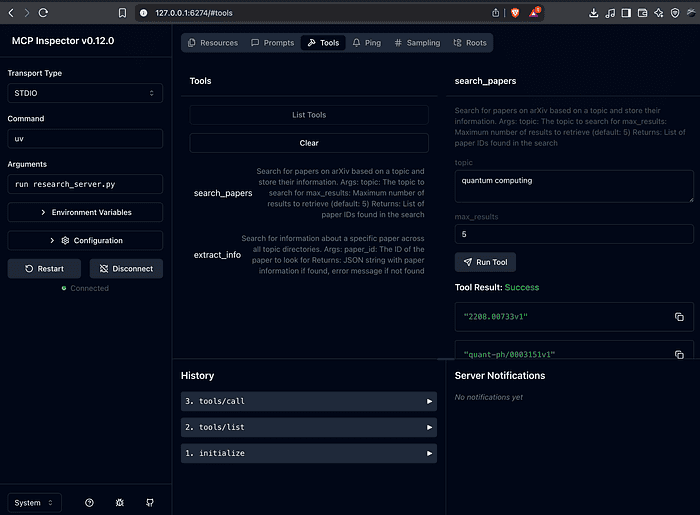
This will start the inspector on http://localhost:3000. It will tell you which port it is hosting the site on (on my machine it was http://127.0.0.1:6274). Open it in your browser and:
- Select “STDIO” as the transport type
- For the command, enter just uv (not the full command)
- In the Arguments field, enter run research_server.py (as separate arguments)
- Click “Connect”
Important Note: The MCP Inspector expects the command and arguments to be separate. If you get an error like “Error: spawn uv run research_server.py ENOENT”, make sure you’ve separated the command (uv) from its arguments (run research_server.py) as described above.
Important Note: The MCP Inspector expects the command and arguments to be separate. If you get an error like “Error: spawn uv run research_server.py ENOENT”, make sure you’ve separated the command (uv) from its arguments (run research_server.py) as described above.
Go to Tools menu → then hit the List Tools header button. Select the tools you want and enter in the dialog then hit the “Run Tool” button.
You should now see your server’s tools listed. You can test them directly from the inspector:
- Try search_papers with a topic like "quantum computing"
- Then try extract_info with one of the paper IDs returned by the search
If everything is working, you’ll see successful responses from both tools. Now let’s connect this to a chatbot!
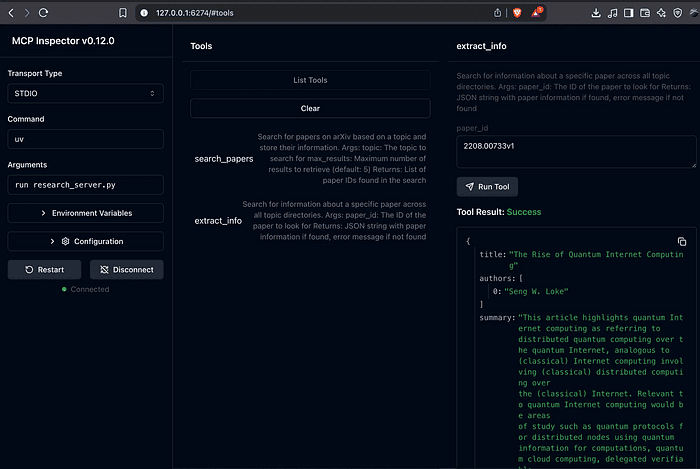
{
  "title": "The Rise of Quantum Internet Computing",
  "authors": [
    "Seng W. Loke"
  ],
  "summary": "This article highlights quantum Internet computing as referring to\\ndistributed quantum computing over the quantum Internet, analogous to\\n(classical) Internet computing involving (classical) distributed computing over\\nthe (classical) Internet. Relevant to quantum Internet computing would be areas\\nof study such as quantum protocols for distributed nodes using quantum\\ninformation for computations, quantum cloud computing, delegated verifiable\\nblind or private computing, non-local gates, and distributed quantum\\napplications, over Internet-scale distances.",
  "pdf_url": "<http://arxiv.org/pdf/2208.00733v1>",
  "published": "2022-08-01"
}
Part 3: Building an MCP Chatbot
Now we’ll create a chatbot that can use our MCP server. We’ll use Claude from Anthropic as our large language model.
First, create a .env file in your project directory with your Anthropic API key:
ANTHROPIC_API_KEY=your_api_key_here
Next, let’s create a file called mcp_chatbot.py:
from dotenv import load_dotenv
from anthropic import Anthropic
from mcp import ClientSession, StdioServerParameters, types
from mcp.client.stdio import stdio_client
from typing import List
import asyncio
import nest_asyncio

nest_asyncio.apply()
load_dotenv()
class MCP_ChatBot:
    def __init__(self):
        # Initialize session and client objects
        self.session = None
        self.anthropic = Anthropic()
        self.available_tools = []
    async def process_query(self, query):
        messages = [{'role':'user', 'content':query}]
        response = self.anthropic.messages.create(
            max_tokens = 2024,
            model = 'claude-3-7-sonnet-20250219',
            # tools exposed to the LLM
            tools = self.available_tools,
            messages = messages
        )
        process_query = True
        while process_query:
            assistant_content = []
            for content in response.content:
                if content.type == 'text':
                    print(content.text)
                    assistant_content.append(content)
                    if len(response.content) == 1:
                        process_query = False
                elif content.type == 'tool_use':
                    assistant_content.append(content)
                    messages.append({'role':'assistant',
                                   'content':assistant_content})
                    tool_id = content.id
                    tool_args = content.input
                    tool_name = content.name
                    print(f"Calling tool {tool_name} with args {tool_args}")
                    # Call a tool through the client session
                    result = await self.session.call_tool(tool_name,
                                              arguments=tool_args)
                    messages.append({
                        "role": "user",
                        "content": [
                            {
                                "type": "tool_result",
                                "tool_use_id": tool_id,
                                "content": result.content
                            }
                        ]
                    })
                    response = self.anthropic.messages.create(
                        max_tokens = 2024,
                        model = 'claude-3-7-sonnet-20250219',
                        tools = self.available_tools,
                        messages = messages
                    )
                    if len(response.content) == 1 and response.content[0].type
                                                                     == "text":
                        print(response.content[0].text)
                        process_query = False

    async def chat_loop(self):
        """Run an interactive chat loop"""
        print("\\nMCP Chatbot Started!")
        print("Type your queries or 'quit' to exit.")
        while True:
            try:
                query = input("\\nQuery: ").strip()
                if query.lower() == 'quit':
                    break
                await self.process_query(query)
                print("\\n")
            except Exception as e:
                print(f"\\nError: {str(e)}")

    async def connect_to_server_and_run(self):
        # Create server parameters for stdio connection
        server_params = StdioServerParameters(
            command="uv",  # Executable
            args=["run", "research_server.py"],  # Command line arguments
            env=None,  # Optional environment variables
        )
        async with stdio_client(server_params) as (read, write):
            async with ClientSession(read, write) as session:
                self.session = session
                # Initialize the connection
                await session.initialize()
                # List available tools
                response = await session.list_tools()
                tools = response.tools
                print("\\nConnected to server with tools:",
                                   [tool.name for tool in tools])
                self.available_tools = [{
                    "name": tool.name,
                    "description": tool.description,
                    "input_schema": tool.inputSchema
                } for tool in response.tools]
                await self.chat_loop()

async def main():
    chatbot = MCP_ChatBot()
    await chatbot.connect_to_server_and_run()
if __name__ == "__main__":
    asyncio.run(main())
Let’s understand what this code does:
- We create an MCP_ChatBot class to handle our chatbot logic
- The connect_to_server_and_run method:
- Creates a connection to our MCP server
- Initializes a client session
- Lists all available tools from the server
- Starts an interactive chat loop
- The process_query method:
- Sends user queries to Claude
- Detects when Claude wants to use a tool
- Forwards tool requests to our MCP server
- Returns tool results back to Claude
- Now run your chatbot:
uv run mcp_chatbot.py
You should see the chatbot connect to your server and display the available tools. Now you can interact with it!
Try these queries:
- “Search for 2 papers on quantum computing”
- “Extract information on [paper ID from previous search]”
- “Summarize the main findings of these papers”
Sample Session
uv run mcp_chatbot.py

API Key loaded: ✓
Processing request of type ListToolsRequest
Connected to server with tools: ['search_papers', 'extract_info']
MCP Chatbot Started!
Type your queries or 'quit' to exit.
Query: java jvm jit
I see you're interested in Java's JVM JIT (Just-In-Time) compilation. Let me search for academic papers on this topic to provide you with some relevant research.
Calling tool search_papers with args {'topic': 'java jvm jit', 'max_results': 5}
Processing request of type CallToolRequest
Requesting page (first: True, try: 0): <https://export.arxiv.org/api/query?search_query=java+jvm+jit&id_list=&sortBy=relevance&sortOrder=descending&start=0&max_results=100>
Got first page: 100 of 2712 total results
Great! I've found 5 papers related to Java JVM JIT compilation. Let me retrieve the details for each of them to provide you with a summary.
Calling tool extract_info with args {'paper_id': '1412.6765v1'}
Processing request of type CallToolRequest
Calling tool extract_info with args {'paper_id': '2305.09493v2'}
Processing request of type CallToolRequest
Calling tool extract_info with args {'paper_id': '2205.03590v1'}
Processing request of type CallToolRequest
Calling tool extract_info with args {'paper_id': '2403.11283v1'}
Processing request of type CallToolRequest
Calling tool extract_info with args {'paper_id': '2403.11281v3'}
Processing request of type CallToolRequest
Based on my search for academic papers on Java JVM JIT (Just-In-Time) compilation, I've found several relevant research articles. Here's a summary of the findings:
## Recent Research on Java JVM JIT
1. **"Pattern-Based Peephole Optimizations with Java JIT Tests" (2024)**
   - Authors: Zhiqiang Zang, Aditya Thimmaiah, Milos Gligoric
   - This paper introduces JOG, a framework for developing Java JIT peephole optimizations alongside JIT tests
   - Allows developers to write optimization patterns in Java itself
   - The researchers developed 162 patterns, including 68 existing optimizations in OpenJDK and 92 new ones
   - Several pull requests have been integrated into OpenJDK
2. **"Java JIT Testing with Template Extraction" (2024)**
   - Authors: Zhiqiang Zang, Fu-Yao Yu, Aditya Thimmaiah, August Shi, Milos Gligoric
   - Presents LeJit, a template-based framework for testing Java JIT compilers
   - Automatically generates test program templates by converting expressions to holes
   - Discovered multiple bugs in popular JIT compilers: 5 in HotSpot, 9 in OpenJ9, and 1 in GraalVM
   - 11 of these bugs were previously unknown, including two CVEs
3. **"Experiences in Building a Composable and Functional API for Runtime SPIR-V Code Generation" (2023)**
   - Presents the Beehive SPIR-V Toolkit for dynamically building SPIR-V binary modules from JVM
   - Shows integration with TornadoVM, which can compile code 3x faster than its existing OpenCL C JIT compiler
4. **"Can We Run in Parallel? Automating Loop Parallelization for TornadoVM" (2022)**
   - Introduces AutoTornado, a static+JIT loop parallelizer for Java programs
   - Works with TornadoVM to support heterogeneous architectures
   - Performs dependence and purity analysis to identify loops that can be parallelized
5. **"Performance comparison between Java and JNI for optimal implementation of computational micro-kernels" (2014)**
   - Compares Java JIT performance with Java Native Interface (JNI)
   - Discusses the JIT compiler's limitations: it's a "black box" for developers and has time constraints
   - Analyzes when it's beneficial to use statically compiled code via JNI versus relying on JIT optimization
These papers demonstrate ongoing research to improve Java JIT compilation performance, testing methodologies, and integration with heterogeneous computing environments. The most recent papers (2024) focus on testing and optimizing JIT compilers, showing that this remains an active area of research.
Query:
Part 4: Enhancing Your MCP Server with Resources and Prompts
Let’s enhance our server by adding resources and prompts, two powerful MCP features that make our server even more useful.
Update your research_server.py file to include these new features:
# Add these new functions to your research_server.py

@mcp.resource("papers://folders")
def get_available_folders() -> str:
    """
    List all available topic folders in the papers directory.
    """
    folders = []
    # Get all topic directories
    if os.path.exists(PAPER_DIR):
        for topic_dir in os.listdir(PAPER_DIR):
            topic_path = os.path.join(PAPER_DIR, topic_dir)
            if os.path.isdir(topic_path):
                papers_file = os.path.join(
                    topic_path,
                    "papers_info.json"
                )
                if os.path.exists(papers_file):
                    folders.append(topic_dir)
    # Create a simple markdown list
    content = "# Available Topics\\n\\n"
    if folders:
        for folder in folders:
            content += f"- {folder}\\n"
        content += f"\\nUse @{folder} to access papers in that "
        content += "topic.\\n"
    else:
        content += "No topics found.\\n"
    return content

@mcp.resource("papers://{topic}")
def get_topic_papers(topic: str) -> str:
    """
    Get detailed information about papers on a specific topic.
    Args:
        topic: The research topic to retrieve papers for
    """
    topic_dir = topic.lower().replace(" ", "_")
    papers_file = os.path.join(
        PAPER_DIR,
        topic_dir,
        "papers_info.json"
    )
    if not os.path.exists(papers_file):
        return (
            f"# No papers found for topic: {topic}\\n\\n"
            "Try searching for papers on this topic first."
        )
    try:
        with open(papers_file, 'r') as f:
            papers_data = json.load(f)
        # Create markdown content with paper details
        content = f"# Papers on {topic.replace('_', ' ').title()}\\n\\n"
        content += f"Total papers: {len(papers_data)}\\n\\n"
        for paper_id, paper_info in papers_data.items():
            content += f"## {paper_info['title']}\\n"
            content += f"- **Paper ID**: {paper_id}\\n"
            content += (
                f"- **Authors**: {', '.join(paper_info['authors'])}\\n"
            )
            content += f"- **Published**: {paper_info['published']}\\n"
            content += (
                f"- **PDF URL**: [{paper_info['pdf_url']}]"
                f"({paper_info['pdf_url']})\\n\\n"
            )
            content += (
                f"### Summary\\n{paper_info['summary'][:500]}...\\n\\n"
            )
            content += "---\\n\\n"
        return content
    except json.JSONDecodeError:
        return (
            f"# Error reading papers data for {topic}\\n\\n"
            "The papers data file is corrupted."
        )

@mcp.prompt()
def generate_search_prompt(topic: str, num_papers: int = 5) -> str:
    """
    Generate a prompt for Claude to find and discuss academic
    papers on a specific topic.
    """
    return f"""
    Search for {num_papers} academic papers about '{topic}' using
    the search_papers tool. Follow these instructions:

    1. First, search for papers using search_papers(
       topic='{topic}',
       max_results={num_papers}
    )

    2. For each paper found, extract and organize the following:
       - Paper title
       - Authors
       - Publication date
       - Brief summary of the key findings
       - Main contributions or innovations
       - Methodologies used
       - Relevance to the topic '{topic}'
    3. Provide a comprehensive summary that includes:
       - Overview of the current state of research in '{topic}'
       - Common themes and trends across the papers
       - Key research gaps or areas for future investigation
       - Most impactful or influential papers in this area
    4. Organize your findings in a clear, structured format with
       headings and bullet points for easy readability.
    Please present both detailed information about each paper and
    a high-level synthesis of the research landscape in {topic}.
    """
We’ve added:
- Two resources:
- papers://folders: Lists all available topic folders
- papers://{topic}: Gets detailed information about papers on a specific topic
- One prompt template:
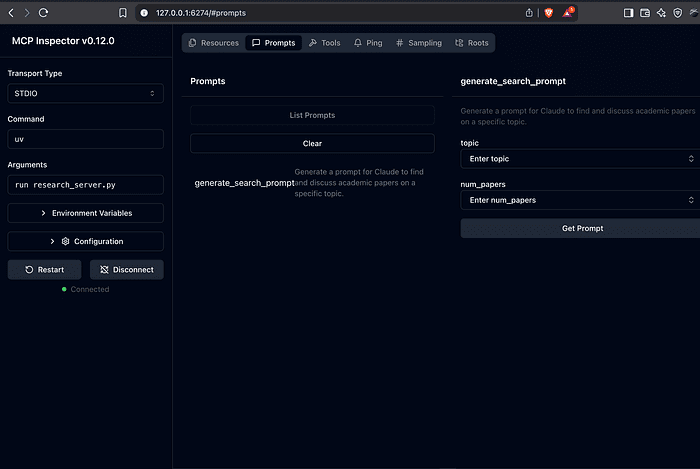
- generate_search_prompt: Creates a detailed prompt for searching papers on a topic
- Now we need to update our chatbot to work with these new features. Here’s an enhanced version that supports resources and prompts:
# Add this method to your MCP_ChatBot class to handle
# resources
async def handle_resource(self, query):
    if query.startswith('@'):
        # Handle resource URI
        resource_name = query[1:]  # Remove the @ symbol
        try:
            # Fetch the resource content
            result = await self.session.get_resource(
                f"papers://{resource_name}"
            )
            print(result.content)
            return True
        except Exception as e:
            print(f"Error accessing resource: {e}")
            return True
    return False

# Add this method to handle prompts
async def handle_prompt(self, query):
    if query.startswith('/prompt'):
        parts = query.split()
        if len(parts) == 1:
            # List available prompts
            response = await self.session.list_prompts()
            prompts = response.prompts
            print("\\nAvailable prompts:")
            for prompt in prompts:
                print(f"- {prompt.name}: {prompt.description}")
                if prompt.parameters:
                    print("  Parameters:")
                    for param in prompt.parameters:
                        param_type = (
                            'optional' if not param.required
                            else 'required'
                        )
                        print(
                            f"    - {param.name}: "
                            f"{param.description} ({param_type})"
                        )
            return True
        else:
            # Execute a specific prompt
            prompt_name = parts[1]
            # Parse parameters (format: key=value)
            params = {}
            for part in parts[2:]:
                if '=' in part:
                    key, value = part.split('=', 1)
                    # Convert to int if possible
                    if value.isdigit():
                        params[key] = int(value)
                    else:
                        params[key] = value
            result = await self.session.get_prompt(
                prompt_name,
                arguments=params
            )
            await self.process_query(result.content)
            return True
    return False

# Update chat_loop method to include handling for
# resources and prompts
async def chat_loop(self):
    """Run an interactive chat loop"""
    print("\\nMCP Chatbot Started!")
    print("Type your queries or 'quit' to exit.")
    print("Special commands:")
    print("  @folders - List all available topic folders")
    print("  @<topic> - Get papers on a specific topic")
    print("  /prompt - List available prompts")
    print(
        "  /prompt <name> <param=value> - "
        "Execute a specific prompt"
    )
    while True:
        try:
            query = input("\\nQuery: ").strip()
            if query.lower() == 'quit':
                break
            # Check for special commands
            if await self.handle_resource(query):
                continue
            if await self.handle_prompt(query):
                continue
            # Process normal query
            await self.process_query(query)
            print("\\n")
        except Exception as e:
            print(f"\\nError: {str(e)}")
Now when you run your chatbot, you’ll have access to these new features!
Now when you run your chatbot, you’ll have access to these new features!
Try these commands:
- @folders - List all available topic folders
- @quantum_computing - View papers on quantum computing (after searching for them)
- /prompt - List available prompts
- /prompt generate_search_prompt topic=ai num_papers=3 - Execute a prompt to search for AI papers
Here we can see the prompt in the MCP Inspector.
Part 5: Connecting to Multiple MCP Servers
In real-world applications, you’ll often want to connect to multiple MCP servers to access different types of functionality. Let’s enhance our chatbot to connect to multiple servers.
First, let’s create a configuration file called server_config.json:
{
    "mcpServers": {
        "filesystem": {
            "command": "npx",
            "args": [
                "-y",
                "@modelcontextprotocol/server-filesystem",
                "."
            ]
        },
        "research": {
            "command": "uv",
            "args": ["run", "research_server.py"]
        },
        "fetch": {
            "command": "uvx",
            "args": ["mcp-server-fetch"]
        }
    }
}
This configuration defines three servers:
- filesystem: For reading and writing files
- research: Our research server
- fetch: For fetching web content
Now, let’s update our chatbot to connect to all these servers:
import json
from contextlib import AsyncExitStack

from dotenv import load_dotenv
from anthropic import Anthropic
from mcp import ClientSession, StdioServerParameters, types
from mcp.client.stdio import stdio_client
from typing import List, TypedDict
import asyncio
import nest_asyncio
import os

# Create a type hint for our tool definition
class ToolDefinition(TypedDict):
    name: str
    description: str
    input_schema: dict

class MCP_ChatBot:
    def __init__(self):
        # Initialize session and client objects
        self.sessions = []  # Track all sessions
        self.exit_stack = AsyncExitStack()  # For managing async context managers
        self.anthropic = Anthropic()
        self.available_tools = []
        self.tool_to_session = {}  # Map tools to their sessions

    async def chat_loop(self):
        """Run an interactive chat loop"""
        print("\\nMCP Chatbot Started!")
        print("Type your queries or 'quit' to exit.")
        while True:
            try:
                query = input("\\nQuery: ").strip()
                if query.lower() == 'quit':
                    break
                await self.process_query(query)
                print("\\n")
            except Exception as e:
                print(f"\\nError: {str(e)}")

    async def connect_to_server(self, server_name: str,
                                          server_config: dict) -> None:
        """Connect to a single MCP server."""
        try:
            server_params = StdioServerParameters(**server_config)
            stdio_transport = await self.exit_stack.enter_async_context(
                stdio_client(server_params)
            )
            read, write = stdio_transport
            session = await self.exit_stack.enter_async_context(
                ClientSession(read, write)
            )
            await session.initialize()
            self.sessions.append(session)
            # List available tools for this session
            response = await session.list_tools()
            tools = response.tools
            print(f"\\nConnected to {server_name} with tools:",
            [t.name for t in tools])
            for tool in tools:
                self.tool_to_session[tool.name] = session
                self.available_tools.append({
                    "name": tool.name,
                    "description": tool.description,
                    "input_schema": tool.inputSchema
                })
        except Exception as e:
            print(f"Failed to connect to {server_name}: {e}")

    async def connect_to_servers(self):
        """Connect to all configured MCP servers."""
        try:
            with open("server_config.json", "r") as file:
                data = json.load(file)
            servers = data.get("mcpServers", {})
            for server_name, server_config in servers.items():
                await self.connect_to_server(server_name, server_config)
        except Exception as e:
            print(f"Error loading server configuration: {e}")
            raise

    # Update process_query to use the correct session for each tool
    async def process_query(self, query):
        messages = [{'role': 'user', 'content': query}]
        response = self.anthropic.messages.create(
            max_tokens=2024,
            model='claude-3-7-sonnet-20250219',
            tools=self.available_tools,
            messages=messages
        )
        process_query = True
        while process_query:
            assistant_content = []
            for content in response.content:
                if content.type == 'text':
                    print(content.text)
                    assistant_content.append(content)
                    if len(response.content) == 1:
                        process_query = False
                elif content.type == 'tool_use':
                    assistant_content.append(content)
                    messages.append({'role': 'assistant',
                                   'content': assistant_content})
                    tool_id = content.id
                    tool_args = content.input
                    tool_name = content.name
                    print(f"Calling tool {tool_name} with args {tool_args}")
                    # Use the correct session for this tool
                    session = self.tool_to_session[tool_name]
                    result = await session.call_tool(tool_name,
                                                 arguments=tool_args)
                    messages.append({
                        "role": "user",
                        "content": [
                            {
                                "type": "tool_result",
                                "tool_use_id": tool_id,
                                "content": result.content
                            }
                        ]
                    })
                    response = self.anthropic.messages.create(
                        max_tokens=2024,
                        model='claude-3-7-sonnet-20250219',
                        tools=self.available_tools,
                        messages=messages
                    )
                    if len(response.content) == 1 and (response.content[0].type
                                                  == "text"):
                        print(response.content[0].text)
                        process_query = False

    async def cleanup(self):
        """Cleanly close all resources."""
        await self.exit_stack.aclose()

# Update main function
async def main():
    chatbot = MCP_ChatBot()
    try:
        await chatbot.connect_to_servers()
        await chatbot.chat_loop()
    finally:
        await chatbot.cleanup()
if __name__ == "__main__":
    # Initialize nest_asyncio
    nest_asyncio.apply()
    # Load environment variables
    load_dotenv()
    # Run the main function
    asyncio.run(main())
Now your chatbot can connect to multiple servers simultaneously! Try this complex query that uses multiple servers:
Fetch the content of this website: <https://modelcontextprotocol.io> and save the content in the file "mcp_summary.md", then create a visual diagram that summarizes what MCP is and save it in a text file.
This query will use:
- The fetch server to get web content
- The filesystem server to save files
- Claude’s reasoning to create a summary and diagram
Sample Session
% uv run mcp_chatbot.py
Secure MCP Filesystem Server running on stdio
Allowed directories: [ '/Users/richardhightower/src/mcp_project' ]
Connected to filesystem with tools: ['read_file', 'read_multiple_files', 'write_file', 'edit_file', 'create_directory', 'list_directory', 'directory_tree', 'move_file', 'search_files', 'get_file_info', 'list_allowed_directories']
Processing request of type ListToolsRequest
Connected to research with tools: ['search_papers', 'extract_info']
Installed 35 packages in 66ms
Connected to fetch with tools: ['fetch']
MCP Chatbot Started!
Type your queries or 'quit' to exit.
Query: what papers are in ./papers folder?
I'll help you explore the papers in the ./papers folder. Let me first check if this directory exists and then list its contents.
Calling tool list_directory with args {'path': './papers'}
I found two directories within the ./papers folder:
1. java_jvm_jit
2. quantum_computing_
Let me explore each of these directories to see what papers they contain:
Calling tool list_directory with args {'path': './papers/java_jvm_jit'}
Calling tool list_directory with args {'path': './papers/quantum_computing_'}
I see that each directory contains a papers_info.json file. Let me read these files to see what papers are stored in each:
Calling tool read_file with args {'path': './papers/java_jvm_jit/papers_info.json'}
Calling tool read_file with args {'path': './papers/quantum_computing_/papers_info.json'}
Based on my search, I found the following papers in the ./papers folder, organized in two categories:
### Java JVM JIT Papers:
1. **Performance comparison between Java and JNI for optimal implementation of computational micro-kernels** (ID: 1412.6765v1)
   - Authors: Nassim A. Halli, Henri-Pierre Charles, Jean-François Mehaut
   - Published: 2014-12-21
2. **Experiences in Building a Composable and Functional API for Runtime SPIR-V Code Generation** (ID: 2305.09493v2)
   - Authors: Juan Fumero, György Rethy, Athanasios Stratikopoulos, Nikos Foutris, Christos Kotselidis
   - Published: 2023-05-16
3. **Can We Run in Parallel? Automating Loop Parallelization for TornadoVM** (ID: 2205.03590v1)
   - Authors: Rishi Sharma, Shreyansh Kulshreshtha, Manas Thakur
   - Published: 2022-05-07
4. **Pattern-Based Peephole Optimizations with Java JIT Tests** (ID: 2403.11283v1)
   - Authors: Zhiqiang Zang, Aditya Thimmaiah, Milos Gligoric
   - Published: 2024-03-17
5. **Java JIT Testing with Template Extraction** (ID: 2403.11281v3)
   - Authors: Zhiqiang Zang, Fu-Yao Yu, Aditya Thimmaiah, August Shi, Milos Gligoric
   - Published: 2024-03-17
### Quantum Computing Papers:
1. **The Rise of Quantum Internet Computing** (ID: 2208.00733v1)
   - Author: Seng W. Loke
   - Published: 2022-08-01
2. **Unconventional Quantum Computing Devices** (ID: quant-ph/0003151v1)
   - Author: Seth Lloyd
   - Published: 2000-03-31
3. **Geometrical perspective on quantum states and quantum computation** (ID: 1311.4939v1)
   - Author: Zeqian Chen
   - Published: 2013-11-20
4. **Quantum Computation and Quantum Information** (ID: 1210.0736v1)
   - Author: Yazhen Wang
   - Published: 2012-10-02
5. **Probabilistic Process Algebra to Unifying Quantum and Classical Computing in Closed Systems** (ID: 1610.02500v1)
   - Author: Yong Wang
   - Published: 2016-10-08
Each paper has an ID, title, authors, summary, PDF URL, and publication date stored in the respective papers_info.json files.
Query:
What’s Next?
Congratulations! You’ve built a powerful MCP server and a chatbot that can interact with multiple servers. This is just the beginning of what’s possible with MCP.
Here are some ideas for next steps:
- Add More Tools: Extend your research server with tools for other academic databases or APIs
- Deploy Remotely: Deploy your MCP server so it can be accessed over the internet
- Authentication: Add authentication to secure your MCP server
- Try Claude Desktop: Connect your MCP server to Claude Desktop for a graphical interface
- Explore Other MCP Servers: Try connecting to the many community-built MCP servers
Conclusion
Model Context Protocol (MCP) represents a significant step forward in AI application development. By standardizing how AI models communicate with external systems, MCP makes it easier to build powerful, context-aware applications.
In this tutorial, we’ve only scratched the surface of what’s possible. As MCP continues to evolve, we’ll see even more sophisticated capabilities, from multi-agent architectures to unified registries for discovering MCP servers.
The future of AI isn’t just about better models -- it’s about connecting those models to the data and tools they need to be truly helpful. MCP is making that future possible today.
What will you build with MCP?
Did you find this tutorial helpful? Let me know in the comments what you’re planning to build with MCP! For more tutorials on AI development, follow me on Medium.
Checkout out the source code for these examples here: https://github.com/RichardHightower/mcp_project.
The source code for this example was derived from DeepLearning MCP Anthropic course. I highly recommend taking the course.
Also checkout this MCP book that is in the works.
About the Author
Rick Hightower is a seasoned software engineer and technical author specializing in AI technologies, machine learning, and modern software development. With extensive experience in building scalable applications and implementing AI solutions, Rick shares his practical insights through his publications and technical tutorials.
Currently focused on AI integration and Model Context Protocol (MCP), Rick combines his technical expertise with clear, accessible writing to help developers understand and implement cutting-edge technologies. His articles on Streamlit, SQL, ChatGPT, and various AI frameworks have helped countless developers navigate the rapidly evolving landscape of artificial intelligence.
When not writing or coding, Rick enjoys exploring new technologies and mentoring aspiring developers. Follow his work to stay updated on the latest developments in AI and software engineering.
Connect with Rick at https://www.linkedin.com/in/rickhigh/.
Rick Hightower brings extensive enterprise experience as a former executive and distinguished engineer at a Fortune 100 company, where he specialized in delivering Machine Learning and AI solutions to deliver intelligent customer experiences. His expertise spans both the theoretical foundations and practical applications of AI technologies.
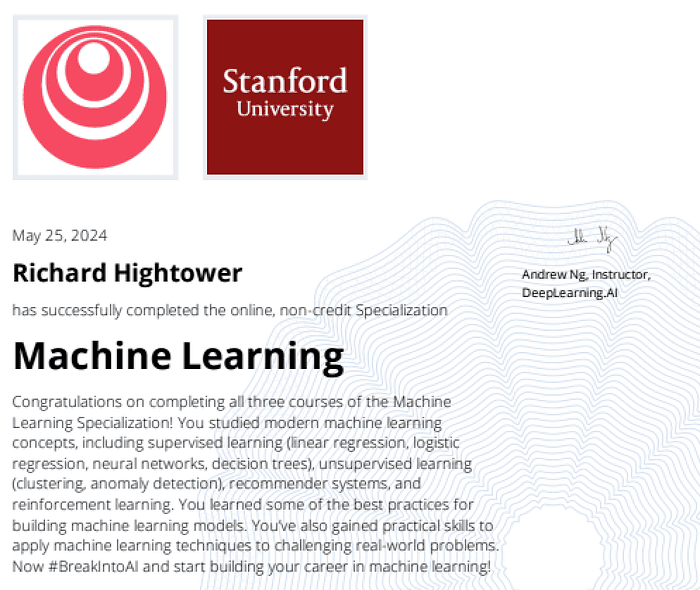
As a TensorFlow certified professional and graduate of Stanford University’s comprehensive Machine Learning Specialization, Rick combines academic rigor with real-world implementation experience. His training includes mastery of supervised learning techniques, neural networks, and advanced AI concepts, which he has successfully applied to enterprise-scale solutions.
With a deep understanding of both the business and technical aspects of AI implementation, Rick bridges the gap between theoretical machine learning concepts and practical business applications, helping organizations leverage AI to create tangible value. Rick has been very actively developing GenAI applications.