Hands-On with Hugging Face: Building Your AI Workspace
Ready to dive into the world of AI? Discover how to set up your ideal Hugging Face workspace and unleash the power of transformers
Originally published on Medium.
Ready to dive into the world of AI? Discover how to set up your ideal Hugging Face workspace and unleash the power of transformers
- A fully configured environment optimized for AI development
- Direct access to thousands of pre-trained models from the Hugging Face Hub
- The ability to run powerful transformer models with just a few lines of code
- Understanding of best practices for reproducible AI workflows
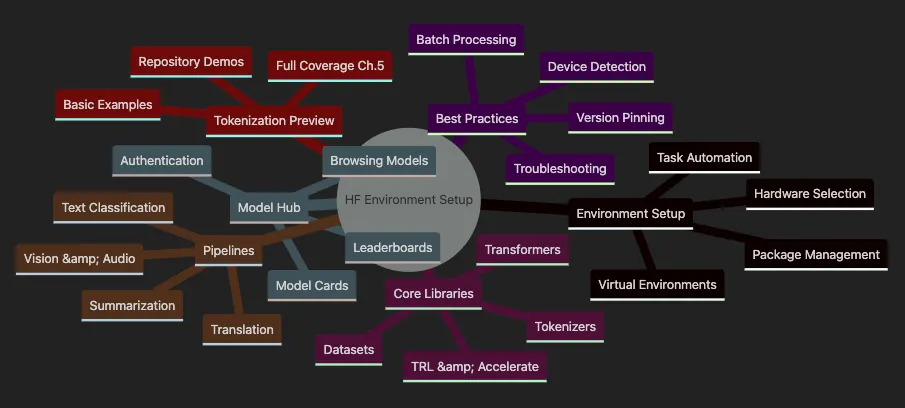
-
Creating and managing virtual environments for isolated development
-
Selecting appropriate hardware (CPU vs GPU) for your projects
-
Implementing effective package management strategies
-
Setting up task automation to streamline workflows
-
Installing and configuring the Transformers library
-
Working with the Datasets library for efficient data handling
-
Understanding Tokenizers for text processing
-
Leveraging TRL and Accelerate for training optimization
-
Efficiently browsing and selecting models
-
Understanding model cards and documentation
-
Using leaderboards to identify state-of-the-art models
-
Setting up authentication for private models
-
Implementing text classification pipelines
-
Creating summarization workflows
-
Building translation systems
-
Exploring vision and audio processing capabilities
-
Understanding basic tokenization concepts
-
Exploring repository examples
-
Preview of the comprehensive coverage in Chapter 5
-
Implementing smart device detection
-
Optimizing performance with batch processing
-
Ensuring reproducibility through version pinning
-
Troubleshooting common issues
# Install poetry
if
 not already installed
curl -sSL https:
//install.python-poetry.org | python3 -
# Create new project
poetry
new
 huggingface-project
cd huggingface-project
# Add dependencies
poetry
add
 transformers datasets accelerate tokenizers trl huggingface_hub
poetry
add
 matplotlib seaborn pandas
# For visualizations
poetry
add
 --
group
 dev jupyter ipykernel pytest black ruff
# Activate environment
poetry shell
# Or use this repository's setup
task setup-complete
# Runs complete setup with all dependencies
# Download and install mini-conda from https://docs.conda.io/en/latest/miniconda.html
# Create environment with Python 3.10
conda create
-
n hf
-
env python
=
3.10
conda activate hf
-
env
# Install packages
conda install
-
c
 pytorch
-
c
 huggingface transformers datasets tokenizers
conda install
-
c
 conda
-
forge accelerate trl jupyterlab
# Or use the repository's conda setup
task conda
-
setup
# Creates conda environment
# Install pyenv (macOS/Linux)
curl https://pyenv.run | bash
# Configure shell (add to ~/.bashrc or ~/.zshrc)
export
 PATH=
"
$HOME
/.pyenv/bin:
$PATH
"
eval

"
$(pyenv init -)
"
# Install Python 3.12.9 with pyenv
pyenv install 3.12.9
pyenv
local
 3.12.9
# Create virtual environment
python -m venv venv
source
 venv/bin/activate
# On Windows: venv\Scripts\activate
# Install packages
pip install transformers==4.53.0 datasets accelerate tokenizers trl jupyterlab
# Taskfile.yml example from this repository
version:

'3'
tasks:

setup:

desc:

"Set up Python environment"

cmds:

-

pyenv

install

-s

3.12
.9

-

pyenv

local

3.12
.9

-

poetry

install

run:

desc:

"Run all examples (interactive)"

cmds:

-

poetry

run

python

src/main.py

# Environment examples

run-pipeline:

desc:

"Run pipeline examples"

cmds:

-

poetry

run

python

src/pipeline_example.py

# Tokenization examples

run-basic-tokenization:

desc:

"Run basic tokenization examples"

cmds:

-

poetry

run

python

src/basic_tokenization.py

# Verification and testing

verify-setup:

desc:

"Verify HuggingFace environment setup"

cmds:

-

poetry

run

python

src/verify_installation.py
-
Run
taskto see all available tasks. -
Run
task setup-completefor complete environment setup. -
Run
task runfor interactive example selection. -
Run
task run-allto run all examples automatically. -
Setting up virtual environments for safe, isolated development.
-
Installing and verifying core Hugging Face libraries with version pinning.
-
Authenticating with the Hugging Face Hub for seamless model access.
-
Understanding each tool’s role in your workflow.
-
Running your first transformer-powered inference in seconds.
-
GitHub — HuggingFaces Article 1: First article in the series covering HuggingFaces fundamentals
-
GitHub — Article 2: Why Language Is Hard for AI: Explores language challenges and how Transformers revolutionized AI
-
GitHub — Article 3: Setup for Hugging Faces: Repository for this article with complete code examples (this article is article 3).
🔧 Common Setup Issues:
ModuleNotFoundError: Check virtual environment activationCUDA errors: Verify PyTorch GPU version matches your CUDA
Token authentication fails: Ensure token has read permissions
Slow downloads: Models cache in
~/.cache/huggingface
# Create a new virtual environment named 'huggingface_env'
python -m venv huggingface_env
# Activate the environment (choose the command for your OS):
source
 huggingface_env/bin/activate
# On macOS/Linux
huggingface_env\Scripts\activate
# On Windows
- Create environment:
python -m venvcreates an isolated Python environment. - Activate environment: Activation modifies your shell to use the environment’s Python.
- Work isolated: All packages are installed only within this environment.
- Deactivate when done: Type
deactivateto return to the system Python.
💾 GPU Memory Guidelines:
Small models (DistilBERT): 2–4GB VRAM
Medium models (BERT-base): 4–8GB VRAM
Large models (GPT-2-large): 8–16GB VRAM
Use
device_map="auto"for automatic memory management
import
 torch
def

get_device
():

"""Get the best available device for pipelines (returns int or str)."""

if
 torch.backends.mps.is_available():

return

"mps"

# Apple Silicon GPU

elif
 torch.cuda.is_available():

return

0

# Return 0 for first CUDA device

else
:

return
 -
1

# Return -1 for CPU in pipeline API
# Usage
device = get_device()
print
(
f"Using device:
{device}
"
)
# Visit https://pytorch.org/get-started/locally/ for the latest command for your system.
# Example for CUDA 12.1:
pip install torch==
2.3
.
0
 torchvision torchaudio --
index
-url https:
//d
ownload.pytorch.org/whl/cu121
- Check CUDA version: Run
nvidia-smito see your GPU and CUDA version. - Match PyTorch version: Visit PyTorch website for the correct install command.
- Install with index URL: The
index-urlpoints to GPU-enabled packages. - Verify GPU access: Test with
torch.cuda.is_available()in Python.
transformers
==
4.41
.
0
datasets
==
2.20
.
0
torch
==
2.3
.
0
accelerate
==
0.30
.
0
evaluate
==
0.4
.
2
pip install -r requirements.
txt
- Read requirements: pip reads each line from requirements.txt
- Resolve dependencies: pip finds compatible versions for all packages
- Download and install: Packages download from PyPI and install
- Verify installation: Check with
pip listto see installed packages
huggingface-cli login
- Run login command: Starts interactive authentication.
- Visit token page: Go to https://huggingface.co/settings/tokens
- Create/copy token: Generate a token with read permissions (write for uploading).
- Paste token: Enter when prompted (characters won’t display for security).
import
 transformers
import
 datasets
import
 accelerate
print
(
"Transformers:"
, transformers.__version__)
print
(
"Datasets:"
, datasets.__version__)
print
(
"Accelerate:"
, accelerate.__version__)
- Import libraries: Python loads each package
- Access version:
__version__attribute contains version string - Print results: Display confirms successful installation
- Check versions: Ensure versions match your requirements
from
 transformers
import
 pipeline
# Import the pipeline API
# If this is your first run, models are downloaded automatically (auth required for some models)
classifier = pipeline(
'text-classification'
)
# Set up sentiment analysis
result = classifier(
"Hugging Face is transforming the way we build AI!"
)
print
(result)
# Output: label and confidence
-
Run
task run-pipelineto see comprehensive pipeline examples including sentiment analysis, text generation, zero-shot classification, and question answering. -
See
src/pipeline_example.pyfor complete working code with device detection and batch processing. -
Import pipeline: Load Hugging Face’s high-level API.
-
Create classifier:
pipeline('text-classification')loads a pre-trained sentiment model. -
Run inference: Pass text to get predictions.
-
View results: Returns label (e.g., ‘POSITIVE’) and confidence score.
-
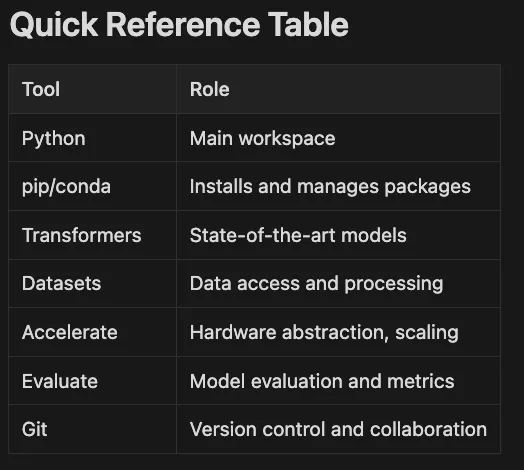
Python: Your main workspace where everything happens
-
pip/conda: Package managers — install and update libraries
-
Transformers, Datasets, Tokenizers: Specialized Hugging Face libraries for models, data, and text processing
-
Accelerate: Hardware abstraction and distributed training.
-
Evaluate: Standardized model evaluation.
-
Git: Version control — your project’s history and collaboration tool
-
Prototype solutions in minutes.
-
Test and compare models from the Model Hub quickly and easily.
-
Scale up with Accelerate for multi-GPU or distributed training.
-
Benchmark results with Evaluate.
-
Collaborate using Git and shared environments.
-
Hardware Selection shows three paths: Local (CPU/GPU), Cloud (Colab/AWS), or Hybrid.
-
Environment Setup illustrates Python installation, virtual environments, and dependency management.
-
Version Control demonstrates Git for code and Hugging Face Hub for models/datasets.
-
Highlighted nodes indicate recommended practices.
-
CPU only: Sufficient for basic experimentation or learning, but slow for large models or datasets
-
GPU-equipped: Modern NVIDIA GPUs (RTX 30/40 series or higher) or Apple Silicon (M1/M2/M3) significantly accelerate training and inference. Ideal for individuals or small teams
-
Pros: Full control, no ongoing cloud costs, data stays local
-
Cons: Limited by hardware power and memory; may require complex driver/CUDA setup for GPUs
-
Google Colab/Kaggle: Free GPU/TPU access (with usage limits). Easy starts, ideal for learning and prototyping
-
AWS, Azure, GCP: Scalable, pay-as-you-go access to powerful GPUs (A100, H100) and TPUs. Suitable for large-scale training, production, or collaborative teams
-
Pros: Scalability, latest hardware, no maintenance, easy collaboration
-
Cons: Ongoing costs, setup learning curve, data privacy and compliance considerations
python
--version
  # Or use python3
--version
# Using venv (built-in)
python -m venv hf-env
# Activate on Windows:
hf-env\Scripts\activate
# Activate on macOS/Linux:
source
 hf-env/bin/activate
#
Using
 conda (install
from
 https:
/
/
conda.io if needed)
conda
create

-
n hf
-
env python
=
3.10
conda activate hf
-
env
- Create isolated space: Virtual environment separates project dependencies.
- Activate environment: Changes your shell to use environment’s Python.
- Install packages: Everything installs within this environment only.
- Switch projects: Deactivate and activate different environments as needed.
python -m pip install
--upgrade
 pip
pip install torch torchvision torchaudio --
index
-url https:
//d
ownload.pytorch.org/whl/cu121
- Identify CUDA version: Check with
nvidia-smicommand - Get install command: PyTorch website generates the exact command
- Install with GPU support: Downloads GPU-enabled packages
- Test GPU availability: Verify with
torch.cuda.is_available()in Python
pip install torch torchvision torchaudio
transformers: Models and pipelines (latest stable version is 4.41.0 as of July 2025)datasets: Efficient data loading and processingtokenizers: Fast tokenization (often installed with transformers, but can be added explicitly)trl: For advanced fine-tuning and RLHF/GRPO workflowsaccelerateanddeepspeed: For multi-GPU and distributed training (see Article 17 for details)
pip install transformers datasets tokenizers trl accelerate deepspeed
- Install core libraries: Transformers provides models, datasets handles data
- Add tokenizers: Fast text processing for transformer models
- Include TRL: Enables reinforcement learning and advanced fine-tuning
- Add scaling tools: Accelerate and DeepSpeed for distributed training
pip freeze > requirements.
txt
conda
env

export
 > environment.yml
- Freeze current state: Captures exact versions of all installed packages
- Save to file: Creates shareable configuration file
- Recreate anywhere: Others can install identical environment
- Track changes: Commit these files to version control
- For pip:
pip install -r requirements.txt - For conda:
conda env create -f environment.yml
import
 transformers
# Should not error
import
 datasets
# Should not error
print
(transformers.__version__)
print
(datasets.__version__)
# Example output:
# 4.41.0
# 2.19.0
git --version
# Should print git version info
git
init

# Start tracking this folder
git
add
 .
# Stage all files
git commit -m
"Initial commit: Project setup"

# Save a snapshot
- Initialize repository: Creates
.gitfolder to track changes - Stage files: Marks files for inclusion in next commit
- Commit changes: Saves permanent snapshot with message
- Continue working: Make changes, stage, and commit repeatedly
pip install huggingface_hub
huggingface-cli login
- Install Hub library: Adds tools for interacting with Hugging Face Hub
- Authenticate: Links your account for pushing/pulling private content
- Push models: Upload trained models with version history
- Share datasets: Version and document your datasets
- Collaborate: Teams can work on shared models and datasets
- ✓ Chosen hardware (local, cloud, or hybrid)
- ✓ Installed Python 3.9+ and set up virtual environment (venv or conda)
- ✓ Installed PyTorch or TensorFlow with appropriate CUDA version (for GPU support)
- ✓ Installed Hugging Face libraries (transformers 4.41.0+, datasets, tokenizers, trl, accelerate, deepspeed)
- ✓ Captured dependencies with requirements.txt or environment.yml
- ✓ Initialized Git for code version control
- ✓ Configured Hugging Face Hub for model/dataset versioning
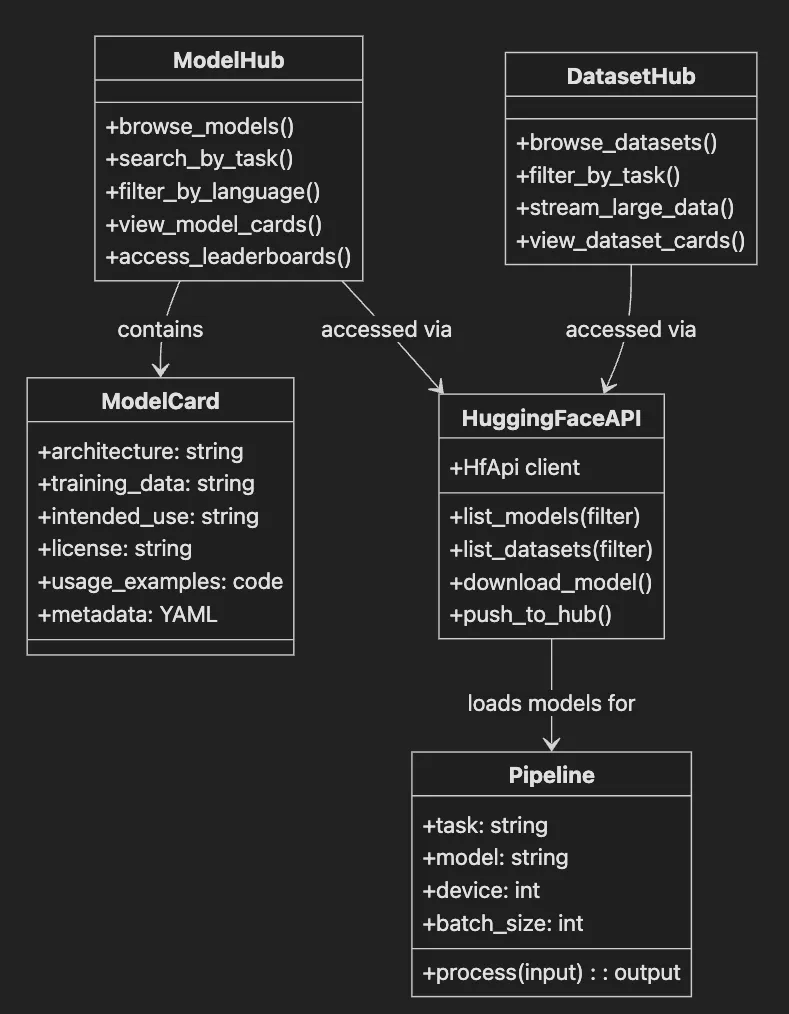
- ModelHub class shows browsing, searching, filtering, and leaderboard access.
- DatasetHub provides similar functionality for datasets with streaming support.
- HuggingFaceAPI handles programmatic access to both hubs.
- ModelCard contains essential model documentation.
- Pipeline uses models loaded from the Hub for inference.
- Web Interface: Visit huggingface.co/models or huggingface.co/datasets. Use filters for task (like text-classification), language, library (PyTorch, TensorFlow), license, and more. Each model or dataset features a dedicated page with documentation, structured YAML metadata, and often an interactive demo via Hugging Face Spaces.
- Python API: For programmatic access, use the
huggingface_hublibrary to search and load resources directly in code. This approach excels for automation, reproducibility, and integrating model selection into ML workflows.
from
 huggingface_hub
import
 HfApi
api = HfApi()
# Create an API client for the Hugging Face Hub
# List all models for the 'text-classification' task
models =
list
(api.list_models(task=
"text-classification"
))
print
(
f"Found
{
len
(models)}
 text-classification models!"
)
%

task

run-hub-api
task:
 [
run-hub-api
]
poetry

run

python

src/hf_hub_example.py
HuggingFace

Hub

API

Examples
===

Authentication

Status

===
✅

Authenticated as:

rickHigh

Organizations:

None
===

Text

Classification

Models

===
Found

97501

text-classification

models!
Top 10 most downloaded text-classification models:

1
.

cardiffnlp/twitter-roberta-base-sentiment-latest

|

Downloads:

4553990

|

Likes:

692

2
.

cross-encoder/ms-marco-MiniLM-L6-v2

|

Downloads:

4393131

|

Likes:

123

3
.

distilbert/distilbert-base-uncased-finetuned-sst-2

|

Downloads:

3520199

|

Likes:

787

4
.

facebook/bart-large-mnli

|

Downloads:

2599661

|

Likes:

1420

5
.

BAAI/bge-reranker-v2-m3

|

Downloads:

2403559

|

Likes:

697

6
.

facebook/roberta-hate-speech-dynabench-r4-target

|

Downloads:

2180517

|

Likes:

85

7
.

lucadiliello/BLEURT-20-D12

|

Downloads:

2080975

|

Likes:

1

8
.

cardiffnlp/twitter-xlm-roberta-base-sentiment

|

Downloads:

1617733

|

Likes:

225

9
.

pysentimiento/robertuito-sentiment-analysis

|

Downloads:

1569923

|

Likes:

94
10
.

nlptown/bert-base-multilingual-uncased-sentiment

|

Downloads:

1458313

|

Likes:

400
===

Model

Details

Example

===
Model:

distilbert/distilbert-base-uncased-finetuned-sst-2-english
Author:

distilbert
Downloads:

3
,520,199
Likes:

787
Pipeline tag:

text-classification
License:

N/A
Tags:

transformers,

pytorch,

tf,

rust,

onnx
Model Card Extract:

Language:

en

Datasets:

sst2,

glue
===

Search

Models

by

Language

===
French text generation models:
1
.

meta-llama/Llama-3.1-8B-Instruct
2
.

HelpingAI/Dhanishtha-2.0-preview
3
.

moelanoby/phi-3-M3-coder
4
.

meta-llama/Llama-3.2-3B-Instruct
5
.

mistralai/Magistral-Small-2506
===

Models

by

Library

===
PyTorch translation models:
1
.

facebook/nllb-200-distilled-600M

(Downloads:

350345
)
2
.

facebook/nllb-200-3.3B

(Downloads:

96866
)
3
.

facebook/nllb-moe-54b

(Downloads:

1513
)
4
.

google-t5/t5-11b

(Downloads:

215927
)
5
.

Helsinki-NLP/opus-mt-en-ar

(Downloads:

116293
)
===

Models

by

Dataset

===
Models trained on IMDB dataset:
1
.

AdapterHub/bert-base-uncased-pf-imdb
2
.

AdapterHub/roberta-base-pf-imdb
3
.

Lumos/imdb2
4
.

Lumos/imdb3
5
.

Lumos/imdb3_hga
All

Hub

API

examples

completed!
- Import
HfApiandModelFilterfromhuggingface_hub(official Hub interaction method) - Create API client for programmatic access
- Use
list_models()withModelFilterto get task-relevant models - Print discovery count
from
 huggingface_hub
import
 list_datasets
datasets_list = list_datasets()
# Get all available datasets
print
(
f"There are
{
len
(datasets_list)}
 datasets on the Hub!"
)
- Import function: Load dataset listing utility
- Call list_datasets: Retrieves all available datasets
- Count results: Shows total dataset availability
- Filter options: Use
DatasetFilterfor specific needs
- Many model and dataset pages feature Hugging Face Spaces — interactive apps for browser-based model testing
- Structured YAML metadata in model cards enhances search, filtering, and leaderboard integration
- For advanced workflows, use
hf_hub_downloadto fetch specific model files or assets
🚀 Testing Models with Spaces: Before downloading a model, test it in Spaces:
# Quick way to test a model's Space before downloading
# Visit: https://huggingface.co/spaces/{username}/{space-name}
# Example: https://huggingface.co/spaces/stabilityai/stable-diffusion
-
Use web interface for quick browsing, filtering, and accessing community demos (Spaces).
-
Use Python API via
huggingface_hubfor automation, advanced filtering, and reproducible workflows. -
Architecture: Model type (e.g., BERT, RoBERTa, DistilBERT).
-
Training Data: Dataset used for training.
-
Intended Use: Recommended tasks and scenarios.
-
License: Usage restrictions (crucial for business or commercial use).
-
Usage Examples: Code snippets for quick starts.
-
Structured Metadata: YAML front matter powers search, filtering, and leaderboard placement.
-
Space Demo (if available): Try the model live in your browser.
from transformers import AutoModelForSequenceClassification, AutoTokenizer
model_name =
"distilbert-base-uncased-finetuned-sst-2-english"
# Download the tokenizer for input text processing
# (A tokenizer splits text into tokens the model understands)
tokenizer = AutoTokenizer.from_pretrained(model_name)
# Download the model weights and configuration
model = AutoModelForSequenceClassification.from_pretrained(model_name)
-
AutoTokenizerandAutoModelForSequenceClassificationautomatically select correct classes based on model name -
from_pretrained()downloads and caches model and tokenizer -
Tokenizer prepares input text; model performs prediction
-
Caching prevents re-downloading on subsequent runs
-
Use filters, tags, and structured model cards to quickly identify best models for projects
-
Loading and using models in code proves fast and consistent across the Hub
-
Spaces provide convenient evaluation before downloading
-
Intended Use: Typical applications (e.g., summarization, sentiment analysis)
-
Limitations: Warnings about struggle areas (e.g., certain languages or sensitive topics)
-
Training Data: Datasets used, affecting bias and generalizability
-
Ethical Considerations: Potential risks or misuse scenarios
-
Structured Metadata (YAML front matter): Machine-readable metadata powers advanced search, filtering, and leaderboard inclusion
-
Compare accuracy, speed, and efficiency
-
Find state-of-the-art models for tasks
-
Weigh trade-offs (higher accuracy vs. faster inference)
-
Always review model cards and licenses before deployment.
-
Use leaderboards to benchmark and compare models for needs.
-
Structured metadata and Spaces prove essential for transparency, discoverability, and community engagement.

-
Run
task run-basic-tokenizationfor hands-on basic tokenization examples -
Run
task run-subword-tokenizationto compare different tokenization methods -
Run
task run-advanced-tokenizationfor padding, truncation, and special tokens -
See
src/tokenizer_comparison.pyfor performance benchmarks -
Run
task test-oovto see how tokenizers handle out-of-vocabulary words
from
 transformers
import
 AutoTokenizer
# Load a tokenizer
tokenizer = AutoTokenizer.from_pretrained(
"bert-base-uncased"
)
# Tokenize some text
text =
"Hugging Face makes NLP easy!"
tokens = tokenizer.tokenize(text)
print
(
f"Text:
{text}
"
)
print
(
f"Tokens:
{tokens}
"
)
# Output: ['hugging', 'face', 'makes', 'nl', '##p', 'easy', '!']
- How different tokenization methods work (BPE, WordPiece, SentencePiece)
- Handling out-of-vocabulary words
- Special tokens and their purposes
- Performance optimization strategies
# Compare different tokenization methods
task run-subword-tokenization
# See advanced features like padding and truncation
task run-advanced-tokenization
# Benchmark tokenizer performance
task run-comparison
- Always use the matching tokenizer: Each model requires its specific tokenizer.
- Use batch processing: Process multiple texts together for efficiency.
- Enable fast tokenizers: Use
use_fast=Truefor better performance.
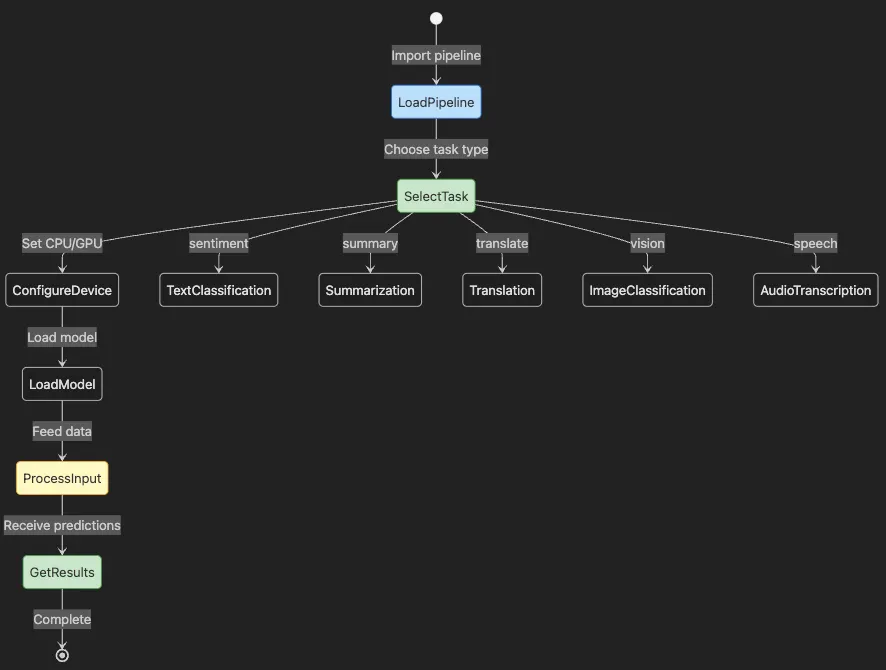
- Process starts with LoadPipeline importing the pipeline API
- SelectTask chooses from text, vision, or audio tasks
- ConfigureDevice sets CPU or GPU usage
- LoadModel fetches the appropriate model
- ProcessInput feeds your data
- GetResults returns predictions
- Branch shows available task types
- Model Loading: Fetches pre-trained models for your task (e.g., sentiment analysis, translation, image classification), either by default or from specific Hub models
- Tokenization / Preprocessing: Converts raw input (text, images, audio) into numerical representations models require
- Pre- and Post-processing: Prepares inputs, runs inference (model’s prediction step), and formats outputs for immediate use
pip install --upgrade
"transformers>=4.40.0"
from transformers import pipeline
import torch
# Use GPU if available, otherwise fallback to CPU
device = 0 if torch.cuda.is_available()
else
 -1
# Create a text classification pipeline with a specific model
classifier = pipeline(

"text-classification"
,
    model=
"distilbert-base-uncased-finetuned-sst-2-english"
,
    device=device
)
# Classify multiple sentences in a batch
sentences = [

"Hugging Face is changing the world!"
,

"This library makes machine learning easy."
,
]
results = classifier(sentences, batch_size=2)
print(results)
- Import
pipelinefunction and detect GPU availability - Create text classification pipeline, explicitly specifying a well-known sentiment analysis model
- Pass sentence list for batch inference using
batch_sizeparameter - Results return as dictionaries with labels and confidence scores
[

{
"label"
:

"POSITIVE"
,

"score"
:

0.9998
}
,

{
"label"
:

"POSITIVE"
,

"score"
:

0.9997
}
]
from
 transformers
import
 pipeline
import
 torch
device =
0

if
 torch.cuda.is_available()
else
 -
1
summarizer = pipeline(

"summarization"
,
    model=
"facebook/bart-large-cnn"
,
    device=device
)
texts = [

"Hugging Face provides a vast ecosystem for transformer models, making state-of-the-art AI accessible to everyone. This enables rapid experimentation and deployment."
,

"Transformers are revolutionizing natural language processing by enabling models to understand context at scale."
]
summaries = summarizer(texts, batch_size=
2
, max_length=
50
, min_length=
20
, do_sample=
False
)
print
(summaries)
- Pipeline loads summarization model (BART-large-CNN from Hub)
- Provide text list for batch summarization
- Set length constraints with
max_lengthandmin_length - Results include
summary_textkey (schema may evolve)
[

{
"summary_text"
:

"Hugging Face offers a comprehensive ecosystem for transformer models, enabling rapid prototyping and deployment."
}
,

{
"summary_text"
:

"Transformers are changing NLP by allowing models to grasp context at scale."
}
]
from transformers import pipeline
import torch
device = 0 if torch.cuda.is_available()
else
 -1
translator = pipeline(

"translation_en_to_fr"
,
    model=
"Helsinki-NLP/opus-mt-en-fr"
,
    device=device
)
sentences = [
"Hugging Face makes AI easy."
,
"Transformers are powerful."
]
translations = translator(sentences, batch_size=2)
print(translations)
- Pipeline loads specific English-to-French translation model
- Pass English sentence list for batch translation
- Results contain
translation_textkey (check documentation for updates)
[

{
"translation_text"
:

"Hugging Face facilite l'IA."
}
,

{
"translation_text"
:

"Les transformers sont puissants."
}
]
from
 transformers
import
 pipeline
import
 torch
device =
0

if
 torch.cuda.is_available()
else
 -
1
image_classifier = pipeline(

"image-classification"
,
    model=
"google/vit-base-patch16-224"
,
    device=device
)
# Replace with your own image path or URL
result = image_classifier(
"path/to/image.jpg"
)
print
(result)
- Uses Vision Transformer (ViT) model for image classification.
- Accepts image file path or URL.
- Returns dictionaries with
labelandscorekeys. - Process multiple images by passing file path list.
from
 transformers
import
 pipeline
import
 torch
device =
0

if
 torch.cuda.is_available()
else
 -
1
asr = pipeline(

"automatic-speech-recognition"
,
    model=
"facebook/wav2vec2-base-960h"
,
    device=device
)
# Replace with your own audio file (wav, mp3, etc.)
result = asr(
"path/to/audio.wav"
)
print
(result)
-
ASR pipeline transcribes spoken words to text
-
Supports various audio formats (wav, mp3, etc.)
-
Output typically contains
textkey -
Check latest schema in documentation
-
Pipelines automate model loading, tokenization/preprocessing, batching, device placement, and inference
-
Perform classification, summarization, translation, image classification, audio transcription, and more with single commands
-
Support batching (
batch_size), device selection (device), and custom models (model), suitable for prototyping and scalable production -
For high-performance or specialized deployments, explore Hugging Face Optimum, ONNX Runtime, or hardware-accelerated backends
-
Output schemas may evolve; inspect output and consult documentation for latest details
-
src/pipeline_example.py- Complete pipeline examples for sentiment analysis, text generation, zero-shot classification, and question answering -
src/translation_example.py- Batch translation and multilingual examples -
src/speech_recognition_example.py- Audio transcription with ASR models -
Run all pipeline examples with
task run-pipeline -
Faster time-to-market: Demo AI features before competitors react
-
Lower technical barriers: Non-experts experiment with advanced models using simple APIs
-
Risk reduction: Validate concepts with real data before heavy investment
-
Scalability: Batch processing and device selection scale pipelines from prototypes to production workloads
-
See
src/config.pyfor robust device detection handling MPS/CUDA/CPU. -
See
src/verify_installation.pyfor comprehensive environment verification. -
See fixes implemented in
src/hf_hub_example.pyfor API deprecation handling. -
Run verification with
task verify-setup.
#
Error: subprocess.CalledProcessError: Command
'['
./build_bundled.sh
', '
0.1.99
']'
 returned non-zero
exit
 status 127
# Solution: Use a newer version
pip install sentencepiece>=0.2.0
# Error: pyproject.toml changed significantly since poetry.lock was last generated
# Solution: Update the lock file
poetry lock
poetry install
# Check your CUDA version
nvidia-smi
# Install PyTorch with matching CUDA version
# Visit https://pytorch.org/get-started/locally/ for the correct command
# Problem: Text too long for model
# Solution: Use truncation
inputs
 = tokenizer(long_text, truncation=
True
, max_length=
512
)
# Problem: Using wrong tokenizer for a model
# Solution: Always load tokenizer with the model
tokenizer
 = AutoTokenizer.from_pretrained(model_name)
model
 = AutoModel.from_pretrained(model_name)
# Problem: Model expects special tokens but they're missing
# Solution: Ensure add_special_tokens=True (default)
inputs
 = tokenizer(text, add_special_tokens=
True
)
# Use fast tokenizers when available
tokenizer = AutoTokenizer.from_pretrained(
"bert-base-uncased"
, use_fast=
True
)
# Process in batches
batch_size =
32
for
 i
in

range
(
0
,
len
(texts), batch_size):
    batch = texts[i:i+batch_size]
    encodings = tokenizer(batch, padding=
True
, truncation=
True
)
# Use smaller batch sizes
# Clear GPU cache periodically
import
 torch
torch.cuda.empty_cache()
# Use mixed precision training
from
 torch.cuda.amp
import
 autocast
with
 autocast():
    outputs = model(**inputs)
# Create a new virtual environment
python -m venv huggingface_env
# Activate the environment
# On Windows:
huggingface_env\Scripts\activate
# On macOS/Linux:
source
 huggingface_env/bin/activate
# Install core Hugging Face libraries with specific versions for reproducibility
pip install transformers==4.40.0 datasets==2.20.0 tokenizers==0.19.0 trl==0.8.0 huggingface_hub==0.23.0
# Freeze your environment to requirements.txt for sharing
pip freeze > requirements.txt
- Install with versions: Specify exact versions for consistency
- Freeze environment: Capture all dependencies
- Share easily: Others recreate identical environment
- Track changes: Commit requirements.txt to version control
# To recreate the environment on another machine
pip install -r requirements.txt
# In your project directory
git
init
git
add
 .
git commit -m
"Initial commit: Project setup"
import
 transformers, datasets, tokenizers, trl, huggingface_hub
print
(
"Transformers version:"
, transformers.__version__)
print
(
"Datasets version:"
, datasets.__version__)
print
(
"Tokenizers version:"
, tokenizers.__version__)
print
(
"TRL version:"
, trl.__version__)
print
(
"HuggingFace Hub version:"
, huggingface_hub.__version__)
- Import libraries: Test each installation
- Print versions: Confirm successful setup
- Check compatibility: Ensure versions match requirements
- Ready for work: Environment prepared for advanced workflows
from
 huggingface_hub
import
 login
login()
# This will prompt you for your Hugging Face access token
- Run
task hf-loginfor CLI authentication - See
src/hf_hub_example.pyfor Hub API usage including model listing and dataset exploration - See
src/model_download_example.pyfor downloading and caching models - Token is automatically loaded from
.envfile in all examples
from transformers import AutoTokenizer, AutoModelForSequenceClassification
model_name =
"distilbert-base-uncased-finetuned-sst-2-english"
tokenizer = AutoTokenizer.from_pretrained(model_name)
model = AutoModelForSequenceClassification.from_pretrained(model_name)
-
model_namespecifies exact Hub model -
AutoTokenizerloads compatible tokenizer -
AutoModelForSequenceClassificationloads model weights for task -
Automatic caching prevents re-downloads
-
Basic concepts: How text becomes tokens and then token IDs
-
Subword methods: BPE, WordPiece, SentencePiece, and Tiktoken differences
-
Advanced features: Padding, truncation, attention masks, and offset mapping
-
Performance optimization: Batch processing and fast tokenizers
-
Best practices: Matching tokenizers to models, handling special tokens
from transformers
import
 pipeline
classifier = pipeline(
'text-classification'
)
result = classifier(
"The new product update is fantastic!"
)
print
(result)  # Example output: [{
'label'
:
'POSITIVE'
,
'score'
:
0.99
}]
-
Reproducibility: Virtual environments and pinned dependencies ensure consistent, shareable experiments
-
Speed: Pipelines and pre-trained models deliver prototypes and proofs-of-concept in days, not months
-
Collaboration: Git and Hugging Face Hub enable seamless teamwork, code/model sharing, and versioning
-
Risk Management: Model cards, licenses, and dataset versioning help evaluate assets for ethical, legal, and business use
-
✓ Choose hardware or cloud resources fitting project needs
-
✓ Create and activate virtual environments for isolation
-
✓ Install Python, pip, and Hugging Face libraries with pinned versions
-
✓ Use Git for code version control and Hugging Face Hub for model/dataset versioning
-
✓ Generate and maintain requirements.txt for reproducibility
-
✓ Implement smart device detection for portable code
-
✓ See how text converts to tokens with quick examples
-
✓ Run repository examples to explore different tokenization methods
-
✓ Understand the importance of matching tokenizers to models
-
✓ Preview concepts covered fully in Chapter 5
-
✓ Authenticate with Hugging Face Hub to push and manage assets
-
✓ Browse Model and Datasets Hub for pre-trained resources
-
✓ Prototype rapidly with pipelines
-
✓ Apply troubleshooting solutions for common issues
-
Virtual Environment: Isolated Python environment for managing dependencies
-
Model Hub: Online repository for pre-trained and community models
-
Dataset Hub: Repository for curated datasets for training and evaluation
-
Pipeline: High-level API for running models on data with minimal code
-
Model Card: Documentation describing model’s purpose, data, and limitations
-
Leaderboard: Ranking of models on benchmark tasks
-
Version Control: System for tracking changes in code (Git) and models/datasets (Hugging Face Hub)
-
TRL: Hugging Face library for advanced fine-tuning and reinforcement learning with LLMs
-
Token: Smallest unit of text that a model processes (word, subword, or character)
-
Tokenizer: Algorithm that converts text to tokens and back
-
Token ID: Numerical representation of a token in the model’s vocabulary
-
Subword Tokenization: Breaking words into smaller pieces to handle unknown words
-
BPE (Byte Pair Encoding): Tokenization method used by GPT models
-
WordPiece: Tokenization method used by BERT models
-
SentencePiece: Language-independent tokenization used by T5, mT5
-
Special Tokens: Reserved tokens like [CLS], [SEP], [PAD] with special meanings
-
Attention Mask: Binary mask indicating real tokens (1) vs padding (0)
-
Offset Mapping: Character positions for each token in the original text
- Run the tokenization examples from this article’s codebase (
task run-basic-tokenization, etc.) - Experiment with different tokenizers on your own text
- Try the tokenizer comparison to see performance differences (
task run-comparison) - Build a simple pipeline that combines tokenization with model inference
- Run all examples at once with
task run-allor interactively withtask run
-
Article 4: Dive into transformer architecture and attention mechanisms
-
Article 8: Create custom pipelines and data processing workflows
-
Articles 11–13: Explore fine-tuning, from basic to advanced RLHF techniques
-
Article 14: Learn to share your models and datasets on the Hub
-
Build a tokenization analyzer that compares how different models tokenize your domain-specific text
-
Create a preprocessing pipeline optimized for your use case
-
Benchmark tokenization performance on your typical workloads
-
Set up reproducible development environments using Poetry, Conda, or pip+pyenv
-
Implement smart device detection for portable code across different hardware
-
Manage dependencies with version pinning and requirements files
-
Use Git and Hugging Face Hub for code and model versioning
-
Quick examples showing text-to-token conversion
-
Repository examples demonstrating different tokenization methods
-
Preview of concepts covered comprehensively in Chapter 5
-
Practical tips for using tokenizers effectively
-
Run working examples from a real codebase with task automation
-
Use pipelines for rapid prototyping across text, vision, and audio tasks
-
Apply best practices for production-ready code
src/
├── config.py
# Device detection and environment configuration
├── main.py
# Interactive menu for all examples
├── basic_tokenization.py
# Basic tokenization concepts
├── subword_tokenization.py
# BPE, WordPiece, SentencePiece examples
├── advanced_tokenization.py
# Padding, truncation, special tokens
├── tokenizer_comparison.py
# Performance benchmarks
├── pipeline_example.py
# Sentiment, QA, generation pipelines
├── translation_example.py
# Batch translation examples
├── speech_recognition_example.py
# ASR demonstrations
├── hf_hub_example.py
# Hub API usage
├── model_download_example.py
# Model downloading and caching
└── verify_installation.py
# Environment verification
notebooks/
├── Chapter_03_Environment_Setup.ipynb
# Interactive environment examples
└── Chapter_03_Tokenization.ipynb
# Interactive tokenization examples
Task Commands:
- task setup-complete
# Complete environment setup
- task verify-setup
# Verify installation
- task run
# Interactive menu
- task run-
all

# Run all examples
- task run-pipeline
# Run pipeline examples
- task run-basic-tokenization
# Basic tokenization
- task run-subword-tokenization
# Subword methods
- task run-advanced-tokenization
# Advanced features
- task run-comparison
# Performance comparison