Introduction: Extending Transformers Beyond Language
In the world of artificial intelligence, transformers have revolutionized natural language processing. But what happens when we ap
Originally published on Medium.
In the world of artificial intelligence, transformers have revolutionized natural language processing. But what happens when we ap

- How transformers adapted from language to excel at vision tasks
- The revolution in audio processing with transformer-based models
- Cross-modal systems that connect text, images, and sound
- Practical deployment strategies using Hugging Face’s unified ecosystem
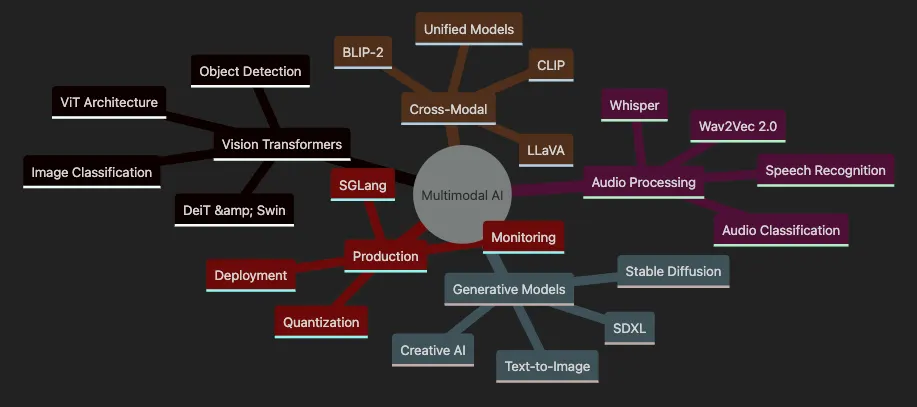
- Covers Vision Transformers including ViT, DeiT, Swin for image understanding
- Explores Audio Processing with Wav2Vec, Whisper for speech and sound
- Details Generative Models like Stable Diffusion for creative AI
- Shows Cross-Modal models connecting text, images, and audio
- Highlights Production considerations with SGLang and deployment

from
 transformers
import
 ViTImageProcessor, ViTForImageClassification
from
 PIL
import
 Image
import
 requests
# Download an example image (parrots)
url =
"<https://huggingface.co/datasets/huggingface/documentation-images/resolve/main/transformers/tasks/image_classification_parrots.png>"
image = Image.
open
(requests.get(url, stream=
True
).raw)
# Load the processor and model
processor = ViTImageProcessor.from_pretrained(
'google/vit-base-patch16-224'
)
model = ViTForImageClassification.from_pretrained(
'google/vit-base-patch16-224'
)
# Preprocess the image and make a prediction
inputs = processor(images=image, return_tensors=
"pt"
)
outputs = model(**inputs)
# Get the predicted class label
predicted_class = outputs.logits.argmax(-
1
).item()
print
(
"Predicted class:"
, model.config.id2label[predicted_class])
# Tip: Always review the model card for details about the model's intended use, data, and limitations:
# <https://huggingface.co/google/vit-base-patch16-224>
- Import libraries: Bring in the Hugging Face classes, PIL for image handling, and requests for downloading images.
- Load an image: Download a sample image (parrots) and open it with PIL.
- Load processor and model:
ViTImageProcessorprepares the image (resizing, normalizing).ViTForImageClassificationloads a pre-trained Vision Transformer. - Preprocess and predict: The processor converts the image to tensors. The model outputs logits — raw scores for each class (logits are the model’s predictions before converting to probabilities).
- Interpret the result: Find the class with the highest logit and map it to a human-readable label.
-
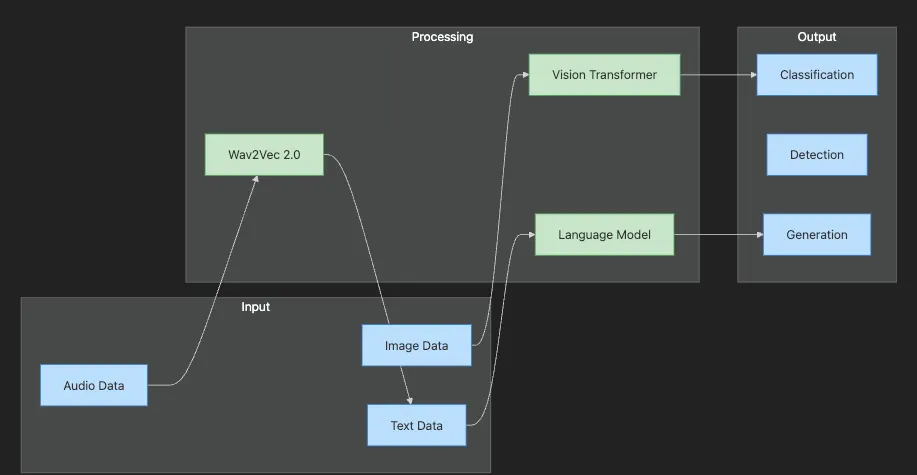
Input layer shows different data modalities: images, audio, and text.
-
Processing layer demonstrates specialized transformers for each modality.
-
Output layer shows various tasks: classification, detection, and generation.
-
Flow illustrates how each modality is processed by appropriate transformer.
-
Browse and download pre-trained models for vision, audio, and multimodal tasks.
-
Use consistent APIs across domains.
-
Fine-tune models on your data with minimal code.
-
Share and deploy models easily, from prototypes to production.
-
Access unified and multi-task transformer models for advanced workflows.
-
Transformers now power AI that sees, hears, and creates, not just processes text.
-
Hugging Face makes these capabilities accessible for all modalities, including unified and multi-task models.
-
You can classify images with a Vision Transformer in just a few lines of code.
-
The same transformer approach works for audio and multimodal AI, and even more unified models are available for advanced applications.
-
Always review model cards and consider inference optimization for production.
-
DeiT (Data-efficient Image Transformer) introduces improved training techniques, making transformers effective with less data and compute.
-
Swin Transformer uses hierarchical and shifted window attention, allowing for efficient scaling to large images and tasks like detection/segmentation.
-
MaxViT and other recent models use hybrid local-global attention or structured/selective attention for better performance and memory efficiency.
from transformers import AutoImageProcessor, AutoModelForImageClassification
from PIL import Image
import requests
# 1. Load an image
url =
"<https://huggingface.co/datasets/huggingface/documentation-images/resolve/main/transformers/tasks/image_classification_parrots.png>"
image = Image.open(requests.get(url, stream=True).raw)
# 2. Choose a modern vision transformer (e.g., DeiT, Swin, MaxViT)
# Examples: 'facebook/deit-base-patch16-224', 'microsoft/swin-tiny-patch4-window7-224', 'google/maxvit-tiny-224'
model_id =
"facebook/deit-base-patch16-224"
processor = AutoImageProcessor.from_pretrained(model_id)
model = AutoModelForImageClassification.from_pretrained(model_id)
# 3. Preprocess: resize, normalize, split into patches, and convert to tensor
inputs = processor(images=image, return_tensors=
"pt"
)
# 4. Predict: model outputs raw prediction scores (logits)
outputs = model(**inputs)
predicted_class = outputs.logits.argmax(-1).item()
# 5. Decode to label
print(
"Predicted class:"
, model.config.id2label[predicted_class])
- Image loading: We load an image from a URL. You can substitute your own image.
- Processor & model: We use
AutoImageProcessorandAutoModelForImageClassification, which support all major vision transformer models (ViT, DeiT, Swin, MaxViT, etc.). - Preprocessing: The processor handles resizing, normalization, and patch creation — all model-specific details are managed automatically.
- Prediction: The model outputs logits (raw scores for each class).
- Decoding: The predicted index is mapped to a human-readable label via the model’s config.
-
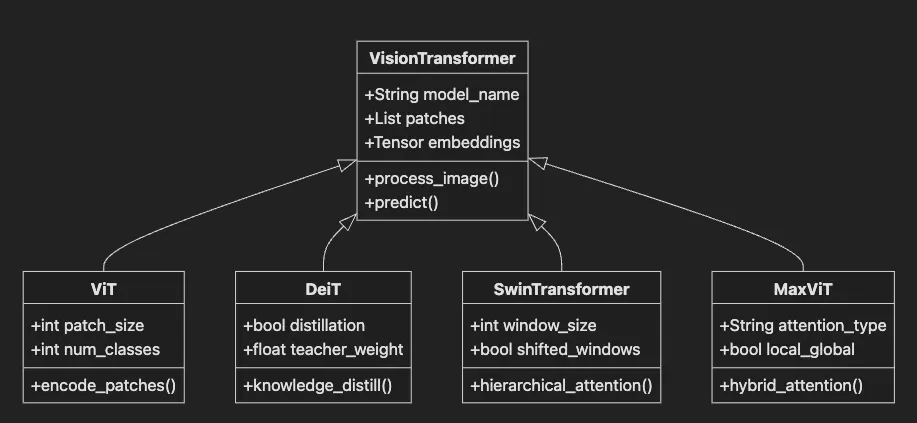
VisionTransformer base class defines common functionality
-
ViT implements basic patch-based vision transformer.
-
DeiT adds data-efficient training with distillation.
-
SwinTransformer uses hierarchical windowed attention.
-
MaxViT combines local and global attention mechanisms.
-
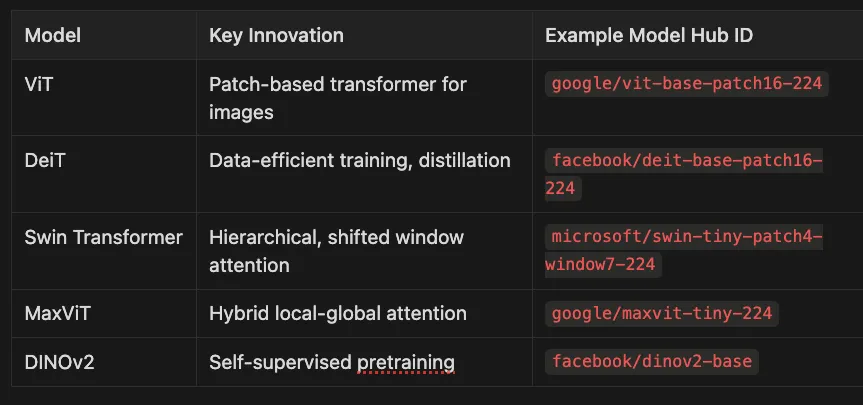
ViT (Vision Transformer): Pioneered patch-based transformer architecture for images, treating each image patch like a token in NLP.
google/vit-base-patch16-224 -
DeiT (Data-efficient Image Transformer): Improved ViT with distillation techniques to train effectively with less data.
facebook/deit-base-patch16-224 -
Swin Transformer: Introduced hierarchical representation with shifted windows for better efficiency and performance.
microsoft/swin-tiny-patch4-window7-224 -
MaxViT: Combined local and global attention mechanisms for improved efficiency and accuracy.
google/maxvit-tiny-224 -
DINOv2: Advanced self-supervised pretraining allowing models to learn powerful representations without labels.
facebook/dinov2-base
-
Modern vision transformers split images into patches and embed them for transformer processing.
-
Self-attention — often structured or windowed — captures both local and global features.
-
Self-supervised pretraining is standard for transfer learning.
-
The Hugging Face ecosystem makes it easy to use, fine-tune, and deploy these models for a wide range of vision tasks.
- Prepare your labeled image dataset (folders or CSV).
- Load data with Hugging Face Datasets or PyTorch.
- Preprocess images using the appropriate image processor.
- Set up the Trainer with your chosen model and training parameters.
- Train and evaluate your custom vision model.
- Structured and selective attention (e.g., windowed or hybrid attention) in 2024–2025 models dramatically reduces memory and compute requirements for large-scale vision tasks.
- Multi-task and cross-domain models now support detection, segmentation, captioning, and more within a single architecture.
from
 transformers
import
 pipeline
# Create an automatic speech recognition pipeline with Whisper
asr = pipeline(
"automatic-speech-recognition"
, model=
"openai/whisper-base"
)
# Transcribe your audio file (WAV, MP3, FLAC, etc.)
result = asr(
"sample.wav"
)
print
(
"Transcription:"
, result[
"text"
])
- Use the pipeline to load a pre-trained Whisper model. (Other models, like Wav2Vec 2.0, are also supported.)
- Pass your audio file directly — no need for manual preprocessing. The pipeline handles feature extraction, batching, and decoding.
- The result is a dictionary containing the transcribed text (and, for some models, additional metadata like timestamps or language).
from
 transformers
import
 AutoProcessor, AutoModelForSpeechRecognition
import
 torch
import
 soundfile
as
 sf
# Load audio file (Whisper expects 16kHz, mono; pipeline will resample automatically)
audio, rate = sf.read(
"sample.wav"
)
processor = AutoProcessor.from_pretrained(
"openai/whisper-base"
)
model = AutoModelForSpeechRecognition.from_pretrained(
"openai/whisper-base"
)
# Preprocess audio
inputs = processor(audio, sampling_rate=rate, return_tensors=
"pt"
, padding=
True
)
# Model inference
with
 torch.no_grad():
    logits = model(**inputs).logits
# Decode output
predicted_ids = torch.argmax(logits, dim=-
1
)
transcription = processor.batch_decode(predicted_ids)
print
(
"Transcription:"
, transcription[
0
])
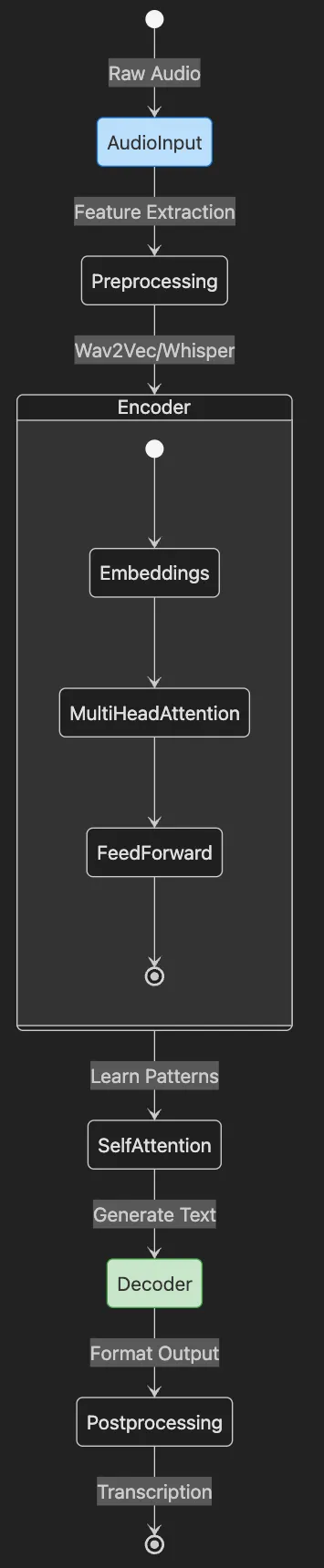
- AudioInput represents raw audio data entering the system
- Preprocessing extracts features and prepares for model
- Encoder (detailed view) shows transformer layers processing audio
- Decoder generates text from encoded representations
- Postprocessing formats final transcription output
Tip: All APIs and models shown are current as of 2025. For the latest models and best practices, check the Hugging Face Model Hub.
from
 transformers
import
 pipeline
# Create an audio classification pipeline
classifier = pipeline(
"audio-classification"
, model=
"superb/wav2vec2-base-superb-ks"
)
# Classify your audio file
result = classifier(
"dog_bark.wav"
)
print
(
"Predicted label:"
, result[
0
][
"label"
])
- The pipeline loads a pre-trained model and processor.
- Pass your audio file (mono, 16kHz preferred for this model; pipeline will resample if needed).
- The output is a list of predicted classes with confidence scores.
Advanced: For large-scale or streaming audio analytics, see Article 8 for batch processing, streaming inference, and deployment strategies.
-
Call Center Analytics: Transcribe and analyze customer calls for quality, sentiment, and compliance. Spot trends and training needs at scale.
-
Accessibility Tools: Provide real-time captions for meetings or broadcasts. Create searchable transcripts for podcasts and videos. Whisper and SeamlessM4T are especially strong for multilingual needs.
-
Monitoring & Compliance: Detect sensitive or prohibited content in media. Monitor smart devices for alarms or critical sound events using audio classification or embedding models.
-
End-to-end models reduce complexity and manual effort.
-
Self-supervised learning means less labeled data is needed.
-
The pipeline() API and AutoProcessor provide model-agnostic, future-proof workflows.
-
Hugging Face provides everything you need to experiment, fine-tune, and deploy audio models.
from diffusers import StableDiffusionXLPipeline
import torch
# Load the SDXL pipeline from the Hugging Face Hub
pipe = StableDiffusionXLPipeline.from_pretrained(

"stabilityai/stable-diffusion-xl-base-1.0"
,
    torch_dtype=torch.float16
)
# Enable memory-efficient inference if on limited hardware
if torch.cuda.is_available():
    pipe = pipe.to(
"cuda"
)
    pipe.enable_model_cpu_offload()
else:
    pipe = pipe.to(
"cpu"
)
# Your text prompt and (optional) negative prompt for fine control
prompt =
"A futuristic city skyline at sunset, digital art"
negative_prompt =
"blurry, low quality, distorted"
# Generate the image (SDXL typically produces results in seconds)
result = pipe(prompt=prompt, negative_prompt=negative_prompt, guidance_scale=7.0)
image = result.images[0]
# Save the image
image.save(
"generated_city.png"
)
print(
"Image saved as generated_city.png"
)
# (Optional) Display in a notebook
# from PIL import Image
# display(image)  # Only works in Jupyter/Colab
- Import libraries: We use
StableDiffusionXLPipeline(for SDXL) fromdiffusersandtorchfor device management. The pipeline bundles the text encoder, denoiser, scheduler, and safety checker. - Load the model:
from_pretrainedfetches a ready-to-use SDXL model from Hugging Face Hub. Settingtorch_dtype=torch.float16enables efficient memory usage on modern GPUs. - Device and memory management: Move the pipeline to GPU (
cuda) for fast generation. For large models or limited GPU memory, useenable_model_cpu_offload()to optimize resource usage. On CPU, expect slower results. - Set your prompt: Describe your desired image. Use a negative prompt to steer the model away from unwanted features (e.g., “blurry, low quality”).
- Generate and save: The pipeline produces the image in seconds. Save it locally, or display it directly in a notebook.
-
Diffusion models generate high-quality images from noise, guided by your text and advanced encoders.
-
Negative prompts, guidance scale, and safety checkers provide fine control and responsible outputs.
-
Hugging Face Diffusers makes state-of-the-art generative AI accessible, efficient, and production-ready.
-
Marketing: Instantly generate custom visuals for campaigns, mockups, or social media.
-
Game Development: Rapidly prototype concept art, in-game assets, and environments.
-
Accessibility: Create tailored content for diverse audiences and use cases.
-
Art & Design: Artists explore new ideas, styles, and collaborate with AI for inspiration.
-
Video & Multimodal: With models like Stable Video Diffusion, generative AI now extends to high-quality video and multimodal content.
-
How multimodal models bridge vision, language, and audio
-
How CLIP, BLIP, BLIP-2, and LLaVA create a shared space for text and images
-
How to build a simple multimodal search engine using modern Hugging Face APIs
-
Where to go next for audio, video, and unified multimodal reasoning
-
Dual Encoders: CLIP uses two neural networks — one for images, one for text. Each turns its input into a vector (a list of numbers capturing meaning).
-
Contrastive Learning: During training, CLIP sees pairs of images and their matching descriptions. It learns to pull matching pairs closer in the vector space, and push mismatched pairs apart. (Contrastive learning is like teaching the model to play a matching game — find pairs that belong together.)
-
Embeddings: An embedding is a compact, numeric summary of an item — think of it as a digital fingerprint for each image or text.
Modern Multimodal Models: As of 2025, unified foundation models such as GPT-4o, Gemini, and GPT-Fusion can natively process and generate text, images, audio, and video in a single architecture. These models support more complex cross-modal reasoning and are rapidly becoming the industry standard for new multimodal applications. For agentic or interactive use cases, consider exploring multimodal agents built on these unified models.
from
 transformers
import
 AutoModel, AutoProcessor
from
 PIL
import
 Image
import
 torch
# Load model and processor using the recommended Auto* interfaces
model_id =
"openai/clip-vit-base-patch16"
model = AutoModel.from_pretrained(model_id)
processor = AutoProcessor.from_pretrained(model_id)
# Prepare images and texts
images = [Image.
open
(
"cat.jpg"
), Image.
open
(
"dog.jpg"
)]
texts = [
"a photo of a cat"
,
"a photo of a dog"
]
# Preprocess inputs
inputs = processor(text=texts, images=images, return_tensors=
"pt"
, padding=
True
)
# Compute similarity scores
with
 torch.no_grad():
    outputs = model(**inputs)
    logits_per_image = outputs.logits_per_image
# Higher = more similar
    probs = logits_per_image.softmax(dim=
1
)
# Convert scores to probabilities
print
(
"Probabilities:"
, probs)
# Each row: image; each column: text
- Load the model and processor. The processor handles prepping both text and images. Use
AutoModelandAutoProcessorfor maximum compatibility. - Prepare your data. Load two images and two matching text descriptions.
- Preprocess inputs. The processor converts everything into tensors.
- Compute similarity scores. The model compares each image to each text, producing a score (higher means more similar).
- Interpret results. Softmax turns scores into probabilities. The highest probability in each row points to the best match for that image.
-
E-commerce: Let customers search for products using natural language, not just keywords.
-
Content Moderation: Flag images that match sensitive or prohibited descriptions.
-
Digital Asset Management: Organize and retrieve images by searching with descriptions or auto-generated captions.
-
Use BLIP-2 (e.g.,
Salesforce/blip2-flan-t5-xl) or LLaVA (e.g.,llava-hf/llava-1.5-7b-hf) for state-of-the-art performance on captioning, VQA, and retrieval. See Hugging Face documentation for model-specific usage. -
For unified multimodal applications (text, image, audio, video), explore APIs for GPT-4o, Gemini, or similar models.
-
CLIP and BLIP do not natively support audio or video. For these modalities, investigate models such as AudioCLIP, VideoCLIP, or unified models like GPT-4o.
-
See Article 7’s earlier sections for hands-on audio examples.
-
CLIP, BLIP, BLIP-2, and LLaVA connect vision and language by embedding them in a shared vector space.
-
Contrastive learning teaches the model to match images and text.
-
Unified multimodal models (GPT-4o, Gemini, GPT-Fusion) are now the standard for applications involving text, images, audio, and video.
-
Use AutoModel and AutoProcessor for future-proof model loading in Hugging Face.
from
 transformers
import
 AutoModel, AutoProcessor
from
 PIL
import
 Image
import
 torch
import
 os
# Load model and processor
model_id =
"openai/clip-vit-base-patch16"
model = AutoModel.from_pretrained(model_id)
processor = AutoProcessor.from_pretrained(model_id)
model.
eval
()
# Collect image file paths
image_folder =
"./images"
image_files = [os.path.join(image_folder, fname)
for
 fname
in
 os.listdir(image_folder)
if
 fname.lower().endswith(
'.jpg'
)]
# Load and preprocess images
images = [Image.
open
(f).convert(
"RGB"
)
for
 f
in
 image_files]
inputs = processor(images=images, return_tensors=
"pt"
, padding=
True
)
# Compute image embeddings
with
 torch.no_grad():
    image_features = model.get_image_features(**inputs)
    image_features /= image_features.norm(dim=-
1
, keepdim=
True
)
# Normalize for cosine similarity
- Model setup: Load CLIP and its processor using
AutoModelandAutoProcessor. Set the model to evaluation mode. - Image collection: Gather all
.jpgfiles from a folder. (Try it with your own images!) - Preprocessing: Images are loaded and converted to RGB, then processed for the model.
- Embedding: We compute a vector for each image. Normalization puts all vectors on the same scale, which is needed for cosine similarity to work properly.
# User provides a text query
text_query =
"a smiling person wearing sunglasses on the beach"
# Preprocess and embed the text
text_inputs = processor(text=[text_query], return_tensors=
"pt"
, padding=
True
)
with
 torch.no_grad():
    text_features = model.get_text_features(**text_inputs)
    text_features /= text_features.norm(dim=-
1
, keepdim=
True
)
# Normalize
# Compute cosine similarities between text and all images
similarities = (image_features @ text_features.T).squeeze(
1
)
# Dot product (cosine similarity)
# Find the best match
best_idx = similarities.argmax().item()
print
(
f"Best match:
{image_files[best_idx]}
"
)
-
Text embedding: The user’s query is embedded into the same space as the images.
-
Similarity calculation: We use a dot product (since vectors are normalized) to get cosine similarity between the query and each image.
-
Result: The image with the highest similarity score is returned as the best match.
-
Product search: Let users describe what they want instead of using rigid filters.
-
Creative asset management: Quickly find the right image from a massive archive.
-
Compliance and moderation: Search for images that match sensitive descriptions or policy rules.
-
You can build a practical multimodal search engine with just a few lines of code using modern Hugging Face APIs.
-
Embeddings and cosine similarity are the heart of cross-modal retrieval.
-
For scalable and production-grade search, use a vector database.
-
Unified models enable cross-modal search over text, image, audio, and video.
-
Graph Pipelines: Construct workflows by connecting models and functions as nodes — each node can represent a model (like image classification), a custom function, or an external API call.
-
Multi-Modality: SGLang is modality-agnostic, supporting text, images, audio, and combinations (multimodal) out of the box.
-
Advanced Inference Optimizations: Benefit from built-in support for quantization (FP8/INT4/AWQ/GPTQ), speculative decoding, and RadixAttention for high-throughput, low-latency serving — crucial for modern LLMs and multimodal models.
-
Extensible Model Support: Serve models from Hugging Face Hub and leading ecosystems (Llama, Gemma, Mistral, DeepSeek, LLaVA, and more), not just Hugging Face.
-
Batch and Streaming Support: Process many requests in parallel (batching) for efficiency, or handle continuous data streams for real-time applications.
-
Extensible Workflows: Add custom Python functions, connect to databases, or call external services as nodes — no need to rewrite your pipeline.
-
Structured Outputs & Control Flow: Compose advanced workflows with branching, chaining, and structured outputs, enabling complex business logic.
# Install SGLang (check for latest version)
pip install
"sglang[all]>=0.2.0"
# For CUDA support
pip install
"sglang[all]>=0.2.0"
 --extra-index-url <https://flashinfer.ai/whl/cu121/torch2.3/>
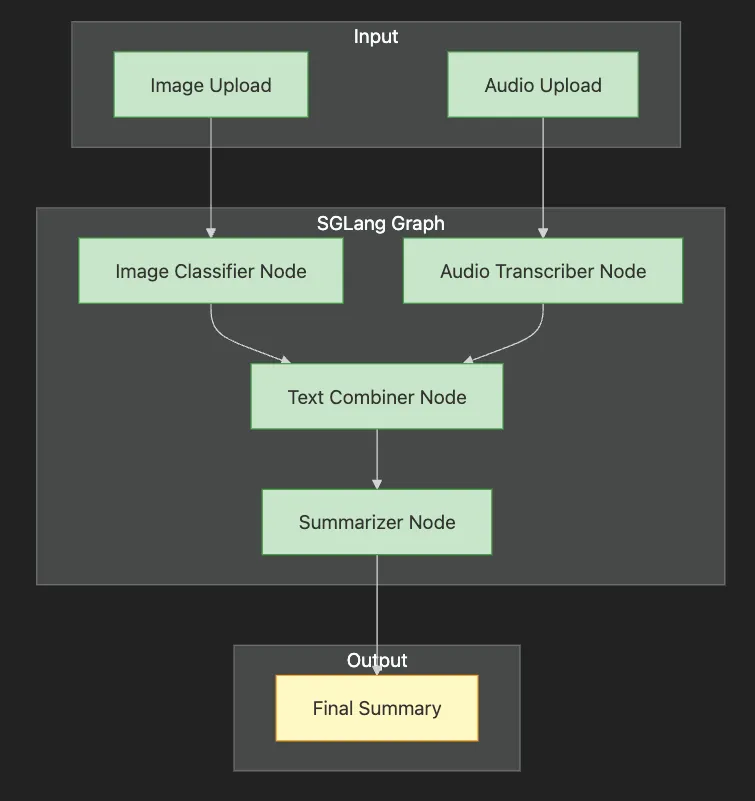
-
Input layer accepts both image and audio uploads
-
SGLang Graph shows four processing nodes in sequence
-
N1 & N2 process inputs in parallel (image classification, audio transcription)
-
N3 combines outputs from both branches
-
N4 summarizes the combined text
-
Output provides final summary to user
-
Quantization Support: SGLang natively supports quantized models (FP8/INT4/AWQ/GPTQ), dramatically reducing memory usage and inference latency — recommended for high-throughput production workloads.
-
Speculative Decoding & RadixAttention: Built-in support for speculative decoding and RadixAttention enables fast, efficient serving of large language models (LLMs) and multimodal transformers.
-
Multi-LoRA Batching: Efficiently serve multiple LoRA adapters in a single deployment, supporting rapid A/B testing and multi-tenant inference.
-
Broader Model Ecosystem: SGLang supports not only Hugging Face models, but also Llama, Gemma, Mistral, DeepSeek, LLaVA, and other leading open-source models.
-
Structured Outputs & Advanced Control Flow: Compose complex graphs with branching, conditional logic, and structured outputs, supporting real-world business logic and integrations.
-
Deploy SGLang pipelines using containerized workflows (e.g., Docker, Kubernetes) for portability and scalability.
-
Integrate with cloud providers (AWS, Azure, GCP) and monitoring tools (Prometheus, Grafana, Datadog) for observability and reliability.
-
For production, enable quantization, batching, and streaming to maximize efficiency and cost savings.
-
Always monitor for updates and review the SGLang documentation for new features and API changes.
import
 sglang
as
 sgl
# Define model functions with quantization enabled
@sgl.function
def

classify_image
(
s, image
):
    s += sgl.image(image)
    s +=
"What type of customer support issue is shown in this image? "
    s +=
"Classify as: error, feature_request, or other.\\n"
    s +=
"Classification: "
 + sgl.gen(
"classification"
, max_tokens=
10
)
@sgl.function
def

transcribe_audio
(
s, audio
):

# In practice, you'd use a speech-to-text model here

# For demo, we'll simulate transcription
    s +=
"Transcribed audio: Customer reporting login issues with error code 403"
@sgl.function
def

summarize_support_request
(
s, image_class, audio_text
):
    s +=
f"Image classification:
{image_class}
\\n"
    s +=
f"Audio transcription:
{audio_text}
\\n"
    s +=
"Please provide a brief summary of this support request:\\n"
    s += sgl.gen(
"summary"
, max_tokens=
100
)
# Create the pipeline
@sgl.function
def

support_pipeline
(
s, image, audio
):

# Process image
    s_img = classify_image.run(image=image)
    image_class = s_img[
"classification"
]

# Process audio
    s_audio = transcribe_audio.run(audio=audio)
    audio_text =
"Customer reporting login issues with error code 403"

# Combine and summarize
    s = summarize_support_request(s, image_class, audio_text)

return
 s
# Runtime configuration with quantization
runtime = sgl.Runtime(
    model_path=
"meta-llama/Llama-2-7b-chat-hf"
,
    quantization=
"awq"
,
# Enable AWQ quantization
    tp_size=
1

# Tensor parallelism size
)
# Set global runtime
sgl.set_default_backend(runtime)
# Example usage
# result = support_pipeline.run(image=user_image, audio=user_audio)
# print(result["summary"])
- Model Functions: Each
@sgl.functiondefines a processing step with clear inputs and outputs. - Quantization: The runtime uses AWQ quantization for memory efficiency.
- Pipeline Composition: The
support_pipelineorchestrates the flow between models. - Structured Generation:
sgl.gen()provides controlled text generation with token limits.
# Launch server with your pipeline
python

-m

sglang.launch_server

\\\\

--model-path

meta-llama/Llama-2-7b-chat-hf

\\\\

--port

8080

\\\\

--quantization

awq
# For containerized deployment, build a Docker image and run in Kubernetes as needed.
-
Vision Transformers (ViT, DeiT, Swin): Treat images as sequences of patches (like words), using self-attention to capture patterns and context. Newer variants like DeiT (Data-efficient Image Transformers) and Swin Transformer bring greater efficiency and scalability, making vision transformers practical for large-scale and real-time applications. Example: Detecting defects in manufacturing or moderating images on social media.
-
Audio Transformers (Wav2Vec 2.0, Whisper, SeamlessM4T): Learn from raw audio for speech-to-text, multilingual speech recognition, and sound classification. Whisper and SeamlessM4T offer robust, multilingual, and highly accurate audio processing. Example: Analyzing customer calls or powering accessibility tools.
-
Load state-of-the-art models in a few lines of code
-
Fine-tune models for your own data
-
Experiment with the latest generative AI (such as SDXL and Stable Diffusion 3)
from
 transformers
import
 AutoProcessor, AutoModelForImageClassification
from
 PIL
import
 Image
import
 requests
# 1. Load an image from the web
url =
"<https://huggingface.co/datasets/huggingface/documentation-images/resolve/main/transformers/tasks/image_classification_parrots.png>"
image = Image.
open
(requests.get(url, stream=
True
).raw)
# 2. Load pre-trained ViT model and processor using Auto classes
processor = AutoProcessor.from_pretrained(
'google/vit-base-patch16-224'
)
model = AutoModelForImageClassification.from_pretrained(
'google/vit-base-patch16-224'
)
# 3. Preprocess the image and predict the class
inputs = processor(images=image, return_tensors=
"pt"
)
outputs = model(**inputs)
predicted_class = outputs.logits.argmax(-
1
).item()
print
(
"Predicted class:"
, model.config.id2label[predicted_class])
- Image Loading: Download and open an image.
- Model & Processor: Fetch a pre-trained ViT model and its processor from Hugging Face, using
AutoProcessorandAutoModelForImageClassificationfor future-proofing. - Prediction: Preprocess the image and predict its label.
- CLIP and its variants (SigLIP, ImageBind): Link images and text, enabling searches like “find all images of cats.”
- BLIP-2, LLaVA, IDEFICS: State-of-the-art models for tasks like image captioning, visual question answering, and cross-modal reasoning.
- Diffusion models (e.g., SDXL, Stable Diffusion 3, PixArt-α): Generate new images from text prompts with improved quality, speed, and flexibility.
from transformers import AutoProcessor, AutoModel
from PIL import Image
# 1. Load CLIP model and processor using Auto classes
model = AutoModel.from_pretrained(
"openai/clip-vit-base-patch16"
)
processor = AutoProcessor.from_pretrained(
"openai/clip-vit-base-patch16"
)
# 2. Prepare images and text queries
images = [Image.open(
"cat.jpg"
), Image.open(
"dog.jpg"
)]
# Replace with your own images
texts = [
"a photo of a cat"
,
"a photo of a dog"
]
# 3. Compute similarity between images and text
inputs = processor(text=texts, images=images, return_tensors=
"pt"
, padding=True)
outputs = model(**inputs)
logits_per_image = outputs.logits_per_image
# Higher = better match
probs = logits_per_image.softmax(dim=1)
# Probabilities for each text-image pair
print("Probabilities:", probs)
- Load CLIP and processor from Hugging Face, using
AutoModelandAutoProcessorfor compatibility with future models. - Inputs: Provide images and text descriptions.
- Processing: Model computes how well each image matches each description.
- Output: Probabilities indicate the best match.
-
Transformers now power vision, audio, and multimodal AI, not just text.
-
Hugging Face makes advanced models easy to use, fine-tune, and deploy — with APIs that future-proof your code.
-
Modern vision (DeiT, Swin, state-space models) and audio (Whisper, SeamlessM4T) transformers set new standards for efficiency and accuracy.
-
Multimodal models (like CLIP, BLIP-2, LLaVA, ImageBind) connect text, images, audio, and more for smarter search and creative tools.
-
SGLang and Hugging Face deployment tools bridge the gap from prototype to scalable, production-ready AI pipelines.
-
ViT, DeiT, Swin: For image understanding and classification.
-
Wav2Vec 2.0, Whisper, SeamlessM4T: For speech recognition and audio analytics.
-
Diffusion Models (SDXL, Stable Diffusion 3, PixArt-α): For generative AI — creating images from text.
-
CLIP, BLIP-2, LLaVA, ImageBind: For connecting and understanding text, images, and more.
-
SGLang: For deploying and scaling these capabilities in real systems.
-
Vision Transformers (ViT, DeiT, Swin) for image classification and analysis
-
Audio processing with Wav2Vec 2.0 and Whisper for speech recognition
-
Generative AI with Stable Diffusion XL for text-to-image generation
-
Multimodal models like CLIP and BLIP for cross-modal search and understanding
-
Building multimodal search engines and applications
-
Production deployment with SGLang
-
Python 3.12 (managed via pyenv).
-
Poetry for dependency management.
-
Go Task for build automation.
-
GPU recommended (but CPU mode supported)
-
(Optional) Hugging Face account for accessing gated models
- Clone this repository
git
clone
 [email protected]:RichardHightower/art_hug_07.git
task setup
task download-samples
.
├── src/
│   ├── __init__.py
│   ├── config.py
# Configuration and utilities
│   ├── main.py
# Entry point with all examples
│   ├── vision_transformers.py
# ViT, DeiT, Swin implementations
│   ├── audio_processing.py
# Wav2Vec2, Whisper examples
│   ├── diffusion_models.py
# Stable Diffusion XL generation
│   ├── multimodal_models.py
# CLIP, BLIP cross-modal search
│   ├── multimodal_search.py
# Building search applications
│   ├── sglang_deployment.py
# Production deployment examples
│   └── gradio_app.py
# Interactive web interface
├── tests/
│   └── test_multimodal.py
# Unit tests
├── notebooks/
│   ├── vision_exploration.ipynb
# Interactive vision examples
│   └── multimodal_search.ipynb
# Search engine tutorial
├── data/
│   ├── images/
# Sample images
│   └── audio/
# Sample audio files
├── outputs/
# Generated images and results
├── .env.example
# Environment template
├── Taskfile.yml
# Task automation
└── pyproject.toml
# Poetry configuration
task run
task run-vision
# Vision transformer examples
task run-audio
# Audio processing examples
task run-diffusion
# Image generation with SDXL
task run-multimodal
# CLIP/BLIP multimodal examples
task run-search
# Multimodal search engine
task run-sglang
# SGLang deployment demo
task gradio
-
Vision Transformers: How ViT, DeiT, and Swin process images as patches
-
Audio Transformers: End-to-end speech recognition with Whisper
-
Diffusion Models: Generate images from text with SDXL
-
Cross-Modal Understanding: CLIP and BLIP for connecting text and images
-
Production Deployment: Using SGLang for scalable multimodal pipelines
-
Image Classification: Classify images using state-of-the-art vision transformers
-
Speech-to-Text: Transcribe audio in multiple languages
-
Text-to-Image: Generate creative images from prompts
-
Multimodal Search: Find images using natural language queries
-
Production Pipeline: Deploy chained models with SGLang
-
Vision: ViT, DeiT, Swin Transformer
-
Audio: Wav2Vec 2.0, Whisper
-
Generation: Stable Diffusion XL
-
Multimodal: CLIP, BLIP, BLIP-2, LLaVA
-
task setup- Set up Python environment and install dependencies -
task run- Run all examples -
task test- Run unit tests -
task format- Format code with Black and Ruff -
task clean- Clean up generated files and outputs -
task download-samples- Download sample images and audio -
task gradio- Launch interactive web interface -
task notebook- Launch Jupyter notebook server -
CUDA GPU: Fastest performance
-
MPS (Apple Silicon): Good performance on Mac
-
CPU: Slower but functional
-
Out of Memory: Try smaller models or enable CPU offloading
-
Slow Generation: Use GPU or reduce image resolution
-
Model Download: First run downloads several GB of models
-
Audio Issues: Ensure audio files are 16kHz mono WAV
- Hugging Faces Transformers and the AI Revolution (Article 1)
- Hugging Faces: Why Language is Hard for AI? How Transformers Changed that (Article 2)
- Hands-On with Hugging Face: Building Your AI Workspace (Article 3)
- Inside the Transformer: Architecture and Attention Demystified (Article 4)
- Tokenization: The Gateway to Transformer Understanding (Article 5)
- Prompt Engineering (Article 6)