Is MCP Dead? The Context Crisis That Broke Naive Tool Loading. Agent Skills vs. MCP vs. CLI
Navigating the Challenges of MCP: From Adoption to Context Management. Did Agent Skills and CLI kill MCP?
Originally published on Medium.
Navigating the Challenges of MCP: From Adoption to Context Management. Did Agent Skills and CLI kill MCP?
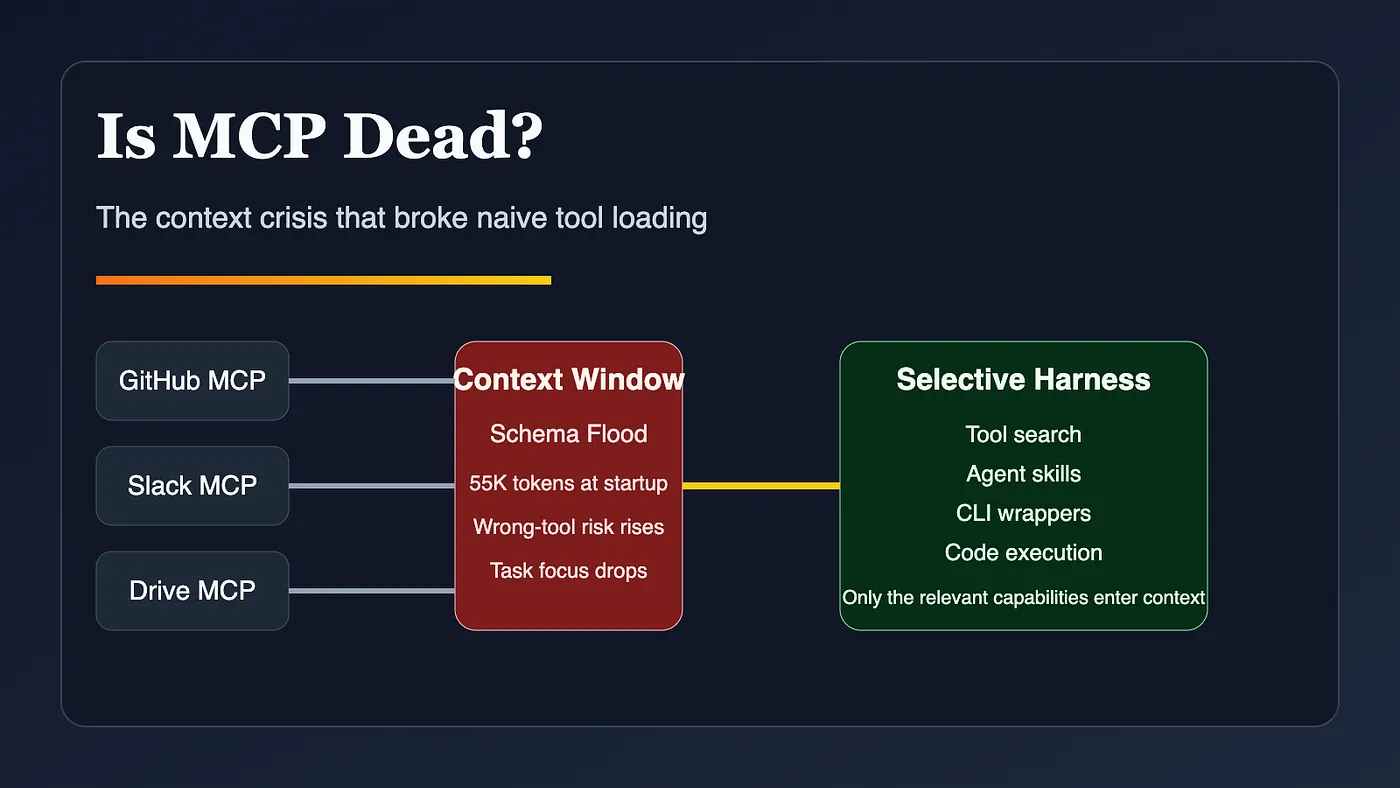 AI Agents MCP context crisis: too many servers flood the context window while a selective harness keeps the working set small
Is the Model Context Protocol (MCP) really dead? Dive into the architectural evolution that reshaped AI tooling, the pitfalls of naive tool loading, and discover why the future of AI agents is brighter than ever. Don’t miss this critical analysis of the context crisis that transformed the game! Read more here!
- Anthropic open-sourced MCP on November 25, 2024 (Anthropic, November 25, 2024).
- Google Cloud put MCP into its database toolbox on April 22, 2025 (Google Cloud, April 22, 2025).
- OpenAI added remote MCP server support to the Responses API on May 21, 2025 (OpenAI, May 21, 2025).
- Google launched Gemini CLI with built-in MCP support on June 25, 2025 (Google, June 25, 2025).
- By December 9, 2025, Anthropic said MCP had already been adopted by ChatGPT, Cursor, Gemini, Microsoft Copilot, and Visual Studio Code, with more than 10,000 active public MCP servers (Anthropic, December 9, 2025).
Anthropic says it had seen tool definitions consume 134K tokens before optimization (Anthropic, November 24, 2025).
- More startup tokens burned before work begins
- More ambiguity during tool selection
- More chances to choose the wrong tool or wrong parameters
- More irrelevant intermediate results entering the window
- Less working room for the code, logs, requirements, and constraints that actually matter
The model is not just “holding” the tool list. It is reasoning over it.
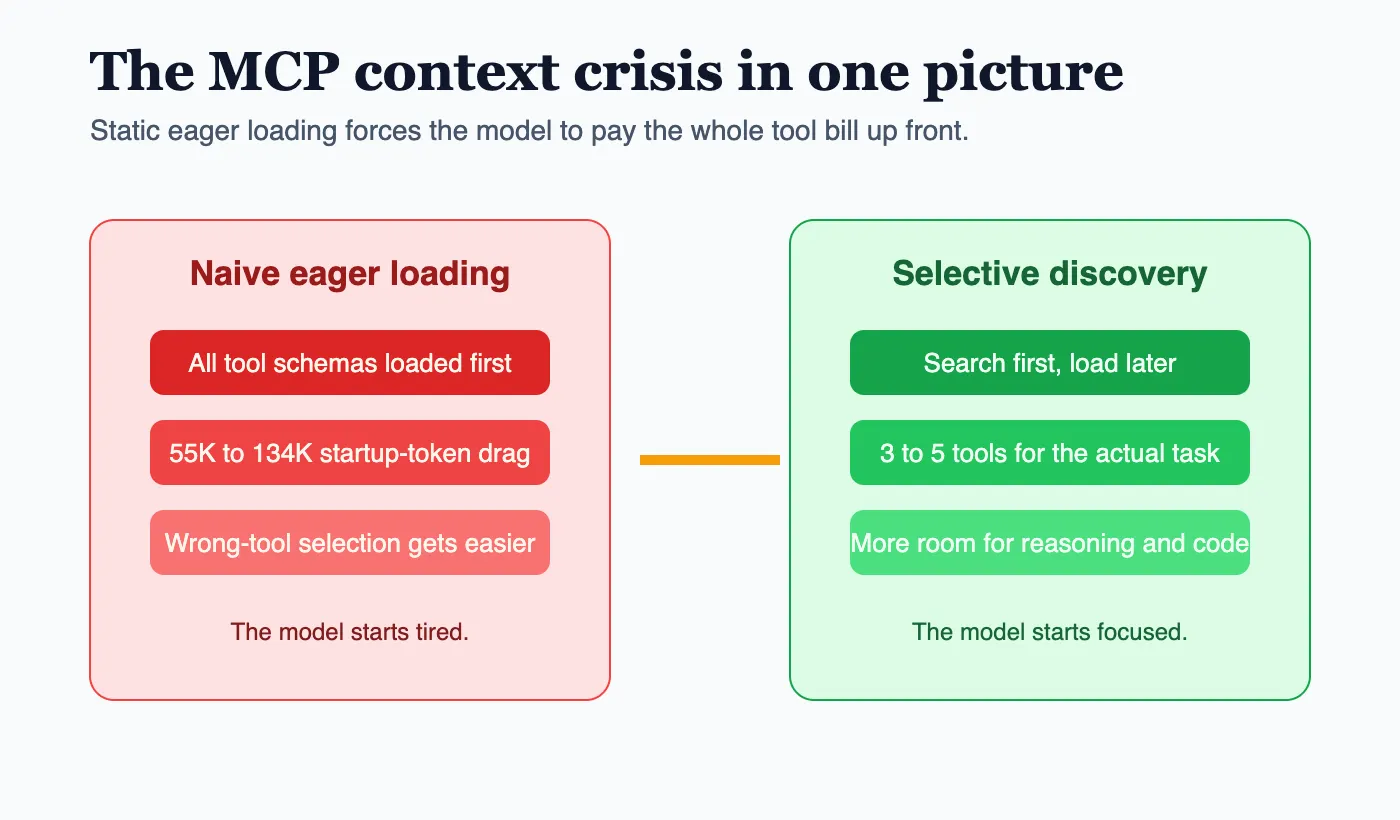 AI Agents startup context comparison: eager loading burns startup tokens while tool search keeps the visible toolset narrow
-
A command surface humans already trust
-
Built-in help and discoverability through
--help, manuals, and examples -
A place to filter, aggregate, or transform data before it ever reaches the model
-
when to use the CLI
-
which commands are safe
-
which outputs to filter
-
which scripts to run first
-
what success looks like
-
release procedures
-
incident response playbooks
-
PR review workflows
-
deployment checklists
-
codebase-specific build and test sequences
-
internal research routines
-
use MCP when you need shared, authenticated, standardized access to remote systems
-
use skills when you need workflow memory, behavioral guidance, or bundled scripts
-
use CLIs when the operational surface already exists and the shell is the most efficient front door
-
Traditional large-tool setup: about 77K tokens consumed before real work begins
-
Tool Search Tool setup: about 8.7K total context consumption
-
Savings: about 85%
-
Context preserved: about 95% of the window
The answer to large tool libraries is not “never use MCP.”
The answer is “stop treating discovery like a startup event.”
-
keep a small always-visible surface
-
expose the high-frequency operations directly
-
let deeper functionality load only when needed
-
standard connectivity
-
uniform authorization
-
attached documentation
-
reusable server contracts
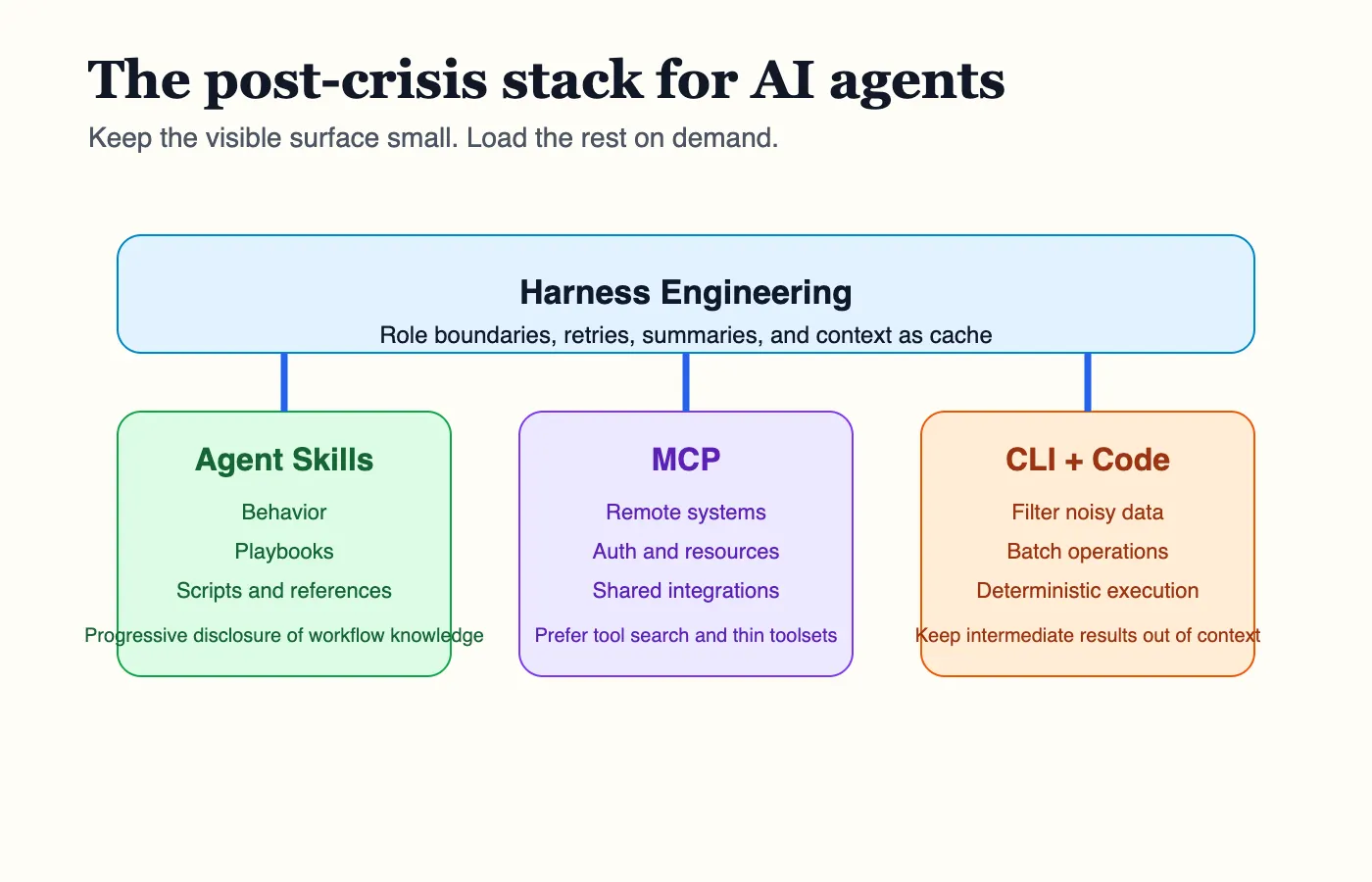 Agentic AI hybrid harness stack: Agent Skills guide behavior, MCP handles remote systems, and CLI plus code keeps noisy data out of context
-
Use MCP for remote systems that genuinely need standardized auth, shared reuse, or rich resource access.
-
Put large or noisy tool surfaces behind search, toolsets, or code-execution front doors.
-
Use Agent Skills for workflow logic, domain playbooks, operational habits, and bundled scripts.
-
Reach for CLIs when the shell already gives you a mature operational interface and the task is mostly procedural.
-
Partition agents by job, not by ego. Research agent. GitHub agent. Deployment agent. Workspace admin agent. Not one giant universal assistant with everything attached.
-
Treat context as cache. Anything that can live in a file, script, summary, or execution environment should not sit in the hot path by default.
-
eager-loading entire server catalogs
-
exposing every tool to every agent
-
sending intermediate junk back through the model
-
assuming larger windows erase attention problems
-
confusing interoperability with good harness design
-
MCP for standard integration
-
Tool Search for discovery
-
Code execution for orchestration
-
Skills for behavior
-
CLIs for proven operational surfaces
-
harnesses that keep each AI agent narrow, sharp, and accountable
Strong AI agents are not the ones that see everything.
They are the ones that see the right thing at the right moment, and nothing else gets to waste the window.
-
Anthropic’s Harness Engineering: Two Agents, One Feature List, Zero Context Overflow
-
Agent-Browser: AI-First Browser Automation That Saves 93% of Your Context Window
-
Claude Code: How to Build, Evaluate, and Tune AI Agent Skills
-
Beyond the AI Coding Hangover: How Harness Engineering Prevents the Next Outage
-
CCA Exam Prep: Mastering the Multi-Agent Research System Scenario
-
Anthropic: Donating the Model Context Protocol and establishing the Agentic AI Foundation
-
Anthropic: Code execution with MCP: building more efficient AI agents
-
Anthropic: Introducing advanced tool use on the Claude Developer Platform
-
Anthropic / Claude: Equipping agents for the real world with Agent Skills
-
Google Cloud Blog: MCP Toolbox for Databases: Simplify AI Agent Access to Enterprise Data
-
GitHub Changelog: The GitHub MCP Server adds support for tool-specific configuration, and more
-
Stanford / TACL: Lost in the Middle: How Language Models Use Long Contexts