LangExtract: Multi-Provider NLP Extraction with Gemini, OpenAI, Claude, and Local Models
Turn unstructured text into clean, structured data using Google's LangExtract library with your choice of LLM provider.
Originally published on Medium.

Turn unstructured text into clean, structured data using Google's LangExtract library with your choice of LLM provider.
Unlock the power of unstructured data with LangExtract! Discover how this innovative tool leverages multi-provider NLP extraction to transform your text into structured insights, ensuring traceability and enhanced accuracy. Ready to revolutionize your data pipelines? Dive into this article for all the details! #NLP #DataScience #LangExtract
LangExtract is an open-source Python library that transforms unstructured text into structured data using various large language models (LLMs) like Google's Gemini, OpenAI's GPT-4o, and Anthropic's Claude. It offers a grounded extraction approach, linking extracted elements to their source text locations, which is crucial for compliance. The library supports multiple LLM providers, allowing users to choose based on cost, performance, and privacy needs. It is recommended for domain-specific entity extraction, while traditional NLP tools like spaCy are better for standard entities and high-volume processing. LangExtract also facilitates local model deployment for enhanced data privacy.
The Structured Data Challenge
Every data pipeline eventually hits the same wall: unstructured text. Customer support tickets arrive as free-form narratives. Clinical notes contain critical information buried in paragraphs. Legal contracts hide key terms in dense prose. Traditional approaches using regex patterns and rule-based systems break down when text varies even slightly from expected formats.
LangExtract, an open-source Python library released by Google in August 2025, solves this problem by leveraging large language models for information extraction. What sets it apart from other LLM-based tools is its grounded extraction approach. Every extracted element links directly to its exact location in the source text, providing the traceability that production systems require.
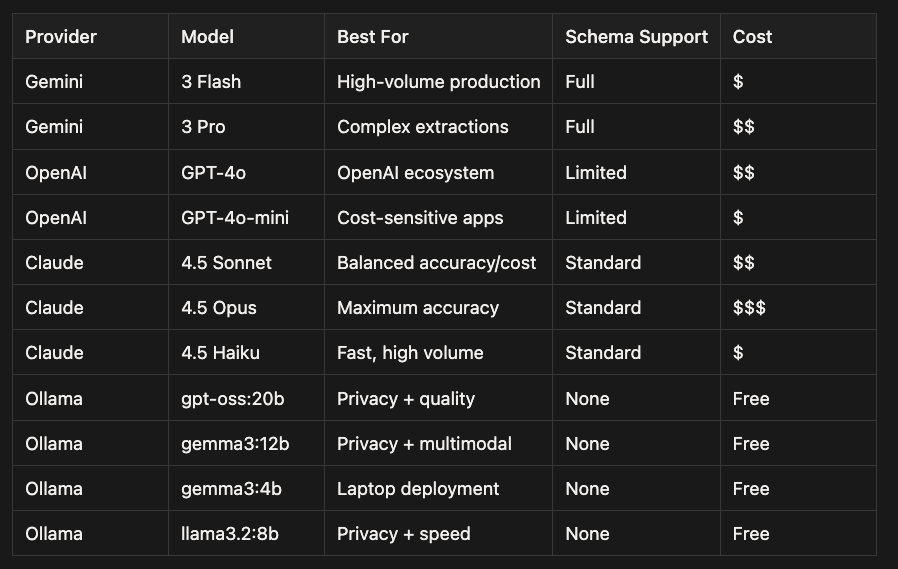
The library supports multiple LLM providers out of the box: Google's Gemini 3 models, OpenAI's GPT-4o and gpt-oss, Anthropic's Claude 4.5 series, and local models via Ollama. This flexibility lets you choose the right model for your cost, performance, and privacy requirements.
LangExtract vs Traditional NLP: When to Use Each
Before diving into LangExtract, consider whether you need it at all. Traditional NLP libraries like spaCy, Hugging Face Transformers, and PyTorch-based tools handle many extraction tasks at a fraction of the cost.
Cost and Performance Comparison
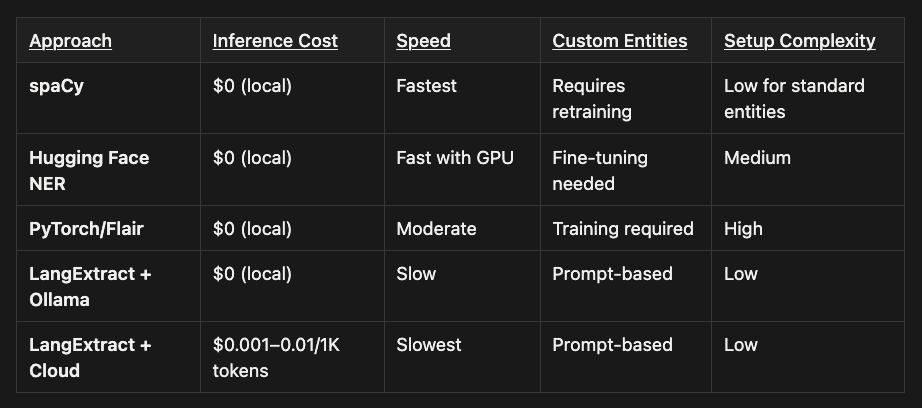 $0 if you have the hardware otherwise there is the cost of the hardware or cloud compute, but small compared to LLM usually
- spaCy: Free local inference, fastest speed, requires retraining for custom entities, low setup complexity for standard entities
- Hugging Face NER: Free local inference, fast with GPU acceleration, needs fine-tuning for custom entities, medium setup complexity
- PyTorch/Flair: Free local inference, moderate speed, requires training for custom entities, high setup complexity
- LangExtract + Ollama: Free local inference, slower speed, prompt-based custom entities (no training needed), low setup complexity
- LangExtract + Cloud: $0.001--0.01 per 1K tokens, slowest speed, prompt-based custom entities (no training needed), low setup complexity
When to Choose Traditional NLP
Use spaCy or Hugging Face when:
- Extracting standard entities (PERSON, ORG, LOCATION, DATE)
- Processing high volumes (millions of documents)
- Running on a budget with no API costs
- Latency requirements are strict (sub-100ms)
- Entity types are stable and well-defined
# spaCy example - fast and free for standard NER
import spacy
nlp = spacy.load("en_core_web_trf")
doc = nlp("Sarah Chen, CTO of Acme Corp, met with investors in Seattle.")
for ent in doc.ents:
    print(f"{ent.label_}: {ent.text}")
# Output: PERSON: Sarah Chen, ORG: Acme Corp, GPE: Seattle
When to Choose LangExtract
Use LangExtract when:
- Entity types are domain-specific or change frequently
- You need attributes on entities (role, sentiment, urgency)
- Source traceability is required for compliance
- Traditional NER misses context-dependent entities
- You lack labeled training data for fine-tuning
# LangExtract - handles custom entities with attributes
# "laptop with flickering screen" -> product_issue with severity attribute
# No training data needed, just examples
How LangExtract Works
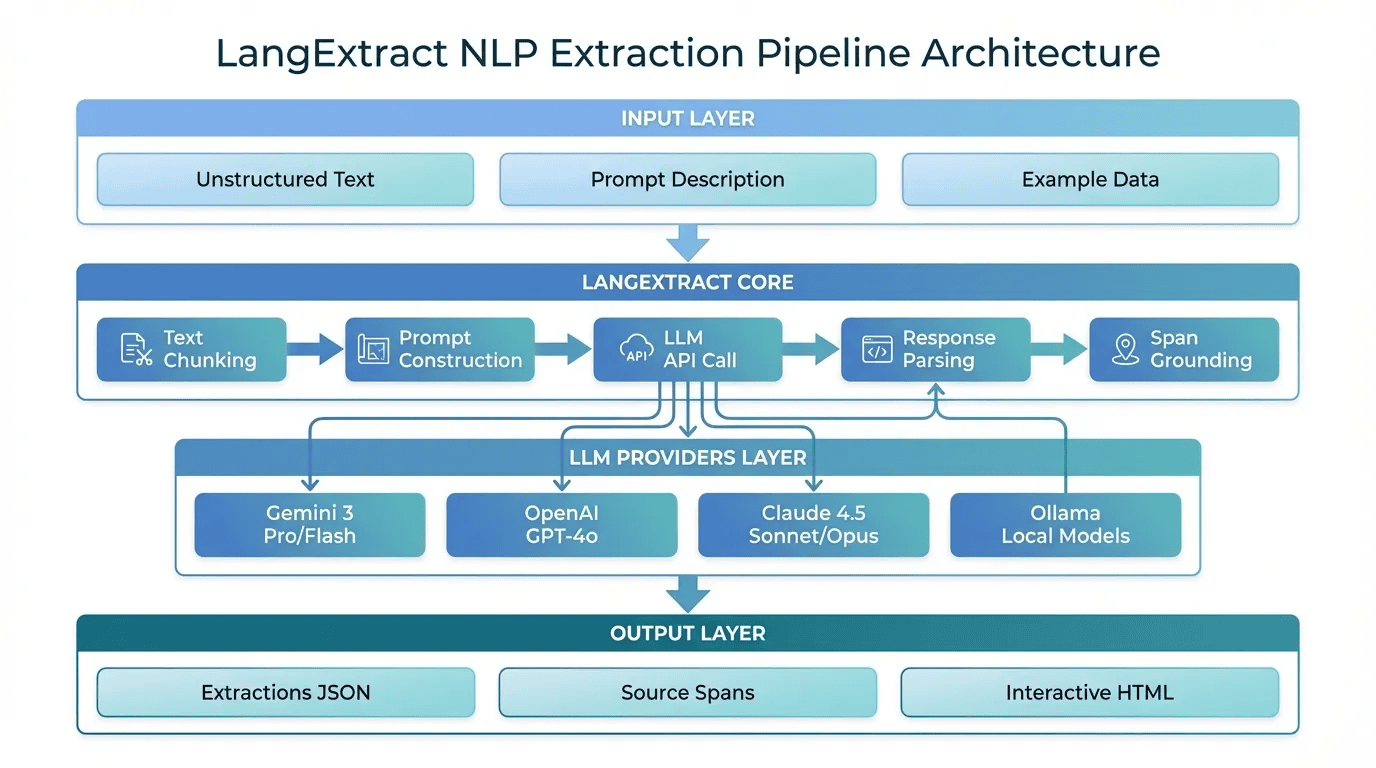 LangExtract Architecture -- Pipeline from input to structured output
LangExtract handles the complexity of chunking long documents, constructing effective prompts, and grounding extractions back to source spans. You provide the extraction schema through natural language and examples.
Getting Started
Installation
# Base installation (Gemini support)
pip install langextract

# With OpenAI support
pip install langextract[openai]

# For Anthropic Claude, base installation works with API key
API Key Configuration
# For Gemini (Google AI Studio or Vertex AI)
export GOOGLE_API_KEY="your-gemini-key"

# For OpenAI
export OPENAI_API_KEY="your-openai-key"

# For Anthropic Claude
export ANTHROPIC_API_KEY="your-anthropic-key"

# For Ollama - no API key needed, just run the server
ollama serve
Named Entity Recognition with LangExtract
Defining Your Extraction Schema
import textwrap
import langextract as lx

prompt = textwrap.dedent("""
    Extract people, organizations, and locations in order of appearance.

    For each entity:
    - Use the exact text from the source (no paraphrasing)
    - Add relevant attributes (role, type, context)
    - Do not create overlapping extractions
""")
Creating Training Examples
examples = [
    lx.data.ExampleData(
        text="Sarah Chen, CTO of Acme Corp in Seattle, announced the merger with TechStart in Austin.",
        extractions=[
            lx.data.Extraction(
                extraction_class="person",
                extraction_text="Sarah Chen",
                attributes={"role": "CTO"}
            ),
            lx.data.Extraction(
                extraction_class="organization",
                extraction_text="Acme Corp",
                attributes={"type": "employer"}
            ),
            lx.data.Extraction(
                extraction_class="location",
                extraction_text="Seattle",
                attributes={"context": "headquarters"}
            ),
            lx.data.Extraction(
                extraction_class="organization",
                extraction_text="TechStart",
                attributes={"type": "acquisition_target"}
            ),
            lx.data.Extraction(
                extraction_class="location",
                extraction_text="Austin",
                attributes={"context": "target_location"}
            ),
        ],
    )
]
Running the Extraction
input_text = """
Marcus Williams, VP of Engineering at DataFlow Inc in Boston,
met with representatives from CloudScale in San Francisco to discuss
the upcoming integration project. Jennifer Park from CloudScale
will lead the technical implementation.
"""

result = lx.extract(
    text_or_documents=input_text,
    prompt_description=prompt,
    examples=examples,
    model_id="gemini-3-flash-preview"
)

for extraction in result.extractions:
    print(f"{extraction.extraction_class}: {extraction.extraction_text}")
    print(f"  Attributes: {extraction.attributes}")
    print(f"  Source span: {extraction.start_index}-{extraction.end_index}")
The start_index and end_index fields let you highlight exactly where each extraction came from. This grounding makes LangExtract suitable for compliance-sensitive applications.
Keyword Extraction
keyword_prompt = textwrap.dedent("""
    Extract key topics, technical terms, and action items from the text.

    For each keyword:
    - Classify as: topic, technical_term, action_item, or metric
    - Add urgency level for action items (high, medium, low)
    - Add category for technical terms
""")

keyword_examples = [
    lx.data.ExampleData(
        text="We need to migrate the PostgreSQL database to Aurora by Q2. The API latency is currently at 200ms.",
        extractions=[
            lx.data.Extraction(
                extraction_class="action_item",
                extraction_text="migrate the PostgreSQL database to Aurora",
                attributes={"urgency": "high", "deadline": "Q2"}
            ),
            lx.data.Extraction(
                extraction_class="technical_term",
                extraction_text="PostgreSQL",
                attributes={"category": "database"}
            ),
            lx.data.Extraction(
                extraction_class="metric",
                extraction_text="200ms",
                attributes={"metric_type": "latency", "component": "API"}
            ),
        ],
    )
]
Comparing LLM Providers
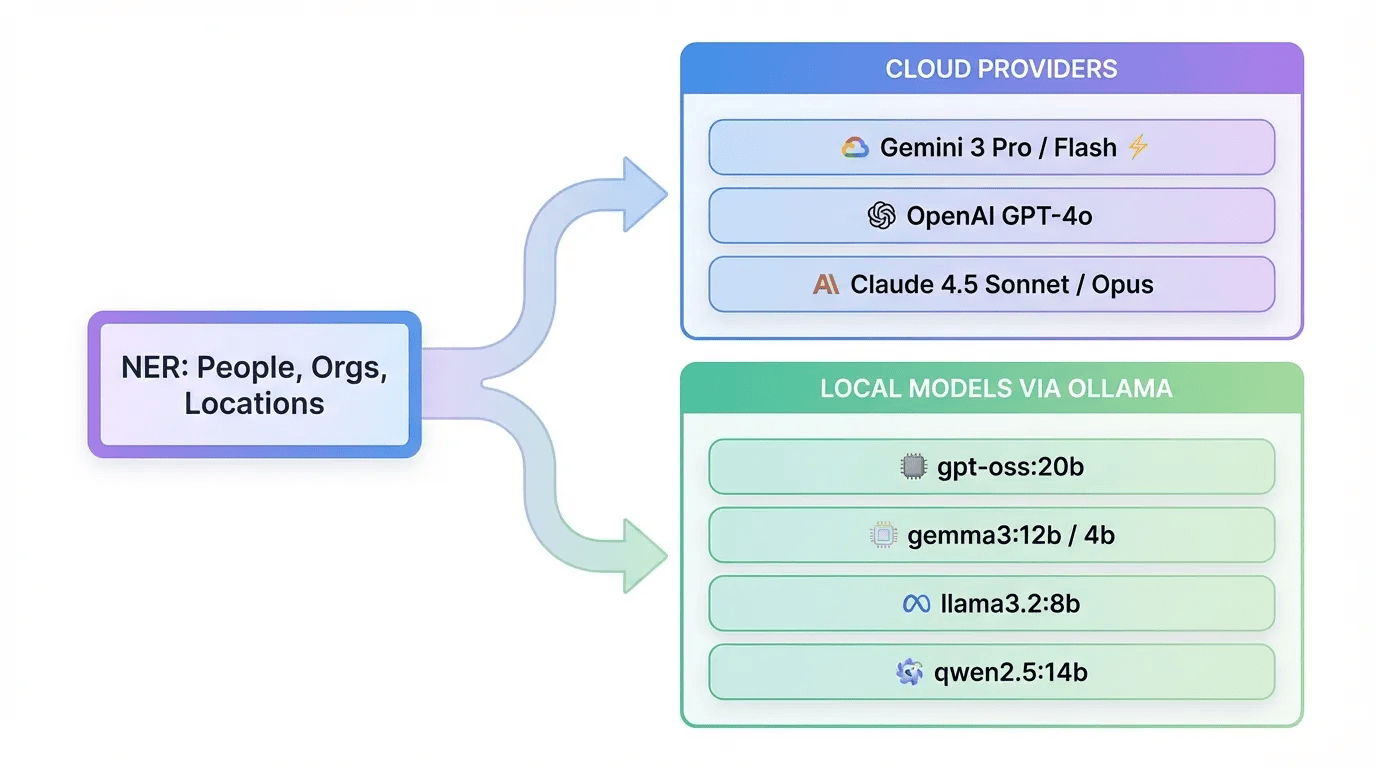 LLM Provider Comparison -- Cloud and Local Options
Gemini 3 Pro and Flash
Google's Gemini models offer the best schema constraint support and are the default choice:
# Gemini 3 Flash: Fast and cost-effective
result = lx.extract(
    text_or_documents=input_text,
    prompt_description=prompt,
    examples=examples,
    model_id="gemini-3-flash-preview"
)

# Gemini 3 Pro: Higher accuracy for complex extractions
result = lx.extract(
    text_or_documents=input_text,
    prompt_description=prompt,
    examples=examples,
    model_id="gemini-3-pro-preview"
)
OpenAI GPT-4o
OpenAI integration requires specific parameters:
import os

# GPT-4o: Strong general-purpose extraction
result = lx.extract(
    text_or_documents=input_text,
    prompt_description=prompt,
    examples=examples,
    model_id="gpt-4o",
    api_key=os.environ.get('OPENAI_API_KEY'),
    fence_output=True,            # Required for OpenAI
    use_schema_constraints=False  # Schema constraints not supported
)

# GPT-4o-mini: Cost-effective for simpler extractions
result = lx.extract(
    text_or_documents=input_text,
    prompt_description=prompt,
    examples=examples,
    model_id="gpt-4o-mini",
    fence_output=True,
    use_schema_constraints=False
)
Claude 4.5 (Anthropic)
Claude 4.5 models provide excellent reasoning capabilities:
# Claude 4.5 Sonnet: Balanced performance and cost
result = lx.extract(
    text_or_documents=input_text,
    prompt_description=prompt,
    examples=examples,
    model_id="claude-4-5-sonnet"
)

# Claude 4.5 Opus: Maximum capability for complex documents
result = lx.extract(
    text_or_documents=input_text,
    prompt_description=prompt,
    examples=examples,
    model_id="claude-opus-4-5"
)

# Claude 4.5 Haiku: Fast and affordable for high volume
result = lx.extract(
    text_or_documents=input_text,
    prompt_description=prompt,
    examples=examples,
    model_id="claude-haiku-4-5"
)
Local Models with Ollama
Running models locally eliminates API costs and keeps data private. Ollama provides an easy way to run open-source models.
Setting Up Ollama
# Install Ollama
curl -fsSL https://ollama.com/install.sh | sh

# Pull models for extraction tasks
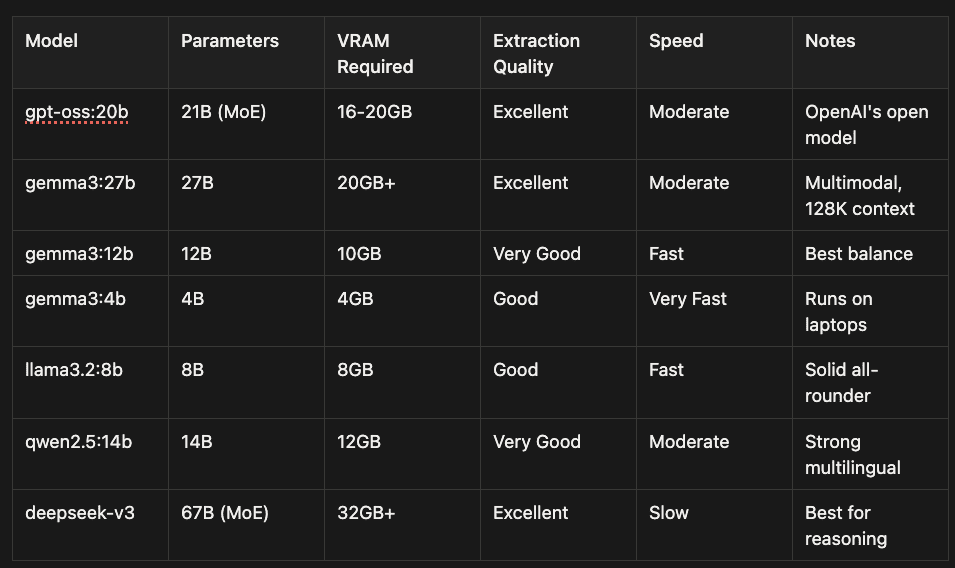
ollama pull gpt-oss:20b      # OpenAI's open model, best quality
ollama pull gemma3:27b       # Google's Gemma 3, multimodal, 128K context
ollama pull gemma3:12b       # Gemma 3 medium, good balance
ollama pull gemma3:4b        # Gemma 3 small, runs on laptops
ollama pull llama3.2:8b      # Meta's Llama, solid performance
ollama pull qwen2.5:14b      # Alibaba's Qwen, strong multilingual
ollama pull deepseek-v3      # DeepSeek, excellent for code/reasoning
# Start the server
ollama serve
Using Local Models with LangExtract
import langextract as lx

# OpenAI's gpt-oss:20b - Best local quality
# 21B MoE model, runs on 16GB+ VRAM
result = lx.extract(
    text_or_documents=input_text,
    prompt_description=prompt,
    examples=examples,
    model_id="gpt-oss:20b",
    model_url="http://localhost:11434",
    fence_output=False,
    use_schema_constraints=False
)
# Llama 3.2 - Good balance of speed and quality
result = lx.extract(
    text_or_documents=input_text,
    prompt_description=prompt,
    examples=examples,
    model_id="llama3.2:8b",
    model_url="http://localhost:11434",
    fence_output=False,
    use_schema_constraints=False
)
# Gemma 3 - Google's latest, multimodal, 128K context
result = lx.extract(
    text_or_documents=input_text,
    prompt_description=prompt,
    examples=examples,
    model_id="gemma3:12b",
    model_url="http://localhost:11434",
    fence_output=False,
    use_schema_constraints=False
)
# Gemma 3 4B - Runs on laptops with 8GB RAM
result = lx.extract(
    text_or_documents=input_text,
    prompt_description=prompt,
    examples=examples,
    model_id="gemma3:4b",
    model_url="http://localhost:11434",
    fence_output=False,
    use_schema_constraints=False
)
Local Model Comparison
When to Use Local Models
Choose local models when:
- Data privacy is critical (healthcare, legal, finance)
- You have consistent high-volume extraction needs
- API costs would exceed hardware investment
- Internet connectivity is unreliable
- You need predictable latency without rate limits
Stick with cloud APIs when:
- Extraction volume is sporadic
- You need the latest model capabilities immediately
- Hardware investment isn't justified
- You want managed infrastructure
Provider Selection Guide
Knowledge Distillation: Train Cheaper Models from LangExtract Output
One of the most powerful patterns is to use LangExtract to generate labeled training data, then train a traditional NLP model for production inference. This gives you the best of both worlds: LLM-quality labels without the LLM inference cost.
The Distillation Workflow
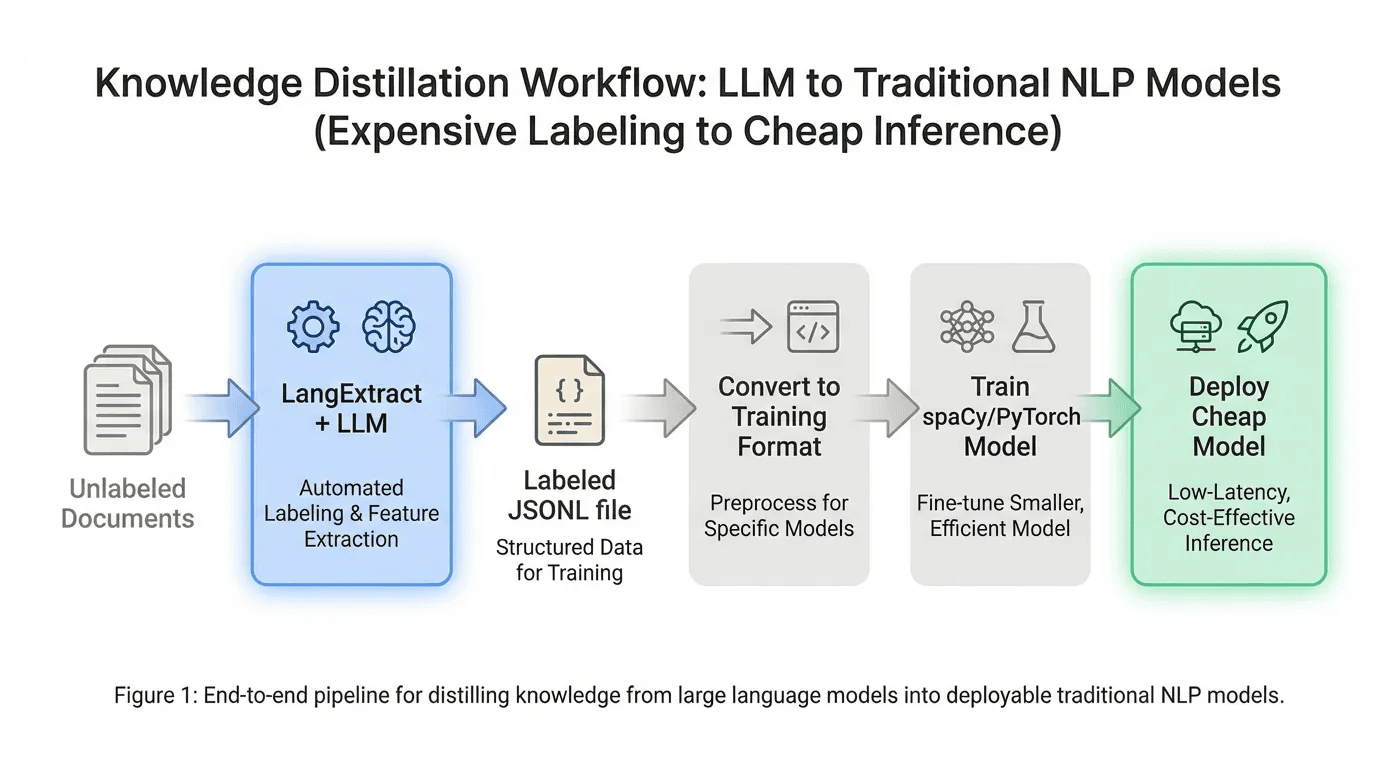 Knowledge Distillation -- From LLM Labels to Cheap Inference
Cost comparison:
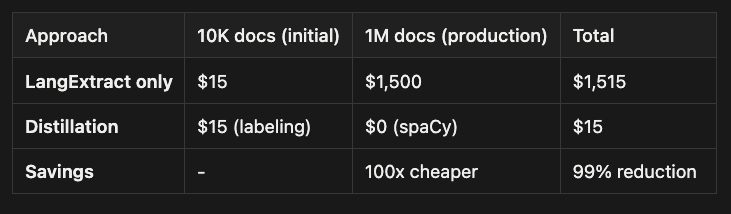
- LangExtract labeling: ~$10--50 for 10,000 documents (one-time)
- spaCy inference: $0 forever, 10,000x faster
Step 1: Generate Labels with LangExtract
import langextract as lx
import json

# Process your corpus
documents = load_your_documents()  # List of text strings

result = lx.extract(
    text_or_documents=documents,
    prompt_description=prompt,
    examples=examples,
    model_id="gemini-3-flash-preview",  # Or gpt-oss:20b locally
    max_workers=10
)

# Save as JSONL for training
lx.save_results(result, "labeled_data.jsonl")
Step 2: Convert to spaCy Training Format
import srsly
import spacy
from pathlib import Path
from spacy.tokens import DocBin

def langextract_to_spacy(jsonl_path: Path, output_path: Path):
    """Convert LangExtract output to spaCy binary training format."""
    nlp = spacy.blank("en")
    db = DocBin()

    data = list(srsly.read_jsonl(jsonl_path))

    for item in data:
        text = item["text"]
        doc = nlp.make_doc(text)

        # Convert LangExtract extractions to spaCy entities
        ents = []
        for extraction in item.get("extractions", []):
            start = extraction["start_index"]
            end = extraction["end_index"]
            label = extraction["extraction_class"].upper()

            span = doc.char_span(start, end, label=label, alignment_mode="contract")
            if span:
                ents.append(span)

        # Filter overlapping spans
        doc.ents = spacy.util.filter_spans(ents)
        db.add(doc)

    db.to_disk(output_path)
    print(f"Saved {len(db)} docs to {output_path}")

# Usage
langextract_to_spacy(Path("labeled_data.jsonl"), Path("train.spacy"))
Step 3: Train spaCy Model
# Generate training config
spacy init config config.cfg --lang en --pipeline ner

# Train the model
spacy train config.cfg \
    --paths.train ./train.spacy \
    --paths.dev ./dev.spacy \
    --output ./custom_ner_model
PyTorch/Transformers Alternative
For higher accuracy, fine-tune a transformer model:
from transformers import AutoTokenizer, AutoModelForTokenClassification
from transformers import Trainer, TrainingArguments
import torch

def langextract_to_transformers(jsonl_path):
    """Convert to Hugging Face NER format."""
    data = list(srsly.read_jsonl(jsonl_path))

    examples = []
    for item in data:
        tokens = item["text"].split()
        labels = ["O"] * len(tokens)

        for ext in item.get("extractions", []):
            # Map character spans to token indices
            text_before = item["text"][:ext["start_index"]]
            token_start = len(text_before.split())
            text_to_end = item["text"][:ext["end_index"]]
            token_end = len(text_to_end.split())

            label = ext["extraction_class"].upper()
            for i in range(token_start, min(token_end, len(tokens))):
                labels[i] = f"B-{label}" if i == token_start else f"I-{label}"

        examples.append({"tokens": tokens, "ner_tags": labels})

    return examples
Cost Analysis: Distillation vs Direct LLM
When to Use Distillation
Use this workflow when:
- You have consistent, repeatable extraction needs
- Volume exceeds 10,000 documents
- Latency requirements are strict (<10ms)
- You want to eliminate ongoing API costs
- Entity types are stable (not changing weekly)
Skip distillation when:
- Entity types change frequently
- Volume is low and sporadic
- You need the latest LLM capabilities
- Development speed matters more than inference cost
Advanced Patterns
Batch Processing
documents = [
    "Document 1 text...",
    "Document 2 text...",
    "Document 3 text...",
]

result = lx.extract(
    text_or_documents=documents,
    prompt_description=prompt,
    examples=examples,
    model_id="gemini-3-flash-preview",
    max_workers=10  # Parallel execution
)
Batch processing allows you to extract structured data from multiple documents in a single operation, dramatically improving efficiency when working with large document collections. LangExtract processes documents in parallel, utilizing multiple workers to maximize throughput.
How Batch Processing Works: Instead of passing a single text string to lx.extract(), you provide a list of documents. LangExtract automatically distributes these documents across multiple workers for concurrent.
Key Parameters:
- text_or_documents: Accepts either a single string or a list of strings
- max_workers: Controls parallelism (default: 5). Higher values increase throughput but may hit API rate limits
- Results maintain document order, with each extraction linked to its source document
Multi-Pass Extraction
result = lx.extract(
    text_or_documents=long_document,
    prompt_description=prompt,
    examples=examples,
    model_id="gemini-3-pro-preview",
    extraction_passes=3  # Multiple passes catch more entities
)
Multi-pass extraction runs the extraction process multiple times over the same document, with each pass potentially catching entities that were missed in previous iterations. This technique is particularly useful for complex documents where entities might be ambiguous or where the model's confidence varies across different sections.
Each pass refines the results, reducing false negatives while the grounding mechanism ensures that duplicates are properly handled. The trade-off is increased processing time and API cost, so it's best used when recall (catching all entities) is more critical than speed.
When to use multi-pass extraction:
- Dense documents with many overlapping entity types
- Critical applications where missing entities is costly
- Documents with complex linguistic structures or technical jargon
- When initial single-pass results show lower-than-expected recall
Visualization
lx.save_results(result, "extractions.jsonl")

lx.visualize(
    input_file="extractions.jsonl",
    output_file="review.html"
)
The visualization feature generates an interactive HTML file that displays your extracted entities highlighted within their original text context. This makes it easy to review extraction quality, verify grounding accuracy, and spot any missed or incorrect entities. The HTML output color-codes different entity types and provides a clean interface for manual validation of results before using them in production workflows.
Use Cases
LangExtract's flexibility and grounded extraction capabilities make it ideal for a wide range of applications across different industries. Below are some real-world use cases that demonstrate how LangExtract can transform unstructured text into actionable structured data:
Healthcare: Clinical Notes
clinical_prompt = """
Extract medications, dosages, symptoms, and diagnoses.
Link each to its exact mention in the clinical note.
Include confidence indicators for ambiguous mentions.
"""
Legal: Contract Analysis
contract_prompt = """
Extract parties, effective dates, payment terms, and obligations.
Classify obligations by responsible party.
Flag renewal and termination clauses.
"""
Support: Ticket Analysis
support_prompt = """
Extract product names, issue types, urgency indicators, and customer sentiment.
Classify urgency as critical, high, medium, or low.
Identify escalation triggers.
"""
Decision Framework
Start Here
    |
    v
Are entity types standard (PERSON, ORG, LOC)?
    |
    +-- YES -> Use spaCy or Hugging Face (free, fast)
    |
    +-- NO -> Do you need attributes on entities?
            |
            +-- NO -> Fine-tune a Transformer model
            |
            +-- YES -> Use LangExtract
                    |
                    v
            Is data privacy critical?
                    |
                    +-- YES -> Use Ollama (gpt-oss:20b or llama3.2)
                    |
                    +-- NO -> Is volume high and consistent?
                            |
                            +-- YES -> Gemini 3 Flash (best cost/quality)
                            |
                            +-- NO -> Match provider to ecosystem
                                    - Google Cloud -> Gemini
                                    - Azure/OpenAI -> GPT-4o
                                    - AWS -> Claude 4.5
Conclusion
LangExtract bridges the gap between unstructured text and production-ready structured data. Its grounded extraction approach provides traceability that regulated industries require, while multi-provider support lets you optimize for cost, performance, or privacy.
Start with spaCy if your entities are standard. Move to LangExtract when you need custom entity types with attributes. Use Gemini 3 Flash for cloud deployments with the best cost/quality ratio. Deploy gpt-oss:20b via Ollama when data must stay local.
The consistent API across providers makes switching straightforward as your needs evolve.
Resources
- LangExtract GitHub Repository
- Google Developer Blog Introduction
- DataCamp Tutorial
- Ollama Model Library
- spaCy Documentation
About the Author
Rick Hightower is a technology executive and data engineer who led ML/AI development at a Fortune 100 financial services company. He created skilz, the universal agent skill installer, supporting 14+ coding agents including Claude Code, Gemini, Copilot, and Cursor, and co-founded the world's largest agentic skill marketplace. Connect with Rick Hightower on LinkedIn or Medium.
The Claude Code community has developed powerful extensions that enhance its capabilities. Here are some valuable resources from Spillwave Solutions (Spillwave Solutions Home Page):
Integration Skills
- Notion Uploader/Downloader Agent Skill: Seamlessly upload and download Markdown content and images to Notion for documentation workflows
- Confluence Agent Skill: Upload and download Markdown content and images to Confluence for enterprise documentation
- JIRA Integration Agent Skill: Create and read JIRA tickets, including handling special required fields
- Mastering PyTorch: Deep RL and NLP Agentic Skill: This repository contains a Codex skill that provides expert guidance for PyTorch development, focused on deep reinforcement learning with TorchRL and NLP transformers with HuggingFace.
- spaCy NLP Agentic Skill: Industrial-strength NLP with spaCy 3.x for text processing and classification.