LangFuse: Evaluating Agents in Production: LLM-as-a-Judge, Datasets, and the Feedback Loop
Enhancing Agent Performance: A Comprehensive Guide to Evaluation and Feedback Loops
Originally published on Medium.
Enhancing Agent Performance: A Comprehensive Guide to Evaluation and Feedback Loops
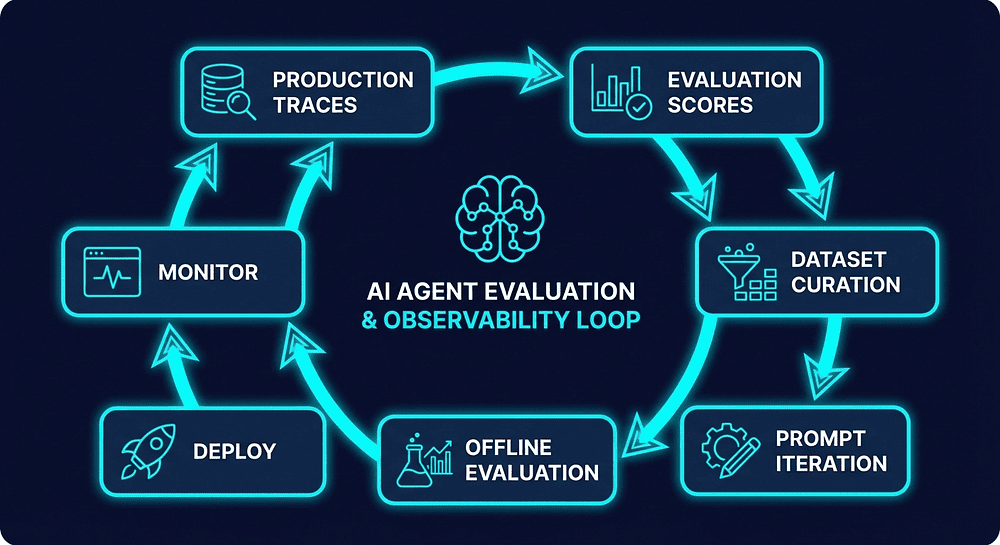
Unlock the secrets to maximizing your AI agents! Discover how to transform your feedback loop into a powerhouse of systematic improvement. From human evaluation to automated scoring, learn the essential strategies to ensure your agent outputs are not just good, but exceptional. Dive into our latest article and elevate your agent systems today! #AI #LangFuse #AgentEngineering
Summary: Effective evaluation of agent outputs requires a combination of human annotation for calibration, user feedback for real-world signals, and automated scoring via LLM-as-a-Judge for comprehensive coverage. Implementing dataset-driven offline evaluations helps prevent regressions by testing changes before deployment. Monitoring cost and latency at each agent step reveals optimization opportunities. A structured feedback loop connects production traces, evaluation scores, and dataset curation, fostering systematic improvement in agent systems.
Tracing shows you what happened. Evaluation tells you if it was any good. Here's how to close the loop.
You've instrumented your agent pipeline. You can see every trace. You know which agent made which LLM call, how long it took, and what it cost. If you followed along with Article 2 in this series, you've got Langfuse wired up, traces flowing, and a dashboard that finally shows you what's happening inside your multi-agent system.
Great. You've solved visibility.
But here's the uncomfortable truth: visibility without judgment is just a fancy log viewer. You can stare at traces all day, but the trace won't tell you whether the output was good. That's a judgment call. And if the only person making that judgment call is you, manually, scrolling through outputs at 11pm, well, that doesn't scale.
The real questions are: Was the output any good? And how do you make it better next time?
This is where most teams stall. They get tracing working, feel good about it, pat themselves on the back, and then go right back to manually spot-checking outputs. I've done this myself. It feels productive. It isn't. That's not engineering. That's hope with extra steps.
In this article, we close the loop. We walk through three levels of evaluation (and why you need all three), build a dataset-driven testing workflow that most tutorials skip entirely, and wire up the feedback architecture that turns your agent system from a black box into a system that gets better systematically.
This is Article 3 in our Langfuse series. In Article 1, we established why traces beat logs. In Article 2, we instrumented our pipeline. Now we answer the question that tracing alone can't: is the output any good?
The Evaluation Spectrum: Three Levels, Three Trade-offs
Is evaluation about human review? Automated scoring? User feedback? Yes. All three. And the trick is understanding when to use which.
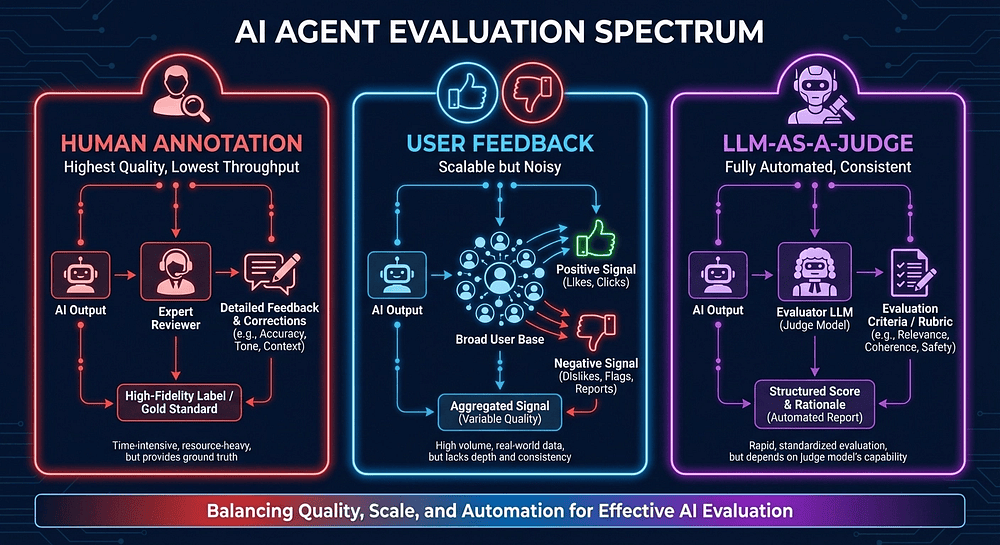
Human Annotation sits at the top of the quality pyramid. A real person reviews agent output in the Langfuse UI, scores it on defined criteria, and writes down their reasoning. This is your highest-quality signal and your lowest-throughput signal. You might annotate 50 traces a week if you're disciplined about it. Most teams average closer to "we looked at a few last Tuesday."
Use human annotation for calibration. When you're building evaluation criteria, when you're training a new LLM-as-a-Judge template, when something looks wrong and you need ground truth, that's when human review earns its keep. Don't try to use it for coverage. You'll burn out or give up.
User Feedback comes from production. Thumbs up, thumbs down, star ratings, correction submissions. These are signals from the people who actually use your agent. It's scalable, it's real, and it's noisy as hell. Users click thumbs-down because they're frustrated with something unrelated to output quality. They click thumbs-up on mediocre responses because they got what they needed fast enough. I've seen user feedback data that was basically a random number generator with opinions.
Use user feedback for trend detection. When your thumbs-down rate spikes from 8% to 15% after a deployment, that's a fire alarm. The absolute numbers matter less than the deltas. A gradual drift in satisfaction scores over weeks? That's your early warning system.
LLM-as-a-Judge is the workhorse. A separate LLM evaluates your agent's output against defined criteria. It's fully automated, consistent across thousands of evaluations, and runs at the speed of an API call. It won't catch everything a human would catch, but it catches things at scale that humans never could, because humans don't look at every trace.
Use LLM-as-a-Judge for coverage. Every trace gets scored. Every regression gets flagged. Every prompt change gets benchmarked. That's the promise.
Here's the key insight that took me longer to internalize than I'd like to admit: you need all three levels working together. Human annotation calibrates your LLM judge (how do you know the judge is right if you haven't checked it against human judgment?). User feedback validates that your automated scores correlate with real satisfaction (a perfect correctness score means nothing if users hate the output). LLM-as-a-Judge gives you the coverage to evaluate every single trace in production (which neither humans nor users will do).
The Evaluation Taxonomy
Not every dimension matters for every agent. Pick the ones that match your use case:
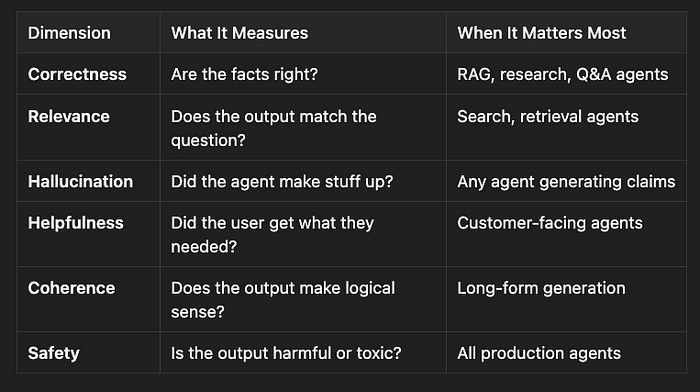
Start with two or three dimensions. A research agent? Correctness and hallucination. Customer support? Helpfulness and safety. You can expand later. Starting with six dimensions and calibrating none of them is worse than starting with two and calibrating them well.
User Feedback: The Signal You're Probably Wasting
The simplest evaluation to implement is user feedback. If your agent has a UI, you probably already have thumbs up/down buttons somewhere. The question isn't whether you have the buttons. It's whether that signal goes anywhere useful.
With Langfuse, you attach user feedback directly to the trace that produced the response:
from langfuse import get_client
langfuse = get_client()

# When user clicks thumbs-up in your UI
langfuse.score(
    trace_id="trace-abc-123",
    name="user_feedback",
    value=1,  # 1 = positive, 0 = negative
    comment="User clicked thumbs up after receiving search results"
)
The critical piece is the trace_id. Your application needs to pass the Langfuse trace ID through to your frontend. When a user provides feedback, you tie it back to the exact trace that generated that response. In practice: your API response includes the trace ID, your frontend stores it alongside the displayed output, and your feedback endpoint sends it back to Langfuse. It's plumbing, but it's essential plumbing.
For richer signals, use numeric or categorical scores:
# Star rating from UI (1-5 scale)
langfuse.score(
    trace_id=trace_id,
    name="user_rating",
    value=4,
    data_type="NUMERIC",
    comment="User rated 4/5 stars"
)

# Categorical feedback for structured analysis
langfuse.score(
    trace_id=trace_id,
    name="response_quality",
    value="helpful_but_incomplete",
    data_type="CATEGORICAL",
    comment="User selected 'helpful but incomplete' from dropdown"
)
Langfuse supports three score data types: NUMERIC (continuous values like 0-1 scales or 1-5 ratings), CATEGORICAL (discrete labels like "correct" or "partially_correct"), and BOOLEAN (binary true/false as 0/1).
Once feedback flows into Langfuse, filter traces by score in the dashboard. Sort by lowest user ratings. Find the traces that users hated. Drill into the trace timeline to understand why. That's your first evaluation signal, and it comes from the people who actually pay the bills.
One more thing: track feedback rate alongside feedback value. If only 2% of users bother to click anything, your sample is heavily biased toward strong opinions (mostly negative, since happy users don't click buttons). Consider supplementing explicit feedback with implicit signals: task completion rates, session length, follow-up question patterns.
LLM-as-a-Judge: Your Automated QA Team
User feedback tells you that something is wrong. LLM-as-a-Judge tells you what is wrong, at scale, on every trace. Think of it as hiring a QA team that works 24/7, evaluates every single interaction, and never calls in sick. The trade-off? It's only as good as your evaluation prompt and your judge model.
What Langfuse Gives You Out of the Box
Langfuse provides battle-tested evaluation templates that cover the common cases:
- Hallucination: Did the agent fabricate information not in the context?
- Helpfulness: Did the response actually help with the user's request?
- Relevance: Is the output aligned with what was asked?
- Correctness: Are the facts right compared to ground truth?
- Toxicity: Harmful or offensive content?
- Conciseness: Appropriately brief without losing information?
- Context Relevance: Are retrieved contexts relevant? (RAG-specific)
- Context Correctness: Is the retrieved context accurate? (RAG-specific)
Each template is an LLM prompt with variable placeholders like {{input}}, {{output}}, and {{ground_truth}}. Langfuse maps your trace data into the template, sends it to the judge model, and parses the response into a typed score. The templates are customizable. Think of them as starting points, not gospel.
Setting Up Evaluators
You configure evaluators in the Langfuse dashboard:
- Navigate to Evaluators, create a new one
- Pick a built-in template or write a custom prompt
- Choose score type: NUMERIC (0-1), CATEGORICAL ("correct"/"incorrect"), or BOOLEAN
- Map variables:
{{input}}from trace input,{{output}}from trace output - Select your judge model (GPT-4o-mini works well, since it's cheap and surprisingly good at assessment tasks)
- Preview the filled prompt to make sure your variable mapping isn't garbled
- Set filters for which traces get evaluated (by tags, metadata, or everything)
Online vs. Offline: When to Use Which
Online evaluators fire automatically on matching production traces. You set filters, and Langfuse evaluates matching traces in near real-time. No manual intervention. Your agents are being graded continuously.
When to use online: production monitoring, catching quality regressions, alerting on score drops.
Offline evaluators run against datasets or trace batches on demand. You trigger them explicitly: before a deployment, during a model comparison, as part of a prompt engineering session.
When to use offline: pre-deployment testing, A/B testing prompts, model comparison experiments.
Both modes produce scores that live on traces and appear in dashboards, so you get trend data either way.
Building Custom Evaluators in Code
The built-in templates handle common cases. Your domain probably has uncommon cases. Here's a pattern I use for evaluating a multi-step research agent, the kind that fetches sources, synthesizes information, and produces structured reports:
import json
from langfuse import get_client
from openai import OpenAI

langfuse = get_client()
openai_client = OpenAI()

RESEARCH_EVAL_PROMPT = """You are evaluating a research agent's output.

User Question: {input}
Agent Response: {output}

Score the response on these dimensions (0.0 to 1.0):
1. Factual Accuracy: Are the claims verifiable and correct?
2. Completeness: Does the response address all aspects of the question?
3. Source Quality: Are sources cited and credible?

Return JSON: {{"accuracy": float, "completeness": float, "source_quality": float, "reasoning": str}}
"""

def evaluate_research_trace(trace_id: str, trace_input: str, trace_output: str):
    """Evaluate a research agent trace on three quality dimensions."""
    response = openai_client.chat.completions.create(
        model="gpt-5-mini",  # Cheap, fast, good at structured eval
        messages=[{
            "role": "user",
            "content": RESEARCH_EVAL_PROMPT.format(
                input=trace_input, output=trace_output
            )
        }],
        response_format={"type": "json_object"}
    )
    scores = json.loads(response.choices[0].message.content)

    # Attach each dimension as a separate score
    for dimension in ["accuracy", "completeness", "source_quality"]:
        langfuse.score(
            trace_id=trace_id,
            name=f"research_{dimension}",
            value=scores[dimension],
            comment=scores.get("reasoning", "")
        )

    return scores
Why GPT-5-mini as the judge? At $0.15 per million input tokens (as of March 2026), you can evaluate thousands of traces for pennies. The judge doesn't need to be creative. It needs to assess quality against defined criteria. That's a different skill set, and smaller models are surprisingly good at it.
Batch Evaluation for Existing Traces
Want to retroactively evaluate traces that weren't scored when they ran? Fetch and score them in bulk:
# Fetch recent production traces
traces = langfuse.fetch_traces(
    tags=["production", "research-agent"],
    limit=100
).data

for trace in traces:
    # Skip already-evaluated traces
    existing_scores = [s.name for s in trace.scores]
    if "research_accuracy" in existing_scores:
        continue

    evaluate_research_trace(
        trace_id=trace.id,
        trace_input=trace.input,
        trace_output=trace.output
    )

langfuse.flush()
Calibrating Your Judge (Don't Skip This)
An uncalibrated judge is worse than no judge because it gives you false confidence. You see green numbers on a dashboard and think your agent is fine. Meanwhile, the judge is systematically wrong about edge cases, and you don't know it.
My calibration workflow:
- Human-label a sample: Annotate 50-100 traces manually in Langfuse
- Run the judge on the same traces: Compare automated scores to human scores
- Measure agreement: 80%+ agreement means you're in good shape
- Study the disagreements: Where the judge gets it wrong tells you how to fix the evaluation prompt
- Re-evaluate quarterly: Judge accuracy drifts as your agent's output distribution evolves
The calibration investment pays off. Spend a day getting your judge right, and it works for you on every trace, every day, automatically. Skip calibration, and your evaluation scores are just noise with a confidence interval you don't know.
Dataset-Driven Offline Evaluation: The Part Most Tutorials Skip
This is where real engineering discipline lives. And almost nobody talks about it.
Online evaluation tells you about current quality. Dataset-driven evaluation tells you whether a change made things better or worse. It's the difference between monitoring and engineering. Between "our agent seems fine" and "we proved that prompt v2 improves correctness by 12% without regressing on completeness."
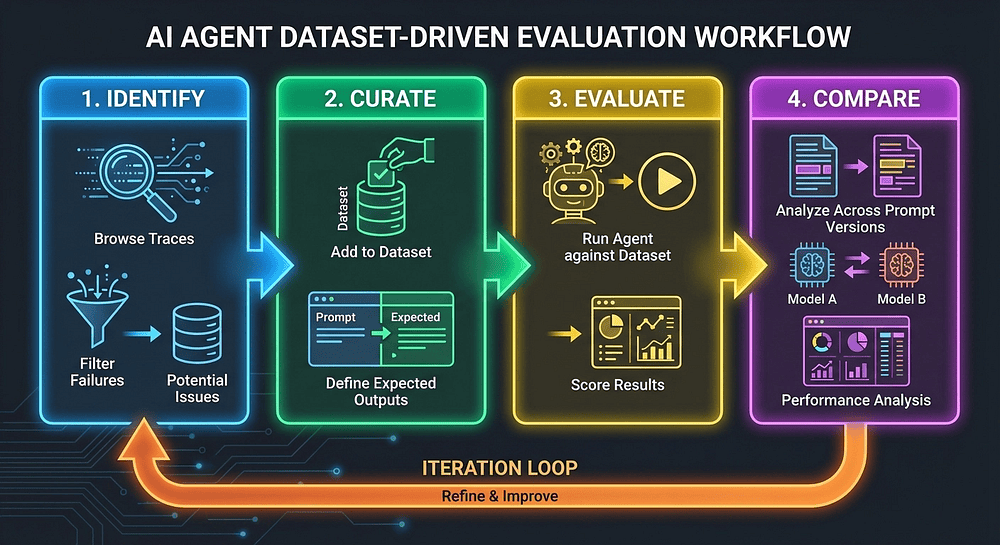
The Four-Step Workflow
Step 1: Identify interesting traces. Browse production traces in Langfuse. Filter by low scores, user complaints, edge cases, or traces where the LLM-as-a-Judge scored low but the user didn't complain. Those are silent failures, the worst kind, because nobody reports them.
Step 2: Curate a dataset. Add those traces to a Langfuse dataset with expected outputs. This becomes your regression test suite. Think of it as the agent equivalent of unit tests, except each "test case" is a real production scenario that your agent struggled with.
from langfuse import get_client

langfuse = get_client()

# Create a dataset from production failures
langfuse.create_dataset(
    name="agent-regression-v1",
    description="Curated from production failures and edge cases, March 2026",
    metadata={"version": "1.0", "curator": "rick"}
)

# Add items from real production failures
langfuse.create_dataset_item(
    dataset_name="agent-regression-v1",
    input={"query": "Compare the pricing of GPT-5.2 vs Claude Sonnet 4"},
    expected_output=(
        "Should include current per-token pricing for both models, "
        "note context window differences, and mention rate limits."
    ),
    metadata={
        "source_trace_id": "trace-xyz-789",
        "failure_mode": "outdated_pricing",
        "difficulty": "medium"
    }
)

langfuse.create_dataset_item(
    dataset_name="agent-regression-v1",
    input={"query": "What changed in Python 3.13?"},
    expected_output=(
        "Should cover the new REPL, experimental JIT compiler, "
        "improved error messages, and deprecation of legacy features."
    ),
    metadata={
        "source_trace_id": "trace-abc-456",
        "failure_mode": "incomplete_coverage",
        "difficulty": "medium"
    }
)
and score results. The item.run() context manager handles trace linking automatically:
from datetime import datetime

dataset = langfuse.get_dataset("agent-regression-v1")
run_name = f"prompt-v2-gpt4o-{datetime.now().isoformat()}"

for item in dataset.items:
    with item.run(
        run_name=run_name,
        run_description="Testing revised prompt v2 with better citations",
        run_metadata={"model": "gpt-5.2", "prompt_version": "v2"}
    ) as root_span:
        # Run your agent exactly as it runs in production
        output = my_research_agent(item.input["query"])

        # Set trace I/O for dashboard visibility
        root_span.set_trace_io(input=item.input, output=output)

        # Score on multiple dimensions
        root_span.score_trace(
            name="correctness",
            value=evaluate_correctness(output, item.expected_output),
            comment="Automated correctness check"
        )
        root_span.score_trace(
            name="completeness",
            value=evaluate_completeness(output, item.expected_output),
            comment="Automated completeness check"
        )

langfuse.flush()
Step 4: Compare results across runs. In the Langfuse UI, navigate to the dataset and compare experiment runs side by side. Did prompt v2 score higher on correctness? Did the model swap reduce hallucinations? Did completeness regress?
Regression Testing: The Agent Test Suite
This is where datasets earn their keep. When you change a prompt, swap a model, or restructure your pipeline, run the same dataset against both versions:
def run_experiment(dataset_name, run_name, agent_fn, model):
    """Run an agent against a dataset and score results."""
    dataset = langfuse.get_dataset(dataset_name)
    for item in dataset.items:
        with item.run(run_name=run_name, run_metadata={"model": model}) as root_span:
            output = agent_fn(item.input["query"])
            root_span.set_trace_io(input=item.input, output=output)
            root_span.score_trace(
                name="overall_quality",
                value=evaluate_overall(output, item.expected_output)
            )
    langfuse.flush()

# Baseline
run_experiment("agent-regression-v1", "baseline-v1", agent_v1, "gpt-5.2")

# Candidate prompt change
run_experiment("agent-regression-v1", "candidate-v2", agent_v2, "gpt-5.2")

# Model swap experiment
run_experiment("agent-regression-v1", "model-swap-mini", agent_v1, "gpt-5-mini")
Every prompt change gets benchmarked. Every model swap gets validated. No more deploying a "better" prompt and discovering three days later that it broke an edge case you forgot about. That's not testing. That's gambling.
Versioned Datasets
As of February 2026, Langfuse supports versioned datasets. Every item add, update, or delete creates a snapshot. Fetch a specific version for reproducible experiments:
# Reproduce last week's experiment exactly
dataset = langfuse.get_dataset(
    name="agent-regression-v1",
    version="2026-03-15T10:30:00Z"
)
This matters when comparing experiments across weeks. If your dataset evolved between runs, your comparison is meaningless. Versioning ensures apples-to-apples.
Cost and Latency: The Quality Dimensions Nobody Measures
Evaluation isn't just about output quality. In production, cost and latency are quality dimensions. An agent that gives perfect answers but costs $0.50 per query and takes 30 seconds? That's a demo, not a product.
Automatic Cost Tracking
Langfuse auto-calculates token costs for every LLM call in your traces. It knows per-token pricing for major providers, and since December 2025, it handles pricing tiers with different rates based on context length. That 200k+ context window in Claude costs more per token, and your accounting should know about it.
For each trace, you get total cost, cost per step, and token breakdowns (input vs. output).
Finding Where the Money Goes
In a multi-agent pipeline, costs are never evenly distributed. Here's what my research agent pipeline looks like after a week of production data:
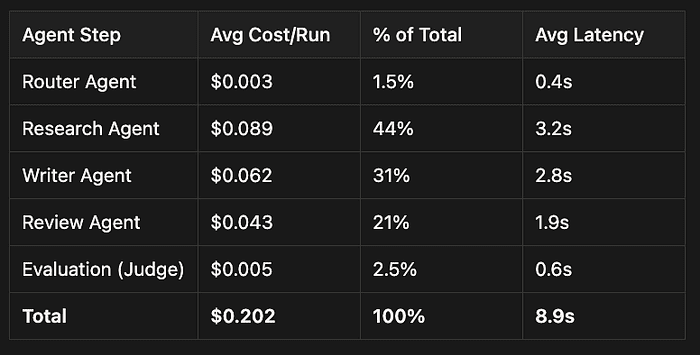
The research agent dominates because it makes multiple LLM calls with large context windows. That's where optimization effort belongs. Without per-step cost tracking, you'd be optimizing the wrong thing.
Latency: Where Time Disappears
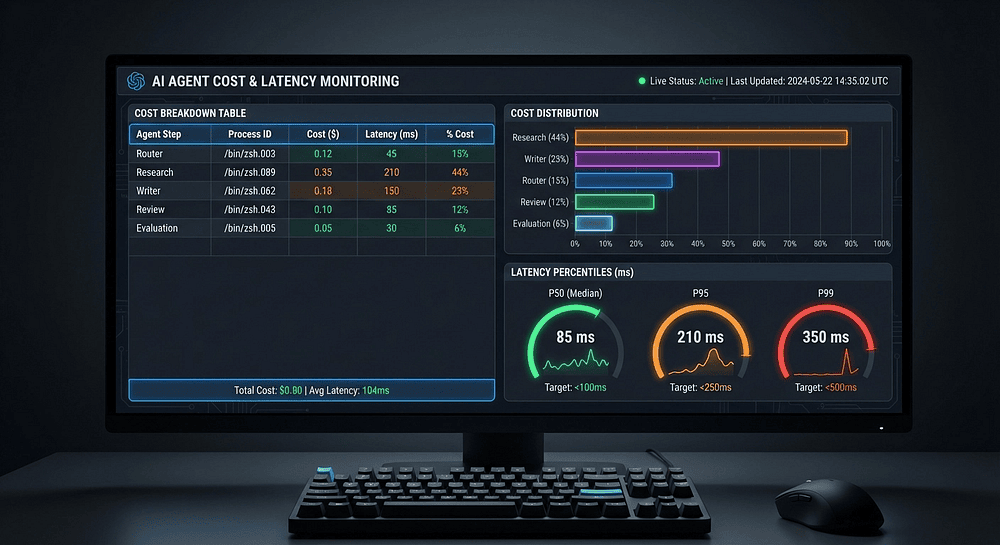
Langfuse's timeline view shows exactly where time goes within a trace. For multi-agent systems, this reveals sequential bottlenecks (steps blocking downstream agents), parallel opportunities (independent steps that could run concurrently), and retry overhead (failed calls that add hidden latency).
Set up alerting on P95 latency. When your 95th percentile trace duration exceeds your SLA, Langfuse's per-step timing tells you exactly which step degraded. Root cause analysis becomes evidence-based rather than speculative.
Three Optimizations from Real Data
After analyzing cost and latency data from my research pipeline, I made three changes:
Model swap on review step. The review agent checks formatting, grammar, and basic coherence. It doesn't need GPT-5.2. Swapping to GPT-5-mini cut review costs 81% with less than 2% quality regression (verified against the regression dataset, which is why datasets matter).
Parallel research calls. The timeline view showed sequential LLM calls that could run concurrently. Parallelizing them cut research latency from 3.2s to 1.4s.
Context window trimming. Some research calls shipped 50k+ tokens of context when the relevant bits were in the first 10k. Trimming reduced costs and improved quality (less noise for the model to wade through).
Combined impact: pipeline cost dropped 34% ($0.202 to $0.134), P50 latency dropped 35% (8.9s to 5.8s). None of these optimizations would have been visible without per-step cost and latency data.
The Feedback Loop: From Ad-Hoc Tweaking to Systematic Engineering
Everything we've covered (user feedback, LLM-as-a-Judge, datasets, cost monitoring) comes together in the feedback loop. This is the architecture that separates teams who are building agents from teams who are engineering agent systems.
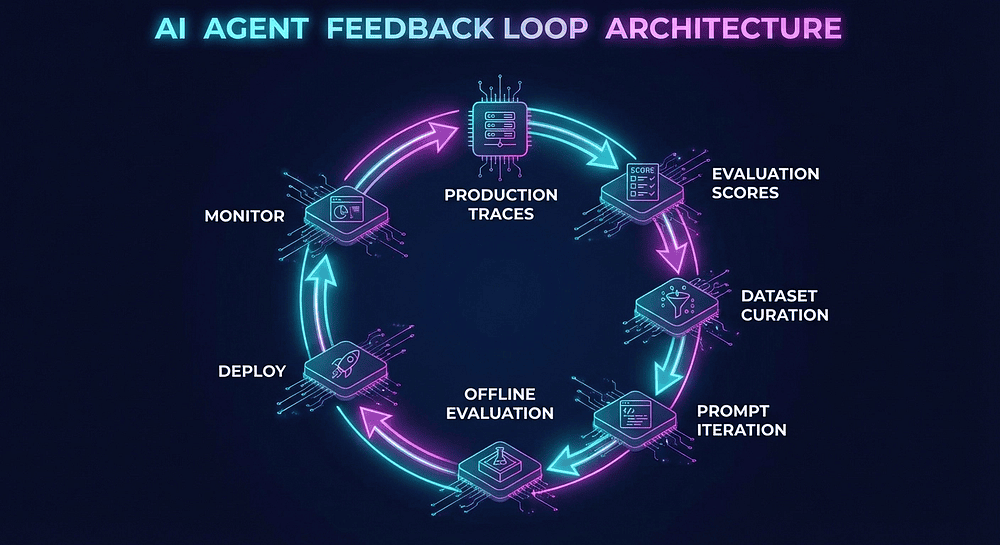
The cycle:
- Production Traces: Agents run in production, generating traces in Langfuse
- Evaluation Scores: Online evaluators grade every trace. Users provide feedback. Cost and latency are tracked per step.
- Dataset Curation: Identify interesting traces (failures, edge cases, excellence) and add them to evaluation datasets
- Prompt Iteration: Revise prompts, adjust parameters, restructure workflows based on what the data tells you
- Offline Evaluation: Run the updated agent against your regression dataset. Compare to baseline.
- Deploy: If scores improve without regressions and costs stay within bounds, ship it
- Monitor: Watch production scores. Detect drift. When quality degrades or costs spike, the loop restarts.
This maps to the instruction-execute-grade pattern from the Google ADK Practitioner's Guide series. The instruction is your prompt. The execution is your agent in production. The grade is the evaluation score. The loop connects them into a system that improves.
Framework-Agnostic by Design
One of Langfuse's strengths as an observability layer is that this feedback loop works regardless of your agent framework. LangChain, Google ADK, CrewAI, AutoGen, or a custom orchestrator: the evaluation workflow stays the same. Traces flow in. Scores attach. Datasets curate from traces. Experiments compare across runs.
The framework handles execution. Langfuse handles observation and evaluation. The feedback loop connects them. Swap frameworks without losing your evaluation infrastructure.
What I've Seen Separate the Winners
I've watched teams ship agents that demo beautifully and fail in production. The pattern is always the same: test with a handful of examples, get excited, deploy. When production inputs diverge from test cases (and they always diverge), the agent fails in ways nobody anticipated.
The teams that win in production run this feedback loop. They curate datasets from real failures. They benchmark every change. They treat cost and latency as first-class quality metrics. They apply the same rigor to agent evaluation that backend teams apply to load testing and integration testing.
That's not complicated. It's disciplined. And discipline, applied consistently through tooling, is what turns a prototype into a production system.
What's Next
This completes our three-part Langfuse series. We went from understanding why agent tracing matters (Article 1) to instrumenting a pipeline (Article 2) to evaluating and systematically improving output quality (this article).
The evaluation workflow here is a foundation. As your agent system matures, consider:
Prompt Management in Langfuse. Version-control prompts directly in Langfuse. Link prompt versions to experiment runs for full traceability from change to quality impact.
CI/CD Integration. Run dataset evaluations in your CI pipeline. Block deployments that regress on quality metrics. A red score is a failed build.
Custom Dashboards. Combine quality scores, cost metrics, and latency data in one view. Make agent health as visible as your service health dashboards.
API-Driven Evaluation Pipelines. Automate the full loop: fetch traces, run evaluations, flag regressions, create tickets. Wire Langfuse's API into your existing infrastructure.
The bigger picture: observability isn't about debugging. It's about building agents that improve systematically over time. Every trace is data for your next iteration. Every score is a signal for optimization. Every dataset is a regression test that prevents backsliding.
That's the competitive advantage. Not better prompts. Not bigger models. A system that gets better every day because you measure, evaluate, and iterate with discipline.
Key Takeaways
- Three evaluation levels work together: Human annotation for calibration, user feedback for production signal, LLM-as-a-Judge for coverage. Each level informs and validates the others.
- Dataset-driven offline evaluation prevents regressions. Curate from production failures. Run experiments before deploying. Compare across prompt versions and model swaps.
- Cost and latency monitoring per agent step reveals optimizations that aggregate metrics hide. Per-step data lets you swap models, parallelize calls, and trim context where quality isn't impacted.
- The feedback loop (traces to scores to datasets to iteration to deployment to monitoring) is the core discipline that separates professional agent systems from prompt-and-pray.
This is Article 3 of 3 in the Langfuse Agent Observability series. For framework-specific agent patterns, check out the Google ADK Practitioner's Guide series.
About the Author
Rick Hightower is a Java Champion, former Senior Distinguished Engineer at a fortune 100 focusing on delivering ML / AI insights to front line applications, and practitioner building multi-agent production systems. Follow him on Medium for more hands-on agent engineering content.
He created skilz, the universal agent skill installer, supporting 30+ coding agents including Claude Code, Gemini, Copilot, and Cursor, and co-founded the world's largest agentic skill marketplace. Connect with Rick Hightower on LinkedIn or Medium. Check out SpillWave, your source for AI expertise.
Rick has been actively developing generative AI systems, agents, and agentic workflows for years. He is the author of numerous agentic frameworks and developer tools and brings deep practical expertise to teams looking to adopt AI. He enjoys writing about himself in the 3rd person.
Rick also wrote a Claude Certified Architect (CCA) series of articles that have a lot of useful information on writing agentic AI systems.
CCA Exam Prep on Agentic Development
- Claude Certified Architect: The Complete Guide to Passing the CCA Foundations Exam
- CCA Exam Prep: Mastering the Code Generation with Claude Code Scenario
- CCA Exam Prep: Mastering the Multi-Agent Research System Scenario
- CCA Exam Prep: Structured Data Extraction
- CCA: Master the Developer Productivity Scenario
- Claude Certified Architect: Master the CI/CD Scenario
- CCA Exam Prep: Mastering the Customer Support Resolution Agent Scenario
- Code Walkthrough of all of the code in this article and accompanying Github
- Long form version of this article that was much too long for Medium, but goes into gory details on each pattern
Rick also wrote a series on harness engineering and how to improve agentic systems using harness engineering for feedback loops and adversarial agents.
Harness Engineering Articles
- The $9 Disaster: What Anthropic's Harness Design Paper Teaches Us About Building Autonomous AI
- Harness Engineering vs Context Engineering: The Model is the CPU, the Harness is the OS
- LangChain Deep Agents: Harness and Context Engineering: Memory, Skills, and Security
- Beyond the AI Coding Hangover: How Harness Engineering Prevents the Next Outage
- LangChain's Harness Engineering: From Top 30 to Top 5 on Terminal Bench 2.0
- Anthropic's Harness Engineering: Two Agents, One Feature List, Zero Context Overflow
- OpenAI's Harness Engineering Experiment: Zero Manually-Written Code