Langfuse vs LangSmith: Two competing AI observability platforms compared
Two approaches to agent observability: open-source flexibility vs managed ecosystem depth
Originally published on Medium.
Two approaches to agent observability: open-source flexibility vs managed ecosystem depth
 Langfuse vs LangSmith: Two competing AI observability platforms compared
- A router agent classifies the intent
- A research sub-agent calls three different tools
- Each tool call generates its own LLM interaction
- The results flow back through a synthesis step
- A writer agent composes the final response
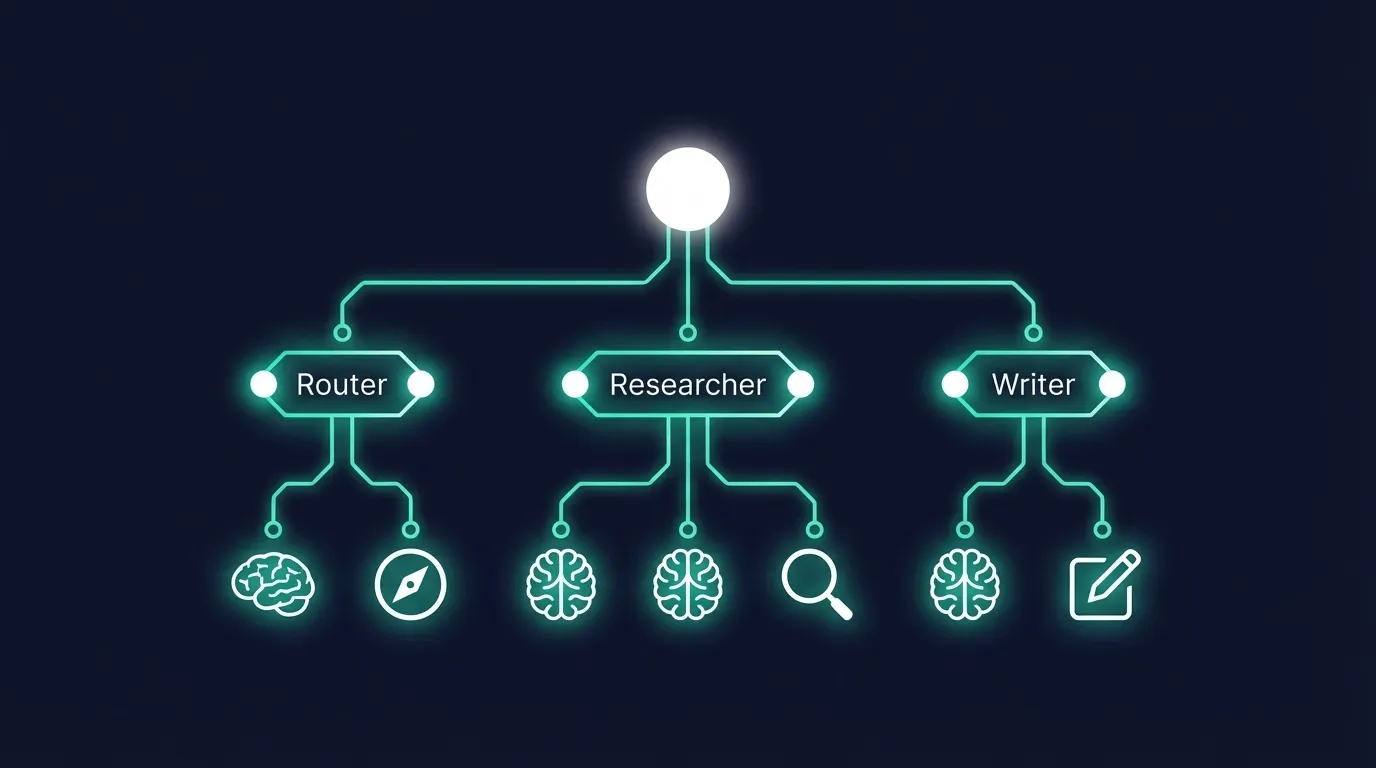 Agent trace tree showing hierarchical operations
-
Hierarchical traces that show parent-child relationships between agent steps
-
Token and cost tracking at every node in the tree
-
Latency attribution so you know which tool call is your bottleneck
-
Evaluation hooks to score agent behavior at each decision point
-
Session tracking to connect multi-turn conversations
-
Python SDK v3 with
@observe()decorator -
OpenTelemetry-native spans and generations
-
80+ integrations (see Langfuse integrations page for current count): LangChain, LangGraph, OpenAI, Claude, LlamaIndex, Vercel AI SDK, and custom agents
-
Self-hosting with full feature parity using Docker
-
ClickHouse backend with raw SQL access for custom analytics
-
Unit-based pricing with a free Hobby tier and a $29/month Core tier, both with unlimited users; higher Pro/Enterprise tiers exist for larger workloads
-
LangSmith Python SDK with @traceable decorator
-
Run Trees with hierarchical run/span structure
-
Deepest LangChain and LangGraph support: native integration, LangGraph Studio IDE, Agent Builder
-
Native alerting: threshold-based monitoring with webhooks
-
Annotation Queues for human-in-the-loop evaluation
-
Per-seat pricing: $39/seat/month on the Plus tier
from
 langfuse import observe, get_client, propagate_attributes
from
 langfuse.langchain import CallbackHandler
from
 langchain_openai import ChatOpenAI
from
 langchain_core.prompts import ChatPromptTemplate
# WHAT: @observe() is Langfuse's core instrumentation decorator.
# WHY: It automatically captures function inputs, outputs, execution time,
#      and any exceptions -- without modifying your function's logic.
# WHEN: Apply to every function that represents a meaningful agent step.
#       Think of it as "anything you'd want to see in a trace."
@
observe
()
def
classify_intent
(
query
: str) -> str:

""
"Classify user intent using LLM."
""

# WHAT: CallbackHandler bridges LangChain's internal event system to Langfuse.

# WHY: LangChain does not expose LLM calls directly. The callback handler

#      intercepts LLM start/end events and creates child spans automatically.

# WHEN: Create a new instance per chain invocation to avoid context leakage

#       between concurrent requests.
    langfuse_handler =
CallbackHandler
()
    llm =
ChatOpenAI
(model_name=
"gpt-5.4"
)
    prompt = ChatPromptTemplate.
from_template
(

"Classify this query as 'research', 'action', or 'chat': {query}"
    )
    chain = prompt | llm

# Passing the handler via config keeps instrumentation separate from logic.

# The chain runs normally; the handler observes silently.
    result = chain.
invoke
(
        {
"query"
: query},
        config={
"callbacks"
: [langfuse_handler]}
    )

return
 result.content
@
observe
()
def
retrieve_context
(
query
: str) -> str:

""
"Retrieve relevant context using tools."
""

# WHAT: Tool calls inside an @observe()-decorated function are automatically

#       linked as child spans in the trace tree.

# WHY: OpenTelemetry context propagation handles the parent-child relationship.

#      You do not need to pass trace IDs manually.

return

search_database
(query)
@
observe
()
def
generate_response
(
query
: str,
context
: str) -> str:
import

langsmith

as

ls
from

langsmith

import

traceable
from

langsmith
.wrappers

import

wrap_openai
import

openai
#
WHAT
:
wrap_openai
()
monkey-patches

the

OpenAI

client

to

intercept

all

API

calls
.
#
WHY
:
Instead

of

passing

a

callback

to

every

chain
,
you

instrument

the

client

once
.
#
Every

subsequent

openai

call

is

automatically

captured

as

a

trace

span
.
#
WHEN
: Call this once at module initialization, before any LLM calls are made.
#       This is the
"wrap once, trace everywhere"
 pattern.
client =
wrap_openai
(openai.
Client
())
#
WHAT
:
@traceable
 declares this function as a traceable unit in a Run Tree.
#
WHY
: run_type provides semantic meaning to the dashboard.
"chain"
 means a
#      sequence of steps;
"tool"
 means a discrete capability invocation.
#      This lets you filter
and
 analyze by operation type.
#
WHEN
: Use run_type=
"chain"
 for multi-step sequences
and
 run_type=
"tool"
#       for discrete capability invocations like database queries or API calls.
@traceable
(run_type=
"chain"
, name=
"Classify Intent"
)
def
classify_intent
(
query
: str) ->
str
:

""
"Classify user intent using LLM."
""
    # The wrapped client automatically links this LLM call as a child of
    # the current
@traceable
 context. No callback configuration required.
    response = client.chat.completions.
create
(
        model=
"gpt-5.4"
,
        messages=[{

"role"
:
"user"
,

"content"
: f
"Classify as 'research', 'action', or 'chat': {query}"
        }]
    )
    return response.choices[
0
].message.content
# run_type=
"tool"
 signals to LangSmith that this is a discrete capability,
#
not
 a reasoning step. It affects how the run is displayed
and
 aggregated.
@traceable
(run_type=
"tool"
, name=
"Retrieve Context"
)
def
retrieve_context
(
query
: str) ->
str
:

""
"Retrieve relevant context using tools."
""
    return
search_database
(query)
@traceable
(run_type=
"chain"
, name=
"Generate Response"
)
def
generate_response
(
query
: str,
context
: str) ->
str
:

""
"Generate final response."
""
-
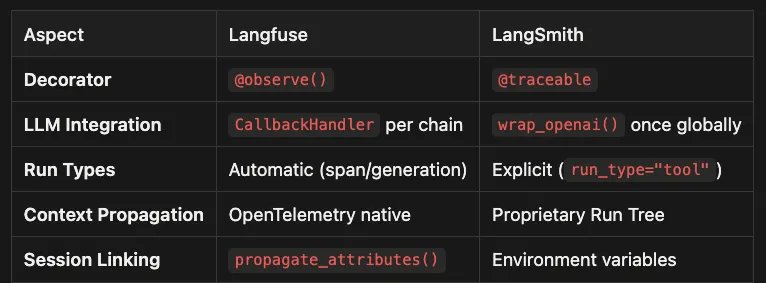
Wraps a function as an “observation” and records inputs, outputs, timing, and exceptions.
-
Best used to mark meaningful agent steps, such as routing, retrieval, and synthesis.
-
Plays nicely with OpenTelemetry-style nesting, so a parent function naturally contains child spans.
-
Wraps a function as a “run” inside a Run Tree.
-
Adds richer labeling controls, such as a human-friendly
nameand semanticrun_type. -
Works especially well when you want dashboards and evaluations to group steps by type.
-
You pass a Langfuse callback into each LangChain invocation so it can listen to LangChain’s internal events.
-
More explicit and granular, which is useful when you only want to trace certain chains, or you need to separate contexts for concurrency.
-
Slightly more boilerplate, since each invocation point must be configured correctly.
-
Instruments the OpenAI client once so that any subsequent calls are captured automatically.
-
Very ergonomic for projects that directly use the OpenAI SDK, and for teams that want “set it and forget it” instrumentation.
-
Global wrapping can be harder to reason about if you need fine-grained control over what is traced.
-
The platform infers structure from spans and LLM “generation” events.
-
Less configuration, but also fewer explicit semantics when you want to distinguish tools vs reasoning steps.
-
You label each unit of work as
chain,tool,llm, and so on. -
Improves filtering, aggregation, and evaluation workflows because the UI can treat different run types differently.
-
Uses industry-standard context propagation patterns.
-
Easier to integrate with existing observability stacks and standards-based tooling.
-
Typically offers better interoperability across languages and services.
-
Uses LangSmith’s own run context model.
-
Often “just works” inside the LangChain and LangGraph ecosystem.
-
Interoperability outside that ecosystem may require additional adapters or exports.
-
You explicitly attach identifiers, such as user ID, conversation ID, or tenant ID, to connect traces across turns.
-
This makes the linking logic obvious and portable, but it does require discipline to set consistently.
-
Many projects enable tracing and session behavior through environment-level configuration.
-
Great for retrofitting tracing without touching much code, especially in LangGraph.
-
You still need a clear convention for conversation identifiers so multi-turn threads are reliably connected.
from langfuse.langchain import CallbackHandler
from langgraph.graph import StateGraph,
END
from langchain_openai import ChatOpenAI
from langchain_core.messages import HumanMessage
from typing import TypedDict, Annotated
import operator
# WHAT: TypedDict defines the shape of state flowing through the graph.
# WHY: LangGraph passes this state dictionary between nodes. Explicit typing
#      prevents silent data loss when a node forgets to return a field.
# WHEN: Always type your state. Untyped state is the leading cause of
#       hard-to-debug graph execution errors.
class

AgentState
(TypedDict):

messages:
 Annotated[list, operator.add]
# operator.add means messages accumulate

research_results:
 str

final_answer:
 str
def

research_node
(
state:
 AgentState
) ->
AgentState:

""
"Research sub-agent with tool calls."
""
    llm = ChatOpenAI(model=
"gpt-5.4"
)

# WHAT: The LLM call here will be captured as a nested span under this node's span.

# WHY: Langfuse's CallbackHandler (passed at invocation time) intercepts

#      LangChain's callback events and creates child spans automatically.
    result = llm.invoke(state[
"messages"
])

return
 {
"messages"
: [result],
"research_results"
: result.content}
def

synthesis_node
(
state:
 AgentState
) ->
AgentState:

""
"Synthesize research into final answer."
""
    llm = ChatOpenAI(model=
"gpt-5.4"
)
    result = llm.invoke([
        HumanMessage(content=f
"Synthesize: {state['research_results']}"
)
    ])

return
 {
"messages"
: [result],
"final_answer"
: result.content}
# Build the graph
graph = StateGraph(AgentState)
graph.add_node(
"research"
, research_node)
graph.add_node(
"synthesis"
, synthesis_node)
graph.set_entry_point(
"research"
)
graph.add_edge(
"research"
,
"synthesis"
)
graph.add_edge(
"synthesis"
,
END
)
app = graph.compile()
# WHAT: Passing CallbackHandler in the config dict enables Langfuse tracing
#       for the entire graph execution, including all nested LLM calls.
# WHY: LangGraph propagates the config (and t
# WHAT: LangSmith traces LangGraph automatically via environment variables.
# WHY: LangSmith is built by the same team as LangChain and LangGraph.
#      The integration is baked into LangGraph's core execution loop.
# WHEN: Set these variables once in your environment or .env file.
#       No code changes needed to enable full tracing.
#
# LANGSMITH_TRACING=true
# LANGSMITH_API_KEY=your-key
from
 langgraph.graph
import
 StateGraph, END
from
 langchain_openai
import
 ChatOpenAI
from
 langchain_core.messages
import
 HumanMessage
# Same graph definition as above...
app = graph.
compile
()
# WHAT: With environment variables set, this invocation is fully traced.
# WHY: LangGraph calls LangSmith's tracing hooks at the framework level,
#      not the application level. The graph, nodes, edges, and LLM calls
#      all appear in LangSmith without any explicit instrumentation.
# WHEN: This zero-config approach works well for teams building exclusively
#       with LangGraph. No per-request setup, no callback management.
result = app.invoke(
    {
"messages"
: [HumanMessage(content=
"Explain quantum computing"
)],

"research_results"
:
""
,
"final_answer"
:
""
}
)
# No callback handler needed - tracing is automatic
LangSmith’s advantage here is zero-friction setup.
from langchain_core.tools import tool
from langfuse import Langfuse
langfuse = Langfuse()
# WHAT: start_as_current_observation() creates a new span that is explicitly
#       linked to a parent trace via trace_context.
# WHY: When a sub-agent runs in a separate function or thread, OpenTelemetry's
#      automatic context propagation may not carry over. This explicit linking
#      ensures the sub-agent's work appears nested under the parent trace.
# WHEN: Use this pattern when sub-agents are invoked as tools (decorated with
#
@tool
), run in separate threads, or execute in a different async context.
@tool
def

research_sub_agent
(
question:
 str
) ->
str:

""
"Sub-agent that maintains trace context."
""
    with langfuse.start_as_current_observation(
        name=
"research-sub-agent"
,
        trace_context={
"trace_id"
: parent_trace_id}
# Explicitly link to parent
    ) as
span:
        span.update(input=question)
# Log what the sub-agent received
        result = sub_graph.invoke(
            {
"messages"
: [HumanMessage(content=question)]},
            config={
"callbacks"
: [CallbackHandler()]}
        )
        span.update(output=result[
"messages"
][-
1
].content)
# Log what it produced

return
 result[
"messages"
][-
1
].content
# WHAT: Nesting
@traceable
 decorators creates automatic parent-child relationships
#       in the Run Tree without any manual trace ID management.
# WHY: LangSmith uses Python's context variable mechanism to track the current
#      active run. When a
@traceable
 function calls another
@traceable
 function,
#      the inner function automatically becomes a child run.
# WHEN: This works seamlessly for synchronous call chains. For async or
#       thread-based sub-agents, you may need to pass run_id explicitly.
@traceable
(name=
"Research Sub-Agent"
)
def

research_sub_agent
(
question:
 str
) ->
str:

""
"Sub-agent - trace context propagates automatically."
""
    result = sub_graph.invoke(
        {
"messages"
: [HumanMessage(content=question)]}
    )

return
 result[
"messages"
][-
1
].content
- Annotation Queues: Human reviewers score traces through a dedicated UI workflow
- Pairwise Comparison: A/B test two model configurations side-by-side
- LLM-as-Judge: Automated scoring with rubric instructions and strict structured output
- Heuristic Evaluators: Pre-built templates for common checks (contains, regex, length)
- Online Evaluation: Real-time scoring of production traces
from
 langsmith
import
 Client
from
 langsmith.evaluation
import
 evaluate
client = Client()
# WHAT: create_dataset() builds a reusable set of input-output pairs for evaluation.
# WHY: Evaluations against a fixed dataset let you measure the effect of model
#      changes, prompt changes, or architecture changes on the same inputs.
#      Without a dataset, you are comparing apples to oranges.
# WHEN: Create datasets for your most critical use cases. Start with 20-50
#       representative examples covering edge cases and common patterns.
dataset = client.create_dataset(
"agent-eval-set"
)
# WHAT: evaluate() runs your agent against the dataset and scores each run.
# WHY: experiment_prefix groups related evaluation runs so you can compare
#      "agent-v1" vs "agent-v2" side-by-side in the LangSmith UI.
# WHEN: Run evaluations before deploying any significant change to prompts,
#       models, or agent architecture.
results = evaluate(
    agent_pipeline,
    data=dataset,
    evaluators=[
"correctness"
,
"helpfulness"
],
    experiment_prefix=
"agent-v2"
)
LangSmith provides a batteries-included evaluation framework.
- LLM-as-Judge: supports categorical scores running on your infrastructure
- Ragas Integration: RAG-specific metrics (retrieval relevance, answer faithfulness, context completeness)
- Custom Scorers: Full SDK access for building custom evaluation logic
- Versioned Dataset Experiments: Reproducible evaluations with timestamp-based versioning
- Evaluator Tracing: Debug your evaluators by tracing their own LLM calls
from langfuse import Langfuse
langfuse
=
 Langfuse
(
)
# WHAT: langfuse.score() attaches a numeric or categorical score to a specific trace.
# WHY: Scores connect evaluation results back to the exact trace that produced them.
#      You can filter traces by score to find the worst-performing runs for debugging.
# WHEN: Use programmatic scoring for automated quality checks that run in production,
#       such as validating that responses meet minimum length or format requirements.
langfuse.score
(
    trace_id
=
"trace-abc-123"
,
    name
=
"correctness"
,
    value
=
0.85
,
    comment
=
"Answer was mostly correct but missed edge case"
)
# WHAT: CATEGORICAL data_type enables string-valued scores instead of numeric ones.
# WHY: Some evaluation criteria are categorical by nature. "Did this hallucinate?"
#      has three meaningful answers: yes, no, or uncertain. Forcing that into a
#      0-1 scale loses information.
# WHEN: Use CATEGORICAL for binary or multi-class checks like hallucination detection,
#       tone classification, or policy compliance.
langfuse.score
(
    trace_id
=
"trace-abc-123"
,
    name
=
"hallucination-check"
,
    value
=
"no_hallucination"
,
# Categorical
    data_type
=
"CATEGORICAL"
)
-
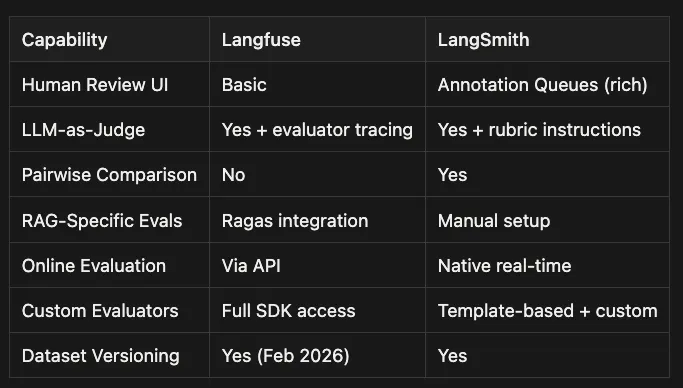
Langfuse: Annotation Queues with structured human review flows, open-sourced in mid-2025. Supports coordinated reviewer workflows and review throughput management.
-
LangSmith: Annotation Queues with a richer reviewer experience. Designed for structured, repeatable human-in-the-loop review at scale.
-
Langfuse: Yes, plus evaluator tracing. You can trace and debug the evaluator itself, which helps when judge outputs look inconsistent or surprising.
-
LangSmith: Yes, with rubric instructions and structured scoring patterns. Great when you want a standardized evaluation setup with clear criteria.
-
Langfuse: No first-class pairwise UI today. You can still run A/B tests, but you typically build the comparison workflow yourself.
-
LangSmith: Yes. Built-in pairwise evaluation makes it easier to compare prompts, models, and agent versions in a consistent workflow.
-
Langfuse: Ragas integration, which is useful for retrieval relevance, faithfulness, and context completeness metrics without reinventing common RAG evaluation logic.
-
LangSmith: Manual setup. You can absolutely evaluate RAG quality, but you will likely wire up metrics and evaluators more explicitly.
-
Langfuse: Via API. Flexible and programmable, but you own more of the “production scoring pipeline” implementation details.
-
LangSmith: Native real-time evaluation workflows. Easier to operationalize ongoing scoring and monitoring.
-
Langfuse: Full SDK access. Best when you want to implement bespoke evaluators, custom scoring schemas, and deeper integration with internal systems.
-
LangSmith: Template-based plus custom options. Fast to get started with common evaluators, with customization available when needed.
-
Langfuse: Yes, including versioned dataset experiments. Useful when you want reproducibility tied to dataset snapshots over time.
-
LangSmith: Yes. Strong support for running repeatable experiments on a stable dataset.
-
Docker Compose deployment for small teams
-
Kubernetes with Helm charts for production
-
ClickHouse backend with raw SQL access for custom analytics
-
Air-gapped deployments with no vendor contact required
-
Open-source core is fully feature-complete; Enterprise tier adds license-keyed features (SSO, advanced RBAC, dedicated support, etc.)
-
Requires a sales contract and license key
-
Helm chart deployment with RDS/K8s support (see current LangSmith docs for chart version)
-
Dynatrace integration for monitoring
-
No self-hosting on free or Plus tiers
-
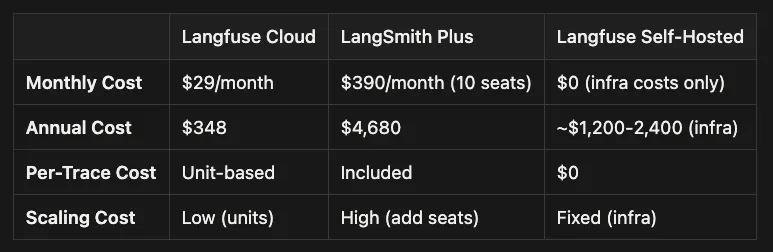
Monthly cost: Free on Hobby tier; $29/month on Core tier. A 10-person team at 100K traces/month most likely lands on Pro (check current pricing page for exact tier thresholds).
-
Annual cost: $348 on Core tier; higher on Pro tier (verify against current Langfuse pricing for the right tier for 100K traces/month). Spend is volume-based, not headcount-based.
-
Per-trace cost: Unit-based. Usage drives cost more than headcount, which can be favorable when your team grows faster than your traffic.
-
Scaling cost: Low (units). Adding engineers does not automatically increase the bill, but higher trace volume will.
-
Monthly cost: $390/month (10 seats). This is per-seat pricing, so it grows directly with team size.
-
Annual cost: $4,680 for seats alone ($390 * 12). Add per-1,000-trace overage charges for any traces above the included allowance — for a 100K-trace scenario, verify the current LangSmith pricing page for the total effective cost.
-
Per-trace cost: LangSmith Plus bills both per seat and per trace (trace overages apply above the included limit; for 100K traces this adds meaningful per-1,000-trace charges on top of the seat cost — verify current overage rates in LangSmith docs).
-
Scaling cost: High (add seats). Every additional teammate increases recurring cost, even if traffic is flat.
-
Monthly cost: $0 (infra costs only). There is no SaaS subscription, but you pay in cloud compute, storage, and operational time.
-
Annual cost: ~$1,200–2,400 (infra). This is the estimated hosting range and will vary based on retention, throughput, and reliability requirements.
-
Per-trace cost: $0 (platform). The platform does not charge per trace, but your infrastructure effectively becomes the cost driver.
-
Scaling cost: Fixed (infra). Costs tend to step up in chunks as you outgrow a deployment size, rather than increasing with each hire.
-
Threshold-based alerts for cost, latency, token usage, and error rates
-
Webhook integrations for Slack, PagerDuty, and custom endpoints
-
“Threads” feature for clustering similar conversations and identifying systemic issues
-
Configurable monitoring dashboards
-
Metrics API for programmatic access to trace data
-
OpenTelemetry export to Datadog, Grafana, or your existing monitoring stack
-
ClickHouse SQL for custom alert queries (self-hosted)
-
Webhook integrations for custom pipelines
 Decision framework: choosing between Langfuse and LangSmith
-
Only LangChain/LangGraph? LangSmith deserves serious consideration.
-
Mixed stack (OpenAI SDK, Claude, LlamaIndex, custom agents)? Langfuse is the stronger choice.
-
Healthcare, finance, or government with strict data residency rules? Langfuse self-hosted is often the only compliant option without an enterprise contract.
-
No strict requirements? Both work.
-
Under 5 engineers? LangSmith’s per-seat cost is manageable ($195/month).
-
10+ engineers? Langfuse’s flat pricing saves thousands per year.
-
Already running Kubernetes and Grafana? Langfuse self-hosted adds minimal overhead.
-
No infrastructure team? LangSmith’s managed SaaS removes the operational burden.
-
You use multiple frameworks (not just LangChain)
-
Self-hosting and data sovereignty are requirements
-
Your team is larger than 5 engineers (cost savings compound)
-
You want raw SQL access to trace data
-
You prefer open-source with no vendor lock-in
-
You already run Grafana or Datadog for monitoring
-
You build exclusively with LangChain and LangGraph
-
You want LangGraph Studio IDE for visual debugging
-
You need native alerting without additional infrastructure
-
You prefer managed SaaS with zero operational overhead
-
Human-in-the-loop evaluation (Annotation Queues) is critical
-
Your team is small (under 5 engineers) and cost per seat is acceptable
-
You are evaluating frameworks and want to test before committing
-
You need different tools for different projects (Langfuse for custom agents, LangSmith for LangGraph)
-
Agent observability requires hierarchical traces, not just request-response logs.
-
Langfuse uses
@observe()+CallbackHandlerwith OpenTelemetry context propagation. -
LangSmith uses
@traceable+wrap_openai()with automatic Run Tree nesting. -
LangSmith traces LangGraph automatically with zero code changes. Langfuse requires a callback handler at each invocation point.
-
Sub-agent tracing is automatic in LangSmith and explicit-but-controllable in Langfuse.
-
Langfuse self-hosting is free with a fully open-source core; Enterprise adds license-keyed features. LangSmith self-hosting requires an Enterprise contract.
-
For a 10-person team, Langfuse Cloud Core costs $348/year (Pro tier costs more — check current pricing). LangSmith Plus seat costs alone are $4,680/year, plus per-trace overages.
-
LangSmith has richer built-in evaluation and alerting. Langfuse integrates more flexibly with existing infrastructure.
- Instrument one existing agent today. Pick the simpler platform for your stack (LangSmith if you use LangChain, Langfuse otherwise) and add tracing to one function. The first trace is the hardest. After that, the pattern is clear.
- Try both free tiers before your team commits. The instrumentation experience and dashboard quality matter more than feature lists.
- For self-hosted Langfuse, run
docker compose upwith the official Langfuse compose file. You can have a local instance running in under 30 minutes. - For LangSmith, start with the environment variable approach and
wrap_openai(). It is the fastest path from zero to your first trace. - Build an evaluation dataset. Tracing tells you what happened. Scoring tells you whether it was good. Start with 20 representative test cases and run evaluations before every significant model or prompt change.