Mastering Claude Code's /btw, /fork, and /rewind: The Context Hygiene Toolkit
Claude Code's /btw, /fork, and /rewind commands to eliminate context pollution
Claude Code's /btw, /fork, and /rewind commands to eliminate context pollution
Learn how to use Claude Code's /btw, /fork, and /rewind commands to eliminate context pollution, manage parallel sessions, and optimize your AI coding workflow. Complete guide with examples and decision framework.
Every developer who has spent serious time with Claude Code has hit the same wall. You are watching the AI refactor a complex module. A question pops into your head, so you type it. Claude stops, answers, and tries to resume. But now your context window holds several hundred tokens of Q&A that have nothing to do with the task.
This is context pollution: the silent killer of AI-assisted coding productivity. And until now, there was no clean way to avoid it.
With the release of Claude Code v2.1.72 on March 10, 2026, Anthropic introduced /btw, a deceptively simple command that solves this problem at its root. Combined with the existing /fork and /rewind commands, it gives developers a complete toolkit for managing what might be the most overlooked aspect of AI-assisted development: context hygiene.
This article breaks down all three commands, shows when to reach for each one, and demonstrates how they combine into workflows that keep your sessions productive from first prompt to final commit.
Why Context Window Optimization Matters for AI Coding
Think of an LLM's context window as a whiteboard in a meeting room. Every note, question, and answer you write on it stays there for the rest of the meeting. If half the whiteboard is covered with off-topic discussions, the team has less space for the actual work, and worse, those off-topic notes keep catching everyone's eye, pulling attention from what matters.
In Claude Code, the context window works the same way. Every token influences the model's next output. When you inject unrelated questions and answers into the primary task context, two things happen:
- Token budget shrinks. Each Q&A exchange consumes space that could hold file contents, code analysis, or implementation plans.
- Signal degrades. The model processes noise alongside the signal, which can reduce output quality on the actual task.
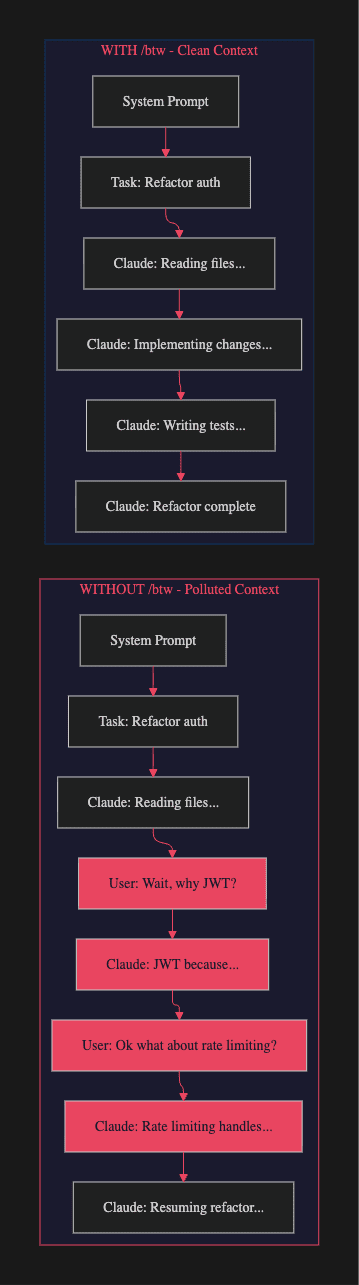
In a typical long-running session, a few casual questions can consume 20-30% of the available context. That is not just wasted space. It is actively degrading every response Claude generates for the rest of the session.
Claude Code /btw Command: The Ephemeral Side Channel
Released in Claude Code v2.1.72 on March 10, 2026, /btw (short for "by the way") solves the most common source of context pollution: the casual mid-task question.
How It Works
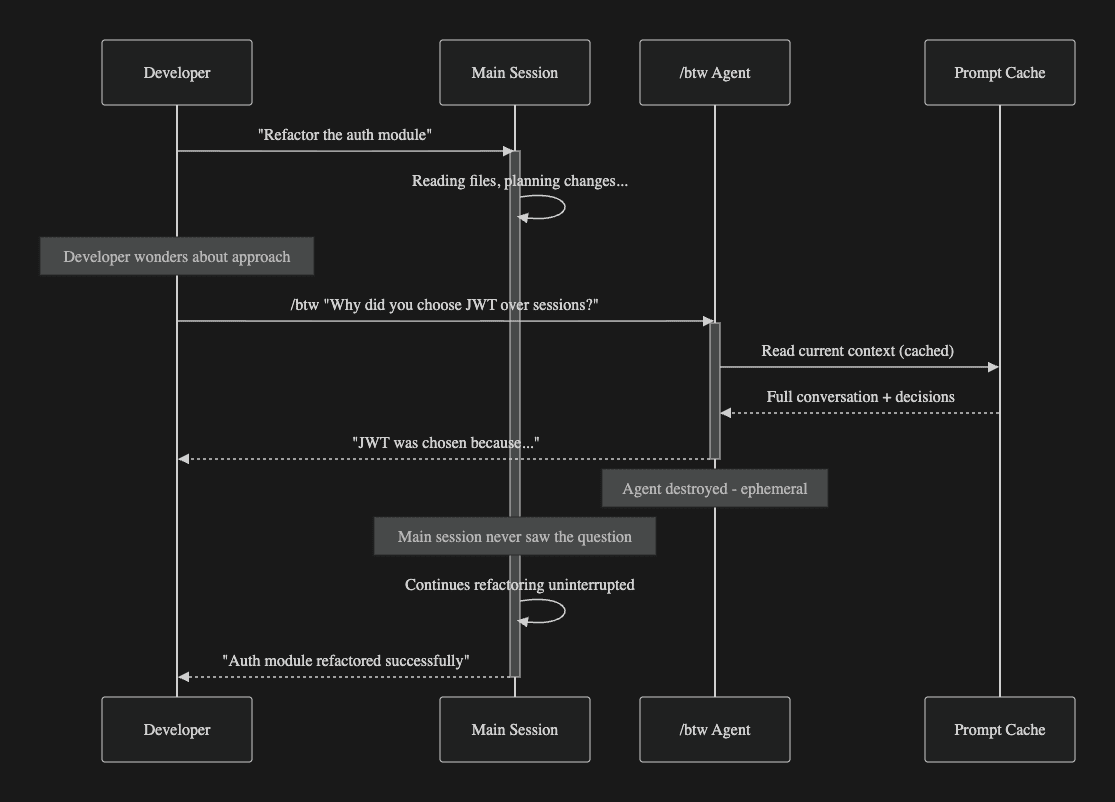
Type /btw followed by your question. Claude Code spawns a temporary, ephemeral agent that:
- Reads the current conversation context via the main session's prompt cache
- Answers your question based on everything Claude has seen and decided
- Displays the answer inline in your terminal
- Destroys itself. The question and answer never enter the main conversation history
The main session continues in the background. Zero interruption. Zero context pollution.
Why This Matters
The key insight behind /btw is that most mid-task questions are about understanding, not about changing direction. You want to know why Claude chose an approach, what a library does, or how a pattern works. These questions are important for you as a developer, but they are irrelevant to Claude's ongoing task. Before /btw, you had two bad options: interrupt the session (polluting context) or start a separate session (losing all context). Now you have a third option that preserves both your understanding and Claude's focus.
In Practice
You have asked Claude to migrate an API from Express to Fastify. Claude is rewriting route handlers, and you want to know about the middleware strategy.
Without /btw:
You: Wait, how are you handling the Express middleware? Are you converting
them to Fastify plugins?

Claude: Good question! I'm converting each Express middleware to a Fastify
plugin using the fastify-plugin wrapper. Here's my approach...
[400+ tokens permanently added to context]
Claude: Now, where was I... Let me continue with the route handlers.
With /btw:
/btw How are you handling the Express middleware migration?

[btw] The main session is converting Express middleware to Fastify plugins
using fastify-plugin. Each middleware is wrapped with fp() and registered
via fastify.register(). Error handling uses Fastify's setErrorHandler.
[Main session continues uninterrupted, context unchanged]
Same information. Zero context cost.
Why It Is Cheap
The /btw agent leverages the main session's prompt cache. You are not re-sending the entire context or starting a new conversation. The ephemeral agent piggybacks on already-processed tokens, making each /btw query cost a fraction of a normal turn. For teams watching their API spend, this is significant: you can check on Claude's progress dozens of times per session without meaningful cost impact.
Constraints by Design
- Single-turn only: One question, one answer. No follow-ups.
- Read-only: Cannot edit files, run commands, or create artifacts.
- No tool access: Cannot read files the main session has not already seen.
These constraints are intentional. They are what make /btw fast, cheap, and safe. If your question needs more than a single answer, or if you need Claude to actually do something, reach for /fork.
Claude Code /fork Command: Parallel Sessions for Deep Exploration
Sometimes understanding is not enough. You need Claude to read additional files, generate diagrams, prototype an alternative approach, or run commands to test a theory. /btw cannot do any of that. /fork can.
How It Works
Forking creates a new session that inherits the full conversation history up to the fork point. The original session stays untouched.
In-session:
/fork
From the CLI (useful for opening in a separate terminal):
claude -r "session-name" --fork-session
VSCode extension support for fork shipped in v2.1.19, so you can also trigger it from the editor's command palette.
Why Forking Beats Starting Fresh
When you start a new Claude Code session, you lose all context. The files Claude has read, the decisions it has made, and the patterns it has identified are all gone. A fork preserves all of that. It is like duplicating a running process. The fork starts exactly where the original is, with full knowledge of everything that has happened. This means you can immediately ask deep questions or explore alternatives without spending turns catching Claude up on the current state.
In Practice
You are building a real-time notification system. Claude is implementing WebSockets, but you wonder about Server-Sent Events.
# Terminal 2 - fork the session
claude -r "notifications-feature" --fork-session

# In the fork:
You: Prototype this notification system using SSE instead of WebSockets.
Compare the complexity.
Claude: [Creates SSE files, analyzes trade-offs, generates comparison]
Meanwhile, the original session continues the WebSocket implementation. You now have two parallel approaches to compare, and neither session's context was polluted by the other.
When /fork Beats /btw
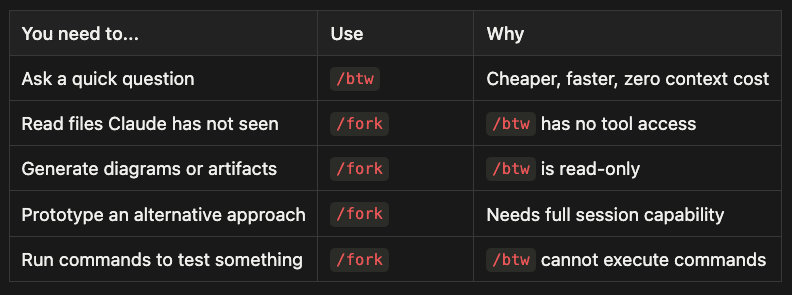
- Ask a quick question: Use /btw -- Cheaper, faster, zero context cost
- Read files Claude has not seen: Use /fork -- /btw has no tool access
- Generate diagrams or artifacts: Use /fork -- /btw is read-only
- Prototype an alternative approach: Use /fork -- Needs full session capability
- Run commands to test something: Use /fork -- /btw cannot execute commands
The trade-off is straightforward: /btw is cheaper and lighter, /fork is more powerful. Choose based on what your question requires, not on habit.
Claude Code /rewind Command: Surgical State Restoration
Introduced on September 29, 2025, /rewind is the command you reach for when Claude has gone down the wrong path. Unlike /btw (which prevents pollution) and /fork (which isolates exploration), /rewind actively removes bad context that already exists.
How It Works
Claude Code creates checkpoints before each of Claude's changes. Activate rewind by:
- Typing
/rewind - Pressing Esc twice
Then choose what to restore:
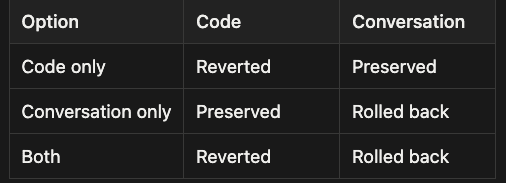
Rewind Options
- Code only: Code is reverted, conversation is preserved
- Conversation only: Code is preserved, conversation is rolled back
- Both: Code is reverted and conversation is rolled back
Why Rewinding Beats Arguing
When Claude misunderstands your requirements, the natural instinct is to explain the mistake: "No, I did not mean X, I meant Y. Here is why..." This creates a correction chain that consumes significant context. The wrong approach stays in the conversation (wasting tokens), the correction stays (more tokens), and Claude must reconcile conflicting instructions (degrading quality).
Rewinding eliminates this entirely. You roll back to before the mistake, provide a clearer prompt, and Claude proceeds as if the error never happened. The context window contains only correct, relevant information.
In Practice
You check on Claude's caching implementation via /btw:
/btw What caching strategy are you implementing?

[btw] Write-through cache with Redis, 5-minute TTL, URL as cache key.
That is wrong for user-specific endpoints. Instead of explaining the problem inline, rewind:
[Esc + Esc]
> Rewind code and conversation

You: Implement a caching layer. Constraints:
- User endpoints: include user ID in cache key, 2-minute TTL
- Public endpoints: URL-only key, 5-minute TTL
- Use Redis for both
Clean slate. Correct approach. Zero context waste.
Context Compression with Summarization
For long-running sessions, /rewind summarization compresses the conversation to a summary and starts fresh:
/rewind summarization
This frees the majority of the context window while retaining key decisions. Think of it as archiving completed work. The outcomes are preserved, but the step-by-step details no longer consume active context. This is essential for multi-phase projects that push the context limit.
Caveat
The /rewind checkpoint system tracks only Claude's changes. Your manual edits and bash commands are not included.
Decision Framework: Which Claude Code Command to Use
When you are in the middle of a session and need to decide which tool to reach for, use this flowchart:
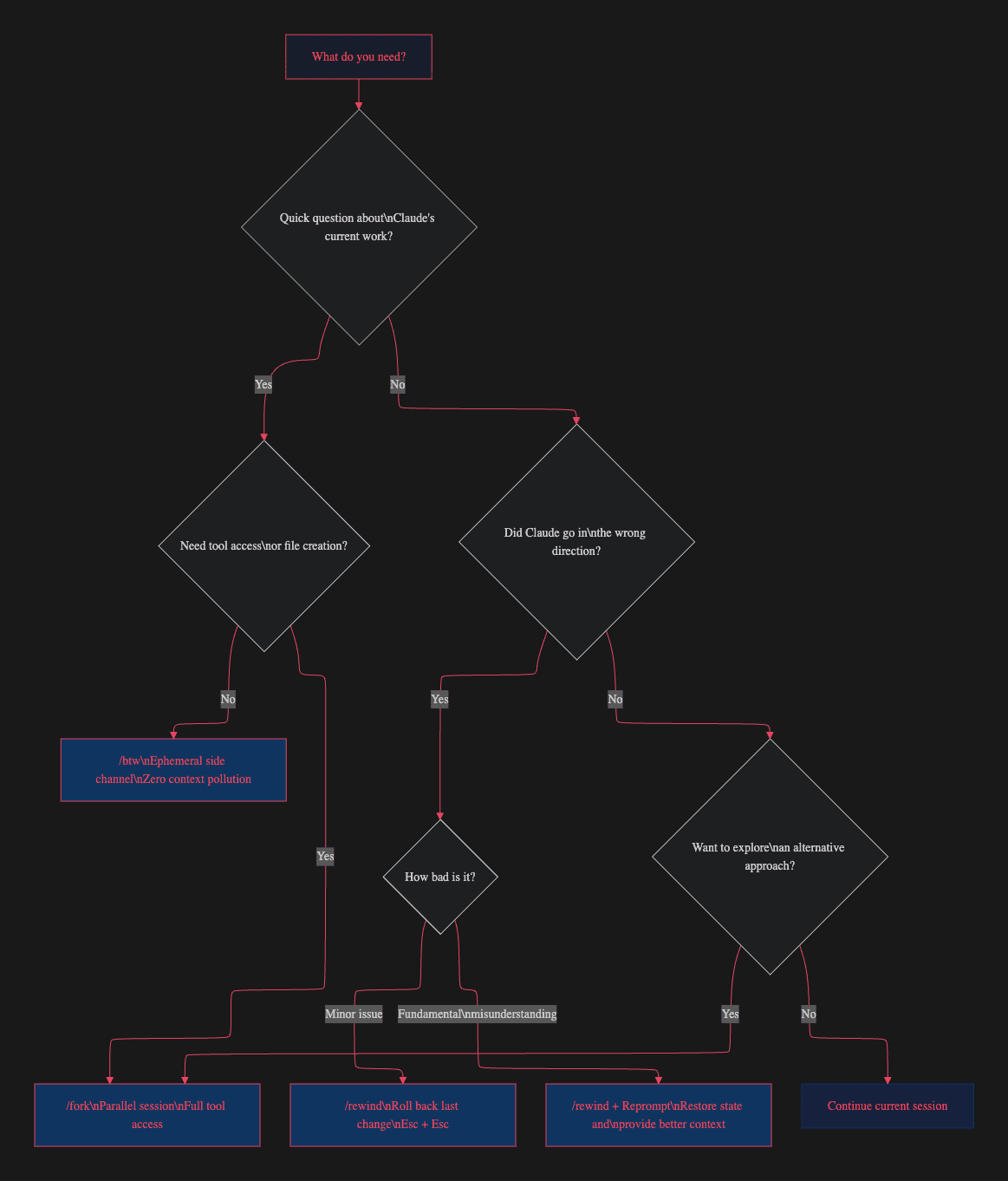
Quick Reference Cheat Sheet
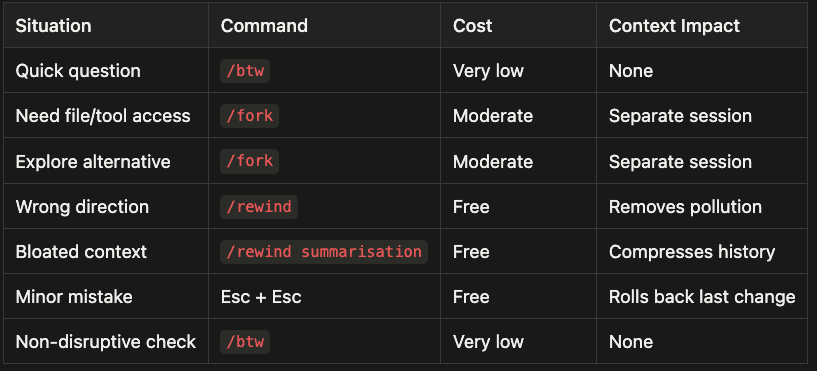
Quick Reference: Command Selection Guide
- Quick question: Use /btw -- Very low cost, no context impact
- Need file/tool access: Use /fork -- Moderate cost, separate session
- Explore alternative: Use /fork -- Moderate cost, separate session
- Wrong direction: Use /rewind -- Free, removes pollution
- Bloated context: Use /rewind summarization -- Free, compresses history
- Minor mistake: Use Esc + Esc -- Free, rolls back last change
- Non-disruptive check: Use /btw -- Very low cost, no context impact
Advanced Claude Code Workflow Patterns
These patterns combine the three commands for maximum effectiveness in real-world development scenarios.
The Monitor-Correct Loop
The most common advanced pattern combines /btw for monitoring with /rewind for correction.
- Start a complex task
- Use /btw periodically to check Claude's approach
- If the approach is wrong, /rewind to before the mistake
- Reprompt with corrected instructions
- Resume /btw monitoring
This loop keeps your context window surgically clean. You never argue with Claude, never explain what went wrong inline, and never accumulate failed approaches in context. The result is a context window that contains only the task description and correct implementation work.
The Exploration Branch
For architectural decisions where you want to see actual code before committing:
- Reach a decision point in your main session
- Fork:
claude -r "main-task" --fork-session - Explore Option A in the fork
- Fork the original again for Option B if needed
- Compare results across forks
- Continue the main session with the winning approach
This pattern is particularly valuable early in a project when you are making decisions that will be expensive to reverse later. The cost of two or three forked sessions is trivial compared to the cost of refactoring a bad architectural choice.
The Context Compression Pipeline
For multi-hour sessions that span multiple project phases:
- Complete Phase 1 of your project
- Use /rewind summarisation to compress Phase 1
- Begin Phase 2 with a clean context retaining Phase 1 decisions
- Repeat for each subsequent phase
This maintains session continuity across work that would otherwise exceed the context window, keeping the signal-to-noise ratio high throughout.
Scripted Forks for Automation
Integrate forking into development scripts for parallel workflows:
#!/bin/bash
# Parallel code review while main session continues
claude -r "$SESSION_ID" --fork-session \\
  -p "Review changes so far. Check for security issues,
      performance problems, and missing error handling.
      Write review to review.md"
This creates a disposable review session that examines the main session's work without affecting it.
Cost Comparison: Context Pollution vs. Clean Workflows
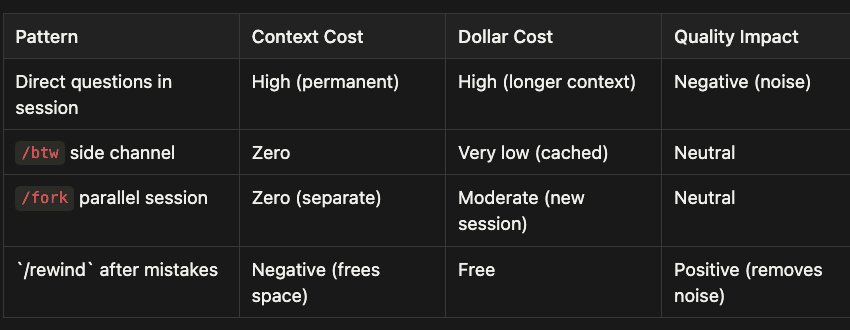
Cost Comparison: Bullet Point Summary
Direct questions in session:
- Context Cost: High (permanent)
- Dollar Cost: High (longer context)
- Quality Impact: Negative (noise)
/btw side channel:
- Context Cost: Zero
- Dollar Cost: Very low (cached)
- Quality Impact: Neutral
/fork parallel session:
- Context Cost: Zero (separate)
- Dollar Cost: Moderate (new session)
- Quality Impact: Neutral
/rewind after mistakes:
- Context Cost: Negative (frees space)
- Dollar Cost: Free
- Quality Impact: Positive (removes noise)
The most expensive pattern is the one most developers default to: asking questions in the main session, consuming context, then paying for the bloated context on every subsequent turn. The "free" question, ironically, actually costs the most over the lifetime of a session.
Summary
Claude Code's /btw, /fork, and /rewind form a complete context hygiene toolkit, each addressing a different aspect of the problem:
- /btw prevents pollution before it happens. Use it for every mid-task question that does not require tool access.
- /fork isolates exploration. Use it when you need full-power investigation without contaminating the main session.
- /rewind removes pollution after it happens. Use it for course correction and context compression.
The developers who get the most out of Claude Code are not the ones who write the best prompts. They are the ones who manage their context windows like the scarce resource they are. Every token in your context window is either signal or noise, and these three commands give you the tools to maximize signal.
Use /btw for every question that does not need tool access. Fork when you need to explore. Rewind when things go sideways. Your context window will thank you.
About the Author
Rick Hightower is a technology executive and data engineer who led ML/AI development at a Fortune 100 financial services company. He created skilz, the universal agent skill installer, supporting 30+ coding agents including Claude Code, Gemini, Copilot, and Cursor, and co-founded the world's largest agentic skill marketplace. Connect with Rick Hightower on LinkedIn or Medium.
Rick has been actively developing generative AI systems, agents, and agentic workflows for years. He is the author of numerous agentic frameworks and developer tools and brings deep practical expertise to teams looking to adopt AI.