Mastering Custom Pipelines: Advanced Data Processing for Production-Ready AI
Welcome to the architect’s guide to Hugging Face workflows. In this chapter, we’ll transform you from a pipeline user to a workflo
Originally published on Medium.
Welcome to the architect’s guide to Hugging Face workflows. In this chapter, we’ll transform you from a pipeline user to a workflo
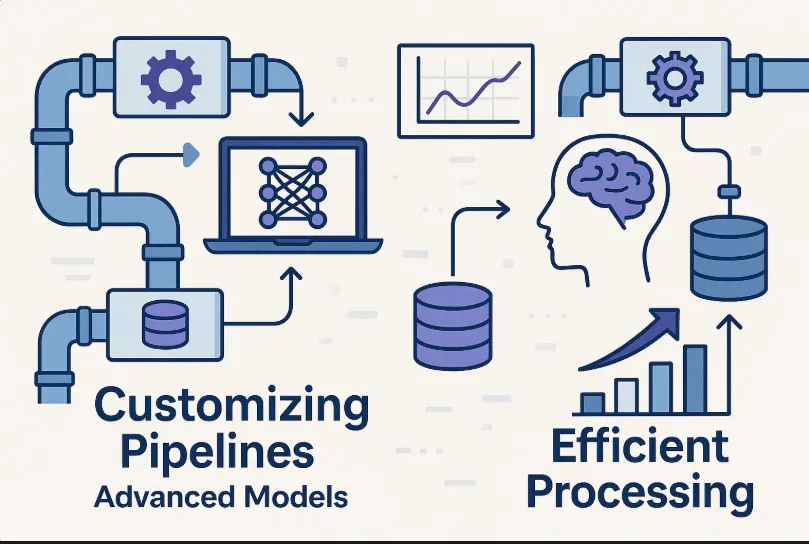
- Deconstruct Hugging Face pipelines to understand their internal components
- Create custom workflows that handle complex preprocessing and business logic
- Process massive datasets efficiently with streaming and batching techniques
- Optimize models for production with quantization and edge deployment
- Generate and leverage synthetic data for training and evaluation
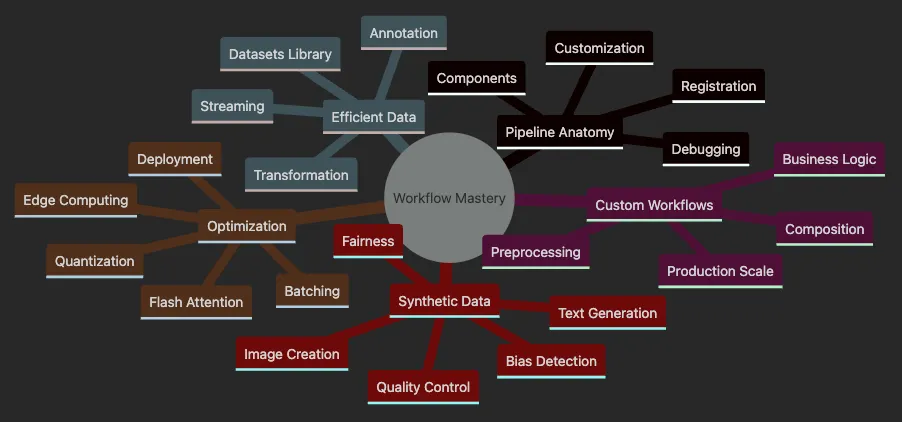
- Covers Pipeline Anatomy including components, customization, debugging.
- Explores Custom Workflows with preprocessing, composition, business logic.
- Details Efficient Data handling with Datasets library and streaming.
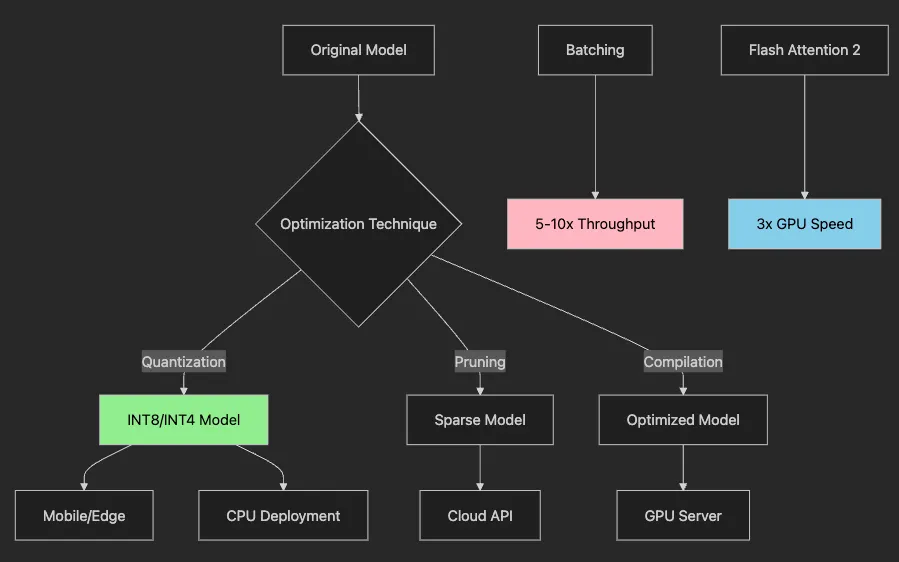
- Shows Optimization techniques from batching to edge deployment.
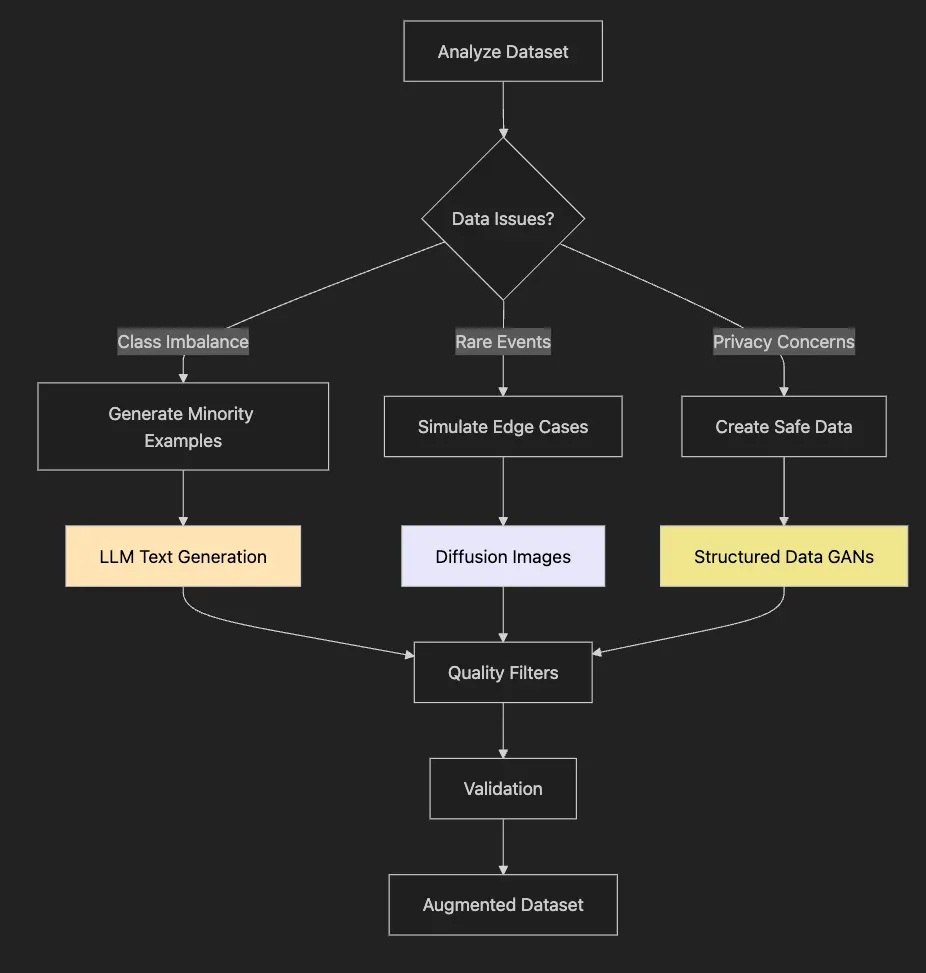
- Presents Synthetic Data generation for augmentation and fairness.
# Modern quick-start with explicit model and device
from
 transformers
import
 pipeline
# Specify model checkpoint and device for reproducibility
clf = pipeline(

'sentiment-analysis'
,
    model=
'cardiffnlp/twitter-roberta-base-sentiment-latest'
,
    device=
0

# 0 for CUDA GPU, -1 for CPU, 'mps' for Apple Silicon
)
# Run prediction on text
result = clf(
'I love Hugging Face!'
)
print
(result)
# Output: [{'label': 'POSITIVE', 'score': 0.9998}]
# Check model card: <https://huggingface.co/cardiffnlp/twitter-roberta-base-sentiment-latest>
-
Custom data cleaning (HTML, emojis, multilingual text)
-
Chained models (sentiment + entity recognition)
-
Speed optimization (batching, device placement)
-
Business logic (filtering, compliance checks)
-
Scale (streaming, batch processing)
-
Clean data from Twitter, Amazon, and internal systems
-
Add product metadata
-
Process 10,000 reviews per minute
-
Log for compliance
-
Stream from S3 buckets
def

custom_preprocess
(
text
):

# Normalize text for consistent predictions

import
 string
    text = text.lower()

return
 text.translate(
str
.maketrans(
''
,
''
, string.punctuation))
texts = [
"Wow! Amazing product!!!"
,
"I don't like this..."
]
# Clean then predict
cleaned = [custom_preprocess(t)
for
 t
in
 texts]
results = clf(cleaned, batch_size=
16
)
# Batch for speed!
print
(results)
- Define preprocessing (lowercase, strip punctuation)
- Clean inputs before pipeline
- Use
batch_sizefor 5x faster inference - Get reliable predictions on normalized data
- For large batches, enable truncation with
truncation=Trueto avoid OOM errors
- Text normalization in preprocessing (lowercasing and punctuation removal)
- Adding confidence flags in postprocessing based on prediction scores
from
 transformers
import
 Pipeline
class

CustomSentimentPipeline
(
Pipeline
):

def

preprocess
(
self, inputs
):

# Strip HTML, normalize text

if

isinstance
(inputs,
list
):
            text = [t.lower()
for
 t
in
 inputs]

else
:
            text = inputs.lower()

import
 string

if

isinstance
(text,
list
):
            text = [t.translate(
str
.maketrans(
''
,
''
, string.punctuation))
for
 t
in
 text]

else
:
            text = text.translate(
str
.maketrans(
''
,
''
, string.punctuation))

return

super
().preprocess(text)

def

postprocess
(
self, outputs
):

# Add confidence thresholds
        results =
super
().postprocess(outputs)

for
 r
in
 results:
            r[
'confident'
] = r[
'score'
] >
0.95

return
 results
from
 datasets
import
 load_dataset
# Stream massive datasets without memory issues
dataset = load_dataset(
'csv'
, data_files=
'reviews.csv'
,
                      split=
'train'
, streaming=
True
, num_proc=
4
)
batch_size =
32
batch = []
for
 example
in
 dataset:
    batch.append(custom_preprocess(example[
'text'
]))

if

len
(batch) == batch_size:
        results = clf(batch, batch_size=batch_size)

# Process results (save, log, etc.)
        batch = []
- Pipelines = fast start, but limited for production
- Always specify model + device for reproducibility
- Custom workflows handle real business needs
- Batch processing with Flash Attention can 20x throughput on modern GPUs
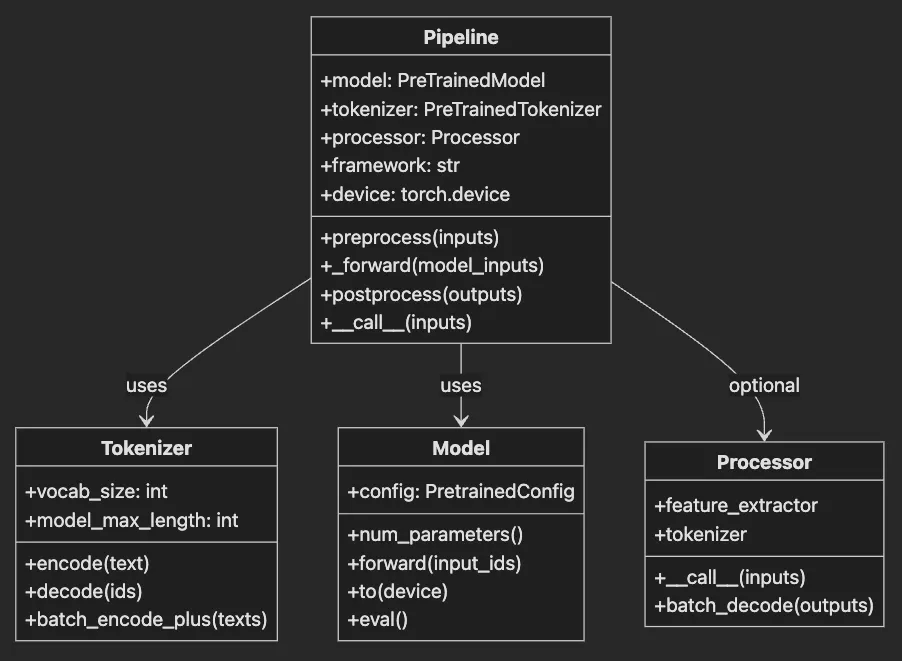
- Tokenizer: The translator. Converts “Hello world” → [101, 7592, 2088, 102]
- Model: The brain. Neural network processing tokens → predictions
- Processor: The prep cook. Resizes images, extracts audio features (multimodal tasks)
from
 transformers
import
 pipeline
clf = pipeline(
'text-classification'
)
print
(
'Model:'
, clf.model)
print
(
'Tokenizer:'
, clf.tokenizer)
print
(
'Processor:'
,
getattr
(clf,
'processor'
,
None
))
print
(
'Framework:'
, clf.framework)
# pytorch or tensorflow
- Swap components — Use custom models/tokenizers
- Compose pipelines — Chain multiple tasks
- Register new types — Create reusable workflows
from
 transformers
import
 Pipeline, pipeline
from
 transformers.pipelines
import
 register_pipeline
class

SentimentNERPipeline
(
Pipeline
):

def

__init__
(
self, sentiment_pipeline, ner_pipeline, **kwargs
):
        self.sentiment_pipeline = sentiment_pipeline
        self.ner_pipeline = ner_pipeline

super
().__init__(
            model=sentiment_pipeline.model,
            tokenizer=sentiment_pipeline.tokenizer,
            **kwargs
        )

def

_forward
(
self, inputs
):
        sentiment = self.sentiment_pipeline(inputs)
        entities = self.ner_pipeline(inputs)

return
 {
"sentiment"
: sentiment,
"entities"
: entities}
# Direct instantiation (register_pipeline is deprecated)
# Create component pipelines
sentiment_pipe = pipeline(
'sentiment-analysis'
,
                         model=
'cardiffnlp/twitter-roberta-base-sentiment-latest'
)
ner_pipe = pipeline(
'ner'
, model=
'dslim/bert-base-NER'
)
# Use it!
pipe = SentimentNERPipeline(
    sentiment_pipeline=sentiment_pipe,
    ner_pipeline=ner_pipe
)
result = pipe(
"Apple Inc. makes amazing products!"
)
# {'sentiment': [{'label': 'POSITIVE', 'score': 0.99}],
#  'entities': [{'word': 'Apple Inc.', 'entity': 'ORG'}]}
from
 transformers.utils
import
 logging
logging.set_verbosity_debug()
# Now see EVERYTHING
clf = pipeline(
'text-classification'
)
result = clf(
'Debug me!'
)
- Model/tokenizer mismatch → Check families match
- Wrong input format → Pipelines expect strings, lists, or dicts
- Memory errors → Reduce batch size or max_length
- Slow inference → Enable Flash Attention (GPU) or batch more
- For GPU issues, check Flash Attention compatibility with
torch.backends.cuda.sdp_kernel(enable_flash=True)
from
 datasets
import
 load_dataset
# Load IMDB reviews
dataset = load_dataset(
'imdb'
, split=
'train'
, trust_remote_code=
True
)
print
(
f"Dataset size:
{
len
(dataset)}
"
)
# 25,000 examples
print
(dataset[
0
])
# {'text': '...', 'label': 1}
# Custom data? Easy!
custom = load_dataset(
'csv'
, data_files=
'reviews.csv'
)
def

preprocess
(
batch
):

# Process entire batches at once
    batch[
'text'
] = [text.lower()
for
 text
in
 batch[
'text'
]]
    batch[
'length'
] = [
len
(text.split())
for
 text
in
 batch[
'text'
]]

return
 batch
# Transform with parallel processing
dataset = dataset.
map
(preprocess, batched=
True
, num_proc=
4
, remove_columns=[
'unused'
])
# Filter short reviews
dataset = dataset.
filter
(
lambda
 x: x[
'length'
] >
20
)
# Stream without loading everything
wiki = load_dataset(
'wikipedia'
,
'20250301.en'
,
                   split=
'train'
, streaming=
True
)
# Process as you go
for
 i, article
in

enumerate
(wiki):

if
 i >=
1000
:
# Process first 1000

break

# Your processing here
    process_article(article[
'text'
])
# Best practices for annotation
from
 datasets
import
 Dataset
# 1. Start small - annotate 100 examples
pilot_data = dataset.select(
range
(
100
))
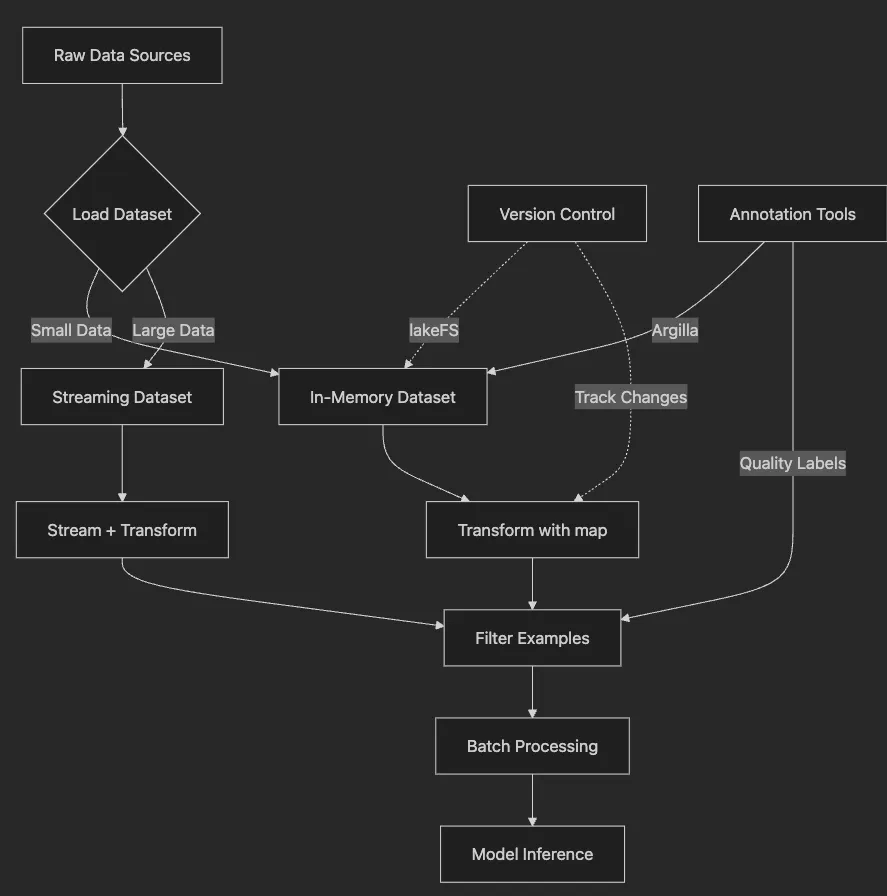
# 2. Use Argilla for team annotation
# See Article 12 for Argilla + HF integration
# 3. Version your annotations
# dataset.push_to_hub("company/product-reviews-v2")
# 4. Track changes with lakeFS for compliance
# In 2025, integrate with HF Spaces for collaborative annotation
# Slow: One by one
texts
=

[
"Review 1"
,
"Review 2"
,
"Review 3"
]
for text in
texts
:
    result
=
 clf
(
text
)

# 3 separate calls
# Fast: Batch processing
results
=
 clf
(
texts,
             padding
=
True
,
# Align lengths
             truncation
=
True
,
# Cap at max_length
             max_length
=
128
,
# Prevent memory spikes
             attn_implementation
=
"flash_attention_2"
)

# 2025 optimization
# 10x faster on GPU!
from
 transformers
import
 AutoModelForSequenceClassification
# Standard model: 400MB
model = AutoModelForSequenceClassification.from_pretrained(

"bert-base-uncased"
)
# Quantized model: 100MB, 4x faster!
try
:

from
 transformers
import
 BitsAndBytesConfig
    quantization_config = BitsAndBytesConfig(
        load_in_8bit=
True
,
        bnb_8bit_compute_dtype=torch.float16
    )
    model_int8 = AutoModelForSequenceClassification.from_pretrained(

"bert-base-uncased"
,
        quantization_config=quantization_config,
        device_map=
"auto"
    )
except
 ImportError:

print
(
"bitsandbytes not installed. Using standard model."
)
    model_int8 = model
# For LLMs: INT4 quantization
quantization_config_int4 = BitsAndBytesConfig(
    load_in_4bit=
True
,
    bnb_4bit_quant_type=
"nf4"
,
    bnb_4bit_compute_dtype=torch.float16
)
model_int4 = AutoModelForCausalLM.from_pretrained(

"meta-llama/Llama-4-Scout-17B-16E"
,
    quantization_config=quantization_config_int4,
    device_map=
"auto"
)
- INT8 quantization reduces memory by 75%
device_map="auto"optimally distributes layers- INT4 enables 7B parameter models on consumer GPUs
- Compute dtype maintains accuracy during forward pass
- Automatic mixed precision balances speed and quality
# 1. Choose efficient model
model_name =
"microsoft/phi-3-mini-4k-instruct"

# 2025 efficiency
# 2. Quantize for edge
import torch
quantized = torch.quantization.quantize_dynamic(
    model, {torch.nn.Linear}, dtype=torch.qint8
)
# 3. Export to ONNX/GGUF
model.save_pretrained(
"model_mobile"
, push_to_hub=False)
# 4. Benchmark on target device
# iPhone 14: 15ms/inference
# Raspberry Pi: 100ms/inference
from peft import LoraConfig, get_peft_model, TaskType
# Adapt Llama-2 with 0.1% of parameters
peft_config = LoraConfig(
    task_type=TaskType.CAUSAL_LM,
    r=16,
# LoRA rank
    lora_alpha=32,
    lora_dropout=0.1,
    target_modules=[
"q_proj"
,
"v_proj"
]
)
model = AutoModelForCausalLM.from_pretrained(
"meta-llama/Llama-4-Scout-17B-16E"
)
peft_model = get_peft_model(model, peft_config)
# Only 40MB of trainable parameters instead of 13GB!
peft_model.print_trainable_parameters()
# trainable params: 4,194,304 || all params: 6,738,415,616 || trainable%: 0.06%
from
 peft
import
 LoraConfig, get_peft_model, TaskType
from
 transformers
import
 AutoModelForCausalLM, BitsAndBytesConfig
import
 torch
# QLoRA configuration for 4-bit quantization
quantization_config = BitsAndBytesConfig(
    load_in_4bit=
True
,
    bnb_4bit_quant_type=
"nf4"
,
    bnb_4bit_compute_dtype=torch.float16,
    bnb_4bit_use_double_quant=
True
)
# Load Llama-4 with 4-bit quantization
model = AutoModelForCausalLM.from_pretrained(

"meta-llama/Llama-4-Scout-17B-16E"
,
# Updated for 2025
    quantization_config=quantization_config,
    device_map=
"auto"
,
    trust_remote_code=
True
)
# LoRA configuration
peft_config = LoraConfig(
    task_type=TaskType.CAUSAL_LM,
    r=
8
,
# Lower rank for QLoRA
    lora_alpha=
16
,
    lora_dropout=
0.1
,
    target_modules=[
"q_proj"
,
"v_proj"
,
"k_proj"
,
"o_proj"
]
# All attention
)
peft_model = get_peft_model(model, peft_config)
peft_model.print_trainable_parameters()
# trainable params: 20,971,520 || all params: 17,064,669,184 || trainable%: 0.123%
-
4-bit quantization reduces memory by 75% vs standard LoRA
-
NF4 (NormalFloat4) maintains accuracy better than INT4
-
Double quantization further compresses the quantization constants
-
Target all attention projections for comprehensive adaptation
-
Compatible with Flash Attention 2 for speed
-
LoRA — High (13GB) — 0.06% — Moderate — — 24GB
-
QLoRA — Low (4GB) — 0.06% — High (2x) — — 8GB

from
 transformers
import
 pipeline
# Latest open LLM
gen = pipeline(

'text-generation'
,
    model=
'mistralai/Mistral-7B-Instruct-v0.3'
,
    device_map=
'auto'
)
# Generate product reviews
prompt =
"""Generate a realistic negative product review for headphones.
Include specific details about sound quality and comfort."""
reviews = gen(
    prompt,
    max_new_tokens=
100
,
    num_return_sequences=
5
,
    temperature=
0.8

# More variety
)
# Quality check with toxicity filtering
from
 evaluate
import
 load
toxicity = load(
"toxicity"
)
for
 review
in
 reviews:

# Check toxicity

if
 toxicity.compute(predictions=[review[
'generated_text'
]])[
'toxicity'
][
0
] >
0.1
:

continue

# Skip toxic content

if
 is_realistic(review[
'generated_text'
]):
        dataset.add_item(review)
from diffusers import DiffusionPipeline
import torch
# Load latest Stable Diffusion
pipe = DiffusionPipeline.from_pretrained(

"stabilityai/stable-diffusion-3.5-large"
,
    torch_dtype=torch.float16,
    variant=
"fp16"
)
pipe = pipe.to(
"cuda"
)
# Generate training images
prompts = [

"smartphone with cracked screen, product photo"
,

"laptop with coffee spill damage, repair documentation"
,

"pristine condition vintage watch, auction listing"
]
for prompt in prompts:
    image = pipe(prompt, num_inference_steps=30).images[0]

# Add to training set with appropriate labels
def

validate_synthetic_data
(
synthetic, real
):

"""Ensure synthetic data improves dataset"""

# 1. Statistical similarity
    real_stats = calculate_statistics(real)
    synth_stats = calculate_statistics(synthetic)

assert
 similarity(real_stats, synth_stats) >
0.85

# 2. Diversity check

assert

len
(
set
(synthetic)) /
len
(synthetic) >
0.95

# 3. Quality filters
    synthetic = filter_nsfw(synthetic)
    synthetic = filter_toxic(synthetic)

# 4. Human review sample
    sample = random.sample(synthetic,
100
)

# Send sample for manual QA

return
 synthetic
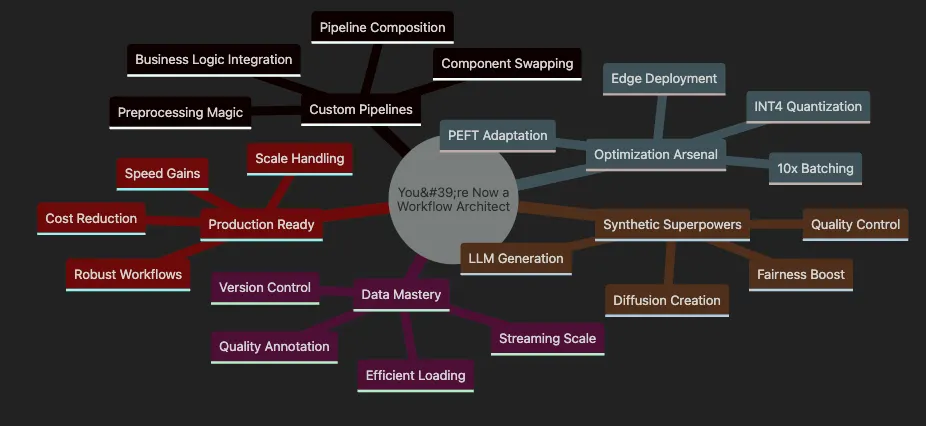
# You can now build THIS
custom_pipeline = compose_pipelines(
    preprocessing=custom_cleaner,
    main_model=sentiment_analyzer,
    post_processing=business_filter,
    output_format=company_standard
)
# Handle millions without breaking a sweat
massive_dataset
 = load_dataset(
"your_data"
, streaming=
True
)
processed
 = massive_dataset.map(transform, batched=
True
)
# 75% cost reduction, same accuracy
optimized_model = quantize_and_compile(
    model,
    target=
"int4"
,
    hardware=
"mobile"
)
# Fill gaps, boost fairness
augmented_data
=
 generate_synthetic
(
    minority_class
=
"rare_defects"
,
    count
=
10000
,
    validate
=
True
)
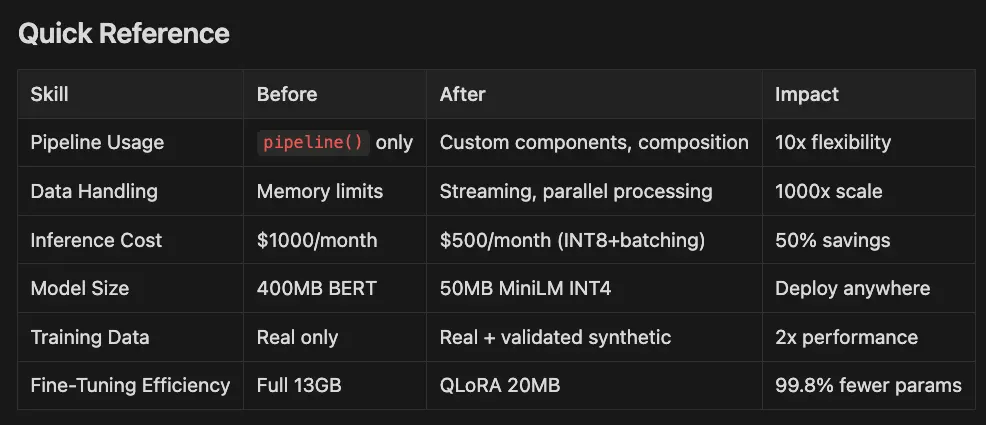
- Pipeline Usage:
pipeline()only Custom components, composition 10x flexibility - Data Handling: Memory limits Streaming, parallel processing 1000x scale
- **Inference Cos:**t $1000/month $500/month (INT8+batching) 50% savings
- Model Size: 400MB BERT 50MB MiniLM INT4 Deploy anywhere
- Training Data: Real only Real + validated synthetic 2x performance
- Fine-Tuning Efficiency: Full 13GB QLoRA 20MB 99.8% fewer params
-
Article 11: Advanced dataset curation techniques
-
Article 12: LoRA/QLoRA for efficient large model adaptation
-
Article 13: Flash Attention and Advanced Optimizations
-
Article 14: Comprehensive evaluation strategies
-
Article 16: Responsible AI and fairness
-
Python 3.12.10 (managed via pyenv)
-
Poetry for dependency management
-
Go Task for build automation
-
macOS (Apple Silicon), Linux, or Windows
-
CUDA GPU (optional for NVIDIA users, required for Flash Attention)
-
MPS support for Apple Silicon
-
(Optional) Hugging Face account for accessing gated models
-
(Optional) bitsandbytes for INT4/INT8 quantization
- Clone the repository:
git
clone
 [email protected]:RichardHightower/art_hug_08.git
cd
 art_hug_08
task setup
- Install Python 3.12.10 if needed
- Set up Poetry environment
- Install all dependencies with 2025 versions:
- transformers ^4.53.0
- datasets ^3.0.0
- diffusers ^0.31.0
- peft ^1.0.0
- bitsandbytes ^0.46.0
- evaluate ^0.4.0
cp
 .env.example .
env
# Edit .env with your configuration (API keys, etc.)
poetry run python test_environment.
py
task run
# Custom pipeline examples with modern models
poetry run python -m
src
.custom_pipelines
# Efficient data handling demonstrations
poetry run python -m
src
.data_workflows
# Optimization benchmarks with quantization
poetry run python -m
src
.optimization
# QLoRA demonstration
poetry run python -m
src
.peft_lora

--qlora
# Production workflow example
poetry run python -m
src
.production_workflows
# Run
all
 demonstrations
poetry run python -m
src
.main

--demo

all
poetry run jupyter notebook notebooks/tutorial.ipynb
task notebook
- Modern model usage (Phi-2, RoBERTa variants)
- BitsAndBytesConfig quantization examples
- QLoRA configuration demonstrations
- Flash Attention 2 benchmarks
- Ethical AI and bias detection
art_hug_08/
├── src/
│   ├── custom_pipelines.py
# Pipeline customization with _sanitize_parameters
│   ├── data_workflows.py
# Efficient data handling demonstrations
│   ├── optimization.py
# Model optimization techniques
│   ├── synthetic_data.py
# Data generation with toxicity filtering
│   ├── production_workflows.py
# End-to-end retail example
│   ├── edge_deployment.py
# ONNX export and edge deployment
│   ├── peft_lora.py
# PEFT/LoRA/QLoRA fine-tuning examples
│   ├── flash_attention.py
# Flash Attention 2 demonstrations
│   ├── advanced_quantization.py
# INT4/INT8 with BitsAndBytesConfig
│   ├── diffusion_generation.py
# Stable Diffusion 3.5 for images
│   ├── config.py
# Configuration with modern defaults
│   ├── utils.py
# Helpers with toxicity checking
│   └── main.py
# Main demo runner
├── notebooks/
│   ├── tutorial.ipynb
# Complete Chapter 8 tutorial (2025 updated)
│   ├── pipeline_exploration.ipynb
│   └── optimization_benchmarks.ipynb
├── docs/
│   ├── art_08.md
# Original chapter
│   └── art_08i.md
# Improved chapter with 2025 updates
├── tests/
│   └── test_basic.py
# Unit tests
└── examples/
    └── retail_workflow.py
# Real-world retail example
-
Subclass and extend standard pipelines with
_sanitize_parameters -
Chain multiple models together (sentiment + NER)
-
Add business logic, preprocessing, and error handling
-
Modern models: cardiffnlp/twitter-roberta-base-sentiment-latest
-
Stream datasets without memory limits
-
Parallel transformations with
map() -
Smart batching for 10x speedup
-
Datasets v3.0+ features
-
INT8/INT4 quantization with BitsAndBytesConfig
-
QLoRA for memory-efficient fine-tuning (75% reduction)
-
Flash Attention 2 for 2–4x GPU speedup
-
Edge deployment with ONNX
-
PEFT/LoRA with modern target modules
-
LLM-based text generation with microsoft/phi-2
-
Stable Diffusion 3.5 Turbo for images
-
Quality validation with toxicity filtering
-
Bias detection in generated content
-
Toxicity detection using evaluate library
-
Bias checking across demographic groups
-
Fairness monitoring in production pipelines
-
Content filtering for safe deployments
task --list
# Show all available tasks
task setup
# Set up the development environment
task run
# Run the main demonstration
task
test

# Run tests
task format
# Format code with black and isort
task lint
# Run linting checks
task clean
# Clean cache and temporary files
task qlora
# Run QLoRA demonstration (NEW)
task bias-check
# Run bias validation on synthetic data (NEW)
task flash
# Run Flash Attention demo
task quantization
# Run advanced quantization demo
-
Hugging Face Pipelines Documentation — Complete pipeline API reference
-
Datasets Library Guide — Master efficient data handling
-
Model Hub — Explore 500,000+ models
-
Quantization Guide — INT8/INT4 optimization techniques
-
PEFT Documentation — Parameter-efficient fine-tuning methods
-
BitsAndBytes Integration — QLoRA implementation details
-
Flash Attention 2 — GPU optimization guide
-
Inference Endpoints — Scalable model deployment
-
Optimum Library — Hardware acceleration
-
Text Generation Inference — Production LLM serving
-
Diffusers Documentation — Image generation pipelines
-
Evaluate Library — Model evaluation and bias detection
-
Responsible AI Resources — Ethical AI guidelines
-
Hugging Face Course — Free comprehensive NLP course
-
Forums — Active community support
-
Blog — Latest research and tutorials
-
YouTube Channel — Video tutorials and talks
-
Accelerate — Distributed training made easy
-
Gradio — Build ML demos quickly
-
Spaces — Deploy ML apps for free
- Hugging Faces Transformers and the AI Revolution (Article 1)
- Hugging Faces: Why Language is Hard for AI? How Transformers Changed that (Article 2)
- Hands-On with Hugging Face: Building Your AI Workspace (Article 3)
- Inside the Transformer: Architecture and Attention Demystified (Article 4)
- Tokenization: The Gateway to Transformer Understanding (Article 5)
- Prompt Engineering (Article 6)
- Extending Transformers Beyond Language (Article 7)