One Codebase, Three Runtimes: How GSD Targets Claude Code, OpenCode, and Gemini CLI
How GSD solves the Cross-Runtime Problem for AI Coding Agent Tools
Originally published on Medium.

How GSD solves the Cross-Runtime Problem for AI Coding Agent Tools
AI coding agents have proliferated. Claude Code, OpenCode, Gemini CLI, Cursor, Windsurf, GitHub Copilot: each runtime defines its own format for commands, agents, and configuration. If you build tooling for one AI coding agent, the path is straightforward. Supporting a second means maintaining a parallel copy of every file. Supporting three means triple the maintenance burden, and the formats inevitably drift.
GSD (Get "Stuff" Done) is a spec-driven development system designed to help AI coding agents maintain context and productivity across long development sessions. It provides a structured framework for tracking specifications, bugs, todos, milestones, and project requirements -- all the essential elements that prevent context rot when working with AI assistants. By organizing development artifacts into a coherent system, GSD ensures that both human developers and AI agents stay aligned on project goals, current state, and next steps throughout the entire development lifecycle.
What makes GSD's approach particularly noteworthy is its decision to build an independent installer rather than relying on Claude Code's plugin system. While GSD predates Claude Code's plugin architecture and agent skills specification, the project deliberately maintains its own installation and conversion pipeline. This architectural choice enables GSD to adapt Claude Code's subagent and command formats to work seamlessly with both Gemini CLI and OpenCode -- runtimes that have no equivalent plugin mechanism. The installer acts as a translation layer, transforming a single canonical codebase into three runtime-specific deployments, each with its own file structure, naming conventions, and tool vocabularies.
This is of interest to me because I write agent skills that are largely compatible across runtimes, but I also really like Claude Agent plugins with commands, agents, hooks, and MCPs -- and I was looking for a way to use the plugins I write more easily with other tools. While I use Claude Code extensively, I also use Gemini CLI, OpenCode, and Codex. I was working on a tool to port plugins I write for Claude Code to different environments before I even started using GSD. I was curious how the GSD community solved this problem when I saw they had support for Gemini and OpenCode as well as Claude Code.
The Cross-Runtime Problem for AI Coding Agent Tools
GSD faced this problem directly. The project ships 11 specialized agents, a full set of slash commands, workflow definitions, templates, and hooks. Keeping three copies of all that in sync would be unsustainable. Every bug fix or new agent would require manual porting to two other formats.
The solution: author everything once in Claude Code format, then convert at install time.
This is not a theoretical exercise. GSD is used by engineers at Amazon, Google, Shopify, and Webflow. The multi-runtime installer is how those teams standardize on GSD regardless of which AI coding agent they prefer.
One Install Command, Three AI Agent Runtimes
A single command handles all three runtimes:
npx get-shit-done-cc@latest
The installer prompts for two choices: which runtime (Claude Code, OpenCode, Gemini CLI, or all three) and where to install (global for all projects, or local for the current project only).
For scripting and CI pipelines, non-interactive flags skip the prompts:
npx get-shit-done-cc --claude --global   # Claude Code only
npx get-shit-done-cc --opencode --global # OpenCode only
npx get-shit-done-cc --gemini --global   # Gemini CLI only
npx get-shit-done-cc --all --global      # All three at once
The --local flag installs to the current project directory instead. Additional flags include --uninstall for removal and --config-dir for custom paths.
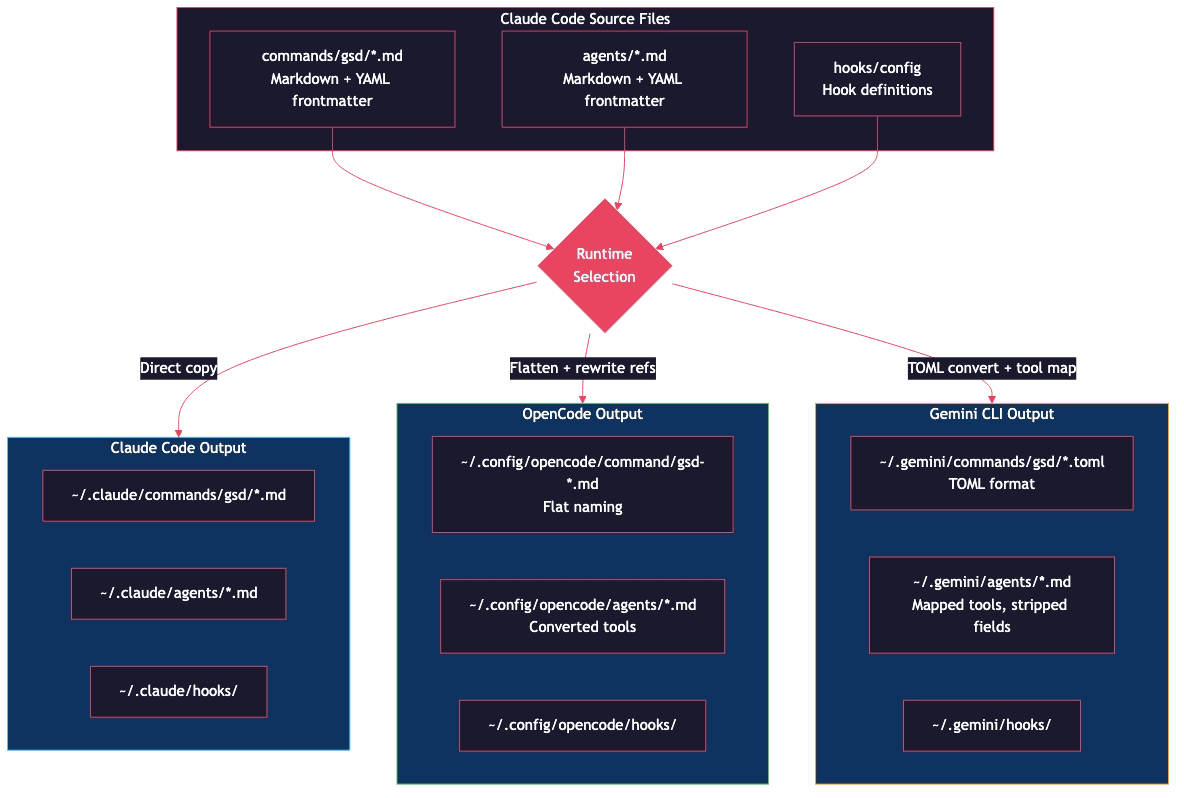
When you select a runtime, the installer does not simply copy files. It reads every source file, detects the runtime target, and applies a chain of transformations specific to that target. Claude Code files pass through unchanged. OpenCode and Gemini CLI files go through conversion functions that rewrite structure, naming, and content.
What the Install-Time Conversion Transforms
The installer transforms four categories of files: commands, agents, tool references, and hooks. Each category has its own conversion rules.
Commands: From Nested to Flat, From YAML to TOML
Claude Code stores commands as Markdown files with YAML frontmatter in a nested commands/gsd/ directory. A command like /gsd:help lives at commands/gsd/help.md. This nested, colon-namespaced structure is Claude Code's native convention.
Each runtime expects something different:
- Claude Code: Direct copy. No conversion needed.
- OpenCode: Flat naming. The nested
commands/gsd/help.mdbecomescommand/gsd-help.md. All/gsd:commandreferences within files are rewritten to/gsd-command. - Gemini CLI: Format conversion. The
convertClaudeToGeminiToml()function transforms Markdown+YAML into TOML.
Here is a Claude Code command before and after conversion. The source file at commands/gsd/help.md:
---
description: Show GSD help and available commands
---

Display help for GSD. See also /gsd:status for current state.
After OpenCode conversion, this becomes command/gsd-help.md. Two things changed: the file moved to a flat directory, and the cross-reference was rewritten:
Display help for GSD. See also /gsd-status for current state.
The colon-based namespace (/gsd:help) becomes a hyphen-based flat name (/gsd-help). Every cross-reference in every file goes through the same rewrite. If a command body mentions /gsd:plan, /gsd:exec, or /gsd:verify, those all become /gsd-plan, /gsd-exec, and /gsd-verify.
The flattening also handles nested subdirectories. Claude Code supports sub-namespaces like commands/gsd/debug/start.md, which a user invokes as /gsd:debug:start. The copyFlattenedCommands() function recurses into these subdirectories and produces command/gsd-debug-start.md. The entire hierarchy collapses into a single flat directory of hyphen-delimited filenames.
Additionally, the YAML frontmatter in each command file goes through the same convertClaudeToOpencodeFrontmatter() function used for agents. This means command files also get their name: field stripped (OpenCode uses the filename as the command name) and any tool references in the command body are lowercased.
For Gemini CLI, the same source undergoes a format change to TOML:
description = "Show GSD help and available commands"
Agents: Two Different Conversion Strategies
Agent conversion is where the most interesting work happens. Claude Code agents are Markdown files with YAML frontmatter defining allowed tools, descriptions, and model preferences. Here is a simplified example:
---
description: "Planner agent for task decomposition"
allowed-tools:
  - Read
  - Write
  - Bash
  - WebSearch
  - TodoWrite
  - Task
color: cyan
---
OpenCode and Gemini CLI both need this converted, but they need it converted differently.
OpenCode Agent Conversion:
The convertClaudeToOpencodeFrontmatter() function transforms the agent into OpenCode's format. The output for this example:
---
description: "Planner agent for task decomposition"
tools:
  read: true
  write: true
  bash: true
  websearch: true
  todowrite: true
  task: true
color: "#00FFFF"
---
Five things changed, and each reflects a real difference in how OpenCode handles agents:
- Schema change:
allowed-tools:became atools:object withtool: trueentries. Where Claude Code uses a YAML array and Gemini uses a differently-keyed YAML array, OpenCode uses a key-value object where each tool name maps totrue. This is the most distinctive structural difference across all three runtimes. - Lowercase conversion: All tool names are lowercased.
Readbecameread,Writebecamewrite,Bashbecamebash. OpenCode shares most of its tool vocabulary with Claude Code but expects lowercase names. Only five tools need special mappings (see the tool mapping table below); the rest just drop to lowercase. - Color normalization: The named color
cyanwas converted to its hex equivalent"#00FFFF". OpenCode accepts hex color codes but does not resolve CSS color names. The installer maps 13 named colors (cyan, red, green, blue, yellow, magenta, orange, purple, pink, white, black, gray, grey) to their hex values. - Name field stripped: If the frontmatter includes a
name:field, it is removed. OpenCode derives the agent name from the filename, so aname:field would be redundant and potentially confusing. - Subagent type rewrite: References to
subagent_type="general-purpose"are converted tosubagent_type="general". OpenCode uses a shorter identifier for its general-purpose agent type.
Beyond the frontmatter, the function also rewrites content throughout the agent body. Every reference to ~/.claude becomes ~/.config/opencode. Every /gsd:command becomes /gsd-command. Tool names like AskUserQuestion and SlashCommand are replaced with their OpenCode equivalents (question and skill) even when they appear in prose or code examples, not just in tool lists.
Gemini CLI Agent Conversion:
The convertClaudeToGeminiAgent() function takes a different approach. The output for the same source:
---
description: "Planner agent for task decomposition"
tools:
  - read_file
  - write_file
  - run_shell_command
  - google_web_search
  - write_todos
---
Four things changed, and each one reflects a real difference in how Gemini CLI works:
- Key rename:
allowed-tools:becametools:with array format. Gemini uses a different YAML schema for agent definitions, but unlike OpenCode's object format, Gemini keeps the array structure. - Tool mapping: Each tool name was mapped to its Gemini equivalent.
Readbecameread_file,Bashbecamerun_shell_command, and so on. More on these mappings below. - Field removal: The
color:field was stripped entirely. Gemini's agent validator rejects unknown fields, andcoloris a Claude Code UI feature with no Gemini equivalent. Compare this with OpenCode, which keeps the color but converts it to hex. - Tool exclusion:
Taskwas removed because Gemini auto-registers agents as callable tools; listingTaskexplicitly would create a conflict. Similarly,mcp__*tools were excluded because Gemini auto-discovers MCP servers at runtime. OpenCode does not need these exclusions.
Two additional transformations handle edge cases. Shell variable references like ${VAR} are converted to $VAR because Gemini's template engine treats ${...} as a template expression. HTML <sub> tags are stripped because terminals cannot render subscript.
Side-by-Side: The Same Agent on Three Runtimes:
This table summarizes how each runtime handles the same agent frontmatter fields:
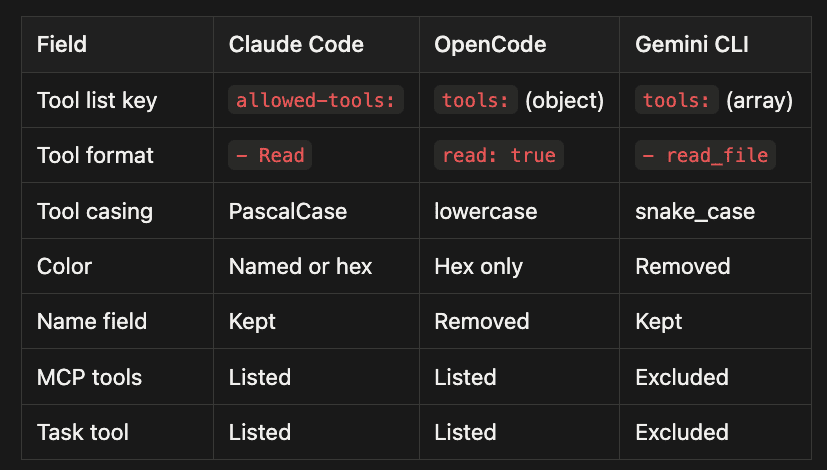
- Tool list key: Claude Code uses
allowed-tools:, OpenCode usestools:(object format), and Gemini CLI usestools:(array format) - Tool format: Claude Code uses
- Read, OpenCode usesread: true, and Gemini CLI uses- read_file - Tool casing: Claude Code uses PascalCase, OpenCode uses lowercase, and Gemini CLI uses snake_case
- Color: Claude Code accepts named or hex colors, OpenCode accepts hex only, and Gemini CLI removes the color field entirely
- Name field: Claude Code keeps it, OpenCode removes it (deriving name from filename), and Gemini CLI keeps it
- MCP tools: Claude Code and OpenCode both list them explicitly, while Gemini CLI excludes them (auto-discovers at runtime)
- Task tool: Claude Code and OpenCode both list it explicitly, while Gemini CLI excludes it (auto-registers agents as callable tools)
Tool Name Mapping: The Cross-Platform Translation Tables
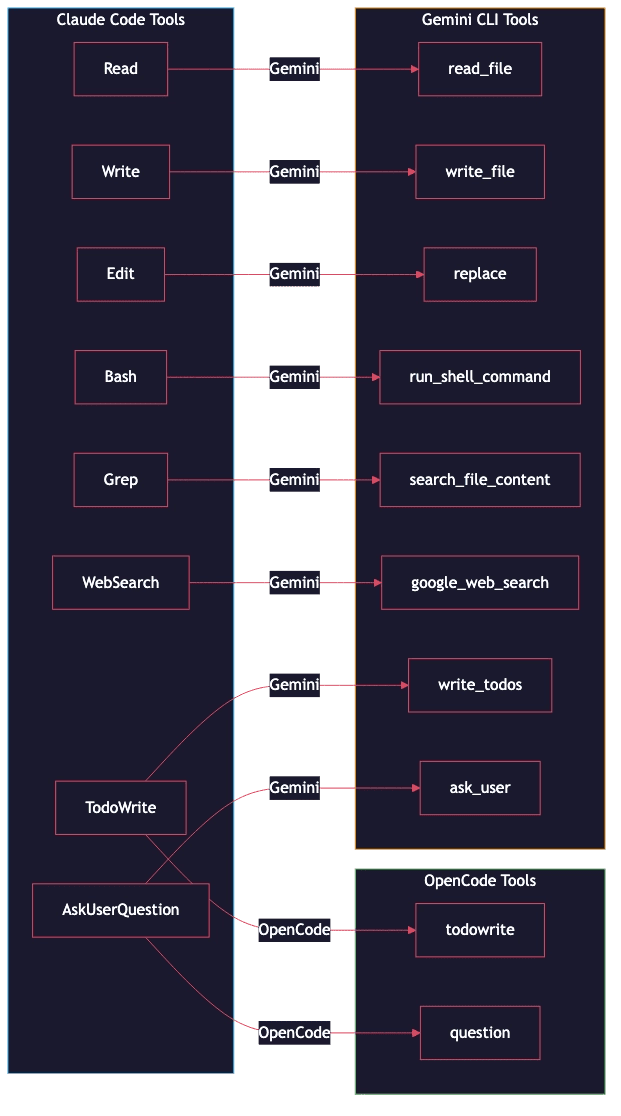
The core of the cross-runtime conversion is two mapping tables. These tables translate Claude Code's PascalCase tool names to their equivalents on each platform.
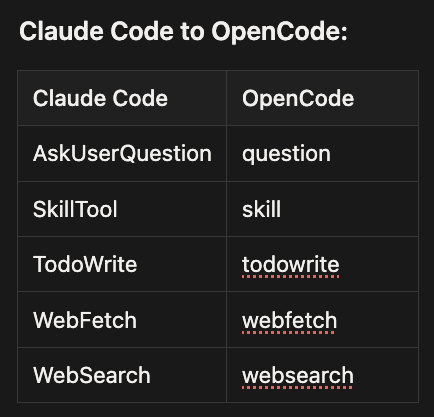
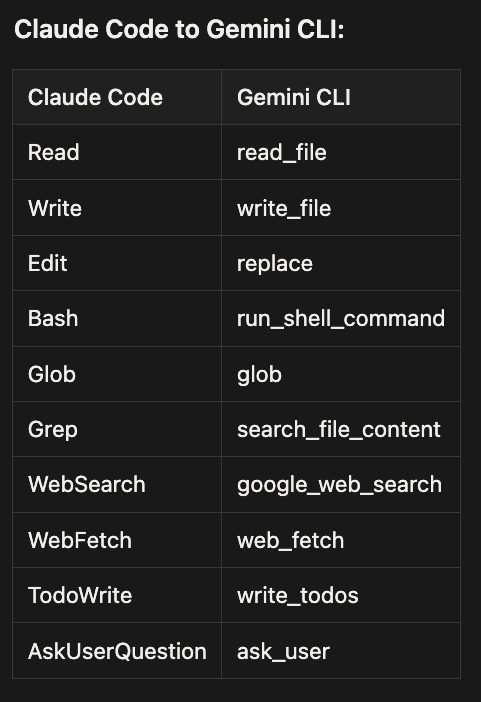
The OpenCode table is small: only five tools need special mappings because OpenCode shares most of its tool vocabulary with Claude Code. The remaining tools (Read, Write, Edit, Bash, Glob, Grep, Task, and others) just need lowercasing: Read becomes read, Bash becomes bash. The convertToolName() function checks the special mapping table first, preserves mcp__* tool names as-is (OpenCode uses the same MCP tool naming convention as Claude Code), and lowercases everything else.
The Gemini table is extensive because Gemini CLI uses a completely different naming convention: snake_case descriptive names (like search_file_content) rather than PascalCase short names (like Grep). Every core tool needs an explicit mapping entry.
When the installer encounters a tool name in an agent's allowed-tools list, it looks up the mapping and substitutes the target name. Any tool not in the mapping table passes through unchanged (lowercased for OpenCode, lowercased for Gemini).
OpenCode Permission Auto-Configuration
OpenCode has a permission system that other runtimes lack: a file-level access control defined in opencode.json. When GSD agents need to read reference documents, templates, or workflow definitions stored in the GSD install directory, OpenCode will prompt the user for permission on each file access unless those paths are pre-authorized.
The installer's configureOpencodePermissions() function handles this automatically. After copying GSD files, it reads (or creates) the opencode.json config and adds two permission entries:
{
  "permission": {
    "read": {
      "~/.config/opencode/get-shit-done/*": "allow"
    },
    "external_directory": {
      "~/.config/opencode/get-shit-done/*": "allow"
    }
  }
}
The read permission allows GSD agents to read files without prompting. The external_directory permission is the safety guard: OpenCode treats any path outside the current project as "external" and requires explicit authorization. Without this entry, every GSD agent that references a global template or workflow file would trigger a permission dialog.
The installer handles opencode.json carefully. OpenCode supports JSONC (JSON with comments), so users may have comments in their config. The installer includes a custom JSONC parser that preserves this. If the config file cannot be parsed, the installer skips permission configuration and warns the user rather than overwriting their file.
Neither Claude Code nor Gemini CLI require this step. Claude Code's permission model is binary (allow or deny at the tool level), and Gemini CLI does not gate file reads behind a permission system.
Hooks: Platform-Specific Code Paths
Hooks handle session lifecycle events: statusline updates, context monitoring, session tracking. Each platform has its own hook configuration mechanism, so GSD handles these in platform-specific code paths. This is one area where a unified abstraction does not yet exist; the hook logic for each runtime is maintained separately.
Where Files Land Across Claude Code, OpenCode, and Gemini CLI
Each runtime stores its configuration in a different root directory:
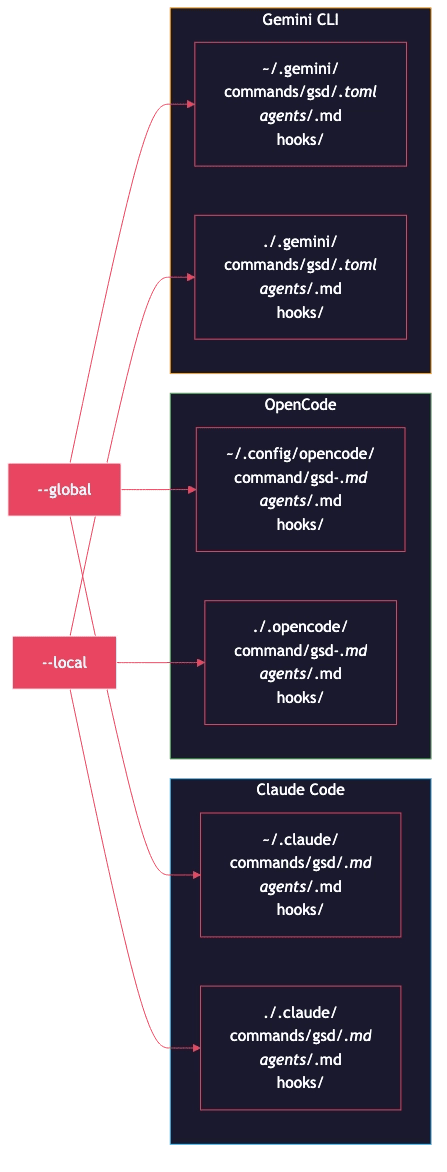
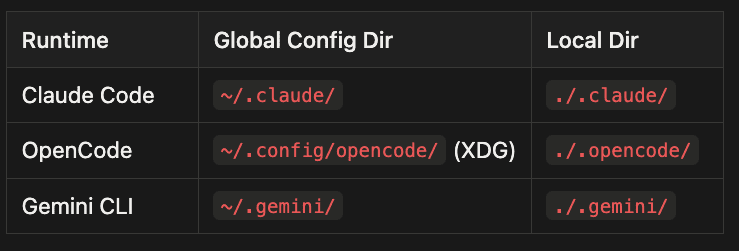
- Claude Code: Global config directory is
~/.claude/, local directory is./.claude/ - OpenCode: Global config directory is
~/.config/opencode/(XDG), local directory is./.opencode/ - Gemini CLI: Global config directory is
~/.gemini/, local directory is./.gemini/
Environment variables let users override these defaults: CLAUDE_CONFIG_DIR, OPENCODE_CONFIG_DIR, GEMINI_CONFIG_DIR, and XDG_CONFIG_HOME.
OpenCode's directory resolution deserves a note. It follows the XDG Base Directory Specification, which means the installer checks four locations in priority order: OPENCODE_CONFIG_DIR (explicit override), dirname(OPENCODE_CONFIG) (if a config file path is set), XDG_CONFIG_HOME/opencode (XDG override), and finally the default ~/.config/opencode. This is more involved than Claude Code or Gemini CLI, which each have a single environment variable override.
The installer uses a clean-install approach. The copyWithPathReplacement() function removes the existing destination directory before writing new files, preventing orphaned files from previous versions from lingering after an upgrade. The function also rewrites ~/.claude/ references within file content to the runtime-appropriate path (for example, ~/.config/opencode/ for OpenCode) and respects each runtime's commit attribution configuration.
Upgrades are straightforward: run the installer again and everything is replaced cleanly.
From Community Ports to Native Cross-Runtime Support
GSD's multi-runtime story started with the community. When GSD was Claude Code-only, two developers independently built ports for other runtimes:
- rokicool created gsd-opencode, adapting GSD for the OpenCode runtime
- Cars-10 created get-shit-done-gemini, porting GSD to Gemini CLI
These community ports proved the demand for multi-runtime support. Rather than maintaining three separate npm packages, the GSD team merged the conversion logic into the main installer. Now a single npx get-shit-done-cc@latest handles all three runtimes, and the separate community packages are no longer necessary.
This consolidation has a practical benefit: bug fixes, new agents, and workflow improvements ship to every platform simultaneously. No more waiting for a community maintainer to sync the latest changes.
Limitations and Trade-offs
The write-once approach has clear trade-offs that users should understand:
Claude-first authoring. The conversion is one-way. If you modify a GSD file in your OpenCode or Gemini configuration directory, those changes will be overwritten on the next install. The source of truth is always the Claude Code format. Contributing changes back means editing the Claude Code source and re-running the installer.
Platform-specific hooks. Each runtime has its own hook mechanism. GSD handles this with platform-specific code rather than a unified abstraction, which means hook behavior can vary slightly between runtimes.
The --auto trade-off. GSD's --auto mode during project initialization skips brownfield detection, always assuming a greenfield (new) project. This speeds up setup but can miss existing source files and package manifests that brownfield detection would normally incorporate.
What Ships to All Three Runtimes
Despite these trade-offs, GSD delivers a consistent core experience across Claude Code, OpenCode, and Gemini CLI:
- 11 specialized agents (planner, executor, verifier, debugger, researchers, mappers, and more)
- All slash commands for the core GSD workflow
- Workflow definitions, templates, and reference documents
- Hooks for statusline and session tracking (adapted per platform)
- Brownfield detection that runs identically regardless of which CLI invoked it
The codebase mapper agents produce the same seven mapping documents whether they run in Claude Code, OpenCode, or Gemini CLI. The planning, execution, and verification phases work the same way. The AI coding agent runtime is a deployment target, not a feature gate.
What's Next
Article 3 in this series compares GSD with other spec-driven development tools: Spec Kit, OpenSpec, and Taskmaster AI. Where does GSD's "convert at install" approach fit in the broader landscape of AI coding agent tooling? And what would a true cross-runtime standard look like?
Questions for discussion:
- Does the write-once, convert-at-install pattern make sense for AI coding agent tooling, or should each runtime have a purpose-built implementation?
- How would you handle two-way sync if you wanted changes in OpenCode or Gemini CLI to flow back to the Claude Code source?
- As AI coding agent runtimes mature, do you expect tool name vocabularies to converge, or diverge further?
If you work with Claude Code, OpenCode, or Gemini CLI in your daily workflow, try npx get-shit-done-cc@latest and see whether the cross-runtime consistency holds up against your real project setup. Share what you find in the comments.
About the Author
Rick Hightower is a technology executive and data engineer who led ML/AI development at a Fortune 100 financial services company. He created skilz, the universal agent skill installer, supporting 30+ coding agents including Claude Code, Gemini, Copilot, and Cursor, and co-founded the world's largest agentic skill marketplace. Connect with Rick Hightower on LinkedIn or Medium. Rick has been doing active agent development, GenAI, agents, and agentic workflows for quite a while. He is the author of many agentic frameworks and tools. He brings core deep knowledge to teams who want to adopt AI.
Check out the article I wrote on GSD: what-is-gsd-spec-driven-development-without-the-ceremony