Save Hours: Stop Repeating Yourself to Claude: Skills, Rules, Memory, and When to Use Each
Mastering Claude Code: Streamline Your Developer Workflow and Boost Productivity with Skills and Customization Tools
Originally published on Medium.
 A developer's tablet displaying a skill file for PR review using AI brain glowing on a laptop in the background: the moment repetitive prompting ends
Mastering Claude Code: Streamline Your Developer Workflow and Boost Productivity with Skills and Customization Tools
Every time you open a pull request, you retype your team's review checklist. Every commit, you remind Claude about your message format. Every code session, you re-explain the same standards.
Claude Code has five different tools to solve this problem, and Claude Code Skills are the most powerful of them. Most people know about one or two of these tools. Here is how they all fit together.
What Are Claude Code Agent Skills?
A Claude Code skill is a markdown file that teaches Claude how to do a specific task your way, without you having to repeat yourself in every conversation.
You write it once. Claude reads it. From that point on, whenever the situation calls for it, Claude applies your standards automatically.
A skill lives in a folder with a SKILL.md file at its core. That file includes a description, plus any instructions, scripts, or reference material Claude needs. The description is what makes the magic happen: when you give Claude a task, it scans all available skill descriptions and activates the ones that match.
Here is a minimal skill:
~/.claude/skills/review-pr/
  SKILL.md
---
description: Review pull requests against our team coding standards:
  naming conventions, test coverage, documentation format, and
  commit message style.
---
# PR Review Skill
When reviewing a PR:
1. Check naming conventions (camelCase for JS, snake_case for Python)
2. Verify all public functions have docstrings
3. Confirm test coverage for new code
4. Flag commit messages that do not follow Conventional Commits
The next time you say "review this PR," Claude knows exactly what to check. No prompt required. And because skills are also slash commands, /review-pr works too.
Claude ships with a skill creator skill so you can ask Claude to create a skill for you.
Agent Skills is an open standard so you can use this same technique with Gemini CLI, Codex, OpenCode and Cursor. All have ways to easily create skills through natural language.
Where Agent Skills Live
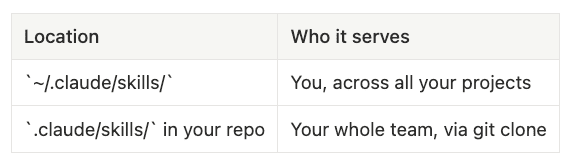
Personal skills follow you everywhere: your commit style, how you like code explained, documentation templates you always reach for.
Project skills ship with the repo. Commit the .claude/skills/ folder and anyone who clones it inherits your team's standards automatically.

The Full Customization Toolkit for Claude Code
Claude Code gives you five ways to customize its behavior. Skills are one piece. Here is the complete picture:
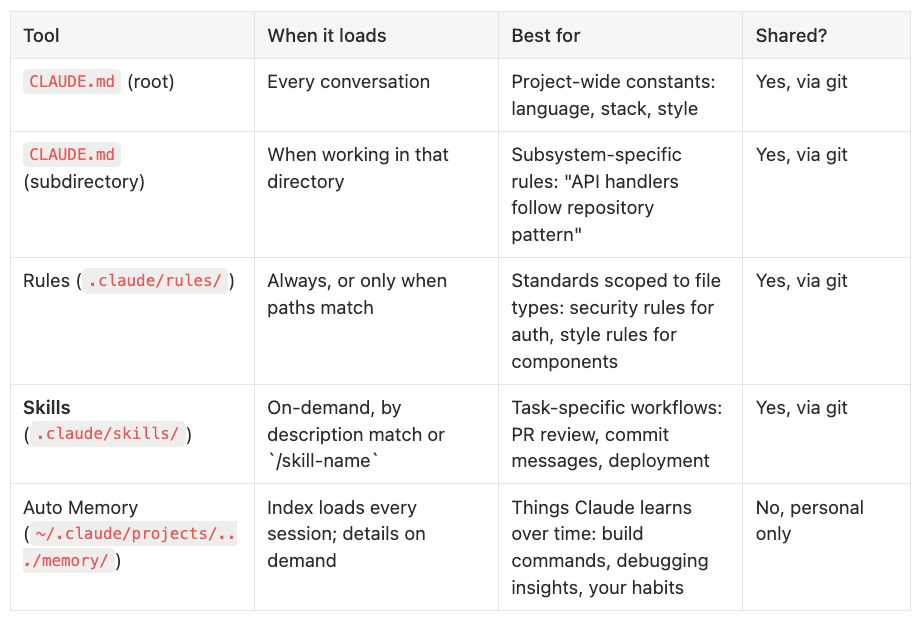
CLAUDE.md (~/.claude/)
- When it loads: Every conversation, every project
- Best for: User-wide constants
- Shared? No
CLAUDE.md (project dir)
- When it loads: Every conversation
- Best for: Project-wide constants: language, stack, style
- Shared? Yes, via git
CLAUDE.md (subdirectory)
- When it loads: When working in that directory
- Best for: Subsystem-specific rules: "API handlers follow repository pattern"
- Shared? Yes, via git
Rules (.claude/rules/)
- When it loads: Always, or only when paths match
- Best for: Standards scoped to file types: security rules for auth, style rules for components
- Shared? Yes, via git
Skills (.claude/skills/)
- When it loads: On-demand, by description match or /skill-name
- Best for: Task-specific workflows: PR review, commit messages, deployment
- Shared? Yes, via git
Auto Memory (~/.claude/projects/.../memory/)
- When it loads: Index loads every session; details on demand
- Best for: Things Claude learns over time: build commands, debugging insights, your habits
- Shared? No, personal only, per project
How Each One Thinks About Context for Claude Code
CLAUDE.md loads entirely into every conversation. It is always present. Use it for things that are always true and always relevant: "this project uses TypeScript strict mode," "database is Postgres."
Subdirectory CLAUDE.md works the same way but scopes to a specific part of your codebase. Put one in src/api/ to give Claude context about API patterns that only matters when working there.
Rules extend this with path-based scoping via frontmatter. A rule with paths: ["src/auth/**"] only loads when you are working in auth files. Rules in ~/.claude/rules/ are personal; rules in .claude/rules/ are shared. To learn more about Rules because there is a lot more to these than we cover here, check out this articles on Claude's Agent Rules.
your-project/
├── .claude/
│   ├── CLAUDE.md              # Always loads
│   └── rules/
│       ├── code-style.md      # Always loads
│       └── security/
│           └── auth.md        # Loads only for auth files
Agent Skills go further: even their full content stays out of context until needed. Only the skill's name and description sit in the background. Your 200-line PR review checklist does not eat your context window when you are debugging a typo. You control auto-trigger behavior in the frontmatter:
---
description: ...
disable-model-invocation: true   # Only you can invoke it; no auto-trigger
---
Auto Memory is different from all of the above. It is not about instructions you write; it is about things Claude learns. When Claude discovers your project uses pnpm test or that the flaky auth test is timezone-sensitive, it saves that to memory automatically.
The MEMORY.md index loads at the start of every session (up to 200 lines). Detailed notes live in separate topic files and load on demand; the same progressive disclosure pattern skills use. You can audit and edit all of it with /memory. Learn more about Auto Memory in this article.
The key distinction: memory is learned, not written. Skills are authored, not discovered.
Pick the Right Tool for Remembering in Claude Code
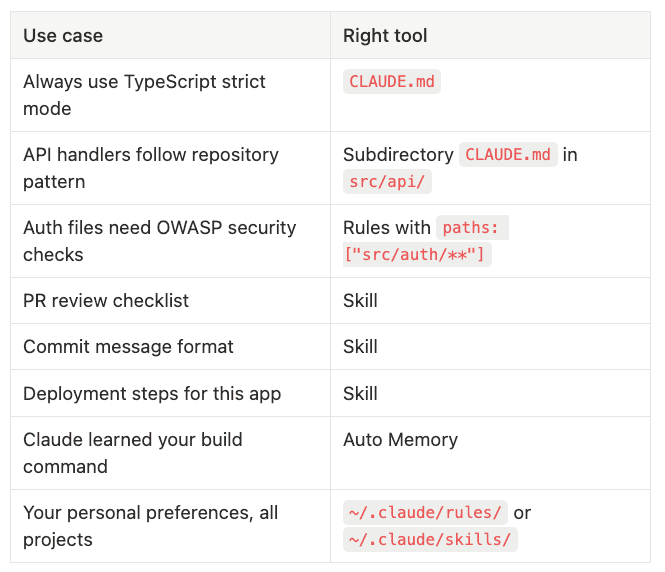
If you want to ____ then add a description to ____:
- Always use TypeScript strict mode: CLAUDE.md
- API handlers follow repository pattern: Subdirectory CLAUDE.md in src/api/
- Auth files need OWASP security checks: Rules with paths: ["src/auth/**"]
- PR review checklist: Skill
- Commit message format: Skill
- Deployment steps for this app: Skill
- Claude learned your build command: Auto Memory
- Your personal preferences, all projects: ~/.claude/rules/ or ~/.claude/skills/
Start Simple with Agent Skills
The golden rule: if you find yourself explaining the same thing to Claude twice, that is a skill waiting to be written.
Start with one skill. Pick the task you explain most often:
.claude/skills/commit/
  SKILL.md    # Your team's commit message format
Commit it to git. Every teammate who clones the repo gets it automatically. No onboarding required.
Which of these tools are you already using? Which one would you start with? Drop it in the comments.
Follow for more tips on mastering Claude Code skills and developer productivity.
#ClaudeCode #AIEngineering #DeveloperProductivity #AITools #Claude
Check out these related articles on Agent Rules, Agent Skills and Claude Code Auto memory:
- Learn more about Agent Rules to avoid stuffing everything in your CLAUDE.md file.
- Learn more about Claude Code's Automatic Memory: No More Re-Explaining Your Project.
- Learn more about Claude's built in tasks to do scheduling: Put Claude on Autopilot: Scheduled Tasks with /loop and /schedule built-in Skills
- Learn more about Skills 2.0: Claude Code Agent Skills 2.0: From Custom Instructions to Programmable Agents.
- Here is a deep dive on building your first useful skill that expands what Claude Code can do for memory: Build Your First Claude Code Agent Skill: A Simple Project Memory System That Saves Hours.
- Once you have mastered creating skills, you can tune them so that they trigger when they are suppose to: Claude Code: How to Build, Evaluate, and Tune AI Agent Skills
About the Author
Rick Hightower is a technology executive and data engineer who led ML/AI development at a Fortune 100 financial services company. He created skilz, the universal agent skill installer, supporting 30+ coding agents including Claude Code, Gemini, Copilot, and Cursor, and co-founded the world's largest agentic skill marketplace. Connect with Rick Hightower on LinkedIn or Medium.
Rick has been actively developing generative AI systems, agents, and agentic workflows for years. He is the author of numerous agentic frameworks and developer tools and brings deep practical expertise to teams looking to adopt AI.