Supercharge Your React Performance with Vercel's Best Practices Agent Skill for Claude Code, Codex and OpenCode
Originally published on Medium.
Ready to supercharge your React performance? Discover how Vercel's new skill for Claude Code can automatically apply 45 expert optimization rules, catching performance issues before they hit production!
The Vercel React Best Practices Skill for Claude Code enhances React performance by applying 45 optimization rules automatically. It organizes rules into categories based on performance impact, focusing on critical issues like request waterfalls and bundle size. The skill integrates seamlessly into development workflows, aiding in code reviews, refactoring, and new feature development while targeting Core Web Vitals metrics. Installation is straightforward with a single command, making expert-level performance guidance accessible to developers of all skill levels.
Building performant React and Next.js applications requires mastering optimization patterns, bundle management, and rendering strategies. But what if your AI coding assistant could apply those best practices automatically, catching performance issues before they reach production?
Vercel Labs has released a specialized skill for Claude Code that packages 45 performance-focused rules into an intelligent, context-aware assistant. The Vercel React Best Practices Skill transforms Claude Code into a React performance expert that understands the nuances of modern web development.
This article expands on the original Vercel React Best Practices Skill overview from SkillzWave, diving deeper into each rule category with practical examples and implementation guidance.
This article explores how this skill works, what patterns it enforces, and how you can integrate it into your development workflow to build faster React applications.
What Is a Claude Code Skill?
Before diving into the Vercel skill specifically, let's understand what makes Claude Code skills powerful. A skill is a specialized instruction set that enhances AI coding assistants with domain-specific knowledge. Think of it as a plugin that teaches your AI assistant to become an expert in a particular area: React performance, security best practices, or accessibility standards.
Unlike generic prompts you write once and forget, skills use progressive context loading. The AI receives relevant guidance exactly when needed, without consuming excessive tokens or overwhelming the conversation with unnecessary information.
The Vercel skill follows a structured architecture designed for maximum effectiveness:
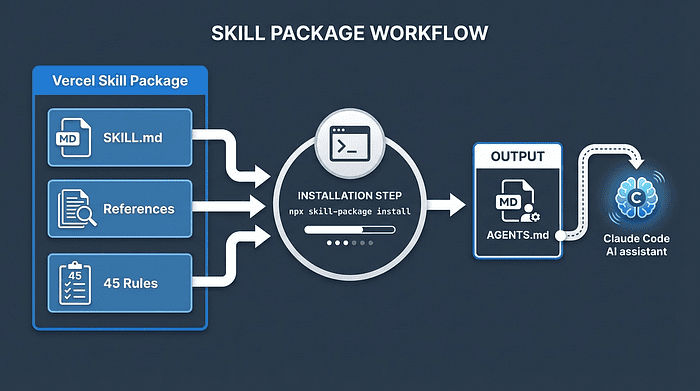 Vercel Skill Architecture: The skill package contains SKILL.md, References, and 45 Rules which compile into AGENTS.md for Claude Code integration
Installing the Skill
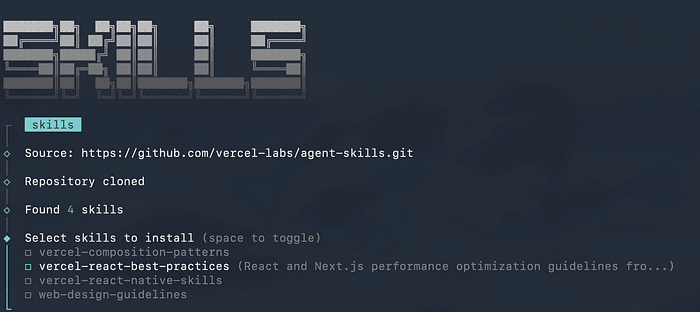
Getting started requires just one command. Navigate to your project root and run:
npx add-skill vercel-labs/agent-skills

pip install skilz # one time
skilz install vercel-labs/agent-skills/vercel-react-best-practices
Once installed, Claude automatically applies these patterns during code reviews, refactoring sessions, and new development. Skilz is the universal agent skill installer that works with 30+ agentic frameworks that support skills.
You don't need to configure anything or remember to activate the skill. It becomes part of Claude's knowledge base for that project, informing every suggestion and recommendation.
The Eight Rule Categories
The skill organizes its 45 rules into eight categories based on performance impact. This prioritization helps you focus on changes that deliver the biggest improvements first, rather than spending time on micro-optimizations that barely move the needle.
The categories range from critical (immediate, dramatic impact on user experience) to low-medium (helpful but situational improvements):
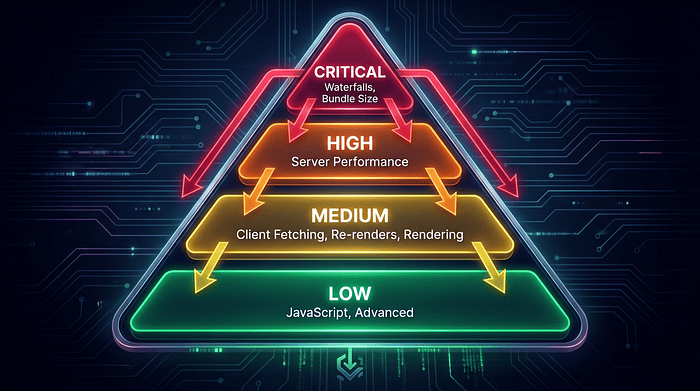 Rule Categories Hierarchy: Critical impact rules (waterfalls, bundle size) at top, followed by High (server performance), Medium (client fetching, re-renders, rendering), and Low (JavaScript, advanced patterns)
Let's explore each category in detail, starting with the most impactful changes.
Critical Impact Rules: The Foundation of Performance
These rules address the most significant performance bottlenecks in React applications. Fixing issues in this category can transform a sluggish application into a fast one, often shaving seconds off load times.
Eliminating Request Waterfalls (async-*)
What It Does: Request waterfalls occur when data fetches execute sequentially, with each request waiting for the previous one to complete before starting. This pattern compounds delays, especially on slower connections.
Why This Matters: Imagine fetching user data, then using that data to fetch posts, then using the first post to fetch comments. At a 200ms latency, this creates a 600ms delay before you begin processing responses. By fetching in parallel, you reduce that to 200ms.
Here's the visual representation of the problem and solution:
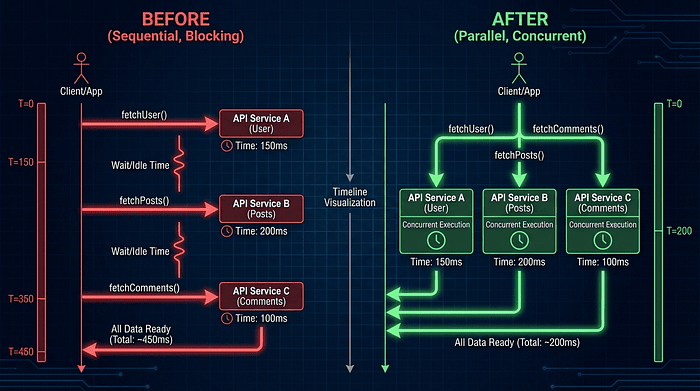 Waterfall vs Parallel Fetching: Left side shows slow sequential API calls with wait times between each request, right side shows fast parallel requests all starting simultaneously
The code transformation looks like this:
// BEFORE: Sequential fetching creates waterfalls
// Each await blocks the next request from starting
const user = await fetchUser(id);
const posts = await fetchPosts(user.id); // Can't start until user completes
const comments = await fetchComments(posts[0].id); // Can't start until posts complete

// AFTER: Parallel fetching with Promise.all
// All requests start simultaneously
const [user, posts, initialComments] = await Promise.all([
  fetchUser(id),         // Starts immediately
  fetchPosts(id),        // Starts immediately (assuming ID is known)
  fetchInitialComments(id) // Starts immediately
]);
When to Use This Pattern: Apply parallel fetching whenever your requests don't truly depend on each other's responses. If you need the user ID to fetch posts but can restructure your API to accept the base ID directly, do it. The performance gains are substantial.
Trade-offs:
- Pro: Dramatically reduces total fetch time
- Pro: Better utilizes network capacity
- Con: May increase backend load if many requests arrive simultaneously
- Con: Requires restructuring APIs if data is truly dependent
Alternative Approaches:
- Server-side data fetching: Move the fetching to the server where latency is minimal
- GraphQL: Use a single query to fetch multiple related resources
- Data loader patterns: Batch and cache requests automatically
Bundle Size Optimization (bundle-*)
What It Does: This rule category prevents unnecessary code from being included in your JavaScript bundles. The most common culprit is barrel imports, where importing a single component pulls in an entire library.
Why This Matters: JavaScript bundle size directly impacts how quickly your application becomes interactive. Every extra kilobyte must be downloaded, parsed, and compiled before your app can respond to user input. A 500KB bundle might take 2-3 seconds to become interactive on a mid-range mobile device.
Here's the problem pattern:
// BEFORE: Barrel import pulls entire library
// This imports Button but includes ALL components in the bundle
import { Button } from '@/components';

// What actually happens behind the scenes:
// 1. Bundler loads @/components/index.js
// 2. index.js exports Button, Card, Modal, Table, etc.
// 3. All of those components end up in your bundle
// 4. Your bundle is now 50KB larger for a single Button

// AFTER: Direct path import enables tree-shaking
// This imports ONLY Button, nothing else
import { Button } from '@/components/ui/Button';

// What happens now:
// 1. Bundler loads @/components/ui/Button.js directly
// 2. Only Button and its dependencies are included
// 3. Unused components are eliminated (tree-shaken)
// 4. Your bundle is lean and fast
When to Use Direct Imports: Always prefer direct imports for large component libraries or utility collections. The extra specificity in your import path pays for itself in bundle savings.
Trade-offs:
- Pro: Significantly smaller bundles (often 30-50% reduction)
- Pro: Faster tree-shaking and build times
- Con: More verbose import statements
- Con: Requires understanding your component structure
Alternative Approaches:
- Dynamic imports: Use
import()to load components on demand - Route-based code splitting: Separate code by page or route
- Library-specific optimizations: Some libraries (like lodash-es) support tree-shaking with barrel imports
These critical impact rules form the foundation of a performant React application. Address these first and you'll see immediate, measurable improvements in your Core Web Vitals scores.
High Impact Rules: Server-Side Performance (server-*)
After addressing critical bottlenecks, the next tier focuses on server-side optimizations. These patterns are particularly important for Next.js applications using Server Components and Server-Side Rendering (SSR).
Server-side performance rules target three key areas:
Caching Strategies
React Server Components introduced new caching primitives like cache() and unstable_cache. These functions prevent duplicate data fetches within the same request, which is crucial when multiple components need the same data.
// Using cache() to deduplicate fetches
import { cache } from 'react';

// Without cache(), calling getUser(id) twice means two database queries
// With cache(), the second call returns the cached result
const getUser = cache(async (id) => {
  return await db.user.findUnique({ where: { id } });
});
Why caching matters: Server Components can trigger the same data fetch multiple times as they compose together. Caching ensures you only hit your database once per request, reducing server load and improving response times.
RSC Boundary Optimization
Server Components (RSC) can render on the server without sending JavaScript to the client. Client Components require JavaScript and interactivity. The skill teaches Claude to minimize the number of Client Components, keeping as much work as possible on the server.
// BEFORE: Entire component tree is client-side
'use client';
function Dashboard({ userId }) {
  const [expanded, setExpanded] = useState(false);
  return (
    <div>
      <UserProfile userId={userId} /> {/* Doesn't need client JS */}
      <ExpandableSection expanded={expanded} /> {/* Needs interactivity */}
    </div>
  );
}

// AFTER: Only interactive parts are client components
function Dashboard({ userId }) {
  return (
    <div>
      <UserProfile userId={userId} /> {/* Server Component */}
      <ExpandableSection /> {/* Client Component */}
    </div>
  );
}

// Separate file: ExpandableSection.js
'use client';
function ExpandableSection() {
  const [expanded, setExpanded] = useState(false);
  // Interactive logic here
}
Why RSC boundaries matter: Client Components add JavaScript to your bundle. By keeping static content in Server Components, you reduce bundle size and improve initial page load.
Data Fetching Colocation
Fetch data as close as possible to where it's consumed. This reduces prop drilling and makes your data dependencies explicit.
// GOOD: Data fetched where it's used
async function UserProfile({ userId }) {
  const user = await getUser(userId); // Fetched here
  return <div>{user.name}</div>;       // Used here
}
This pattern makes code easier to understand and maintain while also enabling better caching and parallel rendering.
Medium Impact Rules: Client-Side Optimization
These three categories address common performance issues in client-side React code. While not as dramatic as eliminating waterfalls, these patterns prevent gradual performance degradation as your application grows.
Client-Side Data Fetching (client-*)
When you must fetch data on the client (for user-initiated actions, dynamic filters, etc.), do it efficiently.
Key patterns:
- Use SWR or React Query for automatic caching and revalidation
- Implement request deduplication
- Add loading and error states
- Consider optimistic updates for better perceived performance
Re-render Optimization (rerender-*)
What It Does: React re-renders components when props or state change. Unnecessary re-renders waste CPU cycles and can make interactions feel sluggish.
Why This Matters: A single state change in a parent component can trigger thousands of re-renders in a large component tree. While React is fast, avoiding unnecessary work is always faster.
// BEFORE: Re-renders on every parent update
function ChildComponent({ onClick, data }) {
  // Expensive calculation runs on every parent re-render
  const processed = expensiveProcessing(data);
  return <div onClick={onClick}>{processed}</div>;
}

// AFTER: Strategic memoization prevents re-renders
const ChildComponent = memo(function ChildComponent({ onClick, data }) {
  // Only recalculates when data actually changes
  const processed = useMemo(() => expensiveProcessing(data), [data]);
  return <div onClick={onClick}>{processed}</div>;
});
When to optimize re-renders:
- Components with expensive calculations or renders
- Lists with many items
- Components that render frequently but rarely change
- Leaf components deep in the tree
Trade-offs:
- Pro: Reduces wasted rendering work
- Pro: Improves frame rates during updates
- Con: Adds memory overhead for memoization
- Con: Can cause bugs if dependencies are wrong
Rendering Performance (rendering-*)
This category covers patterns for efficiently rendering large datasets and complex UIs.
Key techniques:
- Virtualization: Only render visible items in long lists (use react-window or react-virtual)
- Lazy loading: Defer loading heavy components until needed
- Pagination: Break large datasets into pages
- Progressive rendering: Show content incrementally as it loads
// Virtualized list for 10,000 items
import { FixedSizeList } from 'react-window';

function VirtualizedList({ items }) {
  return (
    <FixedSizeList
      height={600}
      itemCount={items.length}
      itemSize={50}
    >
      {({ index, style }) => (
        <div style={style}>{items[index].name}</div>
      )}
    </FixedSizeList>
  );
}
Without virtualization, rendering 10,000 list items creates 10,000 DOM nodes. With virtualization, you render maybe 20 visible items, dramatically improving performance.
Lower Impact Rules: JavaScript and Advanced Patterns
The final two categories address edge cases and micro-optimizations. These matter for high-traffic applications or performance-critical paths but shouldn't be your first priority.
JavaScript Performance (js-*)
Focus areas:
- Avoid creating objects or arrays in render functions (they create new references every time)
- Move static data outside components
- Use
useReffor values that don't need to trigger re-renders - Minimize work in hot paths (functions called frequently)
// BEFORE: Creates new object on every render
function Component() {
  const options = { foo: 'bar' }; // New object every time
  return <Child options={options} />;
}

// AFTER: Static object created once
const OPTIONS = { foo: 'bar' }; // Created once, reused
function Component() {
  return <Child options={OPTIONS} />;
}
Advanced Patterns (advanced-*)
These rules cover specialized scenarios:
- Concurrent rendering optimizations
- Transition APIs for smooth UI updates
- Advanced caching strategies
- Framework-specific edge cases
Most developers won't need these patterns, but they're available when you encounter specific performance challenges.
Performance Metrics: Measuring Success
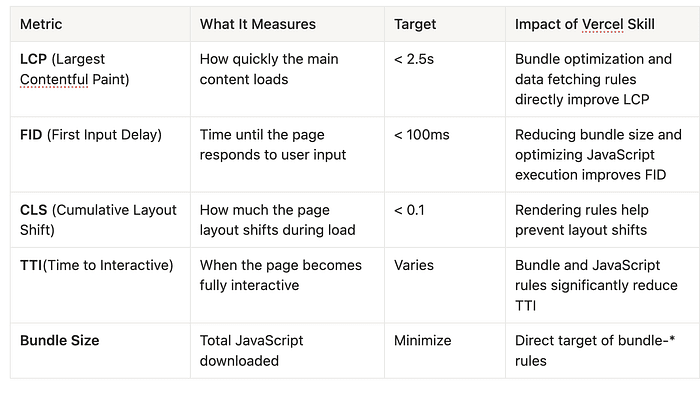
The skill targets metrics that directly impact user experience and Google's Core Web Vitals scoring. Understanding these metrics helps you prioritize which rules to apply first.
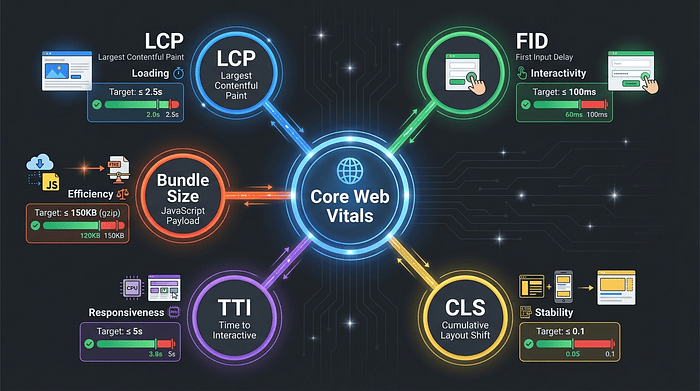 Core Web Vitals Mindmap: Central node with five branches showing LCP (loading, target 2.5s), FID (interactivity, target 100ms), CLS (stability, target 0.1), TTI (time to interactive), and Bundle Size (JavaScript payload)
Here's what each metric means for your application:
Largest Contentful Paint (LCP) measures loading performance. When you eliminate request waterfalls and optimize bundle size, your largest content element appears faster.
First Input Delay (FID) measures interactivity. Smaller bundles parse faster, letting users interact sooner. Note that FID has been replaced by Interaction to Next Paint (INP) in 2024, which the skill also addresses through re-render optimization.
Cumulative Layout Shift (CLS) measures visual stability. Rendering rules help prevent content from jumping around as it loads.
Practical Applications: Using the Skill in Real Workflows
Now that you understand what the skill teaches Claude, let's explore how to integrate it into your development process.
Code Reviews
Point Claude at a pull request and ask it to identify performance anti-patterns. The skill provides specific refactoring suggestions with before and after examples, categorized by impact level.
Example workflow:
# Review a PR branch
git checkout feature/user-dashboard
claude "Review this code looking for issues with performance using react best practices skill"

# Claude will identify:
# - Critical: Request waterfall in UserProfile.tsx
# - High: Missing cache() wrapper on data fetch
# - Medium: Re-render issue in ActivityFeed
Claude prioritizes findings by impact, so you know which issues to fix first. It also provides context about why each pattern matters, helping your team learn over time.
Refactoring Sessions
When optimizing existing code, use the skill to guide your priorities. Start with critical issues, then work down through high and medium impact changes.
Example workflow:
# Analyze an entire component directory
claude "Analyze this code looking for issues with performance using react best practices skill"

# Review suggestions by category
# 1. Fix critical waterfall in data loading
# 2. Add direct imports for bundle optimization
# 3. Optimize re-renders in frequently updated components
This systematic approach ensures you spend time on changes that deliver measurable improvements.
New Feature Development
Enable the skill before starting new features. Claude will guide you toward performant patterns from the start, preventing technical debt.
Example workflow:
# Start a new feature
claude "scaffold component UserAnalytics using react best practices"

# Claude automatically:
# - Uses direct imports
# - Suggests parallel data fetching
# - Implements proper memoization
# - Sets up efficient rendering
Building with performance in mind is easier than retrofitting optimizations later.
CI/CD Integration
Combine Claude Code with your CI/CD pipeline to catch performance regressions before they reach production. The skill's rule-based approach provides consistent, reproducible analysis across your entire codebase.
Example GitHub Action:
- name: Claude Code analysis
  run: |
    npx claude-code analyze \
      --path ./src \
      --output ./claude-analysis.json \
      --format json

- name: Fail on critical findings
  run: node scripts/fail-on-claude-findings.js ./claude-analysis.json
This automated check prevents critical performance issues from being merged.
Why This Matters: The Bigger Picture
React performance optimization traditionally requires deep expertise. Developers spend years learning patterns like:
- When to use memo vs useMemo vs useCallback
- How to structure Server vs Client Components
- Which imports enable tree-shaking
- How to identify request waterfalls
The Vercel skill encodes this expertise into a format AI assistants can apply consistently. This democratizes performance optimization, making it accessible to developers at all skill levels.
For junior developers: The skill acts as a mentor, explaining why certain patterns matter and when to apply them. Each suggestion includes context and rationale, turning performance reviews into learning opportunities.
For senior developers: The skill catches issues during code reviews, reducing the mental burden of remembering every optimization pattern. You can focus on architecture and business logic while Claude handles performance details.
For teams: The skill creates consistency. Every developer gets the same guidance, using the same patterns, following the same priorities. This reduces code review friction and technical debt.
Rather than memorizing dozens of optimization patterns, developers can focus on building features. Claude handles performance reviews using the same rules Vercel applies to its own applications.
The progressive loading approach ensures context stays relevant without consuming excessive tokens. Claude doesn't overwhelm you with all 45 rules at once. Instead, it surfaces relevant guidance based on the code you're writing.
Getting Started: Your First Steps
Ready to integrate Vercel's performance expertise into your workflow? Here's how to begin:
1. Install the skill
# Navigate to your React/Next.js project
cd your-project

# Install the Vercel skill
npx add-skill vercel-labs/agent-skills
skilz install vercel-labs/agent-skills/vercel-react-best-practices
2. Verify installation
Check that the AGENTS.md file was created in your project root. This file contains all 45 compiled rules.
ls .claude/skills/vercel-react-best-practices
AGENTS.md rules SKILL.md
3. Start a Claude Code session
claude
4. Run your first analysis
# Ask Claude to review a component
analyze src/components/Dashboard.tsx focus on performance use the react best practices skill
5. Review suggestions by priority
Claude will categorize findings:
- Critical: Fix these first (waterfalls, bundle issues)
- High: Address after critical (server-side patterns)
- Medium: Optimize when time permits
- Low: Nice-to-have improvements
6. Apply changes incrementally
Don't try to fix everything at once. Pick the highest-impact issues, apply them, measure the results, then move to the next tier.
7. Measure impact
Use tools like Lighthouse, WebPageTest, or Vercel Analytics to quantify improvements:
# Run Lighthouse
npx lighthouse https://your-app.com --view
Beyond the Basics: Advanced Usage
Once you're comfortable with basic usage, explore advanced integration:
- Custom rule priorities: Configure which categories Claude emphasizes based on your application's specific needs.
- Team workflows: Establish conventions for when to apply different rule categories during your development cycle.
- Performance budgets: Set thresholds for bundle size and metrics, then use Claude to enforce them.
- Continuous monitoring: Integrate the skill into your CI/CD to catch regressions automatically.
Conclusion
The Vercel React Best Practices Skill represents a new approach to developer tooling. By encoding performance expertise into structured skills, AI assistants can provide consistent, context-aware guidance that adapts to your codebase. For a quick overview of what this skill offers, see the original SkillzWave blog post.
Performance optimization is no longer a specialized discipline requiring years of experience. With the Vercel skill, every developer on your team gains access to expert-level performance guidance applied automatically during development.
The result is faster applications, happier users, and better Core Web Vitals scores without the traditional overhead of manual performance reviews.
Start building faster React applications today with AI-assisted performance optimization. Check out Vercel Labs for more AI-enhanced development tools and skills.
Key Takeaways
- Claude Code skills teach AI assistants domain-specific expertise through structured instruction sets
- The Vercel skill contains 45 rules organized by performance impact (critical, high, medium, low)
- Critical rules target request waterfalls and bundle size, the biggest performance bottlenecks
- Server-side rules optimize caching, RSC boundaries, and data fetching patterns
- Client-side rules prevent unnecessary re-renders and enable efficient list rendering
- The skill targets Core Web Vitals (LCP, FID/INP, CLS) and bundle size metrics
- Integration works across code reviews, refactoring, new development, and CI/CD
- Installation requires one command:
npx add-skill vercel-labs/agent-skills
Next Steps
- Install the skill in your React or Next.js project
- Run an initial analysis to identify your biggest performance opportunities
- Fix critical issues first (waterfalls and bundle size)
- Measure the impact using Lighthouse or Vercel Analytics
- Integrate into code reviews to prevent future performance regressions
- Explore other skills from Vercel Labs to enhance different aspects of your development workflow
Build faster React applications with AI-assisted performance optimization. The Vercel Best Practices Skill brings expert-level performance guidance to every line of code you write.
About the Author
Rick Hightower is a technology executive and data engineer who led ML/AI development at a Fortune 100 financial services company. He created skilz, the universal agent skill installer, supporting 30+ coding agents including Claude Code, Gemini, Copilot, and Cursor, and co-founded the world's largest agentic skill marketplace. Connect with Rick Hightower on LinkedIn or Medium.