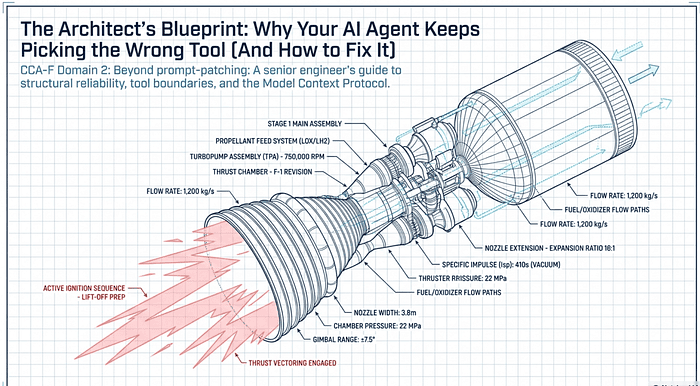
The Architect's Blueprint: Why Your AI Agent Keeps Picking the Wrong Tool (And How to Fix It)
CCA-F Domain 2: Beyond prompt-patching: A senior engineer's guide to structural reliability, tool boundaries, and the Model Context Protocol.
Originally published on Medium.
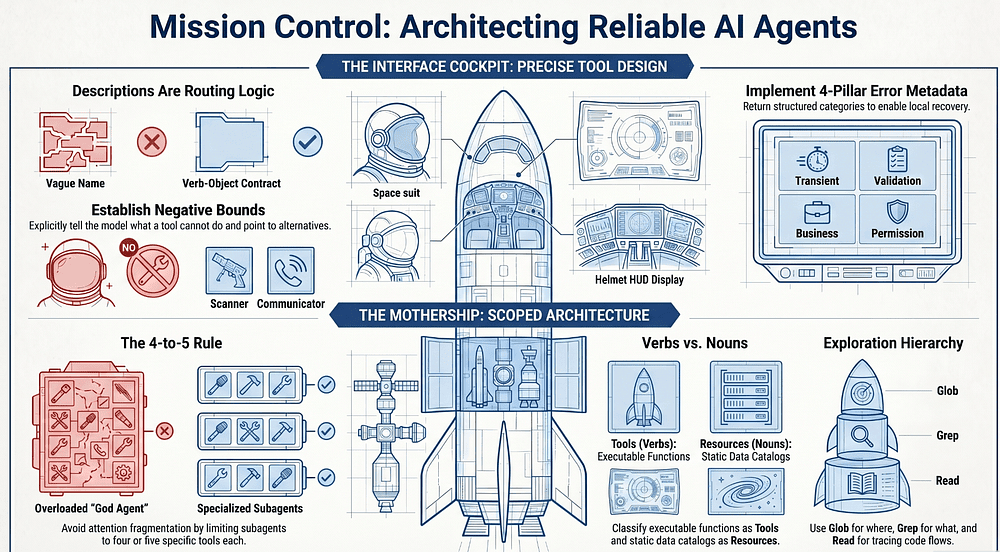
CCA-F Domain 2: Beyond prompt-patching: A senior engineer's guide to structural reliability, tool boundaries, and the Model Context Protocol.
If your agent keeps picking the wrong tool, stop blaming the model and look at the steering wheel.
Summary: Most agent reliability failures get blamed on the model, but they trace back to architecture: ambiguous tool descriptions, bloated toolsets, unstructured errors, and misclassified MCP primitives. This guide walks through the eight structural decisions that separate fragile demos from production-ready agents, with concrete patterns for tool boundaries, error contracts, tool_choice configuration, and MCP server integration.
Beyond the "Vocabulary Quiz"
In the high-stakes environment of CCA-F Domain 2 (Tool Design and Integration), most developers hit a wall not because of a lack of features, but because of a lack of judgment. You build a sophisticated agentic system, only to watch it "coin-flip" between two similar functions or hallucinate a tool call that doesn't exist. The standard response is "prompt-patching": adding desperate instructions to the system prompt like "Please, I beg you, use Tool A for X."
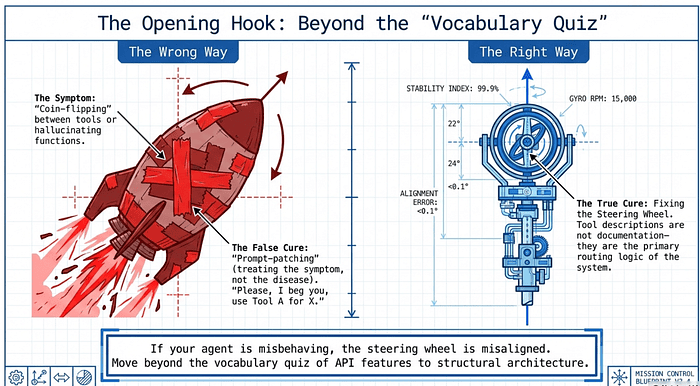
This is treating the symptom, not the disease. To build production-ready agents, we must stop viewing tool descriptions as documentation and start viewing them as the primary routing logic of the system. If your agent is misbehaving, the steering wheel (the tool interface) is misaligned. This guide moves beyond the vocabulary quiz of API features to the structural architecture required for deterministic agentic behavior.
Tool Descriptions Are Not Documentation: They Are Routing Logic
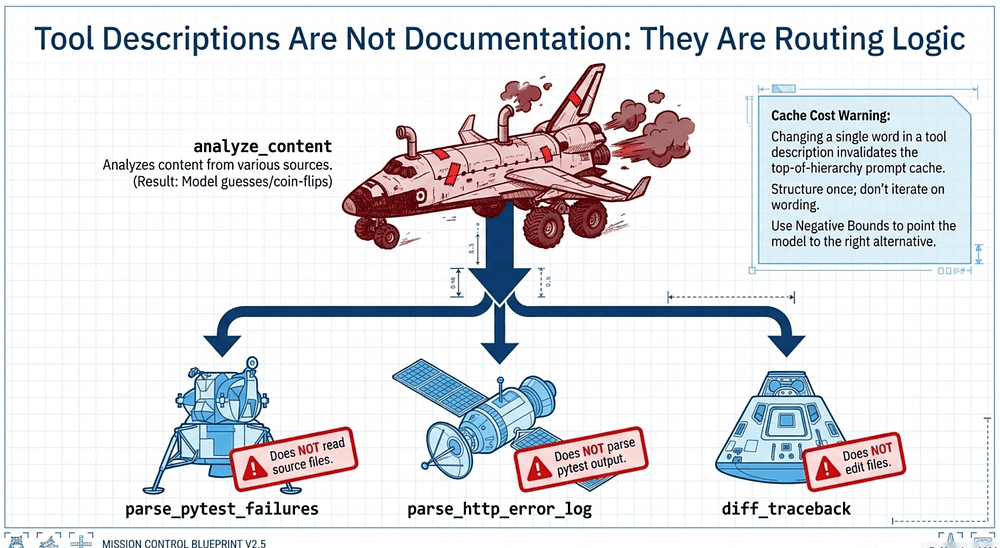
There is no hidden routing layer or magical keyword matcher helping Claude decide which tool to use. The model simply reads the descriptions. If those descriptions are vague, selection becomes unreliable. If they overlap, selection becomes a coin-flip.
The classic failure mode is the analyze_content vs. analyze_document problem. Two tools with near-identical descriptions sit in the same toolset, and the model has nothing to disambiguate them. It picks one, sometimes the right one, sometimes not. No amount of prompt-patching upstream will fix this, because the model is doing exactly what its inputs tell it to do: guessing.
Crucially, as a senior architect, you must recognize that tool definitions are top-of-hierarchy primitives. According to Anthropic's prompt caching logic, tool definitions sit at the very top; changing a single word in a tool description invalidates the cache for the entire system prompt and message layers. This is why structural precision is more efficient than frequent prompt iterations.
The most effective tool interfaces use negative bounds: explicitly telling the model what a tool cannot do and pointing it toward the right alternative.
Weak Interface Name: analyze_content Description: "Analyzes content from various sources."
Robust Interface Name: extract_web_results Description: "Extracts structured data from web search results. Input: HTML from a search results page. Output: ranked list of titles, URLs, and snippets. Use this specifically for web search output. Does NOT process PDFs or local document files (use extract_data_points for those)."
When you find yourself writing a description that says "this tool can do X, Y, or Z," you have a splitting problem. The fix is to decompose that "God Tool" into purpose-specific functions with defined contracts. A generic analyze_document becomes three sharper tools: extract_data_points, summarize_content, and verify_claim_against_source, each with its own input/output contract.
One more check before you blame the tool layer: if the descriptions look clean but the agent still misbehaves on certain user phrases, the problem isn't the tools, it's the system prompt. Keyword-sensitive instructions like "when the user mentions 'report,' always use X" can override a well-written tool description. Review the system prompt for unintended tool associations before rewriting any interfaces.
Example: Splitting a "God Tool" in the buggy-shop agent
Suppose the bug-fix agent has accumulated a single in-process tool called analyze_content. It started innocent ("scan one file"), grew to handle pytest output, then HTTP error logs from a staging endpoint. The description now reads "Analyzes content from various sources." On any given turn, Claude flips a coin.
❌ Weak interface: the God Tool
from claude_agent_sdk import tool, create_sdk_mcp_server

@tool(
    "analyze_content",
    "Analyzes content from various sources.",  # vague, unbounded
    {"source": str, "data": str},
)
async def analyze_content(args):
    # Branches internally on `source`. Claude has to guess which value to pass.
    ...

server = create_sdk_mcp_server("inspector", tools=[analyze_content])
// tools_weak.ts
import { tool, createSdkMcpServer } from "@anthropic-ai/claude-agent-sdk";
import { z } from "zod";

const analyzeContent = tool(
    "analyze_content",
    "Analyzes content from various sources.",
    { source: z.string(), data: z.string() },
    async ({ source, data }) => ({ content: [{ type: "text", text: "..." }] }),
);

export const server = createSdkMcpServer({ name: "inspector", tools: [analyzeContent] });
Symptoms in practice: when the user says check the failing test output, Claude sometimes calls analyze_content with source="pytest", sometimes with source="logs", sometimes invents source="test_results" and the handler silently falls through. There is no routing layer to save you, only the description, and the description says nothing.
✅ Robust interface: split with negative bounds
Decompose into three purpose-specific tools. Each one names what it consumes, what it returns, and what it explicitly does not handle, with a pointer to the right neighbor.
# tools_robust.py
from claude_agent_sdk import tool, create_sdk_mcp_server

@tool(
    "parse_pytest_failures",
    (
        "Parse the stdout of a pytest run into a structured list of failures. "
        "Input: raw pytest output (string). "
        "Output: list of {test_id, file, line, assertion, traceback}. "
        "Use this specifically for pytest output produced by the Bash tool. "
        "Does NOT read source files (use Read) and does NOT parse HTTP logs "
        "(use `parse_http_error_log`)."
    ),
    {"pytest_stdout": str},
)
async def parse_pytest_failures(args):
    ...

@tool(
    "parse_http_error_log",
    (
        "Extract 4xx/5xx entries from a structured HTTP access log. "
        "Input: NDJSON log lines (string). "
        "Output: list of {timestamp, method, path, status, request_id}. "
        "Use this for logs from the staging /var/log/buggy-shop/access.log format. "
        "Does NOT parse pytest output (use `parse_pytest_failures`) and does "
        "NOT fetch logs over the network (use Bash with `tail`)."
    ),
    {"log_ndjson": str},
)
async def parse_http_error_log(args):
    ...

@tool(
    "diff_traceback_against_source",
    (
        "Map a Python traceback frame to the offending source span. "
        "Input: {file, line, traceback}. Output: {file, line, code_excerpt, "
        "likely_cause}. Use after `parse_pytest_failures` to localize a fix. "
        "Does NOT edit files (use Edit) and does NOT run tests (use Bash)."
    ),
    {"file": str, "line": int, "traceback": str},
)
async def diff_traceback_against_source(args):
    ...

server = create_sdk_mcp_server(
    "inspector",
    tools=[parse_pytest_failures, parse_http_error_log, diff_traceback_against_source],
)
// tools_robust.ts
import { tool, createSdkMcpServer } from "@anthropic-ai/claude-agent-sdk";
import { z } from "zod";

const parsePytestFailures = tool(
    "parse_pytest_failures",
    "Parse the stdout of a pytest run into a structured list of failures. " +
    "Input: raw pytest output (string). " +
    "Output: list of {test_id, file, line, assertion, traceback}. " +
    "Use this specifically for pytest output produced by the Bash tool. " +
    "Does NOT read source files (use Read) and does NOT parse HTTP logs " +
    "(use `parse_http_error_log`).",
    { pytest_stdout: z.string() },
    async ({ pytest_stdout }) => ({ content: [{ type: "text", text: "..." }] }),
);

const parseHttpErrorLog = tool(
    "parse_http_error_log",
    "Extract 4xx/5xx entries from a structured HTTP access log. " +
    "Input: NDJSON log lines (string). " +
    "Output: list of {timestamp, method, path, status, request_id}. " +
    "Use this for logs from the staging /var/log/buggy-shop/access.log format. " +
    "Does NOT parse pytest output (use `parse_pytest_failures`) and does " +
    "NOT fetch logs over the network (use Bash with `tail`).",
    { log_ndjson: z.string() },
    async ({ log_ndjson }) => ({ content: [{ type: "text", text: "..." }] }),
);

const diffTracebackAgainstSource = tool(
    "diff_traceback_against_source",
    "Map a Python traceback frame to the offending source span. " +
    "Input: {file, line, traceback}. Output: {file, line, code_excerpt, " +
    "likely_cause}. Use after `parse_pytest_failures` to localize a fix. " +
    "Does NOT edit files (use Edit) and does NOT run tests (use Bash).",
    { file: z.string(), line: z.number().int(), traceback: z.string() },
    async (args) => ({ content: [{ type: "text", text: "..." }] }),
);

export const server = createSdkMcpServer({
    name: "inspector",
    tools: [parsePytestFailures, parseHttpErrorLog, diffTracebackAgainstSource],
});
What changed, and why it works
Three properties to notice in the robust set:
- Names encode intent, not category.
parse_pytest_failuresis a verb-object that the model can match to "the failing test output" without inventing asourcefield.analyze_contentmatched nothing in particular, and so matched everything. - Each description states input, output, and a use-this-when sentence. Claude is choosing from a list of contracts, not a list of vibes.
- Negative bounds point sideways. Every description ends with "Does NOT do X (use Y)." This is the cheap fix that disambiguates against both the other custom tools and the built-ins (
Read,Edit,Bash). The model now has somewhere to be redirected to instead of guessing.
Before you blame the tools
Before you rewrite anything, check the system prompt. A line like "When the user mentions 'logs', always use analyze_content" will override even the sharpest tool description. If the descriptions look clean but the agent still misroutes on certain phrases, the keyword association is upstream. Fix the prompt first; the tool layer is innocent.
A note on cache cost
Tool definitions sit at the top of the cached prefix. Changing a single word in any of the three descriptions above invalidates the cached prompt and tool prefix for every subsequent turn in that session, and for warm sessions across your fleet if you share a prefix. This is why it pays to get the contracts right once, through structural decomposition like the split above, rather than iterating on wording across deploys.
The 4-to-5 Rule: Fighting Attention Fragmentation
There is a massive measurable cost to giving an agent too many capabilities. Engineering analysis shows that an agent with 58 tools across five MCP servers can consume 55,000 to 100,000 tokens before the first conversation token is even generated. This leads to attention fragmentation: as the toolset grows, selection accuracy degrades.
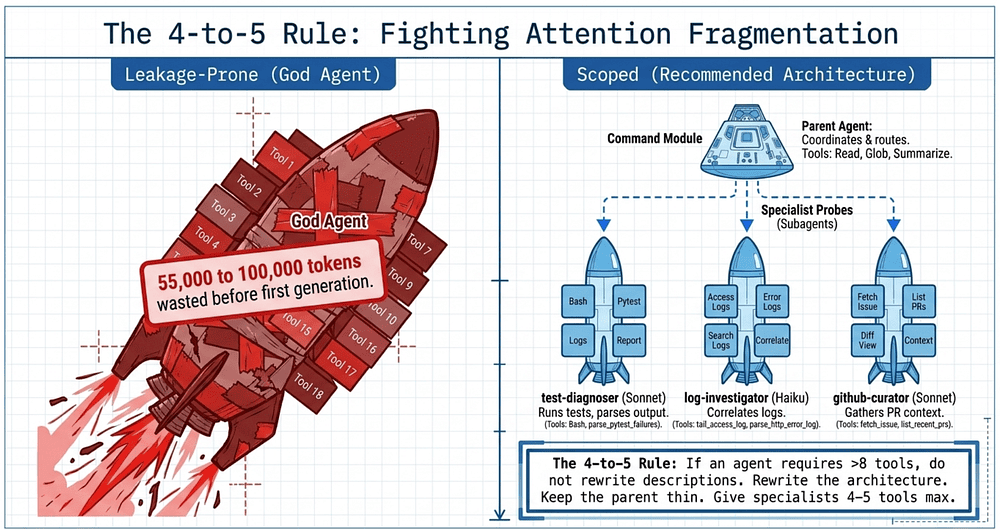
The solution is architectural decomposition. A multi-agent system with five subagents at four tools each is significantly more reliable than one agent with twenty tools.
Architecture Type Design Philosophy Outcome Leakage-Prone One "God Agent" with 18+ tools (research, analysis, synthesis). High token overhead; frequent misrouting; selection "noise." Scoped (Recommended) Specialized subagents (Researcher, Fact Checker) with 4-5 tools each. High reliability; deterministic routing; minimal context waste.
The failure here isn't only attention fragmentation from token count; it's specialization mismatch. When an agent carries tools outside its role, it actively misuses them. The canonical example: a synthesis agent that has web_search in its toolset will reach for the web mid-synthesis to "double-check" something, derailing the drafting task and burning turns on exploratory queries that aren't its job. The same agent without web_search would have done the right thing: finish the synthesis and return. The lesson is that removing a tool is sometimes more powerful than adding instructions telling the agent not to use it.
Heuristic: If an agent requires more than eight tools, do not rewrite the descriptions; rewrite the architecture.
Good grounding. The docs explicitly support the "selection accuracy degrades with more than 30-50 tools" and "tool definitions can consume large portions of the context window" claims (the 4-5 rule is the user's own heuristic, sharper than the SDK doc's looser numbers). Let me build a concrete, dense example showing the architectural fix in buggy-shop terms: one fat agent versus a scoped parent + subagents structure.
Example: From "God Agent" to scoped subagents in buggy-shop
The bug-fix agent has grown. Over a few sprints it picked up tools for reading code, running pytest, parsing failures, querying staging logs, fetching GitHub issue context, posting a draft fix to a PR comment, and a handful of internal MCP integrations for the deploy pipeline. The main query() call now hands Claude eighteen tools across three MCP servers. Selection has gotten flaky. The agent occasionally calls post_pr_comment when the user just asked for a diagnosis, and parse_pytest_failures sometimes loses out to fetch_github_issue when the user mentions "the failing test issue."
This is the canonical failure mode. The fix is not to rewrite descriptions, it is to split the agent.
❌ God Agent (eighteen tools, one context)
# god_agent.py
import asyncio
from claude_agent_sdk import query, ClaudeAgentOptions

async def main():
    async for message in query(
        prompt="Investigate the failing checkout test and propose a fix.",
        options=ClaudeAgentOptions(
            allowed_tools=[
                # Code (4)
                "Read", "Edit", "Glob", "Grep",
                # Test execution (2)
                "Bash", "mcp__inspector__parse_pytest_failures",
                # Logs (2)
                "mcp__inspector__parse_http_error_log",
                "mcp__staging__tail_access_log",
                # GitHub (4)
                "mcp__github__fetch_issue",
                "mcp__github__list_recent_prs",
                "mcp__github__post_pr_comment",
                "mcp__github__create_branch",
                # Deploy pipeline (4)
                "mcp__deploy__list_environments",
                "mcp__deploy__current_revision",
                "mcp__deploy__rollback_to_revision",
                "mcp__deploy__trigger_smoke_tests",
                # Internal (2)
                "mcp__inspector__diff_traceback_against_source",
                "mcp__inspector__summarize_failures_for_humans",
            ],
            setting_sources=["project"],
            max_turns=30,
        ),
    ):
        print(message)

asyncio.run(main())
Eighteen tool schemas plus their input shapes hit the prefix on every turn, before Claude has read a single line of code. Selection accuracy on prompts that mention "the failing checkout test" is roughly a coin flip between three plausible tools. Worse, the deploy tools are sitting in context for a task that has nothing to do with deploy.
✅ Scoped: a thin parent plus three specialists
The parent agent gets four tools (Agent, Read, Glob, plus the human-readable summarizer). Each specialist gets four. No specialist sees the others' tools.
# scoped_agent.py
import asyncio
from claude_agent_sdk import query, ClaudeAgentOptions, AgentDefinition

async def main():
    async for message in query(
        prompt="Investigate the failing checkout test and propose a fix.",
        options=ClaudeAgentOptions(
            # Parent has Agent (to delegate) plus the minimum it needs to coordinate.
            allowed_tools=[
                "Agent",
                "Read",
                "Glob",
                "mcp__inspector__summarize_failures_for_humans",
            ],
            agents={
                "test-diagnoser": AgentDefinition(
                    description=(
                        "Runs the failing test, parses pytest output, and localizes "
                        "the offending source line. Use when the user reports a "
                        "test failure or asks 'why is X failing?'."
                    ),
                    prompt=(
                        "You diagnose pytest failures. Run the test the user names, "
                        "parse the output, and return {test_id, file, line, "
                        "likely_cause}. Do not edit files or post to GitHub."
                    ),
                    tools=[
                        "Bash",
                        "Read",
                        "mcp__inspector__parse_pytest_failures",
                        "mcp__inspector__diff_traceback_against_source",
                    ],
                    model="sonnet",
                ),
                "log-investigator": AgentDefinition(
                    description=(
                        "Pulls and parses staging HTTP logs around a given "
                        "timestamp. Use when a failure may correlate with a "
                        "production or staging request."
                    ),
                    prompt=(
                        "You correlate failures with HTTP logs. Tail the staging "
                        "access log, extract 4xx/5xx entries near the timestamp "
                        "the parent gives you, and return the request IDs."
                    ),
                    tools=[
                        "mcp__staging__tail_access_log",
                        "mcp__inspector__parse_http_error_log",
                        "Read",
                        "Grep",
                    ],
                    model="haiku",  # cheap, log parsing does not need Opus
                ),
                "github-curator": AgentDefinition(
                    description=(
                        "Reads the relevant GitHub issue and recent PRs touching "
                        "the failing file. Use to gather prior context before a fix."
                    ),
                    prompt=(
                        "You gather context from GitHub. Fetch the linked issue "
                        "and the last five PRs touching the file the parent names. "
                        "Return a one-paragraph summary. You cannot post comments."
                    ),
                    tools=[
                        "mcp__github__fetch_issue",
                        "mcp__github__list_recent_prs",
                        "Read",
                        "Grep",
                    ],
                    model="sonnet",
                ),
            },
            setting_sources=["project"],
            max_turns=30,
        ),
    ):
        print(message)

asyncio.run(main())
// scoped_agent.ts
import { query } from "@anthropic-ai/claude-agent-sdk";

for await (const message of query({
    prompt: "Investigate the failing checkout test and propose a fix.",
    options: {
        allowedTools: [
            "Agent",
            "Read",
            "Glob",
            "mcp__inspector__summarize_failures_for_humans",
        ],
        agents: {
            "test-diagnoser": {
                description: "Runs the failing test, parses pytest output, and localizes the " +
                    "offending source line. Use when the user reports a test failure.",
                prompt: "You diagnose pytest failures. Run the named test, parse output, " +
                    "return {test_id, file, line, likely_cause}. Do not edit files.",
                tools: [
                    "Bash",
                    "Read",
                    "mcp__inspector__parse_pytest_failures",
                    "mcp__inspector__diff_traceback_against_source",
                ],
                model: "sonnet",
            },
            "log-investigator": {
                description: "Pulls and parses staging HTTP logs around a given timestamp.",
                prompt: "Tail the staging access log, extract 4xx/5xx entries near the " +
                    "given timestamp, return request IDs.",
                tools: [
                    "mcp__staging__tail_access_log",
                    "mcp__inspector__parse_http_error_log",
                    "Read",
                    "Grep",
                ],
                model: "haiku",
            },
            "github-curator": {
                description: "Reads the linked GitHub issue and recent PRs touching the file.",
                prompt: "Fetch the linked issue and last five PRs touching the named file. " +
                    "Return a one-paragraph summary. You cannot post comments.",
                tools: [
                    "mcp__github__fetch_issue",
                    "mcp__github__list_recent_prs",
                    "Read",
                    "Grep",
                ],
                model: "sonnet",
            },
        },
        settingSources: ["project"],
        maxTurns: 30,
    },
})) {
    console.log(message);
}
What the split bought you
Three things to read off the structure.
Context shrinks at every level. The parent sees four tools, not eighteen. Each subagent sees four. No subagent carries the deploy MCP tools just because the deploy tools exist. The schemas that are not relevant to a given subtask are not in the context for that subtask, full stop. (This is also how subagents work mechanically: a subagent starts with a fresh context, and only its final message returns to the parent. The full investigation transcript never lands in the main agent's history.)
Selection becomes deterministic. When the user says "investigate the failing checkout test," the parent has exactly one delegate that matches that intent: test-diagnoser. The coin flip is gone, because the alternatives are no longer in the same scope. Routing happens once at the parent level between three clearly-named specialists, not eighteen times across overlapping tool descriptions.
Per-specialist tuning becomes free. log-investigator runs on Haiku because it is doing rote log parsing. test-diagnoser and github-curator run on Sonnet. Permission scope is per-subagent, so the github-curator literally cannot post a PR comment, because the tool is not in its tools array. The God Agent could not give you that guarantee no matter how you wrote its system prompt.
The heuristic, applied
If your allowed_tools list is past eight entries, stop iterating on descriptions. Draw the boundaries instead:
- Group tools by intent, not by vendor or MCP server. "Things that diagnose failures" is one specialist, even if those tools come from two MCP servers.
- Cap each specialist at four to five tools. If a specialist starts to bulge, split it again.
- Keep the parent thin. The parent's job is to route, summarize, and ask the user for confirmation. It does not need
Bash. - Pick the cheapest model per specialist. The parent often wants Sonnet or Opus for routing, but a log parser can run on Haiku.
Description engineering can only buy you so much. After eight tools, architecture is the lever.
Scoped Cross-Role Tools
Pure isolation is too rigid. A synthesis agent that needs to verify a single fact shouldn't have to round-trip through the coordinator for every check. The pattern is: give the synthesis agent a narrow, constrained verify_fact tool for high-frequency lookups, and route complex multi-step research back through the coordinator. The cross-role tool is scoped, not general; it cannot do exploratory web search, it cannot fetch arbitrary URLs, it just verifies a claim against a known source.
This is also where you replace generic tools with constrained alternatives. A raw fetch_url invites misuse: the agent will try to fetch anything. Replace it with load_document, which validates that the URL points to an allowed document type and rejects everything else. The constraint is the routing logic.
Seeing is believing so let's create an example.
Example: scoped cross-role tools for the fix-synthesizer subagent
The bug-fix agent already has three specialists. Now add a fourth: fix-synthesizer, which drafts the actual code change. While drafting, it constantly wants to look things up: "is User.role an enum in our schema?", "what does RFC 7807 say about the type field?".
If every lookup round-trips through the parent, a one-token check becomes a ten-turn detour. The fix is a scoped cross-role tool: verify-only, against a known catalog, with no exploratory power.
❌ Generic, unscoped: fetch_url
@tool("fetch_url", "Fetch the contents of a URL.", {"url": str})
async def fetch_url(args):
    ...  # httpx.get and return the body
The synthesizer will use it for everything: Stack Overflow, blog posts, the live staging site. The generality is the bug.
✅ Scoped: verify_fact + load_document
Two narrow tools, in an in-process SDK MCP server. The enum is the gate.
# verification_server.py
SOURCE_CATALOG = {
    "rfc-7807": {...},
    "internal-pricing": {...},
    "internal-schema": {...},
}
ALLOWED_HOSTS = {"docs.internal.buggy-shop", "tools.ietf.org"}
ALLOWED_SUFFIXES = (".md", ".txt", ".html")

@tool(
    "verify_fact",
    (
        "Verify a single claim against ONE catalog source. "
        "Returns supported / contradicted / not found. "
        "Use for high-frequency checks while drafting. "
        "Does NOT do exploratory search. "
        "For multi-step research, return control to the parent."
    ),
    {
        "type": "object",
        "properties": {
            "source_id": {
                "type": "string",
                "enum": list(SOURCE_CATALOG.keys()),
            },
            "claim": {"type": "string"},
        },
        "required": ["source_id", "claim"],
    },
)
async def verify_fact(args):
    ...  # look up source, check claim, return excerpt + verdict

@tool(
    "load_document",
    (
        "Load one document by URL, validated against the "
        "allowed-doc list. Use when verify_fact is "
        "insufficient. Does NOT fetch arbitrary URLs."
    ),
    {"url": str},
)
async def load_document(args):
    parsed = urlparse(args["url"])
    if parsed.hostname not in ALLOWED_HOSTS:
        return {"content": [...], "isError": True}
    if not parsed.path.endswith(ALLOWED_SUFFIXES):
        return {"content": [...], "isError": True}
    ...  # fetch and return text

verification_server = create_sdk_mcp_server(
    name="verifier",
    tools=[verify_fact, load_document],
)
Wire the synthesizer in. The cross-role tools live on the subagent, not the parent:
# scoped_agent.py (additions only)
options = ClaudeAgentOptions(
    allowed_tools=["Agent", "Read", "Glob", ...],
    mcp_servers={"verifier": verification_server},
    agents={
        # test-diagnoser, log-investigator, github-curator ...
        "fix-synthesizer": AgentDefinition(
            description=(
                "Drafts a code fix given a localized failure. "
                "Verifies its own claims against the catalog. "
                "Use AFTER test-diagnoser."
            ),
            prompt=(
                "You receive {file, line, likely_cause}. "
                "Draft a minimal patch. Verify any factual "
                "claim with verify_fact. For lookups outside "
                "the catalog, return control to the parent."
            ),
            tools=[
                "Read",
                "Glob",
                "mcp__verifier__verify_fact",
                "mcp__verifier__load_document",
            ],
            mcpServers=["verifier"],
            model="sonnet",
        ),
    },
    setting_sources=["project"],
    max_turns=30,
)
TypeScript shape is the same; only the server registration differs:
// scoped_agent.ts (additions only)
const verifyFact = tool(
    "verify_fact",
    "Verify a single claim against ONE catalog source. " +
    "Returns supported / contradicted / not found. " +
    "Use for high-frequency checks while drafting. " +
    "Does NOT do exploratory search.",
    {
        source_id: z.enum([
            "rfc-7807",
            "internal-pricing",
            "internal-schema",
        ]),
        claim: z.string(),
    },
    async ({ source_id, claim }) => {
        // look up source, check claim, return excerpt + verdict
        return { content: [...] };
    },
);

const loadDocument = tool(
    "load_document",
    "Load one document by URL, validated against the " +
    "allowed-doc list. Does NOT fetch arbitrary URLs.",
    { url: z.string().url() },
    async ({ url }) => {
        // host + suffix allowlist, then fetch
        return { content: [...] };
    },
);

const verifier = createSdkMcpServer({
    name: "verifier",
    tools: [verifyFact, loadDocument],
});

// In the agents map:
const fixSynthesizer = {
    description: "Drafts a code fix ... Use AFTER test-diagnoser.",
    prompt: "You receive {file, line, likely_cause} ...",
    tools: [
        "Read",
        "Glob",
        "mcp__verifier__verify_fact",
        "mcp__verifier__load_document",
    ],
    mcpServers: ["verifier"],
    model: "sonnet" as const,
};
Why this stays scoped
Three properties give the cross-role tool its discipline.
The schema is the gate. source_id is an enum over the catalog. There is no free string the model can fill with "search the internet for X." If a source is not in the catalog, the tool cannot accept it.
The description names the alternative. "Does NOT do exploratory search. For multi-step research, return control to the parent." The negative bound is the routing logic. When the synthesizer needs something outside the catalog, the tool description itself tells it where to go.
The constraint replaces the generic tool. load_document is what fetch_url should have been: host allowlist, suffix allowlist, no redirects. The synthesizer that would have wandered the web now hits isError: true the first time it tries stackoverflow.com, and falls back to the parent.
When to reach for this
Two signals. First, when a subagent is round-tripping to the parent for the same shape of cheap question over and over. Verification, name lookups, reading a single known doc. Second, when you are about to add a tool with a url or query field. If you can write the legitimate inputs down as an enum or an allowlist, the scoped version is the version you want. If you cannot, you probably need a parent-level specialist instead of a subagent-level tool.
Configuring Tool Choice: Auto, Any, and Forced Selection
tool_choice is the third lever (after descriptions and distribution) for controlling agent behavior. There are three modes:
auto: The model decides whether to call a tool or respond in text. This is the default and the right choice for most agentic flows.any: The model must call a tool, but can pick which one. Use this when conversational text is never an acceptable answer, for example when the agent must always return structured output from one of several extractors.- Forced selection (
{"type": "tool", "name": "..."}): The model must call the named tool. Use this to guarantee a specific tool runs first, for example forcingextract_metadatabefore any enrichment tools fire, then processing subsequent steps in follow-up turns.
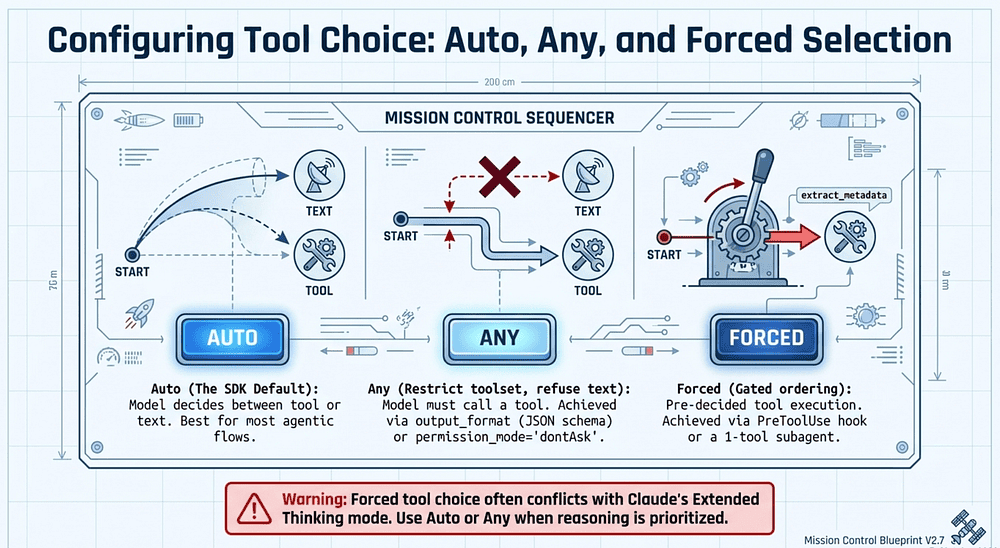
Note on Extended Thinking: Forced tool choice is often incompatible with Claude's Extended Thinking mode. Forced selection can conflict with the model's reasoning process; use auto or any when reasoning is prioritized.
Example: Controlling tool choice with the Messages API, and the SDK equivalents
tool_choice is a parameter on the Anthropic Messages API (the Client SDK layer). It tells the model, on a single API call, whether tool use is optional, mandatory, or pre-decided. The Agent SDK runs the loop for you and sets tool_choice internally, so you do not pass it through query(). The control surface is still there, it is just split across different SDK primitives. This section shows the raw API knob, then maps each mode to its SDK equivalent.
The raw API: three modes
In buggy-shop, suppose you are still at the Client SDK layer, before adopting the Agent SDK. You want the model to extract failure metadata from a pytest log.
# client_sdk_tool_choice.py
import anthropic

client = anthropic.Anthropic()

tools = [
    {
        "name": "extract_metadata",
        "description": "Extract {test_id, file, line} from pytest output.",
        "input_schema": {...},
    },
    {
        "name": "enrich_with_blame",
        "description": "Annotate a failure with git-blame info.",
        "input_schema": {...},
    },
]

# auto: model decides whether to call a tool or just talk.
resp = client.messages.create(
    model="claude-opus-4-7",
    max_tokens=1024,
    tools=tools,
    tool_choice={"type": "auto"},  # default; could be omitted
    messages=[...],
)

# any: model MUST call a tool, picks which one.
resp = client.messages.create(
    ...,
    tool_choice={"type": "any"},
)

# forced: model MUST call this specific tool.
resp = client.messages.create(
    ...,
    tool_choice={"type": "tool", "name": "extract_metadata"},
)
When to use each:
auto: most agentic flows. The model picks tool use or text.any: text is never an acceptable answer. The model must pick a tool.- Forced: you want a specific tool to fire first, then handle the rest in follow-up turns.
A practical note: forced tool choice is often incompatible with Extended Thinking. The forced selection short-circuits the reasoning the model wants to do before picking. Use auto or any when you have thinking enabled.
Why the Claude Agent SDK does not expose tool_choice
The Agent SDK owns the loop. On every turn it sends a Messages API request, reads the response, runs any tools Claude called, and sends the results back. tool_choice is a per-API-call parameter; the SDK sets it implicitly based on what is happening in the loop. There is no single tool_choice for "the whole agent" because the agent makes many API calls.
That does not mean you lose control. You get five SDK-native levers that cover the same ground:
1. auto -> the SDK default
This is exactly what query() already does. No configuration needed. The model decides each turn whether to call a tool or produce text. Most code in the tutorial series sits here.
2. any -> restrict the toolset, refuse text
If text is never acceptable, the cleanest move is to constrain the toolset so the only path forward goes through a tool, and reject text endings. output_format is the strongest version: it forces a structured JSON answer at the end, so the loop cannot terminate on prose.
options = ClaudeAgentOptions(
    allowed_tools=["mcp__inspector__parse_pytest_failures"],
    output_format={
        "type": "json_schema",
        "schema": FailureReport.model_json_schema(),
    },
)
The model can still chain tool calls along the way, but the result is forced into structured form. This is tool_choice: "any" in spirit, applied at the loop boundary.
3. Forced -> PreToolUse hook that gates ordering
The closest analog to tool_choice: {"type": "tool", "name": "..."}. Block any tool other than the required first one, until that one has run.
# force_first_tool.py
extracted = {"done": False}

async def require_extract_first(input_data, tool_use_id, ctx):
    tool = input_data["tool_name"]
    if tool == "mcp__inspector__extract_metadata":
        extracted["done"] = True
        return {}
    if not extracted["done"]:
        return {
            "systemMessage": (
                "Call extract_metadata first, then call enrichment tools."
            ),
            "hookSpecificOutput": {
                "hookEventName": "PreToolUse",
                "permissionDecision": "deny",
                "permissionDecisionReason": "extract_metadata must run first",
            },
        }
    return {}
Wire it into options.hooks with a PreToolUse matcher. Claude tries something else, gets the rejection, retries with extract_metadata. You pay one extra round-trip the first time, but you get the same end state without leaving the SDK.
4. Forced (heavier) -> subagent with one tool
If forcing the same tool every time at the same point in the flow, isolate it. Define a subagent whose only tool is the one you want to force, and have the parent delegate to it first.
agents = {
    "metadata-extractor": AgentDefinition(
        description="Extracts metadata from pytest output. Always run first.",
        prompt="Call extract_metadata on the input. Return its output.",
        tools=["mcp__inspector__extract_metadata"],  # one tool, no choice
    ),
}
The subagent has nothing else to choose. The parent picks up the result and continues with the broader toolset.
5. any (strictest) -> permission_mode="dontAsk" plus a one-tool allowlist
When you want the hardest possible "tool or nothing" guarantee, deny everything not pre-approved. Pair with a single-entry allowed_tools and the model has exactly one path forward.
options = ClaudeAgentOptions(
    allowed_tools=["mcp__inspector__extract_metadata"],
    permission_mode="dontAsk",  # unmatched tools are denied, not prompted
)
Mapping at a glance
Raw API SDK equivalent tool_choice: "auto" Default query() behavior. Nothing to configure. tool_choice: "any" output_format for forced-structured endings, or a single-tool allowed_tools with permission_mode="dontAsk". Forced selection PreToolUse hook that denies until the required tool runs, or a subagent whose tools list is that single tool.
The mental model: in the Client SDK, you set tool_choice once per API call. In the Agent SDK, you shape the loop so that the call the SDK would make on your behalf has the right tool_choice set implicitly. Same control, different surface.
Failing Gracefully: The Four Pillars of Structured Errors
A tool that returns "Operation failed" is a dead end. Production-grade systems rely on the graceful-degradation principle: a report that flags exactly where data is missing is more trustworthy than a report that silently omits it. MCP communicates failures back to the agent via the isError flag, but the flag alone isn't enough. The payload is what matters.
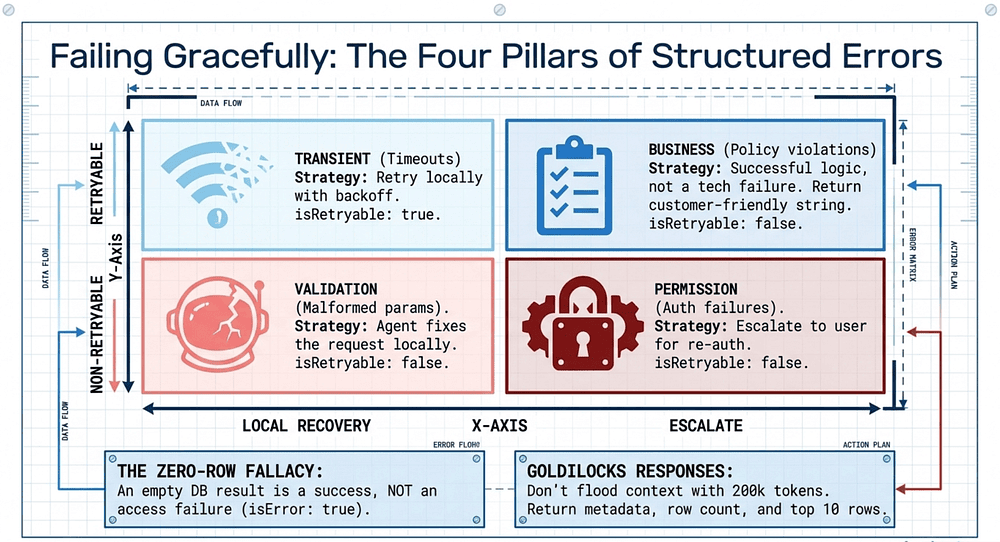
Structured error responses must include an errorCategory and an isRetryable boolean. Failures fall into four buckets:
Transient Errors: Timeouts or rate limits.
- Strategy: Retry with backoff.
isRetryable: true.
Validation Errors: Malformed parameters or missing fields.
- Strategy: The agent must fix the request.
isRetryable: false.
Business Errors: Policy violations (e.g., "refund exceeds threshold").
- Strategy: Crucial distinction: these are successful logic results, not technical failures. Return a customer-friendly explanation for the agent to pass through.
isRetryable: false.
Permission Errors: Authentication failures or insufficient privileges.
- Strategy: Escalate to the user for re-authentication.
isRetryable: false.
Access Failures vs. Valid Empty Results
One distinction trips up even experienced engineers: an empty result is not an error. A database query that returns zero rows is a successful query; the tool worked, the answer is "nothing matched." That should return cleanly with an empty result set, not an isError: true payload. Conflating the two causes the agent to retry queries that will never return data and to escalate non-issues to the user. Reserve isError for actual access failures (the database was unreachable, the API rejected the request), and let valid empty results pass through as data.
Good. I have what I need. Building the example around a refund_for_order tool in buggy-shop, since the "business error" category (refund exceeds threshold) is the most distinctive of the four and gives the example a real shape.
Example: Four error categories in one refund_for_order tool
A tool that returns "Operation failed" gives Claude nothing to act on. A tool that returns {errorCategory: "transient", isRetryable: true} tells Claude to back off and retry. A tool that returns an empty list of refunds without isError tells Claude the search worked and the answer is "none."
This is the same buggy-shop agent, now with a refund tool that runs against the internal billing API. It demonstrates all four error buckets and the empty-result distinction.
The tool
# refund_tool.py
from typing import Any, TypedDict
import httpx
from claude_agent_sdk import tool

class ErrorPayload(TypedDict):
    errorCategory: str  # transient | validation | business | permission
    isRetryable: bool
    message: str        # what Claude (or the user) should hear
    details: dict       # structured context for logs and follow-up

def err(category: str, retryable: bool, msg: str, **details) -> dict:
    return {
        "content": [{"type": "text", "text": msg}],
        "isError": True,
        "structuredContent": {
            "errorCategory": category,
            "isRetryable": retryable,
            "message": msg,
            "details": details,
        },
    }

@tool(
    "refund_for_order",
    (
        "Issue a refund for an order. Returns structured errors with "
        "errorCategory and isRetryable. An empty match list is NOT an error."
    ),
    {
        "type": "object",
        "properties": {
            "order_id": {"type": "string"},
            "amount_cents": {"type": "integer", "minimum": 1},
            "reason": {"type": "string"},
        },
        "required": ["order_id", "amount_cents", "reason"],
    },
)
async def refund_for_order(args: dict[str, Any]) -> dict[str, Any]:
    # --- Validation: the agent must fix the request ---
    if args["amount_cents"] > 100_000_00:
        return err(
            "validation",
            False,
            "amount_cents exceeds the max field value of 10,000,000.",
            field="amount_cents",
        )

    try:
        async with httpx.AsyncClient(timeout=5.0) as c:
            r = await c.post(
                "https://billing.internal/refunds",
                json=args,
                headers={"Authorization": f"Bearer {_token()}"},
            )
    except httpx.TimeoutException:
        # --- Transient: retry with backoff ---
        return err(
            "transient",
            True,
            "Billing API timed out. Retry after 2s.",
            backoff_seconds=2,
        )

    # --- Permission: escalate for re-auth ---
    if r.status_code in (401, 403):
        return err(
            "permission",
            False,
            "Billing token rejected. Ask the user to re-authenticate.",
            status=r.status_code,
        )

    # --- Transient: rate limit ---
    if r.status_code == 429:
        return err(
            "transient",
            True,
            "Rate-limited by billing. Retry after Retry-After.",
            backoff_seconds=int(r.headers.get("Retry-After", "5")),
        )

    body = r.json()

    # --- Business: policy violation. Successful logic result, not a failure. ---
    if body.get("policy_denied"):
        return err(
            "business",
            False,
            (
                "Refund denied by policy: amount exceeds the $500 "
                "auto-approve threshold for this order age."
            ),
            policy=body["policy_denied"],
            threshold_cents=body.get("threshold_cents"),
        )

    # --- Success ---
    return {
        "content": [{"type": "text", "text": f"Refund issued: {body['refund_id']}"}],
        "structuredContent": body,
    }
// refund_tool.ts (shape only; same four buckets)
const err = (
    category: "transient" | "validation" | "business" | "permission",
    retryable: boolean,
    message: string,
    details: Record<string, unknown> = {},
) => ({
    content: [{ type: "text" as const, text: message }],
    isError: true,
    structuredContent: { errorCategory: category, isRetryable: retryable, message, details },
});

const refundForOrder = tool(
    "refund_for_order",
    "Issue a refund. Returns structured errors with errorCategory and " +
    "isRetryable. An empty match list is NOT an error.",
    {
        order_id: z.string(),
        amount_cents: z.number().int().positive(),
        reason: z.string(),
    },
    async ({ order_id, amount_cents, reason }) => {
        if (amount_cents > 10_000_000) {
            return err("validation", false, "amount_cents exceeds the max field value.", { field: "amount_cents" });
        }
        // ... timeout -> transient(retry)
        // ... 401/403 -> permission(no retry)
        // ... 429 -> transient(retry, backoff)
        // ... policy_denied -> business(no retry, customer-friendly text)
        // ... otherwise success
        return { content: [{ type: "text", text: "Refund issued: ..." }] };
    },
);
The empty-result case (not an error)
The companion tool, list_refunds_for_order, shows the distinction that trips people up. Zero matches is data, not failure.
@tool(
    "list_refunds_for_order",
    "List refunds for an order. Empty list = no refunds, NOT an error.",
    {"order_id": str},
)
async def list_refunds_for_order(args):
    try:
        async with httpx.AsyncClient(timeout=5.0) as c:
            r = await c.get(f"https://billing.internal/orders/{args['order_id']}/refunds")
    except httpx.TimeoutException:
        return err("transient", True, "Billing API timed out.", backoff_seconds=2)

    if r.status_code == 404:
        # Order doesn't exist. That IS a failure: the agent asked about
        # something that does not exist, and should not retry.
        return err("validation", False, f"No order {args['order_id']} exists.")

    refunds = r.json().get("refunds", [])
    # Empty list is a valid answer. No isError, no retry.
    return {
        "content": [{"type": "text", "text": f"Found {len(refunds)} refunds."}],
        "structuredContent": {"refunds": refunds, "count": len(refunds)},
    }
Three different "zero-ish" outcomes, three different return shapes:
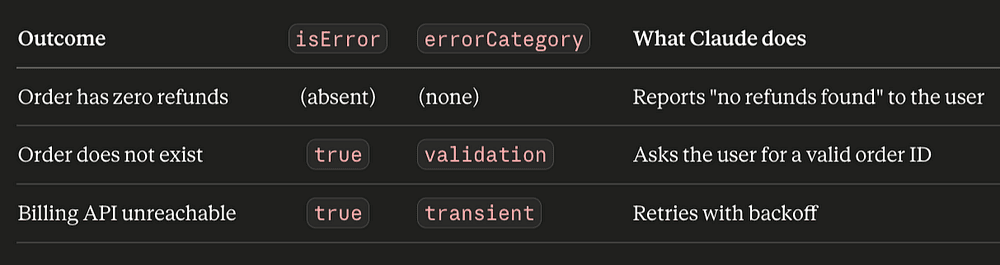
What Claude actually does with each category
The categories are not just labels. Each one steers Claude toward a different action.
Transient. isRetryable: true plus a backoff_seconds hint. Claude waits and retries the same call. You can enforce the backoff with a PreToolUse hook that watches for repeated calls to the same tool with the same args and inserts a delay, but most of the time the textual hint is enough.
Validation. isRetryable: false. The agent reads the field name out of details and either fixes the request itself or asks the user for the right value. Retrying the same call is wasted work, which is why isRetryable is false.
Business. This is the category most teams get wrong. A refund denied by policy is not a technical failure, it is the system working correctly. The reason it still uses isError: true is that you want the agent to stop the workflow and surface the explanation to the user, not silently move on. The message field is written for end-user consumption, not for internal logs. Claude passes it through to the user verbatim.
Permission. isRetryable: false, because retrying without new credentials cannot help. The message tells Claude to escalate to the user for re-authentication. A PreToolUse hook can also intercept the next call to the same MCP server and require fresh credentials.
Why structured beats free text
The same failure expressed as free text:
"Operation failed: refund exceeds threshold"
versus structured:
{
  "errorCategory": "business",
  "isRetryable": false,
  "message": "Refund denied by policy: amount exceeds the $500 auto-approve threshold for this order age.",
  "details": {
    "policy": "auto_approve_cap",
    "threshold_cents": 50000
  }
}
Free text forces Claude to guess: is this transient? Should I retry? Should I tell the user? With the structured form, the decision is in the payload. The message is what the user hears, the details are what your logs capture, and the two boolean axes (errorCategory, isRetryable) are what the agent acts on. Three audiences, one return value.
A small rule of thumb
If you find yourself writing isError: true and you can imagine the agent retrying and getting the same answer, ask: is the answer actually data? If so, drop the flag and return the empty result. isError is for "I could not get you an answer," not "the answer is no."
Local Recovery in Subagents
In a multi-agent system, errors should be handled at the lowest level that can resolve them. A subagent that hits a transient timeout should retry locally; the coordinator doesn't need to know. Only propagate errors upward when the subagent has exhausted its recovery options, and when you do, include partial results and a summary of what was attempted. This gives the coordinator (or the user) something to work with rather than a bare failure.
Goldilocks Responses
Implement "Goldilocks" responses for tool outputs. A database query returning 500 rows (200k tokens) will flood the context. Instead, return high-signal metadata: row count, column names, the first 10 rows, and a pagination token. Enough for the agent to decide what to do next, not so much that it drowns.
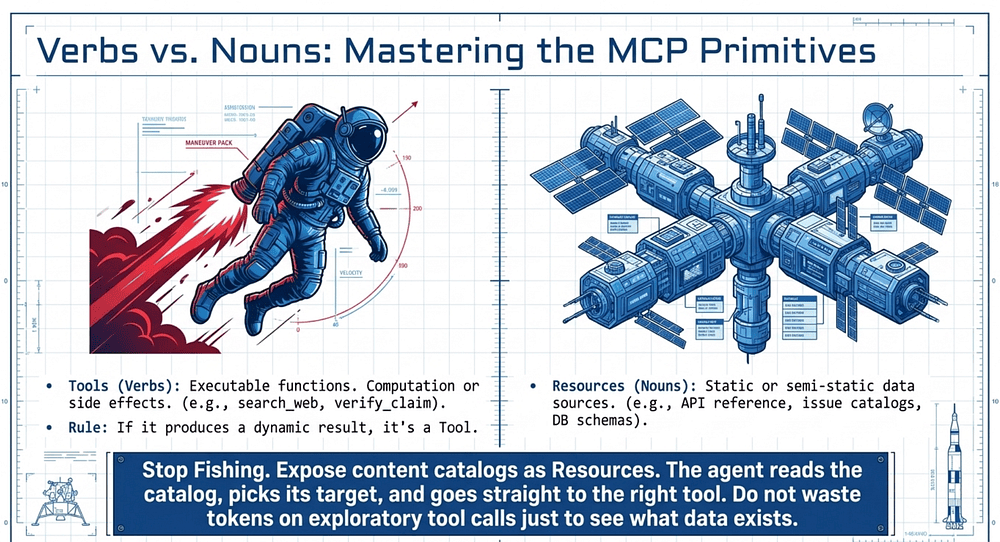
Verbs vs. Nouns: Mastering the MCP Primitives
The Model Context Protocol relies on three primitives. Misclassifying these is a primary source of architectural bloat.
- Tools (Verbs): Executable functions that perform computation or cause side effects (e.g.,
search_web). - Resources (Nouns): Static or semi-static data sources that the agent reads (e.g., an API reference or a reliability database).
- Prompts (Templates): Parameterized templates for structuring interactions.
If you cannot "run" it to produce a dynamic result, it is likely a Resource. Example: a "source reliability database" that an agent reads is a Resource. A function that "verifies a claim" is a Tool. Use Resources for content catalogs (issue summaries, documentation hierarchies, database schemas) to avoid wasting tokens on exploratory tool calls just to see what data exists.
Integrating MCP Servers: Configuration, Scope, and Description Hygiene
All tools from all configured MCP servers are discovered at connection time and become available to the agent simultaneously. That's powerful, and it's also why scoping matters.
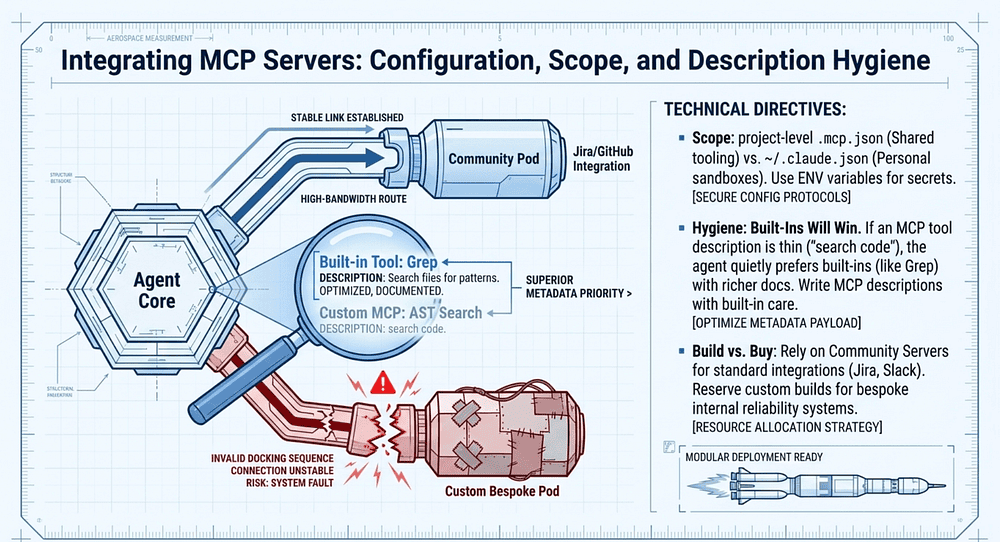
Scope your config files correctly:
- Project-level
.mcp.jsonfor shared team tooling (the Jira server everyone on the team uses, the internal docs server). - User-level
~/.claude.jsonfor personal or experimental servers (your local sandbox, a server you're prototyping).
Use environment variable expansion in .mcp.json (e.g., "${GITHUB_TOKEN}") to keep secrets out of version control. Never commit a literal token.
Enhance MCP Tool Descriptions, or Built-Ins Will Win
This is a subtle failure mode. When an MCP server's tool description is thin, the agent will quietly prefer a built-in tool (like Grep) that has richer documentation, even when the MCP tool is more capable. If you wired up a custom MCP tool that does AST-aware code search, but the description just says "search code," the agent will reach for Grep instead. Write MCP tool descriptions with the same care as built-in tool descriptions: capabilities, inputs, outputs, when to use it versus alternatives.
Community Servers vs. Custom Builds
For standard integrations (Jira, GitHub, Linear, Slack), prefer existing community MCP servers. They're maintained, battle-tested, and you don't own the upkeep. Reserve custom MCP servers for team-specific workflows where no community option exists, or where your internal systems require bespoke logic. Building a custom Jira server is an antipattern; building a custom server for your internal reliability database is reasonable.
Expose Content Catalogs as Resources
If the agent needs to know what data exists before deciding which tool to call, expose that catalog as a Resource rather than forcing exploratory tool calls. An issue summary catalog, a documentation index, a list of available database schemas: all Resources. The agent reads the catalog, picks its target, and goes straight to the right tool. No fishing.
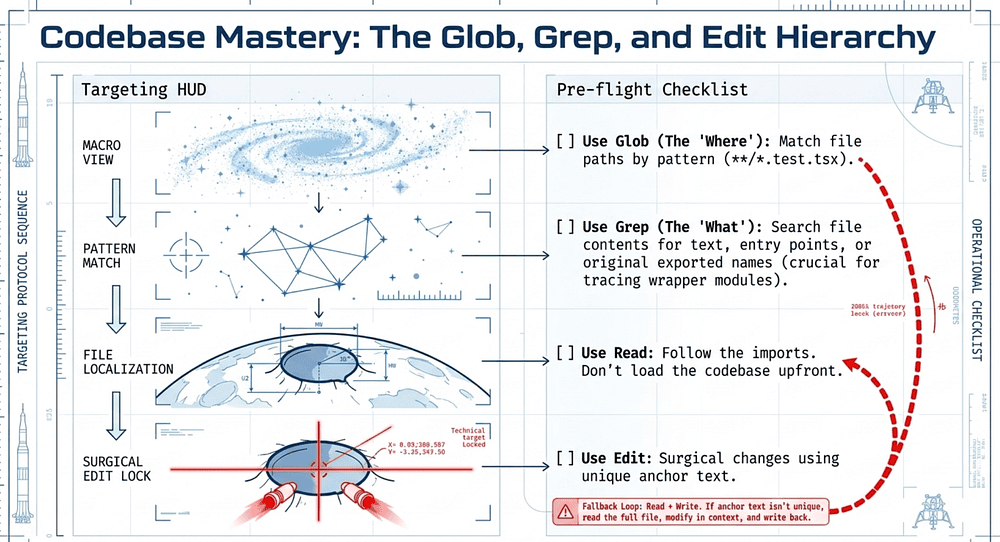
Codebase Mastery: The Glob, Grep, and Edit Hierarchy
When an agent interacts with a codebase, efficiency is driven by incremental exploration rather than reading every file upfront.
Selection Checklist:
- [ ] Use Glob (the "Where"): When you need to match file paths by pattern (e.g.,
**/*.test.tsx). - [ ] Use Grep (the "What"): When you need to search file contents for text (e.g., finding all callers of a function, locating error messages, finding import statements).
- [ ] Use Read to follow imports: Start with Grep to find entry points, then Read to trace flows. Don't load the whole codebase upfront.
- [ ] Use Edit: For surgical changes with unique anchor text.
- [ ] Use Read + Write (the fallback): When Edit fails because the anchor text is non-unique. Read the full file, modify it in context, and write it back.
Tracing Function Usage Across Wrapper Modules
A common pattern: you need to find every caller of a function that's been re-exported through several wrapper modules. The naive approach (grep for the original name) misses callers that import the wrapper alias. The reliable approach is two-step:
- Grep for all exported names that re-export the function across wrapper modules.
- Grep for each exported name across the codebase to find actual call sites.
This catches the full call graph rather than just the direct callers of the original symbol. Let's walk through this and explain with an example.
Example: Tracing calculate_total through wrapper modules
In buggy-shop, the original implementation lives at buggy_shop/pricing/core.py:
def calculate_total(items, tax_rate):
    ...
But over time, three wrapper modules grew up around it:
buggy_shop/checkout/totals.pyre-exports it ascompute_order_totalbuggy_shop/api/v1/pricing.pyre-exports it asget_totalbuggy_shop/legacy/cart.pyre-exports it astotal(lowercased, for the old cart code)
A naive grep -r "calculate_total" finds the definition and any direct callers, but misses every call site that imports the wrapper alias. That is most of the codebase.
The reliable pattern is two grep passes. First find the aliases, then find the callers of each alias.
❌ Naive: single grep for the original name
prompt = "Find every caller of calculate_total in this repo."
options = ClaudeAgentOptions(
    allowed_tools=["Glob", "Grep", "Read"],
    permission_mode="acceptEdits",
)
Claude runs one Grep for calculate_total, finds three import lines (the wrappers themselves) and maybe two direct callers, reports "five call sites." It missed the 40-odd places that call compute_order_total, get_total, or total.
✅ Two-step: aliases first, then call sites
Spell out the procedure in the prompt so Claude does both passes. Restrict the toolset to the search trio so it does not wander.
# trace_callers.py
import asyncio
from claude_agent_sdk import query, ClaudeAgentOptions

PROMPT = """\
Find every caller of `calculate_total` (defined in buggy_shop/pricing/core.py),
including callers that go through wrapper modules. Use this procedure:

1. Grep for `from buggy_shop.pricing.core import calculate_total` and
   `from buggy_shop.pricing.core import calculate_total as <alias>` to find
   every wrapper module and the names they re-export.
2. For each name found (including `calculate_total` itself), Grep the codebase
   for call sites: `<name>(`. Skip the import lines themselves.
3. Return a table with columns: alias, file, line, surrounding function.
"""

async def main():
    async for message in query(
        prompt=PROMPT,
        options=ClaudeAgentOptions(
            allowed_tools=["Glob", "Grep", "Read"],
            permission_mode="acceptEdits",
            max_turns=15,
        ),
    ):
        ...  # handle messages
// trace_callers.ts
const PROMPT = `
Find every caller of \`calculate_total\` (in buggy_shop/pricing/core.py),
including callers via wrapper modules.

1. Grep for imports of calculate_total to find wrapper aliases.
2. For each alias (and the original), Grep for "<name>(" to find calls.
3. Return a table: alias, file, line, surrounding function.
`;

for await (const message of query({
    prompt: PROMPT,
    options: {
        allowedTools: ["Glob", "Grep", "Read"],
        permissionMode: "acceptEdits",
        maxTurns: 15,
    },
})) {
    // ...
}
What Claude actually does, turn by turn
The procedure maps cleanly onto the agent loop. Roughly:
Turn 1 (find the wrappers). Claude calls Grep with a regex that catches both import forms:
pattern: from buggy_shop\.pricing\.core import calculate_total( as \w+)?
type: py
It gets back four matches: the three wrapper modules plus one direct import in tests. The aliases are compute_order_total, get_total, total, and calculate_total itself.
Turn 2 (call sites for each alias). Four parallel Grep calls, one per name. Because Grep is read-only and side-effect free, Claude can fire these in parallel inside a single turn:
pattern: \bcompute_order_total\(   type: py
pattern: \bget_total\(             type: py
pattern: \btotal\(                 type: py  # noisy; will need filtering
pattern: \bcalculate_total\(       type: py
Each match comes back with file and line number. The total( query is the noisy one (it matches any function named total), so Claude follows up with Read on a few candidate files to confirm they are calling the alias from legacy/cart.py and not some unrelated helper.
Turn 3 (assembly). Claude collates the matches into a table and returns. The full call graph, not just the direct callers.
Why this works (and where it breaks)
The pattern works because Grep is the right tool for finding by content and Glob is the right tool for finding by path, and the two-step procedure uses Grep for both passes since both questions are content questions. Read only comes in to disambiguate the noisy total( matches, after Grep has narrowed the search to a handful of files. Edit is not in the toolset at all, because the task is read-only.
Where it breaks: dynamic imports (getattr(pricing, "calculate_total")), __all__ re-exports that do not name the symbol on the import line, and module-level calculate_total = core.calculate_total reassignments. For those, you fall back to a third Grep pass looking for the literal string calculate_total outside import lines, which catches the reassignment pattern. The point is to layer the searches, not to swap to a different tool.
Example: When Edit fails, fall back to Read + Write
The hierarchy in one rule
For codebase exploration, the order is almost always:
- Glob to scope the search by path (only Python files, only
tests/, excludevendor/). - Grep to find content matches, one pass per question.
- Read to disambiguate the noisy matches Grep returns.
- Edit only after Read has confirmed the unique anchor text.
- Read plus Write as the fallback when the anchor is not unique.
The wrapper-module case is two Grep passes (steps 2 and 2 again, with a different query) plus a small amount of Read for disambiguation. No file gets opened that does not need to be, and the call graph comes back complete.
Conclusion: From Symptoms to Structure
Great agentic behavior is an architectural choice, not a prompting fluke. To master Domain 2, apply these eight decision heuristics:
- Ambiguity? Rename, rewrite, and use negative bounds in the tool description.
- Keyword-triggered? If the tool descriptions are already clear but the agent misbehaves on specific user words, the problem is the system prompt, not the tool.
- Overloaded tool? If a tool does "X, Y, and Z," split it into purpose-specific functions.
- Input misuse? Replace generic tools with constrained alternatives and add negative bounds.
- Selection errors? If there are more than 8 tools, decompose the agent into specialized subagents (the 4-to-5 Rule).
- Silent failures? Implement structured
errorCategoryandisRetryablemetadata. Distinguish access failures from valid empty results. Recover locally; propagate only what the subagent can't resolve. - Primitive confusion? Classify by Verbs (Tools) vs. Nouns (Resources). Expose catalogs as Resources to kill exploratory tool calls.
- Edit failure? When an anchor match isn't unique, fall back to the Read-Modify-Write pattern.
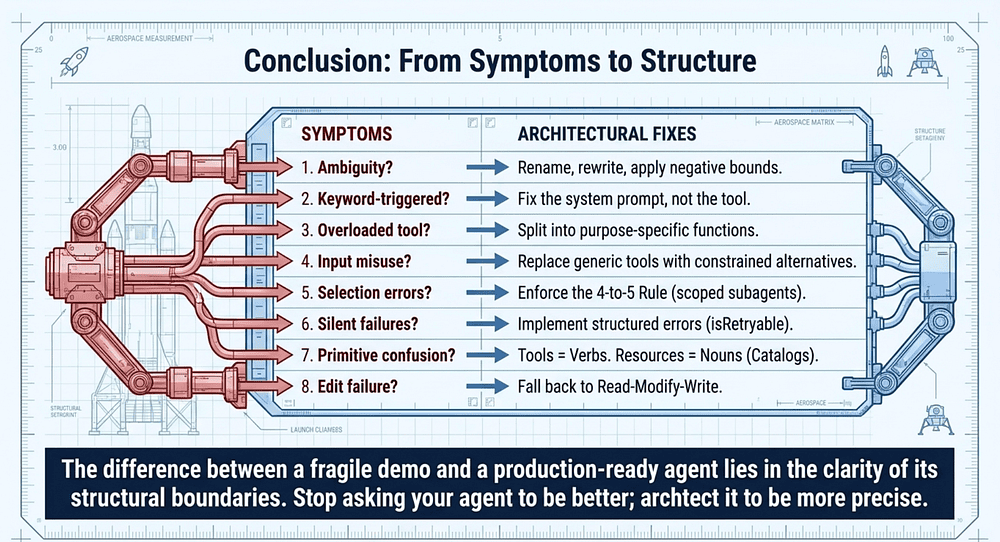
The difference between a fragile demo and a production-ready agent lies in the clarity of its structural boundaries. Stop asking your agent to be better; architect it to be more precise. Go build.
About the Author
Rick Hightower is a former Senior Distinguished Engineer at a Fortune 100 company, focusing on delivering ML / AI insights to front-line applications, and a practitioner building multi-agent production systems. Follow him on Medium for more hands-on agent engineering content. You can also book him to speak and train your team: Check out Rick Hightower's SpeakerHub.

Rick created Skilz, the universal agent skill installer that supports 30+ coding agents, including Claude Code, Gemini, Copilot, and Cursor, and co-founded the world's largest agentic skill marketplace. Connect with Rick Hightower on LinkedIn or Medium. Check out SpillWave, your source for AI expertise.

Rick has been actively developing generative AI systems, agents, and agentic workflows for years. He is the author of numerous agentic frameworks and developer tools and brings deep practical expertise to teams adopting AI. He enjoys writing about himself in the 3rd person.
Rick also wrote a Claude Certified Architect (CCA) series of articles that have a lot of useful information on writing agentic AI systems. Many ideas captured in the CCA and the exam prep Rick wrote echo what you see in this article. If you want to improve your ability to create well-behaved AI agents, studying for the CCA Exam is a good place to start.
CCA Exam Prep on Agentic Development
- Claude Certified Architect: The Complete Guide to Passing the CCA Foundations Exam
- CCA Exam Prep: Mastering the Code Generation with Claude Code Scenario
- CCA Exam Prep: Mastering the Multi-Agent Research System Scenario
- CCA Exam Prep: Structured Data Extraction
- CCA: Master the Developer Productivity Scenario
- Claude Certified Architect: Master the CI/CD Scenario
- CCA Exam Prep: Mastering the Customer Support Resolution Agent Scenario
- Get the complete reading list for CCA-F exam prep articles from this Claude Certified Architect Exam Prep list.
Rick also wrote a series on harness engineering and how to improve agentic systems using harness engineering for feedback loops and adversarial agents. These articles also go hand in hand with this article.
Harness Engineering Articles
- The $9 Disaster: What Anthropic's Harness Design Paper Teaches Us About Building Autonomous AI
- Harness Engineering vs Context Engineering: The Model is the CPU, the Harness is the OS
- LangChain Deep Agents: Harness and Context Engineering: Memory, Skills, and Security
- Beyond the AI Coding Hangover: How Harness Engineering Prevents the Next Outage
- LangChain's Harness Engineering: From Top 30 to Top 5 on Terminal Bench 2.0
- Anthropic's Harness Engineering: Two Agents, One Feature List, Zero Context Overflow
- OpenAI's Harness Engineering Experiment: Zero Manually-Written Code