The End of Manual Agent Skill Invocation: Event-Driven AI Agents
Use system events to trigger agentic skills
Originally published on Medium.
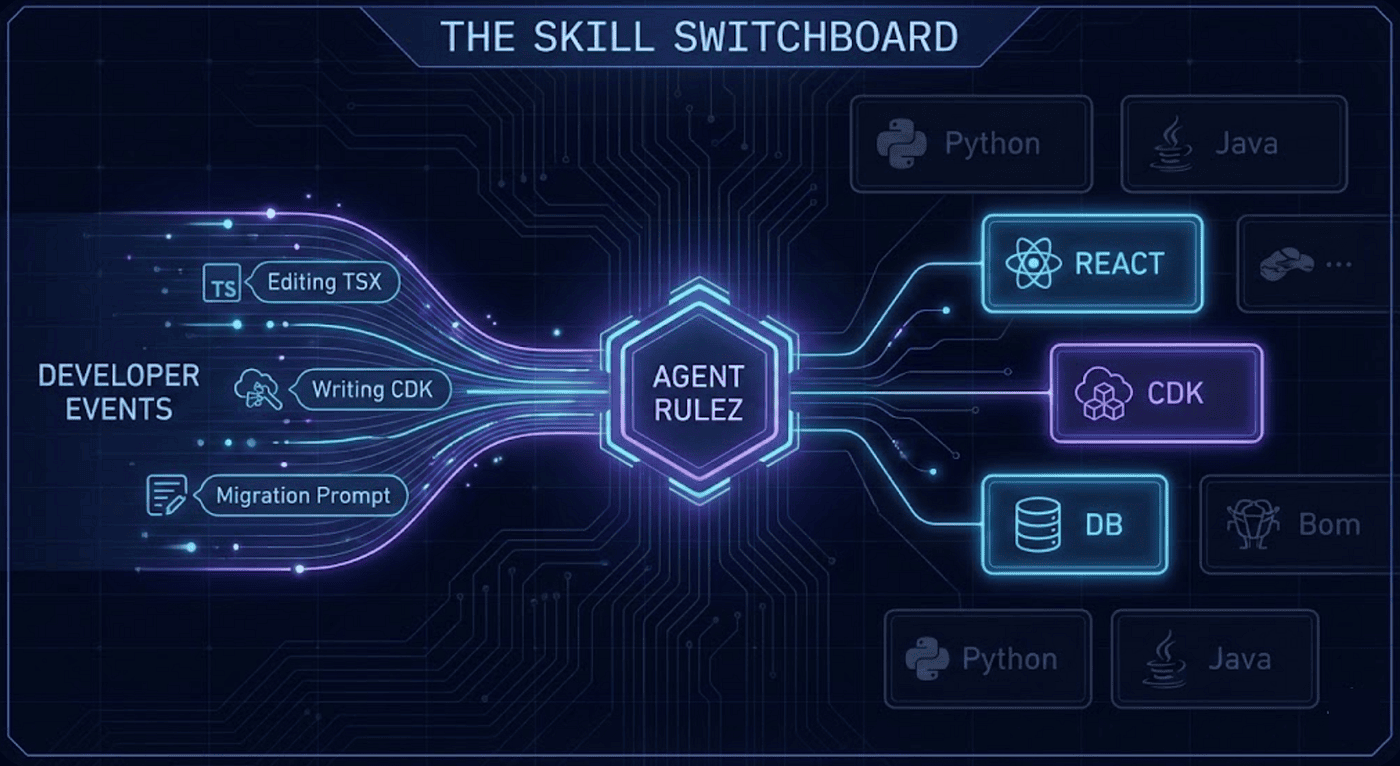 Agent RuleZ is the Agent Switch Board for Agent Skill Activation
Use system events to trigger agentic skills
If your AI coding agent needs you to remember which skill to run, you have already lost.
Most developers building with AI coding agents face the "Skill Gap." You install specialized skills for React, database migrations, or infrastructure (like CDK). You list them in a static CLAUDE.md or AGENTS.md file. For the first few hours, the agent uses them perfectly.
A January 2026 study by Vercel confirmed this "Skill Gap" is a structural problem. Their evaluation found that even with explicit instructions, coding agents only successfully activated the right skills 79% of the time. While Vercel achieved 100% reliability by brute-forcing an 8KB documentation index directly into the agent's passive context, that "always-on" approach quickly saturates your prompt budget when scaling to dozens of skills.
This is a fundamental shift from prompt engineering (finding the magic words to coax a model) to context engineering (building a deterministic control plane for the agent's working memory).
Then, the context window compacts. The skills vanish. By hour three of a deep coding session, you are back to manually enforcing architectural standards.
This is a fundamental shift from prompt engineering (finding the magic words to coax a model) to context engineering (building a deterministic control plane for the agent's working memory).
Why Static Skill References Fail
Static skill lists are the TODO comments of agent configuration: well-intentioned but universally ignored at scale. They fail for four compounding reasons:
- Context Window Compaction: Agents prioritize recent context. Older static lists get summarized or dropped to make room for active work.
- Irrelevant Noise: Loading 15 skills into a prompt when only two are relevant consumes token budget and distracts the model.
- Cognitive Load: The developer has to act as the memory trigger, manually typing /react-component at exactly the right time.
- No Contextual Relevance: A static list doesn't know you are three directories deep in a database migration. It treats all skills equally.
The Solution: A Deterministic Skill Switchboard
To fix this, skill activation must shift from manual invocation to event-driven activation.
Instead of acting as a passive guardrail, a policy engine like Agent RuleZ acts as a Switchboard Operator. When an agent takes an action (like editing a file or running a Bash command), it emits an event. The switchboard intercepts that event, evaluates the active rules, and deterministically injects the exact skill instructions needed for that specific operation.
Because the injections accumulate, an agent can receive multiple relevant skills simultaneously. This approach works consistently across platforms, whether you are utilizing Claude Code Agents, OpenCode Agents, or the Gemini CLI.
Deep Dive: File-Based Activation
Of the various ways to trigger a skill, File-Based Activation is the bread and butter. Most coding work is file-oriented, making file paths and extensions the most reliable deterministic triggers.
How it Works
When an agent touches a file with a specific extension in a specific directory, the relevant skill seamlessly appears in its context. The agent doesn't need to be told to look up your React standards; the simple act of creating a .tsx file forces the standards into its working memory.
Here is what the rule logic looks like in practice:
- name: activate-react-component-skill
  description: "Surface React patterns when editing TSX in components/"
  matchers:
    tools: ["Edit", "Write"]
    extensions: [".tsx", ".jsx"]
    directories: ["src/components/**", "components/**"]
  actions:
    inject: ".claude/skills/react-component/SKILL.md"
Here is another example:
- name: react-skill-injection
  description: "Inject React best practices when creating React components"
  matchers:
    tools: ["Write"]
    extensions: [".tsx", ".jsx"]
    directories: ["src/components/**"]
  actions:
    inject_inline: |
      ## React Component Standards
      Use the `/react-component` skill for creating new components.

      Requirements:
      - Functional components with TypeScript
      - Props interface defined and exported
      - Use React.memo() for pure components
      - Custom hooks extracted to `hooks/` directory
      - Tests co-located in `__tests__/` directory
Why This is Powerful
This relies on AND logic across three distinct matchers:
- tools: Ensures this only fires on file modifications (ignoring passive reads).
- extensions: Narrows the scope to TypeScript/JSX files.
- directories: Prevents the rule from firing on utility files or test scripts outside the components/ path.
When a developer asks the agent to create src/components/UserProfile.tsx, the Edit tool fires a PreToolUse event. The switchboard matches all three criteria and silently injects the team's custom SKILL.md into the agent's context.
The agent instantly knows your naming patterns, prop interfaces, and hook rules. The developer never typed a slash-command. The file path was the trigger; the policy engine governed the execution.
The 4 Other Activation Patterns
While File-Based Activation handles the bulk of day-to-day coding, a mature agentic system utilizes four other activation patterns to round out its awareness:
- Intent-Based Activation: Listens to the developer's natural language (prompt_match). If a developer types "add a verified_at column", the switchboard detects the migration intent and injects the /db-migrate skill before the agent even starts planning.
- Lifecycle-Based Activation: Hooks into session events. The most critical is PreCompact. Right before the context window summarizes, this rule injects a fresh summary of all available project skills, completely immunizing your agent against "skill amnesia."
- Dynamic Activation: Uses inject_command to inspect the project state via shell scripts. For example, it can check if a README.md exists in a newly created module directory and dynamically inject documentation standards only if the file is missing.
- Priority-Based Activation: Forces critical rules to the top of the context window. Security checklists for auth/ or crypto/ directories can be set to priority: 100, ensuring compliance guidelines are evaluated before general coding standards.
The Compound Effect
The magic isn't in a single YAML file. It is the compound effect of encoding your team's collective expertise into a deterministic environment. By moving the burden of memory from the human to the switchboard, you increase speed, reduce cognitive load, and enforce higher architectural quality.
Your agent doesn't need a better memory. It needs better timing.
For the comprehensive coverage five main ways to inject agentic skills into your workflows check out this 25 minute read:
- Activating Agent Skills at the Right Time with Agent RuleZ
For the comprehensive architecture deep dive on using Agent RuleZ, and how to use matchers, actions, event types, and audit trails, read the full 42-minute anchor article here:
- Agent RuleZ: A Deterministic Policy Engine for AI Coding Agents
The repo is at https://github.com/SpillwaveSolutions/agent_rulez if you want to try it out.
About the Author
Rick Hightower is a technology executive and data engineer who led ML/AI development at a Fortune 100 financial services company. He created skilz, the universal agent skill installer, supporting 30+ coding agents including Claude Code, Gemini, Copilot, and Cursor, and co-founded the world's largest agentic skill marketplace. Connect with Rick Hightower on LinkedIn or Medium. Rick has been doing active agent development, GenAI, agents, and agentic workflows for quite a while. He is the author of many agentic frameworks and tools. He brings core deep knowledge to teams who want to adopt AI.