The Reliability Hierarchy: From Probabilistic Prompts to Deterministic Engineering
CCA-F Domain 4: Why 'Asking Nicely' Fails in Production, and How to Architect Guaranteed Results
Originally published on Medium.
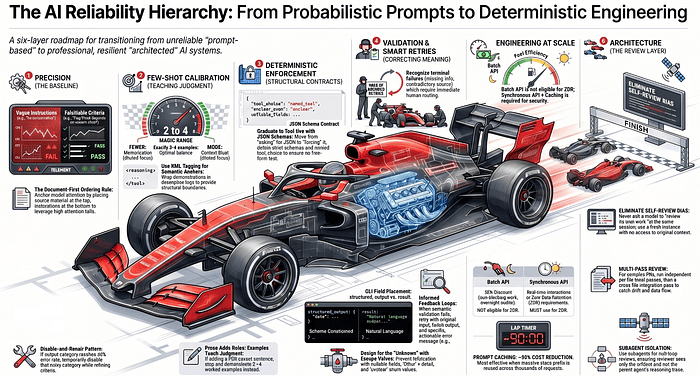
CCA-F Domain 4: Why “Asking Nicely” Fails in Production, and How to Architect Guaranteed Results
In the early days of generative AI, the magic of a conversational interface was enough. Today, as we move these models into critical infrastructure, the urgent need is not magic but consistency, and that demand changes how you build everything.
Summary. This article walks through the full Domain 4 stack of the CCA Foundations exam: precision in prompts, few-shot calibration, deterministic enforcement through tool use and CLI flags, validation and retry loops, batch and caching economics, and multi-instance review architectures. The unifying thesis is simple. Probabilistic guidance is not the same as deterministic enforcement, and reliable systems move work down a strict hierarchy from the prompt layer to the architecture layer. By the end, you will know which failures belong to which layer, which API to reach for given a workload, where structured output actually lives in a CLI response, and why a fresh model instance beats a self-reviewing one every time.
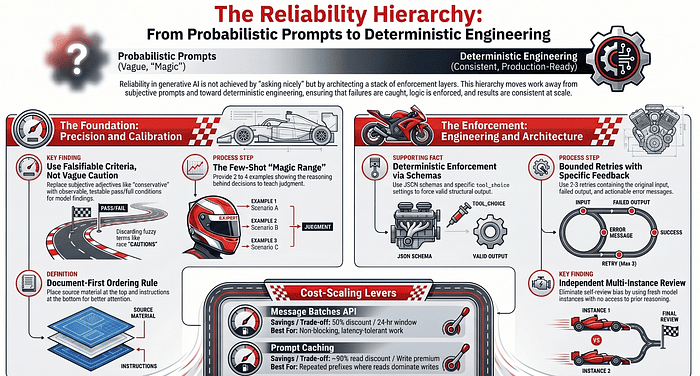
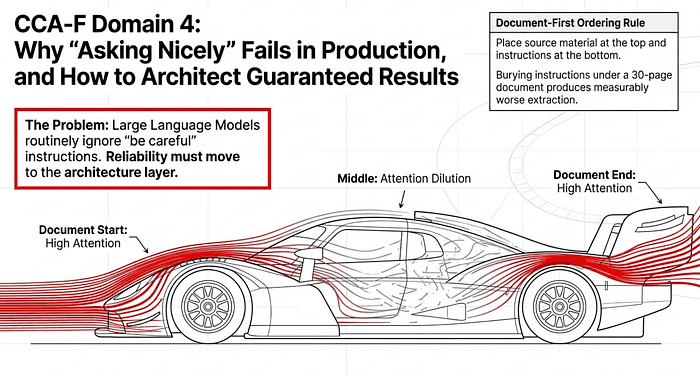
There is a specific kind of frustration reserved for the AI engineer who watches a production pipeline fail because a Large Language Model (LLM) ignored a “be careful” instruction. To build a resilient system, you must move reliability logic from the prompt layer (where you ask nicely) to the architecture layer (where you enforce rules). This transition begins with a fundamental change in how you feed information to the model.
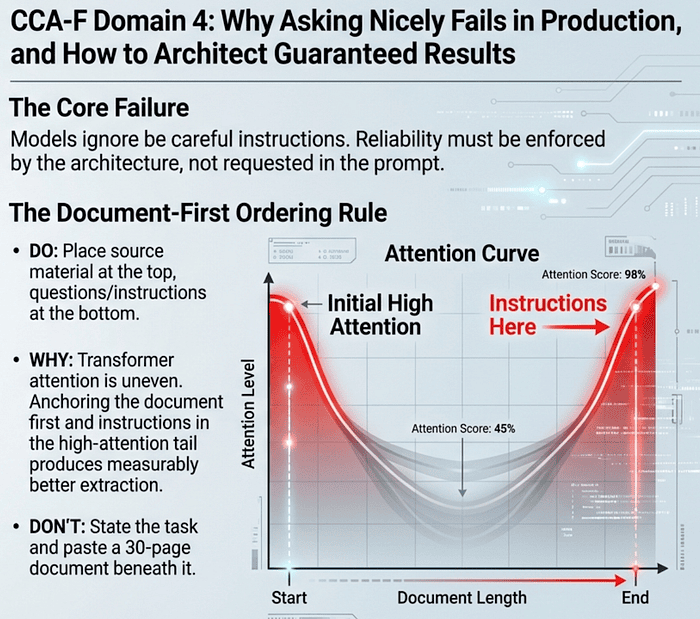
For long-context documents, this means applying the document-first ordering rule: place the source material at the top of the prompt and the questions or instructions at the bottom. Transformer attention is uneven across long inputs, with the strongest focus at the beginning and end. Putting the document first lets the model anchor on the full source, and putting the questions last keeps them in the high-attention tail. The opposite ordering, where you state the task and then paste a 30-page document beneath it, buries the questions in the middle of the attention curve and produces measurably worse extraction.
1. Precision Over Vague Caution
The most dangerous phrase in prompt engineering is “be conservative.” Vague instructions undermine trust for developers. When a model is told to be “accurate” without clear boundaries, it often flags too many non-issues, resulting in a flood of false positives. If a single category of findings reaches a 40% error rate, developers will stop trusting the entire system, even the parts that work perfectly. High false-positive rates in one category undermine confidence in the accuracy of the other categories.
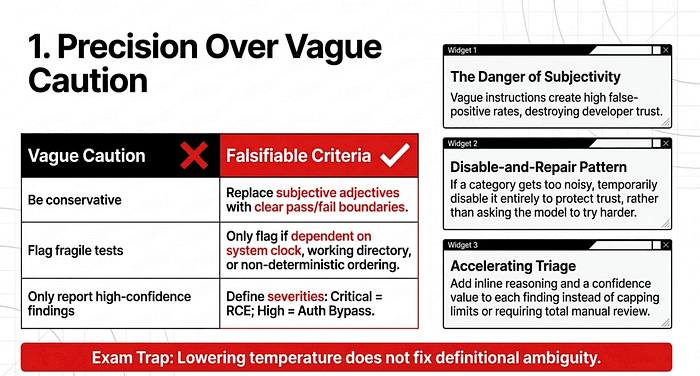
To solve this, you must replace subjective adjectives with falsifiable, observable criteria. These are the terms the exam uses, and they matter: a falsifiable criterion has a clear pass/fail condition you can test against the actual artifact, while a subjective adjective (“misleading,” “fragile,” “concerning”) leaves the model guessing.
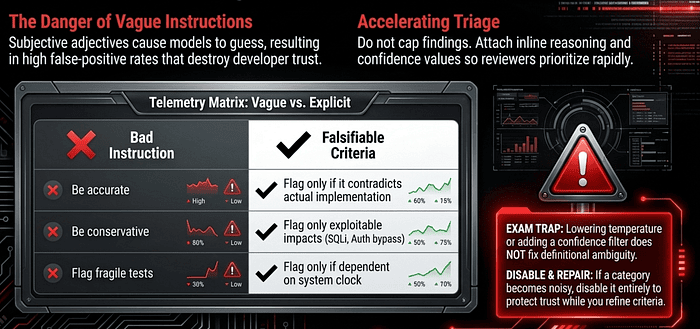
The Contrast: Vague vs. Explicit
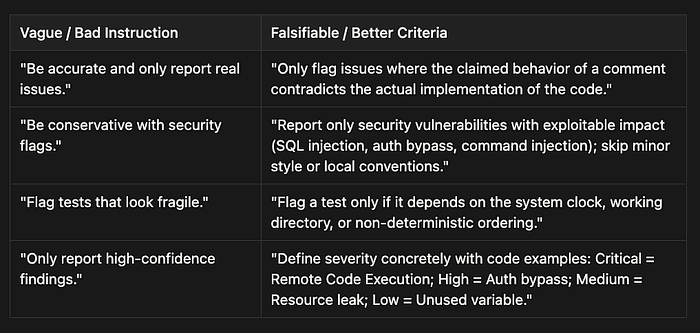
Note the shift in how severity is defined. The exam treats confidence-based filtering (“only report things you are sure about”) as a failure due to vague criteria. The correct technique is to define which categories to report (bugs, security issues with exploitable impact) and which to skip (minor style, local team conventions, formatting nits), then attach concrete code examples to each severity level.
When a Category Goes Bad: The Disable-and-Repair Pattern
If a specific output category becomes too noisy, the engineered solution isn’t to ask the model to “try harder.” The remediation pattern is to temporarily disable the noisy category entirely while you refine the criteria, re-enabling it only once precision is restored. This protects developer trust in the categories that work, which is the resource most worth preserving.
Accelerating Triage Without Dropping Findings
A related failure mode looks like this: your review surfaces 22 findings per pull request, triage becomes the bottleneck, and the temptation is to cap findings, restrict categories, or require human review on every item. All three are wrong answers on the exam. Caps hide real issues, category restrictions drop legitimate defects, and manual review every time doesn’t scale.
The correct technique is to attach inline reasoning and a confidence value to each finding, so reviewers can skim and prioritize in seconds rather than re-reading the entire diff. The findings stay; the friction drops.
Common Trap Answers
When the exam describes a noisy or imprecise review category, expect to see these wrong choices presented as plausible fixes:
“Lower the model temperature.” Temperature does not fix definitional ambiguity. If “fragile” is undefined, lower temperature just makes the same vague judgment more consistent. “Add a confidence threshold to filter low-confidence flags.” Confidence filtering hides the symptom without fixing the criterion. The exam wants you to define what to flag, not to filter how strongly it was flagged. “Reinforce ‘be conservative’ with stronger imperative language.” “Be conservative” is the canonical vague-criterion trap. Capitalizing it does not make it falsifiable. “Use a smaller model that tends to flag less aggressively.” Model selection does not fix a missing definition.
2. The Few-Shot Calibration: Teaching Judgment
When instructions alone fail to produce consistent results, you must move to few-shot prompting. This is the most effective technique for handling ambiguous judgment, the cases where a rule is difficult to describe but easy to demonstrate.
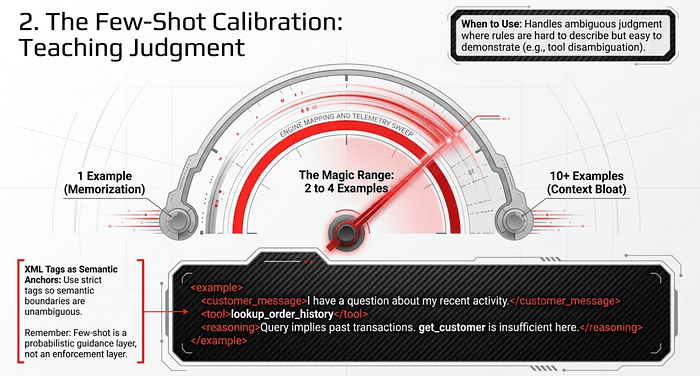
The magic range for few-shot prompting is 2 to 4 examples. Providing only one example often leads the model to memorize that specific case rather than understand the underlying logic. Conversely, dozens of examples bloat the context window and dilute focus.
Effective few-shot examples should demonstrate the why behind a decision. They should include an ambiguous input, the correct decision, and a brief explanation of why similar-looking alternatives were rejected. This allows the model to generalize, learning the pattern of your judgment to handle inputs it has never seen before. Few-shot examples are not lookup tables. The model uses them to generalize, not to match.
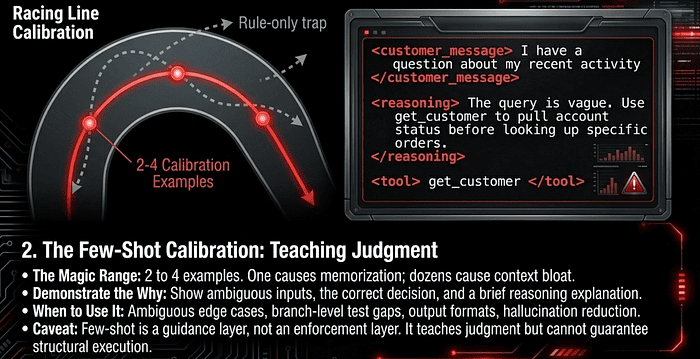
The exam consistently contrasts few-shot examples against the temptation to write longer rules. When an agent picks the right tool 88% of the time on clean queries but only 62% on ambiguous ones, the wrong answer is “write a longer paragraph in the system prompt about how to handle ambiguity.” The right answer is 2 to 4 examples that show the choice and the reasoning. Prose adds rules without examples; examples teach judgment. If you find yourself adding a fifth caveat sentence to a prompt, that’s the signal to stop writing and start demonstrating.
Where Few-Shot Specifically Wins
The exam blueprint calls out specific scenarios where the few-shot prompt is especially effective:
- Ambiguous case handling. A customer support agent that has to choose between
get_customerandlookup_order_historyfor a vague query like "I have a question about my recent activity" learns the right disambiguation from 2 to 4 examples that show the choice and the reasoning, not from a longer paragraph of rules. - Branch-level test coverage gaps. Few-shot examples teach the model to distinguish “this branch has no test” from “this branch is unreachable” from “this branch is covered by an integration test elsewhere.” Description alone produces wildly inconsistent classifications.
- Consistent output format. When you need a specific output shape (for example, location, issue, severity, suggested fix for code review findings), examples produce uniform results across many requests in a way instructions alone cannot.
- Distinguishing acceptable patterns from genuine issues. Show one example of a pattern that is fine and one that is a real bug, side by side. The model learns the boundary and generalizes to novel patterns rather than matching only the pre-specified cases.
- Reducing extraction hallucination. Documents arrive in varied formats: inline citations vs. bibliographies, methodology sections vs. embedded details, informal measurements like “about a cup,” tables vs. narrative. An example for each major variant prevents the model from inventing fields or returning empty / null values for required fields.
The Caveat Worth Memorizing for few-shots
Few-shot is still probabilistic. It is a guidance layer, not an enforcement layer. If your downstream system breaks on malformed JSON, few-shot examples reduce the failure rate but do not eliminate it. Few-shot also does not enforce tool execution order; that requires tool_choice or programmatic gates. When the requirement is structural rather than judgmental, you graduate to the next layer.
The Few-Shot Calibration: a worked example with Claude Code
A customer support agent has two custom tools that look similar on the surface. Customers ask vague questions all day. The agent must pick the right tool on the first try.
The two tools
@tool(
    "get_customer",
    "Fetch profile: name, email, plan, status.",
    {"customer_id": str},
)
async def get_customer(args): ...

@tool(
    "lookup_order_history",
    "Fetch recent orders: items, statuses, totals.",
    {"customer_id": str, "limit": int},
)
async def lookup_order_history(args): ...
On clean queries (“What plan is customer 42 on?”), the agent picks correctly almost every time. On vague queries, it slides to 62%.
The rules-only trap
The instinct is to keep extending the system prompt:
system_prompt = """
Use get_customer for profile questions and lookup_order_history
for orders. If they say "recent activity," consider whether they
mean account changes or purchases. "My account" usually means
profile unless they mention items or shipping. "Status" can mean
either: account status is profile, order status is orders. When
in doubt...
"""
Each new ambiguous case tempts you to add another sentence. The prompt grows, accuracy plateaus. You are encoding judgment as rules, which is exactly what few-shot prompting handles better.
The few-shot version
Replace the rule pile with 3 demonstrations wrapped in XML tags. Claude is trained on tagged inputs and treats tag names as semantic anchors, so the boundary between examples (and between the parts of each example) is unambiguous.
system_prompt = """
You are a customer support agent with two tools: get_customer
and lookup_order_history. Pick the tool that best answers the
customer's underlying question. Study the examples, then handle
the next message.

<examples>
  <example>
    <customer_message>
      I have a question about my recent activity.
    </customer_message>
    <tool>lookup_order_history</tool>
    <reasoning>
      "Activity" without account-specific words (plan, email,
      billing) defaults to purchases.
    </reasoning>
  </example>
  <example>
    <customer_message>
      Is everything okay with my account?
    </customer_message>
    <tool>get_customer</tool>
    <reasoning>
      "Account" with no order or shipping reference points at
      profile state. A specific order would be named.
    </reasoning>
  </example>
  <example>
    <customer_message>
      Did my stuff go through?
    </customer_message>
    <tool>lookup_order_history</tool>
    <reasoning>
      "Stuff" and "go through" map to order placement and
      payment, not profile attributes.
    </reasoning>
  </example>
</examples>
"""
Wiring it up in Claude Agent SDK
# get_customer and lookup_order_history defined above
support = create_sdk_mcp_server(
    name="support",
    tools=[get_customer, lookup_order_history],
)

options = ClaudeAgentOptions(
    system_prompt=system_prompt,
    mcp_servers={"support": support},
    allowed_tools=[
        "mcp__support__get_customer",
        "mcp__support__lookup_order_history",
    ],
)
# async for msg in query(prompt="...", options=options): ...
Why this few shot works
Three examples, not one (one gets memorized as a lookup), and not ten (diminishing returns plus context bloat). Each example pairs the choice with the reasoning, so the model generalizes the pattern instead of matching the surface words. A new query like “Anything weird with my account lately?” lands on get_customer because it inherits the second example's logic, not because the phrase appears anywhere in the prompt.
Why use XML tags with few-shot
Two practical reasons. First, Claude treats tag names as semantic anchors, so <customer_message> and <reasoning> tell the model which parts of each example are the input and which parts are the internal logic. Bare colons and indentation work, but they leave the model to infer structure from formatting alone. Second, tags make the example structure explicit and inspectable. When you scan the prompt later, or hand it to a teammate, the parts of each example are obvious. Use descriptive tag names (<customer_message>, <tool>, <reasoning>) rather than generic ones (<input>, <output>).
The boundary worth remembering
Few-shot is a guidance layer, not an enforcement layer. If get_customer legally must run before any order action, examples will reduce the failure rate, but not eliminate it. That is a permission or hook problem, not a prompt problem. Few-shot teaches judgment; structural guarantees come from the next layer.
3. Deterministic Enforcement: Schemas, Tool Use, and CLI Flags
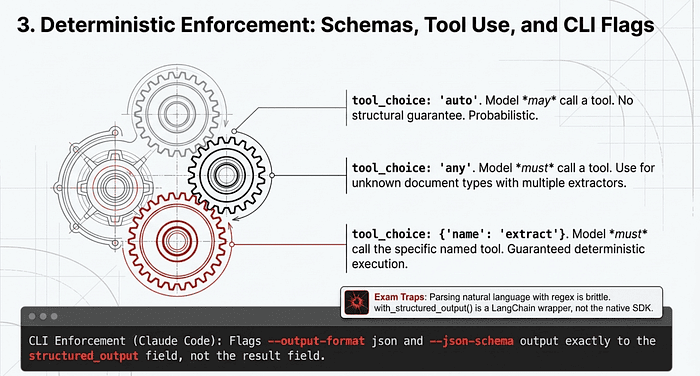
Prompting is a guidance layer, but for machine-readable reliability, you need an enforcement layer. This is the graduation moment where you stop asking for JSON and start forcing it. There are two primary mechanisms worth distinguishing, both of which are tested by the exam.
Mechanism 1: Tool Use with a JSON Schema (API)
The most reliable mechanism in the API is tool use with a JSON schema. You define a tool (for example, extract_invoice_data) with a strict JSON schema as its input parameters. You then set tool_choice so the model must call your tool. The output is now guaranteed to match your schema. Syntax errors are eliminated by construction, not by hope.
The behavior of structured output depends entirely on which tool_choice setting you use, and the exam tests the distinction:
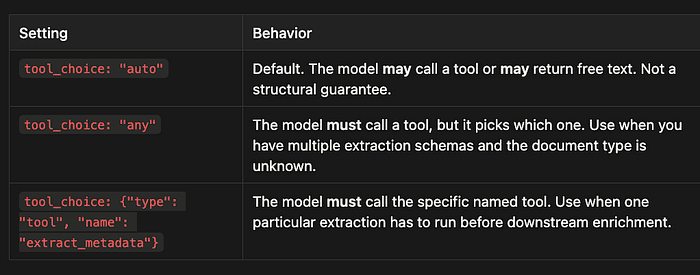
If you need guaranteed structured output, never use "auto". For an unknown document type with multiple possible extractors, use "any". To force a specific extraction step, name the tool.
A Note on Response-Level Structured Output
The API also supports a response-level structured output mode (response_format: json_schema with strict: true) where the entire assistant message conforms to a schema, no tool call required. This is the cleaner choice if you ever find yourself defining a fake "tool" just to shape an output. The exam itself focuses on tool use with schemas as the canonical Task 4.3 mechanism, so know that this alternative exists, but expect tool-use answers to be correct in exam scenarios.
Deterministic Enforcement: a worked example
You are processing a stack of invoices. Each one needs five fields extracted: invoice_number, vendor, date, total, and currency. Downstream code reads these into a database, so a single hallucinated field or a missing key crashes the pipeline.
Prompting alone gets you 95% valid JSON. The other 5% crashes production. Time to graduate from the guidance layer to the enforcement layer.
The schema
The schema is the contract. Same shape for both examples below.
invoice_schema = {
    "type": "object",
    "properties": {
        "invoice_number": {"type": "string"},
        "vendor": {"type": "string"},
        "date": {"type": "string", "format": "date"},
        "total": {"type": "number"},
        "currency": {
            "type": "string",
            "enum": ["USD", "EUR", "GBP"],
        },
        "line_items": {
            "type": "array",
            "items": {
                "type": "object",
                "properties": {
                    "description": {"type": "string"},
                    "amount": {"type": "number"},
                },
                "required": ["description", "amount"],
            },
        },
    },
    "required": [
        "invoice_number", "vendor", "date", "total",
        "currency", "line_items",
    ],
}
Mechanism 1: Tool use with the Claude API
Define a tool whose input_schema is the contract. Force the model to call it with tool_choice. The output is guaranteed to match the schema.
from anthropic import Anthropic

client = Anthropic()
resp = client.messages.create(
    model="claude-opus-4-7",
    max_tokens=1024,
    tools=[{
        "name": "extract_invoice_data",
        "description": "Extract structured fields from an invoice.",
        "input_schema": invoice_schema,
    }],
    tool_choice={"type": "tool", "name": "extract_invoice_data"},
    messages=[{"role": "user", "content": invoice_text}],
)
# The tool call is guaranteed to be present and schema-valid.
data = next(
    block.input for block in resp.content
    if block.type == "tool_use"
)
The named tool_choice is the key. With "auto" the model may return free text and the pipeline breaks. With "any" it picks among your tools, which is right when you have several extractors and do not know the document type. Here, there is one extractor and one job, so name it.
Mechanism 1: Structured output with the Agent SDK
The Agent SDK exposes the same guarantee through the output_format option. The agent does whatever work it needs (it may read files, call tools, or browse), then produces a final message that conforms to your schema.
from claude_agent_sdk import query, ClaudeAgentOptions

options = ClaudeAgentOptions(
    output_format={
        "type": "json_schema",
        "schema": invoice_schema,
    },
)
async for msg in query(
    prompt=f"Extract invoice fields from:\\n\\n{invoice_text}",
    options=options,
):
    if msg.subtype == "success" and msg.structured_output:
        data = msg.structured_output  # schema-valid dict
    elif msg.subtype == "error_max_structured_output_retries":
        # Schema too complex or input too ambiguous.
        # Fall back, simplify, or log for review.
        ...
The SDK retries internally when the model’s first attempt fails validation. If it exhausts retries, you get a result message with subtype error_max_structured_output_retries. Handle that branch explicitly, the same way you would handle any other pipeline failure.
When to use which
The Claude API tool-use approach is the right choice when you are making a single model call and want a single extraction. It is also the canonical answer on the exam.
The Claude Agent SDK approach is the right choice when extraction is the final step of a longer agent run, for example, the agent reads five files, reconciles them, and then emits structured output. The schema lives at the boundary of the agent loop, not inside a single message.
What changed
You stopped asking for JSON and started forcing it. Syntax errors are eliminated by construction. The remaining failure modes are schema mismatches (the model could not produce a valid object at all) and semantic errors (valid object, wrong values), both of which are different problems with different fixes. Few-shot examples help with the semantic ones. Schemas handle the structural ones. Layered, not interchangeable.
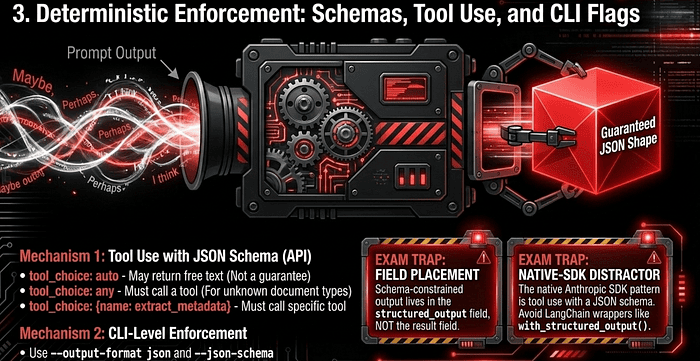
Mechanism 2: CLI-Level Enforcement (Claude Code)
When you run Claude Code in CI or a shell pipeline, there is a CLI-level enforcement path that the exam tests directly. The flags --output-format json and --json-schema enforce structured output at the CLI layer, completely independent of any prompt instruction.
claude --bare -p "Review the diff for security issues" \\
  --output-format json \\
  --json-schema '{"type":"object","properties":{"issues":{"type":"array","items":{...}}}}'
The field placement trap. This is a frequently tested distinction. Regular text output appears in the result field of the JSON response. Schema-constrained output appears in the structured_output field. Pipelines that parse result when they should be parsing structured_output are a common silent-failure bug. The exam will offer result, content[0].text, and output as plausible distractors. The answer is always structured_output when --json-schema is in play.
The matching anti-pattern is parsing natural-language output with regex. The same prompt with the same input can produce different-formatted responses across runs. Regex that works today breaks tomorrow. The fix is never “improve the prompt” or “write better regex.” It is to move enforcement to the CLI or API layer.
The Native-SDK Distractor
One trap worth memorizing. When a question specifies “using the native Anthropic SDK” and one answer mentions with_structured_output(), eliminate that choice immediately. That method is part of LangChain-style wrappers, not the native SDK. The native pattern is tool use with a JSON schema, period.
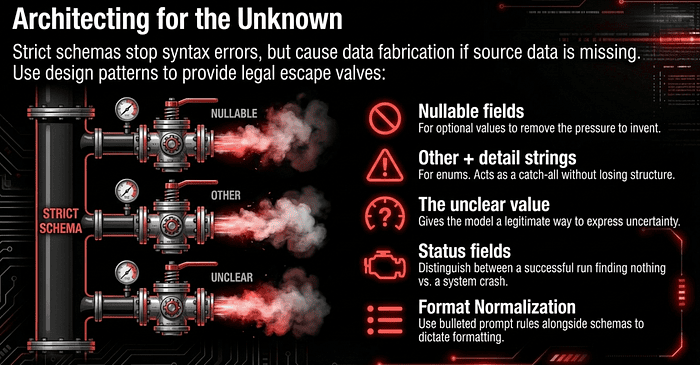
Architecting Schemas for the Unknown
Strict schemas eliminate syntax errors, but they cannot prevent the model from fabricating data when the source is missing. To handle real-world data, use these design patterns:
Nullable fields. Use these whenever a value might be absent. A required field with no source data forces the model into a no-win choice between schema violation and fabrication, so it fabricates. Making the field nullable lets it return
nulland removes the pressure to invent. “Other” + detail strings. When using enums (fixed categories), always provide an"other"option paired with a free-text detail field. This acts as an escape valve for data that does not fit your predefined list, without losing the structure of the enum. The “unclear” value. For truly ambiguous source data, include an"unclear"enum value to give the model a legitimate way to express uncertainty without inventing a result. Status fields. Include a status field (for example,success,no_data,error) to distinguish between a successful run that found nothing and a system failure. Format normalization rules in the prompt. Schemas enforce shape, not content. If source documents have inconsistent date formats, currency notations, or measurement units, include normalization rules in the prompt alongside the strict schema. The schema guarantees the field is a string; the prompt guarantees the string is2024-03-15and notMarch 15th, 2024.
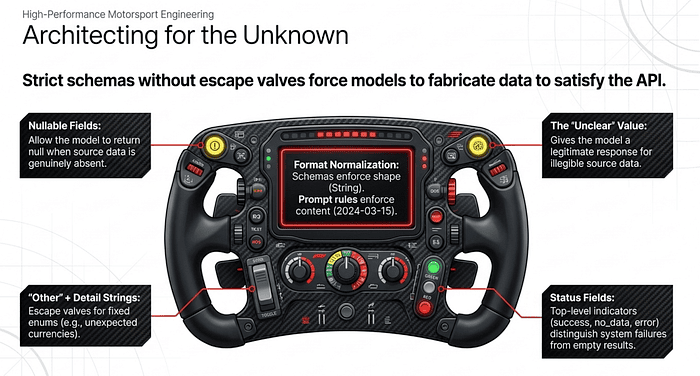
Architecting for the Unknown: a worked example
Same invoice extractor as before. Reality intrudes. Some invoices have no PO number. Some are in Swiss francs (CHF), which is not in your enum. Some are handwritten and the date is illegible. Some uploads are blurry photos with nothing extractable.
A strict schema with required fields and a tight enum will force the model to fabricate in every case. The schema is doing its job (enforcing shape), but you have not given the model a legal way to say "I don't know" or "this doesn't fit your boxes." So it lies in valid JSON.
Five small design moves fix this.
The hardened schema
invoice_schema = {
    "type": "object",
    "properties": {
        # Status field: distinguish success from "found nothing"
        # from "something broke."
        "status": {
            "type": "string",
            "enum": ["success", "no_data", "error"],
        },
        # Nullable fields: PO numbers, due dates, and notes
        # are genuinely optional on real invoices.
        "invoice_number": {"type": "string"},
        "po_number": {"type": ["string", "null"]},
        "due_date": {"type": ["string", "null"], "format": "date"},
        "notes": {"type": ["string", "null"]},
        "vendor": {"type": "string"},
        "date": {"type": "string", "format": "date"},
        "total": {"type": "number"},
        # "Other" + detail: known currencies are an enum,
        # but anything outside the list lands in "other"
        # with the raw code captured in currency_detail.
        "currency": {
            "type": "string",
            "enum": ["USD", "EUR", "GBP", "other", "unclear"],
        },
        "currency_detail": {"type": ["string", "null"]},
    },
    "required": ["status", "currency"],
}
Four ideas are working here at once.
Nullable fields for anything genuinely optional. po_number, due_date, and notes accept null. The model no longer has to choose between violating the schema and inventing a PO number.
“Other” plus a detail string for the currency enum. CHF, JPY, AUD, and the long tail of currencies you did not anticipate now have a legal home: currency: "other", currency_detail: "CHF". You keep the enum's downstream utility for common cases without losing data in rare cases.
An “unclear” enum value for genuine illegibility. A faded scan where the currency symbol could be $ or € no longer forces a guess. The model returns "unclear" and the downstream system can flag it for human review.
A status field at the top level. success for a normal extraction, no_data when the upload is a blank page or a blurry photo, error when something structural went wrong (corrupted file, wrong document type). Without this, a successful run that found nothing is indistinguishable from a failed run.
Note that only status and currency are required. Everything else can legally be absent, because in the real world, it often is.
The prompt does the rest
The schema guarantees that date is a string. It does not guarantee the string is 2024-03-15 rather than March 15th, 2024, or 15/3/24. Normalization is a prompt problem, not a schema problem.
system_prompt = """
Extract invoice fields. Follow these normalization rules:
- Dates: always ISO 8601 (YYYY-MM-DD). "March 15, 2024" becomes
  "2024-03-15". If the year is ambiguous, use "unclear" via the
  status field rather than guessing.
- Totals: a single number, no currency symbols, no thousands
  separators. "$1,234.56" becomes 1234.56.
- Currency: use the ISO 4217 code. USD, EUR, GBP map to the enum.
  Anything else uses "other" with the code in currency_detail.
  If the currency cannot be determined, use "unclear".
- Missing fields: return null. Do not infer or fabricate.
- If the document is not an invoice, or no fields can be read,
  set status to "no_data" and leave other fields null.
"""
Wiring it together
resp = client.messages.create(
    model="claude-opus-4-7",
    max_tokens=1024,
    system=system_prompt,
    tools=[{
        "name": "extract_invoice_data",
        "description": "Extract structured fields from an invoice.",
        "input_schema": invoice_schema,
    }],
    tool_choice={"type": "tool", "name": "extract_invoice_data"},
    messages=[{"role": "user", "content": invoice_text}],
)

data = next(
    b.input for b in resp.content if b.type == "tool_use"
)
# Downstream code now has unambiguous signals.
if data["status"] == "no_data":
    queue_for_human_review(invoice_text)
elif data["currency"] == "other":
    log_unsupported_currency(data["currency_detail"])
elif data["currency"] == "unclear":
    queue_for_human_review(invoice_text)
else:
    write_to_database(data)
What changed
Before: the schema forced shape, the model fabricated content to satisfy the shape, and downstream code could not tell a real result from an invented one.
After: the schema still forces shape, but the shape itself now includes legitimate escape valves. null, "other", "unclear", and status: "no_data" are first-class outcomes, not error conditions. The model can be honest about what it does not know. Downstream code can branch on those signals instead of writing the generated data to a database.
Schemas enforce structure. Nullable fields, escape-valve enums, and status fields define what honest structure looks like. The prompt normalizes the content inside that structure. Each layer does a different job, and you need all three.
You may notice that the prompt above uses bullets, not XML tags, even though we used XML for the few-shot examples earlier. That is intentional.
Why didn’t we use XML in the prompt?
XML tags earn their place when the prompt contains parallel structured content that the model needs to parse, like the few-shot examples block where each example has the same internal shape (<customer_message>, <tool>, <reasoning>). The tags act as semantic anchors so the model knows which part of each example is which.
This prompt is a flat list of normalization rules. There is no parallel structure to anchor, no input-output mapping to demonstrate, and no downstream parsing that benefits from tagged sections. A bulleted list is already the right shape: scannable for the human reader, unambiguous for the model. Wrapping each rule in <rule> tags would be ceremony without payoff.
There is one version of this where tags would help: if you wanted to separate the normalization rules from a section of worked examples of normalization (e.g. showing "March 15, 2024" becoming "2024-03-15" as a tagged before/after pair). Then you would have parallel structure worth anchoring, and the rules section and the examples section would benefit from being clearly delineated. Something like:
system_prompt = """
Extract invoice fields. Follow the rules below, then study the
normalization examples.

<rules>
- Dates: always ISO 8601 (YYYY-MM-DD).
- Totals: a single number, no symbols or separators.
- Currency: ISO 4217 codes. Unknown codes use "other".
- Missing fields: return null. Do not fabricate.
- Non-invoice or unreadable: status "no_data", other fields null.
</rules>
<normalization_examples>
  <example>
    <raw>March 15th, 2024</raw>
    <normalized>2024-03-15</normalized>
  </example>
  <example>
    <raw>$1,234.56</raw>
    <normalized>1234.56</normalized>
  </example>
  <example>
    <raw>CHF 500</raw>
    <normalized>
      currency: "other", currency_detail: "CHF", total: 500
    </normalized>
  </example>
</normalization_examples>
"""
That version is genuinely better than either the plain bulleted list or the tag-everything version, because the examples do real teaching work that the rules alone cannot. The tags are pulling their weight.
But if you are keeping XML to just define the rules, leave it as bullets. The rule of thumb from the earlier discussion holds: tags for parallel demonstrations the model has to generalize from, plain prose or bullets for everything else. You can also use XML to separate logical areas (document content versus edit instructions).
What Tool Use Does and Doesn’t Eliminate
Strict tool-use schemas eliminate JSON syntax errors: missing brackets, malformed quoting, and type mismatches. They do not eliminate semantic errors: line items that don’t sum to the total, dates in the wrong field, or invented values in nullable fields. That class of error belongs to the next layer.
Common Trap Answers
When the exam describes JSON syntax errors, fabricated values, or enum mismatches, expect to see these wrong choices:
“Use even stronger prompt language with capitalized warnings to return only JSON.” Prompt-only instructions are probabilistic. If the downstream parser breaks on a stray fence, you need API-layer enforcement, not louder text. “Add three more few-shot examples of bare JSON output.” Few-shot reduces the failure rate but does not eliminate it. The structural answer is tool use with a JSON schema. “Post-process responses with a regex that strips prose preambles.” Brittle. Different model versions produce different preambles. Move enforcement up the stack. “Mark every field required to ensure complete data.” Causes fabrication when fields are absent. Optional/nullable is correct. “Use a permissive schema for flexibility.” The whole point of a schema is constraint. Permissive schemas are a smell. “Lower temperature to stop the model from fabricating required-but-absent fields.” Temperature does not fix the no-win between schema violation and invention. Nullable fields do. “Use tool_choice: 'auto' and parse JSON from the text response."." Defeats the purpose of tool use.
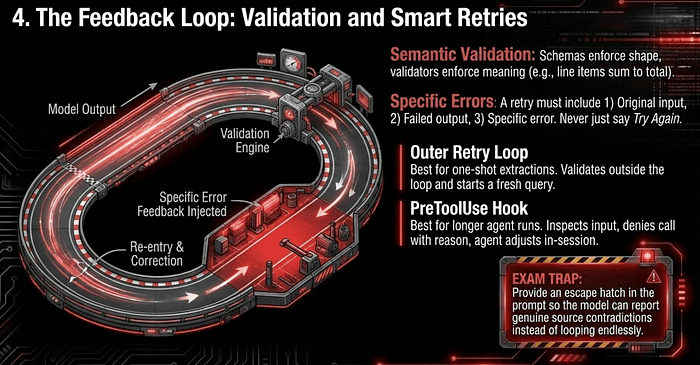
4. The Feedback Loop: Validation and Smart Retries
A schema ensures the data’s shape is correct. Semantic validation ensures the meaning is correct. A schema cannot know if the line items in an invoice should sum to the total; you must enforce that logic through a retry-with-feedback protocol.
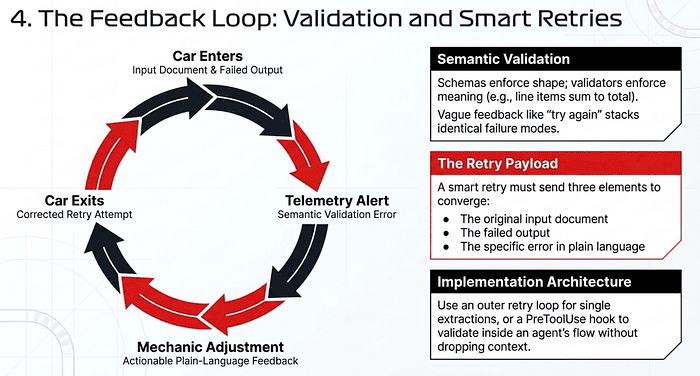
Specific Errors, Not “Try Again”
If validation fails, do not run the original prompt again with a vague “output was invalid, please correct” message. Specific, actionable feedback is what makes retries converge. Send a follow-up request containing:
- The original input document.
- The failed output the model just generated.
- The specific error in plain language. For example: “The line_items array sums to $105.00, but stated_total is $110.00. Re-extract line_items or flag the discrepancy.”
This is the difference between a 60% identical-fail rate on retries and a loop that converges in one shot.
Retry with Feedback: a worked example with the Claude API
The schema guarantees that total is a number and line_items is an array. It cannot guarantee that the line items add up to the total. That is a semantic check, and the model can pass the schema while failing the math.
Pattern: validate downstream, and when validation fails, retry with the specific error spelled out.
The semantic validator
A plain function. Returns None on success, a human-readable error string on failure.
def validate_invoice(data: dict) -> str | None:
    items_sum = sum(item["amount"] for item in data["line_items"])
    stated = data["total"]
    if abs(items_sum - stated) > 0.01:
        return (
            f"The line_items array sums to ${items_sum:.2f}, but "
            f"stated_total is ${stated:.2f}. Re-extract line_items "
            f"or flag the discrepancy in the notes field."
        )
    return None
This is where domain logic lives. Schema enforces shape; this enforces meaning.
The retry loop
The key move is the follow-up message. It contains three things: the original input, the model’s last output, and the specific error. Not “please try again.” Not “your output was invalid.” The exact failure is named.
from anthropic import Anthropic

client = Anthropic()
def extract_with_retry(invoice_text: str, max_retries: int = 3):
    messages = [{"role": "user", "content": invoice_text}]
    for attempt in range(max_retries):
        resp = client.messages.create(
            model="claude-opus-4-7",
            max_tokens=1024,
            tools=[{
                "name": "extract_invoice_data",
                "description": "Extract structured invoice fields.",
                "input_schema": invoice_schema,
            }],
            tool_choice={
                "type": "tool",
                "name": "extract_invoice_data",
            },
            messages=messages,
        )
        tool_use = next(
            b for b in resp.content if b.type == "tool_use"
        )
        data = tool_use.input
        error = validate_invoice(data)
        if error is None:
            return data
        # Feed the failed output and the specific error back in.
        messages.append({"role": "assistant", "content": resp.content})
        messages.append({
            "role": "user",
            "content": [{
                "type": "tool_result",
                "tool_use_id": tool_use.id,
                "content": (
                    f"Validation failed: {error}\\n\\n"
                    f"Re-extract from the original invoice. "
                    f"If the totals genuinely disagree in the "
                    f"source document, set status to 'success' "
                    f"and note the discrepancy in the notes field."
                ),
                "is_error": True,
            }],
        })
    raise ValueError(
        f"Could not extract valid invoice after {max_retries} tries"
    )
Two details worth flagging.
The error goes back as a tool_result with is_error: True, not as a fresh user message. This matches the conversational shape Claude expects: it is called a tool, the tool's result reports a problem, and it gets to try again with the full context of what it just produced.
The retry instruction also opens an escape hatch: “if the totals genuinely disagree in the source document, note the discrepancy.” Without this, you trap the model into a no-win loop on invoices where the source itself is inconsistent (which happens). The escape hatch lets the model surface the problem rather than fabricate agreement.
Why this converges
Without specific feedback, retries are nearly independent attempts at the same task. If the first attempt fails 40% of the time, the second attempt fails at about the same rate. You stack identical failure modes.
With specific feedback, each retry is a different task: “given that you just produced output X, which failed for reason Y, produce a corrected output.” The model has a failed attempt in context, knows exactly which assertion broke, and converges in one or two tries in practice.
The empirical pattern from production systems: vague retries flatline near the single-attempt success rate. Specific retries push success rates into the high nineties within two attempts.
Where this fits in the stack
Three layers, three jobs.
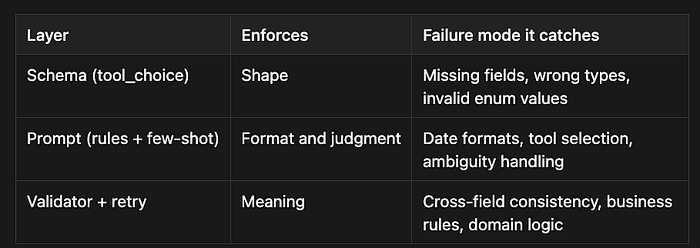
You need all three. The schema cannot check that line items sum to the total. The prompt cannot guarantee the model will not silently round. The validator cannot prevent malformed JSON. Each layer covers what the others cannot.
The boundary worth remembering
Retry with feedback is still probabilistic. If your validator catches a discrepancy that the source document genuinely contains (e.g., the invoice itself adds up incorrectly), no number of retries will fix it. That is when the escape hatch matters: a legitimate way for the model to say “the source disagrees” rather than be forced to make the numbers match. The validator surfaces problems; it does not invent solutions.
Retry with Feedback in the Claude Agent SDK: a worked example
The Agent SDK’s structured output already retries internally on schema failures. What it does not do is retry on semantic failures because it has no knowledge of your business rules. Line items that sum to the total are your invariant, not the schema’s.
Two patterns apply here, and they correspond to two different places to put the validator.
Pattern 1: Validate outside the loop, re-query with feedback
Simplest version. Run the agent, validate the result, and if it fails, start a new query with the failed output and the specific error included in the prompt.
from claude_agent_sdk import query, ClaudeAgentOptions

def validate_invoice(data: dict) -> str | None:
    items_sum = sum(i["amount"] for i in data["line_items"])
    if abs(items_sum - data["total"]) > 0.01:
        return (
            f"line_items sums to ${items_sum:.2f}, but total is "
            f"${data['total']:.2f}. Re-extract or flag in notes."
        )
    return None

options = ClaudeAgentOptions(
    output_format={"type": "json_schema", "schema": invoice_schema},
)

async def extract_with_retry(invoice_text: str, max_tries: int = 3):
    prompt = f"Extract invoice fields from:\n\n{invoice_text}"

    for attempt in range(max_tries):
        data = None
        async for msg in query(prompt=prompt, options=options):
            if msg.subtype == "success" and msg.structured_output:
                data = msg.structured_output

        if data is None:
            raise ValueError("Agent failed to produce output")

        error = validate_invoice(data)
        if error is None:
            return data

        # Rebuild the prompt with the failure spelled out.
        prompt = (
            f"You previously extracted this from the invoice:\n"
            f"{data}\n\n"
            f"Validation failed: {error}\n\n"
            f"Re-extract from the original invoice below. If the "
            f"totals genuinely disagree in the source, set status "
            f"to 'success' and note the discrepancy in 'notes'.\n\n"
            f"Invoice:\n{invoice_text}"
        )

    raise ValueError(f"Did not converge after {max_tries} attempts")
Each retry is a fresh query() call with no shared session, but the prompt carries the three things that matter: the original input, the model's last output, and the specific error. The model sees its own failed attempt and a named reason, and corrects.
This works well for one-shot extractions. It does not work as well when the extraction is part of a longer agent run with reads, searches, and tool calls you would rather not redo.
Pattern 2: Validate inside the loop with a PreToolUse hook
When the validation should run as part of the agent’s normal flow (not as an outer retry), put it in a PreToolUse hook tied to the extraction tool. The hook inspects the tool output and, if validation fails, returns an error result that the agent sees and responds to. The agent stays in the same session, with its full context intact.
This assumes you have moved the extraction into a custom tool rather than a final structured output.
from claude_agent_sdk import (
    query, ClaudeAgentOptions, tool, create_sdk_mcp_server,
    HookMatcher,
)

@tool(
    "extract_invoice",
    "Extract structured fields from an invoice.",
    invoice_schema,
)
async def extract_invoice(args):
    # The model fills args according to the schema.
    # Hand the result back so the hook can inspect it.
    return {"content": [{"type": "text", "text": str(args)}]}

invoice_server = create_sdk_mcp_server(
    name="invoice", tools=[extract_invoice],
)

async def validate_hook(input_data, tool_use_id, context):
    if input_data["tool_name"] != "mcp__invoice__extract_invoice":
        return {}

    data = input_data["tool_input"]
    error = validate_invoice(data)
    if error is None:
        return {}

    # Block the result and feed the failure back into the loop.
    return {
        "hookSpecificOutput": {
            "hookEventName": input_data["hook_event_name"],
            "permissionDecision": "deny",
            "permissionDecisionReason": (
                f"Validation failed: {error} "
                f"Re-call extract_invoice with corrected values, "
                f"or flag the discrepancy in the notes field."
            ),
        },
    }

options = ClaudeAgentOptions(
    mcp_servers={"invoice": invoice_server},
    allowed_tools=["mcp__invoice__extract_invoice"],
    hooks={
        "PreToolUse": [
            HookMatcher(matcher=None, hooks=[validate_hook]),
        ],
    },
)

async for msg in query(
    prompt=f"Extract invoice fields from:\n\n{invoice_text}",
    options=options,
):
    ...
The hook fires before the tool runs (PreToolUse lets you inspect the model's intended tool input). If the math does not check out, the hook denies the call and includes the specific error in permissionDecisionReason. The agent sees the denial reason, adjusts accordingly, and calls the tool again with the corrected values. All within one session, no outer loop, no prompt reconstruction.
Which pattern when
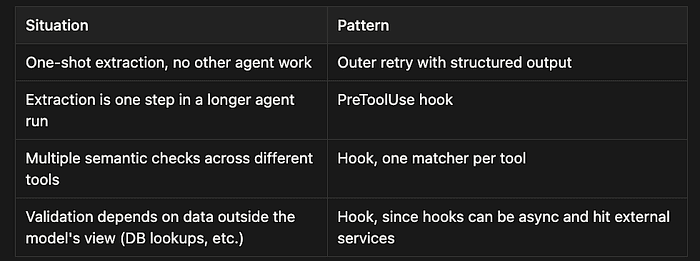
The outer-retry pattern is easier to reason about and easier to test. The hook pattern is more powerful and keeps the agent’s context intact across retries, which matters when re-running the whole agent would require re-reading files or re-calling expensive tools.
What stayed the same
The same three things go back to the model on every retry: the original input, the failed output, and the specific error. The mechanism changes (from a new query() call to a hook denial reason), but the convergence property remains the same. Vague feedback gives you independent re-attempts at the same task; specific feedback gives you a corrected version of the previous attempt. The model needs to know exactly what broke to fix it.
The boundary, again
Hooks are an enforcement layer for the agent’s behavior. They can block a tool call, inject a message, or deny with a reason. They cannot reach into the model’s reasoning and fix it. If the source invoice is genuinely inconsistent, the hook will keep firing, and the agent will keep retrying. Same as before, the answer is an escape hatch in the prompt: a legitimate way for the model to surface the contradiction rather than be trapped trying to resolve it. Enforcement layers catch errors. They do not invent truth where the source has none.
Bounded Retries and Human Escalation
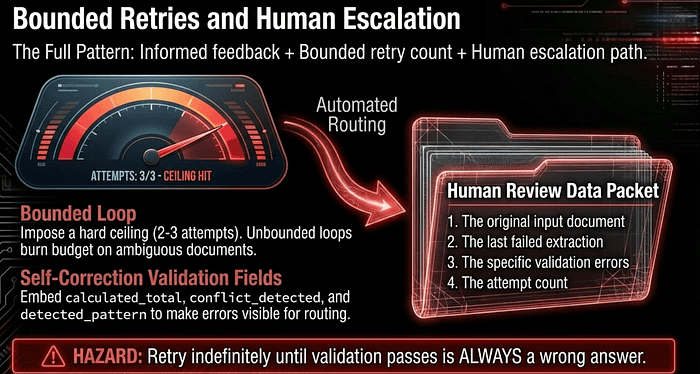
Informed feedback is necessary but not sufficient. The exam treats the full pattern as informed feedback plus a bounded retry count plus a human escalation path. Each piece matters.
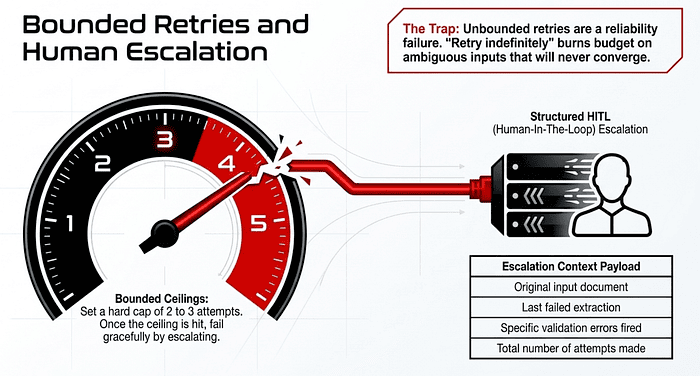
The retry loop must have a hard ceiling, typically 2 or 3 attempts. After the ceiling, the system escalates to a human reviewer with a structured handoff payload:
- The original input document.
- The last failed extraction.
- The specific validation errors that fired.
- The number of attempts made.
Without a ceiling, an ambiguous document can burn tokens in an infinite loop that never converges. Without the structured handoff, the human reviewer has to reconstruct the failure from scratch, which defeats the point of automation.
A common exam trap presents “retry until success” or “retry indefinitely until validation passes” as a choice. Eliminate it immediately. Unbounded retry loops are a reliability failure, not a reliability pattern. The correct pattern is always: informed retry, bounded attempts, structured escalation.
Bounded Retry with Structured HITL Escalation: a worked example (Claude Agent SDK)
The retry-with-feedback loop converges fast on solvable problems. On unsolvable ones, it converges on nothing, and an unbounded loop will burn through your budget chasing an invoice whose numbers genuinely do not add up. The fix has three parts that work together: informed feedback (already covered), a hard ceiling on attempts, and a structured handoff to a human reviewer when the ceiling is reached.
The escalation payload
Define what a human reviewer needs before writing the loop. Reconstructing the failure from logs is exactly the manual reconstruction work automation was supposed to eliminate, so capture the full picture at the moment of escalation.
from dataclasses import dataclass, field
from datetime import datetime, UTC

@dataclass
class EscalationPayload:
    original_input: str
    last_extraction: dict | None
    validation_errors: list[str]
    attempts_made: int
    timestamp: str = field(
        default_factory=lambda: datetime.now(UTC).isoformat()
    )
Four required pieces. The original input, so the reviewer can verify directly. The last extraction, so they can see what the model produced. The validation errors so they know what specifically failed (and across attempts, since errors can shift). The attempt count so they know how hard the system tried.
The bounded loop
from claude_agent_sdk import query, ClaudeAgentOptions

MAX_ATTEMPTS = 3

options = ClaudeAgentOptions(
    output_format={"type": "json_schema", "schema": invoice_schema},
)

async def extract_or_escalate(invoice_text: str):
    prompt = f"Extract invoice fields from:\n\n{invoice_text}"
    last_data: dict | None = None
    errors_seen: list[str] = []

    for attempt in range(1, MAX_ATTEMPTS + 1):
        last_data = None
        async for msg in query(prompt=prompt, options=options):
            if msg.subtype == "success" and msg.structured_output:
                last_data = msg.structured_output
            elif msg.subtype == "error_max_structured_output_retries":
                errors_seen.append(
                    f"Attempt {attempt}: schema retries exhausted"
                )

        if last_data is None:
            continue

        error = validate_invoice(last_data)
        if error is None:
            return {"status": "success", "data": last_data}

        errors_seen.append(f"Attempt {attempt}: {error}")
        prompt = (
            f"Previous extraction:\n{last_data}\n\n"
            f"Validation failed: {error}\n\n"
            f"Re-extract from the invoice below. If the source "
            f"itself is inconsistent, set status to 'success' and "
            f"note the discrepancy in 'notes'.\n\n"
            f"Invoice:\n{invoice_text}"
        )

    # Ceiling hit. Build the handoff and stop spending tokens.
    payload = EscalationPayload(
        original_input=invoice_text,
        last_extraction=last_data,
        validation_errors=errors_seen,
        attempts_made=MAX_ATTEMPTS,
    )
    await escalate_to_human(payload)
    return {"status": "escalated", "payload": payload}
The loop is bounded by range(1, MAX_ATTEMPTS + 1). There is no condition under which it runs forever. If every attempt fails validation, control falls through to the escalation block.
The errors_seen variable accumulates errors across attempts rather than overwriting them. This matters because the same invoice often fails the same check repeatedly, and that pattern itself is diagnostic. Three identical "line items sum to $105 but stated total is $110" errors indicate the source is wrong. Three different errors tell them the model is flailing.
The escalation handler
This part varies by deployment. The point of the structured payload is that the handler can be anything because the data is complete.
async def escalate_to_human(payload: EscalationPayload):
    # Pick one (or several) of these in practice:

    # Write to a review queue table
    await db.review_queue.insert({
        "input": payload.original_input,
        "last_extraction": payload.last_extraction,
        "errors": payload.validation_errors,
        "attempts": payload.attempts_made,
        "created_at": payload.timestamp,
    })

    # Or post to Slack
    await slack.post(
        channel="#invoice-review",
        text=f"Invoice failed after {payload.attempts_made} tries",
        attachment=payload,
    )

    # Or open a ticket
    await jira.create_issue(
        project="OPS",
        summary="Invoice extraction needs review",
        description=format_for_humans(payload),
    )
The handler is dumb on purpose. It does not retry, does not transform, does not make decisions. It hands the complete failure context to a person and gets out of the way. Fail-fast and KISS principles both apply.
Why each piece matters
Pull any one of the three, and the pattern breaks.
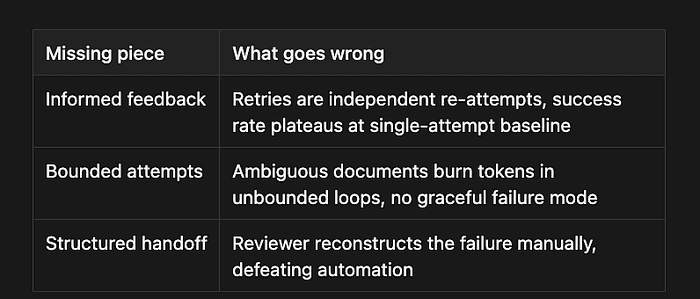
The exam framing of “retry until success” or “retry indefinitely until validation passes” is a trap because both phrases sound responsible. They are not. They confuse persistence with reliability. A system that cannot give up cannot escalate, and a system that cannot escalate has no human-failure mode, so every failure becomes a silent budget leak.
Tuning the ceiling
Two or three attempts are the practical range. Past three, the marginal yield drops sharply on truly ambiguous inputs, and the cost climbs linearly while the convergence probability does not. The decision is empirical:
Run a sample through with a higher ceiling Plot success rate by attempt number Find the attempt where the curve flattens Set the ceiling there
If your data plateaus at attempt 2, three is wasteful. If it is still climbing at attempt 3, your validator may be catching legitimate semantic ambiguity that no number of retries will resolve, which is a sign you need a better escape hatch in the prompt, not a higher ceiling.
The shape of a reliable extraction system
Stacking everything from the last few sections:
- Schema with
tool_choicefor structural guarantees. - Nullable fields, escape-valve enums, and a status field for honest “I don’t know” outcomes.
- Prompt rules for content normalization.
- Validator function for semantic checks.
- Bounded retry loop with informed feedback.
- Structured escalation when the ceiling is hit.
Each layer covers what the others cannot. Together they produce a system that succeeds quickly on clean inputs, recovers gracefully on solvable failures, and fails loudly (with the full context attached) on inputs that need a human. That last property is what distinguishes a reliable agent from a fast one.
When Retries Fail by Design
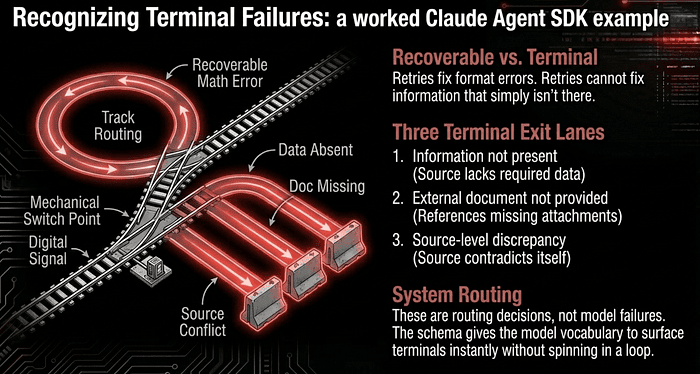
Retries succeed when the failure is due to a format mismatch, a structural output error, or a missed normalization. Retries fail when the required information is simply absent from the source. If the schema requires a customs broker name and the bill of lading has no broker, no number of retries will produce a truthful one. The system must recognize “information not present” as a terminal outcome and route accordingly, not loop forever.
A third variant the exam tests: the information exists, but in a document that the model was never given. A bill of lading references a customs declaration that was not attached to the request. No number of retries yields the missing reference because the data lives outside the prompt. The fix is upstream, in the retrieval or assembly step, not in the retry loop. Recognizing this case by name (external document not provided) is a tested skill.
Similarly, if the source itself is contradictory (two different dates listed for the same event, or line items that legitimately don’t sum to the stated total), retries cannot help. The system must recognize this as a source-level discrepancy and route the case to a human reviewer.
Self-Correction Validation Fields
The best schemas embed validation hooks for long-term reliability:
calculated_totalextracted alongsidestated_total, so the application can flag the discrepancy automatically without trusting either one.conflict_detectedas a boolean, set true when the model encounters contradictory source data and chose to surface rather than guess.detected_patternon every finding, naming which rule or code construct triggered it. When developers dismiss findings, you can analyze which patterns are noisy and feed that back into the prompt.
These fields don’t fix errors. They make the errors visible so the system around the model can act.
Recognizing Terminal Failures: a worked Claude Agent SDK example
Some failures cannot be retried. The schema demands a customs broker name. The bill of lading does not have one. No amount of looping will produce a truthful answer, because the answer is not in the input. The system needs to recognize this and route accordingly, not burn tokens hunting for data that does not exist.
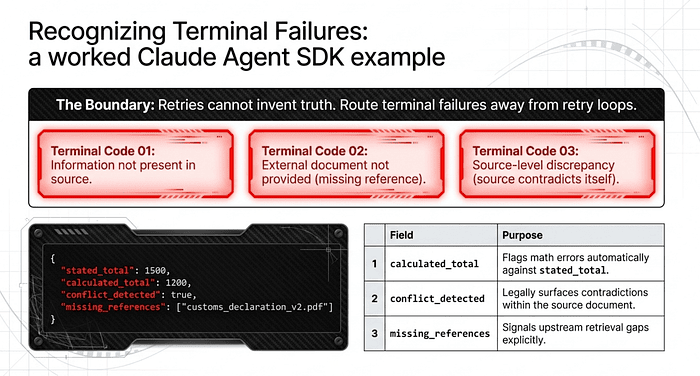
Three distinct terminal cases:
- Information not present. The required field has no source data. (Bill of lading has no broker name.)
- External document not provided. The information exists, but in a document that was never attached. (BOL references a customs declaration; the declaration is not in the prompt.)
- Source-level discrepancy. The source contradicts itself. (Two different dates for the same event; line items legitimately do not sum to stated total.)
None of these are model failures. All three are routing decisions the system needs to make explicitly. The schema defines the visibility.
The schema with self-correction fields
extraction_schema = {
    "type": "object",
    "properties": {

        "status": {
            "type": "string",
            "enum": [
                "success",
                "information_not_present",
                "external_document_required",
                "source_conflict",
                "no_data",
            ],
        },

        # Self-correction: extract both, let the system compare.
        "stated_total": {"type": ["number", "null"]},
        "calculated_total": {"type": ["number", "null"]},

        # Self-correction: model surfaces conflicts rather than
        # silently picking one side.
        "conflict_detected": {"type": "boolean"},
        "conflict_details": {"type": ["string", "null"]},

        # Self-correction: name the missing dependency by document
        # type so retrieval can fetch it on the next pass.
        "missing_references": {
            "type": "array",
            "items": {
                "type": "object",
                "properties": {
                    "document_type": {"type": "string"},
                    "reference_id": {"type": ["string", "null"]},
                    "mentioned_in_field": {"type": "string"},
                },
            },
        },

        # Self-correction: every finding names the rule that
        # produced it, so dismissed findings become tunable data.
        "findings": {
            "type": "array",
            "items": {
                "type": "object",
                "properties": {
                    "field": {"type": "string"},
                    "value": {},
                    "detected_pattern": {"type": "string"},
                },
            },
        },

        "broker_name": {"type": ["string", "null"]},
        "broker_license": {"type": ["string", "null"]},
        "shipment_date": {"type": ["string", "null"]},
    },
    "required": ["status", "conflict_detected", "findings"],
}
Four self-correction mechanisms are at work.
**calculated_total alongside stated_total.**al`. Both come out of the model. The downstream code compares them. Neither value is trusted on its own. If they disagree, that is a signal, not noise.
**conflict_detected as a first-class boolean.**n. Surfacing a conflict is a legitimate outcome of extraction, not a failure mode. The model has a documented way to say "the source itself contradicts itself," which removes the pressure to pick a side silently.
**missing_references array.**y. When the source mentions a document that was not provided, the model names what is missing, by document type. This is the signal upstream retrieval needs to fetch the missing piece and retry, instead of the loop spinning on absent data.
**detected_pattern on every finding.**g. When a finding gets dismissed downstream (the customs broker was actually optional for this shipment type), you can analyze which patterns are noisiest and feed that back into the prompt. The schema turns dismissal into tunable data.
Routing on status
async def process_with_routing(document_text: str, doc_id: str):
    async for msg in query(
        prompt=f"Extract from:\n\n{document_text}",
        options=ClaudeAgentOptions(
            output_format={
                "type": "json_schema",
                "schema": extraction_schema,
            },
        ),
    ):
        if msg.subtype == "success" and msg.structured_output:
            data = msg.structured_output

    # Self-correction check: do the two totals agree?
    if (data["stated_total"] is not None
        and data["calculated_total"] is not None
        and abs(data["stated_total"] - data["calculated_total"])
        > 0.01):
        data["conflict_detected"] = True
        data["status"] = "source_conflict"

    # Route on status. No retries on terminal cases.
    match data["status"]:

        case "success":
            return await write_to_database(data)

        case "information_not_present":
            # Retries cannot invent data. Hand to a reviewer
            # with the full payload so they can confirm the
            # source genuinely lacks the field.
            return await escalate_to_human(
                doc_id=doc_id,
                reason="required_field_absent",
                data=data,
            )

        case "external_document_required":
            # Upstream problem. Try to fetch the missing
            # document and re-run. If retrieval also fails,
            # escalate.
            fetched = await fetch_referenced_documents(
                data["missing_references"]
            )
            if fetched:
                return await process_with_routing(
                    document_text + "\n\n" + fetched,
                    doc_id,
                )
            return await escalate_to_human(
                doc_id=doc_id,
                reason="missing_document_unfetched",
                data=data,
            )

        case "source_conflict":
            # Retries cannot reconcile a contradictory source.
            # The conflict itself is the answer.
            return await escalate_to_human(
                doc_id=doc_id,
                reason="source_contradicts_itself",
                data=data,
            )

        case "no_data":
            return await escalate_to_human(
                doc_id=doc_id,
                reason="unreadable_or_wrong_document",
                data=data,
            )
Notice what is missing from this routing logic: there is no retry loop. The bounded retry from the previous section is for recoverable failures (the math came out wrong, but the data was there). This is for terminal failures, which need a different exit path entirely.
The prompt has to authorize honesty
The schema gives the model a way to surface terminal failures. The prompt has to tell it those are legitimate outcomes, not error conditions.
system_prompt = """
Extract fields from the document. Use these status values
honestly:

- success: all required fields present and consistent.
- information_not_present: the document does not contain the
  required information. Do not invent values. Set the missing
  fields to null.
- external_document_required: the document references another
  document (customs declaration, prior invoice, attached
  certificate) that was not provided. List each missing
  reference in missing_references with its document_type.
- source_conflict: the source contradicts itself. Set
  conflict_detected to true, describe the contradiction in
  conflict_details, and extract both conflicting values where
  possible.

For each finding, populate detected_pattern with the rule that
triggered it. Examples: "explicit_invoice_total",
"sum_of_line_items", "header_metadata", "footer_signature_block".
This lets downstream systems analyze which patterns are
reliable.

When in doubt, surface rather than guess. A flagged conflict is
more useful than a confident wrong answer.
"""
The last sentence does most of the work. The model has to know that surfacing problems is the desired behavior, not a fallback.
Feeding dismissals back into the prompt
The detected_pattern field on findings is the long-term mechanism. Over time, the system records which patterns produce findings that humans dismiss. That data updates the prompt:
# Pseudo-pattern: after N dismissals of a pattern, the prompt
# gets a new rule.
async def update_prompt_from_dismissals():
    noisy_patterns = await db.query("""
        SELECT detected_pattern, COUNT(*) as dismissals
        FROM finding_reviews
        WHERE dismissed = true
        GROUP BY detected_pattern
        HAVING dismissals > 20
    """)

  for row in noisy_patterns:
        # Append guidance to the prompt for the next deployment.
        # e.g. "footer_signature_block findings should not be
        # treated as broker information."
        ...
This is not magic. It is a feedback loop made possible by the schema being honest about why the model produced each finding. Without detected_pattern, all you have is "this finding was dismissed," which is not actionable. With it, you can name the rule that fired and tune it.
What changed
The previous section’s pattern (bounded retry with escalation) assumed every failure was potentially recoverable. This section recognizes that some failures are terminal by their nature, and trying to retry them is a category error.
The schema does most of the work. By making status an enum that names the terminal cases, the model has a vocabulary for "I cannot solve this, and here is why." By making calculated_total, conflict_detected, and missing_references first-class fields, the system can detect inconsistencies without trusting any single number, recognize self-contradiction without ambiguity, and identify retrieval gaps with enough specificity to fix them upstream.
The schema does not fix errors. It makes errors visible enough that the system around the model can act on them. That is the difference between a model that fails silently and an agent system that fails productively.
The boundary worth remembering
Self-correction fields catch a specific class of problem: the model is willing to be honest, but the schema gives it no way to express that honesty. Once the schema has escape valves and the prompt authorizes their use, most “the model lied” complaints turn out to be “the schema forced the model to lie.” Fix the schema first. Retries, validators, and bounded loops all operate on top of that foundation. If the foundation does not let the model say “I don’t know,” nothing above it can recover.
Common Trap Answers
When the exam describes a retry loop that isn’t converging or extractions that keep failing:
“Raise the maximum retry cap from 2 to 6 attempts.” More retries with the same generic feedback multiplies the same wasted call. The fix is specific feedback, not more iterations. “Use a different, larger model on retry while keeping the same generic message.” Model size does not compensate for missing feedback. “Lower temperature on retry attempts.” Temperature is not the failure mode. “Retry indefinitely until validation passes.” Unbounded retry. Always wrong. “Switch to a more capable model and retry on missing information.” No model can extract what is not in the source.
5. Engineering at Scale: Batching, Caching, and the ZDR Constraint
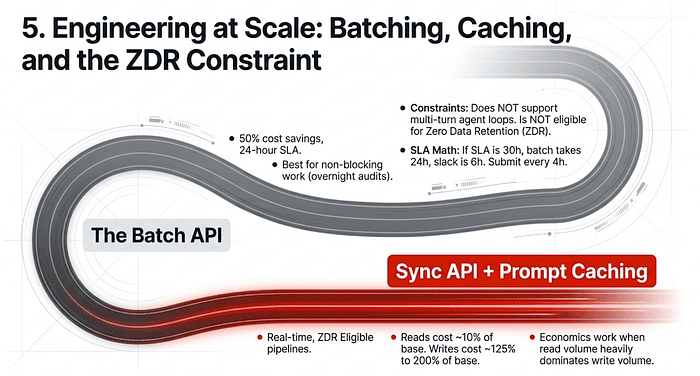
When moving to high-volume processing, the strategic trade-offs shift from latency to cost and depth. The exam tests two distinct cost levers (the Batch API and Prompt Caching), the constraints that eliminate each one in specific scenarios, and the arithmetic of matching them to SLAs.
The Batch API: When It Fits
The Message Batches API offers a 50% cost savings in exchange for a 24-hour processing window with no guaranteed latency SLA. Capacity tops out at 100,000 requests or 256 MB per batch, whichever limit hits first, and results are available for 29 days after creation. The fit is binary:
Use the Batch API for non-blocking, latency-tolerant work: overnight audits, weekly compliance scans, nightly test generation, monthly report summarization, bulk reprocessing. Use the synchronous API for blocking workflows. The exam signals these with specific phrases: “the developer cannot merge until the review completes,” “the user is waiting for a response,” “pre-merge code review checks,” “interactive chat,” “real-time customer support resolution.” If any of those appear, Batch is wrong, regardless of how cost-attractive the discount looks.
The Batch API: a worked example with Claude API
Nightly job: summarize 5,000 customer support transcripts from the day. Nobody is waiting. Results appear on the dashboard the next morning. The 50% discount is real money at this volume.
Submitting the batch
from anthropic import Anthropic

client = Anthropic()

# transcripts: list[dict] with keys "id" and "text",
# loaded from your database

batch = client.messages.batches.create(
    requests=[
        {
            "custom_id": t["id"],
            "params": {
                "model": "claude-opus-4-7",
                "max_tokens": 256,
                "messages": [{
                    "role": "user",
                    "content": (
                        f"Summarize in 2 sentences:\n\n{t['text']}"
                    ),
                }],
            },
        }
        for t in transcripts
    ],
)

print(batch.id)  # save this; you need it to retrieve results
The custom_id is yours to set. Use a value that maps back to your own records (transcript ID, order number, whatever). The batch endpoint returns results in arbitrary order, and custom_id is how you reconnect them.
Retrieving results
Polling shape, because the batch may take anywhere from minutes to 24 hours.
import time

while True:
    batch = client.messages.batches.retrieve(batch.id)
    if batch.processing_status == "ended":
        break
    time.sleep(60)

for result in client.messages.batches.results(batch.id):
    if result.result.type == "succeeded":
        summary = result.result.message.content[0].text
        save_summary(result.custom_id, summary)
    else:
        # "errored", "canceled", or "expired"
        log_failure(result.custom_id, result.result.type)
Results stream as JSONL, one per request. Each has a type of succeeded, errored, canceled, or expired. Handle all four. Production code that only checks succeeded loses the failure signal for the others.
The fit rule, stated plainly
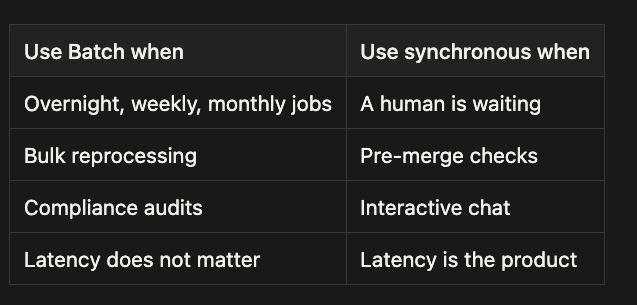
Limits: 100,000 requests or 256 MB per batch (whichever hits first), results available for 29 days. The 24-hour window is a ceiling, not a target; most batches finish much faster.
The discount is structural, not promotional. Anthropic schedules the work against spare capacity and passes half the savings back. You give up the latency guarantees you did not need. That is the entire trade.
The ZDR Disqualifier
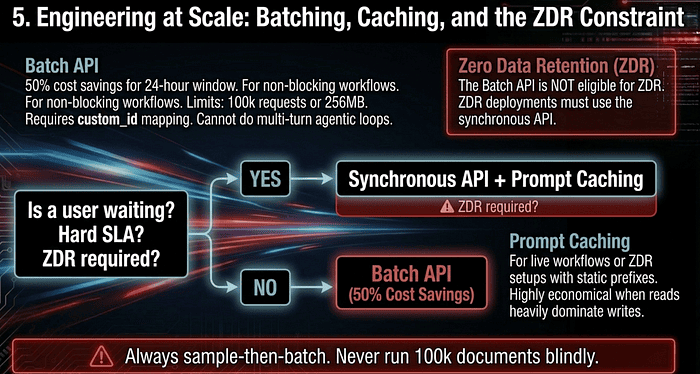
One named exam fact eliminates the Batch API entirely for some deployments: the Message Batches API is not eligible for Zero Data Retention (ZDR). If your deployment has ZDR compliance requirements, you must use the synchronous API even for non-blocking workloads. The 50% headline discount is simply unavailable to you. The only cost lever remaining is Prompt Caching.
Working Within the Constraints
The Sample-then-Batch move. Never run a 100,000-document batch blindly. Refine your prompt on a small sample (say, 100 documents) first to ensure the logic holds before committing to scale. First-pass success rates determine total cost, and iterative resubmission of failures is expensive. No multi-turn tool calls in a single batch request. The Batch API does not support agentic loops where the model calls a tool, receives the result, and continues reasoning within the same request. If your workflow needs that thought loop, you must use the synchronous API. **custom_id is mandatory.**y. Batch results do not return in submission order. The
custom_idfield is the only reliable way to correlate inputs to outputs and to identify which specific documents failed for resubmission.
The SLA Arithmetic, Worked Out
A common exam scenario gives you an SLA and asks how often to submit batches. The reasoning is straightforward.
Suppose you owe a 30-hour SLA and the Batch API takes up to 24 hours. Your slack is 30 minus 24, or 6 hours. But 6 hours is the ceiling, not the answer, because you need the next batch to clear before the SLA expires on the current one. In practice, you submit no later than every 4 hours, leaving a margin for the next batch to complete inside the SLA window. The general formula is: max submission interval = SLA budget minus max batch processing time, then back off further to leave a real margin.
If a document fails the first time (context too long, content filter), identify it by custom_id and resubmit it, modified (chunked, filtered), in the next batch. Resubmissions consume your slack, which is why the sample-first refinement step pays for itself many times over.
Prompt Caching: The Other Cost Lever
When Batch is unavailable (live workflow, ZDR requirement) and you still face cost pressure from large, repeated prefixes, the lever to pull is Prompt Caching. The exam expects you to know the cost picture precisely:
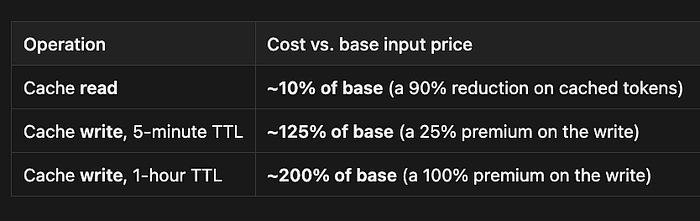
The economics work when read volume dominates write volume. A customer support agent who sends a 50,000-token policy preamble on every interaction writes the cache once per refresh window and reads it on every subsequent call. The 90% read discount swallows the 25% write premium many times over. A pipeline where every request has a unique context never benefits from caching, because every call is a cache write.
A common distractor on the exam: “skip Prompt Caching because the 25% write premium isn’t recovered.” The correct judgment is to look at the read-to-write ratio, not the per-operation cost. When reads outnumber writes by orders of magnitude (the realistic case for repeated static prefixes), caching pays.
Choosing Between the Two Cost Levers
The decision is a short flowchart:
- Is a user waiting? Yes → synchronous API. Cost lever: Prompt Caching if there is a repeated static prefix.
- Does the workload have a hard latency SLA tighter than 24 hours, or financial penalties for delay? Yes → synchronous API. Same cost lever.
- Does the deployment require Zero Data Retention? Yes → synchronous API. Same cost lever.
- Otherwise (overnight reports, weekly audits, bulk reprocessing) → Batch API. The 50% discount is the cost lever.
Common Trap Answers
When the exam describes a high-volume workload or a cost-sensitive pipeline:
“Use the Batch API for pre-merge code review to save 50%.” The developer is blocked. Wrong workflow for Batch. “Batch supports multi-turn agentic loops.” It does not. Tool-call-then-continue requires the synchronous API. “Submit the full 100,000-document batch immediately to start the clock.” Refine on a sample first. Iterating fixes on a failed full batch is expensive. “Retry the entire batch when one document fails.” Failures are handled per-
custom_id. Resubmit only the failed entries. “Skip Prompt Caching because the 25% write premium isn’t recovered.” Look at the read-to-write ratio, not the per-operation cost. When reads outnumber writes by orders of magnitude, caching pays many times over. “Use Batch API anyway, even with ZDR requirements.” Batch is not ZDR-eligible. The only cost lever for ZDR deployments is Prompt Caching.
6. Multi-Instance and Multi-Pass Review Architectures
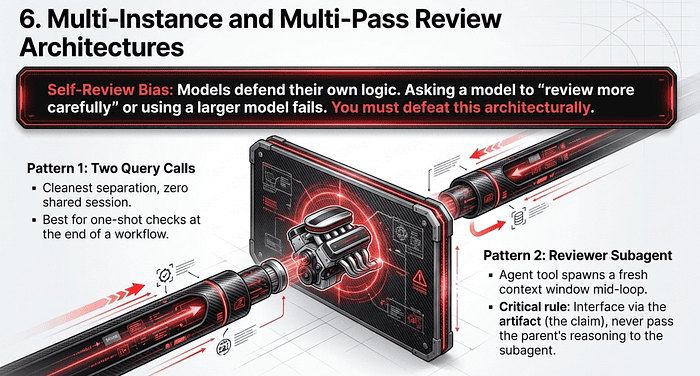
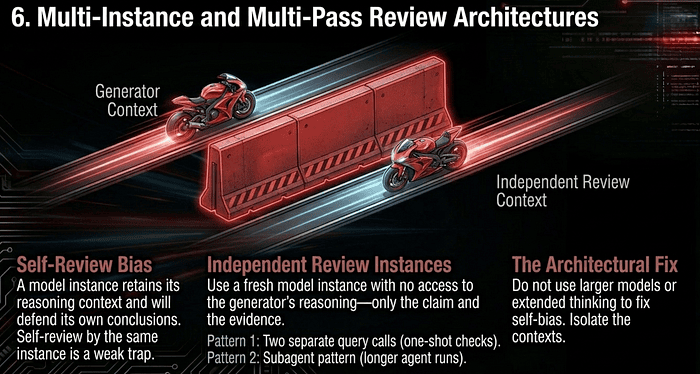
Reliability also requires overcoming self-review bias. A model instance that generated an output retains the reasoning context from that generation. It is fundamentally biased toward its own conclusions and less likely to question its own decisions in the same session. Telling that same instance to “review your work” is the weakest possible verification step.
Independent Review Instances
The fix is to use a fresh model instance, without the original reasoning chain, to review the output. Independent review catches subtle issues that self-review and extended thinking miss, because the second instance has to reconstruct the reasoning from scratch and so encounters the same evidence with no prior commitment.
Note what does not fix self-review bias: switching to a larger model for the reviewer, adding extended thinking to the reviewer, or asking the generator to review itself “more carefully.” All three are common distractors. The fix is architectural, not scale-based: a clean second instance with no access to the generator’s rationale.
This is also why prompt chaining beats a single long prompt for complex sequences (e.g., analyze, then rank, then recommend). Each call gets a clean focus, and you can inspect intermediate outputs to verify the work before the next step runs.
Independent Review with the Claude Agent SDK: a worked example
A code review agent finds a security issue in a pull request. You want to know if the finding is real before shipping it to a developer. The instinct is to ask the same agent: “Are you sure?” That does not work, because the agent has already committed to the answer in its own context. It will defend it.
The architectural fix is a second model instance with no access to the first one’s reasoning. Just the evidence and the claim. The reviewer reconstructs the analysis from scratch, which is what makes it a real check, not a rubber stamp.
The Agent SDK gives you two ways to do this. Pick based on whether the review is a one-shot check or a recurring step inside a larger workflow.
Pattern 1: Two separate query() calls
The simplest version. Run the generator. Run the reviewer in a separate query() call that has no shared session. The contexts are independent by construction.
from claude_agent_sdk import query, ClaudeAgentOptions

generator_options = ClaudeAgentOptions(
    allowed_tools=["Read"],
    output_format={"type": "json_schema", "schema": finding_schema},
)

reviewer_options = ClaudeAgentOptions(
    allowed_tools=["Read"],
    output_format={"type": "json_schema", "schema": verdict_schema},
)

async def review_code(path: str):
    # Pass 1: generator
    finding = None
    async for msg in query(
        prompt=f"Review {path} for security issues.",
        options=generator_options,
    ):
        if msg.subtype == "success" and msg.structured_output:
            finding = msg.structured_output

    if finding is None or finding["status"] != "issue_found":
        return None

    # Pass 2: reviewer, fresh query, no shared context
    verdict = None
    async for msg in query(
        prompt=(
            f"Another reviewer claims line {finding['line']} of "
            f"{path} has a {finding['severity']} issue: "
            f"\"{finding['claim']}\"\n\n"
            f"Read the file and evaluate this claim independently."
        ),
        options=reviewer_options,
    ):
        if msg.subtype == "success" and msg.structured_output:
            verdict = msg.structured_output

    return {"finding": finding, "verdict": verdict}
Two query() calls, two independent SDK sessions. The reviewer has access to the same tools (it can read the file) but has zero visibility into the generator's reasoning. It sees only the claim and re-derives a conclusion, which is the entire point.
This works well when review is a standalone step. It is less natural when the review is supposed to happen inside a longer agent run that you do not want to fragment.
Pattern 2: A reviewer subagent
When the review should happen during a larger agent run, define the reviewer as a subagent. The parent agent calls the subagent through the Agent tool, which spawns a fresh model instance with an independent context window. The subagent returns its verdict to the parent, but the parent never sees the subagent's reasoning, and vice versa. (In the exam, the Agent tool is referred to as the Task tool, which is the old name).
from claude_agent_sdk import query, ClaudeAgentOptions

options = ClaudeAgentOptions(
    allowed_tools=["Read", "Glob", "Agent"],
    agents={
        "security_reviewer": {
            "description": (
                "Independent reviewer. Evaluates a security claim "
                "made by another reviewer. Returns 'confirmed', "
                "'rejected', or 'unclear' with reasoning. Has no "
                "knowledge of how the original claim was reached."
            ),
            "prompt": (
                "You are an independent code security reviewer. "
                "You will receive a claim about a specific line "
                "in a file. Read the file yourself, evaluate the "
                "claim on its merits, and respond with one of: "
                "confirmed, rejected, unclear. Give your reasoning."
            ),
            "tools": ["Read"],
        },
    },
    system_prompt=(
        "You are a code review agent. For each security finding "
        "you produce, invoke the security_reviewer subagent with "
        "the file path, line number, and a one-sentence claim. "
        "Wait for its verdict before reporting the finding. Do "
        "not pass your reasoning to the subagent, only the claim."
    ),
)

async for msg in query(
    prompt="Review src/auth.py for security issues.",
    options=options,
):
    ...
The key constraint is in the parent’s system prompt: do not pass your reasoning to the subagent, only the claim. This is what keeps the review independent. If the parent forwards its full chain of thought, the subagent is no longer reviewing in isolation; it is reviewing with the original commitment already in place. The architectural fix only works if the interface between the two instances is the artifact (the claim), not the reasoning.
The subagent uses its own tools (Read) to read the file itself and produce a verdict. The parent receives only the verdict, not the subagent’s intermediate work. Two clean contexts, isolated by construction.
Why subagents work for this
Subagents are not just “another model call.” They are a separate context window with their own system prompt, tools, and conversation history.y. From the parents’ perspective, calling a subagent looks like calling any other tool: send input, get output. The fact that the subagent is itself running a full agent loop is invisible.
This is the architectural property required by the independent-review pattern. The reviewer instance has no access to the generator’s internal state, because there is no shared state. The SDK enforces the isolation that you would otherwise have to enforce manually by carefully separating two API calls.
Picking between the patterns
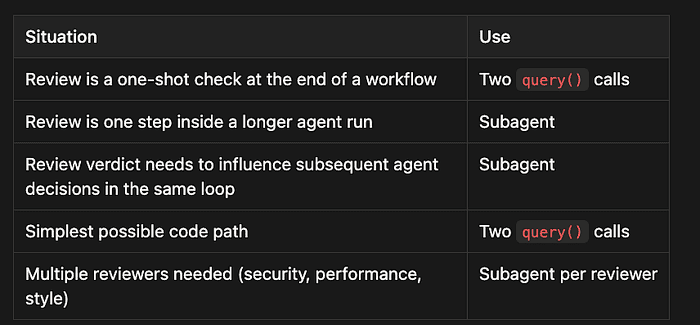
The two-query pattern is more transparent. You can see the boundary between generation and review just by reading the code. The subagent pattern is more powerful, because the parent agent can call the reviewer mid-loop and react to the verdict without you having to orchestrate the round-trip manually.
The distractors worth knowing
Three tempting non-fixes that do not work:
Larger reviewer model. Does not help. The bias is from shared context, not from model capacity. Extended thinking on the reviewer when it shares context with the generator. Does not help. More thinking with the same prior commitment produces the same conclusion. “Review more carefully” prompts to the original instance. Actively worse. The instance is now motivated to defend the original answer, not evaluate it.
The fix is architectural. Spend the engineering effort on isolating two instances, not on tuning one.
One implementation detail worth flagging
When using the subagent pattern, the parent agent decides what to forward to the subagent. The system prompt instruction “do not pass your reasoning to the subagent, only the claim” is doing real work, but it is a prompt-layer instruction, which means it is a guidance layer, not an enforcement layer. If you need a hard guarantee that the parent cannot leak its reasoning to the child, you would have to enforce it by hooking into the Agent tool invocation, intercepting, and stripping anything beyond the claim.
For most cases, the prompt-layer instruction is sufficient. For high-stakes reviews where independence is a correctness requirement (regulated environments, security-critical paths), graduate to the hook layer.
The Attention Dilution Problem
For large reviews (a 14-file pull request, a 30-section regulatory filing, a multi-chapter document), one pass over everything produces inconsistent depth: detailed feedback in some sections, superficial in others, and contradictory findings, with identical patterns flagged in one file and approved in another. This is attention dilution, and a larger context window does not solve it.
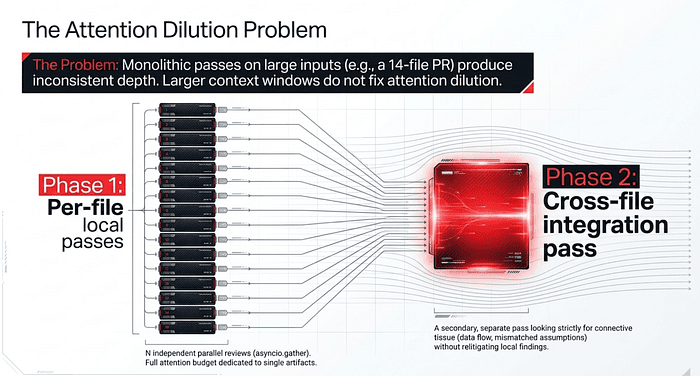
The pattern that does work is a multi-pass review:
- Per-file local passes. Run a focused review on each file independently. Each pass has the full attention budget for that single artifact.
- A separate cross-file integration pass. Run one additional pass dedicated to cross-file concerns: data flow between modules, consistent naming, duplicated logic, mismatched assumptions at boundaries.
This decomposition matches the prompt-chaining pattern for predictable, multi-aspect work, and it produces consistent depth that monolithic reviews cannot.
Multi-Pass Review with the Claude Agent SDK: a worked example
A pull request touches 14 files. You ask one agent to review the whole thing. What you get back: file 1 gets a detailed analysis, file 8 gets a one-line “looks fine,” and the same pattern (say, a missing null check) gets flagged in file 3 and waved through in file 11. Attention diluted across a large context window produces inconsistent depth and contradictory findings.
A bigger context window does not fix this. The model has the bytes, but it cannot allocate equal attention to all of them. The fix is structural: give each file its own dedicated pass, then run a second pass to address cross-file concerns that no single-file pass can see.
The shape of the solution
Two phases. Phase 1 runs N independent local reviews, one per file. Phase 2 runs a single integration review that takes the N findings as input and looks for the connective tissue: data flow between modules, mismatched assumptions, duplicated logic, and naming drift.
import asyncio
from claude_agent_sdk import query, ClaudeAgentOptions

local_options = ClaudeAgentOptions(
    allowed_tools=["Read"],
    output_format={
        "type": "json_schema",
        "schema": local_findings_schema,
    },
    system_prompt=(
        "You are reviewing a single file in isolation. Focus on "
        "logic errors, edge cases, and code quality within this "
        "file only. Do not speculate about callers or callees you "
        "cannot see. Return findings as structured output."
    ),
)

async def review_file(path: str) -> dict:
    findings = None
    async for msg in query(
        prompt=f"Review {path}. Read the file and report findings.",
        options=local_options,
    ):
        if msg.subtype == "success" and msg.structured_output:
            findings = msg.structured_output
    return {"path": path, "findings": findings}
The review_file function does one thing: a focused pass on one file with the full attention budget on that artifact. The system prompt explicitly forbids speculation about code outside the file, which keeps the pass narrow and prevents it from doing a bad job of the cross-file work it cannot see.
Phase 1: parallel local passes
Concurrency matters here. Each file’s review is independent of the others, so they can all run at once. asyncio.gather runs N agent loops in parallel and collects the results.
async def phase_one(changed_files: list[str]) -> list[dict]:
    return await asyncio.gather(*[
        review_file(path) for path in changed_files
    ])
For 14 files, this finishes in roughly the time of the slowest single review, not 14x the time. The cost scales linearly with the number of files, but the wall-clock time remains nearly constant.
Each local review gets its own context window and its own attention budget. File 8 no longer competes with file 1 for the model’s focus; it has the model entirely to itself.
Phase 2: the integration pass
The second pass takes the structured outputs from phase 1 and runs a single-agent loop dedicated to cross-file analysis. This pass does not re-read every file from scratch (that would put us back in the attention-dilution trap). It reads the findings and reads the files selectively, looking for patterns that the per-file passes by definition could not catch.
integration_options = ClaudeAgentOptions(
    allowed_tools=["Read", "Glob", "Grep"],
    output_format={
        "type": "json_schema",
        "schema": integration_findings_schema,
    },
    system_prompt=(
        "You are reviewing cross-file concerns in a pull request. "
        "Per-file reviews have already run; their findings are "
        "provided. Look for: data flow inconsistencies between "
        "modules, mismatched assumptions at function boundaries, "
        "duplicated logic, naming drift, and patterns flagged in "
        "one file but missed in another. Use Read and Grep to "
        "verify hypotheses across files. Do not re-litigate the "
        "per-file findings."
    ),
)

async def phase_two(local_results: list[dict]) -> dict:
    findings_summary = "\\n\\n".join(
        f"File: {r['path']}\\nFindings: {r['findings']}"
        for r in local_results
    )
    cross_file = None
    async for msg in query(
        prompt=(
            f"Per-file review results:\\n\\n{findings_summary}\\n\\n"
            f"Identify cross-file issues these passes could not "
            f"see. Read files as needed to verify."
        ),
        options=integration_options,
    ):
        if msg.subtype == "success" and msg.structured_output:
            cross_file = msg.structured_output
    return cross_file
The integration pass has different tools from the local passes. Grep matters here: it lets the agent search for a pattern across the whole codebase, which is exactly the kind of cross-file question that motivates the second phase ("is this validation pattern used consistently in all the new endpoints?").
The system prompt also explicitly rules out redoing the per-file work. The integration pass is for cross-file concerns. Letting it relitigate the local findings just dilutes attention again, at a different layer.
Putting it together
async def review_pull_request(changed_files: list[str]) -> dict:
    local = await phase_one(changed_files)
    cross_file = await phase_two(local)
    return {
        "per_file": local,
        "cross_file": cross_file,
    }
Two phases, distinct responsibilities, no shared attention budget. The per-file results are detailed and uniformly thorough. The cross-file results capture what no single-file view could.
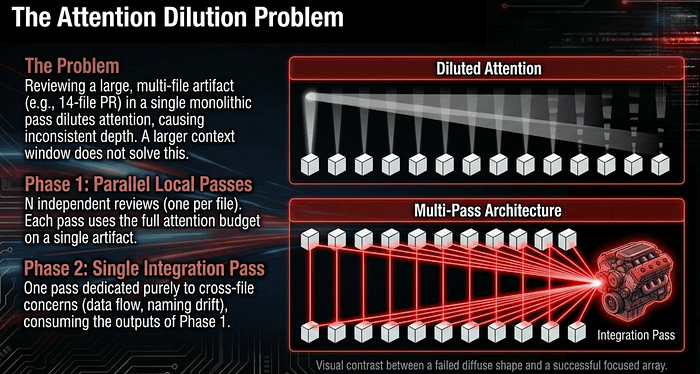
Why this beat the monolithic pass
A single agent reviewing 14 files at once has to spread its attention across thousands of lines of code. Some files get focus; others get cursory treatment, with no way for you to predict which. The same pattern can be flagged in one file and approved in another, not because the patterns differ, but because the model’s attention was elsewhere when it processed the second file.
Splitting the work fixes this in two ways. First, each per-file pass uses the full model in a single artifact, so depth is consistent. Second, the cross-file pass only performs cross-file work, so it does not compete with per-file work for the same context budget. Each pass has a single job, and each job gets all the attention.
This is the same prompt-chaining principle applied to a parallel-then-sequential shape. Phase 1 is N independent chains, one per file. Phase 2 is a single chain that consumes the outputs of phase 1. The artifacts between phases (the structured findings) are inspectable, which means you can verify the per-file work before the integration pass runs.
When to reach for this pattern
The trigger is artifact count, not just total size. A single 5,000-line file is a depth problem, not an attention-dilution problem. Fourteen 200-line files are the attention-dilution problem, even though the total bytes are similar. The signal is: are there N distinct artifacts, each deserving focused review?
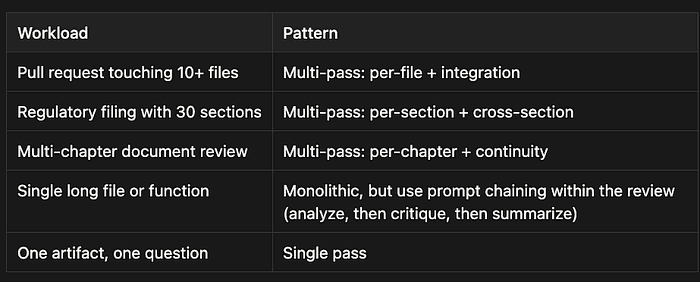
The boundary worth flagging
Multi-pass review trades wall-clock simplicity for consistency. You now have two phases to orchestrate, two sets of structured findings to merge, and a small amount of latency overhead from the sequential phase 2. For small reviews (one or two files), this is overkill, and a single pass wins on simplicity. The pattern earns its keep at scale, where the alternative is unreliable depth, contradictory findings, and developers ignoring the review tool because it missed obvious things.
The cost is real but bounded: N parallel calls instead of 1, plus one integration call. The benefits (consistent depth, cross-file coverage, inspectable intermediate artifacts) make the review trustworthy enough to act on. Trustworthiness is the property that matters; the rest is implementation detail.
Calibrated Routing With Self-Reported Confidence
For workflows that route findings to humans selectively, have the model emit a confidence value alongside each finding. Calibrated against historical accept/dismiss rates per category, those confidences let you auto-approve high-confidence findings, route medium-confidence ones to a queue, and surface low-confidence ones for human review. The confidence is not a probability you trust on its face. It is a sorting signal you calibrate against ground truth.
Common Trap Answers
When the exam describes self-review failure or a large, inconsistent-depth review:
“Add extended thinking to the reviewer instance.” Does not fix self-review bias. The reviewer still carries the generator’s reasoning. “Use a larger model for the reviewer.” Bias is architectural, not scale-based. “Have the generator self-review more carefully before submission.” Self-review by the generating instance is the failure mode, not the fix. “Share the generator’s reasoning trace with the reviewer so it has full context.” This primes the reviewer to agree. Independent instances should see the artifact, not the rationale. “Reject pull requests over N files to avoid attention dilution.” Hides the problem rather than solving it. Decompose into per-file passes plus an integration pass instead. “Use a larger context window to fit everything in one review pass.” Larger windows do not redistribute attention. Lost-in-the-middle is a property of the architecture, not a quota.
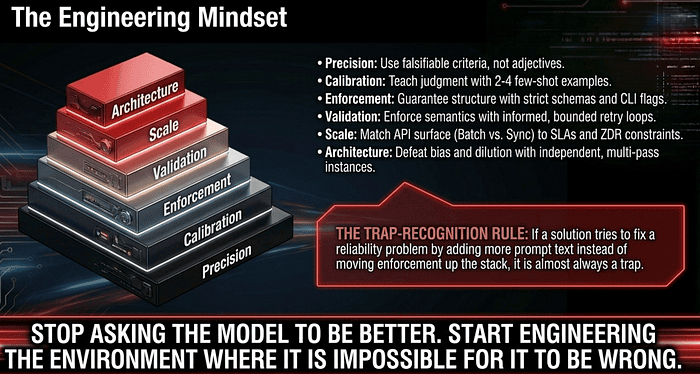
The Engineering Mindset
The transition from AI enthusiast to AI architect is marked by the realization that the prompt is only one component of a reliable system. True reliability follows a strict hierarchy:
- Precision. Replace vague adjectives with falsifiable, observable criteria.
- Calibration. Use 2 to 4 few-shot samples to teach the model how to generalize judgment.
- Enforcement. Force structural consistency through strict schemas, tool use, and CLI flags. Know which mechanism fits which surface, and remember that schema-constrained CLI output lives in
structured_output, notresult. - Validation. Use application logic to catch semantic errors and initiate informed retry loops, with human routing for source-level conflicts.
- Scale. Match the API surface to the workflow. Synchronous for blocking and ZDR-constrained work, Batch for non-blocking. Reach for Prompt Caching when the prefix repeats and the reads dominate the writes.
- Architecture. Use independent review instances and per-file plus integration passes to eliminate bias and ensure focused attention.
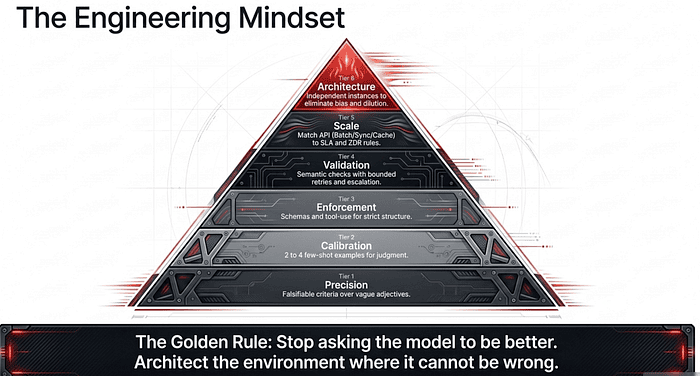
One trap-recognition rule covers more Domain 4 questions than any other: if a wrong-looking answer tries to fix a reliability problem by adding more prompt text instead of moving enforcement up the stack, it is almost always a trap. Stronger language, more rules, capitalized warnings, additional caveats, “be more careful” instructions, raising retry caps without changing the feedback, larger models, lower temperature, bigger context windows. Most of these appear as plausible distractors on Domain 4 questions. The architectural answer wins almost every time.
Stop asking the model to be better. Start engineering the environment where it is impossible for it to be wrong.
About the Author
Rick Hightower is a former Senior Distinguished Engineer at a Fortune 100 company, focusing on delivering ML / AI insights to front-line applications, and a practitioner building multi-agent production systems. Follow him on Medium for more hands-on agent engineering content. You can also book him to speak and train your team: Check out Rick Hightower’s SpeakerHub.](https://speakerhub.com/speaker/richard-matthew-hightower).
Rick created Skilz, the universal agent skill installer that supports 30+ coding agents, including Claude Code, Gemini, Copilot, and Cursor, and co-founded the world’s largest agentic skill marketplace. Connect with Rick Hightower on LinkedIn or Medium. Check out SpillWave, your source for AI expertise.
Rick has been actively developing generative AI systems, agents, and agentic workflows for years. He is the author of numerous agentic frameworks and developer tools and brings deep practical expertise to teams adopting AI. He enjoys writing about himself in the 3rd person.
Rick also wrote a Claude Certified Architect (CCA) series of articles that have a lot of useful information on writing agentic AI systems. Many ideas captured in the CCA and the exam prep Rick wrote echo what you see in this article. If you want to improve your ability to create well-behaved AI agents, studying for the CCA Exam is a good place to start.
CCA Exam Prep on Agentic Development
- Claude Certified Architect: The Complete Guide to Passing the CCA Foundations Exam
- CCA Exam Prep: Mastering the Code Generation with Claude Code Scenario
- CCA Exam Prep: Mastering the Multi-Agent Research System Scenario
- CCA Exam Prep: Structured Data Extraction
- CCA: Master the Developer Productivity Scenario
- Claude Certified Architect: Master the CI/CD Scenario
- CCA Exam Prep: Mastering the Customer Support Resolution Agent Scenario
- Get the complete reading list for CCA-F exam prep articles from this Claude Certified Architect Exam Prep list.
Rick also wrote a series on harness engineering and how to improve agentic systems using harness engineering for feedback loops and adversarial agents. These articles also go hand in hand with this article.
Harness Engineering Articles
- The $9 Disaster: What Anthropic’s Harness Design Paper Teaches Us About Building Autonomous AI
- Harness Engineering vs Context Engineering: The Model is the CPU, the Harness is the OS
- LangChain Deep Agents: Harness and Context Engineering: Memory, Skills, and Security
- Beyond the AI Coding Hangover: How Harness Engineering Prevents the Next Outage
- LangChain’s Harness Engineering: From Top 30 to Top 5 on Terminal Bench 2.0
- Anthropic’s Harness Engineering: Two Agents, One Feature List, Zero Context Overflow
- OpenAI’s Harness Engineering Experiment: Zero Manually-Written Code