Tokenization -- Converting Text to Numbers for Neural Networks
Introduction: Why Tokenization Matters
Originally published on Medium.
Introduction: Why Tokenization Matters
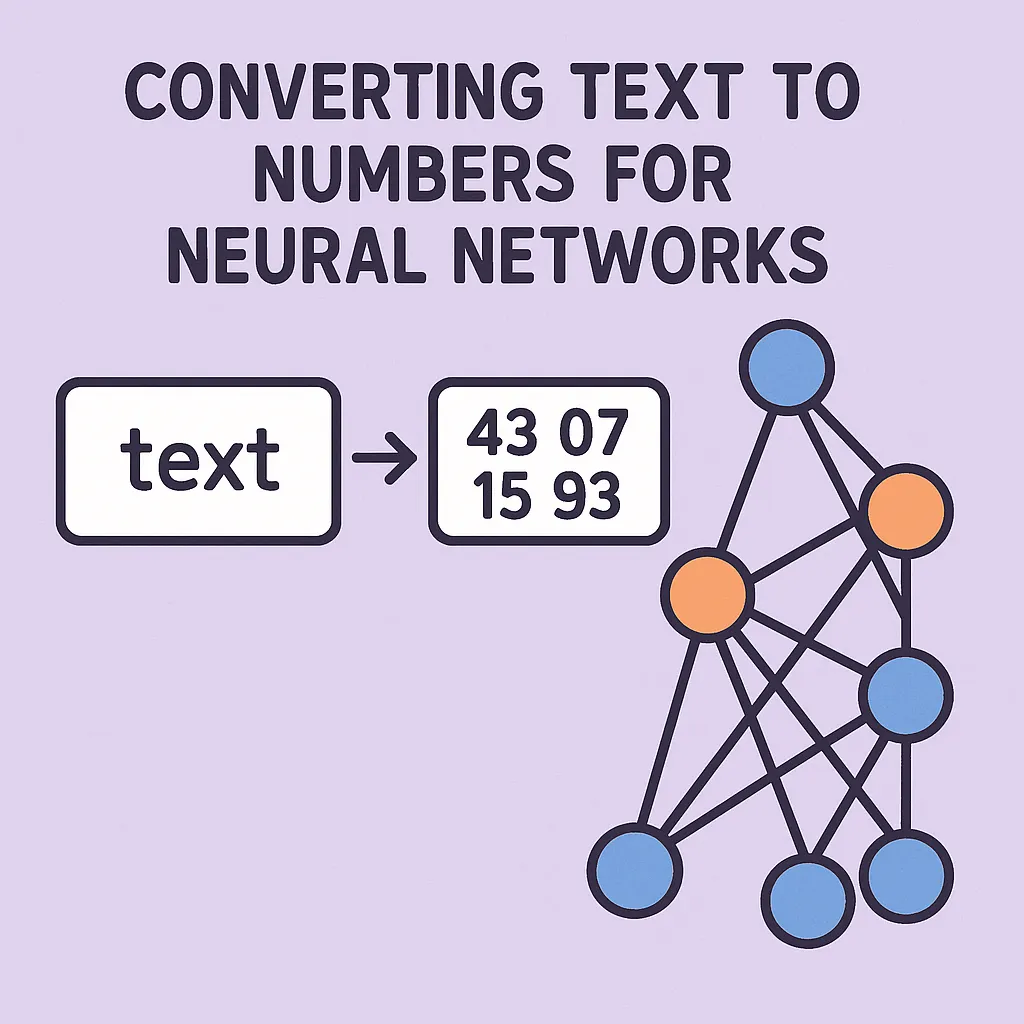
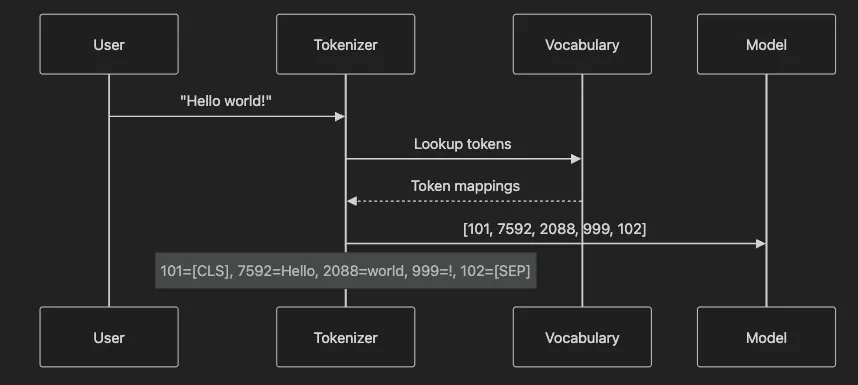
- Understand how tokenization converts text into numerical representations
- Compare three major tokenization algorithms: BPE, WordPiece, and Unigram
- Implement tokenization using Hugging Face’s transformers library
- Handle common edge cases in production systems
- Debug tokenization issues effectively
- Build custom tokenizers for specialized domains
- This is very hands-on article series, so be sure to clone the github repo, run the examples, and load the notebooks.
- Customer Support: A chatbot needs to distinguish between “can’t login” and “cannot log in”
- Financial Analysis: A system must recognize “Q4 2023” as one unit, not three
- Medical Records: “Myocardial infarction” must stay together to preserve meaning
- Misunderstood user intent
- Incorrect data extraction
- Higher computational costs
- Reduced model accuracy

- Whole words: “cat” → [“cat”]
- Subwords: “unhappy” → [“un”, “happy”]
- Characters: “hi” → [“h”, “i”]
from
 transformers
import
 AutoTokenizer
import
 logging
# Configure logging
logging.basicConfig(level=logging.INFO)
logger = logging.getLogger(__name__)
def

demonstrate_basic_tokenization
():

"""
    Shows how tokenization converts text to numbers.
    This example uses BERT's tokenizer to process a simple sentence.
    """

# Load BERT tokenizer
    tokenizer = AutoTokenizer.from_pretrained(
'bert-base-uncased'
)

# Sample text
    text =
"Tokenization converts text to numbers."

# Tokenize
    tokens = tokenizer.tokenize(text)
    token_ids = tokenizer.encode(text)

# Display results
    logger.info(
f"Original text:
{text}
"
)
    logger.info(
f"Tokens:
{tokens}
"
)
    logger.info(
f"Token IDs:
{token_ids}
"
)

# Show token-to-ID mapping

for
 token, token_id
in

zip
(tokens, token_ids[
1
:-
1
]):
# Skip special tokens
        logger.info(
f"  '
{token}
' →
{token_id}
"
)

return
 tokens, token_ids
# Run the demonstration
tokens, ids = demonstrate_basic_tokenization()
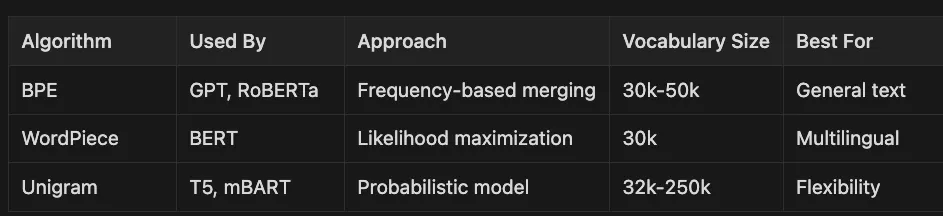
-
Used by: GPT, RoBERTa
-
Approach: Frequency-based merging
-
Vocabulary Size: 30k-50k
-
Best For: General text processing
-
Used by: BERT
-
Approach: Likelihood maximization
-
Vocabulary Size: 30k
-
Best For: Multilingual applications
-
Used by: T5, mBART
-
Approach: Probabilistic model
-
Vocabulary Size: 32k-250k
-
Best For: Flexibility in token selection
def

demonstrate_bpe_tokenization
():

"""
    Demonstrates BPE tokenization using RoBERTa.
    BPE handles unknown words by breaking them into known subwords.
    """
    tokenizer = AutoTokenizer.from_pretrained(
'roberta-base'
)

# Test words showing BPE behavior
    test_words = [

"tokenization"
,
# Common word

"pretokenization"
,
# Compound word

"cryptocurrency"
,
# Technical term

"antidisestablish"

# Rare word
    ]
    logger.info(
"=== BPE Tokenization (RoBERTa) ==="
)

for
 word
in
 test_words:
        tokens = tokenizer.tokenize(word)
        ids = tokenizer.encode(word, add_special_tokens=
False
)
        logger.info(
f"\\n'
{word}
':"
)
        logger.info(
f"  Tokens:
{tokens}
"
)
        logger.info(
f"  Count:
{
len
(tokens)}
"
)

# Show how BPE splits the word

if

len
(tokens) >
1
:
            logger.info(
f"  Split pattern:
{
' + '
.join(tokens)}
"
)

return
 tokenizer
def

demonstrate_wordpiece_tokenization
():

"""
    Shows WordPiece tokenization used by BERT.
    Note the ## prefix marking word continuations.
    """
    tokenizer = AutoTokenizer.from_pretrained(
'bert-base-uncased'
)

# Same test words for comparison
    test_words = [

"tokenization"
,

"pretokenization"
,

"cryptocurrency"
,

"antidisestablish"
    ]
    logger.info(
"\\n=== WordPiece Tokenization (BERT) ==="
)

for
 word
in
 test_words:
        tokens = tokenizer.tokenize(word)
        logger.info(
f"\\n'
{word}
':"
)
        logger.info(
f"  Tokens:
{tokens}
"
)

# Explain ## notation

if

any
(t.startswith(
'##'
)
for
 t
in
 tokens):
            logger.info(
"  Note: ## indicates continuation of previous token"
)

# Reconstruct word from pieces
            reconstructed = tokens[
0
]

for
 token
in
 tokens[
1
:]:
                reconstructed += token.replace(
'##'
,
''
)
            logger.info(
f"  Reconstructed:
{reconstructed}
"
)

return
 tokenizer
# requirements.txt
transformers
==
4.36
.
0
torch
==
2.1
.
0
tokenizers
==
0.15
.
0
datasets
==
2.16
.
0
class

TokenizationPipeline
:

"""
    Production-ready tokenization pipeline with error handling.
    Supports batch processing and various output formats.
    """

def

__init__
(
self, model_name=
'bert-base-uncased'
, max_length=
512
):

"""
        Initialize tokenizer with specified model.
        Parameters:
        -----------
        model_name : str
            Hugging Face model identifier
        max_length : int
            Maximum sequence length
        """
        self.tokenizer = AutoTokenizer.from_pretrained(model_name)
        self.max_length = max_length
        logger.info(
f"Initialized tokenizer:
{model_name}
"
)

def

tokenize_single
(
self, text, return_offsets=
False
):

"""
        Tokenize a single text string.
        Parameters:
        -----------
        text : str
            Input text to tokenize
        return_offsets : bool
            Whether to return character offset mappings
        Returns:
        --------
        dict : Tokenization results including input_ids, attention_mask
        """

if

not
 text:
            logger.warning(
"Empty text provided"
)
            text =
""

try
:
            encoding = self.tokenizer(
                text,
                truncation=
True
,
                max_length=self.max_length,
                padding=
'max_length'
,
                return_offsets_mapping=return_offsets,
                return_tensors=
'pt'
            )
            logger.info(
f"Tokenized
{
len
(text)}
 chars into
{encoding[
'input_ids'
].shape[
1
]}
 tokens"
)

return
 encoding

except
 Exception
as
 e:
            logger.error(
f"Tokenization failed:
{
str
(e)}
"
)

raise
def

tokenize_batch
(
self, texts, show_progress=
True
):

"""
    Efficiently tokenize multiple texts.
    Parameters:
    -----------
    texts : list of str
        Input texts to process
    show_progress : bool
        Display progress information
    Returns:
    --------
    dict : Batched tokenization results
    """

if

not
 texts:
        logger.warning(
"Empty text list provided"
)

return

None

# Clean texts
    texts = [text
if
 text
else

""

for
 text
in
 texts]

# Process in batches for memory efficiency
    batch_size =
32
    all_encodings = []

for
 i
in

range
(
0
,
len
(texts), batch_size):
        batch = texts[i:i + batch_size]

if
 show_progress:
            logger.info(
f"Processing batch
{i//batch_size +
1
}
/
{(
len
(texts)-
1
)//batch_size +
1
}
"
)
        encoding = self.tokenizer(
            batch,
            truncation=
True
,
            max_length=self.max_length,
            padding=
True
,
            return_tensors=
'pt'
        )
        all_encodings.append(encoding)

# Combine batches
    combined = {
        key: torch.cat([e[key]
for
 e
in
 all_encodings], dim=
0
)

for
 key
in
 all_encodings[
0
].keys()
    }
    logger.info(
f"Tokenized
{
len
(texts)}
 texts"
)

return
 combined
def

demonstrate_special_tokens
():

"""
    Shows how special tokens frame and separate sequences.
    Essential for tasks like question-answering and classification.
    """
    tokenizer = AutoTokenizer.from_pretrained(
'bert-base-uncased'
)

# Single sequence
    text1 =
"What is tokenization?"
    encoding1 = tokenizer(text1)
    tokens1 = tokenizer.convert_ids_to_tokens(encoding1[
'input_ids'
])
    logger.info(
"=== Special Tokens in Single Sequence ==="
)
    logger.info(
f"Text:
{text1}
"
)
    logger.info(
f"Tokens:
{tokens1}
"
)
    logger.info(
f"[CLS] at position 0: Marks sequence start"
)
    logger.info(
f"[SEP] at position
{
len
(tokens1)-
1
}
: Marks sequence end"
)

# Sequence pair (for QA tasks)
    question =
"What is tokenization?"
    context =
"Tokenization converts text into tokens."
    encoding2 = tokenizer(question, context)
    tokens2 = tokenizer.convert_ids_to_tokens(encoding2[
'input_ids'
])
    type_ids = encoding2[
'token_type_ids'
]
    logger.info(
"\\n=== Special Tokens in Sequence Pair ==="
)
    logger.info(
f"Question:
{question}
"
)
    logger.info(
f"Context:
{context}
"
)

# Find separator positions
    sep_positions = [i
for
 i, token
in

enumerate
(tokens2)
if
 token ==
'[SEP]'
]
    logger.info(
f"[SEP] positions:
{sep_positions}
"
)
    logger.info(
f"Question tokens: positions 1 to
{sep_positions[
0
]-
1
}
"
)
    logger.info(
f"Context tokens: positions
{sep_positions[
0
]+
1
}
 to
{sep_positions[
1
]-
1
}
"
)

return
 tokens1, tokens2
[CLS]: Classification token - Aggregates sequence meaning[SEP]: Separator token - Marks boundaries between sequences[PAD]: Padding token - Fills shorter sequences to match batch length[UNK]: Unknown token - Replaces out-of-vocabulary words[MASK]: Masking token - Used in masked language modeling
def

demonstrate_offset_mapping
():

"""
    Shows how offset mapping links tokens back to source text.
    Critical for named entity recognition and text highlighting.
    """
    tokenizer = AutoTokenizer.from_pretrained(
'bert-base-uncased'
)
    text =
"Apple Inc. was founded by Steve Jobs in Cupertino."
    encoding = tokenizer(
        text,
        return_offsets_mapping=
True
,
        add_special_tokens=
True
    )
    tokens = tokenizer.convert_ids_to_tokens(encoding[
'input_ids'
])
    offsets = encoding[
'offset_mapping'
]
    logger.info(
"=== Token to Character Mapping ==="
)
    logger.info(
f"Original:
{text}
\\n"
)

# Create visual alignment
    logger.info(
"Token → Original Text [Start:End]"
)
    logger.info(
"-"
 *
40
)

for
 token, (start, end)
in

zip
(tokens, offsets):

if
 start == end:
# Special token
            logger.info(
f"
{token:
12
}
 → [SPECIAL]"
)

else
:
            original = text[start:end]
            logger.info(
f"
{token:
12
}
 → '
{original}
' [
{start}
:
{end}
]"
)

# Demonstrate entity extraction
    entity_tokens = [
2
,
3
]
# "apple inc"
    logger.info(
f"\\nExtracting entity from tokens
{entity_tokens}
:"
)
    start_char = offsets[entity_tokens[
0
]][
0
]
    end_char = offsets[entity_tokens[-
1
]][
1
]
    entity = text[start_char:end_char]
    logger.info(
f"Extracted: '
{entity}
'"
)

return
 encoding
- Preserves exact character positions
- Enables highlighting in source text
- Supports entity extraction
- Maintains alignment through tokenization
def

benchmark_tokenization_methods
():

"""
    Compares performance of different tokenization approaches.
    Shows impact of batching and fast tokenizers.
    """

import
 time

# Create test corpus
    texts = [
"This is a sample sentence for benchmarking."
] *
1000

# Method 1: Individual tokenization
    tokenizer_slow = AutoTokenizer.from_pretrained(
'bert-base-uncased'
, use_fast=
False
)
    start = time.time()

for
 text
in
 texts:
        _ = tokenizer_slow(text)
    individual_time = time.time() - start

# Method 2: Batch tokenization
    start = time.time()
    _ = tokenizer_slow(texts, padding=
True
, truncation=
True
)
    batch_time = time.time() - start

# Method 3: Fast tokenizer
    tokenizer_fast = AutoTokenizer.from_pretrained(
'bert-base-uncased'
, use_fast=
True
)
    start = time.time()
    _ = tokenizer_fast(texts, padding=
True
, truncation=
True
)
    fast_time = time.time() - start
    logger.info(
"=== Performance Comparison ==="
)
    logger.info(
f"Individual processing:
{individual_time:
.2
f}
s"
)
    logger.info(
f"Batch processing:
{batch_time:
.2
f}
s (
{individual_time/batch_time:
.1
f}
x faster)"
)
    logger.info(
f"Fast tokenizer:
{fast_time:
.2
f}
s (
{batch_time/fast_time:
.1
f}
x faster than batch)"
)

return
 {

'individual'
: individual_time,

'batch'
: batch_time,

'fast'
: fast_time
    }
- Use Fast Tokenizers: Rust-based implementation offers 5–10x speedup.
- Batch Processing: Reduces overhead significantly.
- Precompute When Possible: Cache tokenized results.
- Optimize Padding: Use dynamic padding to reduce wasted computation.
def

detect_tokenizer_mismatch
():

"""
    Demonstrates problems from using wrong tokenizer with model.
    Shows how to verify compatibility.
    """

from
 transformers
import
 AutoModel

# Intentional mismatch
    tokenizer = AutoTokenizer.from_pretrained(
'bert-base-uncased'
)
    model = AutoModel.from_pretrained(
'roberta-base'
)
    text =
"This demonstrates tokenizer mismatch."

try
:
        inputs = tokenizer(text, return_tensors=
'pt'
)
        outputs = model(**inputs)
        logger.warning(
"Model processed mismatched inputs - results unreliable!"
)

except
 Exception
as
 e:
        logger.error(
f"Mismatch error:
{e}
"
)

# Correct approach
    logger.info(
"\\n=== Correct Matching ==="
)
    model_name =
'roberta-base'
    tokenizer = AutoTokenizer.from_pretrained(model_name)
    model = AutoModel.from_pretrained(model_name)
    inputs = tokenizer(text, return_tensors=
'pt'
)
    outputs = model(**inputs)
    logger.info(
f"Success! Output shape:
{outputs.last_hidden_state.shape}
"
)
def

handle_long_documents
():

"""
    Strategies for documents exceeding token limits.
    Shows truncation and sliding window approaches.
    """
    tokenizer = AutoTokenizer.from_pretrained(
'bert-base-uncased'
)
    max_length =
512

# Create long document
    long_doc =
" "
.join([
"This is a sentence."
] *
200
)

# Strategy 1: Simple truncation
    truncated = tokenizer(
        long_doc,
        max_length=max_length,
        truncation=
True
,
        return_tensors=
'pt'
    )
    logger.info(
f"Document length:
{
len
(long_doc)}
 chars"
)
    logger.info(
f"Truncated to:
{truncated[
'input_ids'
].shape[
1
]}
 tokens"
)

# Strategy 2: Sliding window
    stride =
256
    chunks = []
    tokens = tokenizer.tokenize(long_doc)

for
 i
in

range
(
0
,
len
(tokens), stride):
        chunk = tokens[i:i + max_length -
2
]
# Reserve space for special tokens
        chunk_ids = tokenizer.convert_tokens_to_ids(chunk)
        chunk_ids = [tokenizer.cls_token_id] + chunk_ids + [tokenizer.sep_token_id]
        chunks.append(chunk_ids)
    logger.info(
f"\\nSliding window created
{
len
(chunks)}
 chunks"
)
    logger.info(
f"Overlap:
{max_length - stride}
 tokens between chunks"
)

return
 chunks
- Truncation: Fast but loses information
- Sliding Window: Preserves all content with overlap
- Hierarchical: Process sections separately then combine
- Summarization: Reduce content before tokenization
class

TokenizationDebugger
:

"""
    Comprehensive debugging tools for tokenization issues.
    """

def

__init__
(
self, tokenizer
):
        self.tokenizer = tokenizer

def

analyze_text
(
self, text
):

"""
        Detailed analysis of tokenization results.
        Parameters:
        -----------
        text : str
            Text to analyze
        """
        logger.info(
f"\\n=== Analyzing: '
{text}
' ==="
)

# Basic tokenization
        tokens = self.tokenizer.tokenize(text)
        token_ids = self.tokenizer.encode(text)

# Get special token info
        special_tokens = {

'PAD'
: self.tokenizer.pad_token_id,

'UNK'
: self.tokenizer.unk_token_id,

'CLS'
: self.tokenizer.cls_token_id,

'SEP'
: self.tokenizer.sep_token_id
        }

# Analysis results
        logger.info(
f"Character count:
{
len
(text)}
"
)
        logger.info(
f"Token count:
{
len
(tokens)}
"
)
        logger.info(
f"Compression ratio:
{
len
(text)/
len
(tokens):
.2
f}
 chars/token"
)

# Check for unknown tokens
        unk_count = tokens.count(self.tokenizer.unk_token)

if
 unk_count >
0
:
            logger.warning(
f"Found
{unk_count}
 unknown tokens!"
)
            unk_positions = [i
for
 i, t
in

enumerate
(tokens)
if
 t == self.tokenizer.unk_token]
            logger.warning(
f"Unknown token positions:
{unk_positions}
"
)

# Display token breakdown
        logger.info(
"\\nToken Breakdown:"
)

for
 i, (token, token_id)
in

enumerate
(
zip
(tokens, token_ids[
1
:-
1
])):
            special =
""

for
 name, special_id
in
 special_tokens.items():

if
 token_id == special_id:
                    special =
f" [
{name}
]"
            logger.info(
f"
{i}
: '
{token}
' →
{token_id}
{special}
"
)

return
 {

'tokens'
: tokens,

'token_ids'
: token_ids,

'char_count'
:
len
(text),

'token_count'
:
len
(tokens),

'unk_count'
: unk_count
        }

def

compare_tokenizers
(
self, text, tokenizer_names
):

"""
        Compare how different tokenizers handle the same text.
        """
        results = {}
        logger.info(
f"\\n=== Comparing Tokenizers on: '
{text}
' ==="
)

for
 name
in
 tokenizer_names:
            tokenizer = AutoTokenizer.from_pretrained(name)
            tokens = tokenizer.tokenize(text)
            results[name] = {

'tokens'
: tokens,

'count'
:
len
(tokens)
            }
            logger.info(
f"\\n
{name}
:"
)
            logger.info(
f"  Tokens:
{tokens}
"
)
            logger.info(
f"  Count:
{
len
(tokens)}
"
)

return
 results
- [ ] Verify tokenizer matches model
- [ ] Check for excessive unknown tokens
- [ ] Monitor sequence lengths
- [ ] Validate special token handling
- [ ] Test edge cases (empty strings, special characters)
- [ ] Compare against expected output
def

train_custom_medical_tokenizer
():

"""
    Trains a tokenizer optimized for medical text.
    Reduces fragmentation of medical terms.
    """

from
 tokenizers
import
 Tokenizer, models, trainers, pre_tokenizers

# Medical corpus (in practice, use larger dataset)
    medical_texts = [

"Patient presents with acute myocardial infarction."
,

"Diagnosis: Type 2 diabetes mellitus with neuropathy."
,

"Prescribed metformin 500mg twice daily."
,

"MRI shows L4-L5 disc herniation with radiculopathy."
,

"Post-operative recovery following cholecystectomy."
,

"Chronic obstructive pulmonary disease exacerbation."
,

"Administered epinephrine for anaphylactic reaction."
,

"ECG reveals atrial fibrillation with rapid ventricular response."
    ]

# Initialize BPE tokenizer
    tokenizer = Tokenizer(models.BPE())
    tokenizer.pre_tokenizer = pre_tokenizers.Whitespace()

# Configure trainer
    trainer = trainers.BpeTrainer(
        vocab_size=
10000
,
        special_tokens=[
"[PAD]"
,
"[UNK]"
,
"[CLS]"
,
"[SEP]"
,
"[MASK]"
],
        min_frequency=
2
    )

# Train on medical corpus
    tokenizer.train_from_iterator(medical_texts, trainer=trainer)

# Test on medical terms
    test_terms = [

"myocardial infarction"
,

"cholecystectomy"
,

"pneumonia"
,

"diabetes mellitus"
    ]
    logger.info(
"=== Custom Medical Tokenizer Results ==="
)

for
 term
in
 test_terms:
        encoding = tokenizer.encode(term)
        logger.info(
f"\\n'
{term}
':"
)
        logger.info(
f"  Tokens:
{encoding.tokens}
"
)
        logger.info(
f"  IDs:
{encoding.ids}
"
)

return
 tokenizer
- Better Coverage: Keeps domain terms intact
- Smaller Vocabulary: Focused on relevant terms
- Improved Accuracy: Better representation of domain language
- Reduced Tokens: More efficient processing
def

compare_medical_tokenization
():

"""
    Shows advantage of domain-specific tokenization.
    """

# Generic tokenizer
    generic = AutoTokenizer.from_pretrained(
'bert-base-uncased'
)

# Medical terms that generic tokenizers fragment
    medical_terms = [

"pneumonoultramicroscopicsilicovolcanoconiosis"
,

"electroencephalography"
,

"thrombocytopenia"
,

"gastroesophageal"
    ]
    logger.info(
"=== Generic vs Domain Tokenization ==="
)

for
 term
in
 medical_terms:
        generic_tokens = generic.tokenize(term)
        logger.info(
f"\\n'
{term}
':"
)
        logger.info(
f"  Generic:
{generic_tokens}
 (
{
len
(generic_tokens)}
 tokens)"
)

# Custom tokenizer would show fewer tokens

# Calculate efficiency loss

if

len
(generic_tokens) >
3
:
            logger.warning(
f"  ⚠️ Excessive fragmentation:
{
len
(generic_tokens)}
 pieces"
)
def

handle_edge_cases
():

"""
    Demonstrates handling of problematic text inputs.
    """
    tokenizer = AutoTokenizer.from_pretrained(
'bert-base-uncased'
)
    edge_cases = {

"Empty string"
:
""
,

"Only spaces"
:
"     "
,

"Mixed languages"
:
"Hello 世界 Bonjour"
,

"Emojis"
:
"Great job! 👍🎉"
,

"Code"
:
"def func(x): return x**2"
,

"URLs"
:
"Visit <https://example.com/page>"
,

"Special chars"
:
"Price: $99.99 (↑15%)"
,

"Long word"
:
"a"
 *
100
    }
    logger.info(
"=== Edge Case Handling ==="
)

for
 case_name, text
in
 edge_cases.items():
        logger.info(
f"\\n
{case_name}
: '
{text[:
50
]}
{
'...'

if

len
(text) >
50

else

''
}
'"
)

try
:
            tokens = tokenizer.tokenize(text)
            encoding = tokenizer(text, add_special_tokens=
True
)
            logger.info(
f"  Success:
{
len
(tokens)}
 tokens"
)

# Check for issues

if

not
 tokens
and
 text:
                logger.warning(
"  ⚠️ No tokens produced from non-empty text"
)

if
 tokenizer.unk_token
in
 tokens:
                unk_count = tokens.count(tokenizer.unk_token)
                logger.warning(
f"  ⚠️ Contains
{unk_count}
 unknown tokens"
)

except
 Exception
as
 e:
            logger.error(
f"  ❌ Error:
{
str
(e)}
"
)
-
Empty/Whitespace: Return empty token list or pad token
-
Mixed Scripts: May produce unknown tokens
-
Emojis: Handled differently by each tokenizer
-
URLs/Emails: Often split incorrectly
-
Very Long Words: May exceed token limits
-
Tokenization bridges text and neural networks — It’s the critical first step that determines model performance
-
Algorithm choice matters — BPE, WordPiece, and Unigram each have strengths for different applications
-
Always match tokenizer and model — Mismatches cause silent failures and poor results
-
Special tokens provide structure — [CLS], [SEP], and others help models understand sequences
-
Production requires optimization — Use fast tokenizers and batch processing for efficiency
- [ ] Use the same tokenizer for training and inference
- [ ] Handle edge cases gracefully (empty strings, special characters)
- [ ] Implement proper error handling and logging
- [ ] Optimize for your production constraints (speed vs accuracy)
- [ ] Test with real-world data, including edge cases
- [ ] Monitor tokenization metrics (unknown token rate, sequence lengths)
- [ ] Consider domain-specific tokenizers for specialized applications
# Standard setup
from
 transformers
import
 AutoTokenizer
# Initialize tokenizer
tokenizer = AutoTokenizer.from_pretrained(
'bert-base-uncased'
)
# Basic usage
tokens = tokenizer.tokenize(
"Hello world"
)
encoding = tokenizer(
"Hello world"
, return_tensors=
'pt'
)
# Production usage
encoding = tokenizer(
    texts,
# List of strings
    padding=
True
,
# Pad to same length
    truncation=
True
,
# Truncate to max_length
    max_length=
512
,
# Maximum sequence length
    return_tensors=
'pt'
,
# Return PyTorch tensors
    return_attention_mask=
True
,
# Return attention masks
    return_offsets_mapping=
True

# For NER tasks
)
# Access results
input_ids = encoding[
'input_ids'
]
attention_mask = encoding[
'attention_mask'
]
-
Experiment with different tokenizers on your data
-
Measure tokenization metrics for your use case
-
Build custom tokenizers if needed
-
Integrate with your model pipeline
-
Monitor production performance
-
Hugging Faces Transformers and the AI Revolution (Article 1)
-
Hugging Faces: Why Language is Hard for AI? How Transformers Changed that (Article 2)
-
Hands-On with Hugging Face: Building Your AI Workspace (Article 3)
-
Inside the Transformer: Architecture and Attention Demystified (Article 4)
- Python 3.12 (managed via pyenv).
- Poetry for dependency management.
- Go Task for build automation.
- API keys for any required services (see .env.example).
- Clone this repository:
git
clone
 [email protected]:RichardHightower/art_hug_05.git
cd
 art_hug_05
task setup
.
├── src/
│   ├── __init__.py
│   ├── config.py
# Configuration and utilities
│   ├── main.py
# Entry point with all examples
│   ├── tokenization_examples.py
# Basic tokenization examples
│   ├── tokenization_algorithms.py
# BPE, WordPiece, and Unigram comparison
│   ├── custom_tokenization.py
# Training custom tokenizers
│   ├── tokenization_debugging.py
# Debugging and visualization tools
│   ├── multimodal_tokenization.py
# Image and CLIP tokenization
│   ├── advanced_tokenization.py
# Advanced tokenization techniques
│   ├── model_loading.py
# Model loading examples
│   └── utils.py
# Utility functions
├── tests/
│   └── test_examples.py
# Unit tests
├── .env.example
# Environment template
├── Taskfile.yml
# Task automation
└── pyproject.toml
# Poetry configuration
task run
task run-tokenization
# Run basic tokenization examples
task run-algorithms
# Run tokenization algorithms comparison
task run-custom
# Run custom tokenizer training
task run-debugging
# Run tokenization debugging tools
task run-multimodal
# Run multimodal tokenization
task run-advanced
# Run advanced tokenization techniques
task run-model-loading
# Run model loading examples
task notebook
-
Create interactive notebooks for experimentation
-
Run code cells step by step
-
Visualize tokenization results
-
Test different tokenizers interactively
-
task setup- Set up Python environment and install dependencies -
task run- Run all examples -
task run-tokenization- Run basic tokenization examples -
task run-algorithms- Run algorithm comparison examples -
task run-custom- Run custom tokenizer training -
task run-debugging- Run debugging and visualization tools -
task run-multimodal- Run multimodal tokenization examples -
task run-advanced- Run advanced tokenization techniques -
task run-model-loading- Run model loading examples -
task notebook- Launch Jupyter notebook server -
task test- Run unit tests -
task format- Format code with Black and Ruff -
task lint- Run linting checks (Black, Ruff, mypy) -
task clean- Clean up generated files
- Using Homebrew (Recommended):
brew install pyenv
pyenv install
3.12
.0
 pyenv
global

3.12
.0
python
--version
- Download the installer from Python.org
- Run the installer and ensure you check “Add Python to PATH”
- Open Command Prompt and verify installation:
python
--version
pip install pyenv-win
- Install using the official installer:
curl -sSL https://install.python-poetry.org | python3 -
echo

'export PATH="$HOME/.poetry/bin:$PATH"'
 >> ~/.zshrc
source
 ~/.zshrc
- Install using PowerShell:
(Invoke-WebRequest -
Uri
 https:
//install.python-poetry.org -UseBasicParsing).Content | python -
poetry
--version
- Using Homebrew:
brew install
go
-task/tap/
go
-task
task
--version
- Using Scoop:
scoop install
go
-task
choco install
go
-task
task
--version
- Python not found: Ensure Python is correctly added to your PATH variable
- Poetry commands not working: Restart your terminal or add the Poetry bin directory to your PATH
- Task not found: Verify Task installation and PATH settings
- Dependency errors: Run
poetry updateto resolve dependency conflicts
% task run-medical
task:
 [run-medical] poetry run python src/medical_tokenization_demo.py
INFO
:__main__
:
🏥 Medical Tokenization Examples
INFO
:__main__
:==================================================
INFO
:__main__
:
=== Generic vs Domain Tokenization ===
INFO
:__main__
:
'pneumonoultramicroscopicsilicovolcanoconiosis'
:
INFO
:__main__
:
Generic:
 [
'p'
,
'##ne'
,
'##um'
,
'##ono'
,
'##ult'
,
'##ram'
,
'##ic'
,
'##ros'
,
'##copic'
,
'##sil'
,
'##ico'
,
'##vo'
,
'##lc'
,
'##ano'
,
'##con'
,
'##ios'
,
'##is'
] (
17
 tokens)
WARNING
:__main__
:  ⚠️ Excessive
fragmentation:

17
 pieces
INFO
:__main__
:
'electroencephalography'
:
INFO
:__main__
:
Generic:
 [
'electro'
,
'##ence'
,
'##pha'
,
'##log'
,
'##raphy'
] (
5
 tokens)
WARNING
:__main__
:  ⚠️ Excessive
fragmentation:

5
 pieces
INFO
:__main__
:
'thrombocytopenia'
:
INFO
:__main__
:
Generic:
 [
'th'
,
'##rom'
,
'##bo'
,
'##cy'
,
'##top'
,
'##enia'
] (
6
 tokens)
WARNING
:__main__
:  ⚠️ Excessive
fragmentation:

6
 pieces
INFO
:__main__
:
'gastroesophageal'
:
INFO
:__main__
:
Generic:
 [
'gas'
,
'##tro'
,
'##es'
,
'##op'
,
'##ha'
,
'##ge'
,
'##al'
] (
7
 tokens)
WARNING
:__main__
:  ⚠️ Excessive
fragmentation:

7
 pieces
INFO
:__main__
:
=== MedCPT Biomedical Text Encoder Example ===
INFO
:__main__
:Loading
 MedCPT Article Encoder...
INFO
:__main__
:
Embedding
shape:
 torch.Size([
3
,
768
])
INFO
:__main__
:Embedding

dimension:

768
INFO
:__main__
:
=== MedCPT Tokenization of Medical Terms ===
INFO
:__main__
:
'diabetes insipidus'
:
INFO
:__main__
:
Tokens:
 [
'diabetes'
,
'ins'
,
'##ip'
,
'##idus'
] (
4
 tokens)
INFO
:__main__
:
'vasopressinergic neurons'
:
INFO
:__main__
:
Tokens:
 [
'vasopressin'
,
'##ergic'
,
'neurons'
] (
3
 tokens)
INFO
:__main__
:
'hypothalamic destruction'
:
INFO
:__main__
:
Tokens:
 [
'hypothalamic'
,
'destruction'
] (
2
 tokens)
INFO
:__main__
:
'polyuria and polydipsia'
:
INFO
:__main__
:
Tokens:
 [
'poly'
,
'##uria'
,
'and'
,
'polyd'
,
'##ips'
,
'##ia'
] (
6
 tokens)
INFO
:__main__
:
=== Comparison with Generic
BERT
 ===
INFO
:__main__
:
'diabetes insipidus'
:
INFO
:__main__
:
MedCPT:

4
 tokens
INFO
:__main__
:  Generic
BERT
:
5
 tokens
INFO
:__main__
:  ✅ MedCPT is
1
 tokens more efficient
INFO
:__main__
:
'vasopressinergic neurons'
:
INFO
:__main__
:
MedCPT:

3
 tokens
INFO
:__main__
:  Generic
BERT
:
6
 tokens
INFO
:__main__
:  ✅ MedCPT is
3
 tokens more efficient
INFO
:__main__
:
'hypothalamic destruction'
:
INFO
:__main__
:
MedCPT:

2
 tokens
INFO
:__main__
:  Generic
BERT
:
6
 tokens
INFO
:__main__
:  ✅ MedCPT is
4
 tokens more efficient
INFO
:__main__
:
'polyuria and polydipsia'
:
INFO
:__main__
:
MedCPT:

6
 tokens
INFO
:__main__
:  Generic
BERT
:
7
 tokens
INFO
:__main__
:  ✅ MedCPT is
1
 tokens more efficient
INFO
:__main__
:
✅ Medical tokenization examples completed!
"""
Medical Tokenization Demo
Standalone script to run medical tokenization examples
"""
from
 transformers
import
 AutoTokenizer, AutoModel
import
 torch
import
 logging
# Configure logging
logging.basicConfig(level=logging.INFO)
logger = logging.getLogger(__name__)
def

compare_medical_tokenization
():

"""Shows advantage of domain-specific tokenization."""

# Generic tokenizer
    generic = AutoTokenizer.from_pretrained(
'bert-base-uncased'
)

# Medical terms that generic tokenizers fragment
    medical_terms = [

"pneumonoultramicroscopicsilicovolcanoconiosis"
,

"electroencephalography"
,

"thrombocytopenia"
,

"gastroesophageal"
    ]
    logger.info(
"\n=== Generic vs Domain Tokenization ==="
)

for
 term
in
 medical_terms:
        generic_tokens = generic.tokenize(term)
        logger.info(
f"\n'
{term}
':"
)
        logger.info(
f"  Generic:
{generic_tokens}
 (
{
len
(generic_tokens)}
 tokens)"
)

# Custom tokenizer would show fewer tokens

# Calculate efficiency loss

if

len
(generic_tokens) >
3
:
            logger.warning(
f"  ⚠️ Excessive fragmentation:
{
len
(generic_tokens)}
 pieces"
)
def

medcpt_encoder_example
():

"""Demonstrates MedCPT encoder for biomedical text embeddings."""
    logger.info(
"\n=== MedCPT Biomedical Text Encoder Example ==="
)


try
:

# Load MedCPT Article Encoder
        logger.info(
"Loading MedCPT Article Encoder..."
)
        model = AutoModel.from_pretrained(
"ncbi/MedCPT-Article-Encoder"
)
        tokenizer = AutoTokenizer.from_pretrained(
"ncbi/MedCPT-Article-Encoder"
)


# Example medical articles
        articles = [
            [

"Diagnosis and Management of Central Diabetes Insipidus in Adults"
,

"Central diabetes insipidus (CDI) is a clinical syndrome which results from loss or impaired function of vasopressinergic neurons in the hypothalamus/posterior pituitary, resulting in impaired synthesis and/or secretion of arginine vasopressin (AVP)."
,
            ],
            [

"Adipsic diabetes insipidus"
,

"Adipsic diabetes insipidus (ADI) is a rare but devastating disorder of water balance with significant associated morbidity and mortality. Most patients develop the disease as a result of hypothalamic destruction from a variety of underlying etiologies."
,
            ],
            [

"Nephrogenic diabetes insipidus: a comprehensive overview"
,

"Nephrogenic diabetes insipidus (NDI) is characterized by the inability to concentrate urine that results in polyuria and polydipsia, despite having normal or elevated plasma concentrations of arginine vasopressin (AVP)."
,
            ],
        ]


# Format articles for the model
        formatted_articles = [
f"
{title}
.
{abstract}
"

for
 title, abstract
in
 articles]


with
 torch.no_grad():

# Tokenize the articles
            encoded = tokenizer(
                formatted_articles,
                truncation=
True
,
                padding=
True
,
                return_tensors=
'pt'
,
                max_length=
512
,
            )


# Encode the articles
            embeds = model(**encoded).last_hidden_state[:,
0
, :]

            logger.info(
f"\nEmbedding shape:
{embeds.shape}
"
)
            logger.info(
f"Embedding dimension:
{embeds.shape[
1
]}
"
)


# Show tokenization comparison for medical terms
            logger.info(
"\n=== MedCPT Tokenization of Medical Terms ==="
)

            medical_terms = [

"diabetes insipidus"
,

"vasopressinergic neurons"
,

"hypothalamic destruction"
,

"polyuria and polydipsia"
            ]


for
 term
in
 medical_terms:
                tokens = tokenizer.tokenize(term)
                logger.info(
f"\n'
{term}
':"
)
                logger.info(
f"  Tokens:
{tokens}
 (
{
len
(tokens)}
 tokens)"
)


# Compare with generic BERT tokenizer
            generic = AutoTokenizer.from_pretrained(
'bert-base-uncased'
)
            logger.info(
"\n=== Comparison with Generic BERT ==="
)


for
 term
in
 medical_terms:
                medcpt_tokens = tokenizer.tokenize(term)
                generic_tokens = generic.tokenize(term)

                logger.info(
f"\n'
{term}
':"
)
                logger.info(
f"  MedCPT:
{
len
(medcpt_tokens)}
 tokens"
)
                logger.info(
f"  Generic BERT:
{
len
(generic_tokens)}
 tokens"
)


if

len
(generic_tokens) >
len
(medcpt_tokens):
                    logger.info(
f"  ✅ MedCPT is
{
len
(generic_tokens) -
len
(medcpt_tokens)}
 tokens more efficient"
)


except
 Exception
as
 e:
        logger.error(
f"Error loading MedCPT model:
{e}
"
)
        logger.info(
"Install with: pip install transformers torch"
)
        logger.info(
"Note: MedCPT model requires downloading ~440MB"
)
def

main
():

"""Run medical tokenization examples."""
    logger.info(
"🏥 Medical Tokenization Examples"
)
    logger.info(
"="
 *
50
)


# Run generic vs domain comparison
    compare_medical_tokenization()


# Run MedCPT encoder example
    medcpt_encoder_example()

    logger.info(
"\n✅ Medical tokenization examples completed!"
)
if
 __name__ ==
"__main__"
:
    main()
-
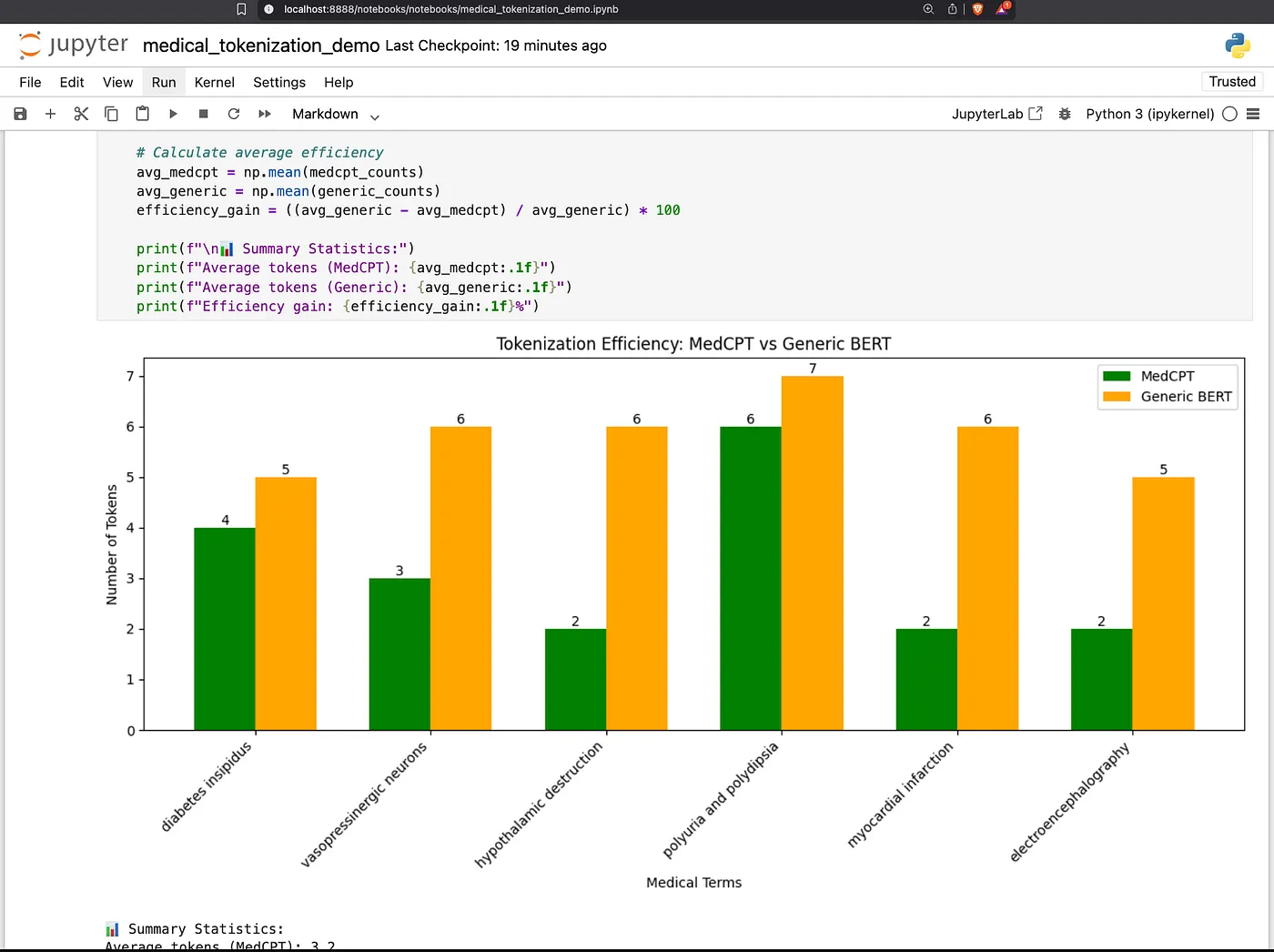
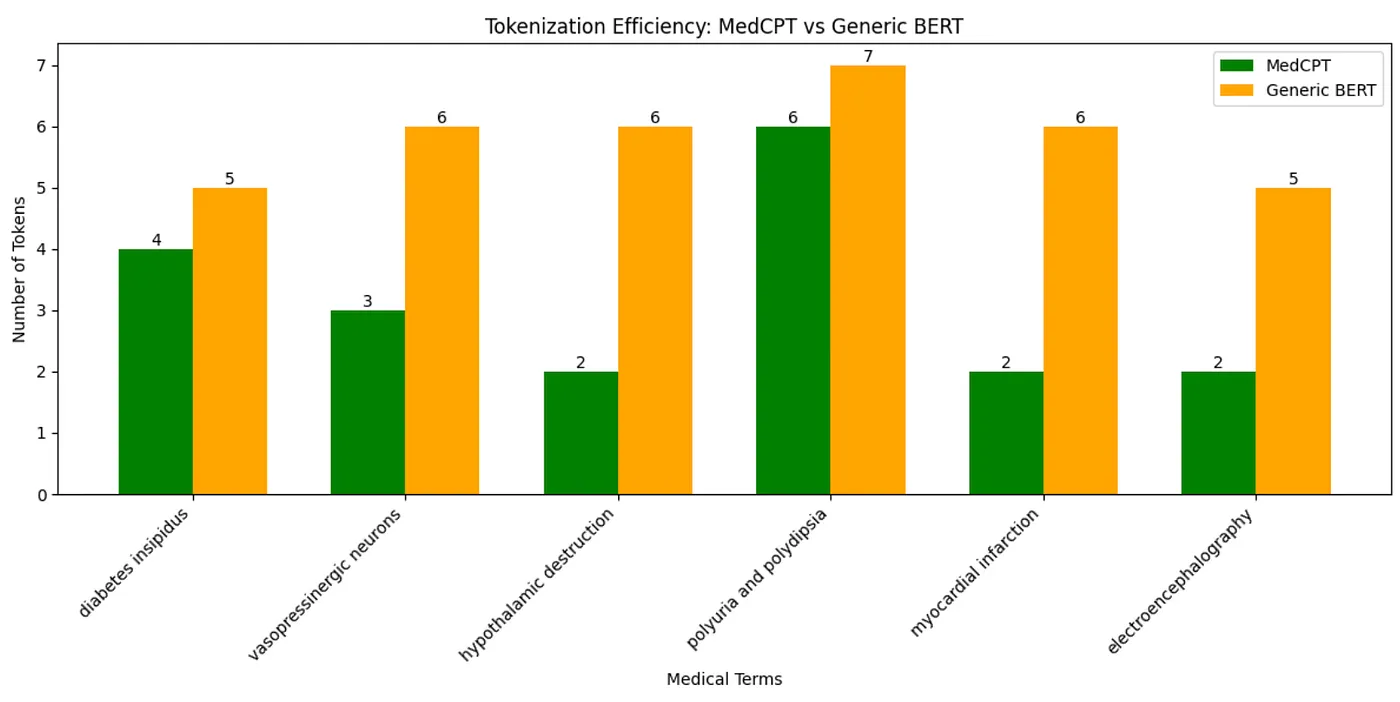
Generic vs. Domain Tokenization Comparison: Shows how a standard tokenizer breaks down complex medical terms into many small pieces (tokens)
-
MedCPT Encoder Example: Demonstrates a specialized medical text encoder model that better understands medical terminology
-
Comparison Between Tokenizers: Directly compares how many tokens are needed for the same medical phrases using both tokenizers
-
Fewer tokens means more efficient processing (saves time and computing resources).
-
Better tokenization leads to better understanding of the text’s meaning.
-
Specialized models can handle longer medical texts within token limits.
-
A general-purpose one called “bert-base-uncased” that works for everyday language.
-
A specialized medical one called “MedCPT-Article-Encoder” trained specifically on medical texts.