Tokenization: The Gateway to Transformer Understanding
Every journey into transformer models begins with a critical step: converting human language into a format machines can understand
Originally published on Medium.
Every journey into transformer models begins with a critical step: converting human language into a format machines can understand
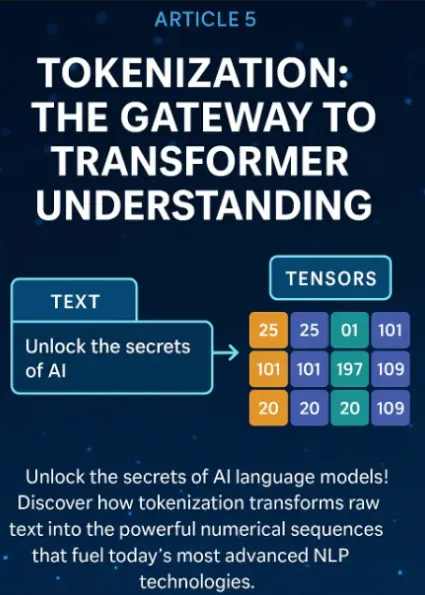
- How tokenization transforms text into tokens and numerical IDs
- The strengths and weaknesses of major tokenization algorithms (BPE, WordPiece, Unigram)
- Practical implementation using Hugging Face’s modern tokenization tools
- Techniques for multilingual and domain-specific tokenization
- How to customize tokenizers for specialized vocabularies
- Debugging strategies to ensure reliable tokenization
- Recent developments in token efficiency and multimodal approaches
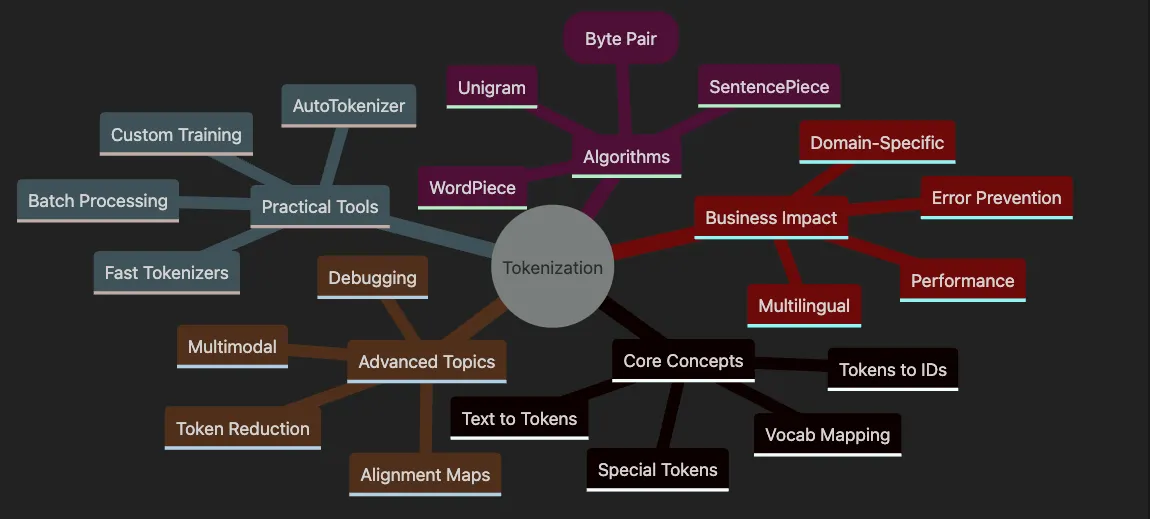
- Covers Core Concepts including text splitting, ID mapping, special tokens, and vocabularies.
- Explores Algorithms like BPE, WordPiece, Unigram, and SentencePiece.
- Details Practical Tools with AutoTokenizer, fast implementations, and batch processing.
- Highlights Advanced Topics including multimodal, alignment, and debugging.
- Shows Business Impact on multilingual support, domains, and performance.
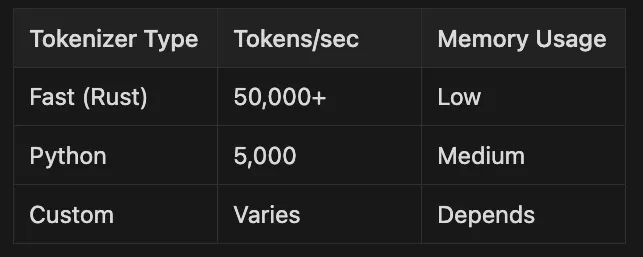
from
 transformers
import
 AutoTokenizer
# Load a pre-trained fast tokenizer (BERT)
tokenizer = AutoTokenizer.from_pretrained(
'bert-base-uncased'
)
text =
"Transformers are revolutionizing AI!"
# Tokenize and prepare model inputs in one step
encoded = tokenizer(text)
print
(
'Input IDs:'
, encoded[
'input_ids'
])
print
(
'Tokens:'
, tokenizer.convert_ids_to_tokens(encoded[
'input_ids'
]))
# For direct tensor output (e.g., for PyTorch models):
tensor_inputs = tokenizer(text, return_tensors=
"pt"
)
print
(
'Tensor Input IDs:'
, tensor_inputs[
'input_ids'
])
- Load the Tokenizer: We use Hugging Face’s
AutoTokenizerto load a pre-trained BERT tokenizer. By default, this loads a highly efficient 'fast' tokenizer compatible with modern models. - Tokenize and Encode: Calling
tokenizer(text)splits the sentence into tokens, maps them to unique IDs, and returns everything needed for model input. This unified interface handles punctuation, casing, and special tokens automatically. - Tensor Output: For deep learning frameworks like PyTorch or TensorFlow, use
return_tensors="pt"(or"tf") to get tensors directly—essential for training and inference workflows.
- Tokenization forms the essential first step for transformer models
- Models need numbers, not words — tokenization bridges this gap
- Use modern, fast tokenizers and the callable API for robust, scalable workflows
- The right strategy impacts accuracy, coverage, and business outcomes
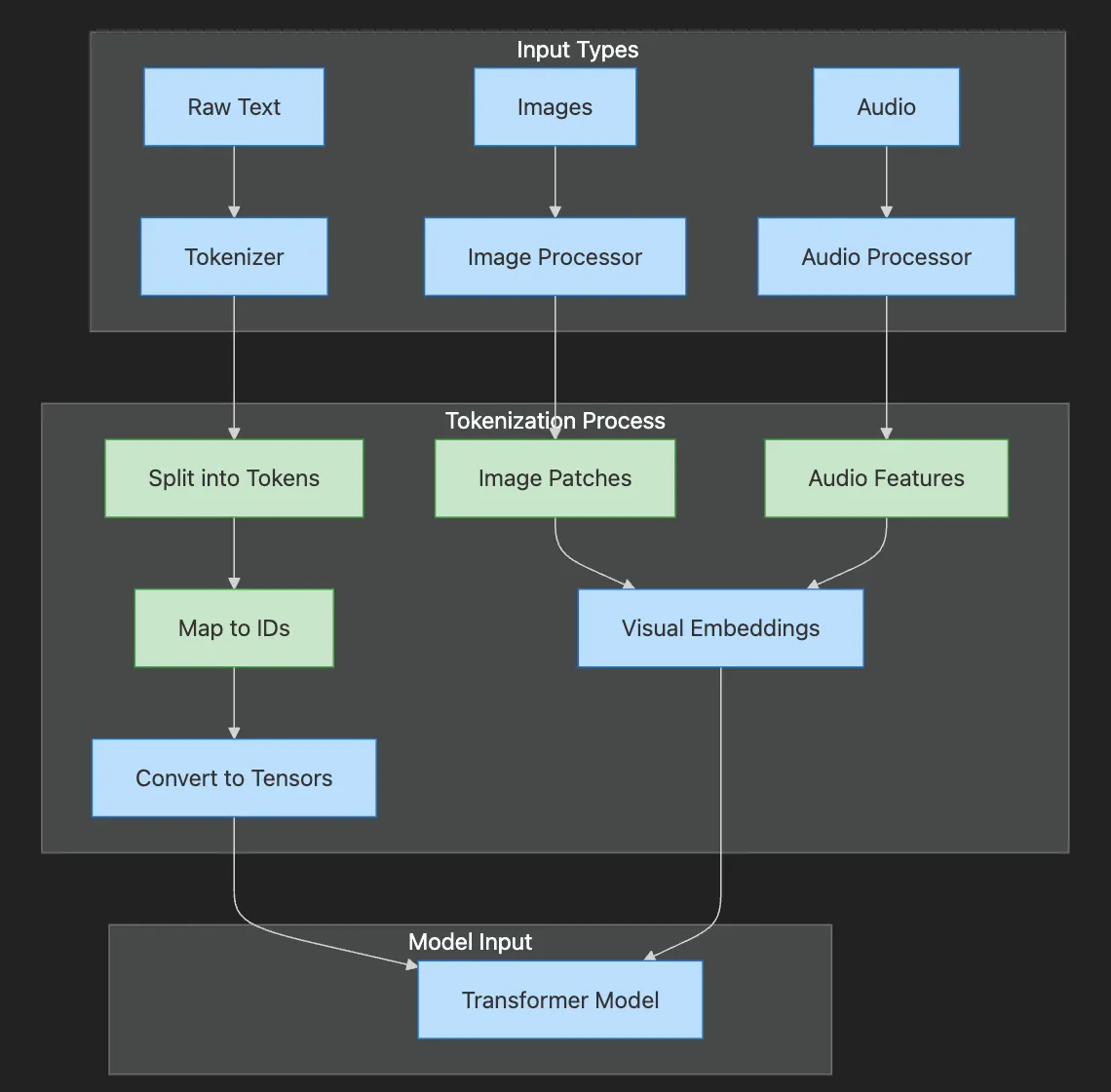
- Input Types shows raw text, images, and audio entering respective processors
- Tokenization Process illustrates splitting, mapping, and conversion steps
- Text becomes tokens → IDs → tensors
- Images become patches → embeddings
- Audio becomes features → embeddings
- All paths converge at the Transformer Model
- Splitting data into tokens — For text, these can be words, subwords, or characters. For images and multimodal data, tokens can represent image patches, visual features, or other modalities, depending on the tokenizer and model.
- Mapping tokens to integer IDs — Each token gets assigned a unique number from the model’s vocabulary (text) or a learned codebook (vision/multimodal).
from
 transformers
import
 AutoTokenizer
# Always use the tokenizer that matches your model version
# Example: Multilingual BERT
tokenizer = AutoTokenizer.from_pretrained(
'bert-base-multilingual-cased'
)
text =
"Transformers están revolucionando la IA! 🚀"
# Tokenize and map to IDs in one step (recommended)
encoded = tokenizer(text, return_tensors=
'pt'
)
print
(
'Input IDs:'
, encoded[
'input_ids'
])
print
(
'Tokens:'
, tokenizer.convert_ids_to_tokens(encoded[
'input_ids'
][
0
]))
# Inspect special tokens
print
(
'Special tokens:'
, tokenizer.special_tokens_map)
- Load multilingual tokenizer: Handles multiple languages and emojis
- Process text: Tokenizer splits text intelligently
- Convert to IDs: Each token maps to a unique integer
- Inspect results: View tokens and special token mappings
from
 transformers
import
 AutoImageProcessor
from
 PIL
import
 Image
import
 requests
# Load a vision processor (tokenizer for images)
processor = AutoImageProcessor.from_pretrained(
'google/vit-base-patch16-224'
)
image_url =
'<https://huggingface.co/datasets/huggingface/documentation-images/resolve/main/transformers/tasks/image_classification.png>'
image = Image.
open
(requests.get(image_url, stream=
True
).raw)
# Process image into model-ready inputs
inputs = processor(images=image, return_tensors=
'pt'
)
print
(
'Pixel values shape:'
, inputs[
'pixel_values'
].shape)
- Load image processor: Vision models use processors instead of tokenizers
- Fetch sample image: Download from URL using requests
- Process image: Convert to patches and normalize
- Check output shape: Verify tensor dimensions for model input
-
Multilingual data: A tokenizer trained only on English may split or drop non-English words and emojis, hurting understanding. Multilingual tokenizers (e.g., ‘bert-base-multilingual-cased’) or language-agnostic models are preferred for global applications.
-
Domain-specific terms: If the tokenizer splits or misses key phrases (like ‘force majeure’ in law or ‘HbA1c’ in medicine), your model may misinterpret important information. Fine-tuning or training a tokenizer on domain-specific data minimizes unknown tokens (“[UNK]”).
-
Multimodal inputs: For applications combining text, images, or other data (e.g., e-commerce search, document analysis), using the correct multimodal tokenizer or processor proves essential for preserving meaning across modalities.
-
Handles rare and specialized terms
-
Reduces unknown or out-of-vocabulary tokens
-
Preserves multimodal context
-
Improves accuracy and user experience
- Mismatched tokenizer and model: Using a tokenizer from one model (e.g., ‘bert-base-uncased’) with a different model (e.g., ‘roberta-base’ or a vision model) scrambles your input. Tokens and IDs won’t align, causing errors.
- Missing special tokens: Many models require special tokens for tasks (e.g., [CLS] for classification, [SEP] to separate sentences, or
tokens for multimodal models). Forgetting these breaks downstream tasks. - Inconsistent preprocessing: If you clean, lowercase, or augment data inconsistently, you might introduce subtle bugs. Some tokenizers expect lowercased input, others don’t.
- Not inspecting outputs: Always check the tokens and IDs your tokenizer produces — especially with non-standard text, emojis, or images.
- Ignoring quantization/compression: For large-scale or edge deployments, not leveraging modern quantization (like Finite Scalar Quantization, FSQ) leads to inefficient inference or storage.
🔍 Tokenization Debugging Checklist:
- [ ] Tokenizer matches model? (
from_pretrainednames match) - [ ] Special tokens present? (Check with
tokenizer.special_tokens_map) - [ ] Unknown tokens minimal? (Look for [UNK] in output)
- [ ] Padding/truncation set? (For batch processing)
# Example: Using a mismatched tokenizer and model
from
 transformers
import
 AutoTokenizer, AutoModel
tokenizer = AutoTokenizer.from_pretrained(
'bert-base-uncased'
)
model = AutoModel.from_pretrained(
'roberta-base'
)
text =
"Tokenization mismatch!"
inputs = tokenizer(text, return_tensors=
'pt'
)
try
:
    outputs = model(**inputs)
except
 Exception
as
 e:

print
(
"Error due to mismatched tokenizer and model:"
, e)
- Load mismatched pair: BERT tokenizer with RoBERTa model.
- Attempt processing: Tokenize text and feed to model.
- Catch error: Model expects different special tokens and vocabulary.
- Learn from mistake: Always match tokenizer and model versions.
-
Always pair your model and tokenizer/processor. Check documentation for required special tokens.
-
Inspect tokenization on real data, including edge cases, emojis, and multimodal samples.
-
For production, consider modern quantization techniques (like FSQ) to optimize inference and storage. See Article 8 for more on quantization and efficient deployment.
-
Tokenization prepares text, images, or multimodal data for transformer models by splitting into tokens and mapping to IDs or embeddings
-
Always use the matching tokenizer/processor and model — never mix and match
-
Inspect token outputs to catch issues early, especially with special tokens, domain-specific terms, or multimodal data
-
Tokenization choices affect accuracy, bias, efficiency, and user experience
-
For production, leverage quantization techniques (e.g., FSQ) to optimize performance and storage
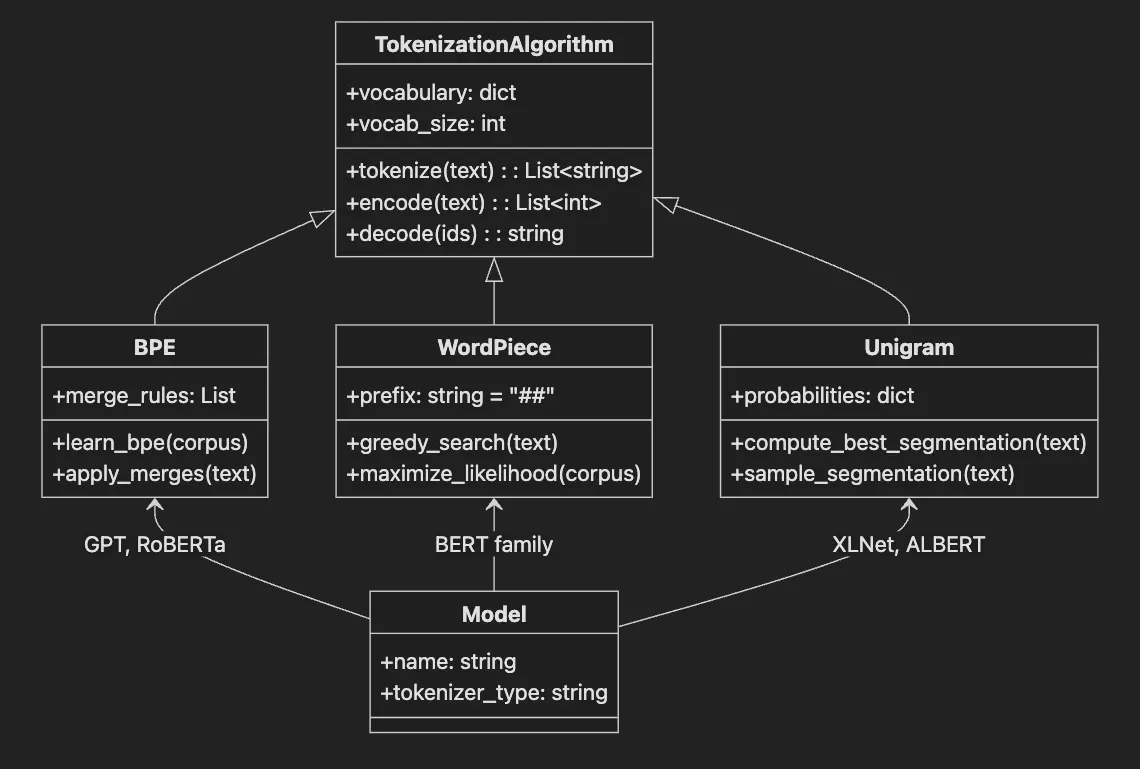
- TokenizationAlgorithm base class defines common interface
- BPE learns merge rules and applies them iteratively
- WordPiece uses greedy search with ## prefix for subwords
- Unigram computes probabilities for best segmentation
- Each algorithm associates with specific model families
Future Directions: Recent research explores tokenizer-free and character-level models (like ByT5 and Charformer) that operate directly on bytes or characters without explicit tokenization. While still emerging, these approaches may become more prominent in the next generation of language models, especially for multilingual or noisy data.
from
 transformers
import
 AutoTokenizer
# Load RoBERTa's BPE tokenizer
# The .tokenize() method remains current as of Hugging Face Transformers v5.x
# For large/custom workflows, see the 'tokenizers' library
tokenizer = AutoTokenizer.from_pretrained(
'roberta-base'
)
text =
'unhappiness'
tokens = tokenizer.tokenize(text)
print
(
'BPE Tokens:'
, tokens)
# Example output: ['un', 'happi', 'ness']
- Load BPE tokenizer: RoBERTa uses BPE algorithm
- Tokenize word: BPE splits based on learned merge rules
- View subwords: Common prefixes/suffixes remain intact
- Understand flexibility: New words get reasonable splits
from
 transformers import AutoTokenizer
# Load BERT
's WordPiece tokenizer
# .tokenize()
is
 current;
for

custom
 training, use the
'tokenizers' library
tokenizer = AutoTokenizer.from_pretrained(
'bert-base-uncased')
text
 =
'unhappiness'
tokens = tokenizer.tokenize(
text
)
print(
'WordPiece Tokens:', tokens)
# Example output: [
'un', '##happi', '##ness']
- Load WordPiece tokenizer: BERT’s default algorithm
- Notice ## prefix: Marks continuation of words
- Observe consistency: Similar words get similar splits
- Appreciate precision: Technical terms often preserved better
from
 transformers
import
 AutoTokenizer
# Load XLM-RoBERTa's Unigram tokenizer
# .tokenize() is current and supported
tokenizer = AutoTokenizer.from_pretrained(
'xlm-roberta-base'
)
text =
'unhappiness'
tokens = tokenizer.tokenize(text)
print
(
'Unigram Tokens:'
, tokens)
# Example output: ['un', 'happiness'] or ['un', 'happi', 'ness']
- Load Unigram tokenizer: XLM-RoBERTa’s choice for multilingual
- Observe variability: Splits may vary by context
- Note flexibility: Handles morphologically rich languages well
- Consider use case: Best for agglutinative languages
-
BPE: [‘un’, ‘happi’, ‘ness’]
-
WordPiece: [‘un’, ‘##happi’, ‘##ness’]
-
Unigram: [‘un’, ‘happiness’] or [‘un’, ‘happi’, ‘ness’]
-
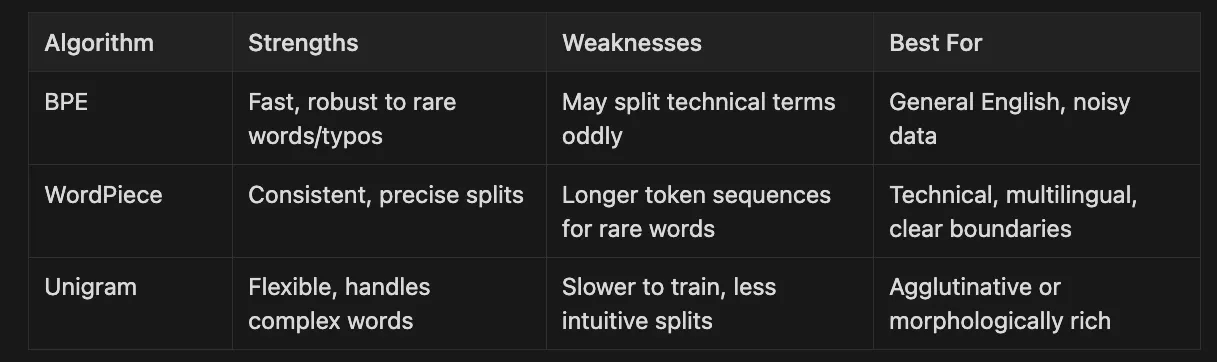
BPE: Fast, robust to rare words/typos May split technical terms oddly General English, noisy data
-
WordPiece: Consistent, precise splits Longer token sequences for rare words Technical, multilingual, clear boundaries
-
Unigram Flexible: handles complex words Slower to train, less intuitive splits. Agglutinative or morphologically rich
-
Using a pre-trained model? Stick with its original tokenizer for best results
-
Mostly English or European languages? BPE or WordPiece are safe bets
-
Lots of jargon or new terms? Consider training a custom tokenizer using the Hugging Face
tokenizerslibrary (see next section) -
Working with Asian or agglutinative languages? Unigram often performs best
-
Always test tokenization on real samples from your data. Poor tokenization reduces accuracy, increases costs, or introduces subtle biases
-
Ensure your tokenizer aligns with both model architecture and dataset preprocessing pipeline. Mismatches degrade performance, especially in specialized domains
-
For large-scale or streaming data, explore on-the-fly tokenization using the Hugging Face
tokenizerslibrary for maximum efficiency
Emerging Trends: Tokenizer-free and character-level models (such as ByT5 and Charformer) are being actively researched. While not yet mainstream in production, they may shape the future of language modeling, especially for highly multilingual or noisy data.
-
Finnish: “talossanikin” = talo (house) + ssa (in) + ni (my) + kin (also) = “also in my house”
-
Turkish: “evlerimden” = ev (house) + ler (plural) + im (my) + den (from) = “from my houses”
-
Japanese: “食べられませんでした” (taberaremasen deshita) = 食べ (eat) + られ (potential) + ませ (negative politeness) + ん (negative) + でした (past) = “was not able to eat”
-
Russian: A single noun can have up to 12 different forms depending on case and number
-
Arabic: Verbs change based on person, gender, number, tense, voice, and mood
-
Hungarian: Words can have hundreds of potential forms through various suffixes
-
For agglutinative languages: Breaking words into appropriate subword units is crucial because individual words can be extremely long and rare, even though their components are common
-
For morphologically rich languages: Models need to recognize different forms of the same root, requiring tokenizers that can handle inflections effectively
Practical Impact: When building multilingual models or systems for morphologically complex languages, choosing the right tokenization strategy can significantly improve model performance, reduce vocabulary size requirements, and enhance the model’s ability to generalize to unseen words.
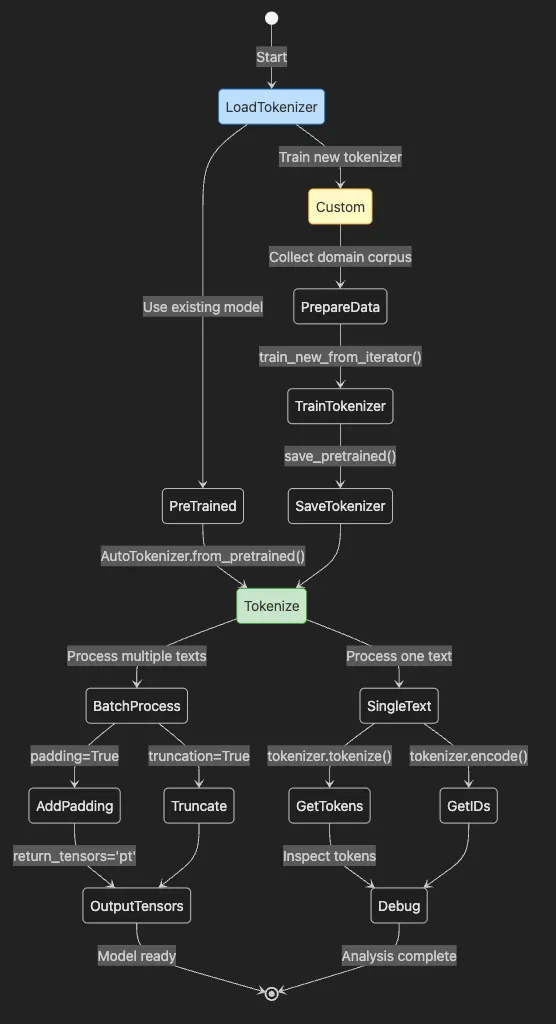
-
Process starts with LoadTokenizer choosing pre-trained or custom
-
PreTrained path uses existing models via
from_pretrained() -
Custom path involves data preparation, training, and saving
-
Tokenize handles single or batch processing
-
BatchProcess adds padding and truncation for efficiency
-
Outputs either tensors for models or tokens for debugging
-
Use pre-built tokenizers for popular models
-
Train and integrate custom tokenizers for specialized domains using the latest APIs
-
Debug, visualize, and align tokenization outputs for advanced NLP tasks
pip install
"transformers>=4.38.0"

"tokenizers>=0.15.0"
from
 transformers
import
 AutoTokenizer
# Load the BERT tokenizer (downloads vocab and config)
tokenizer = AutoTokenizer.from_pretrained(
'bert-base-uncased'
)
sentences = [

"Tokenization is fun!"
,

"Let's build smarter models."
]
# Tokenize the batch, including alignment info
encoded = tokenizer(
    sentences,
    padding=
True
,
# Pad to the longest sentence
    truncation=
True
,
# Truncate if too long
    return_tensors=
'pt'
,
# PyTorch tensors ('tf' for TensorFlow)
    return_offsets_mapping=
True

# Get character-to-token alignment
)
print
(
'Input IDs:'
, encoded[
'input_ids'
])
print
(
'Offsets:'
, encoded[
'offset_mapping'
])
- Load the Tokenizer:
AutoTokenizer.from_pretrained('bert-base-uncased')fetches the correct vocabulary and configuration, ensuring tokenization matches the model. - Batch Tokenization: Passing a list of sentences lets the tokenizer process them efficiently in one call — essential for fast training and inference.
- Padding and Truncation:
padding=Truemakes all sentences the same length for batching.truncation=Trueavoids input length errors. - Tensor Output:
return_tensors='pt'returns PyTorch tensors. To use TensorFlow, setreturn_tensors='tf'. - Alignment Information:
return_offsets_mapping=Trueadds character-to-token alignment, useful for mapping model outputs back to original text.
# For TensorFlow tensors, use:
encoded_tf = tokenizer(
    sentences,
    padding=
True
,
    truncation=
True
,
    return_tensors=
'tf'
,
    return_offsets_mapping=
True
)
print
(
'TF Input IDs:'
, encoded_tf[
'input_ids'
])
from
 transformers import AutoTokenizer
# texts: an iterable (e.g., list or generator) of domain-specific sentences
texts = [

"Patient exhibits signs of pneumothorax."
,

"CT scan reveals bilateral infiltrates."
,

# ... more sentences
]
# Train a custom Byte-Pair Encoding (BPE) tokenizer
# You can also set 'tokenizer_type' to 'unigram' or 'wordpiece' for other algorithms
tokenizer = AutoTokenizer.
train_new_from_iterator
(
    texts,
    vocab_size=
5000
,
    tokenizer_type=
"bpe"
  #
Options
:
"bpe"
,
"wordpiece"
,
"unigram"
)
tokenizer.
save_pretrained
(
"./custom_tokenizer"
)
- Corpus Preparation: Collect domain-specific text in plain text files or as a Python iterable. More data yields better vocabularies, but even a few thousand sentences help.
- Algorithm Choice: Specify
tokenizer_type—choose "bpe" (Byte-Pair Encoding), "wordpiece", or "unigram" (SentencePiece) depending on your needs. See Article 5 for detailed comparison. - Training:
train_new_from_iteratorlearns a vocabulary of frequent tokens.vocab_sizelimits the number of unique tokens. - Saving: Use
save_pretrained()to store all tokenizer files and configuration for seamless integration.
from
 transformers
import
 AutoTokenizer
custom_tokenizer = AutoTokenizer.from_pretrained(
"./custom_tokenizer"
)
sample =
"Patient exhibits signs of pneumothorax."
# Tokenize and get alignment info
tokens = custom_tokenizer.tokenize(sample)
ids = custom_tokenizer.encode(sample)
offsets = custom_tokenizer(
    sample, return_offsets_mapping=
True
, return_tensors=
None
)[
"offset_mapping"
]
print
(
'Custom Tokens:'
, tokens)
print
(
'Token IDs:'
, ids)
print
(
'Offsets:'
, offsets)
- Load custom tokenizer: Use standard
from_pretrainedmethod - Test tokenization: See how domain terms are handled
- Get multiple views: Tokens, IDs, and alignment offsets
- Verify quality: Check if important terms stay intact
text =
"Let's test: 🤖 transformers!"
output = tokenizer(
    text,
    return_offsets_mapping=
True
,
    return_tensors=
None
)
tokens = tokenizer.convert_ids_to_tokens(output[
'input_ids'
])
offsets = output[
'offset_mapping'
]
for
 token, (start, end)
in

zip
(tokens, offsets):

print
(
f"
{token}
: [
{start}
,
{end}
] -> '
{text[start:end]}
'"
)
- Tokenization: The tokenizer splits input into subword tokens (not words!). This is how the model “sees” your text.
- Token IDs: Each token maps to an integer ID with
convert_ids_to_tokens. These IDs are what the model processes. - Alignment:
offset_mappingshows start and end character positions of each token in original text—critical for tasks like NER or error analysis. - Inspection: Print tokens and their corresponding character spans to spot unexpected splits or unknown tokens (like
[UNK]).
-
If key words split into subwords, your model may lose meaning
-
Emojis or rare symbols may become
[UNK], hurting performance for chat or social media data -
Special tokens (e.g.,
[CLS],[SEP]) often insert automatically. Always check if they appear where needed -
Always match the tokenizer to your model
-
Visualize tokenization and alignment on real data to catch surprises
-
Customize your tokenizer for domain-specific language
-
Use
save_pretrainedandfrom_pretrainedfor robust, future-proof workflows
from transformers import AutoTokenizer
# Always
match
 the tokenizer to your model
# Use the latest model checkpoint as needed
tokenizer = AutoTokenizer.from_pretrained(
'bert-base-uncased'
)
text =
"Tokenization is the foundation of NLP."
encoded = tokenizer(text, return_tensors=
'pt'
)  # Convert to PyTorch tensors
print
(
'Tokens:'
, tokenizer.tokenize(text))
print
(
'Token IDs:'
, encoded[
'input_ids'
])
# Sample
output
:
# Tokens: [
'tokenization'
,
'is'
,
'the'
,
'foundation'
,
'of'
,
'nlp'
,
'.'
]
# Token IDs: tensor(
[[19204, 2003, 1996, 4566, 1997, 17953, 1012]]
)
- Load tokenizer: Matches BERT model’s vocabulary
- Process text: Convert to tokens and IDs in one call
- Get tensors: Ready for PyTorch model input
- Inspect output: Verify tokenization quality
from
 transformers
import
 AutoTokenizer
# Suppose 'texts' is an iterator or list of strings from your domain corpus
base_tokenizer = AutoTokenizer.from_pretrained(
'bert-base-uncased'
)
# Train a new tokenizer on your domain data
new_tokenizer = base_tokenizer.train_new_from_iterator(
    texts, vocab_size=
3000
)
# Save for future use and sharing
new_tokenizer.save_pretrained(
'./my_custom_tokenizer'
)
- Start with base: Use existing tokenizer as template
- Train on domain: Learn vocabulary from your specific data
- Control size: Set vocab_size for efficiency
- Save properly: Use save_pretrained for Hub compatibility
- AutoTokenizer: Loads the right tokenizer for any pretrained model from the Hub
- train_new_from_iterator: Modern, integrated way to train custom tokenizers for your data
- Special Token Management: Use
add_special_tokensandspecial_tokens_mapfor robust handling - Integration: Works seamlessly with datasets and pipelines, reducing errors and boilerplate
sentences = [

"Transformers are powerful."
,

"Tokenization makes them work!"
]
# Batch tokenize, pad, and truncate
encoded_batch = tokenizer(
    sentences,
    padding=
True
,
# Pad to same length
    truncation=
True
,
# Truncate if too long
    return_tensors=
'pt'

# PyTorch tensors
)
# For production or API use: convert tensors to lists for JSON serialization
input_ids_list = encoded_batch[
'input_ids'
].cpu().tolist()
print
(
'Batch Input IDs:'
, input_ids_list)
- Process batch: Handle multiple texts efficiently
- Pad uniformly: All sequences same length for batching
- Truncate safely: Prevent length errors
- Convert for APIs: Lists serialize to JSON easily
# Inspect current special tokens
print
(
'Special tokens:'
, tokenizer.special_tokens_map)
# Add custom special tokens if needed
special_tokens_dict = {
'additional_special_tokens'
: [
'<CUSTOM>'
]}
num_added = tokenizer.add_special_tokens(special_tokens_dict)
print
(
f'Added
{num_added}
 special tokens.'
)
# Visualize tokenization with special tokens
text =
"Classify this sentence."
encoded = tokenizer(text)
print
(
'Tokens with Special Tokens:'
, tokenizer.convert_ids_to_tokens(encoded[
'input_ids'
]))
# Example output: ['[CLS]', 'classify', 'this', 'sentence', '.', '[SEP]']
- Check existing: View current special tokens
- Add custom: Extend for special use cases
- Update model: Remember to resize embeddings if adding tokens
- Verify output: Ensure special tokens appear correctly
- Tokenization forms the first and most critical step in transformer pipelines
- The right tokenizer — off-the-shelf or custom — directly affects results
- Use train_new_from_iterator for custom tokenizers and manage special tokens with add_special_tokens
- Hugging Face tools make tokenization fast, flexible, and production-ready
- Always debug and visualize tokenization to avoid subtle bugs
- Stay informed about token-efficient modeling and multilingual tokenization trends
- Hugging Faces Transformers and the AI Revolution (Article 1)
- Hugging Faces: Why Language is Hard for AI? How Transformers Changed that (Article 2)
- Hands-On with Hugging Face: Building Your AI Workspace (Article 3)
- Inside the Transformer: Architecture and Attention Demystified (Article 4)
- Python 3.12 (managed via pyenv).
- Poetry for dependency management.
- Go Task for build automation.
- API keys for any required services (see .env.example).
- Clone this repository:
git
clone
 [email protected]:RichardHightower/art_hug_05.git
cd
 art_hug_05
task setup
.
├── src/
│   ├── __init__.py
│   ├── config.py
# Configuration and utilities
│   ├── main.py
# Entry point with all examples
│   ├── tokenization_examples.py
# Basic tokenization examples
│   ├── tokenization_algorithms.py
# BPE, WordPiece, and Unigram comparison
│   ├── custom_tokenization.py
# Training custom tokenizers
│   ├── tokenization_debugging.py
# Debugging and visualization tools
│   ├── multimodal_tokenization.py
# Image and CLIP tokenization
│   ├── advanced_tokenization.py
# Advanced tokenization techniques
│   ├── model_loading.py
# Model loading examples
│   └── utils.py
# Utility functions
├── tests/
│   └── test_examples.py
# Unit tests
├── .env.example
# Environment template
├── Taskfile.yml
# Task automation
└── pyproject.toml
# Poetry configuration
task run
task run-tokenization
# Run basic tokenization examples
task run-algorithms
# Run tokenization algorithms comparison
task run-custom
# Run custom tokenizer training
task run-debugging
# Run tokenization debugging tools
task run-multimodal
# Run multimodal tokenization
task run-advanced
# Run advanced tokenization techniques
task run-model-loading
# Run model loading examples
task notebook
-
Create interactive notebooks for experimentation
-
Run code cells step by step
-
Visualize tokenization results
-
Test different tokenizers interactively
-
task setup- Set up Python environment and install dependencies -
task run- Run all examples -
task run-tokenization- Run basic tokenization examples -
task run-algorithms- Run algorithm comparison examples -
task run-custom- Run custom tokenizer training -
task run-debugging- Run debugging and visualization tools -
task run-multimodal- Run multimodal tokenization examples -
task run-advanced- Run advanced tokenization techniques -
task run-model-loading- Run model loading examples -
task notebook- Launch Jupyter notebook server -
task test- Run unit tests -
task format- Format code with Black and Ruff -
task lint- Run linting checks (Black, Ruff, mypy) -
task clean- Clean up generated files
- Using Homebrew (Recommended):
brew install pyenv
pyenv install
3.12
.0
 pyenv
global

3.12
.0
python
--version
- Download the installer from Python.org
- Run the installer and ensure you check “Add Python to PATH”
- Open Command Prompt and verify installation:
python
--version
pip install pyenv-win
- Install using the official installer:
curl -sSL https://install.python-poetry.org | python3 -
echo

'export PATH="$HOME/.poetry/bin:$PATH"'
 >> ~/.zshrc
source
 ~/.zshrc
- Install using PowerShell:
(Invoke-WebRequest -
Uri
 https:
//install.python-poetry.org -UseBasicParsing).Content | python -
poetry
--version
- Using Homebrew:
brew install
go
-task/tap/
go
-task
task
--version
- Using Scoop:
scoop install
go
-task
choco install
go
-task
task
--version
- Python not found: Ensure Python is correctly added to your PATH variable
- Poetry commands not working: Restart your terminal or add the Poetry bin directory to your PATH
- Task not found: Verify Task installation and PATH settings
- Dependency errors: Run
poetry updateto resolve dependency conflicts
% task run-medical
task:
 [run-medical] poetry run python src/medical_tokenization_demo.py
INFO
:__main__
:
🏥 Medical Tokenization Examples
INFO
:__main__
:==================================================
INFO
:__main__
:
=== Generic vs Domain Tokenization ===
INFO
:__main__
:
'pneumonoultramicroscopicsilicovolcanoconiosis'
:
INFO
:__main__
:
Generic:
 [
'p'
,
'##ne'
,
'##um'
,
'##ono'
,
'##ult'
,
'##ram'
,
'##ic'
,
'##ros'
,
'##copic'
,
'##sil'
,
'##ico'
,
'##vo'
,
'##lc'
,
'##ano'
,
'##con'
,
'##ios'
,
'##is'
] (
17
 tokens)
WARNING
:__main__
:  ⚠️ Excessive
fragmentation:

17
 pieces
INFO
:__main__
:
'electroencephalography'
:
INFO
:__main__
:
Generic:
 [
'electro'
,
'##ence'
,
'##pha'
,
'##log'
,
'##raphy'
] (
5
 tokens)
WARNING
:__main__
:  ⚠️ Excessive
fragmentation:

5
 pieces
INFO
:__main__
:
'thrombocytopenia'
:
INFO
:__main__
:
Generic:
 [
'th'
,
'##rom'
,
'##bo'
,
'##cy'
,
'##top'
,
'##enia'
] (
6
 tokens)
WARNING
:__main__
:  ⚠️ Excessive
fragmentation:

6
 pieces
INFO
:__main__
:
'gastroesophageal'
:
INFO
:__main__
:
Generic:
 [
'gas'
,
'##tro'
,
'##es'
,
'##op'
,
'##ha'
,
'##ge'
,
'##al'
] (
7
 tokens)
WARNING
:__main__
:  ⚠️ Excessive
fragmentation:

7
 pieces
INFO
:__main__
:
=== MedCPT Biomedical Text Encoder Example ===
INFO
:__main__
:Loading
 MedCPT Article Encoder...
INFO
:__main__
:
Embedding
shape:
 torch.Size([
3
,
768
])
INFO
:__main__
:Embedding

dimension:

768
INFO
:__main__
:
=== MedCPT Tokenization of Medical Terms ===
INFO
:__main__
:
'diabetes insipidus'
:
INFO
:__main__
:
Tokens:
 [
'diabetes'
,
'ins'
,
'##ip'
,
'##idus'
] (
4
 tokens)
INFO
:__main__
:
'vasopressinergic neurons'
:
INFO
:__main__
:
Tokens:
 [
'vasopressin'
,
'##ergic'
,
'neurons'
] (
3
 tokens)
INFO
:__main__
:
'hypothalamic destruction'
:
INFO
:__main__
:
Tokens:
 [
'hypothalamic'
,
'destruction'
] (
2
 tokens)
INFO
:__main__
:
'polyuria and polydipsia'
:
INFO
:__main__
:
Tokens:
 [
'poly'
,
'##uria'
,
'and'
,
'polyd'
,
'##ips'
,
'##ia'
] (
6
 tokens)
INFO
:__main__
:
=== Comparison with Generic
BERT
 ===
INFO
:__main__
:
'diabetes insipidus'
:
INFO
:__main__
:
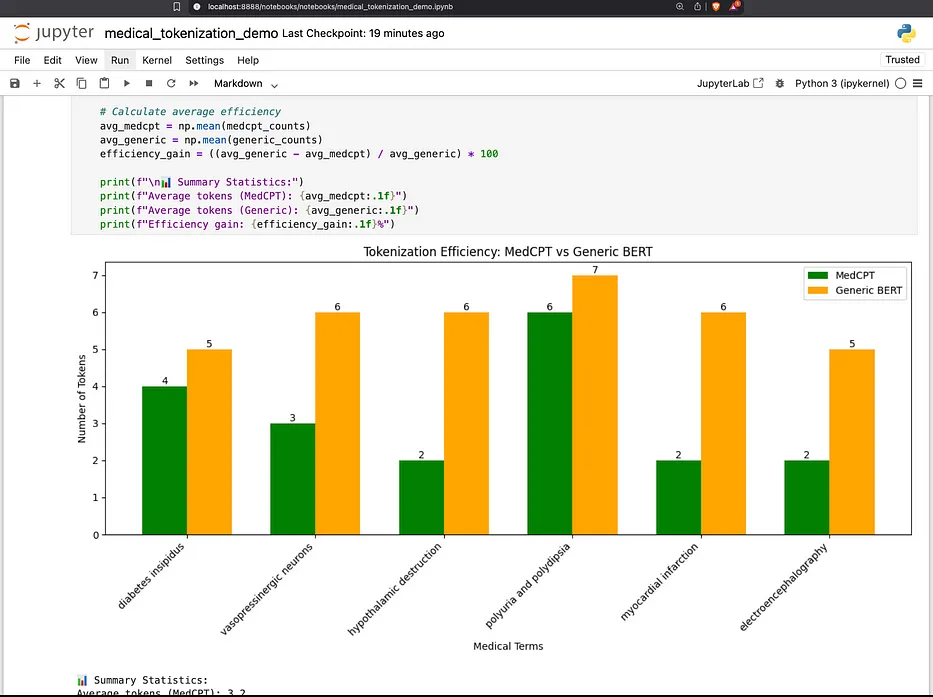
MedCPT:

4
 tokens
INFO
:__main__
:  Generic
BERT
:
5
 tokens
INFO
:__main__
:  ✅ MedCPT is
1
 tokens more efficient
INFO
:__main__
:
'vasopressinergic neurons'
:
INFO
:__main__
:
MedCPT:

3
 tokens
INFO
:__main__
:  Generic
BERT
:
6
 tokens
INFO
:__main__
:  ✅ MedCPT is
3
 tokens more efficient
INFO
:__main__
:
'hypothalamic destruction'
:
INFO
:__main__
:
MedCPT:

2
 tokens
INFO
:__main__
:  Generic
BERT
:
6
 tokens
INFO
:__main__
:  ✅ MedCPT is
4
 tokens more efficient
INFO
:__main__
:
'polyuria and polydipsia'
:
INFO
:__main__
:
MedCPT:

6
 tokens
INFO
:__main__
:  Generic
BERT
:
7
 tokens
INFO
:__main__
:  ✅ MedCPT is
1
 tokens more efficient
INFO
:__main__
:
✅ Medical tokenization examples completed!
"""
Medical Tokenization Demo
Standalone script to run medical tokenization examples
"""
from
 transformers
import
 AutoTokenizer, AutoModel
import
 torch
import
 logging
# Configure logging
logging.basicConfig(level=logging.INFO)
logger = logging.getLogger(__name__)
def

compare_medical_tokenization
():

"""Shows advantage of domain-specific tokenization."""

# Generic tokenizer
    generic = AutoTokenizer.from_pretrained(
'bert-base-uncased'
)

# Medical terms that generic tokenizers fragment
    medical_terms = [

"pneumonoultramicroscopicsilicovolcanoconiosis"
,

"electroencephalography"
,

"thrombocytopenia"
,

"gastroesophageal"
    ]
    logger.info(
"\n=== Generic vs Domain Tokenization ==="
)

for
 term
in
 medical_terms:
        generic_tokens = generic.tokenize(term)
        logger.info(
f"\n'
{term}
':"
)
        logger.info(
f"  Generic:
{generic_tokens}
 (
{
len
(generic_tokens)}
 tokens)"
)

# Custom tokenizer would show fewer tokens

# Calculate efficiency loss

if

len
(generic_tokens) >
3
:
            logger.warning(
f"  ⚠️ Excessive fragmentation:
{
len
(generic_tokens)}
 pieces"
)
def

medcpt_encoder_example
():

"""Demonstrates MedCPT encoder for biomedical text embeddings."""
    logger.info(
"\n=== MedCPT Biomedical Text Encoder Example ==="
)

try
:

# Load MedCPT Article Encoder
        logger.info(
"Loading MedCPT Article Encoder..."
)
        model = AutoModel.from_pretrained(
"ncbi/MedCPT-Article-Encoder"
)
        tokenizer = AutoTokenizer.from_pretrained(
"ncbi/MedCPT-Article-Encoder"
)

# Example medical articles
        articles = [
            [

"Diagnosis and Management of Central Diabetes Insipidus in Adults"
,

"Central diabetes insipidus (CDI) is a clinical syndrome which results from loss or impaired function of vasopressinergic neurons in the hypothalamus/posterior pituitary, resulting in impaired synthesis and/or secretion of arginine vasopressin (AVP)."
,
            ],
            [

"Adipsic diabetes insipidus"
,

"Adipsic diabetes insipidus (ADI) is a rare but devastating disorder of water balance with significant associated morbidity and mortality. Most patients develop the disease as a result of hypothalamic destruction from a variety of underlying etiologies."
,
            ],
            [

"Nephrogenic diabetes insipidus: a comprehensive overview"
,

"Nephrogenic diabetes insipidus (NDI) is characterized by the inability to concentrate urine that results in polyuria and polydipsia, despite having normal or elevated plasma concentrations of arginine vasopressin (AVP)."
,
            ],
        ]

# Format articles for the model
        formatted_articles = [
f"
{title}
.
{abstract}
"

for
 title, abstract
in
 articles]

with
 torch.no_grad():

# Tokenize the articles
            encoded = tokenizer(
                formatted_articles,
                truncation=
True
,
                padding=
True
,
                return_tensors=
'pt'
,
                max_length=
512
,
            )

# Encode the articles
            embeds = model(**encoded).last_hidden_state[:,
0
, :]
            logger.info(
f"\nEmbedding shape:
{embeds.shape}
"
)
            logger.info(
f"Embedding dimension:
{embeds.shape[
1
]}
"
)

# Show tokenization comparison for medical terms
            logger.info(
"\n=== MedCPT Tokenization of Medical Terms ==="
)
            medical_terms = [

"diabetes insipidus"
,

"vasopressinergic neurons"
,

"hypothalamic destruction"
,

"polyuria and polydipsia"
            ]

for
 term
in
 medical_terms:
                tokens = tokenizer.tokenize(term)
                logger.info(
f"\n'
{term}
':"
)
                logger.info(
f"  Tokens:
{tokens}
 (
{
len
(tokens)}
 tokens)"
)

# Compare with generic BERT tokenizer
            generic = AutoTokenizer.from_pretrained(
'bert-base-uncased'
)
            logger.info(
"\n=== Comparison with Generic BERT ==="
)

for
 term
in
 medical_terms:
                medcpt_tokens = tokenizer.tokenize(term)
                generic_tokens = generic.tokenize(term)
                logger.info(
f"\n'
{term}
':"
)
                logger.info(
f"  MedCPT:
{
len
(medcpt_tokens)}
 tokens"
)
                logger.info(
f"  Generic BERT:
{
len
(generic_tokens)}
 tokens"
)

if

len
(generic_tokens) >
len
(medcpt_tokens):
                    logger.info(
f"  ✅ MedCPT is
{
len
(generic_tokens) -
len
(medcpt_tokens)}
 tokens more efficient"
)

except
 Exception
as
 e:
        logger.error(
f"Error loading MedCPT model:
{e}
"
)
        logger.info(
"Install with: pip install transformers torch"
)
        logger.info(
"Note: MedCPT model requires downloading ~440MB"
)
def

main
():

"""Run medical tokenization examples."""
    logger.info(
"🏥 Medical Tokenization Examples"
)
    logger.info(
"="
 *
50
)

# Run generic vs domain comparison
    compare_medical_tokenization()

# Run MedCPT encoder example
    medcpt_encoder_example()
    logger.info(
"\n✅ Medical tokenization examples completed!"
)
if
 __name__ ==
"__main__"
:
    main()
-
Generic vs. Domain Tokenization Comparison: Shows how a standard tokenizer breaks down complex medical terms into many small pieces (tokens)
-
MedCPT Encoder Example: Demonstrates a specialized medical text encoder model that better understands medical terminology
-
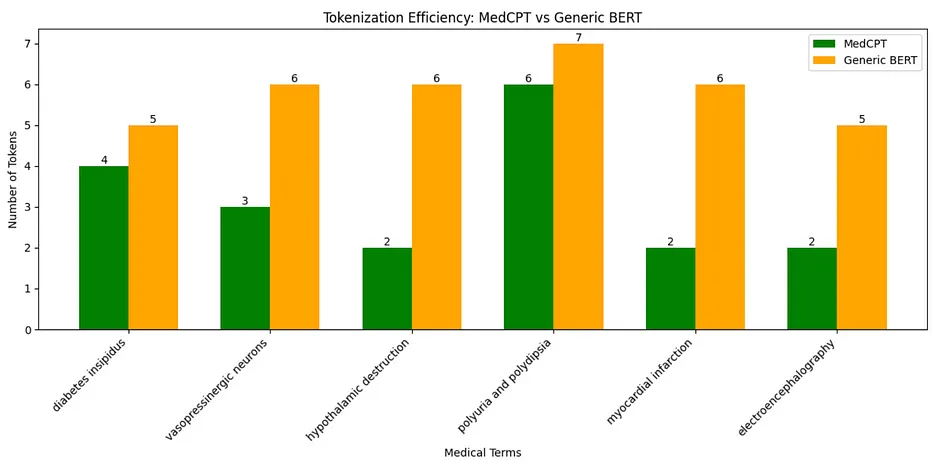
Comparison Between Tokenizers: Directly compares how many tokens are needed for the same medical phrases using both tokenizers
-
Fewer tokens means more efficient processing (saves time and computing resources).
-
Better tokenization leads to better understanding of the text’s meaning.
-
Specialized models can handle longer medical texts within token limits.
-
A general-purpose one called “bert-base-uncased” that works for everyday language.
-
A specialized medical one called “MedCPT-Article-Encoder” trained specifically on medical texts.