Transformers and the AI Revolution: The Role of Hugging Face
Originally published on Medium.

Imagine this: Your messaging app instantly summarizes emails, translates chats, or drafts business proposals; all in natural language. A chatbot understands your words and your intent, replying in seconds. These aren't futuristic dreams. They're everyday realities, driven by transformer models at the core of modern AI.
Follow Rick on LinkedIn or Medium for more enterprise AI and AI architecture insights.
Transformers have revolutionized the game. Unlike older models that read text one word at a time and often lose track of context, transformers process entire sequences in parallel.
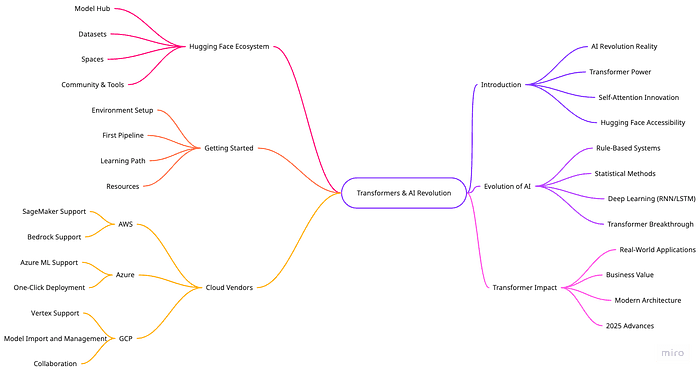
This capability allows them to understand meaning, nuance, and relationships across entire sentences, documents, or even multimodal data.
Self-attention is the key innovation. Think of it as an orchestra conductor: instead of listening to each instrument individually, the conductor hears all at once and creates harmony from the full context. This holistic approach explains why transformers excel at language, vision, and business data tasks.
Fueled by self-attention and parallel processing, transformers now power chatbots, search engines, medical assistants, and creative AI tools. They enable machines to read, write, see, and reason with human-like fluency.
But if transformers are so powerful, why isn't everyone using them? Until recently, deploying these models required deep expertise and heavy computing resources. That's where Hugging Face comes in.
Hugging Face serves as the "app store" for AI models. It offers open-source tools, pre-trained models (already trained on massive datasets), and a vibrant community. You don't need a PhD or a supercomputer. With just a few lines of Python, anyone can use the world's best AI models — whether you're building a prototype, fine-tuning for your business domain, or deploying at scale.
This article will explore the transformer architectures and highlight the latest advances as of 2025.
- The Hugging Face Ecosystem: We'll tour the comprehensive Model Hub with its 500,000+ models, explore the Datasets library for training and evaluation, demonstrate Spaces for interactive demos, and introduce the community and tools that power AI collaboration.
- Getting Started Guide: We'll provide environment setup instructions, walk through your first pipeline implementation, outline a learning path for mastery, and share essential resources for continued learning.
Throughout this article, you'll find practical code examples, visual explanations, and business applications demonstrating how transformers and Hugging Face are reshaping what's possible with AI technology.
Note: Check out the companion github repo with all the examples.
Now, let's explore the transformer revolution and Hugging Face's role in making AI accessible to everyone. Here's what we'll cover:
Our topics outline the key areas we'll explore throughout this article:
- Introduction to the AI Revolution: We'll examine how transformers have made AI a practical reality, explore the power of transformer architecture, dive into the self-attention mechanism innovation, and highlight how Hugging Face has made these technologies accessible to everyone.
- Evolution of AI Systems: We'll trace AI development from early rule-based systems through statistical methods and deep learning approaches like RNNs/LSTMs, culminating in the transformer breakthrough that changed everything.
- Real-World Transformer Impact: We'll showcase practical applications across industries, demonstrate business value creation, and examine modern.
Let's explore how major cloud platforms integrate with Hugging Face's ecosystem, offering scalable infrastructure and enterprise-grade tools to deploy transformer models in production. This section will examine how AWS, Google Cloud, and Microsoft Azure provide specialized services to leverage Hugging Face's innovations, making advanced AI accessible to organizations of all sizes.
Cloud Platform and Vendor Support for Hugging Face
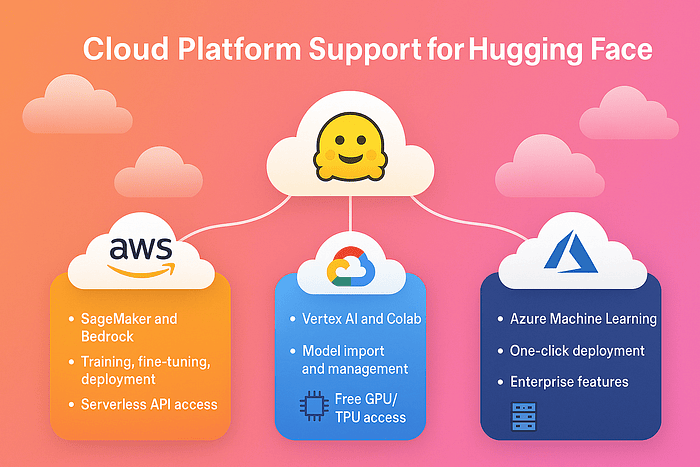
Major cloud providers have embraced Hugging Face's open-source ecosystem, offering various levels of integration:
AWS provides dual support through Amazon SageMaker and Bedrock. SageMaker offers comprehensive training, fine-tuning, and deployment capabilities with specialized hardware support (GPUs, Inferentia, Trainium). Models can be deployed via managed endpoints or integrated into existing AWS infrastructure. Bedrock complements this with serverless API access to select Hugging Face LLMs, simplifying deployment for teams prioritizing ease of use over customization. Bedrock provides access to choose Face Hugging large language models (LLMs) like Vicuna and Falcon via managed APIs on Amazon Bedrock.
Google Cloud Platform supports Hugging Face through Vertex AI and Colab. Vertex AI supports calling hundreds of Hugging Face models directly from their ecosystem. Vertex AI enables enterprise-grade model management with features like versioning, A/B testing, and integrated monitoring. Users can import, fine-tune, and deploy hundreds of Hugging Face models within Google's ecosystem. Colab is the experimentation layer, providing free GPU/TPU access for prototyping and model development before production deployment.
Microsoft Azure offers the deepest integration through Azure Machine Learning Studio. Users can browse and deploy models from a native Hugging Face catalog with one-click deployment, or programmatically via CLI/SDK. Azure stands out with enterprise features like Private Link, VNet integration, and support for specialized hardware (MI300X GPUs), making it particularly attractive for regulated industries.
All platforms support common ML tasks across NLP, computer vision, and audio processing, with varying degrees of security, compliance, and infrastructure flexibility. The choice typically depends on existing cloud commitments, specific hardware requirements, and the balance between managed simplicity and customization needs.
Follow Rick on LinkedIn or Medium for more enterprise AI and AI architecture insights.
Using Hugging Face to Analyze Sentiment in One Line
Let's start by exploring a practical example of Hugging Face's powerful capabilities. The following code demonstrates how to perform sentiment analysis with just a few lines of Python , showcasing the accessibility that makes Hugging Face so revolutionary in the AI space.
# Install the latest version of the transformers library for
# full feature support
# pip install --upgrade transformers
from transformers import pipeline

# Create a sentiment analysis pipeline
# (automatically selects a high-performing model, e.g., DistilBERT, RoBERTa, DeBERTa, or a lightweight LLM)
sentiment_analyzer = pipeline('sentiment-analysis')

# Analyze the sentiment of a sentence
result = sentiment_analyzer('Hugging Face makes AI accessible to everyone!')
print(result)  # Output: [{'label': 'POSITIVE', 'score': 0.9998}]

# For large-scale or production use, you can enable hardware
# acceleration and inference optimizations (see later chapters).
Step-by-Step Breakdown:
- pipeline('sentiment-analysis') loads a pre-trained transformer model—often DistilBERT, RoBERTa, DeBERTa, or even a lightweight LLM, depending on availability and configuration
- The pipeline automatically selects the best model for your task, but you can specify a particular one if needed (including multilingual or domain-specific models)
- Pass any sentence to the pipeline and get instant results with a confidence score
- The output is a Python list of dictionaries, for example: [{'label': 'POSITIVE', 'score': 0.9998}]
Note: Check out the companion github repo with all the examples.
Need to share results or integrate with other systems? You can easily convert the output to valid JSON:
[
  {
    "label": "POSITIVE",
    "score": 0.9998
  }
]
No training, no downloading datasets, no complex setup — just results. The pipeline handles all the complexity behind the scenes, making advanced AI accessible even to beginners.
Production Deployment Tips: Use model quantization for 2-4x speedup. Implement caching for repeated inferences. Consider edge deployment with ONNX Runtime. Monitor model drift in production. Use batch inference for throughput optimization.
For production or large-scale applications, Hugging Face pipelines now support hardware acceleration (GPU, TPU, AWS Inferentia) and inference optimizations via libraries like Optimum and ONNX Runtime for faster and more efficient processing. You can also leverage quantization and memory-efficient inference to deploy models in resource-constrained environments.
Modern Hugging Face workflows support federated and distributed fine-tuning out of the box, enabling privacy-preserving learning and scaling across multiple devices or data centers. Reinforcement learning integrations (with TRL, RLHF, and Stable-Baselines3) allow you to train advanced conversational and reasoning agents — techniques that power next-generation chatbots and assistants.
Throughout this article series, you'll move from understanding how transformers work to building real-world AI applications. Each article serves as a hands-on workshop:
- Learn core concepts like attention, tokenization, and model architectures.
- Apply them with Hugging Face tools and open datasets.
- Build, fine-tune, and deploy solutions for business and creative use cases — leveraging the latest advances in inference, distributed training, and reinforcement learning.
You'll see how companies use these tools to automate support, analyze contracts, detect fraud, and create new products. No matter your background, you'll find practical guidance and step-by-step tutorials to help you bring AI into your projects.
Key Takeaways:
- Transformers let machines understand context and meaning, enabling applications we once thought impossible.
- Hugging Face makes these tools available to everyone, not just AI experts.
- The Hugging Face ecosystem supports modern best practices: hardware acceleration, inference optimization, federated and distributed training, and reinforcement learning integration.
- This article series is your roadmap from learning the basics to building and deploying production-ready AI.
Next, we'll explore how AI evolved from simple rule-based systems to the transformer-powered revolution. For a deeper dive into the history and evolution of language models, see article 2: "Foundations of Natural Language Processing and Large Language Models." Ready to see how AI got here? Let's dive in.
The Rise of Transformers in AI
AI has evolved far beyond rigid, rule-based systems. Today, transformers drive the most advanced language, vision, and more breakthroughs. In this section, you'll discover how AI evolved step by step — and why transformers have changed the game for technology and business.
We'll walk through this evolution using practical analogies and real-world examples. See the timeline diagram in article 2 if you want a visual roadmap. For a deeper dive into transformer internals, refer to article 4 (at the time of this writing, those are still in the works).
Modern Trend Callout: Recent years have witnessed the emergence of efficient transformer architectures (such as Longformer, FlashAttention, and Mamba) that scale to more extended sequences and lower costs, as well as multimodal transformers like CLIP and LLaVA that jointly process text, images, and even audio. We'll explore these advances in later chapters, but keep them in mind as you learn the fundamentals.
A Brief History: From Rules to Deep Learning
Early AI attempted to mimic human logic with hand-crafted rules. Imagine writing out every instruction for a computer: if you want to detect a date, you must specify every pattern by hand. These rule-based systems worked like recipe books — fine for simple, predictable tasks but fragile when faced with new language or ambiguity.
As data exploded, rule-making couldn't keep up. Statistical methods emerged, letting AI learn patterns from real data instead of rigid instructions. For example, spam filters started using probabilities — if an email contains particular words, it's more likely to be spam. This represented a leap forward, but these models struggled with nuance and context, especially in language where meaning depends on the whole sentence.
Deep learning brought the next wave. Models like Recurrent Neural Networks (RNNs) and Long-Short-Term Memory networks (LSTMs) could process sequences and remember previous words, enabling smarter chatbots and translation. But even these models had limits: they often 'forgot' important information in long texts, making it hard to capture the full meaning in long conversations or documents.
Each new method unlocked new business value: rule-based chatbots handled basic queries, statistical models automated spam detection, and deep learning enabled voice assistants and instant translation. Yet, true language understanding at scale remained out of reach.
Quick Recap:
- Rule-based: Precise but brittle
- Statistical: Flexible, but shallow context
- Deep learning: Better at sequences, but memory fades with length
Next, we'll see how transformers solved these challenges.
What Transformers Changed in AI
Transformers, introduced in the 2017 paper 'Attention Is All You Need,' revolutionized everything. Unlike older models, transformers examine the entire input at once. Their breakthrough is the self-attention mechanism, which lets the model weigh the importance of every word (or token) in a sequence relative to every other word.
Definition: Self-attention is a mechanism that allows the model to focus on relevant parts of the input, no matter where they appear.
Picture a book club where everyone discusses each chapter, connecting details across the story. Transformers operate this way with text, capturing complex relationships and context, even in long documents.
Consider the sentence: 'The bank will not approve the loan.' Older models might misinterpret 'bank' as a riverbank. A transformer, using self-attention, examines words like 'approve' and 'loan' to infer that 'bank' means a financial institution correctly.
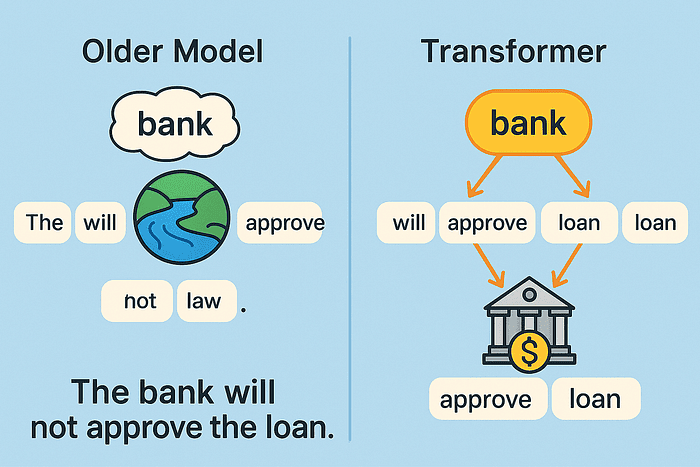
Transformers also process data in parallel, not step-by-step. This accelerates training and enables much larger models, like BERT and GPT-4.
Visualizing Self-Attention with Hugging Face (2025 API)
Let's visualize how transformers process text through self-attention with a practical code example. The following snippet demonstrates how to extract and examine attention patterns from a transformer model using Hugging Face's 2025 API:
from transformers import AutoModel, AutoTokenizer
import torch

# Use a modern, efficient small transformer model
model_name = "microsoft/MiniLM-L12-H384-uncased"  # Or try "microsoft/deberta-v3-small"
tokenizer = AutoTokenizer.from_pretrained(model_name)
model = AutoModel.from_pretrained(model_name)

# Prepare a sample input
sentence = "The bank will not approve the loan."
inputs = tokenizer(sentence, return_tensors="pt")

# Forward pass to get attention weights (2025 API best practice)
with torch.no_grad():
    outputs = model(**inputs, output_attentions=True)
    attentions = outputs.attentions  # Tuple of attention matrices per layer

# Print shape of attention from the last layer
print(f"Attention shape (last layer): {attentions[-1].shape}")  # (batch, heads, tokens, tokens)
Breaking down the code:
- Load model and tokenizer: We use MiniLM, a modern, efficient transformer model (alternatively, try DeBERTa-v3-small).
- Tokenize input: The sentence is split into tokens the model can process.
- Run model: We pass the input through the model, requesting attention weights via the forward call (the recommended approach as of 2025).
- Inspect attention: The output shape shows the number of attention heads and tokens. Each attention matrix reveals how much each word focuses on every other word.
Try running the code yourself! For a deeper look at attention, see article 4, "Inside the Transformer: Architecture and Attention Demystified".
Key Takeaway: Self-attention lets transformers relate every part of the input to every other part, at every layer. This makes them robust and flexible for language, vision, and even multimodal data.
Looking Forward: Recent transformer innovations include efficient attention mechanisms (like FlashAttention and Performer) for longer documents, and multimodal models (like CLIP, BLIP, and LLaVA) processing text and images. These advances are covered in depth in later articles.
Business Impact: Real-World Examples of Transformer-Powered Applications
Transformers have moved from research labs into real business. Here's how they're used today:
- Customer Service: Chatbots and virtual assistants use transformers to handle complex, multi-turn conversations. Banks now deploy AI agents that answer questions, troubleshoot issues, and process requests using natural language.
- Healthcare: Transformers extract key details from clinical notes, summarize long medical documents, and help diagnose diseases by analyzing patient histories. This speeds up workflows and reduces errors. Microsoft claims its new AI system is better than doctors at diagnosing complex health conditions.
- Finance: Transformers-powered AI models automate document review, detect fraud, and analyze news or social media for trading insights.
- Legal: Law firms use transformers to summarize contracts, flag risky clauses, and monitor regulatory changes, saving hours of manual review.
- Creative Tools: Text-to-image generators (like DALL-E) and AI writing assistants (like ChatGPT) rely on transformers to enable new forms of content creation.
Using a Transformer Model for Document Classification
Let's see how to implement a simple document classification system using transformers. This code demonstrates how you can categorize incoming documents or texts without needing labeled training data:
from transformers import pipeline

# Load a zero-shot classification pipeline (recommended in 2025)
classifier = pipeline("zero-shot-classification")

# Example: Classifying a customer support ticket
text = "I am unable to access my account after the recent update."
labels = ["billing issue", "technical problem", "general inquiry"]
result = classifier(text, candidate_labels=labels)
print(result)
How this works:
- Zero-shot classification: The model can assign labels it hasn't seen during training.
- Example: We classify a support ticket. The model should pick 'technical problem' as the most likely label.
- Business value: This approach automates support ticket triage and routing, saving time and improving customer experience.
Try adapting the code to your examples.
Quick Recap:
- Transformers enable more innovative, more adaptive tools across industries.
- They automate complex tasks, extract insights, and support new business models.
For more hands-on applications, see Chapters 3 (pipelines), 7 (vision and multimodal), and 9 (semantic search).
The Hugging Face Ecosystem: Community, Tools, and Innovation
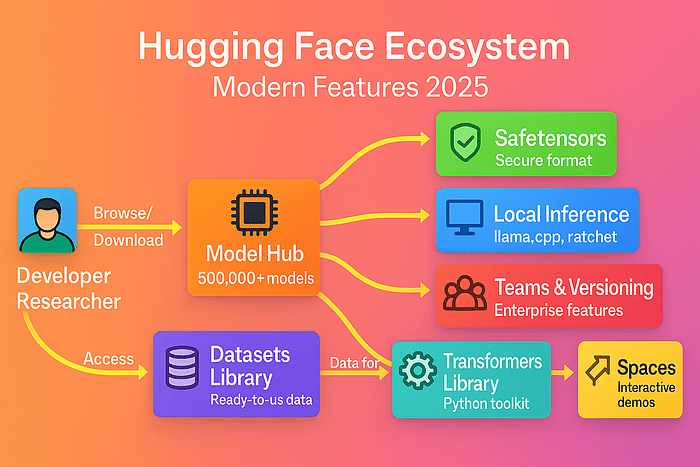
Let's look at how Hugging Face's various components work together to create a comprehensive AI development and deployment ecosystem. Key components of Hugging Face are:
- The developer/Researcher interacts with the entire ecosystem.
- Model Hub provides 500,000+ pre-trained models for various tasks.
- Datasets Library offers ready-to-use data for training and testing.
- Spaces enables building and deploying interactive demos.
- Transformers Library serves as the Python toolkit connecting everything.
- Modern Features include Safetensors format, local inference options, and enterprise collaboration.
The following diagram illustrates the relationships between the key elements of the Hugging Face platform and how developers interact with them:
Transformer models and generative AI have moved from research labs to powering everyday products, and Hugging Face is the platform that made this leap possible. Its mission: make powerful AI tools and models accessible to everyone, not just big tech or academia. Today, Hugging Face supports not only transformer models but also diffusion, multimodal, and 3D models, reflecting the latest trends in AI.
Think of Hugging Face as the 'GitHub for AI models.' Whether a developer, data scientist, or business leader, you can browse, use, and share models and datasets in minutes. The platform's tools and open-source culture make modern AI accessible, collaborative, and production-ready for teams and organizations of all sizes.
As of 2025, Hugging Face is trusted by over 50,000 organizations worldwide, and its ecosystem continues to expand to support the latest AI modalities — including text, image, audio, video, and 3D.
What is Hugging Face and why is it Important?
Hugging Face democratizes AI. Like GitHub revolutionized code sharing, Hugging Face centralizes AI models, datasets, and tools in one open platform. Its core goal: make advanced machine learning — across text, vision, audio, video, and 3D — easy to access, use, and improve.
You don't need expertise to get started. You can find, use, or share AI models for any modality with just Python basics. The platform's collaborative design lets you build on the work of thousands worldwide, moving from idea to prototype in hours.
Hugging Face also sets the standard for secure and efficient model sharing. The safetensors format is now the default for model weights, ensuring speed and safety when downloading or deploying models.
Security Best Practices with Safetensors
Safetensors is now the security standard for AI model storage. Here's how you can use it:
# Loading models securely with safetensors
from transformers import AutoModel, AutoTokenizer

# Safetensors is now default, but you can explicitly request it
model = AutoModel.from_pretrained("bert-base-uncased", use_safetensors=True)
tokenizer = AutoTokenizer.from_pretrained("bert-base-uncased")

# Verify the model loaded correctly
print(f"Model loaded with {model.num_parameters():,} parameters")
Safetensors is a modern, security-focused file format for storing machine learning model weights. Created by Hugging Face, it addresses several critical limitations of traditional PyTorch and TensorFlow model storage formats.
Key Features of Safetensors
- Enhanced Security: Eliminates arbitrary code execution vulnerabilities found in pickle-based formats, protecting against potential supply chain attacks
- Memory Mapping: Allows direct memory access to tensors without loading the entire model, reducing RAM usage.
- Faster Loading: Can be 2-6x faster than traditional formats due to efficient memory mapping and parallelized loading.
- Language Agnostic: Compatible across Python, Rust, and other languages for consistent model sharing.
- Metadata Support: Includes structured metadata for better model documentation and versioning.
Industry Adoption: As of 2025, safetensors has become the default format for model sharing in the Hugging Face ecosystem, with major organizations adopting it as a security best practice.
Bottom Line: Safetensors represents an essential advancement in AI infrastructure security, balancing performance needs with critical protections against supply chain attacks.
Next, we will discuss the main tools and features powering this ecosystem.
Core Components: Model Hub, Datasets, Spaces, and Transformers Library
The Hugging Face ecosystem stands on several pillars, each solving a key part of the modern AI workflow. Here's how they fit together and reflect current best practices:
Model Hub: Your Multimodal AI Model Library
The Model Hub houses a searchable collection of over 500,000 pre-trained models. Text, vision, audio, video, and even 3D models are ready for use or fine-tuning. Hugging Face supports not just transformer architectures, but also diffusion, retrieval-augmented, and multimodal models.
Want to analyze customer sentiment, generate images, or process audio? Skip training from scratch. Simply pick a state-of-the-art model from the Hub and use it instantly.
Loading a Pre-trained Model with Hugging Face Transformers
Here's a simple example showing how to load a pre-trained model and use it for sentiment analysis:
from transformers import pipeline  # Pipeline: simple interface for common ML tasks

# Load a sentiment analysis pipeline (downloads a model from the Hub)
classifier = pipeline('sentiment-analysis')

# Run the model on some text
result = classifier('Hugging Face makes AI easy!')
print(result)
Key steps:
- pipeline: Loads a pre-trained model for a specific task (like sentiment analysis).
- Pass in text and get instant predictions; no training or data cleaning is needed.
Note: Most models now use the safetensors format for secure and efficient loading.
Definition: Pipeline is a high-level Hugging Face interface for running common ML tasks with pre-trained models.
Datasets: Fuel for Machine Learning Across Modalities
Great models need great data. The datasets library gives you access to thousands of ready-to-use datasets for tasks like classification, translation, summarization, image generation, audio transcription, and more. No more manual downloads or messy CSVs.
Loading a Dataset with Hugging Face Datasets
Let's explore how to efficiently load and work with datasets in the Hugging Face ecosystem. This code example demonstrates loading the IMDb movie reviews dataset, a popular benchmark for sentiment analysis tasks:
from datasets import load_dataset  # load_dataset: fetch datasets by name

# Load the IMDb movie reviews dataset
imdb = load_dataset('imdb')

# Preview the first review
print(imdb['train'][0])
Key steps:
- load_dataset: Downloads and prepares datasets in one line
- Access items directly — no data wrangling required
Definition: A Dataset in Hugging Face is a standardized, ready-to-use data collection for machine learning, supporting text, images, audio, video, and 3D.
Spaces: Interactive, Multimodal AI Apps — No DevOps Required
Spaces lets you build and share interactive machine learning demos and complete applications. Use tools like Gradio or Streamlit to wrap your models in simple web UIs — no server setup needed. Spaces now support multimodal and 3D demos, and offer scalable compute options including GPU upgrades.
Transform a sentiment analysis model or an image generator into a web app in minutes. Try it locally, then deploy it to Hugging Face Spaces to share with anyone or scale it up with GPU computing.
Building a Simple Gradio App for Sentiment Analysis
Now, let's see how to create a simple Gradio app for sentiment analysis that you can host on Hugging Face Spaces:
import gradio as gr  # Gradio: easy web UIs for ML models
from transformers import pipeline

classifier = pipeline('sentiment-analysis')

def analyze_sentiment(text):
    return classifier(text)[0]['label']

iface = gr.Interface(fn=analyze_sentiment, inputs="text", outputs="label")
iface.launch()  # Launches a local web server for your app
What happens here:
- Gradio builds a simple web UI for your model.
- iface.launch() starts a local web server, opens it in your browser, and try it out.
- Deploy to Spaces to share your app online and scale compute as needed.
Definition: Space is a hosted Hugging Face environment for interactive, multimodal AI apps. It supports GPU upgrades and production deployment via Inference Endpoints.
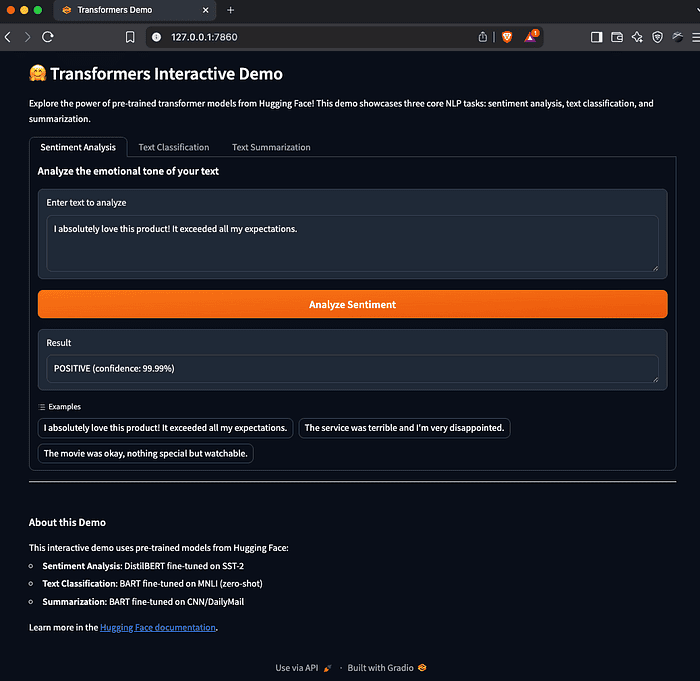
The above is the output from the companion github repo for this article. It is a Gradio app with sentiment analysis, text clarification, and text summarization examples.
Gradio is an open-source Python library that allows you to quickly create customizable web interfaces for your machine learning models, data analyses, or any Python function. It's particularly popular in the AI community for its simplicity and integration with Hugging Face's ecosystem.
Key features of Gradio include:
- Simple API: Create interactive UIs with just a few lines of Python code
- Multiple Input/Output Types: Support for text, images, audio, video, and more
- Easy Sharing: Generate temporary public links to share your app with anyone
- Customization: Flexible design options to match your needs or brand
- Hugging Face Integration: Seamless deployment to Hugging Face Spaces
Here's a simple example of how Gradio works:
import gradio as gr
# Define a function that your UI will use
def greet(name):
    return f"Hello, {name}!"

# Create a Gradio interface
demo = gr.Interface(
    fn=greet,              # The function to wrap
    inputs="text",         # Input type
    outputs="text",        # Output type
    title="Greeting App"   # UI title
)

# Launch the interface
demo.launch()
When you run this code, Gradio opens a local web server with a simple UI containing a text input field, a submit button, and an output area. Users can type their name, click submit, and see the greeting. The interface is automatically responsive and works on both desktop and mobile devices.
Gradio is particularly valuable for:
- ML Model Demos: Quickly show stakeholders how your models work
- Research Prototyping: Test ideas with interactive interfaces
- Educational Content: Create interactive tutorials or exercises
- Collaborative Development: Share works-in-progress with teammates
When combined with Hugging Face Spaces, Gradio lets you deploy these interfaces to the web with persistent URLs, making it easy to showcase your work or build simple applications without managing servers.
Transformers Library: The Python Power Tool for Modern AI
The transformers library serves as the engine under the hood. It lets you load, fine-tune, and deploy transformer, diffusion, and multimodal models with just a few lines of Python. Built-in support for PyTorch, TensorFlow, and JAX remains, alongside new integrations for local inference frameworks.
You can:
- Use pre-trained models out of the box
- Fine-tune models on your own data (fine-tune: further train a model on new data for specific tasks)
- Export models for production (including to Inference Endpoints or local frameworks)
Definition: Fine-tune means adapting a pre-trained model to a new, specific task by continuing training on new data.
Local Inference Frameworks: Efficient On-Device AI
Hugging Face supports integration with popular local AI frameworks like llama.cpp and ratchet for fast, private, and cost-effective inference. These frameworks let you run models from the Hub directly on consumer hardware, including laptops and edge devices.
Enterprise Collaboration: Teams, Versioning, and Governance
The platform now features advanced collaboration tools, team workspaces, model versioning, and enterprise-grade security, making it suitable for startups and large organizations.
These components work together seamlessly. Here's an updated summary:
Summary Table: Hugging Face Core Components (2025)
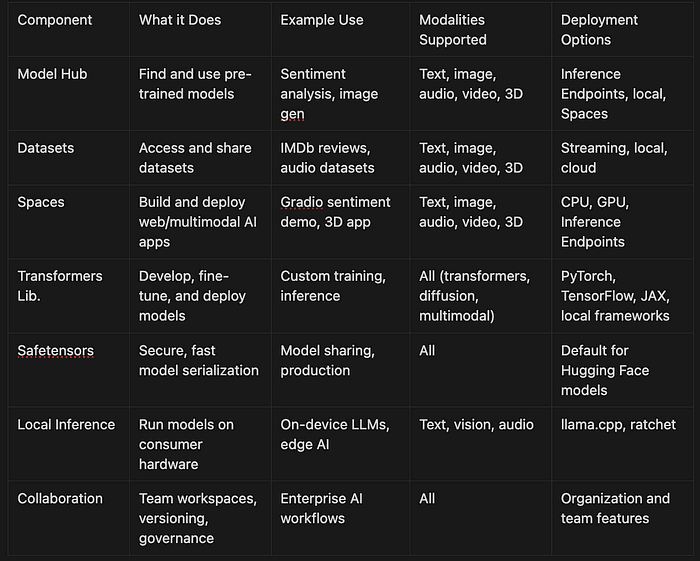
You can start simple; just run a pipeline. Or go deeper: fine-tune models, build multimodal apps, deploy at scale, and collaborate with your team. The choice is yours.
Open-Source Culture, Industry Adoption, and Community Governance
Hugging Face thrives on open-source and community. Thousands of contributors from solo developers to engineers at Google, Microsoft, Meta, and leading startups improve the tools and share new models daily.
Anyone can participate: report bugs, suggest features, or assist others. This keeps the platform running smoothly and ensures it addresses real-world needs. Hugging Face provides team workspaces, model versioning, and security features for businesses and enterprises for compliance and collaboration.
Open-source means no vendor lock-in and complete transparency. Industry leaders trust Hugging Face to power production AI, knowing they benefit from best practices and shared innovation.
Responsible AI is core. Model cards, dataset documentation, and clear guidelines help everyone use models safely and ethically. Community governance ensures decisions are open and accountable.
Section Recap and Transition
Hugging Face is more than just tools. It's a global community making cutting-edge AI accessible to everyone. Its main features simplify every step from concept to scalable application, while open-source principles and enterprise options ensure you're never building alone.
Next, we'll show you how to get hands-on with this ecosystem. The following section, "Navigating This Article Series: Your Roadmap to Transformer Mastery," provides a step-by-step guide to learning and applying these tools.
Navigating This Article Series: Your Roadmap to Transformer Mastery
Welcome! Before we start, take a moment to understand how this series is organized to help you learn about transformers and the Hugging Face ecosystem—step by step.
Consider this section your guide: you'll see what you need to get started, how the articles connect, and how to get the most out of every hands-on example. Whether you're a data scientist, developer, or just transformer-curious, this guide is made to meet you wherever you are. You'll progress from basic concepts to advanced, production-ready AI; always focusing on practical skills and real-world results.
Learn by Doing
Each article combines clear explanations with hands-on code. You'll start with the big picture, then immediately apply what you learn. Here's the typical flow:
- Concepts First: Article begins with key ideas and why they matter, often using business scenarios or analogies
- Step-by-Step Tutorials: Follow annotated code, you can run locally or in the cloud
- Practice: Exercises and challenges reinforce learning and encourage experimentation
- Business Connection: See how each technique solves real problems — from automating feedback to building chatbots
Let's jump into a hands-on example early in the article series. Try it now if you like!
Running a Sentiment Analysis Pipeline
from transformers import pipeline  # Import the pipeline function

# Load a pre-trained sentiment analysis pipeline
classifier = pipeline('sentiment-analysis')

# Analyze the sentiment of a sample sentence
result = classifier('Hugging Face makes AI easy!')
print(result)  # Example output: [{'label': 'POSITIVE', 'score': 0.9998}]

# Note: Output scores may vary depending on the model version and input.
How it works:
- Import the pipeline function from Hugging Face Transformers (your entry point to pre-built AI tools)
- Load a sentiment analysis model (pre-trained to classify text as positive or negative)
- Run the model on your text
- Print the result — see instant AI in action!
The result is a standard Python list of dictionaries (which can be easily serialized to JSON for production or API use). Output scores will vary based on the underlying model and input.
Try changing the sample sentence and notice how the output changes. Throughout the article series, code is broken down step by step so you'll always understand why it works — not just what to type.
What You Need to Get Started
You don't need to be an AI expert. Here's what helps:
- Python: Comfortable with functions, classes, and libraries like NumPy or pandas.
- Machine Learning Basics: Know terms like training, validation, and neural networks (see article 2 for a refresher).
- Command Line & Git: Basics for installing packages and version control.
- Hardware: Most exercises run on a laptop. For model fine-tuning or training, a GPU (local or cloud, e.g., Google Colab) is recommended.
For advanced training and distributed computing, consider installing the accelerate library (see later chapters for usage).
If you're missing any skills, don't worry — each chapter links to quick tutorials and resources so you can catch up as you go.
Before we discuss the technical details of transformers and Hugging Face, let's ensure your local environment is correctly set up. Configuring the right tools will make your learning journey smoother and more enjoyable as you experiment with the code examples throughout this article.
The next section'll explore different environment setup options to accommodate various workflows and preferences. Whether you prefer Poetry for dependency management, Mini-conda for environment isolation, or a traditional pip setup with pyenv, we've got you covered with step-by-step instructions to get your development environment ready for AI experimentation, not to mention a github repo with setup scripts.
Environment Setup Options
Before diving into transformers, let's ensure you have the right environment:
Poetry Setup (Recommended for Projects)
# Install poetry if not already installed
curl -sSL https://install.python-poetry.org | python3 -

# Create new project
poetry new huggingface-project
cd huggingface-project

# Add dependencies
poetry add transformers==4.53.0 datasets torch
poetry add --group dev jupyter ipykernel
Mini-conda Setup (Alternative)
# Download and install mini-conda from
# https://docs.conda.io/en/latest/miniconda.html

# Create environment with Python 3.12.9
conda create -n huggingface python=3.12.9
conda activate huggingface

# Install packages
conda install -c pytorch -c huggingface transformers datasets torch
conda install -c conda-forge jupyterlab
Traditional pip with pyenv
# Install Python 3.12.9 with pyenv
pyenv install 3.12.9
pyenv local 3.12.9

# Create virtual environment
python -m venv venv
source venv/bin/activate  # On Windows: venv\Scripts\activate

# Install packages
pip install transformers==4.53.0 datasets torch jupyterlab
Quick Setup
Install the core libraries with one command (tested with Transformers v4.53.0+, Datasets v2.20.0+, and Torch v2.2.0+):
Installing Hugging Face Transformers and Dependencies
pip install --upgrade transformers datasets torch
For advanced distributed training, you may also want to install Accelerate:
pip install accelerate
You can use your local machine, a cloud notebook (like Google Colab), or deploy models to Hugging Face Spaces and Inference Endpoints for scalable cloud execution. Each chapter will mention any extra requirements if needed.
I wrote up detailed instruction with a good setup script hosted on github. Check out the README.md.
Running Examples
Run all examples:
task run
Or run individual modules:
task run-sentiment       # Sentiment analysis examples
task run-classification  # Document classification
task run-summarization   # Text summarization
task run-gradio          # Launch web interface
Direct Python execution:
poetry run python src/main.py
poetry run python src/sentiment_analysis.py
poetry run python src/document_classification.py
poetry run python src/text_summarization.py
poetry run python src/gradio_app.py
Setting Up Your Environment
Quickstart: Installing Hugging Face Transformers and Dependencies
pip install --upgrade transformers datasets torch
# (Optional for advanced users)
pip install accelerate
This command installs the main libraries:
- transformers for working with models and pipelines (v4.53.0+ recommended)
- datasets for data handling (v2.20.0+ recommended)
- torch for deep learning (v2.2.0+ recommended)
- accelerate (optional) for distributed and efficient training
Use your local machine, a cloud notebook (like Google Colab), or deploy to Hugging Face Spaces and Inference Endpoints for scalable cloud execution. Each chapter will mention any extra requirements.
How Articles Build Your Skills
This article series is structured as a learning path. Early article cover the basics — NLP, transformer architecture, and the Hugging Face platform. Later chapters dive into fine-tuning, custom training, deployment, and advanced topics like reinforcement learning for reasoning models.
Here's the journey ahead:
- Foundations: NLP, transformer basics, and the Hugging Face ecosystem
- Core Skills: Pipelines, tokenization, and working with pre-trained models for text, vision, and audio
- Advanced Usage: Fine-tuning, dataset management, and custom training workflows
- Deployment: Sharing, deploying, and scaling models for production (including Spaces and Inference Endpoints)
- Cutting-Edge: Efficient training (LoRA, SFT), reinforcement learning (GRPO), and reasoning models
- Production & Optimization: Debugging, scaling, and integrating with other frameworks
Each article ends with links to github repos or HuggingFaces spaces with summaries, and links to related content. For example, if you want to deploy a model as a web app, you'll find pointers to the Gradio and Spaces chapters. If you're focused on fine-tuning, you'll be guided to articles on custom training and dataset curation.
Example: Connecting Your Skills
- Start with a sentiment analysis pipeline
- Later, fine-tune it on your own data (see chapters on Datasets and the Trainer API)
- Evaluate and deploy your custom model for real business value
Reinforcing Learning: Summaries and Checkpoints
Every chapter includes summaries, key takeaways, and quick checklists. Use these as checkpoints to review your learning and fill any gaps before moving on.
Real-World Focus
Every technique is tied to business value. Whether automating feedback, building chatbots, or launching new AI products. You'll see how your skills translate to impact in real projects.
Key Takeaways
- Each chapter blends concise theory with hands-on practice.
- Prerequisites and setup are simple; links to refreshers are included.
- The article series builds skills step by step, with summaries and exercises to reinforce learning.
- Code is practical, annotated, and always explained.
- Every concept connects to real-world business impact.
Article Series Structure and Learning Approach
Each article acts as a mini-workshop. You'll first understand the core concept, then put it into practice right away. This learn-by-doing approach helps you remember more and see how abstract ideas solve real problems.
When you learn about attention mechanisms, you'll get a clear explanation. Then dive into hands-on code that lets you experiment and see results instantly.
You're encouraged to tweak code, try new inputs, and even break things. That's how real learning happens. Each article ends with sample code to try things out and project ideas to extend your skills.
Prerequisite Knowledge
To get started, make sure you have:
- Python Programming: Comfortable with functions, classes, and third-party libraries.
- Machine Learning Basics: Understand a model, the difference between training and inference (using a trained model to make predictions), and basic neural network ideas.
- Command Line & Git: Able to install packages and clone repositories.
- Hardware: Most exercises run on a laptop. A GPU (local or cloud) is recommended for training large models.
The Hugging Face Accelerate library can be installed for advanced training and distributed computing to simplify multi-GPU and distributed workflows (see later chapters for details).
Need a refresher? The article series links to short tutorials.
How Articles in this Series Connect and Support Your AI Development Journey
The article series is a logical path from basics to advanced applications. Here's how the articles fit together:
- Foundations: NLP, transformers, and Hugging Face overview
- Core Skills: Pipelines, tokenization, and using pre-trained models
- Advanced Techniques: Fine-tuning, dataset management, and custom models
- Deployment: Sharing, deploying, and scaling models (including Spaces and Inference Endpoints)
- Cutting-Edge Topics: LoRA, reinforcement learning (GRPO), and reasoning models
- Production Optimization: Debugging, distributed training (with Accelerate), and integration with other frameworks
You'll find cross-references throughout. Look for pointers in the deployment chapters if you want to deploy with Gradio or Spaces. Interested in fine-tuning? You'll be guided to custom training and data curation.
Articles build on each other, but you can also jump to sections that match your needs. Summaries and examples for article to reinforce learning and offer practical checkpoints.
Redux and Review
Let's distill the essentials from this article. You now have a clear view of how Natural Language Processing (NLP) forms the backbone of modern AI, and why transformer models — especially those using self-attention — are at the heart of today's most powerful language and multimodal systems. While BERT was a breakthrough and remains widely used, models like GPT-4, Llama 3, DeepSeek-R1, and Mistral have set new benchmarks for language understanding and generation as of 2025.
Note: All code examples in this article series are tested with Hugging Face Transformers v5.x (2025). APIs used here are current and stable. For the latest updates, always consult the official Hugging Face documentation.
Transformers: The Core of Modern AI
Transformers are the engine behind today's AI breakthroughs. Unlike older models like RNNs, which process data step by step, transformers use self-attention to analyze all input simultaneously. This enables them to capture context and relationships across entire documents, images, audio, or even multiple data types — much like a reader who remembers every detail, not just the last sentence.
Modern transformer models power not only text tasks, but also vision, audio, and multimodal applications. The Hugging Face Model Hub features state-of-the-art open LLMs such as Llama 3, Mistral, DeepSeek, and Zephyr, as well as leading models for vision and diffusion.
Self-attention lets the model weigh the importance of each part of the input, enabling it to understand nuance and long-range dependencies. This is why transformers excel at tasks like translation, summarization, code generation, and more.
Practical Example: Transformers vs. RNNs
Suppose you need to analyze the sentiment of a long customer review. An RNN might forget early details by the end. A transformer, however, considers the whole review at once, so context like "I loved the service, but..." is never lost.
Here's how you can use Hugging Face's pipeline to run sentiment analysis with a transformer:
Using a Transformer for Sentiment Analysis
Let's dive into a practical example of using Hugging Face's pipeline for sentiment analysis. The following code shows how to use a pre-trained transformer model to analyze sentiment in text:
from transformers import pipeline

# Load a pre-trained sentiment analysis pipeline (defaults to a current model, e.g. DistilBERT or a recent open LLM)
classifier = pipeline('sentiment-analysis')

# Analyze a long review
review = (
    "I loved the friendly staff and the beautiful ambiance. "
    "However, the wait time was longer than expected, and the food was just average. "
    "Overall, I might return, but only if improvements are made."
)
result = classifier(review)
print(result)
Step by step:
- pipeline('sentiment-analysis') loads a ready-to-use transformer model from the Model Hub
- The model analyzes the full review in one go, weighing both positive and negative phrases
- The output reflects a holistic understanding of the review's sentiment
This approach is powerful for real-world tasks that require understanding nuance and context — like customer feedback analysis or document review. For production deployments, Hugging Face supports efficient inference through quantization, ONNX export, and serverless endpoints.
Hugging Face: AI Made Accessible
If transformers are the engine, Hugging Face is the vehicle. The Hugging Face ecosystem puts advanced AI at your fingertips with:
- Model Hub: Thousands of pre-trained models for text, vision, audio, and more — including the latest open LLMs (Llama 3, Mistral, DeepSeek, Zephyr)
- Datasets: Ready-to-use data for training and evaluation
- Spaces: Share and demo interactive AI apps, powered by Gradio
- Transformers Library: Intuitive Python tools for using and fine-tuning models
- Inference Endpoints: Scalable, serverless deployment for production use
You don't need to be a deep learning expert. With just a few lines of code, you can summarize, translate, moderate, or generate text — making AI practical for business and research.
To build interactive web demos, Hugging Face recommends Gradio, which is tightly integrated with Spaces. This makes it easy to share models and collect feedback from users.
Here's a quick example using the Model Hub to create a text summarizer:
Loading a Pretrained Text Summarization Model
The following code example demonstrates how to create a text summarization model using the Hugging Face transformers library. This simple but powerful code snippet shows the ease of implementing advanced NLP capabilities with just a few lines of Python:
from transformers import pipeline

# Load a summarization pipeline (defaults to a current model, e.g. BART or T5)
summarizer = pipeline('summarization')

# Example article
article = (
    "Transformers have dramatically improved the field of natural language processing. "
    "They use self-attention mechanisms to understand context and relationships in text, "
    "enabling applications such as translation, summarization, and question answering."
)
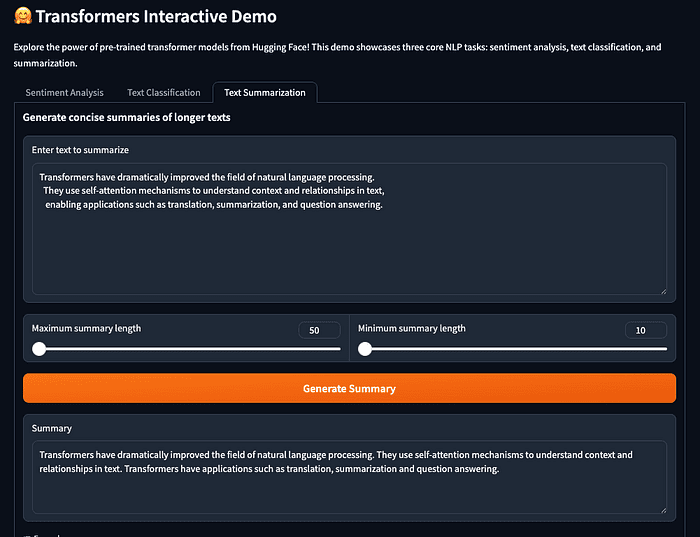
summary = summarizer(article, max_length=40, min_length=10, do_sample=False)
print(summary[0]['summary_text'])
What happens here?
- The summarization pipeline loads a transformer model fine-tuned for summarization
- You provide a short article as input
- The model produces a concise summary — ideal for business reports, news digests, or research abstracts
This workflow shows how Hugging Face lowers the barrier to advanced AI. For production, you can deploy models as serverless endpoints or integrate them into scalable applications with optimized inference.
Your Learning Journey
This article series will guide you step by step:
- Grasp the core theory behind transformers (see article 2 for NLP fundamentals)
- Practice with real code and business scenarios
- Explore advanced topics like model fine-tuning, deployment, efficient inference, and reasoning (see later chapters for quantization, serverless deployment, and reinforcement learning)
Each chapter builds on the last, blending exercises, case studies, and practical advice so you can apply what you learn immediately.
Key Takeaways
- Transformers capture context and relationships, powering state-of-the-art AI across text, vision, audio, and multimodal domains.
- Hugging Face makes these tools accessible, open-source, and practical, with support for efficient inference and scalable deployment.
- This article series connects theory to hands-on projects, helping you build real AI solutions using the latest models and best practices.
Glossary
- Transformer: Neural network model using self-attention to process data in parallel and capture global context
- Self-Attention: Mechanism that allows the model to weigh all input elements relative to each other, enabling nuanced understanding
- Pipeline: Hugging Face abstraction that loads a ready-to-use model for a specific task (e.g., sentiment analysis, summarization)
- Model Hub: Repository of pre-trained models for various domains and tasks, including the latest open LLMs and multimodal models
- Datasets: Curated collections of data for training or evaluating models
- Spaces: Platform for sharing and demoing interactive AI apps, powered by Gradio
- Inference Endpoints: Scalable, serverless API endpoints for deploying models in production
- Quantization: Technique for reducing model size and speeding up inference by using lower-precision arithmetic
- Gradio: Python library for building interactive web UIs for machine learning models, integrated with Hugging Face Spaces
- Open Source: Software developed and shared freely, encouraging collaboration and transparency
Looking Ahead
You now have a solid foundation in transformers and the Hugging Face ecosystem. Next, dive into Article 2 for the basics of NLP, or jump to Article 3 for hands-on setup. Ready to transform your skills? Let's get started!
Summary
This article established the foundation for your journey into transformer-powered AI and the Hugging Face ecosystem. We explored the evolution of AI, the transformative role of transformers, and how Hugging Face democratizes access to cutting-edge tools and models. With a clear roadmap and practical focus, you're ready to dive into modern AI development's technical and hands-on aspects in the chapters ahead.
Check out the companion github repo with all the examples.
About the Author
Rick Hightower brings extensive enterprise experience as a former executive and distinguished engineer at a Fortune 100 company, where he specialized in Machine Learning and AI solutions to deliver intelligent customer experiences. His expertise spans both theoretical foundations and practical applications of AI technologies.
As a TensorFlow-certified professional and graduate of Stanford University's comprehensive Machine Learning Specialization, Rick combines academic rigor with real-world implementation experience. His training includes mastery of supervised learning techniques, neural networks, and advanced AI concepts, which he has successfully applied to enterprise-scale solutions.
With a deep understanding of both business and technical aspects of AI implementation, Rick bridges the gap between theoretical machine learning concepts and practical business applications, helping organizations leverage AI to create tangible value.
Follow Rick on LinkedIn or Medium for more enterprise AI and AI Architecture insights.