Under the Hood: Middleware, Sub-Agents, and Deep Agent LangGraph Orchestration
How LangChain Deep Agents compose modular middleware, quarantine context with subagents, and leverage LangGraph for durable execution
Originally published on Medium.
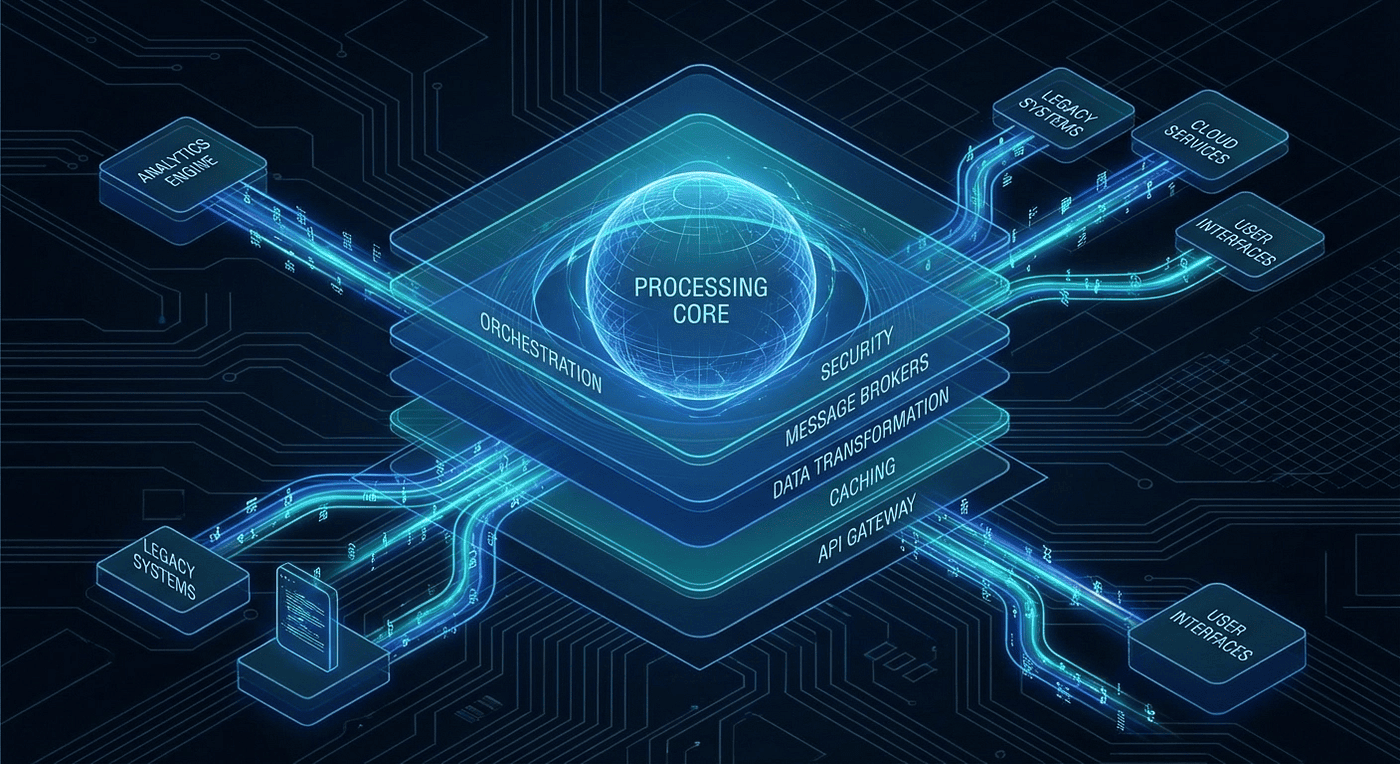
How LangChain Deep Agents compose modular middleware, quarantine context with subagents, and leverage LangGraph for durable execution
Dive into the world of AI with "Under the Hood: Middleware, Sub-Agents, and LangGraph Orchestration"! Discover how modular middleware and context quarantine can revolutionize your AI agents, making them more resilient and efficient. Are you ready to unlock the secrets of LangChain Deep Agents?
Every web developer knows middleware. In Express.js, you stack authentication, logging, and rate limiting without touching your route handlers. In Django, request and response flow through a pipeline of processors you can add, remove, or reorder at will. Spring Boot allow you to mix in aspects for logging, transactions and security. The core application never changes.
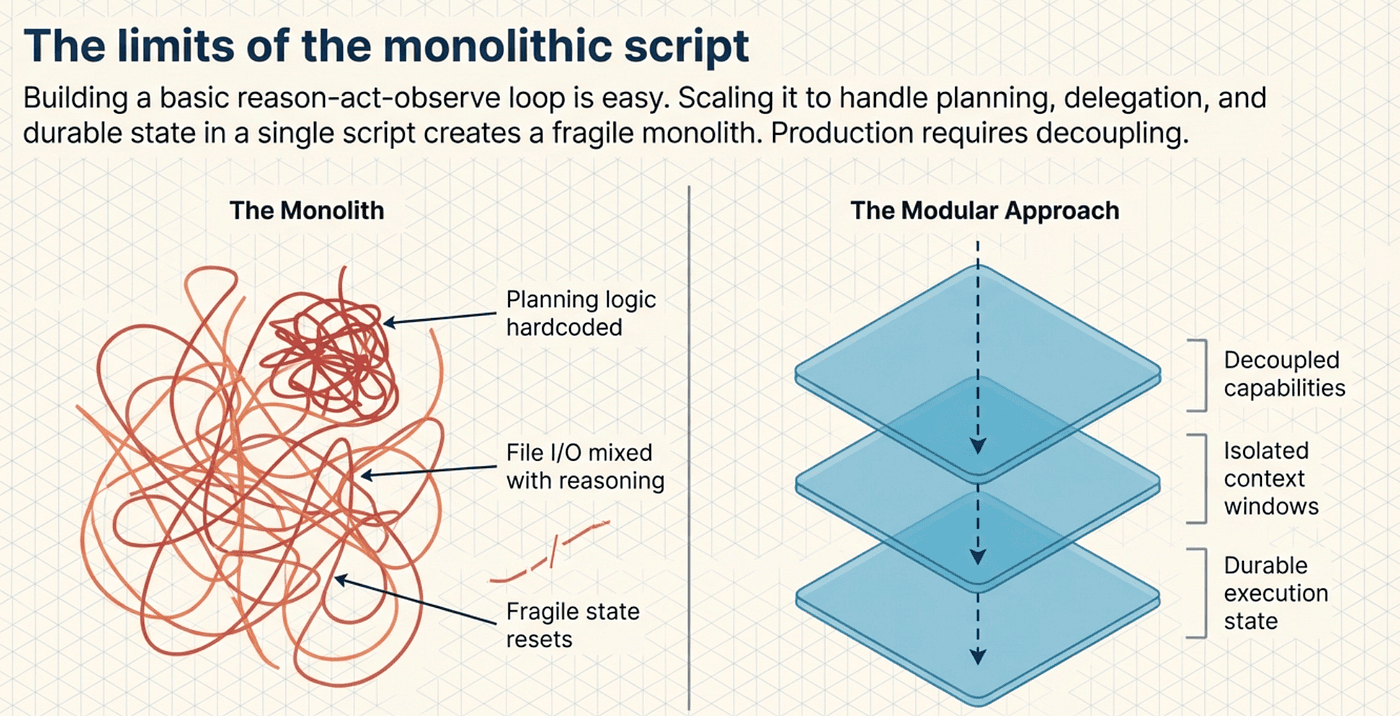
LangChain Deep Agents bring the same idea to AI agents. Instead of building a monolithic agent that handles planning, file access, delegation, and conversation management in one tangled loop, you stack middleware. Each layer adds a capability. The core agent loop stays untouched. This article takes you under the hood to see how it works.
We will cover three interconnected systems: the middleware architecture that makes Deep Agents modular, the subagent pattern that solves context window bloat, and the LangGraph engine that provides the durable, stateful execution foundation underneath. By the end, you will understand not just what Deep Agents do, but how their internals fit together.
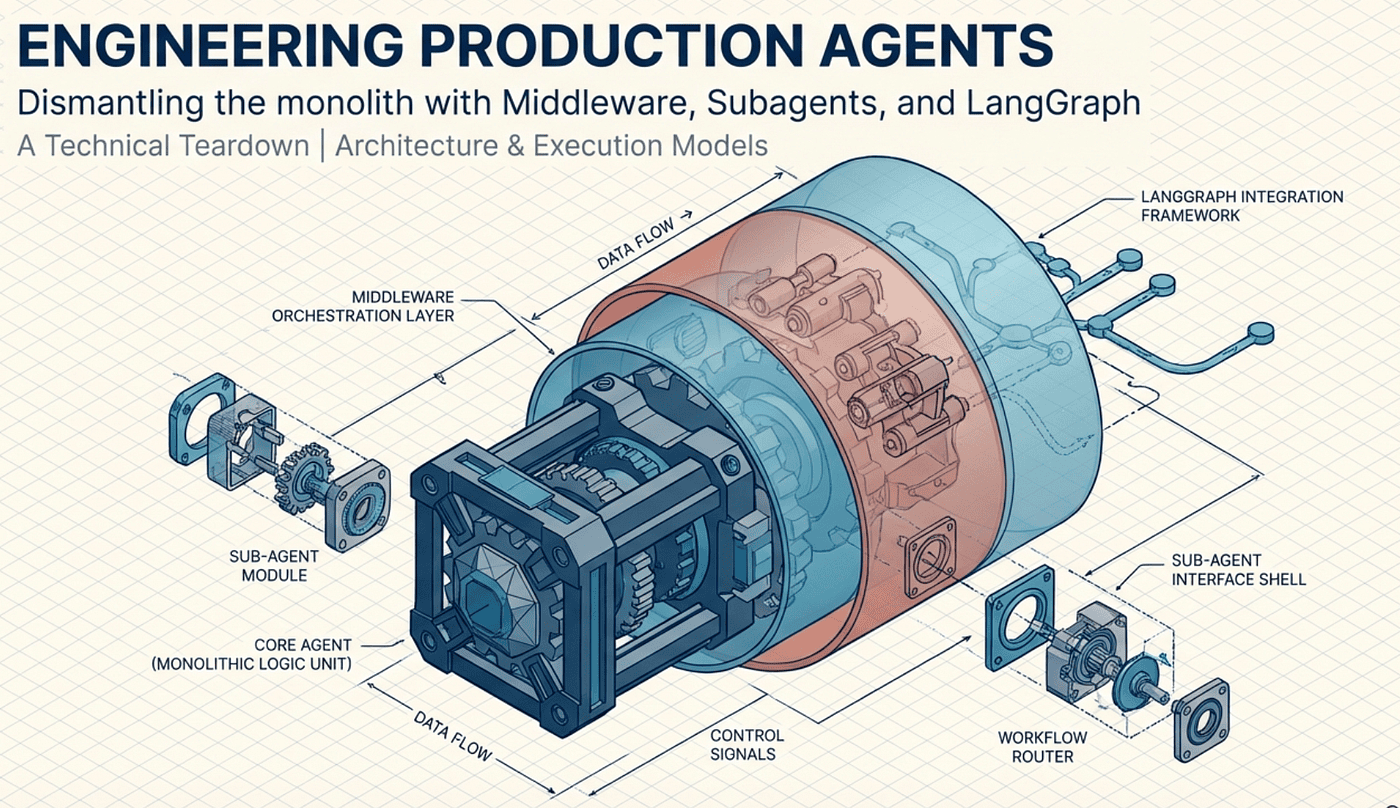
The Power of Middleware
Middleware in Deep Agents is not a metaphor. It is a concrete architectural pattern with a precise contract. Every middleware component implements the AgentMiddleware protocol, which defines two hooks:
- before_agent(state) runs once during initialization, setting up the middleware's contribution to the agent's state
- wrap_model_call(call_model, state) intercepts every LLM invocation, letting the middleware inject tools, modify prompts, or transform results
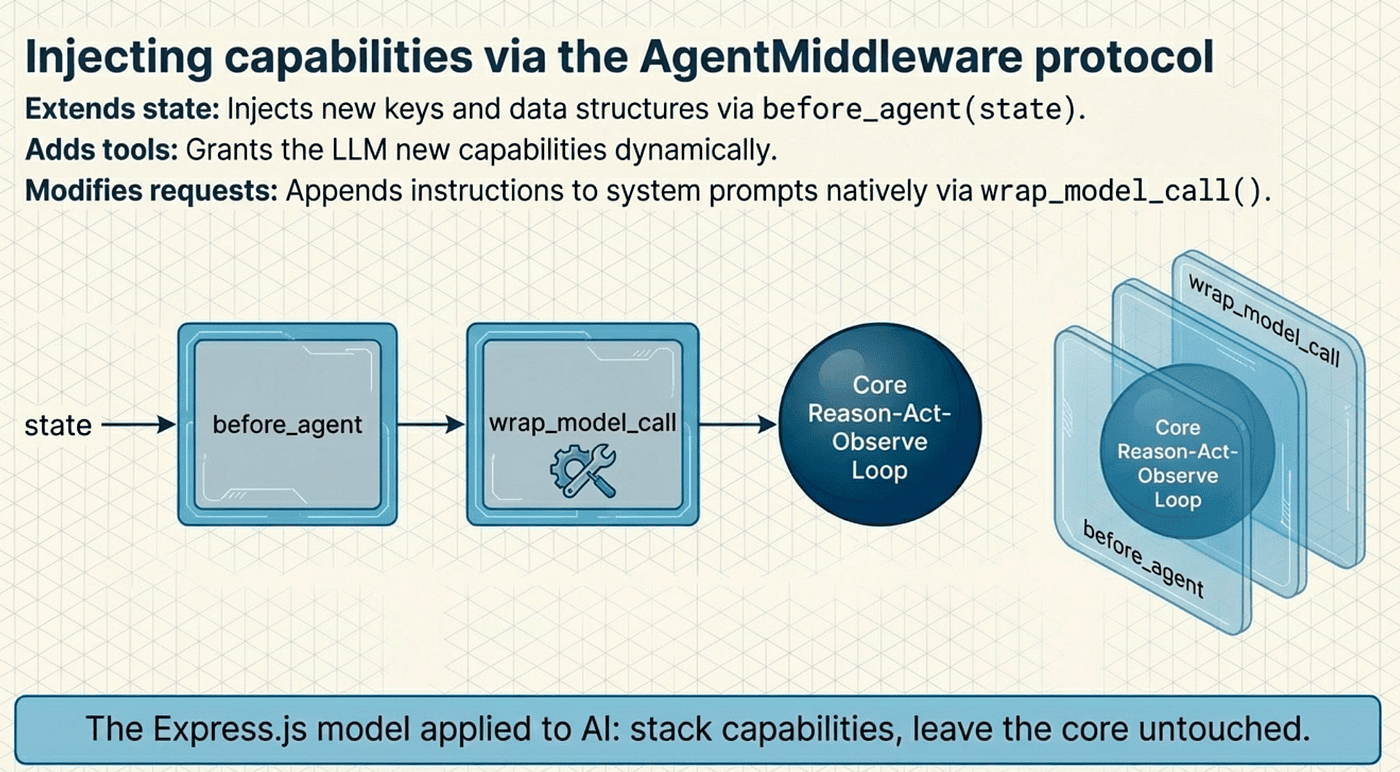
Through these hooks, each middleware extends the agent loop in three ways:
- Extends the state schema by adding new keys and data structures to the agent's state
- Adds new tools that give the model additional capabilities
- Modifies the model request by appending instructions to the system prompt
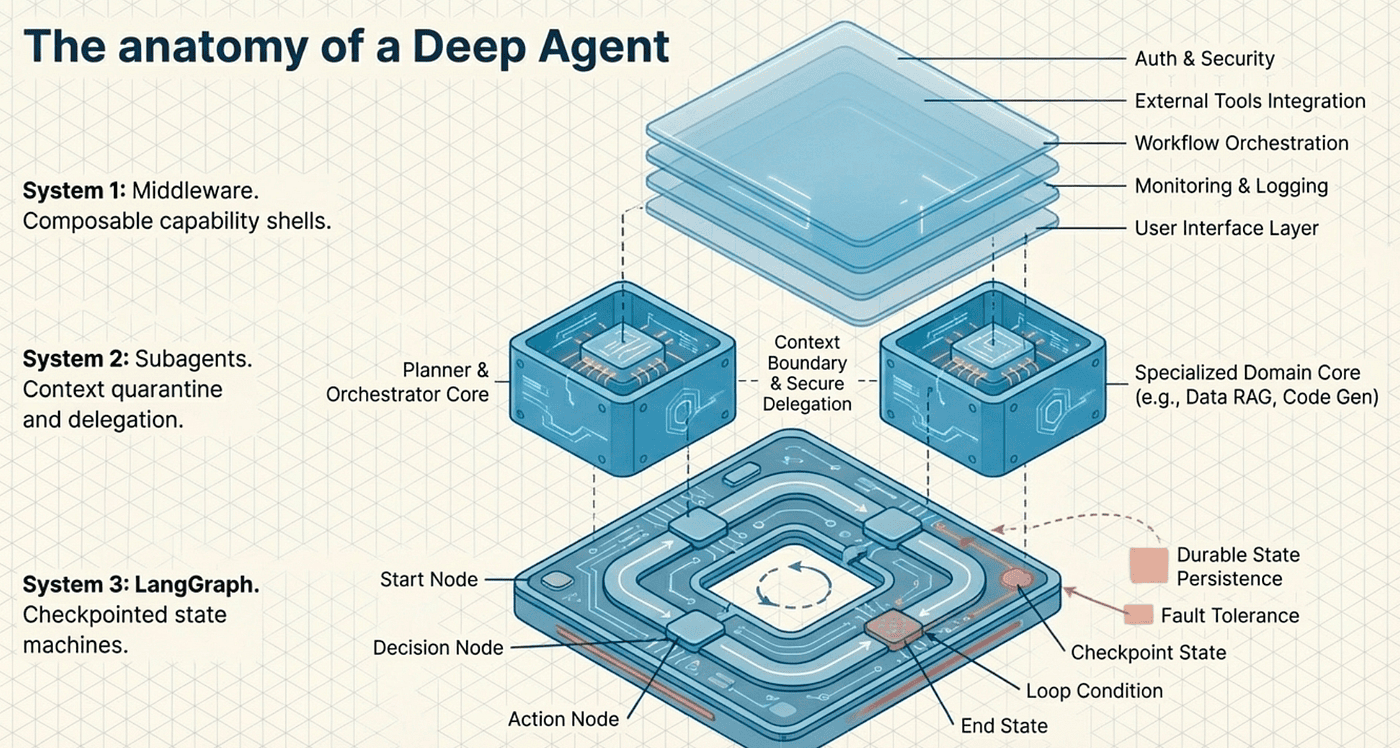
The beauty of this approach is composability. You never modify the core agent loop. You wrap it. Think of it as concentric shells: the innermost shell is the basic reason-act-observe loop, and each middleware layer adds another shell around it.
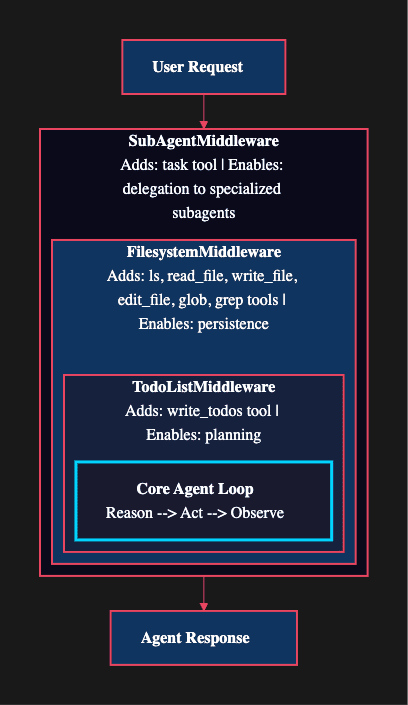
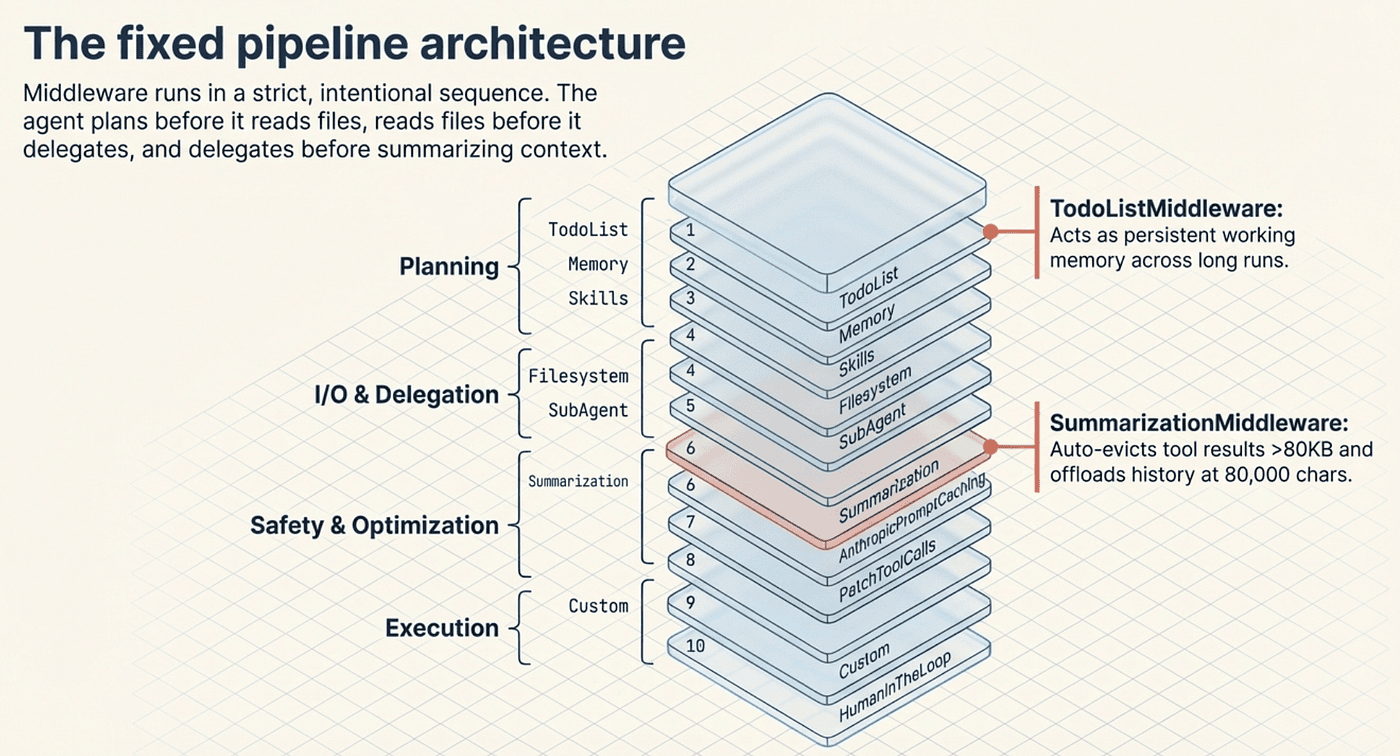
When you call create_deep_agent, it automatically attaches middleware in a strict, fixed order. The full pipeline runs ten layers deep: TodoListMiddleware first for planning, then MemoryMiddleware for loading context from AGENTS.md files, SkillsMiddleware for progressive disclosure of capabilities, FilesystemMiddleware for file operations, SubAgentMiddleware for delegation, SummarizationMiddleware for context management, AnthropicPromptCachingMiddleware for model-specific optimization, PatchToolCallsMiddleware for normalizing tool calls, any custom middleware you provide, and finally HumanInTheLoopMiddleware for approval workflows. This ordering is intentional: the agent plans before it reads files, reads files before it delegates, and delegates before it summarizes.
TodoListMiddleware: Structured Planning
The planning middleware is inspired by how Claude Code handles complex tasks. Before diving into execution, the agent writes out a to-do list that breaks a problem into discrete steps.
What it does: TodoListMiddleware provides a write_todos tool. The agent can create tasks, mark them complete, and update the plan as it learns new information. The middleware's before_agent() hook initializes the todo state, and the wrap_model_call() hook injects the planning tool into each LLM call.
Why this matters: Without explicit planning, agents tend to jump straight into action, lose track of multi-step problems, and forget what they have already tried. The to-do list acts as a persistent anchor that keeps the agent focused across long execution runs. Think of it as the agent's working memory for task management.
from deepagents import create_deep_agent
from langchain.chat_models import init_chat_model

# TodoListMiddleware is auto-attached by create_deep_agent
agent = create_deep_agent(
    model=init_chat_model("anthropic:claude-sonnet-4-20250514"),
    tools=[web_search, code_executor],
    system_prompt="You are a senior software engineer."
)

# The agent now has write_todos in its toolset.
# It will plan before acting on complex requests.
The code snippet demonstrates the automatic middleware attachment in LangChain Deep Agents. When you call create_deep_agent(), the framework automatically attaches TodoListMiddleware (along with the other middleware layers mentioned earlier) without requiring explicit configuration.
The example shows three key points:
- Automatic middleware integration: You don't need to manually add TodoListMiddleware. The create_deep_agent() function attaches it automatically as part of the ten-layer middleware pipeline described in the previous section.
- Minimal configuration: You only specify what matters for your use case: the model (anthropic:claude-sonnet-4-5), the domain-specific tools (web_search, code_executor), and the agent's role ("You are a senior software engineer.").
- Implicit capabilities: The write_todos tool becomes available automatically. The agent gains planning capabilities without any explicit code to add them. This relates directly to the middleware composability principle explained earlier: each middleware layer extends the agent's capabilities transparently.
This snippet illustrates the "stacking" metaphor from the Power of Middleware section. The core agent loop remains unchanged -- it still just reasons, acts, and observes. TodoListMiddleware wraps around it, injecting the planning tool through its wrap_model_call() hook. The result is an agent that plans before acting, without any modification to the underlying agent implementation.
When the agent receives a complex request like "refactor this module and update all tests," it will first write a to-do list breaking the work into steps: analyze the current module structure, identify refactoring targets, update each function, run tests, and fix any failures. Each completed step gets checked off, providing both the agent and any observers with a clear progress trail.
FilesystemMiddleware: Beyond Simple File Access
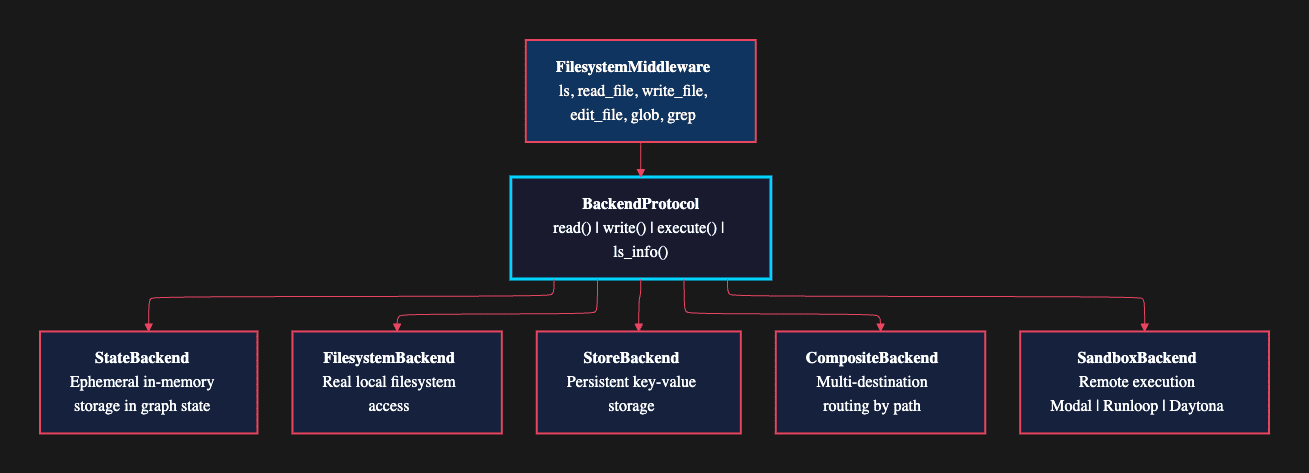
The filesystem middleware gives agents far more than basic file I/O. It provides nine tools through a pluggable backend abstraction that decouples file operations from their underlying storage.
The nine tools: ls, read_file, write_file, edit_file, glob, grep, execute, task, and compact_conversation. These cover directory listing, file reading and writing, pattern-based search, content search, shell execution, subagent delegation, and conversation compression.
The BackendProtocol: All operations route through a BackendProtocol interface with four methods: read(), write(), execute(), and ls_info(). This abstraction layer lets you swap storage backends without changing any middleware code:
- StateBackend: Ephemeral in-memory storage within the graph state. Files exist only during the agent's execution.
- FilesystemBackend: Real local filesystem access for reading and writing actual files.
- StoreBackend: Persistent key-value storage that survives across sessions.
- CompositeBackend: Routes specific paths to different backends. For example, /memories/ goes to StoreBackend while everything else uses FilesystemBackend.
- SandboxBackendProtocol: Remote execution through Modal, Runloop, or Daytona for isolated environments.
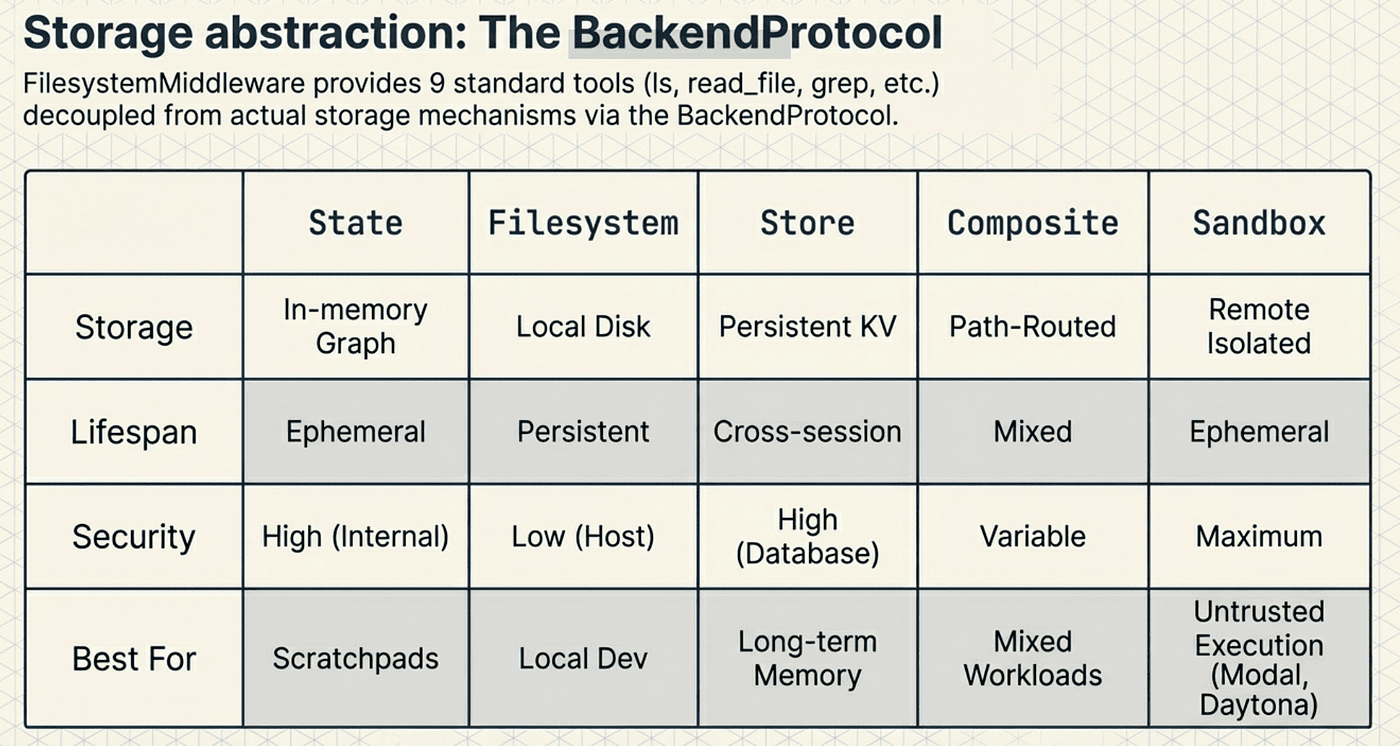
Modal, Runloop, and Daytona are remote execution platforms that provide sandboxed environments for running code safely, isolated from the host system. The SandboxBackendProtocol integrates with these platforms to enable agents to execute code and shell commands in containerized, ephemeral environments rather than on the local machine.
- Modal: A serverless cloud platform that spins up containerized Python environments on-demand. When an agent uses Modal as its sandbox backend, code execution happens in a fresh container with configurable dependencies, GPU access, and automatic scaling. Modal handles orchestration, resource allocation, and teardown automatically. This is ideal for compute-intensive tasks like running machine learning models, data processing pipelines, or parallel experiments.
- Runloop: A developer-focused sandbox service designed specifically for AI agents. It provides pre-configured execution environments with common tools and libraries already installed. Runloop emphasizes fast startup times (typically under 1 second) and persistent sessions that can survive across multiple tool calls. This makes it well-suited for agents that need to maintain state across several code execution steps, such as building and testing software incrementally.
- Daytona: An open-source development environment platform that creates standardized, reproducible workspaces. When used as a sandbox backend, Daytona provides full development environments with version control, editors, and debugging tools. It excels at tasks requiring a complete development setup, such as cloning repositories, running test suites, or performing multi-file refactoring operations. Daytona workspaces can be configured via Infrastructure as Code, ensuring consistent environments across agent executions.
The key benefit of routing execution through these platforms rather than using local execution is safety and isolation. If an agent generates buggy code or runs a command with unintended side effects, the damage is contained within the disposable sandbox. The host system remains untouched. Additionally, these platforms provide access to resources (GPUs, large memory instances, specific OS environments) that may not be available locally.
The custom_tool_descriptions parameter lets you shape how the model uses these tools without changing the middleware code. The same FilesystemMiddleware, configured with different descriptions, can serve a research agent ("store your findings"), a coding agent ("save generated code"), or a data analysis agent ("cache query results"). The middleware provides the mechanism; the descriptions provide the policy.
from deepagents.middleware.filesystem import FilesystemMiddleware

fs_middleware = FilesystemMiddleware(
    long_term_memory=True,
    system_prompt="""Store intermediate research results to files. Read
              them back when you need specific details.""",
    custom_tool_descriptions={
        "ls": "List files in the working directory to see what data you have stored.",
        "read_file": "Read a previously saved file to retrieve stored results.",
        "write_file": "Save intermediate results or notes for later use."
    }
)
SubAgentMiddleware: Delegation
The delegation middleware enables the main agent to spawn specialized subagents that run in completely isolated contexts. It adds a task tool that lets the agent delegate work to named subagents, each with its own system prompt, tools, and optionally its own model.
Not every subtask needs the same tools or instructions. A research subtask benefits from web search tools and a research-oriented prompt. A code review subtask needs file access and a quality-focused prompt. Delegation lets you give each subtask exactly the right configuration without polluting the parent agent's setup. We will explore why the isolation matters in the next section.
Middleware Is Composable
You are not limited to the default middleware components. Deep Agents supports additional middleware you can stack as needed:
- SummarizationMiddleware: Monitors total context size and automatically offloads old messages to /offloaded_history/ when context exceeds roughly 80,000 characters, replacing them with a summary. It also truncates large tool arguments and evicts tool results larger than 80KB to /large_tool_results/.
- HumanInTheLoopMiddleware: Pauses execution on configurable tool calls and waits for human approval before proceeding.
- MemoryMiddleware: Loads persistent context from AGENTS.md files, letting agents retain learned patterns across sessions.
- SkillsMiddleware: Provides progressive disclosure of SKILL.md files, revealing capabilities as the agent needs them.
from langchain.agents.middleware import (
    SummarizationMiddleware,
    HumanInTheLoopMiddleware,
)
agent = create_deep_agent(
    model=init_chat_model("openai:gpt-4o"),
    tools=[deploy_tool, monitor_tool, rollback_tool],
    system_prompt="You are a DevOps automation agent.",
    middleware=[
        SummarizationMiddleware(
            model="openai:gpt-4o-mini",
            max_tokens_before_summary=3000,
            messages_to_keep=20,
        ),
        HumanInTheLoopMiddleware(
            interrupt_on={
                "deploy_tool": True,
                "rollback_tool": True,
                "monitor_tool": False,
            }
        ),
    ],
)
In this example, the agent will automatically summarize conversations that exceed 3,000 tokens (keeping the 20 most recent messages intact) and will pause for human approval before deploying or rolling back. Monitoring runs freely without interruption. The core agent loop has no idea any of this is happening. It just reasons, acts, and observes. The middleware handles the rest transparently.
Solving Context Bloat with Subagents
Context bloat is one of the most practical problems in agent engineering. As an agent works through a complex task, its context window fills up with tool call results, intermediate reasoning, error messages, and retries. Performance degrades. The agent enters what practitioners call the "dumb zone," where the sheer volume of context overwhelms the model's ability to reason clearly. Research has shown that LLMs perform worse on reasoning tasks when the context contains large amounts of irrelevant information, even when the relevant facts are present.
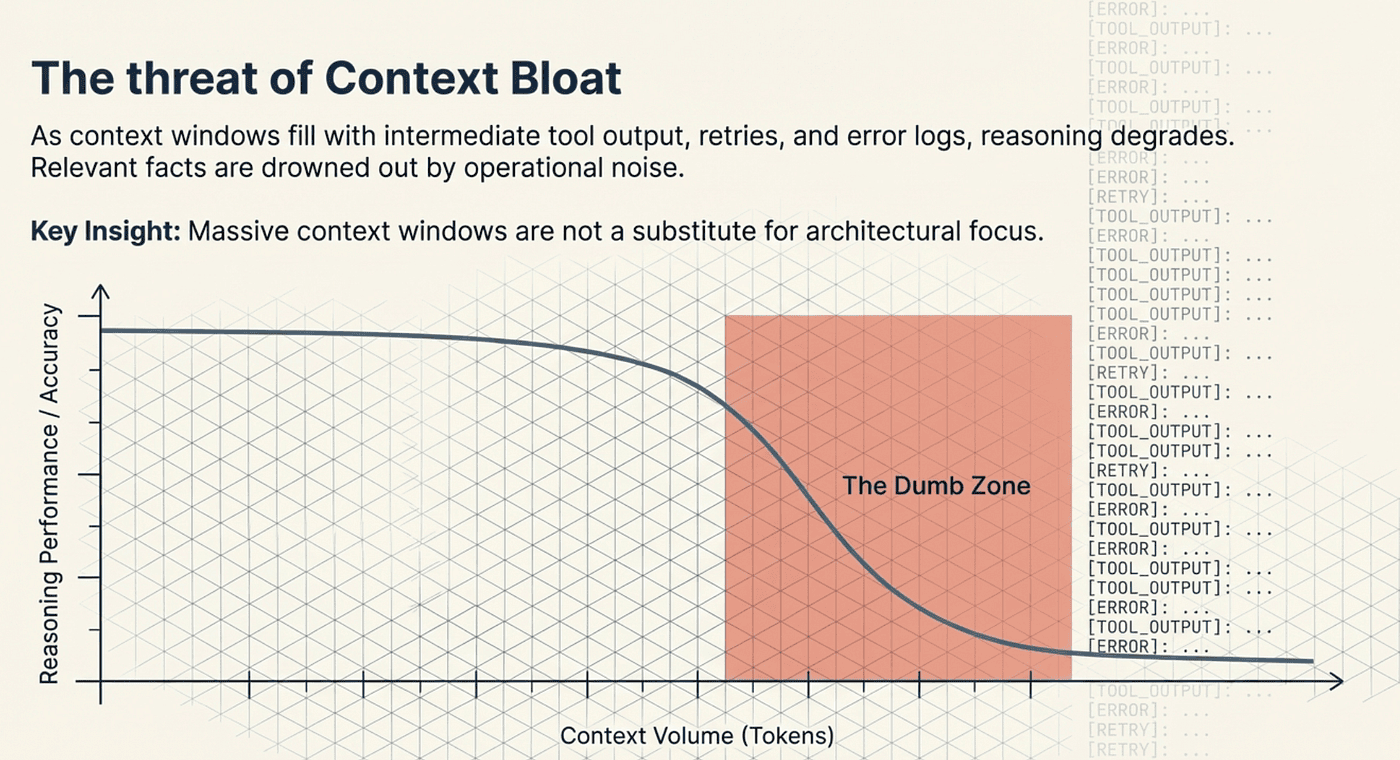
Research has shown that LLMs perform worse on reasoning tasks when the context contains large amounts of irrelevant information, even when the relevant facts are present.
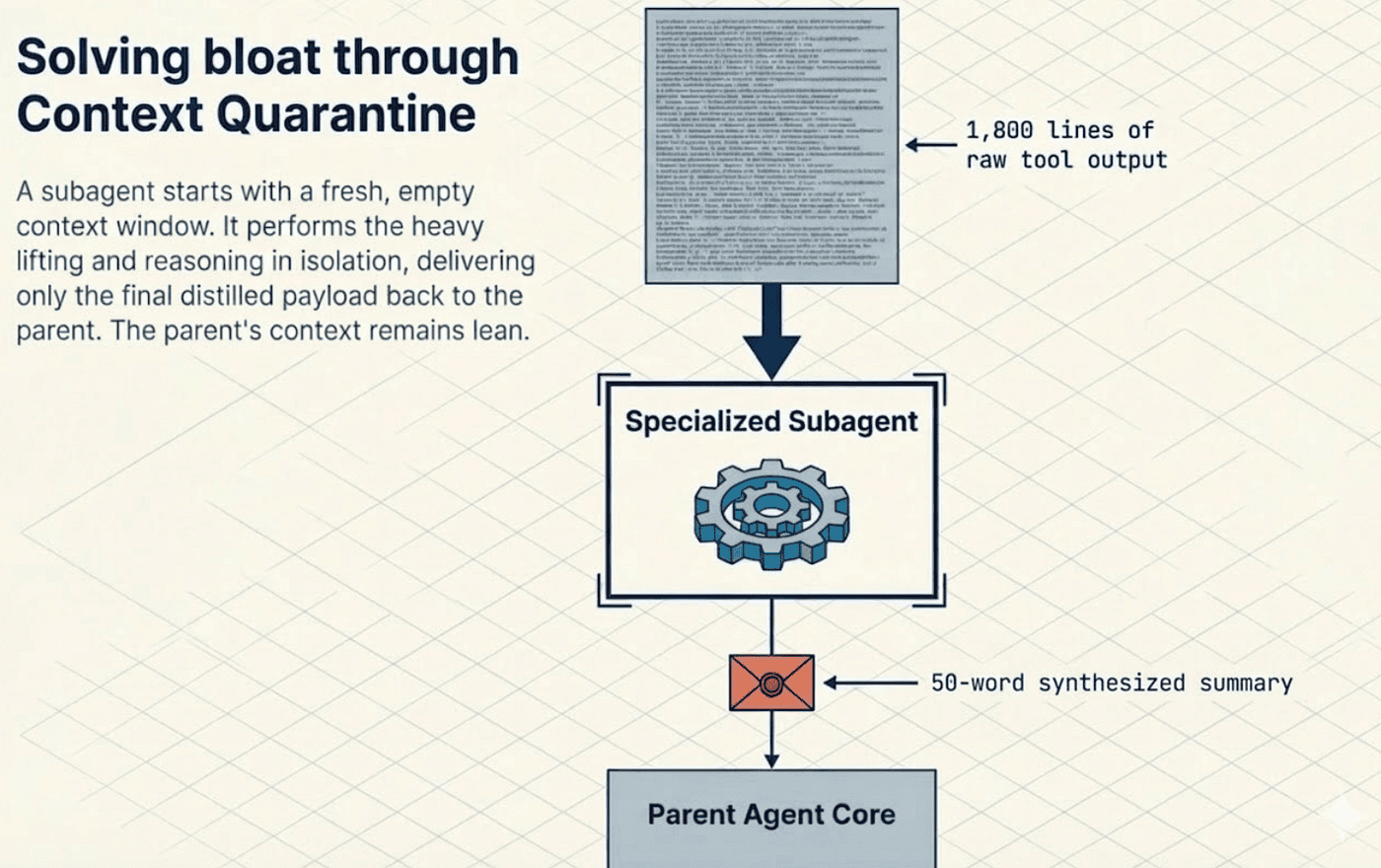
Subagents solve this through what the LangChain team calls context quarantine.
How Context Quarantine Works
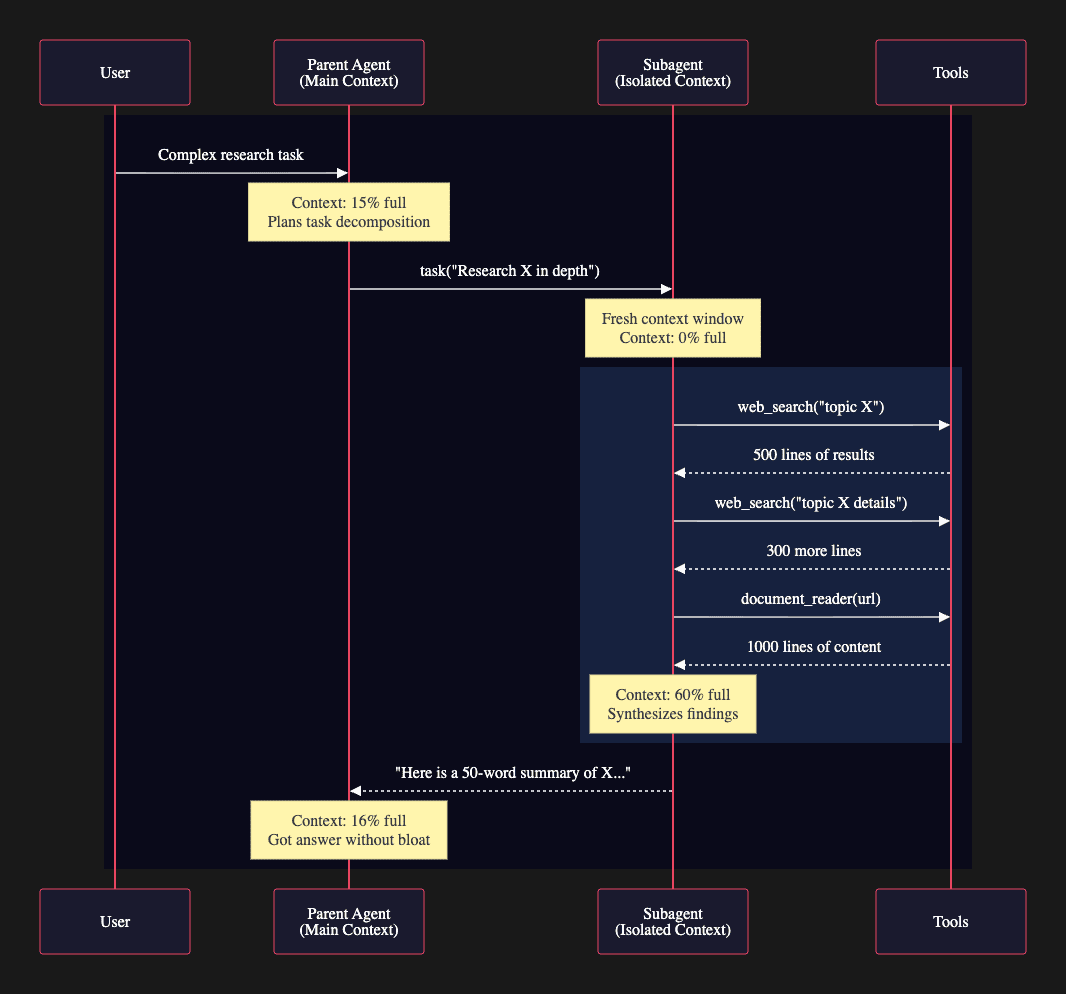
When a parent agent delegates a task to a subagent, the subagent starts with a fresh context window. Each subagent invocation creates an entirely new agent instance via create_deep_agent(). The subagent runs its own tools, processes its own results, and does all of its reasoning in isolation. The parent never sees the intermediate steps. It only receives the final synthesized answer, delivered back as a ToolMessage response.
Context Isolation
The sequence diagram above illustrates the core mechanism of context quarantine in action. When a user presents a complex research task, the parent agent begins with a lean context window: only 15% full. Rather than executing all the research steps itself and bloating its own context, the parent delegates the entire research subtask to a specialized subagent.
The subagent starts with a completely fresh context window at 0% capacity. It performs multiple tool calls: three separate searches and document reads that generate 1,800 lines of raw data. This heavy lifting happens entirely within the subagent's isolated context, which grows to 60% full as it accumulates search results and processes documents.
The critical moment comes at the end: the subagent synthesizes all 1,800 lines of raw information into a concise 50-word summary and returns only that summary to the parent. The parent's context grows by just 1 percentage point, from 15% to 16%, instead of the 45 percentage points it would have absorbed if it had executed those tool calls directly.
This is context quarantine working as designed. The subagent serves as a disposable workspace where messy exploration happens. The parent receives only the distilled insight, maintaining a clean context window that preserves its reasoning capacity for high-level task coordination.
Consider the numbers. The subagent consumed 1,800 lines of raw tool output, processed it, and returned a 50-word summary. The parent's context grew by roughly 1 percentage point instead of 45. That is the power of context quarantine. The subagent did the heavy lifting in a disposable context, and the parent received only the distilled result.
As an additional safety net, results larger than 80KB are automatically evicted to /large_tool_results/ rather than being kept in the conversation. This prevents any single tool call from overwhelming the context, whether it comes from a subagent or from the agent's own tools.
Bidirectional State Isolation
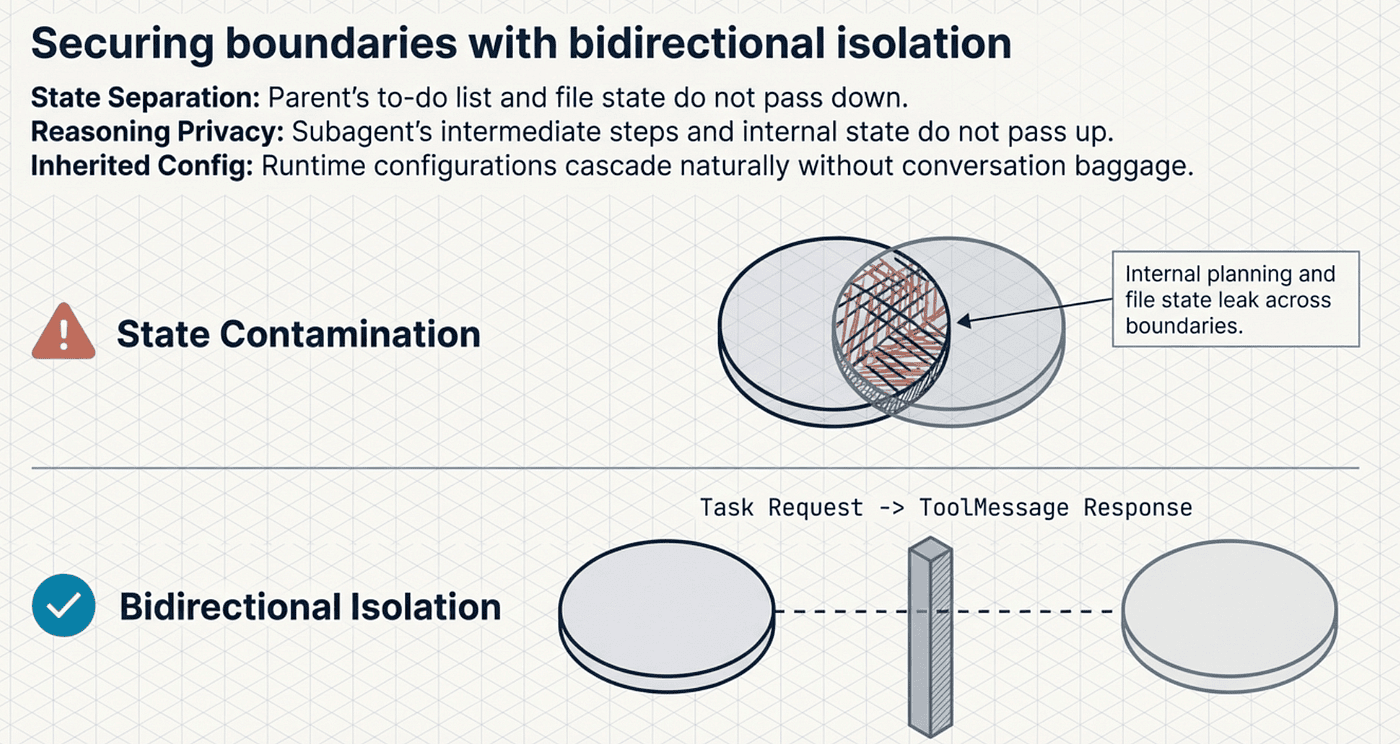
The isolation works in both directions. The parent's to-do list, file state, and other middleware state are not passed to the subagent. The subagent's internal state is not propagated back to the parent. Each operates in its own world, communicating only through the task request and the final response.
This design prevents a subtle but dangerous problem: state contamination. If a subagent's internal planning state leaked back into the parent, the parent would see to-do items it did not create, files it did not write, and context it cannot interpret. Bidirectional isolation keeps each agent coherent.
One important nuance: while conversation state is isolated, runtime configuration does propagate. When you invoke a parent agent with runtime context (model settings, API keys, feature flags), that configuration automatically flows to all subagents. This means subagents inherit operational settings without inheriting conversational baggage.
This isolation also creates a natural security boundary. A subagent given only web_search and document_reader tools cannot access the filesystem, even if the parent agent can. Tool scoping through subagent boundaries is a security pattern as much as an organizational one.
Defining Subagents
You define subagents as part of the create_deep_agent configuration. Each subagent is a dictionary with a name, description, system prompt, and tools:
subagents = [
    {
        "name": "researcher",
        "description": (
            "Deep research on technical topics. Use when you need "
            "thorough analysis of a subject."
        ),
        "system_prompt": (
            "You are a research specialist. Search broadly, "
            "cross-reference sources, then synthesize findings into "
            "concise summaries."
        ),
        "tools": [web_search, document_reader],
        "model": "anthropic:claude-opus-4-5",
    },
    {
        "name": "code_reviewer",
        "description": (
            "Code quality analysis. Use when you need to review code "
            "for bugs, style, or architecture issues."
        ),
        "system_prompt": (
            "You are a senior code reviewer. Focus on correctness, "
            "readability, and maintainability."
        ),
        "tools": [read_file, static_analyzer],
    },
    {
        "name": "general",
        "description": (
            "General-purpose assistant for miscellaneous tasks that "
            "do not fit other specialists."
        ),
        "system_prompt": "You are a helpful assistant.",
        "tools": [web_search, calculator, read_file],
    },
]

agent = create_deep_agent(
    model=init_chat_model("anthropic:claude-sonnet-4-5"),
    tools=[deploy_tool],
    system_prompt=(
        "You are a project lead agent. Delegate research to the "
        "researcher and code reviews to the code_reviewer."
    ),
    subagents=subagents,
)
The description field matters more than it might look. The parent agent reads these descriptions to decide which subagent to delegate to. A vague description like "helps with stuff" leads to poor delegation decisions. A specific description like "code quality analysis for bugs, style, or architecture issues" gives the parent agent clear criteria.
The "general" subagent deserves special attention. Deep Agents includes a built-in general-purpose subagent that mirrors your main agent's capabilities: same system prompt, same tools, same model. It exists purely for context isolation. When the parent agent encounters an exploratory task that does not fit a specialized subagent, it can delegate to the general subagent to keep its own context clean. The general subagent provides a disposable sandbox for figuring things out without polluting the parent's working memory.
Subagents Can Have Their Own Middleware
A powerful pattern is giving subagents their own middleware stack. A research subagent might need SummarizationMiddleware to handle long search results that would overflow its own context. A deployment subagent might need HumanInTheLoopMiddleware for safety. Each subagent can be independently configured, creating a hierarchy of middleware stacks that mirrors the hierarchy of agents.
The LangGraph Engine
Everything described so far runs on LangGraph. Understanding why LangChain chose LangGraph as the execution engine, rather than standard sequential chains, reveals a lot about what makes Deep Agents robust.
Why Not Sequential Chains?
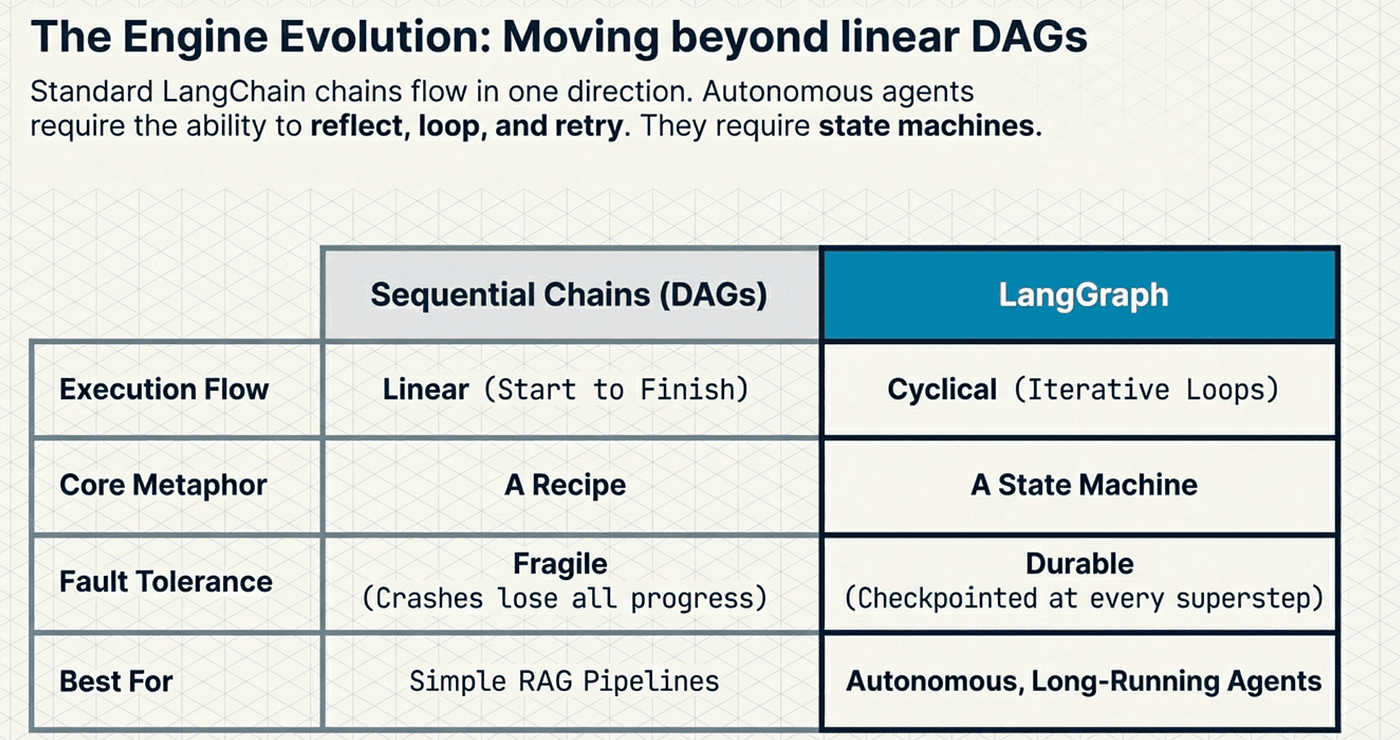
Standard LangChain chains are directed acyclic graphs (DAGs). Data flows in one direction: input to output. A chain executes once and terminates. It cannot loop back, reconsider a decision, or retry a failed step without external orchestration.
That works fine for simple pipelines: "take user input, look up context, generate response." It does not work for agents. An agent needs to reason, act, observe the result, and then decide whether to reason again or finish. That decision point is a cycle. DAGs cannot represent cycles. LangGraph can. This is really moving form agentic workflows to true agents.
The distinction is fundamental. A chain is a recipe: follow steps in order. A chain is an agentic worfkow. A graph is a state machine: transition between states based on conditions, and loop. Agents need state machines. This is core to the idea of moving from just GenAI to using true AI Agents.
LangGraph's Three Pillars
Cycles: Nodes in a LangGraph can route back to previous nodes, enabling the iterative reason-act-observe loop that agents require. Without cycles, you cannot build an agent that reflects on its own results and decides to try a different approach.
Controllability: LangGraph gives you explicit control over execution flow through conditional edges that route execution based on state. You can define branching logic, parallel execution paths, and interrupt points. The execution is deterministic and inspectable, which matters enormously for debugging and auditing.
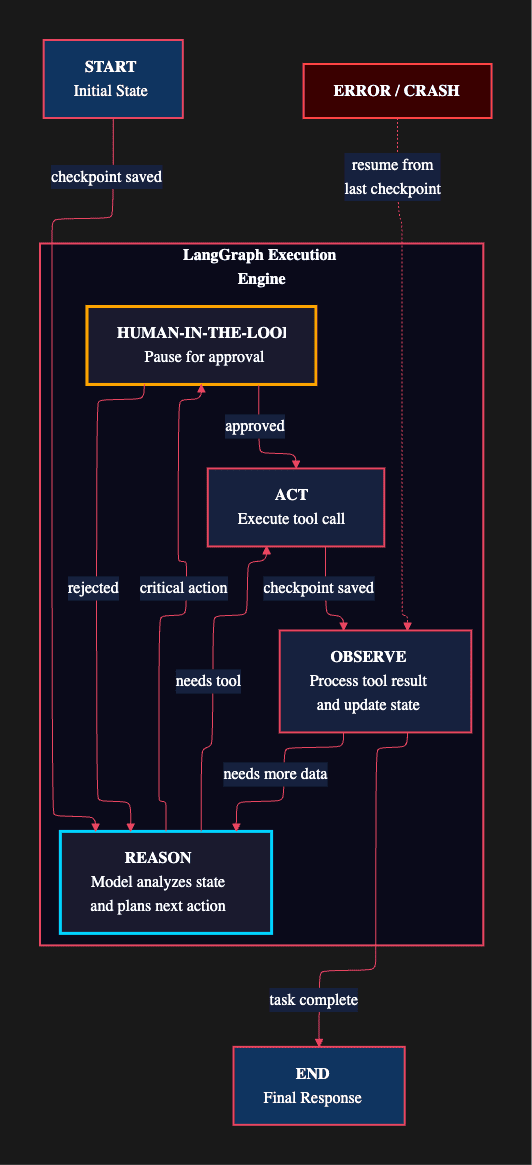
Persistence: LangGraph checkpointers save the complete graph state at every superstep. If the process crashes, you resume from the last checkpoint, not from scratch. LangGraph checkpointers transforms agents from fragile single-shot programs into durable long-running processes.
Checkpointers in Practice
LangGraph offers multiple checkpointer implementations for different environments:
from langgraph.checkpoint.memory import InMemorySaver
from langgraph.checkpoint.postgres import PostgresSaver

# Development: in-memory (fast, not durable)
dev_checkpointer = InMemorySaver()

# Production: PostgreSQL (durable, supports pause/resume)
prod_checkpointer = PostgresSaver(connection_string="postgresql://...")
What gets saved: A checkpointer captures the complete graph state after every superstep: the message history, middleware state, tool call results, and any custom state keys. A superstep represents one full cycle through the graph's nodes.
Why this matters for Deep Agents: Long-running agent tasks can take minutes or even hours. A research agent that has completed 15 of 20 subtasks should not lose all progress because of a network timeout or an API rate limit. Checkpointers make Deep Agents fault-tolerant by default. They also enable time travel debugging, where you can inspect the agent's state at any previous point in its execution.
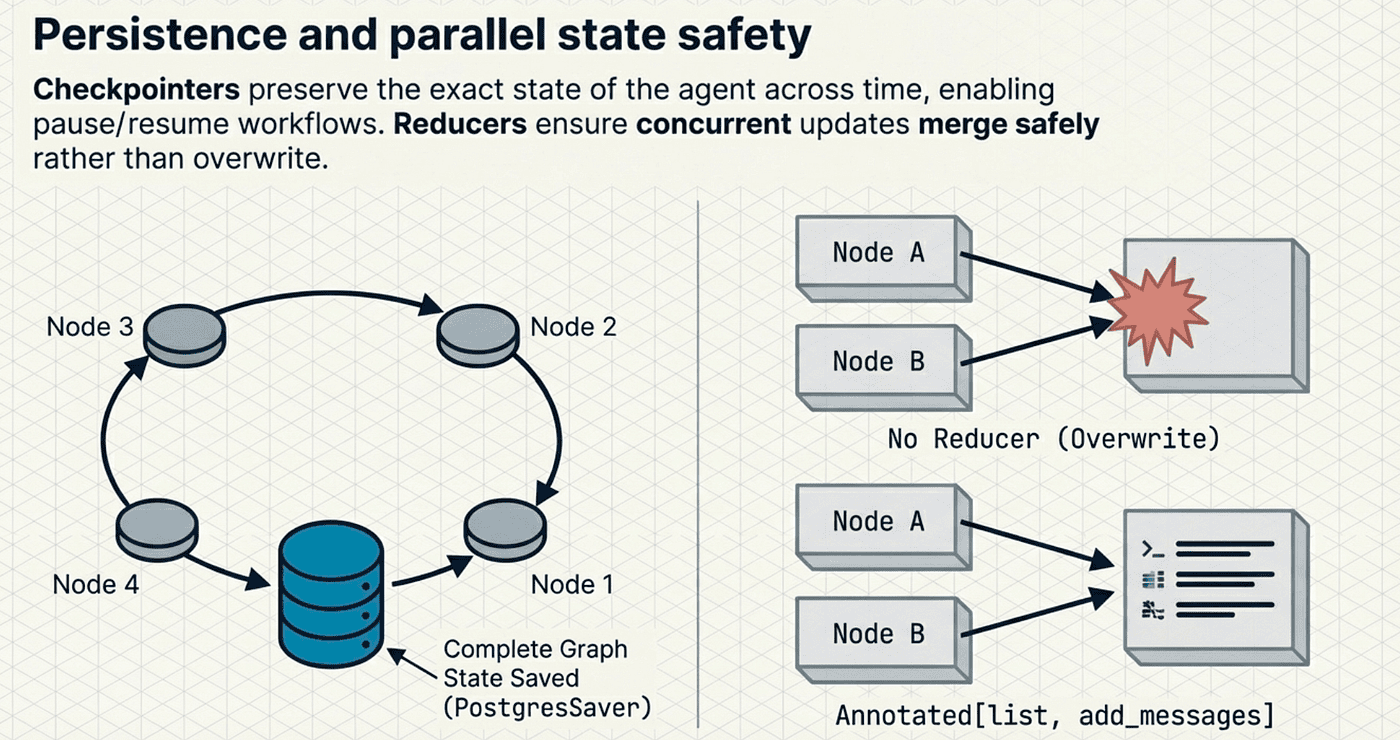
When to use each: InMemorySaver for development and testing where speed matters and durability does not. SqliteSaver for CLI tools and lightweight applications that need file-based durability. PostgresSaver for production workloads where you need concurrent access, high availability, and cannot afford to lose progress.
State Management with Reducers
LangGraph uses reducer-driven state schemas to manage how state updates work across nodes. This is a subtle but critical design decision:
from typing import TypedDict, Annotated
from langgraph.graph import add_messages

class AgentState(TypedDict):
    messages: Annotated[list, add_messages]
    todos: list[dict]
    files: dict[str, str]
    current_step: str
The Annotated type with add_messages tells LangGraph how to merge state updates. When two nodes both produce messages, the reducer appends them rather than overwriting. Without reducers, a state update from one node would silently destroy the output of another. This prevents data loss in concurrent execution paths and is especially important for the middleware architecture, where multiple middleware layers may update the same state keys during a single superstep.
The Deep Agents AgentState itself contains five key fields: messages for conversation history, todos for task tracking, memory for retrieved agent context, skills for available capability descriptions, and context for dynamic execution context. Each field plays a specific role in the middleware pipeline.
Code Walkthrough: Putting It All Together
Here is a complete, production-ready Deep Agent configuration that combines everything we have discussed. This is the kind of setup you would use for a real DevOps automation agent:
from deepagents import create_deep_agent
from deepagents.middleware.filesystem import FilesystemMiddleware
from langchain.chat_models import init_chat_model
from langchain.agents.middleware import (
    SummarizationMiddleware,
    HumanInTheLoopMiddleware,
)
from langgraph.checkpoint.postgres import PostgresSaver

# Define specialized subagents
subagents = [
    {
        "name": "researcher",
        "description": "Conducts deep research on technical topics.",
        "system_prompt": (
            "You are a research specialist. Search multiple sources, "
            "cross-reference findings, and return concise summaries."
        ),
        "tools": [web_search, document_reader, arxiv_search],
        "model": "anthropic:claude-sonnet-4-5",
    },
    {
        "name": "code_analyst",
        "description": "Analyzes codebases for quality and architecture.",
        "system_prompt": (
            "You are a senior software architect. Analyze code for "
            "correctness, performance, and maintainability."
        ),
        "tools": [read_file, static_analyzer, test_runner],
    },
]

# Configure the production checkpointer
checkpointer = PostgresSaver(
    connection_string="postgresql://agent:secret@localhost:5432/agents"
)

# Build the agent with full middleware stack
agent = create_deep_agent(
    model=init_chat_model("anthropic:claude-sonnet-4-20250514"),
    tools=[deploy_tool, monitor_tool, rollback_tool],
    system_prompt=(
        "You are a senior DevOps engineer. Plan carefully before acting. "
        "Delegate research tasks to the researcher subagent. "
        "Delegate code reviews to the code_analyst subagent."
    ),
    subagents=subagents,
    middleware=[
        SummarizationMiddleware(
            model="openai:gpt-4o-mini",
            max_tokens_before_summary=3000,
            messages_to_keep=20,
        ),
        HumanInTheLoopMiddleware(
            interrupt_on={
                "deploy_tool": True,
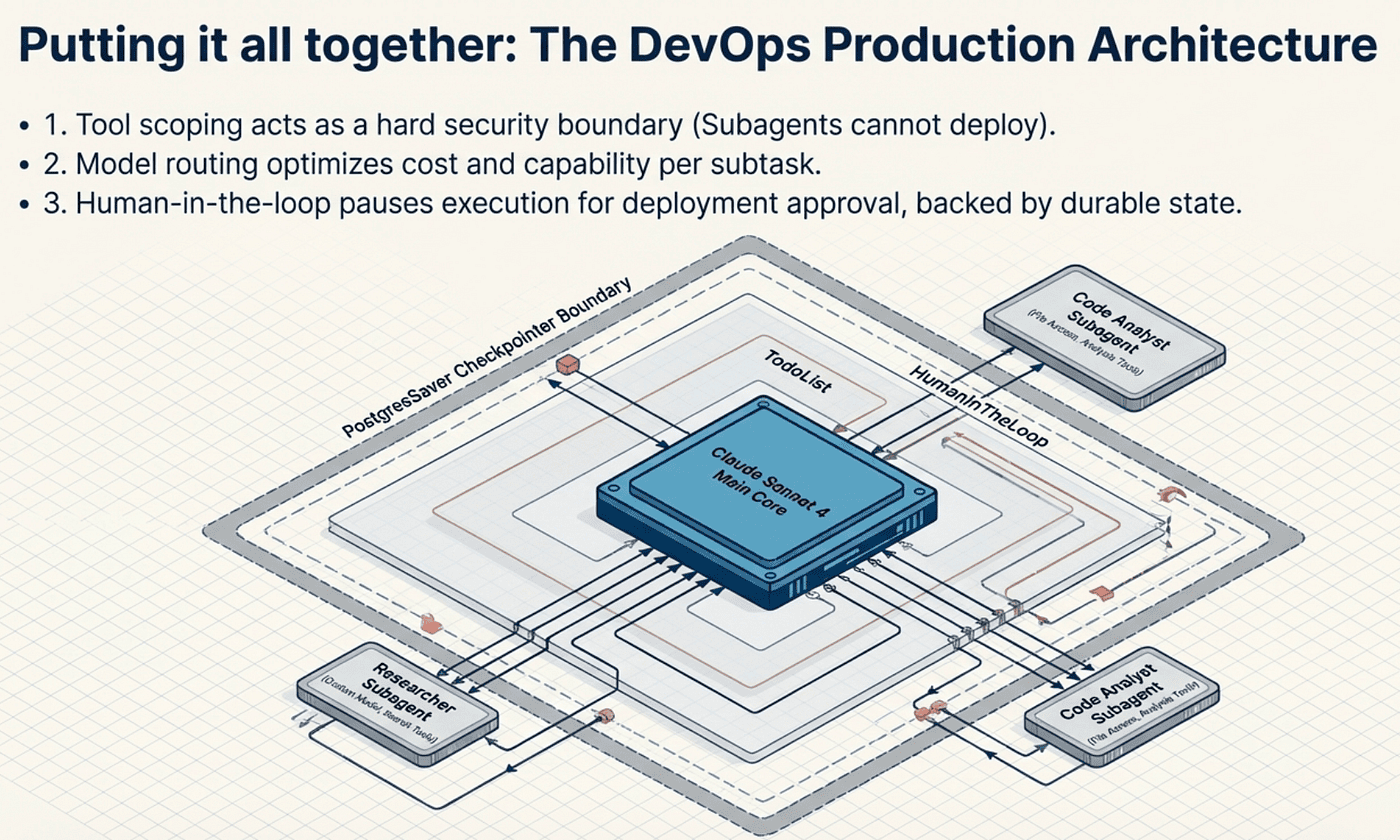
Let us walk through what this configuration achieves:
Model selection: The main agent uses Claude Sonnet 4.5, but the researcher subagent also specifies its own model. The code analyst subagent inherits the parent's model. This flexibility lets you optimize cost and capability per task. You might use a cheaper, faster model for routine monitoring and a more capable model for complex research.
Middleware ordering: SummarizationMiddleware and HumanInTheLoopMiddleware are your custom additions. They slot into the pipeline alongside the auto-attached middleware: TodoListMiddleware, FilesystemMiddleware, and SubAgentMiddleware. The fixed pipeline order ensures predictable behavior regardless of how you configure the stack.
Subagent specialization: The researcher gets search tools and a research prompt. The code analyst gets file access and analysis tools. Neither gets deployment tools because they should not deploy anything. Tool scoping through subagents is a security pattern as much as an organizational one.
Checkpointing: PostgresSaver ensures that if this agent runs a two-hour deployment pipeline and crashes at hour one, it resumes from the last completed step. No work is lost.
Human approval: Deployments and rollbacks require human approval. Monitoring runs freely. This balances automation with safety in a way that is configurable per tool.
Running the Agent
Once configured, the agent runs like any LangGraph graph:
import asyncio

async def main():
    config = {"configurable": {"thread_id": "deployment-2024-001"}}

    async for event in agent.astream_events(
        {"messages": [{"role": "user", "content": "Deploy the new API version to staging."}]},
        config=config,
    ):
        if event["event"] == "on_chat_model_stream":
            print(event["data"]["chunk"].content, end="", flush=True)

asyncio.run(main())
The thread_id links to the checkpointer state, enabling pause and resume across sessions. If the agent pauses for human approval on Tuesday and you approve on Wednesday, it picks up exactly where it left off. The checkpointer preserved the complete state, including the pending tool call, the agent's plan, and the conversation history. That same thread_id also enables time travel: you can replay any previous checkpoint to debug what happened at a specific point in the execution.
What This Architecture Enables
The combination of middleware, subagents, and LangGraph creates an agent architecture with three properties that monolithic designs struggle to achieve:
Modularity: Add capabilities by stacking middleware. Remove them the same way. The core agent loop never changes. If you need conversation summarization next month, add SummarizationMiddleware. If you need human approval, add HumanInTheLoopMiddleware. If you need remote sandboxed execution, swap the backend to SandboxBackendProtocol. No refactoring required.
Scalability: Subagents keep context windows clean. A parent agent can orchestrate ten subagents on a massive project while its own context stays lean and focused. Each subagent gets a fresh context window, does its work, and returns a concise result. The parent never accumulates the intermediate debris.
Resilience: Checkpointers protect against failures. Human-in-the-loop middleware prevents dangerous autonomous actions. SummarizationMiddleware prevents context overflow by offloading old messages and evicting oversized results. Together, these create an agent that can run for hours on complex tasks without losing progress or coherence.
These are not theoretical benefits. They are the properties that separate a demo agent from a production agent. In the next article, we will put these components to work on real-world use cases: autonomous research pipelines, multi-agent code review systems, and deployment automation. You will see how the architecture described here translates into practical solutions that run reliably at scale.
This is Article 3 in a 5-part series on LangChain Deep Agents. Article 2 covered getting started with your first Deep Agent. Article 4 will explore production use cases and deployment patterns.
Sources
- GitHub -- langchain-ai/deepagents
- LangChain Deep Agents Middleware Docs
- LangChain Deep Agents Subagents Docs
- LangChain Blog: Deep Agents
- LangChain Blog: Building Multi-Agent Applications with Deep Agents
- DeepWiki: langchain-ai/deepagents
- DeepWiki: Planning with TodoListMiddleware
- LangGraph Persistence Docs
- deepagents on PyPI
About the Author
Rick Hightower is a technology executive and data engineer who led ML/AI development at a Fortune 100 financial services company. He created skilz, the universal agent skill installer, supporting 30+ coding agents including Claude Code, Gemini, Copilot, and Cursor, and co-founded the world's largest agentic skill marketplace. Connect with Rick Hightower on LinkedIn or Medium.