What Is GSD? Spec-Driven Development Without the Ceremony
How AI agents forget what they're building , and how to fix it
Originally published on Medium.
How AI agents forget what they're building , and how to fix it
Article 1 of 3 in the GSD Deep Dive series
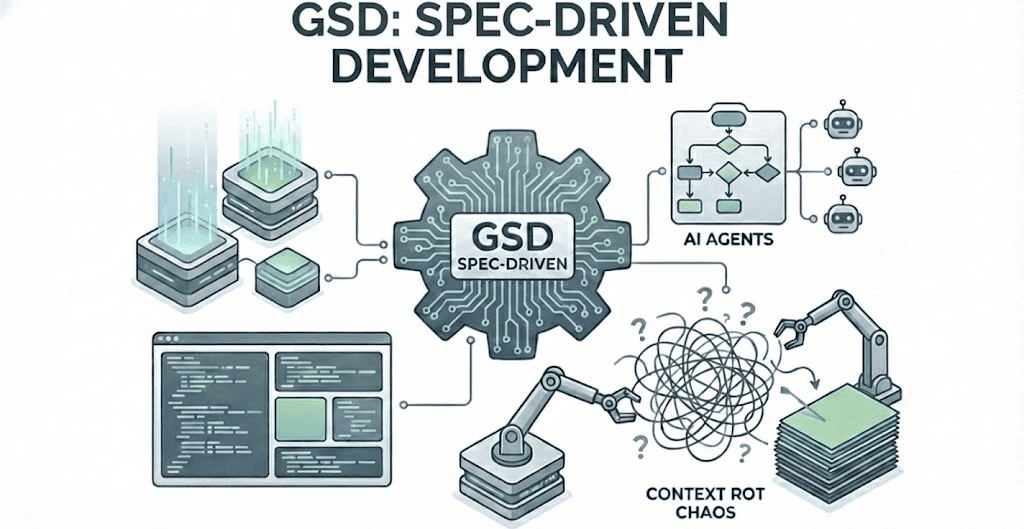
Your AI coding agent starts a session on fire. The first feature lands clean. Requirements are tracked. Code is well-structured. This is spec-driven development working as promised.
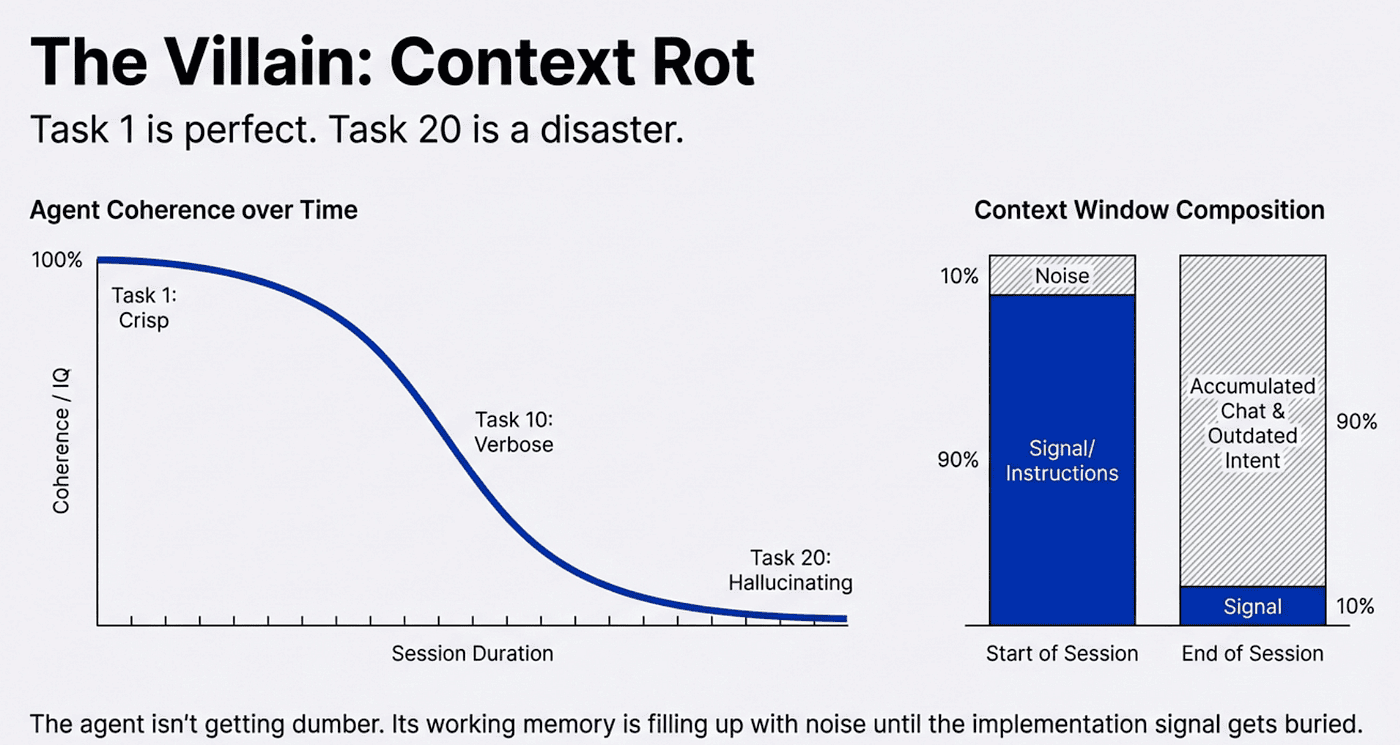
By task ten, the agent is "being more concise." By task fifteen, it has forgotten half the requirements. By task twenty, you are fighting the agent more than the problem.
This is context rot: the quality degradation that happens as an AI agent fills its context window with accumulated discussion, partial decisions, and outdated intent. Every developer working with AI coding agents has experienced it. The agent is not getting dumber; its working memory is filling up with noise until the signal gets buried.
GSD was built to fix this.
Why should I care about SDD?
Before diving into GSD, let's clarify why spec-driven development matters — and how it transforms you from a 'vibe coder' reacting to AI chaos into an 'AI architect' directing the build.
The Core Problem Spec-Driven Development Solves At its heart, spec-driven development (SDD) tackles the chaos of unstructured AI coding workflows. Without it, AI agents like Claude or Gemini are like brilliant but scatterbrained interns: they excel at isolated tasks but struggle with long-term coherence. The problems include:
- Context Rot: Over sessions, agents forget requirements, repeat mistakes, or drift from the original vision because their "memory" (context window) gets polluted with tangential chats, failed experiments, and outdated decisions.
- Scalability Issues: For complex projects, ad-hoc prompting leads to inconsistent code, untraceable changes, and manual debugging hell. It's like building a house without blueprints — fine for a shed, disastrous for a skyscraper.
- Human-AI Misalignment: Agents interpret vague instructions differently each time, leading to "good enough" outputs that don't match your intent. SDD enforces structure to make AI predictable and reliable.
- Efficiency Drains: Without specs, you waste time micromanaging, rewriting, or fighting the agent, turning a productivity booster into a frustration source.
SDD solves this by treating software building as a disciplined process: externalize requirements into traceable artifacts, break work into verifiable steps, and use agents as tools in a system rather than as magic black boxes. It's inspired by traditional software engineering (e.g., Agile specs) but optimized for AI's strengths (parallelism, research) and weaknesses (forgetfulness, token limits).
Vibe Coder vs. AI Systems Architect: The Key Shift
- Vibe Coder: This is the default mode for many devs starting with AI agents. You're "vibing" through sessions: throw prompts at the agent, iterate on the fly, and hope momentum carries you. It's fun and fast for prototypes or small fixes, like jamming on a guitar without sheet music. Pros: Creative freedom, quick wins. Cons: Outputs are inconsistent, projects balloon in complexity, and context rot kicks in hard. You're reacting to the agent's whims, often ending up as the agent's editor rather than its director. By task fifteen, you are fighting the agent. Pure vibes lead to entropy.
- AI Systems Architect: With SDD tools like GSD, you become an architect: designing the blueprint (specs, roadmaps), delegating execution (to agents), and verifying the build (through loops). It's like composing a symphony. You define the structure, agents play the instruments. Pros: Scalable for real products, maintains quality over long hauls, frees you for high-level decisions. Cons: Slight upfront overhead (e.g., discussing phases). The difference? Vibe coders build by feel; AI architects build by design.
Traditional SDD systems have a reputation for being time consuming and rigid with a steep learning curve. The upfront cost is often considered too much. GSD reduces a lot of that steep learning curve and focuses on Getting Stuff Done.
In GSD terms, you're not chatting endlessly, you're curating contexts, orchestrating waves, and archiving milestones. This shift turns AI from a quirky sidekick into a reliable assembly line.
New to AI coding? A context window is the limited "memory" an AI model uses to process your prompts and generate responses. Think of it like RAM: once it fills up with chat history, the model starts "forgetting" earlier instructions. SDD like GSD solves this by storing project knowledge in files instead of chat transcripts.
What Is GSD?
GSD (Get Stuff Done) is a meta-prompting, context engineering, and spec-driven development system for AI coding agents. The real name is a bit crude, but this comes so highly recommended. It works with Claude Code, OpenCode, and Gemini CLI, and it installs in one command:
npx get-shit-done-cc@latest
GSD is maintained as open source by TÂCHES, is MIT licensed, and is trusted by engineers at Amazon, Google, Shopify, and Webflow.
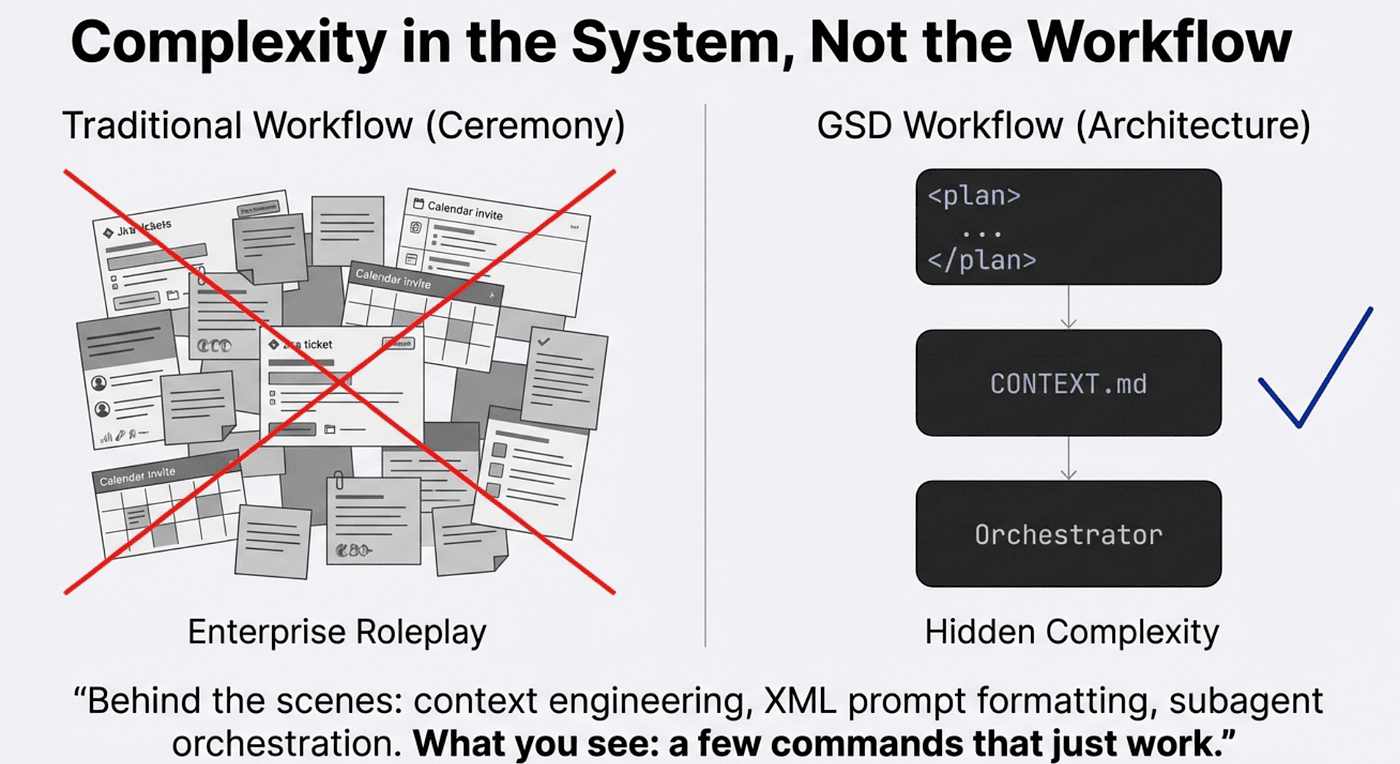
The philosophy is direct. Other spec-driven development tools bring along sprint ceremonies, story points, stakeholder syncs, and Jira-style workflows. GSD rejects all of that. As its creator puts it:
💡 "The complexity is in the system, not in your workflow. Behind the scenes: context engineering, XML prompt formatting, subagent orchestration, state management. What you see: a few commands that just work."
No enterprise roleplay. Just an effective system for building software with AI coding agents.
GSD was highly recommended by Matty
GSD was highly recommended by Matty Squarzoni who is a super skilled AI practitioner. I previously worked with GitHub Spec-Driven Development. While I don't claim to be an expert, I used it regularly and was getting quite good at developing projects with it, but it took a while. The ramp up curve is pretty steep. I even wrote an agent skill to help me adopt Github Spec Driven Development, and wrote articles about Github spec driven development.
I had skimmed several tools — including GSD, BMAD and OpenSpec — before settling on GitHub Spec-Driven Development. GSD was one I initially overlooked. For one, to be honest, I did not like the name.
Then I met someone I really respect — Matty — who's extremely productive using GSD. He recommended it highly. I tried it, and it flows so much better. It integrates beautifully with Claude Code, and it also works with Gemini CLI and OpenCode — tools I like to use.
GSD is very productive. I've switched my GitHub Spec-Driven Development projects over to GSD. I start new projects with GSD. The conversion was straightforward: I just converted the .speckit files to .planning files, and Bob's your uncle—it all works great.
I feel bad because I finally got my buddy Chris to convert to Github Spec Driven Development, and then I switched to GSD. I don't think GSD is the perfect tool for every project and every team. I am creating a follow-up article comparing GSD to other spec driven development tools. GSD is my weapon of choice. Thanks Matty.
The Core Workflow
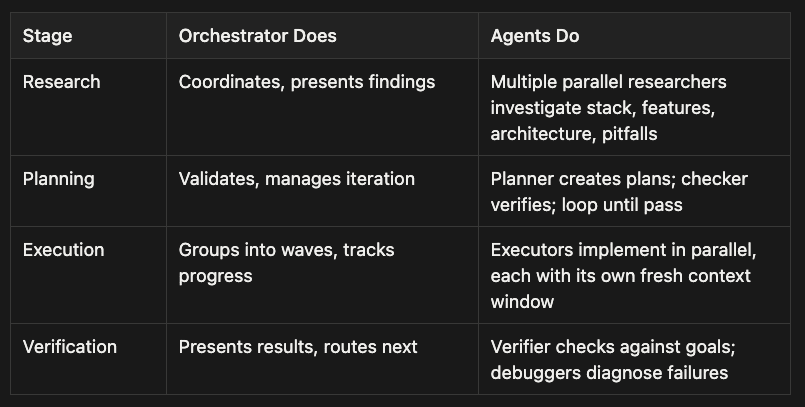
GSD organizes work in a clear hierarchy: Project > Milestone > Phase > Plan > Task. You start a project once, break it into milestones, and for each milestone you work through phases. Each phase follows the same four-step loop: discuss, plan, execute, verify.
GSD workflow loop showing discuss, plan, execute, and verify steps for AI coding agent sessions (spec-driven development)
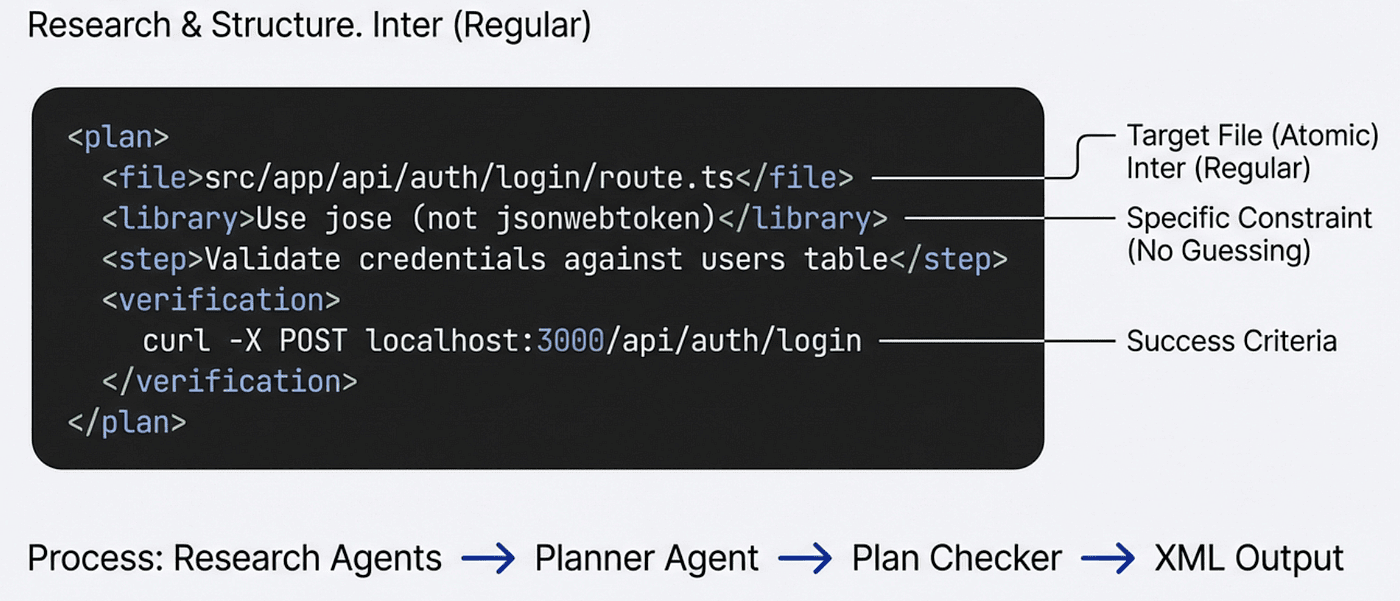
Figure 1: The GSD workflow loop. Each phase cycles through discuss, plan, execute, and verify before advancing to the next phase.
To see this in action, imagine you are building a SaaS dashboard with user authentication, a data visualization layer, and a settings page. You start by running /gsd:new-project. GSD asks questions until it fully understands your idea: goals, constraints, tech preferences, edge cases. It optionally spawns parallel research agents to investigate the domain. Then it extracts requirements, scopes what is v1 versus v2, and creates a phased roadmap. You approve the roadmap, and you are ready to build.
From here, you loop through each phase:
Step 1: Discuss (Shape the Implementation)
/gsd:discuss-phase 1
Before anything gets planned, you shape the implementation. The system analyzes the phase and identifies gray areas based on what is being built. For a visual feature, it asks about layout, density, and interactions. For an API, it asks about response format, error handling, and flags. For authentication, it might ask: OAuth providers or email/password only? Session tokens or JWTs? What happens on failed login attempts?
You answer until you are satisfied. The output, a CONTEXT.md file, feeds directly into the next two steps: research agents read it to know what patterns to investigate, and the planner reads it to know what decisions are locked. The deeper you go here, the more the system builds what you actually want. Skip it and you get reasonable defaults. Use it and you get your vision.
Step 2: Plan (Research, Structure, Verify)
/gsd:plan-phase 1
Three things happen in sequence. First, research agents investigate the domain, guided by your discussion decisions ("user wants JWTs" leads to researching JWT libraries and security best practices). Second, a planner agent creates atomic task plans with XML structure. Third, a plan checker reviews each plan against phase goals and iterates until they pass.
Each plan is small enough to execute in a fresh context window. Here is what one looks like:
<task type="auto">
  <name>Create login endpoint</name>
  <files>src/app/api/auth/login/route.ts</files>
  <action>
    Use jose for JWT (not jsonwebtoken - CommonJS issues).
    Validate credentials against users table.
    Return httpOnly cookie on success.
  </action>
  <verify>curl -X POST localhost:3000/api/auth/login returns 200 + Set-Cookie</verify>
  <done>Valid credentials return cookie, invalid return 401</done>
</task>
Notice what this plan contains: the exact files to touch, the specific library to use (and why not a different one), the verification command, and the success criteria. There is no room for guessing. The executor agent receives this plan in a fresh context and knows exactly what to build and how to confirm it works.
Step 3: Execute (Wave-Based Parallel Builds)
/gsd:execute-phase 1
Plans run in dependency waves. Independent plans execute in parallel; dependent plans wait for their prerequisites. Each plan executor gets its own fresh context window (near 200k tokens on Claude) loaded with curated project artifacts rather than the full chat history. Every completed task gets its own atomic git commit, making each change independently revertable and traceable via git bisect.
Wave 1 (parallel): Plan 01 (User Model) | Plan 02 (Auth Config)
Wave 2 (parallel): Plan 03 (Login API) | Plan 04 (Register API)
Wave 3 (sequential): Plan 05 (Auth Middleware)
Why waves? Independent plans (User Model and Auth Config) run simultaneously because they touch different files. Dependent plans (Login API needs User Model) wait in a later wave. This is also why GSD favors vertical slices over horizontal layers: independent features parallelize naturally because they rarely collide.
You can walk away and come back to completed work with clean git history. Or work on a different project while its executing this phase.
Step 4: Verify (Conversational Acceptance Testing)
/gsd:verify-work 1
Automated checks confirm that code exists and tests pass, but does the feature work the way you expected? This step finds out. The system extracts testable deliverables and walks you through them one at a time. "Can you log in with email and password?" Yes or no. "Does the registration endpoint return a confirmation?" Yes or no.
If something fails, you do not manually debug. The system spawns debug agents to diagnose the root cause and creates fix plans. You run /gsd:execute-phase again with those fix plans, and the cycle continues until everything passes.
When all phases in a milestone are done, /gsd:complete-milestone archives the milestone and tags the release. Then /gsd:new-milestone starts the next version.
Planning Artifacts: Durable Context Engineering
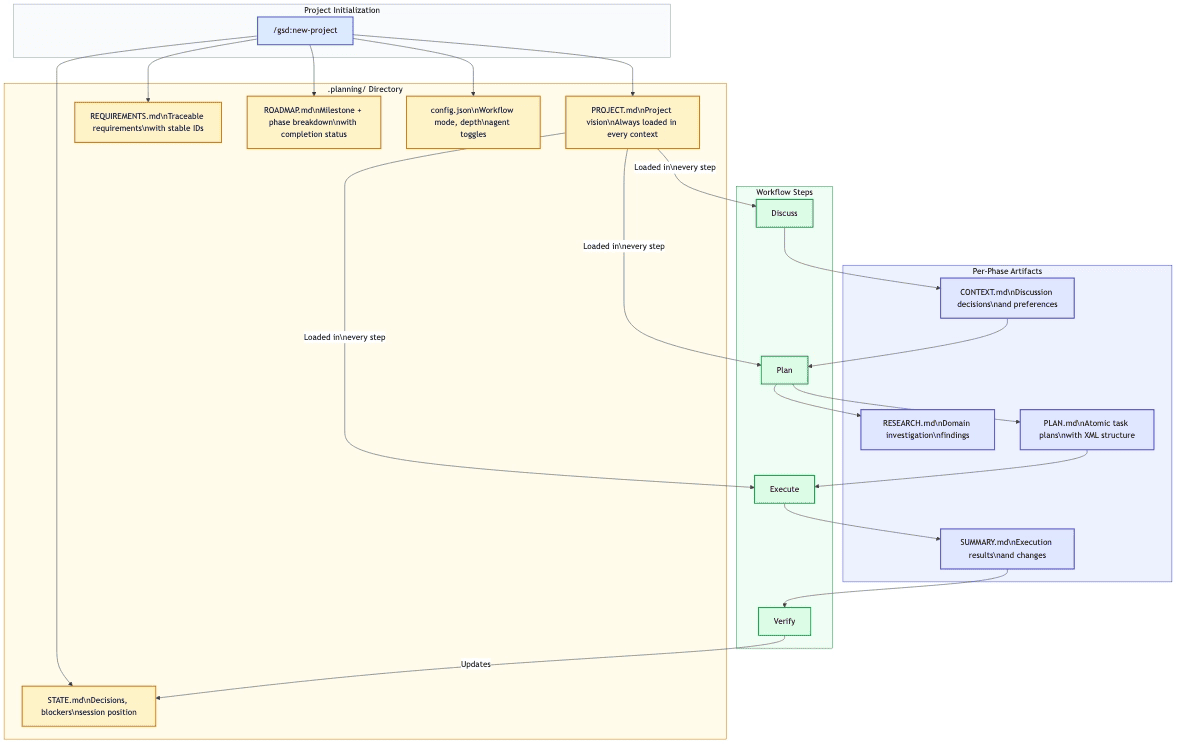
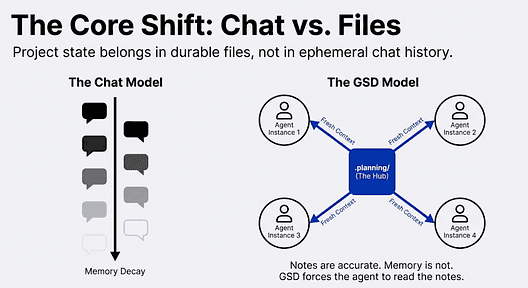
The key insight behind GSD is that project state belongs in files, not in chat history. GSD maintains a .planning/ directory that serves as the project's durable memory. This is context engineering in practice: every agent reads structured, accurate files rather than a decaying chat transcript.
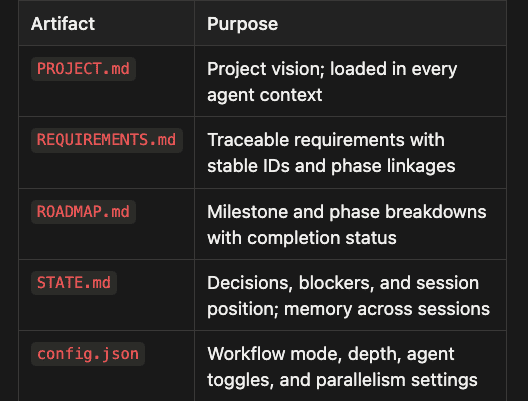
Figure 2: How planning artifacts connect to workflow steps. Project-level artifacts feed every context; per-phase artifacts capture decisions and results.
Project-level artifacts persist across the entire project:
PROJECT.md— Project vision; loaded in every agent contextREQUIREMENTS.md— Traceable requirements with stable IDs and phase linkagesROADMAP.md— Milestone and phase breakdowns with completion statusSTATE.md— Decisions, blockers, and session position; memory across sessionsconfig.json— Workflow mode, depth, agent toggles, and parallelism settings
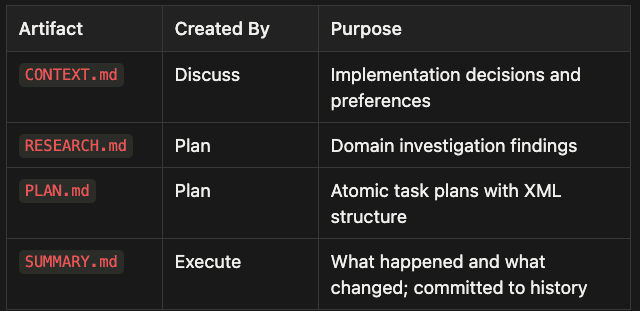
Per-phase artifacts capture what happened in each step:
CONTEXT.md— Created by Discuss; captures implementation decisions and preferencesRESEARCH.md— Created by Plan; contains domain investigation findingsPLAN.md— Created by Plan; holds atomic task plans with XML structureSUMMARY.md— Created by Execute; documents what happened and what changed; committed to history
Think of these files as the difference between taking notes in a meeting versus trying to remember everything from a three-hour conversation. The notes are always accurate. The memory is not. GSD takes the notes for you, and every agent reads from those notes rather than from a decaying chat transcript.
How GSD Defeats Context Rot
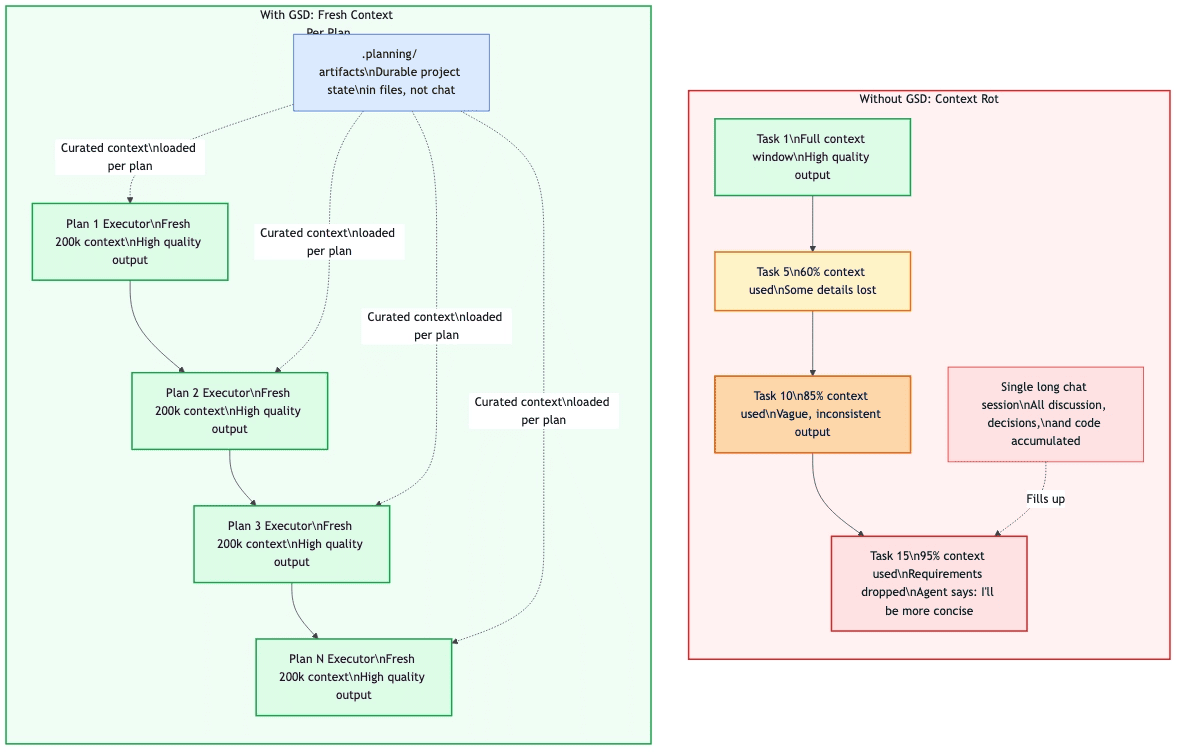
Without GSD, quality degrades as the context window fills. With GSD, each executor starts fresh from file artifacts.
In a traditional long-running AI session, every message adds to the context window. Early decisions, abandoned approaches, debugging conversations, and exploratory tangents all compete for space. The agent gradually loses access to the information that matters most. By the end, it is operating on fragments.
GSD inverts this completely. Each plan executor starts with a clean context loaded from file artifacts. The project vision, relevant requirements, and the specific task plan are injected fresh. There is no accumulation of stale context. No leftover noise from previous tasks.
"200k tokens purely for implementation, zero accumulated garbage."
The result is that task twenty gets the same quality output as task one. Meanwhile, the orchestrator that manages the overall flow stays at 30–40% context utilization because the heavy implementation work happens in disposable subagent contexts. Your session stays fast and responsive even during complex multi-phase builds.
The Agent Orchestra
GSD uses a thin orchestrator pattern. The main orchestrator never does heavy lifting; it spawns specialized agents, collects results, and routes to the next step.
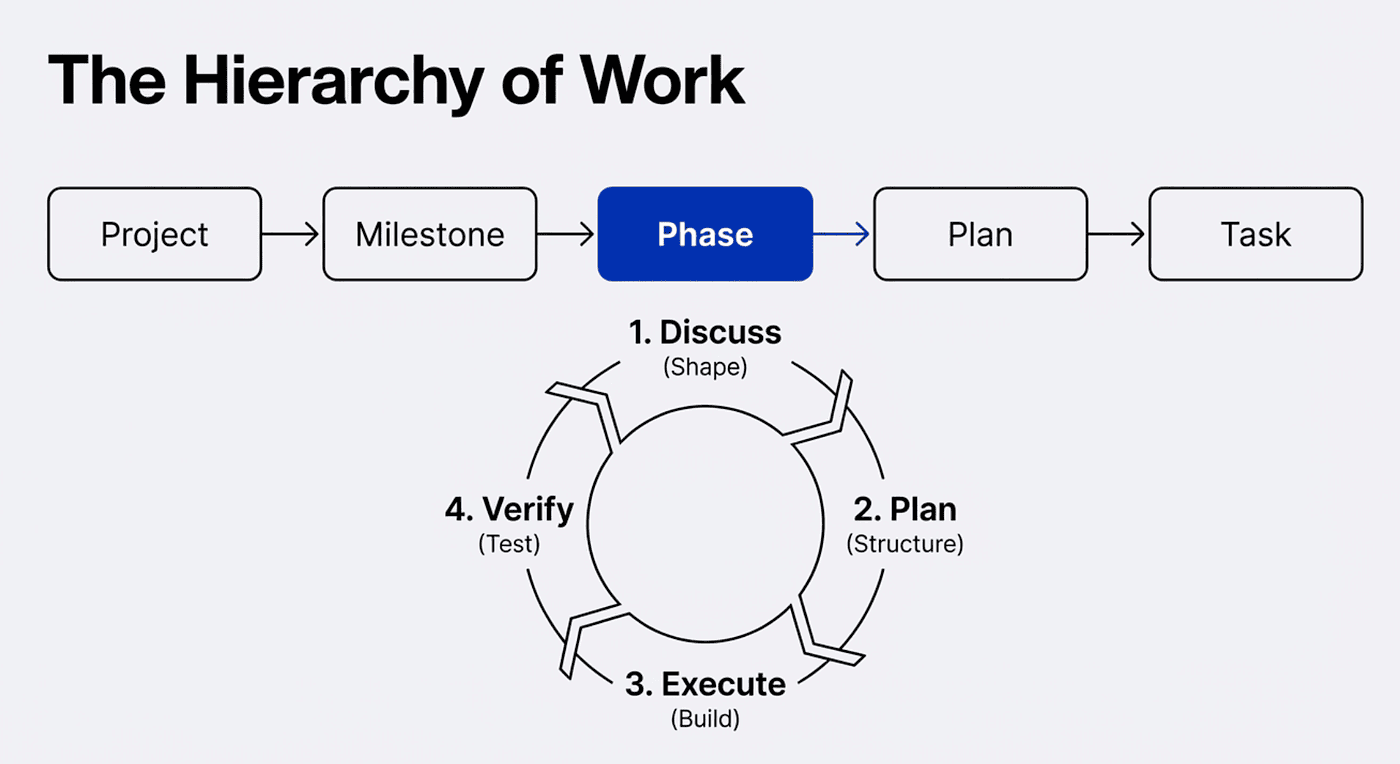
- Research stage: Orchestrator coordinates and presents findings while multiple parallel researchers investigate stack, features, architecture, and pitfalls
- Planning stage: Orchestrator validates and manages iteration while planner creates plans and checker verifies them in a loop until they pass
- Execution stage: Orchestrator groups tasks into waves and tracks progress while executors implement in parallel, each with its own fresh context window
- Verification stage: Orchestrator presents results and routes next steps while verifier checks against goals and debuggers diagnose failures
This separation is what keeps the system scalable. The orchestrator is lightweight. The agents do all the heavy computation in their own isolated contexts. When an agent finishes, its context is discarded; only the output persists as a file artifact. This is the mechanism that prevents context rot: the main thread never accumulates the weight of implementation work.
GSD also lets you tune the system for your needs. Model profiles (quality, balanced, budget) control which Claude model each agent uses, letting you balance output quality against token spend. Workflow toggles let you skip research or plan checking when speed matters more than thoroughness.
Getting Started
Installation takes one command:
npx get-shit-done-cc@latest
The installer prompts you to choose a runtime (Claude Code, OpenCode, Gemini CLI, or all) and a location (global or local). Verify with /gsd:help inside your chosen runtime.
For existing codebases: Run /gsd:map-codebase first. It spawns parallel agents to analyze your stack, architecture, conventions, and concerns so that /gsd:new-project already understands your codebase.
For greenfield projects: Start with /gsd:new-project and let the system ask questions until it understands your idea completely. If you run the new project task with an existing project, gsd detects this and offers to map your brownfield project.
For quick tasks: Use /gsd:quick for bug fixes, small features, or config changes that do not need full planning. Same quality guarantees with a faster path.
I use the add todo and manage todo gsd commands quite a bit when I need to do something but it is small and I am not sure which phase this todo item should go but I don't want to lose it.
What's Next in This Series
This article introduced GSD and the core problem it solves: context rot in long-running AI agent sessions. GSD counters context rot by externalizing project state into durable file artifacts, giving each execution unit a fresh and curated context, and orchestrating specialized agents that work in isolation so the main session stays lean.
The four-step loop (discuss, plan, execute, verify) is simple to use, but the system behind it handles the hard parts: context engineering, agent orchestration, dependency-aware parallel execution, and automated verification.
The next two articles go deeper:
- Article 2: How GSD ships to Claude Code, OpenCode, and Gemini CLI from a single codebase
- Article 3: GSD vs Spec Kit vs OpenSpec vs Taskmaster AI; where spec-driven development tools diverge
Have you hit context rot in a long AI coding session? Share how you handled it in the comments, and whether a structured spec-driven development system like GSD would change your workflow.
GSD is open source under the MIT License. Find it at github.com/gsd-build/get-shit-done.
Examples where I use GSD:
agent_rulez/.planning at main · SpillwaveSolutions/agent_rulez
agent-brain/.planning at main · SpillwaveSolutions/agent-brain
agent-memory/.planning at main · SpillwaveSolutions/agent-memory
https://github.com/SpillwaveSolutions/agent-cron/tree/main/.planning
About the Author
Rick Hightower is a technology executive and data engineer who led ML/AI development at a Fortune 100 financial services company. He created skilz, the universal agent skill installer, supporting 30+ coding agents including Claude Code, Gemini, Copilot, and Cursor, and co-founded the world's largest agentic skill marketplace. Connect with Rick Hightower on LinkedIn or Medium. If you want to kick start your next AI project, hire us. We can help you create true agentic systems.
The Claude Code community has developed powerful extensions that enhance its capabilities. Here are some valuable resources from Spillwave Solutions (Spillwave Solutions Home Page):
Integration Skills
- Notion Uploader/Downloader Agent Skill: Seamlessly upload and download Markdown content and images to Notion for documentation workflows. I use this one with Agent Brain.
- Confluence Agent Skill: Upload and download Markdown content and images to Confluence for enterprise documentation. Use a confluence search to get a bunch of related documents to your project and then search them with Agent Brain. Talk about context engineering on steroids!
- JIRA Integration Agent Skill: Create and read JIRA tickets, including handling special required fields. Pull down that whole epic and search through all the related tickets. Agent Brain and context engineering for the win!
If you like this article, check out these other articles by this author (me):
Activating Agent Skills at the Right Time with Agent RuleZ — Feb 22, 2026
Agent RuleZ: A Deterministic Policy Engine for AI Coding Agents — Feb 20, 2026
Agent Brain: A Code-First RAG System for AI Coding Assistants — Feb 11, 2026
From Approval Hell to Just Do It: How Agent Skills Fork Governed Sub-Agents in Claude Code 2.1 — Feb 5, 2026
Stop Clicking "Approve": How I Killed Approval Fatigue with Claude Code 2.1 — Feb 5, 2026
Agent Brain: Giving AI Coding Agents a Full Understanding of Your Entire Enterprise — Feb 4, 2026
Build Agent Skills Faster with Claude Code 2.1 Release — Feb 3, 2026
Build Your First Agent Skill in 10 Minutes Using the Context7 Wizard, and Save Hours — Feb 2, 2026
Supercharge Your React Performance with Vercel's Best Practices Agent Skill — Jan 29, 2026
Agent Skills: The Universal Standard Transforming How AI Agents Work — Jan 28, 2026