Why Language Is Hard for AI -- and How Transformers Changed Everything
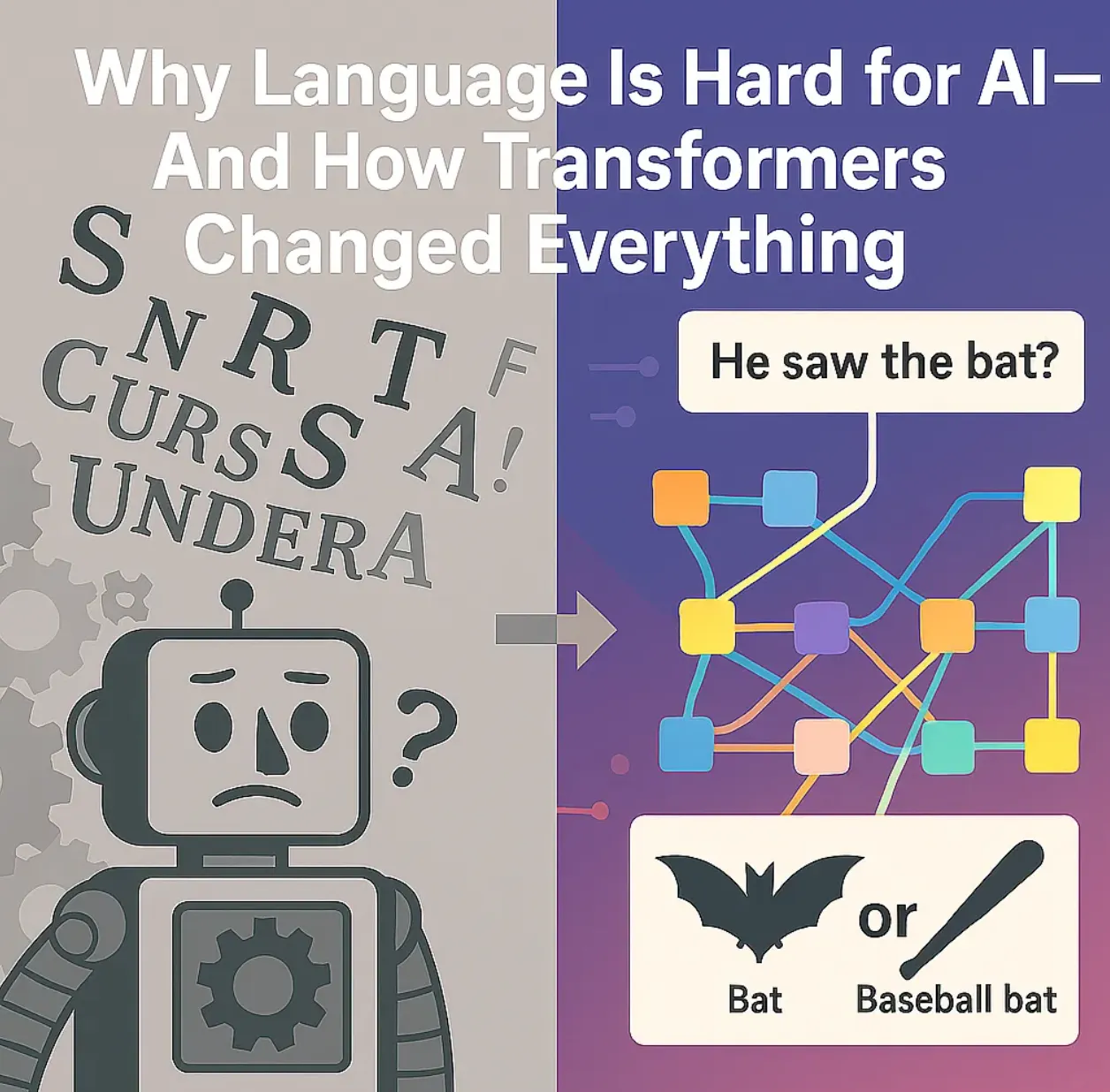
Language influences everything — business, culture, science, and daily life. However, teaching computers to genuinely understand l
Originally published on Medium.
Language influences everything — business, culture, science, and daily life. However, teaching computers to genuinely understand l
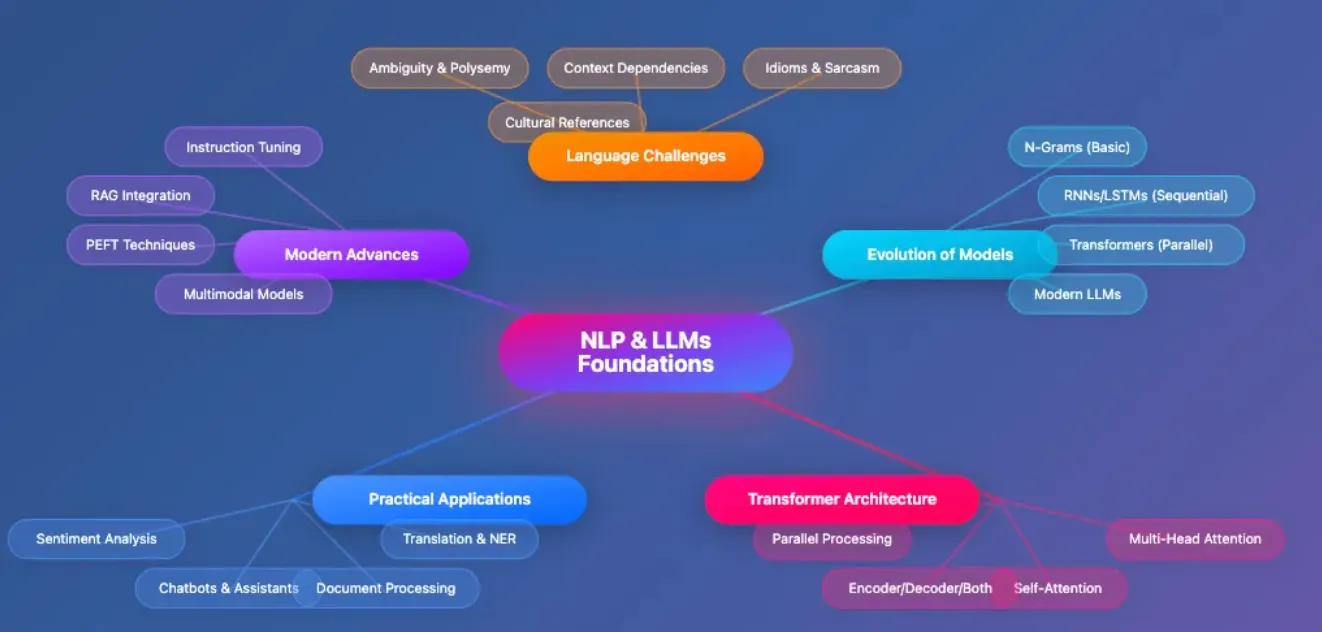
- Language Challenges: We’ll examine why language is difficult for machines, including ambiguity, context dependencies, understanding idioms and sarcasm, and interpreting cultural references.
- Evolution of Models: We’ll trace the development from basic N-gram models through sequential RNNs/LSTMs to parallel transformer architectures and modern LLMs.
- Transformer Architecture: We’ll dive into the revolutionary self-attention mechanism, multi-head attention, various transformer configurations (encoder/decoder/both), and how parallel processing transformed NLP.
- Practical Applications: We’ll explore real-world implementations including chatbots and assistants, sentiment analysis, document processing, and translation/named entity recognition.
- Modern Advances: We’ll cover cutting-edge techniques like instruction tuning, retrieval-augmented generation (RAG), parameter-efficient fine-tuning (PEFT), and multimodal models.
# Note: Bigram models are now used mainly for educational purposes.
from
 collections
import
 defaultdict
def

train_bigram_model
(
corpus
):
    model = defaultdict(
lambda
: defaultdict(
int
))

for
 sentence
in
 corpus:
        words = sentence.split()

for
 i
in

range
(
len
(words)-
1
):
            model[words[i]][words[i+
1
]] +=
1

return
 model
corpus = [
"AI transforms business"
,
"Business drives innovation"
]
bigram_model = train_bigram_model(corpus)
print
(
dict
(bigram_model))
- Initialize model: Create nested dictionary to store word pairs
- Process corpus: Split each sentence into individual words
- Count pairs: Track how often each word follows another
- Store results: Build frequency map of word sequences
def

predict_next_word
(
model, current_word, top_k=
3
):

if
 current_word
not

in
 model:

return
 []
    next_words = model[current_word]
    total_count =
sum
(next_words.values())
    predictions = [(word, count/total_count)

for
 word, count
in
 next_words.items()]
    predictions.sort(key=
lambda
 x: x[
1
], reverse=
True
)

return
 predictions[:top_k]
- Check if word exists in model: First verifies if the current word appears in our trained model, returning empty list if not
- Retrieve next word frequencies: Gets all words that follow the input word and their counts
- Calculate probabilities: Converts raw counts to probabilities by dividing each count by the total
- Sort predictions: Orders word predictions by probability (highest first)
- Return top results: Returns the top k most likely next words with their probabilities
# Simulate how a transformer might "attend" to words in a sentence
# Note: This uses random scores for illustration only.
import
 numpy
as
 np
words = [
'AI'
,
'transforms'
,
'business'
]
attention_scores = np.random.dirichlet(np.ones(
len
(words)), size=
len
(words))
for
 i, word
in

enumerate
(words):

print
(
f"Attention for '
{word}
':"
,
dict
(
zip
(words, attention_scores[i])))
- Define words: List the words in our sentence
- Generate scores: Create attention weights using Dirichlet distribution (ensures they sum to 1)
- Display attention: Show how much each word ‘focuses’ on others
- Interpret results: Higher scores indicate stronger relationships
- Instruction-tuned and chat-optimized models: Models like GPT-4, Llama-3, and DeepSeek follow instructions and hold natural conversations, enabling advanced reasoning and dialogue.
- Retrieval-Augmented Generation (RAG): Combining transformers with search over external data sources grounds responses in up-to-date, factual information — crucial for enterprise AI.
- Parameter-Efficient Fine-Tuning (PEFT): Techniques like LoRA enable rapid adaptation of large models to new tasks with minimal compute, democratizing customization.
- Multimodal Transformers: Models like CLIP, BLIP, and ViT extend transformer power to vision, audio, and cross-modal tasks — enabling AI to understand images, text, and speech together.
🚀 Production Deployment Tips:
Use model quantization for 2–4x speedup with reduced memory usage.
Implement caching for repeated inferences.
Consider edge deployment with ONNX Runtime.
Monitor model drift in production.
Use FlashAttention for efficient long-context processing.
- Language complexity demands context and nuanced understanding.
- Early models like bigrams and RNNs/LSTMs serve as educational stepping stones.
- Transformers and self-attention unlock deep understanding across all words and modalities.
- Recent advances — instruction tuning, RAG, PEFT, and multimodal architectures — power real-world AI.
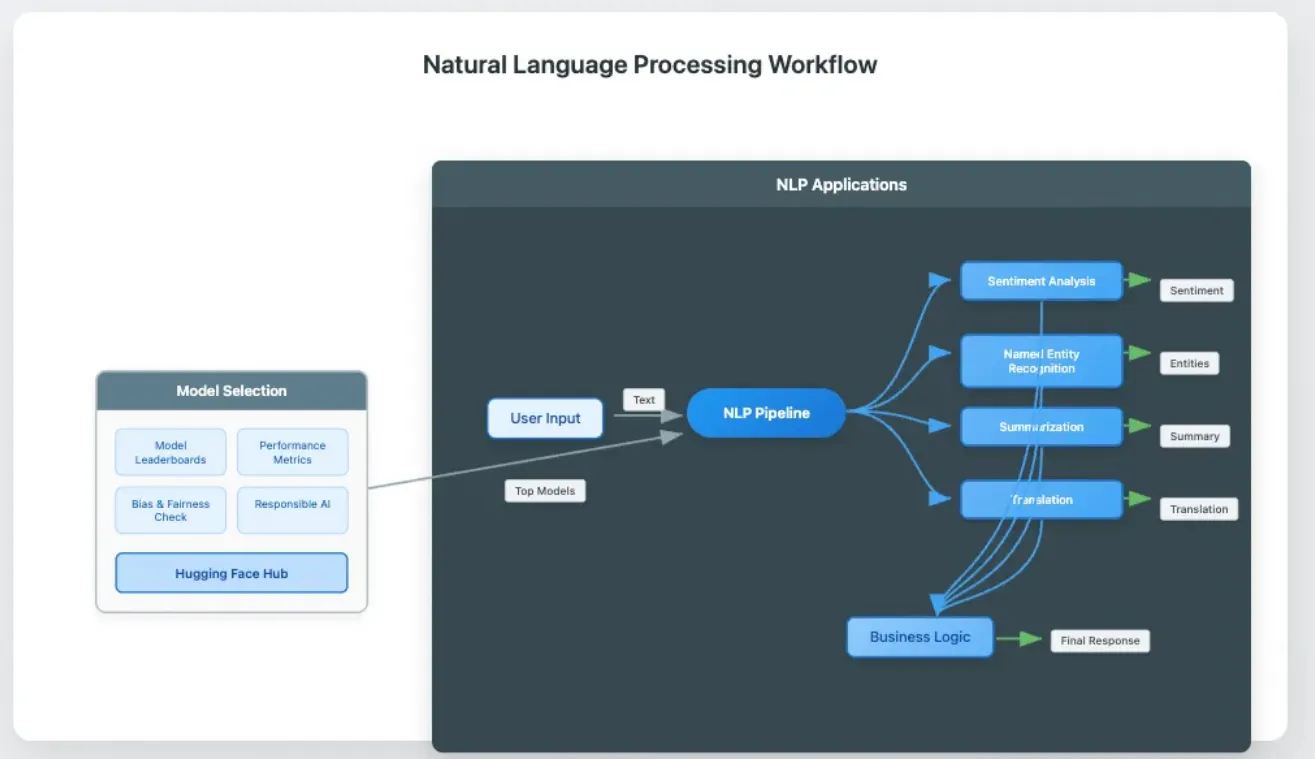
- User Input flows into the NLP Pipeline
- Pipeline branches to various tasks: Sentiment Analysis, NER, Summarization, Translation
- All results feed into Business Logic for processing
- Business Logic returns responses to User
- Model Selection shows Hugging Face Hub informed by Leaderboards and Evaluation
- Hub provides top models to the Pipeline
💡 Finding Top Models: Visit huggingface.co/models and click “Sort by trending” or check task-specific leaderboards for the latest benchmarks.
- Chatbots & Virtual Assistants: Automate customer support — banks use chatbots to answer account questions 24/7, slashing human agent needs.
- Sentiment Analysis: Detect customer feelings about products — e-commerce companies scan reviews to spot trends and react swiftly.
- Summarization: Condense lengthy documents — legal teams review contracts faster.
- Named Entity Recognition (NER): Extract names, companies, and places from messy text — news aggregators tag articles for easy browsing.
- Machine Translation: Shatter language barriers — global businesses instantly translate support tickets and documentation.
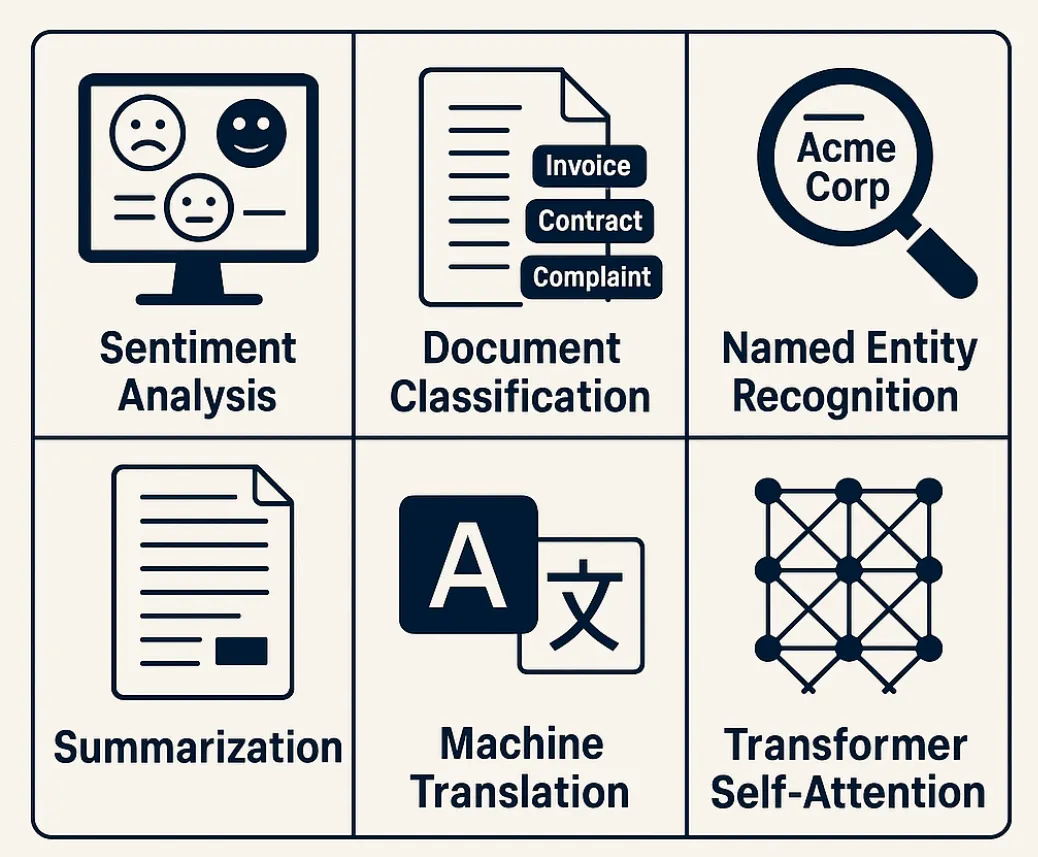 5 use cases and one transformer architecture
# 1. Import the pipeline utility from Hugging Face
from
 transformers
import
 pipeline
# 2. Load a pre-trained sentiment analysis pipeline (explicit model specification)
sentiment_analyzer = pipeline(

'sentiment-analysis'
,
    model=
'cardiffnlp/twitter-roberta-base-sentiment-latest'

# Replace with a current top model from the Model Hub
)
# 3. Example customer review
review =
"The new phone has an amazing camera and battery life!"
# 4. Run sentiment analysis
result = sentiment_analyzer(review)
# 5. Print the result (Python output)
print
(result)
# Output: [{'label': 'Positive', 'score': 0.998}]
- Import pipeline: Load Hugging Face’s high-level interface for NLP tasks
- Load model: Explicitly specify a current, high-performing sentiment model (RoBERTa variant)
- Provide input: Supply a sample customer review
- Analyze sentiment: Run the model on your text
- Display results: Print Python list showing predicted label and confidence score
-
NLP powers countless business tools, from chatbots to document summarization.
-
Hugging Face pipelines make advanced NLP accessible with minimal code.
-
Specify models explicitly and consult Model Hub leaderboards for best performance.
-
Explore ecosystem tools like LangChain and SpaCy for complex applications.
-
Many words juggle multiple meanings. Consider “bank”:
-
“She went to the bank to deposit a check.” (finance)
-
“He sat on the bank of the river.” (geography)
-
Humans leverage context to pick the correct meaning. Computers must learn this skill, which is called word sense disambiguation.
-
Meaning often depends on distant sentences. Example:
-
“After reading the article series, John gave it to Mary because she enjoyed it.”
-
Who enjoyed the article series? Machines must track references. This is something early NLP models bungled. Modern transformers excel here, though perfection remains elusive.
-
Phrases like “kick the bucket” (meaning “to die”) or sarcastic remarks like “Great job!” confuse literal-minded algorithms. Humor and cultural references multiply complexity.
 Sarcasm
# 1. Import pipeline utility
from transformers import pipeline
# 2. Load a zero-shot classification pipeline with an up-to-date model
classifier = pipeline(
    'zero-shot-classification',
    model='MoritzLaurer/deberta-v3-large-zeroshot-v1.1-all-33'
# Replace with a top model from the Model Hub
)
# 3. Example sentences using 'bank' in different senses
sentence1 =
"She deposited money at the bank."
sentence2 =
"The fisherman sat by the bank."
# 4. Define candidate labels
labels = [
"finance"
,
"river"
,
"sports"
]
# 5. Classify each sentence
result1 = classifier(sentence1, labels)
result2 = classifier(sentence2, labels)
# 6. Print the top predicted label for each
print(
"Sentence 1:"
, result1[
"labels"
][0])
# finance
print(
"Sentence 2:"
, result2[
"labels"
][0])
# river
- Load classifier: Import zero-shot classification with explicit, current model (DeBERTa-v3)
- Create examples: Two sentences using “bank” in different contexts
- Define labels: List possible interpretations
- Run classification: Model predicts which label fits best
- Display predictions: Show top label for each sentence
Sentence 1:

finance
Sentence 2:

river
-
Language brims with ambiguity, context, and culture.
-
Zero-shot classification handles new categories, but challenges persist.
-
Consider these limitations and evaluate for responsible AI in real-world applications.
-
Customer Support Automation: Chatbots answer common questions instantly, cutting support costs and freeing staff for complex issues.
-
Document Processing: Banks and insurers extract key info from forms and contracts, accelerating approvals and reducing errors.
-
Market Intelligence: Companies scan social media and reviews to spot trends and improve products.
# 1. Import pipeline utility
from
 transformers
import
 pipeline
# 2. Load a text classification pipeline (sentiment model for demo; replace with custom model for production)
classifier = pipeline(

'text-classification'
,
    model=
'cardiffnlp/twitter-roberta-base-sentiment-latest'

# Replace with your fine-tuned model
)
# 3. Example documents
documents = [

"Your invoice is attached. Please process the payment by Friday."
,

"Congratulations! You have been selected for a new credit card."
,

"The meeting is scheduled for 10 AM tomorrow in conference room B."
]
# 4. Classify each document
for
 doc
in
 documents:
    result = classifier(doc)

print
(
f"Document:
{doc}
\\nPrediction:
{result[
0
][
'label'
]}
\\n"
)
- Import utility: Load text classification pipeline
- Specify model: Use pre-trained model (replace with custom for production)
- Prepare documents: List sample emails or documents
- Run classification: Process each document and display results
-
Sentiment analysis: Process 1000 reviews/minute vs 10/minute manual
-
Document routing: 85% accuracy, 50% time reduction
-
Text generation: 70% reduction in draft creation time
-
NLP delivers tangible business value through automation and insights.
-
Even simple pipelines save significant time and money.
-
Fine-tune models to specific needs and select explicitly from Model Hub.
-
Responsible AI practices and modern trends (RAG, multimodal, ecosystem tools) prove essential for production success.
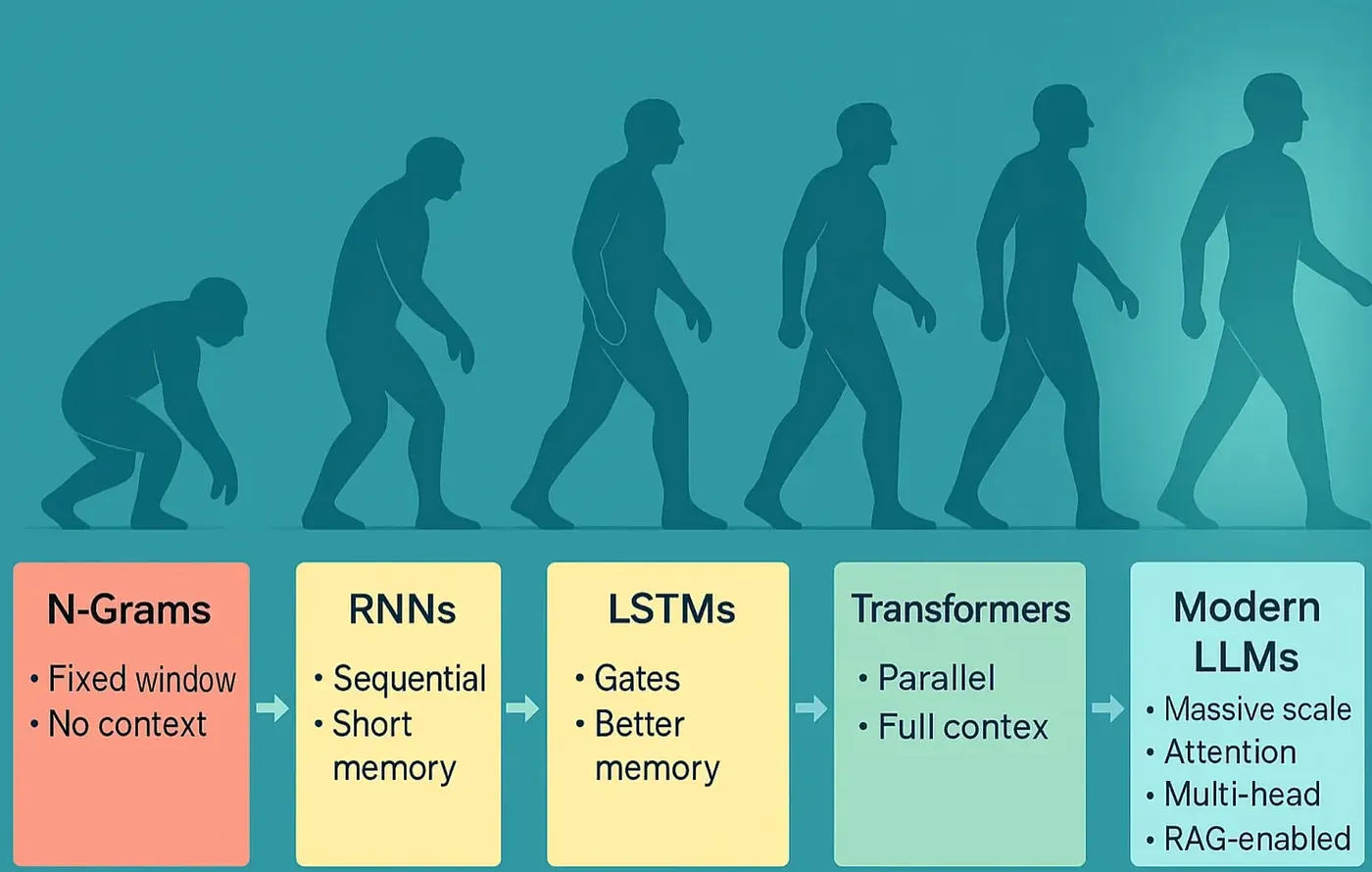 Evolution of Machine Language Understanding
from
 collections
import
 defaultdict
def

train_bigram_model
(
corpus
):

# For illustration; use NLTK or spaCy for production
    model = defaultdict(
lambda
: defaultdict(
int
))

for
 sentence
in
 corpus:
        words = sentence.split()

for
 i
in

range
(
len
(words)-
1
):
            model[words[i]][words[i+
1
]] +=
1

return
 model
corpus = [
"I love NLP"
,
"NLP is awesome"
]
bigram_model = train_bigram_model(corpus)
print
(
dict
(bigram_model))
# Note: For practical applications, consider using libraries such as NLTK or spaCy, which provide optimized N-gram modeling and preprocessing tools.
- Initialize model: Create defaultdict for counting word pairs
- Process sentences: Split text and iterate through word pairs
- Count occurrences: Track frequency of each word following another
- Return model: Dictionary mapping words to their followers
- Limited Context: N-grams see only a few words at a time. Important information outside that window vanishes.
- Long-Range Dependencies: RNNs and LSTMs try remembering more, but memory fades with distance (vanishing gradient: earlier information gets lost as sequences grow).
- Scalability: N-grams need huge tables tracking all possible word combinations. RNNs process words sequentially, crawling through long texts.
- Ambiguity and Rare Words: Early models can’t resolve meaning when context is distant or words are rare. In “After the bank approved the loan, the river flooded the town,” ‘bank’ means something different each time. Early models struggle distinguishing.
# This is a conceptual example: real models learn these weights
import
 numpy
as
 np
words = [
'The'
,
'cat'
,
'sat'
,
'on'
,
'the'
,
'mat'
]
# Generate random attention weights for illustration
attention_scores = np.random.dirichlet(np.ones(
len
(words)), size=
len
(words))
for
 i, word
in

enumerate
(words):

print
(
f"Attention for '
{word}
':"
,
dict
(
zip
(words, attention_scores[i])))
- Define sequence: List words in the sentence
- Generate weights: Create attention scores using Dirichlet (sums to 1)
- Display attention: Show how each word attends to others
- Interpret scores: Higher values indicate stronger relationships
-
Unlimited Context: Every word attends to all others, regardless of distance.
-
Parallel Processing: All words process simultaneously, dramatically accelerating training.
-
Rich Understanding: Transformers resolve ambiguity and learn deep patterns, powering today’s best language models.
-
N-grams: Simple, fast, but short-sighted.
-
RNNs/LSTMs: Add memory, but struggle with long-range context.
-
Transformers: Use self-attention to see the whole picture, enabling advanced NLP.
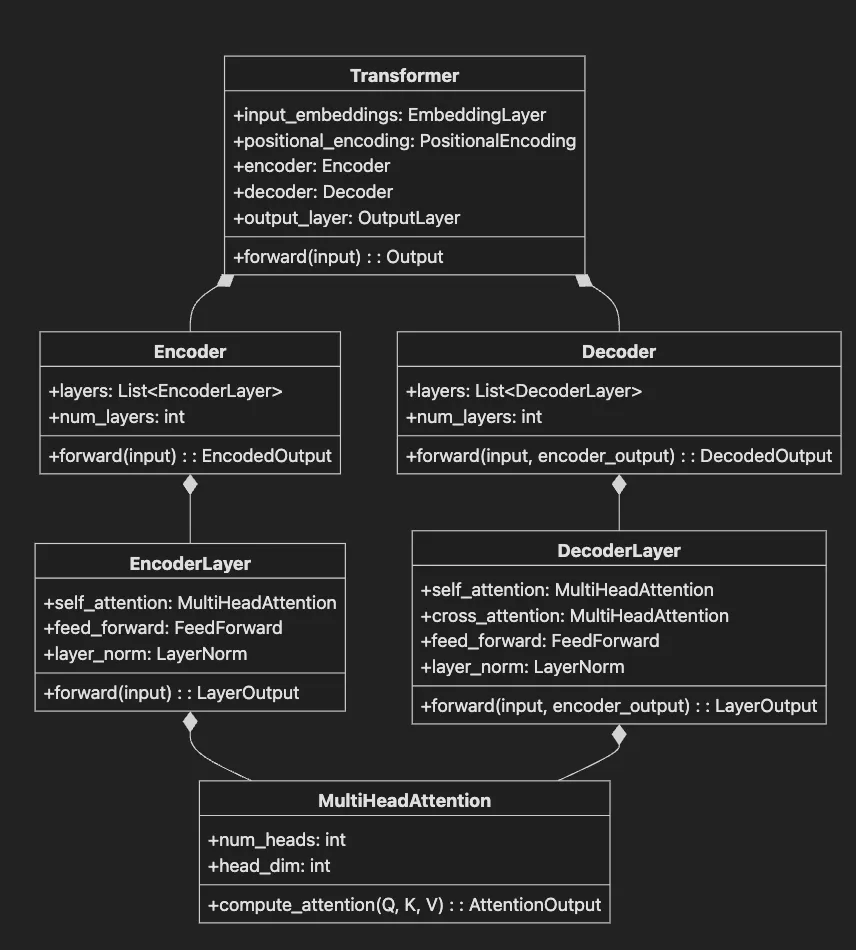
- Transformer class contains input embeddings, positional encoding, encoder, decoder, and output layer.
- Encoder contains multiple EncoderLayer instances.
- Decoder contains multiple DecoderLayer instances.
- EncoderLayer has self-attention, feed-forward network, and layer normalization.
- DecoderLayer adds cross-attention to attend to encoder output.
- MultiHeadAttention computes attention with Q, K, V matrices across multiple heads.
from
 transformers
import
 AutoTokenizer, AutoModel
import
 torch
# Load tokenizer and model with attention outputs enabled
tokenizer = AutoTokenizer.from_pretrained(
'bert-base-uncased'
)
model = AutoModel.from_pretrained(
'bert-base-uncased'
, output_attentions=
True
)
sentence =
"The bank can guarantee deposits will cover future tuition costs."
inputs = tokenizer(sentence, return_tensors=
"pt"
)
outputs = model(**inputs)
attentions = outputs.attentions
# List of attention matrices
print
(
f"Number of attention layers:
{
len
(attentions)}
"
)
print
(
f"Shape of attention matrix in layer 0:
{attentions[
0
].shape}
"
)
# Using FlashAttention for efficient long-context processing
# from transformers import AutoModel
# model = AutoModel.from_pretrained("model-name", attn_implementation="flash_attention_2")
- Tokenization: Split sentence into tokens the model understands.
- Model Forward Pass: Process tokens and return attention weights (via
output_attentions=True). - Access Attention:
attentionscontains one tensor per layer showing token relationships. - Shape Explanation: Each matrix has shape
(batch_size, num_heads, seq_length, seq_length)—BERT-base typically uses 12 heads. Each head denotes a different context for deeper meaning that the model is tracking. - FlashAttention Note: For efficient processing of long sequences, use the FlashAttention implementation.
from
 transformers
import
 AutoTokenizer, AutoModel
import
 torch
tokenizer = AutoTokenizer.from_pretrained(
'bert-base-uncased'
)
model = AutoModel.from_pretrained(
'bert-base-uncased'
, output_attentions=
True
)
# Get attention weights
inputs = tokenizer(
"The bank approved the loan"
, return_tensors=
"pt"
)
outputs = model(**inputs)
attention = outputs.attentions
# List of attention matrices
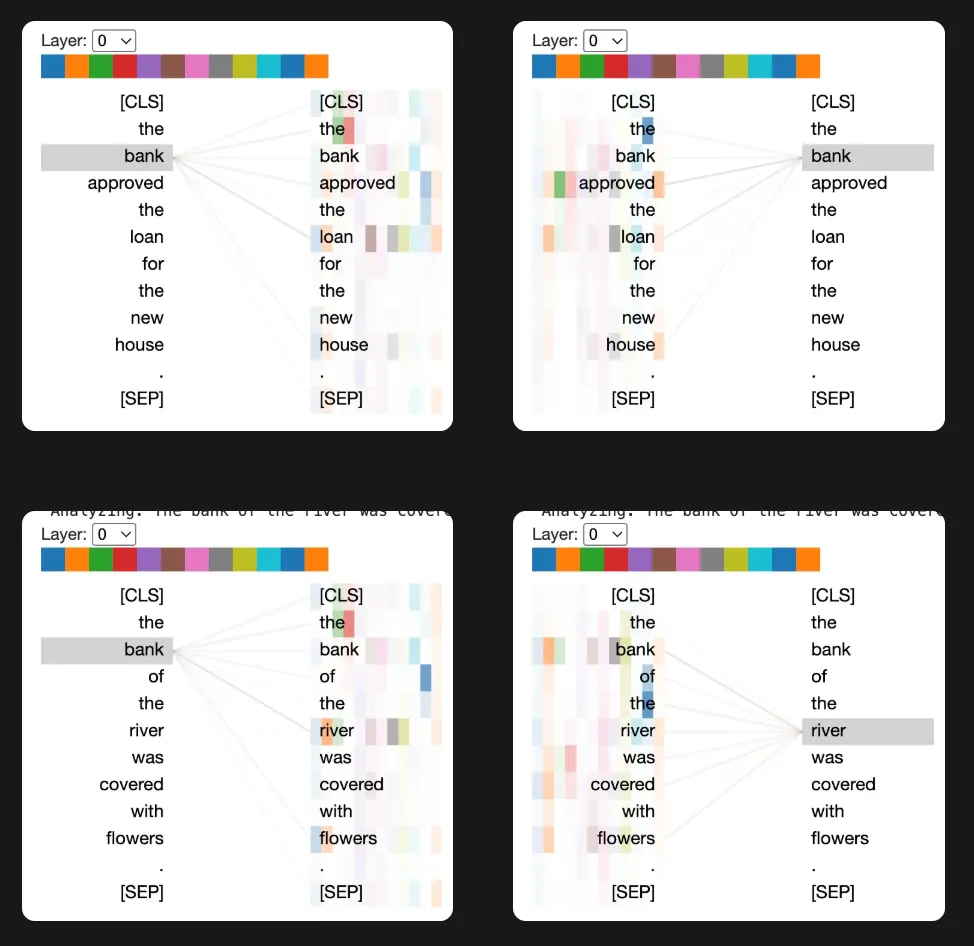
-
Encoder-only models (like BERT): Analyze and understand input text. Perfect for classification, extraction, or assessing meaning — think spam detection or document classification.
-
Decoder-only models (like GPT): Generate text, one token at a time. Power story generation, code completion, or chatbots.
-
Encoder-decoder models (like T5 or BART): Transform one sequence into another — translation, summarization, or question answering.
-
The encoder reads and understands reports like an analyst.
-
The decoder generates new content from prompts like a writer.
-
The encoder-decoder rewrites documents in another language like a translator.
# Encoder-only: BERT for classification
from
 transformers
import
 BertTokenizer, BertForSequenceClassification
bert_tokenizer = BertTokenizer.from_pretrained(
'bert-base-uncased'
)
bert_model = BertForSequenceClassification.from_pretrained(
'bert-base-uncased'
)
# Decoder-only: GPT-2 for text generation
from
 transformers
import
 GPT2Tokenizer, GPT2LMHeadModel
gpt2_tokenizer = GPT2Tokenizer.from_pretrained(
'gpt2'
)
gpt2_model = GPT2LMHeadModel.from_pretrained(
'gpt2'
)
# Encoder-decoder: T5 for text-to-text tasks
from
 transformers
import
 T5Tokenizer, T5ForConditionalGeneration
t5_tokenizer = T5Tokenizer.from_pretrained(
't5-small'
)
t5_model = T5ForConditionalGeneration.from_pretrained(
't5-small'
)
- BERT: Loads encoder-only model for text classification
- GPT-2: Loads decoder-only model for text generation
- T5: Loads encoder-decoder model for text transformation tasks
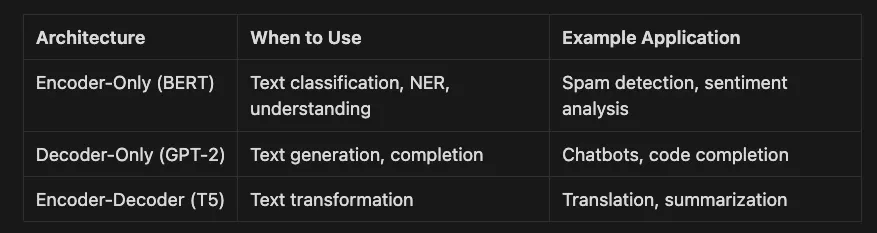
-
Llama 4 for better generation
-
DeBERTa-v3 for improved classification
-
Flan-T5 for better instruction following
-
An RNN reads each token sequentially.
-
A transformer analyzes all tokens in parallel, using self-attention to connect distant ideas (linking the introduction to the conclusion).
# Compare how RNNs (sequential) and transformers (parallel) process sequences
import
 time
sequence =
list
(
range
(
1000
))
# Simulate a 1000-token document
# Sequential processing (like RNN)
start = time.time()
for
 token
in
 sequence:

# Simulate processing each token (placeholder)

pass
seq_time = time.time() - start
# Parallel processing (like Transformer)
start = time.time()
# Simulate processing all tokens at once (placeholder)
_ = [token
for
 token
in
 sequence]
par_time = time.time() - start
print
(
f"Sequential (RNN-like) time:
{seq_time:
.6
f}
s"
)
print
(
f"Parallel (Transformer-like) time:
{par_time:
.6
f}
s"
)
- Create sequence: Simulate 1000-token document
- Sequential processing: Loop through tokens one by one (RNN-style)
- Parallel processing: Process all tokens simultaneously (Transformer-style)
- Compare times: Show speed difference (simplified demonstration)
-
Train on bigger, more diverse datasets for superior results
-
Handle long documents, chats, or transcripts effortlessly
-
Iterate faster and deliver AI solutions to market sooner
-
Traditional NLP: Implementation of bigram models showing why simple counting approaches fail at language understanding
-
Ambiguity Challenges: Demonstrations of word sense disambiguation problems (e.g., “bank” as financial institution vs. river bank)
-
Transformer Solutions: Visualization of self-attention mechanisms that enable context understanding
-
Architecture Comparisons: Side-by-side demonstrations of encoder-only (BERT), decoder-only (GPT-2), and encoder-decoder (T5) models
-
Real-world Applications: Practical implementations of sentiment analysis, document classification, and text generation with quantified business value
-
Main Repository: https://github.com/RichardHightower/art_hug_02
-
Article Early Version: article.md
-
README: README.md
-
Tutorial: tutorial.md
# Install poetry
if
 not already installed
curl -sSL <https:
//install.python-poetry.org> | python3 -
# Create new project
poetry
new
 nlp-transformers
cd nlp-transformers
# Add dependencies
poetry
add
 transformers==
4.53
.0
 datasets torch nltk spacy
poetry
add
 --
group
 dev jupyter ipykernel
# Activate environment
poetry shell
# Download and install mini-conda from <https://docs.conda.io/en/latest/miniconda.html>
# Create environment with Python 3.12.9
conda create
-
n nlp
-
transformers python
=
3.12
.9
conda activate nlp
-
transformers
# Install packages
conda install
-
c
 pytorch
-
c
 huggingface transformers datasets torch
conda install
-
c
 conda
-
forge jupyterlab spacy nltk
# Install Python 3.12.9 with pyenv
pyenv install 3.12.9
pyenv
local
 3.12.9
# Create virtual environment
python -m venv venv
source
 venv/bin/activate
# On Windows: venv\\\\Scripts\\\\activate
# Install packages
pip install transformers==4.53.0 datasets torch nltk spacy jupyterlab
SENTIMENT_MODEL
=cardiffnlp/twitter-roberta-base-sentiment-latest
CLASSIFICATION_MODEL
=MoritzLaurer/deberta-v3-large-zeroshot-v1.
1
-all-
33
GENERATION_MODEL
=gpt2
HUGGINGFACE_TOKEN
=your-token-here
# Optional
from
 collections
import
 defaultdict
def

train_bigram_model
(
corpus
):
    model = defaultdict(
lambda
: defaultdict(
int
))

for
 sentence
in
 corpus:
        words = sentence.split()

for
 i
in

range
(
len
(words)-
1
):
            model[words[i]][words[i+
1
]] +=
1

return
 model
corpus = [
"The bank will close soon"
,
"She sat by the bank of the river"
]
bigram_model = train_bigram_model(corpus)
for
 prev_word, next_words
in
 bigram_model.items():

print
(
f"After '
{prev_word}
':
{
dict
(next_words)}
"
)
# Example output:
# After 'The': {'bank': 1}
# After 'bank': {'will': 1, 'of': 1}
- Build model: Count which words follow which in the corpus.
- Process sentences: Track word pair frequencies.
- Display results: Show possible next words after each word.
- Observe limitations: Model can’t distinguish ‘bank’ (finance) from ‘bank’ (river) — it only sees one word ahead.
# Requires: transformers >= 4.40.0
from
 transformers
import
 AutoTokenizer, AutoModel
import
 torch
tokenizer = AutoTokenizer.from_pretrained(
'bert-base-uncased'
)
model = AutoModel.from_pretrained(
'bert-base-uncased'
, output_attentions=
True
)
sentence =
"The bank will not close until 5pm."
inputs = tokenizer(sentence, return_tensors=
"pt"
)
outputs = model(**inputs)
# Get attention weights from the last layer
last_layer_attention = outputs.attentions[-
1
]
# Shape: (batch, num_heads, seq_len, seq_len)
print
(
f"Attention shape:
{last_layer_attention.shape}
"
)
# Output example:
# Attention shape: torch.Size([1, 12, 10, 10])
- Load model: Import BERT with attention output enabled
- Tokenize input: Convert sentence to tokens
- Run model: Process tokens and extract attention weights
- Examine shape: Each attention matrix shows how words relate (12 heads, 10x10 token relationships)
-
Encoder-only (e.g., BERT, DeBERTa, Longformer): Best for understanding and classifying text.
-
Decoder-only (e.g., GPT-4, Llama 4, Mistral): Best for generating text.
-
Encoder-decoder (e.g., T5, BART): Best for translation and summarization. Choose the right architecture — like selecting the perfect tool from your toolbox.
-
NLP powers AI across industries and modalities
-
Early models had limits with context, scale, and ambiguity
-
Transformers use self-attention for deep, flexible understanding
-
Efficient transformer variants and multimodal models drive state-of-the-art performance
-
Choosing the right architecture and fine-tuning strategy proves key
-
Mastering these basics sets you up for success with Hugging Face and modern AI development