Your AI Coding Agent Forgets Things. Manage the Context Window to 10x Results
One fact that 10x developers know: Claude Code context window is the operating system, and everything else is a way to manage it.
Originally published on Medium.
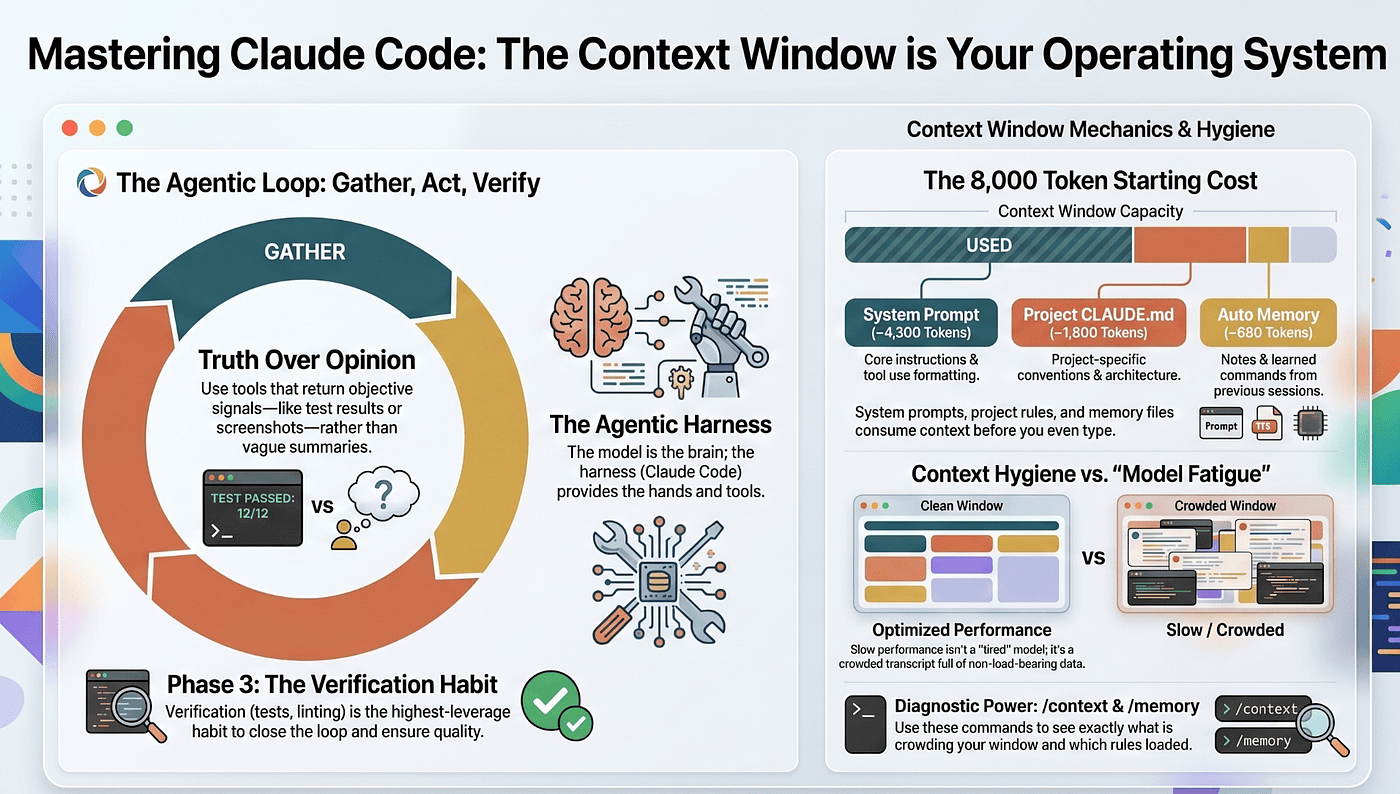
One fact that 10x developers know: Claude Code context window is the operating system, and everything else is a way to manage it.
Most people learn Claude Code as a list of commands. The developers who actually get faster every week learn one thing instead: the Claude Code context window is the operating system, and everything else is a way to manage it.
Summary: In this article: You will learn the single mental model that makes Claude Code make sense: the context window is a bounded, scarce resource, and every feature exists to manage what the agent can see right now. We cover the three-phase agentic loop, why the third phase matters most, what actually fills the context window, and the two commands that turn an abstract problem into a thirty-second fix.
This is Part 1 of “Claude Code, Day-to-Day,” a 19-part guide to mastering Claude Code for working engineers.
Open any guide to Claude Code and it starts the same way. Install the CLI. Type claude. Here is /help. Here are some prompt patterns. You will be productive in ten minutes, and you will also be stuck there. Knowing more commands does not make you better. The developers who compound their productivity week over week have built a mental model of what the agent is doing under the hood, and they use it to decide which lever to pull when something feels wrong.
That mental model has one central idea. The Claude Code context window is the operating system. Every command, mode, skill, subagent, and hook is a tool for managing what lives in that window at a given moment. Once you see the tool through that lens, everything else becomes a special case of one fundamental skill: deciding what the agent can see right now.
This article builds that lens.
Check out this companion video.
What Claude Code actually is
Start by throwing out two wrong mental models.
It is not smarter autocomplete. Autocomplete suggests the next token. Claude Code reasons about your codebase, decides on a plan, and executes it across multiple files using a real terminal. A different category of tool entirely.
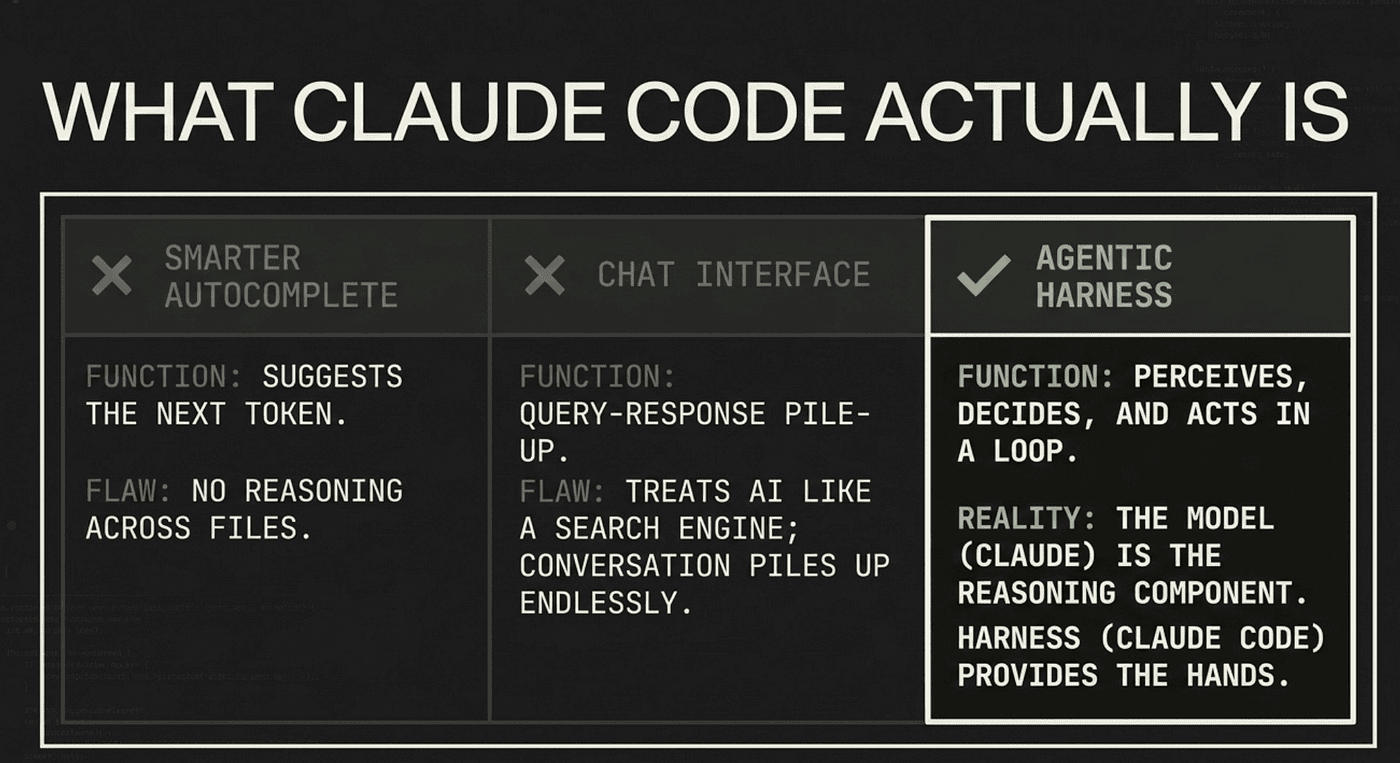
It is not a chat interface with tools bolted on. A chat interface is a query-response loop: you ask, the model answers, the conversation piles up. Claude Code asks and answers too, but in between it acts. It runs commands, reads files, edits code, calls tests. The chat framing tricks you into treating the agent like a search engine you query for advice. The reality is closer to an engineer sitting next to you who keeps reaching for tools.
Anthropic’s own framing is the agentic harness. The model (Claude) is the reasoning component. The harness (Claude Code) is everything around it: the tools, the file access, the context management, the execution environment, the permission gating. The model can think. The harness gives it hands. Together they form an agent, a system that perceives, decides, and acts in a loop.
That loop has a name worth knowing.
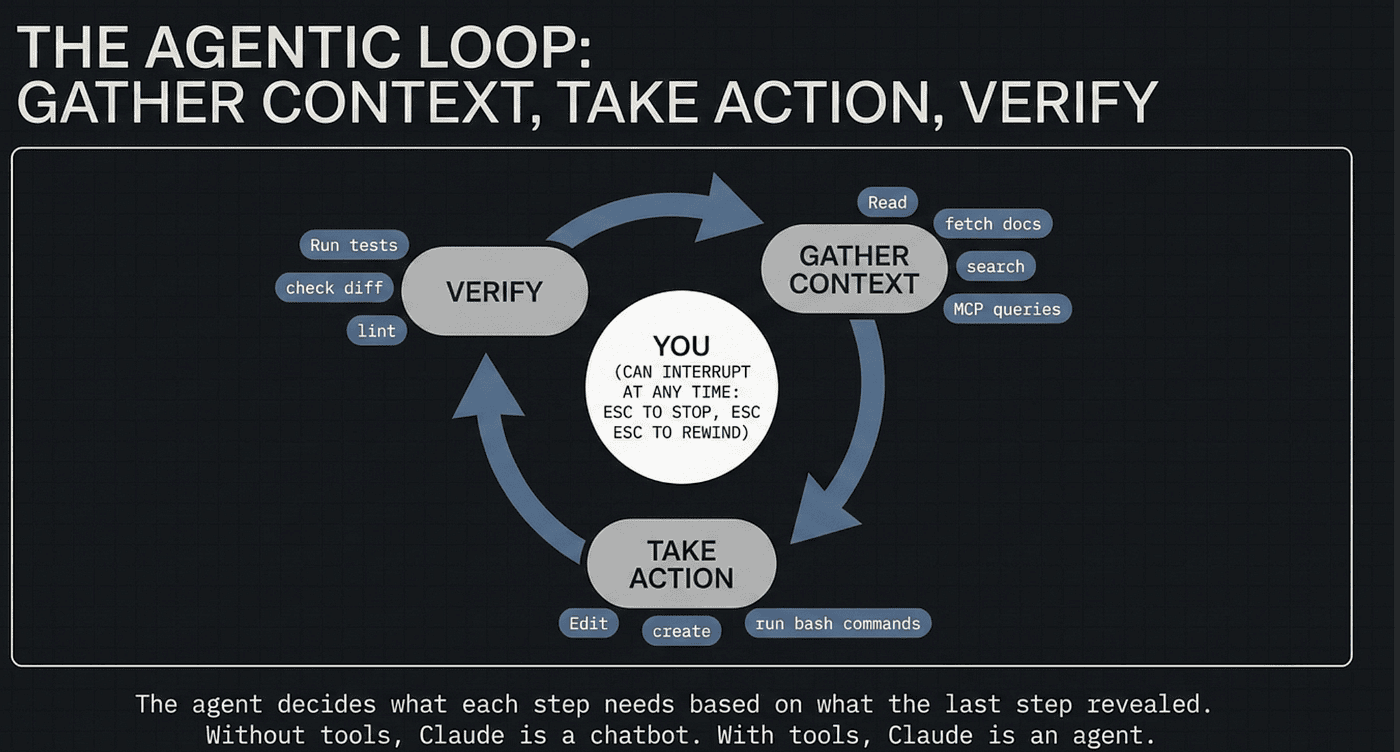
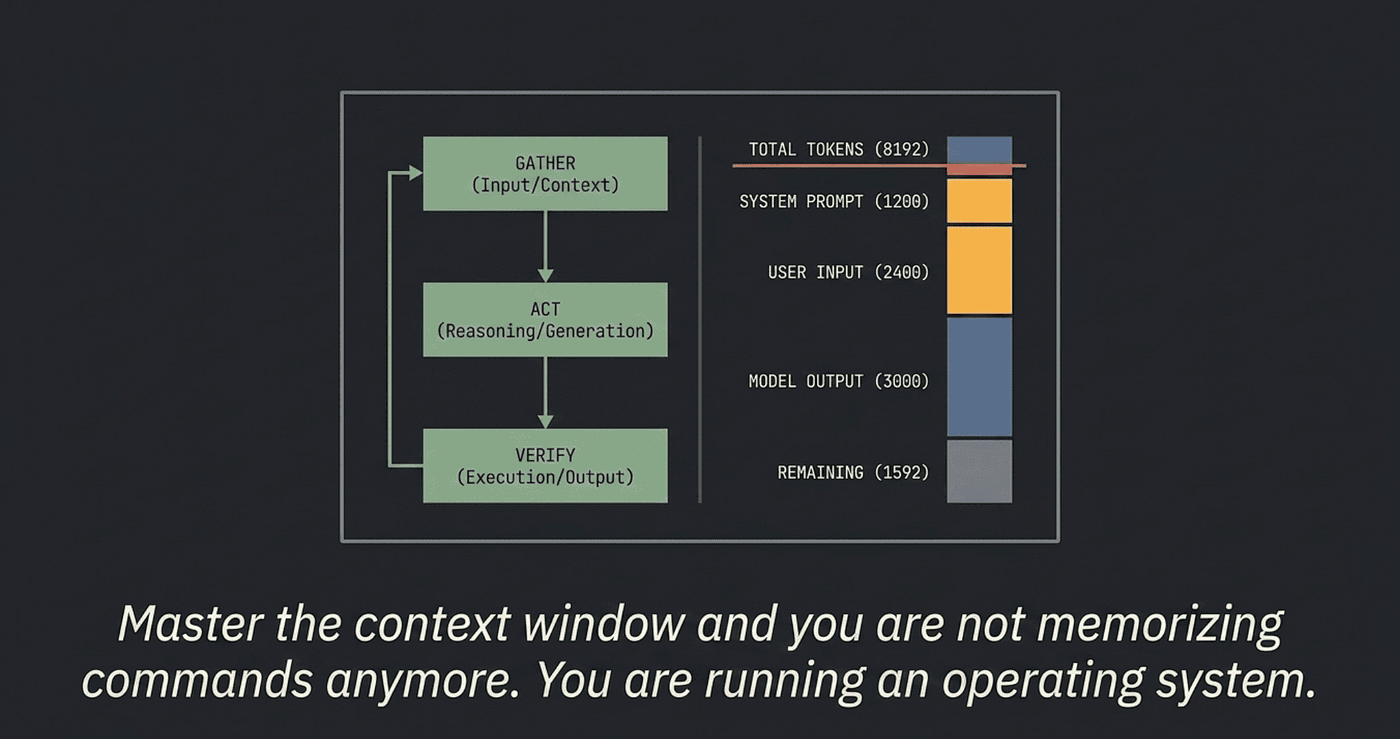
The agentic loop: gather context, take action, verify
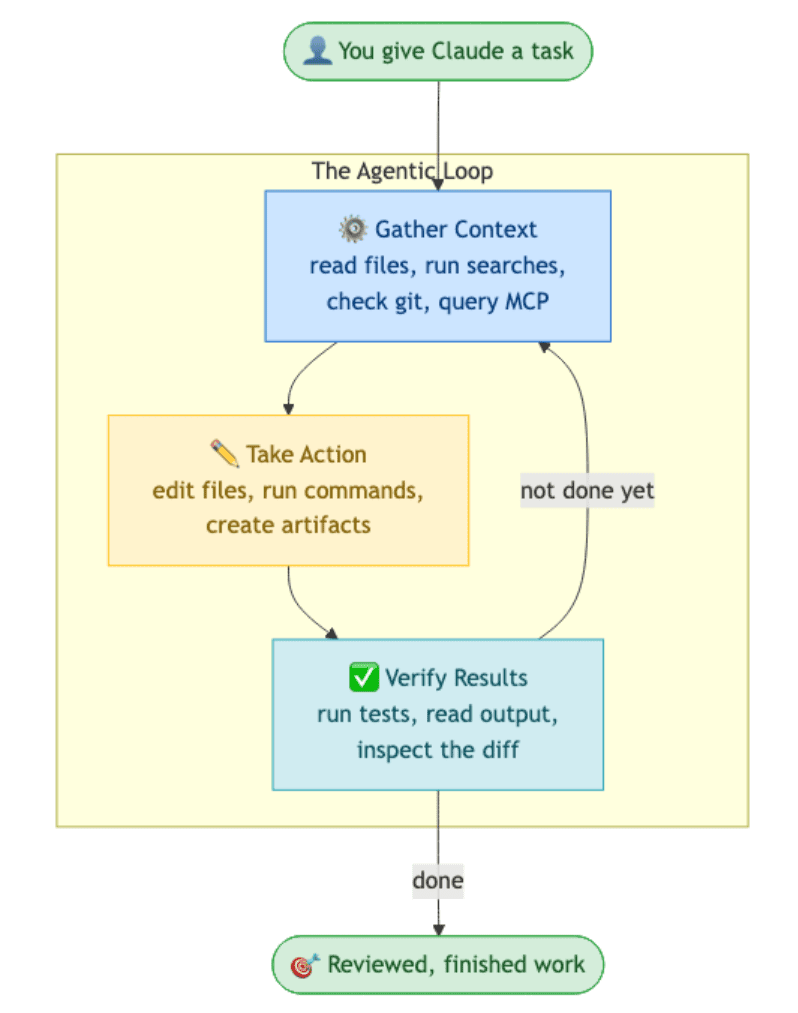
The agentic loop has three phases, repeated until the work is done:
- Gather context. Read files, run searches, check git status, fetch docs, query MCP servers. Whatever the agent needs to understand the problem.
- Take action. Edit files, run commands, create artifacts.
- Verify results. Run tests, check the output, look at the diff, confirm the change did what was intended.
These phases blend together. A bug fix might cycle through all three half a dozen times before the agent is done; a quick question might never leave phase one. The agent decides what each step needs based on what the last step revealed.
You are part of the loop too. You can interrupt at any point: Esc to stop, Esc Esc to rewind, a new prompt to redirect. That is the central trick of agentic coding: the agent has the wheel, but you can grab it back any time.
You are part of the loop too. You can interrupt at any point: Esc to stop, Esc Esc to rewind, a new prompt to redirect. That is the central trick of agentic coding: the agent has the wheel, but you can grab it back any time.
The loop runs on two kinds of component. Models that reason: Sonnet, Opus, Haiku. Tools that act: Read, Edit, Write, Bash, Glob, Grep, WebFetch, the task tools, plus anything you add through MCP servers, skills, and plugins. The model decides which tool to call, the harness runs it, the result flows back into context. Without tools, Claude is a chatbot. With tools, Claude is an agent.
The third phase is the one that matters
Look at the three phases again. Most people fixate on the first two. The third one decides whether the work is any good.
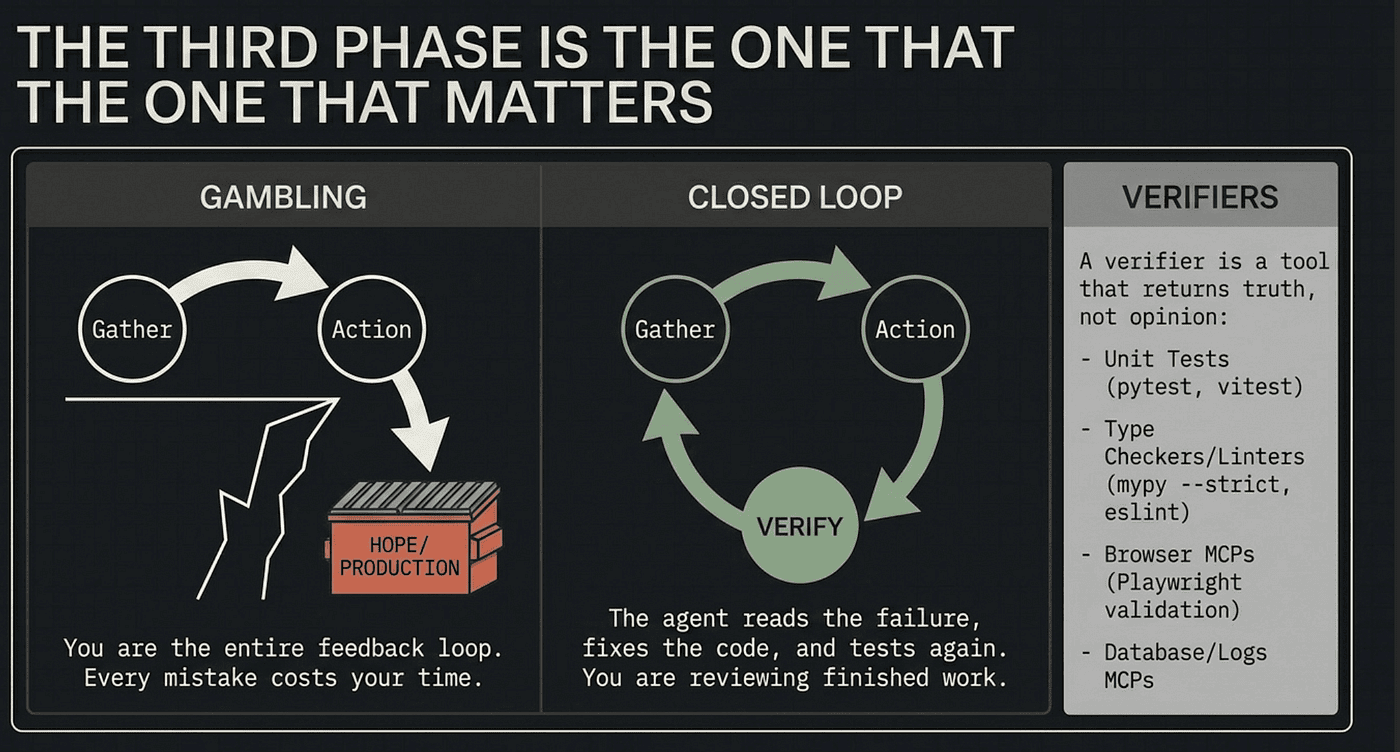
Without a verifier, an agentic loop is gambling. The agent reads files, writes code, tells you it is done, and you have no choice but to read the diff and hope. Sometimes the work is right. Often it is plausible. Occasionally it is wrong in a way that looks right until production. You are the entire feedback loop, so every mistake costs your time.
With a verifier, the loop closes on itself. The agent writes code, runs the test, reads the failure, fixes the code, runs the test again. You are no longer inside the loop. You are reviewing finished work. Anthropic’s internal teams put it bluntly: giving Claude a way to verify its work is the single highest-leverage thing you can do. Everything else is multiplicative on top of that one habit.
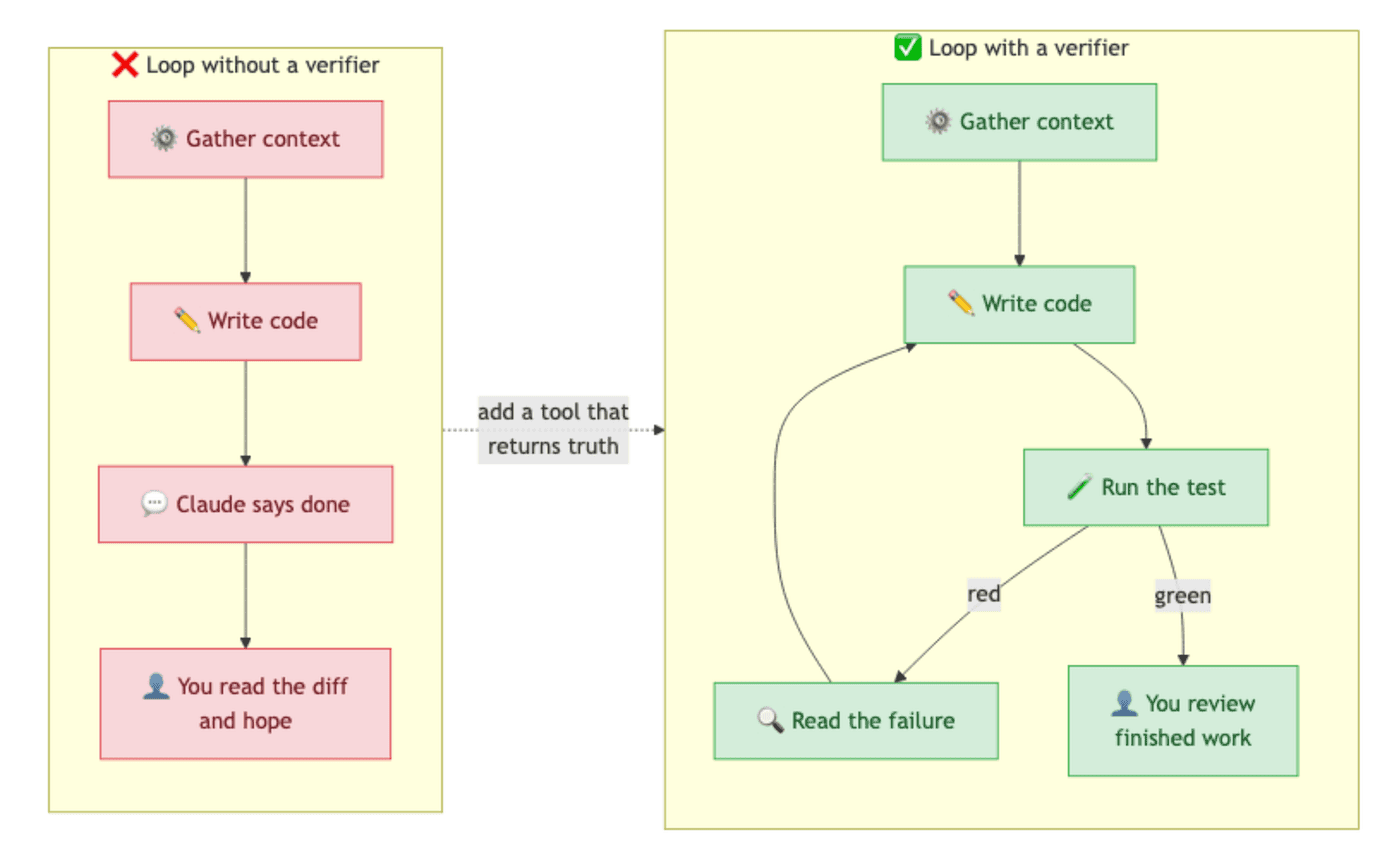
A verifier can be almost anything that returns a signal the agent can read. Most projects walk a progression:
- Start with unit tests. The cheapest, most universal verifier. A handful of
pytestorvitesttests covering the function you are about to change is enough. The agent runs them, sees green or red, and iterates. The bar is "did the change break what used to work," not "do we have full coverage." - Add a type checker and a linter.
mypy --strict,tsc --noEmit,ruff,eslint. Fast, cheap, and they catch a different class of mistake than tests do. - For UI work, add a browser MCP server like the Playwright MCP: a real browser the agent can drive, screenshot, and validate against.
- For data work, add a database MCP server (Postgres, SQLite, Snowflake): the agent runs the query that proves a migration did what was intended.
- For systems work, give the agent your logs through a logs MCP or
tail -fin a sandboxed shell: did the service behave the way you said?
The pattern is identical: the agent needs a tool that returns truth, not opinion. A test passes or fails. A screenshot matches or it does not. Vague signals like “looks good to me” or “compiles fine” leave the loop open and put you back in the slot of being the only thing that can tell whether the work worked.
The cheapest version of all of this is one sentence at the end of every prompt: “…then run the tests and tell me if anything broke.” That single discipline gets you most of the way. MCP servers and hooks are automation on top of the habit, not a replacement for it.
Remember this if you remember nothing else from this section: gather context, take action, verify. Skip the third one and you have turned an agent back into a chatbot.
The context window, plainly
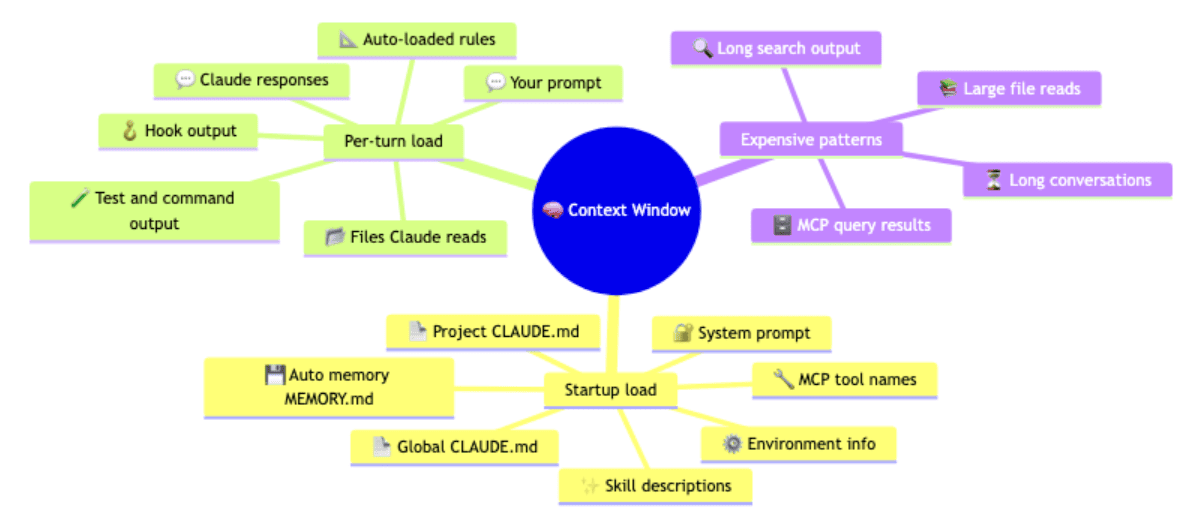
The context window is the agent’s working memory for a single session. Everything Claude knows about your current task lives in one bounded buffer that gets sent with every model call: your prompts, the files it has read, the commands it has run, their output, the rules it has loaded, the skills it can access, its own previous responses. When the buffer fills up, performance degrades. When it overflows, the harness summarizes older content to make room (/compact), and some detail is inevitably lost.
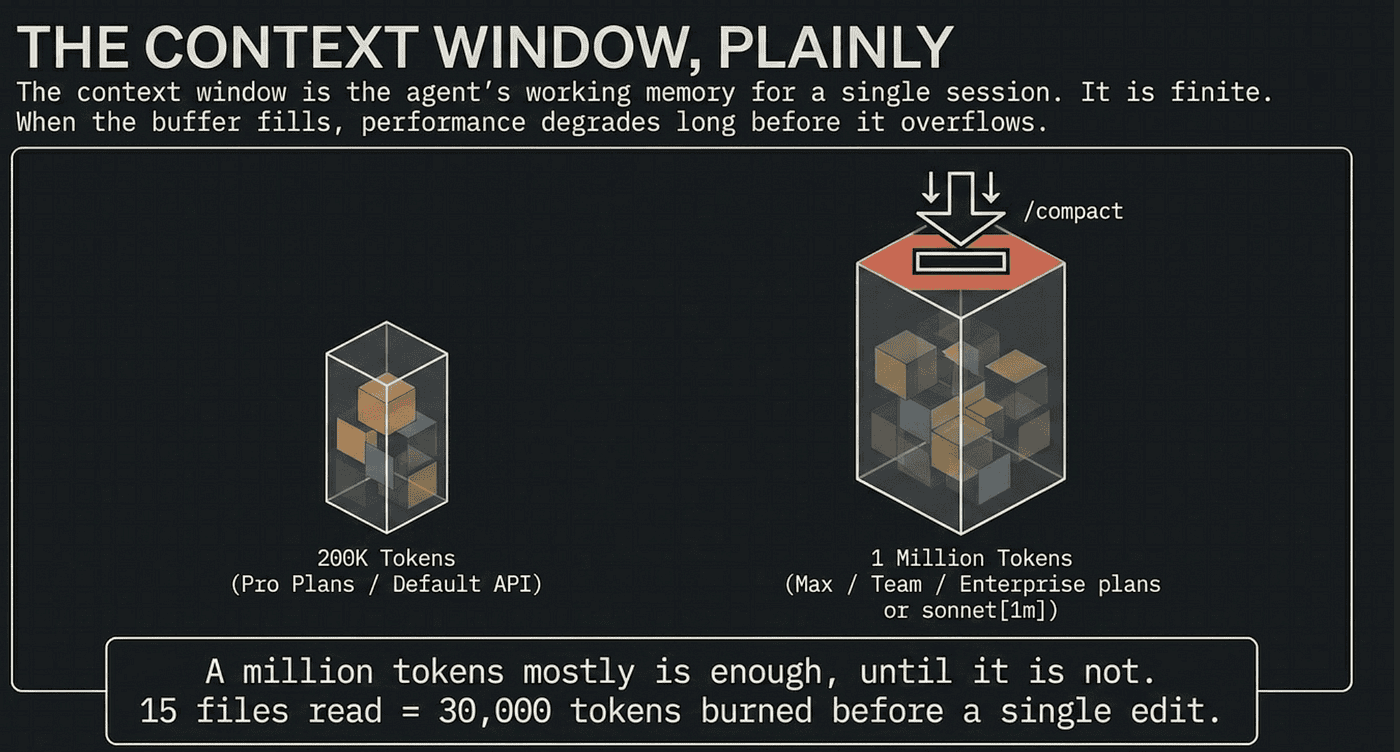
This is why your AI coding agent “forgets” things. It is not a flaw, it is the design. The buffer is finite, so something has to give. Understanding which something, and when, is the whole game.
How big is “bounded”? On Max, Team, and Enterprise plans, Opus is automatically upgraded to a 1 million token context window for long sessions with large codebases. Sonnet on those plans defaults to 200K and can be upgraded to 1M with usage credits, addressed by the sonnet[1m] alias. On Pro plans and the bare Anthropic API, the default is 200K unless you explicitly select an extended-context model. So most readers on serious plans have 1M tokens per session. Readers on Pro have 200K.
A million tokens sounds like enough for anything. It mostly is, until it is not. A medium source file is 2,000 tokens. A grep across a service directory can be 10,000. Read fifteen files in a debugging session and you have burned 30,000 tokens before a single edit. That is 15% of a 200K window, 3% of a 1M one, but the same session that reads fifteen files often goes on to read a hundred and fifty, because the larger window lets you take on bigger tasks. The window fills faster than people expect at every size, and performance degrades long before it actually overflows. This is the constraint everything else bends around.
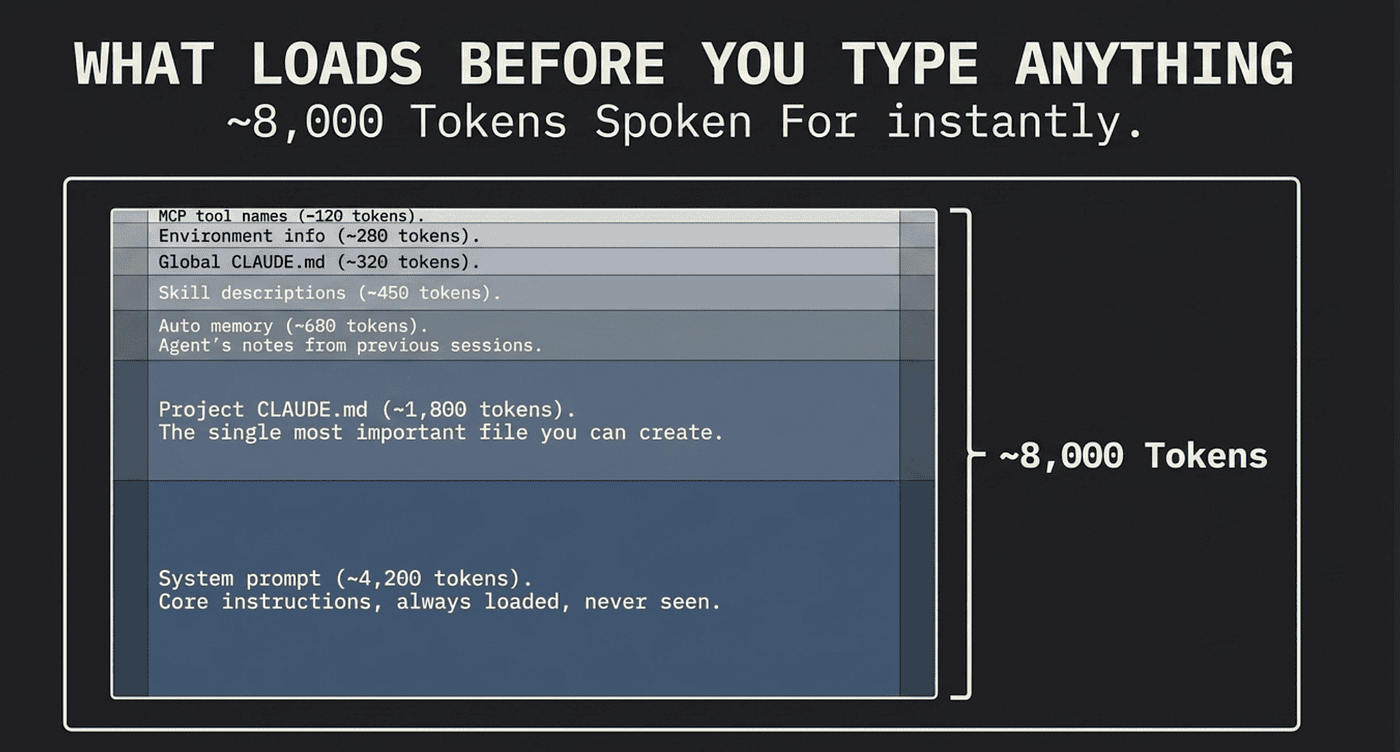
What loads before you type anything
Open a fresh Claude Code session, type nothing, and you have already spent roughly 8,000 tokens. Here is where they went, in load order:
- System prompt (~4,200 tokens). The core instructions for behavior, tool use, and response formatting. Always loaded first. You never see them.
- Auto memory (~680 tokens). The first 200 lines or 25 KB of
MEMORY.md: the agent's notes to itself from previous sessions, including build commands it learned and mistakes to avoid. - Environment info (~280 tokens). Working directory, platform, shell, OS version, git status.
- MCP tool names (~120 tokens with tool search on). The names of tools your MCP servers expose. Full schemas are deferred until the agent wants one.
- Skill descriptions (~450 tokens). One-line descriptions of every skill the agent can invoke. The full body loads only on use.
- Global
CLAUDE.md(~320 tokens) and projectCLAUDE.md(~1,800 tokens). Your preferences and your project's conventions, build commands, and architecture notes. The project file is the single most important file you can create for any codebase.
These numbers are representative, not exact, but the shape holds: roughly 8,000 tokens are spoken for before you do anything.
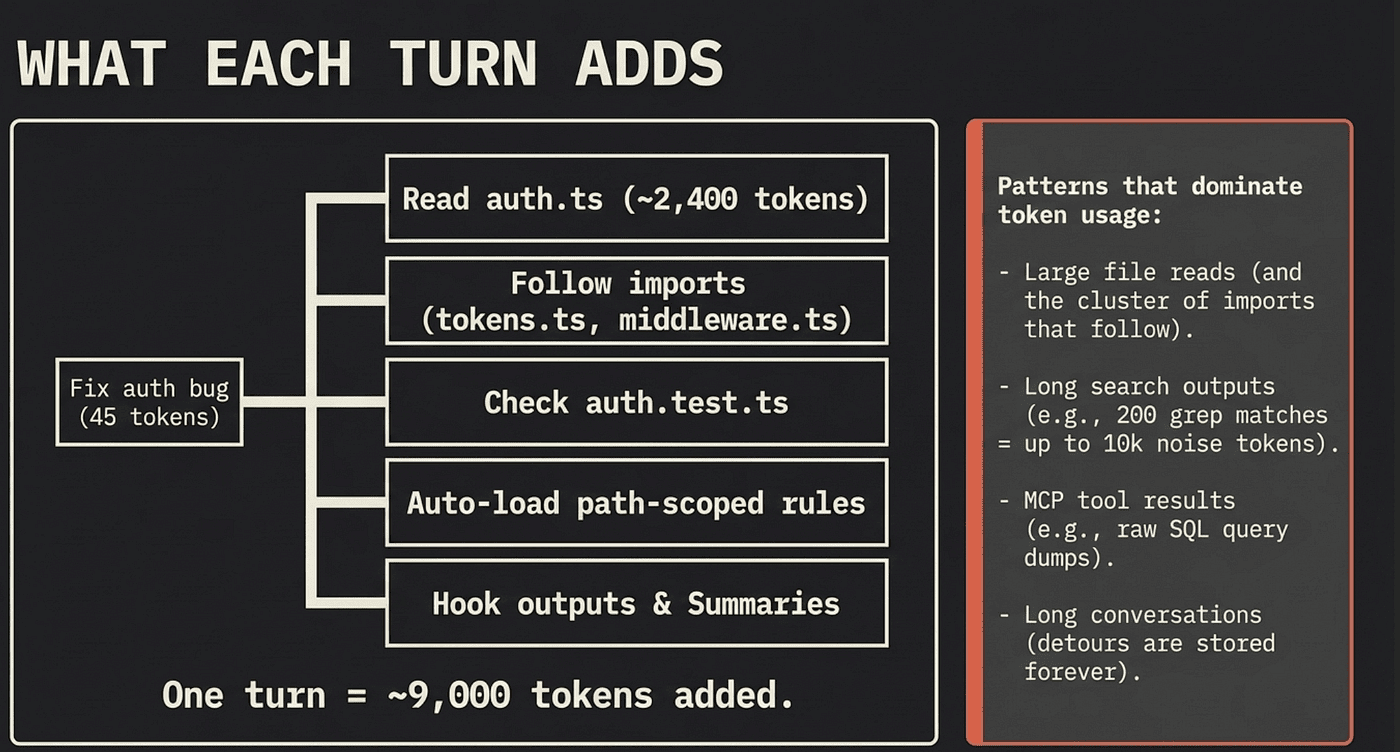
What each turn adds
Every interaction piles on more. Ask Claude to fix an auth bug. Your prompt is tiny, roughly 45 tokens, so most of the agent’s context is project knowledge, not your words. Then it reads auth.ts (~2,400 tokens), follows imports into tokens.ts and middleware.ts, checks auth.test.ts, auto-loads a path-scoped rule, runs a PostToolUse hook, lands npm test output in context, and writes a summary. One turn, roughly 9,000 tokens added. Most of it is invisible: the terminal shows "Read auth.ts" as a one-liner, but the agent has the whole file.
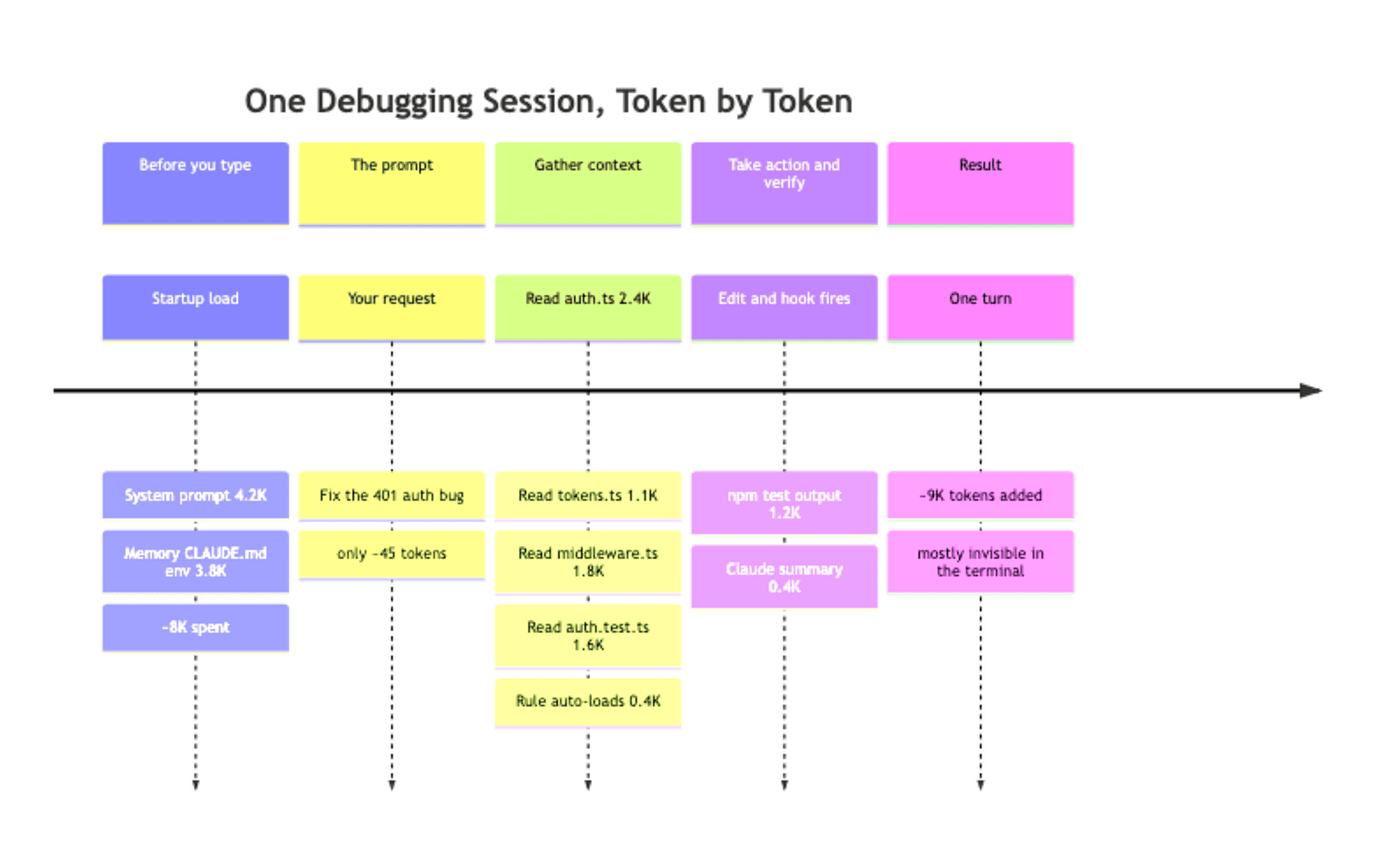
At 200K, ten turns like this gets you to half your window. At 1M, you can do it fifty times before halfway, but real sessions with research, dead ends, and re-reads easily produce fifty turns over an afternoon.
A few patterns dominate token usage and are worth watching first when something feels slow. Large file reads: a 3,000-line source file is 30,000-plus tokens, and big files come in clusters because you read one and then read the three it imports. Long search outputs: a grep returning 200 matches can be 5,000 to 10,000 tokens, most of it noise, all of it stored. MCP tool results: a SELECT * from a real table comes back with thousands of rows. Long conversations: every prompt, response, tool call, and result is stored, so a two-hour session has paid for every detour it took.
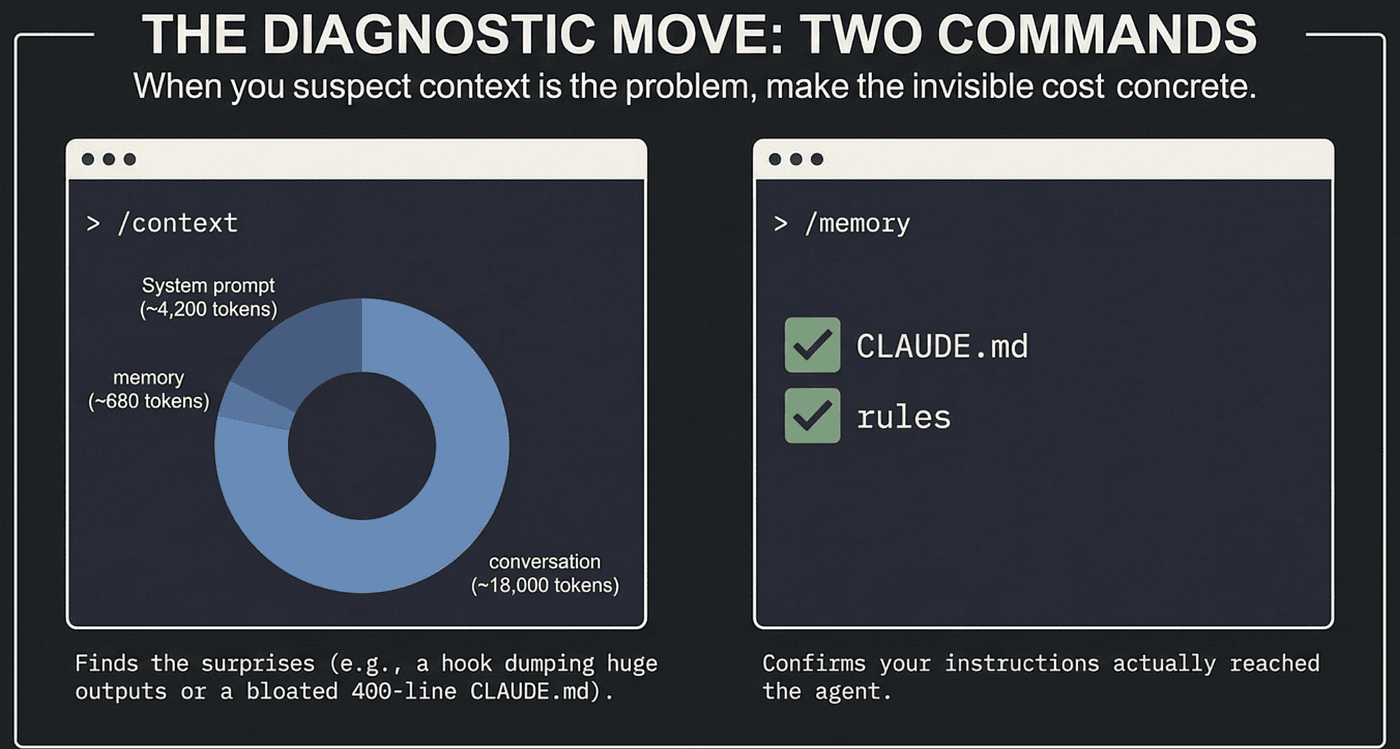
The diagnostic move: two commands
When you suspect context is the problem, the command is /context. It shows everything currently in the window, broken down by category (system prompt, memory files, skills, MCP tools, conversation messages), each with a token count and a percentage.
The first time you run /context on a long session, you will see something that surprises you. Maybe a hook is dumping huge output every turn. Maybe a CLAUDE.md has grown to 400 lines. Maybe a single early file read accounts for 20% of your window. /context makes the cost concrete instead of abstract, and that is usually enough to fix the problem on the spot.
Pair it with /memory to see which CLAUDE.md, rules, and auto-memory files actually loaded for this session. That tells you whether your instructions even reached the agent. Most "Claude is not following my CLAUDE.md" complaints turn out to be "CLAUDE.md never loaded."
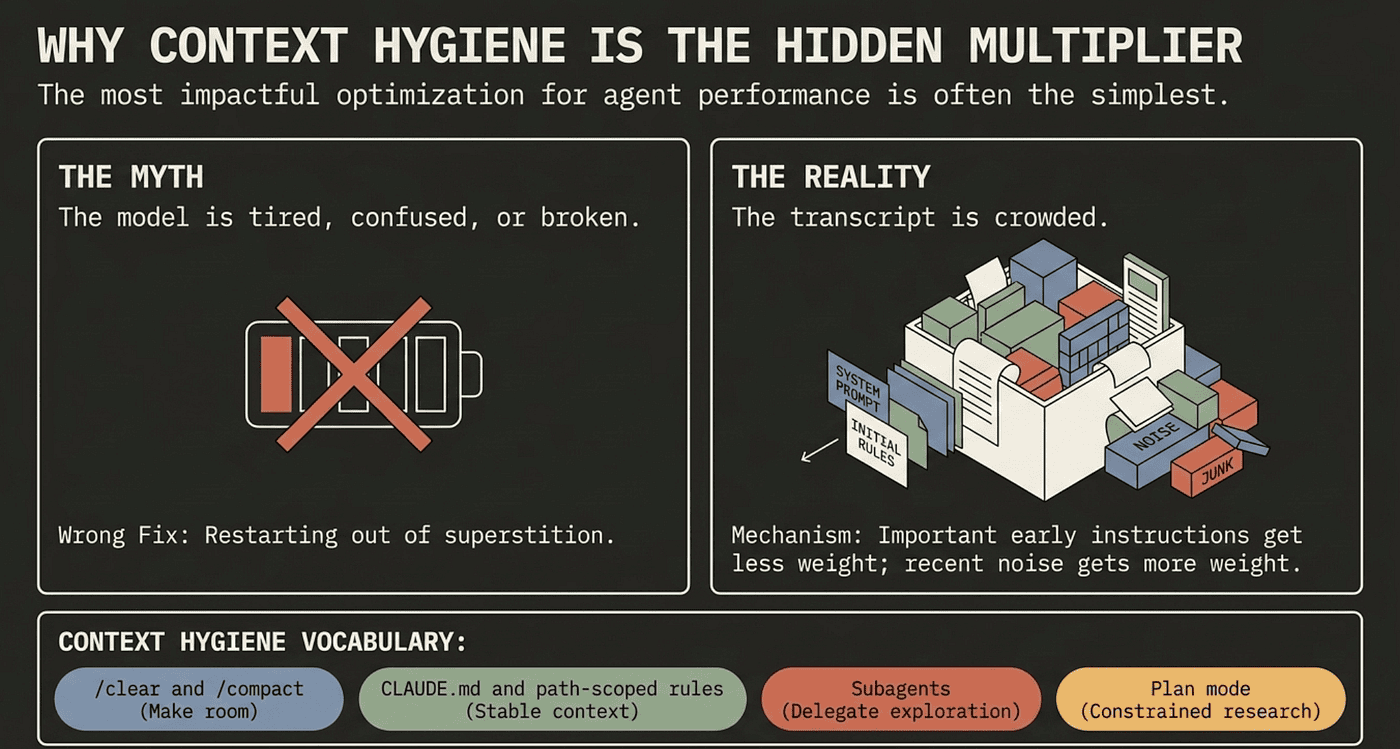
Why context hygiene is the hidden multiplier
People say long sessions get “tired” or “confused.” That framing is wrong, and it leads to the wrong fix: wait, restart, or rephrase.
The model is not tired. The transcript is crowded. Every file the agent read, every command it ran, every tool result it processed stays in context until you do something about it. After a few hours, the conversation is full of material that no longer matters: files read once and never touched again, search results from an abandoned hypothesis, errors from problems you already fixed. None of it is wrong. It is just no longer load-bearing, and it crowds out the things that are.
LLM performance degrades as context fills. Important early instructions get less attention. Recent corrections get more weight than the architecture decision from twenty minutes ago. The model is not broken. It is working as designed on increasingly noisy input.
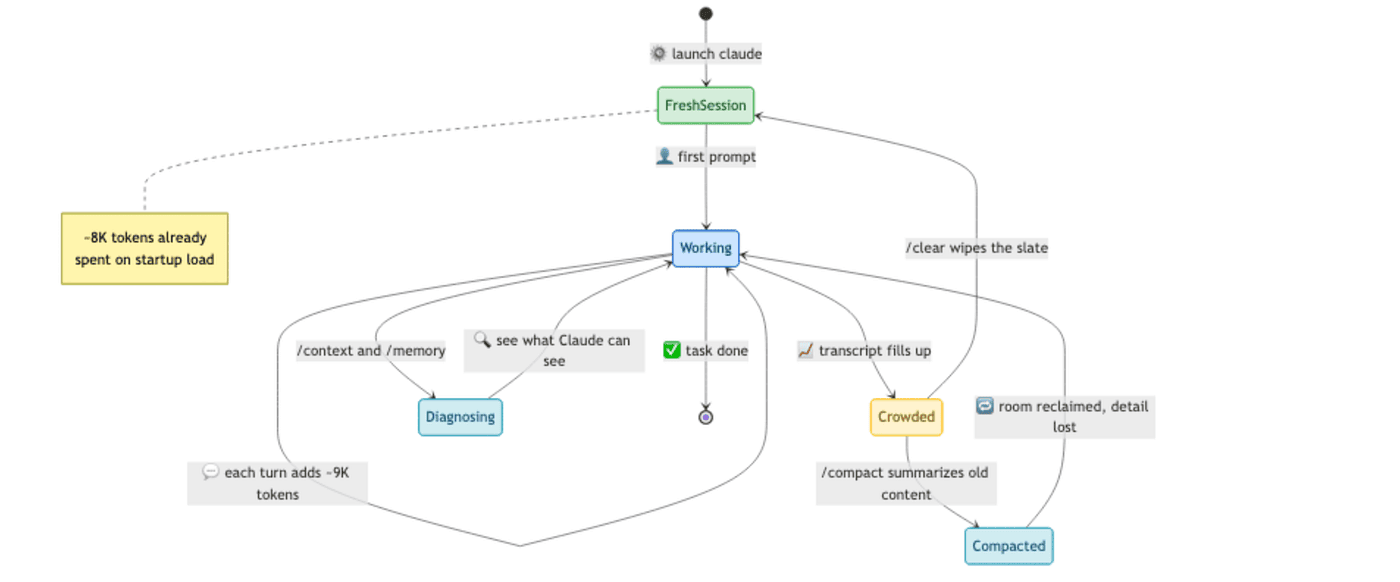
The fix is context hygiene, and almost every technique in this guide is context hygiene under a different name. /clear and /compact make room by removing or summarizing old content. CLAUDE.md and rules put persistent context in a stable place so you do not re-explain conventions every session, and path-scoped rules keep instructions out of context until they are relevant. Subagents delegate exploration to a separate context window, reading dozens of files and handing you back a 400-token summary. Plan mode does research in a constrained mode, so the exploration does not pollute the execution session.
These are not unrelated features. They are techniques for the same underlying question: what is the agent looking at right now, and is it what should be there?
Once that clicks, the whole tool feels different. You stop seeing modes, skills, and hooks as a menu of features to enable. You start seeing them as a vocabulary for talking about context. “This prompt is making my context fat; that is a subagent.” “This rule applies everywhere; that is CLAUDE.md." "This must happen on every commit; that is a hook." The right answer is usually obvious once you ask the question.
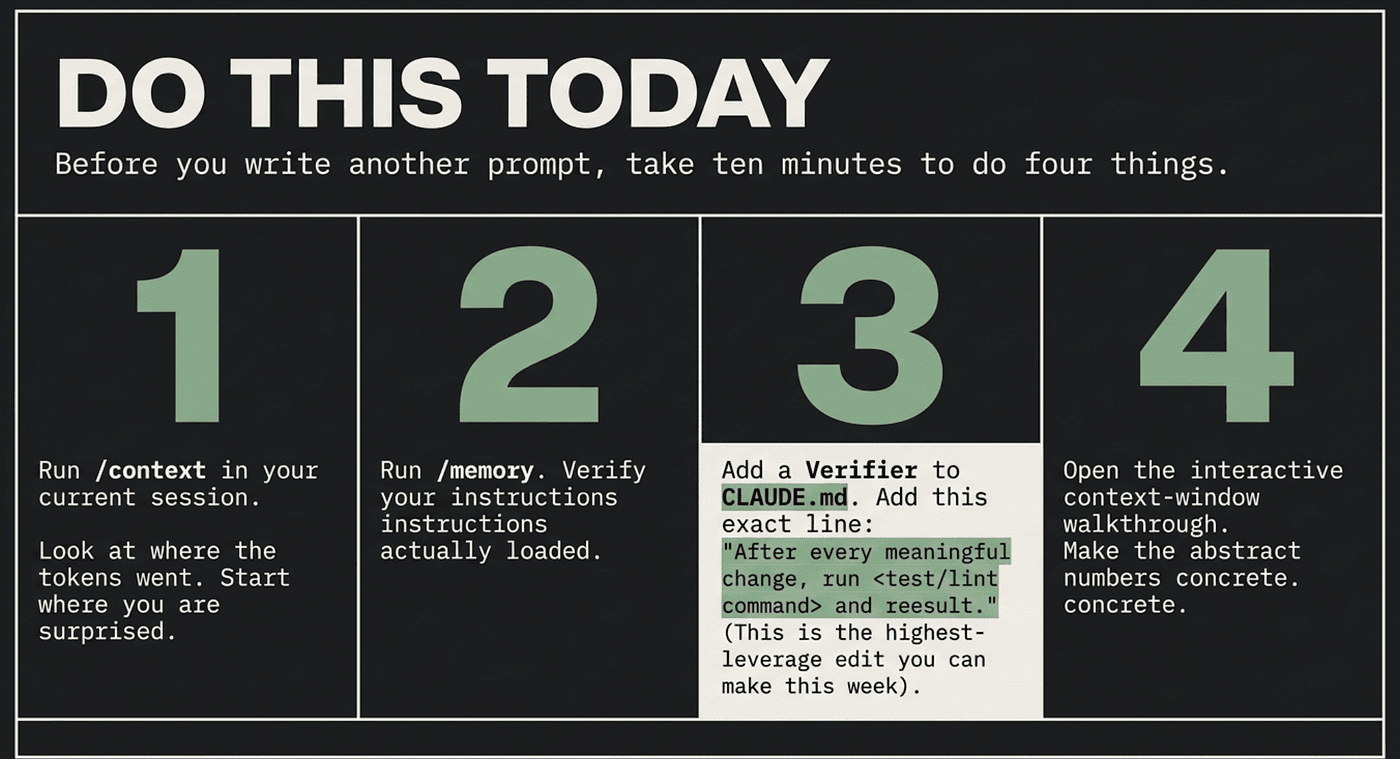
Do this today
Before you write another prompt, do four things. They take ten minutes total.
- Run
/contextin your current session. Look at where the tokens went. Whatever surprises you is where to start. - Run
/memory. Confirm yourCLAUDE.mdand rules actually loaded. Most "Claude ignores my instructions" problems are really "my instructions never reached the agent." - Pick one verifier you can run from the command line and write it into your
CLAUDE.md. A test, type-check, or lint command. Add a line: "After every meaningful change, run<command>and report the result." That single line will do more for your output quality than any other edit this week. - Open the interactive context-window walkthrough. Five minutes of scrubbing through it makes the abstract numbers concrete.
The one model that makes everything else click
Most people learn Claude Code as a growing list of commands and never stop being beginners. The shortcut past that is a single reframe: the context window is the operating system, and a scarce, bounded one. The agent forgets by design because its memory is finite. That is not a bug to wait out. It is a resource to manage.
Every feature in the tool answers the same question: what can the agent see right now, and is it the right thing? Master that question and you are not memorizing commands anymore. You are running an operating system.
So the next time a long session starts producing sloppy work, do not blame the model and do not restart out of superstition. Run /context, read what is crowding the window, clear it. The model was never tired. The desk was just buried in paper.
This is Part 1 of “Claude Code, Day-to-Day,” a 19-part guide to mastering Claude Code for working engineers.
About the Author — Claude Certified Architect
Rick Hightower is a former Senior Distinguished Engineer at a Fortune 100 company, focusing on delivering ML / AI insights to front-line applications, and a practitioner building multi-agent production systems. Rick is a Claude Certified Architect. Follow him on Medium for more hands-on agent engineering content. You can also book him to speak and train your team: Check out Rick Hightower’s SpeakerHub.
Rick created Skilz, the universal agent skill installer that supports 30+ coding agents, including Claude Code, Gemini, Copilot, and Cursor, and co-founded the world’s largest agentic skill marketplace. Connect with Rick Hightower on LinkedIn or Medium. Check out SpillWave, your source for AI expertise.
Rick has been actively developing generative AI systems, agents, and agentic workflows for years. He is the author of numerous agentic frameworks and developer tools and brings deep practical expertise to teams adopting AI. He enjoys writing about himself in the 3rd person.
Rick also wrote a Claude Certified Architect (CCA) series of articles that have a lot of useful information on writing agentic AI systems. Many ideas captured in the CCA and the exam prep Rick wrote echo what you see in this article. If you want to improve your ability to create well-behaved AI agents, studying for the CCA Exam is a good place to start.
CCA Exam Prep on Agentic Development
- Claude Certified Architect: The Complete Guide to Passing the CCA Foundations Exam
- CCA Exam Prep: Mastering the Code Generation with Claude Code Scenario
- CCA Exam Prep: Mastering the Multi-Agent Research System Scenario
- CCA Exam Prep: Structured Data Extraction
- CCA: Master the Developer Productivity Scenario
- Claude Certified Architect: Master the CI/CD Scenario
- CCA Exam Prep: Mastering the Customer Support Resolution Agent Scenario
- Get the complete reading list for CCA-F exam prep articles from this Claude Certified Architect Exam Prep list.
Rick also wrote a series on harness engineering and how to improve agentic systems using harness engineering for feedback loops and adversarial agents. These articles also go hand in hand with this article.
Harness Engineering Articles
- The $9 Disaster: What Anthropic’s Harness Design Paper Teaches Us About Building Autonomous AI
- Harness Engineering vs Context Engineering: The Model is the CPU, the Harness is the OS
- LangChain Deep Agents: Harness and Context Engineering: Memory, Skills, and Security
- Beyond the AI Coding Hangover: How Harness Engineering Prevents the Next Outage
- LangChain’s Harness Engineering: From Top 30 to Top 5 on Terminal Bench 2.0
- Anthropic’s Harness Engineering: Two Agents, One Feature List, Zero Context Overflow
- OpenAI’s Harness Engineering Experiment: Zero Manually-Written Code