
Your Agents Need Forty Systems. AgentCore Gateway Makes Them One Endpoint.
AgentCore Gateway is the managed capability registry you skip building, but tool selection still fails in the descriptions you author, not in the plumbing.
Gateway centralizes discovery, auth, and audit for every tool your agents touch. It will not write your tool descriptions, and that is still where selection breaks.
You get to delete the registry you were going to build, then notice the real bug still sits behind nicer infrastructure. Discovery and auth scale; tool quality is still yours.
In this article: You will learn what Amazon Bedrock AgentCore Gateway actually is (a managed capability registry behind one MCP endpoint), how to wire it into the Claude Agent SDK and LangChain DeepAgents in about ten lines each, where the platform win stops, and how inbound versus outbound auth layers fit together. By the end you will know which half of the tool problem Gateway solves, and which half still lives in text you write.
The market-intelligence agent currently reads a file off disk and tells you what it says. That is a demo.
To be useful it needs the internal product catalog, so it can tell you that a competitor's new tier undercuts your mid-market SKU by nine percent rather than just reporting that the tier exists. The catalog is an API behind auth, in a different AWS account, owned by a team that will ask what your agent is going to do with it. Behind that sit the pricing service, the CRM, three Lambda functions somebody wrote in 2023, and a Knowledge Base full of win-loss notes.
You know how this goes. You write a thin wrapper per system. Then a second agent needs three of the same tools and you copy the wrappers. Then someone asks who called the pricing API at 2 a.m., and you discover that the answer is nowhere. Then the tool count crosses fifteen, and selection accuracy quietly falls off a cliff.
The production answer is a unified agent capability registry: shared discovery, permission scoping, and audit logging behind one boundary. It is real infrastructure, and building it is a quarter of work you were not planning to do.
AgentCore Gateway is that registry, managed. Wire it into either harness in about ten lines. Then get specific about the half of the problem Gateway does not touch, which is, inconveniently, the half your agent actually fails on.
What AgentCore Gateway is
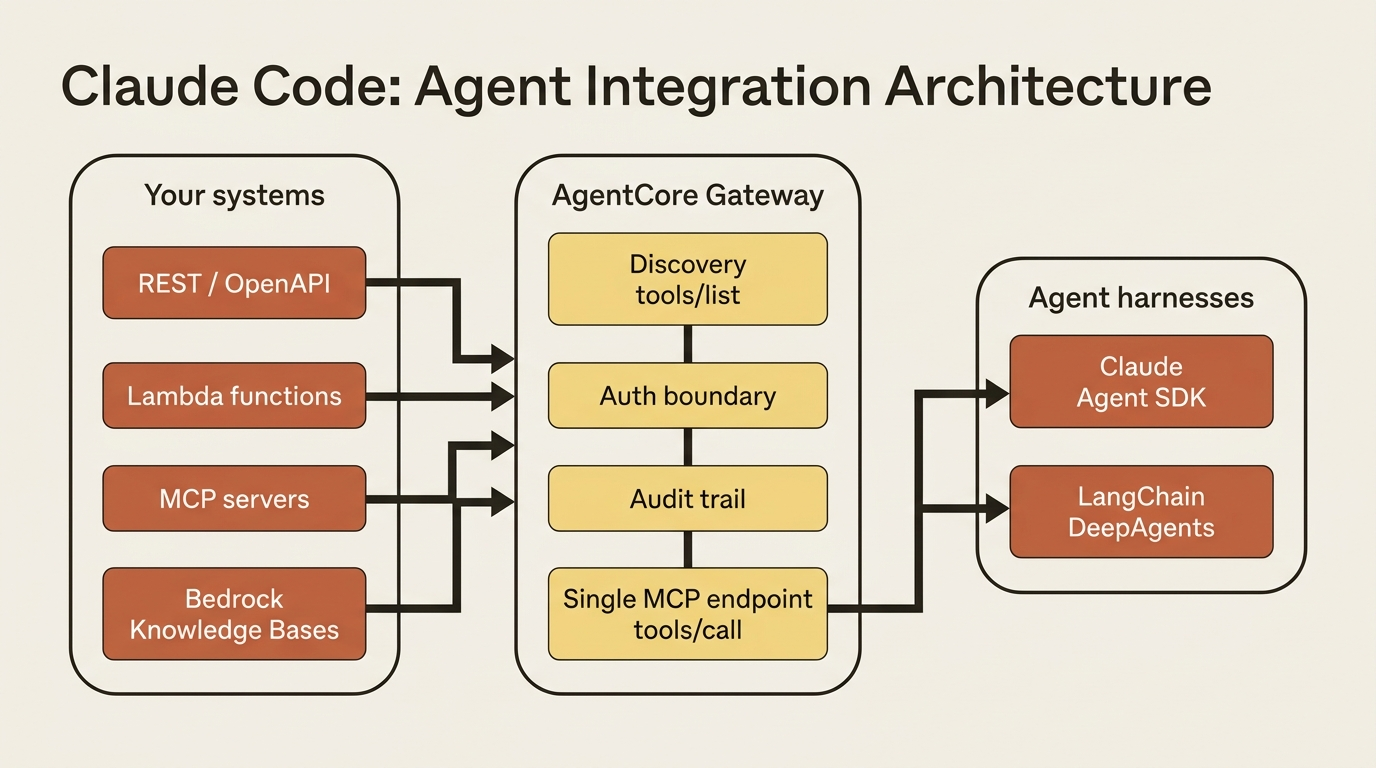
Gateway takes APIs, Lambda functions, MCP servers, and Bedrock Knowledge Bases. It turns them into tools an agent can discover and call through a single MCP endpoint behind auth you configure.
That sentence is the whole product. The shape matches a classic registry: one boundary, one discovery mechanism, one place where auth happens, one audit trail. Your forty systems stop being forty integration problems and become forty targets behind one endpoint.
Creating a gateway is two calls:
from bedrock_agentcore.gateway import GatewayClient

gw = GatewayClient(region="us-east-1")

gateway = gw.create_gateway_and_wait(name="market-intel-gateway")
gateway_id = gateway["id"]

target = gw.create_gateway_target_and_wait(
    gatewayIdentifier=gateway_id,
    name="product-catalog-api",
    # targetType=..., targetConfig=...  # shape varies by target type
)
Note the comment: this article does not paste a fabricated target payload. create_gateway_target_and_wait(wait_config=None, **kwargs) forwards its kwargs to the control-plane API, and the required keys differ by target type: an OpenAPI schema for an API target, an ARN for Lambda, a URL for MCP. Check the current bedrock-agentcore-control reference for the type you are wiring. Knowledge Bases get dedicated helpers: create_knowledge_base_target(...) exposes a Retrieve tool, and create_agentic_retrieve_target exposes AgenticRetrieveStream.
What comes out the other side is an MCP endpoint that speaks MCP version 2025-03-26, with tools/list and tools/call. That is why the wiring on both harnesses is dull.
Wiring the Claude Agent SDK
This is the most idiomatic integration in the series: both sides speak MCP over HTTP with OAuth bearer auth, and neither side had to compromise.
The annotated listing below is the full pattern. Endpoint and token come from the environment; mcp_servers registers Gateway as a named HTTP MCP server; allowed_tools scopes which Gateway tools may run without a permission prompt.
import os
from claude_agent_sdk import query, ClaudeAgentOptions

gateway_url = os.environ["GATEWAY_MCP_SERVER_URL"]  # ①
access_token = os.environ["AGENTCORE_GATEWAY_TOKEN"]

async for message in query(  # ②
    prompt="Compare the competitor's new tier against our mid-market SKU.",
    options=ClaudeAgentOptions(
        mcp_servers={  # ③
            "agentcore-gateway": {
                "type": "http",
                "url": gateway_url,
                "headers": {"Authorization": f"Bearer {access_token}"},  # ④
            }
        },
        allowed_tools=["mcp__agentcore-gateway__lookup_sku"],  # ⑤
    ),
):
    ...
① Endpoint and token come from environment variables, not hardcoded into the options.
② The async iterator is the SDK query surface; the harness only consumes messages.
③ mcp_servers registers the Gateway as a named HTTP MCP server the session can call.
④ Bearer auth rides in the Authorization header that inbound JWT mode expects.
⑤ allowed_tools scopes which Gateway tools may run without a permission prompt.
Note: The full extracted listing at code/agent-core/part-05-gateway-capability-registry/listings/01-claude-sdk-gateway-mcp.py shows the runnable form.
No proxy, no adapter, no glue. The SDK's mcp_servers accepts {"type": "http", "url": ..., "headers": {...}} for streamable-HTTP MCP, which is precisely the shape Gateway serves.
Enumerate real tool names from the Gateway's tools/list before you fill in allowed_tools. Keep the permission distinction straight: in the Claude Agent SDK, allowed_tools governs permission (run without a prompt), while disallowed_tools governs availability (whether the model sees the tool at all). Confusing those controls is how a tool you "removed" keeps getting called.
The strongest evidence that this is the intended path is not only in the SDK docs. The AgentCore Developer Guide shows Claude Code itself connecting to a Gateway:
claude mcp add "$SERVER_NAME" "$GATEWAY_MCP_SERVER_URL" \
  --transport http --header "Authorization: Bearer $AUTH_TOKEN"
AWS documented its tool fabric by pointing Anthropic's agent at it. That is the harness-on-hyperscaler thesis as a shell command.
Wiring LangChain DeepAgents
DeepAgents supports any MCP server as a tool source. The Gateway endpoint goes through LangChain's MCP loader, and the tools come out as ordinary callables.
from langchain_aws import ChatBedrockConverse
from langchain_mcp_adapters.client import MultiServerMCPClient
from deepagents import create_deep_agent

llm = ChatBedrockConverse(model="us.anthropic.claude-sonnet-4-20250514")  # ①

mcp = MultiServerMCPClient({  # ②
    "agentcore-gateway": {
        "url": gateway_mcp_endpoint,
        "transport": "streamable_http",  # ③
        # "headers": {...}   # when Identity-protected
    },
})
gateway_tools = await mcp.get_tools()  # ④

agent = create_deep_agent(
    model=llm,
    tools=gateway_tools,  # ⑤
    system_prompt="Use the catalog and pricing tools to compare competitor tiers to ours.",
)
① The model is Bedrock Converse with a Claude Sonnet 4 regional inference profile.
② MultiServerMCPClient names the Gateway as one MCP server entry in the client map.
③ streamable_http is the transport Gateway serves for remote MCP.
④ get_tools() materializes Gateway tools as ordinary LangChain tools at startup.
⑤ Those tools pass straight into create_deep_agent; there is no seam beyond the loader.
Note: The full extracted listing at code/agent-core/part-05-gateway-capability-registry/listings/02-deepagents-gateway-mcp.py shows the runnable form.
get_tools() returns LangChain tools. tools= takes LangChain tools. There is no seam, because both sides already agreed on MCP.
You can skip the adapter and write a thin LangChain @tool that posts to the Gateway data plane directly. It works. It also throws away everything that makes this integration good: you get one opaque tool named call_gateway_tool, and the model has to guess the tool_name string. Use the MCP loader.
The judgment call: when tools bind
Both wirings are about ten lines. The difference is not effort; it is when the binding happens.
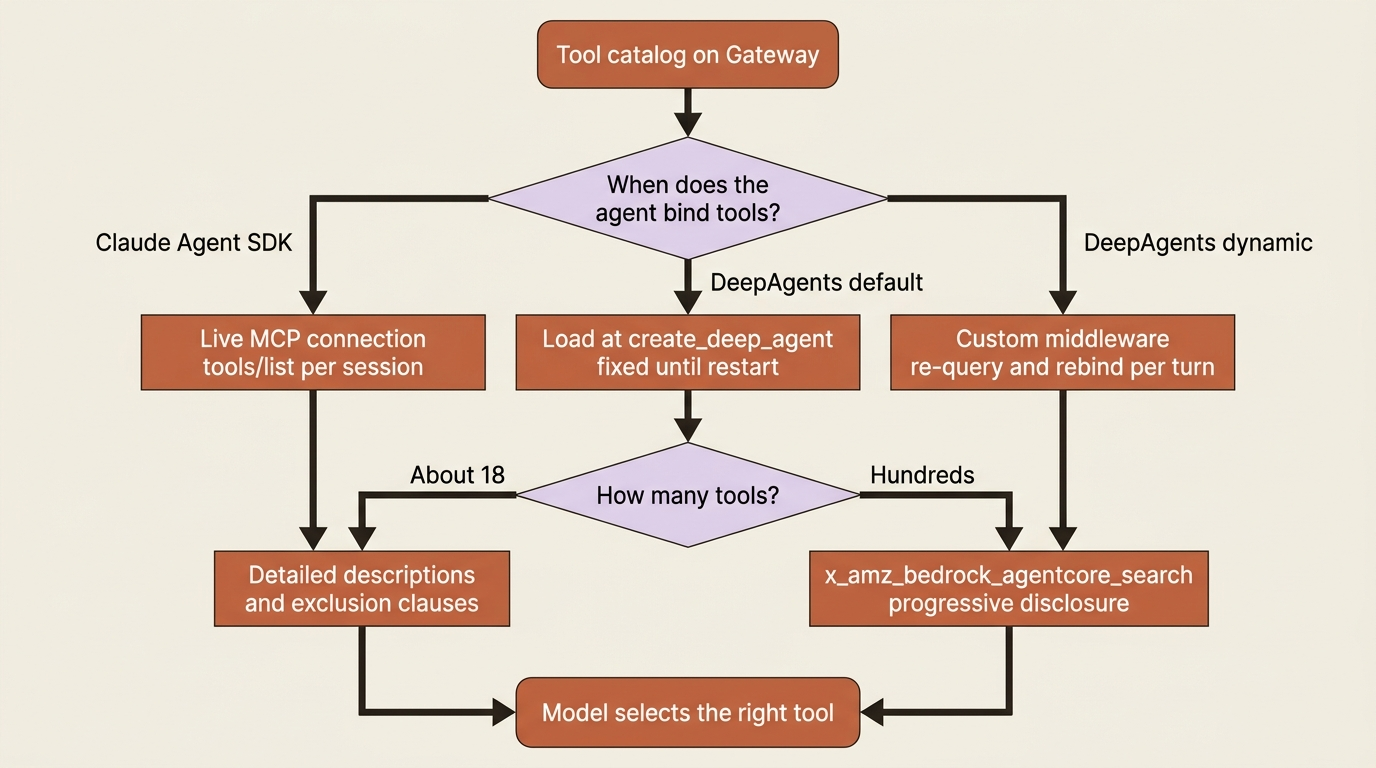
DeepAgents loads Gateway tools at startup, so the tool set is fixed when create_deep_agent runs. The Claude Agent SDK holds a live MCP connection and can call tools/list per session. In practice, both are static enough that a tool added to the Gateway on Tuesday does not reach a long-running agent until it restarts.
There is a real gap here. The Strands ecosystem ships a first-party tool-search plugin (agentcore_tool_search) that dynamically discovers Gateway tools. There is no DeepAgents equivalent out of the box. If you want dynamic rebinding, you write it: middleware that re-queries the tool catalog and rebinds per turn. DeepAgents' explicit-parameter design makes that tractable; the Claude Agent SDK's internalized design makes the same pattern more awkward.
Use the Claude Agent SDK for the cleanest static wiring. Use DeepAgents when you want the tool catalog itself to be dynamic and you are willing to write the middleware.
Where the win stops
Now the part that matters.
A classic capability-layer failure: a travel-booking agent with eighteen tools, working fine in the demo. A customer asks it to compare flights, then check loyalty points, then book the cheapest option. The agent picks search_flights to check loyalty points, fails silently four turns in a row, and gives up. A human spends twelve minutes recovering the session and issues a $15 credit.
The cause was not the model. It was that search_loyalty_history had a two-word description: "Gets history."
Now put those eighteen tools behind a Gateway. Discovery is centralized, auth is uniform, every call is audited, and the agent still picks search_flights to check loyalty points. Gateway moved the failure behind better infrastructure. It did not touch it.
Be precise about what stays yours.
Tool descriptions. Anthropic's guidance is that extremely detailed descriptions are by far the most important factor in tool performance. The recommended minimum is three to four sentences covering what the tool does, when to use it, what the parameters mean, and what it does not do. Gateway will faithfully serve a two-word description to every agent in your organization, at scale, with excellent audit logging.
Exclusion clauses. That last item is the one people skip, and it is the one that fixed the loyalty-points bug. The model reads the description before the name or the schema. A description that only says what a tool does leaves the model to infer where it stops. That inference is usually wrong when two tools overlap. Write the boundary in: what this tool is not for, and which tool to use instead.
Structured errors. When a Gateway-fronted API returns a 400, what your agent gets back determines whether it recovers or loops. A well-formed tool error carries an error category, a retryable flag, and an explanation the model can act on. The four categories worth taxonomizing are transient, validation, permission, and business. Business-rule violations are terminal. An agent that retries a terminal error is a runaway loop with better manners.
Response shape. A tool that returns correct data in an unusable format fills the context window as effectively as a failure does. Gateway proxies whatever your API returns. If that is 400 lines of JSON where the model needed three fields, you have a context problem the platform cannot see.
None of that is Gateway's job, and none of it is a criticism of Gateway. The platform owns the plumbing; you own the contract between deterministic code and a non-deterministic model. Write it like a contract.
Pattern check: Gateway implements the registry (shared discovery, one auth boundary, audit logging). It does not implement selection. The capability layer's dominant failure mode is the model choosing the wrong tool, and that lives entirely in text you author.
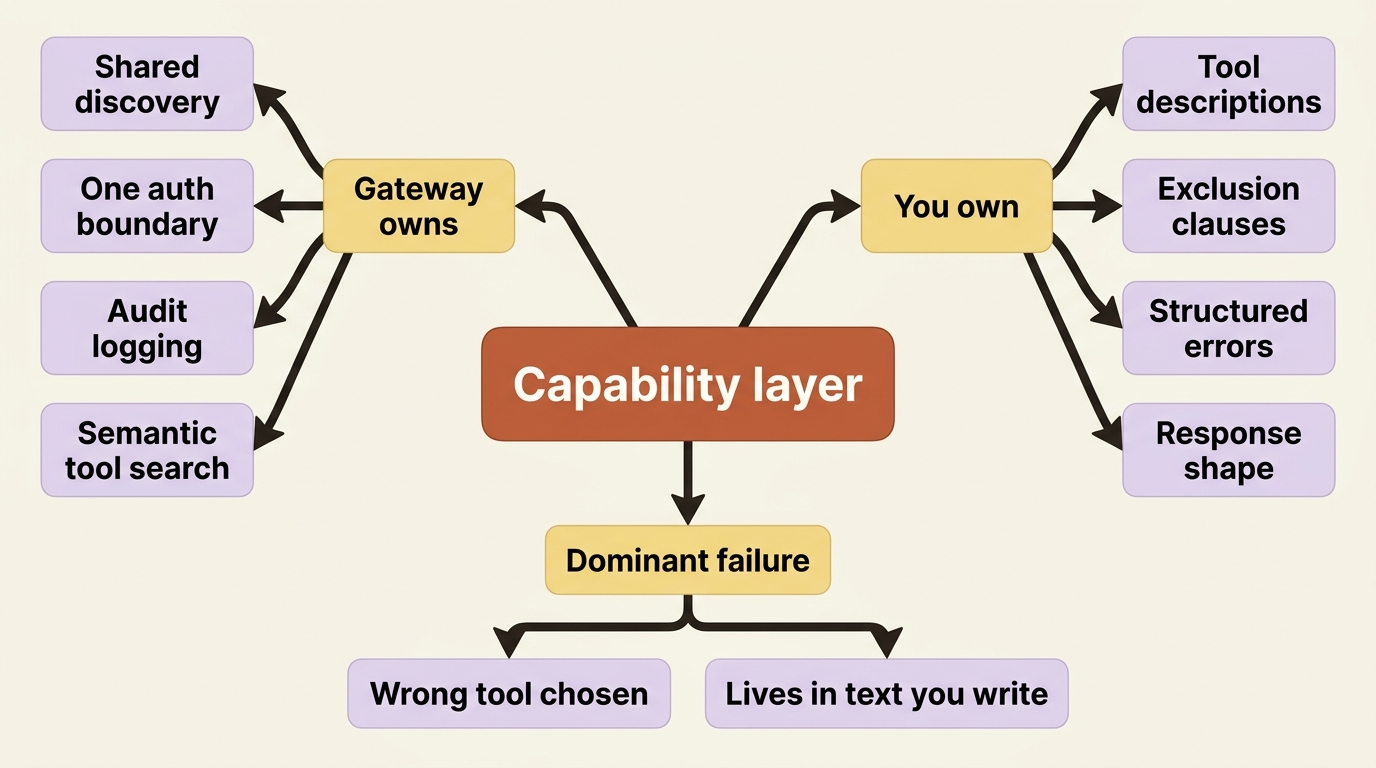
The one place Gateway helps with selection
Credit where it is due.
If semantic search is enabled, the Gateway exposes a tool called x_amz_bedrock_agentcore_search, which lets an agent load only the relevant tools out of hundreds registered.
That is progressive disclosure, sold as a service. Descriptions fix selection among eighteen tools. They do not fix selection among three hundred, because at three hundred the constraint is not clarity; it is the context window. Every tool definition you load is a tax on every turn. Semantic search converts that fixed tax into pay-on-use.
If your Gateway fronts an enterprise's worth of systems, this is the feature that makes the whole thing viable. It is the one part of the capability layer where the platform does something you would find genuinely tedious to build yourself.
Auth has two layers
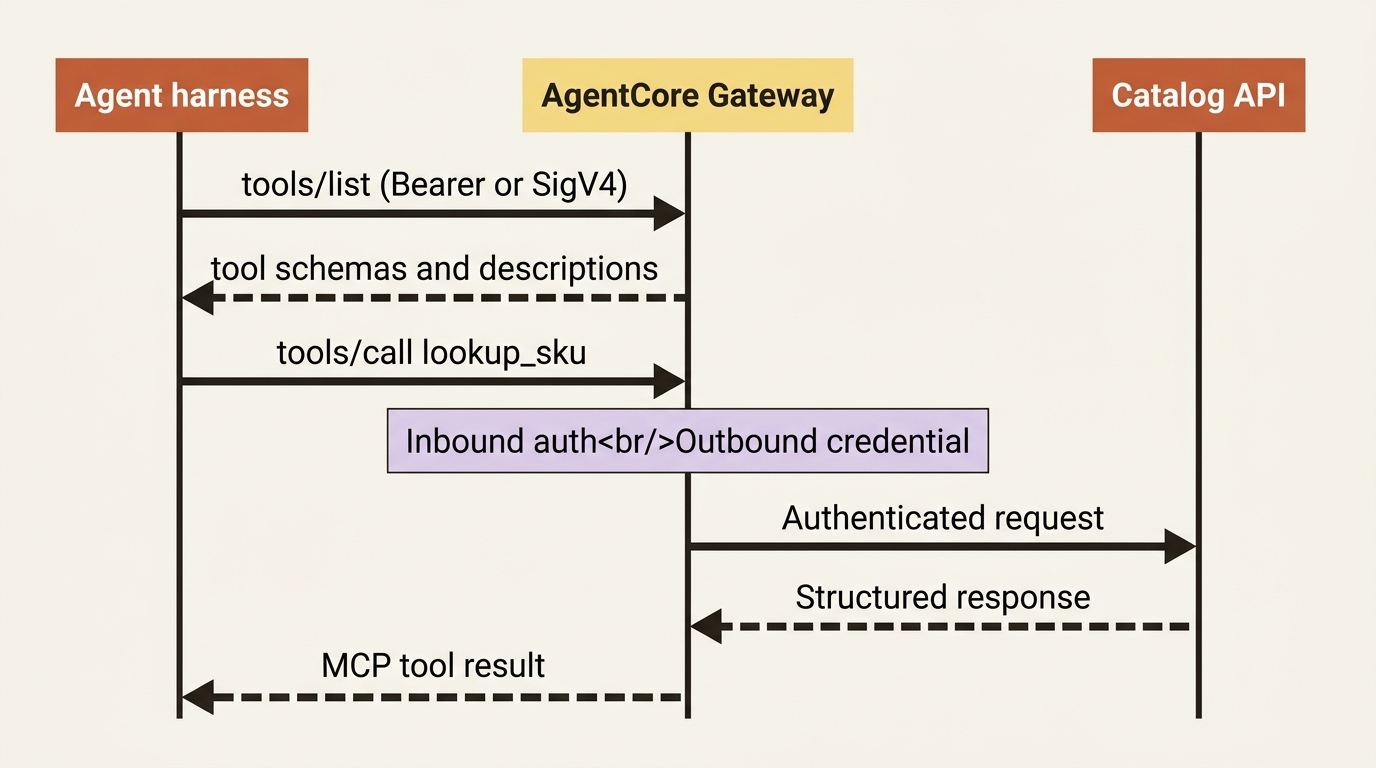
Both snippets above set an Authorization: Bearer header. You will also find AgentCore examples that sign with SigV4, including the Strands tool-search plugin's aws_iam_streamablehttp_client. That looks like a contradiction. It is not. It is two of four configured inbound modes, and knowing which one you are in is a prerequisite to writing the client.
Inbound authorization governs who may call your Gateway. You choose one type at CreateGateway and it applies to the whole gateway:
- JWT (
authorizerType: CUSTOM_JWT) validates a bearer token from any OAuth 2.0 identity provider. You configure acustomJWTAuthorizerwith a discovery URL, allowed audience, allowed clients, allowed scopes, and any custom claim rules. This is the mode both snippets above assume. - IAM identity authorizes through the caller's AWS credentials, gated on the
bedrock-agentcore:InvokeGatewayaction, scoped to the gateway ARN. This is the mode SigV4 clients assume. - Authenticate only verifies identity and then makes no authorization decision, passing identity through so the target decides. Useful with passthrough outbound auth.
- No authorization (
authorizerType=NONE) is exactly what it sounds like. The docs are emphatic that it is not for production unless you put your own authentication in front of it (for example an interceptor Lambda).
Outbound authorization governs how the Gateway authenticates to each target. It is configured per target in credentialProviderConfigurations. Options include the gateway's own service role (GATEWAY_IAM_ROLE), the caller's IAM identity (CALLER_IAM_CREDENTIALS, available only on AWS_IAM or AUTHENTICATE_ONLY gateways), OAuth, an API key in Secrets Manager, or JWT_PASSTHROUGH, which forwards the inbound bearer token to the target unmodified.
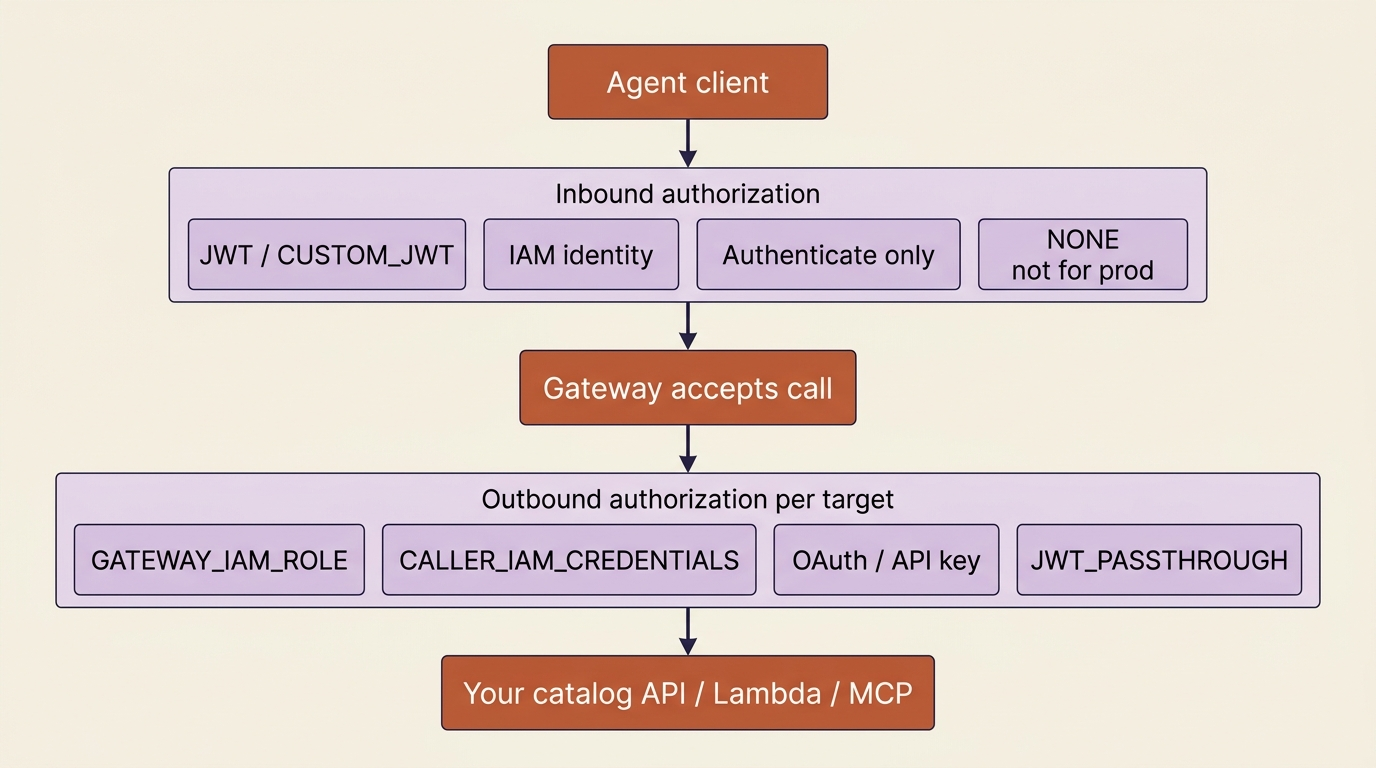
The mental model is simple: inbound decides whether the agent gets in; outbound decides what identity the Gateway wears when it calls your catalog API. They are independent. The interesting combinations live in the seam. CALLER_IAM_CREDENTIALS propagates the original caller's identity all the way to the target, so existing IAM policies keep applying. JWT_PASSTHROUGH does the same with a bearer token. Both avoid the anti-pattern where every agent request reaches your backend as the same undifferentiated service principal.
One detail that pays for itself: on a JWT gateway, a request with a missing or insufficient token returns 401 or 403 with a WWW-Authenticate header that advertises required scopes and points at the gateway's OAuth protected-resource metadata. MCP-compliant clients can read that and discover what they need.
In production: JWT inbound auth logs some token claims to CloudTrail, including the subject. Do not put personally identifiable information in the sub claim; use a GUID or a pairwise identifier. Compliance teams notice this after the fact.
Either way, you mint and refresh the token. Cognito, Auth0, Okta, or any OAuth 2.0 provider can issue it, and agentcore create can provision a Cognito user pool if you want the fast path. Identity that belongs to the analyst rather than to your service is a deeper topic for a later article.
Do this today
- Create one Gateway and register a single real target (catalog API, Lambda, or Knowledge Base) instead of inventing a toy.
- Wire that Gateway MCP URL into either the Claude Agent SDK (
mcp_servers+ bearer header) or DeepAgents (MultiServerMCPClient+get_tools()). - Run
tools/listand copy real tool names intoallowed_tools(SDK) or inspect the LangChain tool list (DeepAgents) before demo day. - Rewrite every tool description to at least three sentences, including an exclusion clause for anything that overlaps another tool.
- Classify tool errors into
transient,validation,permission, andbusiness, and treat business failures as non-retryable.
The registry is free. Selection is still yours.
You now have a path to real systems through one governed endpoint: discovery, auth, and audit on infrastructure you did not build, wired into either harness in about ten lines. That is a large build you get to skip.
The trap is celebrating the plumbing and forgetting the contract. Gateway will not save a two-word description. It will not invent exclusion clauses. It will not reshape a 400-line JSON payload into the three fields the model needs. The dominant failure mode in the capability layer is still the model choosing the wrong tool, and that failure lives in text you author.
Ship the Gateway. Then treat every tool description like production code. That is the whole lesson.