
Your Agent Has a Shell on the Box With the Credentials. Code Interpreter Is How You Fix That.
AgentCore Code Interpreter is the sandbox DeepAgents told you to have; isolation only becomes real when you remove Bash, not when you add a parallel tool.
DeepAgents says enforce boundaries at the sandbox level. It does not ship a sandbox. AgentCore Code Interpreter is the isolation layer, and removing Bash is the decision that makes it real.
The small horror of rereading your agent config and realizing you gave a language model a shell on the box that holds your credentials. Code Interpreter is how you put a real boundary there.
In this article: You will learn what Amazon Bedrock AgentCore Code Interpreter is (sandboxed Python, JavaScript, and TypeScript as an API call), how to wire it into the Claude Agent SDK and LangChain DeepAgents, why adding a sandbox beside unrestricted
Bashis theater, and howthread_id-scoped sessions finish the identity join from Runtime. By the end you will treat isolation as a config decision, not a system-prompt preference.
Your market-intelligence agent can already pull a competitor's pricing tiers and your own SKU list through a governed Gateway. It has two lists and a language model, which is a well-documented way to produce confident arithmetic errors.
It needs to run code: compute the delta, normalize currencies, chart the trend, write the report.
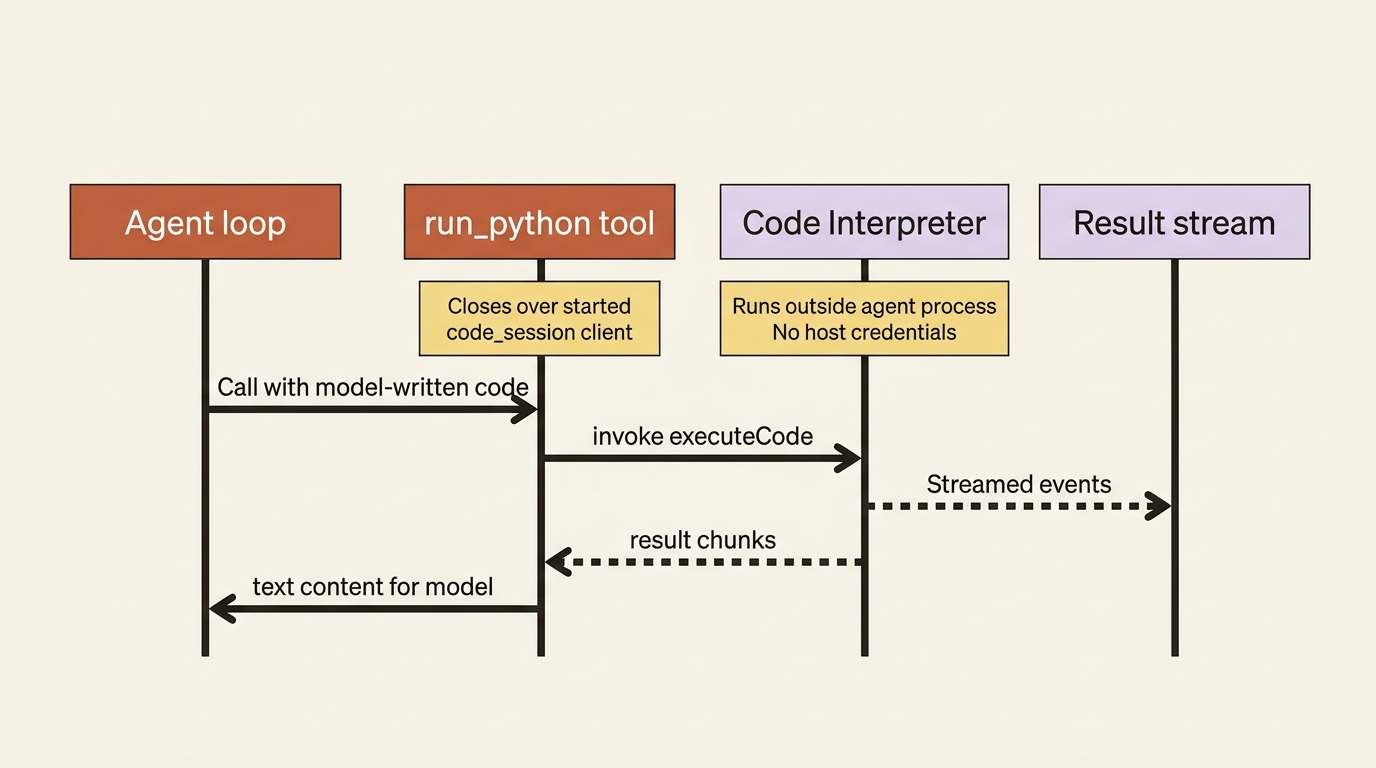
On a laptop, that often means Bash, and on a laptop that is fine. The blast radius is your machine, and you are watching. In production the agent runs unattended in a microVM that holds AWS credentials, a Gateway bearer token, and a live connection to your product catalog. Bash there is not a convenience tool. It is a shell on the box for a language model, executing code it wrote after reading text off the internet.
DeepAgents states its trust model plainly: trust the LLM, and enforce boundaries at the tool and sandbox level rather than expecting the model to police itself. That is the mechanical-enforcement pattern, correctly named by a framework that declines to be a cloud provider and does not ship the sandbox it tells you to have.
Here is the sandbox.
What Code Interpreter is
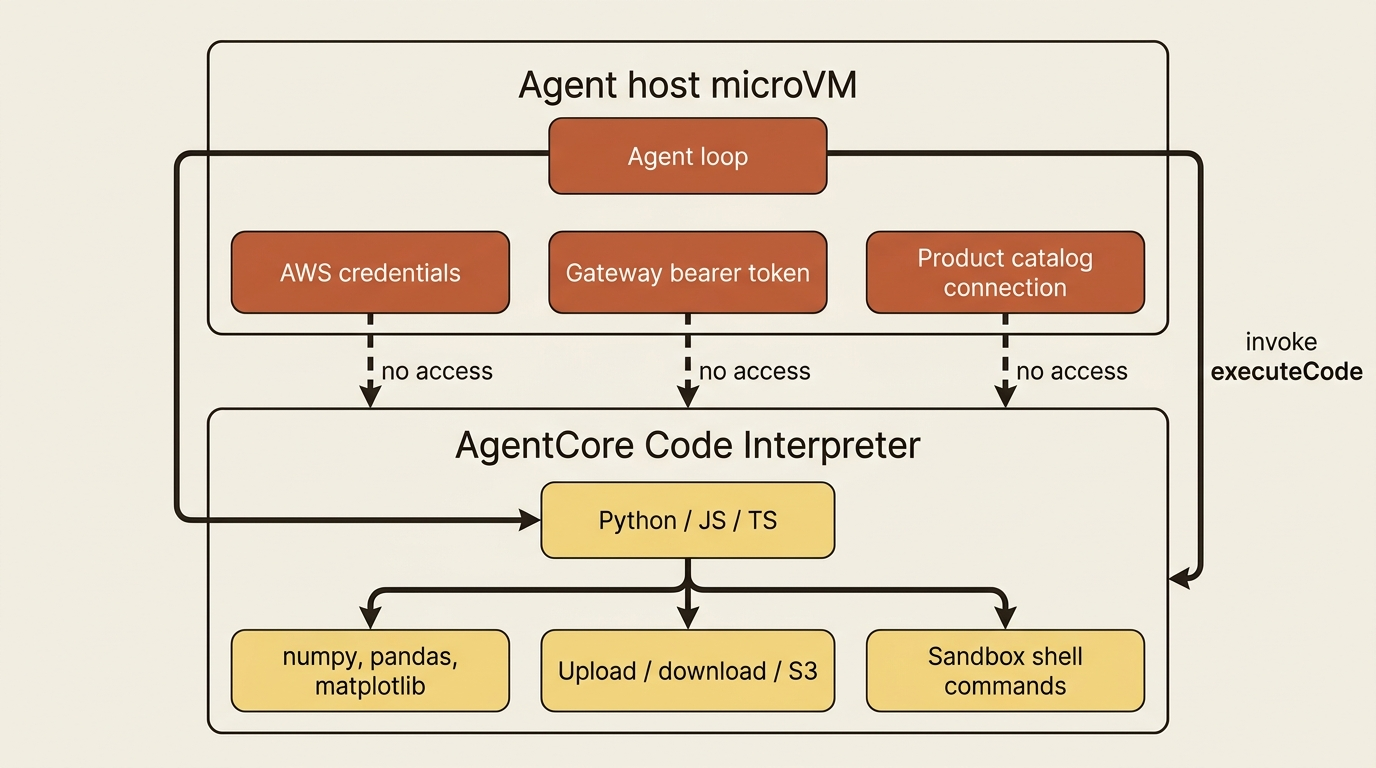
AgentCore Code Interpreter is sandboxed code execution as an API call. Python, JavaScript, and TypeScript run in a managed environment with common libraries such as numpy, pandas, and matplotlib pre-installed, plus file upload and download, package installation, and shell commands, all outside your agent's process.
Specs that matter for design:
- Session timeout defaults to 900 seconds and maxes at 28,800 seconds (8 hours), set with
sessionTimeoutSeconds. - File size is up to 100 MB for inline upload, and up to 5 GB if you reference S3 through terminal commands. That second number is what makes real data analysis viable.
- Custom interpreters let you set an execution role and a
networkModeofVPC, so the sandbox can reach internal data sources without public internet. - CloudTrail logging covers execution, the audit half of the isolation story.
The 8-hour ceiling matches the Runtime microVM's. Your agent's compute lease and its sandbox lease expire on the same horizon. That is tidy and not a coincidence.
The canonical surface
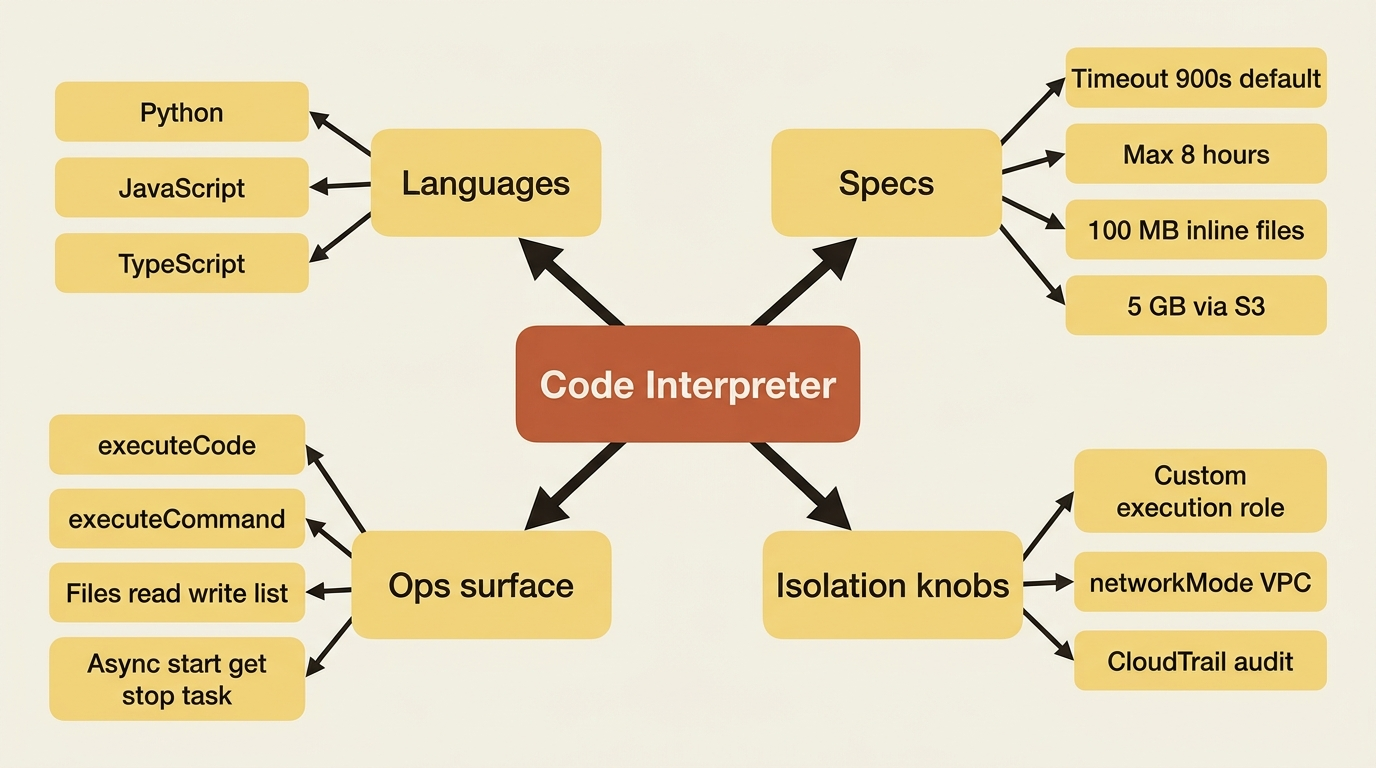
The SDK's documented shape is a client with a session lifecycle and one generic invoke:
from bedrock_agentcore.tools.code_interpreter_client import code_session

with code_session("us-west-2") as ci:
    response = ci.invoke("executeCode", {
        "language": "python",
        "code": "import numpy as np; print(np.mean([1, 2, 3]))",
    })
    for event in response["stream"]:
        print(event["result"])
code_session handles start() and stop() for you. Operation names per the boto3 reference include executeCode, executeCommand, readFiles, listFiles, removeFiles, writeFiles, startCommandExecution, getTask, and stopTask. The last three are the async task API for long-running commands, so you do not block your entrypoint on a ten-minute job (a good way to get a Runtime session killed).
Convenience wrappers over invoke include execute_code(...), install_packages(['numpy']), and clear_context(). Sharp edge: clear_context() only affects the Python context. JavaScript and TypeScript contexts are unaffected.
Older examples that call execute_code(args["code"], language="python") or upload_file(...) are wrappers around the same operations. Verify against your installed version. The invoke("executeCode", {...}) form is what AWS docs and quickstarts standardize on.
Wiring the Claude Agent SDK
Wrap the sandbox as a custom tool and register it through an in-process MCP server. The annotated listing below is the full pattern: start the session, define the tool inside the with block, admit only the sandbox tool (plus Read), and remove Bash.
from typing import Any
from claude_agent_sdk import tool, create_sdk_mcp_server, query, ClaudeAgentOptions
from bedrock_agentcore.tools import code_session

async def analyze(prompt: str):
    with code_session("us-west-2") as ci:  # ①

        @tool(  # ②
            "run_python",
            "Execute Python in an AWS-managed sandbox, not on the agent host. "
            "Use for all pricing math, currency normalization, and chart generation. "
            "Does not have access to the agent's filesystem or AWS credentials.",
            {"code": str},
        )
        async def run_python(args: dict[str, Any]) -> dict[str, Any]:
            result = ci.invoke("executeCode", {"language": "python", "code": args["code"]})  # ③
            return {"content": [{"type": "text", "text": str(result)}]}

        sandbox = create_sdk_mcp_server(name="sandbox", version="1.0.0", tools=[run_python])  # ④

        async for message in query(
            prompt=prompt,
            options=ClaudeAgentOptions(
                mcp_servers={"sandbox": sandbox},  # ⑤
                allowed_tools=["mcp__sandbox__run_python", "Read"],
                disallowed_tools=["Bash"],  # ⑥
            ),
        ):
            ...
① The code_session context manager starts the sandbox client so the tool handler can close over a live ci, not a not-yet-started one.
② run_python is defined inside the with block as an SDK @tool, so the closure binds to the started session.
③ invoke("executeCode", ...) runs the model's code in the managed sandbox, not on the agent host.
④ create_sdk_mcp_server registers the tool as an in-process MCP server the query loop can see.
⑤ mcp_servers and allowed_tools admit only the sandbox tool (plus Read) into the model's tool surface.
⑥ disallowed_tools=["Bash"] removes the host shell from availability, which is the isolation decision.
Note: The full extracted listing at code/agent-core/part-06-code-interpreter-isolation/listings/01-claude-sdk-sandbox-tool.py shows the runnable form.
Define the tool inside the with block. The handler closes over ci, and it needs a started client. Defining run_python outside the context manager is the wiring bug you will actually write.
Look at the description. Tool descriptions are high-leverage text, and this one has an exclusion clause: what the tool does not have access to. That sentence does selection work.
disallowed_tools=["Bash"] is the whole point, and it is the line people skip.
Removing Bash is the point
Adding a sandbox next to an unrestricted shell is theater. The model has both. It picks whichever description looked more attractive, and your isolation boundary is a suggestion.
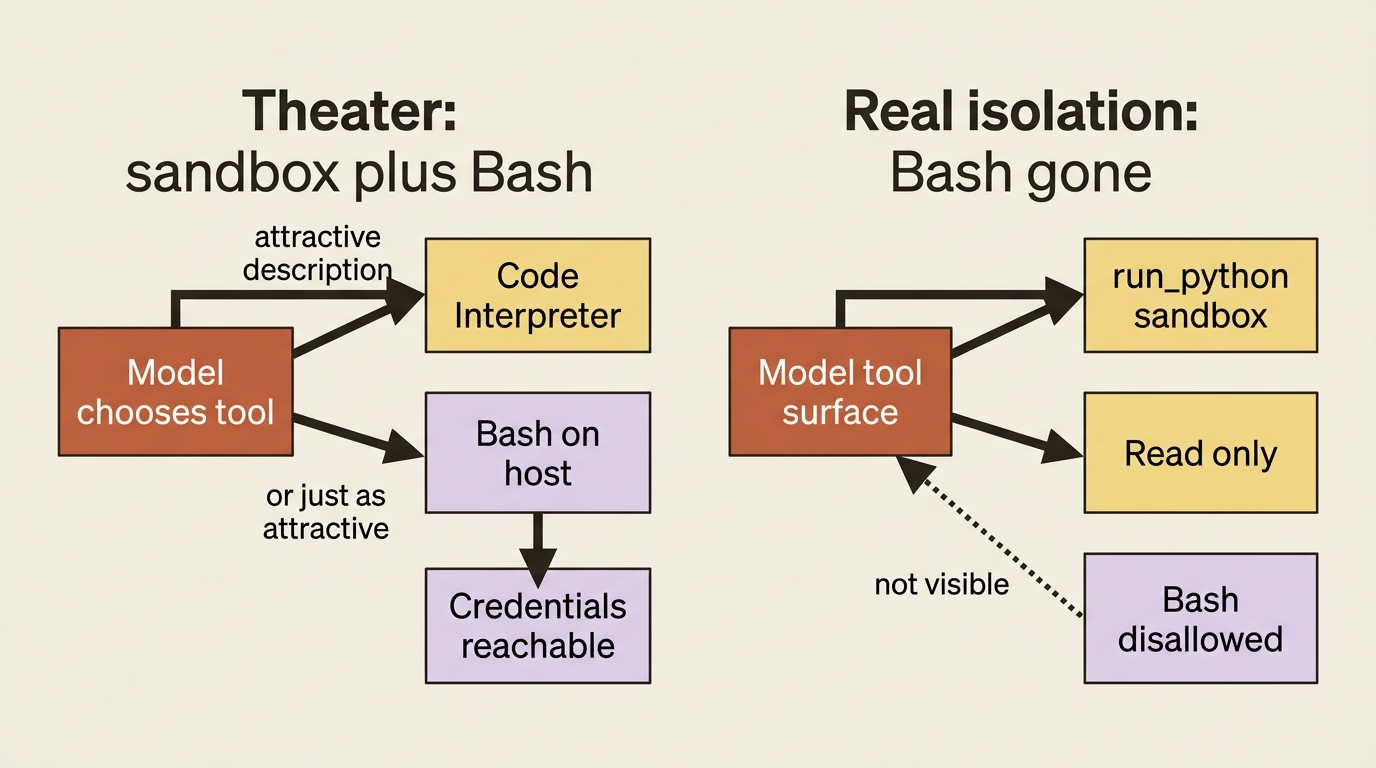
In the Claude Agent SDK, allowed_tools governs permission (run without prompting), while disallowed_tools governs availability (whether the model sees the tool at all). To replace Bash, remove it from the model's context; do not merely decline to auto-approve it. Verify the exact field name against your installed claude-agent-sdk version. If your version does not expose disallowed_tools, scope a deny rule instead.
This is mechanical enforcement in one line of config. Not "the system prompt asks the model to prefer the sandbox." The shell is gone. The model cannot choose a tool it does not have, and that is the only kind of enforcement that survives a prompt that says "ignore your previous instructions."
Pattern check: Code Interpreter implements isolation, and it is the strongest showing in the platform. What it does not implement is the decision to use it. A sandbox tool sitting alongside Bash provides exactly zero isolation, and the platform cannot tell you that.
The DeepAgents wiring (and a source correction)
Both of the integration reports this series is grounded in describe the DeepAgents wiring as a hand-written bridge: wrap CodeInterpreter in a LangChain @tool yourself. That was true. It is not true now.
langchain-aws ships a first-party CodeInterpreterToolkit:
from langchain_aws.tools import create_code_interpreter_toolkit
from langchain_aws import ChatBedrockConverse
from deepagents import create_deep_agent
from botocore.config import Config as BotoConfig

toolkit, code_tools = await create_code_interpreter_toolkit(region="us-west-2")  # ①

agent = create_deep_agent(  # ②
    model=ChatBedrockConverse(
        model="us.anthropic.claude-sonnet-4-6",
        region_name="us-west-2",
        config=BotoConfig(read_timeout=300),  # ③
    ),
    tools=code_tools,  # ④
    system_prompt=(
        "Do all pricing math in the sandbox. Never estimate a number you could compute."
    ),
)
① The factory is async: you must await create_code_interpreter_toolkit (its browser sibling is not).
② create_deep_agent wires the Bedrock model, the toolkit tools, and the system prompt in one call.
③ BotoConfig(read_timeout=300) keeps long browse-and-compute turns from hitting boto's default read timeout.
④ tools=code_tools is the first-party eleven-tool surface, not a hand-written single-tool adapter.
Note: The full extracted listing at code/agent-core/part-06-code-interpreter-isolation/listings/02-deepagents-code-interpreter-toolkit.py shows the runnable form.
Two details matter before you celebrate. The factory is async and must be awaited. And BotoConfig(read_timeout=300) is not decoration: agent turns that browse and compute can run for minutes, and boto's default read timeout will cut them off mid-thought. AWS sets it explicitly in its own reference implementation, a reliable sign it bit somebody.
That is a verified first-party integration, not an adapter skeleton. It ships eleven tools rather than the one you were going to write: execute_code, execute_command, read_files, write_files, list_files, delete_files, upload_file, install_packages, start_command_execution, get_task, and stop_task. It returns artifacts as text, files, and images; it is natively async; and upload_file takes a semantic description field so the model learns what the columns mean instead of guessing from a filename.
It goes further than a toolkit. AgentCore is a native sandbox provider in the Deep Agents CLI, so deepagents --sandbox agentcore runs against AgentCore Code Interpreter with no agent code at all. The integration the reports told you to write is now a command-line flag.
Flag the correction rather than quietly rewriting history: two carefully researched reports, both accurate at the time, both stale on the same fact. When a claim says a wiring is "build it yourself," check the framework's integration docs before you build it. The hyperscaler and the framework are both shipping faster than anyone's notes.
Session isolation that pays off the Runtime join
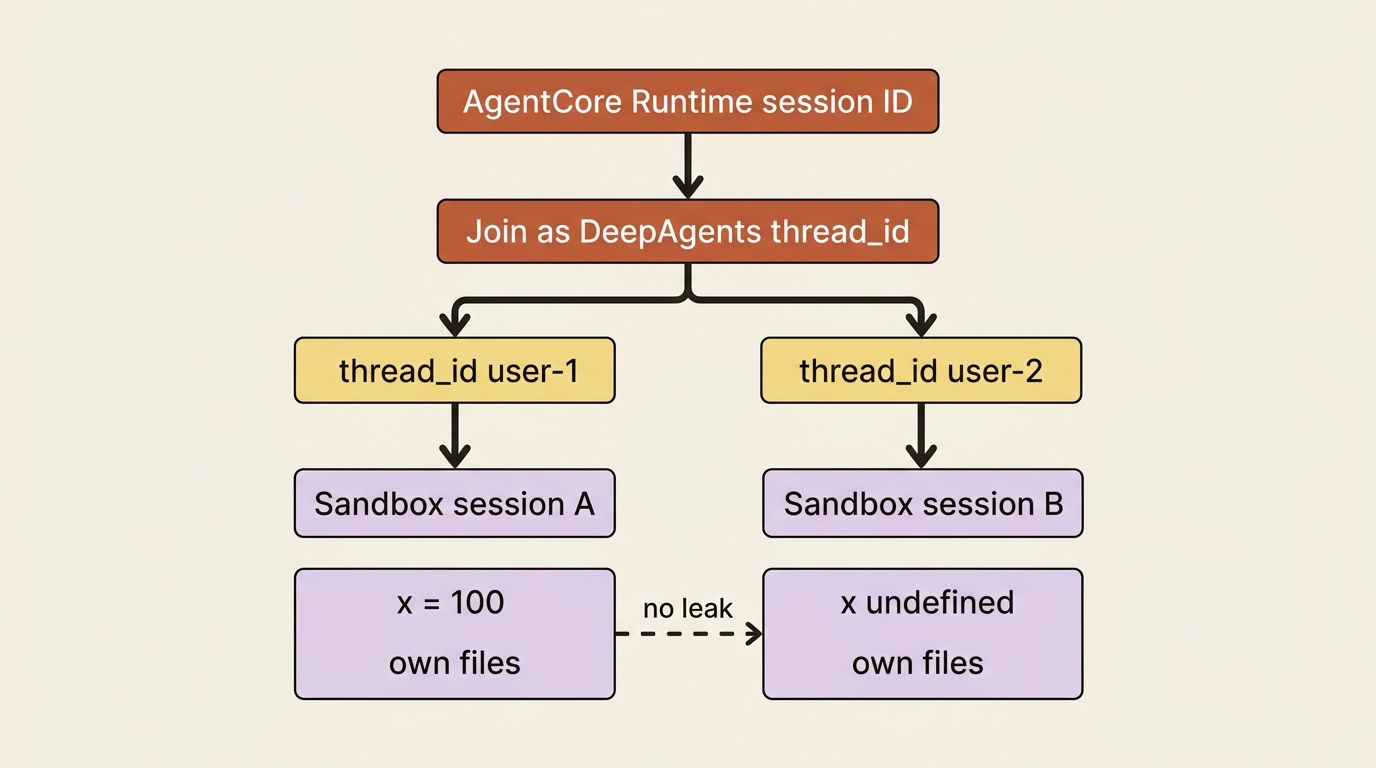
The toolkit has one property worth stopping on. Sessions are keyed by thread_id:
config_user1 = {"configurable": {"thread_id": "user-1"}}
config_user2 = {"configurable": {"thread_id": "user-2"}}
Each thread gets its own sandbox session with isolated state. Set x = 100 in one, and x is undefined in the other.
Join the AgentCore Runtime session ID to the DeepAgents thread_id. Write that one line and the chain runs all the way through. One microVM lease equals one conversation equals one sandbox with its own variables and its own files. One analyst's half-finished dataframe cannot leak into another analyst's session. You did not configure isolation to get that; you threaded an ID correctly.
Cleanup is explicit, and you should treat it that way:
await toolkit.cleanup()                      # all sessions
await toolkit.cleanup(thread_id="user-1")    # one thread's session
Gotcha: the sessions you forgot to stop
Sandbox sessions are cloud resources with their own lifecycle and their own billing clock. They do not vanish when your agent finishes thinking.
The failure mode is quiet. An exception fires mid-analysis, your stop() never runs, and a sandbox sits idle until its timeout expires. One of those is invisible. A few hundred a day is a line item somebody eventually asks about.
Use code_session rather than manual start()/stop(). Use toolkit.cleanup() in a finally. If you manage interpreters directly, list_sessions(status="READY") shows what you left running, which is a good check before you conclude that your agent is cheap.
Routing the filesystem itself into the sandbox
The toolkit gives the agent sandbox tools. DeepAgents also has its own filesystem. You may want ordinary write_file and read_file calls to land in the sandbox rather than requiring the agent to choose a sandbox tool consciously. That is CompositeBackend, routing paths to different backends:
agent = create_deep_agent(
    model=llm,
    tools=code_tools,  # ①
    system_prompt="Scratch analysis lives in /sandbox/. Long-term notes in /memories/.",
    backend=CompositeBackend(  # ②
        default=StateBackend(),  # ③
        routes={
            "/sandbox/": SandboxViaCodeInterpreterBackend(ci),   # adapter skeleton  ④
            "/memories/": StoreBackend(store=AgentCoreMemoryStore(memory_id)),  # durable notes  ⑤
        },
    ),
)
① code_tools still comes from the toolkit; the backend routing is additive, not a replacement for the eleven tools.
② CompositeBackend is the single filesystem the agent sees; it dispatches each path to a sub-backend by prefix.
③ The default is thread-scoped scratch (StateBackend) for any path no route matches.
④ /sandbox/ is the adapter you write: ordinary filesystem ops land in Code Interpreter isolation structurally, not electively.
⑤ /memories/ routes to durable store-backed notes, so long-term state is not sandbox-scoped.
Note: The full extracted listing at code/agent-core/part-06-code-interpreter-isolation/listings/03-composite-backend-sandbox-routes.py shows the runnable form.
This one is an adapter you write. DeepAgents backends implement BackendProtocol from deepagents.backends.protocol. Operations are async and typed-dict shaped (WriteResult, ReadResult, LsResult, and so on), and there is no first-party Code Interpreter backend. Implement the full protocol against your installed version and align the return-dict keys before you deploy.
Is it worth it? Sometimes. The toolkit is the right default. The backend is the right answer when you want isolation to be structural rather than chosen: the agent is physically incapable of writing outside the sandbox rather than merely instructed to prefer it. That is the same argument as removing Bash, applied one layer down.
The judgment call
Both harnesses reach the same sandbox. The difference is what you have to author.
DeepAgents wants this more, and it is not close. It ships a first-party toolkit with eleven tools, thread-scoped session isolation that lines up with identity threading, and native async. Philosophically it completes a design that explicitly declines to provide its own enforcement. DeepAgents plus Code Interpreter is the security model DeepAgents describes, finally assembled.
The Claude Agent SDK is more work and gives up something real. You write the @tool, you manage the closure, and you deliberately remove capabilities the SDK ships. In exchange you had a working Bash from line one, which is why prototyping in the Claude Agent SDK feels faster. Whether in-process enforcement survives a compromised process is the real question, and the answer is no. That is a fine trade on a laptop and a bad one in a microVM holding a Gateway token.
Same series trade again: ergonomics in-process, enforcement out-of-process, and production wants the second one.
Do this today
- Wire Code Interpreter into one harness: Claude Agent SDK (
@tool+code_session+disallowed_tools=["Bash"]) or DeepAgents (await create_code_interpreter_toolkit+tools=code_tools). - Confirm
Bash(or any host shell tool) is unavailable to the model, not merely unapproved. - Put
toolkit.cleanup()orcode_sessioncontext management in a path that runs on exceptions, then checklist_sessions(status="READY")after a failed run. - Join Runtime session ID to DeepAgents
thread_idso each conversation gets an isolated sandbox. - Point real pricing math at the sandbox with a system prompt that forbids estimating numbers the agent could compute.
Isolation is a decision, not a prompt
You now have a path to compute real answers in a sandbox that cannot touch host credentials, with no shell on the box and no container for you to operate. Gateway gets the agent to real systems; Code Interpreter keeps the arithmetic off the credential plane.
The trap is shipping the sandbox tool and leaving Bash in the room. Adding isolation next to an unrestricted shell is theater. Removing the shell is the mechanical-enforcement pattern in one line of config.
Ship the sandbox. Remove the host shell. Clean up the sessions you start. That is the whole lesson, and the next capability surface (managed browsers against live pages) is exactly when this isolation starts earning its keep.