
The Built-In Tools Got You Started. These Three Moves Are How the Agent Grows Up.
The built-in Read, Edit, and Bash tools are a floor, not a ceiling. Three moves grow an agent up: custom tools for your code, MCP for the outside world, and subagents for delegation, each one a way to keep the context window from filling with noise.
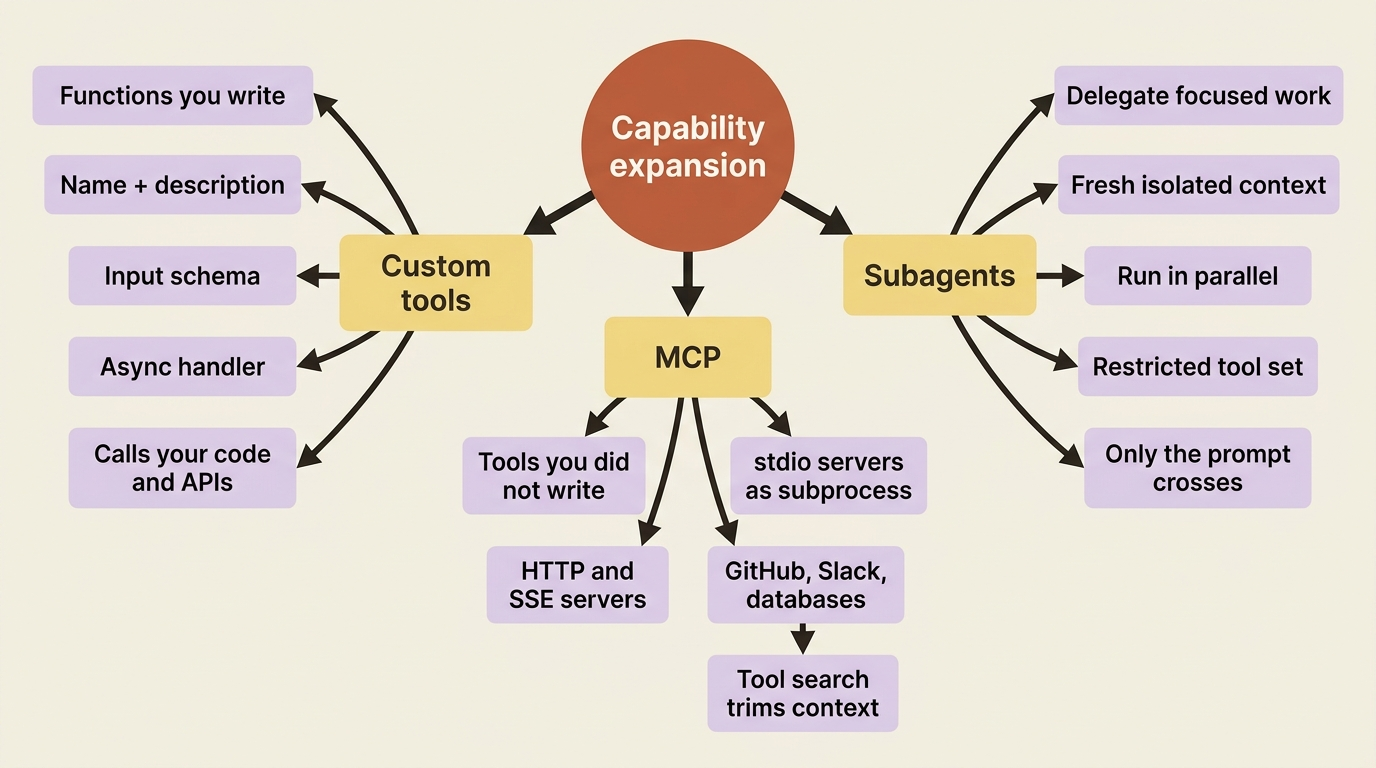
Custom tools let your Claude agent call your code. MCP connects it to the outside world. Subagents let it delegate. Here is how all three fit the same agent without bloating it.
In this article: You will learn the three capability moves that take an agent past Read, Edit, and Bash. Custom tools wire your own functions and APIs into the loop. The Model Context Protocol connects the agent to servers other people built. Subagents delegate focused work to isolated helpers so the main context stays lean. By the end you will know how all three fit one agent, how to wire them up in Python and TypeScript, and the gotchas that quietly break each one.
An agent that can read files, edit them, and run shell commands feels capable. For a surprising amount of work, it is. But "capable" runs out faster than you expect.
The agent cannot hit your internal pricing API, because that lives behind an HTTP endpoint, not a file on disk. It cannot reach your issue tracker. And when you point it at something genuinely large, every file it reads and every command it runs piles into a single context window until the details that matter get crowded out by the details that do not.
Those are three different problems, and they have three different answers. This is the capability-expansion chapter, and it comes in three movements. Custom tools give the agent functions you write, so it can call your code and your APIs. MCP connects it to external services and tool ecosystems you did not write. And subagents let it hand focused work to specialized helpers whose context never touches the main thread. We will keep each movement tight and thread them through one running goal: turning a code-maintenance agent's ad-hoc test running into a real, delegated capability.
Movement one: custom tools
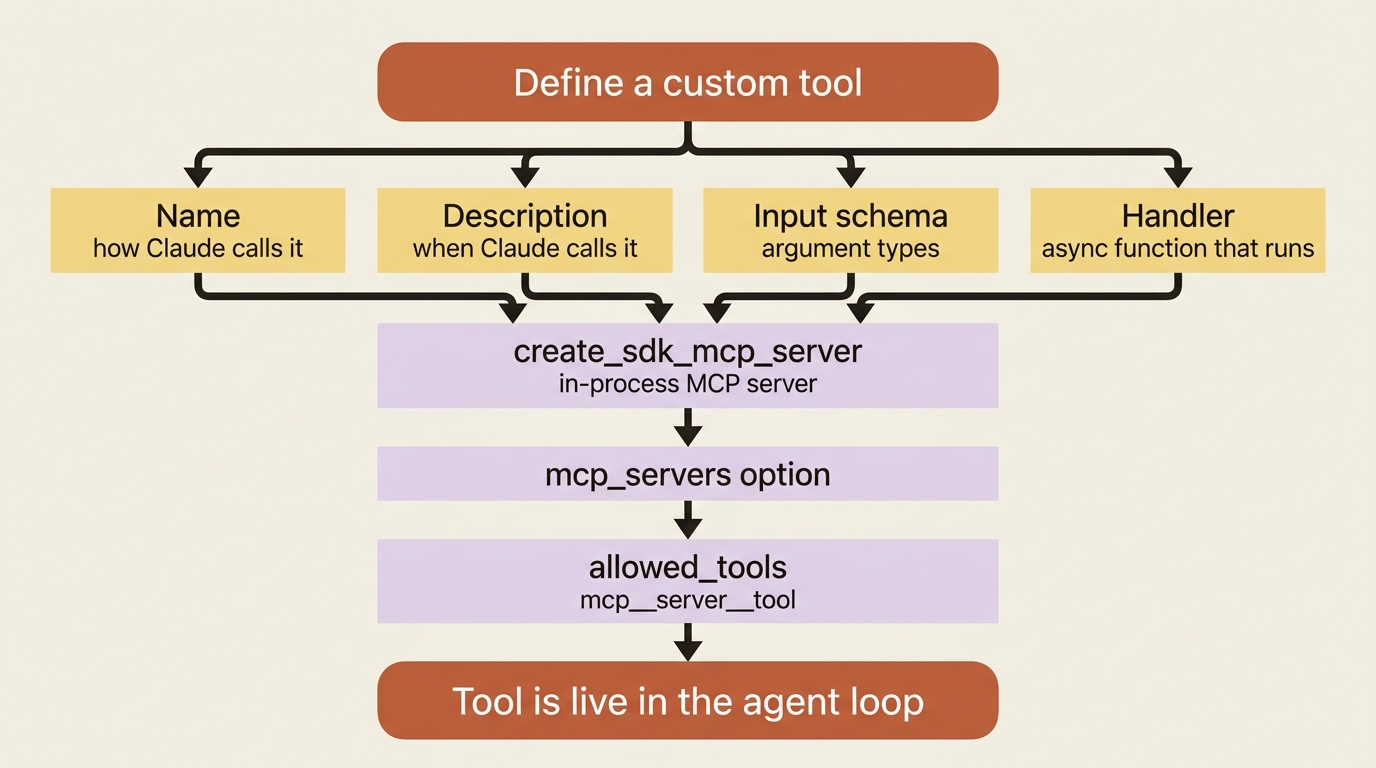
A custom tool is a function you write that Claude can call. You define four things, and the SDK wires it into the loop:
- A name Claude uses to call it.
- A description Claude reads to decide when to call it.
- An input schema for the arguments.
- A handler, the async function that actually runs.
In TypeScript you use the tool() helper with a Zod schema, and the handler arguments are typed straight from it. In Python you use the @tool decorator with a dict that maps argument names to types. Same four parts, two ergonomics.
Here is a tool that runs a project's test suite and hands the agent structured output, instead of making it shell out to pytest and parse the result itself.
from typing import Any
import subprocess
from claude_agent_sdk import tool, create_sdk_mcp_server, ToolAnnotations


@tool(
    "run_tests",
    "Run the buggy-shop pytest suite and return pass/fail counts and failures.",
    {"path": str},
    annotations=ToolAnnotations(readOnlyHint=True),  # no side effects: safe to parallelize
)
async def run_tests(args: dict[str, Any]) -> dict[str, Any]:
    result = subprocess.run(
        ["pytest", args["path"], "-q", "--tb=short"],
        capture_output=True, text=True,
    )
    return {"content": [{"type": "text", "text": result.stdout or result.stderr}]}


# Wrap the tool in an in-process MCP server (runs inside your app, not a subprocess)
test_server = create_sdk_mcp_server(name="testing", version="1.0.0", tools=[run_tests])
import { tool, createSdkMcpServer } from "@anthropic-ai/claude-agent-sdk";
import { execSync } from "node:child_process";
import { z } from "zod";

const runTests = tool(
  "run_tests",
  "Run the buggy-shop pytest suite and return pass/fail counts and failures.",
  { path: z.string().describe("Path to the test file or directory") },
  async (args) => {
    let out: string;
    try {
      out = execSync(`pytest ${args.path} -q --tb=short`, { encoding: "utf8" });
    } catch (e: any) {
      out = e.stdout || e.stderr; // pytest exits non-zero on failures
    }
    return { content: [{ type: "text", text: out }] };
  },
  { annotations: { readOnlyHint: true } } // no side effects: safe to parallelize
);

// Wrap the tool in an in-process MCP server (runs inside your app, not a subprocess)
const testServer = createSdkMcpServer({ name: "testing", version: "1.0.0", tools: [runTests] });
Two details earn their place. First, the handler returns a content array of result blocks. That array is exactly what Claude sees as the tool result. For a failure, you would add isError: true in Python, so Claude reacts to the failure instead of the loop quietly stopping.
Second, that readOnlyHint annotation matters more than it looks. It is the mechanism that lets a tool run in parallel. Reads with no side effects can be marked read-only, and the agent is then free to fan them out. Tools that change state stay sequential by default. Annotating a genuinely safe tool as read-only is a small line that pays off whenever the agent has several independent things to check at once.
To actually use the tool, pass its server to mcp_servers and approve the tool by its qualified name. That naming pattern, mcp__<server>__<tool>, is worth committing to memory now, because it is the same for every MCP tool you will ever wire up.
options = ClaudeAgentOptions(
    mcp_servers={"testing": test_server},
    allowed_tools=["Read", "Edit", "Grep", "mcp__testing__run_tests"],
)
Movement two: MCP for tools you did not write
The in-process server above is one flavor of MCP. The Model Context Protocol is an open standard for connecting agents to external tools and data. Its real power is not the tools you write yourself. It is letting your agent use servers other people already built: GitHub, Slack, databases, and your own internal services. You do not write the tool implementations. You point the agent at a server, and the server brings its tools with it.
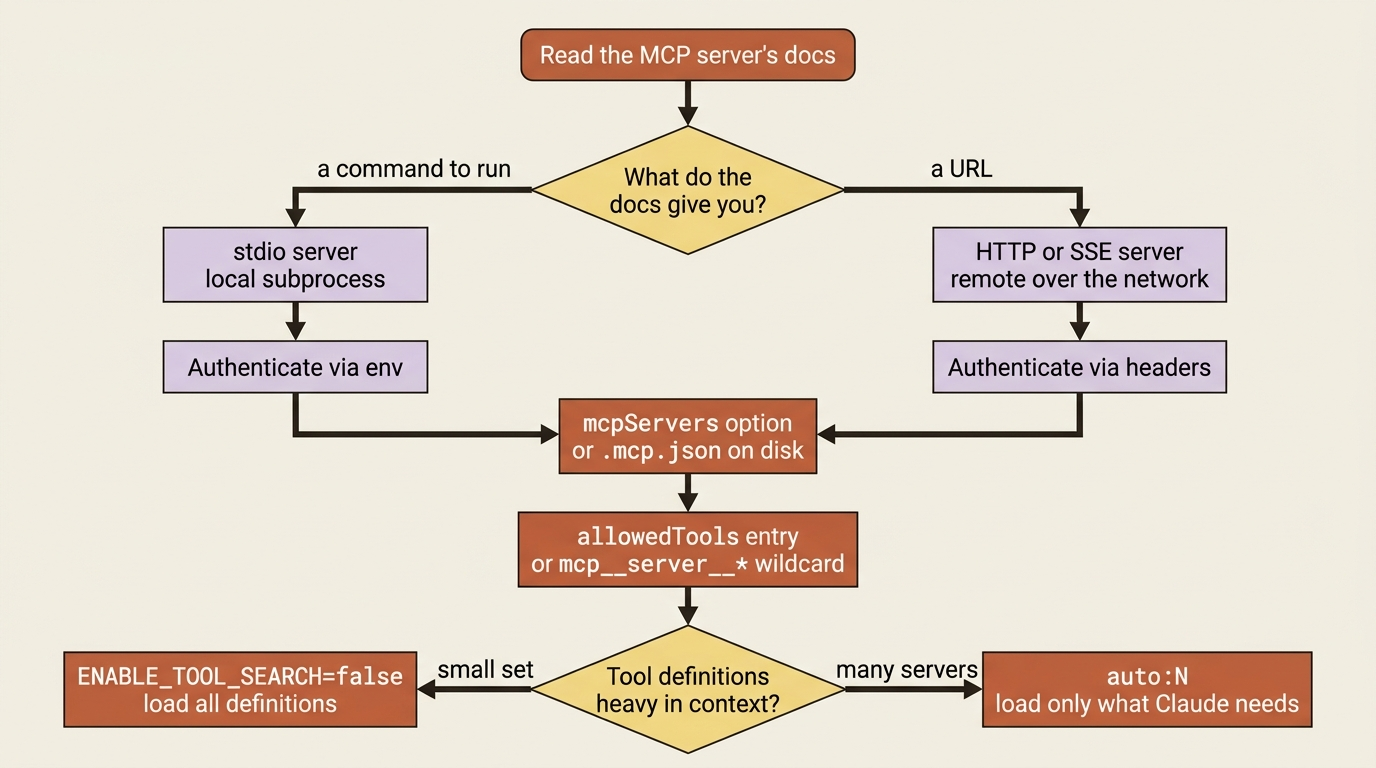
MCP servers come in two shapes, and the server's own documentation tells you which one you have. If the docs hand you a command to run, it is a stdio server, a local subprocess the SDK launches. If they hand you a URL, it is an HTTP or SSE server, a remote endpoint you reach over the network. You configure both in the same mcpServers option. You authenticate stdio servers by passing credentials through env, and HTTP servers by passing them through headers.
import os
from claude_agent_sdk import ClaudeAgentOptions

options = ClaudeAgentOptions(
    mcp_servers={
        # stdio: a local subprocess the SDK launches
        "github": {
            "command": "npx",
            "args": ["-y", "@modelcontextprotocol/server-github"],
            "env": {"GITHUB_TOKEN": os.environ["GITHUB_TOKEN"]},
        },
        # http: a remote server you reach over the network
        "internal-api": {
            "type": "http",
            "url": "https://tools.internal.example.com/mcp",
            "headers": {"Authorization": f"Bearer {os.environ['API_TOKEN']}"},
        },
    },
    allowed_tools=["mcp__github__list_issues", "mcp__internal-api__*"],
)
const options = {
  mcpServers: {
    // stdio: a local subprocess the SDK launches
    github: {
      command: "npx",
      args: ["-y", "@modelcontextprotocol/server-github"],
      env: { GITHUB_TOKEN: process.env.GITHUB_TOKEN },
    },
    // http: a remote server you reach over the network
    "internal-api": {
      type: "http" as const,
      url: "https://tools.internal.example.com/mcp",
      headers: { Authorization: `Bearer ${process.env.API_TOKEN}` },
    },
  },
  allowedTools: ["mcp__github__list_issues", "mcp__internal-api__*"],
};
The wildcard, mcp__internal-api__*, approves every tool from that server without listing each one individually. You can also keep server config out of code entirely, in a .mcp.json file at your project root. That file loads when settingSources includes "project", which keeps configuration with the repo instead of buried in application code.
Gotcha: MCP tools need explicit allowedTools permission, and permission_mode="acceptEdits" does not cover them. That mode only auto-approves file edits and filesystem Bash commands. If Claude can see an MCP tool but never calls it, you almost certainly forgot to add it, or a wildcard for it, to allowedTools. Reach for a wildcard in the allow list rather than bypassPermissions. The wildcard approves the MCP tools you want. bypassPermissions approves them too, but it also drops every other safety prompt in the process.
When you have too many tools: tool search
Connect a few large MCP servers and a new problem appears. Every tool definition consumes context on every turn, and dozens of them can crowd out the actual work, the same way a hundred file reads can.
Tool search fixes this. It withholds tool definitions from context and loads only the ones Claude needs for the current turn. It is on by default, and you tune it with the ENABLE_TOOL_SEARCH environment variable. The value auto:N activates search once tool definitions exceed N percent of the context window. The value false turns it off, so all definitions load on every turn.
options = ClaudeAgentOptions(
    mcp_servers={"enterprise-tools": {"type": "http", "url": "https://tools.example.com/mcp"}},
    allowed_tools=["mcp__enterprise-tools__*"],
    env={"ENABLE_TOOL_SEARCH": "auto:5"},  # search kicks in past 5% of context
)
In production: turn tool search off with "false" when your tool set is small, under roughly ten tools that fit comfortably in context. The search step costs a round trip. For a handful of tools, you are paying latency to solve a problem you do not actually have. Tool search earns its keep only once definitions get heavy.
Movement three: subagents for delegation
The first two movements gave the agent more reach. Subagents give it something different: the ability to delegate. And delegation, in an agent, is really about protecting context.
A subagent is a separate agent instance that your main agent spawns to handle a focused subtask. It runs in its own fresh conversation, does its work, and returns only its final message to the parent. Every intermediate file read, every grep, every tool call stays inside the subagent and never touches the main thread.
That isolation is the headline benefit. A reviewer subagent can read thirty files, and the parent receives a three-line summary instead of thirty files' worth of context. Two more benefits follow from the same design. Subagents can run in parallel, so a style checker, a security scanner, and a test runner can all run at once. And each subagent gets its own specialized system prompt and a restricted tool set, so it cannot do more than the job you gave it.
You define subagents in the agents option, and you must include "Agent" in allowedTools, because Agent is the tool Claude uses to invoke them. Here is a reviewer constrained to read-only tools and a cheaper model:
from claude_agent_sdk import query, ClaudeAgentOptions, AgentDefinition

options = ClaudeAgentOptions(
    allowed_tools=["Read", "Edit", "Grep", "Glob", "Agent"],  # Agent enables delegation
    agents={
        "reviewer": AgentDefinition(
            description="Reviews a proposed bug fix for correctness and regressions. "
                        "Use after a fix is written, before declaring the task done.",
            prompt="You are a meticulous code reviewer. Check the fix for correctness, "
                   "edge cases, and regressions. Be concise: list only real issues.",
            tools=["Read", "Grep", "Glob"],  # read-only: it reviews, never edits
            model="sonnet",                  # a cheaper model is plenty for review
        ),
    },
)
const options = {
  allowedTools: ["Read", "Edit", "Grep", "Glob", "Agent"], // Agent enables delegation
  agents: {
    reviewer: {
      description:
        "Reviews a proposed bug fix for correctness and regressions. " +
        "Use after a fix is written, before declaring the task done.",
      prompt:
        "You are a meticulous code reviewer. Check the fix for correctness, " +
        "edge cases, and regressions. Be concise: list only real issues.",
      tools: ["Read", "Grep", "Glob"], // read-only: it reviews, never edits
      model: "sonnet", // a cheaper model is plenty for review
    },
  },
};
Claude decides when to invoke the reviewer by matching the task against its description. Write that field with the same care you would give a skill description. To force the invocation, name the subagent directly in your prompt: "Use the reviewer agent to check this fix."
The single most important thing to understand about subagents is what crosses the boundary between parent and child.
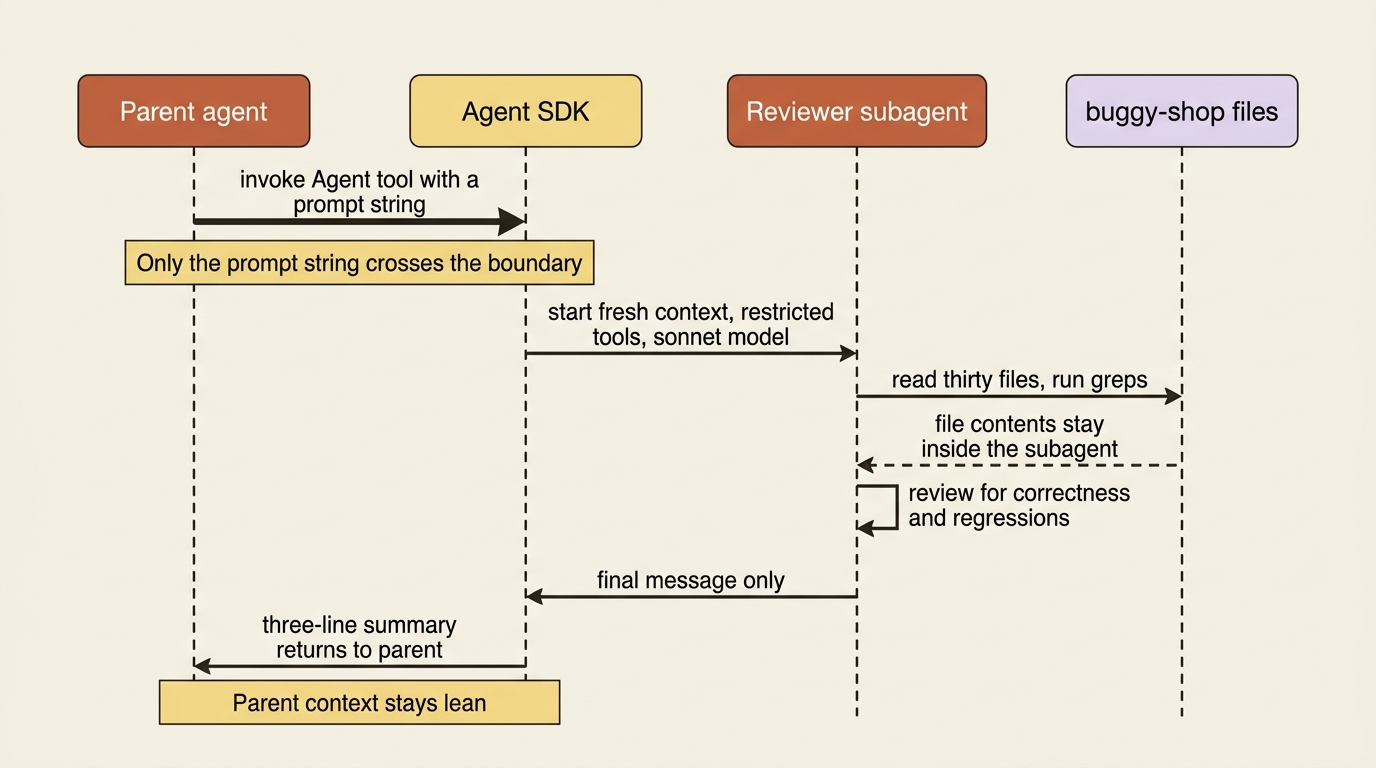
The subagent's context starts fresh. It does not see the parent's conversation, the parent's tool results, or the parent's system prompt. The only channel from parent to subagent is the prompt string passed when the Agent tool is invoked. So any file path, any error message, any decision the subagent needs has to be in that prompt. The subagent does inherit tool definitions and your project CLAUDE.md, but not skills, unless you list them in the definition.
Gotcha: subagents do not inherit the parent's permission prompts, but they do inherit dangerous permission modes. If the parent runs under bypassPermissions, acceptEdits, or auto, every subagent inherits that mode, and you cannot override it per subagent. A subagent with a looser system prompt running under inherited bypassPermissions has full autonomous system access. Plan for this before you delegate. Keep the parent in default mode, add a PreToolUse hook that gates the subagent's actions, or use upfront allow rules that cover exactly what the subagent legitimately needs.
Gotcha: subagents cannot spawn their own subagents. Do not put "Agent" in a subagent's tools array. It will not get a nested helper, and the configuration is meaningless.
Putting the three movements together
Now the movements connect into one workflow. The code-maintenance agent uses the custom run_tests tool to see what is failing. It fixes the source. It calls run_tests again to confirm the suite is green. Then it delegates to the reviewer subagent for an independent second opinion before declaring victory. If you later need it to file the fix as a GitHub issue, or pull live pricing data from an internal service, that capability is one MCP server away, with no new tool code to write at all.
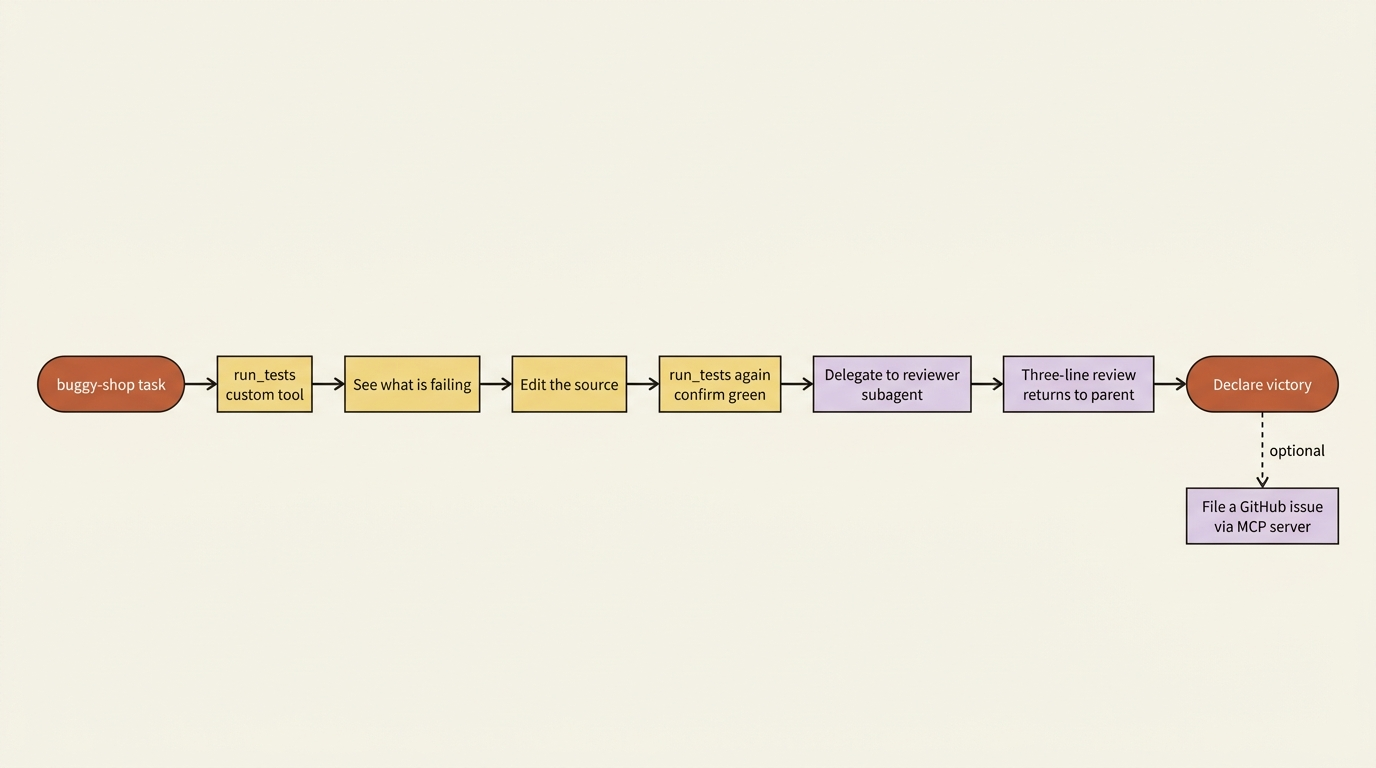
Three movements, one agent. And through all of it, the main context stays focused on the fix, rather than drowning in everything the agent touched along the way.
Do this today
- Replace one ad-hoc shell command with a custom tool. Pick something your agent keeps running by hand, a test run or a build, and wrap it with
@toolso it returns structured output. Mark itreadOnlyHint=Trueif it has no side effects. - Wire up one MCP server you did not write. Add GitHub or a database server to
mcpServers, authenticate it throughenvorheaders, and approve its tools with amcp__server__*wildcard. - Verify your
allowedToolslist. If an MCP tool is visible but never fires, add it or a wildcard toallowedTools. Remember thatacceptEditsdoes not cover MCP tools. - Define one read-only subagent. Add a
reviewerto theagentsoption with a restricted tool set and a cheaper model, and put"Agent"inallowedTools. - Audit your permission mode before delegating. Confirm the parent is not running under
bypassPermissions,acceptEdits, orauto, because every subagent inherits that mode.
The takeaway
The built-in tools are the floor, not the ceiling. Custom tools connect the agent to code and APIs you control, defined by a name, a description, a schema, and a handler, and marked read-only when they are safe to parallelize. MCP connects it to a whole ecosystem of servers you did not write, addressed by the mcp__server__tool convention and gated by allowedTools, with tool search waiting in reserve for when the tool count gets heavy. Subagents let the agent delegate focused work to specialized, tool-restricted helpers whose context never pollutes the main thread.
The thread running through all three is the context window. Custom tools return structured results instead of raw shell noise. MCP tool search withholds definitions until they are needed. Subagents quarantine an entire investigation behind a three-line summary. Grow the agent up, and the discipline that keeps it sharp is the same one you started with: be deliberate about what the agent is looking at right now. Reach further, delegate cleanly, and keep the desk clear.
This is Part 7 of "Building with the Claude Agent SDK," a 14-part guide to building production-ready AI agents.