
Permissions Ask the Model for Permission. Hooks Do Not Ask Anyone.
Permissions route every decision through the model and your approval prompts. Hooks do not. They are your code firing at fixed points in the agent loop, with the final word on what the agent is allowed to do.
How to put deterministic, non-negotiable guardrails into your AI agent: block destructive commands, inject live context, and audit every edit, no matter what the model decides.
In this article: You will learn what hooks are in the Claude Agent SDK, why they sit a level below permissions, and how they give you the final word on agent behavior. We walk the lifecycle events in firing order, build the three hooks every team eventually wants (block a dangerous command, inject live context, audit every edit), and cover the gotchas that matter because hooks run inside your own process.
You can give an AI agent a careful set of permissions and still lose. Permissions are real, and they help, but they share a property with everything else the agent does: they pass through the model's judgment and your approval prompts. The model decides what to attempt. You decide whether to approve. Both of those are judgment calls, and judgment calls fail.
A hook is a different kind of thing entirely. A hook is your code, running at a fixed point in the agent loop, executing every single time, regardless of what the model wants or which permission mode you are in. If a PreToolUse hook says no to rm -rf /, the answer is no. Full stop. No prompt, no model discretion, no clever phrasing that talks its way past the guardrail.
This is the moment you stop configuring an agent and start controlling it. Hooks let you block dangerous operations before they run, inject fresh context into the conversation, transform tool inputs on the fly, and audit everything for compliance. This article walks the lifecycle events in the order they fire, builds the three demos every team ends up wanting, and then spends real time on the gotchas, because hooks run inside your process and the failure modes are particular.
How a hook fires
Before any code, it helps to see the whole mechanism at once. A hook firing is a five-step pipeline.
An event fires: a tool is about to run, a prompt was submitted, or the session just started. The SDK collects the hooks registered for that event. Matchers filter which ones actually run, narrowing by tool name. Each matching callback executes, receiving a typed input object with the event details. Finally, your callback returns an output object that tells the agent what to do: allow, block, modify the input, or inject context.
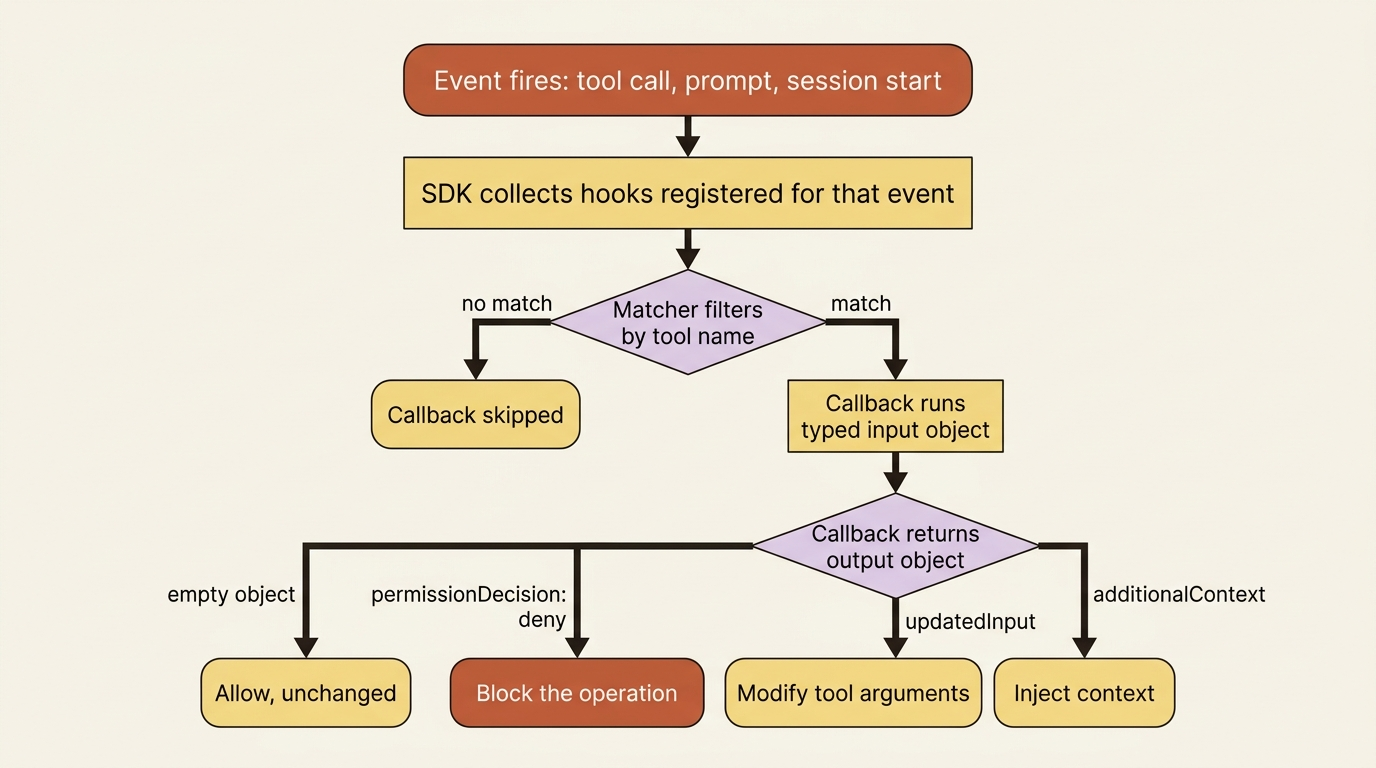
You register hooks in the hooks option, keyed by event name, each wrapped in a HookMatcher in Python or a matcher object in TypeScript that optionally narrows by tool. A matcher of "Write|Edit" runs only for those two tools. Omit the matcher and the callback runs for every occurrence of the event.
One limit is worth fixing in your mind early: matchers filter by tool name only, not by file paths or arguments. To act on a specific path, you check tool_input inside the callback. The matcher gets you to "this is a write." Your code decides "this is a write to a path I care about."
The events, in the order they fire
Across a single run, hooks fire at a set of predictable points. Six of them form the backbone.
SessionStart runs once when the session begins, which is the natural place to load state or warm a cache. UserPromptSubmit runs when a prompt is submitted, before the model sees it, which is your chance to inject context. PreToolUse runs before every tool call and can block or modify it. PostToolUse runs after a tool returns, with the result in hand. Stop runs when the agent finishes, which is a good place to save state. And SessionEnd runs at teardown.
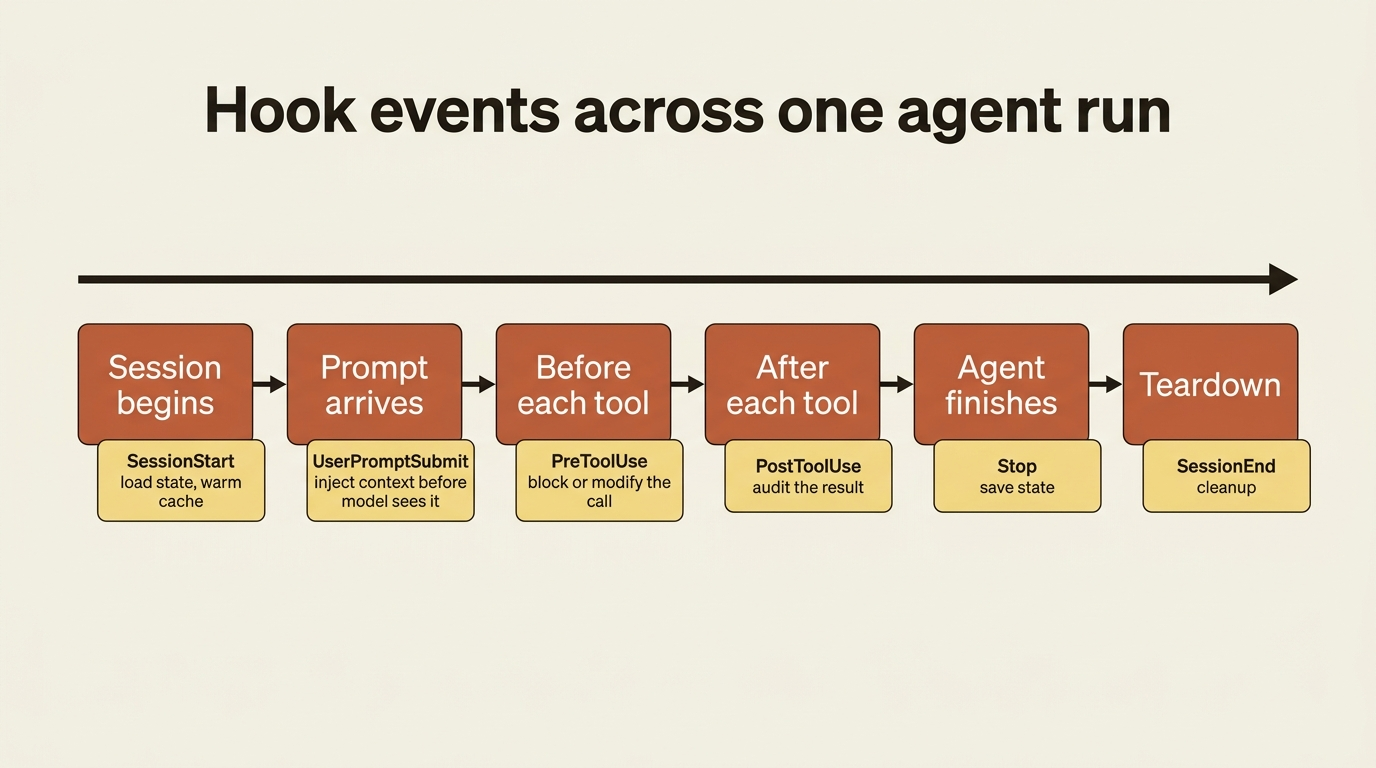
There are more events beyond these six, including PostToolUseFailure, SubagentStart, SubagentStop, and PreCompact. But the six above carry most of the weight, and two of them, PreToolUse and PostToolUse, do most of the real work. The demos start there.
A Python gotcha worth knowing before you write a line of code: the Python SDK does not support SessionStart or SessionEnd as callback hooks. Those events, plus several others, are TypeScript-only in the programmatic API. In Python you get them only as shell-command hooks configured through settings files, loaded via settingSources. If you reach for a SessionStart callback in Python and it never fires, this is why. PreToolUse, PostToolUse, UserPromptSubmit, and Stop all work as callbacks in both SDKs.
Demo one: block a dangerous command, no matter what
This is the headline use of hooks. A PreToolUse hook on the Bash tool inspects the command and blocks anything destructive. Because this runs before the permission mode is even consulted, where hooks are evaluated first, it holds even under bypassPermissions. This is the safety net that does not depend on the model behaving.
The callback returns two things together: a permissionDecision of "deny" inside hookSpecificOutput to stop the call, and a permissionDecisionReason to tell the model why, so it does not simply retry the same thing. The top-level systemMessage is for the human watching: it surfaces a message to the user, not to the model.
async def block_dangerous_bash(input_data, tool_use_id, context):
    command = input_data["tool_input"].get("command", "")

    if "rm -rf" in command:
        return {
            # Top-level field: a message shown to the user
            "systemMessage": "Blocked a destructive command. Use a scoped, reversible deletion instead.",
            # hookSpecificOutput: the actual block
            "hookSpecificOutput": {
                "hookEventName": input_data["hook_event_name"],
                "permissionDecision": "deny",
                # permissionDecisionReason: explain the block to the model so it adapts
                "permissionDecisionReason": "rm -rf is not permitted",
            },
        }
    return {}  # empty object means: allow, unchanged
import { HookCallback, PreToolUseHookInput } from "@anthropic-ai/claude-agent-sdk";

const blockDangerousBash: HookCallback = async (input) => {
  const preInput = input as PreToolUseHookInput;
  const command = (preInput.tool_input as Record<string, unknown>).command as string;

  if (command?.includes("rm -rf")) {
    return {
      // Top-level field: a message shown to the user
      systemMessage: "Blocked a destructive command. Use a scoped, reversible deletion instead.",
      // hookSpecificOutput: the actual block
      hookSpecificOutput: {
        hookEventName: preInput.hook_event_name,
        permissionDecision: "deny",
        // permissionDecisionReason: explain the block to the model so it adapts
        permissionDecisionReason: "rm -rf is not permitted",
      },
    };
  }
  return {}; // empty object means: allow, unchanged
};
You register it with a Bash matcher so it only runs on shell commands:
from claude_agent_sdk import ClaudeAgentOptions, HookMatcher

options = ClaudeAgentOptions(
    hooks={"PreToolUse": [HookMatcher(matcher="Bash", hooks=[block_dangerous_bash])]},
)
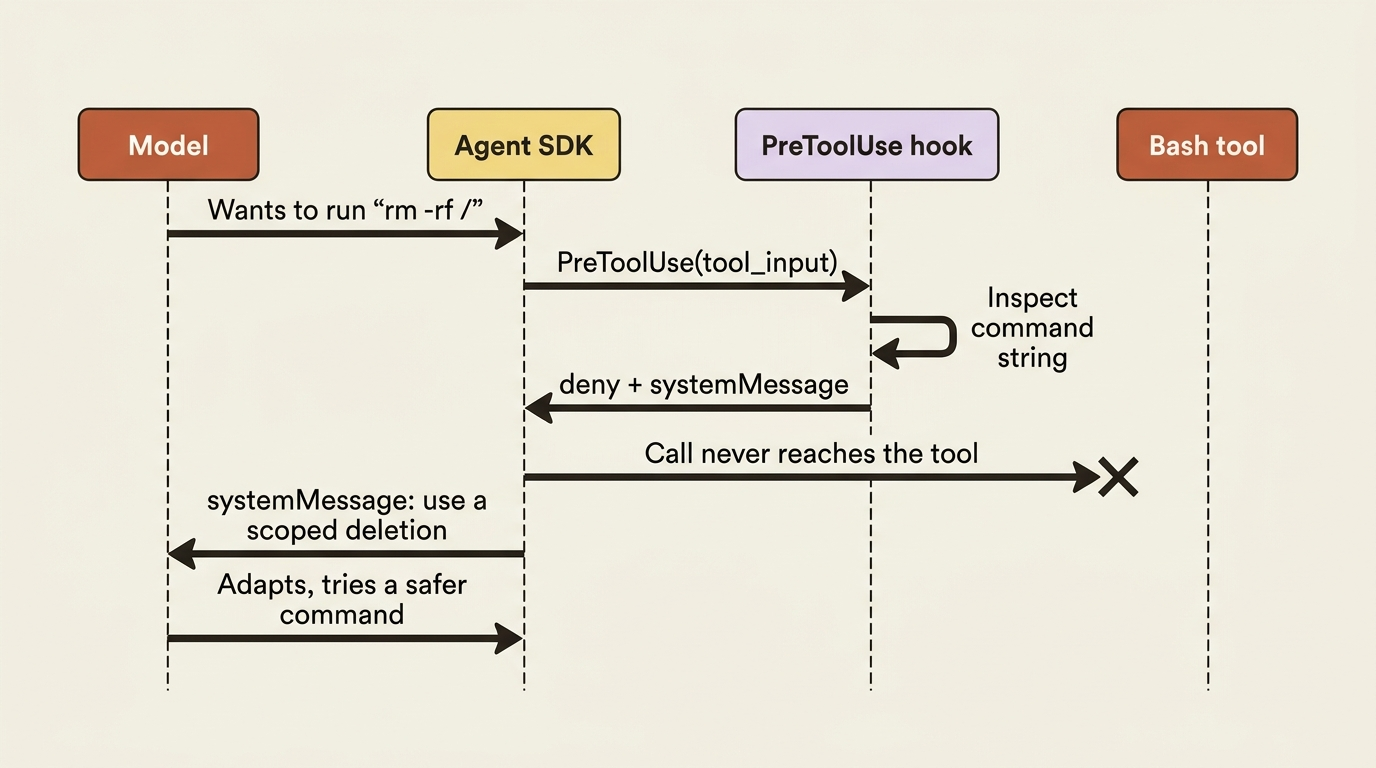
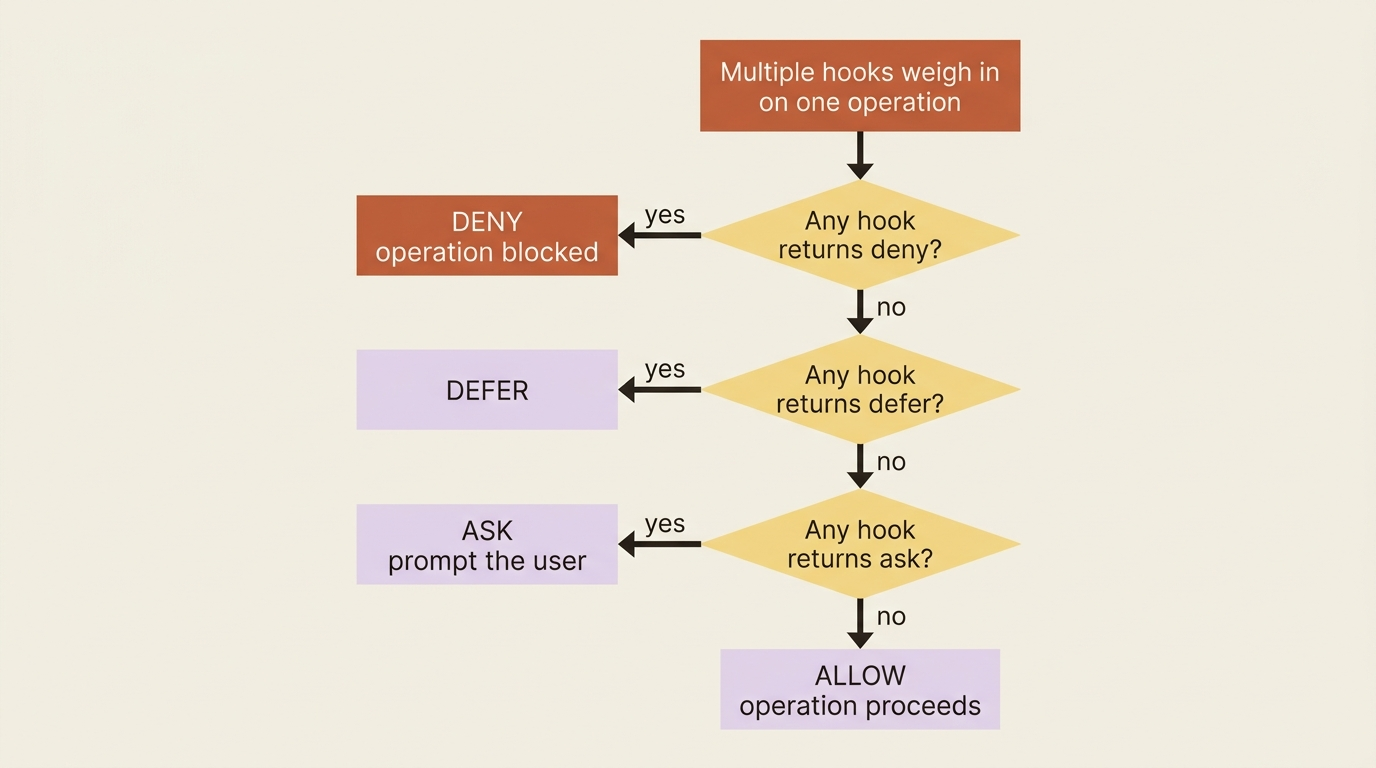
A production version would match a list of dangerous patterns rather than a single substring, but the shape is exactly this. Note the precedence rule for when several hooks weigh in on the same operation: deny beats defer beats ask beats allow. If any hook returns deny, the operation is blocked, period.
Demo two: inject live context into every prompt
If PreToolUse blocks, UserPromptSubmit informs. This hook runs before the model sees a prompt and appends information to it through additionalContext. The classic use is grounding the agent in facts it cannot know from training: today's date, the current git branch, and the environment it is running in.
import subprocess
from datetime import date


async def inject_context(input_data, tool_use_id, context):
    branch = subprocess.run(
        ["git", "rev-parse", "--abbrev-ref", "HEAD"],
        capture_output=True, text=True,
    ).stdout.strip()

    return {
        "hookSpecificOutput": {
            "hookEventName": input_data["hook_event_name"],
            # additionalContext is appended to the prompt the model receives
            "additionalContext": f"Today is {date.today().isoformat()}. Git branch: {branch}.",
        }
    }
This one is shown in Python only. The TypeScript shape is the same object with camelCase keys. Register it under UserPromptSubmit with no matcher, since prompt events have no tool to match against.
Gotcha: it is tempting to write a UserPromptSubmit hook that spawns a subagent or kicks off another query to "enrich" the prompt. Be careful. If that work submits another user prompt, it can trigger the same hook again, and you have built a recursive loop. Keep prompt-submit hooks to cheap, synchronous enrichment, such as reading a file or running a fast git command, and never let them re-enter the prompt path.
Demo three: audit every file edit
PostToolUse runs after a tool returns, which makes it the natural home for logging. This hook appends a line to a JSONL audit trail every time the agent writes or edits a file, exactly the kind of record that compliance and debugging both want. Since it only performs a side effect and does not need to influence the agent, it is a clean fit for the pattern.
import json
from datetime import datetime, timezone


async def audit_edit(input_data, tool_use_id, context):
    entry = {
        "ts": datetime.now(timezone.utc).isoformat(),
        "tool": input_data["tool_name"],
        "file": input_data["tool_input"].get("file_path", "unknown"),
        "session": input_data["session_id"],
    }
    with open("audit.jsonl", "a") as f:
        f.write(json.dumps(entry) + "\n")
    return {}  # nothing to decide; this is pure side effect
Register it under PostToolUse with a "Write|Edit" matcher so it logs only file mutations. If you genuinely do not need the agent to wait for the write, you can return an async output, which is async_: True in Python and async: true in TypeScript, so the logging happens in the background. The catch: async outputs cannot block, modify, or inject anything, because by the time they run the agent has already moved on. Use them for logging, metrics, and notifications only.
The output object, and the one field placement that trips everyone
Every callback returns one object with two tiers, and getting the tiers right is most of what goes wrong with hooks.
Top-level fields affect the conversation. systemMessage surfaces a message to the user, and continue (continue_ in Python) controls whether the agent keeps running. hookSpecificOutput affects the current operation, and its valid fields depend on the event. Returning {} always means "allow, no changes."
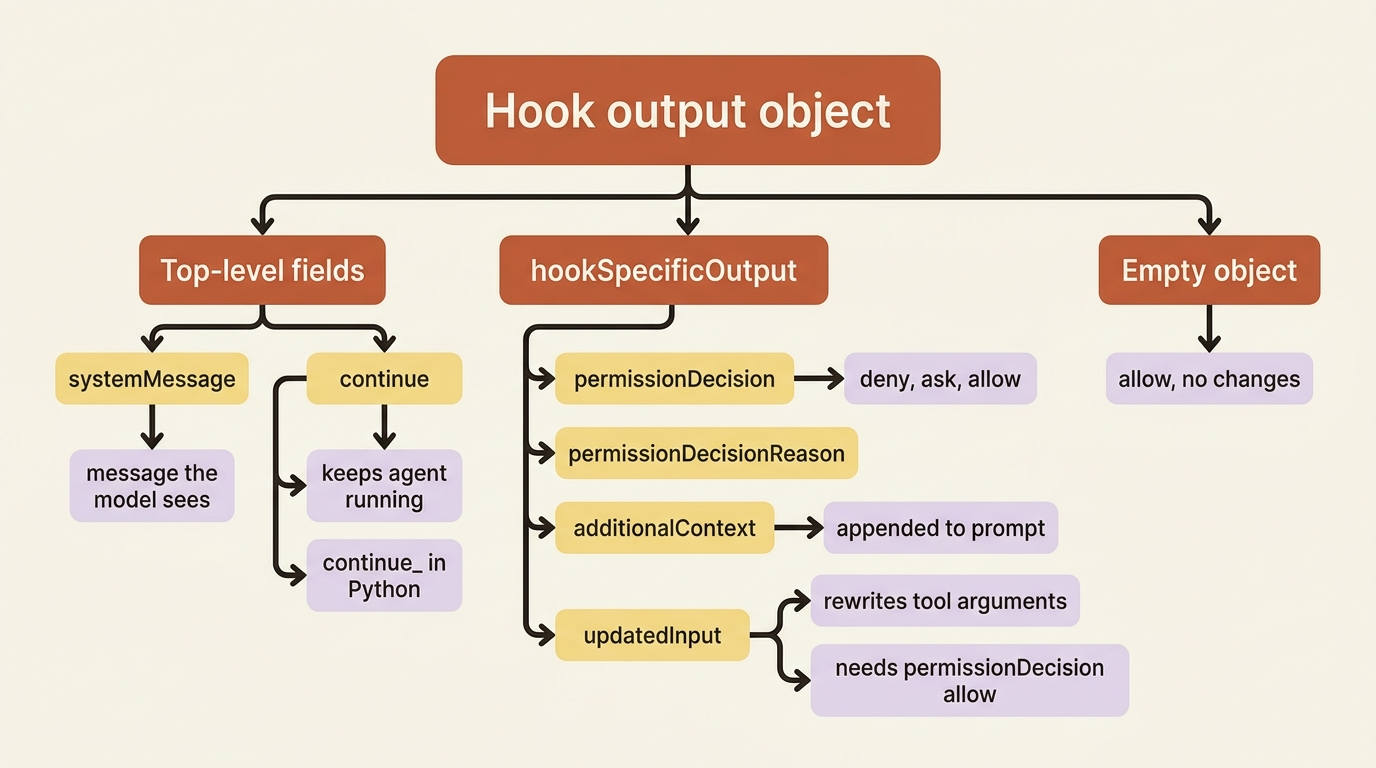
Gotcha: updatedInput is the field that lets a PreToolUse hook rewrite a tool's arguments, such as redirecting a write into a sandbox or sanitizing a path. It lives inside hookSpecificOutput, not at the top level. When you set it, you must also set permissionDecision: "allow" in the same object, or the modified input will not be approved. Putting updatedInput at the top level is the single most common hooks mistake, and it fails silently: the tool just runs with the original input as if your hook did nothing. Also, always return a new input object rather than mutating the one you received.
Where hooks run, and why that cuts both ways
One architectural fact shapes everything about using hooks well: programmatic hooks run inside your application's process, as direct callbacks. This has a great upside and a real downside, and you should hold both at once.
The upside is that hooks do not consume the agent's context window. A PostToolUse audit hook can log a megabyte of detail and the model never pays a token for it, because the logging happens in your process, not in the conversation. That is exactly why hooks are the right tool for heavy logging and validation that you would never want bloating the prompt.
The downside is that, because the hook is your code in your process, an exception in a hook can crash your application, and a slow hook stalls the agent. The default timeout is 60 seconds per matcher. A hook that makes a network call on every PreToolUse will make the agent feel sluggish, and an unhandled error in a hook takes down the run. Treat hook callbacks like production code in a hot path: guard against exceptions, keep them fast, and push anything slow into an async output or a background queue.
Do this today
- Write a
PreToolUsehook onBashthat blocks at least one destructive pattern, and confirm it holds even underbypassPermissions. - Pair every deny with a
permissionDecisionReasonthat tells the model why, so it adapts instead of retrying the same blocked command. - Add a
PostToolUseaudit hook with a"Write|Edit"matcher that appends to a JSONL trail. You will want that record the first time you debug a session. - Audit your callbacks for the
updatedInputmistake. If you rewrite tool arguments, confirmupdatedInputsits insidehookSpecificOutputnext topermissionDecision: "allow". - Wrap each hook body in exception handling and keep it fast. A hook runs in your process, so a crash there is a crash everywhere.
The takeaway
Hooks are the difference between hoping the agent behaves and guaranteeing it does. They fire deterministically at fixed points in the loop, run your own code, and decide outcomes without consulting the model: PreToolUse to block or transform before an action, UserPromptSubmit to inject live context, and PostToolUse to audit after the fact.
Keep three things straight and you will avoid nearly every hooks bug. updatedInput goes inside hookSpecificOutput, alongside permissionDecision: "allow". Deny beats everything when hooks disagree. Your callbacks run in your process, so they must be fast and crash-proof. Python users, remember that SessionStart and SessionEnd are shell-command-only.
Permissions ask for permission. Hooks ask no one. Once you have written your first PreToolUse deny and watched it hold under every mode, you will not ship an agent without one again.
This is Part 8 of "Building with the Claude Agent SDK," a 14-part guide to building production-ready AI agents.