
How to Build an AI Agent That Researches, Cites, and Checks Its Own Work
Feature tutorials teach you one SDK primitive at a time, but real agents compose all of them at once. This capstone builds a research agent to prove the patterns generalize.
Feature tutorials teach you one primitive at a time. Real agents compose all of them at once. This capstone builds a Claude Agent SDK research agent to prove the patterns generalize, and to show you the hard part nobody teaches.
In this article: You will see how to assemble a long-running research agent from the Claude Agent SDK: an orchestrator that plans an investigation, delegates focused tasks to parallel researcher subagents, synthesizes cited findings, and verifies its own draft against the original request. The lesson is composition. By the end you will understand how the orchestrator-workers, prompt-chaining, parallelization, and evaluator-optimizer patterns cooperate inside one options object, and why the same template builds a bug-fixer, an analyst, or an architecture reviewer.
Every SDK tutorial has the same comfortable shape. Here is one capability. Here is a small example that uses exactly that capability and nothing else. You learn streaming, then permissions, then subagents, each in a clean room with no other moving parts. That is the right way to learn. It is not the way you build.
Real agents do not use one primitive at a time. They compose all of them at once, and the hard part, the part no feature tutorial can teach, is making the eighth capability work without breaking the previous seven. A streaming agent is easy. A streaming agent that also delegates to parallel workers, fences itself with permissions, writes structured output, and audits every external fetch is a different kind of problem. The features stop being a checklist and start being a system.
This article is the capstone. We stop adding features and start composing them, and we do it by building a Claude Agent SDK research agent: you give it a question, it plans an investigation, delegates focused research to parallel workers, synthesizes their findings into a cited report, checks its own draft against the original request, and hands you a finished document. It is the agent equivalent of a final exam, because doing it well requires the loop, subagents, parallelization, structured output, the filesystem, streaming, permissions, deployment, and observability to all cooperate. If you can build this, you can build your own.
Why a research agent, and not another bug-fixer
A research agent is a deliberate choice. A bug-fixer is a narrow shape. It reads code, edits code, runs tests, and the shape of the work is fixed. The point of a capstone is to prove the patterns generalize beyond that one shape, so we pick a problem that looks nothing like a bug fix: long-running, open-ended, producing a document rather than a diff, coordinating a team rather than working alone.
The surprise is that underneath, it is the same agent. The loop is the same. The delegation is the same. The leashes are the same. Only the tools and the prompt change. That is the real lesson, and you only see it when the capstone is a different product from everything that came before.
The shape of the agent
Before any code, hold the architecture in your head, because every primitive slots into it.
There is one orchestrator, the main agent, and it never does research itself. Its job is a fixed high-level workflow: plan the investigation, save the user's request to a file so it can check its own work later, delegate focused research tasks to subagents, synthesize what they return, write a report to a file, then verify the report actually addresses the original question. When it synthesizes, it consolidates citations so each source gets one number across all findings.
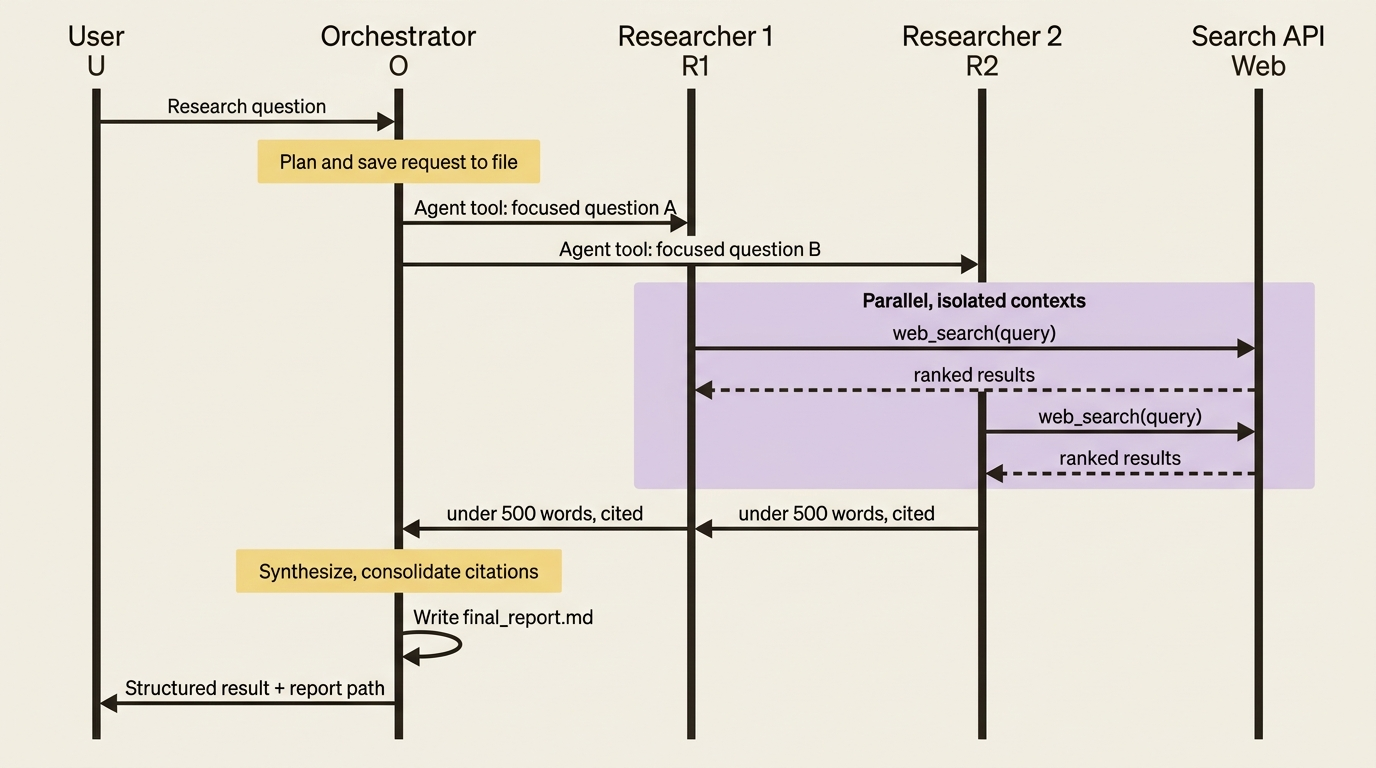
The researcher subagents are the workers. Each takes one focused question, searches the web in its own isolated context, and returns distilled findings with sources. The orchestrator stitches; the workers dig.
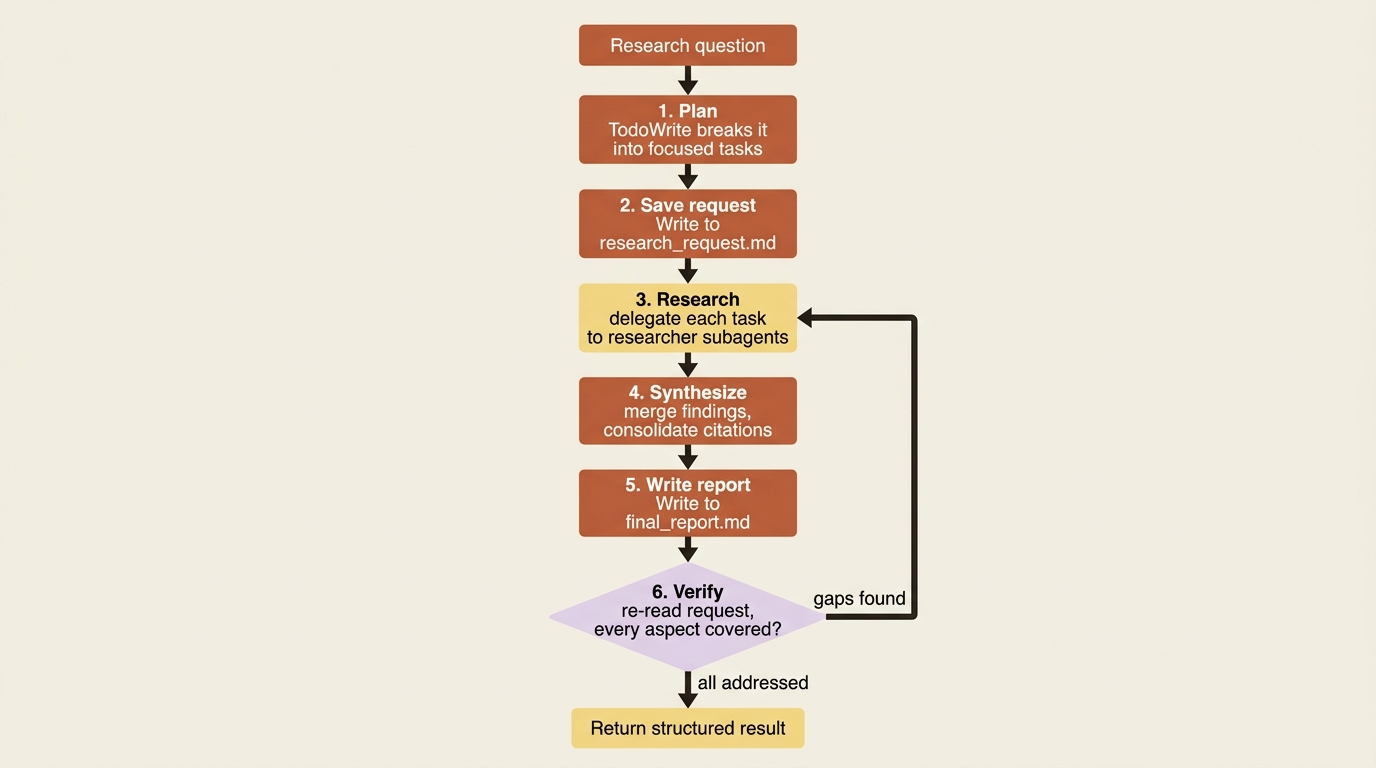
This one design is four patterns at once. It is orchestrator-workers, the main agent decomposing and delegating. It wraps prompt chaining, the fixed workflow sequence. It uses parallelization, multiple researchers running at once. And it closes with evaluator-optimizer, the verify step checking the draft against the request. Four of the five canonical agent patterns, in one agent. We will watch each fall into place.
Step one: the orchestrator and its workflow
The orchestrator is a query() call whose system prompt encodes the workflow as numbered steps. This is prompt chaining expressed as instructions: a fixed sequence the agent follows, with the built-in TodoWrite tool tracking progress so a long run stays organized.
The critical instruction, the one that makes this orchestrator-workers rather than one agent doing everything, is the rule that it must always delegate research and never search itself. That discipline is what keeps the orchestrator's context clean. It sees plans and synthesized findings, never the raw flood of search results.
ORCHESTRATOR_PROMPT = """You are a research orchestrator.

Your workflow:
1. Plan: break the research question into focused tasks with TodoWrite.
2. Save the request: Write the user's question to ./workspace/research_request.md.
3. Research: delegate each task to the 'researcher' subagent via the Agent tool.
   ALWAYS delegate. NEVER search the web yourself.
4. Synthesize: review all findings and consolidate citations (each unique URL
   gets one number across all findings).
5. Write: Write the full report to ./workspace/final_report.md.
6. Verify: re-read ./workspace/research_request.md and confirm every aspect is
   addressed with proper citations. If something is missing, delegate another
   research round and revise.

Delegation: default to ONE researcher. Parallelize only for explicit comparisons
or genuinely independent aspects. Bias toward focused depth over breadth.
"""
That prompt establishes a main agent that plans, delegates, synthesizes, and verifies. The spine of the whole agent is this system prompt plus the Agent tool that lets it delegate. Everything else hangs off that spine.
Step two: the researcher subagent and the search tool
The worker is an AgentDefinition with one job and a search tool. It searches, reads, and returns findings, and crucially it is instructed to return a concise synthesis with sources, not a raw dump.
This is the context-isolation payoff made concrete. The researcher might read ten thousand tokens of web pages, but the orchestrator only ever sees the few hundred tokens of distilled findings it returns. Each researcher runs in its own context window, so the raw search noise never reaches the main agent.
Search itself is a custom tool. You could wire a search MCP server, but the cleanest path is an in-process tool wrapping whatever search API you use, exposed to the researcher alone.
from typing import Any
import os, httpx
from claude_agent_sdk import tool, create_sdk_mcp_server, ToolAnnotations, AgentDefinition

@tool(
    "web_search",
    "Search the web and return ranked results with titles, URLs, and snippets.",
    {"query": str},
    annotations=ToolAnnotations(readOnlyHint=True),  # read-only: safe to parallelize  ①
)
async def web_search(args: dict[str, Any]) -> dict[str, Any]:
    async with httpx.AsyncClient() as client:
        resp = await client.post(
            "https://api.tavily.com/search",
            json={"api_key": os.environ["TAVILY_API_KEY"], "query": args["query"]},  # ②
        )
    return {"content": [{"type": "text", "text": resp.text}]}

search_server = create_sdk_mcp_server(name="search", version="1.0.0", tools=[web_search])  # ③

researcher = AgentDefinition(
    description="Researches one focused question via web search and returns cited "
                "findings. Use for every research task; never let the orchestrator search.",
    prompt="""You research one focused topic. For each finding, cite the source.
Return a concise synthesis: key findings plus a Sources list of title and URL.
Do NOT return raw search results or full page text. Keep it under 500 words.""",  # ④
    tools=["mcp__search__web_search"],  # this subagent gets search and nothing else  ⑤
    model="sonnet",                      # a capable, cost-efficient worker model  ⑥
)
① readOnlyHint=True declares the tool has no side effects, which is what makes it safe for the orchestrator to fan out across parallel researchers.
② The single search call wraps your search API, so everything the researcher learns flows through this one in-process tool.
③ create_sdk_mcp_server packages the tool into an MCP server the SDK can mount, so the researcher can call it by name.
④ The worker's prompt enforces the concise-synthesis, no-raw-dumps, under-500-words contract that keeps the orchestrator's context small.
⑤ The researcher is granted exactly one tool, search, and nothing else, so a worker can never write files or delegate further.
⑥ Pinning the worker to sonnet keeps the disposable specialist on a capable but cost-efficient model.
That buys you a disposable specialist the orchestrator spins up as many times as the plan requires, each in its own context, each returning a clean result. The "under 500 words, no raw dumps" instruction is the single most important line for keeping a long research run inside its token budget.
One subtlety worth internalizing: the only channel into a subagent is the Agent tool's prompt string. The orchestrator must pass each researcher its focused question explicitly. The worker cannot see the plan, the other researchers, or the conversation. It sees one question and answers it.
This is also where parallelization lives. When the plan has genuinely independent tasks, such as comparing three frameworks or surveying three regions, the orchestrator issues multiple Agent calls in one turn, and they run concurrently. When the question is unified, it uses one researcher. The orchestrator decides per question, guided by the bias-toward-one rule in its prompt.
Step three: the filesystem as working memory
A long research run generates more than fits comfortably in a conversation. This is where the built-in filesystem tools stop being incidental and become structural.
The orchestrator writes the request to research_request.md and the report to final_report.md, and researchers can offload long notes to files too. The point to internalize: for any agent that produces a lot, the filesystem is working memory, and the message history is just the conversation about that memory. The report does not live in the chat; it lives in a file the agent builds up and you read at the end.
Cross-run memory follows from the same idea. Remembering a user's past investigations is just a matter of where those files live. Keep the workspace on a mounted volume or durable store, and a returning user's history persists rather than vanishing when an ephemeral container dies.
Step four: a report your pipeline can consume
The report itself is prose in a file. But the orchestrator's return value should be structured, so whatever calls this agent, whether a UI, a pipeline, or a scheduled job, gets a typed signal rather than parsing the agent's chatter. We pass an output_format schema, and the validated result lands in ResultMessage.structured_output.
research_schema = {
    "type": "object",
    "properties": {
        "report_path": {"type": "string"},
        "sources_count": {"type": "number"},
        "request_addressed": {"type": "boolean"},  # did the verify step pass?
        "summary": {"type": "string"},
    },
    "required": ["report_path", "request_addressed", "summary"],
}
After the run, your code reads structured_output and knows, as typed data, where the report is, how many sources it cites, and whether the agent's own verification passed. That last field is the evaluator-optimizer pattern surfacing as data: the verify step is the evaluator, and request_addressed is its verdict.
One trap to mind: check the result subtype for error_max_structured_output_retries before trusting the field, because on a long run the schema must stay simple enough to satisfy. A schema that the agent cannot reliably produce at the end of a sixty-turn run is worse than no schema at all.
Step five: the verify step is an evaluator-optimizer loop
Step six of the workflow is easy to skim past, and it is the one that most improves quality. After writing the report, the orchestrator re-reads research_request.md and checks whether the draft addresses every part of the original question. If something is missing, it delegates another round and revises.
That is the evaluator-optimizer pattern: the orchestrator plays both generator and evaluator against a clear criterion, namely does the report cover what was asked. The agent is grading its own homework against a rubric it saved before it started, which is exactly why saving the request to a file in step two matters. The criterion is fixed and external to the draft.
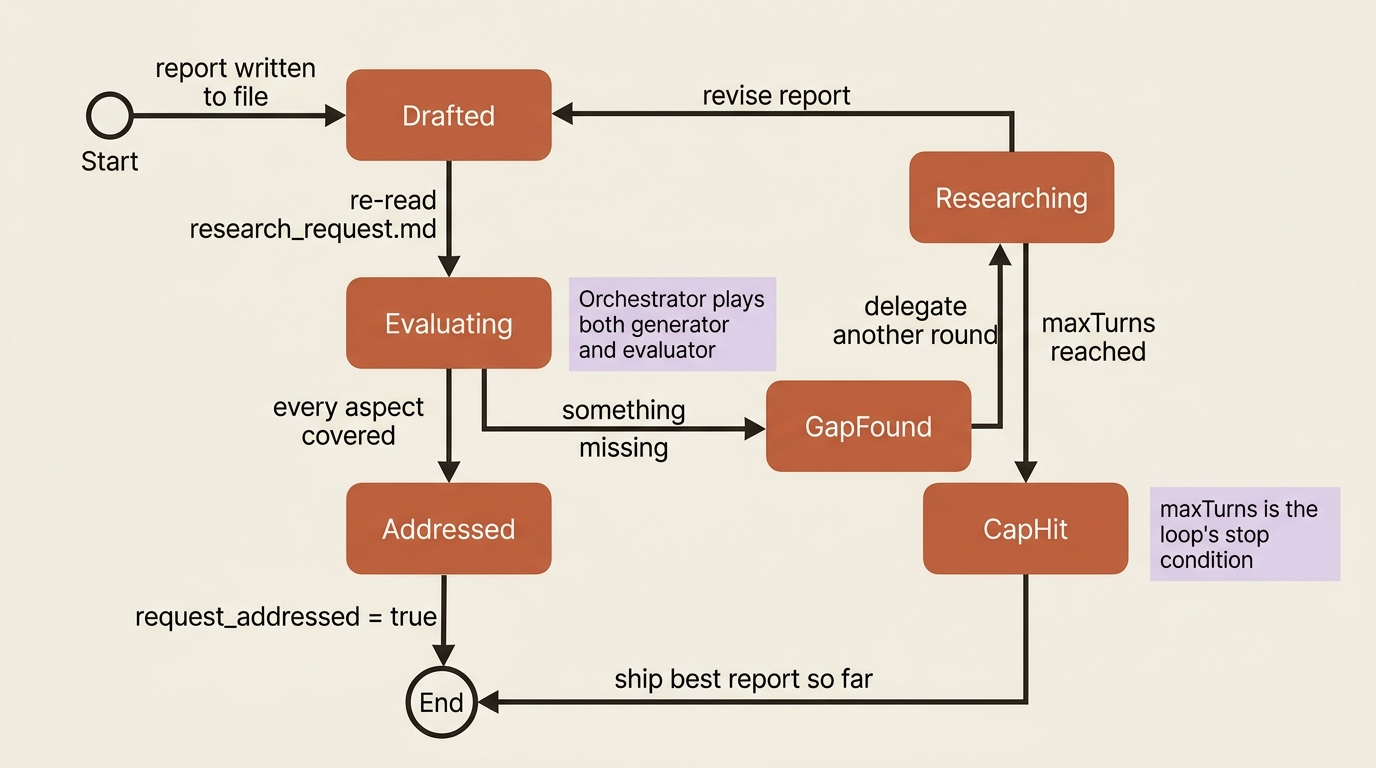
You can make this stronger with a dedicated reviewer subagent whose only job is to critique the draft for gaps and weak citations and return a verdict. Either way, one rule holds: the loop needs a stopping condition. The maxTurns cap is exactly that stopping condition here. An investigation that can never fully satisfy itself ends with the best report it has rather than looping forever. That is the classic "stuck" failure mode wearing a research costume, and the cap is what tames it.
Step six: watching it run, and keeping it on a leash
A research run can take minutes, so streaming is not a nicety; it is how the user knows the agent is alive. You enable include_partial_messages and watch the stream, and you use the background-task messages, which surface parallel subagents as task_started and task_progress events, to attribute work to the right researcher. The user then sees "researcher 2 is investigating X" rather than an undifferentiated wall of activity.
Safety scales with autonomy, and this agent reads arbitrary web content, which is untrusted input by definition. A malicious page could carry a prompt injection. The defenses are the ones you already have:
- Permissions fence the agent to its workspace so it cannot write outside it. A deny rule on writes anywhere but
./workspace/holds even if an injection tries to redirect it. - The
canUseToolhuman-in-the-loop gate would guard any tool more dangerous than search, if this agent had one. - A
PreToolUsehook auditing every URL fetched gives you a record of exactly what the agent read. That is both an observability win and an injection-forensics tool when something goes wrong.
The leash is not one feature. It is permissions, gates, and hooks layered so that even a compromised run stays contained.
Step seven: shipping it
This agent is a deployment chapter's ideal case study. It is long-running, so session resumption and checkpointing matter: a run that crashes mid-investigation resumes from its captured session_id instead of re-doing three rounds of searches. It is stateful, so its workspace wants durable storage rather than an ephemeral filesystem. And it is the kind of thing you run as a scheduled job or behind an API, locked down behind a network proxy so an injected agent still cannot exfiltrate.
You would package the whole thing as a plugin: the orchestrator prompt, the researcher and reviewer subagents, the search tool's MCP server, and the audit hook, all bundled into one research-agent plugin loaded with a single line of config. And you would turn on OpenTelemetry so a run that visits twenty sources across five subagents becomes a nested trace you can actually debug, with each researcher's spans nesting under the orchestrator's Agent-tool span. A run that big is incomprehensible without that trace; with it, you can see exactly which researcher found what, and what each one cost.
Putting it together
Here is the assembled query() call, every piece from the previous steps in one options object. This is the whole agent.
import asyncio
from claude_agent_sdk import query, ClaudeAgentOptions, ResultMessage

async def research(question: str):
    options = ClaudeAgentOptions(
        system_prompt={"type": "preset", "preset": "claude_code", "append": ORCHESTRATOR_PROMPT},  # ①
        mcp_servers={"search": search_server},
        agents={"researcher": researcher},                       # the worker  ②
        allowed_tools=["Read", "Write", "TodoWrite", "Agent"],   # orchestrator does NOT get search  ③
        disallowed_tools=["Bash"],                               # least privilege
        output_format={"type": "json_schema", "schema": research_schema},  # ④
        max_turns=60,                                            # the loop's stop condition  ⑤
        include_partial_messages=True,                           # stream the long run  ⑥
        hooks={"PreToolUse": [audit_url_hook]},                  # audit fetches  ⑦
    )

    async for message in query(prompt=question, options=options):
        if isinstance(message, ResultMessage):
            if message.subtype == "success" and message.structured_output:  # ⑧
                r = message.structured_output
                print(f"Report at {r['report_path']}, {r.get('sources_count')} sources, "
                      f"verified={r['request_addressed']}, cost=${message.total_cost_usd:.2f}")
            else:
                print(f"Run did not complete cleanly: {message.subtype}")  # ⑨

asyncio.run(research("Compare the three leading open-source vector databases for a RAG system."))
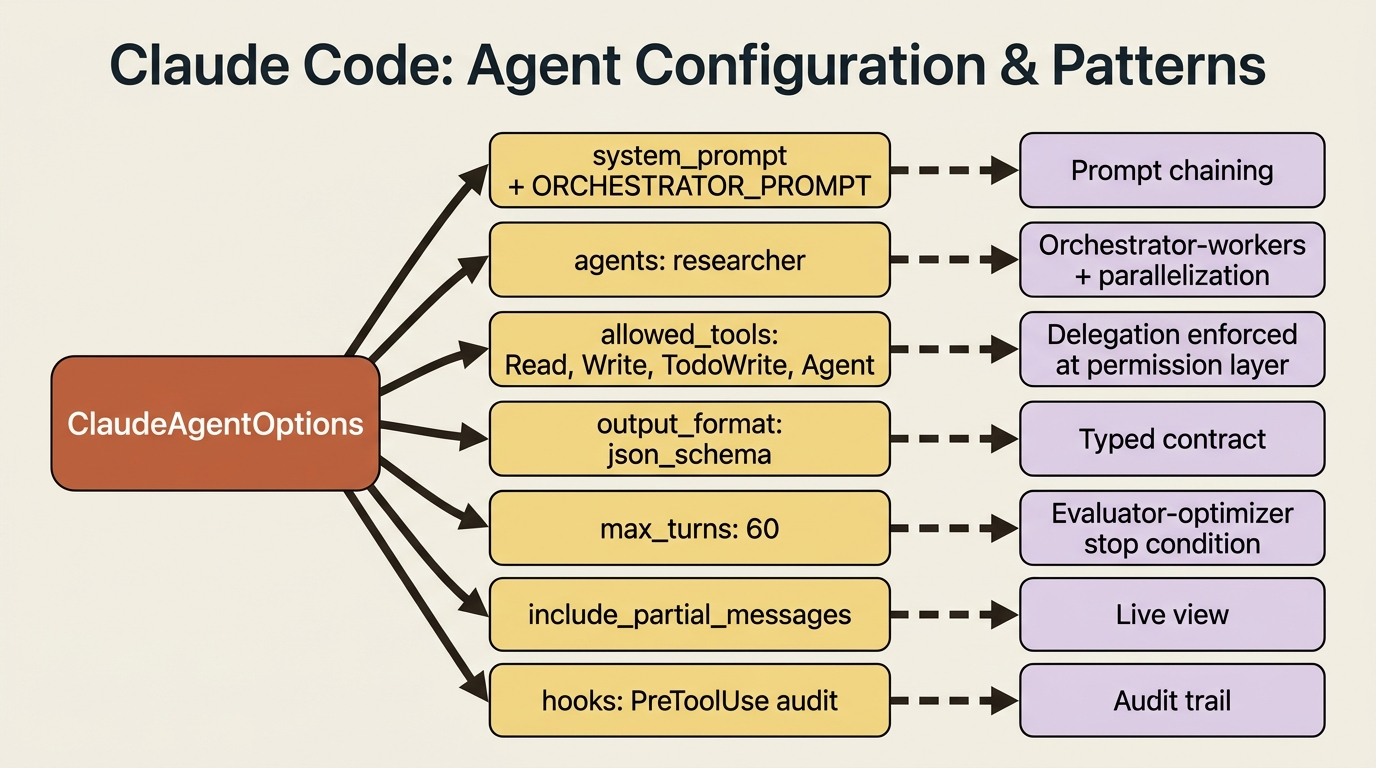
① Appending ORCHESTRATOR_PROMPT to the preset is prompt chaining: the fixed numbered workflow rides on top of the standard Claude Code system prompt.
② Registering the researcher as a named agent plus the Agent tool is what makes this orchestrator-workers with parallelization.
③ The orchestrator gets Read, Write, TodoWrite, and Agent but never search, so delegation is enforced at the permission layer, not just requested in the prompt.
④ The output_format schema turns the run's result into the typed contract downstream code consumes.
⑤ max_turns=60 is the evaluator-optimizer loop's stopping condition, so a never-satisfied investigation still ends.
⑥ include_partial_messages turns on the streaming view so a minutes-long run shows progress.
⑦ The PreToolUse hook audits every fetch, giving the run an injection-forensics trail.
⑧ Guard on both subtype == "success" and structured_output before trusting the typed result, the Part 9 retry-exhaustion trap.
⑨ Any other subtype is handled explicitly rather than assumed to be success.
Look at what one options object pulled together. The orchestrator prompt is prompt chaining. The researcher in agents plus the Agent tool is orchestrator-workers and parallelization. The fact that the orchestrator gets Read, Write, and Agent but not search is the delegation discipline enforced at the permission layer, not just in the prompt. The output_format is the typed contract. maxTurns is the evaluator-optimizer loop's stopping condition. include_partial_messages is the live view. The hook is the audit trail.
Nothing here is new. Everything here is composed.
Do this today
- Map your own agent to its primitives. Take an agent you have built or want to build, and list which SDK features each part needs. The exercise reveals which ones you have not actually composed yet.
- Save the request before you act. In any agent with a verify step, write the original task to a file at the start. The verifier needs a fixed, external criterion, and an in-context memory of the request drifts.
- Enforce delegation at the permission layer. If a primitive must not do something, do not just tell it in the prompt. Remove the tool. The orchestrator that physically cannot search is more reliable than the one merely instructed not to.
- Cap every self-correcting loop. Set
maxTurnson any agent that can re-do its own work. A loop without a stop condition is a runaway, not a feature. - Turn on a trace before you need it. Enable OpenTelemetry on any multi-subagent agent now, while it works, so the nested spans are already there when it misbehaves.
Nothing new, everything composed
Step back and look at what this one agent used. The agent loop and its caps. Streaming. Permissions and the canUseTool gate. Sessions and checkpointing. Project context and skills. Custom tools, MCP, and subagents. Hooks. Structured output, cost tracking, and OpenTelemetry. Deployment patterns and a threat model. Plugin packaging. Four of the five design patterns, cooperating in a single workflow.
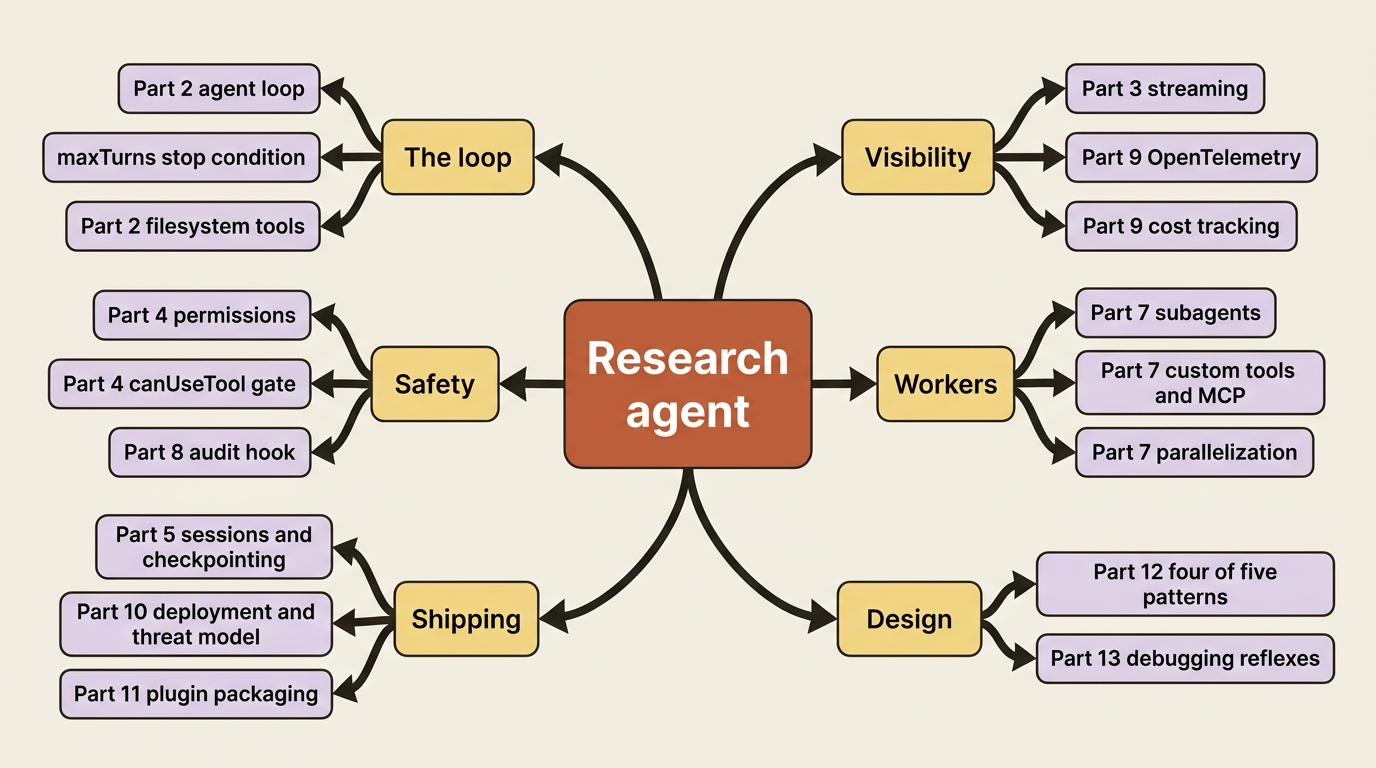
That is the real lesson. The primitives are general. A bug-fixer and a research agent look like different products, but underneath they are the same loop, the same delegation, and the same leashes, pointed at different work. Swap the researcher's search tool for a database query and the report for a financial summary, and you have an analyst. Swap it for a code-reading tool and you have an architecture reviewer. The template does not change; the tools and the prompt do.
You can now design, build, secure, deploy, and observe an agent that plans its own multi-step research, coordinates a team of workers, holds itself to a quality bar, and ships a cited report. More than that, you can explain, in precise vocabulary, exactly which patterns it uses and why. That was the whole point. From here, the only agent left to build is yours. Go build one that is not a toy.
This is Part 14 of "Building with the Claude Agent SDK," a 14-part guide to building production-ready AI agents.