
The Ten Errors You Will Actually Hit With the Claude Agent SDK
Most Claude Agent SDK bugs are configuration mistakes wearing a misleading error message, so the fastest way to debug is to start from the symptom and check the options you set before the run.
A field guide organized by symptom, not by feature. When something breaks in production, you do not know which subsystem failed. You only know what you are seeing, so this guide starts there.
In this article: You will learn the ten failures developers actually hit when building with the Claude Agent SDK, each one diagnosed by symptom rather than by feature. You will pick up two diagnostic reflexes that resolve a startling share of problems, and you will see why nearly every fix is a single configuration option. By the end you will debug agents the way experienced engineers do: from the symptom backward, not the stack trace forward.
Most guides to a tool teach you a feature and warn you about its traps along the way. That works while you are reading. It fails the moment something breaks in production, because production does not announce which feature failed. Your agent hands you an empty session, or a stream that stops short, or a tool the model can see but never calls. You do not think "ah, a checkpointing issue." You think "this is wrong, and I do not know why."
So this field guide inverts the usual order. It is organized by symptom, the thing you can actually observe, not by subsystem. You read it backward from what you are seeing. Each entry is three short parts: the symptom, the cause, and the fix.
There is a pattern underneath all ten, and it is worth stating up front because it changes how you read the rest. Almost every entry traces back to an option you set, or forgot to set, before the run, not to the line where the error finally surfaced. Claude Agent SDK debugging is mostly the work of recognizing configuration bugs that are wearing a misleading error message. Once you internalize that, the fixes below stop feeling like trivia and start feeling like a checklist.
Start here: two reflexes before you debug anything
Before any specific symptom, two diagnostic moves resolve a surprising share of problems. Reach for them reflexively, the way you reach for git status before you reach for anything else.
Inspect the system/init message. It is the first message of every run, and it reports what actually loaded: your plugins, your slash commands, and your MCP servers. Before you debug why a skill, plugin, or tool "is not working," confirm that it even loaded. Print plugins, slash_commands, and mcp_servers off that init message, and the answer is often staring back at you. The thing you are trying to use is not in the list. It never loaded. You have been debugging code that was never going to run.
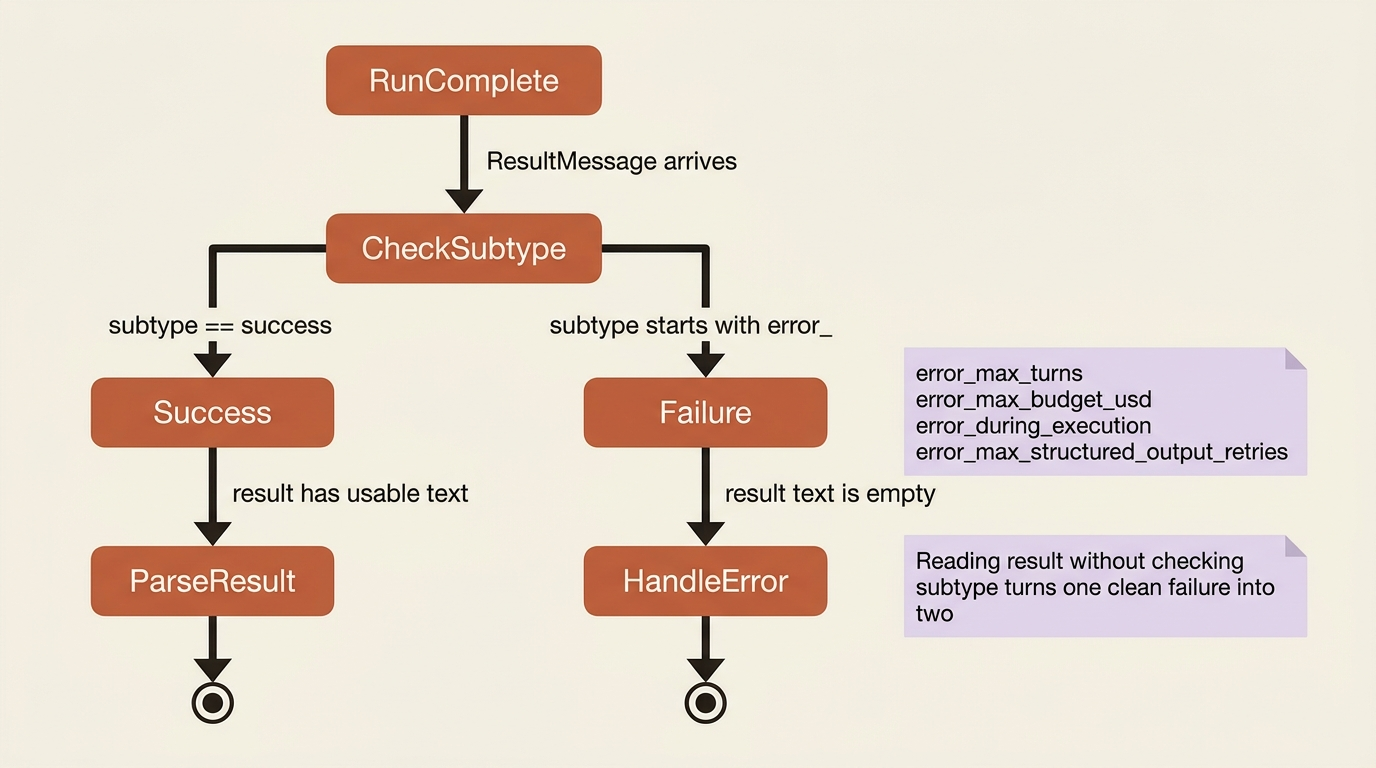
Check the ResultMessage subtype before reading the result. The result only carries usable output on subtype success. On error_max_turns, error_max_budget_usd, error_during_execution, or error_max_structured_output_retries, the result text is empty. You need to handle the failure, not parse a field that is not there. Reading result without checking subtype first is how one clean failure becomes a confusing second error stacked on top of it.
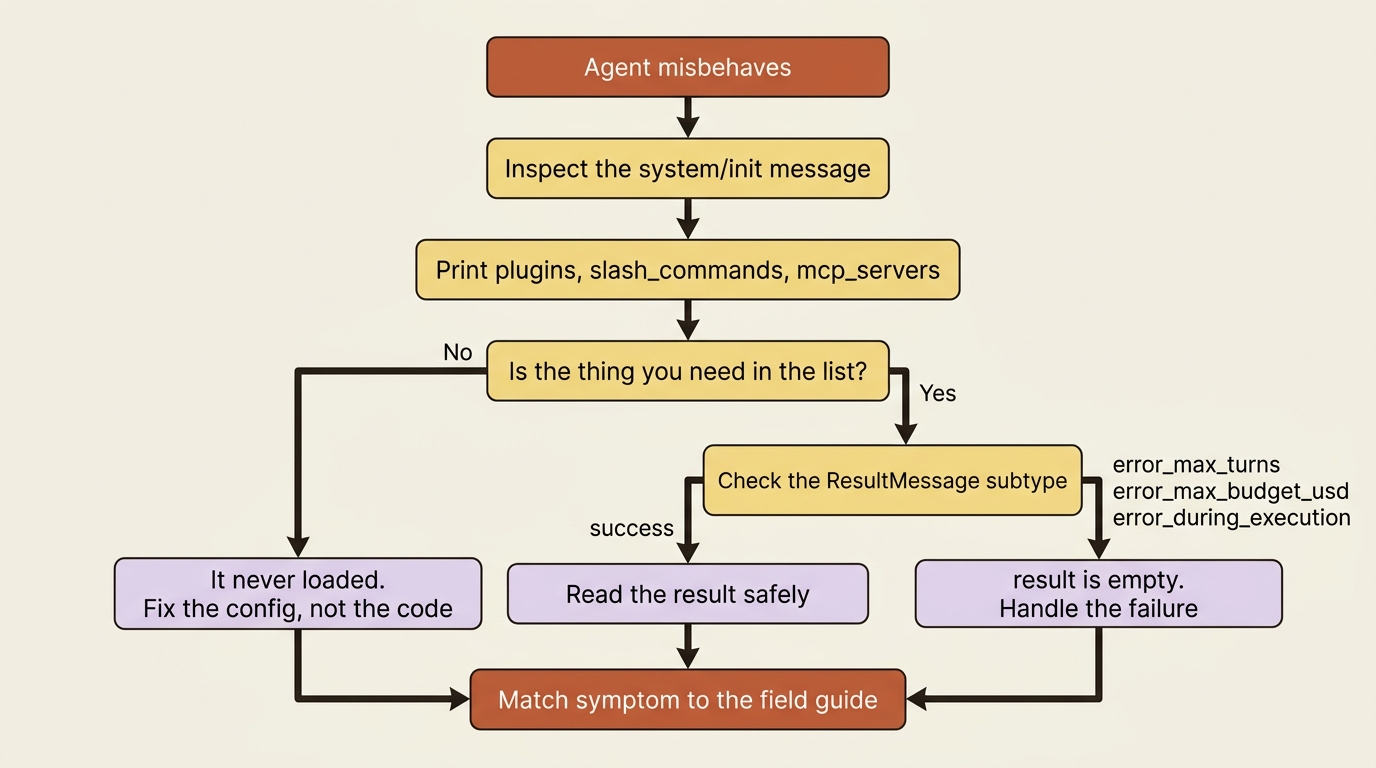
With those two reflexes in place, here are the ten symptoms.
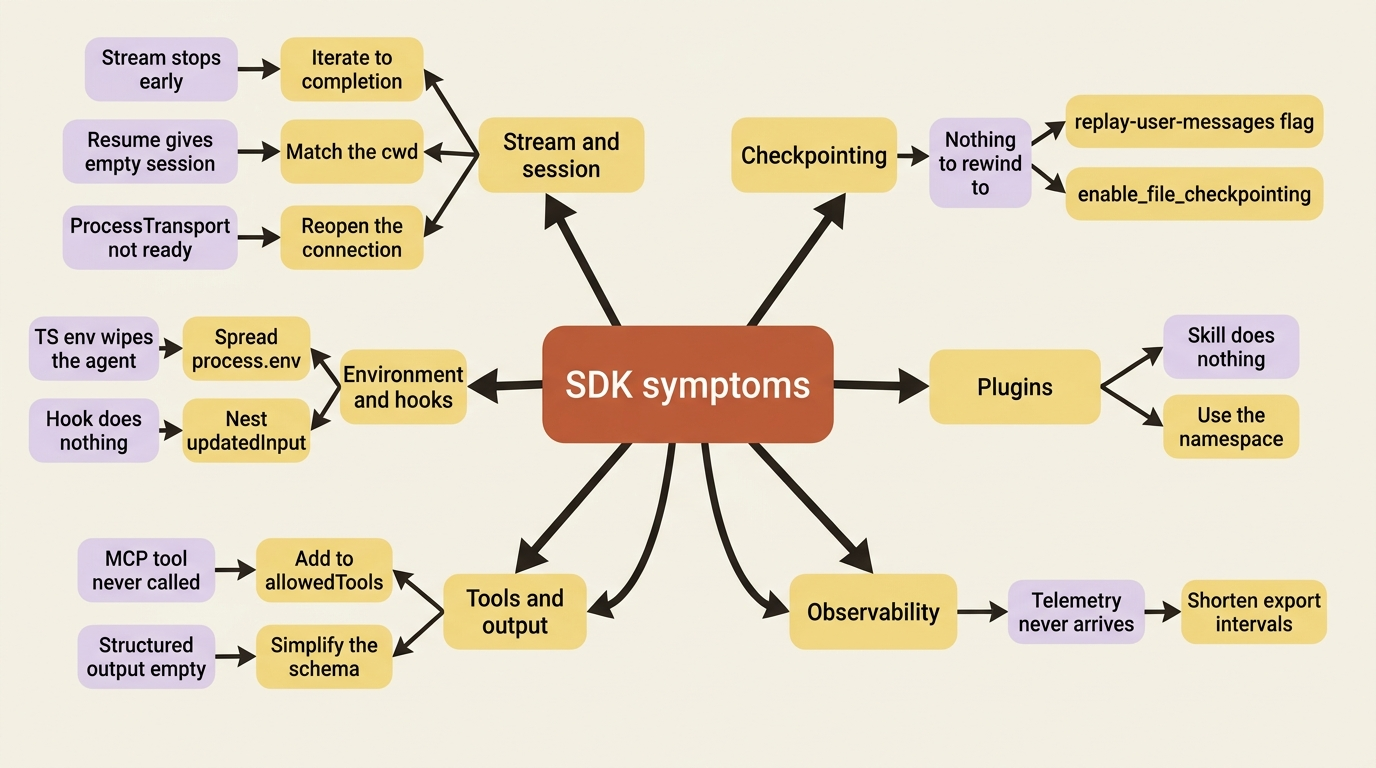
The symptom map
Here is the whole field guide at a glance. When something breaks, find the branch that matches what you are seeing, then read the matching entry below for the cause and the fix.
Symptom: the stream stops early or output gets truncated
You break out of the message loop the moment you see the ResultMessage, and cleanup gets cut off, or trailing events vanish.
Cause. A few trailing system events, a prompt suggestion for instance, can arrive after the result message. Breaking early leaves the transport in a bad state.
Fix. Iterate the stream to completion. Do not break on the result message; let the loop finish naturally. If you need the result's data, capture it into a variable and keep iterating.
result = None
async for message in query(prompt="...", options=options):
    if isinstance(message, ResultMessage):
        result = message          # capture, do not break
# loop has finished cleanly; now use result
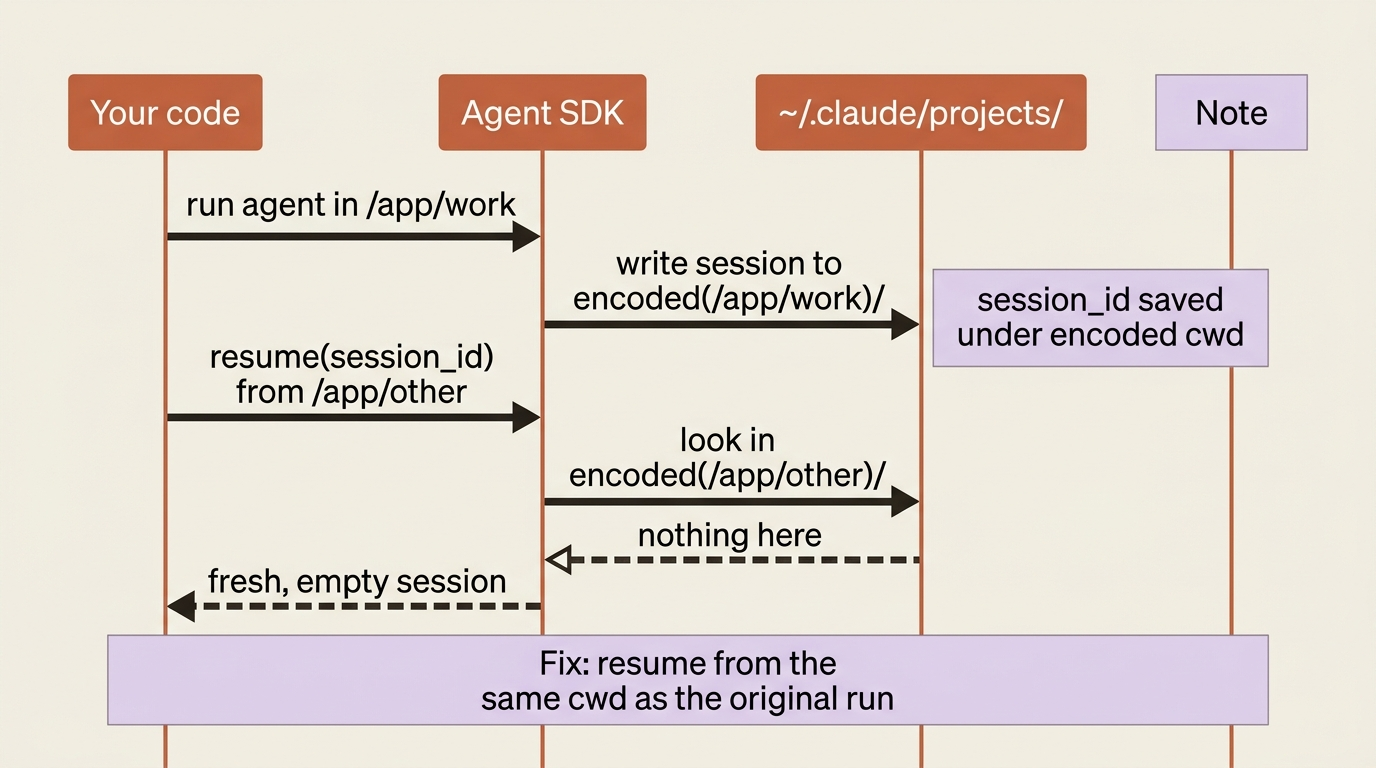
Symptom: resume gives you a fresh, empty session
You pass a valid session_id to resume, and instead of your history you get a blank conversation, as if the session never existed.
Cause. Almost always a mismatched working directory. Sessions live under ~/.claude/projects/<encoded-cwd>/, where the path is your absolute cwd with non-alphanumeric characters turned to dashes. Resume from a different directory, and the SDK looks in the wrong folder. It finds nothing, so it gives you a new session.
Fix. Run the resume from the same cwd as the original run. Then confirm that the session file actually exists on that machine. Session files are local to the host that created them, so a session created in one container will not resume in another unless you have persisted it yourself.
Symptom: "ProcessTransport is not ready for writing"
You call rewind_files(), or otherwise write to the session, and hit this exact error.
Cause. You called it after the message loop finished. The connection to the CLI process closes when the loop completes, so there is nothing left to write to.
Fix. Reopen the connection before rewinding. Resume the session with an empty prompt, then call rewind_files() on that fresh query and break. Alternatively, rewind mid-stream while you are still iterating, in which case you do not even need to recapture the session ID.
Symptom: checkpointing has nothing to rewind to
You enabled checkpointing, but message.uuid is missing on your user messages, so you have no checkpoint IDs to pass to rewind. Or you get "No file checkpoint found for message."
Cause. Two different setup omissions, and they look similar but are not. Missing UUIDs mean you did not set the replay-user-messages flag through extra_args (extraArgs), which is what makes checkpoint identifiers appear in the stream. "No checkpoint found" means checkpointing was not enabled on the original session, the one you are now trying to rewind.
Fix. Set the flag to receive UUIDs, and make sure file checkpointing was on for the run you are trying to rewind.
options = ClaudeAgentOptions(
    enable_file_checkpointing=True,
    extra_args={"replay-user-messages": None},   # TS: extraArgs: { "replay-user-messages": null }
)
Both are pre-run options. Neither can be fixed at rewind time. One more thing worth knowing: checkpointing tracks Write, Edit, and NotebookEdit only, so changes that a Bash command made are not captured.
Symptom: an MCP tool is visible but never called
The agent clearly knows the tool exists. You can see it in the init message's mcp_servers. But it never actually invokes it.
Cause. No permission. MCP tools require explicit allowedTools permission, and permission_mode="acceptEdits" does not cover them. That mode only auto-approves file edits and filesystem Bash commands.
Fix. Add the tool, or a wildcard, to allowedTools. The wildcard mcp__servername__* approves every tool from that server. Reach for the wildcard rather than bypassPermissions, which would work but also drops every other safety prompt. Remember the naming convention: mcp__<server>__<tool>.
options = ClaudeAgentOptions(
    allowed_tools=["mcp__buggy_shop__*"],   # every tool from the buggy_shop server
)
Symptom: structured output comes back empty
You asked for JSON via output_format, but structured_output is empty, and there is no data to parse.
Cause. The model could not produce valid JSON matching your schema within its retry limit, so the result has subtype error_max_structured_output_retries. Usually the schema is too complex, too deeply nested, or has too many required fields. Sometimes the task itself is ambiguous.
Fix. Check the subtype before reading the output, and have a fallback ready: retry with a simpler prompt, or drop to unstructured text. To prevent the failure in the first place, keep schemas focused, make fields optional when the information might not be available, and write a clear prompt. Also recall that structured output never streams. It only lands at the end, in the result message.
Symptom: telemetry never reaches your collector
You configured OpenTelemetry, the agent runs fine, but nothing shows up in Honeycomb, Datadog, or your collector, especially for short tasks.
Cause. The CLI batches telemetry and exports on an interval: metrics every 60 seconds, traces and logs every 5. A short run finishes, and the process exits before the interval fires. The data is dropped before it is ever sent.
Fix. Shorten the export intervals so data flushes while the task is still running.
export OTEL_METRIC_EXPORT_INTERVAL="1000"   # one second
export OTEL_LOGS_EXPORT_INTERVAL="1000"
export OTEL_TRACES_EXPORT_INTERVAL="1000"
There is a related trap here. Never set console as an exporter through the SDK. The SDK uses standard output as its message channel, and a console exporter corrupts it. Point at a local collector or Jaeger instead.
Symptom: the TypeScript agent will not start with a custom env
You pass a custom env, for telemetry, credentials, or anything else, in TypeScript, and the agent fails to start at all.
Cause. In TypeScript, options.env replaces the inherited environment entirely. Without PATH, your API key, and the rest, the child process cannot launch. Python merges env on top of the inherited environment, so Python does not have this failure.
Fix. Spread the existing environment first.
const options = {
  env: { ...process.env, ...yourVars },   // spread first, then add
};
This one line is the entire difference between a working and a dead agent in TypeScript.
Symptom: a hook runs but silently does nothing
Your PreToolUse hook fires. You can log from it. But the input rewrite or decision you returned has no effect, and no error appears.
Cause. Field placement. updatedInput belongs inside hookSpecificOutput, not at the top level of the returned object, and when you set it you must also set permissionDecision: "allow" in the same object. Put updatedInput at the top level, and the tool just runs with the original input, exactly as if your hook had returned nothing.
Fix. Nest it correctly, and pair it with permissionDecision: "allow".
return {
  hookSpecificOutput: {
    hookEventName: "PreToolUse",
    permissionDecision: "allow",
    updatedInput: { ...input, path: safePath },   // nested, not top-level
  },
};
Always return a new input object rather than mutating the one you received. Two more hook traps from the same family: in Python, SessionStart and SessionEnd are not available as callback hooks, only as shell-command hooks, and a UserPromptSubmit hook that submits another prompt can trigger itself in a recursive loop. Keep those hooks to cheap synchronous work.
Symptom: a plugin loads but its skill does nothing
The plugin shows up in the init message, but invoking its skill as a slash command does nothing.
Cause. The namespace. Plugin skills are addressed as plugin-name:skill-name. Invoke /triage-failing-test without the plugin prefix, and that is simply not the skill's name, so nothing happens.
Fix. Use the full namespaced form, /buggy-shop-tools:triage-failing-test, and verify that it appears that way in the init message's slash_commands. Autonomous invocation by the model works without you typing the namespace; this only bites when you call it as a slash command. If the plugin itself did not load, check that the path points at the plugin root directory, the one containing .claude-plugin/, not at the manifest file.
Two more worth knowing
A couple of setup-time traps do not fit a runtime symptom but still cost real time.
A thinking.type.enabled API error on your first run means your SDK version predates Opus 4.7 support. Upgrade the package, and it clears.
Streaming "broke" after you turned on extended thinking. It did not break. Setting the thinking-token option (max_thinking_tokens / maxThinkingTokens) disables partial messages by design. Drop the thinking option, or accept per-turn complete messages for that run.
One Python-specific shape is worth remembering across all of these. total_cost_usd and usage are typed as optional and can be None on error paths. Guard before formatting them, or a failed run throws a second, more confusing error on top of the first.
Do this today
You do not need to wait for a failure to put this guide to work. Spend twenty minutes today wiring these reflexes into your code.
- Print the init message on every run, at least in development. Log
plugins,slash_commands, andmcp_servers. Future-you debugging a missing tool will thank present-you. - Add a subtype guard before every place you read
result. Branch onsuccessversus theerror_subtypes so a failed run never throws a second error on top of the first. - Audit your
allowedToolsagainst your MCP servers. Any tool the model should be able to call needs an explicit entry or amcp__server__*wildcard.acceptEditsdoes not cover MCP tools. - If you build agents in TypeScript, grep your code for
env:. Every customenvmust spreadprocess.envfirst, or the agent will not start. - Set short OTEL export intervals in any environment that runs short tasks. One second flushes telemetry before the process exits.
Configuration bugs in disguise
The pattern across this whole guide is a single idea: the SDK's error messages tend to surface far from their cause, because the cause is almost always an option you set, or skipped, before the run.
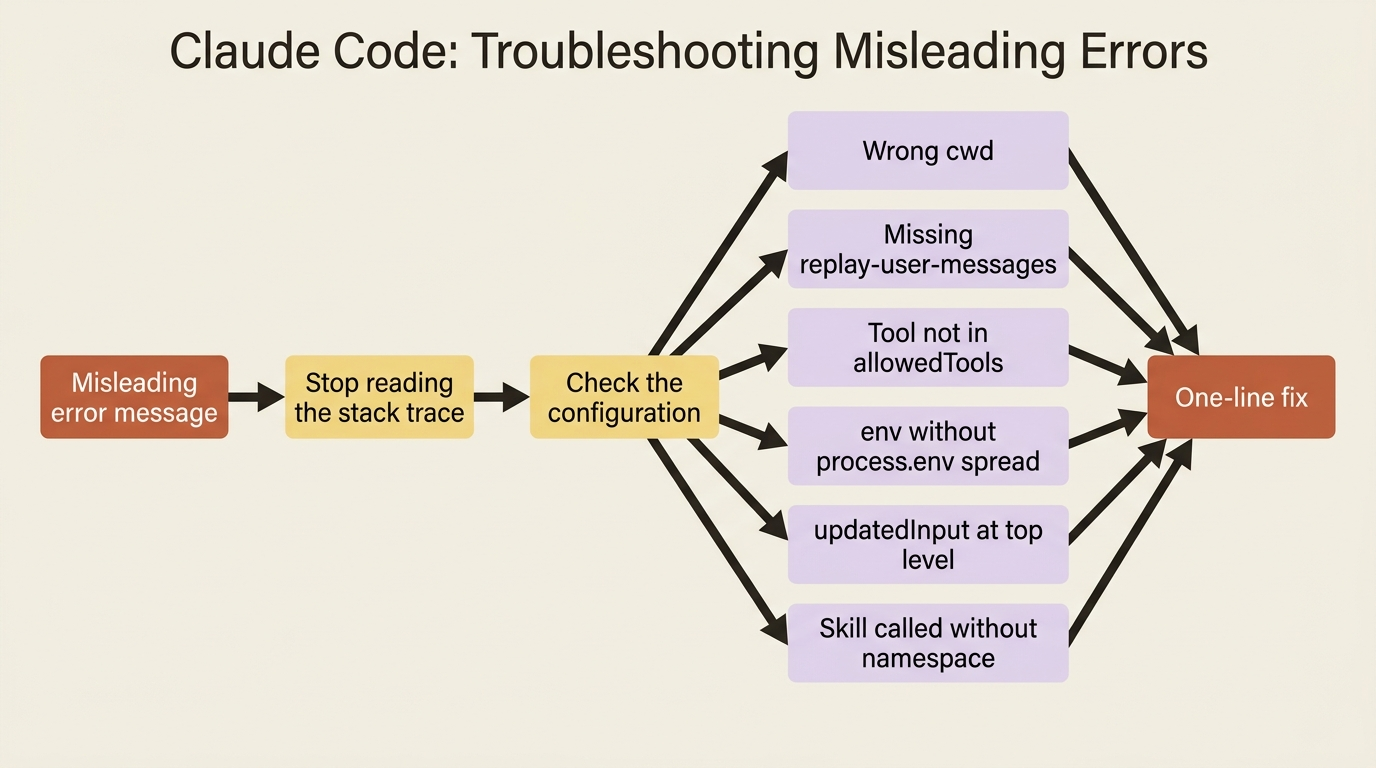
So the fastest debugging reflex is counterintuitive: stop reading the stack trace, and start checking configuration. Inspect the init message to see what loaded. Check the result subtype before trusting the output. Then match your symptom to the list above, and the fix is nearly always a single option. The right cwd. The replay-user-messages flag. A wildcard in allowedTools. A spread of process.env. A correctly nested updatedInput. A skill's namespace. Ten symptoms, ten one-line fixes, and every one of them a configuration bug in disguise.
That is the whole craft. The stack trace tells you where the error surfaced. The configuration tells you why. Learn to read the second one first, and an agent that breaks in production stops being a mystery and becomes a checklist.
This is Part 13 of "Building with the Claude Agent SDK," a 14-part guide to building production-ready AI agents.