
Your First Claude API Call, and the One Idea That Explains Everything Downstream
The Claude API is stateless by design; once you internalize that every request is the whole story, conversations, tools, caching, and production reliability stop surprising you.
The Claude API forgets every conversation the instant it ends. Once you understand why that is a feature and not a bug, the rest of the API stops surprising you.
In this article: You will make your first call to the Claude API in Python, see the exact JSON it sends and receives, learn the three required parameters that cannot be skipped, and walk away with the one mental model that makes every later feature, from multi-turn chat to tool use to production retries, fall into place: the Claude API is stateless, every request is the whole story, and the conversation is yours to own.
You make your first call to the Claude API and it works. You ask a question, you get a thoughtful answer, and you feel like you have built something. Then you make a second call to follow up, and Claude responds as though the first call never happened. No memory of your name, your question, or anything you just said.
This is the moment most people quietly assume they did something wrong. You did not. The Claude API is stateless by design, and that single fact explains more about how it behaves than any other thing you will learn. Get it now, in your first ten minutes, and everything downstream falls into place instead of fighting you: conversations, tools, caching, and production reliability.
A quick note on language before we start. Examples lead in Python because the anthropic SDK is the most used in tutorials and keeps the lesson tight. The API is the same JSON over HTTP in any language, so when the TypeScript or curl version teaches something different you will see it. Otherwise Python carries the lesson.
What "stateless" actually means
Every request you send is the whole story. The API holds nothing between calls.
When you call the Claude API, you send a request, the model generates a response, and the connection is done. There is no session sitting on a server with your conversation in it. There is no thread quietly accumulating context. The next request you send starts from absolute zero, knowing only what you put in that request.
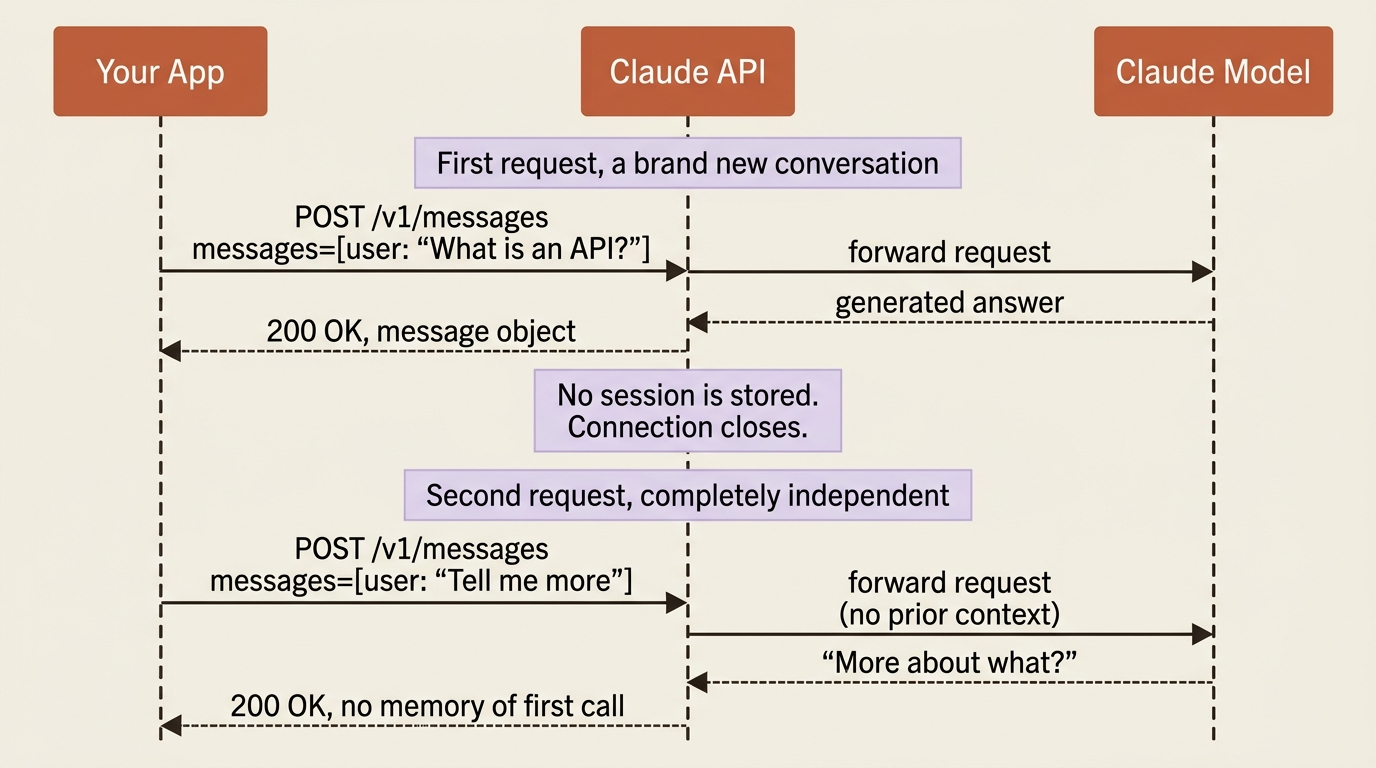
This is different from sitting in a chat window, where the product remembers your conversation for you. At the API level, that remembering is your job. If you want Claude to know what was said a moment ago, you resend it.
Why design it this way? Because statelessness is what makes the API predictable, scalable, and easy to reason about. Every request is independent, so it can be routed to any available server, retried safely, and load-balanced without coordination. The cost is that you, the developer, own the conversation. The benefit is that nothing surprising is hiding on a server you cannot see. Once you internalize that the request is the whole story, the "why did it forget" confusion disappears for good.
What you need before the first call
You need three things: a Console account, an API key, and the SDK installed.
First, create an account at the Claude Console and generate an API key from your account settings. Treat the key like a password. It goes in an environment variable, never in your source code, and never in a URL.
export ANTHROPIC_API_KEY="your-key-here"
Then install the official Python SDK:
pip install anthropic
The SDK is worth using from day one. It manages the required headers for you, handles request formatting and timeouts, and gives you typed responses and built-in retry logic. You can call the raw HTTP endpoint with curl or any HTTP client, and we will look at that shape in a moment so you understand what the SDK is doing. For real code, though, the SDK saves you from a category of small mistakes.
The smallest call that works
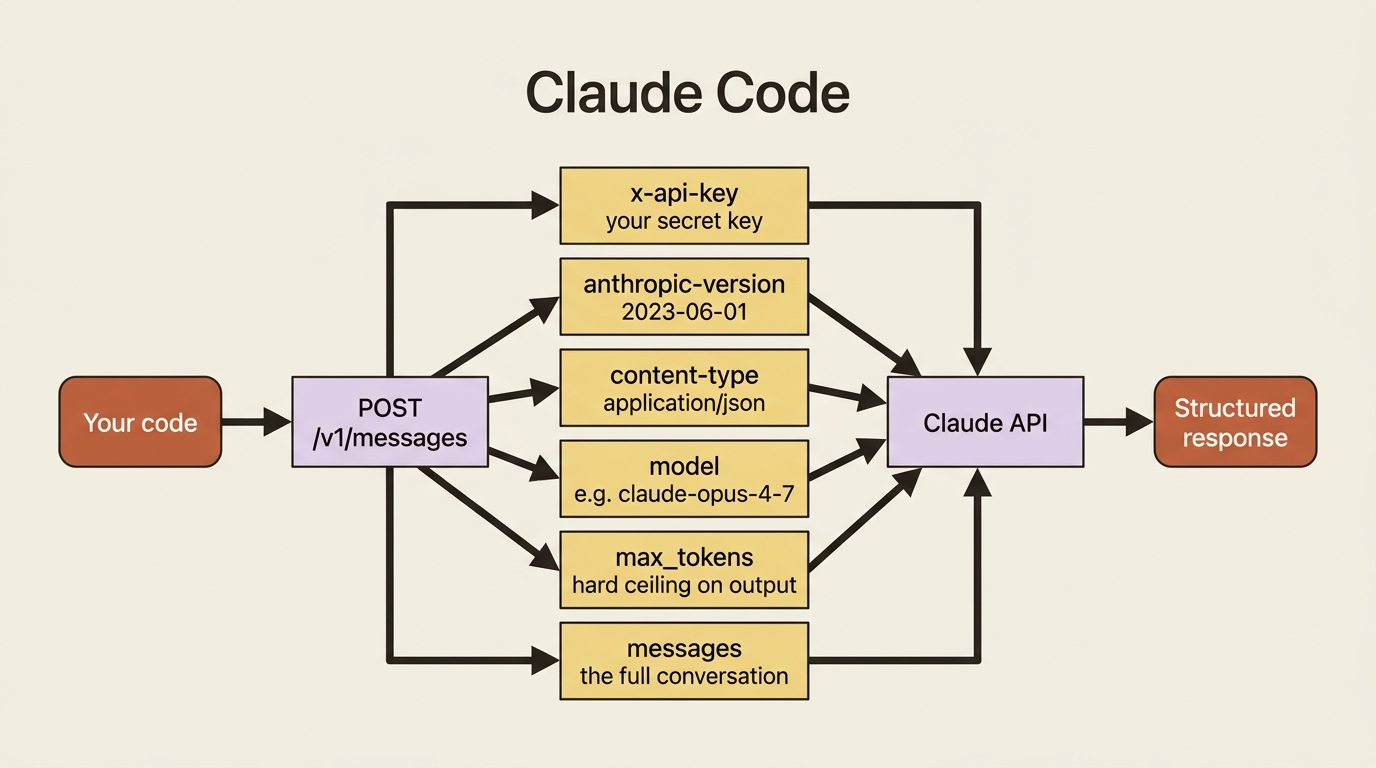
A valid request needs exactly three things: model, max_tokens, and messages.
Here is a complete first call. It asks Claude one question and prints the answer.
import anthropic

client = anthropic.Anthropic()  # reads ANTHROPIC_API_KEY from the environment

message = client.messages.create(
    model="claude-opus-4-7",
    max_tokens=1024,
    messages=[
        {"role": "user", "content": "In one sentence, what is an API?"}
    ],
)

print(message.content[0].text)
Run it, and you get a one-sentence answer. Three parameters did the work. model picks which Claude you are talking to. messages is the conversation so far, here a single user turn. Finally, max_tokens caps how long the response can be.
That last parameter deserves attention because it is the first thing that bites people.
Gotcha. max_tokens is required, and the request fails without it. It is a hard ceiling on output length, not a gentle suggestion, so if you set it too low the response gets cut off mid-sentence. Set it generously for the kind of output you expect: a short classification needs little, and a long draft needs a few thousand. The anthropic-version header is mandatory too, but the SDK sends it for you, which is one more reason to use the SDK.
What comes back
The response is a structured object, not a string. The text is one field among several worth knowing.
When you call print(message.content[0].text) you are reaching into a richer object. Here is roughly what the API returned, trimmed for readability:
{
  "id": "msg_01XFD...",
  "type": "message",
  "role": "assistant",
  "content": [
    {"type": "text", "text": "An API is a defined set of rules that lets..."}
  ],
  "model": "claude-opus-4-7",
  "stop_reason": "end_turn",
  "usage": {
    "input_tokens": 14,
    "output_tokens": 27
  }
}
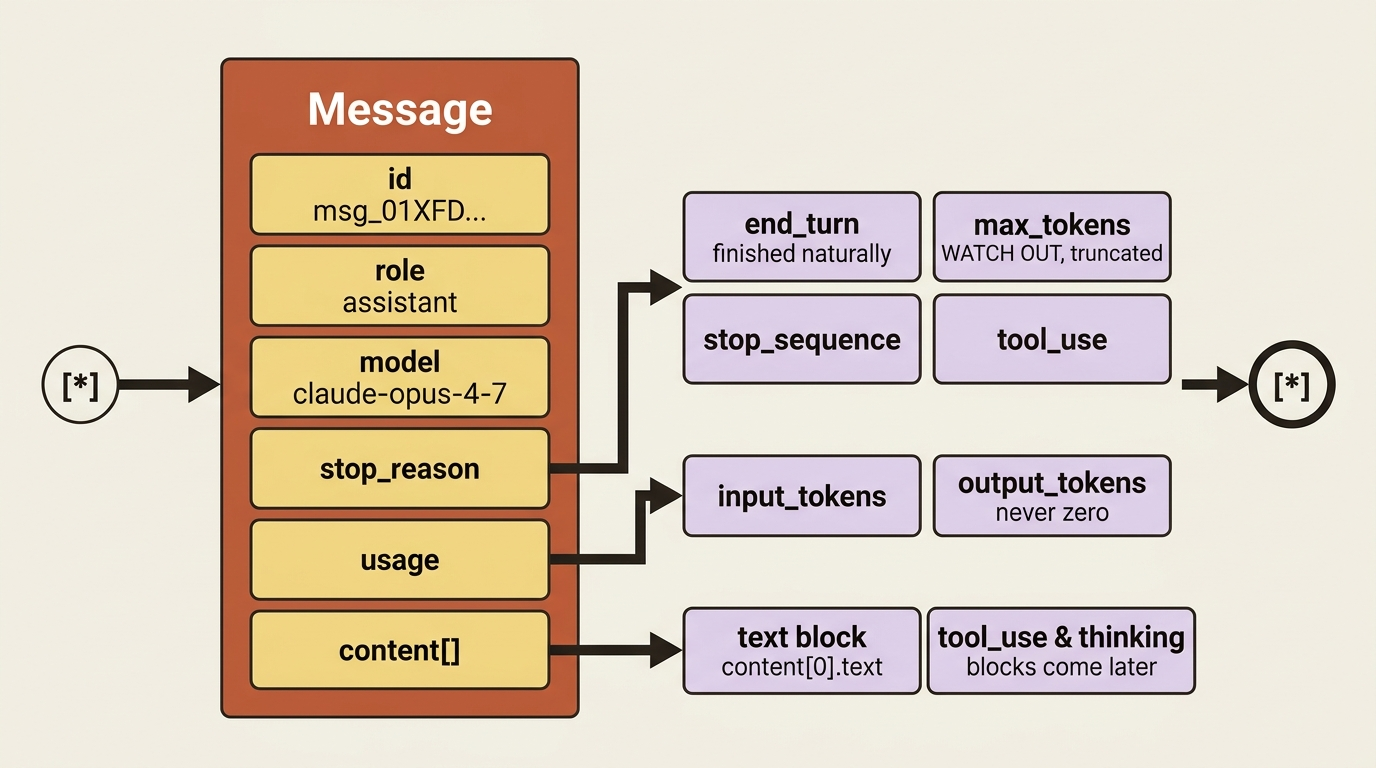
Three fields are worth knowing on day one.
content is an array of blocks, not a plain string. Today it holds one text block, which is why you index content[0].text. It is an array because later it can hold more than text: tool-use requests, thinking blocks, and other block types you will meet down the line. Reading it as a list now means your code will not break when that day comes.
stop_reason tells you why Claude stopped talking. The common value is end_turn, meaning the model finished naturally. The one to watch for is max_tokens, which means you hit your output ceiling and the response was truncated. Other values like stop_sequence and tool_use show up once you use those features. Checking stop_reason is how you tell a complete answer from a clipped one.
usage reports input_tokens and output_tokens. This is what you are billed and rate-limited on, and it is the foundation of cost control. One small surprise to file away: output_tokens is never zero, even for an empty response, because of how the API parses the model's output into the response.
The same call, without the SDK
The SDK is a convenience. The API is just JSON over HTTP. Seeing the raw shape demystifies everything above.
It helps to see what the SDK is doing for you. Here is the identical request as a raw HTTP call:
curl https://api.anthropic.com/v1/messages \
  --header "x-api-key: $ANTHROPIC_API_KEY" \
  --header "anthropic-version: 2023-06-01" \
  --header "content-type: application/json" \
  --data '{
    "model": "claude-opus-4-7",
    "max_tokens": 1024,
    "messages": [
      {"role": "user", "content": "In one sentence, what is an API?"}
    ]
  }'
That is the whole API at its core: a POST to /v1/messages, three headers, and a JSON body with the same three fields you used in Python. The x-api-key header carries your key, anthropic-version pins the API version so your integration does not shift under you, and content-type says you are sending JSON. The SDK attaches all three automatically. Everything else in this series is variations on this one request.
Choosing a model
The model string is a deliberate choice between intelligence, speed, and cost.
In the examples above the model string was claude-opus-4-7, the most capable model, suited to hard reasoning and long-running agentic work. But you are not locked into one. The family spans a spectrum, and you pick per request based on what the task needs.
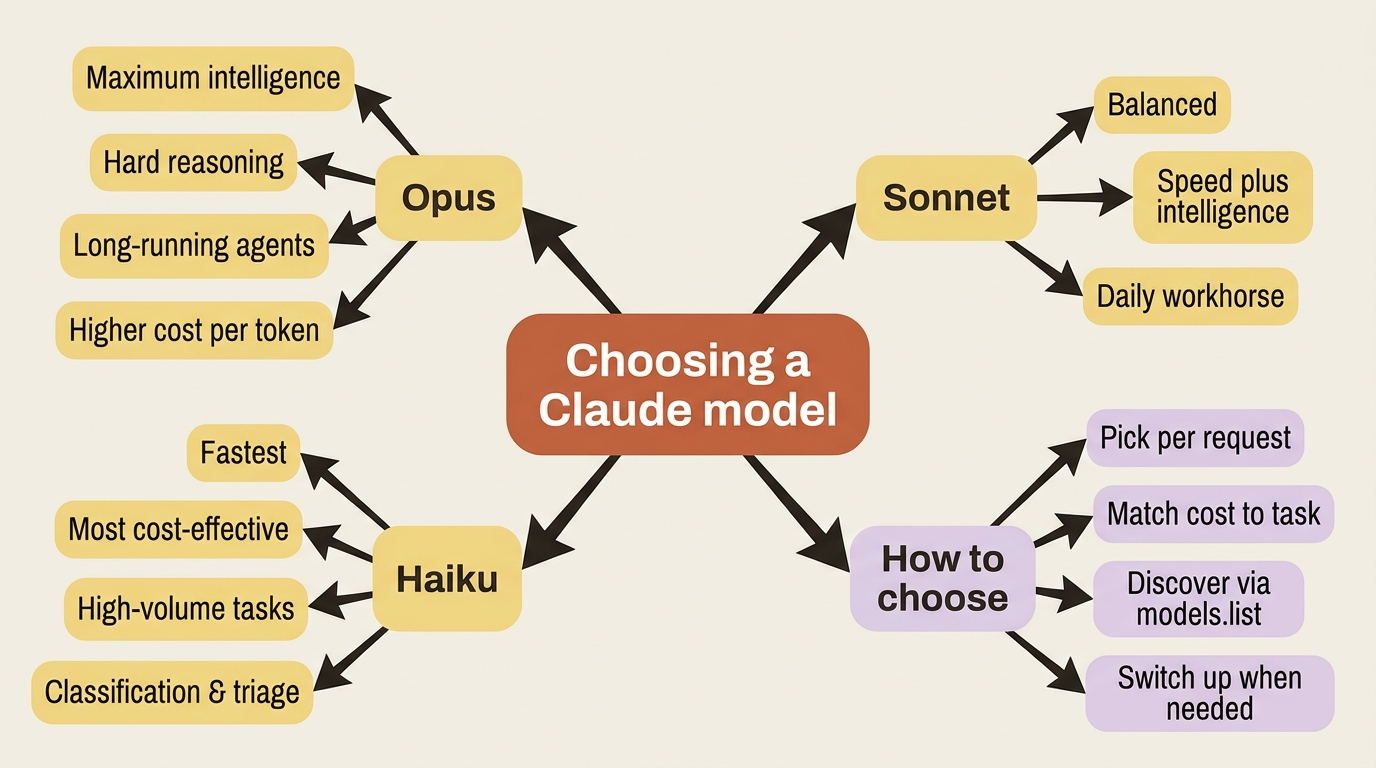
As a rough guide, Opus models favor maximum intelligence, Sonnet models balance speed and intelligence, and Haiku models are the fastest and most cost-effective. For a high-volume, simple task like sorting support emails, a smaller model is often the smarter call, and you can always reach for a larger one when a request genuinely needs it.
Rather than hard-coding a model string from memory, you can ask the API what is currently available with the Models endpoint:
import anthropic

client = anthropic.Anthropic()

for model in client.models.list().data:
    print(model.id, "-", model.display_name)
Each entry includes the model id you pass to messages.create, a human-readable display_name, and useful details like max_input_tokens, which is the size of the context window, and the maximum max_tokens the model will produce. When a new model ships or an old one is deprecated, this list is the source of truth, so your code can discover models instead of trusting a string you wrote months ago.
A running example: a support-triage service
Across this series we build one thing, and it grows over time. The project is a customer-support triage service. It takes an inbound support email, classifies it, and later drafts a reply and looks up order status by calling real tools. We start it here with the simplest possible version: one email in, one classification out.
import anthropic

client = anthropic.Anthropic()

email = """
Subject: Where is my order??
I ordered a blue jacket two weeks ago (order #48810) and it still
hasn't shipped. This is really frustrating. Can someone help?
"""

message = client.messages.create(
    model="claude-haiku-4-5",
    max_tokens=256,
    messages=[
        {
            "role": "user",
            "content": f"Classify this support email as one of: "
                       f"BILLING, SHIPPING, TECHNICAL, or OTHER. "
                       f"Reply with only the category.\n\n{email}",
        }
    ],
)

print(message.content[0].text)   # SHIPPING
print(message.stop_reason)       # end_turn
print(message.usage.output_tokens)
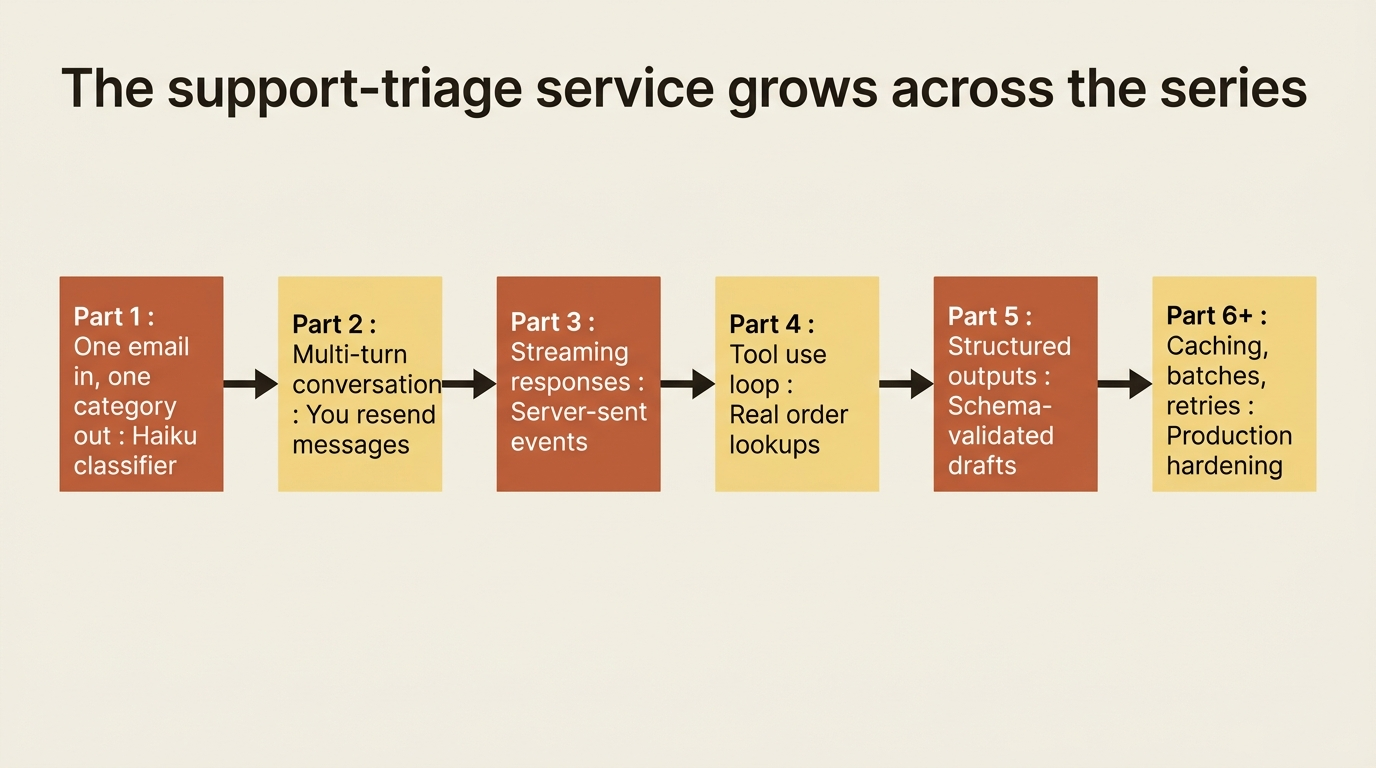
Notice the deliberate choices. The model is claude-haiku-4-5, because classifying an email is exactly the kind of fast, high-volume task a smaller model handles well. The max_tokens is a low 256, because the answer is one word and there is no reason to allow more. The request is also fully self-contained: the email, the instruction, and the list of categories all travel in that single messages array, because the API will remember none of it afterward. That last point is not a limitation here. It is the whole design, and the next part turns it into an advantage by reconstructing real multi-turn conversations on top of it.
Do this today
Spend twenty minutes turning the words above into running code. The investment pays off across every later feature.
- Create an API key in the Claude Console and put it in an environment variable named
ANTHROPIC_API_KEY. Never paste it into source code. - Install the SDK with
pip install anthropicand run the three-linemessages.createexample. Confirm you get a response. - Print the whole response object, not just
content[0].text. Look atstop_reasonandusage. The fields you are seeing are the ones you will rely on for the rest of the series. - Call
client.models.list()once and write down the current Opus, Sonnet, and Haiku IDs. This is the antidote to copy-pasting a stale model name from somewhere on the internet. - Switch the model in your first call from Opus to Haiku and back. Notice the difference in latency and in
output_tokens. That intuition is what tells you which model to reach for next time.
The one idea that makes everything else click
You have made a real call, read a structured response, seen the raw HTTP underneath it, chosen a model on purpose, and started a project we will carry through the series. More importantly, you have the one idea that makes the rest coherent: the Claude API is stateless, every request is the whole story, and the conversation is yours to own.
That raises an obvious question. If the API forgets everything, how do you build a chatbot that remembers? How do you have a back-and-forth that actually holds together across turns? That is not a workaround you bolt on later. It is a pattern you build directly on top of the stateless request.
So here is the question to sit with before the next article: if a single request is the whole story, what would you have to put in the next request to make Claude pick up exactly where it left off?
This is Part 1 of "Building with the Claude API," an eleven-part guide to taking a developer from a first messages.create call to a hardened, observable, production-deployed integration.