
Your Chatbot's Memory Is a Lie. Here Is What Is Really Going On.
The Claude API has no server-side memory, so multi-turn chat is an array you grow and resend on every call. Once you see that, every chatbot makes more sense and the stateless model stops feeling like a limitation.
The Claude API does not remember a single word between calls. The "conversation" you feel is an array your code grows by hand and resends, in full, on every turn. Once you see that one trick, every chatbot you have ever used makes more sense.
In this article: You will learn the single most important pattern in the Claude API: a multi-turn conversation is not a session living on a server, it is a
messagesarray you assemble and resend on every call. We cover how the array alternates between user and assistant roles, where the system prompt actually lives, how to constrain answers by prefilling an assistant turn, whystop_reasonis a habit and not a curiosity, and how to wire it all into a small triage service that asks before it answers.
You opened the Anthropic SDK, sent your first request, and Claude replied. So far, so easy. Then you sent a follow-up and it acted like you had never spoken before. You added more turns, the response began to wander, and somewhere around message ten you noticed the bill climbing on what felt like the same conversation. Welcome to the moment every developer has on the Claude API. The thing you assumed was a conversation is not one.
The reason is almost embarrassingly simple, and it is the single most important pattern in this series. The Claude API is stateless. Every request is the entire story, and the model remembers nothing once the response is sent. So the Claude API conversation history you feel when you chat with an AI product is not stored on a server somewhere. It is an array your code grows, one turn at a time, and resends in full on every request. Learn to do that yourself and the stateless API stops being a limitation. It becomes a clean, predictable building block.
This article turns statelessness from a gotcha into a tool.
The mental model: a conversation is array reconstruction
To continue a conversation, you resend the entire history plus the new turn, every single time. There is no session. There is no thread ID. There is only the array.
You send a messages array. Claude replies. You append Claude's reply to the array as an assistant turn, append the user's next message as a user turn, and send the whole thing again. The array grows with each exchange, and because you are always sending the complete history, Claude always has the full context to respond to.
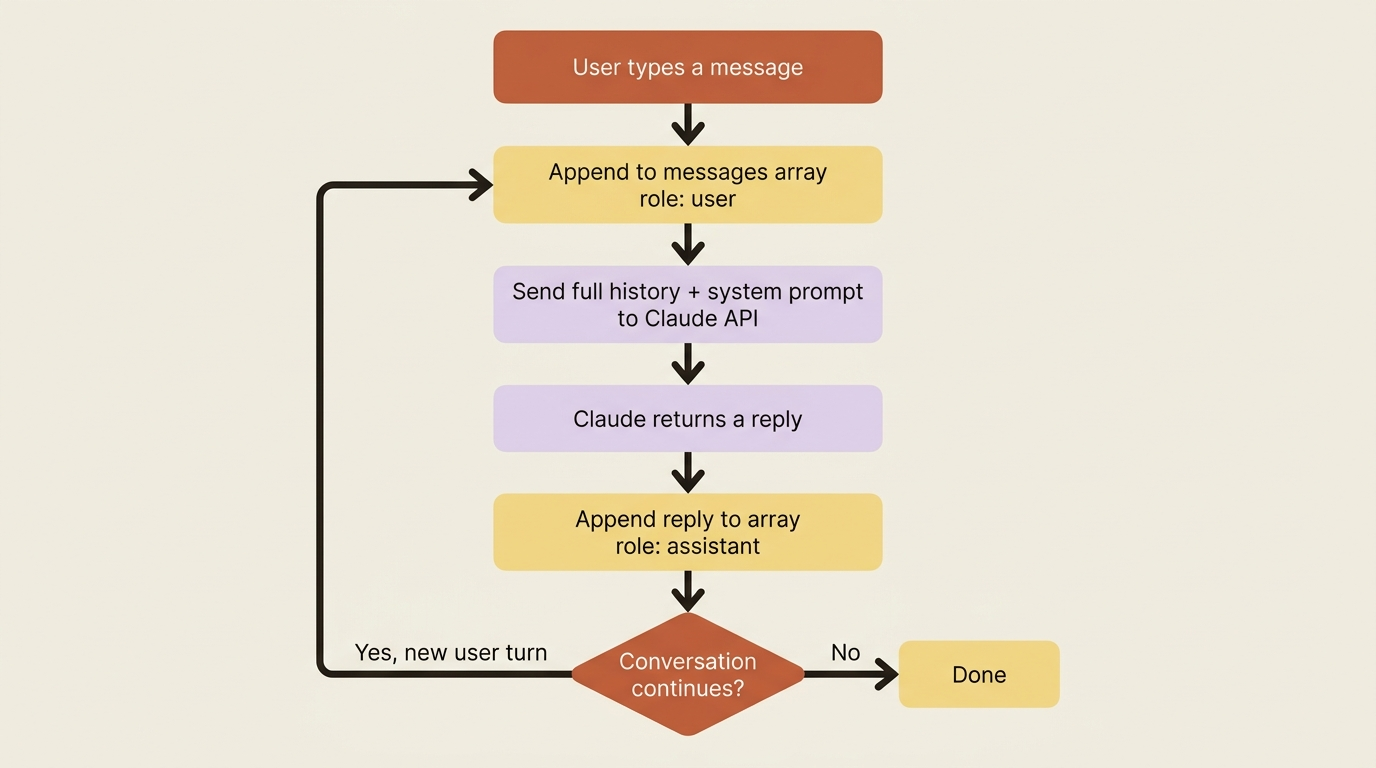
The messages array is built from objects, each with a role and content. The role is either user or assistant. A conversation with some history looks exactly like the transcript you would expect:
[
  {"role": "user", "content": "Hello there."},
  {"role": "assistant", "content": "Hi, I'm Claude. How can I help you?"},
  {"role": "user", "content": "Can you explain LLMs in plain English?"}
]
Notice what is happening structurally. The array alternates: user, assistant, user. The final turn is from the user, and that is the prompt the model is responding to now. Everything before it is context you are replaying so the model knows what was already said. There is no magic and no hidden state. The transcript is the memory.
Building a real multi-turn loop
Appending the response to your history and resending is the entire mechanism. A few lines of Python do it.
Hold a short conversation across two turns and watch the array grow.
import anthropic

client = anthropic.Anthropic()

# The conversation history starts with the user's first message.
messages = [
    {"role": "user", "content": "I'm planning a trip to Japan. Any advice?"}
]

# First call.
response = client.messages.create(
    model="claude-sonnet-4-6",
    max_tokens=1024,
    messages=messages,
)

# Append Claude's reply to the history as an assistant turn.
messages.append({"role": "assistant", "content": response.content[0].text})

# Now the user follows up. Append their new turn.
messages.append({"role": "user", "content": "When is the best time to visit?"})

# Second call sends the FULL history, so Claude knows we mean Japan.
response = client.messages.create(
    model="claude-sonnet-4-6",
    max_tokens=1024,
    messages=messages,
)

print(response.content[0].text)
The second response answers "when is the best time to visit Japan," even though the word "Japan" never appears in the follow-up question. That works for exactly one reason: the first exchange is still in the messages array you sent. Drop that history, and the model has no idea what country you mean, because nothing on the server remembers it.
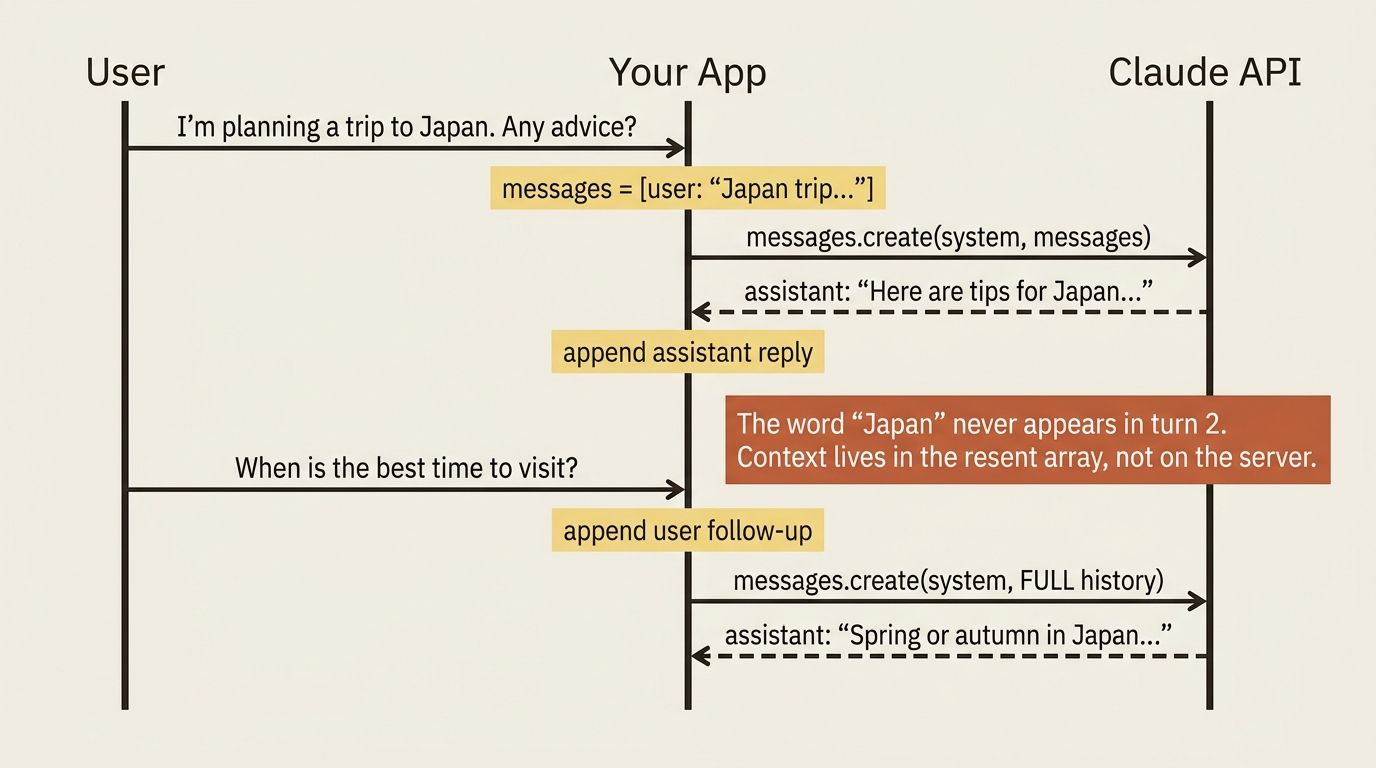
The append-and-resend rhythm is the chatbot. Every conversational AI you have used is doing this under the hood.
One consequence is worth saying out loud now, because it shapes everything later in the series: the array only grows. A long conversation means a large array, which means more input tokens on every call, which means rising cost and latency as the chat goes on. That is not a flaw to fix; it is a tradeoff to manage, and prompt caching, token counting, and conversation pruning are the levers for it.
The system prompt: setting the rules, not joining the conversation
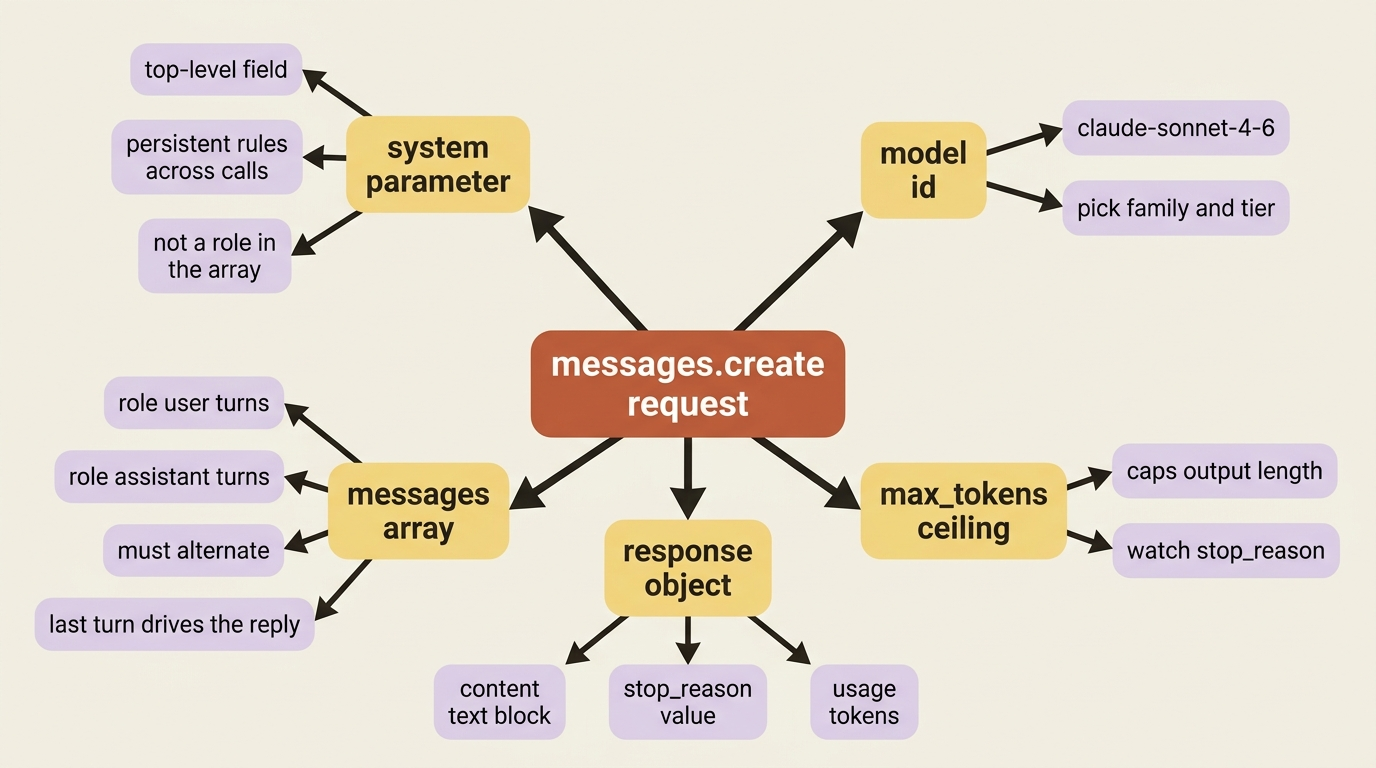
The system prompt is a top-level parameter that shapes behavior, not a message in the array.
So far the conversations have been bare exchanges. You usually want to set the ground rules first: who the model is, how it should behave, what format to use. That is the system prompt, and on the Claude API it lives in its own top-level system parameter, separate from the messages array.
response = client.messages.create(
    model="claude-sonnet-4-6",
    max_tokens=1024,
    system="You are a concise travel assistant. Answer in two sentences or fewer.",
    messages=[
        {"role": "user", "content": "I'm planning a trip to Japan. Any advice?"}
    ],
)
The system parameter sets persistent instructions that apply across the whole conversation, while the messages array carries the actual back-and-forth. Keeping them separate is deliberate: the system prompt is the standing context, and the messages are the dialogue.
This is also where developers arriving from other APIs hit their first real surprise.
Gotcha. There is no "system" role inside the messages array. If you try to add {"role": "system", "content": "..."} the way some other APIs expect, it will not work. The system prompt is a separate parameter, full stop. One more rule to internalize: the messages array must alternate between user and assistant roles. If you accidentally send two user turns in a row, the API combines them into a single turn rather than treating them as a true exchange, which is rarely what you intended.
Prefilling: putting words in Claude's mouth
End your array with an assistant turn and the model continues from where you left off. It is a precise way to constrain output, and it falls straight out of the array model.
The model's response continues from the last turn in your array. Usually that last turn is a user message, so the model starts a fresh reply. If you make the last turn an assistant message, the model picks up exactly where your text stops, as if it had started writing the reply itself.
This is called prefilling, and the classic example is steering a multiple-choice answer:
response = client.messages.create(
    model="claude-sonnet-4-6",
    max_tokens=8,
    messages=[
        {"role": "user", "content": "What's the Greek name for Sun? (A) Sol (B) Helios (C) Sun"},
        {"role": "assistant", "content": "The best answer is ("},
    ],
)

print(response.content[0].text)   # B) Helios
By ending the array with a partial assistant turn, you have told the model "your reply starts here, keep going." It continues from the open parenthesis instead of writing a paragraph of preamble. The same trick forces a reply to begin with a { for JSON, with a specific heading, or in a particular voice. It is one of the cheapest, most reliable ways to constrain output.
Knowing why Claude stopped
stop_reason tells you whether you got a complete answer or a truncated one. In a real loop you must check it.
Every response tells you why the model stopped, and the value you must watch for is max_tokens, which means the reply was cut off because it hit your output ceiling. In a single demo call you might eyeball that. In a conversation loop, you append the response to your history automatically. A silently truncated turn then becomes permanent context, and the conversation carries a half-finished sentence forward forever.
The common values are end_turn, meaning the model finished naturally, and max_tokens, meaning it ran out of room. Checking before you trust a turn is a small habit that saves real debugging:
if response.stop_reason == "max_tokens":
    print("Warning: response was truncated. Consider raising max_tokens.")
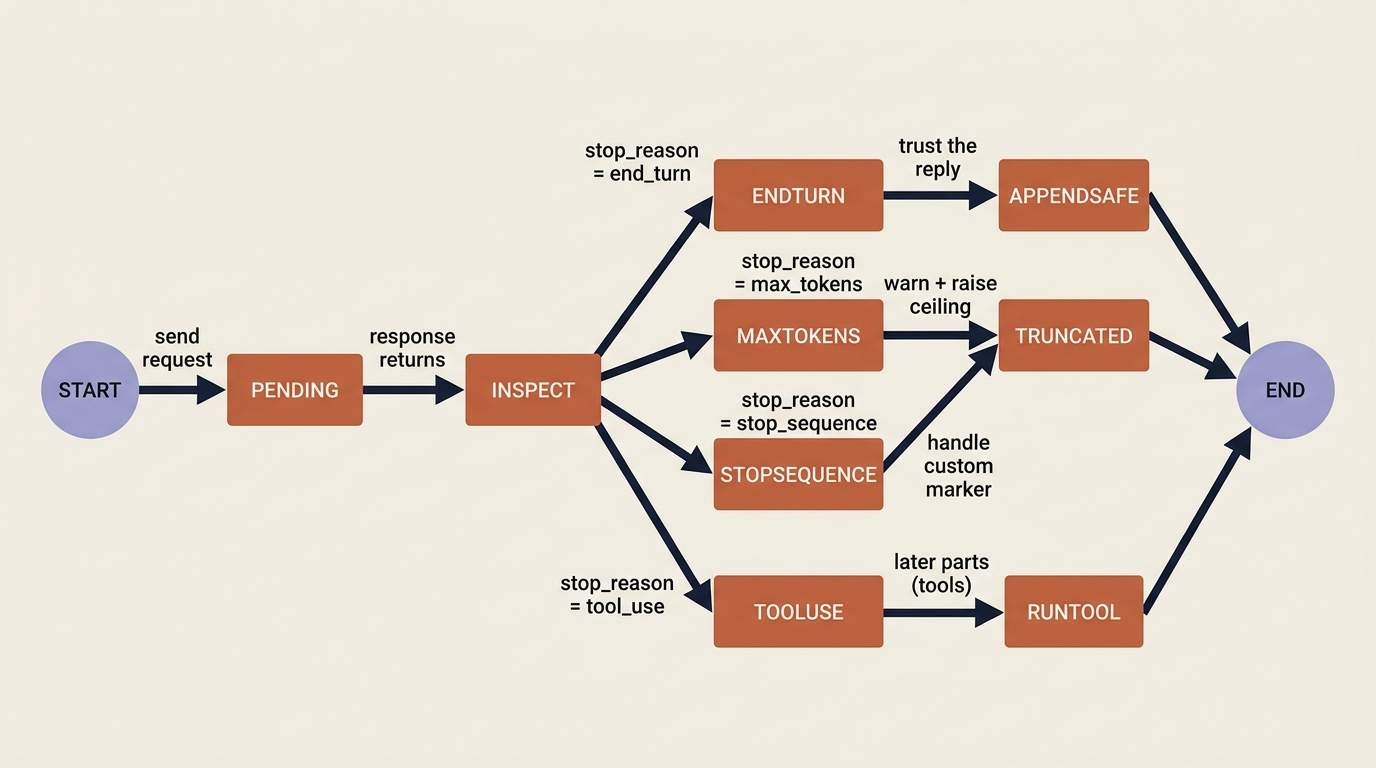
stop_sequence and tool_use show up when you start using custom stop sequences and tools. For now, treating max_tokens as a flag to handle rather than ignore is enough.
The running example: a triage service that asks before it answers
A support-triage service that takes an email and returns a category is a single stateless call. Real triage is rarely one-shot, though. Sometimes an email is too vague to classify, and the right move is to ask a clarifying question, then use the answer. That requires conversation, which means the array pattern is the whole tool.
import anthropic

client = anthropic.Anthropic()

SYSTEM = (
    "You are a support triage assistant. Classify each request as "
    "BILLING, SHIPPING, TECHNICAL, or OTHER. If the request is too vague "
    "to classify confidently, ask one short clarifying question instead."
)

# The customer's opening message is genuinely ambiguous.
messages = [
    {"role": "user", "content": "Hi, my thing isn't working. Can you help?"}
]

response = client.messages.create(
    model="claude-sonnet-4-6",
    max_tokens=256,
    system=SYSTEM,
    messages=messages,
)

# Claude asks a clarifying question rather than guessing. Save it to history.
clarifying_question = response.content[0].text
print("Agent:", clarifying_question)
messages.append({"role": "assistant", "content": clarifying_question})

# The customer answers. Append their reply and send the whole thread back.
messages.append({
    "role": "user",
    "content": "Sorry, I mean I was charged twice for my subscription this month.",
})

response = client.messages.create(
    model="claude-sonnet-4-6",
    max_tokens=256,
    system=SYSTEM,
    messages=messages,
)

print("Classification:", response.content[0].text)   # BILLING
Trace the state through that exchange. The system prompt sets the rules once and rides along on both calls without being part of the dialogue. The first user turn is too vague, so the model asks a question instead of guessing. Your code appends that question, appends the customer's answer, and resends the entire thread. At that point the model has everything it needs to classify confidently as BILLING.
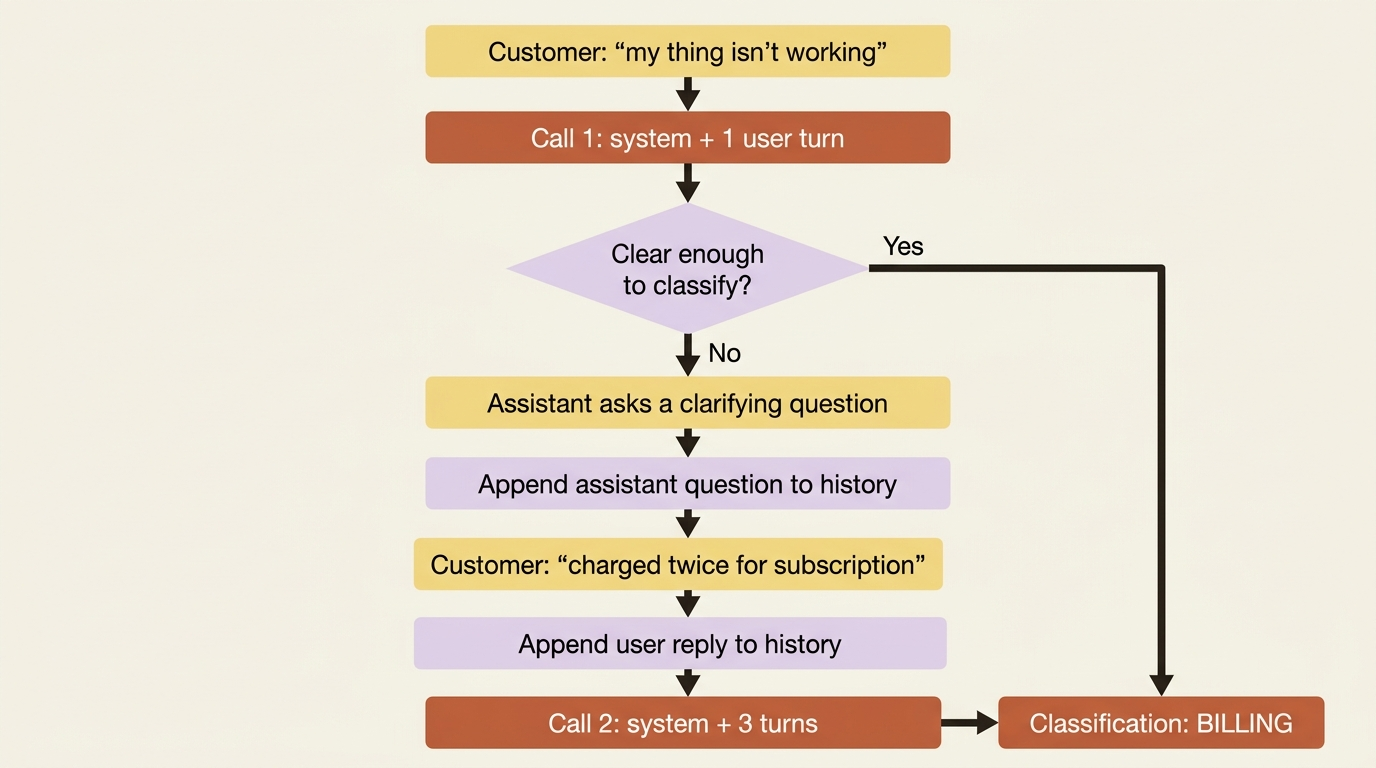
Nothing was remembered on a server. Your code carried the whole conversation, turn by turn, exactly as the stateless model requires.
Do this today
A few small habits make the array pattern second nature.
- Write the append-and-resend loop yourself once. Two
messages.createcalls, three turns, no framework. Print the array before each call. Watching it grow is the lesson. - Set a system prompt as a top-level parameter, never a role inside the array. If you find yourself reaching for
{"role": "system", ...}, stop and move it tosystem=. - Add a
stop_reasoncheck after every call. Treatmax_tokensas a warning to log or raise the ceiling, not as something to ignore. - Try prefilling once. End your array with
{"role": "assistant", "content": "{"}and ask for JSON. Notice how cleanly the output starts. - Track input tokens across a long thread. Print
response.usage.input_tokensafter each call and watch them climb. That number is your future cost forecast.
The pattern that unlocks the rest of the API
You now know the most important pattern in the entire Claude API: a conversation is an array you build, append to, and resend in full. You can set behavior with a system prompt, constrain output by prefilling an assistant turn, and check stop_reason so a truncated reply does not poison your history. That is genuinely most of what day-to-day API work requires.
Notice the experience you just built, though. The customer types a message and waits in silence until the entire response is ready, then it appears all at once. For a one-word classification that is fine. For a long, thoughtful reply, that silence stretches into seconds, and your user starts to wonder if the app froze. Real products do not make people wait for the whole answer. They show the words arriving as the model writes them.
That is streaming, and once you have it, the array you have just learned to build starts to feel alive. The mental model does not change. The wire format does, and the user experience changes with it.
This is Part 2 of "Building with the Claude API," an eleven-part series that takes a developer from a first messages.create call to a hardened, observable, production-deployed integration.