
Claude API Streaming: The Event Protocol Behind the Typing Cursor
Streaming is not a trickle of text; it is a typed event protocol, and the one delta type nobody warns you about will silently break your tool calls.
Streaming feels like a trickle of text, but it is actually an ordered sequence of typed server-sent events. Get the protocol right and your app feels alive; get one delta wrong and your tool calls quietly explode.
In this article: You will learn what the Claude API actually sends when you set
stream=true: the six core event types, where the words live, how the Python and TypeScript SDKs hide the event loop, and the one trap that catches every developer who later wires streaming up to tool use. By the end you will be able to read a raw SSE response overcurl, ship a streaming chat UI, and know exactly whypartial_jsonis not JSON.
Here is a failure mode every developer ships at least once. You build something on the Claude API, it works in testing, and then a real user asks a real question that needs a long answer. The user types, hits enter, and then nothing happens. The cursor blinks. Five seconds. Eight seconds. The user assumes the app crashed, hits the button again, and now you have two requests in flight and one confused person.
Nothing was broken. You used messages.create, which waits for the entire response to finish generating before returning a single thing. For a one-word classification that is invisible. For a paragraph, it is a wall of silence that reads as a bug. The fix is Claude API streaming: have the API send the response in pieces as the model writes it, so you can show words appearing in real time, exactly like every chat product you have used.
Streaming is mechanical rather than conceptual, so this article does not dress it up. The goal is to understand the event sequence the API actually sends, handle it correctly, and avoid the one trap that catches everyone later. This is also the moment in any Claude integration where the raw wire format earns a closer look, so we will step outside Python where it teaches something.
What streaming actually sends: a sequence of typed events
The takeaway: a streamed response is not a trickle of text. It is an ordered sequence of typed events, and the text is only part of it.
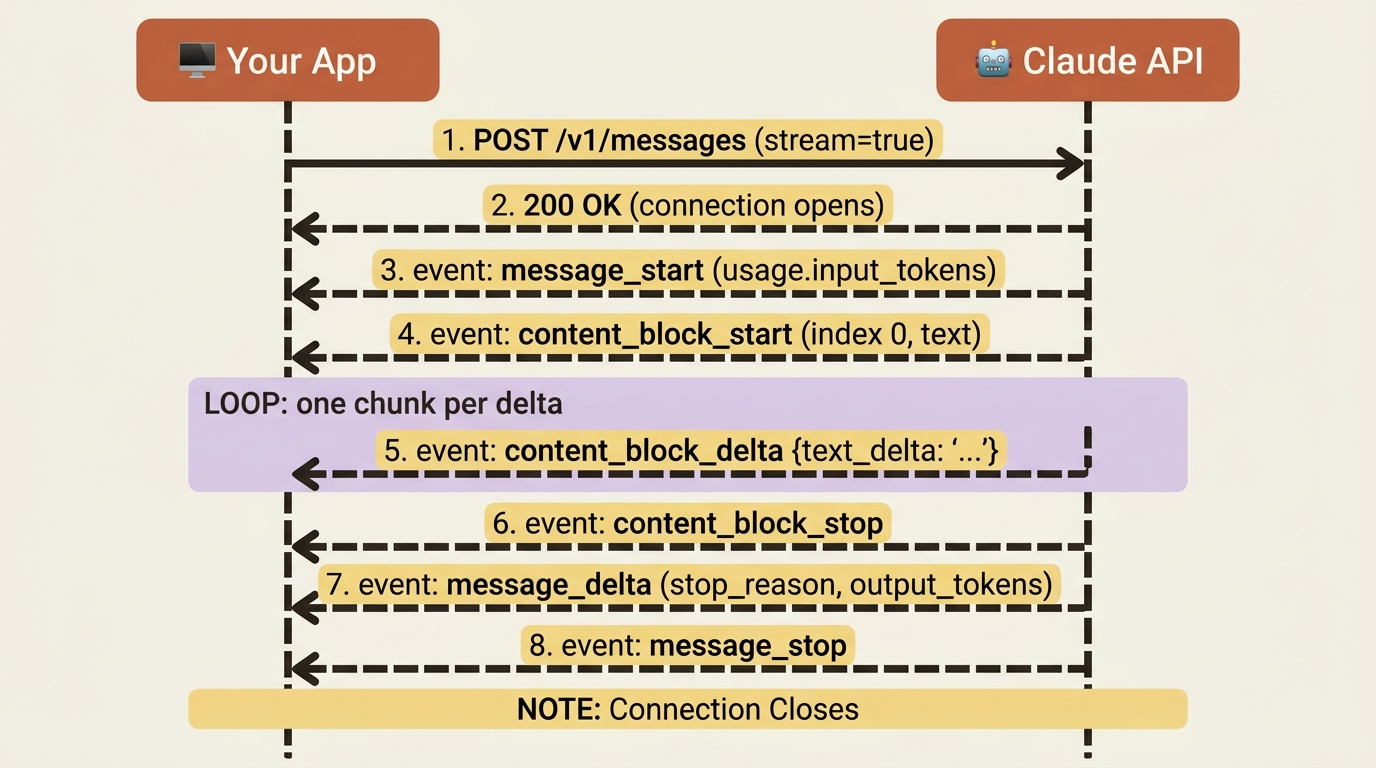
When you set stream to true, the API responds using server-sent events (SSE): a long-lived HTTP response that delivers a series of small JSON events instead of one big payload. Those events arrive in a predictable order, and each has a type that tells you what it is. There are six event types in the core sequence:
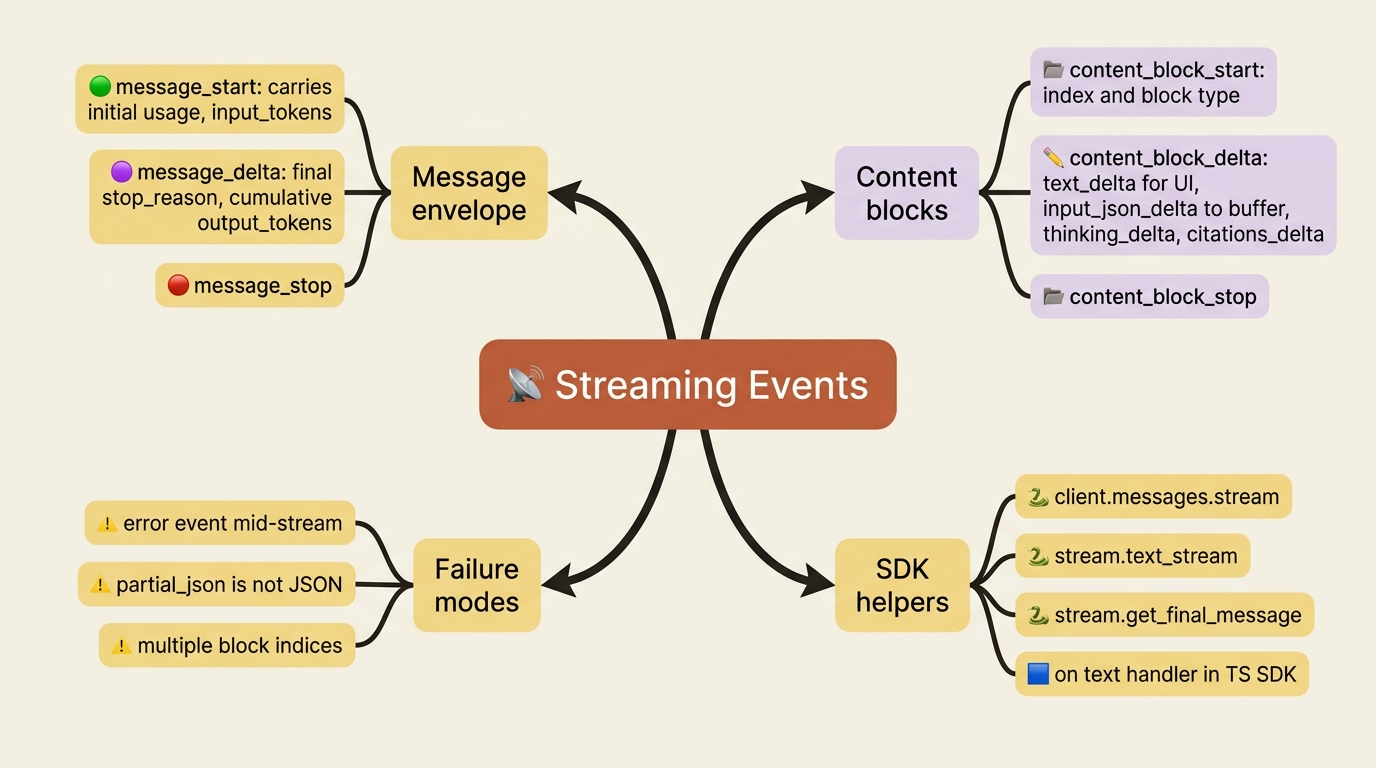
message_start: the response is beginning. This event carries an almost-empty message object, including initialusagewith the input token count.content_block_start: a new content block is opening, with itsindexand type, such as a text block or a tool-use block.content_block_delta: an incremental piece of the current block. This is where the actual text arrives, one chunk at a time.content_block_stop: the current block is complete.message_delta: top-level changes to the message as it finishes, most importantly the finalstop_reasonand cumulativeusage.message_stop: the response is fully done.
The shape mirrors the non-streaming response you already know. A message contains content blocks, and each block fills up over time. The events just narrate that process live: the message starts, a block opens, the block fills with deltas, the block stops, the message wraps up with its final metadata, and the message stops. Once you see that arc, the stream is no longer mysterious. It is the same object you would get from a non-streaming call, delivered in installments.
The deltas that carry text
The takeaway: text arrives inside content_block_delta events as text_delta pieces. You concatenate them to rebuild the reply.
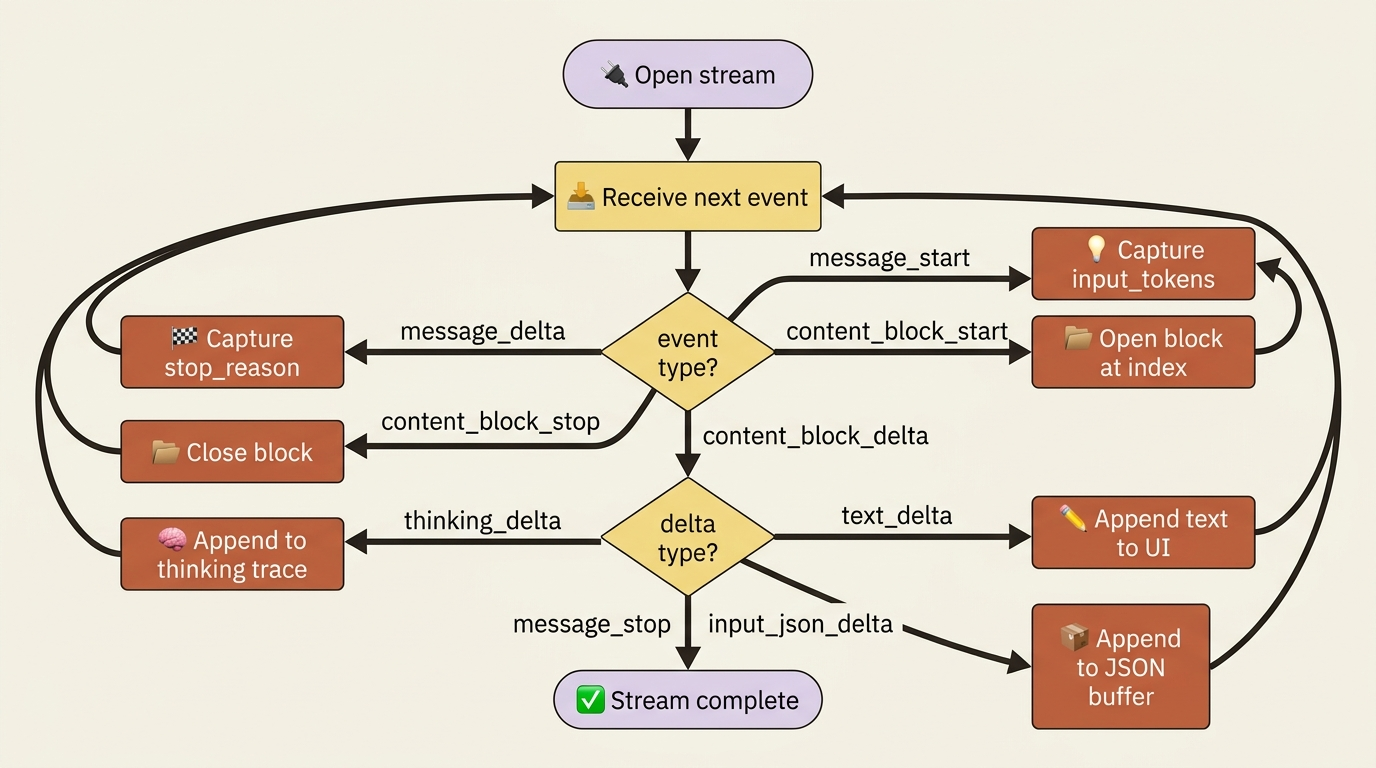
The events that matter most for a basic chat UI are the content_block_delta events, because that is where the words are. Each delta has its own type. For ordinary text, the delta type is text_delta, and it carries a text field with the next chunk:
{"type": "content_block_delta", "index": 0,
 "delta": {"type": "text_delta", "text": "The best time"}}
To display the response as it streams, you watch for these deltas and append each text chunk to what you have shown so far. That is the whole trick for text. Other delta types exist for richer responses, such as thinking_delta for extended reasoning, citations_delta for cited sources, and input_json_delta, which we will get to because it is the trap. For streaming a plain answer to a user, text_delta is the one you handle.
Streaming in Python, the easy way
The takeaway: the SDK hides the event bookkeeping behind a clean iterator. Reach for the raw events only when you need them.
You almost never parse those raw events by hand in Python. The SDK gives you a stream() context manager that handles the connection, accumulates the events, and hands you a clean iterator of text. Here is a streaming reply printed to a terminal as it arrives:
import anthropic

client = anthropic.Anthropic()

with client.messages.stream(
    model="claude-sonnet-4-6",
    max_tokens=1024,
    messages=[
        {"role": "user", "content": "Explain how a jet engine works."}
    ],
) as stream:
    for text in stream.text_stream:
        print(text, end="", flush=True)

    # When the loop ends, the SDK has assembled the complete message for you.
    final = stream.get_final_message()
    print("\n\nStopped because:", final.stop_reason)
The text_stream iterator yields just the text chunks from the text_delta events, so you can print them with flush=True and watch the answer type itself out. When the stream finishes, get_final_message() gives you the fully assembled Message object, identical to what a non-streaming create call would have returned, including stop_reason and final usage. That is the best of both worlds: live output during generation, and a complete object to store in your conversation history afterward.
This is the layer most production code lives at. You get real-time UX without managing the event state machine yourself.
The same stream, raw
The takeaway: under the SDK helper, you are reading server-sent events off an HTTP connection. Seeing it once makes the abstraction concrete.
It is worth seeing what the SDK is smoothing over, because the raw form is what you would handle in a language without a helper, or when debugging. Over curl, a streamed response is a sequence of event: and data: lines:
curl https://api.anthropic.com/v1/messages \
  --header "x-api-key: $ANTHROPIC_API_KEY" \
  --header "anthropic-version: 2023-06-01" \
  --header "content-type: application/json" \
  --data '{
    "model": "claude-sonnet-4-6",
    "max_tokens": 256,
    "stream": true,
    "messages": [{"role": "user", "content": "Hi"}]
  }'
The response comes back as a stream of lines like this, trimmed:
event: message_start
data: {"type":"message_start","message":{"id":"msg_...","usage":{"input_tokens":8}}}

event: content_block_delta
data: {"type":"content_block_delta","index":0,"delta":{"type":"text_delta","text":"Hello"}}

event: message_delta
data: {"type":"message_delta","delta":{"stop_reason":"end_turn"},"usage":{"output_tokens":12}}

event: message_stop
data: {"type":"message_stop"}
In TypeScript, the SDK gives you the same convenience as Python, with a client.messages.stream(...) call that emits typed events you can subscribe to. Use the text event for chunks, plus a final message at the end. The point of showing the raw form is not that you will hand-roll a parser. The point is that you can see there is no magic: streaming is structured events over an open connection, and every SDK helper is just reading those lines and reassembling them.
Telling who said what: tagging streamed output
The takeaway: when more than one source is generating text, the index on each block lets you keep their output separate.
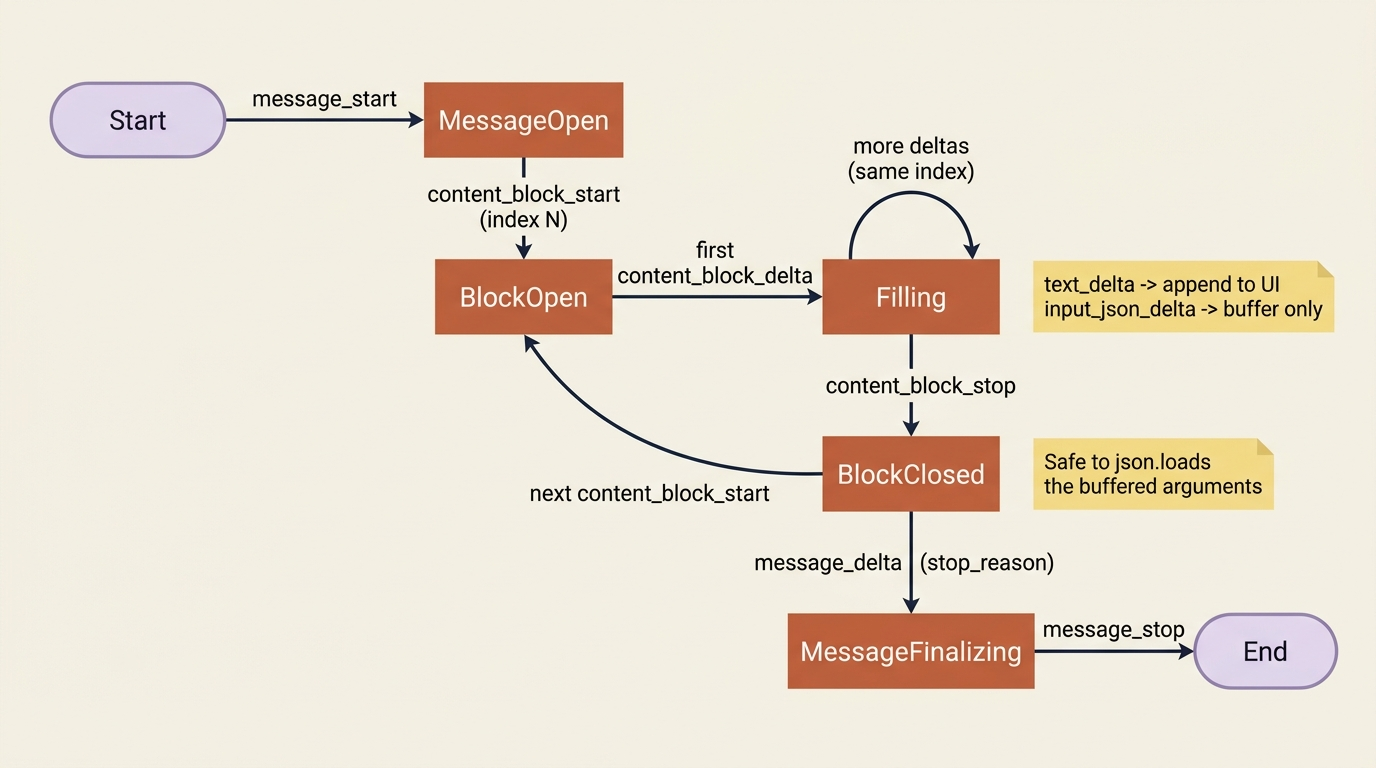
A subtle point matters once your app does more than a single reply. Each content block carries an index, and deltas reference the index of the block they belong to. In a simple text reply there is only index 0, so you can ignore it. However, when a response contains multiple blocks, or later when subagents and tools generate output in parallel, the index is how you route each chunk to the right place instead of smearing two streams into one garbled line. Keep the index in mind now, lightly, so it is familiar when it becomes load-bearing.
The trap: tool input streams as partial JSON
The takeaway: tool-call arguments arrive as fragments of a JSON string that are not valid JSON until the block ends. Do not parse mid-stream.
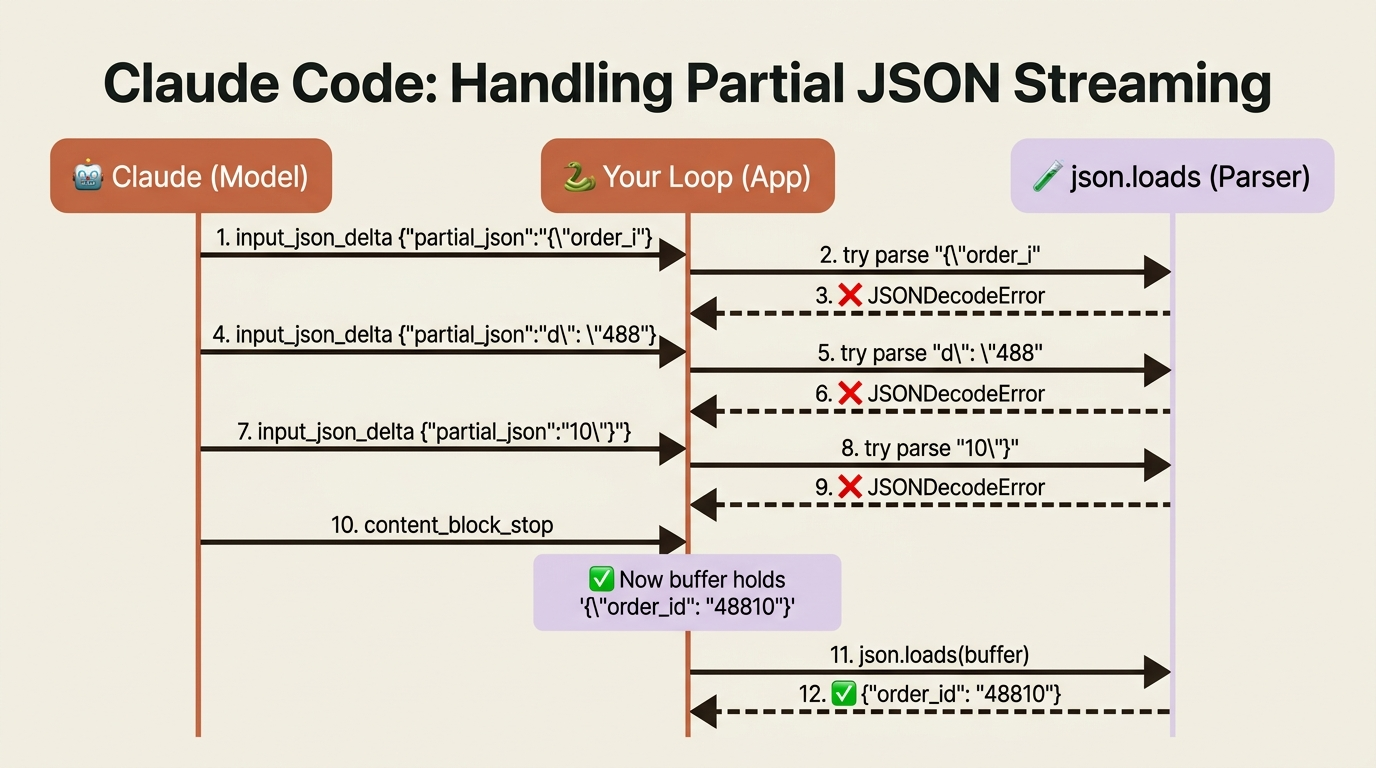
Here is the mistake that catches nearly everyone who combines streaming with tool use. When the model calls a tool, the tool's input arguments do not arrive as text deltas. They arrive as input_json_delta events, each carrying a partial_json string that is a fragment of the full JSON argument object.
The word "partial" is the whole warning.
Gotcha. A partial_json chunk is a slice of a JSON string, not valid JSON on its own. You might receive {"order_i, then d": "488, then 10"} across three separate deltas. If you try to json.loads each chunk as it arrives, every parse fails until the very last one, and even that is luck. The correct approach is to buffer: accumulate the partial_json strings as they stream in, and only parse the result once the content_block_stop event for that block tells you the arguments are complete. The SDK's accumulated final message does this for you, which is one more reason to lean on it. By default, the API streams tool input this way precisely because partial arguments are not safe to act on, so treat the buffer-then-parse rule as the norm.
A running example: a streaming triage service
Let us make this concrete with a support-triage service. So far it would have answered all at once. Now we stream its reasoning to a terminal so a support agent watching the queue sees the classification form in real time rather than waiting for it.
import anthropic

client = anthropic.Anthropic()

SYSTEM = (
    "You are a support triage assistant. Briefly explain your reasoning, "
    "then end with a line 'CATEGORY: X' where X is BILLING, SHIPPING, "
    "TECHNICAL, or OTHER."
)

email = """
Subject: Double charged
I was billed twice for my subscription this month and I need a refund
for the duplicate charge as soon as possible.
"""

print("Agent view (streaming):\n")
with client.messages.stream(
    model="claude-sonnet-4-6",
    max_tokens=512,
    system=SYSTEM,
    messages=[{"role": "user", "content": email}],
) as stream:
    for text in stream.text_stream:
        print(text, end="", flush=True)

    final = stream.get_final_message()

if final.stop_reason == "max_tokens":
    print("\n[truncated: raise max_tokens]")
The experience changes completely even though the request barely did. The support agent watches the reasoning appear word by word and reaches the CATEGORY: BILLING line at the end, instead of staring at a blank panel until the whole thing lands. We still capture the final assembled message afterward, so the rest of the pipeline, such as saving to history and checking stop_reason, works exactly as it did before. Streaming changed the feel of the app without changing its logic.
One more difference: errors can arrive mid-stream
The takeaway: a streamed request can fail after it has already returned a 200, so error handling differs from the request-response world.
There is a wrinkle that does not exist for ordinary calls. A non-streaming request either succeeds with a 200 or fails with an error status, cleanly, one or the other. A streaming request returns a 200 the moment the connection opens, before generation is done, so an error can surface partway through the stream as an error event. Your handling has to account for a stream that starts fine and then fails. In practice, the SDK's stream() context manager raises these as exceptions you can catch, so wrapping the streaming loop in a try block is enough for most apps. Just do not assume that a 200 means you are safe, the way you reasonably would for a non-streaming call.
Do this today
- Convert one slow non-streaming call to
client.messages.stream(). Pick any endpoint that takes more than two seconds, swapmessages.createfor thestream()context manager, and iteratestream.text_stream. Your latency feel improves immediately. - Capture the final message after the loop. Always call
get_final_message()so you still havestop_reasonandusagefor logging and history, just like the non-streaming path. - Run one raw
curlwithstream: true. Pipe it tohead -40once. Seeing theevent:anddata:lines flow past in person is worth more than reading three docs about SSE. - Wrap the streaming loop in a try block. Catch the SDK's exceptions so a mid-stream
errorevent surfaces as a real failure, not a partial response that silently truncates. - Write the buffer-then-parse rule into a comment now. When you add tool use later, you will be tempted to
json.loadseachinput_json_delta. Future you will thank present you for the warning at the top of the file.
The protocol is the point
A streaming response is not magic and it is not just "the text shows up faster." It is a small, well-defined protocol: six event types, one ordered arc per message, deltas that carry either text you render or JSON fragments you must buffer. The Python and TypeScript SDKs are excellent, and most production code lives at the stream.text_stream layer where the protocol is invisible. That is fine. What you want is the ability to drop a layer when something breaks: to read a raw event: line in a log, to know that a partial_json chunk is a string and not an object, to recognize that a 200 on a streamed request means the connection opened, not that generation succeeded.
Get the mental model right and the SDK helpers feel like conveniences instead of mysteries. Skip it and the day you wire streaming up to tool use, you will spend an afternoon staring at JSONDecodeError traces with no idea why the model is sending broken JSON. It is not broken. It was never meant to be parsed yet. Buffer first, parse on content_block_stop, and the trap stops being a trap.
The next time your app freezes on a long answer, you know the fix is one method call. The next time you debug a flaky stream, you know what to look for in the raw events. That is the whole job.
This is Part 3 of "Building with the Claude API," an eleven-part guide that takes a developer from a first messages.create call to a hardened, observable, production-deployed integration.