
Function Calling With Claude Is Not What You Think: Here Is the Loop You Actually Have To Write
Function calling sounds like the model runs your code, but it does not. The tool loop is the disciplined message exchange you write yourself, and it is the single most important skill in agentic development.
"Tool use" sounds like the model executes your code. It does not. The Claude API hands you a JSON request and waits, and the four-step loop that runs the tool and feeds the answer back is the entire job.
In this article: You will learn the real mental model behind Claude API tool use, the four-step request-and-respond protocol, and the roughly twelve lines of Python that turn it into a working agent loop. We cover how to define a tool the model fills reliably, how to read the
tool_usestop reason, how to wire up parallel tool calls and steer behavior withtool_choice, and how to handle failures withis_errorandstrict. By the end, every agent framework you have ever used will look like exactly this loop, repeated.
There is a moment that reframes how you think about AI agents, and it usually arrives the first time you wire up a tool. You define a function, say get_order_status. You tell Claude it exists. You ask, "Where is my order?" Claude responds, and the response is not an answer. It is a structured request that says, in effect: "I would like to call get_order_status with order_id 48810. Go run that and tell me what you find." Then it stops and waits.
That is the whole truth of Claude API tool use, and it surprises almost everyone. The API does not execute your functions. It cannot reach into your database, call your API, or run your code. What it can do is recognize that a tool would help, produce a perfectly formed request to use it, and pause until you come back with the result. The execution is yours. The loop that carries the request out to your code, and the answer back to the model, is something you write.
Get this loop right and you can build agents that look up orders, query databases, hit external APIs, and take real action in the world. Get it wrong, usually by forgetting that the loop is your job, and your agent stalls after a single turn. We will build it explicitly, so you own it.
The mental model: tools are a request-and-respond protocol
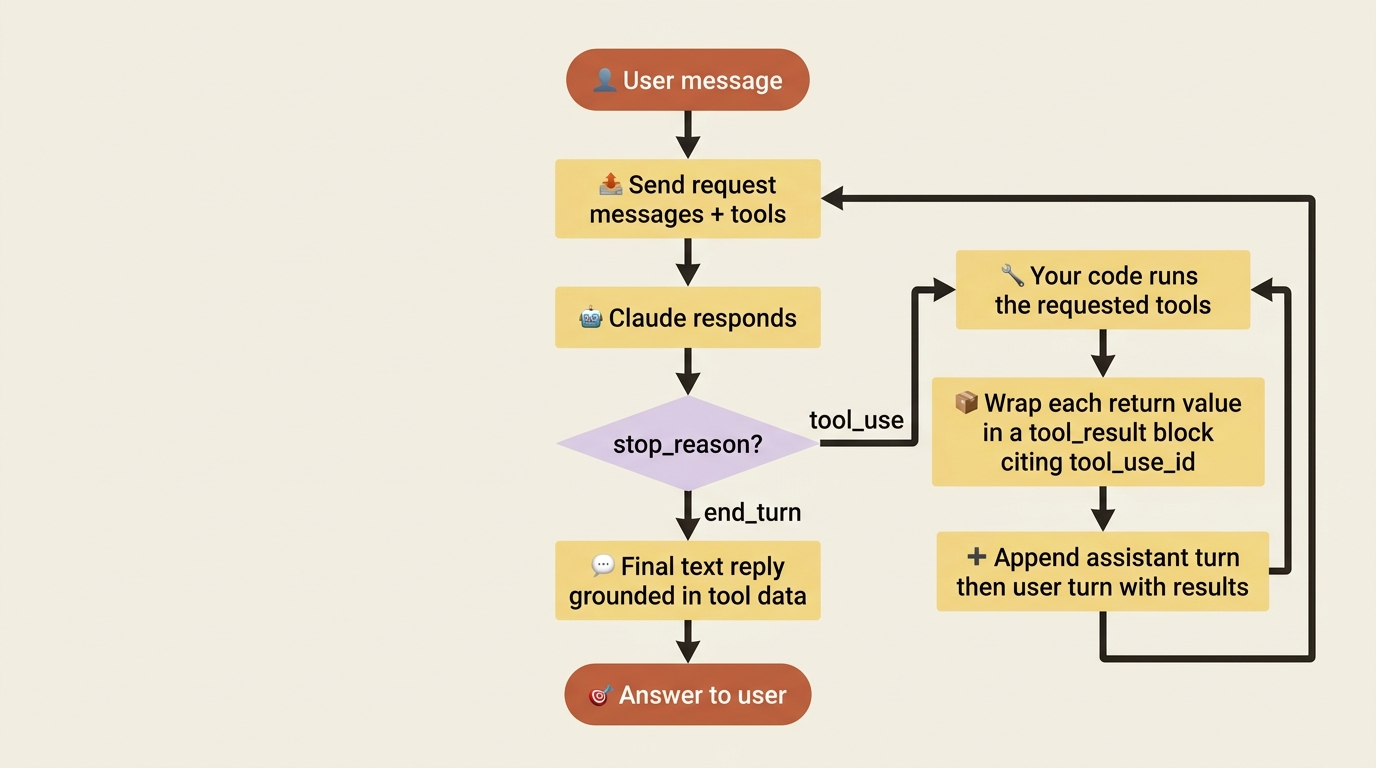
You describe the tools, the model requests one, you run it, and you send the result back. The model never runs anything itself.
The full cycle has four steps, and it is worth holding all four in your head at once before we touch code:
- You send a request that includes a list of
tools, each described with a name, a description, and a JSON schema for its inputs. - The model decides a tool would help. Instead of a normal text reply, it returns a
tool_usecontent block containing the tool name and the input arguments it wants, and the response carries astop_reasonoftool_use. - Your code reads that block, runs the actual function with those arguments, and packages the return value into a
tool_resultblock. - You append the model's
tool_useturn and yourtool_resultturn to the conversation, then send the whole thing back. The model reads the result and either answers the user or requests another tool.
Step 4 is the loop. The model can ask for tool after tool, and each time you run it and feed back the result, until finally it has what it needs and returns an ordinary text reply with a stop_reason of end_turn. This is just the conversation-as-array pattern of stateless messages, with two new block types riding inside it. Nothing here is magic. It is a disciplined exchange of structured messages, and you are one of the two parties.
Defining a tool
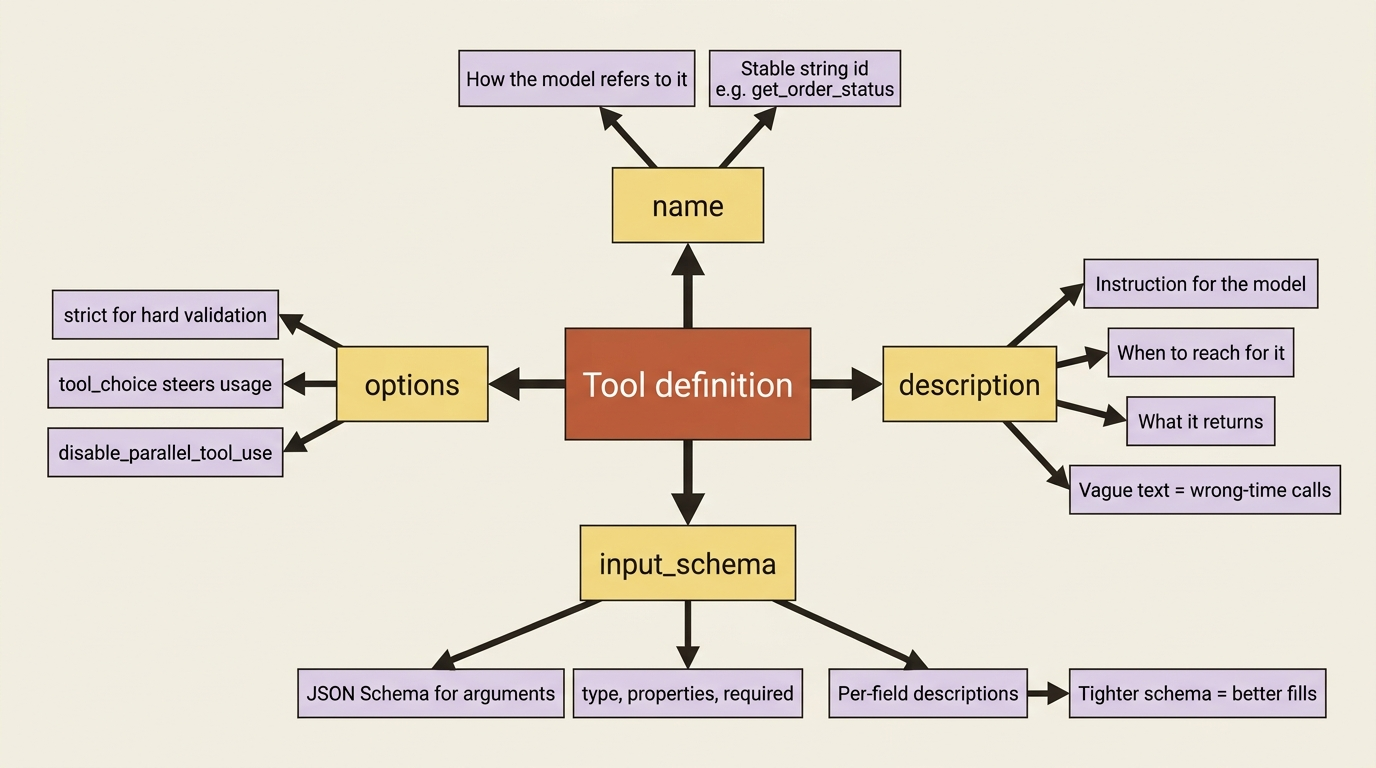
A tool definition is a name, a plain-language description, and a JSON schema for the inputs. The description is doing more work than it looks like.
You describe a tool with three fields. The name is how the model refers to it. The description tells the model what the tool does and when to use it. The input_schema is a JSON schema that defines the shape of the arguments the model must produce. Here is a tool that looks up an order's status:
tools = [
    {
        "name": "get_order_status",
        "description": "Look up the current shipping status of a customer "
                       "order by its order ID. Returns the status and an "
                       "estimated delivery date.",
        "input_schema": {
            "type": "object",
            "properties": {
                "order_id": {
                    "type": "string",
                    "description": "The customer's order ID, e.g. '48810'.",
                }
            },
            "required": ["order_id"],
        },
    }
]
Two things deserve emphasis. The description is not documentation for you; it is instruction for the model, and a vague description produces a tool the model uses at the wrong times or not at all. Write it as if you were explaining the tool to a new teammate: what it does, what it returns, and when to reach for it. The input_schema is also a contract. The model produces arguments matching this shape, so the more precise your schema, including types, required fields, and per-property descriptions, the more reliably the model fills it in correctly.
Watching the model request a tool
A tool request comes back as a tool_use block with a stop_reason of tool_use. That stop reason is your signal to run something.
Send a question alongside those tools and watch what comes back:
import anthropic

client = anthropic.Anthropic()

messages = [{"role": "user", "content": "Where is my order 48810?"}]

response = client.messages.create(
    model="claude-sonnet-4-6",
    max_tokens=1024,
    tools=tools,
    messages=messages,
)

print(response.stop_reason)   # tool_use
print(response.content)
The stop_reason is tool_use, not end_turn, and that difference is the entire signal. It means the model did not finish; it paused to ask for something. Inside response.content you will find a tool_use block that looks like this:
{
  "type": "tool_use",
  "id": "toolu_01A2b3...",
  "name": "get_order_status",
  "input": {"order_id": "48810"}
}
The model parsed "order 48810" out of natural language, matched it to your tool, and produced valid arguments conforming to your schema. However, it did not look anything up, because it cannot. That id field matters enormously, because when you send the result back, you must reference it so the model knows which request your answer responds to.
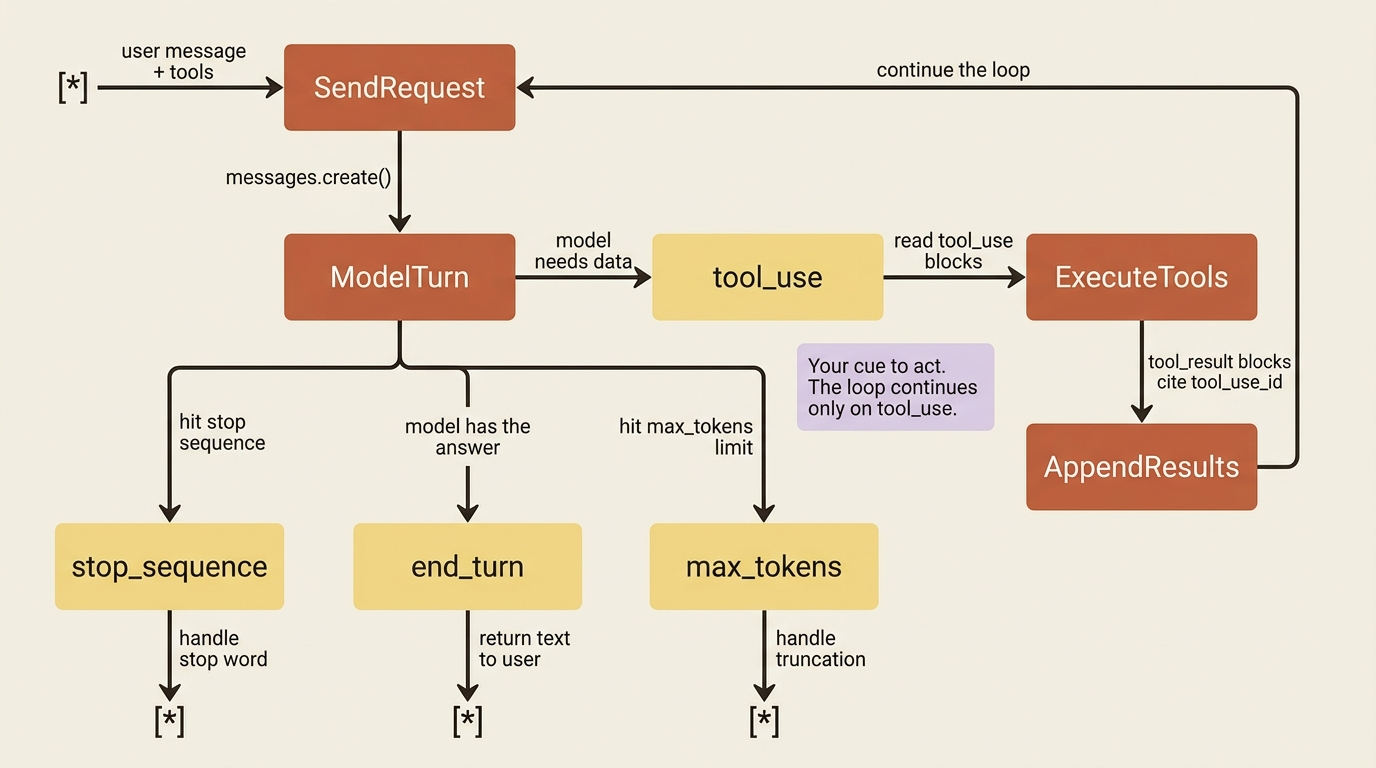
Gotcha. Nothing happens until your code makes it happen. The model only requested the tool, and the conversation is now frozen mid-thought, waiting for you. If you treat the tool_use response as a final answer and stop here, your agent simply dangles, having asked a question it never let you answer. The tool_use stop reason is not a result; it is a to-do item assigned to your code.
Closing the loop: running the tool and sending the result back
You execute the function, wrap the return value in a tool_result block that cites the original tool_use id, and send the conversation back.
Now you do the part the model cannot. You run the real function, then return its output as a tool_result block in a new user turn. The critical detail is that the tool_result carries a tool_use_id matching the id from the request.
def get_order_status(order_id: str) -> dict:
    # In reality this hits your database or order API. Here it is faked.
    return {"order_id": order_id, "status": "shipped",
            "estimated_delivery": "2026-05-24"}

# Find the tool_use block in the model's response.
tool_use = next(b for b in response.content if b.type == "tool_use")

# Run the real function with the model's arguments.
result = get_order_status(**tool_use.input)

# Append the model's turn, then our tool_result turn, citing the id.
messages.append({"role": "assistant", "content": response.content})
messages.append({
    "role": "user",
    "content": [
        {
            "type": "tool_result",
            "tool_use_id": tool_use.id,
            "content": str(result),
        }
    ],
})

# Send it back. Now the model has the data it asked for.
response = client.messages.create(
    model="claude-sonnet-4-6",
    max_tokens=1024,
    tools=tools,
    messages=messages,
)

print(response.content[0].text)
# "Your order 48810 has shipped and should arrive by May 24th."
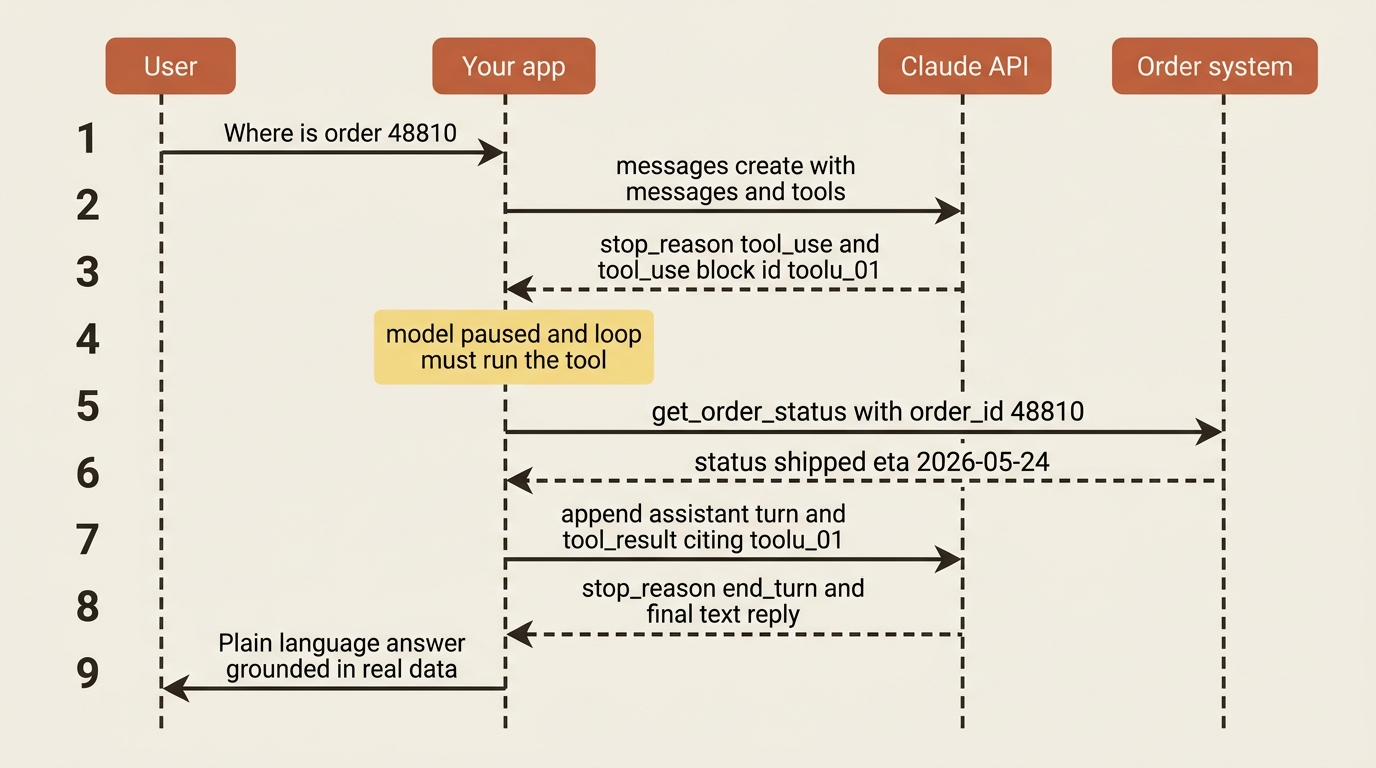
Trace the array. It now holds the user's question, the model's tool_use request, your tool_result answer, and finally the model's plain-language reply built from real data. The tool_use_id is the thread that ties request to result. If you drop it or mismatch it, the model cannot connect your answer to its question. This append-request-respond rhythm is the loop, and once you see it run end to end, every agent you have ever used looks like exactly this, repeated.
Making it a real loop
Wrap the exchange in a while loop so the model can call as many tools as it needs before answering.
A single tool call is the easy case. Real tasks need several, sometimes in sequence, where the result of one informs the next. The honest implementation is a loop that keeps running tools as long as the model keeps asking, and breaks out when the model finally returns a normal reply.
def run_agent(messages):
    while True:
        response = client.messages.create(
            model="claude-sonnet-4-6",
            max_tokens=1024,
            tools=tools,
            messages=messages,
        )
        messages.append({"role": "assistant", "content": response.content})

        # No tool requested: the model is done, return its answer.
        if response.stop_reason != "tool_use":
            return response

        # Otherwise, run every tool the model asked for and feed results back.
        tool_results = []
        for block in response.content:
            if block.type == "tool_use":
                result = get_order_status(**block.input)
                tool_results.append({
                    "type": "tool_result",
                    "tool_use_id": block.id,
                    "content": str(result),
                })
        messages.append({"role": "user", "content": tool_results})
The loop's exit condition is the stop_reason. As long as it is tool_use, there is work to do, so you run the requested tools and continue. The moment it is anything else, the model has finished, and you return. This loop of roughly a dozen lines is the same tool loop that frameworks wrap and hide, and writing it once yourself means you understand exactly what those frameworks are doing on your behalf.
Parallel tool calls
The model can request several tools in one turn. Notice that the loop above already handles that.
You may have noticed that the inner for loop iterates over content blocks rather than grabbing a single one. That is deliberate, because a single response can contain multiple tool_use blocks. If the user asks, "Where are my orders 48810 and 48811?", the model can request both lookups at once, in one turn, rather than serializing them across two round trips. Your job is to run all of them and return all the results together in one tool_result turn, which the loop above does for free. If you ever need to forbid this and force exactly one tool at a time, the disable_parallel_tool_use option on tool_choice covers that case.
Steering and constraining tool use
tool_choice controls whether and which tools the model may use. Four settings cover the cases.
By default, the model decides on its own whether a tool is warranted. Sometimes you want to override that, and the tool_choice parameter gives you four levers:
{"type": "auto"}: the model decides whether to use a tool. This is the default and the right choice most of the time.{"type": "any"}: the model must use one of the available tools, though it picks which. Useful when a plain text reply is never acceptable.{"type": "tool", "name": "get_order_status"}: the model must use the one tool you name. Useful for forcing a specific structured action.{"type": "none"}: the model may not use any tool. Useful for turning tools off for one turn without rebuilding the request.
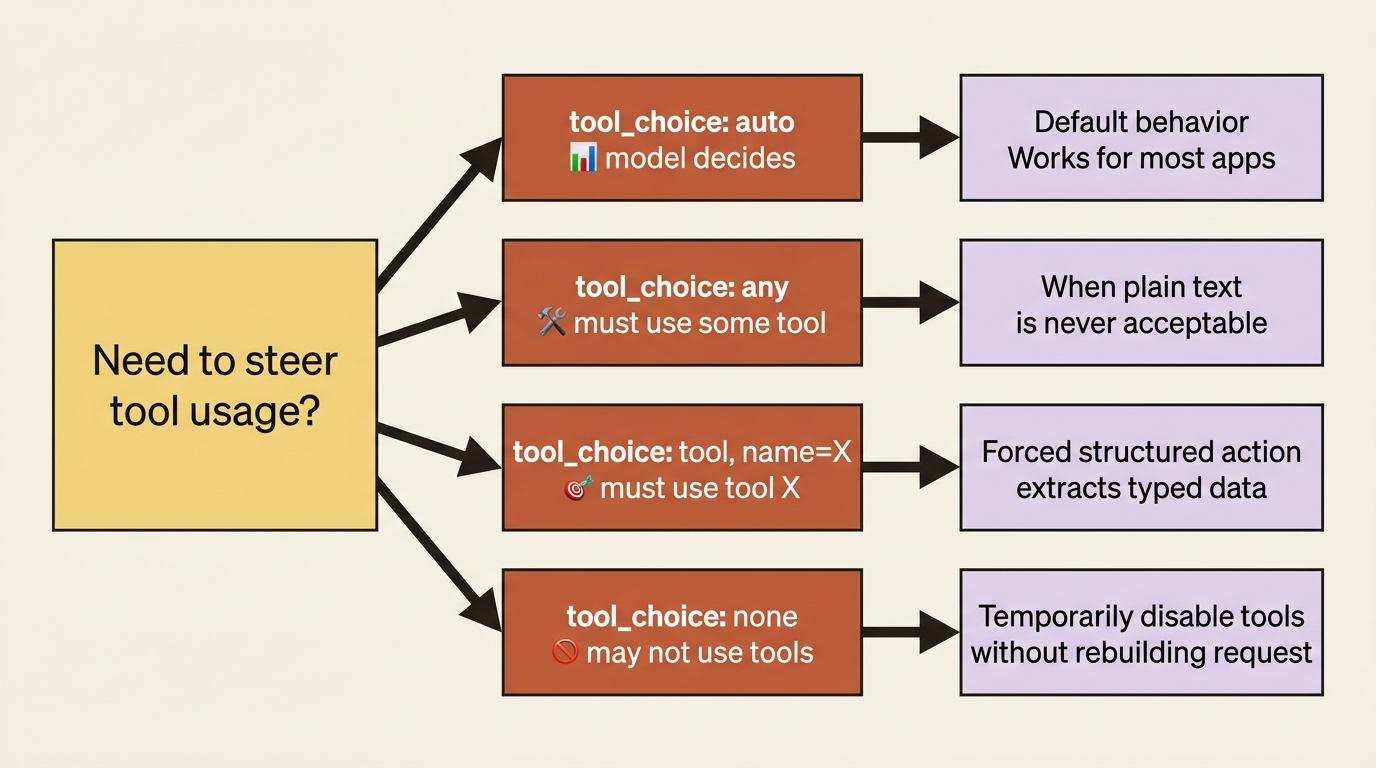
Most applications run on auto and reach for the others only when the task demands a guaranteed shape of behavior. Forcing a specific tool, in particular, is a common way to get structured data out of the model.
When tools fail, and when schemas must hold
Report tool failures back with is_error so the model can recover, and use strict when you cannot tolerate a malformed argument.
Two reliability features round out the protocol. First, tools fail in the real world. The order ID does not exist, the database times out, or the external API returns a 500. You do not crash the loop. You return a tool_result with is_error set to true and an explanation in the content, and the model reads that and adapts, often by apologizing to the user or trying a different approach.
tool_results.append({
    "type": "tool_result",
    "tool_use_id": block.id,
    "content": "Error: no order found with that ID.",
    "is_error": True,
})
Second, by default the model's tool arguments conform to your schema reliably, but not with a hard guarantee. When a malformed argument would be unacceptable, set strict to true on the tool definition. That setting guarantees schema validation on the tool name and inputs. Use it when downstream code will choke on a missing field or wrong type, and skip it when the model's normal reliability is good enough.
The running example: a triage agent that looks things up
We can now give a support-triage service real hands. Without tools it can only classify and reply from the text in front of it. With the order-lookup tool wired into the loop, a shipping question gets a real, data-backed answer instead of a guess.
import anthropic

client = anthropic.Anthropic()

SYSTEM = (
    "You are a support agent. Use tools to look up real order data when a "
    "customer asks about an order. Never guess a status."
)

def get_order_status(order_id: str) -> dict:
    fake_db = {"48810": {"status": "shipped", "eta": "2026-05-24"}}
    if order_id not in fake_db:
        return {"error": "order not found"}
    return {"order_id": order_id, **fake_db[order_id]}

tools = [{
    "name": "get_order_status",
    "description": "Look up shipping status and ETA for an order by ID.",
    "input_schema": {
        "type": "object",
        "properties": {"order_id": {"type": "string"}},
        "required": ["order_id"],
    },
}]

def handle(email_text):
    messages = [{"role": "user", "content": email_text}]
    while True:
        resp = client.messages.create(
            model="claude-sonnet-4-6", max_tokens=1024,
            system=SYSTEM, tools=tools, messages=messages,
        )
        messages.append({"role": "assistant", "content": resp.content})
        if resp.stop_reason != "tool_use":
            return resp.content[0].text

        results = []
        for block in resp.content:
            if block.type == "tool_use":
                data = get_order_status(**block.input)
                results.append({
                    "type": "tool_result",
                    "tool_use_id": block.id,
                    "content": str(data),
                    "is_error": "error" in data,
                })
        messages.append({"role": "user", "content": results})

print(handle("Hi, where is my order 48810? It's been a while."))
Walk the flow once. The email arrives. The model recognizes a shipping question and emits a tool_use for get_order_status with order_id 48810. The loop runs the real lookup and feeds back the shipped status and ETA, and the model composes a reply grounded in that data. If the customer had asked about a missing order ID, the lookup returns an error, the loop flags it with is_error, and the model gracefully tells the customer it could not find that order rather than inventing a status. The agent now acts on the world instead of only describing it.
Do this today
Open a Python file and build the smallest possible version of this loop end to end:
- Define one tool with a clear
name, a description that explains when to use it, and aninput_schemathat names every required field with its own description. - Send a question that obviously needs the tool, then
print(response.stop_reason)and confirm it istool_use. Inspect thetool_useblock and copy theid. - Run your real function with
tool_use.input, then append the assistant turn and auserturn containing atool_resultblock that cites the sametool_use_id. Send the conversation back and read the final reply. - Wrap the whole exchange in a
whileloop and add a second tool. Watch the model chain calls across turns until it has what it needs. - Add a failure path: make the tool return an error sometimes, set
is_error: Trueon thattool_result, and verify the model recovers gracefully instead of crashing.
When that runs, you understand agents at the level the API actually works at: not as a black box you talk to, but as a protocol you participate in.
The loop is the lesson
You have built the Claude API tool loop by hand, which means you understand the thing every agent framework is built on top of. You can define tools with schemas the model fills reliably, read the tool_use stop reason as your cue to act, close the loop with a correctly referenced tool_result, run tools in parallel, steer behavior with tool_choice, and handle failures with is_error. That is the core of agentic development on the Claude API.
The model is brilliant at deciding what should happen. Your code is the only thing that can make it happen. Once you internalize that split, the next agent you build will not surprise you when it sits there waiting after a tool request. You will know exactly which line of code did not run yet, because you wrote it.
This is Part 4 of "Building with the Claude API," an eleven-part guide that takes a developer from a first messages.create call to a hardened, observable, production-deployed integration.