
Stop Parsing the Model's Prose: How to Get Real JSON Out of the Claude API
Stop scraping prose out of LLM responses. The Claude API gives you two ways to make 'reply in JSON' a contract instead of a suggestion.
Asking Claude to "reply only with JSON" is how you ship a parser that breaks the first time it answers "Sure, here you go!" There is a better way, and it is built into the API.
In this article: You will learn why prompt-engineered JSON is a treadmill, and the two ways the Claude API gives you a real contract instead: native Claude API structured outputs with
output_config, and strict tool use as a structured-output mechanism. We walk through both with working Python examples onclaude-sonnet-4-6, show when to choose each route, and end with a small triage service that returns clean, typed records ready for your pipeline.
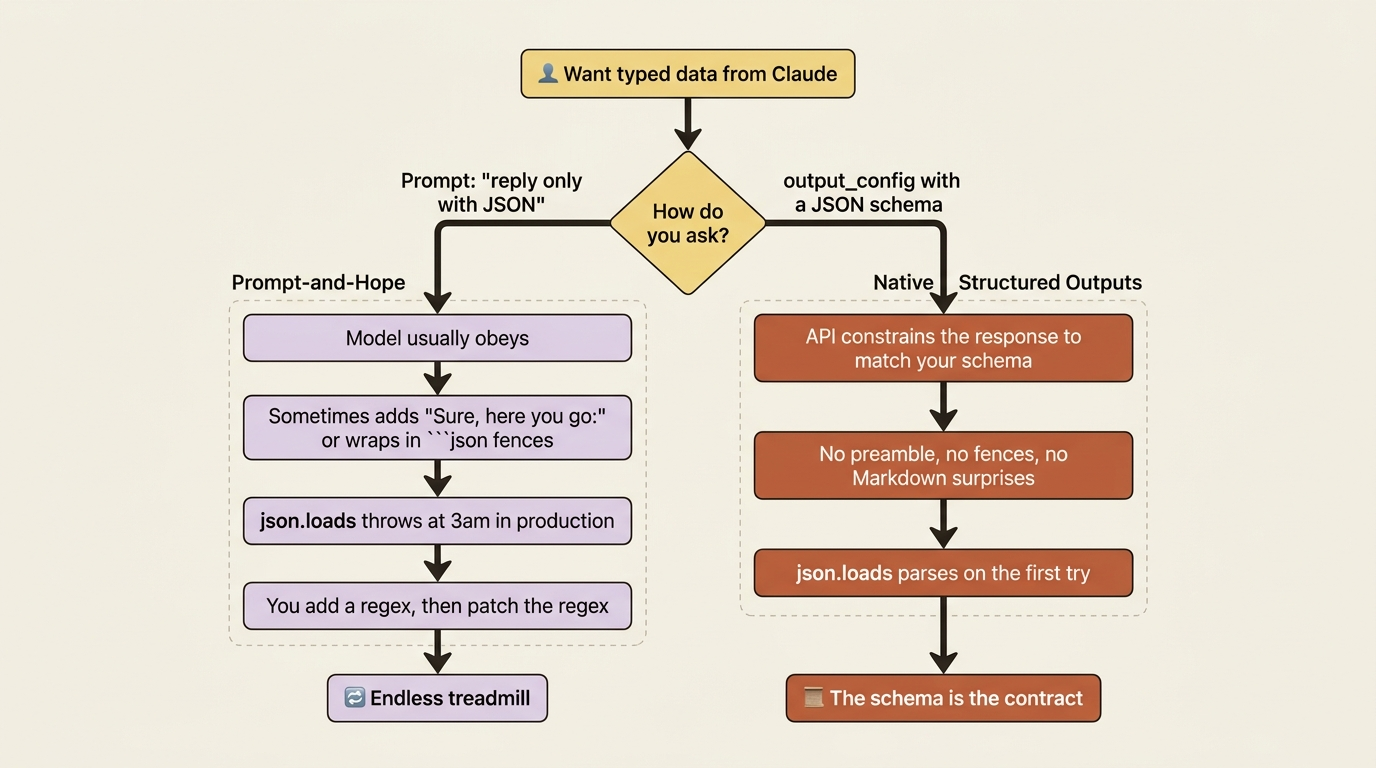
You have felt this pain even if you have never named it. You ask the model to "return the result as JSON," it does, your code runs json.loads on the response, and life is good. Then one day the model decides to be polite and prefixes the JSON with "Here's the classification you asked for:" and your parser explodes. You add a regex. The model wraps the JSON in a Markdown fence. You patch the regex. A trailing comma slips through. You read a stack trace at an hour you do not want to be awake.
The model was never the problem. The model is genuinely good at producing structured data. The problem is that asking for structure in the prompt makes it a suggestion, not a contract. The Claude API gives you two ways to make it a contract, and once you know them you stop writing parsers and start writing business logic.
This article is about stepping off the treadmill.
Why "respond only with JSON" is a trap
It helps to be precise about what fails, because the failure is intermittent, and intermittent failure is the worst kind of failure. When you put "respond only with JSON" in your prompt, you are asking the model to behave. Most of the time it does. That phrase, "most of the time," is exactly the trap.
The preamble ("Sure, here you go:"), the trailing explanation, the Markdown fences, the occasional trailing comma: each one is rare. Each one slips through your testing. Each one shows up in production, on a Friday, when traffic is high. You end up defending against the model's helpfulness with ever-more-elaborate string surgery, and you never reach certainty. There is no version of your regex that handles the next thing the model will helpfully add.
The fix is to stop asking and start constraining.
Route one: native structured outputs
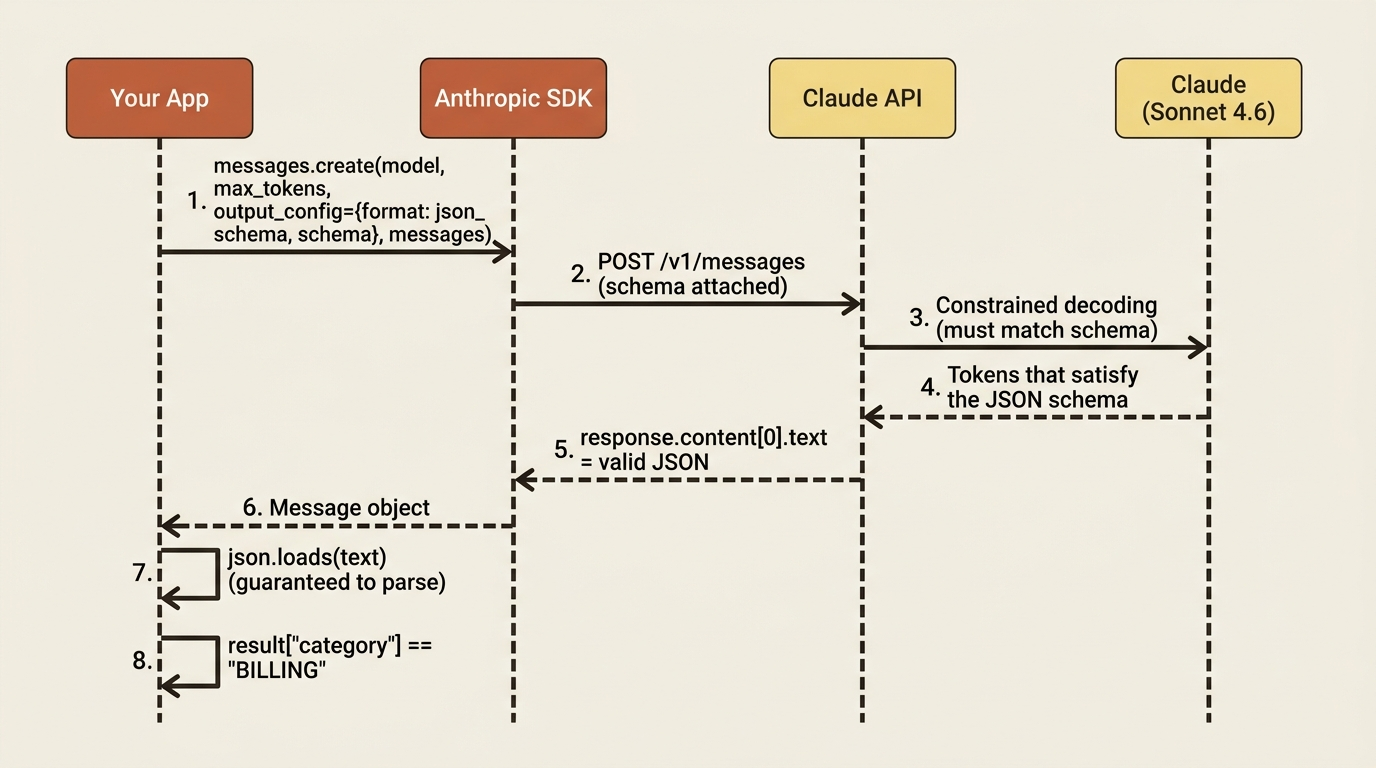
The Claude API lets you supply a JSON schema that the model's output must conform to. You pass it via the output_config parameter with a format of type json_schema. When you do, the response text is a JSON object that matches your schema, full stop. No "here you go," no fences, nothing to strip.
Here is a support-triage classification expressed as a schema and requested directly:
import anthropic
import json

client = anthropic.Anthropic()

schema = {
    "type": "object",
    "properties": {
        "category": {
            "type": "string",
            "enum": ["BILLING", "SHIPPING", "TECHNICAL", "OTHER"],
        },
        "priority": {
            "type": "string",
            "enum": ["LOW", "MEDIUM", "HIGH"],
        },
        "suggested_reply": {"type": "string"},
    },
    "required": ["category", "priority", "suggested_reply"],
}

email = "I was double charged for my subscription and I'm furious. Fix this now."

response = client.messages.create(
    model="claude-sonnet-4-6",
    max_tokens=1024,
    output_config={"format": {"type": "json_schema", "schema": schema}},
    messages=[{"role": "user", "content": f"Triage this email:\n\n{email}"}],
)

# The response text is guaranteed to be JSON matching the schema.
result = json.loads(response.content[0].text)
print(result["category"])    # BILLING
print(result["priority"])    # HIGH
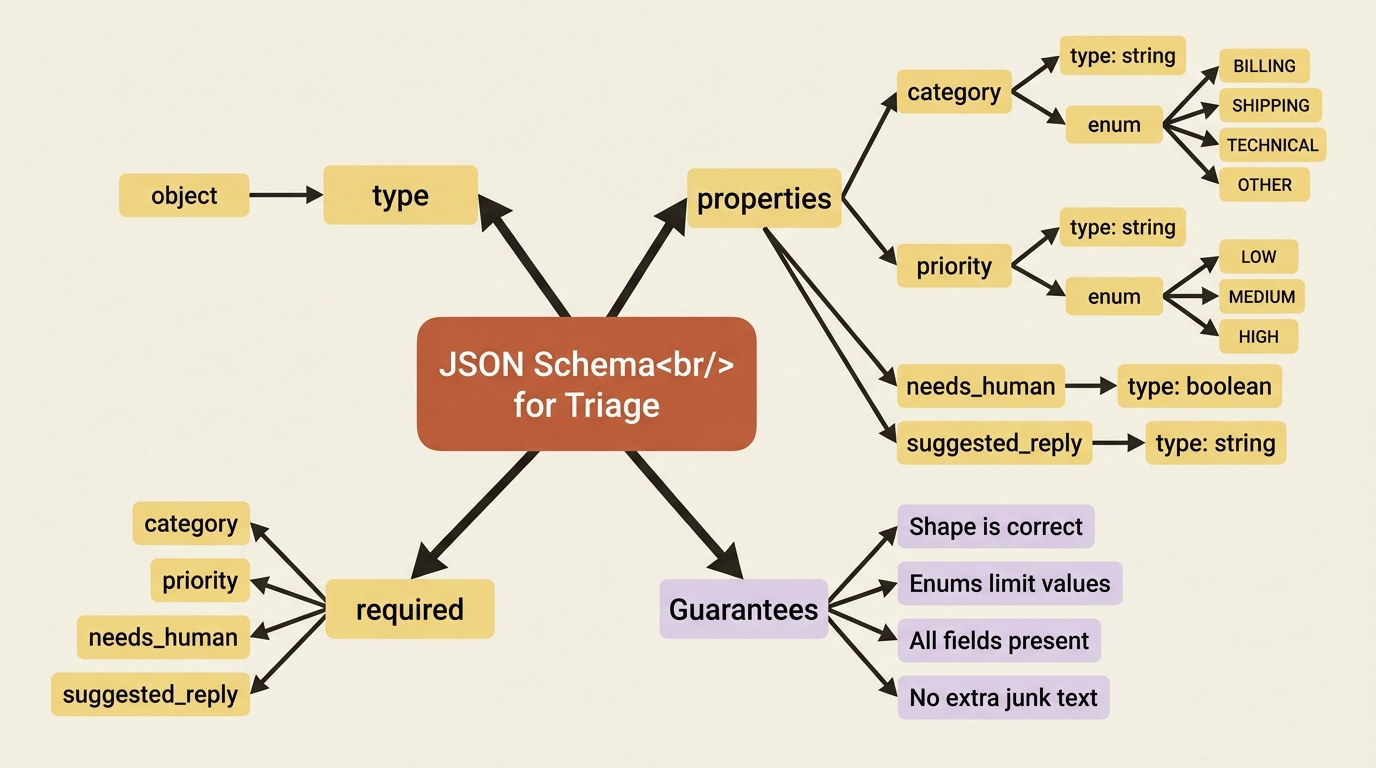
Read what changed. You defined the exact shape you want. The enum pins category and priority to known values. The required list forces all three fields to appear. You passed the schema as the output format. The response text parsed cleanly on the first try, because the API constrained the model to produce exactly that shape rather than trusting it to.
The enum does quiet, important work. The category cannot come back as "Billing Issue" or "billing/charges" or "Billing." It is one of your four exact strings, which means your downstream if result["category"] == "BILLING" branch is safe forever. No normalization layer. No fuzzy matching. No defensive .upper().strip() calls.
This is the cleanest route when the structured data is the model's whole answer. The schema is the contract, and the API enforces it.
Route two: strict tool use as structured output
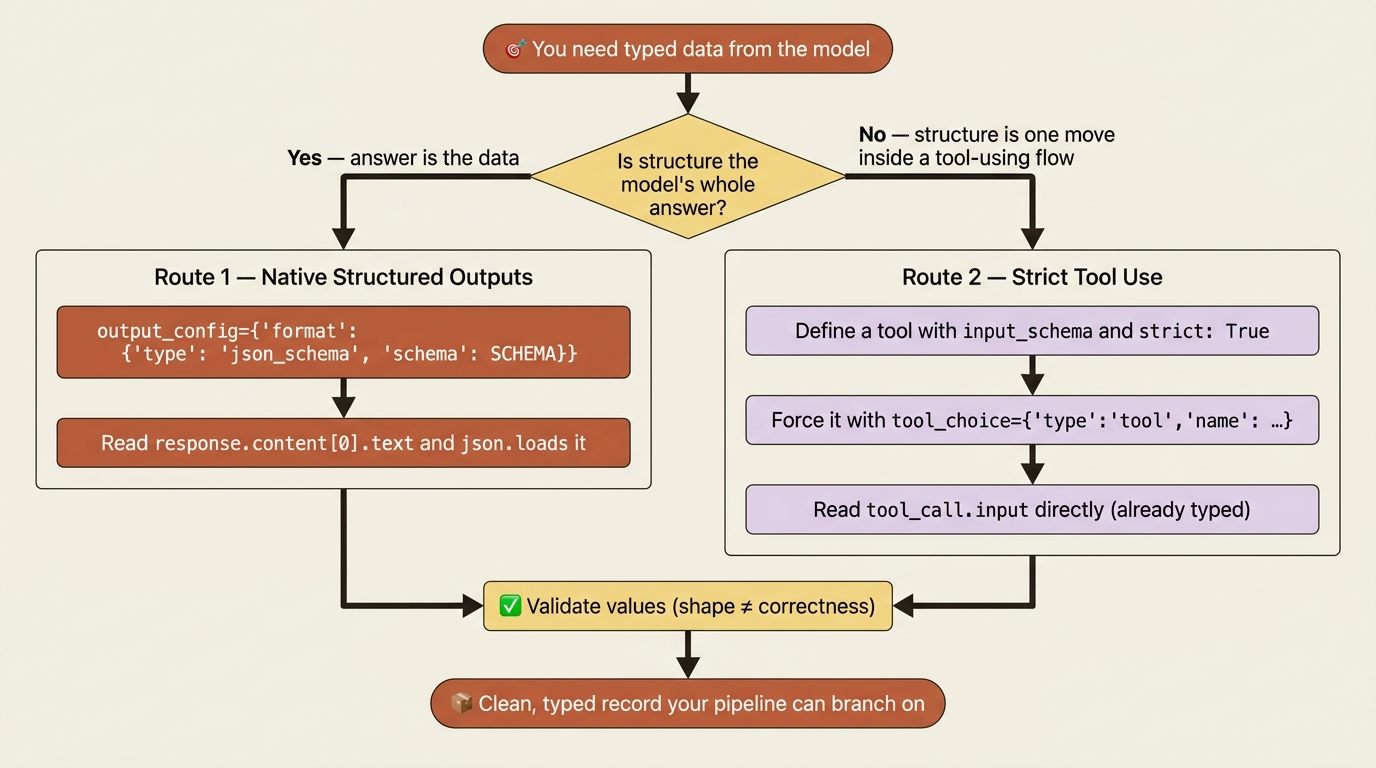
The Claude API has another way to get typed data, and it comes from a feature you have probably already met: tool use. A tool definition is, viewed sideways, a named schema. That makes tool use a second route to structured data, useful when you are already inside a tool-using flow or when you want the model to choose between answering normally and emitting structure.
You define a tool whose input_schema is the shape you want, set strict to True to guarantee conformance, force the tool with tool_choice, and read the structured object straight out of the tool_use block's input.
tools = [{
    "name": "record_triage",
    "description": "Record the triage classification for a support email.",
    "input_schema": {
        "type": "object",
        "properties": {
            "category": {"type": "string",
                         "enum": ["BILLING", "SHIPPING", "TECHNICAL", "OTHER"]},
            "priority": {"type": "string",
                         "enum": ["LOW", "MEDIUM", "HIGH"]},
        },
        "required": ["category", "priority"],
    },
    "strict": True,
}]

response = client.messages.create(
    model="claude-sonnet-4-6",
    max_tokens=1024,
    tools=tools,
    tool_choice={"type": "tool", "name": "record_triage"},
    messages=[{"role": "user", "content": f"Triage this email:\n\n{email}"}],
)

tool_call = next(b for b in response.content if b.type == "tool_use")
print(tool_call.input)   # {'category': 'BILLING', 'priority': 'HIGH'}
By forcing record_triage with tool_choice and setting strict, you have turned the tool machinery into a structured-data extractor. The model is not really running a tool here. It is filling your schema, and you read the typed result from tool_call.input with no parsing at all.
Picking a route
So which route should you reach for?
- Use native structured outputs when the structured data is the model's whole answer to the user. Triage classifications, extracted fields, parsed receipts.
- Use strict tool use when you are already inside a tool-using flow and want one of those tools to capture structured data, or when you want the model to choose between answering normally and emitting structure based on the conversation.
The routes overlap, and either is far better than prompt-and-hope. The deciding question is usually whether structure is the answer or one move within a larger agentic exchange.
Validate anyway: shape is not the same as sense
A guarantee of shape is not a guarantee of correctness, and it pays to keep that distinction sharp. The API ensures the response matches your schema: the right fields, the right types, the allowed enum values. It does not ensure the model picked the right category, only a valid one. Treat structured output as trusted in form and verify in substance where it matters, the same way you would validate input from any external system.
In practice that means a light layer of your own checks on top:
result = json.loads(response.content[0].text)

VALID = {"BILLING", "SHIPPING", "TECHNICAL", "OTHER"}
if result["category"] not in VALID:
    # With a schema enum this should not happen, but defend the boundary anyway.
    result["category"] = "OTHER"
This is belt-and-suspenders, and with an enum schema the belt rarely slips. The habit of validating values, not just trusting shape, is what separates a demo from something you put real traffic through.
A triage service that emits a clean record
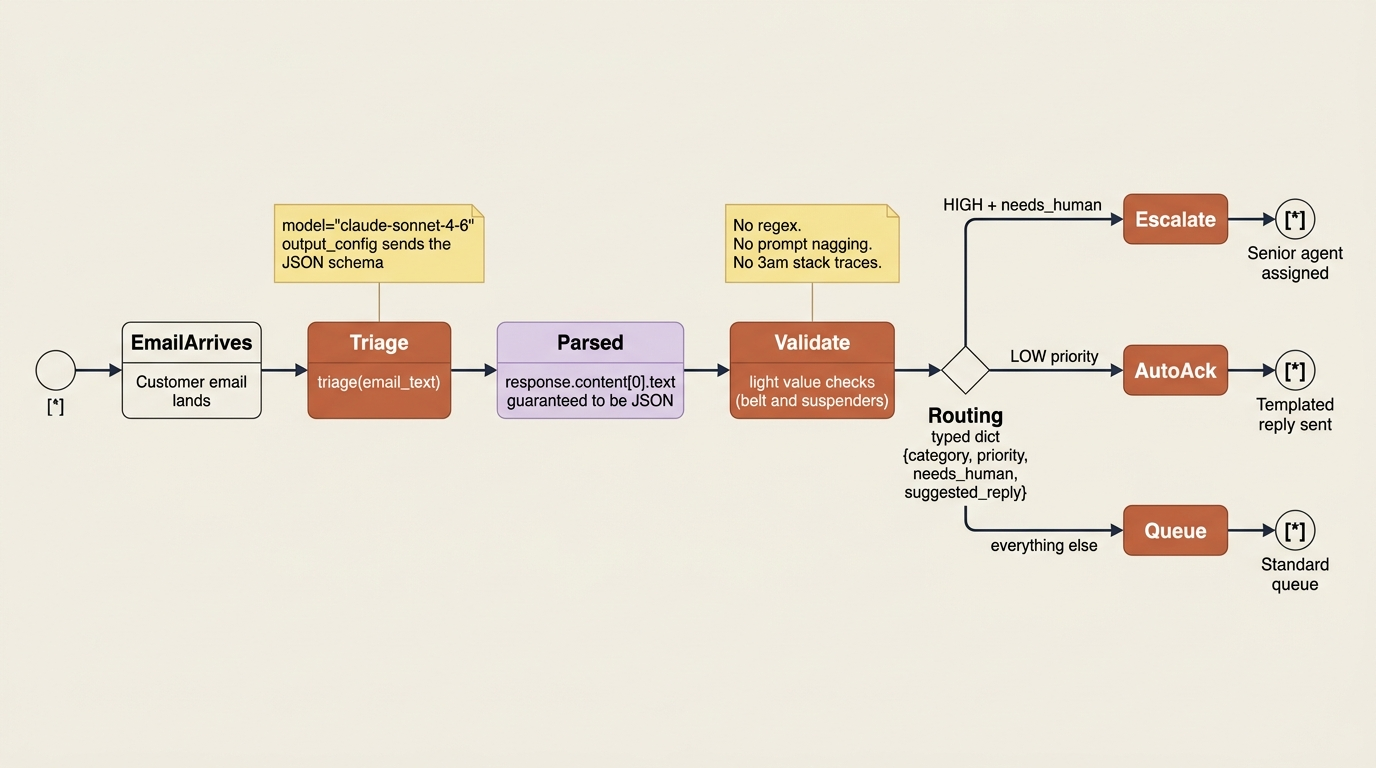
Now we can put it all together. We will build a small triage function that takes a support email, returns a structured record, and lets the rest of the pipeline branch on real fields instead of scraping prose. The service can route HIGH-priority billing issues to a senior agent, auto-acknowledge LOW-priority ones, and queue the rest.
import anthropic
import json

client = anthropic.Anthropic()

SCHEMA = {
    "type": "object",
    "properties": {
        "category": {"type": "string",
                     "enum": ["BILLING", "SHIPPING", "TECHNICAL", "OTHER"]},
        "priority": {"type": "string", "enum": ["LOW", "MEDIUM", "HIGH"]},
        "needs_human": {"type": "boolean"},
        "suggested_reply": {"type": "string"},
    },
    "required": ["category", "priority", "needs_human", "suggested_reply"],
}

def triage(email_text: str) -> dict:
    response = client.messages.create(
        model="claude-sonnet-4-6",
        max_tokens=1024,
        output_config={"format": {"type": "json_schema", "schema": SCHEMA}},
        messages=[{"role": "user", "content": f"Triage this support email:\n\n{email_text}"}],
    )
    return json.loads(response.content[0].text)

record = triage("My app keeps crashing on launch after the latest update. Help!")

# Downstream code branches on real fields, no string parsing in sight.
if record["priority"] == "HIGH" and record["needs_human"]:
    print("Escalating to a human agent.")
print("Category:", record["category"])          # TECHNICAL
print("Draft reply:", record["suggested_reply"])
The difference in the calling code is night and day. There is no content[0].text blob to interpret. There is no regex. There is no hoping the model behaved. The triage() function returns a dictionary with category, priority, needs_human, and suggested_reply as proper typed fields, and the routing logic reads like ordinary code, because it is. The model did the hard part, understanding the email, and the schema guaranteed the easy part, handing the result back in a shape your program can use.
Do this today
A few concrete moves you can make in the next ten minutes:
- Find one place in your code where you call
json.loadson a model response. Replace the prompt-engineered "respond only with JSON" withoutput_config={"format": {"type": "json_schema", "schema": SCHEMA}}and delete the regex. If you do not have one yet, write the triage example above. - Add an enum for every field with a finite value set. Status, category, priority, country code, plan name. The enum eliminates a whole class of normalization bugs at the source.
- Add a five-line validator that checks values, not just shape. Schema enforcement protects you from malformed JSON; value validation protects you from valid-but-wrong answers. Both matter.
- If you already use tools, pick one that captures structured data and set
strict: Trueon it. Then force it withtool_choicewhen you want guaranteed structure from that path. - Pin your model to a stable ID. The examples here use
claude-sonnet-4-6. Use whatever current model your account supports, and keep the ID specific so you know what you are testing against.
From prose you scrape to data you can trust
The shift this article asks you to make is small in code and large in temperament. You stop treating the model's response as text you wrestle with and start treating it as data you can trust at the boundary. The schema is the contract. The API enforces it. Your downstream code reads typed fields the way it would read fields from any other internal system.
That changes what you can build. With reliable structured outputs you can route, branch, persist, and pipeline model results without writing a single line of parser code. Combined with tool use, you can build agents that both act on the world and report back in clean, typed data. That is a genuinely capable foundation, and it is one fewer thing keeping you up at night.
So the next time you find yourself reaching for a regex to pull JSON out of model output, stop. The Claude API already has a way to make the structure a contract instead of a hope. Use it, and let the model do the work the model is good at.
This is Part 5 of "Building with the Claude API," an 11-part series on building production integrations with the Claude API.