
Your Claude API Bill Is Mostly Wasted. One Parameter Cuts It by Ninety Percent.
Prompt caching is a one-parameter change that cuts repetitive Claude API workloads to roughly a tenth of their price, and most teams never turn it on because they do not understand the prefix-cache mental model.
Re-sending a 200,000-token system prompt on every request is the line item that quietly doubles your bill. The model never needed to reprocess it. Prompt caching is the one-parameter fix that almost nobody turns on.
In this article: You will learn how Claude API prompt caching actually works under the hood, how to enable it on a system prompt and tool definitions with a single
cache_controlmarker, how to read the three-wayusagesplit that proves it is working, the cache-order trap that silently destroys hit rates, and why cached reads are not just cheaper but often invisible to your rate limit. By the end, the highest-leverage cost lever on the API will be a checkbox, not a mystery.
Here is a bill that should not exist. You build something genuinely good on the Claude API: a support agent with a long, carefully written system prompt, a rich set of tool definitions, perhaps a big reference document the model needs for context. It works beautifully. Then the invoice arrives, and it is enormous. When you dig into it, you find the culprit. That long system prompt, those tool definitions, and that reference document are all being re-sent and reprocessed on every single request, and you are paying full input-token price for the privilege every time.
The maddening part is that almost none of it changes between calls. The system prompt on request 5,000 is byte-for-byte identical to the one on request 1. The model is recomputing the exact same thing thousands of times, and you are footing the bill.
Claude API prompt caching fixes this. You mark the stable parts of your prompt once, the API caches the processed result, and subsequent requests read from that cache at roughly a tenth of the cost and a fraction of the latency. It is the single highest-leverage change you can make to a repetitive workload, and it requires one parameter. Nothing else on the API moves your cost and latency curves this much for this little effort.
How prompt caching actually works: mark the stable prefix, reuse the processing
The mental model is a prefix cache. The model processes your prompt from the top down, and everything up to a marker you place can be cached and reused on the next call, as long as it is identical. You set that marker with a cache_control breakpoint, which has a type of ephemeral, on the last block of the stable section. The first request that includes it pays to write the cache, a small premium over the normal input price. Every subsequent request that starts with the same prefix reads from the cache instead of reprocessing, billed at roughly ten percent of the base input rate.
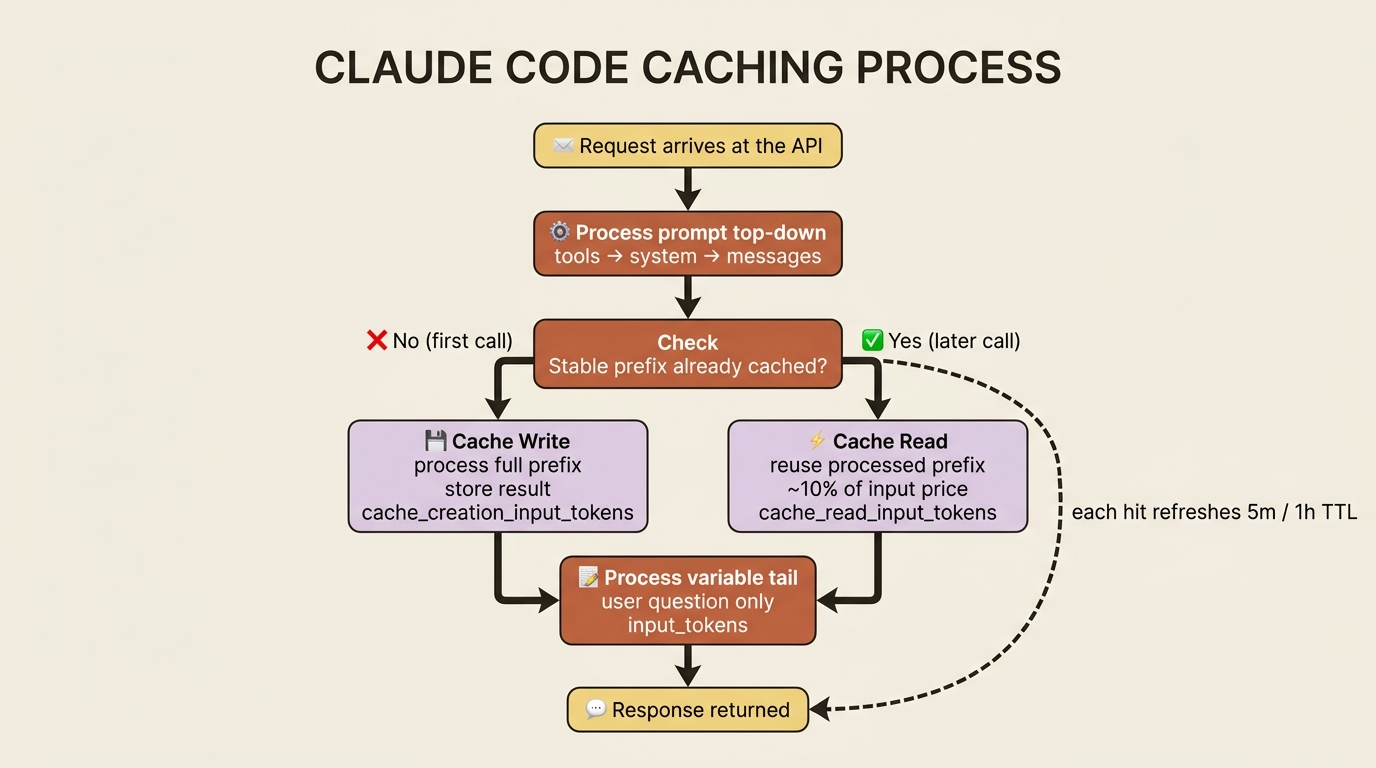
The economics are lopsided in your favor for anything repetitive. A cache write costs a little more than a normal read of those tokens. A cache read costs a fraction of it. The moment a cached prefix is reused even a couple of times, you are ahead. On a high-volume workload that reuses the same system prompt thousands of times, the savings dominate the bill.
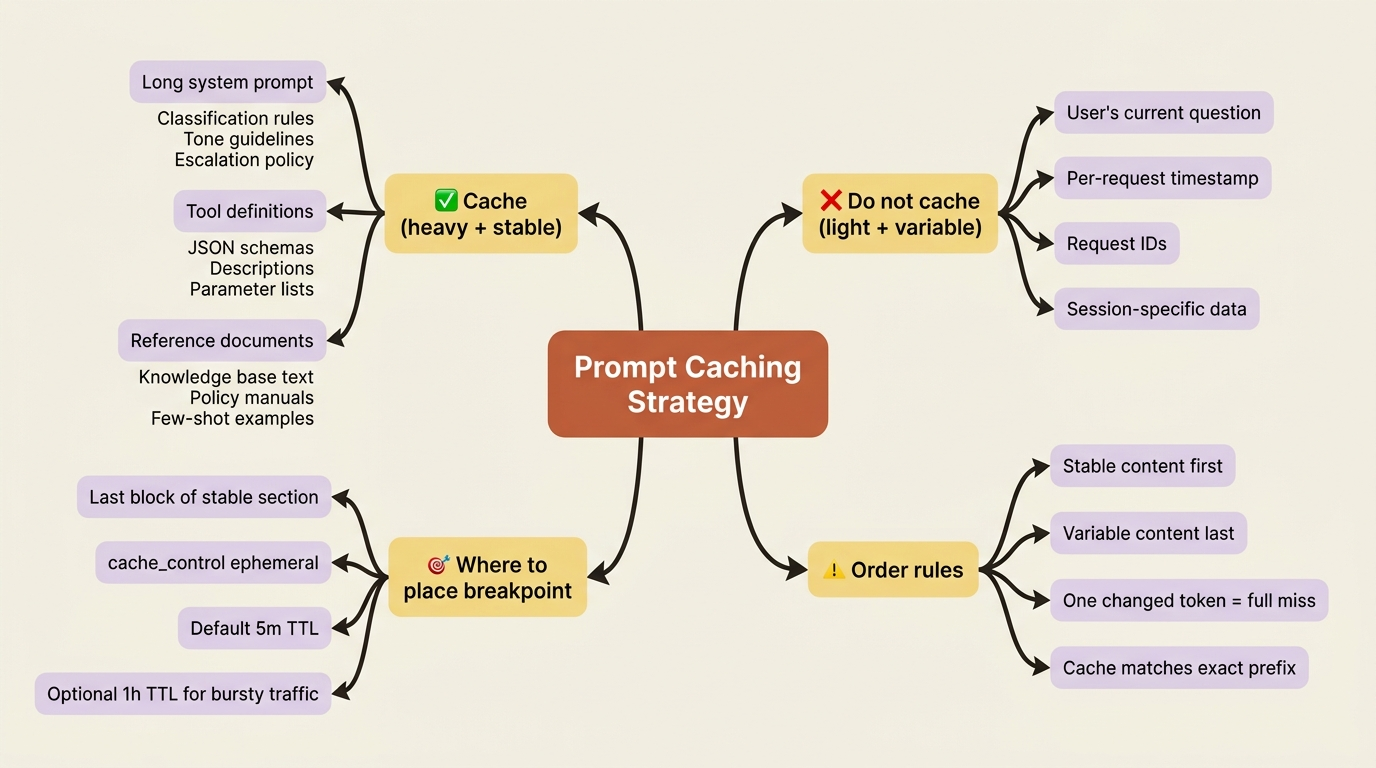
What is worth caching is exactly the material that is large and stable: your system prompt, your tool definitions, and any long context document or example set you send on every call. What is not worth caching is the small, changing tail, namely the user's actual question this turn. The strategy writes itself: cache the heavy, fixed prefix; leave the light, variable part uncached.
Caching a system prompt in one parameter
Suppose your triage service has grown a substantial system prompt: detailed classification rules, tone guidelines, escalation policy, and the rest. To cache it, you express the system prompt as a structured block and attach a cache_control marker:
import anthropic

client = anthropic.Anthropic()

LONG_SYSTEM_PROMPT = """
You are a support triage assistant for an e-commerce company.
... (hundreds of lines of classification rules, tone, policy) ...
"""

response = client.messages.create(
    model="claude-sonnet-4-6",
    max_tokens=512,
    system=[
        {
            "type": "text",
            "text": LONG_SYSTEM_PROMPT,
            "cache_control": {"type": "ephemeral"},
        }
    ],
    messages=[{"role": "user", "content": "Where is my order 48810?"}],
)

print(response.usage)
The only new thing is the cache_control key on the system block. Notice that system is now a list of blocks rather than a plain string, which is what lets you attach the marker. On the first call, the API processes that prompt and writes it to cache. On the second call with the same prompt, it reads the processed result back instead of recomputing it. The customer's question stays outside the cached prefix because it changes every time, which is exactly what you want.
Reading the usage object: where the proof lives
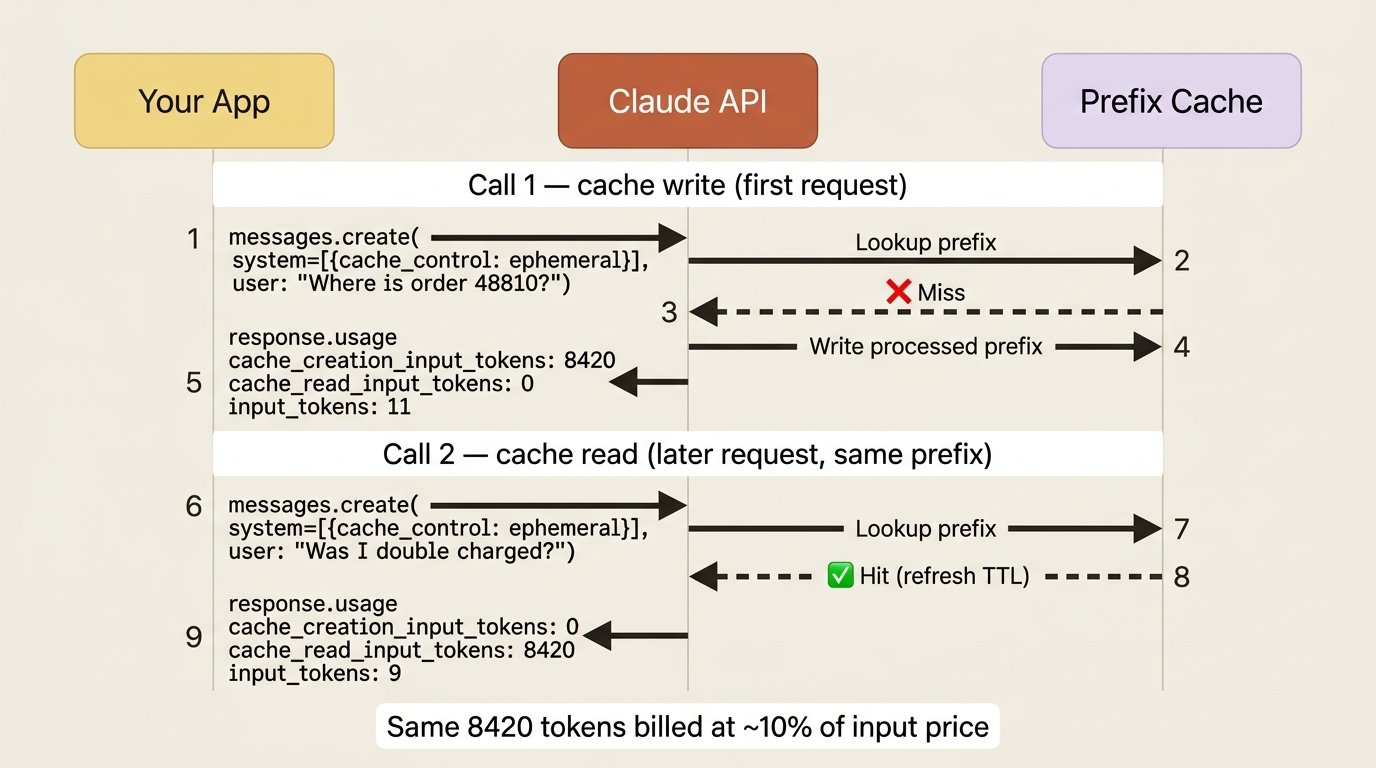
Caching changes how you read the usage object, and this is the part most people get confused by. Without caching, you had input_tokens and output_tokens. With caching, your input is now split across three fields:
cache_creation_input_tokens: tokens written to the cache on this call, the one-time write cost.cache_read_input_tokens: tokens read from the cache on this call, the cheap reuse.input_tokens: the tokens that were neither, meaning the fresh, uncached part of this request.
The crucial consequence is that your total input is the sum of all three, not just input_tokens:
total_input_tokens = cache_creation_input_tokens
                   + cache_read_input_tokens
                   + input_tokens
This trips people up because input_tokens suddenly looks tiny once caching kicks in, and they think something broke. It did not. With a 200,000-token cached document and a 50-token user question, you see input_tokens: 50 even though the real total input is 200,050 tokens. The other 200,000 are sitting in cache_read_input_tokens, billed at a fraction of the price.
Watching these three numbers across two consecutive calls is how you prove caching is working. The first call shows a large cache_creation_input_tokens; the second shows that same number moved into cache_read_input_tokens.
Caching tool definitions too
It is not just the system prompt. Tool definitions, with their schemas and descriptions, are stable across requests and often sizable, so they are prime cache candidates. You place a cache_control marker on the last tool in the list, and everything up to and including it gets cached:
tools = [
    {
        "name": "get_order_status",
        "description": "Look up shipping status and ETA for an order by ID.",
        "input_schema": {
            "type": "object",
            "properties": {"order_id": {"type": "string"}},
            "required": ["order_id"],
        },
        "cache_control": {"type": "ephemeral"},
    }
]
The cache spans the natural order in which the API processes your request: tools first, then system prompt, then messages. A breakpoint on the last tool caches the whole tool set. A breakpoint on the system block extends the cached region through the system prompt. You are caching a prefix of the entire request, and the breakpoints simply tell the API how far that prefix reaches.
How long the cache lasts
A cached prefix does not live forever. By default, it has a five-minute time to live, set by the ttl field, which defaults to 5m. Each cache hit refreshes that window, so on a steadily trafficked endpoint, the cache stays warm indefinitely because every request resets the clock. The cache only expires after five minutes of no matching requests.
For workloads with longer gaps between requests, you can request a one-hour TTL:
"cache_control": {"type": "ephemeral", "ttl": "1h"}
The one-hour cache costs slightly more to write but survives longer idle periods, which makes it worthwhile when your traffic is bursty rather than continuous. For most steady, high-volume services, the default five-minute TTL is the right call precisely because the traffic keeps it warm on its own.
The trap: cache order is everything
Here is the mistake that silently destroys your cache hit rate, and it is subtle enough that you can ship it without noticing that the savings never materialized.
Caching matches an exact prefix from the very start of the request. Everything before your breakpoint must be byte-for-byte identical from one call to the next, or the cache misses entirely. The classic self-inflicted wound is putting something variable early in the prompt: a timestamp, the user's name, a request ID, anything that changes per call, placed above your stable content. One changed token near the top invalidates the entire cached prefix below it, and you quietly pay full price on every request while believing you are cached.
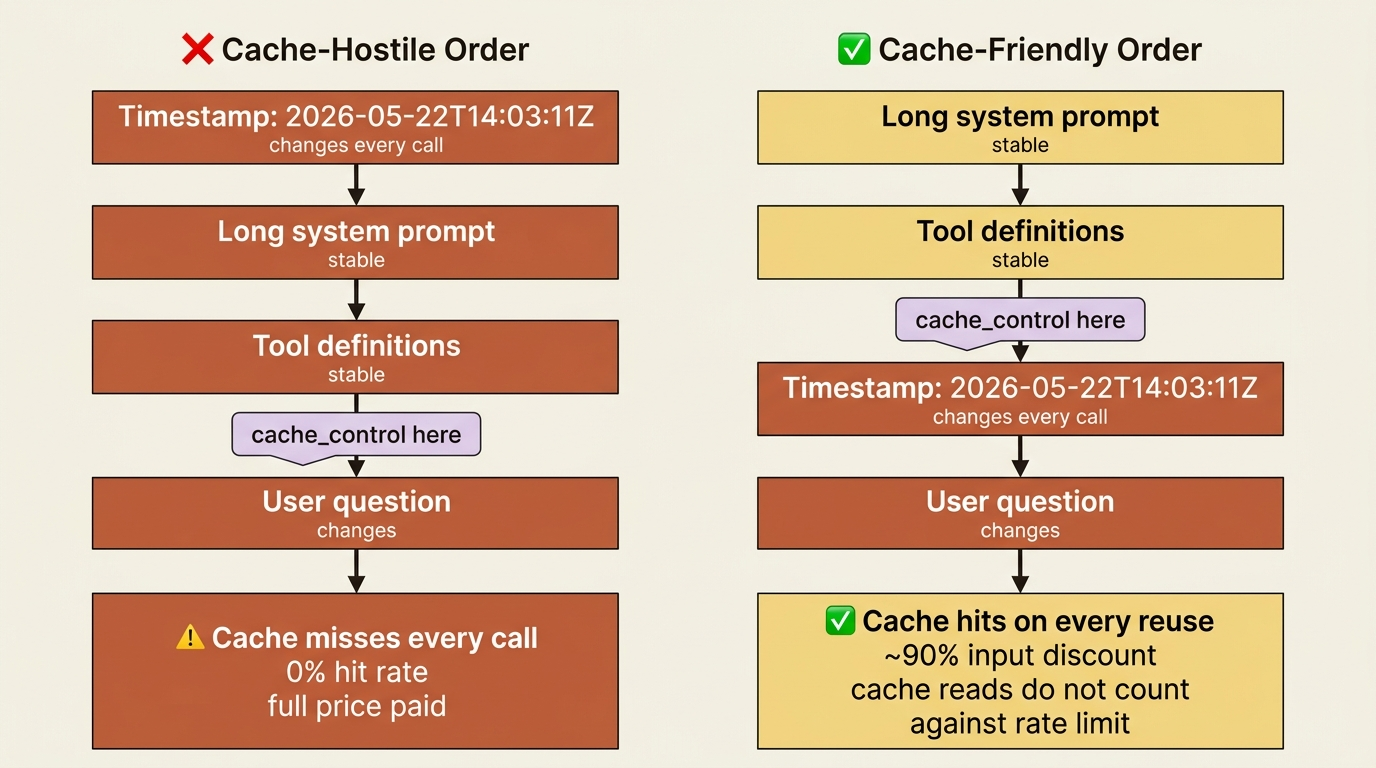
The rule is simple and absolute: put everything stable first, place your breakpoint after it, and keep everything variable, including the user's message, after the breakpoint. Order your prompt for the cache, not for your own reading convenience.
The payoff that is not on your bill: rate limits
There is a second benefit to caching that is easy to miss because it does not show up as a dollar figure. On most models, cached read tokens do not count toward your input-tokens-per-minute rate limit. Only input_tokens plus cache_creation_input_tokens are charged against your throughput ceiling, while cache_read_input_tokens ride for free against the limit. This means caching does not just make each request cheaper; it lets you process far more total tokens per minute than your raw limit suggests.
The arithmetic is striking. With a two-million-tokens-per-minute limit and an eighty-percent cache hit rate, you can effectively push ten million total input tokens per minute through, because the eight million cached tokens do not count against the limit. Caching turns a fixed rate limit into a much higher effective one.
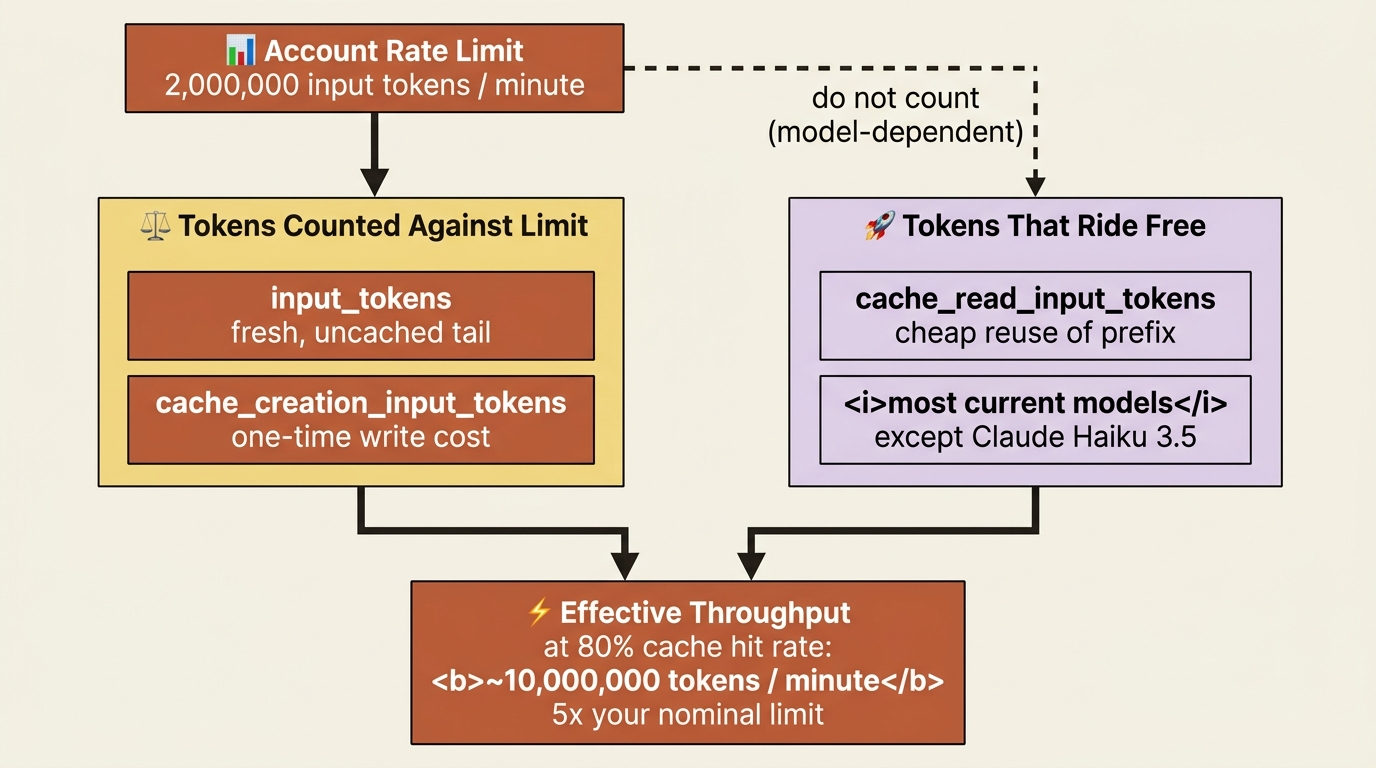
One caveat to file away: a small number of older models, notably Claude Haiku 3.5, do count cache reads toward the limit, so verify the behavior for the specific model you run. For most current models, though, caching is as much a throughput strategy as a cost one.
A complete cached triage service
Let us bring caching into the triage service properly, caching both the long system prompt and the tool definitions, and printing the usage so the savings are visible across two calls:
import anthropic

client = anthropic.Anthropic()

LONG_SYSTEM_PROMPT = """
You are a support triage assistant for an e-commerce company.
... (a long, stable set of rules, tone, and policy) ...
"""

tools = [{
    "name": "get_order_status",
    "description": "Look up shipping status and ETA for an order by ID.",
    "input_schema": {
        "type": "object",
        "properties": {"order_id": {"type": "string"}},
        "required": ["order_id"],
    },
    "cache_control": {"type": "ephemeral"},   # cache the tool set
}]

def triage(question: str):
    return client.messages.create(
        model="claude-sonnet-4-6",
        max_tokens=512,
        system=[{
            "type": "text",
            "text": LONG_SYSTEM_PROMPT,
            "cache_control": {"type": "ephemeral"},   # cache the system prompt
        }],
        tools=tools,
        messages=[{"role": "user", "content": question}],
    )

first = triage("Where is my order 48810?")
print("Call 1:", first.usage.cache_creation_input_tokens, "written")

second = triage("Was I double charged this month?")
print("Call 2:", second.usage.cache_read_input_tokens, "read from cache")
Run it, and the two-call story tells itself. The first call reports a large cache_creation_input_tokens as it writes the system prompt and tools to the cache. The second call, with a different customer question but the identical stable prefix, reports that same large number under cache_read_input_tokens, billed at a fraction of the price and, on most models, not counted against your rate limit at all. The only thing that varied between the two calls was the small user question, which is exactly the design: the heavy, fixed prefix is cached once and reused, and you pay full freight only for the few tokens that actually change.
Do this today
Five steps. They take twenty minutes and start saving money on the next request.
- Audit one production prompt. Pick your highest-volume Claude API call. Add up the bytes in your system prompt, tool definitions, and any reference documents you send every request. If the total is more than a few thousand tokens, you have a cache opportunity worth thousands of dollars a month.
- Add
cache_control: {"type": "ephemeral"}to the last block of your system prompt. Convertsystemfrom a string to a list of blocks if it is not already. Ship the change. The first request writes the cache; the next one proves it. - Print
response.usageand watch all three input fields. Run two consecutive requests with the same prefix and confirm thatcache_creation_input_tokensfrom call one shows up ascache_read_input_tokenson call two. That is your proof. - Hunt for the order trap. Search your prompt construction for anything dynamic, such as a timestamp, request ID, user name, or correlation ID, that sits before your
cache_controlmarker. Move it after the marker, into the variable tail. One stray token near the top is the difference between ninety percent savings and zero. - Add
"ttl": "1h"only if your traffic is bursty. For steadily trafficked endpoints, the default five-minute TTL is refreshed by every hit and stays warm on its own. The one-hour TTL is for jobs that run on cron, not for hot user-facing APIs.
The cheapest line you will ever ship
For a repetitive workload, prompt caching is often the difference between viable unit economics and a bill that scares your finance team. It is one parameter, one mental model (the prefix cache), one trap to avoid (variable content before the breakpoint), and one usage object to read correctly. There is no clever architecture to design, no infrastructure to provision, no library to learn. You add five characters to a JSON block and the savings begin on the very next call.
Most teams ship prompts the way they read them, with timestamps and request IDs at the top, freeform user messages at the bottom, and the stable system prompt in the middle. That order is the bill. Reorder the prompt for the cache, place the marker once, and you will spend the rest of the quarter watching cache_read_input_tokens do quiet, compounding work on every invoice you receive.
The model was never the expensive thing. The expensive thing was processing the same prefix ten thousand times. Stop paying for it.
This is Part 6 of "Building with the Claude API," an eleven-part guide to taking a developer from a first messages.create call to a hardened, observable, production-deployed integration.