
The Claude API Endpoint That Tells You What a Request Will Cost Before You Send It
Most Claude API cost surprises are not surprises: count_tokens lets you measure a request before you send it, and the full usage object tells you exactly what it cost after.
Almost nobody calls count_tokens. The teams that do stop being surprised by their Anthropic bill. Here is the small, mechanical habit that turns cost from something that happens to you into something you decide.
In this article: You will learn how to use the Claude API's
count_tokensendpoint to measure an exact input size before any tokens are billed, how to read every field of theusageobject that comes back on a real call, why caching means your input total lives in three fields and not one, and how to wire a pre-flight check into a real service so an oversized prompt never sneaks past you again.
Most cost surprises on the Claude API are not really surprises. They are things you could have seen coming and chose, by default, not to look at. A support thread balloons to forty messages and you send the whole history on every turn. A user pastes a giant document into the prompt. A conversation quietly grows past the point where it is economical to keep resending. In every one of those cases, the information you needed, the exact size of the request, was available before you ever hit send. You just did not ask.
This article is about how to start asking. The Claude API has a small, under-used endpoint called count_tokens that returns the input token count for any request, without generating anything and without costing a generation. Paired with reading the usage object well after the fact, it gives you a complete picture: what a request will cost before you commit, and what it actually cost once it returns. That is the whole basis of running an LLM workload on a budget instead of on hope.
It is a small chapter in a long series, but the habit it builds separates a service you can forecast from one that bills you by ambush.
What count_tokens actually does
The endpoint is POST /v1/messages/count_tokens, and the official Python SDK exposes it as client.messages.count_tokens(...). You hand it the same messages, system, and tools you would send to a real messages.create call. It returns the number of input tokens that request would consume. The count includes the cost of tools, images, and documents, without actually creating the message. No generation happens, so there is no output, and no output-token charge.
import anthropic

client = anthropic.Anthropic()

count = client.messages.count_tokens(
    model="claude-sonnet-4-6",
    messages=[{"role": "user", "content": "Where is my order 48810?"}],
)

print(count.input_tokens)   # e.g. 14
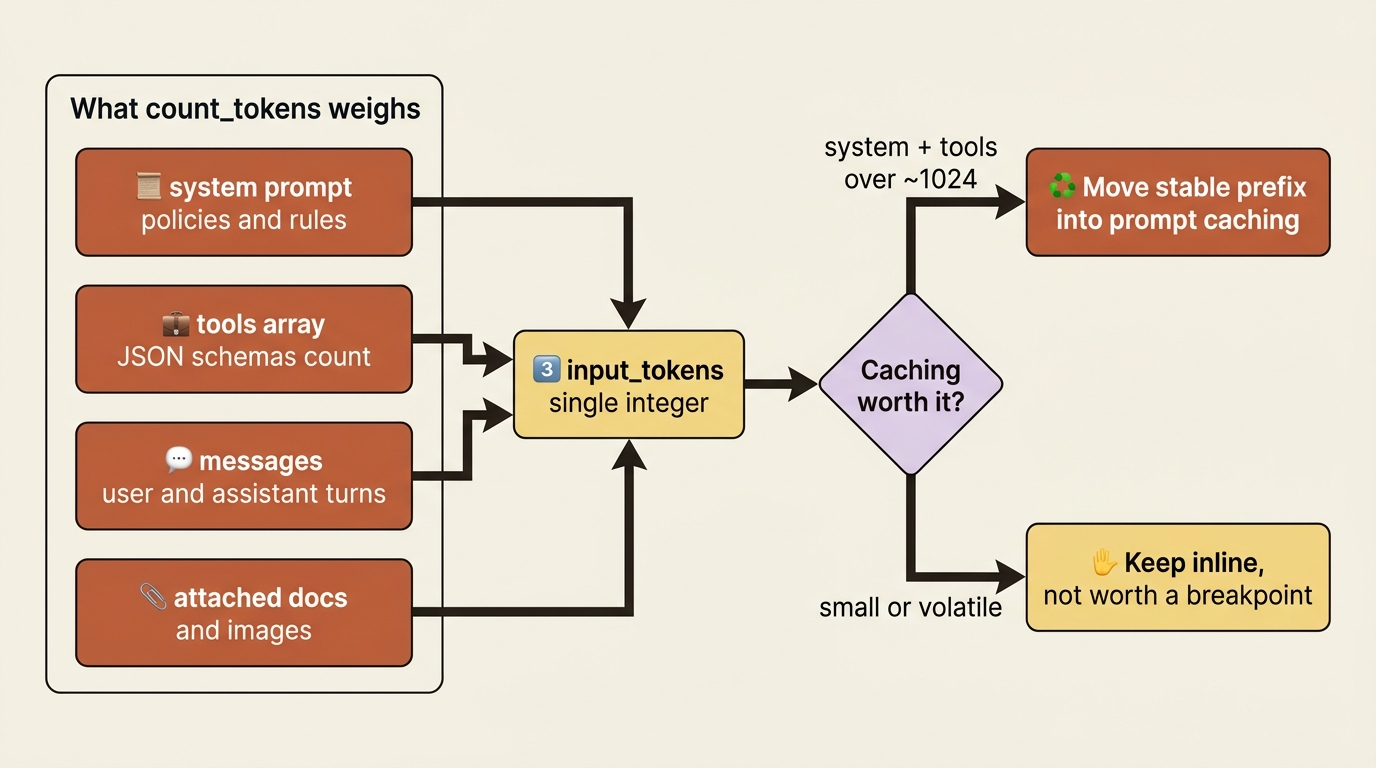
The response is a small object with a single field, input_tokens: the total number of tokens across the provided messages, system prompt, and tools. That number is your input size for that exact request. Because you pass the full request shape, the count reflects everything. A long system prompt, a fat set of tool definitions, and an attached document all fold into the total, so what you measure is what you would actually be billed for on the input side.
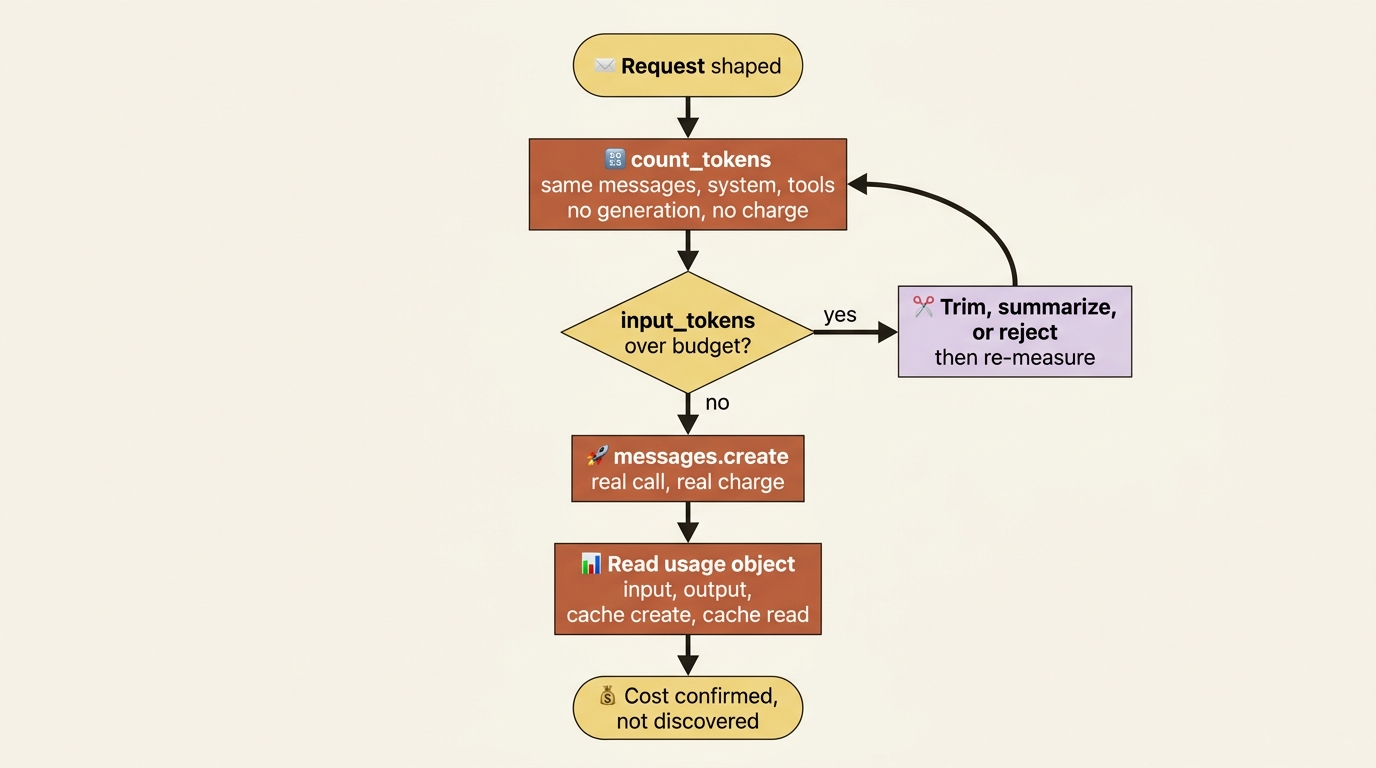
The practical move this unlocks is a pre-flight check. Before sending a request that you suspect might be large, count it first, and decide what to do based on the number rather than firing blindly and reading the damage afterward.
The usage object: what a request actually cost
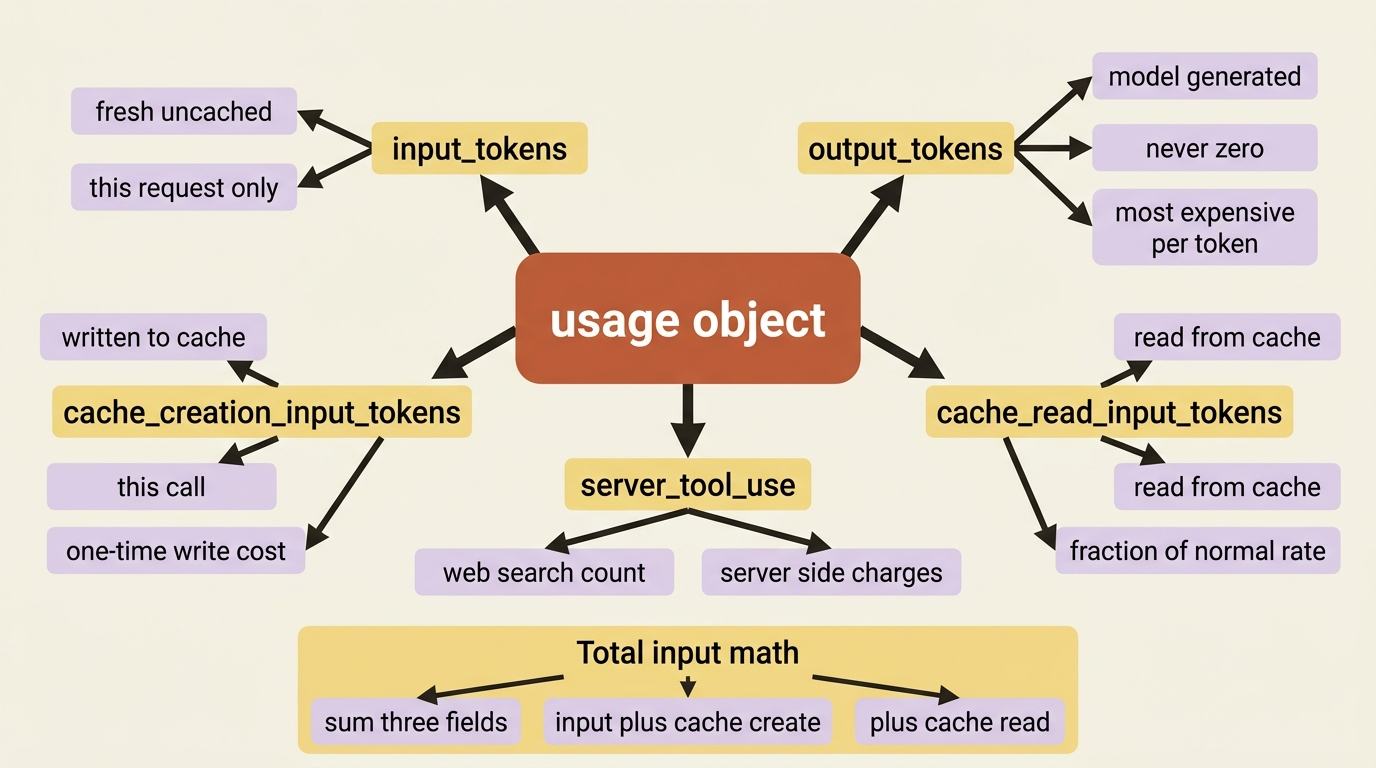
Counting is the before. The usage object is the after. Every real, non-counting response from the Claude API includes a usage block, and it has more in it than the two fields most tutorials introduce. The fields you need to know:
input_tokens: the fresh, uncached input tokens for this request.output_tokens: the tokens the model generated. The more expensive side per token, and it is never zero, even for an empty reply, because of how output is parsed.cache_creation_input_tokens: tokens written to the cache on this call.cache_read_input_tokens: tokens read from the cache on this call.server_tool_use: counts of server-side tool requests, such as web searches, which carry their own charges.
The single most important thing to remember when budgeting is this: once caching is in play, your total input is not input_tokens alone. It is the sum of three fields.
total_input_tokens = input_tokens + cache_creation_input_tokens + cache_read_input_tokens
Read only input_tokens, and you will badly undercount a cached request's true size, or badly overestimate its cost if you forget that the cached portion is billed at a fraction of the rate. To estimate spend per request, take each of these counts and multiply by that token type's price. Fresh input, cached read, cache write, and output each have their own rate. Then sum the results.
The point is not the arithmetic. It is the discipline: every field in usage corresponds to a real line on your bill, so budgeting means reading all of them, not just the first.
Counting a realistic request, not a toy
A bare user message is the boring case. The endpoint earns its keep when you count a realistic request, the kind your service actually sends, with a substantial system prompt and a full tool set attached.
count = client.messages.count_tokens(
    model="claude-sonnet-4-6",
    system="...a long triage system prompt with rules and policy...",
    tools=[
        {
            "name": "get_order_status",
            "description": "Look up shipping status and ETA for an order by ID.",
            "input_schema": {
                "type": "object",
                "properties": {"order_id": {"type": "string"}},
                "required": ["order_id"],
            },
        }
    ],
    messages=[{"role": "user", "content": "Where is my order 48810?"}],
)

print(count.input_tokens)   # reflects system + tools + message together
The returned count now includes the system prompt and the tool definitions, not just the question. Which is exactly what you want, because that is what the real request would carry.
This is also a quiet way to see how much your system prompt and tools weigh, which is useful when deciding whether they are worth caching. A fat, stable prefix that counts in the thousands of tokens is a prime candidate for prompt caching: you pay the cache-write cost once, then every subsequent call reads the prefix at a fraction of the normal input rate.
A triage service that checks before it spends
Here is where counting becomes a guardrail rather than a curiosity. Support emails are unpredictable in length. Most are a paragraph. Occasionally someone pastes an entire forwarded thread, a wall of logs, or a chain of forty replies. Sending that straight to the model is how a routine classification suddenly costs many times what it should.
The fix is a pre-flight token check that trims an oversized inbound thread down to something sensible before it ever reaches the model:
import anthropic

client = anthropic.Anthropic()

MODEL = "claude-sonnet-4-6"
MAX_INPUT_TOKENS = 4000   # budget ceiling for a single triage request

def triage(email_text: str):
    messages = [{"role": "user", "content": f"Classify this support email:\n\n{email_text}"}]

    # Pre-flight: how big is this request before we send it?
    count = client.messages.count_tokens(model=MODEL, messages=messages)

    if count.input_tokens > MAX_INPUT_TOKENS:
        # Too big. Trim the email and re-measure rather than blindly sending.
        email_text = email_text[:8000] + "\n\n[thread truncated for length]"
        messages = [{"role": "user", "content": f"Classify this support email:\n\n{email_text}"}]
        print(f"Trimmed oversized email ({count.input_tokens} tokens) before sending.")

    response = client.messages.create(model=MODEL, max_tokens=256, messages=messages)
    print("Input billed:", response.usage.input_tokens,
          "| Output billed:", response.usage.output_tokens)
    return response

triage("Subject: HELP\n" + ("(forwarded reply) " * 2000))
Trace the safeguard. The forwarded monster email arrives. The pre-flight count flags it as over the four-thousand-token ceiling. The service trims it and re-measures before sending, then makes the real call and prints the actual usage so the before-estimate and after-fact line up. A request that might have cost many times the norm is brought back inside budget automatically, with no human watching the queue.
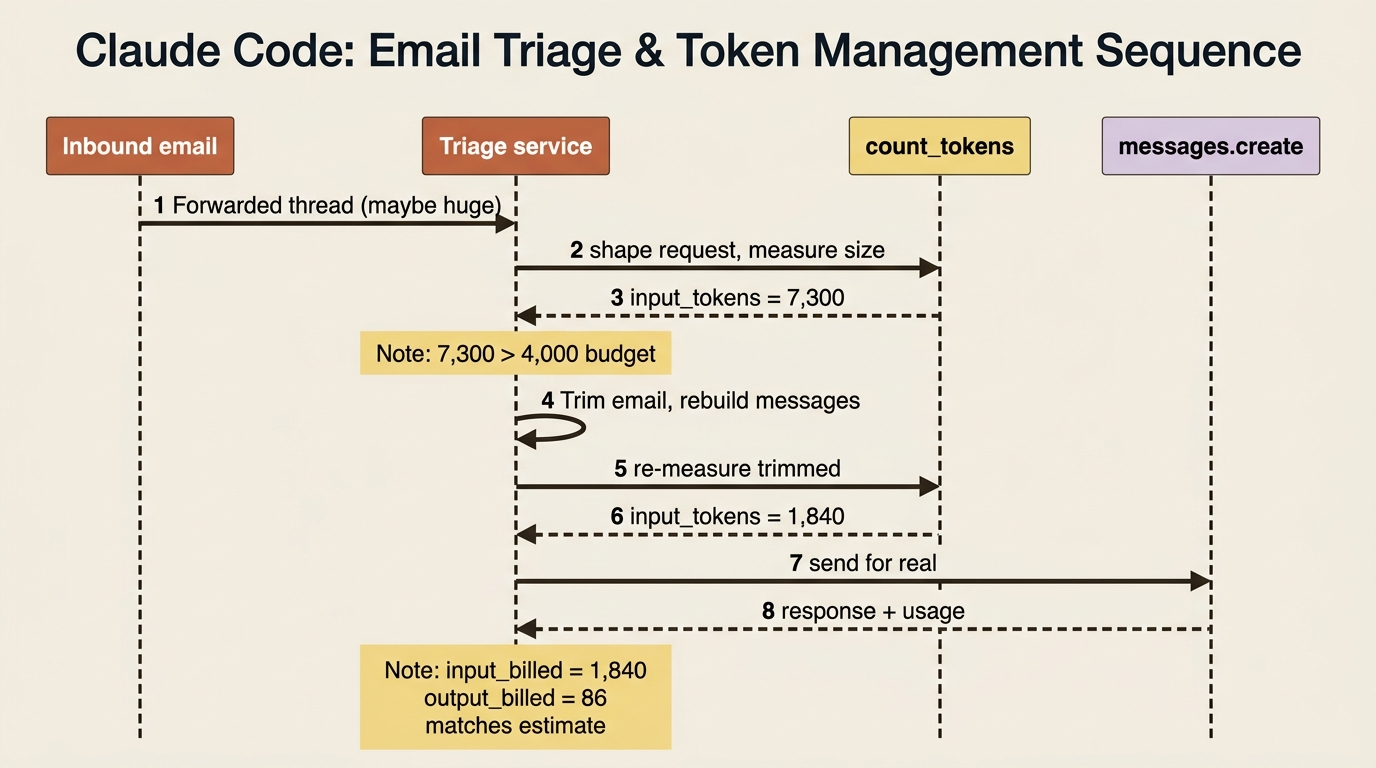
The whole technique is just two halves of one loop: count to decide, send, then read usage to confirm. Do that on every request that touches user-controlled input and "the bill spiked overnight" stops being a thing that happens to your service.
The lifecycle, end to end
It helps to see the whole arc of a single request once. Every call to the Claude API moves through the same states whether you measure it or not: you shape it, optionally estimate it, decide whether to send it, send it, and reconcile what came back. The discipline count_tokens introduces is making the estimating and reconciling steps explicit instead of skipped.
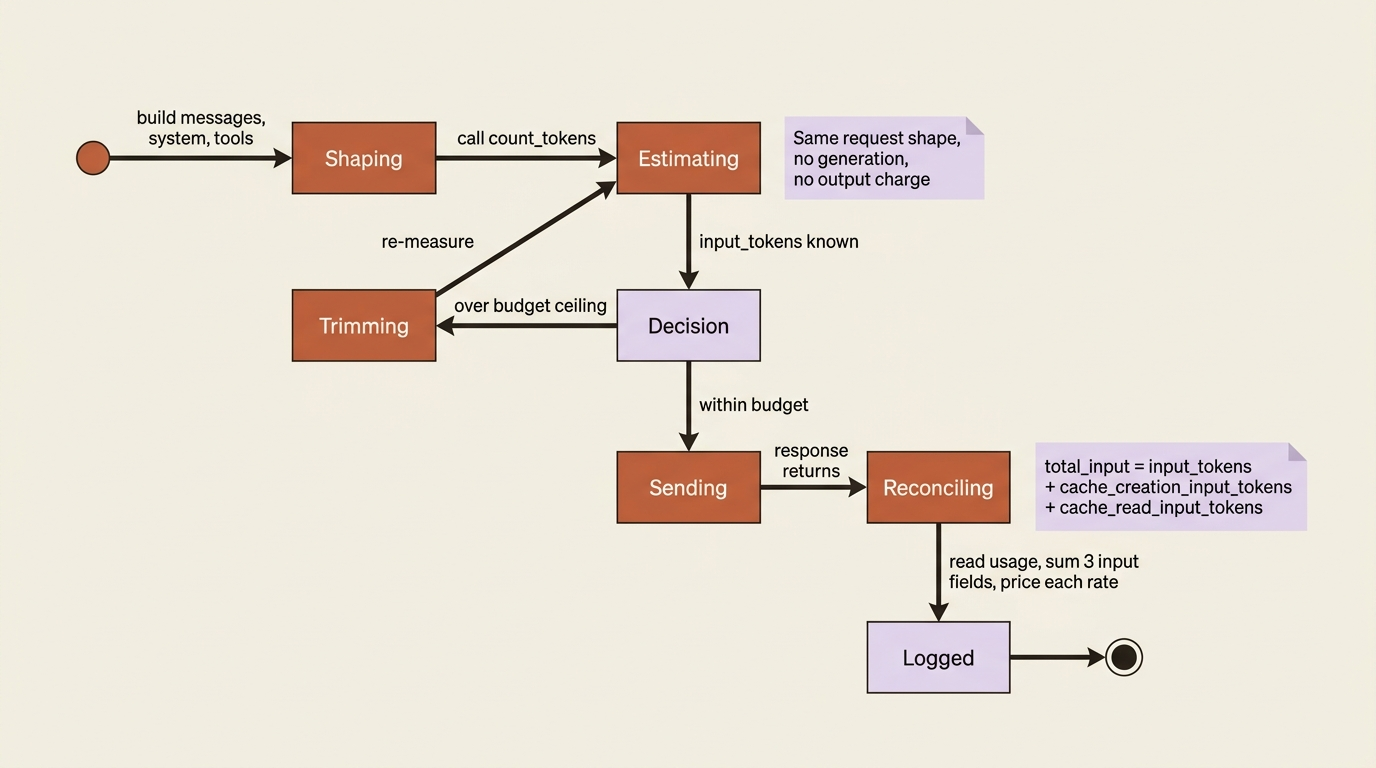
The estimating state is free. The reconciling state is the only place where cost data is real. Skip either, and you are guessing.
Do this today
Three small changes that take less than an hour and immediately tighten your cost story:
- Wrap one expensive endpoint with
count_tokens. Pick the call in your service most likely to receive user-pasted text. Add a pre-flight call toclient.messages.count_tokens(...)with the samemessages,system, andtools. Define a ceiling. Trim or reject anything above it. Log both the estimate and the realusageso you can compare. - Log every field of
usage, not justinput_tokensandoutput_tokens. Addcache_creation_input_tokensandcache_read_input_tokensto your structured logs today, even if you have not turned caching on. The day you do turn it on, your dashboards will already be correct. - Count your system prompt and tools in isolation. Call
count_tokenswith your system and tools but a one-word user message. The number you get back is the fixed overhead every request in your service carries. If it is over roughly a thousand tokens and it does not change often, it is a prime candidate for prompt caching.
Cost stops being something that happens to you
You can now measure a request's input size before sending it with count_tokens, read the full usage object after to see what it truly cost, remember that a cached request splits its input across three fields and not one, and wire a pre-flight check into a real service so oversized inputs get caught instead of billed.
The shift this represents is small in code and large in posture. You stop reacting to the bill at the end of the month. You start deciding, on a per-request basis, what you are willing to spend. The same endpoint you ignored on day one becomes the thing that lets you sleep through a traffic spike.
So the next time you build a Claude API integration and your gut says "this prompt might be big," do not guess. Count it. The endpoint is right there. It is free. It is exact. And it is the difference between a service you forecast and a service that ambushes you.
This is Part 7 of "Building with the Claude API," an eleven-part guide that takes a developer from a first messages.create call to a hardened, observable, production-deployed integration.