
Your Overnight LLM Backlog Is Costing You Double. Here Is How to Stop Paying It.
There is a category of LLM work that quietly overpays on every invoice: the overnight backlog. The Claude Message Batches API exists to give you 50 percent off for the work nobody is waiting on, and the only mental shift required is moving from per-request thinking to job thinking.
The Claude Message Batches API hands you a built-in 50 percent discount on every request that does not need to finish in the next breath. Most teams miss it because the work hides in plain sight.
In this article: You will learn when to move LLM work from synchronous
messages.createcalls to the Claude Message Batches API, how to submit a job of many requests at once, how to poll itsprocessing_status, how to collect results from the.jsonlstream without silently mismatching them, and the one ordering rule that catches teams when they try to delete a batch that is still running.
There is a category of LLM work that quietly overpays on every API invoice, and it hides in plain sight. Think about what a customer support triage service actually does at scale. During the day, a customer is waiting, so a fast answer matters. Overnight, however, a backlog accumulates: hundreds of emails that arrived after hours, a queue to classify before the morning shift, an evaluation run over thousands of past tickets to test a new prompt. None of that work has a human tapping their foot. Nobody is waiting on the answer in real time.
Yet if you process that backlog with ordinary messages.create calls, you pay the full real-time price for every one, as though each were urgent. You are buying instant turnaround that you do not need and cannot use, because the results will sit until morning regardless. The Claude Message Batches API exists for exactly this case. You hand it a pile of requests, it processes them asynchronously within twenty-four hours, and it charges you half. For work that can wait, declining that discount is leaving money on the table for nothing.
The shift here is conceptual as much as technical. It moves you from "ask and wait" to "submit and collect later," and from per-request thinking to job thinking. Once that lands, every overnight backlog, eval suite, and bulk classification job in your system looks like a candidate.
A batch is a job, not a faster loop
A batch is not a quicker way to fire many calls in parallel. It is a different shape of work. Instead of one request and one response repeated in a loop, you assemble many requests into a single job, submit it once, and walk away. The API processes the requests on its own schedule, guaranteed to finish within a twenty-four-hour window and usually much sooner. You come back later to collect all the results at once. You trade immediacy for a fifty percent discount and a much simpler high-volume workflow.
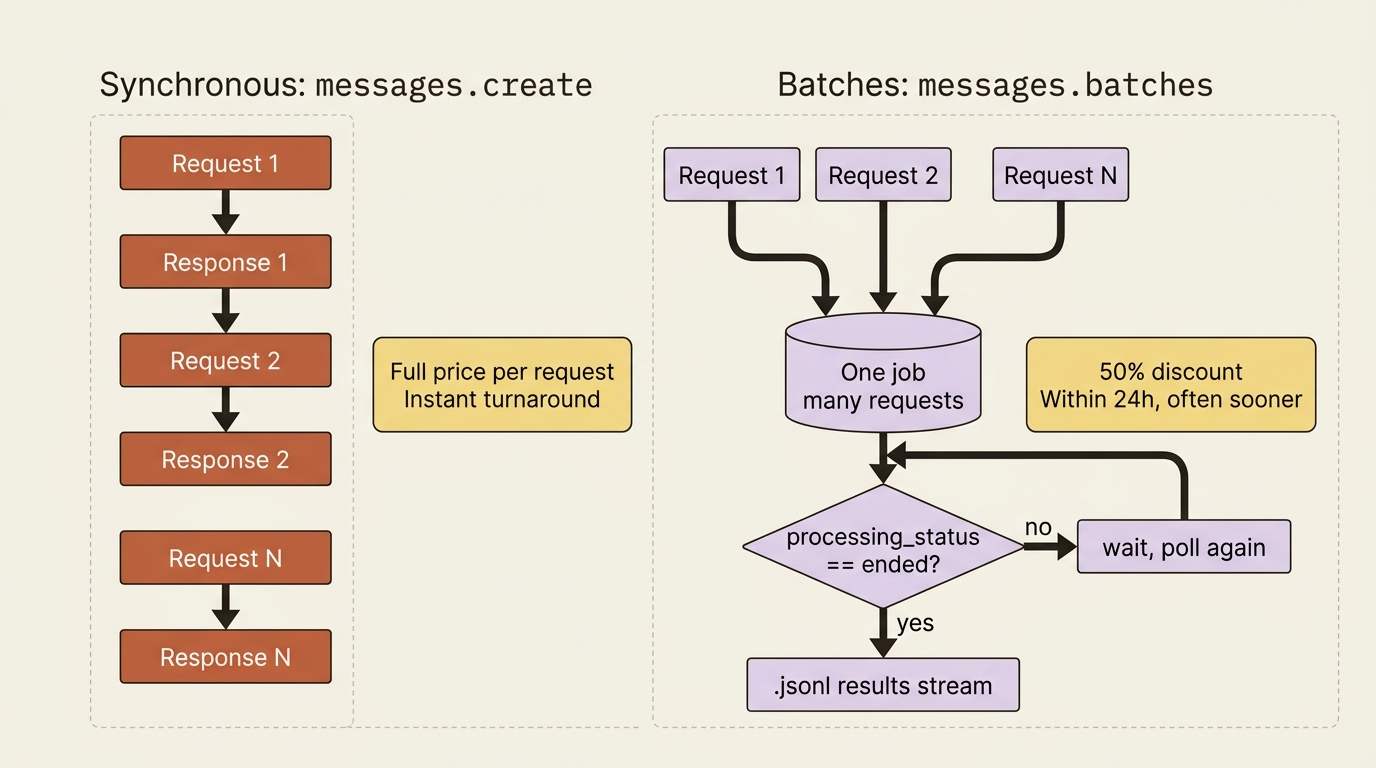
Each request inside the batch carries a custom_id that you assign. That ID is the thread you will use to match each result back to the request that produced it. Hold on to that idea, because it is the one piece of bookkeeping the batch model puts on you, and it is also the source of the most common bug.
Submitting a batch
You create a batch with client.messages.batches.create, passing a list of requests. Each request is an object with two parts: a custom_id you choose, and a params object that is exactly the body of a normal Messages request. The params object holds the same model, max_tokens, messages, and anything else you would normally send.
import anthropic

client = anthropic.Anthropic()

# A backlog of overnight support emails to classify.
emails = {
    "ticket-1001": "Where is my order 48810? It's late.",
    "ticket-1002": "I was double charged for my subscription.",
    "ticket-1003": "The app crashes every time I open it.",
}

batch = client.messages.batches.create(
    requests=[
        {
            "custom_id": ticket_id,
            "params": {
                "model": "claude-haiku-4-5",
                "max_tokens": 256,
                "messages": [
                    {"role": "user", "content": f"Classify this email: {text}"}
                ],
            },
        }
        for ticket_id, text in emails.items()
    ],
)

print(batch.id)                 # msgbatch_...
print(batch.processing_status)  # in_progress
Notice that each custom_id is the ticket ID, a value meaningful to your system. That choice is deliberate. You are tagging each request with something you can route on later. The params block is just a normal request body, which means everything you already know works inside a batch unchanged: system prompts, tools, structured outputs, even prompt caching. You are not learning a new request format. You are wrapping the familiar one in an envelope with an ID on it.
Watching the job: processing status and request counts
After submitting, the batch is a job you check on rather than a response you wait for. You retrieve it to see where it stands:
batch = client.messages.batches.retrieve(batch.id)
print(batch.processing_status)   # in_progress, canceling, or ended
print(batch.request_counts)
# {processing: 3, succeeded: 0, errored: 0, canceled: 0, expired: 0}
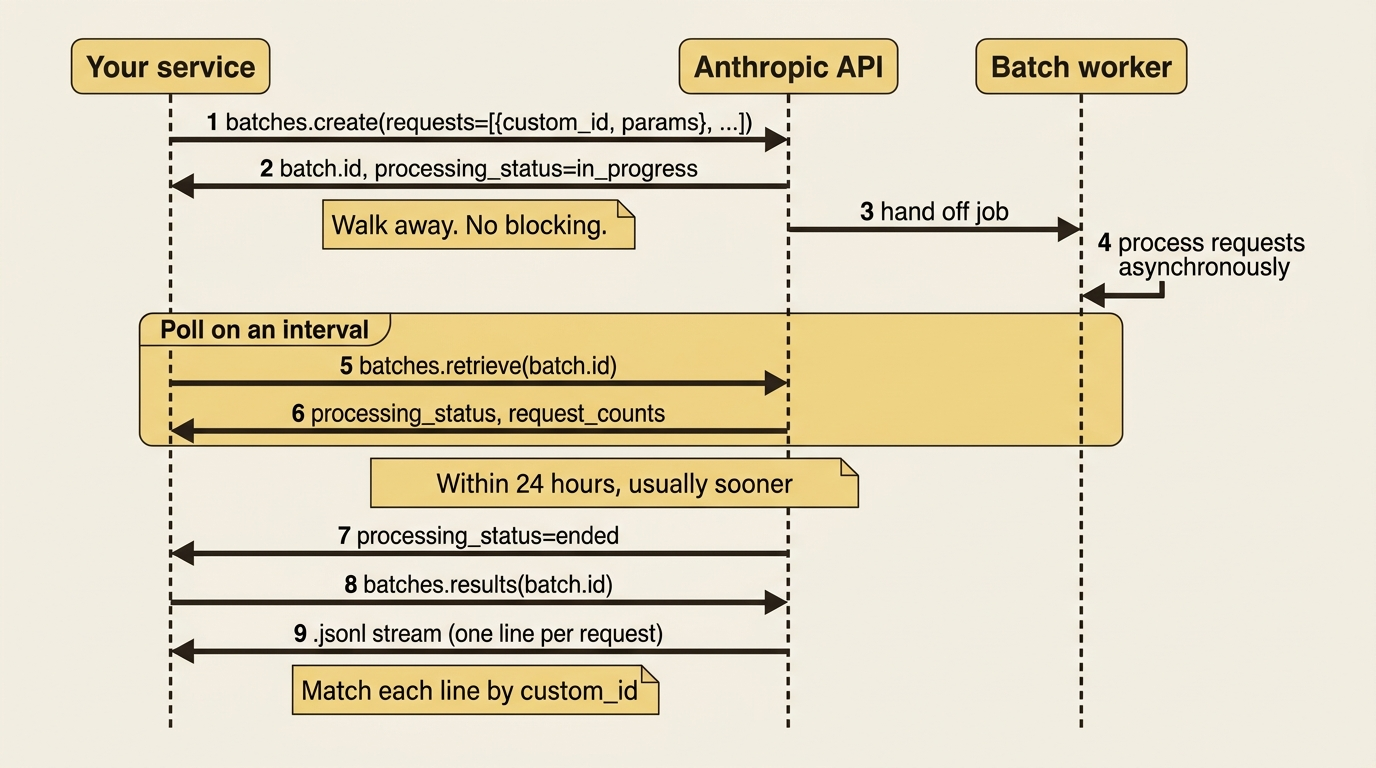
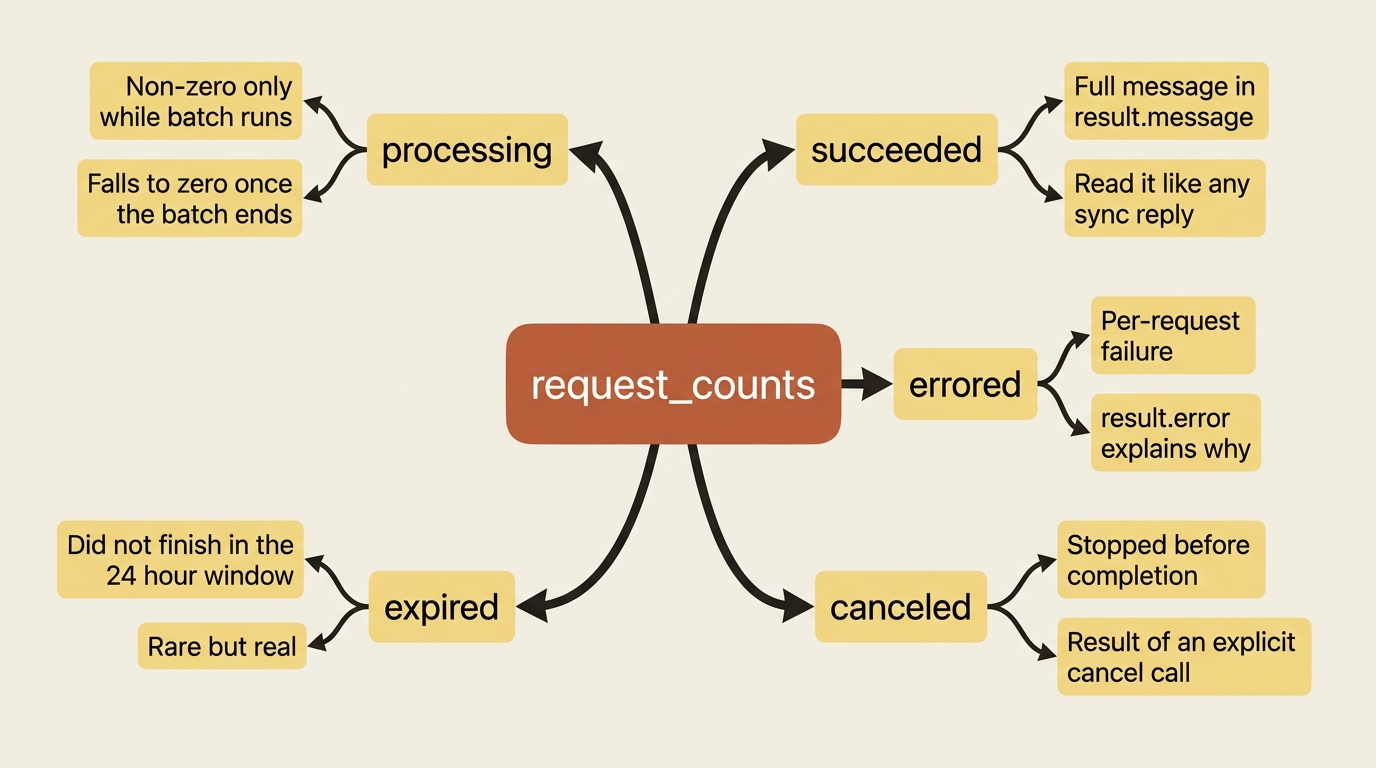
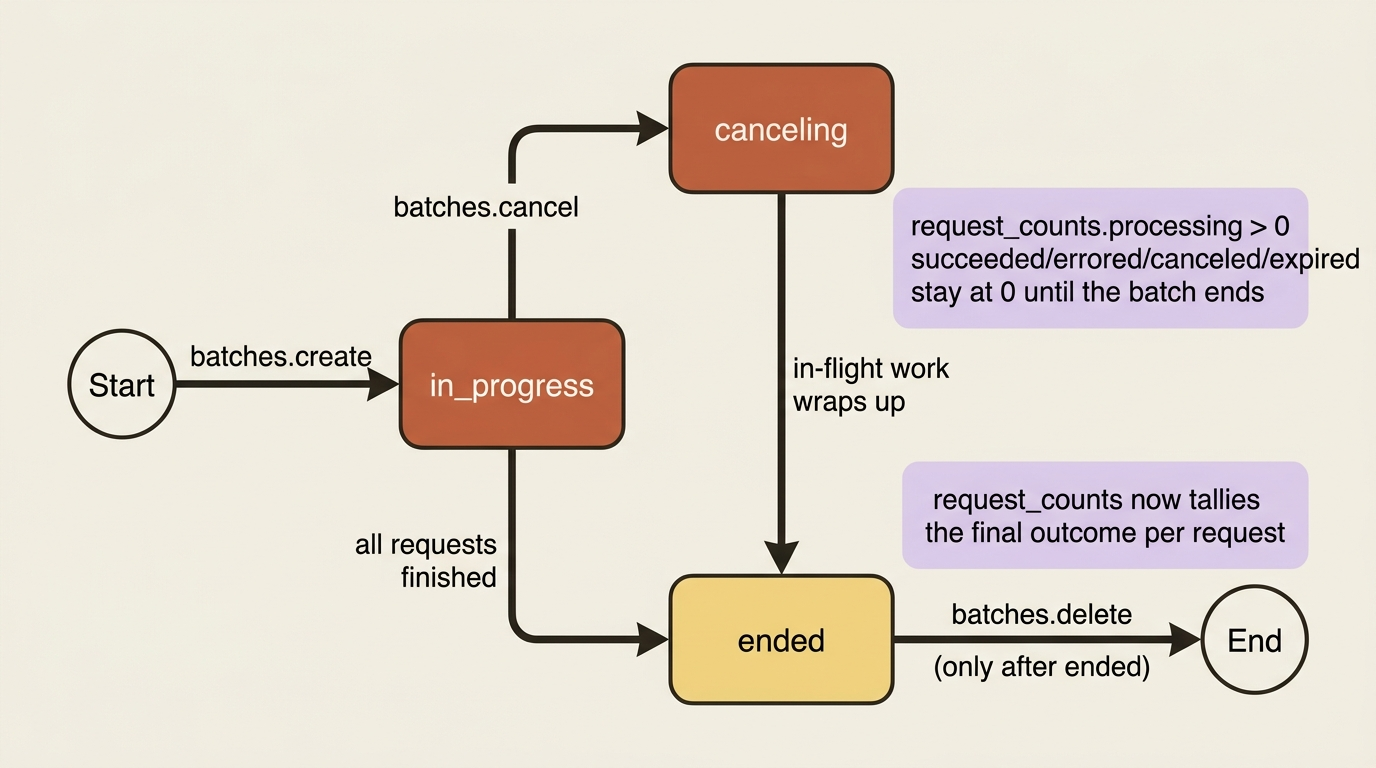
Two fields tell the whole story. The processing_status has three values: in_progress while the batch is still working, canceling if you have asked it to stop, and ended once every request has reached a final state. The request_counts object tallies the individual requests by outcome: processing, succeeded, errored, canceled, and expired.
One detail is worth internalizing: those per-outcome counts stay at zero until the entire batch ends, and only processing is meaningful while the job runs. The sum of all five always equals your total request count, so once the batch ends, the tally is your at-a-glance summary of how the job went.
In practice you poll on an interval, perhaps every minute or every few minutes, and wait for processing_status to reach ended before collecting results. There is no need to hammer the endpoint. The work is asynchronous by design.
Collecting results: the .jsonl and the trap nobody warns you about
When the batch ends, its results become available as a .jsonl file, one JSON object per line, each containing the outcome of a single request. The SDK streams these for you with client.messages.batches.results, and each item carries the custom_id you assigned plus a result describing what happened.
results = {}
for entry in client.messages.batches.results(batch.id):
    if entry.result.type == "succeeded":
        reply = entry.result.message.content[0].text
        results[entry.custom_id] = reply
    elif entry.result.type == "errored":
        results[entry.custom_id] = f"ERROR: {entry.result.error}"
    # 'canceled' and 'expired' are the other two possible result types.

print(results["ticket-1002"])   # the classification for that specific email
The result.type tells you the per-request fate. The four values are succeeded, with a full message identical to a normal Messages response; errored; canceled; and expired. You read the model's answer out of result.message exactly as you would a synchronous response, which means structured outputs and tool blocks behave the same inside a batch result. The only new discipline is keying everything by custom_id, which brings us to the trap.
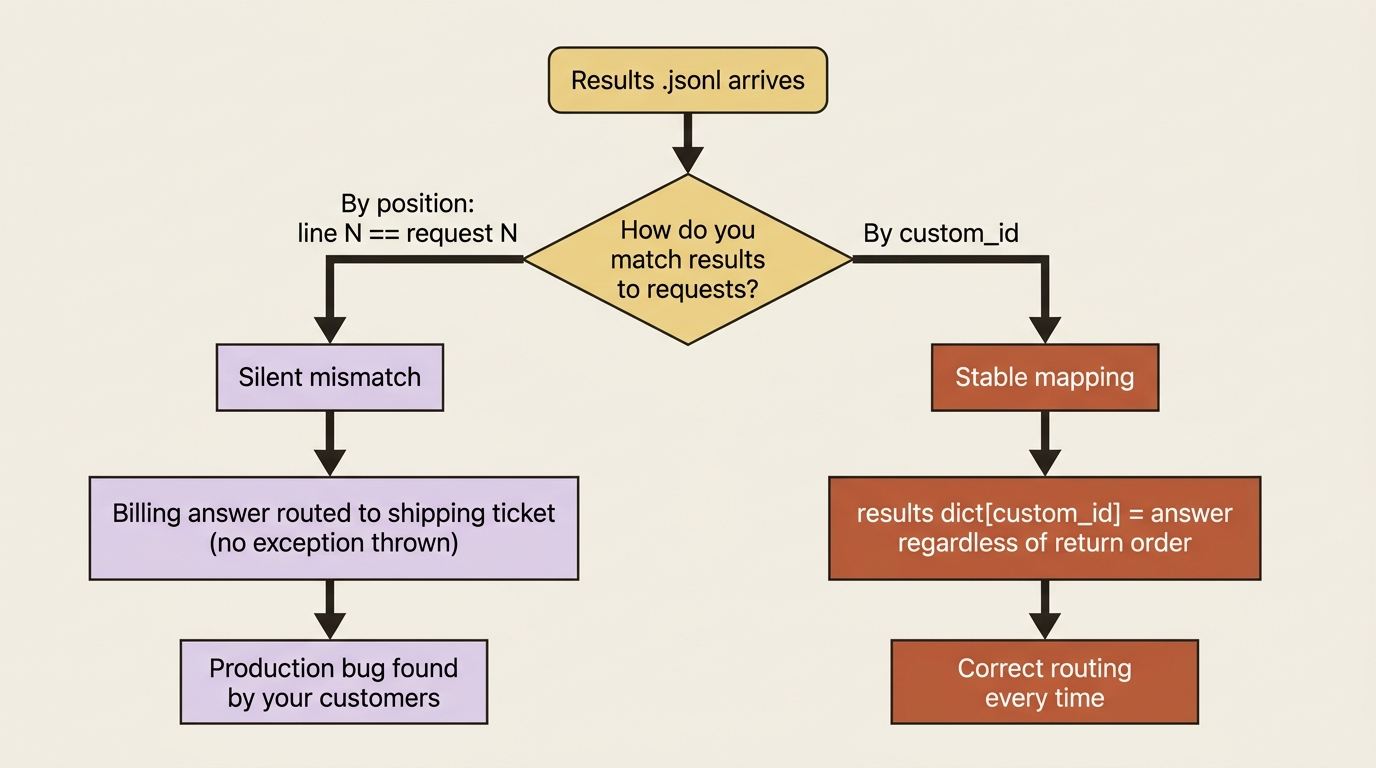
Batch results are not returned in the order you submitted them, and the API says so explicitly. If you collect results into a plain list and assume line one corresponds to request one, you will silently mismatch every answer to the wrong ticket. The bug will not throw. It will just quietly route the billing classification to the shipping ticket. Always match results to requests using the custom_id, and never by position. This is the entire reason custom_id exists, and it is non-negotiable in any code that does more than print results to a screen.
Canceling and deleting: mind the order
Two lifecycle operations round out the API, and there is one ordering rule that catches people. You can cancel a batch any time before it finishes, which moves it into the canceling state while the system wraps up any in-flight, non-interruptible requests:
client.messages.batches.cancel(batch.id)
Deletion is more constrained, and the constraint is the gotcha within the gotcha. A batch can only be deleted once it has finished processing. If you want to get rid of a batch that is still running, you cannot delete it directly. You must cancel it first, let it reach an ended state, and then delete it. Trying to delete an in-progress batch will not work. The mental model is simple once stated: cancel stops a running batch, delete removes a finished one, and you cannot skip straight to delete on something still in flight.
The whole thing, end to end
Let us put it together as the triage service would actually use it. Take last night's entire backlog, classify it in one batch at half price, wait for it to finish, and collect the results keyed by ticket.
import anthropic
import time

client = anthropic.Anthropic()

def classify_overnight_queue(emails: dict[str, str]) -> dict[str, str]:
    # 1. Submit the whole backlog as one job.
    batch = client.messages.batches.create(
        requests=[
            {
                "custom_id": ticket_id,
                "params": {
                    "model": "claude-haiku-4-5",
                    "max_tokens": 256,
                    "messages": [{"role": "user",
                                  "content": f"Classify as BILLING, SHIPPING, "
                                             f"TECHNICAL, or OTHER:\n\n{text}"}],
                },
            }
            for ticket_id, text in emails.items()
        ],
    )

    # 2. Poll until the job ends.
    while True:
        batch = client.messages.batches.retrieve(batch.id)
        if batch.processing_status == "ended":
            break
        time.sleep(30)

    # 3. Collect results, keyed by ticket via custom_id (never by order).
    classifications = {}
    for entry in client.messages.batches.results(batch.id):
        if entry.result.type == "succeeded":
            classifications[entry.custom_id] = entry.result.message.content[0].text
        else:
            classifications[entry.custom_id] = f"[{entry.result.type}]"
    return classifications

queue = {
    "ticket-1001": "Where is my order 48810?",
    "ticket-1002": "I was double charged this month.",
    "ticket-1003": "App crashes on launch.",
}
print(classify_overnight_queue(queue))
# {'ticket-1001': 'SHIPPING', 'ticket-1002': 'BILLING', 'ticket-1003': 'TECHNICAL'}
Read the three phases. You submit the entire night's backlog as a single job and get back a batch ID immediately, without waiting on any classification. You poll every thirty seconds until processing_status reaches ended, doing nothing in between. Then you stream the results and build a dictionary keyed by the ticket's custom_id, so each classification lands on the right ticket regardless of what order the results arrived in. The whole queue is processed at half the synchronous cost, and the only thing you gave up was an immediacy nobody needed at 3 a.m.
Do this today
- Audit your nightly cron jobs and eval runs for synchronous LLM calls. Any loop that processes a backlog without a user waiting on the result is a candidate for the Message Batches API and a fifty percent line-item reduction.
- Pick the smallest such job and rewrite it. Wrap the existing request body inside
{"custom_id": ..., "params": ...}and submit throughbatches.create. The migration is hours of work, not days. - Key your results dictionary by
custom_idfrom the very first commit. Never iterate the.jsonlwithenumerateand assume position. Make the matching discipline impossible to skip. - Add a poll loop with a sensible sleep, around thirty to sixty seconds. Resist the urge to hammer
batches.retrieveevery second. The job is asynchronous by design and finishes when it finishes. - Internalize the cancel-then-delete rule. If you build admin tooling around batches, write the cancel-first path now, before someone tries to delete an in-flight job and is surprised when nothing happens.
The discount you have been overpaying to ignore
High-volume LLM work splits into two piles, and most teams treat both the same way. One pile is interactive: a person is waiting, latency matters, and synchronous messages.create is the right tool. The other pile is everything else: overnight backlogs, batch evaluations, bulk classification, retroactive analysis. For that second pile, the Claude Message Batches API is a 50 percent discount sitting in plain sight, available to anyone willing to wait minutes or hours instead of seconds.
The shift is not technical. The request bodies are the same. The model behaves the same. Tools, structured outputs, and prompt caching all work inside batches without modification. What changes is how you think about the work: not as a request you send, but as a job you submit, watch from a distance, and collect from later.
The next time you see a cron job firing thousands of LLM calls into the night, ask yourself what it is buying with that real-time turnaround. If the answer is "nothing, the results sit until morning," you have just found the line item your finance team will thank you for fixing.
This is Part 8 of "Building with the Claude API," an eleven-part guide that takes a developer from a first messages.create call to a hardened, observable, production-deployed integration.