
Your Claude API Integration Is Running With Most of Its Features Switched Off
Most Claude API integrations run on conservative defaults; flipping on extended thinking, server-side tools, and the anthropic-beta header turns a baseline integration into a capable agent.
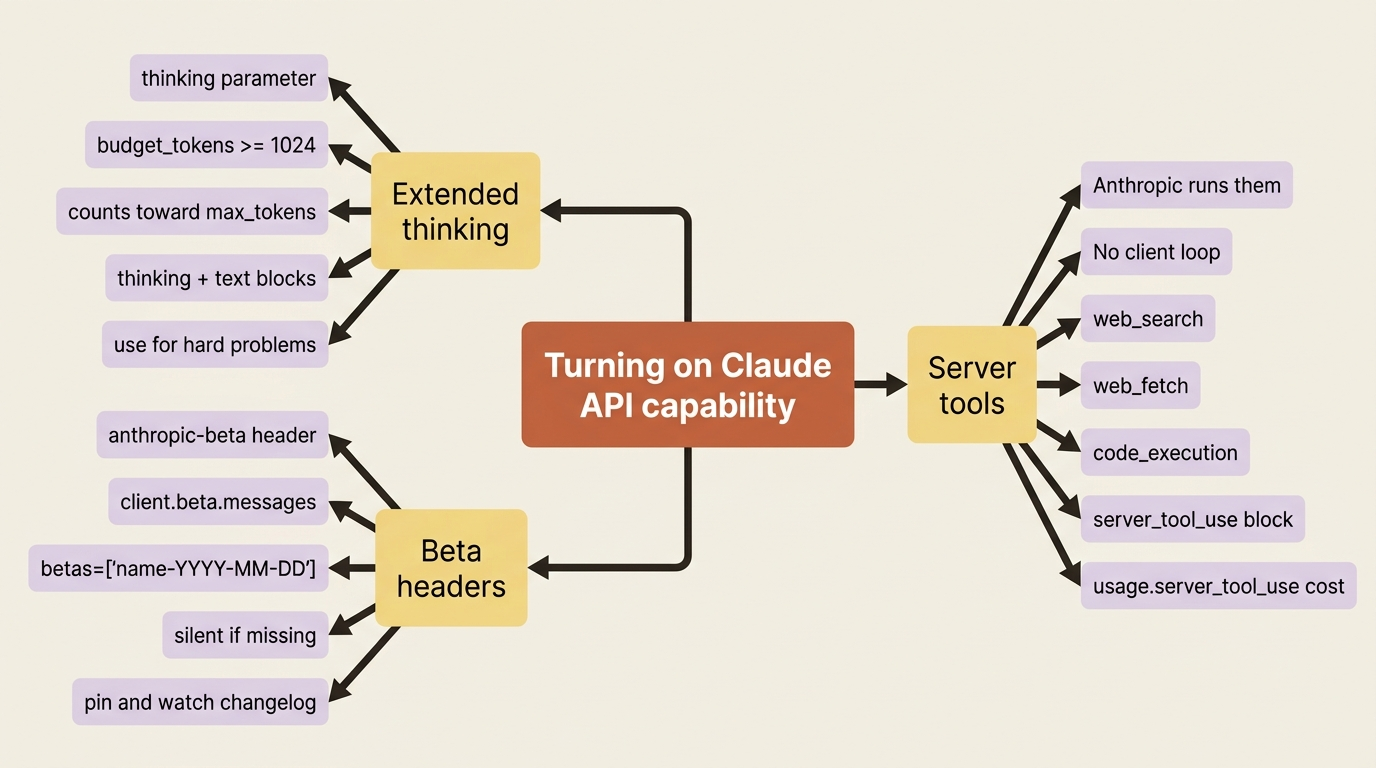
Extended thinking, server-side tools, and one HTTP header decide whether your Claude integration sounds like a chatbot or behaves like an agent. Here is how to turn them on without breaking what already works.
In this article: You will learn three capabilities that change what a Claude API integration can do: extended thinking, where you grant the model a token budget to reason before it answers; server-side tools, where Anthropic runs web search, web fetch, and code execution for you with no tool loop in your code; and the
anthropic-betaheader, the silent opt-in mechanism that gates most newly released features. By the end you will know when each one is worth the trade and how to debug the maddening "I enabled the feature and nothing happened" case.
You build a Claude integration. It holds conversations. It streams. It runs your tools, returns structured data, caches the expensive parts, batches the backlog. At some point you stop and admire it: a real working thing. Then you read a release post about a new capability such as extended thinking, web search, or code execution, try it, and it does nothing. No error, no warning, no clue. The request looks fine. The response just lacks the behavior you expected.
That moment is almost never a bug. It is the gap between what the Claude API exposes by default and what it can do once you opt in. The defaults are conservative on purpose. The interesting surface area sits behind a thinking parameter you have not set, a tool type you have not enabled, and one HTTP header you have not sent. Claude API extended thinking, server tools, and the anthropic-beta header are the three switches that close that gap, and they share a single mental model: turning capability on.
A standing caveat applies throughout: beta features move. Treat the specific names here as accurate at the time of writing, and verify against the current beta-headers page before you build on them.
Extended thinking: paying for the model to reason first
For a simple classification, the model answers immediately, and that is correct. For a genuinely hard problem, such as a thorny refund-policy edge case, a multi-step diagnosis, or a knotty legal question, you often get a better answer if the model is allowed to reason at length before committing to a reply. That is what extended thinking is. You pass a thinking configuration, and the model produces internal reasoning, visible as thinking content blocks, before its final response.
The enabled form takes a budget_tokens value: the number of tokens the model may spend reasoning. It must be at least 1,024 and less than your max_tokens. Critically, that budget counts toward your max_tokens limit, so size max_tokens to cover both the thinking and the answer.
import anthropic

client = anthropic.Anthropic()

response = client.messages.create(
    model="claude-sonnet-4-6",
    max_tokens=4096,
    thinking={"type": "enabled", "budget_tokens": 2048},
    messages=[{
        "role": "user",
        "content": "A customer wants a refund 40 days after purchase. Our policy "
                   "is 30 days, but they were hospitalized. What should we do, "
                   "and what's the precedent risk?",
    }],
)

for block in response.content:
    if block.type == "thinking":
        print("[reasoning]", block.thinking[:200], "...")
    elif block.type == "text":
        print("[answer]", block.text)
The response now contains two kinds of block: thinking blocks holding the model's reasoning, and the usual text block with its answer. The reasoning is not free. You pay for those tokens, and the response takes longer. Extended thinking is a deliberate trade, not a default to flip on everywhere. Reach for it when answer quality on a hard problem justifies the latency and cost, and leave it off for the fast, simple calls that make up most traffic.
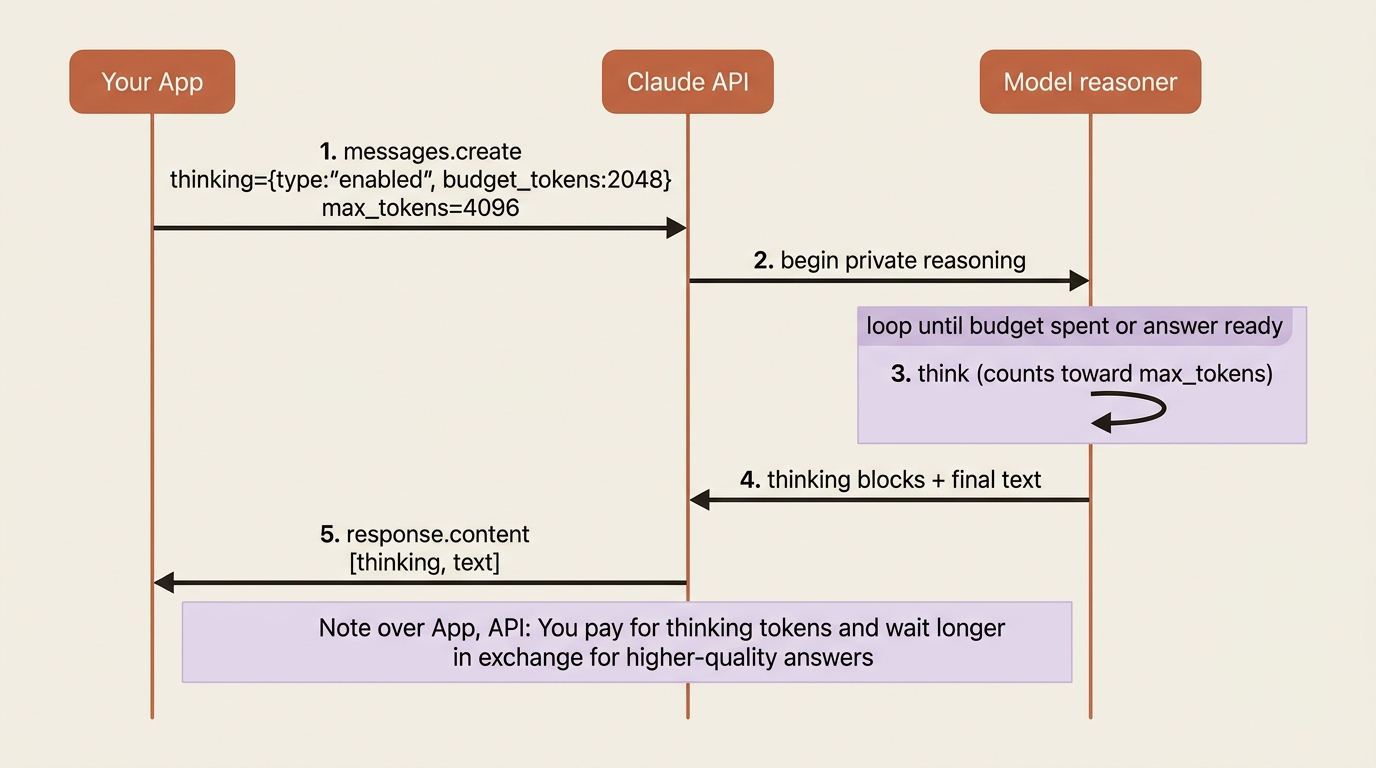
There is also an adaptive setting that lets the model decide how much to reason, and a disabled setting for turning it off explicitly. The enabled-with-a-budget form is the one to understand first, because it makes the cost-quality trade visible in your code instead of hiding it in heuristics.
Server-side tools: tools Anthropic runs for you
Most tool-use tutorials teach the client-tool pattern. The model emits a tool_use block, your code runs the function, you append a tool_result to the conversation, and you call the API again. You own the execution and you own the loop. It works, and it is the right pattern for any tool that touches your own systems.
Server tools invert that. These are tools Anthropic runs on its own infrastructure, so the model can call one, the work happens server-side, and the result comes back within the same response without your code ever executing anything. The current server tools include web search, web fetch, and code execution.
The difference is fundamental to how you think about them. With a client tool you owned the execution and the loop. With a server tool you own neither. You switch it on, the model uses it as needed, and you read what came back. You give up control over the execution in exchange for not having to build or host it.
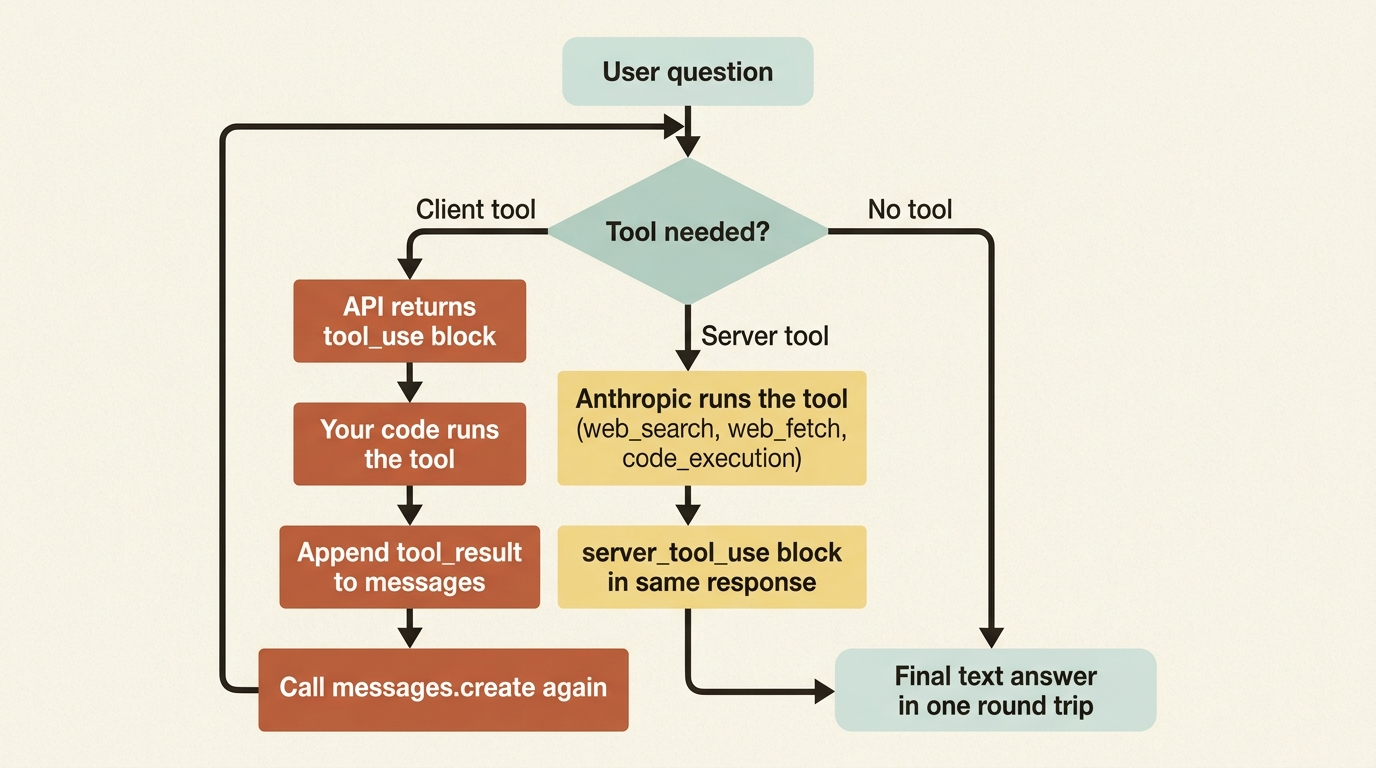
When the model uses a server tool, you see a server_tool_use block in the response, and the request counts show up in the usage object under server_tool_use, such as web_search_requests and web_fetch_requests. Server tools carry their own per-use charges on top of tokens, so this counter is what you watch for cost.
Here is web search, which lets the model look up current information mid-response:
response = client.messages.create(
    model="claude-sonnet-4-6",
    max_tokens=1024,
    tools=[{"type": "web_search_20250305", "name": "web_search"}],
    messages=[{"role": "user",
               "content": "Is there a known outage affecting our payment provider today?"}],
)

print(response.content)             # includes server_tool_use and the model's answer
print(response.usage.server_tool_use)  # web_search_requests count
You added the web-search tool to the tools list with its type, and the model decided to use it, searched, and folded the findings into its answer, all in one round trip, with no execution loop on your side. That is the server-tool bargain in one example: more capability and less plumbing, in exchange for the work happening somewhere you do not control.
Beta headers: the real answer to "how do I turn this on?"
You will constantly read about a Claude feature, try it, and find it does nothing. The reason is almost always that the feature is in beta and you did not send the header that enables it. The anthropic-beta header is the opt-in mechanism for experimental and newly released capabilities. Learning to use it is more durable than memorizing any single feature, because the feature list churns while the mechanism stays put.
On the raw API you add a header. In the SDK, you use the beta namespace and pass a betas list:
from anthropic import Anthropic

client = Anthropic()

response = client.beta.messages.create(
    model="claude-opus-4-7",
    max_tokens=1024,
    betas=["code-execution-2025-05-22"],
    messages=[{"role": "user", "content": "Compute the 50th Fibonacci number."}],
    tools=[{"type": "code_execution_20250522", "name": "code_execution"}],
)
Notice the shape. You call client.beta.messages.create rather than client.messages.create, and you list the beta feature names in betas. The names follow a dated convention, feature-name-YYYY-MM-DD, where the date marks the version, and you use the exact documented string. To enable several betas at once you list them all, comma-separated on the raw header. At the time of writing, the kinds of capability gated this way include code execution, extended cache TTLs, the one-million-token context window, the Files API, and Skills, among others, each with its own dated header value.
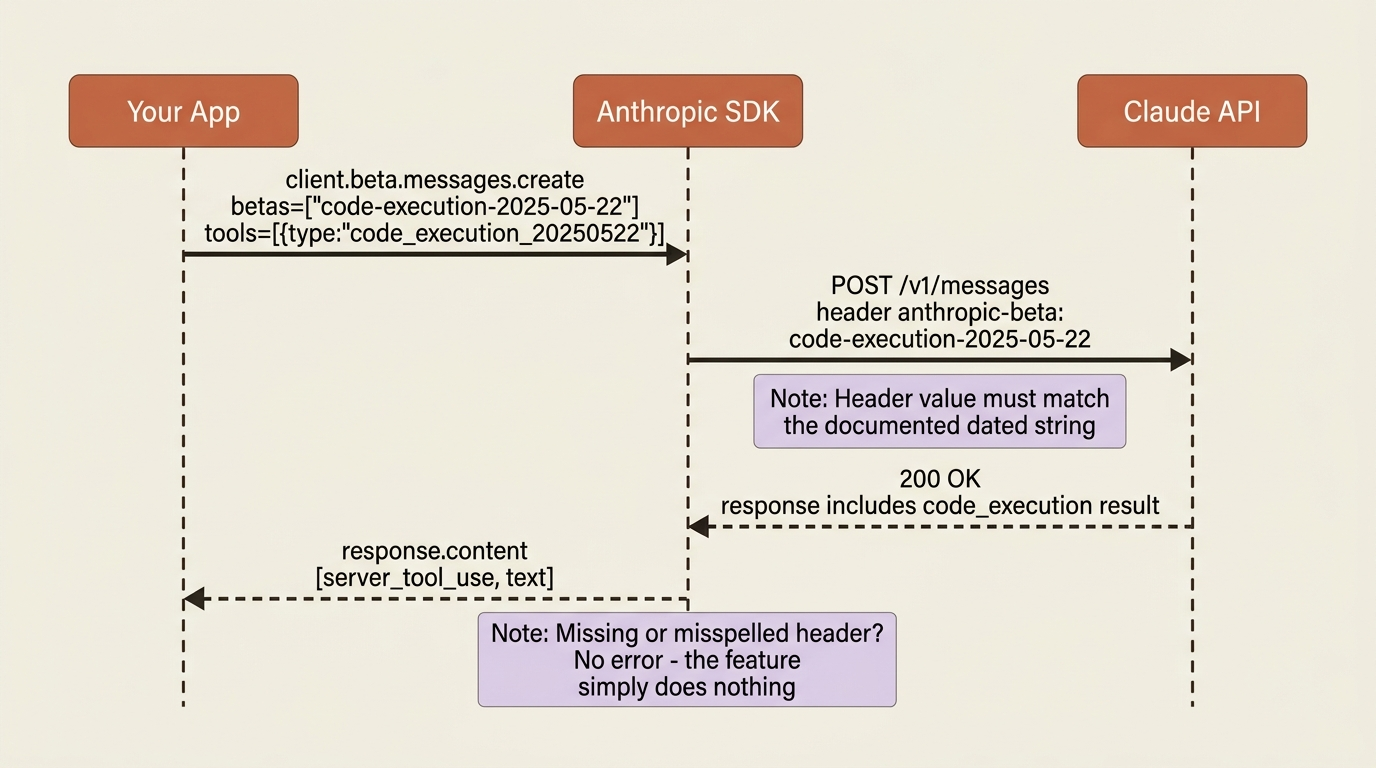
Gotcha worth tattooing on your monitor. A missing or misspelled anthropic-beta value does not error. The feature simply stays off, and your request runs as though you never asked for it, which is maddening to debug because everything looks fine except the behavior you wanted is absent. When a beta feature seems to do nothing, check the header value first, against the current docs, before suspecting anything deeper. Also remember the standing warning that beta features can change, be deprecated, or carry different pricing and rate limits, so pin the version and watch the changelog.
A worked example: a triage agent that researches before it answers
The three switches click together once you put them in a real example. Imagine a support-triage service that reads incoming customer emails and drafts a reply. Most of the time the agent can answer from the system prompt and the model's own knowledge. Sometimes a customer references something that might be a known, current issue, such as an outage, a service disruption, or a widespread bug, and an answer based on stale assumptions is worse than no answer at all. The agent needs a research step.
With web search as a server tool, that step is one tool declaration in the request:
import anthropic

client = anthropic.Anthropic()

SYSTEM = (
    "You are a support agent. If a customer mentions a possible outage or "
    "widespread issue, use web search to check current status before replying. "
    "Otherwise answer directly."
)

def triage_with_research(email_text: str):
    response = client.messages.create(
        model="claude-sonnet-4-6",
        max_tokens=1024,
        system=SYSTEM,
        tools=[{"type": "web_search_20250305", "name": "web_search"}],
        messages=[{"role": "user", "content": email_text}],
    )

    answer = "".join(b.text for b in response.content if b.type == "text")
    searches = response.usage.server_tool_use
    return answer, searches

reply, searches = triage_with_research(
    "Your checkout has been throwing errors all morning. Is something down?"
)
print(reply)
print("Web searches performed:", searches)
Trace what the agent does. The email hints at a current outage. The system prompt tells the agent to verify before answering. Because web search is enabled as a server tool, the model searches for the present status and grounds its reply in what it finds, all without any tool loop in your code. You read the final text out of the response and check usage.server_tool_use to see how many searches it ran: exactly the per-use cost you are now accountable for.
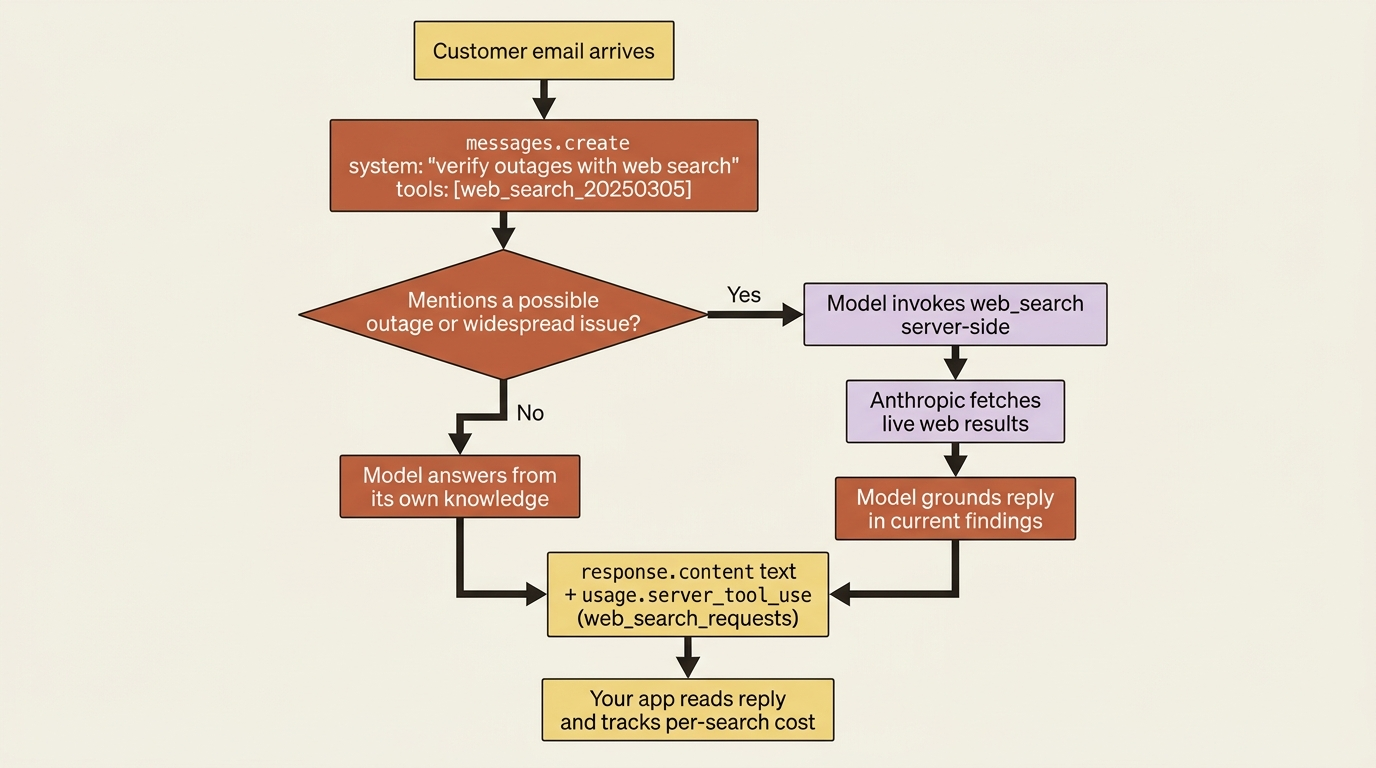
The agent went from answering out of its own knowledge to answering out of the live web, and the only thing you wrote was a system prompt and a one-line tool declaration. That is the shape of the upgrade: small surface change, large behavior change, all of it visible in the response so you can measure and bill it.
Do this today
- Pick one hard request type in your workload and try extended thinking. Set
thinking={"type": "enabled", "budget_tokens": 2048}and amax_tokensof at least 4,096. Compare answer quality and latency against the same call without thinking, on a handful of real prompts, before you decide where it earns its cost. - Add web search as a server tool to one route where current information matters. Status pages, news, anything time-sensitive. Log
usage.server_tool_useso the new per-search cost is visible in the same place as your token spend. - Make one beta call. Switch to
client.beta.messages.create, pass abetaslist with one dated header value from the current docs, and confirm the feature actually takes effect by checking the response, not by trusting that the call did not error. - Write the date convention down. Pin every beta-header string you use in a constant alongside the date, and link to the corresponding docs page in a comment. Future-you will thank present-you when a header is silently deprecated.
- Plan for the gotcha. Add a smoke test that asserts the expected beta behavior is present in the response, so a quiet "feature off" failure shows up in CI instead of in production.
Switching the lights on, one at a time
Most Claude API integrations never get past the defaults, and the defaults are conservative on purpose. The interesting capability sits behind three opt-ins that share one shape: you tell the API to do more, and it does. Extended thinking trades latency and tokens for quality when the question is hard enough to deserve it. Server tools trade execution control for less plumbing when the work is something Anthropic can run for you. The anthropic-beta header trades the comfort of stability for early access to features the rest of the surface area has not caught up with yet.
The thing they all reward is the same: knowing they exist, sending the right field or header, and reading the response carefully enough to confirm the feature actually fired. Everything else is the same Messages API you have been calling all along.
So the next time you read about a Claude capability and the first try does nothing, do not assume your code is broken. Check the header, check the tool declaration, check the thinking parameter. The model was always going to do the work. It was just waiting for you to flip the switch.
This is Part 9 of "Building with the Claude API," an eleven-part guide that takes a developer from a first messages.create call to a hardened, observable, production-deployed integration.