
Your Claude Integration Is a Black Box Until You Log This One Header
Three closing questions every production Claude integration must answer: how to see itself, how to swap SDKs cheaply, and when the stateless model is no longer enough.
The most useful observability you will ever add to a Claude API service costs four lines of code. The most expensive mistake you will ever make is ignoring them and then trying to debug one bad request out of a million.
In this article: You will learn the three things you need to know once your Claude API integration is real and running. We cover the observability fields every response gives you for free, when to reach for the OpenAI compatibility layer and what it silently takes away, and how to tell the moment a stateless request is no longer enough and a managed agent is. You will leave with a troubleshooting checklist that catches almost every recurring bug in a Claude integration.
You shipped it. It survived its first busy Monday. The retries fire, the rate limits behave, the streaming holds together under load. The integration is real now, and that means a different set of questions starts to matter. How do you actually see what your service is doing across thousands of requests, not just when something breaks? Can you reuse the prompts and logic you have written if you want to compare Claude against another model with minimal effort? And if your needs have outgrown the stateless request entirely, where do you go next?
These are the questions you only get to ask once something is genuinely in production, and they are the three that close the loop on building a serious Claude API integration. Two of them have settled, well-supported answers. One is still moving. The managed-agents surface in particular is newer and evolving, so treat the specifics in that section as a signpost to verify against current docs rather than a settled API.
Let us close all three loops.
Claude API observability: see what your service is doing
Every response your service receives from the Claude API carries two pieces of free observability data. Capture them on every call and almost every production question becomes answerable. Skip them and you spend the rest of your life squinting at logs that do not quite tell you what happened.
The first is request-id, a globally unique identifier for that specific request, returned as a response header on every call. The second is the usage object, which breaks down input tokens, output tokens, cache-creation tokens, cache-read tokens, and server-tool counts for the response. The Python SDK exposes the request ID directly on the response object via a public _request_id attribute, so capturing it is a single read:
import anthropic

client = anthropic.Anthropic()

response = client.messages.create(
    model="claude-sonnet-4-6",
    max_tokens=256,
    messages=[{"role": "user", "content": "Classify this ticket..."}],
)

print("Request ID:", response._request_id)   # req_018Ee...
print("Usage:", response.usage)
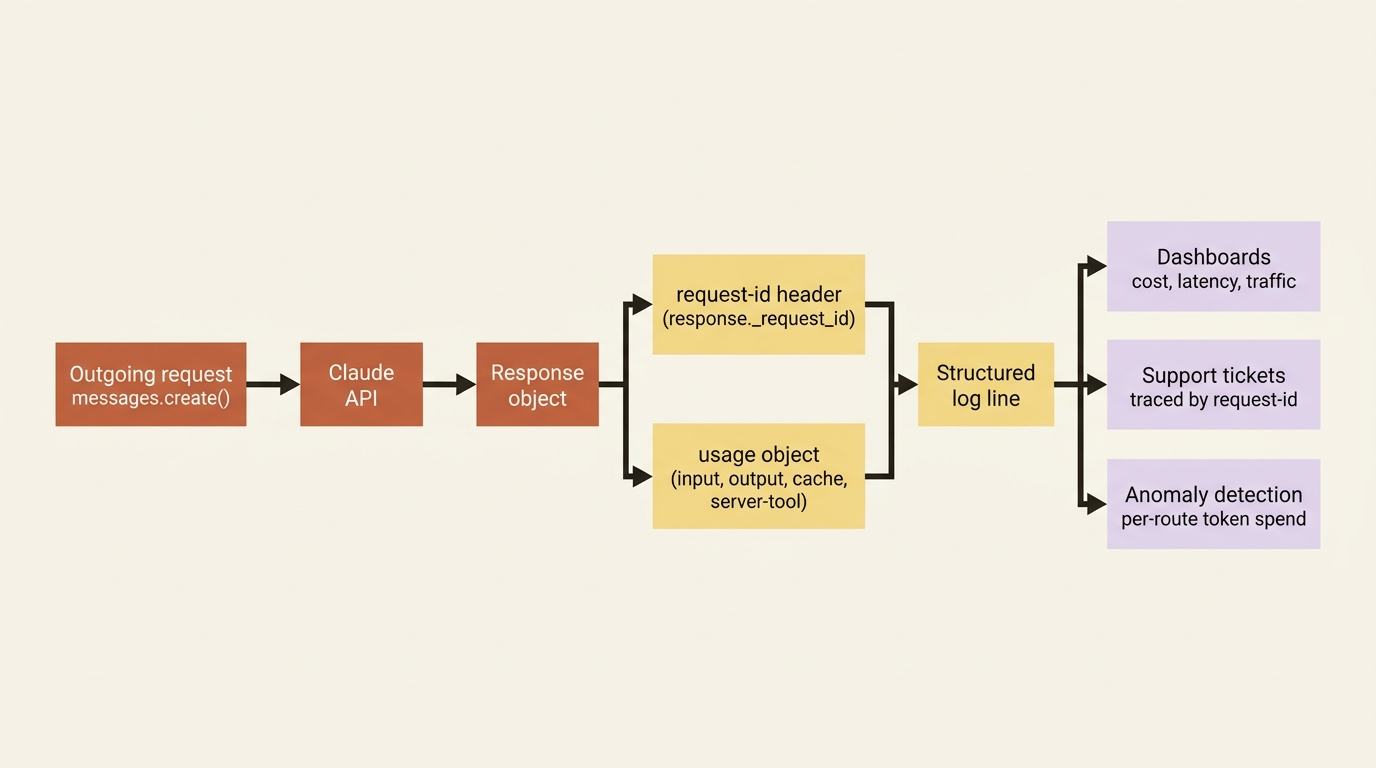
Of the two, the request ID is the single most useful thing to log. When you need to debug a specific request, or when you contact Anthropic support about one, it is the thread that lets anyone trace exactly what happened on their side. Without it, support conversations are slower because nobody can look the request up by ID. With it, the conversation begins with a lookup.
Pair the request ID with the usage object and you have per-request cost visibility for free. Aggregated across your traffic, that visibility becomes spend tracking, anomaly detection on routes that suddenly burn more tokens than they should, and the data you need to decide what is worth caching or which tier you should commit to. If you have been doing batch processing, your custom_id plays the same role inside a batch, letting you tie each individual result back to the work that produced it.
The discipline is simple and pays compounding dividends. Log the request ID and the usage on every call. Structure those logs so you can query them. Do not wait until the first incident to start. The service that has been logging request IDs from day one can answer "what happened to ticket 47928" in thirty seconds. The service that started logging them yesterday cannot answer it about anything that happened the day before.
The OpenAI compatibility layer: a bridge, not a home
Here is a genuinely useful escape hatch. If you have an existing codebase written against the OpenAI SDK, or you want to A/B test Claude against a model you already call that way, you do not have to rewrite everything to try Claude. Anthropic provides an OpenAI-compatibility layer. Change three things, namely the base URL, the API key, and the model name, and your existing OpenAI SDK code calls Claude instead.
from openai import OpenAI

client = OpenAI(
    api_key="YOUR_ANTHROPIC_KEY",          # a Claude API key
    base_url="https://api.anthropic.com/v1/",  # point at the Claude API
)

response = client.chat.completions.create(
    model="claude-opus-4-7",               # a Claude model name
    messages=[
        {"role": "system", "content": "You are a helpful assistant."},
        {"role": "user", "content": "Who are you?"},
    ],
)

print(response.choices[0].message.content)
Three lines changed, and your OpenAI code is talking to Claude. For evaluating capabilities, comparing outputs, or easing the first weeks of a migration, that is a wonderful on-ramp. But you must be clear-eyed about what the compatibility layer is and is not, because the convenience hides real losses.
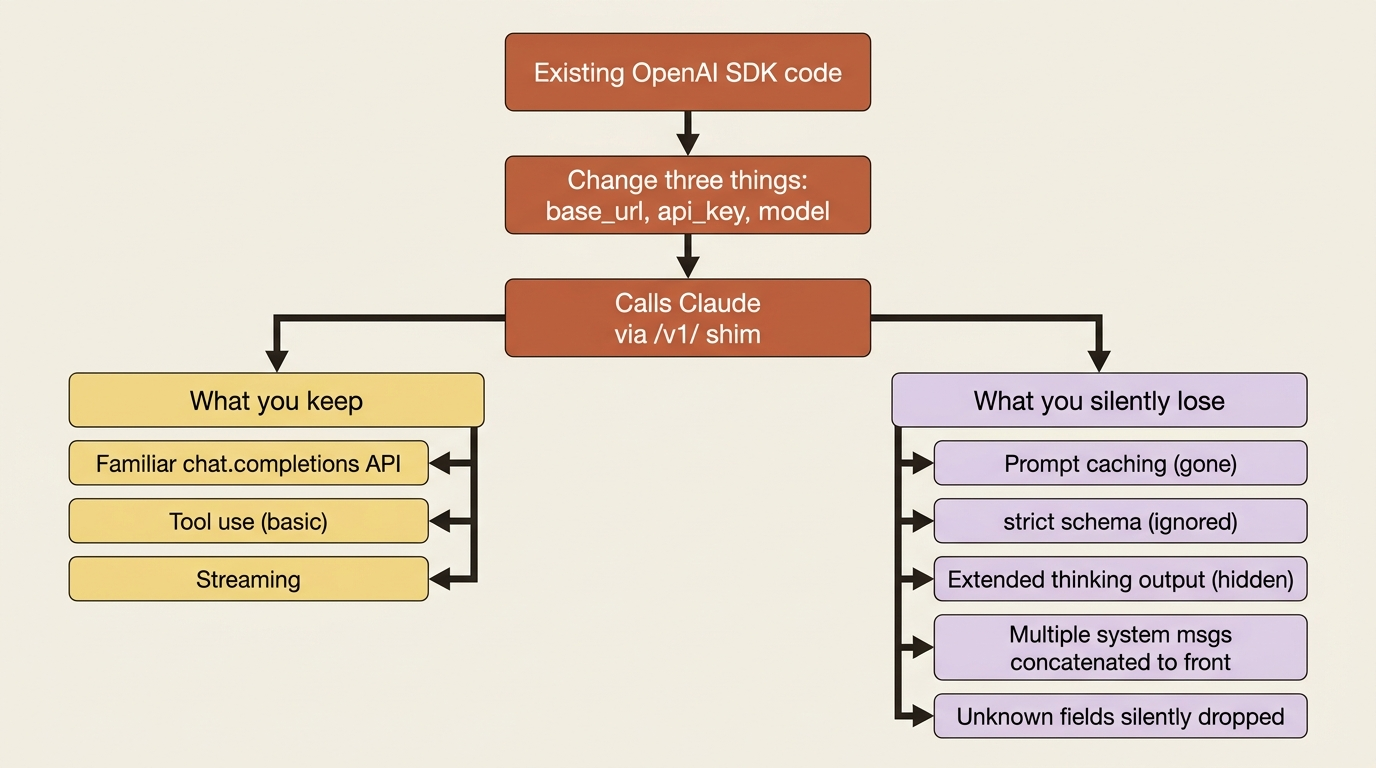
The shim is explicitly intended for testing and comparison, not as a production solution. The reason is that it silently drops much of what makes the Claude API worth using in the first place. Prompt caching is not supported through it, so the single biggest cost lever you have is simply gone. The strict parameter on structured outputs is ignored, so you lose the guaranteed schema conformance that the native API gives you. Extended thinking can be switched on, but the OpenAI SDK will not return Claude's reasoning output. Because the native Claude API supports a single initial system message, multiple system or developer messages get hoisted and concatenated to the front, which can subtly change behavior in ways that are hard to spot. Most unsupported fields are silently ignored rather than erroring, which is convenient and dangerous in equal measure. Your code runs. It just does not run the way you think. (See the official limitations summary at /en/api/openai-sdk.)
So the honest framing is this. Use the compatibility layer to get Claude running in an existing OpenAI codebase quickly, to compare models side by side, or to start a migration without rewriting everything on day one. Then, when you commit, move to the native Claude API, where caching, structured outputs, full extended thinking, and the rest of the surface actually live. The shim is a bridge. It is not a home.
Managed Agents: when stateless is not enough
This entire request-by-request approach has been built on one foundation: the stateless request. You send the whole story every time, you own the conversation, the API remembers nothing. That model is simple, predictable, and correct for the vast majority of integrations, including the kind of triage and classification service most teams ship first. But there is a class of problem where you genuinely outgrow it: long-running agents that need durable server-side state, a persistent environment to execute in, and a managed lifecycle rather than a conversation array you reassemble on every call.
For that, Anthropic offers a managed-agents surface (see /en/managed-agents/overview). It is a set of endpoints (Agents, Sessions, and Environments) alongside supporting Skills and Files APIs that move state and execution onto Anthropic's infrastructure. Instead of reconstructing a conversation on every call, a Session holds it. Instead of you having no execution environment, an Environment provides one. These endpoints are accessed through their own beta header and carry their own rate limits, separate from the Messages API. That separation signals what is going on: managed agents are a distinct product surface rather than an extension of the stateless model.
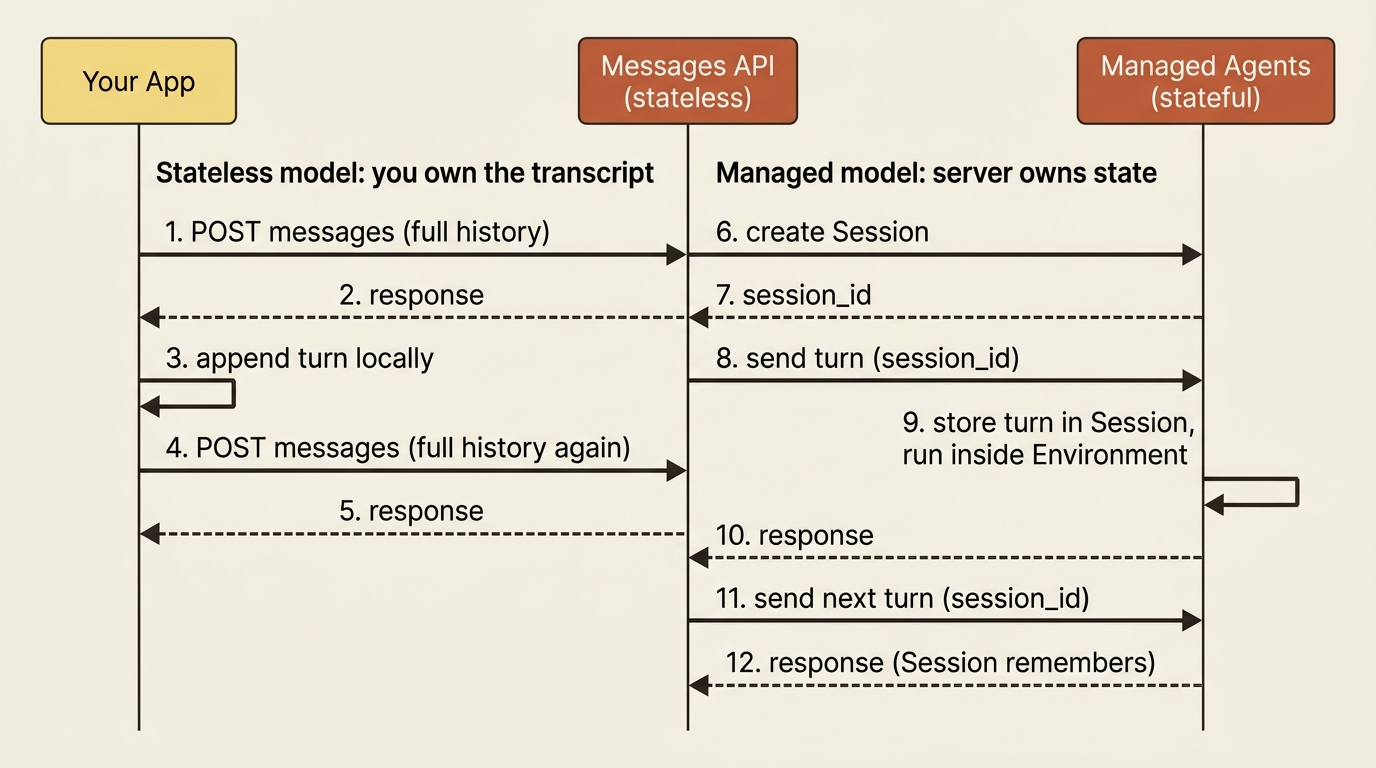
The right way to think about this is as a door rather than a destination. Everything you have learned at the request level (how conversation, tools, structured output, and context actually work) is exactly the foundation you need to understand a managed agent. A managed agent is built on these same primitives with state and execution layered on top. When the day comes that a stateless request is not enough, you will not be starting over. You will be graduating, and that is its own deep topic worth its own series. For now, know that the door exists and what is behind it.
The troubleshooting checklist you will actually reach for
When something misbehaves in a Claude integration, it is almost always one of a handful of recurring mistakes. Recognizing the pattern saves you an hour of staring at logs. Here is the short list with the fix.
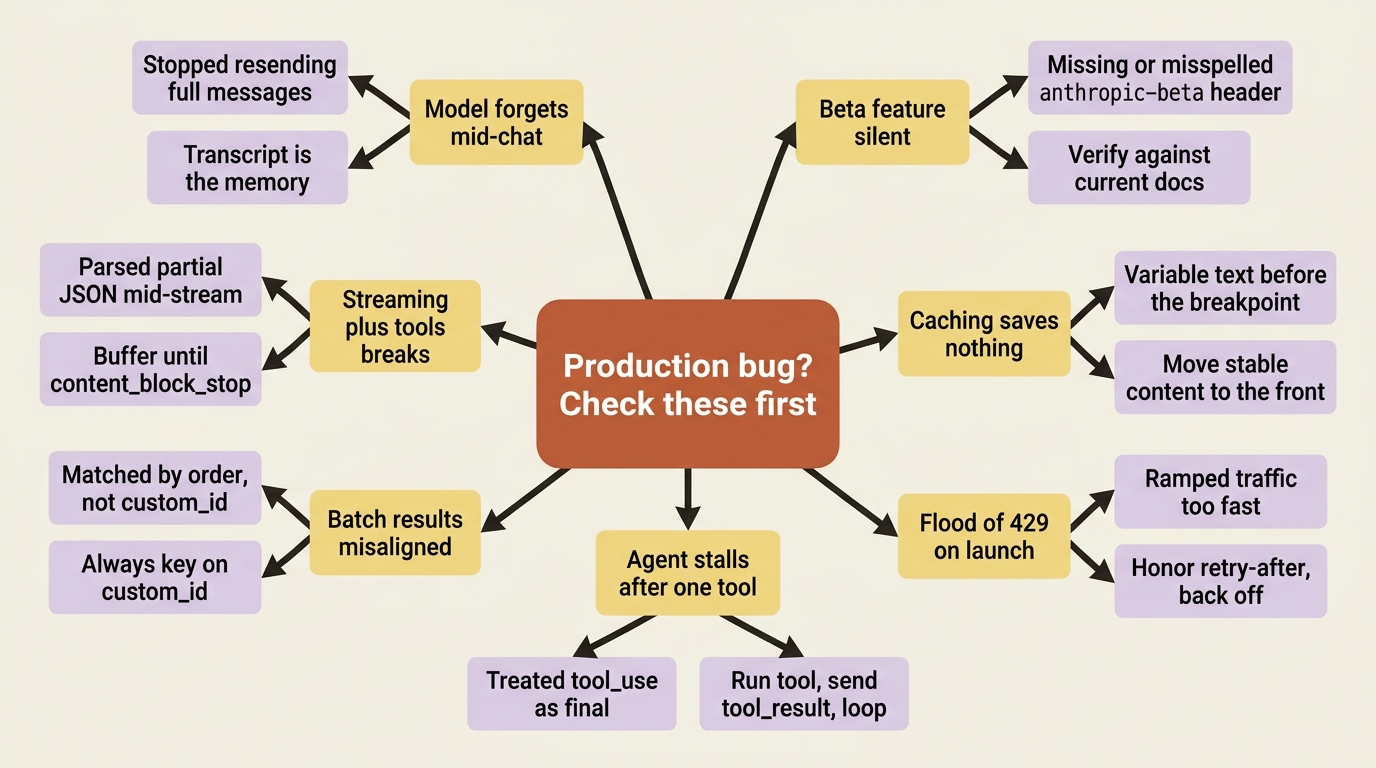
A beta feature does nothing? You forgot or misspelled the anthropic-beta header, and the feature silently stayed off. Check the header value against current docs. Caching is not saving anything? Something variable sits before your cache breakpoint, busting the exact-prefix match on every call. Move everything stable to the front of the prompt and put the variable parts after the breakpoint.
A flood of 429 errors on launch? Your traffic ramped too fast and hit acceleration limits, or you are simply over your rate limit for the tier. Ease traffic up gradually, and always honor retry-after. The agent stalls after one tool call? You treated the tool_use response as the final answer instead of actually running the tool and feeding back a tool_result. Build the loop.
Tool results land on the wrong item in a batch? You matched results by order instead of by custom_id. Always key on custom_id; order is not a contract. Streaming and tools break together? You tried to parse partial tool-input JSON mid-stream. Buffer until the content block stops, then parse the complete payload. The model "forgets" mid-conversation? You stopped resending the full messages array. The API has no memory; the transcript is the memory, and if you do not send it, the model does not have it.
Almost every real-world bug in a Claude integration is on this list. Keep it handy. The bugs you spend the most time on are the ones that take the longest to recognize, and recognition is the entire fix.
Do this today
You can convert most of this article into running production behavior in under an hour.
- Add request-id and usage logging to every Claude API call. One structured log line per call: model, request ID, input tokens, output tokens, cache reads, latency. That is the foundation for everything else.
- Pick one route and chart its weekly token spend. Use the data you just started logging. The shape of the chart tells you whether caching is paying off, whether traffic is creeping, and where to look next.
- Try the OpenAI compatibility layer on a throwaway script. Point an existing OpenAI SDK call at the Claude base URL, swap the model name, run it. Feel how fast the on-ramp is, then read the section above again on what it costs you.
- Print and pin the troubleshooting checklist. Tape it to the wall next to whoever is on call. The next time something breaks, it will be on the list.
Where this leaves you
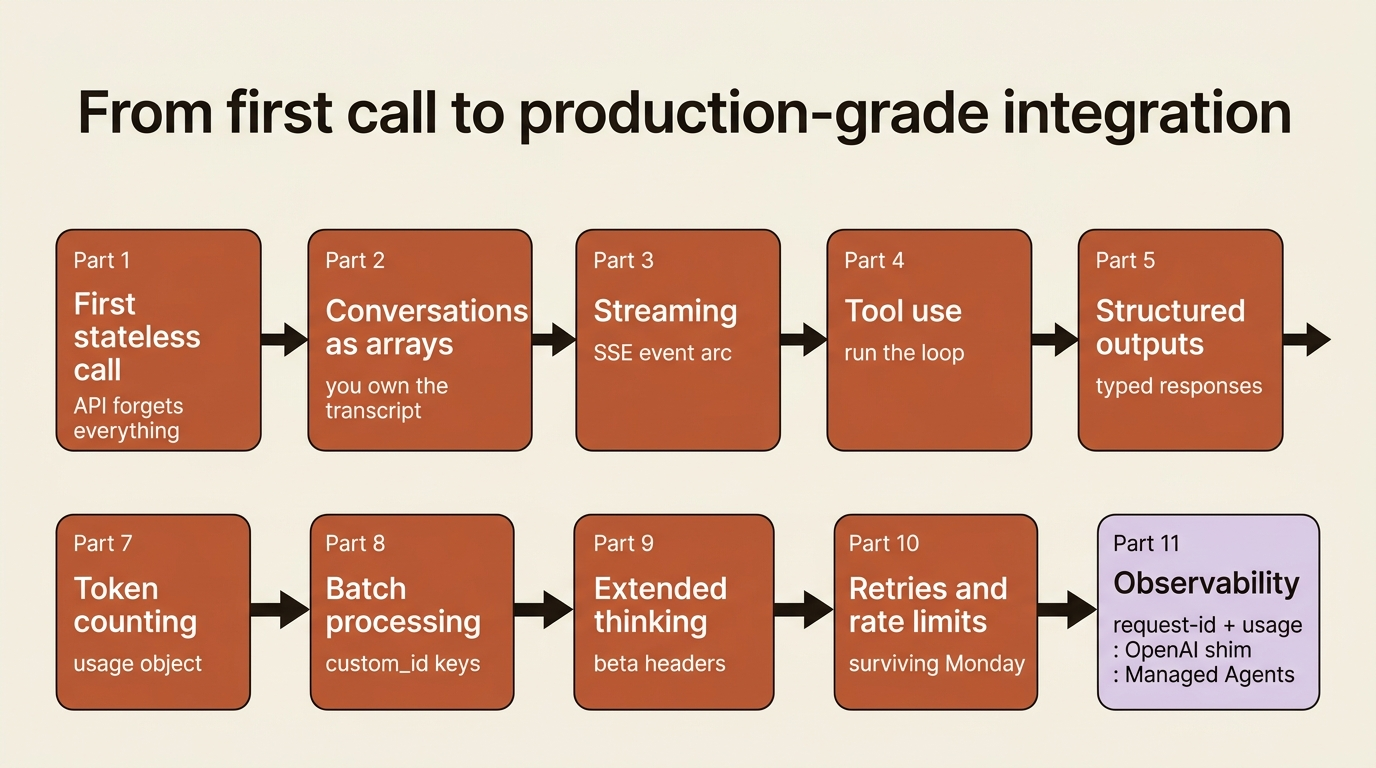
Look back at the arc. You started not knowing what a single API call returned. You can now build a service that holds conversations, streams them, runs tools in a loop, returns typed data, caches its expensive prefix, counts its own cost, batches its backlog at half price, reaches the beta surface through one header, survives a traffic flood with retries and backoff, and reports on itself through request IDs and usage. That is not a toy. That is a production integration, built from the request up, with no framework hiding the parts from you.
That is the whole point of going request-first. Every abstraction you will ever use on top of the Claude API, every agent framework, every managed runtime is built on the primitives this approach made concrete. You understand the stateless request, so you understand what the conveniences are doing for you and what they are doing to you. When you reach for a higher-level tool, you will reach for it because you chose to, not because the layer underneath was a mystery.
The single idea that started everything still holds. The API forgets every conversation the instant it ends, and that is a feature. Every request is the whole story. You have learned to write that story well. The rest is just practice.
This is Part 11 of "The Claude API, Request by Request," an 11-part guide to building production-grade integrations on top of the Claude API one primitive at a time.