
The Ten-Minute Ritual That Decides Whether Claude Code Actually Helps You
The ten-minute daily ritual that keeps an AI coding agent sharp, anchored, and worth the seat.
Five of those minutes happen before you write a line of code, two happen after, and the rest of your workday runs in a loop. Master the bookends and the AI coding agent stops drifting.
In this article: Most developers blame their prompts when Claude Code feels like a chatbot with extra steps. The real problem is rhythm. This is the Claude Code daily routine that experienced users run: a three-minute morning re-anchor, a repeatable working loop that keeps your context clean, and a two-minute end-of-day cleanup. None of it is hard. All of it compounds.
There is a specific moment, usually around 3 p.m., when an AI coding agent stops feeling like a colleague and starts feeling like a slot machine. You ask for a change. It produces something plausible. You squint at it, unsure it works, and ask for another. The session has become a swamp, and you cannot point to the moment it happened.
That moment is not a model problem. It is a workflow problem, and it is the most common reason developers conclude that Claude Code is overhyped. The difference between people who feel genuinely accelerated and people who feel mildly annoyed is almost never the cleverness of their prompts. It is the Claude Code daily routine they run underneath the prompts: a small, boring, repeatable structure executed the same way every single day.
Here is the claim, stated plainly. The first ten minutes of your workday with Claude Code are the only minutes worth scripting. The middle should stay context-dependent, because real work is messy and a rigid script would get in the way. But the opening three minutes and the closing two minutes are identical every day, and getting them right pays compound interest. This article is that routine, written down.
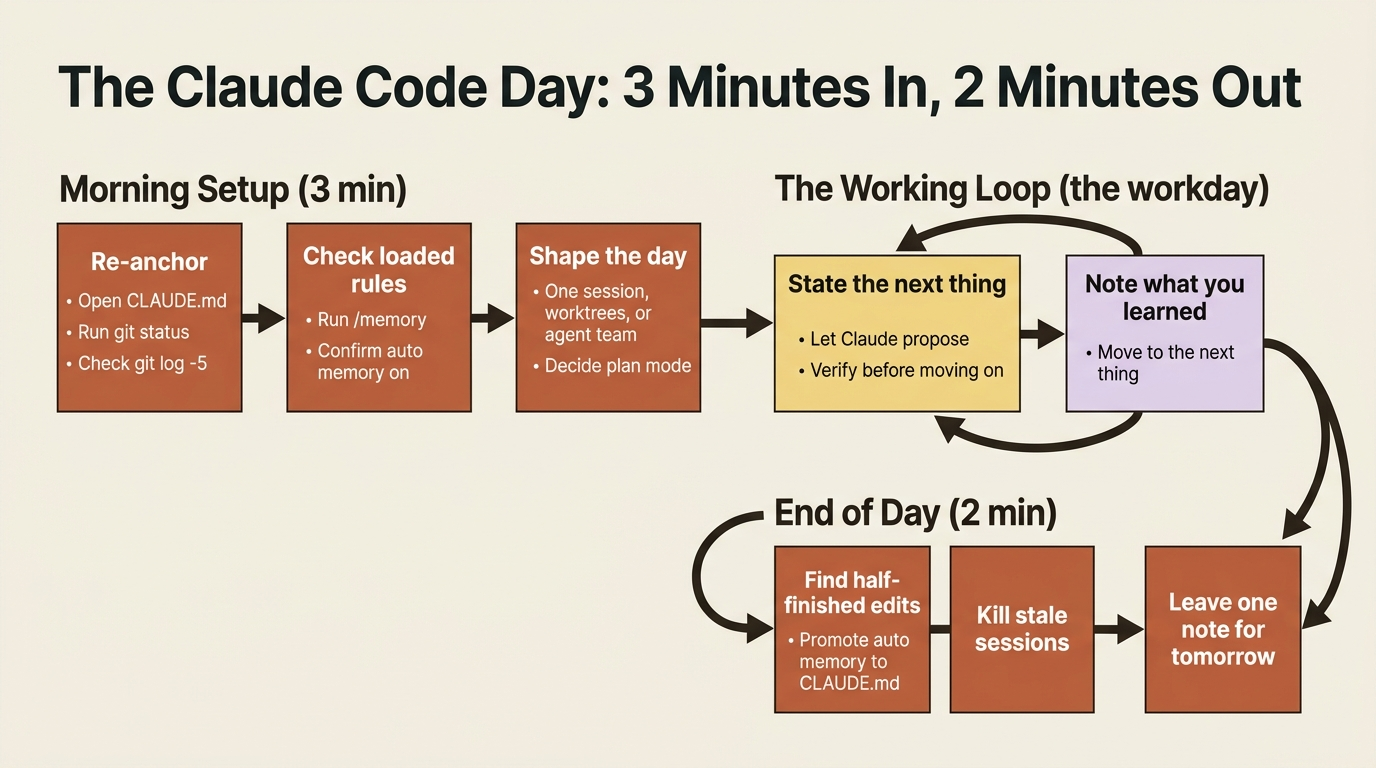
Morning Setup: Three Minutes to Re-Anchor
Open your terminal in the project you will be working in. Then, in this exact order, do three things.
Re-anchor in the project. Open CLAUDE.md and skim it. Not because you have forgotten what it says, but because reading it primes your own brain for the conventions you are about to enforce on the agent. Confirm the build, test, and lint commands you will need today are actually listed. Then run git status to see the working tree before Claude does, and glance at git log -5 --oneline to remember where Friday-you left off.
This takes thirty seconds. The point is not the information, because most of it you already know. The point is putting yourself inside the project's head before you ask another mind to be in it with you. CLAUDE.md, for the record, is the project memory file that Claude Code automatically loads into every session: your conventions, your commands, your house rules.
Run /memory. This command shows every memory file loaded for the session, including CLAUDE.md, CLAUDE.local.md, and any rule files, plus the toggle for auto memory. Check three things: are the rules you expect actually loaded, is auto memory on, and is anything loaded that you did not expect?
If auto memory is off, turn it on. Auto memory is where Claude quietly saves corrections, things like "the build runs with pnpm build, not npm," after the third time you fix it. Without it, every session starts amnesiac. With it on, corrections accumulate in ~/.claude/projects/<project>/memory/MEMORY.md, ready when you need them.
Decide the shape of the day. Not in detail, just the broad question: is today one task or many? Three options, and most days are the first.
- One session. The default. Most days are this.
- Several worktrees. You are doing two genuinely independent things, say a bugfix on one branch and a feature on another.
claude -w feature-namegives each one its own worktree with isolated state and no cross-contamination. - An agent team. Experimental, gated behind the environment variable
CLAUDE_CODE_EXPERIMENTAL_AGENT_TEAMS=1. Reach for it when one transcript stops being enough: parallel research across many files, or a cross-layer change touching frontend, backend, and tests at once.
Knowing the other two exist is the actual win, even on days you do not use them.
Decide whether to plan first. If today's first task is non-trivial, meaning anything that touches more than two or three files or makes an architectural decision, start in plan mode. Press Shift+Tab until the status bar reads plan, or prefix your first prompt with /plan. Claude will research, propose an approach, and ask before touching anything. The thirty seconds spent reading that plan saves the twenty minutes you would otherwise spend rewinding the wrong implementation. For anything bigger than half a day, do not start in your main session at all: write a spec to disk first, commit it, then open a fresh session to execute it.
Three minutes. You are anchored.
The Working Loop: The Rhythm of the Middle
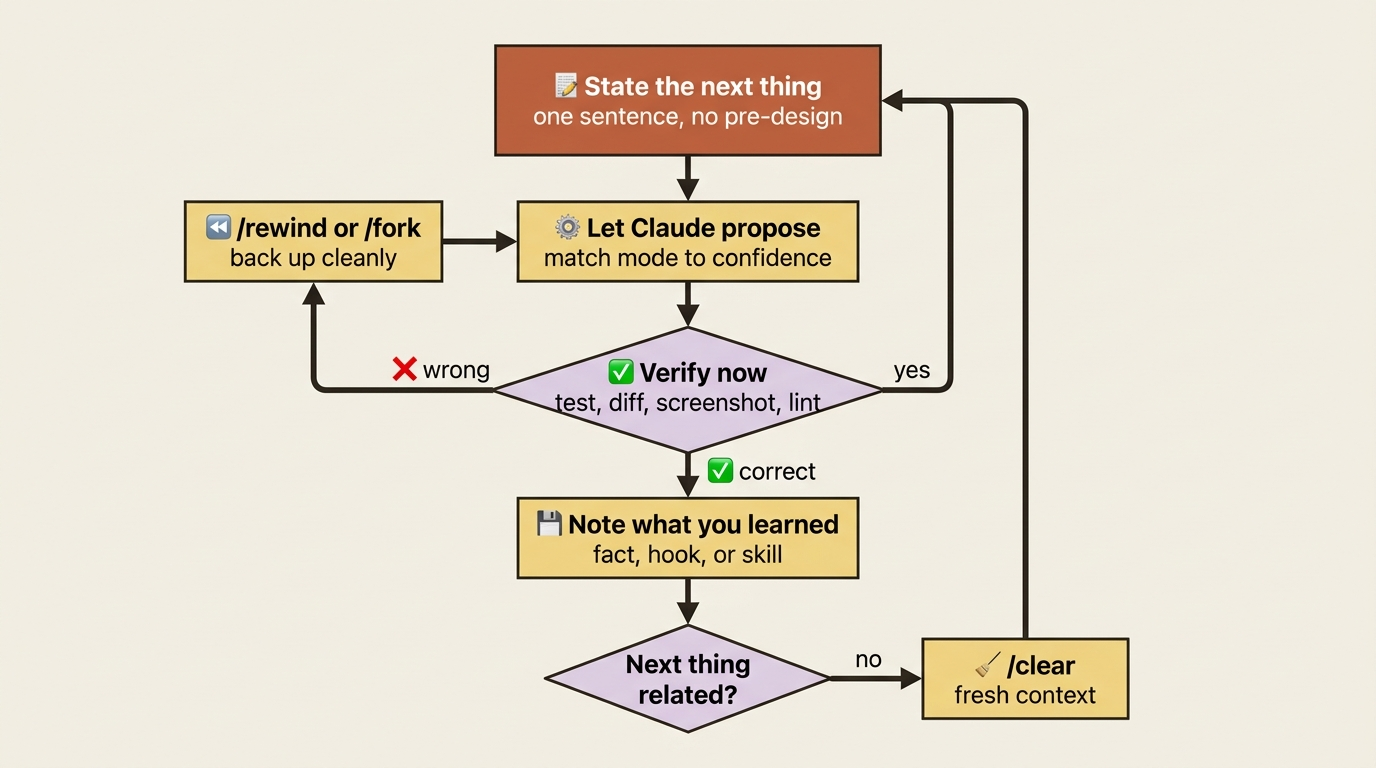
The rest of the day is one pattern, repeated as many times as needed. Five deliberately simple steps.
- State the next thing. One sentence. "Add a rate-limit header to the public API endpoints." Do not pre-design it.
- Let Claude propose. In
defaultmode it asks before editing. Inplanmode it writes a plan. InacceptEditsmode it edits and shows you the diff. Match the mode to your confidence. - Verify before moving on. Run the test, read the diff, check the screenshot, eyeball the lint output. Never accumulate unverified changes.
- Note anything you learned. If Claude got something wrong twice, that is a
CLAUDE.mdedit. A shell command run three times is a hook. A prompt typed twice is a skill. - Move to the next thing. Continue in the same session, or run
/clearif the next task is unrelated.
That is the whole loop. Everything below is detail about keeping it running when the day gets messy.
Keep the Main Thread Clean
The biggest source of session degradation is letting unrelated side trips into the main conversation. "While you're at it, can you also look at that other thing?" Five of those and your context window is a swamp. There is a phrase worth internalizing here: context is the operating system of an agentic coding tool. Everything Claude can reason about lives in that finite window, so what you let into it is the whole game.
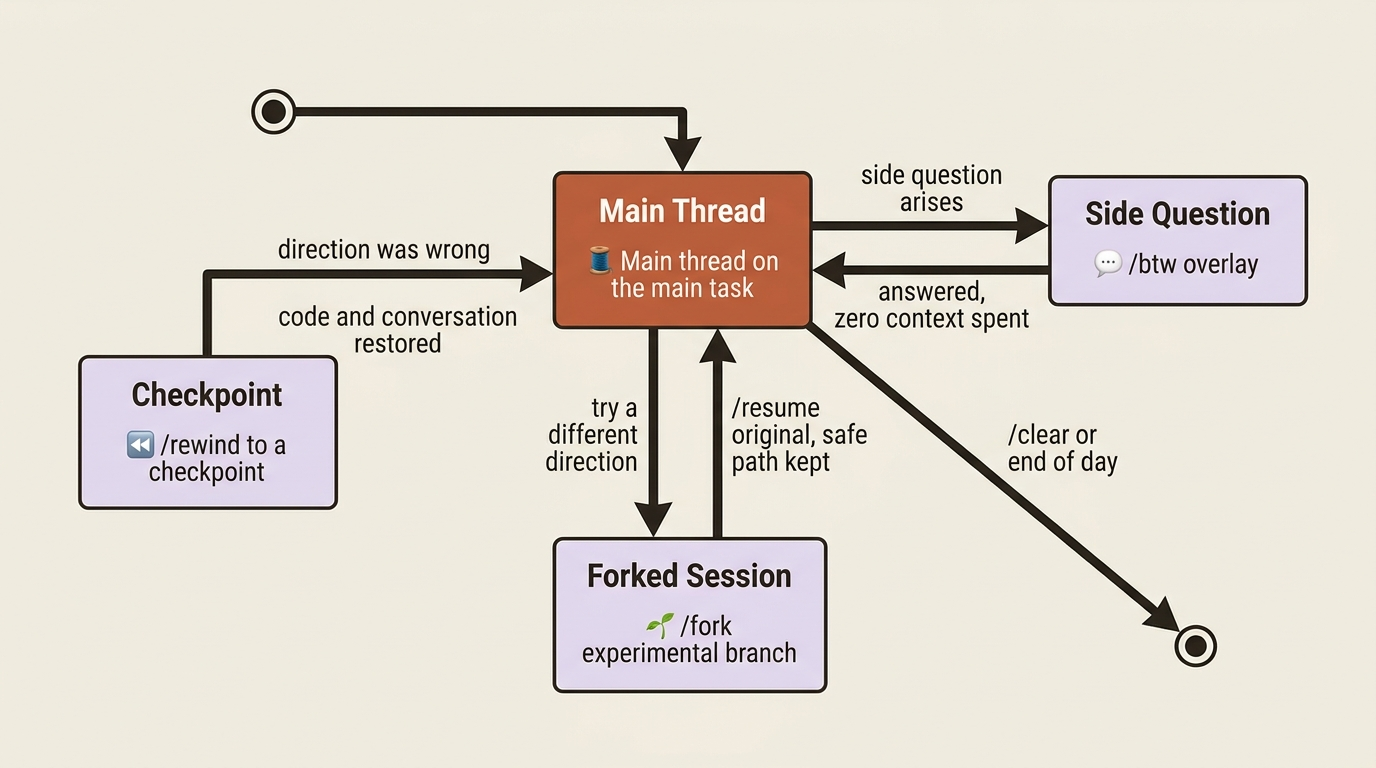
Three commands keep the main thread doing the main thing.
/btw <question> is for ephemeral side questions, the "what was that config file again?" moments. The question and answer never enter conversation history; they appear as a dismissible overlay. The side question can see everything Claude has already read, but it cannot call tools or read new files. It is perfect for the "remind me how this works" question that would otherwise bolt a 500-token detour onto your main thread. You can even run /btw while Claude is mid-turn, and it will not interrupt the work.
/fork (alias /branch) duplicates the current conversation into a new session with the same history. The original is preserved, and you can return to it with /resume. Use it when you want to try a different direction but are not sure it will pan out. You end up with two sessions: the original on the safe path, the fork on the experiment.
/rewind (or pressing Esc twice) undoes edits and rolls the conversation back. Claude Code checkpoints your files before every edit, and the rewind menu lets you restore code, conversation, or both to an earlier point. It is the surgical version of /fork: use it when you do not want a parallel branch, you just want to back out the last fifteen minutes because the direction was wrong.
The pattern is easy to remember. /btw means "answer me without spending context." /fork means "try an alternative without losing this one." /rewind means "actually, back up."
Turn Anything You Repeat Twice Into the Right Artifact
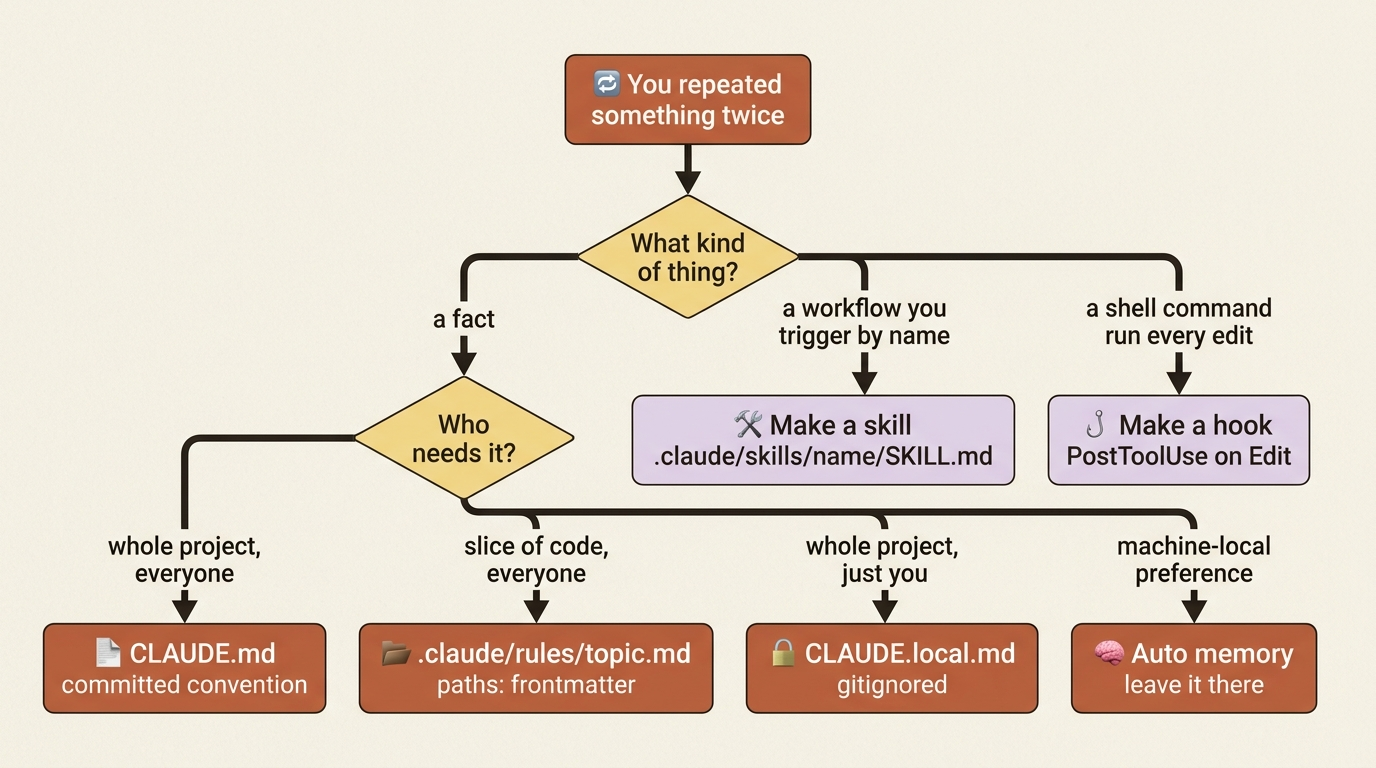
This is the habit that compounds harder than any other. The first time something happens, it is a one-off. The second time, a pattern. The third time, you have already wasted enough effort to justify writing it down. Do not wait until the end of the day to capture these: the friction is the signal, and the signal fades fast.
There are three categories, and each has a destination.
A fact that belongs in every session goes in CLAUDE.md. This is a project-wide convention every collaborator needs. "The auth service uses RS256 JWTs, not HS256." "All API errors return { error: string, code: string }." Open the file, add the line, commit. Done.
A fact that only matters for certain files goes in a path-scoped rule. Same idea, but the rule only loads into context when Claude touches a matching file. It lives in .claude/rules/<topic>.md with YAML frontmatter:
---
paths: ["**/*.py"]
---

# Python conventions

- Use `ruff` for formatting; run `ruff check --fix` before committing.
- Type hints required for public functions; `mypy --strict` is part of CI.
- Tests live in `tests/`, mirror the source path, use pytest.
- Prefer `pathlib.Path` over `os.path`.
This is the move you make when CLAUDE.md is getting fat. Splitting language-specific guidance into .claude/rules/ keeps your TypeScript sessions from paying the token cost of your Python conventions. Path patterns support globs and brace expansion. Rules without a paths field load unconditionally, the same as CLAUDE.md.
A procedure you trigger by name goes in a skill. This is anything that is not a fact but a workflow: "run tests, then lint, then build, stop on first failure." The trigger for creating a skill is the same as the others: you typed the procedure twice. Do not type it a third time. Generate the skill.
Delegate Reading and Verification to Subagents
The biggest unforced error in long sessions is doing all the reading in the main thread. Claude reads twenty files to locate one function, your context window absorbs the cost of every one of them, and your main session is twenty files heavier for the rest of the day.
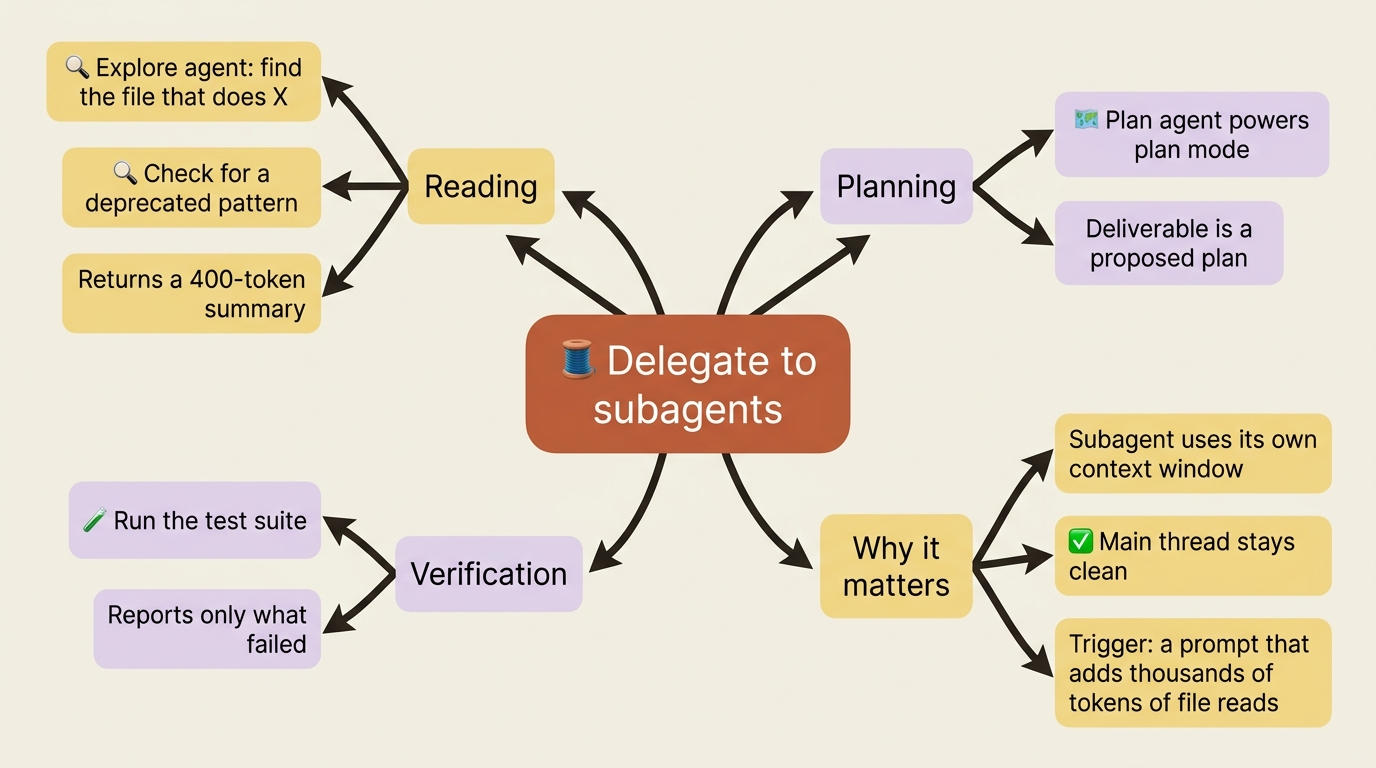
The fix is to delegate the reading. For "find the file that does X," or "check whether anything uses this deprecated pattern," or "review this PR for obvious problems," spawn a subagent. The subagent works in its own context window, reads as many files as it needs, and returns a roughly 400-token summary to your main thread. Your context is untouched.
Two built-in subagents do most of this work. Explore is the "go read things and tell me what is there" agent. Plan powers plan mode; same idea, but its deliverable is a proposed plan instead of a research summary. Invoke them by name, or just say "explore the codebase for X" and Claude will pick the right one.
The same logic applies to verification. Do not burn main-thread context running a hundred-test suite that prints a screenful per test. Spawn a subagent to run the tests and report only what failed. You get the answer; your main thread stays clean. The habit to build: if a prompt would add more than a few thousand tokens of file reads to your context, it belongs in a subagent.
Verify as You Go, Not After
This is the highest-leverage habit in the entire routine, so it deserves its own section. Tests, screenshots, lint, and type checks belong inside the loop, not bolted on at the end. The moment Claude proposes an edit, your next move should be to verify it. Run the test. Check the screenshot. Read the diff. Then approve and move on.
The reason this matters: without verification, an AI coding agent can drift for an hour producing plausible-looking code that does not actually work. With verification at every step, drift gets caught the moment it happens, when you have one bad change to back out instead of fifty. Anthropic's own internal teams say it bluntly: giving Claude a way to verify its work is the single highest-leverage thing you can do.
This is one expression of a deeper idea. An agentic loop is three phases repeated: gather context, take action, verify. Skip the verify phase and the loop is broken, no matter how good the first two phases were. To make verification automatic, a PostToolUse hook on Edit is five lines of JSON and turns "I should run the tests" into "the tests just ran," and a skill can bundle test, lint, and build into one invocation. But you do not need automation to start. Just type "run the tests" after every meaningful change. The habit is what matters; automation only removes the friction once the habit exists.
End-of-Day Ritual: Two Minutes to a Clean Handoff
Skip this at your peril, because next morning's "what was I even doing?" tax is real and it is expensive.
Look for half-finished edits. Run git status to see the dirty files. If anything is in a half-done state, a function half-written or a type error you ignored, then finish it, revert it, or commit it with a WIP: prefix and a clear comment about what is broken. Do not leave the repo in a state where tomorrow-you cannot tell real work from an artifact.
Promote anything worth keeping out of auto memory. Run /memory and skim what Claude saved today. "The auth service uses RS256 JWTs" belongs in CLAUDE.md where your team can see it. "Migrations must always be reversible" belongs in a rule scoped to migrations/**. "I personally prefer pnpm even though the team uses npm" belongs in CLAUDE.local.md, which is still fully supported and gitignored by default. A pure machine-local preference can stay in auto memory. Thirty seconds per item, and over weeks your team's CLAUDE.md gets richer while your auto memory stays focused on you.
Kill stale sessions and worktrees. If you opened three worktrees and only one survived the day, remove the other two with git worktree remove .claude/worktrees/<name>. Delete dead claude --resume candidates from the picker. The goal is one clear handoff, not seven stale entry points.
Leave one note for tomorrow-you. If the session ends mid-task, drop a one-line note in TODO.md, or run git stash push -m "Mid-feature: still need to wire the refresh endpoint". Future-you reads it first thing tomorrow and resumes instantly. Thirty seconds of writing saves ten minutes of reconstruction.
Do This Today
You do not have to adopt the whole routine at once. Pick the smallest of these three you have not done yet and do it before you close this article.
1. Promote one thing from chat into CLAUDE.md. Find a correction you have given Claude twice. Add it as a bullet. Commit. The next session will not repeat the mistake, and neither will anyone else on your team.
2. Run /context once. Look at where your tokens are actually going. There will be a surprise: a hook dumping huge output every turn, a CLAUDE.md that has crept past 200 lines, or a single early file read that ate 15% of the window. The fix is usually obvious the moment you see the cost.
3. Build your first skill with the bundled skill-creator. Do not hand-write the YAML. Install it with /plugin install skill-creator@claude-plugins-official, then ask Claude to use the skill-creator skill to turn the prompt you keep retyping into a real skill on disk. It is the difference between "I should make a skill for that someday" and "that is a skill now."
Three actions, fifteen minutes total. Each one converts a recurring tax into a permanent saving.
The Routine Is the Skill
It is tempting to believe that getting more out of an AI coding agent is a matter of finding better prompts, some secret incantation. It is not. The developers who are genuinely faster are not better prompt engineers. They are better at the boring parts: anchoring before they start, keeping the main thread clean, capturing what they learn, verifying as they go, and handing off cleanly at day's end.
That is the whole Claude Code daily routine. Three minutes in, two minutes out, and a working loop in between that you keep clean on purpose. Script the bookends, stay flexible in the middle, and the agent stops feeling like a slot machine and starts feeling like the colleague it was supposed to be.
Do the first ten minutes tomorrow. Then do them the day after. The rhythm is the work.
This is Part 3 of "Claude Code, Day-to-Day," a 19-part guide to mastering Claude Code for working engineers.