
Stop Typing 'Keep Going': The Autonomous Claude Code Commands That Finish Work While You Sleep
Set the outcome, then walk away: the autonomous Claude Code commands that turn repeated nudges into finished work.
How /goal, /loop, /batch, /simplify, and /debug turn an endless stream of tiny nudges into outcomes you set once and walk away from
In this article: Every Claude Code user eventually notices they are typing the same three words over and over: "keep going." This is the chapter on the commands that stop that. You will learn how
/goaliterates until a measurable condition holds, how/looppolls on a schedule, how/batchfans a large refactor out to parallel agents, and how/simplifyand/debugclean up and self-diagnose. You will also learn the one rule that keeps all of this from going sideways: autonomous work amplifies whatever is already true.
There is a moment in every Claude Code user's progression where they catch themselves typing the same nudge for the tenth time that hour. "Run the tests again." "Try the next file." "Check the deploy status." Each one is small on its own. In aggregate they are exhausting, and worse, they are the bottleneck. You are not the architect anymore. You are the carriage return.
The fix is not to type faster. The fix is to stop typing those nudges at all. That is what autonomous Claude Code is for: you set the outcome once, and the tool keeps working until the outcome is real. This is the single biggest leverage shift available to a working engineer using an agentic coding workflow, and it comes down to five commands.
The autonomy spectrum: where the leverage actually lives
Autonomy is not a switch. It is a spectrum, and most people stall halfway up it without realizing there is more.
At the bottom you are user-driven: you type every prompt, and each turn is a manual nudge. One rung up is Auto Mode, which approves tool calls within a turn so you stop clicking "yes" on every file edit. Higher still are the commands in this article: /goal removes per-turn prompts, /loop runs a prompt on a schedule, and /batch fans work out to a team of agents that converge only at pull request review.
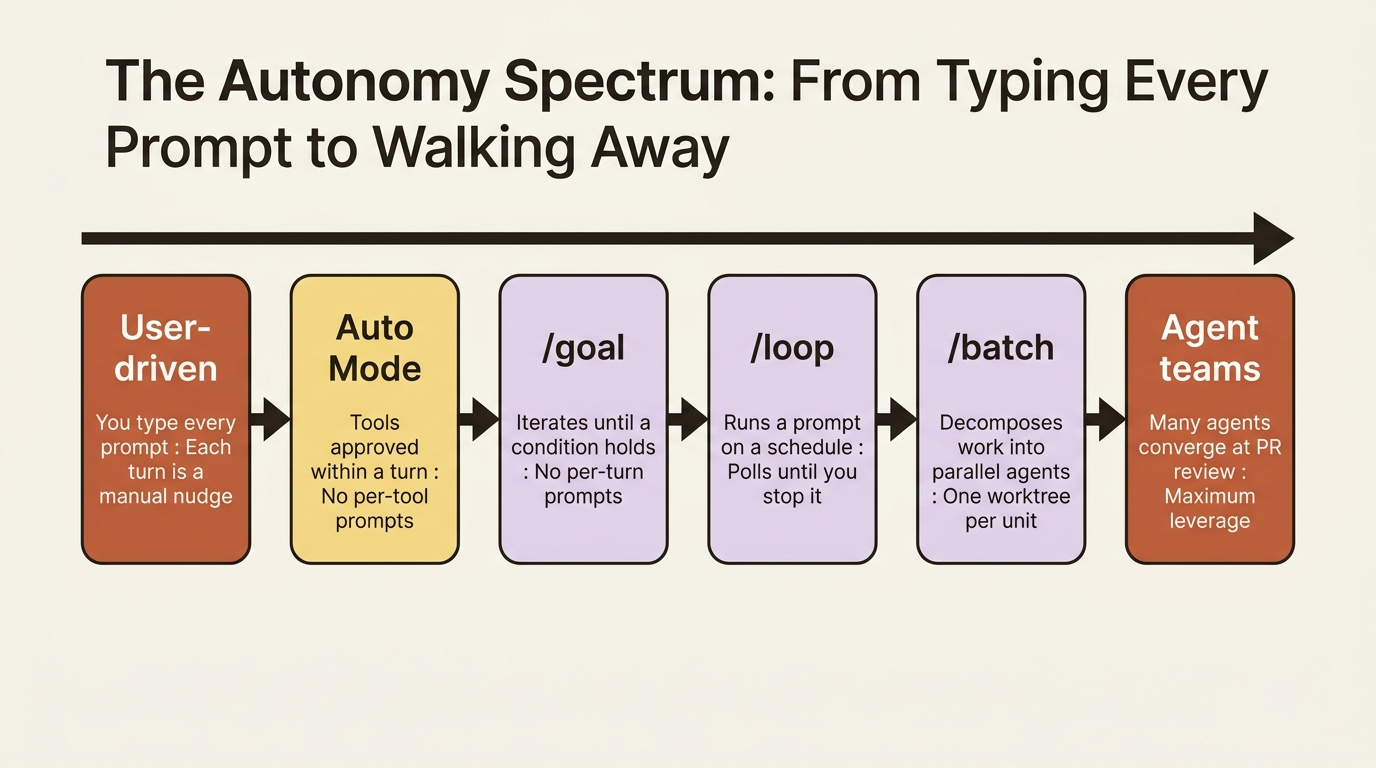
Here is the framing that matters before any command: autonomous does not mean unsupervised. Each command is still a turn you can interrupt, a session you can watch from your phone, and a process whose decisions you can audit in the transcript afterward. What changes is whether you have to be the one typing every nudge. With real verifiers wired up, the answer is no.
Anthropic engineers sometimes call this the Ralph Wiggum loop: "keep going, keep going, keep going." The model just iterates until the condition holds. It sounds silly until you watch it ship a feature you specced before lunch and review after.
/goal: keep working until a condition holds
This is the headline command, and it is the one to learn first.
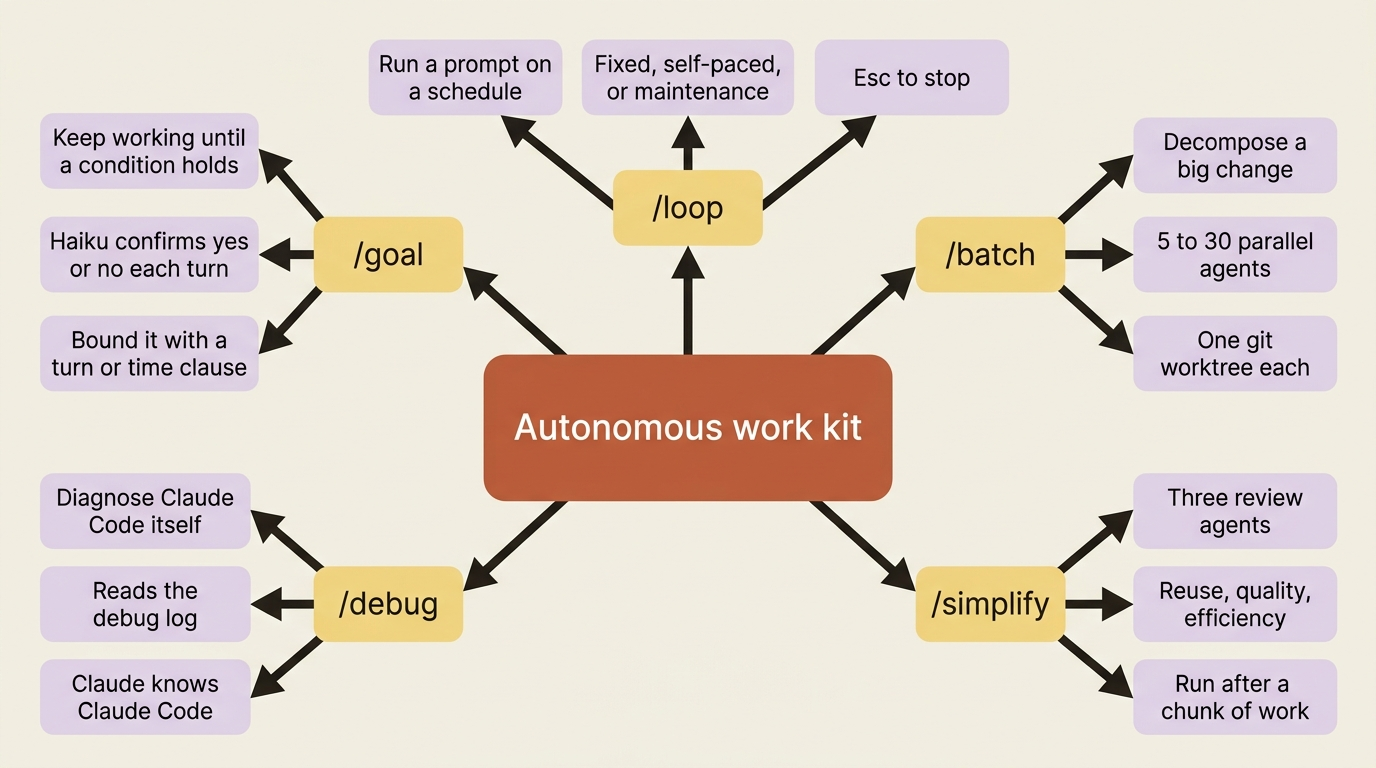
You set a completion condition. Claude keeps working across turns until a small, fast model confirms the condition is met. Then the goal clears and Claude reports done. Setting a goal starts a turn immediately, with the condition as the directive, so you do not send a separate prompt.
/goal all tests in test/auth pass and the lint step is clean
The mechanism is worth understanding because it shapes how you write conditions. After each turn, a small fast model (Haiku, by default) reads the conversation so far and the condition you set, then decides yes or no. No means Claude keeps working, and the evaluator's reason becomes guidance for the next turn. Yes clears the goal.
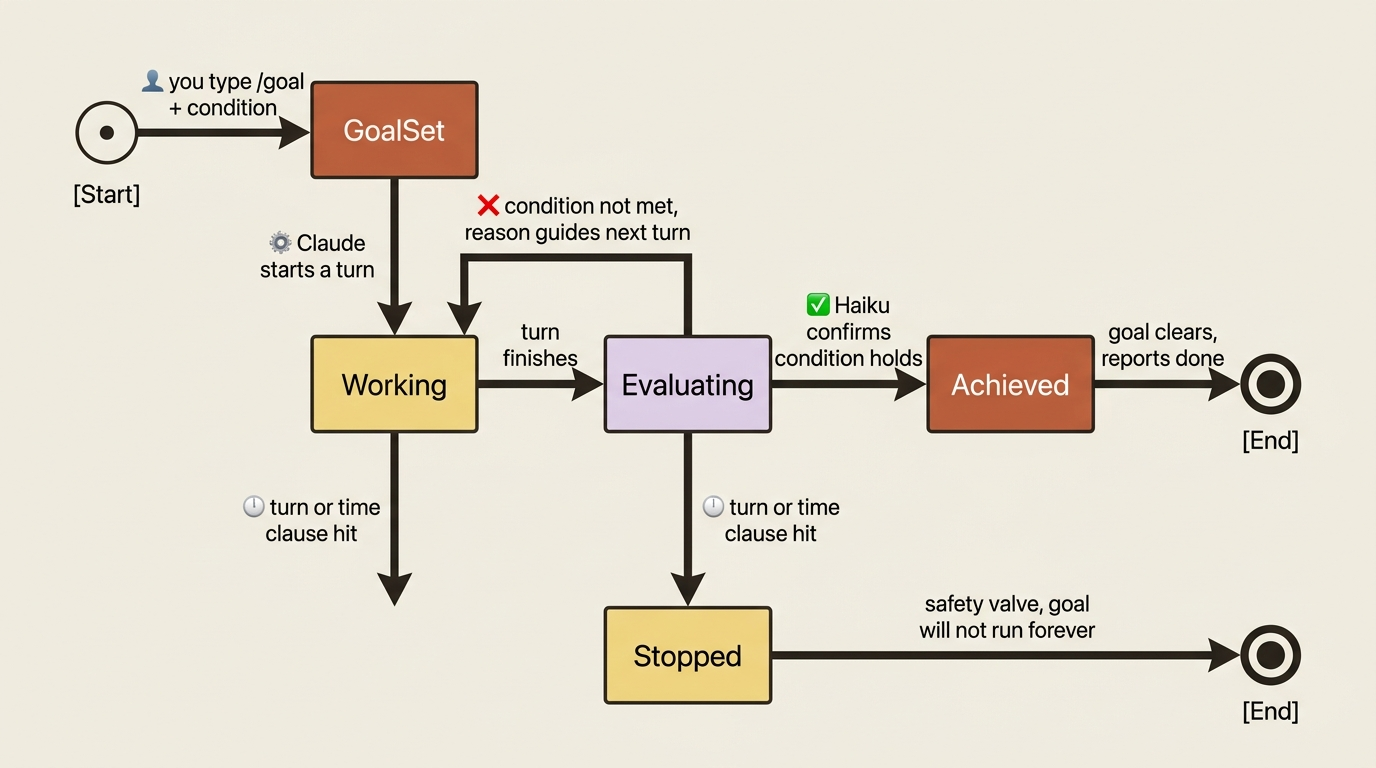
The detail everybody gets wrong on their first try: the evaluator does not run tools. It judges only what Claude has surfaced in the conversation. So your condition has to be something Claude's own output can demonstrate.
A condition that holds up across many turns has three properties:
- One measurable end state. A test result, a build exit code, a file count, an empty queue.
- A stated check. How Claude should prove it. "
npm testexits 0." "git statusis clean." - Constraints that matter. Anything that must not change on the way there. "No other test file is modified." "The public API in
src/types.tsstays the same."
Good conditions are concrete:
/goal all tests pass and there are no TypeScript errors

/goal the migration script in scripts/migrate-jwts.ts runs to
completion against the local Postgres without errors and all
existing tests still pass
Bad conditions are aspirational: /goal fix the auth bug has no measurable end state, and /goal make the codebase better has no end state at all. The evaluator cannot confirm a vibe.
The condition can be up to 4,000 characters, so be specific. And here is the safety valve: to bound how long a goal runs, include a turn or time clause in the condition itself, such as "or stop after 20 turns" or "or stop after 30 minutes." Even if the verifier never green-lights, the goal will not run forever. Run /goal with no arguments to see status. Run /goal clear to cancel one early.
The combo that makes autonomous Claude Code feel autonomous
/goal removes per-turn prompts. Auto Mode removes per-tool prompts: it approves the individual tool calls (file edits, shell commands) inside a single turn. Neither one alone gets you all the way there. Together they do.
This is the most common misconception about autonomous work, so it is worth stating flatly. Auto Mode does not start new turns. It approves tools within a turn. People set Auto Mode, send one prompt, and expect Claude to iterate toward a goal forever. It will not. Auto Mode plus a single prompt gets you "Claude finished one turn without bothering me." /goal is the part that makes it iterate.
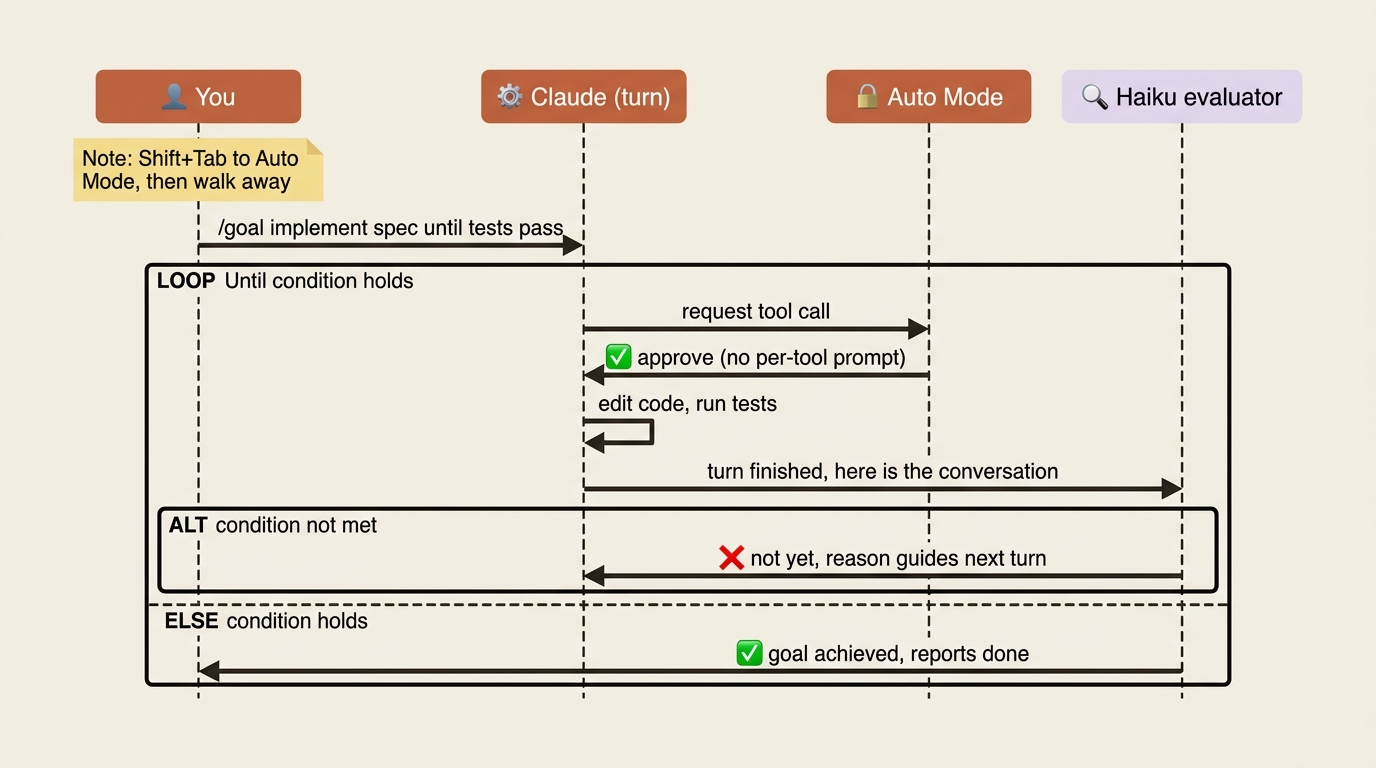
The full workflow, start to finish:
- Write a spec. Produce a
docs/specs/feature.mdwith real, verifiable acceptance criteria. This is the part that cannot be skipped, and we will come back to why. /clearor open a fresh session. Reset the context so Claude starts clean./goal implement the spec in docs/specs/feature.md until all acceptance criteria hold and the test suite passes.Shift+Tabto Auto Mode. This approves tool calls within turns.- Walk away. Or watch from your phone via Remote Control.
This is the workflow that heavyweight orchestration frameworks were trying to give you, except every layer here is native. The spec is a markdown file in your repo. The goal is a one-line command. The autonomy is built in. A worked run looks like this:
[Fresh session, afternoon]
> /goal implement the spec in docs/specs/jwt-migration.md until all
  acceptance criteria hold and the test suite passes

[Shift+Tab to auto mode]

[Walk away. Two hours later:]

Goal achieved (2h 14m, 47 turns).
All 8 acceptance criteria from the spec verified:
- ✓ Existing session cookies remain valid during transition
- ✓ New logins issue JWTs
- ✓ All tests pass (132 passing, 0 failing)
The bar to clear before this works: a spec with verifiable acceptance criteria, a working test suite Claude can run, and verifiers that return real signal. With those in place, this is the closest you get to "describe the work, walk away, come back to a finished PR."
One more thing: /goal works in headless mode too. claude -p "/goal CHANGELOG.md has an entry for every PR merged this week" runs the whole loop in a single invocation, which makes it CI-friendly with no terminal session needed.
/loop: run a prompt on a schedule
Where /goal keeps a session running until a condition holds, /loop runs a prompt repeatedly on a schedule until you stop it. Different shape, different job.
It has three modes. Fixed interval takes an interval and a prompt: /loop 5m check if the deploy finished and report failures. Claude converts the interval to a cron expression. Supported units are s, m, h, and d, and intervals that do not map cleanly round to the nearest valid one.
Self-paced takes a prompt with no interval: /loop check whether CI passed and address any review comments. Claude picks a delay between one minute and one hour based on what it observed last iteration: short waits while a build is finishing, longer waits when nothing is pending. This mode is usually the better one because it adapts. You do not poll every five minutes when nothing has moved. In self-paced mode, Claude may use the Monitor tool, which runs a background script and streams output lines back instead of re-running a prompt cold.
The maintenance prompt is just /loop with no arguments. Claude continues unfinished work, tends to the current branch's PR, and runs cleanup passes if nothing else is pending. Drop your own default into .claude/loop.md and edits take effect on the next iteration.
Stop a loop by pressing Esc while it waits. One caveat worth internalizing: if you want to react to events (CI failing, a PR comment landing) rather than poll for them, an event-push mechanism beats /loop. Polling wastes tokens when nothing has changed. Use /loop only for the cases where you genuinely need to ask, "has anything changed yet?" Those are deploys, long builds, and slow integrations.
/batch and /simplify: when one session is not enough
Some work does not fit a single session. Two bundled skills handle that.
/batch is the most ambitious command in the kit. Give it a change description and it does four things in sequence: it researches the codebase to understand scope, decomposes the work into 5 to 30 independent units, presents a plan for approval, and then spawns one agent per unit. Each agent runs in an isolated git worktree, implements and tests its unit, and opens a PR.
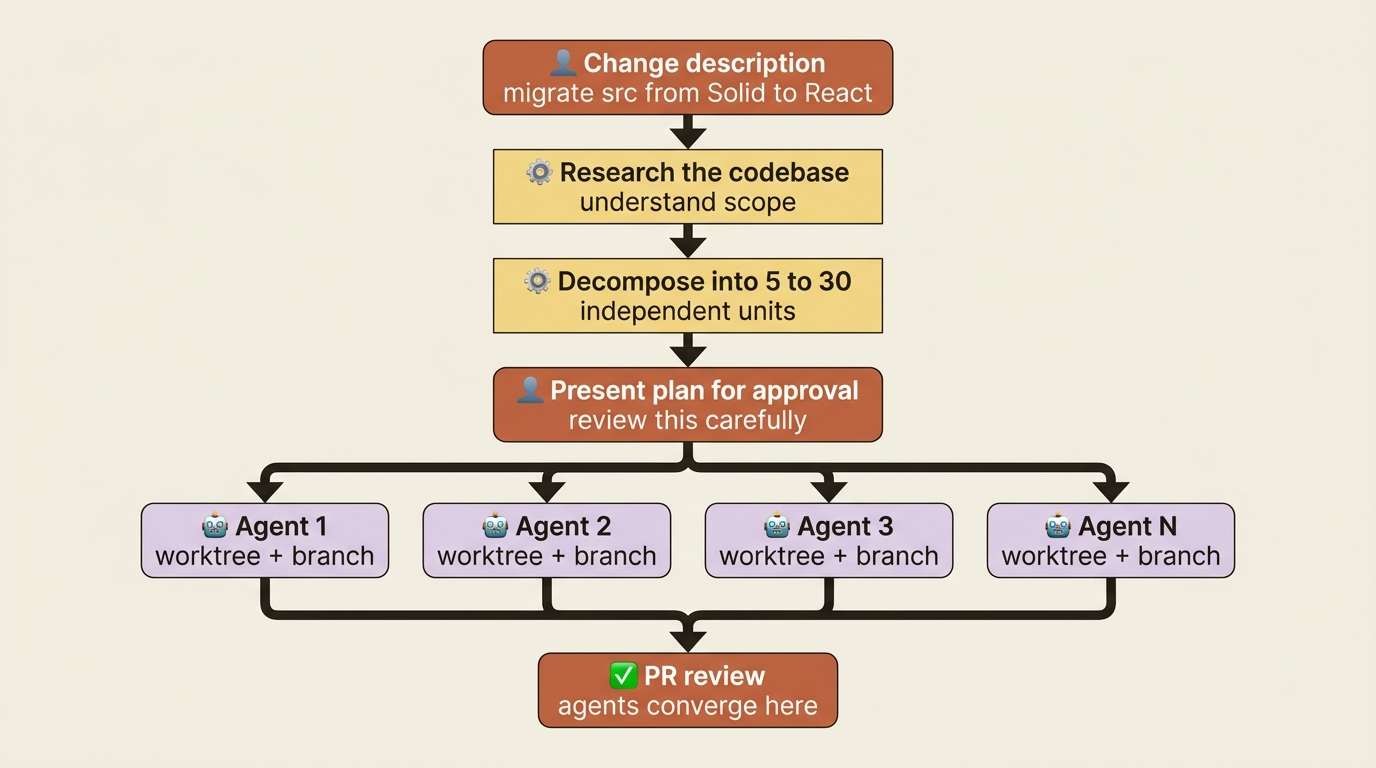
The canonical example is "/batch migrate src/ from Solid to React." /batch finds every component, plans the migration unit by unit, and dispatches an agent per component. Worktree isolation is the load-bearing detail. Each agent has its own branch and cannot see the others' edits, so twenty parallel agents do not overwrite each other. They converge only at PR review.
The tradeoff: decomposition quality matters more than execution quality. If the unit boundaries are wrong, you get twenty PRs that conflict at merge time. So /batch is the one bundled command where reading the plan carefully is not optional. Approve the decomposition, then let the execution run autonomously.
/simplify is the smaller cousin. After you or Claude finish a feature or fix, /simplify spawns three parallel review agents: one hunts code reuse and duplication, one checks code quality (bugs, unclear logic), and one finds efficiency improvements. They run concurrently, aggregate findings, and apply fixes. You can focus it: "/simplify focus on memory efficiency." The key is timing. /simplify runs after a chunk of work, not during. It is the cleanup pass that turns a working-but-rough implementation into a polished one. Run it before opening a PR.
/debug: when Claude Code itself misbehaves
This is the most underused command in the kit, and the one with the fastest payback.
/debug is the right move when something feels wrong with Claude Code itself, not with your code. A hook is not firing when you expect it to. A skill is not being invoked. An MCP server connected but its tools never showed up. Claude keeps suggesting a deprecated API even though you installed a skill to prevent exactly that.
In any of those cases, /debug enables debug logging for the session, reads the resulting log, and diagnoses the issue. You can pass a hint to focus it:
/debug why isn't the prettier hook running after my edits?

/debug the postgres MCP connected but I don't see its tools
/debug works because Claude knows Claude Code. The Claude Code docs are part of Claude's working knowledge, and the debug log is a structured format Claude can read. Combine the two and you have a tool that does not just dump logs, it interprets them. The related diagnostic is /doctor, which validates your installation and settings and lets you press f to have Claude fix reported issues. Rule of thumb: run /doctor when something does not work at all (usually a config problem), and /debug when something works partially or unpredictably (usually a logic problem).
What autonomous work does not fix
Here is the note that earns its place in every honest chapter about automation: autonomous work amplifies whatever is already true. If your verifiers are sharp and your spec is clear, autonomous work ships finished features while you sleep. If your verifiers are vague and your spec is hand-wavy, autonomous work ships a finished, fully tested implementation of the wrong thing.
Three things autonomous Claude Code does not replace.
A clear specification. /goal implement the spec until acceptance criteria hold only works if the spec actually has acceptance criteria. A vague goal produces vague work, faster.
Verifiers that return truth. /goal checks whether Claude has surfaced evidence that the condition holds. If Claude can game the verifier, say by writing a stub that "passes" a test without doing the work, the goal will clear and the work will still be broken. Real tests, type checks, lint, screenshot checks, and database queries are what keep /goal honest.
Human review of the final result. Auto Mode plus /goal produces finished work, not pre-reviewed work. Read the diff. Run the tests yourself. Open the page in a browser. The autonomous loop closes the production gap. It does not close the validation gap. Those are separate concerns, and pretending they are one is how teams ship confident bugs.
Treat autonomous work like a power tool. It makes you faster at whatever you were already doing. If you were doing it well, it scales. If you were doing it badly, it scales the badness just as efficiently.
Do this today
Three concrete moves, in order of payback.
1. Run one small task under /goal. It does not have to be a feature. Try something like "/goal add error handling to every route in src/api/handlers/ so they return { error: string, code: string } on failure, with tests verifying the new shape." Watch the per-turn evaluator reasons scroll by. That feedback teaches you how to write conditions better than any guide can. Then scale up.
2. Set up one /loop, only if you need it. If you have a long-running build or deploy, /loop check the deploy status is the lowest-friction start. If you have nothing recurring to poll, skip this. /loop is a "when you need it" tool, not a "set this up on day one" tool.
3. Run /debug the next time something breaks. This is the habit with the biggest return. The next time a hook misfires, do not grep logs by hand. Type /debug why didn't the prettier hook run after my last edit. Session-aware diagnosis plus the fact that Claude knows Claude Code makes this the fastest recovery from a misconfigured setup.
The compounding case for setting outcomes instead of typing nudges
Every autonomous-work command you adopt converts one more class of "things I used to type repeatedly" into "things that happen on their own." That is not a small productivity bump. It is a change in what your job is.
Six months in, the engineer who has adopted /goal for substantial features, /loop for status polling, /batch for large refactors, and /debug for troubleshooting types meaningfully fewer prompts per day, and ships more, than the engineer who has not. Not because they are faster typists. Because they stopped being typists.
The skill being rewarded here is not prompt-writing. It is outcome definition: the ability to state, precisely and verifiably, what "done" means. Get that right, wire up verifiers that cannot be fooled, and the loop closes itself. Set the outcome, then walk away.
This is Part 13 of "Claude Code, Day-to-Day," a 19-part guide to mastering Claude Code for working engineers.