
Read Every Edit Claude Makes, and Never Approve npm test Again
Auto mode is now the default, so the skill worth learning is taking the controls back: Manual mode to read every edit, plus one committed allow rule so the command you run fifty times a day stops interrupting you.
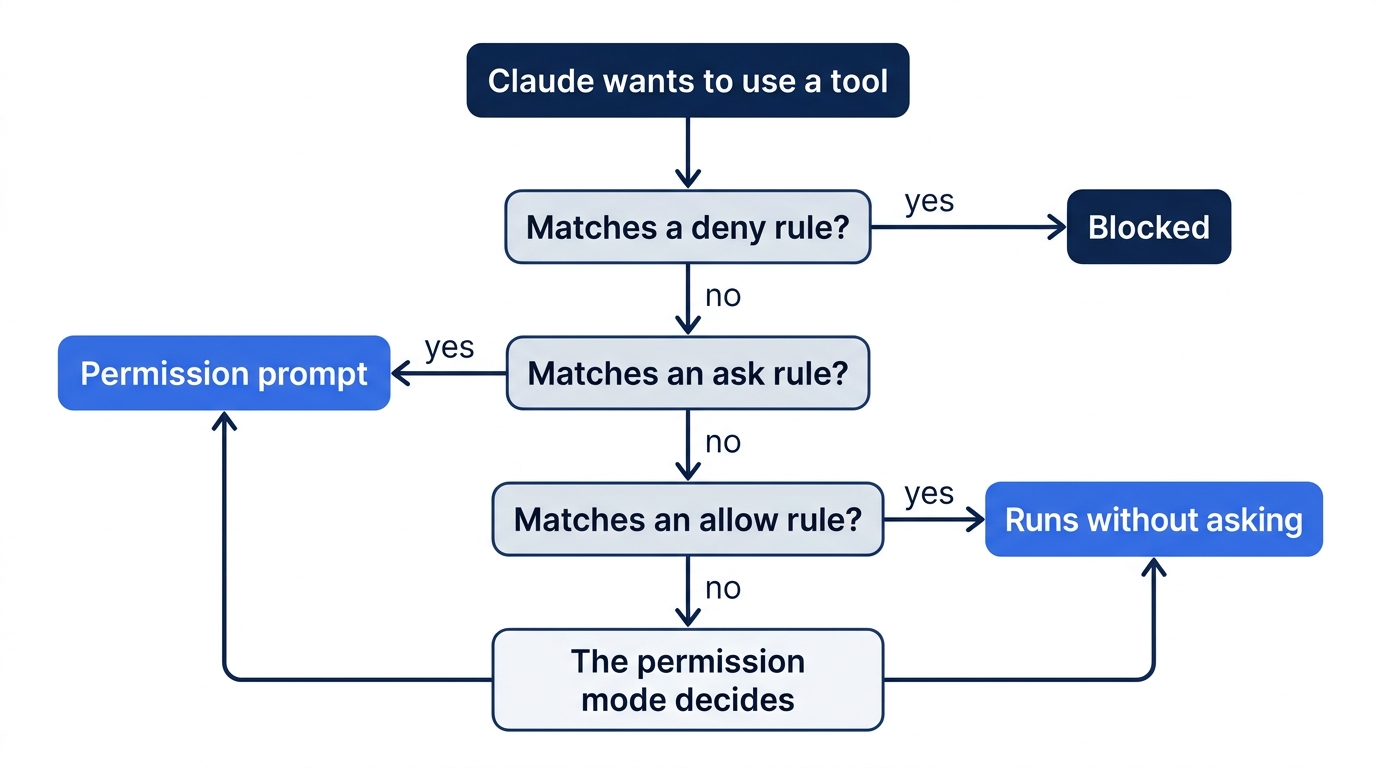
Claude Code permissions come down to two controls: a mode that decides how often Claude asks, and rules that decide what it never has to ask about. One line in a settings file connects them.
Auto mode is fast, but you never see a change before it lands, and the alternative seems to be approving the same test command over and over.
In this article: Day 4 of a day-by-day guide to Claude Code. Start here: you put Claude Code in Manual mode, add one allow rule so
npm testruns without a prompt, and buildpriority()from your spec while you approve each edit. Going deeper: all six permission modes, which mode a session starts in, the rule syntax and its blind spots, and how auto mode decides what to block.
Tested on Claude Code 2.1.326.
Yesterday you planned the priority() function in plan mode and saved the plan as docs/specs/priority.md.
Start here
At the end of today, you can put Claude Code in Manual mode, add a rule that lets npm test run without a prompt, and build priority() from your spec while you approve each edit.
Starting fresh or fell behind? Run git switch -C main claude-code/day-03. This replaces your main with the end of Day 3; to keep your own work, run git branch my-backup first.
For three days, Claude Code ran in auto mode, the permission mode a new session starts in, unless your account starts in Manual mode. In auto mode, Claude edits files and runs commands without asking you, and a background safety check looks at each risky action first. Auto mode is fast, but you do not see each change before it lands.
Today you use the other side of the controls. Two ideas do the work:
- Manual mode is the permission mode in which Claude asks you before every file edit and every command that is not read-only. You approve or refuse each one. Its value in settings files is
default. - A permission rule is a line in a settings file that tells Claude Code what to do with one tool or one command: allow it without asking, always ask, or deny it. Most rules work in every mode. Going deeper lists the exceptions.
Together, they let you read every edit, while the one command you run fifty times a day, npm test, stops interrupting you.
Add an allow rule for npm test
Claude Code reads settings from JSON files. The project settings file is .claude/settings.json at the project root. You commit it with the code, so everyone who clones Ticket Triage gets the same rules.
Close any open Claude Code session in Ticket Triage first (type /exit). Then check the starting state:
cd ~/code/ticket-triage
git status
npm test
ls docs/specs
Git prints nothing to commit, working tree clean. The tests show ℹ pass 5 and ℹ fail 0, the count from Day 3. ls prints priority.md, the spec from Day 3. If any of the three differs, finish Day 3 first.
Create the folder for the settings file:
mkdir -p .claude
In your editor, create .claude/settings.json with this content:
{
  "permissions": {
    "allow": [
      "Bash(npm test *)"
    ]
  }
}
Read the rule from the outside in:
permissions.allowis the list of things Claude may do without asking.Bashis the name of Claude's tool for shell commands. A rule names the tool first.npm test *is the command, in parentheses. The space and*at the end match any extra text afternpm test, such as options. They also match plainnpm test.
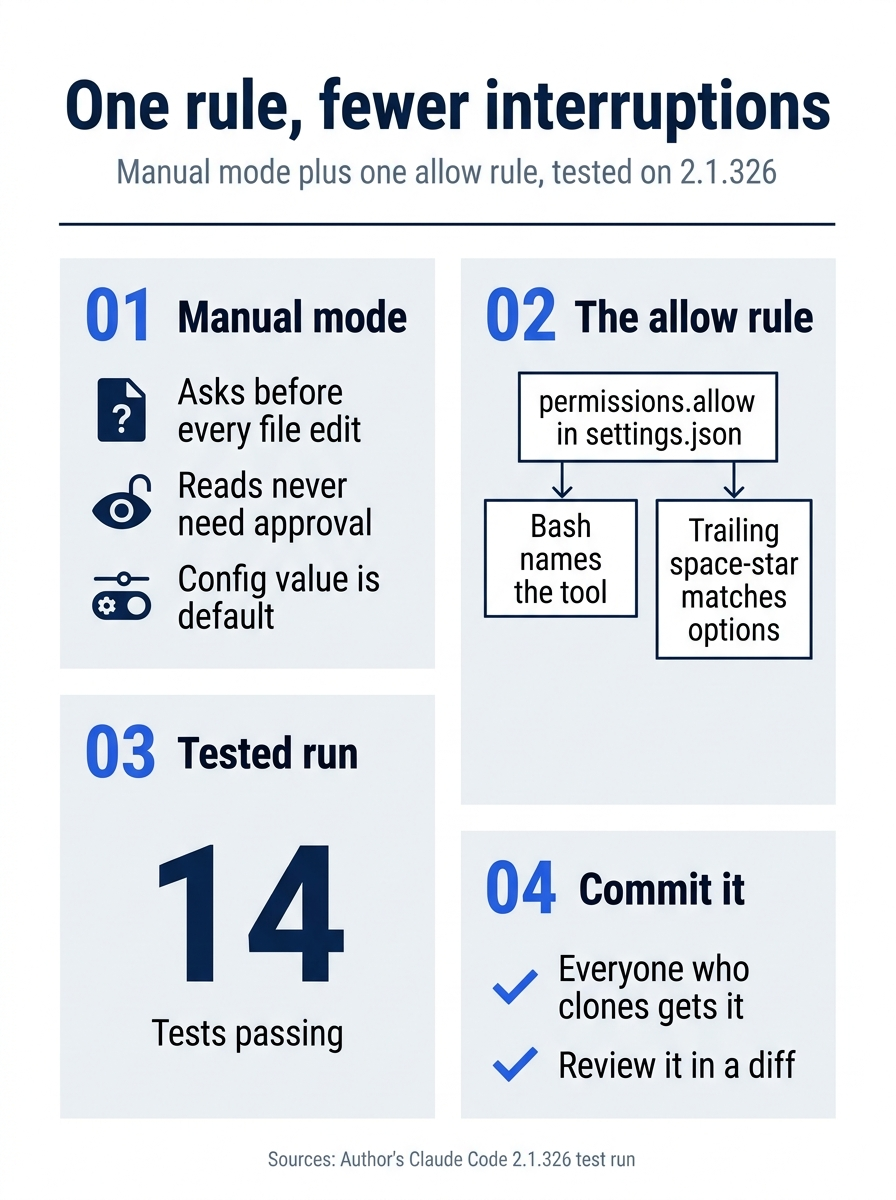
The setup has two halves. Manual mode keeps you in the loop for every file edit, and the committed allow rule removes the one prompt you would otherwise answer dozens of times. On the tested run, the result was 14 passing tests and a rule that every clone of the repository shares.
Start in Manual mode
Start Claude Code:
claude
The status bar under the prompt box shows the current mode:
⏵⏵ auto mode on (shift+tab to cycle)
Press Shift+Tab once. Shift+Tab moves to the next permission mode, and from auto mode the next one is Manual. If your status bar already says ⏸ manual mode on, your account starts in Manual mode, so do not press Shift+Tab. The status bar changes to:
⏸ manual mode on
Check that Claude Code loaded your rule. Type:
/permissions
A dialog opens with tabs across the top: Recently blocked, Allow, Ask, Deny, Auto mode, and Workspace. The Allow tab is selected, and its list includes your rule:
Bash(npm test *)
The list can also show rules that Claude Code adds by itself. Press Esc to close the dialog. The status bar still says ⏸ manual mode on.
Build priority() from the spec
Give Claude the spec from Day 3. Type this prompt:
Implement docs/specs/priority.md. Follow the spec exactly. Then run the
tests and tell me if anything broke.
Manual mode: create priority.js, create priority.test.js. No prompt for npm test. Today every reader is in Manual mode, so the steps below show each prompt in full.
Claude reads the spec and the existing code. Reading project files never needs your approval, so Claude does not ask. Then Claude wants to create the first file, and Claude Code stops and shows a permission prompt: a box that shows what Claude is about to do and asks for your answer. On the tested run, it looked like this:
 Create file
 src/priority.js
  1 // Rates a support ticket's priority as high or normal.
  2 export function priority(text) {
  3   const t = text.toLowerCase()
  4   if (t.includes("urgent") || t.includes("asap") || t.includes("immediately")) return "high"
  5   return "normal"
  6 }
 Do you want to create priority.js?
 ❯ 1. Yes
   2. Yes, and switch to accept edits (auto-approve file edits and common file commands) for this session (shift+tab)
   3. No
 Esc to cancel · Tab to amend
Your file can differ a little, because Claude writes its own code. Read it before you answer. It should return "high" for the three words in the spec and "normal" for everything else. Press 1 for Yes.
A second prompt follows, Do you want to create priority.test.js?. It shows the tests that your Day 3 spec listed. On the tested run, the spec listed nine, and the file began:
test("urgent", () => assert.equal(priority("This is urgent"), "high"))
test("asap", () => assert.equal(priority("Please reply asap"), "high"))
test("immediately", () => assert.equal(priority("Fix this immediately"), "high"))
test("normal", () => assert.equal(priority("Where is my package?"), "normal"))
test("uppercase", () => assert.equal(priority("URGENT: box crushed"), "high"))
Read it, then press 1 again. If Claude asks to change a file that the spec does not name, press 3 for No and tell Claude why.
Now watch the next step. Claude runs the tests, and no prompt appears. On the tested run, the screen showed:
⏺ Bash(npm test 2>&1 | tail -30)
  ⎿    duration_ms: 0.041959
       type: 'test'
       ...
     … +27 lines (ctrl+o to expand)
Claude added 2>&1 | tail -30 to see only the end of the output, and your rule still matched. The output looks different from your own npm test because Node prints a plainer format when another program reads its output. Without your rule, Claude Code would stop here and ask. If Claude runs another test command, such as node --test test/priority.test.js, your rule does not match it, and a prompt appears. Read the command and choose 1. Yes.
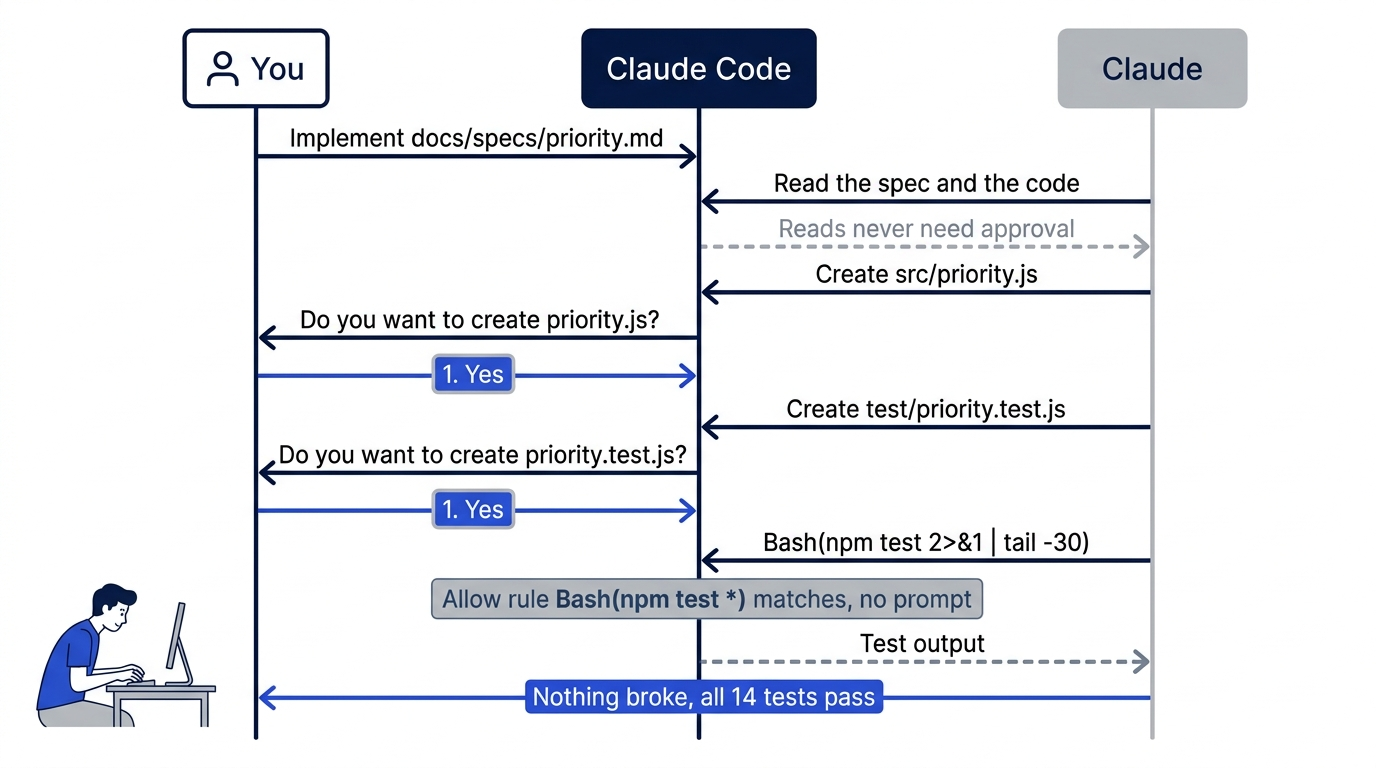
Claude ends with a short report. Your Day 3 spec decides how many tests Claude writes, so your count can differ. On the tested run, it said: "Nothing broke: npm test passes all 14 tests, the 5 existing classify tests and 9 new ones." On a second run, in a session that started in Manual mode, the spec listed eight tests, and the total was 13.
You may see other choices on some prompts, such as Yes, and don't ask again or Yes, and switch to auto mode. Use Yes or No today. Going deeper explains the others.
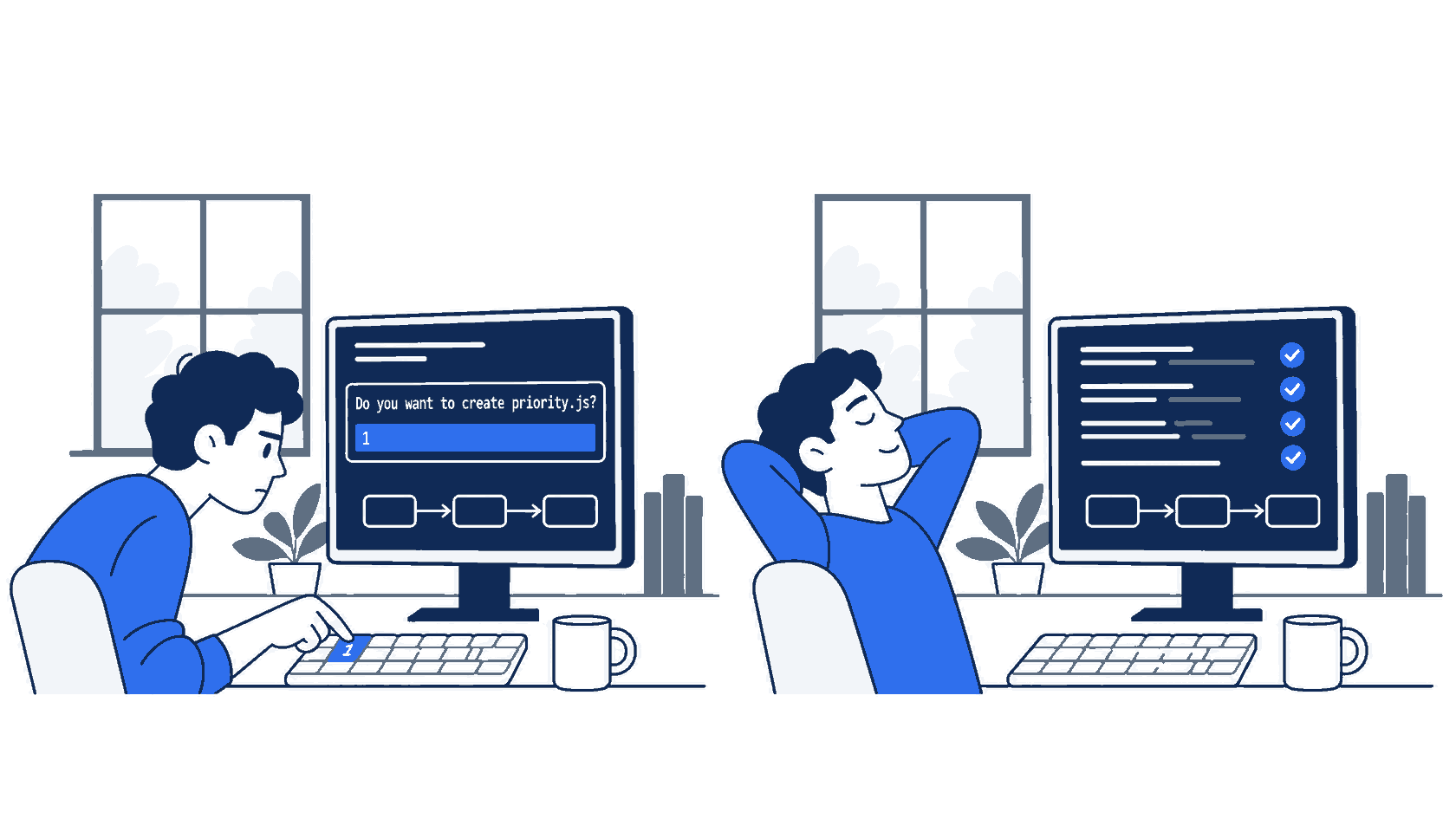
The scene captures the point of Manual mode: you read each change before it lands, and the allow rule keeps the routine test run from breaking your focus.
Check the win
Do not take Claude's word for it. In a second terminal, in the same folder, run:
npm test
Look for these lines:
✔ refund
✔ shipping
✔ other
✔ damaged
✔ water damage
✔ urgent
✔ asap
✔ immediately
✔ normal
✔ uppercase
✔ mixed case
✔ urgently (substring)
✔ empty string
✔ independent of category
ℹ tests 14
ℹ pass 14
ℹ fail 0
Each test name also shows a time, and your test names for priority() can differ. The check is ℹ fail 0, and a pass count of 5 plus the number of tests in your spec.
Then look at what changed:
git status --short
Three new entries:
?? .claude/
?? src/priority.js
?? test/priority.test.js
src/classify.js is not in the list, because the spec said not to change it. Commit all three:
git add .claude/settings.json src/priority.js test/priority.test.js
git commit -m "Add priority() from the spec, and allow npm test"
The settings file is now part of the project. Tomorrow, and on every other day, npm test runs without a prompt in this repository.
Close the session with /exit. The next session starts in auto mode again, or in Manual mode if your account starts there. A Shift+Tab change lasts for one session unless you change the default, and Going deeper shows how.
You switched to Manual mode, approved each edit after you read it, and watched npm test run without a prompt because of one committed rule. Write down your pass count: 14 on the tested run, 13 on the second.
You can stop here. Going deeper explains why this works and where it breaks.
Going deeper
This section is for readers who want every permission mode, the full rule syntax, how auto mode decides, and the settings that change a session's starting mode. It assumes that you finished Start here in Parts 1 to 4.
The six permission modes
Claude Code has six permission modes. The permission modes page is the reference. Manual mode shows under its config value, default:
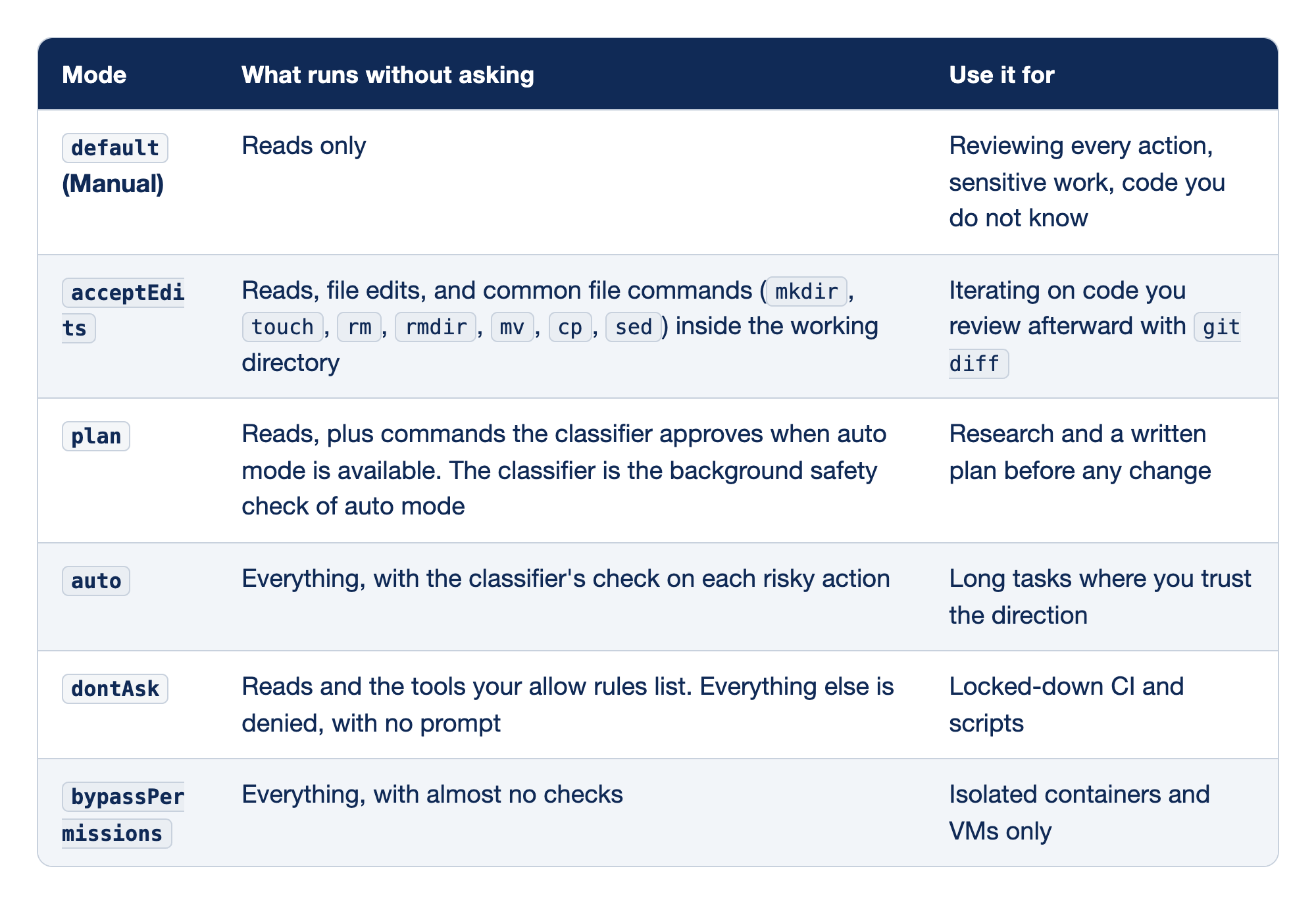
Each of the six modes gets one row with two facts: the "What runs without asking" column lists the actions Claude takes without a prompt, and the "Use it for" column names the work that mode suits.
default(Manual) runs only reads without asking, and it fits reviewing every action, sensitive work, and code you do not know.acceptEditsruns reads, file edits, and the common file commandsmkdir,touch,rm,rmdir,mv,cp, andsedinside the working directory without asking, and it fits iterating on code you review afterward withgit diff.planruns reads, plus commands the classifier approves when auto mode is available, and it fits research and a written plan before any change.autoruns everything, with the classifier checking each risky action, and it fits long tasks where you trust the direction.dontAskruns reads and the tools your allow rules list, denies everything else with no prompt, and fits locked-down CI and scripts.bypassPermissionsruns everything with almost no checks, and it belongs only in isolated containers and VMs.
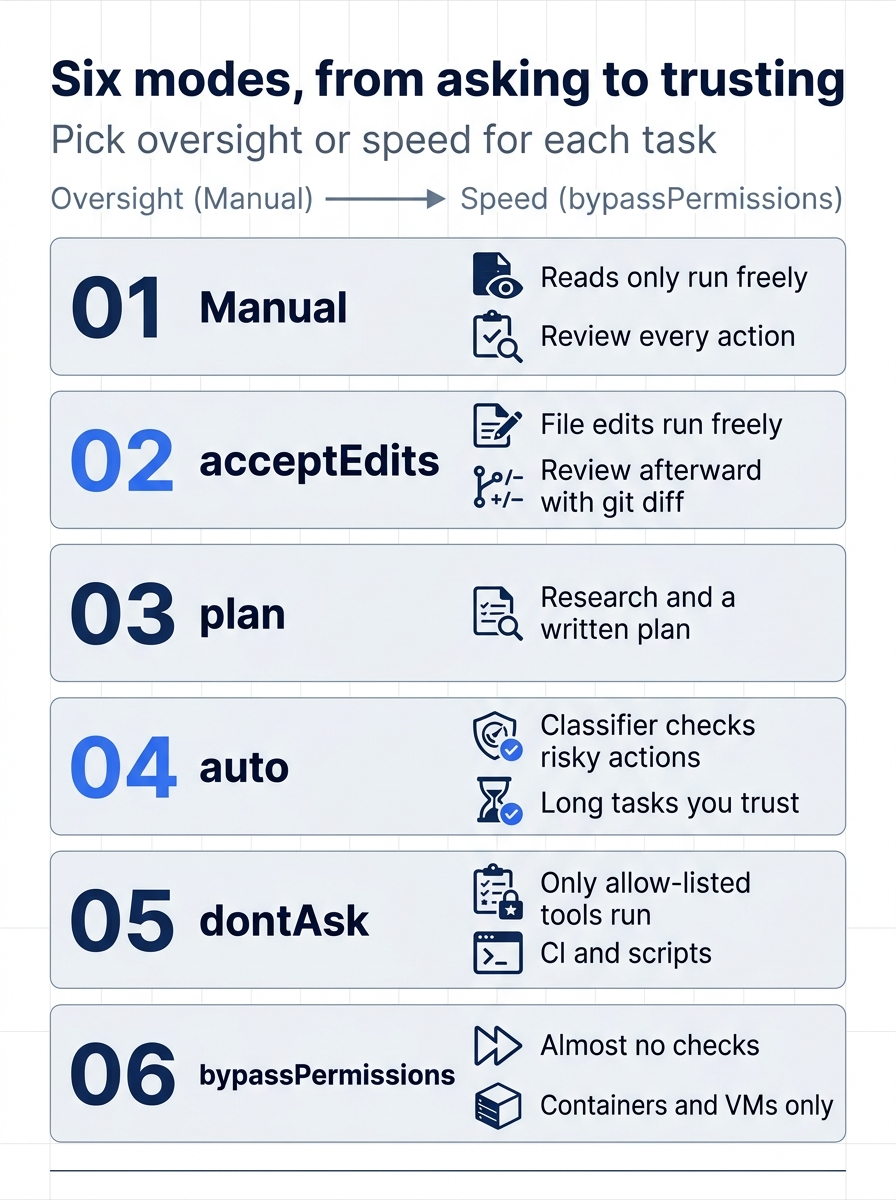
Read the six modes left to right as a trade: each step gives up some oversight for speed. Manual and acceptEdits keep you reviewing, plan keeps Claude researching, auto hands risky calls to a classifier, and dontAsk and bypassPermissions are for runs with no one watching.
The CLI calls Manual mode "Manual" in the status bar, in claude --help, and in the IDE extensions. Two other places use the config value, default: hooks, which are commands that Claude Code runs on its own at set points, and the Agent SDK, the library for building your own agents on Claude Code. Claude Code accepts manual as an alias wherever you type the value, such as claude --permission-mode manual.
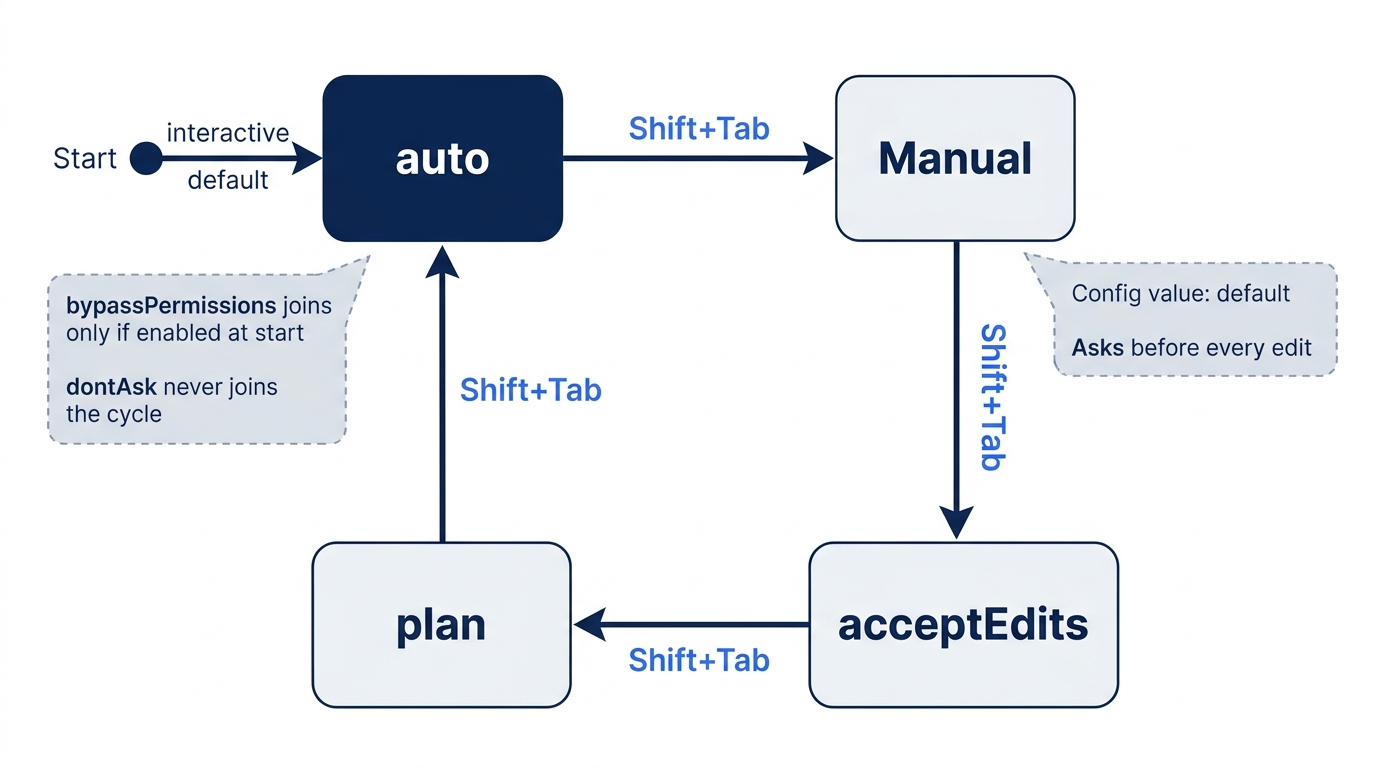
The Shift+Tab cycle. From auto, the first press goes to Manual, and the cycle then runs Manual, acceptEdits, plan, and back to auto. Two modes are not in the default cycle. bypassPermissions joins the cycle only when you start the session with a flag or setting that enables it, as described below. dontAsk never joins the cycle: set it with --permission-mode dontAsk. If both auto and bypass are in the cycle, bypass comes first, so you pass through it on the way to auto.
Switching from a prompt. In Manual and acceptEdits, a Bash permission prompt adds Yes, and switch to auto mode when auto mode is available, in v2.1.247 or later. It approves the command and moves the session to auto. It does not appear on a prompt that an ask rule or a hook forced. A file prompt in Manual mode offers Yes, and switch to accept edits, which approves the edit and moves the session to acceptEdits.
Which mode a session starts in
Claude Code takes the starting mode from the first of these that applies:
- The
--permission-modeflag, or--dangerously-skip-permissions. permissions.defaultModein a settings file.- The built-in default.
The built-in default is auto mode for interactive terminal and VS Code sessions on every plan and provider, from Claude Code v2.1.284. One release earlier, v2.1.283 made the same change only for third-party providers and for sessions with telemetry off. The exceptions start in Manual: claude -p runs and the Agent SDK (from v2.1.302), any session where a settings file sets permissions.disableAutoMode to "disable", and organizations with the HIPAA configuration applied. If the flag, a setting, or the built-in default asks for auto and auto mode is not available to the session, the session starts in Manual.
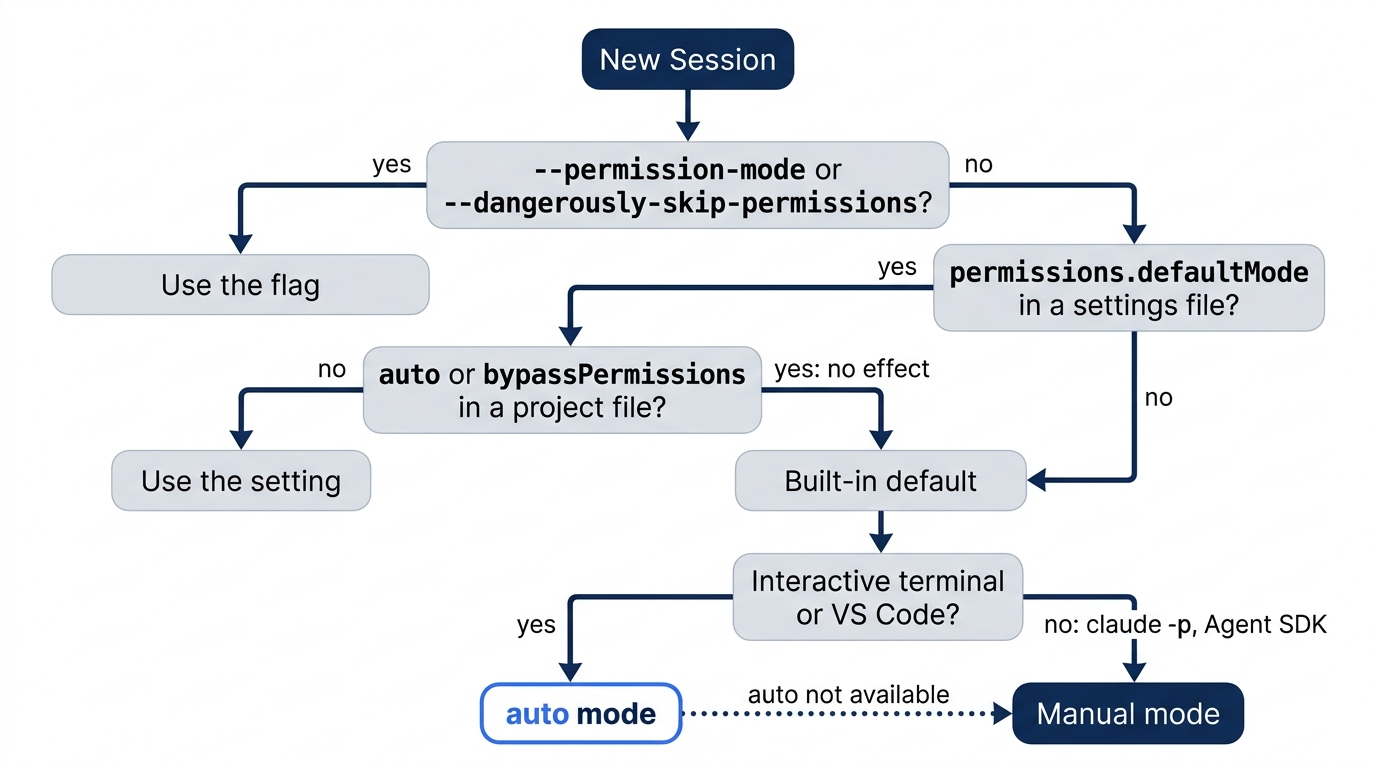
The first edition of this guide said that auto mode was opt-in, not available on Pro, and only on the Anthropic API. All three claims are out of date. Auto mode is available on every plan. Team and Enterprise get it by default, and an admin can turn it off. It runs on Amazon Bedrock, Google Cloud's Agent Platform, Microsoft Foundry, and Claude Platform on AWS too. The model matters: on the Anthropic API, auto mode needs Opus 4.6 or later, Sonnet 4.6 or later, Haiku 5.5, or a Fable model. On the cloud providers it needs Sonnet 5 or later, Opus 4.7 or later, Haiku 5.5, or a Fable model. Today's default, Opus 5.5, qualifies everywhere.
Make Ticket Triage start in Manual mode. Add defaultMode to the project settings file:
{
  "permissions": {
    "defaultMode": "default",
    "allow": [
      "Bash(npm test *)"
    ]
  }
}
On the tested run, a new session in the folder started with ⏸ manual mode on, with no Shift+Tab needed. To start every project in Manual mode, put the same key in your user settings, ~/.claude/settings.json.
Two values do not work from project files. "auto" in .claude/settings.json or .claude/settings.local.json has no effect, so a repository cannot switch its own safety check on for you. Claude Code then uses the built-in default, not a defaultMode from your user settings. "bypassPermissions" in those files has no effect either, and the session starts in Manual. Put either value in ~/.claude/settings.json if you want it. Every other value works from any settings file.
The VS Code extension never reads a project's settings files for the starting mode. Its own setting, claudeCode.initialPermissionMode, accepts default, manual, acceptEdits, plan, and bypassPermissions, but not auto. To start VS Code conversations in auto, leave the setting unset and pick Auto from the mode indicator once.
Where settings live, and which file wins
Claude Code reads four settings files. The settings page is the reference:
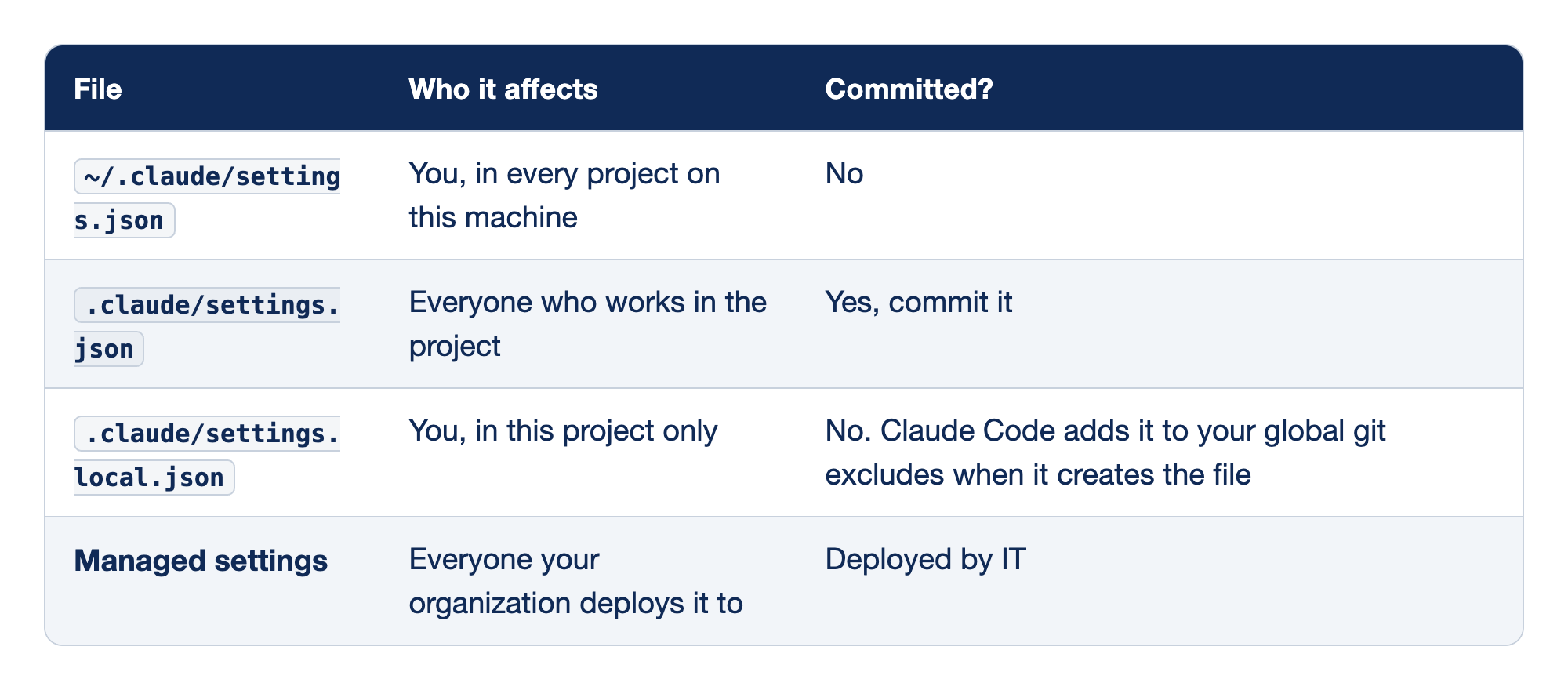
Each settings file gets one row. The "Who it affects" column says whose sessions read the file, and the "Committed?" column says whether the file belongs in git.
~/.claude/settings.jsonaffects you in every project on this machine, and you do not commit it..claude/settings.jsonaffects everyone who works in the project, and you commit it..claude/settings.local.jsonaffects only you in this one project, and it stays out of git, because Claude Code adds it to your global git excludes when it creates the file.- Managed settings affect everyone your organization deploys them to, and IT deploys them rather than anyone committing them.
Docs pages: Managed settings.
When one key appears in more than one file, the highest level wins: managed settings, then the --settings command-line flag, then .claude/settings.local.json, then .claude/settings.json, then ~/.claude/settings.json. Permission lists are different: allow, ask, and deny lists from every file merge. A deny rule at any level beats an allow rule at any other level, so a user-level deny blocks a project-level allow, and the reverse.
Claude Code watches these files and applies most edits to a running session, including permission rules. Start here closed the session before the edit only to keep the steps simple. Run /status to see which settings files loaded, and claude doctor to list entries that Claude Code rejected.
Trust. Allow rules in a project's .claude/settings.json take effect only after you trust the folder. When you clone a repository that ships allow rules, the trust dialog lists them, so read them before you accept. Deny and ask rules apply without trust, because they only restrict. On the tested run, adding a rule to a folder that was already trusted did not bring the dialog back.
Two ways to save a rule, and why Start here edits the file
Every Bash prompt in Manual mode offers Yes, and don't ask again for: npm test *. The text after "for:" is the command prefix. Both ways were tested:
- The prompt option. It saved
"Bash(npm test *)"to.claude/settings.local.json, the personal file. Git ignored the file, so the rule stayed on one machine and did not reach teammates. - Editing
.claude/settings.json. It saved the same rule to the shared file, which shows ingit statusand goes into a commit.
Start here teaches the second way because you can see the rule, review it in a diff, and share it. Use the prompt option for a personal exception that the team does not need.
Approvals for file edits never save to a file. Yes, and switch to accept edits changes the mode for the rest of the session only. A prompt that offers only a one-time Yes means that a saved rule would allow more than the prompt can show you. Approve it once, or add a narrower rule in /permissions.
Rule syntax in detail
The permissions page is the full reference. The parts you need most:
Toolalone matches every use of the tool.Bashmatches every shell command. As a deny rule, a bare tool name removes the tool from Claude's context.Tool(specifier)matches specific uses.Bash(npm run build)matches exactlynpm run build.Read(./.env)matches reading.envin the current folder.WebFetch(domain:example.com)matches fetches to one domain.*matches any text, including spaces. Put it after the subcommand:Bash(git log *)allows onlygit logcommands, butBash(git *)allows every git command.- The space before a trailing
*is part of the rule.Bash(ls *)matchesls -laand plainls, but notlsof.Bash(ls*)matcheslsoftoo. - Space form or colon form.
Bash(npm test:*)is an older way to writeBash(npm test *), and the two match the same commands. The colon form works only at the very end of a rule. The docs and the permission prompt both write the space form, so use it. You will still see the colon form in old blog posts and in the first edition of this guide.
Exact rule or wildcard rule. Both forms were tested for npm test. The exact rule Bash(npm test) still matched npm test 2>&1 | tail -5, because the redirect 2>&1 is not checked and tail is read-only. It prompted for npm test -- --test-name-pattern=refund, because the extra options make a different command. Bash(npm test *) matches both. Start here uses the wildcard form so that Claude can run a single test without a prompt.
What a rule cannot see.
- Compound commands. Claude Code splits a command on
&&,||,;,|, and newlines, and every part must be allowed.Bash(npm test *)does not approvenpm test && rm -rf build. - The same program in another form. A rule matches the command text, not the program. A deny rule
Bash(git push *)stopsgit push origin main, but notgit -C . push origin mainorsh -c 'git push'. For a boundary that must hold, use the sandbox or a hook. - The model's instructions. Claude Code enforces rules, not the model. A line in CLAUDE.md that says "never push" shapes what Claude tries, but it changes nothing that Claude Code allows.
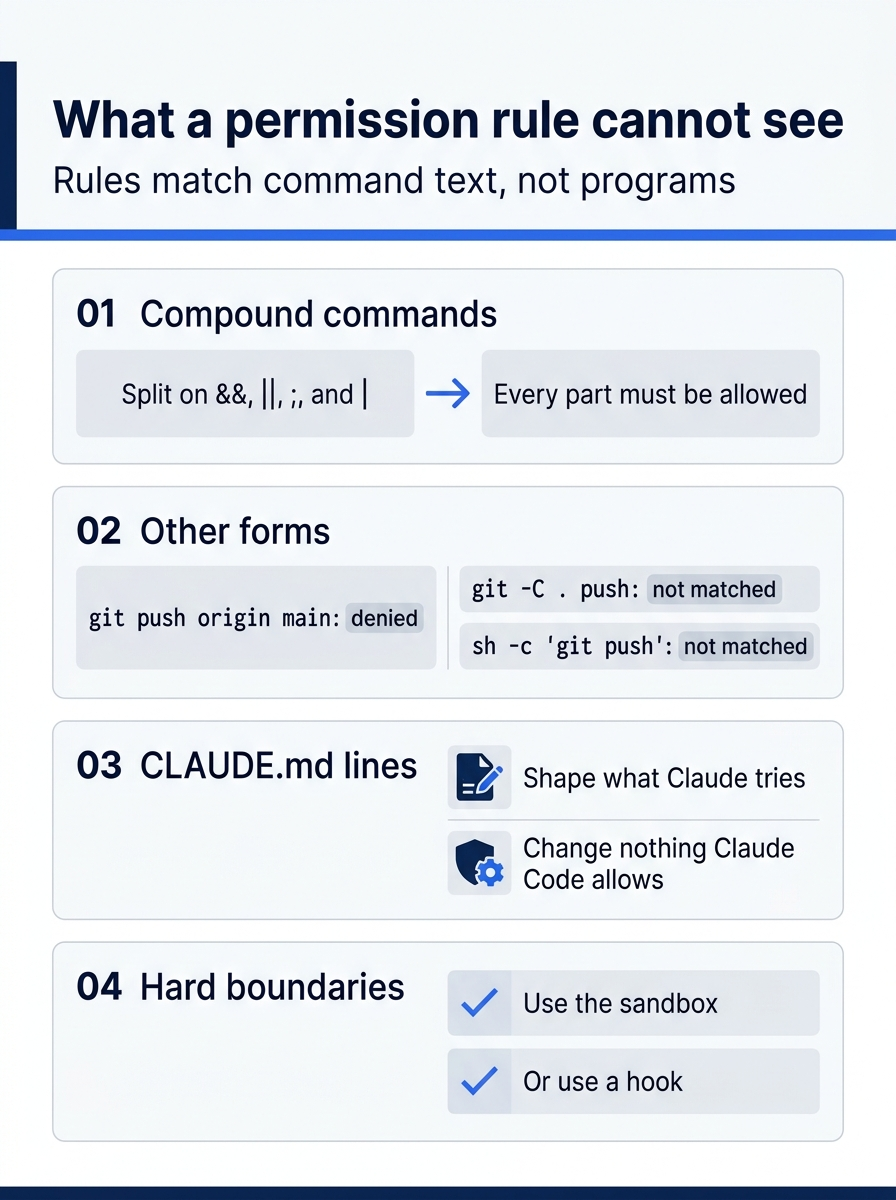
A rule is a text match, not a security boundary. It catches the command you wrote it for, and it misses the same action spelled another way, so anything that must never happen belongs in the sandbox or a hook.
Order of evaluation. Deny rules first, then ask, then allow. The first match decides, and a more specific rule does not change the order. A broad deny such as Bash(aws *) blocks aws s3 ls even if an allow rule names it.
Commands that never prompt. A built-in set of read-only commands runs without a prompt in every mode: ls, cat, head, tail, grep, find, wc, diff, pwd, cd, and the read-only forms of git, such as git status, git diff, and git log. Do not write allow rules for them. A starter file for a real project:
{
  "permissions": {
    "allow": [
      "Bash(npm test *)",
      "Bash(npm run lint *)",
      "Bash(npm run build)"
    ],
    "ask": [
      "Bash(git push *)"
    ],
    "deny": [
      "Read(./.env)",
      "Read(./.env.*)"
    ]
  }
}
The ask rule forces a prompt before any push, in every mode. On the tested run in auto mode, git push origin main stopped with the line Ask rule Bash(git push *) overrides auto mode for this command. and a Yes or No choice.
The /permissions dialog
/permissions lists every rule and the file it came from. On Claude Code 2.1.326, the tabs were Recently blocked, Allow, Ask, Deny, Auto mode, and Workspace. You can add and remove rules there, even while Claude works: a change applies from Claude's next tool call. The Auto mode tab shows the classifier's rules and appears only when auto mode is available.
How auto mode decides
Auto mode sends each action through a fixed order:
- Your allow, ask, and deny rules decide first, with a few safety exceptions.
- Reads, and file edits inside the working directory, run without the classifier.
- Everything else, mostly shell commands and network requests, goes to the classifier.
- If the classifier blocks an action, Claude gets the reason and tries another way.
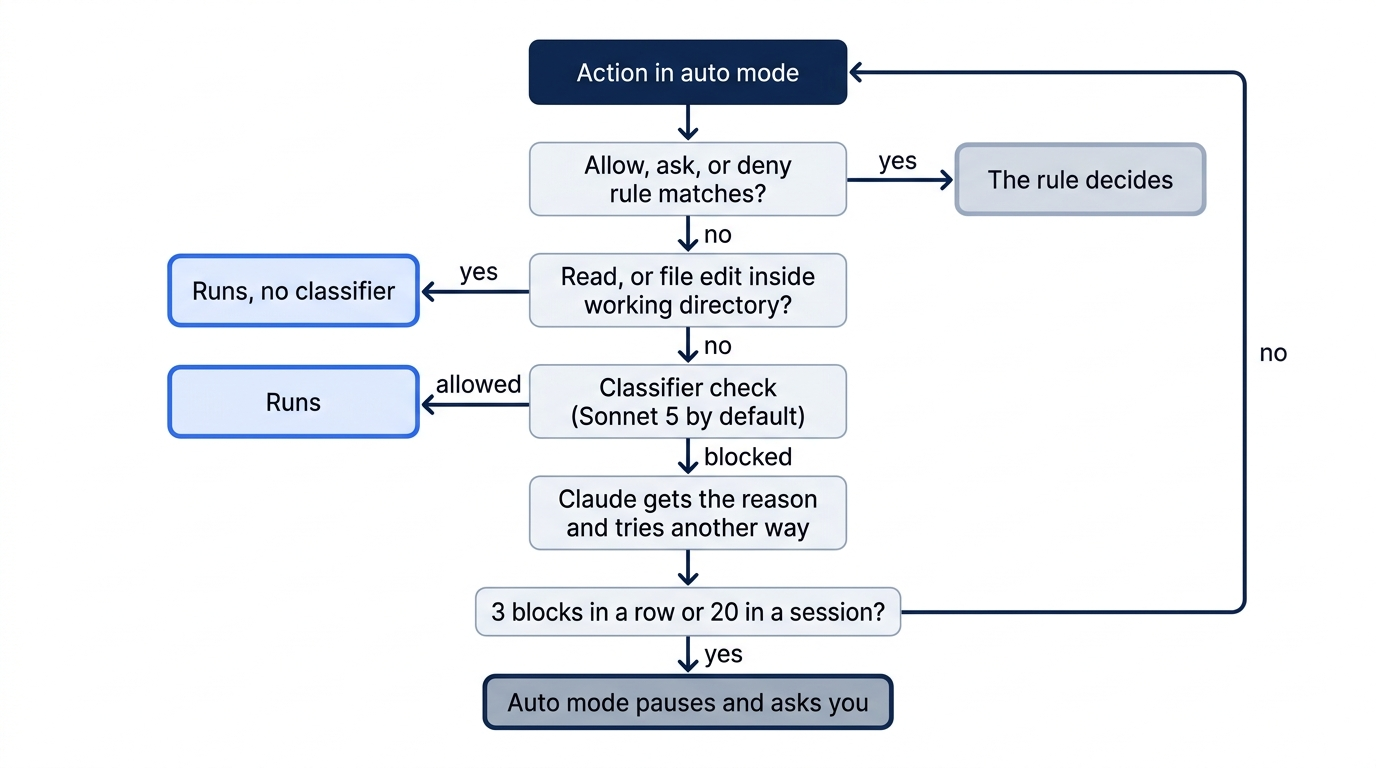
The classifier is a separate model. By default it is Sonnet 5. It sees your messages, Claude's tool calls, and your CLAUDE.md, but not tool results, so text hidden in a file or web page cannot talk it into anything. A rule in CLAUDE.md such as "never force push" steers both Claude and the classifier.
Blocked by default (a selection): curl | bash and other download-and-run commands, force push, git reset --hard and other commands that discard uncommitted work, production deploys and migrations, terraform destroy, sending sensitive data to outside endpoints, printing a live credential, and starting another agent with its safety checks off. Run claude auto-mode defaults to print the full lists as JSON.
Allowed by default (a selection): file operations in the working directory, installing the dependencies your manifest declares, read-only HTTP requests, and pushing to any branch of the repository you work in, including the default branch. If you want a human checkpoint before a push, add the ask rule above.
Your words count. A boundary you state in the conversation, such as "don't push until I review", makes the classifier block matching actions. It is not stored, so it can disappear when Claude Code compacts the conversation. Compacting replaces older messages with a summary to free space. Use a deny or ask rule for a boundary that must last. To clear a block in conversation, name the action and its details: "you can force-push" clears nothing, but naming the branch can.
Allow rules in auto mode. Narrow rules such as Bash(npm test) stay in effect and skip the classifier. When a session enters auto mode, Claude Code drops broad rules that allow any code to run: Bash(*), wildcarded interpreters such as Bash(python*), package-manager run commands, and Agent rules. It restores them when you leave auto mode.
When auto mode gives up. A blocked action shows a notice and goes to the Recently blocked tab of /permissions. Select it and press r to approve it and let Claude retry. After 3 blocks in a row, or 20 in one session, auto mode pauses and Claude Code asks you instead. Repeated blocks for the same destination mean the classifier does not know your infrastructure: an admin can list trusted repositories, buckets, and domains in autoMode.environment, or run /auto-mode-setup to draft the entries. claude auto-mode config shows the result, and claude auto-mode critique reviews custom rules. See configure auto mode.
Auto mode reduces prompts, but the docs say plainly that it does not guarantee safety. Use it where you trust the general direction, and keep Manual mode for work where you want to read every change. On Enterprise plans and API accounts, classifier calls can count toward token usage. Auto mode also nudges Claude to keep working instead of asking clarifying questions.
Paths every mode guards
Writes to a few paths prompt in Manual and acceptEdits, go to the classifier in auto, and are denied in dontAsk. The list includes .git, .claude, .vscode, .idea, .husky, .devcontainer, shell startup files such as .zshrc, and .mcp.json. An allow rule cannot pre-approve these writes. If you ask Claude to add a rule to .claude/settings.json for you, expect a prompt even in auto mode.
Separately, rm and rmdir commands aimed at critical paths, such as /, your home folder, or the project folder itself, are never approved by a rule or a hook, in any mode.
dontAsk and bypassPermissions
dontAsk denies every call that would prompt, so a run never waits for input. On the tested run, claude -p "Run npm test and report the pass count. Then create a file named note.txt that says hi." --permission-mode dontAsk ran the tests because the project rule allowed them, refused to create the file, said why, and exited with code 0. Use it with a short allow list for scripts.
bypassPermissions skips almost every check. --dangerously-skip-permissions is the same as --permission-mode bypassPermissions. --allow-dangerously-skip-permissions only adds the mode to the Shift+Tab cycle without switching to it. Some checks remain even here: deny rules, ask rules, and critical-path rm commands still apply. Allow rules have no effect. Claude Code refuses to start in this mode as root or under sudo on macOS and Linux, and the first interactive start shows a warning that you must accept. Use it only in a container or VM with nothing to lose. An administrator can turn it off for everyone with permissions.disableBypassPermissionsMode set to "disable" in managed settings, and permissions.disableAutoMode does the same for auto mode.
Running without anyone at the keyboard
An unattended run has no one to answer a permission prompt. In CI, run claude -p in dontAsk mode with a short allow list, such as --allowedTools "Bash(npm test)", so every tool you did not list is denied at once instead of stalling the job. Day 24 builds that run.
Go further: You Are Keyboard-Mashing 'y'. Here Is How to Stop. tours all six modes with the first edition's examples, including when to reach for plan mode. It was written before auto mode became the default, so it still says that auto mode needs a one-time opt-in and that the Shift+Tab cycle starts at default.
Do this today
Everyone
- Build
priority()from the spec in Manual mode. Check the win:npm testshowsℹ fail 0with 5 tests plus the tests in your spec, andgit show --stat HEADlists.claude/settings.json,src/priority.js, andtest/priority.test.js. - Habit: when the same command prompts you a third time and you trust it, add an allow rule to
.claude/settings.jsonand commit it. Check:/permissionsshows the rule on theAllowtab.
If you read Going deeper
- Add
"defaultMode": "default"to Ticket Triage's.claude/settings.json. Check: a new session starts with⏸ manual mode on. Reset: type/exit, then rungit restore .claude/settings.json. Check thatgit status --shortprints nothing. Day 5 expects your normal starting mode. - Add the ask rule
Bash(git push *). In auto mode, ask Claude to rungit push origin main. Check: Claude Code showsAsk rule Bash(git push *) overrides auto mode for this command.Choose No. Ticket Triage has no remote, so a push would fail anyway. Reset: type/exit, then rungit restore .claude/settings.json. Check thatgit status --shortprints nothing. - Run
claude auto-mode defaults. Check: it prints JSON withallow,soft_deny,hard_deny, andenvironmentlists, and oneallowentry startsGit Push Destination. Reset: nothing changed. - Run the
dontAskcommand from Going deeper in Ticket Triage. Check: the reply reports the test count, andls note.txtsaysNo such file or directory. Reset: check thatgit status --shortprints nothing.
Oversight where you want it, silence where you do not
Auto mode is the default for a reason: most of the time, you want Claude to keep moving. The cost is that changes land before you see them. Manual mode reverses that trade, and on its own it would bury you in prompts for commands you trust.
The fix is not a compromise between the two. It is a split. The mode decides how much Claude asks in general; rules decide the exceptions. Deny and ask rules hold a boundary in every mode, and a narrow allow rule, committed where the whole team can review it, removes the prompts that teach you to stop reading.
One line, "Bash(npm test *)", turned out to be the difference between reviewing every edit and giving up on review. Choose your mode for the task, and let your settings file handle the rest.
This is Part 4 of "Claude Code, Day-to-Day (second edition)," a day-by-day guide to Claude Code in which each day takes 20 to 40 minutes. Part 4 is Day 4. All 28 days are out now.