
Your Tests Pass. Claude Says It Is Fixed. Now Ask Who Checked the Fix.
Verification in Claude Code is two moves in a fixed order: hand Claude a failing test you wrote, with the exact failure and a ban on touching the test, then run /code-review medium in a fresh context to find what the test never checked.
Write the failing test yourself, hand Claude the exact failure with one file off limits, then run /code-review in a fresh context. Two tested runs show what a green test suite misses and what a second opinion catches.
The tests went green, Claude said it was fixed, and you shipped it, only to learn that the test checked the one thing that was never in doubt.
In this article: Day 12 of a day-by-day guide to Claude Code. Start here: you write a failing test by hand, give its failure to Claude, check that Claude fixed the code and not the test, and read a
/code-reviewof the change before you commit. Going deeper: why the prompt says "fix the code, not the test," how the/code-revieweffort levels work, and which Claude Code review to use when.
Tested on Claude Code 2.1.326.
Yesterday you added a Prettier hook, so every file that Claude edits gets formatted without asking.
Start here
At the end of today, you can write a failing test by hand, give its failure to Claude, check that Claude fixed the code and not the test, run /code-review on the change, read what it found, and commit.
Starting fresh or fell behind? Run git switch -C main claude-code/day-11. This replaces your main with the end of Day 11; to keep your own work, run git branch my-backup first.
Claude works in a loop of three steps, the agentic loop: gather context, take action, verify. Today is about the third step. To verify a change is to check it with something that returns a fact, not an opinion. A test is the plainest verifier: it passes or it fails. A failing test is a test that you write before the code can pass it. It states what you want in a form that Claude can run.
A test proves only what it checks. A code review reads the change and looks for problems that no test covers. Claude Code includes a review command, /code-review. You use both today, in that order.
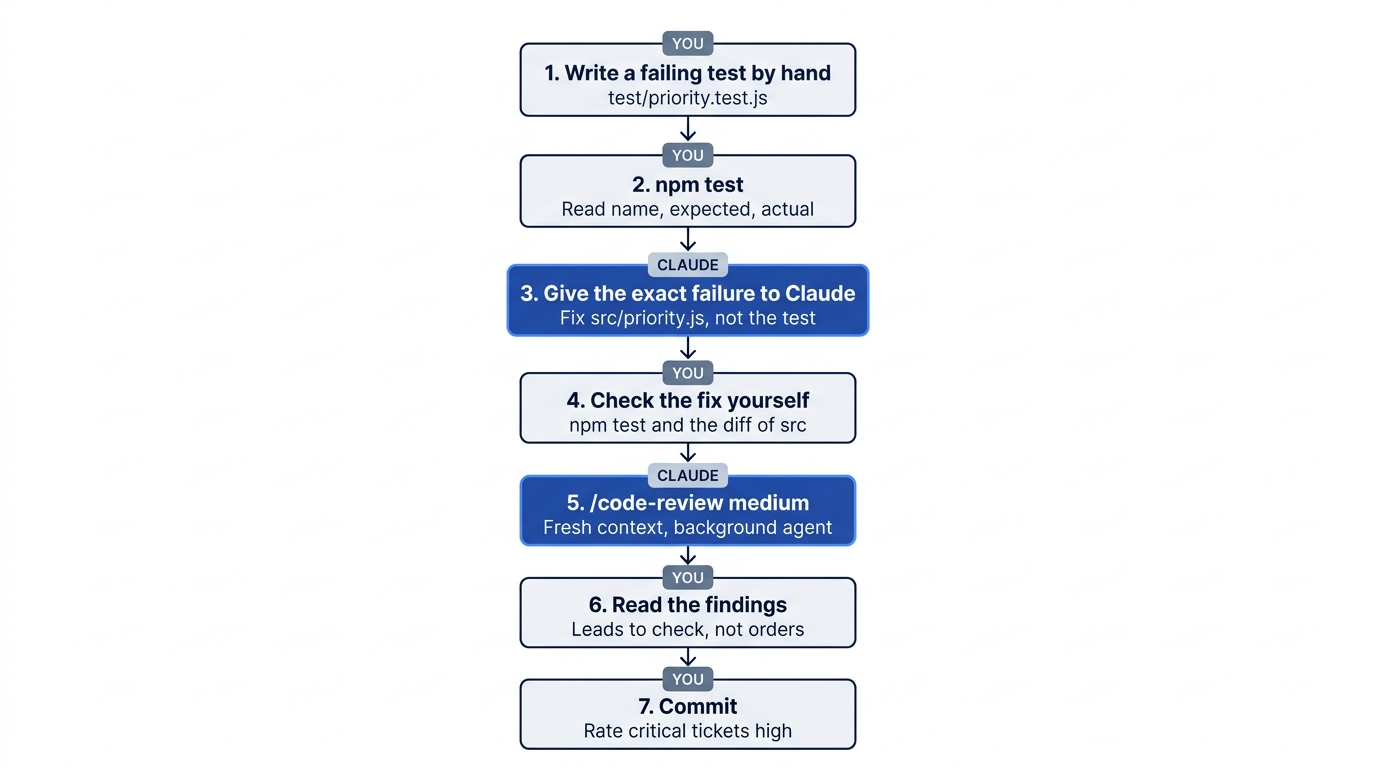
The task: Ticket Triage should rate a ticket that says "critical" as high priority. Today priority() returns "normal" for it.
Check the starting state
Open a terminal in Ticket Triage:
cd ~/code/ticket-triage
git status
npm test
Git prints nothing to commit, working tree clean. The tests show ℹ fail 0 and the pass count from Day 11, such as ℹ pass 18.
Write the failing test
Add one line to the end of test/priority.test.js. This command appends it, and >> adds to the end of the file without changing the rest:
echo 'test("critical", () => assert.equal(priority("This is critical"), "high"))' >> test/priority.test.js
Read the line from the left. test("critical", ...) names the test critical. assert.equal(a, b) passes when a equals b and fails when it does not. In this test, a is what priority() returns for "This is critical", and b is "high", the answer you want.
You wrote this test, not Claude. It is your statement of the goal, and it is the one thing Claude must not change today.
Read the failure
Run the tests:
npm test
The new test fails. The counts at the end show 19 tests, with 18 passing and 1 failing. Above the counts, the details of the failing test include expected: 'high' and actual: 'normal'.
Find three facts in the output: the test name is critical, the expected value is 'high', and the actual value is 'normal'. Those three facts are what Claude needs. Give Claude the exact failure, not your summary of it.
Give the failure to Claude
Start Claude Code with claude and type this prompt:
npm test fails: the "critical" test in test/priority.test.js expects priority("This is critical") to be "high", but it returns "normal". Fix src/priority.js, not the test. Then run npm test and tell me the pass and fail counts.
The prompt has three parts. The first sentence is the failure, in the words of the test output. "Fix src/priority.js, not the test" closes the shortcut: a test passes just as well when someone changes the test to match the wrong answer. The last sentence asks for the verifier to run again, with counts you can check.
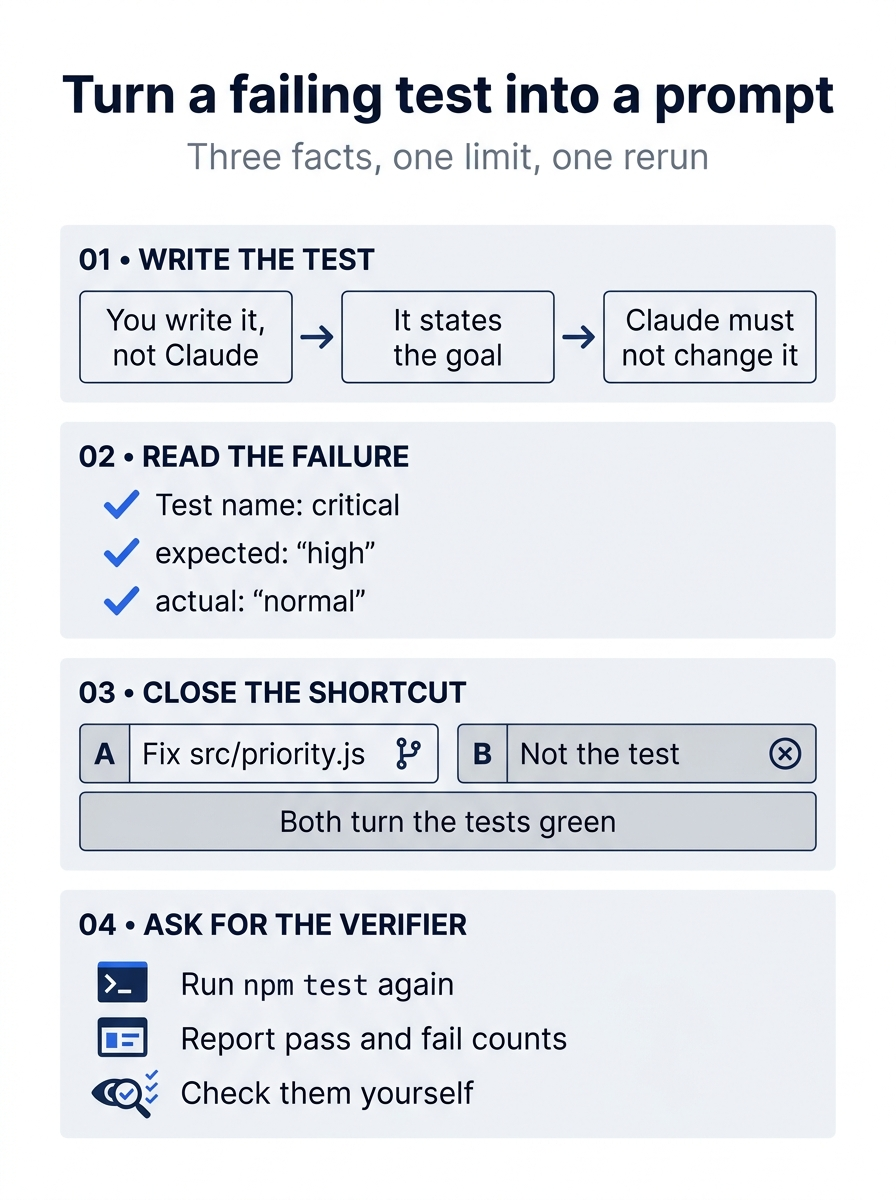
In short, the prompt holds three facts copied from the output, one limit on what Claude may change, and one request to run the verifier again.
Claude reads both files, changes one line in src/priority.js, and runs the tests. On the tested Manual-mode run, the reply was:
⏺ I fixed it in src/priority.js: priority() now treats "critical" as high priority, the same way it
  already treats "urgent", "asap" and "immediately". The test file is unchanged.

  npm test: 19 passed, 0 failed.

  - Missing test: CLAUDE.md says every new rule needs a test whose ticket also matches an older rule.
    The new test, "This is critical", only matches the new keyword. A test like
    priority("Critical: refund me asap") would cover that, but you asked me not to touch the tests,
    so I didn't add it. Want me to?
  - False positives: the check looks for the text anywhere in the ticket, as the other keywords do.
    So "not critical" and "uncritical" are also rated high priority.
Your wording will differ. Notice the first note. It is the CLAUDE.md rule that you wrote on Day 5, and Claude kept to your limit instead of breaking it. A false positive is a ticket that gets flagged when it should not, such as "not critical".
Manual mode: one prompt, Do you want to make this edit to priority.js?. Choose 1. Yes. No prompt appears for npm test, because the Day 4 rule allows it.
The prompt box can show a suggested next prompt. On the tested Manual-mode run, it was yes, add that test. Do not send it today.
Check the fix yourself
Do not take Claude's word for it. In a second terminal, in the same folder, run:
npm test
git diff --stat
git diff src
The tests show ℹ pass 19 and ℹ fail 0. The stat shows two files: src/priority.js | 2 +- from Claude and test/priority.test.js | 1 + from you. The diff of src shows one changed line:
-  if (t.includes("urgent") || t.includes("asap") || t.includes("immediately")) return "high"
+  if (t.includes("urgent") || t.includes("asap") || t.includes("immediately") || t.includes("critical")) return "high"
Your test file has only the line that you added. Claude fixed the code, not the test.
Ask for a review
The tests pass, but they check only what you wrote. Back in Claude Code, type:
/code-review medium
/code-review reviews the current diff, the changes since your last commit. medium is the effort level, how hard the review looks. Always type the level. Going deeper explains why.
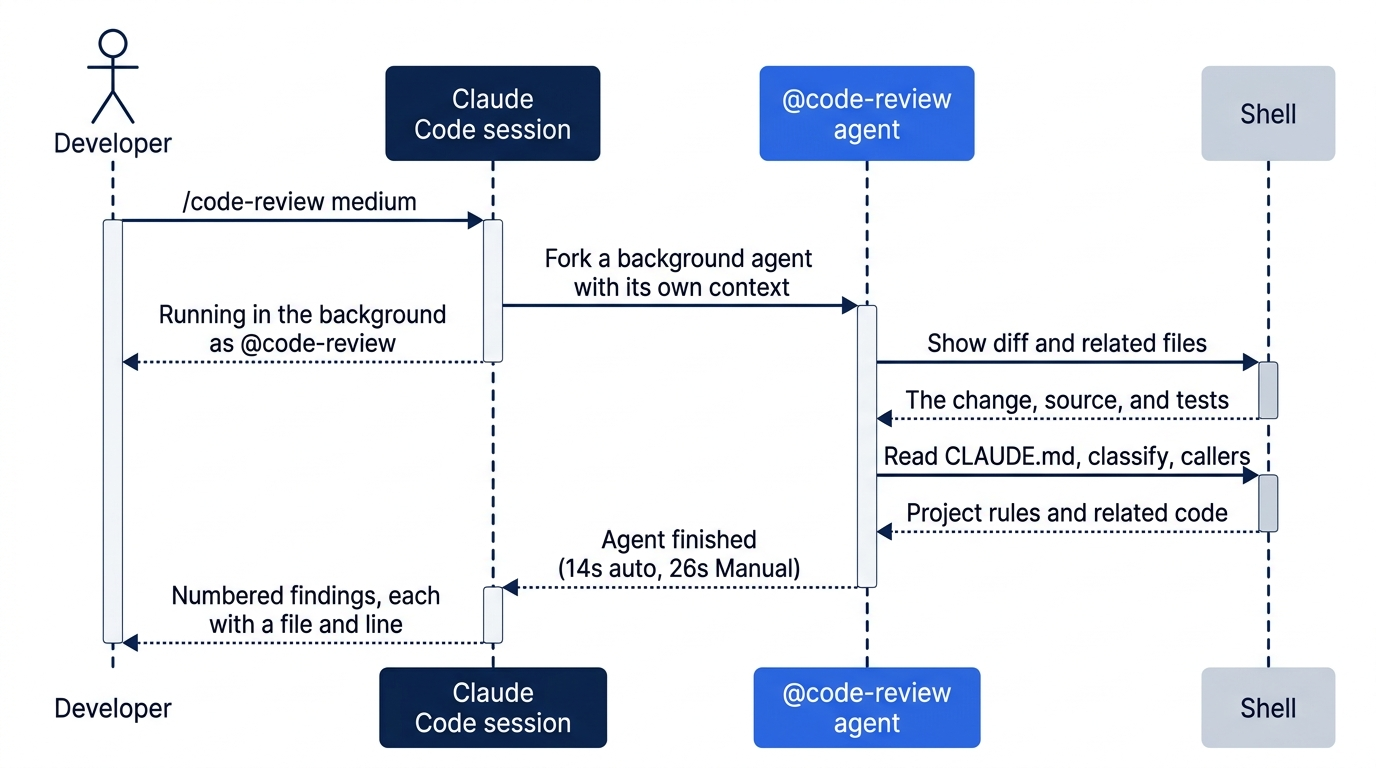
The review runs as a background agent, a helper with its own context window, like Explore on Day 9. It reads the change fresh, without the conversation in which Claude wrote it. The screen shows:
❯ /code-review medium
  ⎿  Running in the background as @code-review
Manual mode: while you wait, one or more prompts appear. The tested run showed two. Each is labeled Bash command · from the code-review agent and asks Do you want to proceed?. Read each command, and choose 1. Yes at each. Ignore the tip about auto mode on each prompt. Going deeper shows the two tested commands.
Wait for the finish line before you type a prompt. It took under half a minute on the tested runs:
⏺ Agent "/code-review medium" finished · 14s
Read the findings
Claude then lists the review's findings, the problems it found. On the tested auto-mode run, the list was:
⏺ The code review (medium) came back with 4 findings. I haven't changed anything.

  1. Missing test required by CLAUDE.md (test/priority.test.js:20): the only test for "critical"
     uses a ticket that matches no older rule, which CLAUDE.md requires for every new rule. I raised
     this last time too. One test fixes it, for example priority("Critical: my box arrived crushed")
     returning "high", with classify on the same ticket returning "damaged".
  2. Negated phrases get escalated (src/priority.js:8): "not critical" and "non-critical" both come
     back as "high". People write "not critical" much more often than "not asap", so this new word
     makes the existing substring problem worse in practice. Fixing it means checking whole words
     and some negation, which goes beyond a small bug fix.
  3. Crashes on missing text (src/priority.js:8): priority(undefined) or priority(null) throws a
     TypeError. This was already true before my change. Adding (text ?? "") in front of
     .toLowerCase() would make it return "normal" instead.
  4. Cleanup (src/priority.js:8): the line is now four includes() calls joined together. Putting
     the words in a list and checking it with .some() would behave the same and be easier to extend.
  ...
The Manual-mode run found 5 issues, in a different order and in different words. Your list will differ too. Look for two findings that both tested runs reported: the missing CLAUDE.md test, and the "not critical" false positive. Each finding names a file and a line, so you can check it in your editor.
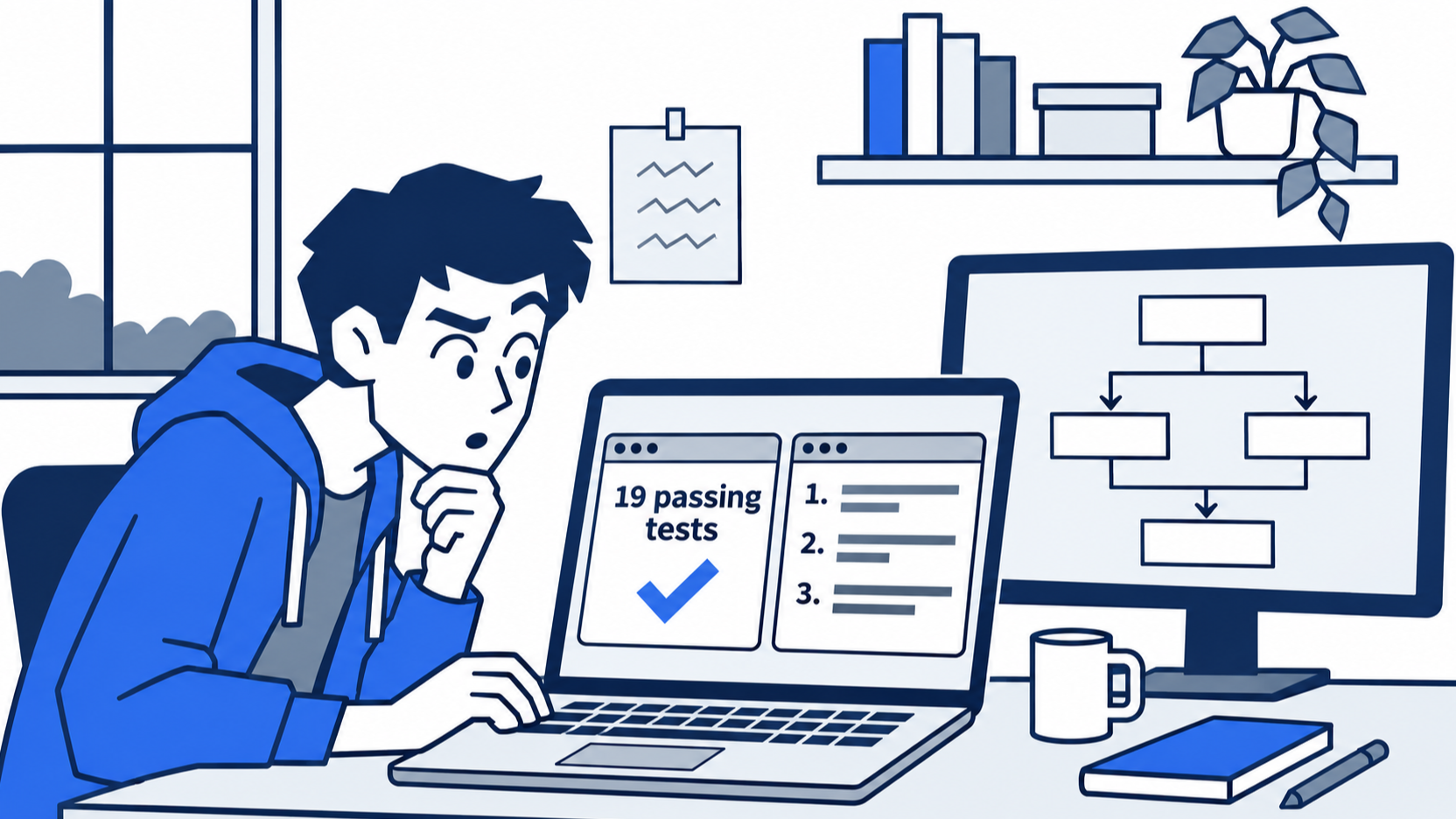
The scene is the turn of the day: the suite is green, and a reviewer with a fresh context still finds two things worth a look.
Claude ends by asking whether to make some of these changes. Do not answer today. Read the list, and do not act on it. A finding is a reason to look, not an order. Some findings are bugs, some are cleanup, and some, like the "not critical" problem, are decisions about what the product should do. Going deeper has an exercise that acts on finding 1.
Check the win and commit
In the second terminal, commit both files:
git commit -am "Rate critical tickets high"
git status
npm test
The -a option stages every tracked file that changed, so the commit holds your test and Claude's fix. Git prints nothing to commit, working tree clean. The tests show ℹ pass 19 and ℹ fail 0. Write down the pass count.
You wrote a failing test, gave its failure to Claude, checked that the fix changed the code and not the test, read a code review of the change, and committed it.
You can stop here. Going deeper explains why this works and where it breaks.
Going deeper
This section is for readers who want to know why the prompt is worded as it is, how /code-review chooses what to report, what the Manual-mode prompts were, and which review to use when. It assumes you finished Start here in Parts 1 to 12.
Why "fix the code, not the test"
A failing test has two ways to pass: change the code, or change the test. Both make npm test green. Only one does what you wanted. When the test is yours, say which file Claude may change. On both tested runs, Claude kept to it and said so. It even declined to add the test that the CLAUDE.md rule asks for, because the prompt put the test file off limits, and it asked first instead.
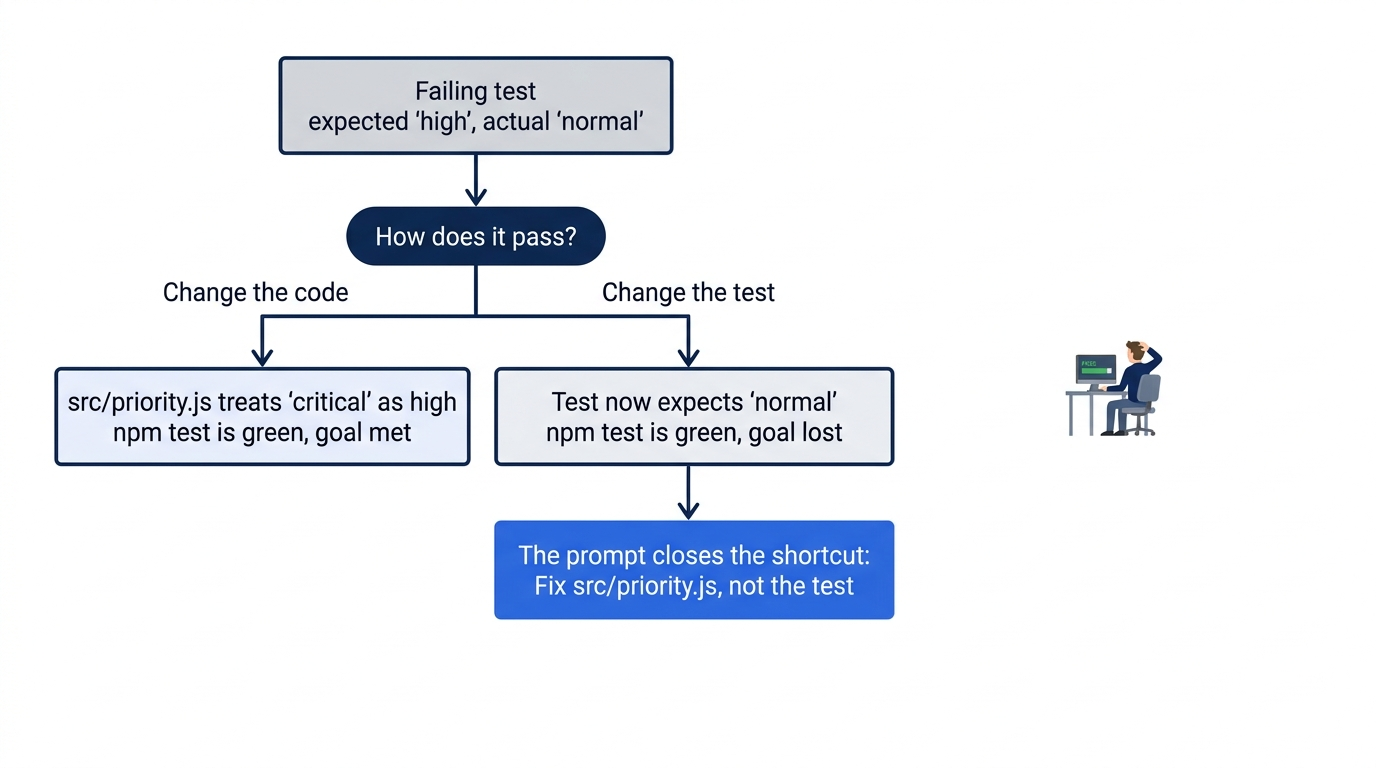
The wording of the failure matters too. The prompt copies the test name, the input, the expected value, and the actual value from the output. Claude does not have to run the tests to learn what broke. On both tested runs, its first command read the two files with cat and showed the new test with git diff. It ran npm test only after its edit.
Verifiers, from cheapest to richest
A test is one verifier. Projects stack several, because each one catches a different kind of mistake:
- A type checker or compiler, such as
tsc --noEmit. It is instant, and it catches wrong names and wrong types. - A linter, such as ESLint. It catches unused variables and risky patterns.
- Unit tests, like Ticket Triage's. They check one function at a time.
- Integration and end-to-end tests. They are slower, and they check the parts working together.
- Production logs and metrics. They check the code after it ships.
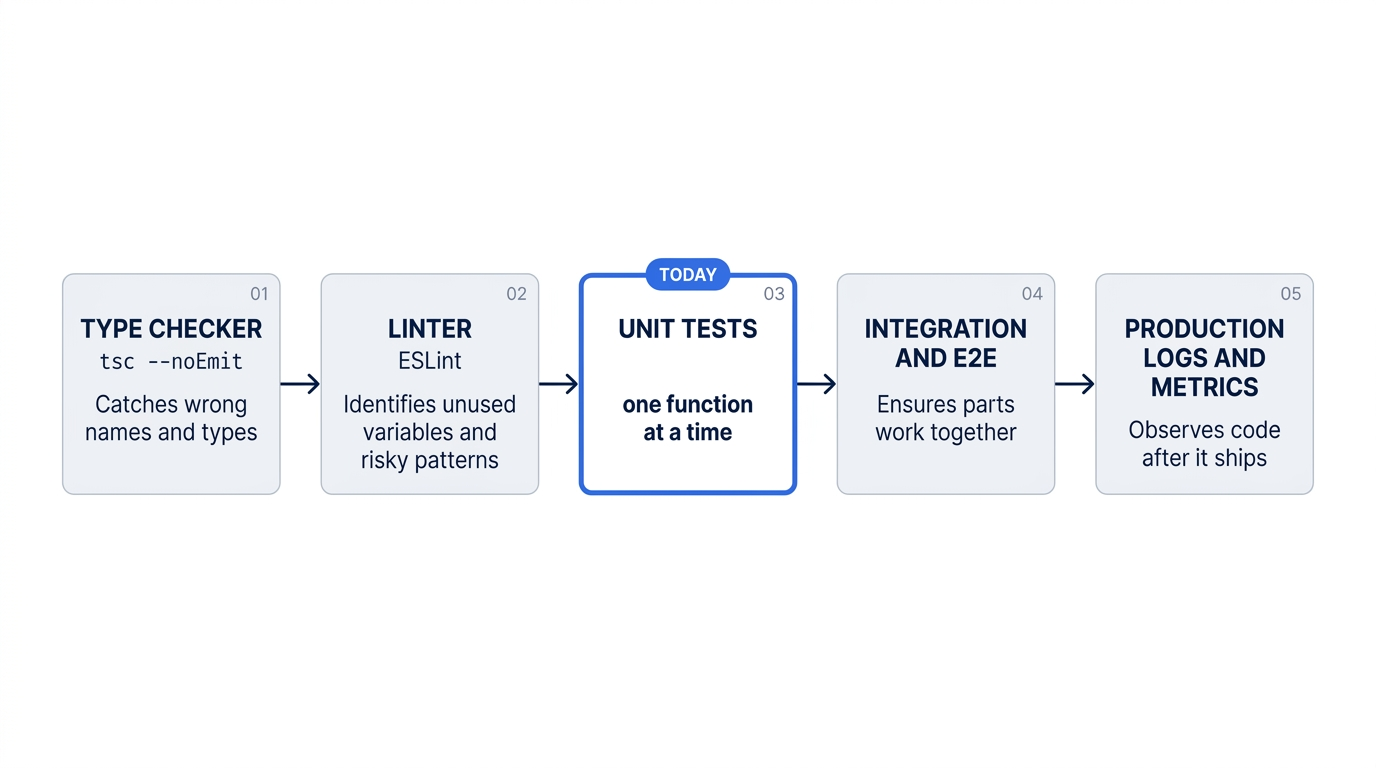
Ticket Triage uses only the third today. Yesterday's hook is the pattern for the first two: a PostToolUse hook can run a linter after every edit, as it runs Prettier now. See the hooks guide.
A hook helps only if it runs. In the tested auto-mode run, Claude made today's fix with a sed shell command, not its Edit tool, so yesterday's Edit|Write hook did not run. The new line was already in Prettier style, so nothing changed. In the Manual-mode run, Claude used its Edit tool, the kind of change that the hook watches. The records are verification/claude_code_daily/day12-tests/screens/auto-fix.txt and manual-fix.txt.
How /code-review works
/code-review is a bundled skill: its instructions are built into Claude Code. In a terminal session, it runs the review as a forked subagent, as the same page says. On the tested runs, the screen showed Running in the background as @code-review. Next it showed Agent "/code-review medium" finished, after 14 seconds in auto mode and 26 seconds in Manual mode. Claude's summary of the findings came last. The agent reads the change in its own context window, so it does not inherit the reasons that Claude gave itself while it wrote the fix. A reviewer that did not write the code asks different questions.
The commands reference gives the full form:
/code-review [low|medium|high|xhigh|max|ultra] [--fix] [--comment] [--max-findings n|all|default] [pr#|branch|path]
- The level. The skill's own description says the levels run from a few high-confidence findings at
lowto many findings, some uncertain, at the top. Since 2.1.311, the skill tells Claude to put the level first and to usemaxonly when you ask.ultraruns a deep multi-agent review in the cloud. - No level means the last level. The
/code-reviewpage says that with no level, the review reuses the lastlowthroughmaxlevel you typed, even in an earlier session, and shows a notice such asReusing high effort, the level you typed last time. If you never typed a level, the review uses the session's current effort. In an earlier test of this guide, alowrun on this same change returned an empty result. A reader who once typedlowand later types/code-reviewgetslowagain, and may see nothing. Type the level every time. - Why medium found a CLAUDE.md finding. Since 2.1.290, a
mediumreview also reports cleanup and CLAUDE.md conventions findings on models without tuned review settings, including Opus 5.5. Findings 1 and 4 in the tested list are of those two kinds. --max-findings, added in 2.1.288, reports more or fewer findings than the usual limit. The choice stays until you pass--max-findings default.--fixapplies the findings to your working tree after the review.--commentposts them on a GitHub pull request. A target, such as a PR number, reviews that instead of your diff. This guide tested only/code-review mediumon the working tree./reviewis an alias./simplifylooks only for cleanup and applies it; it does not hunt for bugs./security-reviewchecks the changes on your branch for security problems. It compares your branch with the default branch of theoriginremote, so it needs that remote. Ticket Triage as built here has no remote, so/security-reviewdoes not run on it.
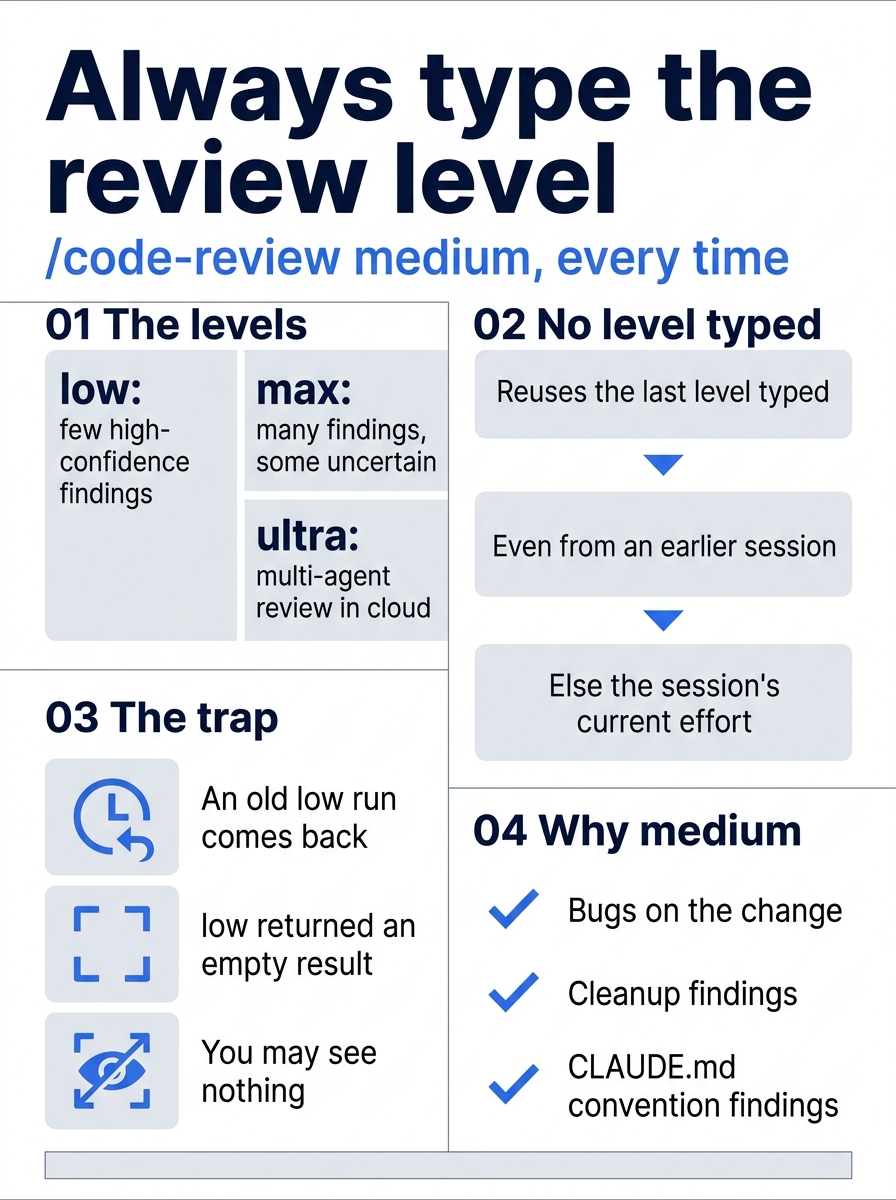
A bare /code-review can surprise you: the level you typed weeks ago comes back, and a low level can return nothing at all.
Two runs on the same change gave 4 findings and 5 findings, in different words. The two findings that matter most showed up in both. Treat the list as a set of leads that you check in the file, not as a score.
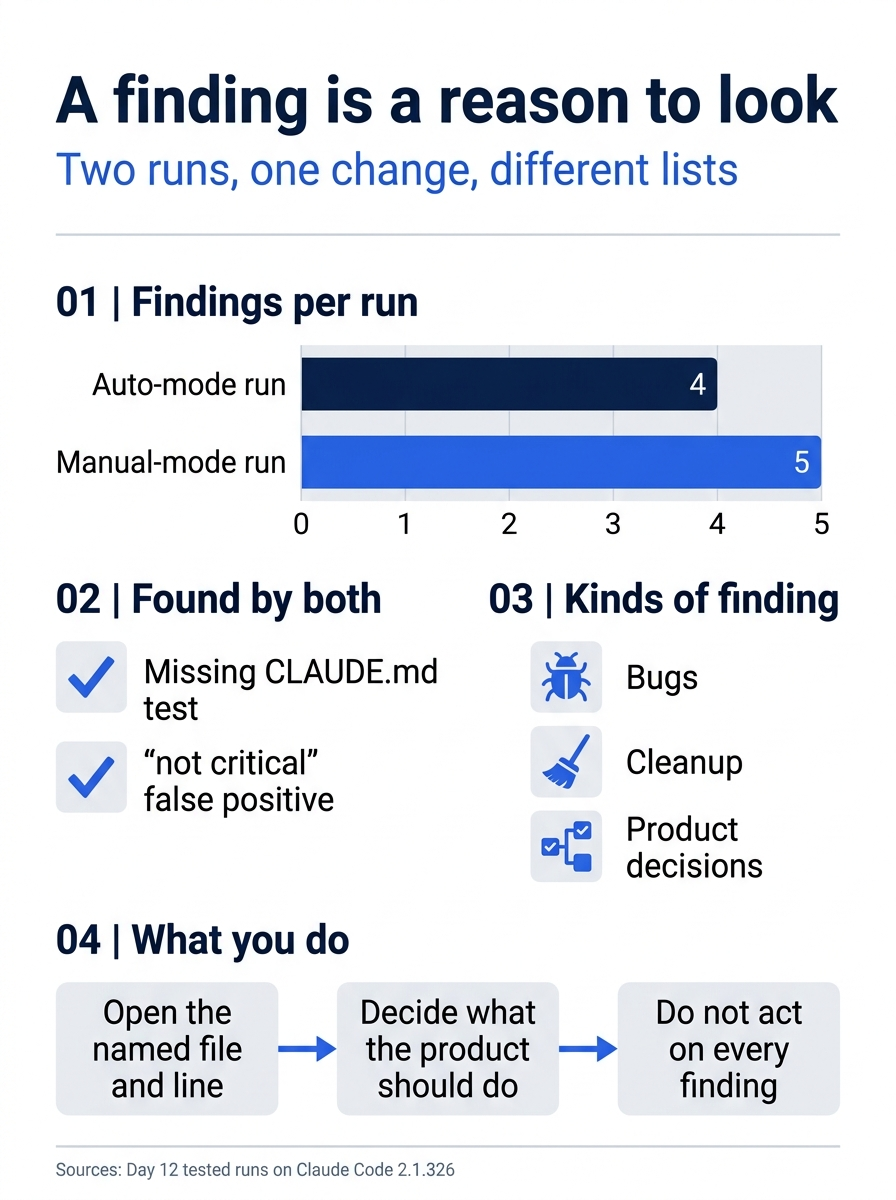
Two runs, two lists, one shared core. A finding names a file and a line, so you can check it. Some findings are bugs, some are cleanup, and some, like "not critical", are decisions about what the product should do.
The Manual-mode prompts
The review agent's two commands each joined several reads into one shell command. The first was labeled Show diff and related files and ran git diff HEAD, cat on the source and test files, ls, and grep. The second was labeled Read user CLAUDE.md, classify, callers. Both also reached outside the project: the first listed ~/.claude/CLAUDE.md, your personal CLAUDE.md, and the second read it. On Day 10, a command that only read files inside the project ran without a prompt. The second choice on each prompt points at the difference, because it names the ~/.claude folder.
Each prompt offered four choices: 1. Yes, a second choice that allows reading from your ~/.claude folder for this project, 3. Yes, and switch to auto mode, and 4. No. Choose 1. Yes. The third choice changes your session's mode for the rest of the day. The prompt also showed ctrl+x ctrl+k twice to stop background agents, which stops the review if you change your mind.
The tester has a personal ~/.claude/CLAUDE.md. If you have none, the agent can run fewer commands, or different ones, and you can see only one prompt. The records are verification/claude_code_daily/day12-tests/screens/manual-review-prompt-1.txt and manual-review-prompt-2.txt. The edit prompt from Start here is in manual-fix-prompt-1.txt.
Code Review, Ultrareview, and /code-review
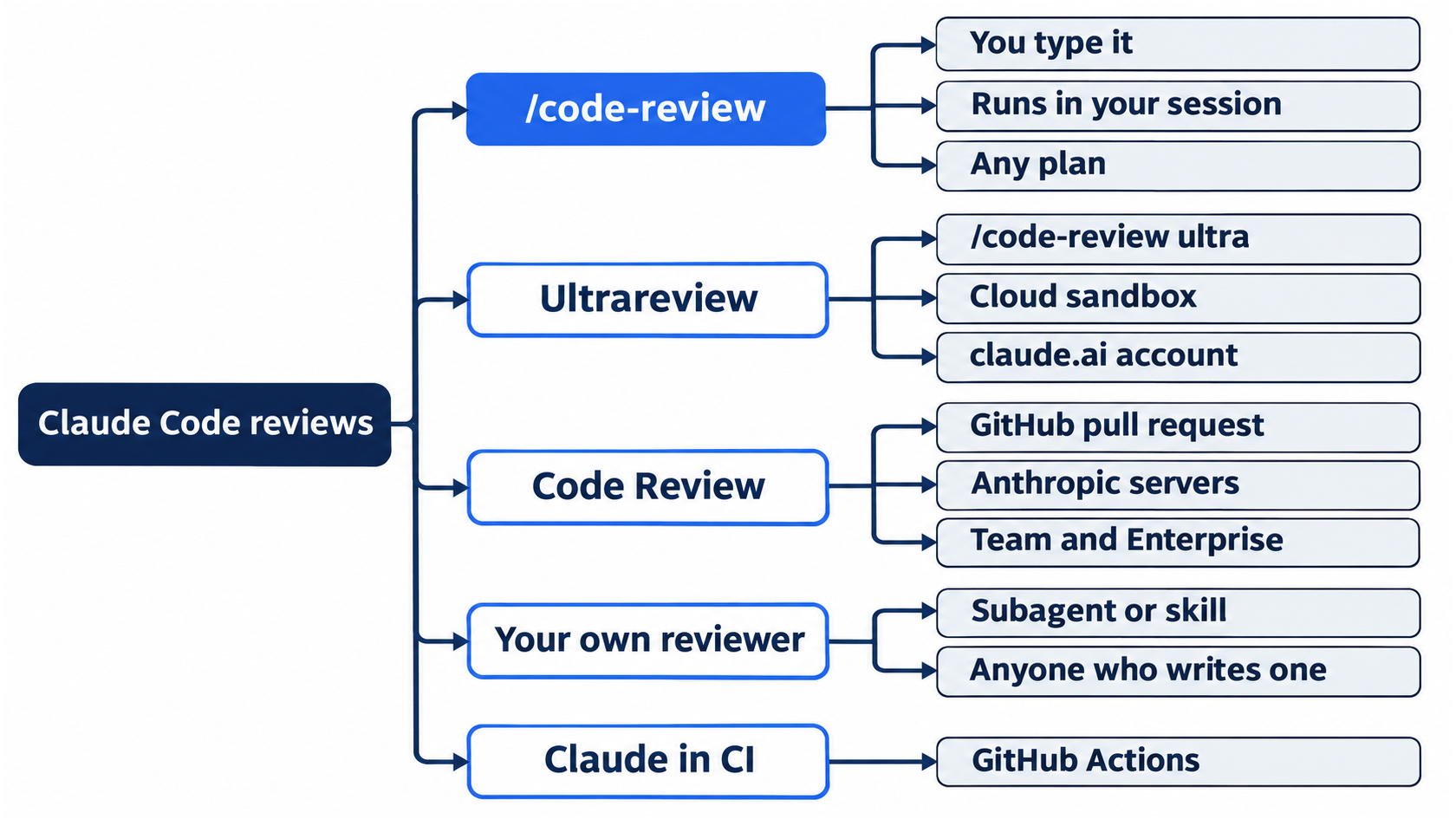
Claude Code has more than one review, and the names are close:
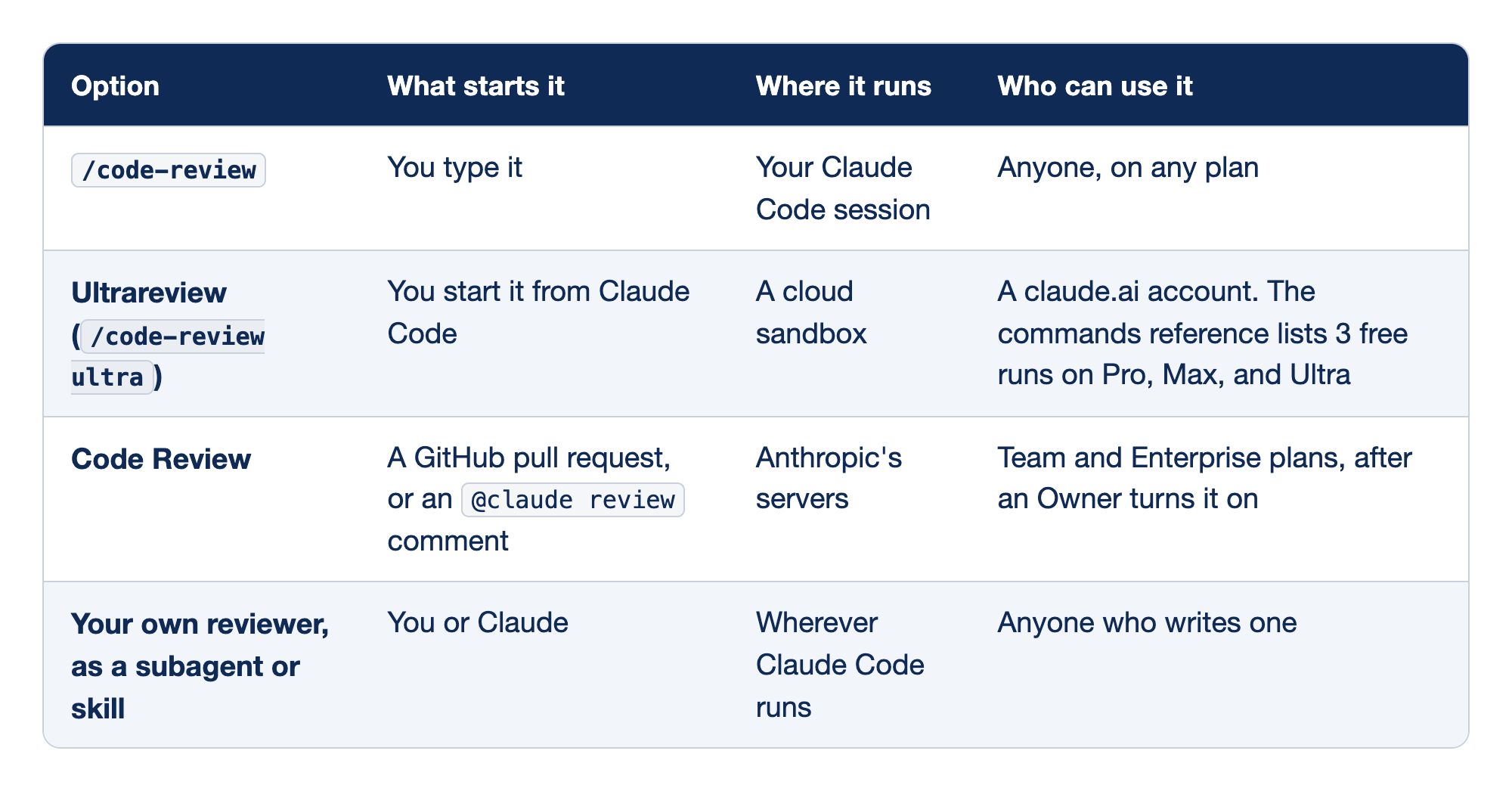
Claude Code offers four kinds of review, and they differ in how they start, where they run, and who can use them. The Option column names the review. "What starts it" says what sets the review going, "Where it runs" says which machine does the work, and "Who can use it" names the account or plan that the review needs.
/code-reviewstarts when you type it, runs in your own Claude Code session, and works for anyone on any plan.- Ultrareview, which is
/code-review ultra, starts from Claude Code and runs in a cloud sandbox. It needs a claude.ai account, and the commands reference lists 3 free runs on Pro, Max, and Ultra. - Code Review starts from a GitHub pull request or an
@claude reviewcomment and runs on Anthropic's servers. It is for Team and Enterprise plans, after an Owner turns it on. - Your own reviewer, written as a subagent or a skill, starts when you or Claude call it and runs wherever Claude Code runs. Anyone who writes one can use it.
Docs pages: Ultrareview, Code Review, subagent, skill.
The table comes from the Code Review docs page. This guide tested only the first row. Per the docs, Code Review posts inline comments on a pull request, ranked by severity, and never approves or blocks the merge. Its levels are named Quick, Standard, and Deep, which are not the same words as the /code-review levels. Claude in your own CI, through GitHub Actions, is a fifth option.
Act on finding 1
This exercise starts from the end of Start here, with a clean tree. It was tested in both modes. In Claude Code, type:
Add one test to test/priority.test.js for "critical" whose ticket also matches an older rule, as CLAUDE.md requires. Check it with classify() in the same test. Do not change src. Run npm test.
On the tested runs, Claude added one test with the ticket "Critical and urgent: my package arrived crushed". The ticket also matches the older urgent rule in priority(), and crushed in classify(). Your ticket can differ. Check in the second terminal: npm test shows ℹ pass 20 and ℹ fail 0, and git diff shows one new test in test/priority.test.js and no change in src. If the prompt box shows a suggested next prompt, such as commit this, do not send it, so that the reset below can undo the change.
Manual mode: one prompt, Do you want to make this edit to priority.test.js?. Choose 1. Yes.
Before you reset, review the new test:
/code-review medium
Wait for the finish line, as in Start here. On both tested runs, no finding asked for a new critical test. The first finding was about the test that Claude had just added: the ticket also contains "urgent", which also rates high, so the test still passes if someone deletes the critical rule. The CLAUDE.md rule asks for a ticket that matches an older rule, and Claude chose an older rule that hides the new one. A review of a fix can find a flaw in the fix. Claude suggested a ticket with no second priority word, such as "Critical: my package arrived crushed". The older priority words are urgent, asap, and immediately. This guide did not test that change. If your ticket has no second priority word, the review can report no problem with the new test.
Manual mode: no prompts during this review on the tested run. If a prompt appears, read the command and choose 1. Yes, as in Start here.
Reset: run git restore .. Check that git status --short prints nothing and npm test shows ℹ pass 19.
Go further: Your AI Wrote the Code. Who Checked It? adds lint and type-check hooks, a Stop hook that runs the tests, a custom reviewer subagent, and a /security-review skill. It describes /code-review as a plugin from the official marketplace. On 2.1.326, it is a bundled skill, as the /code-review page says, and you do not install it.
Do this today
Everyone
- Add the failing
criticaltest, give its failure to Claude, run/code-review medium, read the findings, and commit. Check the win:git log --oneline -1showsRate critical tickets high,git statusis clean, andnpm testshowsℹ pass 19andℹ fail 0. - Habit: before you commit a change that Claude made, run
/code-review mediumand read every finding. Check: your next commit comes after a review list that you read to the end.
If you read Going deeper
- Do the "Act on finding 1" exercise. Check:
npm testshowsℹ pass 20before the reset. Reset:git restore .. Check thatgit status --shortprints nothing andnpm testshowsℹ pass 19. - In the same exercise, before the reset, run
/code-review mediumagain. Check: no finding asks for a newcriticaltest. If your ticket also contains a second priority word, such as "urgent", a finding says that the new test cannot catch a brokencriticalrule. Then reset as above.
Green is not the same as right
A failing test turns your goal into something Claude can run, and a ban on editing that test keeps the goal intact. Checking the fix yourself turns Claude's reply into a fact. A review in a fresh context then asks the questions that neither you nor the test thought to ask.
The tests went green on both runs. Both reviews still found the missing test and the "not critical" problem. The suite tells you the code does what you checked; the review tells you what you forgot to check.
This is Part 12 of "Claude Code, Day-to-Day (second edition)," a day-by-day guide to Claude Code in which each day takes 20 to 40 minutes. Part 12 is Day 12. All 28 days are out now.