
Stop Asking Claude to Format Your Code: Make a Hook Do It Every Time
A CLAUDE.md style rule is advice that Claude usually follows. A PostToolUse hook that runs Prettier after every Edit and Write makes formatting happen every time, and a Prettier check before each commit covers the one gap the hook leaves.
A CLAUDE.md rule asks Claude to follow your house style. A Claude Code hook runs Prettier after every edit, with no prompt and no exceptions. Install it, watch it reformat a line that Claude wrote, and commit it for your whole team.
You wrote the style rule into CLAUDE.md, and Claude still slips a semicolon or a one-line function into the diff on the day you are not looking.
In this article: Day 11 of a day-by-day guide to Claude Code. Start here: you install Prettier, add a
PostToolUsehook that formats every file Claude edits, watch it reformat a line that Claude wrote, and commit it for your team. Going deeper: where the format hook does not run, the other hook events and types, workspace trust, and aTaskCompletedhook that mirrors the task list to a file.
Tested on Claude Code 2.1.326.
Yesterday you wrote the /ship skill, ran it on a clean tree and on a broken one, and committed it.
Start here
At the end of today, Ticket Triage has a formatter, and Claude Code runs it on every file that Claude edits, with no prompt from you.
Starting fresh or fell behind? Run git switch -C main claude-code/day-10. This replaces your main with the end of Day 10; to keep your own work, run git branch my-backup first.
Since Day 1, the CLAUDE.md that /init wrote has had a style line: no semicolons, double quotes, 2-space indent. Claude reads that rule and usually follows it. "Usually" is fine for advice, but formatting is mechanical, and you want it to happen every time. A hook is a shell command that Claude Code runs by itself at a fixed point in a session. Claude does not decide whether a hook runs. Claude Code runs it whenever its point comes.
Today you install Prettier, a widely used code formatter for JavaScript, and add a hook that runs Prettier after each edit that Claude makes.
Check the starting state
Open a terminal in Ticket Triage:
cd ~/code/ticket-triage
git status
npm test
Git prints nothing to commit, working tree clean. The tests show ℹ fail 0 and the pass count from yesterday, such as ℹ pass 18.
The hook uses jq, a small command-line tool that reads JSON. Check that you have it:
jq --version
On the tested machine, it printed jq-1.7.1. If your shell says command not found, install it with brew install jq on macOS or sudo apt-get install jq on Debian and Ubuntu.
Install Prettier
Ticket Triage has had no dependencies until today. Installing a package creates a node_modules folder, which must not go into git. Tell git to ignore it first:
echo "node_modules" > .gitignore
npm install --save-dev prettier
.gitignore lists the paths that git ignores. --save-dev records Prettier in package.json as a devDependency, a package that you need to work on the project but that the code does not need to run. npm prints a summary that ends with:
added 1 package, and audited 2 packages in 1s
...
found 0 vulnerabilities
The tested version was Prettier 3.10.1. Open package.json and check that it now has a devDependencies section with a "prettier" line.
Tell Prettier the house style
Prettier has its own defaults. It uses double quotes, as Ticket Triage does, but it adds semicolons and wraps lines at 80 characters. In your editor, create .prettierrc in the project folder with this content:
{
  "semi": false,
  "printWidth": 120
}
"semi": false removes semicolons, to match the CLAUDE.md rule. "printWidth": 120 lets a line run to 120 characters, so the long if line in src/priority.js stays on one line.
Format the project once, by hand
Run Prettier in check mode. npx runs a command from a package installed in this project:
npx prettier --check src test
On the tested run, one file did not match:
Checking formatting...
[warn] test/priority.test.js
[warn] Code style issues found in the above file. Run Prettier with --write to fix.
Your list can differ, because Claude wrote your tests. Now let Prettier fix every file once:
npx prettier --write src test
git diff --stat
npm test
On the tested run, git diff --stat showed test/priority.test.js | 2 +-. Prettier changed one test name that held an escaped double quote, "mixed-case \"Immediately\"", to single quotes, because that needs no escape. The tests still show ℹ fail 0 and the same pass count.
You format by hand once so that, from now on, a change that the hook makes comes only from Claude's edit, not from old style differences in the same file.
Add the hook
A hook has three parts:
- An event, the point in the session when it runs.
PostToolUseruns right after Claude uses a tool, such as the tool that edits a file. - A matcher, which narrows the event.
Edit|Writemeans "only after the Edit tool or the Write tool", the two tools that Claude uses to change and create files. - A command, the shell command to run.
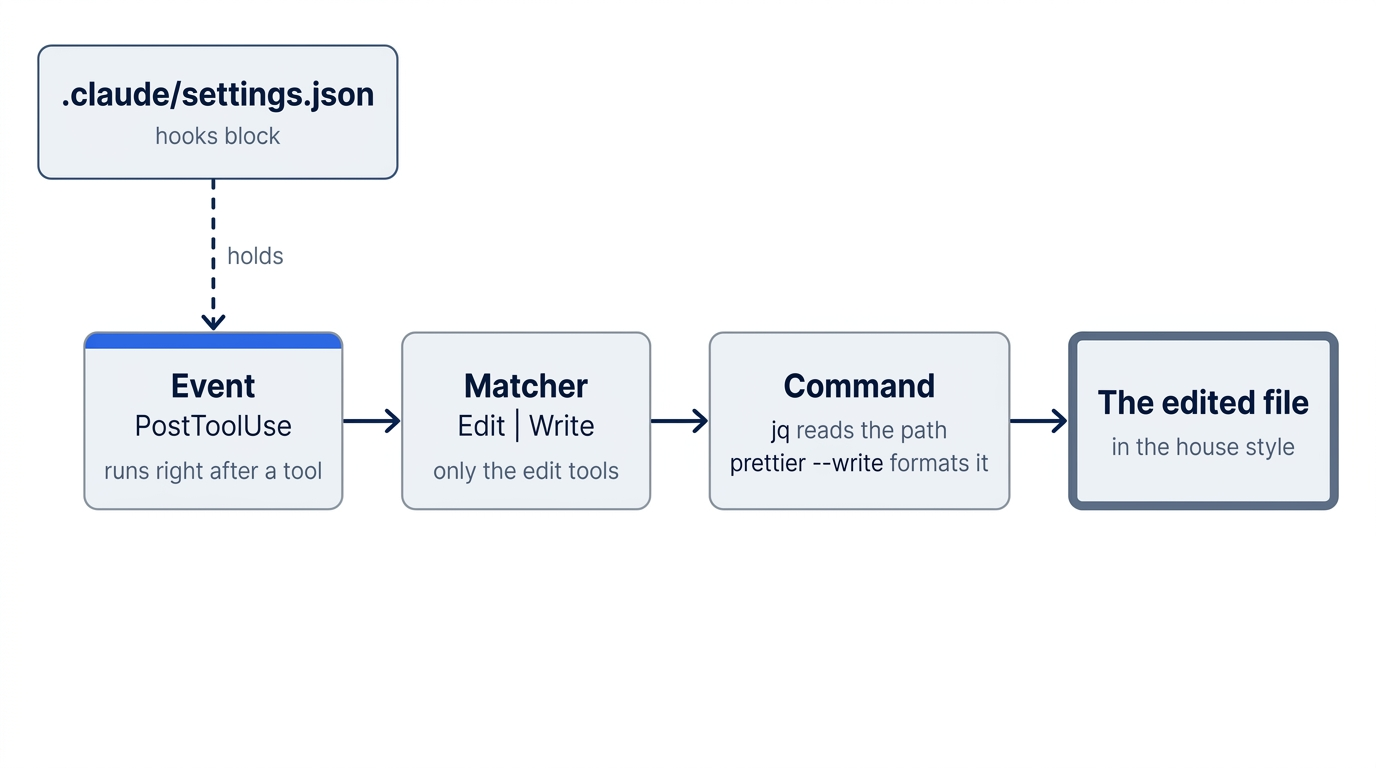
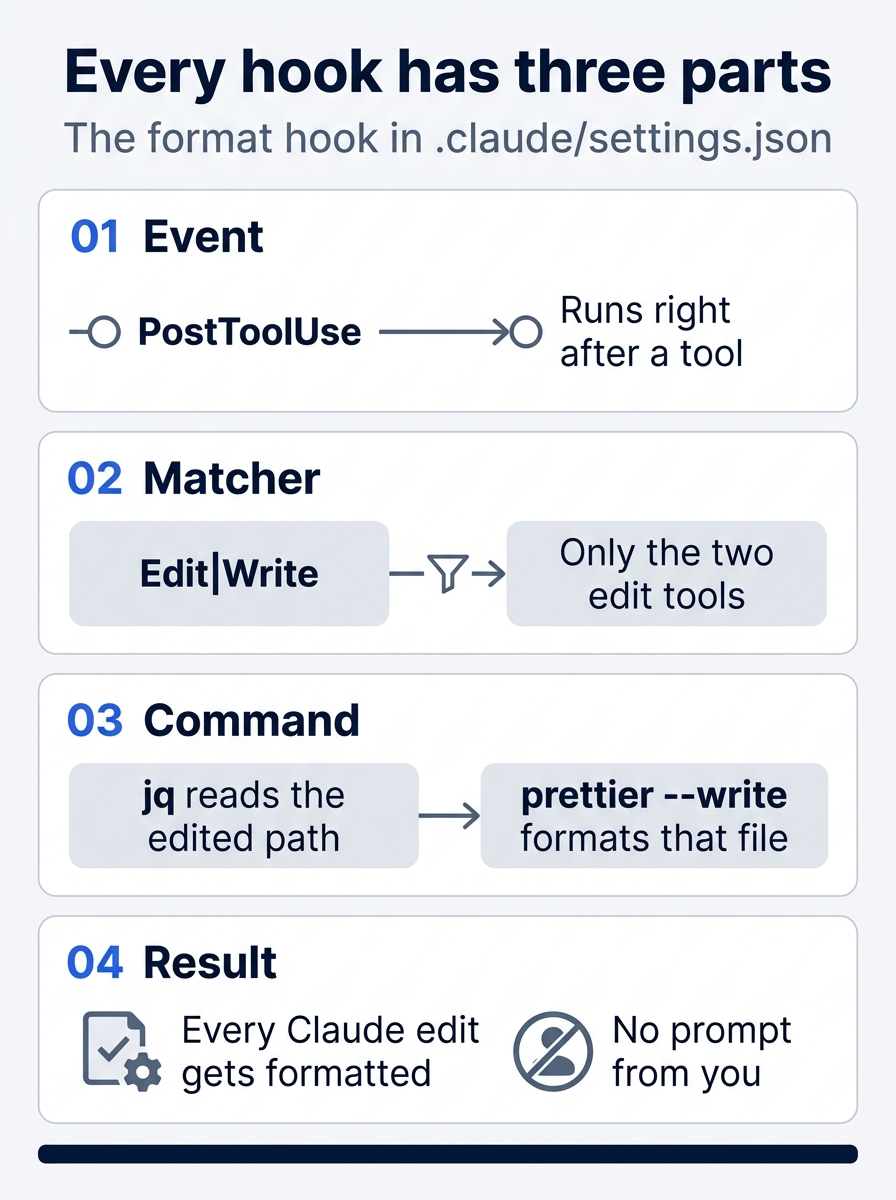
Three parts answer three questions: when the hook runs, after which tools, and what it does. The format hook answers them with PostToolUse, Edit|Write, and one Prettier command.
Hooks live in the settings file that you used on Day 4, .claude/settings.json. It already holds the rule that lets npm test run. In your editor, add the hooks block so that the whole file reads:
{
  "permissions": {  // ①
    "allow": [
      "Bash(npm test *)"
    ]
  },
  "hooks": {
    "PostToolUse": [  // ②
      {
        "matcher": "Edit|Write",  // ③
        "hooks": [
          {
            "type": "command",  // ④
            "command": "f=$(jq -r '.tool_input.file_path') && npx prettier --write --ignore-unknown \"$f\""  // ⑤
          }
        ]
      }
    ]
  }
}
① The permissions block is the Day 4 rule, unchanged; the new hooks block sits beside it in the same file.
② The event key names when the hook runs: PostToolUse fires right after a tool call succeeds.
③ The matcher narrows the event to the Edit and Write tools, so a Bash command or a file read does not trigger the formatter.
④ The command type runs a shell command, one of the five hook types that Going deeper lists.
⑤ The command reads the edited file's path from the JSON on standard input with jq, then runs Prettier on that one file.
Note: The full listing, without markers, is extracted at code/claude_code_daily/part-11-hooks/listings/01-format-hook-settings.json.
This is the example from Claude Code's hooks guide. Read the command from the left. When the hook runs, Claude Code sends it a short JSON message about the edit on its standard input. jq -r '.tool_input.file_path' takes the path of the edited file from that message and stores it in f. Then npx prettier --write formats that one file in place. --ignore-unknown tells Prettier to skip a file type that it does not know, such as a plain text file, instead of failing.
Ask for the wrong style on purpose
Start a new session with claude, so that Claude Code loads the new settings. Type this prompt:
Add this line above priority() in src/priority.js: export function isUrgent(text) { return priority(text) === 'high'; }
The line breaks the house style three ways: single quotes, a semicolon, and a whole function on one line. You ask for it on purpose. If the file ends up in the house style, something fixed it, and the test shows you what.
On the tested run, the screen showed:
⏺ Update(src/priority.js)
  ⎿  Added 2 lines
      1 +export function isUrgent(text) { return priority(text) === "high" }
      2 +
      3  // Rates a support ticket's priority as high or normal.
      4  export function priority(text) {
      5    const t = text.toLowerCase()
Look at line 1. Claude already wrote double quotes and dropped the semicolon, because CLAUDE.md asks for that style. The function is still on one line. In auto mode, Claude may also run npm test.
Manual mode: edit priority.js. The prompt reads Do you want to make this edit to priority.js?. Choose 1. Yes, not option 2, so that the session stays in Manual mode.
See what the hook did
A hook that succeeds prints nothing in the conversation. You see its work in the file. In a second terminal, run:
head -3 src/priority.js
The file shows three lines, not the one line that Claude wrote:
export function isUrgent(text) {
  return priority(text) === "high"
}
Prettier split the function body onto its own line, after Claude's edit. Claude read the file again and noticed. On the auto-mode run, its reply said a formatter hook ran after the edit and split it across three lines. Now check the whole project:
npx prettier --check src test
It prints All matched files use Prettier code style!.
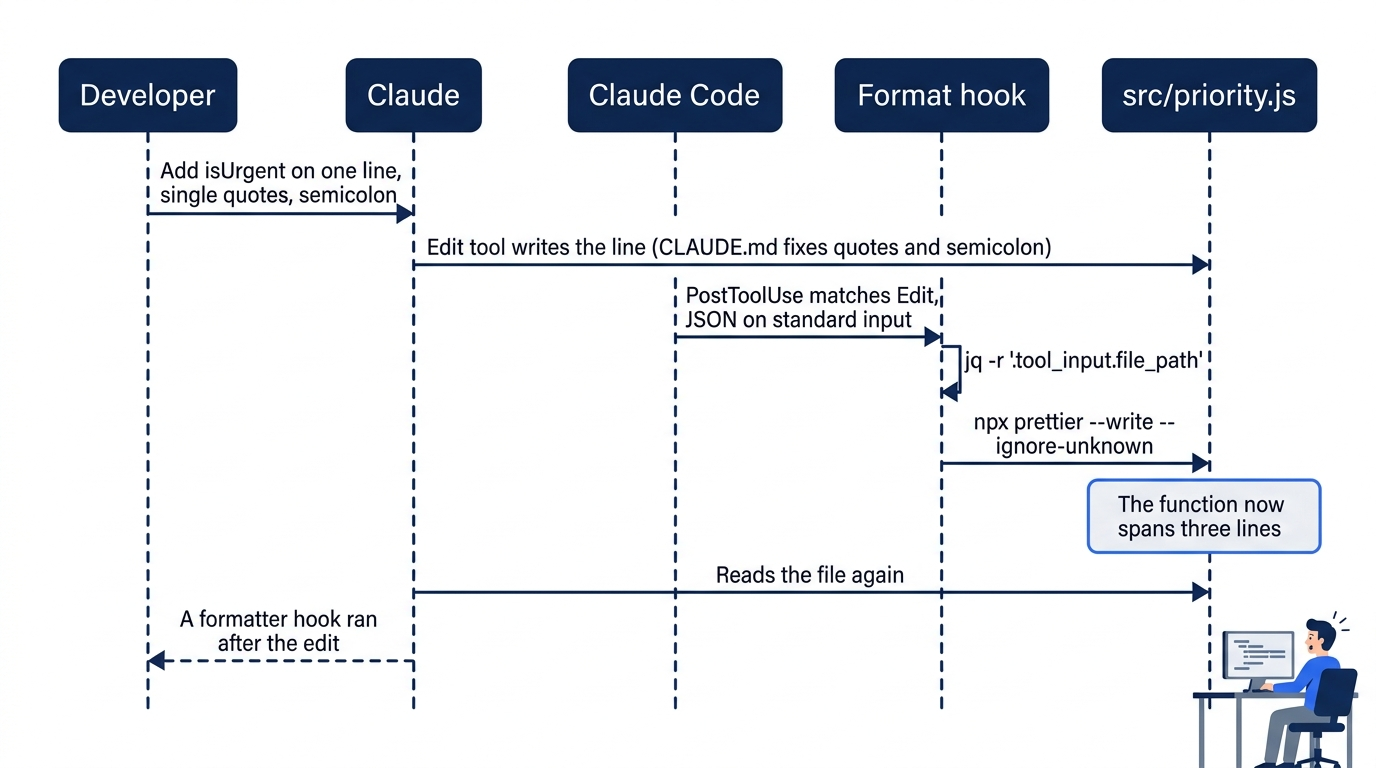

The scene shows the payoff of the day. Claude wrote the function on one line, and the hook reformatted it with no prompt and no reminder.
Claude fixed the quotes and the semicolon because CLAUDE.md asked. The hook fixed the line breaks because the hook always runs. On a day when Claude misses a CLAUDE.md rule, the hook still runs. Use a CLAUDE.md rule for advice, and a hook for a step that must happen after every edit. The hook runs after Claude's Edit and Write tools. Going deeper explains when it does not run.
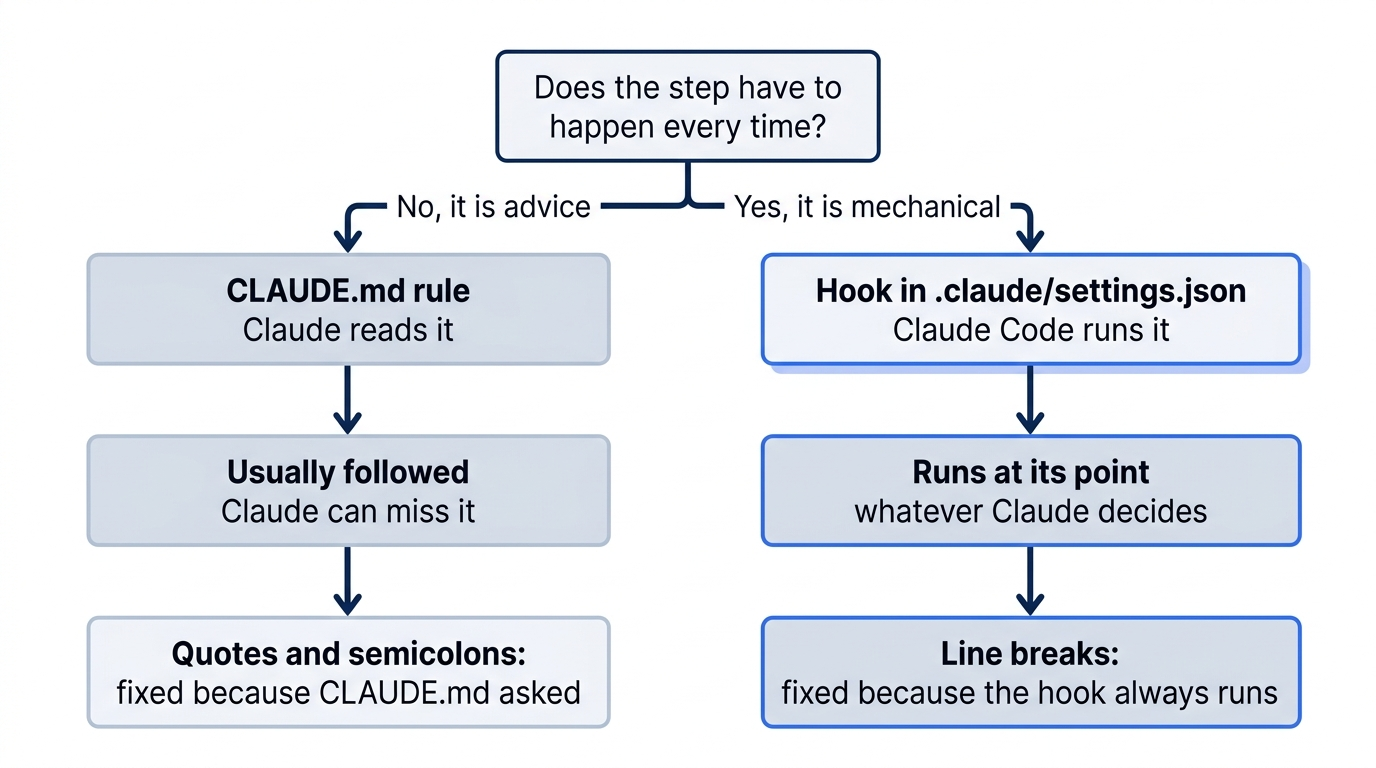
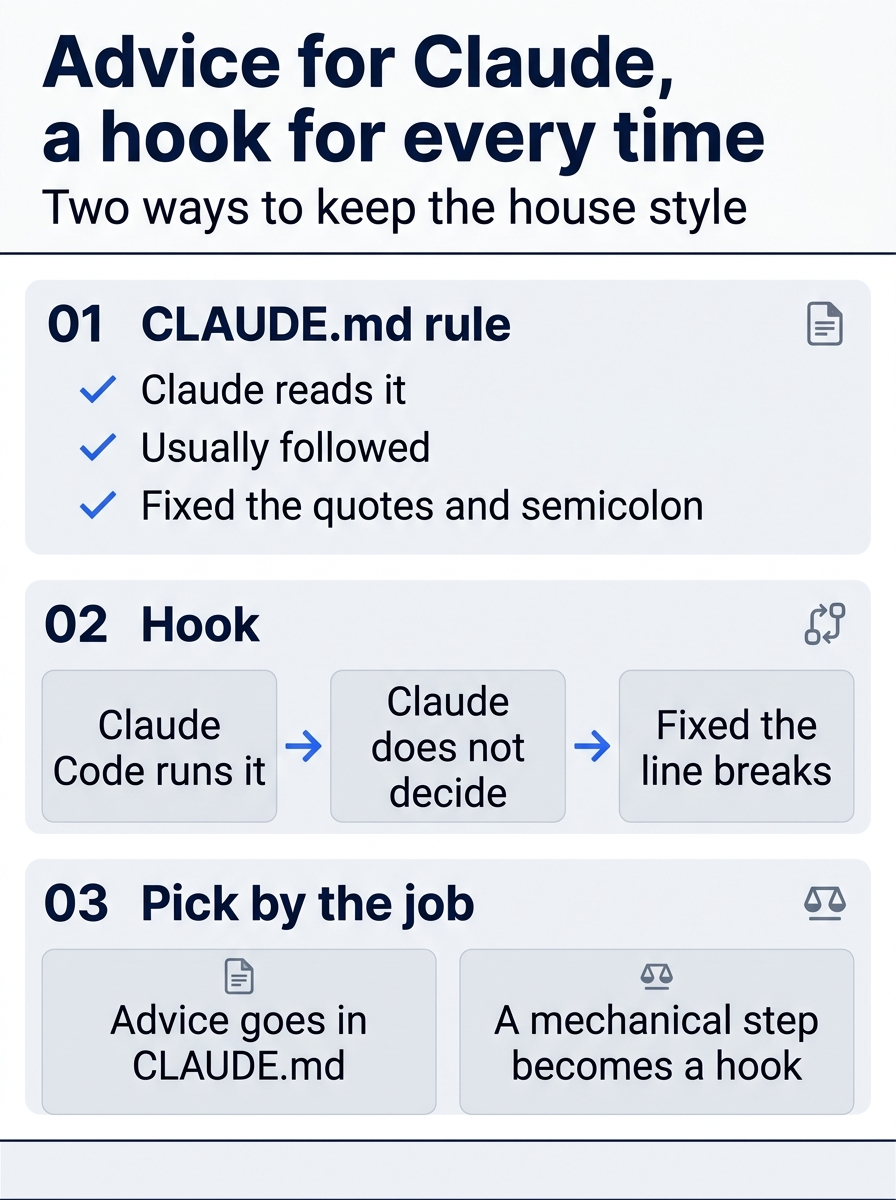
The two tools split the work by who decides. Claude decides whether to follow a rule, and Claude Code runs a hook whatever Claude decides.
Claude may suggest a next prompt in the input box, such as adding tests for isUrgent. Do not send it today. Type /exit.
Check the win and commit
In your terminal, run git status --short. On the tested run, it listed:
 M .claude/settings.json
 M package.json
 M src/priority.js
 M test/priority.test.js
?? .gitignore
?? .prettierrc
?? package-lock.json
node_modules is not in the list, because .gitignore hides it. package-lock.json is a file that npm writes to record the exact version that it installed. Commit all of it, so that everyone who clones Ticket Triage gets the formatter and the hook:
npm test
git add .gitignore .prettierrc package.json package-lock.json .claude/settings.json src test
git commit -m "Format every edit with Prettier"
git status
The tests show ℹ fail 0, and git prints nothing to commit, working tree clean. A teammate who clones the project runs npm install once, and the hook works for them too.
You installed a formatter, added a hook that runs it after every edit by Claude, watched it reformat Claude's line, and committed it for your team.
You can stop here. Going deeper explains why this works and where it breaks.
Going deeper
This section is for readers who want to know where a hook does not run, what other hooks can do, and how to keep the task list in a file. It assumes you finished Start here in Parts 1 to 11.
Where the format hook breaks
The hook runs after the Edit and Write tools, and only after those tools. Claude can also change a file with a shell command, and then the hook does not run. On an earlier test run for this part, Claude appended a line to a file with cat >>, and the line stayed unformatted. The hooks reference states the rule: "Claude Code doesn't run a PostToolUse hook matching Edit|Write when a Bash command or a process outside Claude Code rewrites the same file."
The docs point to a different event for that case. A FileChanged hook, added in v2.1.83, uses a file watcher, so it runs however a file changes. However, it watches files by name: each part of its matcher, such as .envrc|.env, is one literal file name. It suits a few known files, not "every file that Claude touches". This guide did not test it.
For Ticket Triage, the simple safety net is the check you ran in Start here. Run npx prettier --check src test before you commit. It catches a file that a shell command changed.
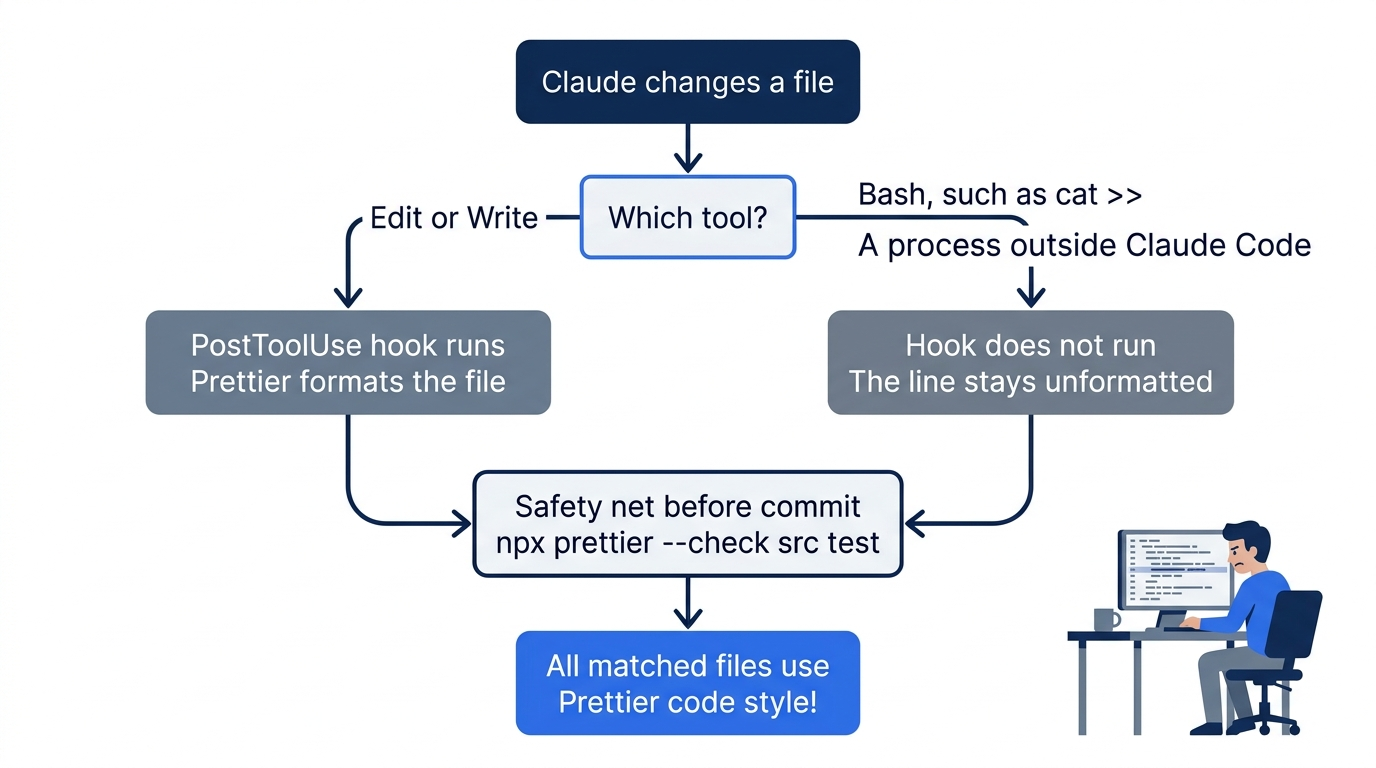
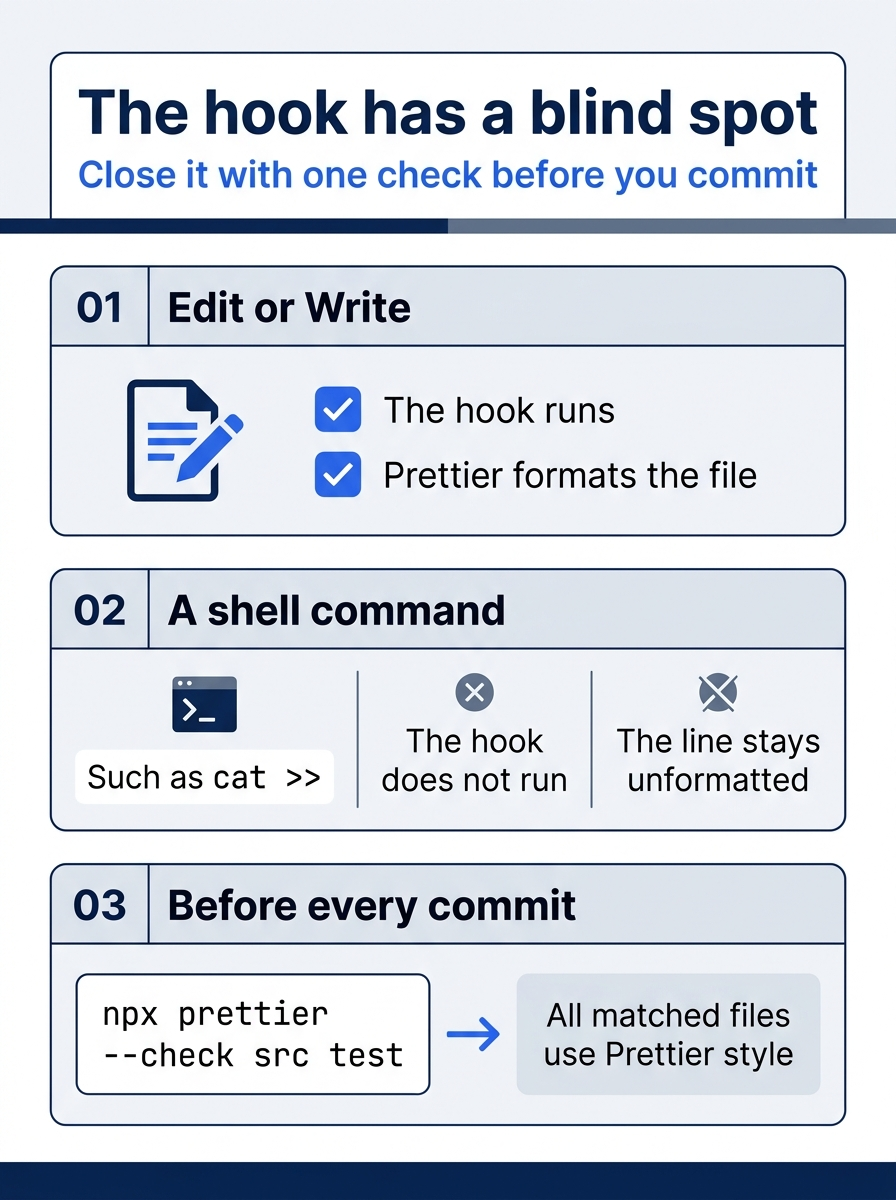
The hook covers the two edit tools, and the check before a commit covers everything else. Together they keep every file in the house style.
What Claude sees
When a hook succeeds and prints nothing, Claude Code shows nothing in the conversation, as the hooks guide says. Claude still learned about the change on the tested runs, because it read src/priority.js again after its edit, as the Read 1 file line after the Update block shows. To see what a hook did, press Ctrl+O for the transcript view. A hook that fails can show a hook error notice there. Without jq, the format hook cannot read the file path, so the edit stays unformatted. This guide did not test that case.
Workspace trust
A hook runs a shell command with your full user permissions. In an interactive session, Claude Code holds back hooks from every settings file until you accept the workspace trust dialog for the folder, the dialog that you saw on Day 1. A claude -p run never shows that dialog and treats the folder as trusted. Before you run Claude Code on a repository that you did not write, read its .claude/settings.json. A cloned project can carry hooks, just as Ticket Triage now does.
Where hooks live
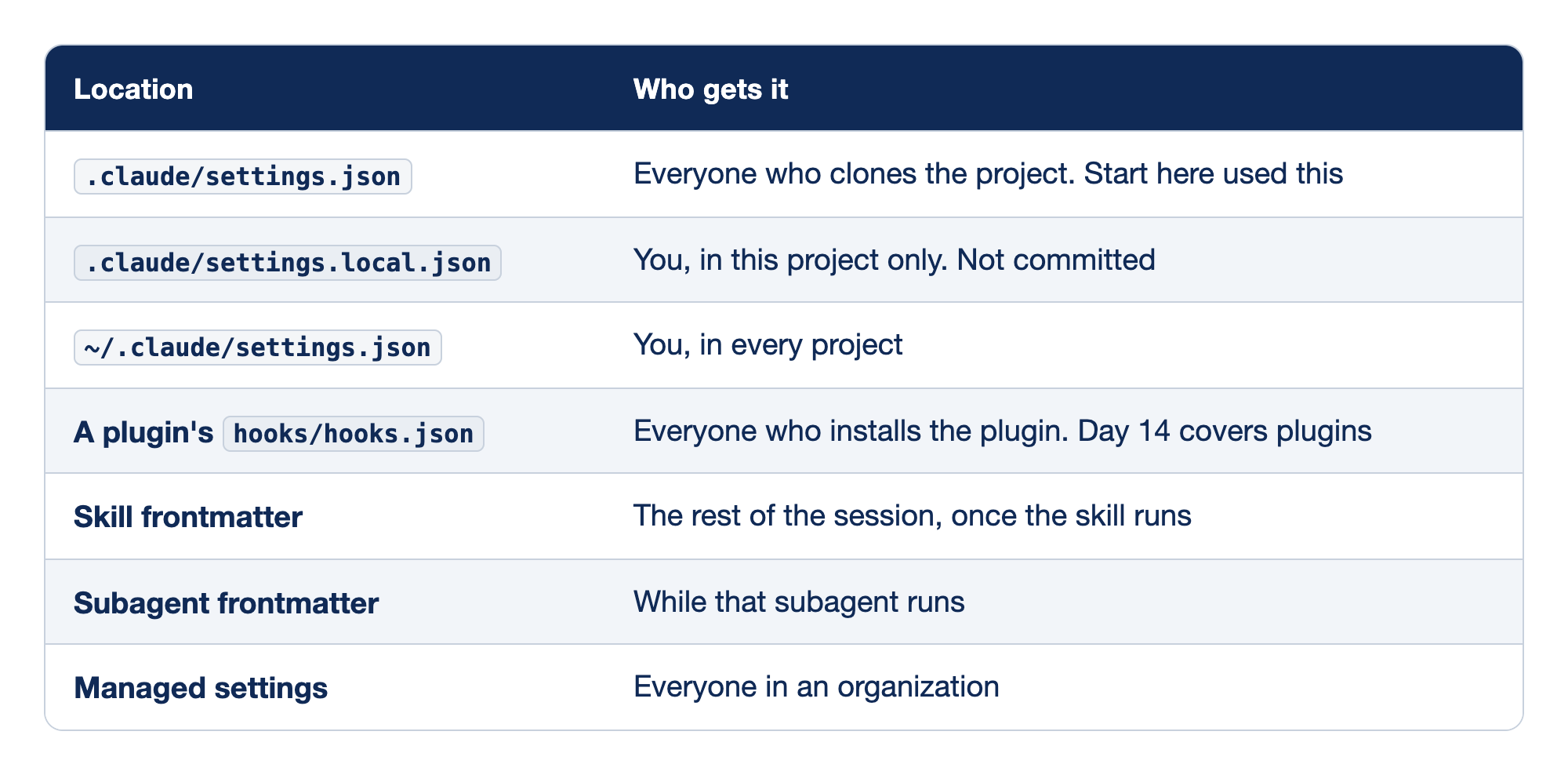
Claude Code reads hooks from seven places, and the place decides who gets the hook and for how long. The Location column names the settings file or frontmatter that holds the hook. The "Who gets it" column names the people the hook applies to, or the part of a session in which it runs.
.claude/settings.jsongives the hook to everyone who clones the project, and it is the file that Start here used..claude/settings.local.jsongives the hook only to you, in this project only, because the file is not committed.~/.claude/settings.jsongives the hook to you in every project on your machine.- A plugin's
hooks/hooks.jsongives the hook to everyone who installs the plugin, and Day 14 covers plugins. - Skill frontmatter adds the hook for the rest of the session, once the skill runs.
- Subagent frontmatter adds the hook only while that subagent runs.
- Managed settings give the hook to everyone in an organization.
Docs pages: plugin, Skill, Subagent, Managed settings.
Hooks from all these places add up. They do not replace each other. To turn every hook off for a while, set "disableAllHooks": true in a settings file. To remove one hook, delete its entry. The /hooks command opens a read-only list of every hook that the session loaded, with its source. This guide did not test the menu on 2.1.326.
Other events and hook types
The format hook used one event. The hooks reference lists many more. These are the ones that most projects use:
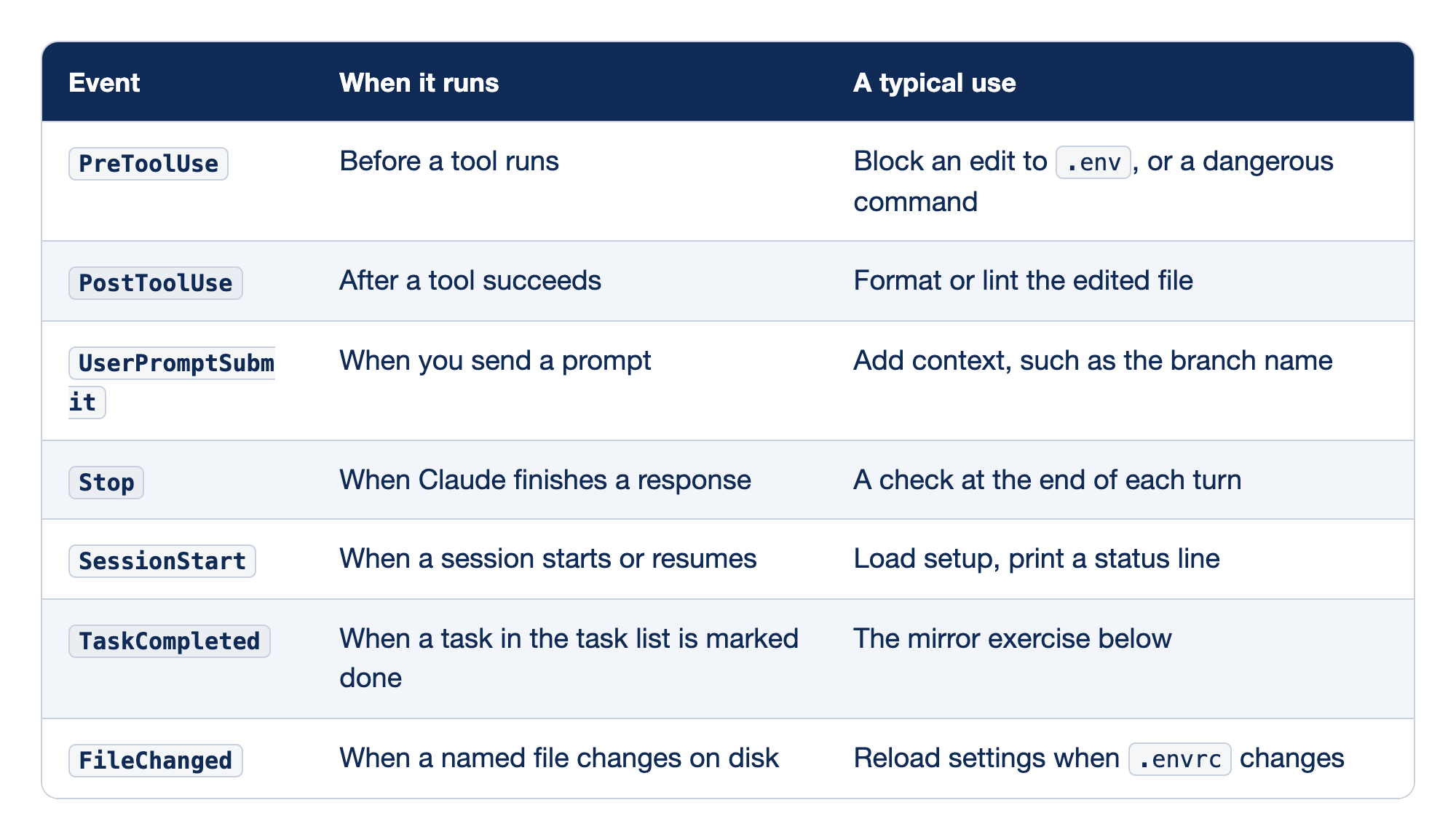
Seven hook events cover most projects. The Event column holds the event name for the hooks block. "When it runs" says the point in the session that fires the event, and "A typical use" gives one job that a hook on that event does well.
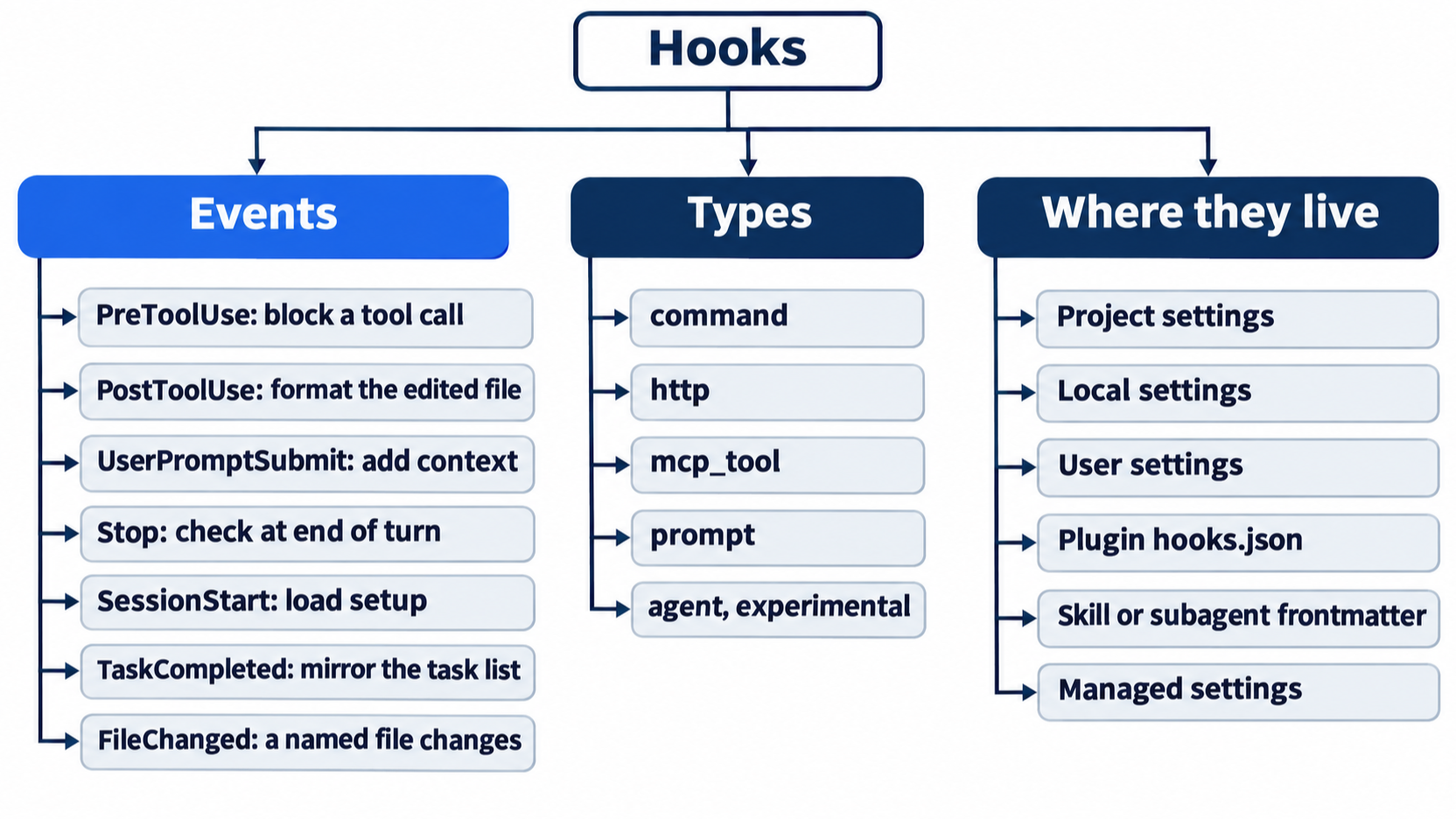
PreToolUseruns before a tool runs, and a typical use is to block an edit to.envor a dangerous command.PostToolUseruns after a tool succeeds, and a typical use is to format or lint the edited file, as the format hook does.UserPromptSubmitruns when you send a prompt, and a typical use is to add context, such as the branch name.Stopruns when Claude finishes a response, and a typical use is a check at the end of each turn.SessionStartruns when a session starts or resumes, and a typical use is to load setup or print a status line.TaskCompletedruns when a task in the task list is marked done, and the mirror exercise in this section uses it.FileChangedruns when a named file changes on disk, and a typical use is to reload settings when.envrcchanges.
A PreToolUse hook can stop a tool call: a command hook that exits with code 2 blocks it, and Claude Code feeds the hook's error message back to Claude. The docs' "Block edits to protected files" example uses this to protect .env and .git/. A PostToolUse hook cannot undo anything, because the tool has already run.
A hook does not have to be a shell command. There are five types: command, which Start here used; http, which posts the event to a URL; mcp_tool, which calls a tool on an MCP server; prompt, which asks a Claude model for a yes or no decision; and agent, which starts a subagent that can read files before it decides. The docs mark agent hooks as experimental. This guide tested only command.
Exercise: mirror the task list to a file
Day 3's Going deeper described the task list, the checklist that Claude keeps while it works, and promised a copy on disk, because the list is gone when the session ends. A TaskCompleted hook can copy each finished task into a file. This exercise is opt-in. This guide tested it once, in auto mode, and the reset puts Ticket Triage back as Start here left it.
The Task tools are off by default on Opus 5.5. Since v2.1.233, they are not offered on Opus 4.8, Sonnet 5, and newer models unless you set CLAUDE_CODE_ENABLE_TODO_TOOLS=1. With the tools off, Claude cannot mark a task done, and the hook never runs.
-
In your editor, add a
TaskCompletedentry inside thehooksblock of.claude/settings.json, after thePostToolUseentry, so that the block reads:"hooks": { "PostToolUse": [ // ① { "matcher": "Edit|Write", "hooks": [ { "type": "command", "command": "f=$(jq -r '.tool_input.file_path') && npx prettier --write --ignore-unknown \"$f\"" } ] } ], "TaskCompleted": [ // ② { "hooks": [ // ③ { "type": "command", "command": "mkdir -p docs && jq -r '\"- [x] \" + .task_subject' >> docs/tasks.md" // ④ } ] } ] }① The format hook from Start here stays as it was; the new entry goes after it, separated by a comma.
②
TaskCompletedis a second event key in the samehooksobject, and it fires each time Claude marks a task done.③ The entry has no
matcherline, because this event takes no matcher; itshooksarray comes first.④ The command creates
docs/if needed, builds a- [x]line fromtask_subjectwith jq, and appends it with>>, so earlier lines stay.Note: The full
.claude/settings.jsonwith both hooks, without markers, is extracted at code/claude_code_daily/part-11-hooks/listings/02-task-mirror-settings.json.TaskCompletedtakes no matcher. Its JSON message carriestask_subject, the task's title, and the command appends it todocs/tasks.mdas a checked item. -
Start a session with the Task tools turned on:
CLAUDE_CODE_ENABLE_TODO_TOOLS=1 claude -
Type this prompt:
Make a task list with two tasks: run npm test and report the counts, then count the files in test/. Do them in order and mark each one completed when it is done.On the auto-mode run, Claude replied
I made the two tasks, ran them in order, and marked each one completed.Type/exit. -
Check the file with
cat docs/tasks.md. On the auto-mode run, it held:- [x] Run npm test and report counts - [x] Count files in test/Your task titles can differ, because Claude writes them.
-
Reset. Put the settings back and delete the file:
git restore .claude/settings.json
rm docs/tasks.md
git status --short
Check that
git status --shortprints nothing.
The hook appends, so the file grows with every finished task, across sessions. It records only what finished, not what is still open. This guide did not test the Manual mode version of this exercise. A version that rewrites the whole list after every turn needs claude -p, a way to run Claude from a script. Day 24 builds it with the guard that it needs.
Corrections to the first edition
The first edition's Part 9 was written in May 2026. Checked against Claude Code 2.1.326 on November 17, 2026:
- It listed four hook types. The docs now list five, with
mcp_tool. - Its format hook piped the path through
xargs npx prettier --write. The docs' example, which Start here uses, adds--ignore-unknownand quotes the path. - Its task-list sync depends on the Task tools, which are off by default on Opus 5.5 since v2.1.233. Start the session with
CLAUDE_CODE_ENABLE_TODO_TOOLS=1, as the exercise above does.
Go further: Stop Hoping Claude Remembers Your Standards. Make Them Enforce Themselves. is the first edition's hooks chapter, with a worked script that blocks edits to protected files and more on prompt and agent hooks. Read it with the corrections above in mind: its task-list sync assumes that the Task tools are on.
Do this today
Everyone
- Install Prettier, add the format hook, ask for the wrong style, and commit. Check the win:
head -3 src/priority.jsshowsisUrgenton three lines,npx prettier --check src testprintsAll matched files use Prettier code style!, andgit statusis clean after the commit. - Habit: run
npx prettier --check src testbefore every commit, because the hook does not see changes that a shell command makes. Check: your next commit comes after a check that printsAll matched files use Prettier code style!.
If you read Going deeper
- Run the task-list mirror exercise. Check:
docs/tasks.mdlists each task that Claude marked done, as- [x]lines. Reset: rungit restore .claude/settings.jsonandrm docs/tasks.md. Check thatgit status --shortprints nothing.
Advice versus a guarantee
A style rule in CLAUDE.md is a request. Claude reads it, and on most days it follows it. A hook is not a request. Claude Code runs the command at its point in the session, every time, whatever Claude decides.
The isUrgent run shows both at work in one edit. CLAUDE.md fixed the quotes and the semicolon. The hook fixed the line breaks. Put advice in CLAUDE.md, put the steps that must never be skipped in a hook, and keep one npx prettier --check src test before each commit for the changes that the hook cannot see.
This is Part 11 of "Claude Code, Day-to-Day (second edition)," a day-by-day guide to Claude Code in which each day takes 20 to 40 minutes. Part 11 is Day 11. All 28 days are out now.