
Stop Hoping Claude Remembers Your Standards. Make Them Enforce Themselves.
Guidance vs. policy: enforcing engineering standards with Claude Code hooks the model cannot skip.
Claude Code hooks turn "the model usually formats my code" into "the code is formatted, every time, because a hook makes it so." Here is how to cross that line.
In this article: You will learn the difference between guidance Claude reads and policy Claude Code enforces. We cover the hook lifecycle, the eight events worth knowing, three worked examples (format-on-edit, blocking writes to protected files, end-of-turn sync), the four hook types, and a clear decision rule for when to reach for a hook instead of a CLAUDE.md line. By the end you will know how to make an engineering standard deterministic in five lines of JSON.
Here is a situation every team using an agentic coding tool eventually hits. You write a line in your project's CLAUDE.md file: "Always run the linter after editing a file." For a week, it works. Then you notice a commit that skipped the linter. Not because Claude is broken, but because the model read a thousand tokens of instructions and that line did not win its attention budget on that turn.
That gap, between "I asked Claude to do something and it usually does" and "the thing happens, every time, guaranteed," is the subject of this article. Claude Code hooks are how you close it. A hook is not advice the model reads. It is code that runs at fixed lifecycle events, regardless of what the model decides. This is the layer where you stop trusting Claude to remember and start enforcing that it gets done.
Guidance versus policy: the one distinction that matters
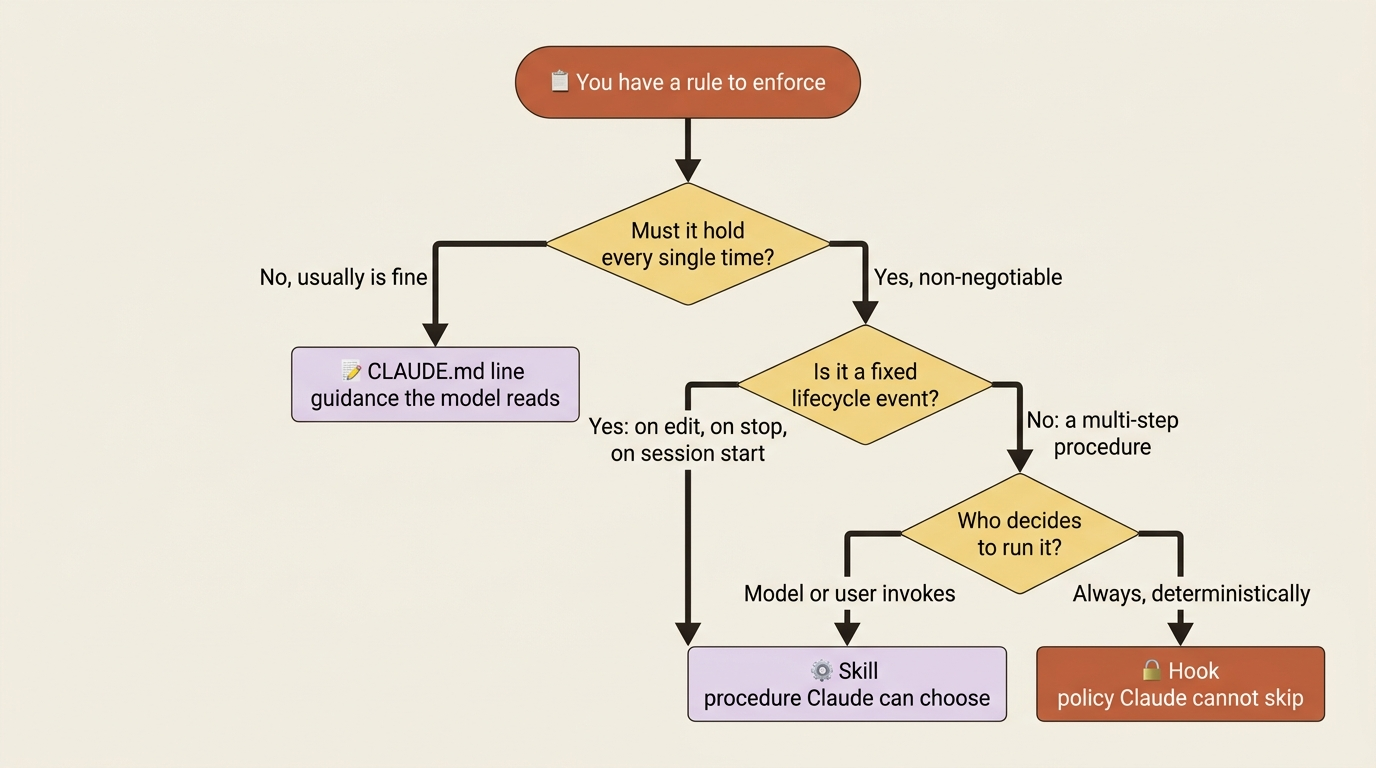
Claude Code gives you several ways to shape its behavior. A CLAUDE.md file holds project guidance that sits in context every session. Skills hold procedures the model can choose to invoke. Hooks are different in kind, not degree.
Here is the rule of thumb, and it is worth memorizing: CLAUDE.md is guidance. Hooks are policy.
If a rule has to hold every single time, write the hook. If "usually" is acceptable, a CLAUDE.md line is fine. The wrong framing is "hooks are the advanced version of CLAUDE.md." The right framing is "hooks are the version that does not depend on the model paying attention."
Pre-commit lint becomes a hook that runs your linter on every edit. Blocking writes to .env becomes a hook that returns a hard denial. Auto-formatting every file becomes five lines of JSON. None of these depend on the model remembering anything. They are deterministic. Most engineers never write a single hook. The ones who do never go back.
The hook lifecycle: when hooks fire
Hooks fire at specific points during a Claude Code session, and those points come in three cadences.
Once per session. SessionStart fires when a session begins or resumes. SessionEnd fires when it terminates.
Once per turn. UserPromptSubmit fires when you submit a prompt, before Claude processes it. Stop fires when Claude finishes responding. StopFailure fires when an API error interrupts the turn.
On every tool call inside the agentic loop. PreToolUse fires before a tool runs, PostToolUse after it succeeds, PostToolUseFailure when one fails. PermissionRequest fires when a permission dialog would appear, and PermissionDenied fires when the Auto Mode classifier denies a tool.
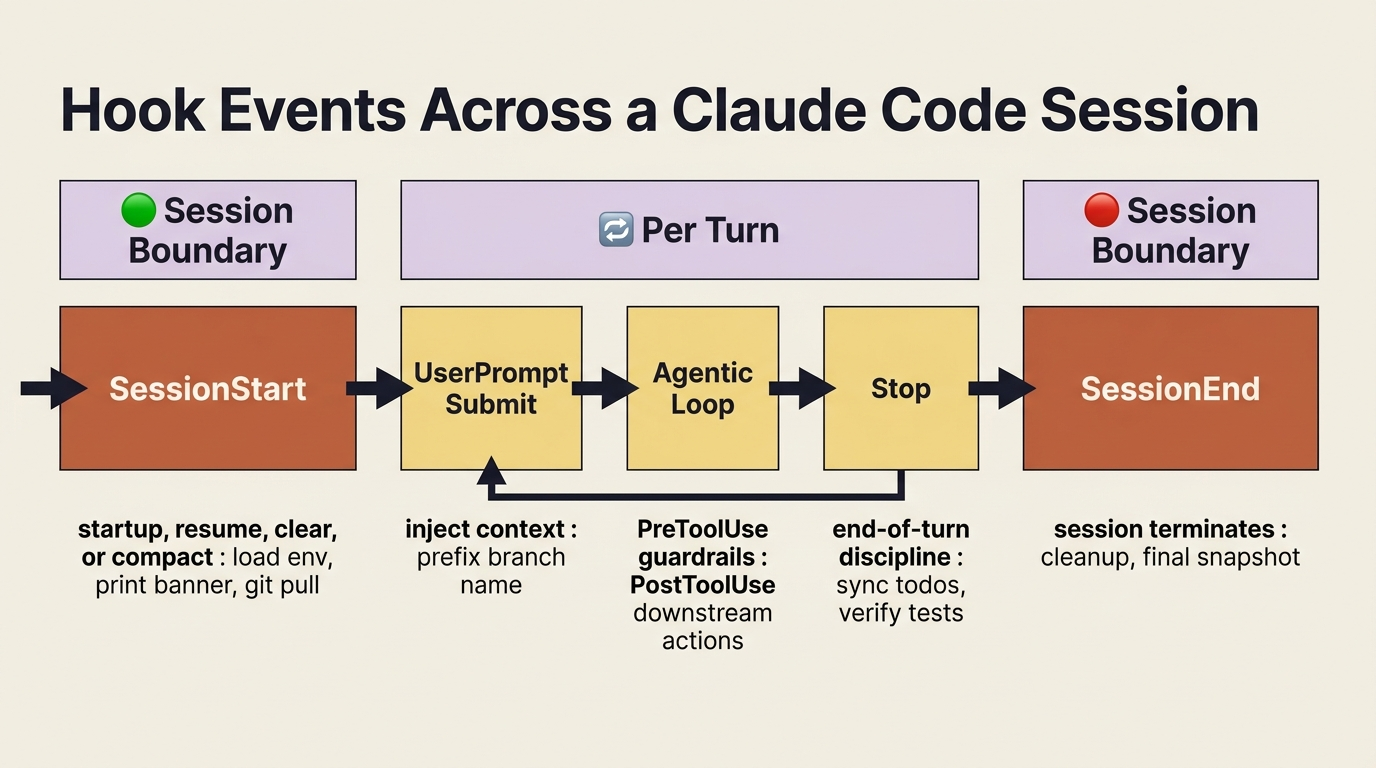
There are more events: TaskCreated, TaskCompleted, SubagentStart, SubagentStop, PreCompact, PostCompact, WorktreeCreate, WorktreeRemove, FileChanged, InstructionsLoaded, and others. Most users will never touch most of them. The eight events above cover ninety-five percent of what you will actually write.
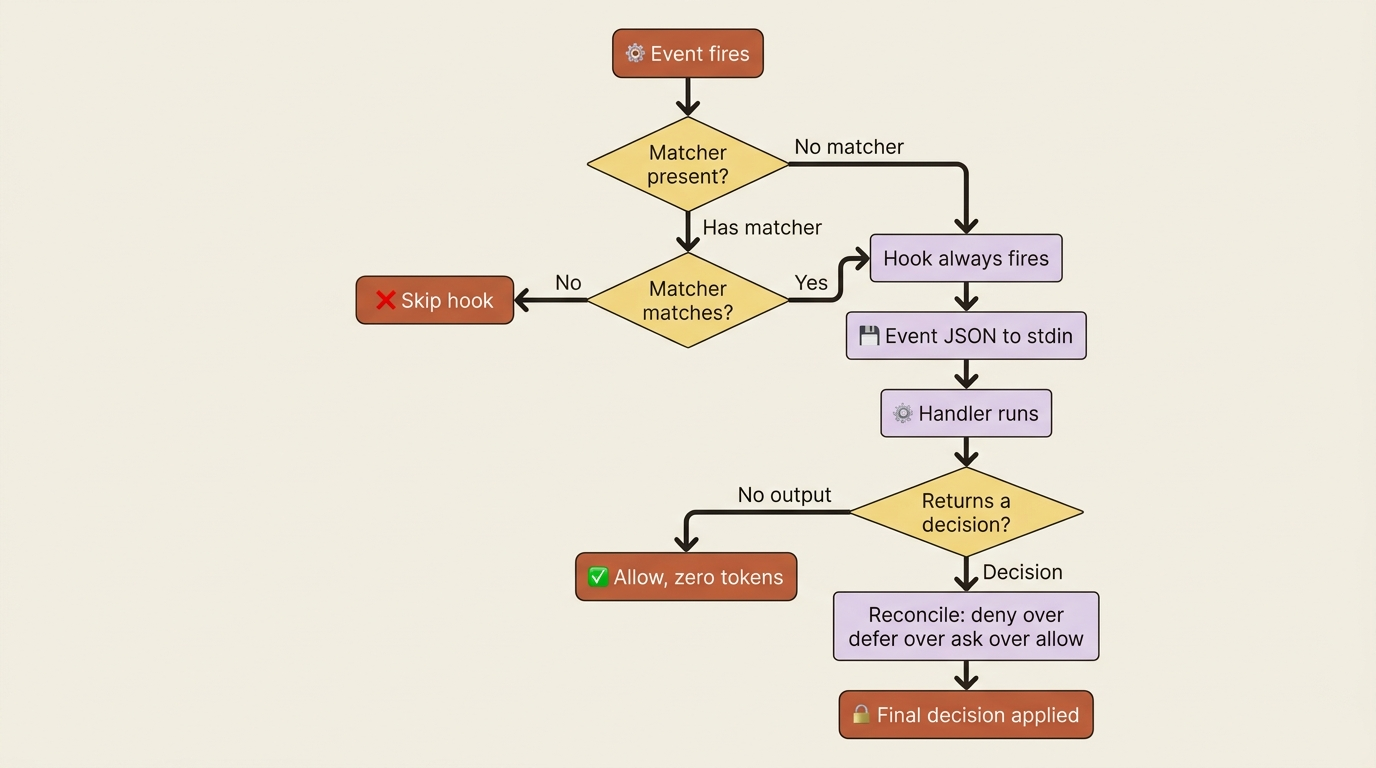
When an event fires and a matcher matches, Claude Code passes JSON about the event to your hook handler. For command hooks, that input arrives on stdin. The handler inspects it, takes action, and optionally returns a decision: allow, deny, modify, or defer. When multiple hooks match one event, their decisions reconcile with a strict precedence: deny beats defer beats ask beats allow. The strictest answer wins.
The events worth knowing
A short tour of the events you will actually reach for.
PreToolUse fires before a tool runs. It can block the call (deny), prompt the user (ask), allow without prompting (allow), or modify the tool's input (updatedInput). This is the right place for guardrails: block writes to protected paths, validate Bash commands against an allowlist, redirect output paths.
PostToolUse fires after a tool succeeds. It cannot undo the tool call, because that already happened, but it can run downstream actions: format the edited file, run a linter, append to an audit log. It is the most common hook type by far.
Stop fires when Claude finishes responding, once per turn. It is useful for end-of-turn discipline: sync state to disk, generate a status snapshot, verify tests pass before the turn really ends. One critical detail: Stop fires on every response, not just task completion. Design accordingly.
UserPromptSubmit fires when you submit a prompt, before Claude processes it. It can inject additional context, block the prompt, or change the session title. A typical use: every prompt should be prefixed with the current branch name, and the hook adds it so you do not have to type it.
SessionStart fires once when a session begins or resumes. It has four triggers exposed through the matcher: startup for a new session, resume for /resume or --resume, clear for /clear, and compact for the state after compaction. Use it for one-time setup: print a status banner, load a project environment, run a git pull to make sure the worktree is current.
PermissionDenied fires when Auto Mode's classifier denies a tool. It is useful for retry logic: the hook can return retry: true and let Claude try a different approach. It is new as of v2.1.86.
TaskCreated and TaskCompleted fire when items in the in-session task list are created or marked complete. They are the natural triggers for keeping a durable to-do file on disk in sync with Claude's working task list.
PreCompact fires before Claude Code runs /compact. Use it to archive the full transcript before the model summarizes and drops detail.
Matchers narrow which events fire your hook. For tool events, the matcher is the tool name: Bash, Edit|Write, or a glob like mcp__github__*. For session events, the matcher is the trigger reason, such as startup|resume. Events without a matcher (UserPromptSubmit, Stop, TaskCreated, TaskCompleted) always fire on every occurrence.
Worked example: format-on-edit
The lowest-friction hook pays back the most for the least work. Here it is in full:
{
  "hooks": {
    "PostToolUse": [
      {
        "matcher": "Edit|Write",
        "hooks": [
          {
            "type": "command",
            "command": "jq -r '.tool_input.file_path' | xargs npx prettier --write"
          }
        ]
      }
    ]
  }
}
Five lines of substance. Drop it into .claude/settings.json under the hooks key. From the next session forward, every file Claude edits gets formatted automatically. There is no CLAUDE.md line that Claude might forget, and no manual npm run format after every change. The rule is enforced.
Walk through what each piece does. "PostToolUse" is the event; it fires after a tool succeeds. "matcher": "Edit|Write" fires the hook only when Claude uses the Edit or Write tool, skipping Bash, Read, and everything else. "type": "command" marks this as a shell-command hook (as opposed to prompt, agent, or http, which we get to shortly). The command itself is a plain Unix pipeline: Claude Code pipes the event JSON to stdin, jq extracts the edited file path, and xargs hands it to npx prettier --write. The file gets formatted in place.
You can verify the hook is registered by typing /hooks in your session. The /hooks menu is a read-only browser of every hook configured for the current session, grouped by event, showing the matcher, the source (User, Project, Local, Plugin, or Built-in), and the full command. If a hook does not fire when you expect, /hooks is your first diagnostic.
The same shape supports a family of patterns with minor tweaks. Swap prettier --write for npx eslint --fix to lint on every edit. Add a grep -q '.ts$' guard and run npx tsc --noEmit to type-check after every TypeScript edit. Change the matcher to Bash and append jq -r '.tool_input.command' to a log file to record every shell command Claude runs. Each one is five to ten lines of JSON. Each closes a feedback loop that would otherwise depend on you remembering.
Worked example: block writes to protected files
When you need a hard guarantee that Claude cannot touch certain files, write a PreToolUse hook that returns a denial. The clean approach is a separate script the hook calls.
Save this to .claude/hooks/protect-files.sh:
#!/bin/bash
# Block edits to protected files. Reads the hook input from stdin.

INPUT=$(cat)
FILE_PATH=$(echo "$INPUT" | jq -r '.tool_input.file_path // empty')

PROTECTED_PATTERNS=(".env" ".env." "package-lock.json" ".git/")

for pattern in "${PROTECTED_PATTERNS[@]}"; do
  if [[ "$FILE_PATH" == *"$pattern"* ]]; then
    echo "Blocked: $FILE_PATH matches protected pattern '$pattern'" >&2
    exit 2
  fi
done

exit 0
The script reads the JSON event from stdin, pulls out the file_path field with jq, and exits with code 2 if the path matches any protected pattern. Exit code 2 is Claude Code's signal to block the tool call. The stderr message is fed back to Claude so it can adjust.
Make the script executable with chmod +x .claude/hooks/protect-files.sh, then register it in .claude/settings.json:
{
  "hooks": {
    "PreToolUse": [
      {
        "matcher": "Edit|Write",
        "hooks": [
          {
            "type": "command",
            "command": "\"$CLAUDE_PROJECT_DIR\"/.claude/hooks/protect-files.sh"
          }
        ]
      }
    ]
  }
}
$CLAUDE_PROJECT_DIR is the project root, so the path resolves no matter where Claude is running from.
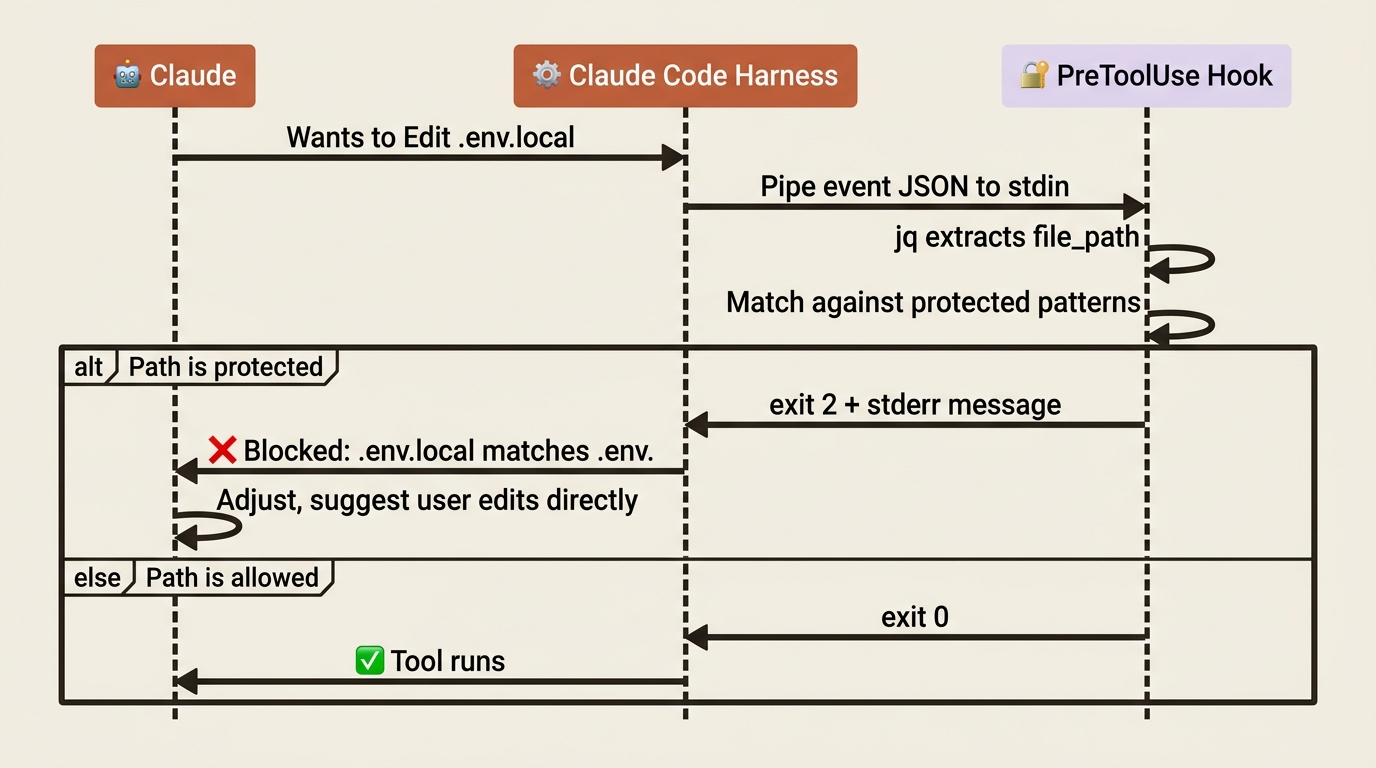
From this point forward, any attempt by Claude to write to .env, .env.local, package-lock.json, or anything under .git/ is blocked at the harness level. Claude sees the rejection message ("Blocked: .env.local matches protected pattern '.env.'") and adjusts, usually by suggesting the user make the change directly. That is exactly the behavior you want.
This is a fundamentally different guarantee than a CLAUDE.md line that says "never edit .env files." The CLAUDE.md line is a hint the model usually honors. The hook is a wall.
Worked example: a Stop hook for end-of-turn sync
A common pattern keeps a durable to-do file on disk in sync with Claude's in-session task list. Every time Claude finishes responding, you regenerate the durable mirror. Stop hooks were built for exactly this.
The minimum version, assuming you have a sync-todos skill that does the work:
{
  "hooks": {
    "Stop": [
      {
        "hooks": [
          {
            "type": "command",
            "command": "claude -p '/sync-todos' --output-format text"
          }
        ]
      }
    ]
  }
}
The hook runs claude -p '/sync-todos' after every turn. This headless invocation runs the skill in a fresh subprocess: it reads the in-session task list, writes the JSON, and regenerates the markdown. The work happens out of band, so the next prompt does not wait on it. If you prefer a direct script with no Claude subprocess, point the command at a scripts/sync-todos.sh that does the same work itself.
One caveat is worth repeating, because it bites people. Stop fires on every response, not just task completion. If a session has thirty turns, the hook runs thirty times. The handler must be cheap: do the work, then return immediately. If the operation is expensive, like running the full test suite or calling an API, move it to a more targeted event such as TaskCompleted.
The four hook types
Hooks are not only shell commands. Four hook types cover different needs.
command runs a shell command or a script. It is the workhorse. It receives the event JSON on stdin and returns decisions via stdout (as JSON) or via stderr plus an exit code. The timeout default is 10 minutes, or 30 seconds for UserPromptSubmit.
http POSTs the event JSON to an HTTP endpoint. The endpoint returns a decision in the response body, using the same format as command hooks. It is useful for compliance and audit logging across a team: point every developer's hook at one central audit service.
prompt sends the event JSON plus your prompt to a fast Claude model (Haiku by default) and lets the model make a yes-or-no decision. Reach for this when the decision needs judgment that is hard to express as a regex or a shell pipeline. "Should Claude really stop here, or are there obvious follow-ups?" is a prompt hook. It returns {"ok": true} to allow or {"ok": false, "reason": "..."} to block. The timeout default is 30 seconds.
agent is like prompt, but it spawns a full subagent with tool access. It can read files, run commands, and inspect the codebase, then return a decision. Use it when verification needs to look at actual state, not just the event input. "Verify all tests pass before allowing Claude to stop" is an agent hook: the agent runs the suite, reads the result, and decides. It is experimental. The timeout default is 60 seconds, with up to 50 tool-use turns.
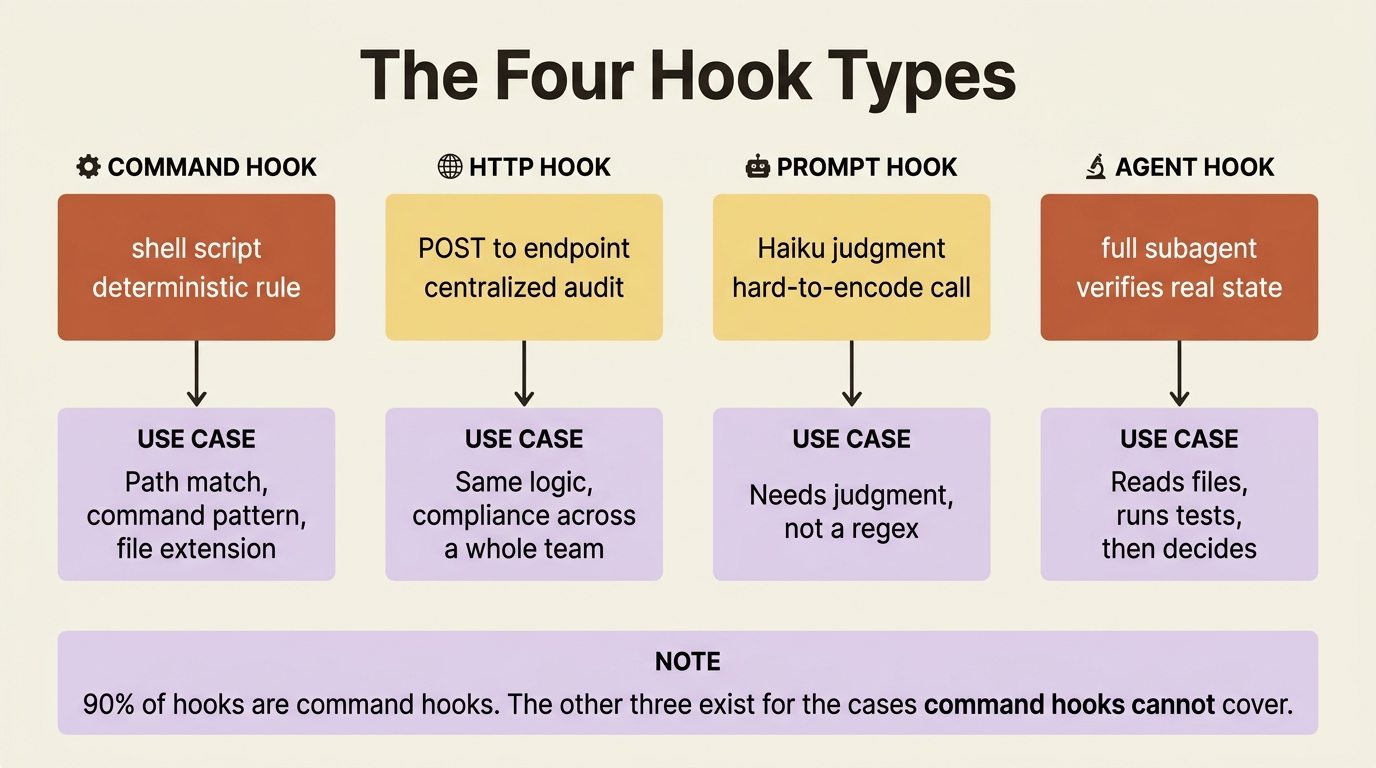
The decision tree is short. A deterministic check with a clear rule, such as a path match or a command pattern? Use command. The same logic, but centralized for compliance? Use http. A decision needing judgment that resists being encoded as code? Use prompt. A decision that needs to look at code or run commands to verify? Use agent. Ninety percent of hooks are command hooks. The other three exist for the cases where command hooks are not enough.
One more place hooks can live: subagents can define their own hooks in YAML frontmatter. Those hooks run only while that specific subagent is active and are cleaned up when it finishes. This is how you give a security-review agent a guardrail that says it can never write to the filesystem, regardless of what its prompt suggests. Stop hooks in subagent frontmatter are automatically converted to SubagentStop events at runtime.
Hooks versus everything else
Here is the disambiguation that ties the whole behavior-shaping picture together.
| Mechanism | Trigger | Trust model | Cost |
|---|---|---|---|
| CLAUDE.md | Always in context | Model reads, usually follows | Tokens every session |
Rule (.claude/rules/) |
Path-scoped or always | Model reads, usually follows | Tokens when relevant |
| Skill | User or model invokes | Model runs the body | Tokens when invoked |
| Subagent | Model delegates | Separate context, returns a summary | Tokens for the subagent's work |
| Hook | Fixed lifecycle event | Deterministic, cannot be ignored | Zero tokens unless it returns output |
Two axes matter: trust and cost. Hooks sit at the top of the trust axis, because the rule fires every time regardless of what the model decides. They sit at the bottom of the cost axis, because they cost no tokens unless the hook returns text that lands in context. That combination is what makes them irreplaceable for rules that must hold.
The cost detail rewards a second look. A PostToolUse hook that runs prettier --write and exits with no output costs zero tokens, because Claude never sees that anything happened. A PostToolUse hook that runs your linter and returns the failures on stdout does land in Claude's context, as information for the next turn. That is usually what you want for verifiers: Claude sees the failure and fixes it. But it also means a hook that produces a huge payload, like a 5,000-line npm test log, can become a context-eating problem of its own. Current versions handle this: hook output over 50KB is automatically saved to disk, and only a path plus a preview is injected.
Three failure modes, and how to read them
When a hook misbehaves, it is almost always one of three things.
The hook never fires. Type /hooks and confirm it is registered for the event you expect. If it is missing, the configuration did not load, usually because the JSON is malformed or it lives in the wrong file. Project hooks go in .claude/settings.json, user hooks in ~/.claude/settings.json, and local-only hooks in .claude/settings.local.json. Matcher names are case-sensitive: bash will not match the tool, only Bash will.
The hook fires but does the wrong thing. Run the hook command manually with a sample of the event JSON. The JSON shape depends on the event: tool_input.file_path for Edit and Write, tool_input.command for Bash. The reference page for each event lists its input schema.
PostToolUse cannot undo what you wanted to undo. It cannot, by design. By the time PostToolUse fires, the tool has already executed. Move the guardrail to PreToolUse, which can deny the call before it runs.
A few more sharp edges worth knowing in advance. PermissionRequest hooks do not fire in headless (-p) mode, so use PreToolUse for automated permission decisions in headless runs. Stop hooks do not fire on user interrupts, such as pressing Esc; they fire only when Claude finishes naturally, and API errors fire StopFailure instead. And if two PreToolUse hooks both rewrite a tool's arguments with updatedInput, the last one to finish wins, so order matters when hooks are stacked.
Do this today
Three concrete moves, under fifteen minutes total.
Open /hooks in your current session. See what is already there. Most projects carry a few hooks from plugins or from /init. Knowing what they are is the first step to managing them.
Add the format-on-edit hook. Take the five lines from the worked example above. Open .claude/settings.json, add the hooks block, save. Confirm with /hooks that PostToolUse / Edit|Write is now registered. Edit a file and watch it format itself.
Pick one rule from your CLAUDE.md that should hold every time, and rewrite it as a hook. Look for lines like "always run tests before committing," "never edit .env files," or "run the type checker after every change." Those are lines Claude usually follows. Pick one. Move it from CLAUDE.md to a hook. From now on, that rule is not usually true. It is always true.
The setup that works for everyone, not just you
Every line you move from "guidance Claude reads" to "behavior Claude Code enforces" is one less thing that depends on the model paying attention on a given turn. That is the compounding effect. It does not feel dramatic on day one. It feels dramatic six months later, when you hand your .claude/settings.json to a new teammate and your engineering standards travel with it, intact and self-enforcing, with nothing left to remember.
CLAUDE.md asks. Hooks guarantee. The day you stop hoping and start enforcing is the day your standards stop being a suggestion.
This is Part 9 of "Claude Code, Day-to-Day," a 19-part guide to mastering Claude Code for working engineers.