
Stop Retyping the Same Prompt: A Practical Guide to Claude Code Skills
Turn the prompts you keep retyping into named, version-controlled skills your team and Claude can both invoke.
How a single markdown file turns your most-repeated prompt into a named command that you, your team, and Claude can all run
In this article: You will learn what a Claude Code skill actually is (a markdown file, nothing more), how its frontmatter decides who can run it and when, and the difference between procedure skills and reference skills. You will see the five starter skills worth adding to any project, how
skill-creatorbuilds one in ninety seconds, and how to keep Claude current on fast-moving libraries. The payoff is simple: anything you have typed three times should already be a command.
You know the prompt. The one you paste into Claude Code every few hours: "run the tests, then lint, then the build, and stop if anything fails." Or the security checklist you keep reconstructing from memory. You have written that prompt dozens of times, slightly differently each time, and each time you wonder, vaguely, whether there is a better way.
There is. Claude Code skills turn the prompts you keep retyping into named, reusable commands. A skill is a markdown file. That is the entire idea. Once you internalize it, the gap between "I should automate that someday" and "that is a command now" collapses to about ninety seconds.
Claude Code is Anthropic's agentic coding tool: it reads your repo, edits files, and runs commands on your behalf. If memory is for what Claude needs to know, skills are for what Claude needs to do. The two layers complete each other.
A skill is just a markdown file
Here is the whole mechanism. A file at .claude/skills/<name>/SKILL.md becomes /<name> in your session. You can invoke it. Claude can invoke it. Frontmatter at the top controls when each is allowed. The body of the file is the prompt that runs when the skill fires.
Here is the minimum viable skill:
---
name: ship
description: Run tests, then lint, then build. Stop on the first failure.
---

Run these checks in order, stopping if any fails:

1. `npm test`
2. `npm run lint`
3. `npm run build`

Report which step failed and the relevant output. On success, summarize
what passed.
Save that to .claude/skills/ship/SKILL.md and you have /ship. Type it, and Claude runs the body as if you had pasted it into the prompt yourself. The difference is that this prompt now lives in version control, your team can edit it, and Claude can decide to invoke it on its own when the conversation calls for it.
Two reframes matter here, especially if you learned Claude Code from older articles.
First, custom commands and skills are now the same mechanism. A file at .claude/commands/deploy.md and a skill at .claude/skills/deploy/SKILL.md both create /deploy and behave identically. Old .claude/commands/ files still work. Skills add what plain commands could not: a directory for supporting files, frontmatter that controls who invokes them, and the ability for Claude to load them automatically when relevant.
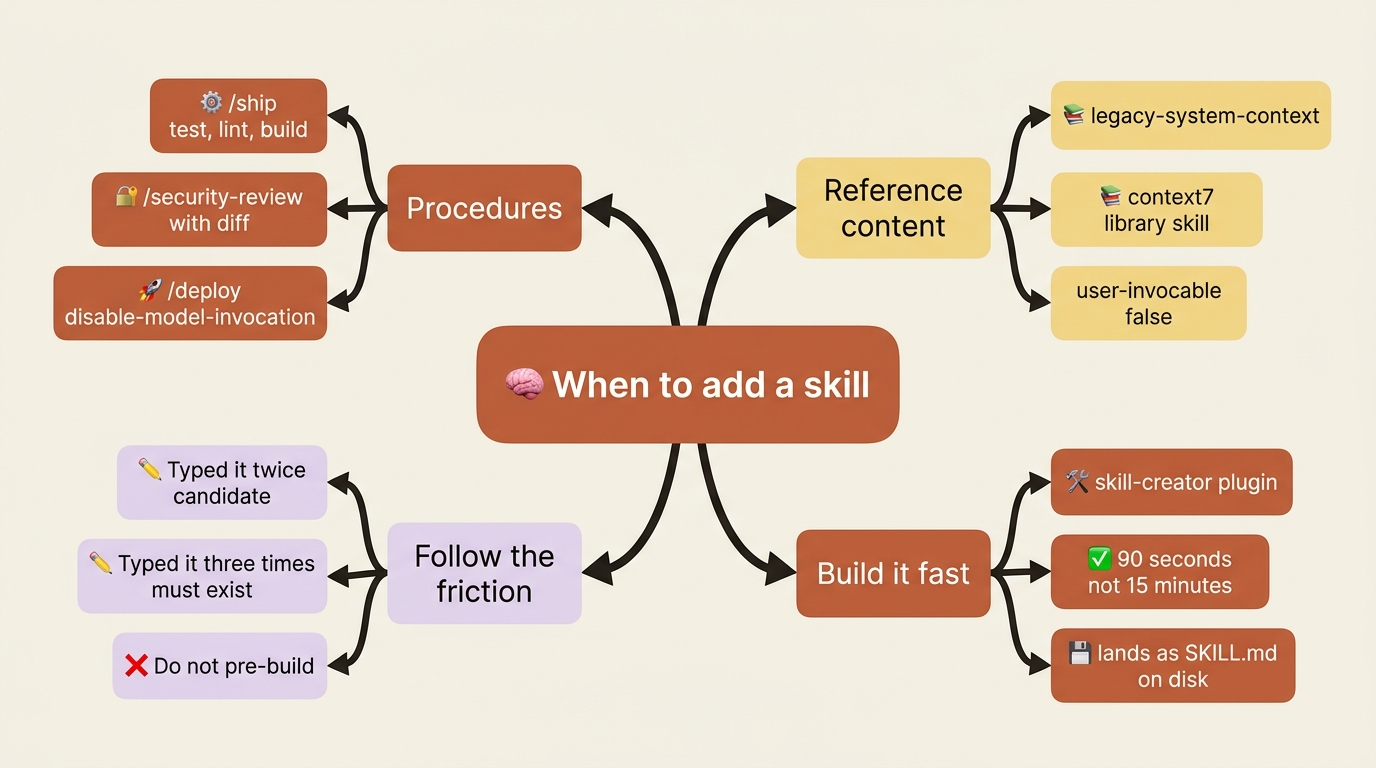
Second, skills are not only procedures. Half the conversation about skills is about workflows: deploy, ship, review, commit. The other half, just as important, is reference content: background knowledge Claude reads when relevant. A legacy-system-context skill that explains how an old system works is a skill, loaded when the topic comes up; you never type its name. Both shapes live in the same place. The frontmatter tells them apart.
The frontmatter decides who can run it
Most frontmatter fields are optional. One is not.
The description field is the most important line in the file. It states what the skill does and when to use it, and Claude reads descriptions to decide which skill, if any, matches your prompt. Write descriptions the way a user would phrase the request, not the way an internal design doc would describe it. "Reviews code changes for security vulnerabilities" beats "Static analysis subsystem for the SDLC."
The fields worth knowing:
name: the slash command. Defaults to the directory name. Lowercase letters, numbers, and hyphens.description: what the skill does and when to use it. Never skip this.when_to_use: extra trigger phrases, appended to the description for matching.argument-hint: an autocomplete hint like[branch-name].disable-model-invocation: true: only you can invoke it. The right call for anything with side effects:/deploy,/commit,/send-slack-message. You do not want Claude deciding to deploy because the code looks ready.user-invocable: false: only Claude can invoke it. The right call for reference-content skills that make no sense as a typed command.allowed-tools: restrict what the skill can call, for example a read-only skill.
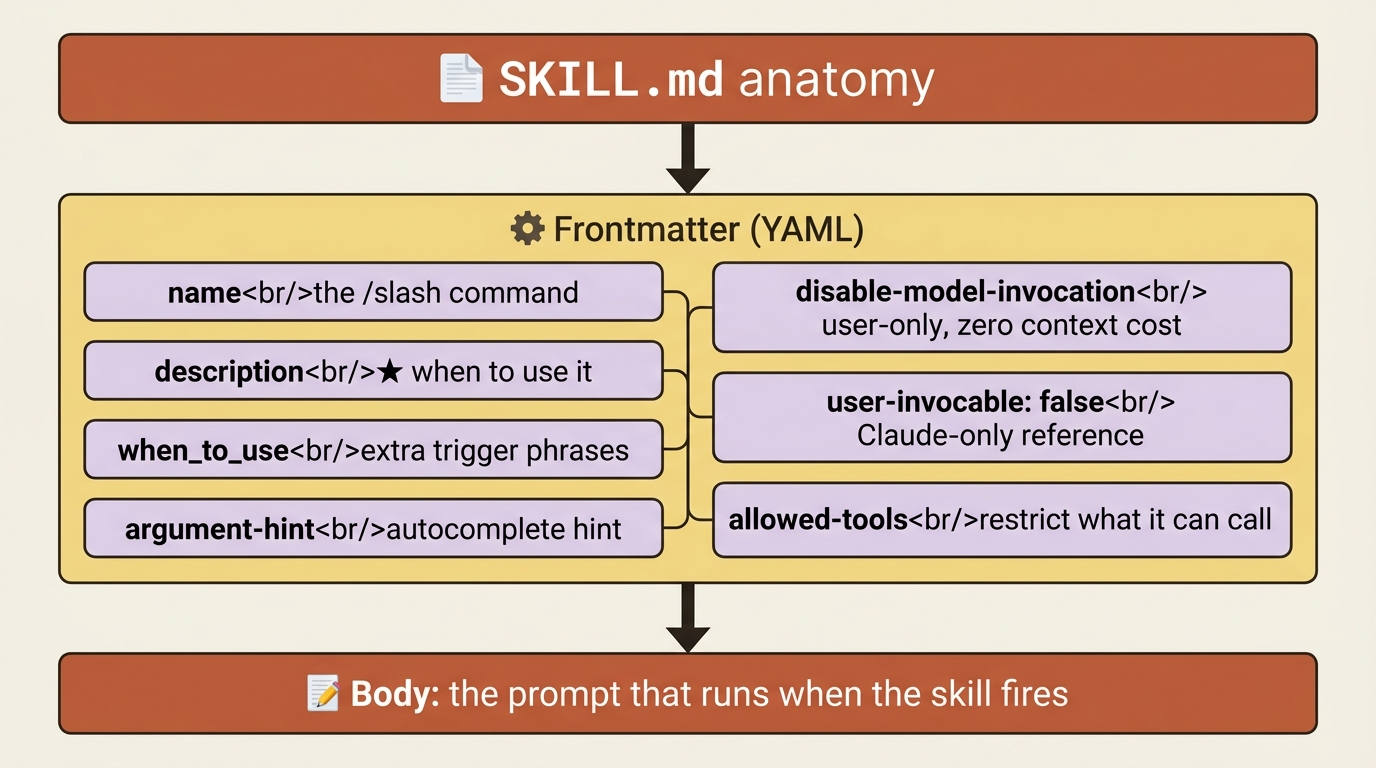
The who-can-invoke combinations matter. By default, both you and Claude can run the skill, and its description always sits in context so Claude can match against it. Setting disable-model-invocation: true makes it user-only, and the description does not even appear in the skill index at startup, so the skill costs zero context until you call it by name. Setting user-invocable: false makes it Claude-only, useful for reference content. Setting both breaks the skill, since neither party can run it.
That zero-context property is a quiet but real trick: if you have a pile of rarely used skills with long descriptions, disable-model-invocation: true keeps them out of the startup budget entirely.
Live data and arguments make skills powerful
A skill that takes input is far more useful than one that does not.
$ARGUMENTS captures everything typed after the skill name. Positional $0, $1, and so on split the input by word, with shell quoting for multi-word values. Named arguments come from an arguments frontmatter field. There are also substitutions like ${CLAUDE_SESSION_ID}, ${CLAUDE_EFFORT} (so a skill can adapt to the current effort level), and ${CLAUDE_SKILL_DIR} (the skill's own directory, for bundled scripts).
The feature that changes how skills feel is shell injection. A line starting with !`...` runs a shell command and injects its output into the prompt before Claude sees it. You give Claude live data without asking it to run a command first. The classic case is a /fix-issue skill:
---
name: fix-issue
description: Investigate and fix a GitHub issue by number
argument-hint: <issue-number>
---

!`gh issue view $ARGUMENTS`

Investigate and fix the issue above.

1. Trace the bug to its root cause.
2. Implement the fix.
3. Write or update tests.
4. Summarize what you changed and why.
Run /fix-issue 1234. The gh issue view 1234 runs in your shell, its output lands at the top of the prompt, and Claude sees the issue as if you had pasted it in. No extra tool call needed. The same pattern powers a /security-review that injects git diff and audits the result against a bundled checklist.
Skills are folders, so bundle the supporting files
A skill is a directory, not just a file. The minimum is SKILL.md, but you can put anything else alongside it:
.claude/skills/security-review/
├── SKILL.md          # Entry point
├── checklist.md      # Full review checklist
├── examples.md       # Example findings
└── scripts/
    └── scan.sh       # Helper script
Reference those files from SKILL.md with ordinary markdown links, and Claude reads them on demand. Run bundled scripts through the ${CLAUDE_SKILL_DIR} placeholder so the path resolves wherever the skill is installed.
Why bother? Length matters: the body stays in context across turns once the skill loads, so a 1,000-line skill is 1,000 lines of recurring token cost. Detailed reference material in a separate file costs nothing until Claude opens it. Target under 500 lines for SKILL.md itself. Bundling also makes the skill self-contained: anyone who copies the directory gets the whole thing in one move.
Where skills live, and who shares them
There are three locations, mapping to three audiences.
Project skills at .claude/skills/<name>/SKILL.md are committed to the repo and shared with the team. The home for skills that exist because of this project: /ship with the project's actual build commands, /help-me listing this project's resources.
User skills at ~/.claude/skills/<name>/SKILL.md are personal and apply to every project: workflows you carry everywhere, like a personal /commit-cleanup.
Plugin skills are distributed through marketplaces, namespaced as plugin-name:skill-name so multiple plugins coexist without collision.
When the same name exists at multiple scopes, precedence is clear. Project skills win over user skills, and managed (org-level) skills win over both. Plugin skills are namespaced, so they never enter the contest.
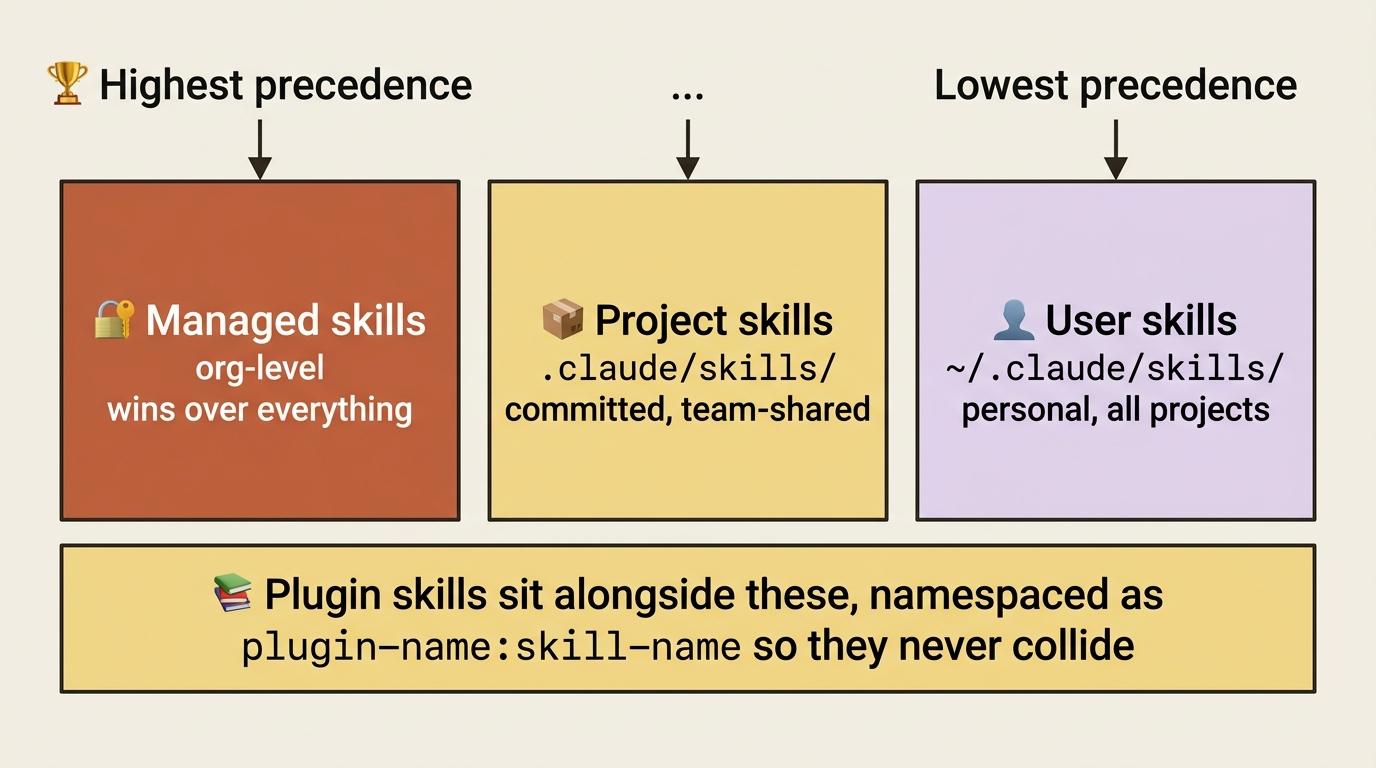
The rule of thumb: project-level for what the team needs, user-level for what you need everywhere, plugins for what organizations distribute.
How Claude decides to fire a skill on its own
This is the part people misunderstand most. There are two ways a skill runs, and they behave very differently.
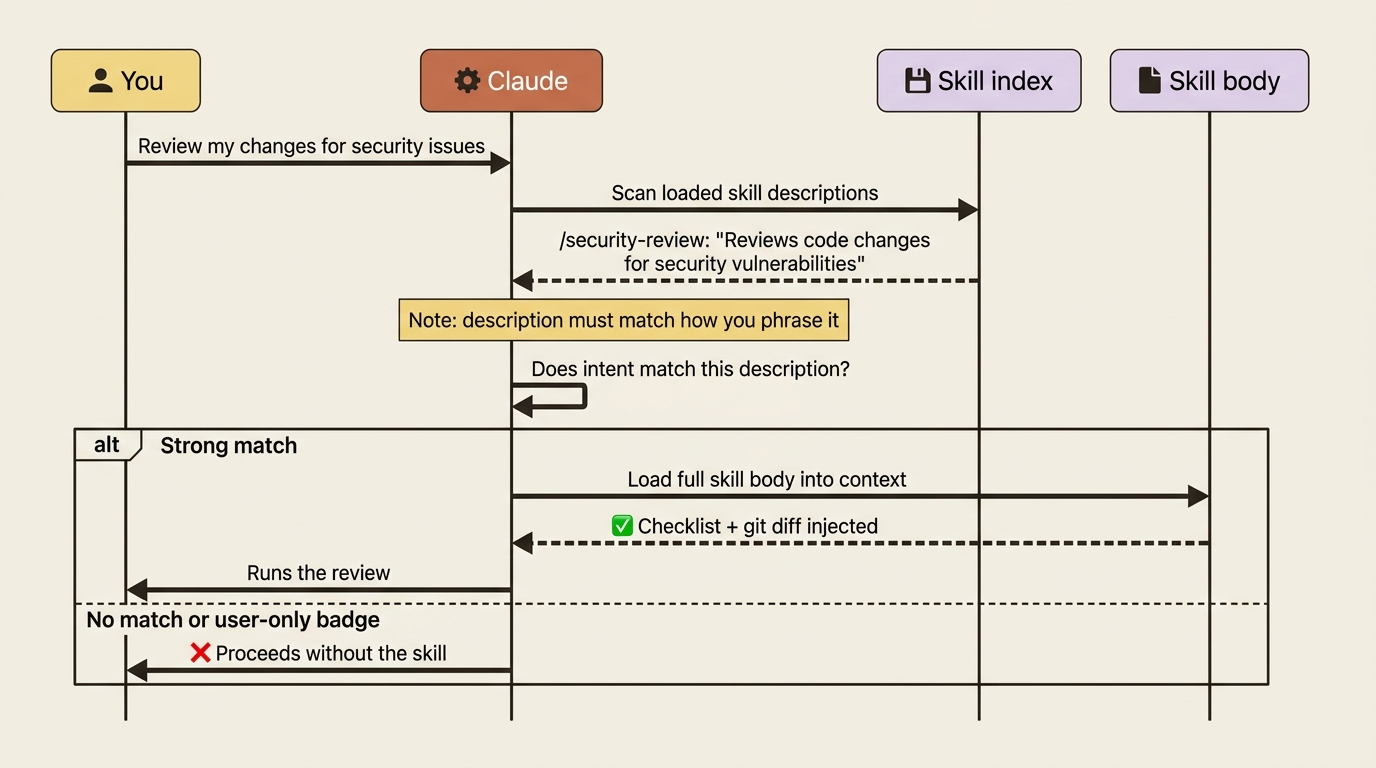
You can invoke a skill directly by typing its name: simple, deterministic, always works. But Claude can also invoke a skill on its own, and that path runs through the description field. When you type a prompt, Claude scans the descriptions of the skills in its index and asks, in effect, "does any of these match what the user wants?" If one matches strongly, Claude loads the full body and runs it.
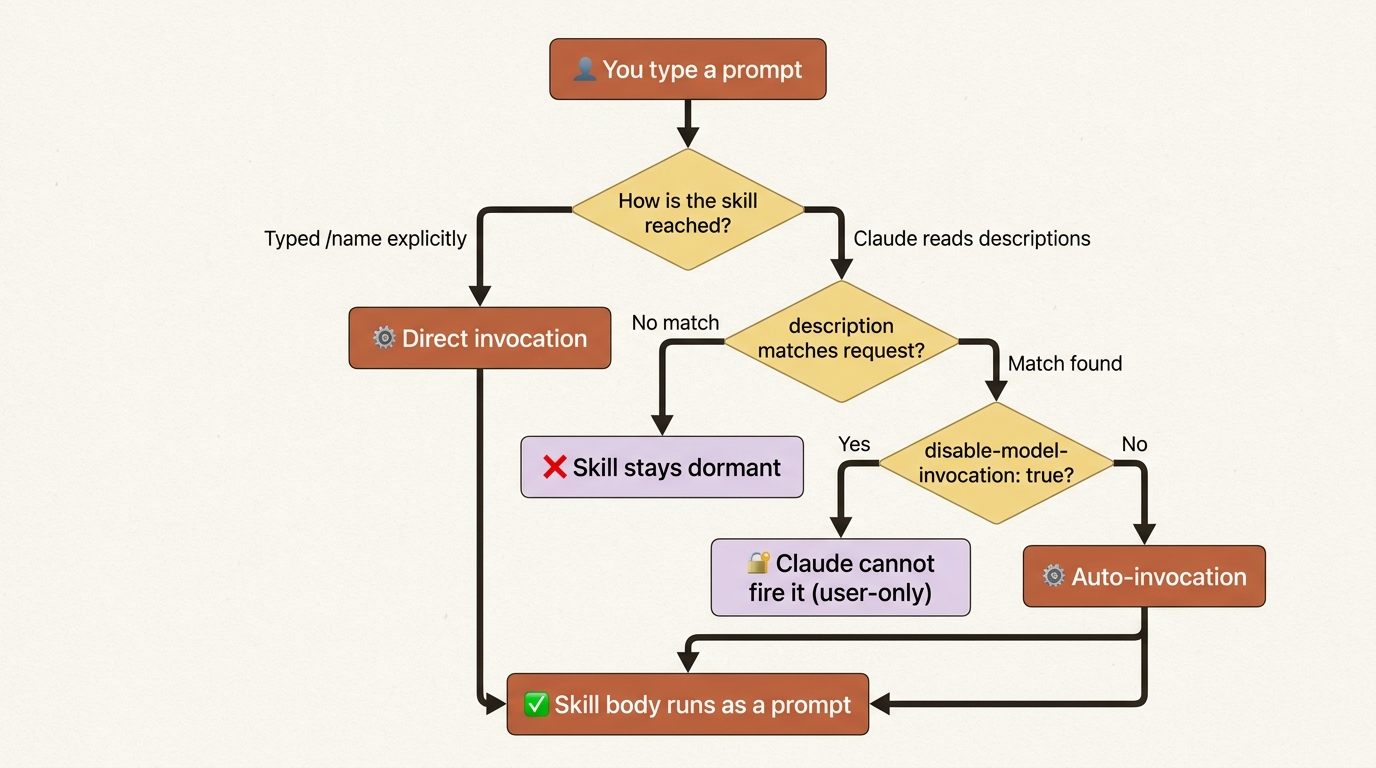
This is why the description is load-bearing. If you write it the way a spec would ("Static analysis subsystem"), Claude will not connect it to your plain-English request ("check my changes for security holes"). Write it the way you would actually ask.
It is also why disable-model-invocation: true matters for risky skills. That flag removes the skill from the autonomous path entirely: Claude never sees its description and never runs it without you. For /deploy, that is exactly what you want.
The five starter skills every project should have
These five are not features Claude Code ships with. They are conventions, maybe forty lines of markdown total, and they will save you more time than any other forty lines you write this year.
/ship is your test, lint, and build chain in one command, run in order, stopping on the first failure. The lowest-friction way to enforce a verify-as-you-go habit. Run it after every meaningful change instead of typing four commands.
/help-me is the in-session table of contents. It lists every command, skill, and subagent in this project, with a one-line purpose and when each fires. Type /help-me for the overview or /help-me deploy to drill into one entry.
/help-me status answers "where am I right now": current branch, active goal, in-session todos, last test result, dirty files. The morning-coffee command, for every "wait, what was I doing?" moment.
/security-review is the diff-injection pattern from earlier, scoped to your team's threat model, with a bundled checklist.
/deep-research <topic> runs a thorough read-only research task in a separate, forked context, then returns only the summary. Your main thread stays clean. You see the conclusion, not the file-by-file digging.
Bundled skills you already have
Claude Code ships with skills available in every session, alongside built-in commands like /help. Mechanically they are skills, prompt-based rather than fixed logic. The ones to know:
/debug [description]turns on debug logging, reads the log, and diagnoses when Claude Code itself misbehaves: hooks not firing, memory not loading, MCP servers acting up./loop [interval] <prompt>re-runs a prompt on a schedule, for example polling every five minutes until a deploy finishes./batch <description>decomposes a big change into 5 to 30 independent units, spawns an agent per unit in isolated worktrees, and opens a PR per unit./simplifyruns parallel review agents over recent work for reuse, quality, and efficiency, then applies fixes./claude-apiloads current Claude API reference material into your project, scoped to your language.
You can use any of these tomorrow. Most engineers have tried at most one.
Build skills with skill-creator, not by hand
Do not write skill frontmatter from scratch. There is a skill for that.
The skill-creator skill lives in the official Anthropic plugin marketplace. Install it once:
/plugin install skill-creator@claude-plugins-official
After that, building a skill is a sentence:
Use the skill-creator skill to build a /ship skill that runs `pnpm test`,
then `pnpm lint`, then `pnpm typecheck`, then `pnpm build`. Stop on the
first failure. Report which step failed and the relevant output.
skill-creator walks Claude through naming, the description, the frontmatter choices (does this need disable-model-invocation? an argument-hint?), and the body, then writes a complete SKILL.md to disk. Ninety seconds, no YAML, no looking up field names.
Here is why this is more than a convenience. The gap between "I should make a skill someday" and "that is a skill now" is almost always the friction of writing the YAML. Remove it, and people ship skills five times as often, because the cost dropped from fifteen minutes to ninety seconds. skill-creator also does what hand-writing skips: it picks descriptions that match how you actually phrase requests, suggests disable-model-invocation: true for side-effecting skills, asks about argument hints, and picks the right scope.
Follow the friction, do not pre-build
The trigger rule is simple. Anything you have typed twice is a candidate for a skill. Anything you have typed three times should already exist as one. A correction Claude keeps getting wrong becomes a CLAUDE.md rule instead.
But resist the urge to pre-build. Every skill you write before you need it is a guess about your future workflow, and guesses decay into clutter. Every skill you write because you typed the same thing twice is an evidence-based decision, and those compound. Follow the friction.
One more pattern is worth naming, because it answers the most common Claude Code complaint: Claude suggesting deprecated APIs. Context7 is an MCP server, and a skill, that pulls live documentation from libraries. Install it, then ask Claude to "create a skill for Pydantic v2 from context7" (or React Server Components, or SQLAlchemy 2.0). The result is a project-shareable SKILL.md grounded in the actual current library, not Claude's training-data memory of it. The fix for deprecated suggestions is to give Claude a skill that holds current truth.
Do this today
Three actions, fifteen minutes total, permanent payback.
- Install
skill-creator. Run/plugin install skill-creator@claude-plugins-official. One command. It pays back forever. - Build
/shipfor your current project. Tell Claude: "Use the skill-creator skill to build a /ship skill that runs my project's test, lint, and build commands and stops on the first failure." Ninety seconds of conversation, a real skill on disk. Run/shipafter your next change. - Build
/help-me. Same pattern: "Use the skill-creator skill to build a /help-me skill that lists every command, skill, and agent in this project and explains when each fires." It is the skill you will run most.
If you do nothing else with this article, install skill-creator and make one skill today.
The prompt you keep retyping is wasted work
Skills are not an advanced feature. They are a markdown file that records a prompt so you never have to reconstruct it again. The whole mechanism fits in one rule: a file at .claude/skills/<name>/SKILL.md becomes /<name>, the frontmatter decides who can run it, and the body is the prompt.
The real shift is in how you notice your own work. Once you have skills, every repeated prompt becomes a small, visible signal: this should be a command. The friction you used to absorb silently becomes a thing you fix in ninety seconds. Procedures, reference content, team conventions, and library knowledge can all be named, version-controlled, shareable artifacts instead of muscle memory in your fingers.
Anything you have typed twice is a candidate. Anything you have typed three times should already exist. Go make the first one.
This is Part 8 of "Claude Code, Day-to-Day," a 19-part guide to mastering Claude Code for working engineers.