
Why You Keep Explaining the Same Thing to Claude (and the Five Layers That Fix It)
The five layers of Claude Code memory that stop your AI from repeating its mistakes, and how to route each fact to the right one.
Claude Code memory is not one file. It is five layers, each with a scope. Put every fact in the right one and you stop teaching the same lesson twice.
In this article: Claude Code memory is the system that keeps your AI from forgetting your project's facts. It has five layers, from organization-wide policy down to the notes Claude writes for itself. You will learn what each layer is for, how path-scoped rules grow your instruction set without growing your token cost, and the daily habit that turns one developer's discoveries into shared team knowledge. By the end, the "explain it again" tax disappears.
You tell Claude Code that your project uses pnpm, not npm. You tell it the auth service signs JWTs with RS256, not HS256. You tell it tests live in tests/ and mirror the source path. Useful facts, all of them. Then tomorrow you open a fresh session, and Claude suggests npm install. By Friday you have explained the build command nine times, and you are starting to wonder why this tool keeps forgetting things.
Here is the reframe: it is not forgetting. Every Claude Code session starts with a fresh context window, by design. The reason your facts evaporate is that you never told Claude where the persistent things go. That "where" is Claude Code memory, and once you understand its five layers, the most expensive recurring tax in your day quietly disappears.
Memory is a hierarchy, not a file
Most developers know about CLAUDE.md and stop there. That is like knowing about the src/ folder and assuming it is the whole codebase. CLAUDE.md is the headline. The layers around it are what make it scale.
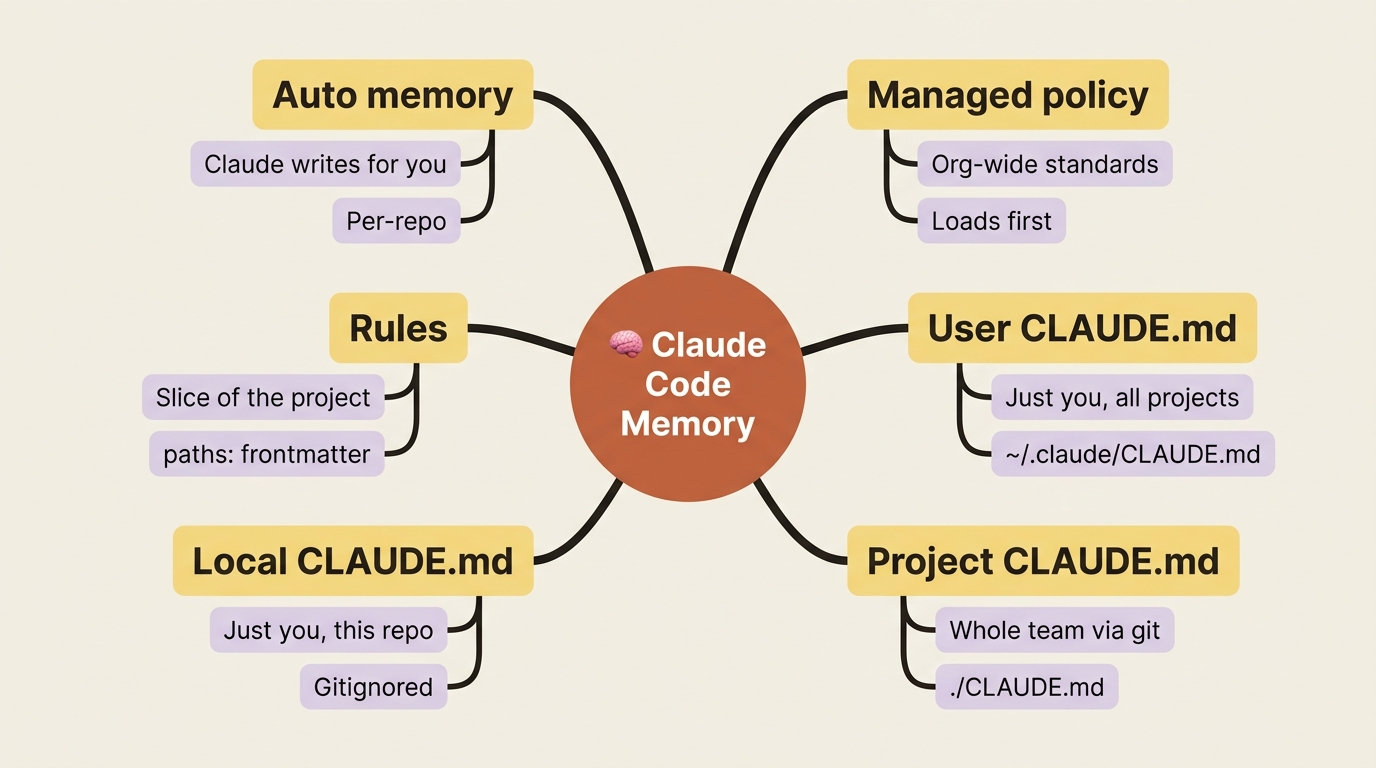
There are five layers of Claude Code memory, ordered from most general to most specific:
- Managed policy. Lives at an OS-specific path and is shared with every user on the machine. This is where an organization enforces standards that apply to everyone.
- User CLAUDE.md. Lives at
~/.claude/CLAUDE.md. Just you, across every project on your machine. - Project CLAUDE.md. Lives at
./CLAUDE.mdor./.claude/CLAUDE.md. Shared with your team through source control. - Local CLAUDE.md. Lives at
./CLAUDE.local.md. Just you, just this project, gitignored by default. - Rules. Markdown files in
.claude/rules/. Project-wide or personal, and optionally scoped to specific files. - Auto memory. Notes Claude writes for you, living in
~/.claude/projects/<project>/memory/.
That is six bullets for five layers because rules and auto memory each deserve their own line. The point holds: memory is a stack, not a single document.
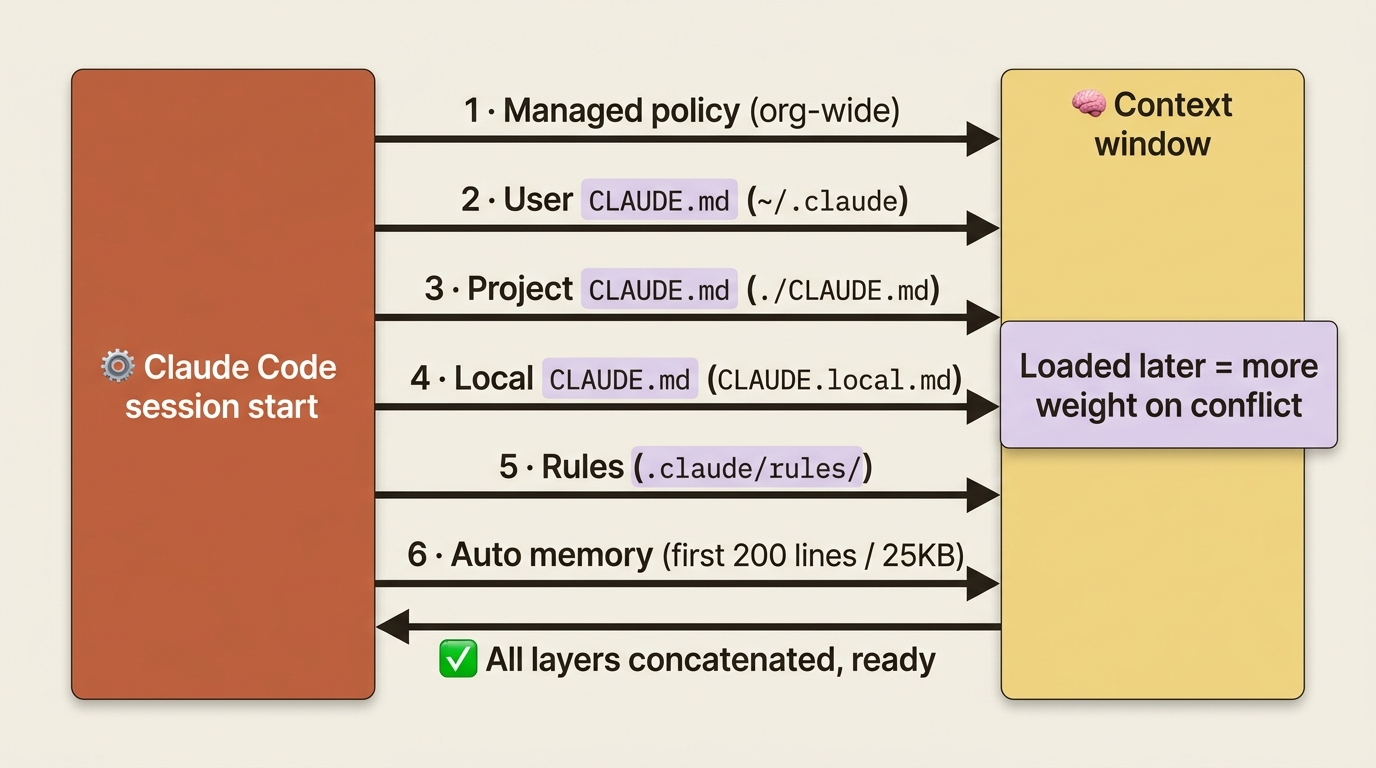
All five layers concatenate into context at the start of every session. The order matters. Managed policy loads first, then user, then project, then local, then rules, then auto memory. Instructions closer to where you launched Claude appear later in context, and later instructions carry more weight when two of them conflict. So a project rule will generally win over a personal default, which is exactly what you want.
One nuance worth internalizing early: CLAUDE.md instructions shape Claude's behavior. They are not hard configuration. The more specific and concise your instructions, the more reliably Claude follows them. Memory is guidance Claude reads, not a switch it obeys. Hold onto that distinction; it explains almost every "why didn't it listen" moment.
And one supported layer that early articles got wrong: CLAUDE.local.md. Some of the first writing on Claude Code treated it as deprecated. That was incorrect. It is fully supported, it is the right home for "this preference matters for this project, but only to me," and running /init with the personal option sets it up and gitignores it for you.
CLAUDE.md, done with discipline
The CLAUDE.md file is the single highest-leverage file you can create in any project. It is also the one most developers ruin by inflating it to four hundred lines of half-relevant backstory. Bloat is not harmless. The longer the file, the more often Claude ignores the rules you actually care about.
So treat CLAUDE.md as a curated document, not a dumping ground. Five principles do most of the work.
Target under 200 lines. This is the line where adherence visibly starts to degrade. If your file is approaching that ceiling, the answer is not to keep adding. The answer is to split content out into rules.
Lead with what Claude got wrong twice. If you have corrected Claude on the same thing more than once, that correction is your highest-priority content. Do not open with two paragraphs about why the project exists. Open with the fix that would have saved you time today.
Be specific enough to verify. "Use 2-space indentation" beats "format code nicely." "Run npm test before committing" beats "test your changes." "API handlers live in src/api/handlers/" beats "keep files organized." Concrete and checkable is the standard. If you cannot verify whether Claude followed a line, that line is not pulling its weight.
Treat repeated review comments as CLAUDE.md edits. Every time you catch yourself leaving the same review comment on Claude's output twice, that comment is a CLAUDE.md candidate. The file compounds in value the moment you stop accepting "I'll just correct it again" as your default.
Use @path/to/file.md imports for reference material. CLAUDE.md can pull in other files with @ syntax, recursively, up to five hops deep. One honest caveat: imports load in full at launch, so they do not reduce your context cost. The value is organization, not size.
Here is the shape that works. Five sections, around sixty lines of real content, every line earning its place:
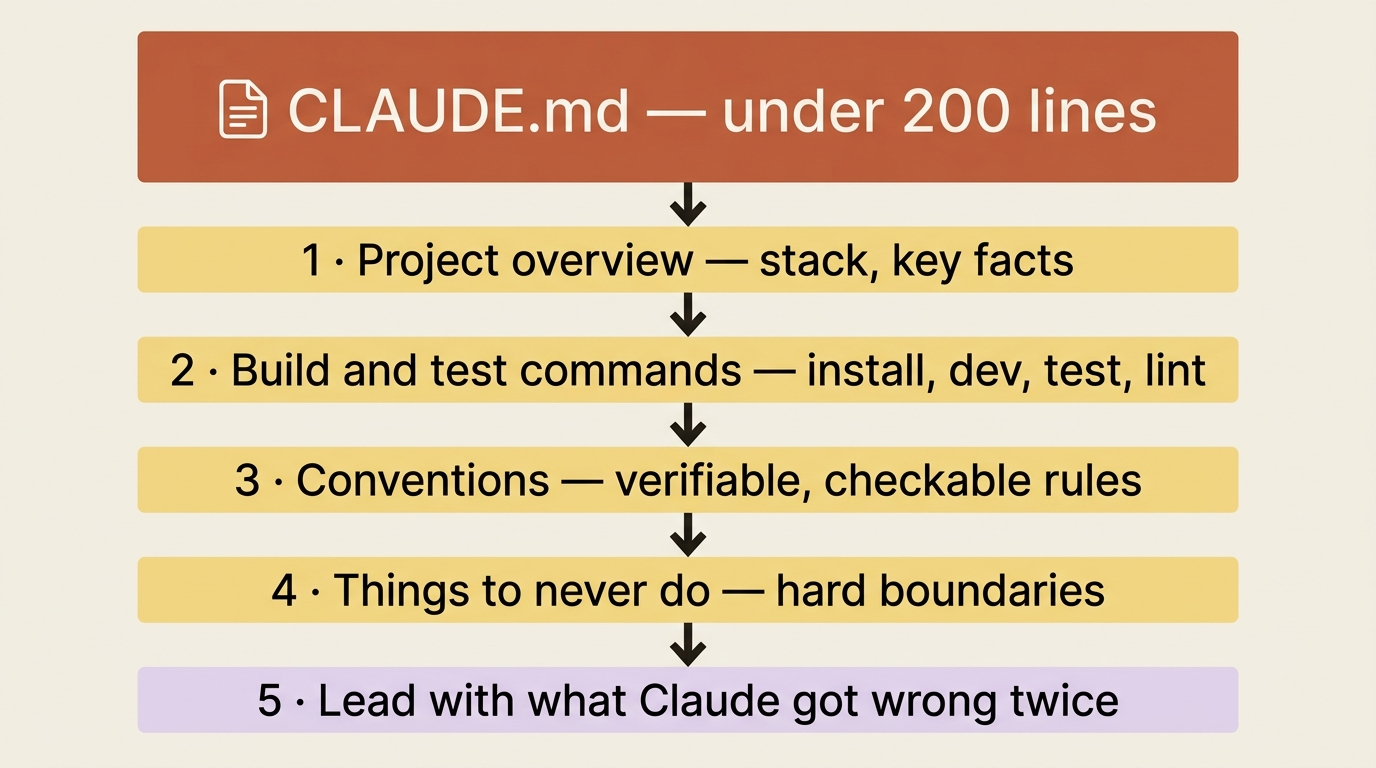
Anything that does not fit one of those buckets is probably a candidate for a rule, a skill, or a trim. And three anti-patterns are worth naming so you can spot them in your own files. The kitchen-sink CLAUDE.md pastes in every conversation you have ever had; it becomes a wall of noise. The history lesson explains why the project exists; Claude needs your conventions, not your backstory. The aspirational rule says things like "write clean code"; it is neither verifiable nor actionable. Concrete or cut.
One pro tip: block-level HTML comments, the <!-- maintainer notes --> kind, are stripped before CLAUDE.md is injected into context. Use them for notes to other humans without paying the token cost.
Path-scoped rules: grow instructions without growing cost
Here is the trick that most developers miss entirely, and it is the reason your CLAUDE.md should never balloon.
A rule is a markdown file in .claude/rules/<name>.md. It is the same building block as CLAUDE.md, with one critical addition: optional paths: frontmatter that tells Claude Code to load the rule only when matching files are in context.
Consider a Python rule:
---
paths: ["**/*.py"]
---

# Python conventions

- Use `ruff` for formatting; run `ruff check --fix` before committing.
- Type hints are required for public functions; `mypy --strict` is part of CI.
- Tests live in `tests/`, mirror the source path, use pytest.
- Prefer `pathlib.Path` over `os.path`.
That rule only enters context when Claude actually touches a .py file. Your TypeScript work stops paying for your Python rules. Your Python work stops paying for your TypeScript rules. In a polyglot repository, those savings add up fast, and your instruction set can grow without your per-session token cost growing with it.
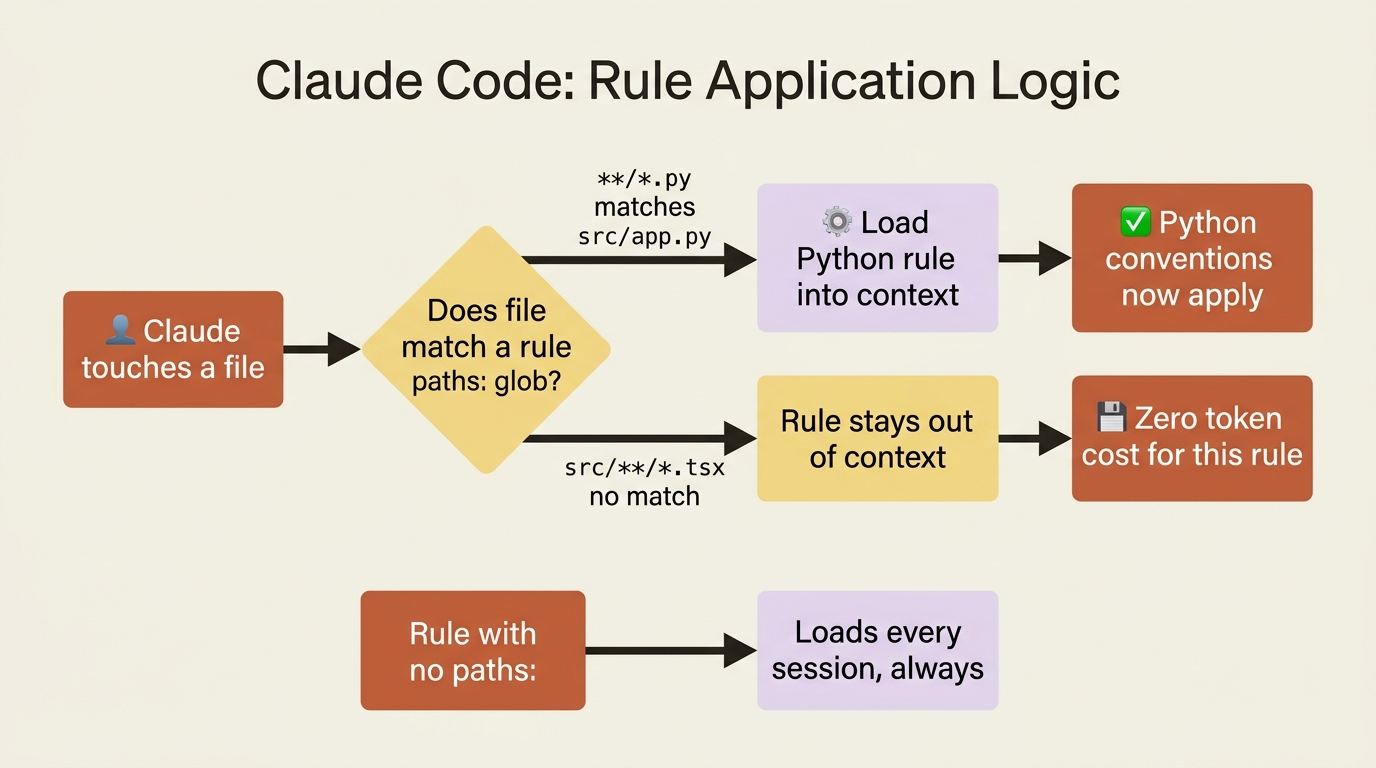
The pattern syntax is standard glob: ** for any depth, * for one segment, brace expansion for multiple extensions, and you can list multiple patterns. Rules without paths: frontmatter load every session, at the same priority as .claude/CLAUDE.md. Use those for topic-organized instructions that always apply: security policy, repo-wide conventions, anything you do not want crammed into the main CLAUDE.md but that is not file-scoped either.
Rules can nest into subdirectories like .claude/rules/frontend/react.md, and all .md files are discovered recursively. The subdirectories are for your organization only; what actually controls loading is the paths: frontmatter, not the folder. The .claude/rules/ directory also supports symlinks, so you can keep one canonical security policy and link it into every repo in your organization. And personal rules in ~/.claude/rules/ apply to every project on your machine, the natural home for cross-project preferences.
The mental model is clean: CLAUDE.md is for things that apply to the whole project. Rules are for things that apply to a slice of the project. Same building block, different scope. When your CLAUDE.md creeps past 200 lines, ask: which of these lines only matter for some files? Those are your extraction candidates.
Auto memory: the layer Claude maintains for you
Here is the layer most developers do not know exists. Auto memory is the layer Claude writes to for you. It has been on by default since v2.1.59, and most users have never once opened the directory where it quietly accumulates.
The mechanism is simple. As you work, Claude decides which observations are worth keeping. Build commands it learned by trial. Debugging insights it discovered. Preferences you corrected. Architectural notes that surfaced in conversation. Each becomes a line in ~/.claude/projects/<project>/memory/MEMORY.md, or, when that file grows long, a section in a topic file like debugging.md or architecture.md that MEMORY.md references.
You trigger writes with plain language:
- "Remember that the API tests require a local Redis instance."
- "Always use pnpm, not npm, in this project."
- "Note that the JWT refresh endpoint expects the token in the body, not the header."
Claude saves the note. Next session, you do not explain it again.
A detail worth knowing: the first 200 lines, or 25KB, of MEMORY.md load into every session automatically; topic files load on demand when relevant. Auto memory is the only memory layer with a load cap. CLAUDE.md and rules load in full no matter how long, though shorter still helps adherence.
You can inspect and edit everything with the /memory command. It lists every CLAUDE.md, CLAUDE.local.md, and rule loaded for the current session, with a toggle for auto memory and a link to open the auto-memory folder. The files are plain markdown. Edit them, delete what is wrong, rearrange them however you like. Claude keeps maintaining MEMORY.md regardless. Auto memory is not a black box; it is a directory of files you control.
Two limits define what auto memory is good for. First, it is machine-local. Two laptops with the same project have two independent memories, and cloud environments do not sync it. That is a feature: your machine-local quirks should not bleed into your teammates' sessions. (All worktrees of the same repo do share one auto-memory directory, since the project is derived from the git repository.) Second, it is per-user, per-repo. Your auto memory is invisible to teammates and theirs to you. That separation is what makes auto memory safe to write to freely. It is also what makes it a poor home for facts the whole team needs.
That second limit is the whole reason the next section exists.
The daily habit: promote what matters to others
Auto memory is the right place for your notes. The moment a note matters for anyone else on the project, move it. This single habit turns one developer's hard-won discoveries into shared team knowledge, and it takes under a minute per note.
The triage has four outcomes.
Promote to project CLAUDE.md when the note is true for the whole codebase and every collaborator needs it. "The auth service uses RS256 JWTs, not HS256" is a CLAUDE.md line. Bury it in your machine-local auto memory and your colleague's Claude session keeps suggesting HS256, because their Claude was never told.
Promote to a rule when the note is true for a slice of the codebase and every collaborator needs it there. "Database migrations must always be reversible" belongs in .claude/rules/migrations.md with paths: ["migrations/**"]. The same line in a global CLAUDE.md wastes context on every session that has nothing to do with migrations.
Promote to CLAUDE.local.md when the note is true for the whole codebase but only matters to you. "I use pnpm even though the team is on npm" does not belong in the team CLAUDE.md, the team is not on pnpm; it does not belong in ~/.claude/CLAUDE.md, it is project-specific; and it is too stable to leave drifting in auto memory. CLAUDE.local.md is the answer.
Leave it in auto memory when it is genuinely personal and still unproven: draft notes, preferences, things you are still figuring out.
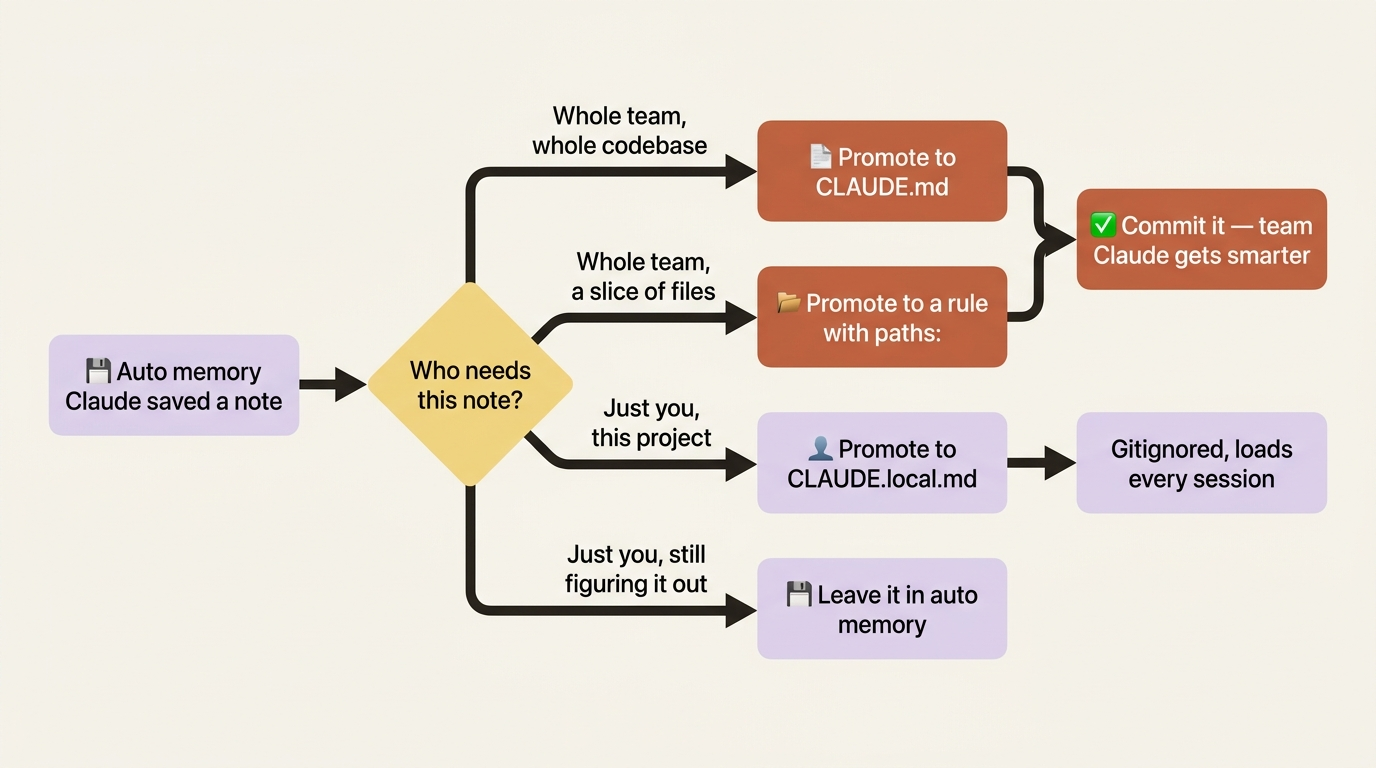
The whole operation is mechanical. Run /memory. Browse what Claude saved. Pick a line that meets a promotion criterion. Open the target file, paste the line, delete it from the auto-memory file. Done. Do this for two or three minutes at the end of each day, and after a few weeks your team's CLAUDE.md gets richer, your rule files get sharper, your auto memory stays focused on the genuinely personal, and the next person who joins the project inherits the conventions you spent days teaching Claude. Institutional knowledge stops being trapped on one laptop and starts living in the repo.
Memory versus enforcement: a line worth drawing
One framing prevents a common mistake. Memory is for guidance Claude reads. It is not for behavior Claude Code enforces.
A CLAUDE.md line that says "always run lint before committing" is a suggestion. Claude will usually honor it, but "usually" is doing real work in that sentence. If a rule must hold every single time, memory is the wrong tool. A PreToolUse hook on git commit that runs lint and blocks on failure is enforcement, and enforcement does not negotiate.
So when you find yourself adding an absolute rule to CLAUDE.md, pause and ask whether it truly must hold every time. If it must, write it as a hook instead. Memory shapes behavior; hooks guarantee it.
Do this today
Ten minutes of discipline buys days of saved re-explanation. Three steps:
- Run
/memory. Look at every memory file actually loaded for your current session. The first surprise, and there will be one, is the lesson. - Promote one thing from auto memory into CLAUDE.md. Find a fact your team needs that is currently sitting in your machine-local
MEMORY.md. Move it into the project CLAUDE.md and commit it. The whole team's Claude just got smarter. - Audit your CLAUDE.md. If it is over 200 lines, hunt the bloat. If anything in it only matters for certain file types, extract it into
.claude/rules/<name>.mdwithpaths:frontmatter. If anything is aspirational ("write clean code"), cut it.
While you are in there, two troubleshooting reflexes are worth keeping. If Claude is not following your CLAUDE.md, run /memory first and confirm the file is actually loaded; if it is loaded, suspect vague instructions, conflicting rules, or a file past 200 lines. And if instructions seem to vanish after a /compact, know that a project-root CLAUDE.md survives compaction because Claude re-reads it from disk, while nested CLAUDE.md files in subdirectories do not auto-reload. Anything that must persist belongs in the project root.
Stop paying the tax
The developers who feel like Claude Code "keeps forgetting things" are almost always the ones treating memory as a single file, or not thinking about it at all. The developers for whom Claude feels like a teammate who already knows the project have done one quiet thing differently: they routed each fact to the right layer.
Managed policy for the organization. User CLAUDE.md for you, everywhere. Project CLAUDE.md for the team. CLAUDE.local.md for your project-specific quirks. Path-scoped rules for the slices. Auto memory for the discoveries, promoted the moment they matter to anyone else.
That is the whole system. It is not complicated, and it compounds. Every fact you place correctly today is a fact you never explain again. Stop paying the tax. Write it down where it belongs.
This is Part 7 of "Claude Code, Day-to-Day," a 19-part guide to mastering Claude Code for working engineers.