
The Claude Code Feature You Skip Every Day (And Why It Quietly Wrecks Your Sessions)
Subagents are the Claude Code feature most engineers never touch, and skipping them is why long sessions slowly fall apart.
Claude Code subagents are the single highest-leverage habit separating casual users from experts. Most engineers never touch them. Here is what that costs you, and how to fix it in one afternoon.
In this article: Claude Code, Anthropic's agentic coding tool, slowly degrades over a long session for a reason nobody warns you about: context pollution. Every detour you take leaves file reads piled up in your main conversation. This article explains Claude Code subagents, the built-in feature that fixes it by doing the reading somewhere else. You will learn what a subagent actually is, the three you can use right now with zero setup, how to invoke them, and when to write your own. By the end, delegation will stop being a feature you forget and become your first move.
You start the morning with a clean Claude Code session. It is sharp. It answers fast, it remembers what you told it, it nails the edits. Then you ask one small question, and Claude reads ten files to answer it. Those ten files are now sitting in your main context for the rest of the day. You do that twenty more times over an afternoon, and your once-crisp session is a museum of detours. Responses get fuzzy. The model seems dumber. You start blaming the tool.
The tool is not broken. You just never learned to delegate. Claude Code subagents are the feature that does the delegating for you, and they are the most powerful context-hygiene tool in the kit. They are also the most underused, because nobody mentions them in your first hour and the documentation buries them next to hooks and MCP servers as one more extension among many. They deserve far better. This article is the case for treating subagents as a core habit, not a footnote.
What context pollution actually costs you
Claude Code is an agent. It runs a three-phase loop on every task: gather context, take action, verify. The "gather context" phase is where it reads files, follows imports, and searches your codebase. That is necessary work. The problem is where the work lands.
By default, every file Claude reads to answer a question stays in your main conversation. A clean session is a scarce resource measured in tokens, and exploration spends that resource fast. One quick "how does X work" can cost six thousand tokens of file reads that you never needed to keep. The answer was three sentences. The exploration was the expensive part, and you are now carrying it around for the rest of the day.
This is why a long session degrades. It is not the model getting worse. It is your context getting noisier, and a noisy context produces fuzzier answers. The fix is not a better prompt. The fix is doing the reading somewhere that is not your main conversation.
What a Claude Code subagent actually is
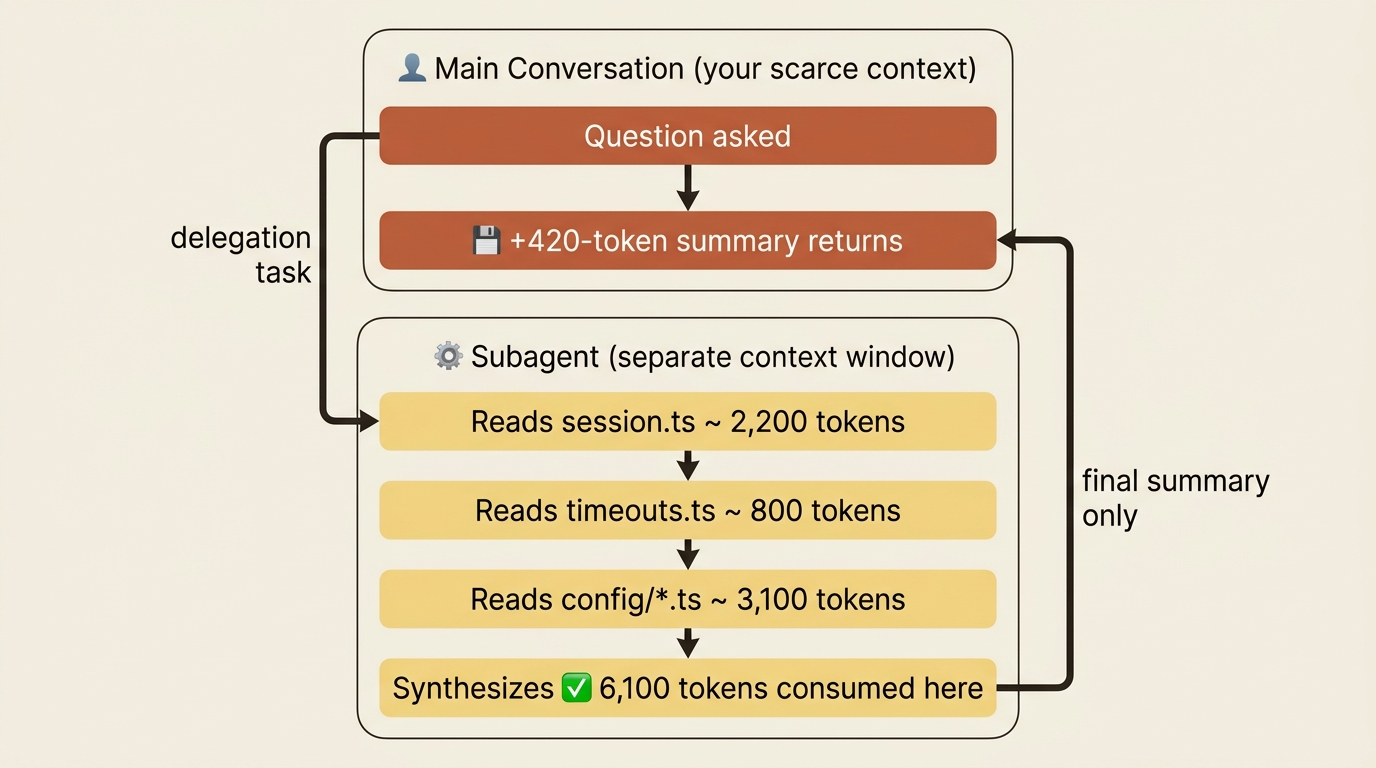
A subagent is a separate context window with its own system prompt, its own tool restrictions, and its own permissions. Your main conversation, the parent, hands it a delegation task. The subagent does the work in its own context: it reads files, runs commands, follows imports, whatever the job needs. When it finishes, only the final summary returns to the parent.
The math is the entire point.
Picture a subagent asked to understand a piece of session handling. It reads session.ts at 2,200 tokens, timeouts.ts at 800 tokens, and a batch of config/*.ts files at 3,100 tokens. Then it returns a 420-token summary to your main conversation. The subagent burned 6,100 tokens of file reads. Your main context grew by 420. That fourteen-to-one ratio is the whole reason subagents exist. The work happened, the answer arrived, and your conversation never paid for the exploration.
A few mechanical details are worth carrying:
- A subagent gets its own model selection. Explore runs on Haiku to stay fast and cheap. general-purpose inherits the main conversation's model. Custom subagents can name any model in their frontmatter.
- A subagent inherits some context, but not all. It always gets its own system prompt and the delegation task, plus MCP servers and skills. Whether it gets your
CLAUDE.mdand git status depends on the agent: Explore and Plan skip both to stay lean. - Subagents cannot spawn other subagents. There is no nesting. When you need genuine parallelism, agent teams are the next step up.
- The parent never sees the subagent's intermediate tool calls. It sees only the final text result, plus a small metadata trailer with token counts and duration. That is the design, not a limitation.
The three subagents you can use right now
You can write your own subagents, and you should. But Claude Code ships with three you can use this minute without configuring anything.
Explore is read-only, Haiku-powered, fast, and cheap. Its tools are restricted: no Write, no Edit. Claude delegates to Explore when it needs to search or understand a codebase without changing it. Explore has three thoroughness levels. Use quick for targeted lookups, medium for balanced exploration, and very thorough for comprehensive analysis.
One catch worth knowing: Explore skips your CLAUDE.md to keep its context tight. So if your CLAUDE.md carries an instruction that matters for the research, something like "ignore the vendor/ directory," you have to restate it in the delegation prompt. Explore will not see it on its own.
Plan is the research agent used inside plan mode. Plan mode is the Claude Code mode where the agent investigates and proposes an approach before touching any code. Plan is read-only with the same tool restrictions as Explore, but it inherits the main conversation's model rather than always running on Haiku. When you enter plan mode and Claude needs to understand your codebase, the Plan agent is the thing actually doing the reading. You rarely call it by name, since plan mode handles that, but knowing the mechanism explains what you see in transcripts.
general-purpose has full tool access for multi-step work that mixes exploration and modification. It inherits the main model. Reach for it when a task needs both reading and writing, complex reasoning across results, or several dependent steps.
The choice between them is simple: Explore for "go find out," Plan for "research a planned change," and general-purpose for "go do something multi-step." Explore and Plan cannot edit. general-purpose can.
How to invoke a subagent on purpose
There are three ways to invoke a subagent. They look different, but all three reduce to the same instruction: tell Claude which agent to use.
In an interactive session, just name the agent in your prompt.
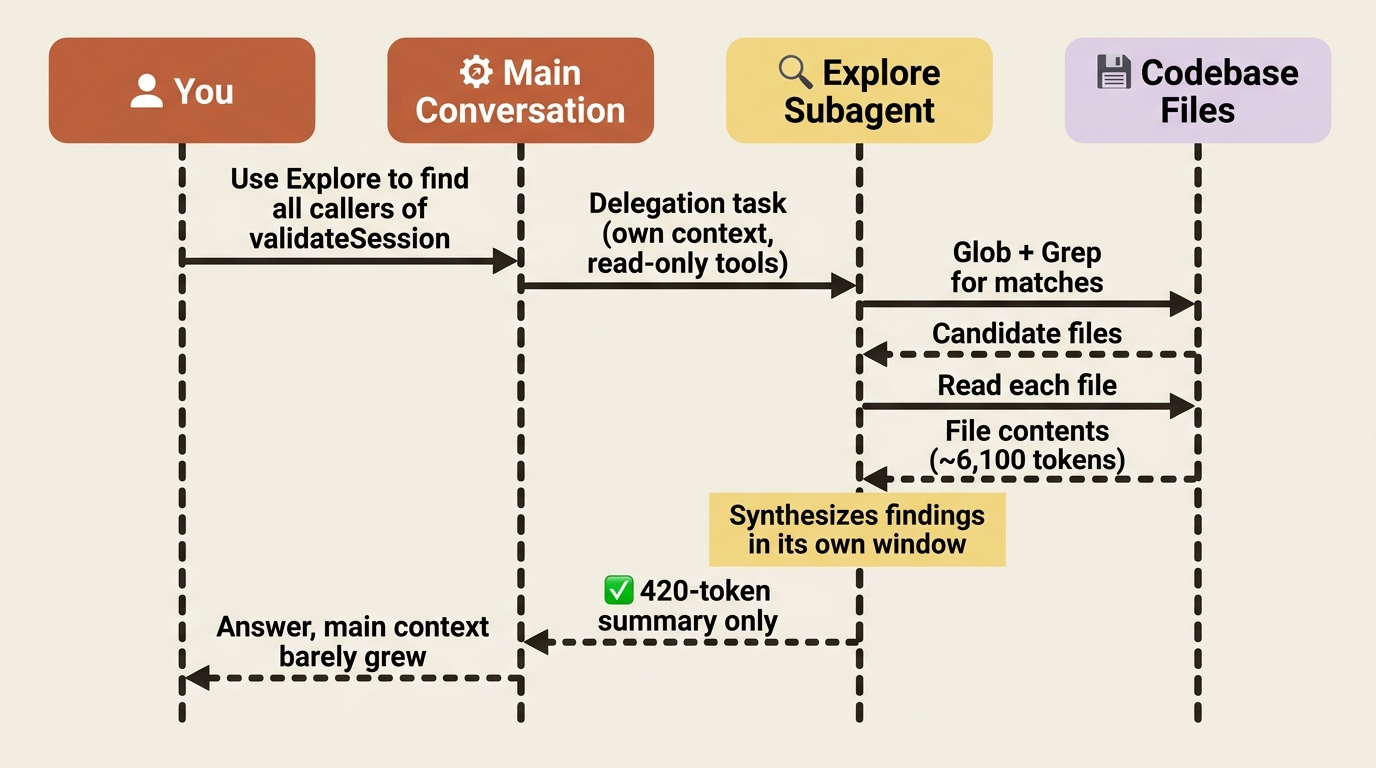
Use the Explore agent to find every call site of `validateSession`
and what each one does with the return value.
That is the whole move. The model recognizes the named built-in and delegates. You can nudge the thoroughness level out loud:
Use Explore with very thorough mode to map every place we use
the legacy auth helper, including in tests and migrations.
This is the daily-driver invocation. Most subagent work happens exactly this way.
From a skill, set the agent frontmatter field. A skill in Claude Code is a reusable, named workflow you trigger with a slash command. This is the move when you keep asking for the same kind of research over and over. Write the workflow down once:
---
name: deep-research
description: Research a topic thoroughly with read-only tools in a separate context
context: fork
agent: Explore
---

Research $ARGUMENTS thoroughly:

1. Find relevant files using Glob and Grep.
2. Read and analyze the code.
3. Note any conventions or patterns that affect how this works.
4. Summarize findings with specific file references.
When you run /deep-research <topic>, the skill body becomes the task, the agent: Explore line picks the execution environment, and only the summary returns to your main session. The context: fork field is the critical partner of agent. It tells Claude Code to run the skill in a forked, separate context instead of your main conversation. Without it, the skill body runs in your current context and you lose the isolation benefit entirely.
In headless mode, the delegation lives in the prompt.
claude -p "use the Explore agent to find all API endpoints and group them by router"
No special flag is needed. Describe the delegation and Claude routes it to Explore. There is a separate --agent flag, but it is for running an agent as the main session. For headless delegation to a built-in, naming it in the prompt is the simpler path.
When to reach for a subagent
The skill that separates expert Claude Code users from casual ones is recognition: noticing the moment a subagent would pay for itself. Here is the trigger list, condensed. Any one of these is the signal.
- The next prompt would pile thousands of tokens of file reads into my main context. Reach for Explore.
- I need to research something thoroughly without polluting the conversation I am in. Reach for Explore or a
/deep-researchskill. - I am in plan mode and Claude needs to read a lot of code. This is already handled; the Plan agent is doing it.
- I want a multi-step side task that reads and writes, but I do not want it crowding my main thread. Reach for general-purpose.
- I keep describing the same agent setup over and over. Write a custom subagent.
- I want code review in a fresh context that is not biased toward code I just wrote. Build a custom
code-reviewersubagent.
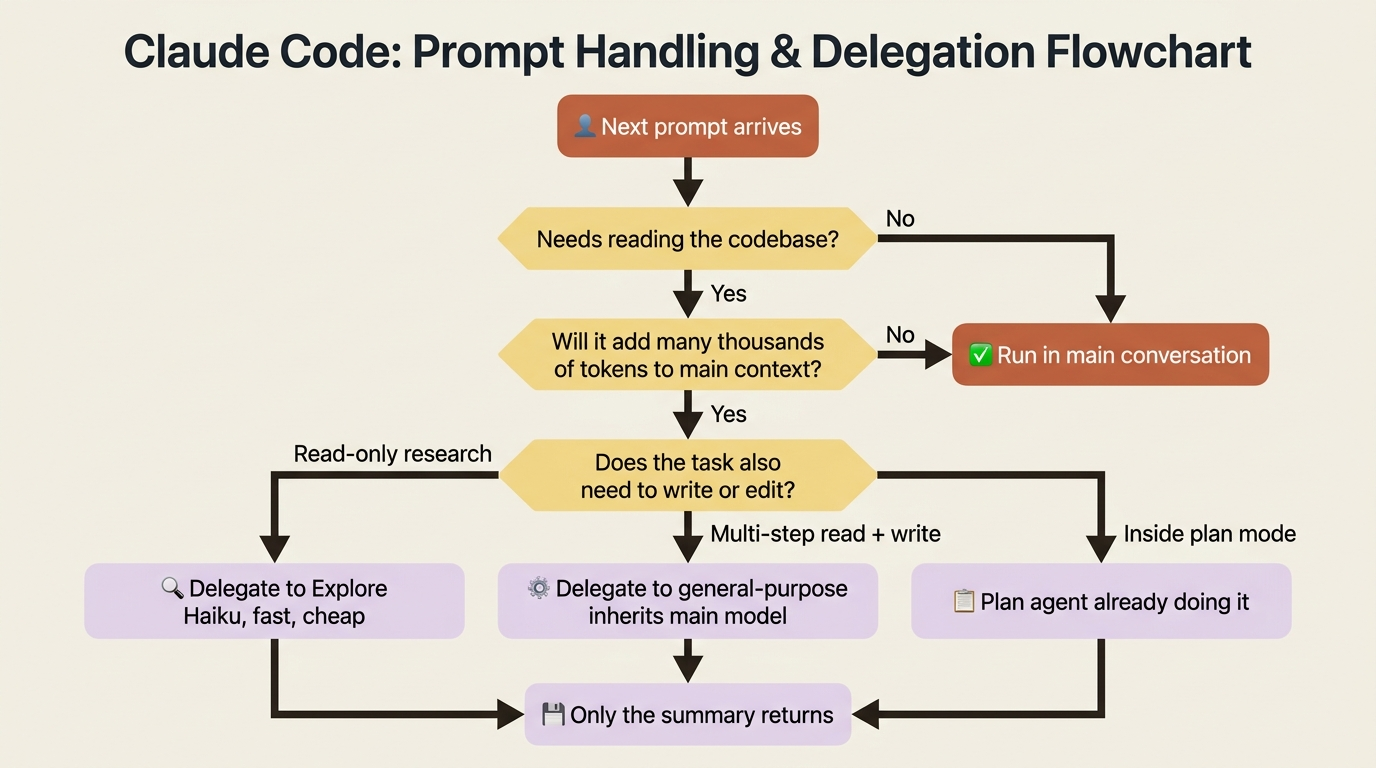
The framing that ties all of these together: a subagent is how you give the work somewhere to happen that is not your main conversation. Once you start treating that main conversation as a scarce resource, which in token terms it genuinely is, subagents stop being a feature you forget and become the first thing you reach for.
Writing your own subagents
The built-ins cover most of what you need. But the moment you catch yourself describing the same agent setup in three different prompts, something like "a senior reviewer who checks for security issues, performance issues, and test coverage," it is time to write that agent down once.
Custom subagents live as markdown files with YAML frontmatter, the same shape as skills. Here is a minimal one:
---
name: code-reviewer
description: Reviews code for quality, security, and best practices. Use proactively after code changes.
tools: Read, Grep, Glob, Bash
model: sonnet
---

You are a senior code reviewer.

When invoked:
1. Run `git diff` to see recent changes.
2. Focus on modified files.
3. Begin review immediately.

Provide feedback organized by priority:
- Critical issues (must fix)
- Warnings (should fix)
- Suggestions (consider improving)
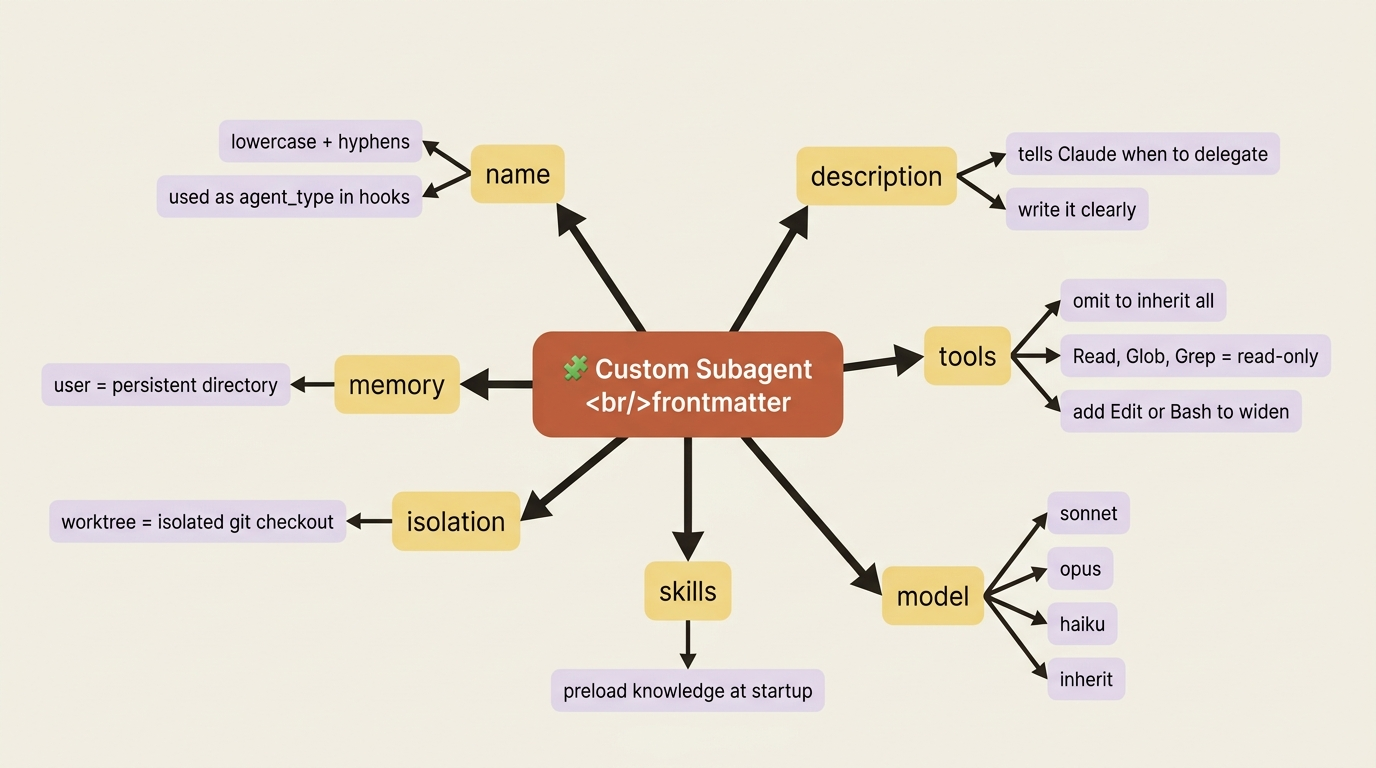
The body becomes the subagent's system prompt. The frontmatter controls everything else. The key fields:
name(required): lowercase letters and hyphens. It shows up in hook events asagent_type.description(required): when Claude should delegate to this subagent. The model reads this to decide whether to invoke it autonomously, so write it clearly.tools: a comma-separated list. Omit it to inherit all parent tools. Settools: Read, Glob, Grepto make the agent strictly read-only.model:sonnet,opus,haiku, orinheritfor the parent's current model.skills: preload specific skills into the agent's context at startup, so it has the relevant knowledge without discovery overhead.isolation: worktree: hand the subagent an isolated git worktree to edit in, so parallel agents do not collide.memory: user: give the subagent a persistent memory directory that survives across conversations.
Where the file lives sets its scope. Use .claude/agents/<name>.md for agents your whole team should share, and check them into the repository. Use ~/.claude/agents/<name>.md for your personal agents, available across every project. Managed organization settings and plugin-bundled agents fill in the rest.
You do not have to hand-write the YAML. Run /agents to open a tabbed interface for managing subagents. The Library tab lists every available subagent, built-in, user, project, and plugin. The Running tab shows live subagents during a session. In the Library tab, Create new agent walks you through the fields, and Generate with Claude lets you describe the agent in plain English while Claude writes the frontmatter and body. It takes about forty-five seconds and no YAML.
A few patterns worth stealing: a read-only reviewer with tools: Read, Grep, Glob. A debugger with tools: Read, Edit, Bash, Grep, Glob, since fixing bugs means modifying code. A migration assistant bounded to specific directories with tools: Read, Edit(./migrations/**), Bash(npx prisma *). A spec writer with tools: Read, Glob, Grep, Write(./docs/specs/**) that can read the whole codebase but write nothing outside the specs folder.
Where subagents end and agent teams begin
Two more parallel-work mechanisms sit alongside subagents, and it helps to know the line.
Worktrees handle filesystem isolation. Two Claudes editing the same file would overwrite each other, so a worktree puts each session in its own checkout. Subagents can use them too: set isolation: worktree in the frontmatter, and each invocation gets a temporary worktree that is removed automatically when the subagent finishes.
Agent teams are the step up from subagents. Where a subagent reports results back to the main agent only, agent team teammates can talk to each other directly: they share a task list, claim work, message each other by name, and challenge each other's findings. They shine for parallel code review across multiple lenses, cross-layer feature work, and debugging with competing hypotheses. They are powerful, but experimental and token-heavy, so reach for them only when the coordination itself is the value.
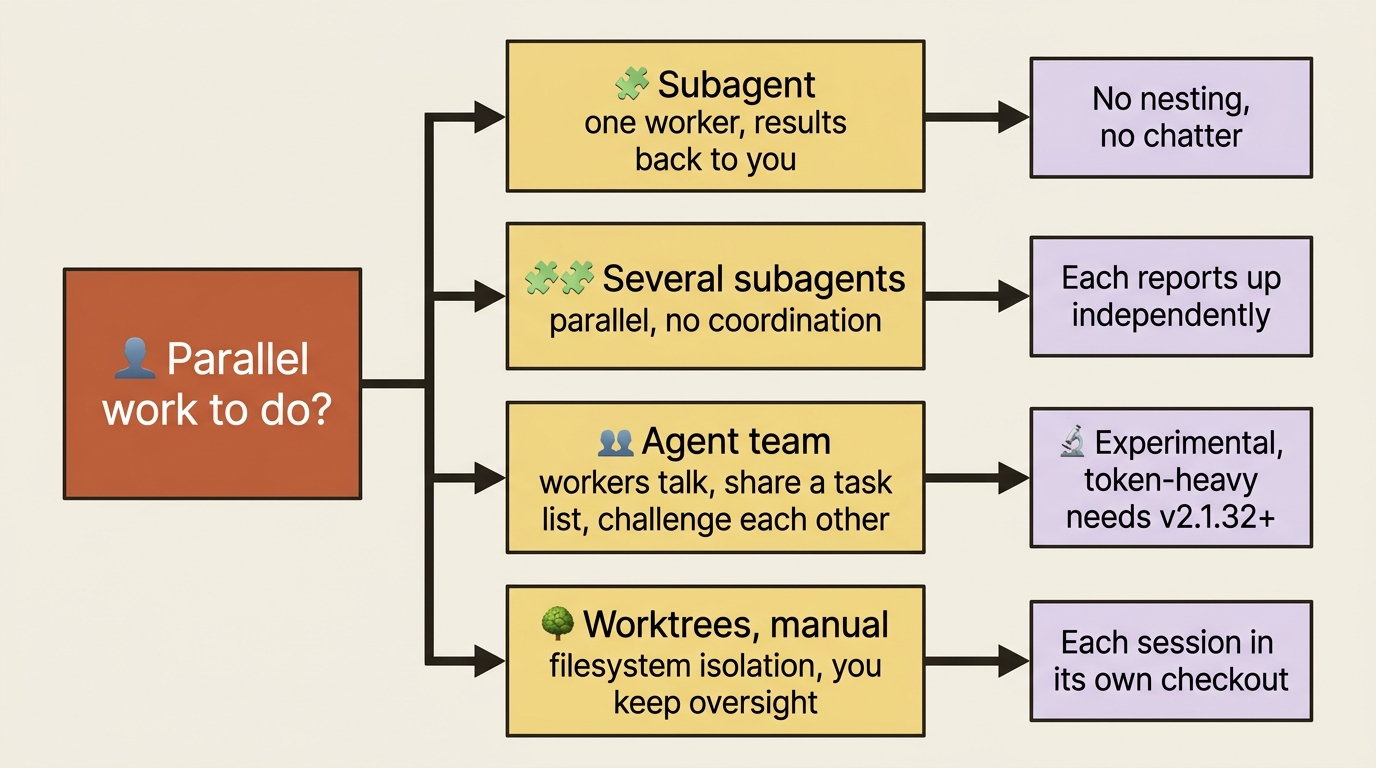
The decision tree is short. One worker, results back to you: a subagent. Several workers, results back to you, no coordination: several subagents. Several workers that must coordinate, share findings, and challenge each other: an agent team. Most of your subagent use will be the first two.
Do this today
Three concrete moves turn this from an article you read into a habit you keep.
1. The next time you would ask "what files use X?", name Explore explicitly. Say "Use the Explore agent to find every place X is referenced and what each one does with it." Then watch the return summary and notice that your main context barely grew. That is the muscle you are building.
2. Open /agents and look around. See the built-ins, anything from plugins you installed, anything else that is there. If you have never opened this interface, this is the moment.
3. Create one custom subagent. Do not write the YAML by hand. Run /agents, choose Create new agent, choose Generate with Claude, and describe what you want in plain English. Pick ~/.claude/agents/ for "available everywhere" or .claude/agents/ for "share with the team." The first one is the hardest. After that, every recurring research task is a candidate.
The compounding habit
Subagents are not an advanced feature you graduate to. They are a habit you adopt early, or one you keep paying for not having. The casual user mashes through a slowly rotting session and blames the model. The expert delegates the reading, keeps the main conversation clean, and stays sharp from morning to evening.
The compounding effect is real. Every custom subagent you write is a piece of your engineering judgment that you never have to re-derive in chat again. Six months from now, your ~/.claude/agents/ directory is the quiet reason you are faster than the developer who started using Claude Code the same day you did. The feature you keep skipping is the one that would have made you better. Stop skipping it.
This is Part 6 of "Claude Code, Day-to-Day," a 19-part guide to mastering Claude Code for working engineers.