
Your AI Says the Code Works. Can It Prove It?
Close the loop: MCP lets an AI verify its code against reality instead of just claiming it works.
How MCP servers for Claude Code turn every "done" from a confident guess into a checked fact
In this article: Most AI coding assistants stop at "this should work." This piece shows how the Model Context Protocol gives Claude Code real senses, the ability to query a database, screenshot a page, and read production logs, so it can verify its own work. You will learn what MCP is, the three ways to install a server, and the specific trio of MCP servers that closes the verification loop for any real web application.
There is a quiet lie at the center of most AI-assisted coding. The assistant writes a migration and tells you it "should work." It restyles a component and assures you the page "should look right." It ships a fix and signs off with "let me know if anything breaks." Every one of those sentences is a guess wearing the costume of a result.
The fix is not a smarter model. It is giving the model a way to look. That is what MCP servers for Claude Code do, and once you wire up the right ones, the difference is stark: instead of an AI that claims its code works, you get an AI that runs the code, inspects reality, and reports what it actually found.
What MCP actually is
MCP stands for Model Context Protocol, an open standard for connecting large language models to external tools. Skills give Claude new instructions. Hooks give Claude Code new behavior. MCP gives Claude new senses: the ability to read a database, drive a browser, tail a log, or query an issue tracker.
From Claude Code's point of view, every MCP server you connect adds a new family of tools that Claude can call right alongside its built-in Read, Edit, and Bash. From your point of view, MCP kills the copy-paste tax. You no longer paste a SQL result into chat and ask Claude to interpret it. You connect a Postgres MCP server and let Claude run the query itself.
A few mechanical facts are worth carrying with you.
MCP tools are namespaced as mcp__<server>__<tool>. You will see names like mcp__postgres__query, mcp__playwright__navigate, and mcp__github__list_issues. Permission rules use the same shape: mcp__postgres__* grants every Postgres tool, while mcp__github__list_issues grants exactly one.
Tools are deferred by default. With tool search enabled, only tool names load when a session starts. The full schema loads when Claude actually decides to use a tool. The practical upshot: adding more MCP servers barely touches your context budget. You can connect six or eight without paying for them on every turn.
MCP servers speak one of three transports. Stdio runs a local subprocess on your machine. HTTP is the modern remote default. SSE is a deprecated but still-supported remote option. The rule of thumb is simple: if a server's docs hand you a command to run, it is stdio; if they hand you a URL, it is HTTP.
The mental model to lock in: skills add knowledge, subagents add isolation, hooks add enforcement, and MCP adds capabilities. This is the layer where Claude reaches outside the chat.
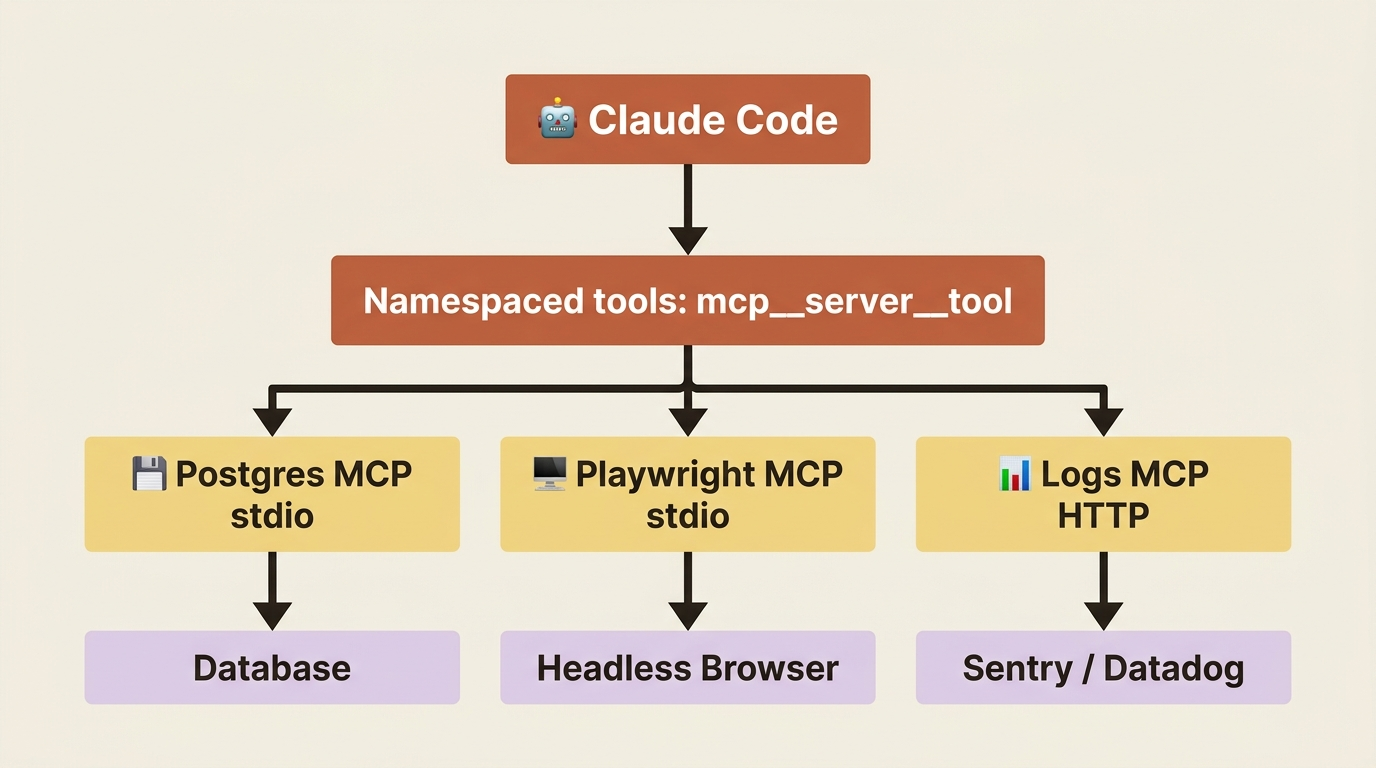
Three ways to add an MCP server
You do not need to memorize the whole surface. In practice, three paths cover almost everything.
Path one: install a plugin from the official marketplace. This is the cleanest route for popular servers. The official plugin marketplace ships one-line install commands for Playwright, Context7, Linear, GitHub, and more:
/plugin install playwright@claude-plugins-official
The plugin bundles the MCP server configuration, so you never hand-write a config file. Run /reload-plugins to activate it in the current session.
Path two: add a server with claude mcp add. Reach for this when a server is not in the marketplace, or when you want explicit control. There are three flavors, one per transport:
# Remote HTTP server (the modern default)
claude mcp add --transport http notion https://mcp.notion.com/mcp

# Remote HTTP server with auth
claude mcp add --transport http secure-api https://api.example.com/mcp \
  --header "Authorization: Bearer your-token"

# Local stdio server (a subprocess on your machine)
claude mcp add postgres -- npx -y @modelcontextprotocol/server-postgres \
  "postgresql://localhost/mydb"
Path three: edit .mcp.json directly. Use this for fine control or for a team-shared configuration you check into version control. The format is plain:
{
  "mcpServers": {
    "postgres": {
      "command": "npx",
      "args": ["-y", "@modelcontextprotocol/server-postgres", "${DATABASE_URL}"]
    }
  }
}
Environment variables expand with ${VAR} syntax, including ${VAR:-default} for fallbacks. That is how you keep secrets out of version control: reference ${DATABASE_URL}, and set the real value in a developer's shell or a .env file.
After adding any server, run /mcp to confirm it connected. For project-scoped servers loaded from .mcp.json, Claude Code prompts for your approval before using them the first time. That is a deliberate security gate: it stops a malicious commit from silently attaching an MCP server to your machine.
One more thing about scope. The --scope flag controls who shares a server. local keeps it private to this project, stored in ~/.claude.json. project commits it to .mcp.json so your whole team gets the same setup. user makes it available across all your projects but private to you. When the same server name appears at multiple scopes, the most specific one wins: local beats project beats user. Pick project for shared infrastructure like a team dev database, and local for anything carrying a personal credential you do not want to leak.
The connection lifecycle (and why /mcp is your first stop)
When something goes wrong, it helps to know where in the lifecycle a server actually is. A server moves through a small set of states, and the symptom you see usually maps to exactly one of them.
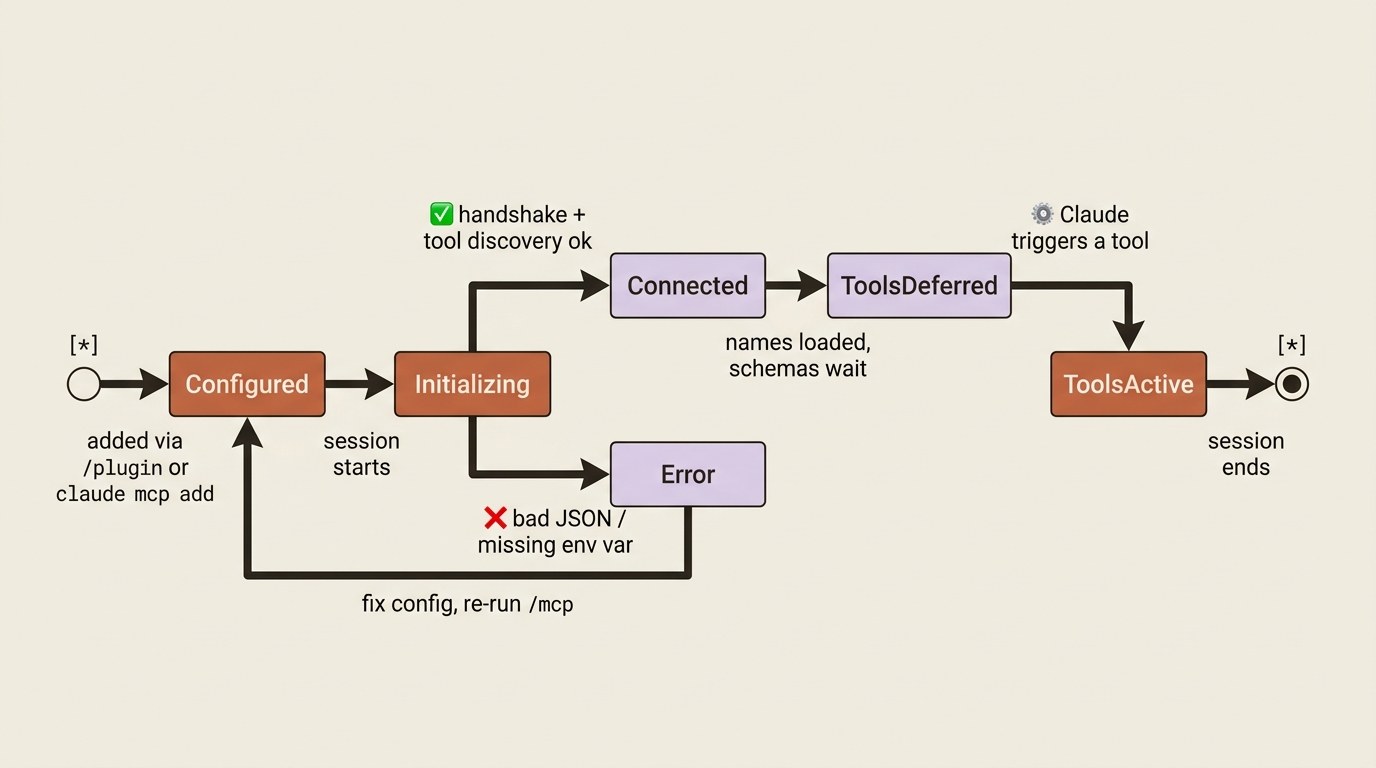
If a server never appears in /mcp, the config is usually malformed; run claude --debug mcp and read the connection log. If the server appears but its tools do not, the most common cause is harmless: tools are deferred via tool search and simply have not been triggered yet. Other causes are a failed tool-discovery step or missing allowedTools permissions. And if a server starts in one directory but not another, suspect a relative-path bug. Use absolute paths, or the portable ${CLAUDE_PROJECT_DIR} and ${CLAUDE_PLUGIN_ROOT} variables.
That is the supporting cast. Now the headline.
The verification-loop MCP trio
Here is the core argument of this whole topic. Three MCP servers, working together, do something none of them does alone: they let Claude see what it just did. They close the third phase of the agentic loop, the one that runs gather context, take action, verify.
For any project that talks to data, has a UI, and runs in production, which describes nearly every web application, three servers carry the load.
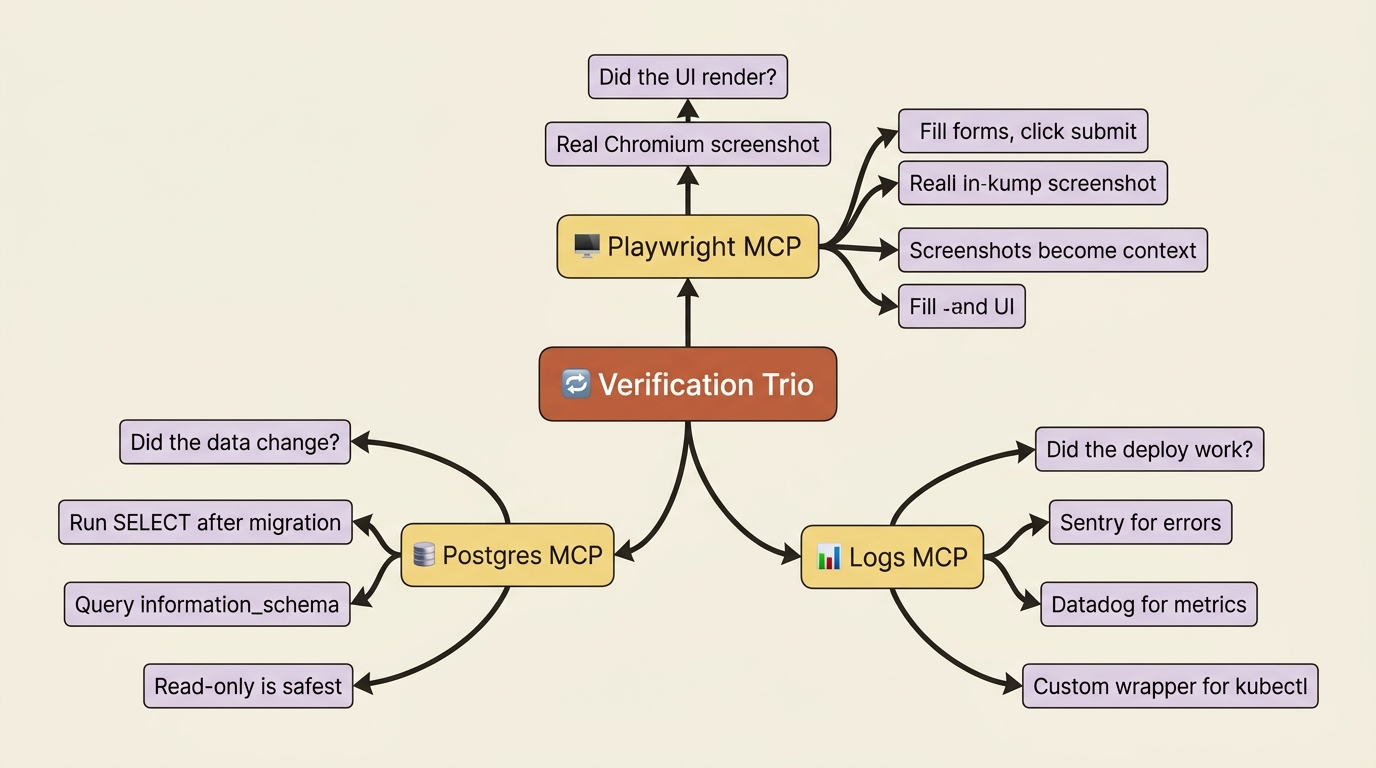
Postgres MCP: "did the data change?"
The first verifier. Claude writes a migration, runs it, then runs a SELECT to confirm the new column actually exists with the expected type. Or it inserts a row and queries to confirm the row landed. Install it as a local stdio server:
claude mcp add postgres -- npx -y @modelcontextprotocol/server-postgres \
  "postgresql://localhost/mydb"
The pattern this unlocks is the whole point. You ask Claude to add a last_login_at column to the users table and backfill it. Claude writes the migration, runs pnpm prisma migrate dev, and then, without being asked, queries information_schema.columns to confirm the column exists as timestamp with time zone, and runs a count(*) to confirm the backfill populated 1,247 rows. Only then does it say "ready to commit."
Without the Postgres MCP, Claude writes the migration, runs it, and tells you it worked. With the MCP, Claude verifies it and then tells you. Same migration. Entirely different trust level.
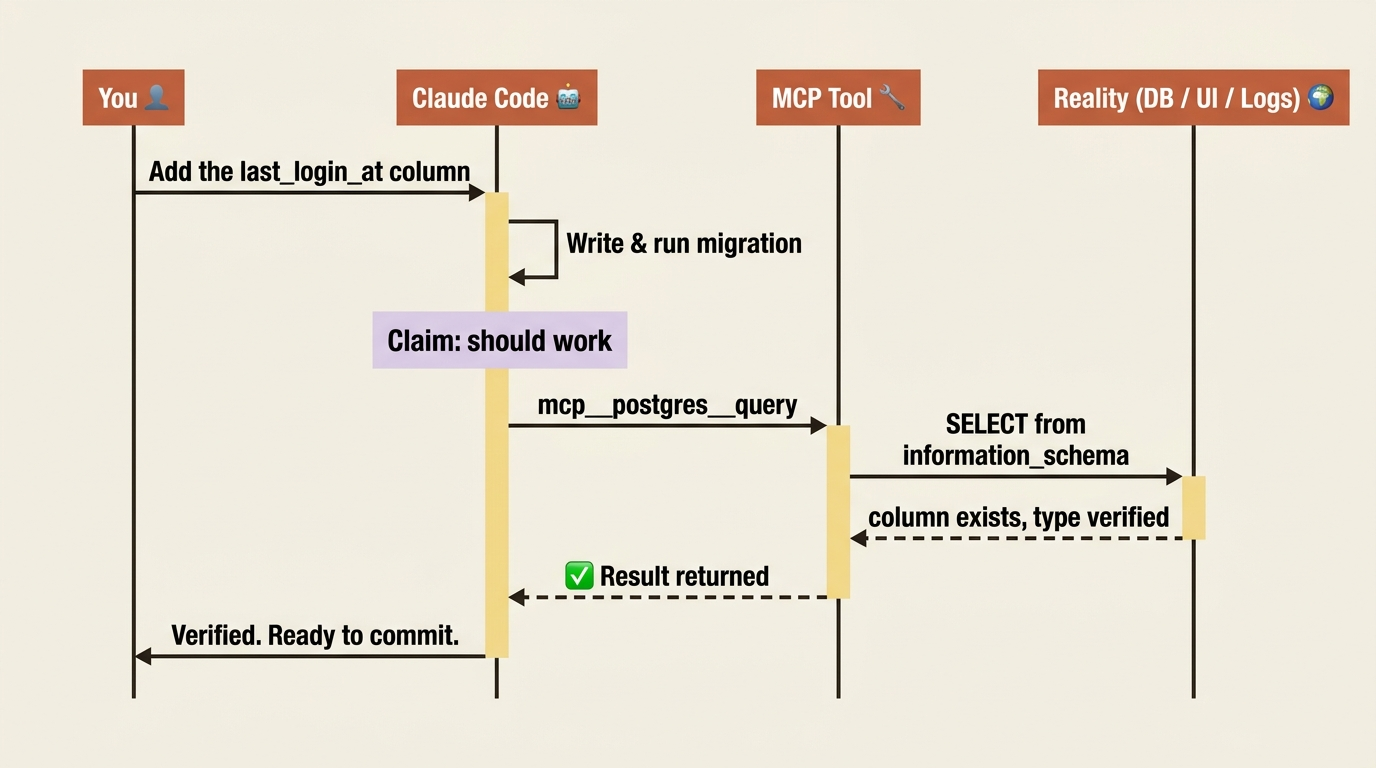
One safety detail matters. The Postgres MCP can be configured read-only or read-write. For verification loops, read-only is almost always what you want: let Claude query state, but route every modification through a normal Bash-run migration you can see and approve. Lock it down in your permissions configuration:
{
  "permissions": {
    "allow": ["mcp__postgres__query"]
  }
}
The same pattern works for MySQL, SQLite, Snowflake, and any other database with an MCP. The naming stays consistent: mcp__<db-name>__query.
Playwright MCP: "did the UI render correctly?"
The second verifier, and for UI work, the single biggest jump in trustworthiness the MCP layer provides. Claude modifies a React component, opens the page in a real headless browser, takes a screenshot, and confirms the change actually rendered. Install it from the marketplace:
/plugin install playwright@claude-plugins-official
The plugin bundles Microsoft's official Playwright MCP server. After /reload-plugins, Claude can navigate, click, fill forms, evaluate JavaScript in the page, wait for selectors, and take screenshots.
Picture the workflow. You ask for a totals card that shows percent-change as a green or red badge. Claude edits TotalsCard.tsx, restarts the dev server, navigates to http://localhost:3000/dashboard, screenshots it, reads the screenshot, confirms the badge rendered in the right color, then navigates to a short-range variant and checks it updated. It reports back with screenshots attached.
The Playwright MCP is the direct answer to "Claude said the styles work and they do not." Either Claude verifies the page visually, or the claim is still a guess. Two practical notes: launching a real Chromium instance takes a few seconds, which is fine because you only pay that cost when Claude needs to check a result, not on every keystroke. And the screenshots Playwright returns become real attachments in Claude's context that the model can actually read, not paths it has to trust.
For native apps, the equivalent move is computer use, a research preview on macOS available on Pro and Max plans, where Claude drives the operating system instead of a browser. Playwright is the right answer for web; computer use is the right answer for everything else.
Logs MCP: "did the deploy actually work?"
The third verifier. Claude deploys a fix, waits a minute, then reads the last sixty seconds of production logs to confirm the error rate dropped, or to roll back if it did not.
There is no single "logs MCP"; the right one depends on your stack. Use the Sentry MCP (@sentry/mcp-server) for application errors. Use the Datadog MCP for logs and metrics across services if you already run Datadog. Or build a thin custom logs MCP wrapping kubectl logs, journalctl, or docker logs when your setup is bespoke. The Sentry install looks like this:
claude mcp add sentry -- npx -y @sentry/mcp-server --auth-token "$SENTRY_TOKEN"
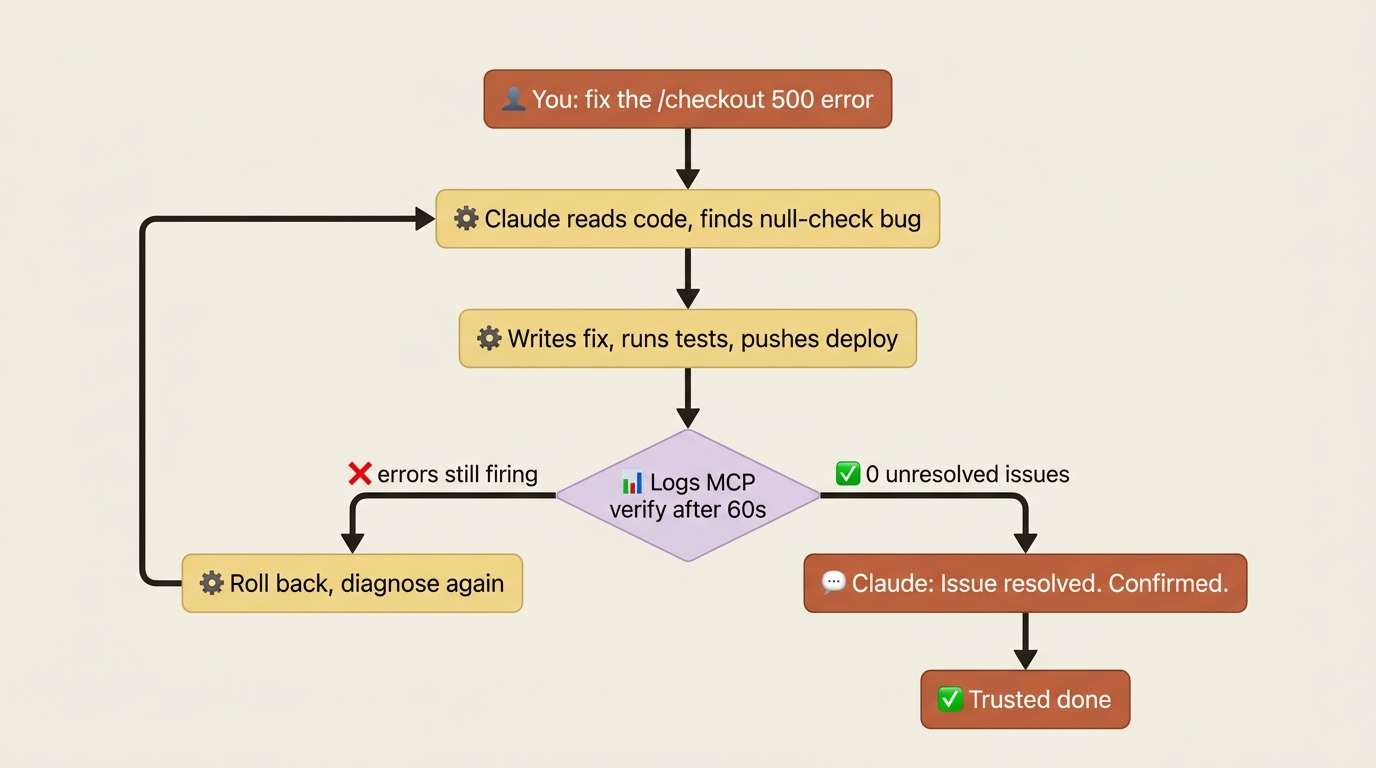
Now the loop is concrete. A user reports a 500 on /checkout. Claude reads the code, finds a null-check bug in the order processor, writes the fix, runs the tests, and pushes the deploy. Sixty seconds later it queries Sentry: zero unresolved issues matching /checkout, 247 successful requests in the last five minutes. It reports the issue resolved, with the evidence attached.
Without the logs MCP, that last step is "let me know if it does not work." With it, Claude verifies the fix landed in production, then tells you.
Why the three together matter
Each server is useful alone. Together they close the verification loop for any service that talks to data, has a UI, and runs in production. The progression to internalize: write code, exercise it (a DB query, a browser screenshot, a deploy), observe the result (table state, screenshot, log line), and iterate. That is the agentic loop made real.
Here is the install sequence for a typical web project:
claude mcp add --scope project postgres -- npx -y \
  @modelcontextprotocol/server-postgres "${DATABASE_URL}"
/plugin install playwright@claude-plugins-official
claude mcp add --scope local sentry -- npx -y \
  @sentry/mcp-server --auth-token "${SENTRY_TOKEN}"
/reload-plugins
/mcp
The closing /mcp shows every connected server and its status. If anything is red, that is where to look first.
Context7: stop the deprecated-API suggestions
There is one more server worth installing, and it solves the most common AI-coding complaint of all: Claude suggests deprecated APIs from libraries that have moved on. Training data has a cutoff. Libraries do not. The gap between them is where you get code that compiles but uses last year's idioms.
Context7 closes that gap by pulling current documentation straight from a library's source repository, scoped to a specific version:
/plugin install context7@claude-plugins-official
After /reload-plugins, two patterns light up. First, inline lookup: before Claude writes a Pydantic v2 schema, you ask it to check the current syntax with Context7, and it writes code grounded in present-day truth. Second, skill generation: ask Claude to "create a skill for Pydantic v2 from Context7" and you get a reusable SKILL.md full of current conventions and pitfalls that loads automatically every future session. Give Claude a tool that holds current truth, then cache that truth so you never pay for the lookup twice.
A day with MCP wired up
Once the trio plus a couple of extras are connected, a morning looks like this. You ask what is assigned to you this sprint; Claude queries Linear. You pick the top issue; Claude moves it to "in progress," branches, writes the implementation, runs the migration, queries Postgres to confirm the new table and index landed, opens the relevant page in Playwright to screenshot the new UI, opens a GitHub pull request, and posts the screenshot as a PR comment.
That is several MCP servers each doing what it is best at, in one conversation. Take any one out and the chain breaks: no screenshot means no PR evidence, no database query means the migration check is a guess. The lesson is not that you need every server. It is that as you add servers, the workflows compound. Two servers do not give you twice the value; they give you new shapes of work that neither alone enabled.
Do this today
Three concrete moves, ordered by payback. They take about ten minutes total.
Install Playwright. Run /plugin install playwright@claude-plugins-official. This single server does the most for the most projects. Within one session, Claude starts verifying UI work visually instead of asking you to confirm it.
Connect your database. Whatever your stack, Postgres, MySQL, SQLite, or Snowflake, get its MCP. Use --scope project and commit .mcp.json so your whole team inherits the setup. From here on, schema changes are verified and data assertions are real.
Install Context7. Run /plugin install context7@claude-plugins-official. It is the cheapest possible defense against deprecated-API suggestions. Then ask Claude to generate a skill for whichever library you fight with most.
The loop is finally closed
For most of its short history, AI-assisted coding has run on trust you could not verify. The model claimed; you hoped. MCP changes the contract. It gives Claude Code senses, and senses turn claims into checks.
This is the deeper idea worth holding onto: in Claude Code, context is the operating system, and MCP is how that operating system reaches the world outside the chat. A database it can query. A browser it can drive. Logs it can read. None of it makes the model smarter. All of it makes the model honest, because an AI that can look at reality stops needing to guess about it.
Install the three. The next time Claude says "done," it will mean it, and it will show you why.
This is Part 10 of "Claude Code, Day-to-Day," a 19-part guide to mastering Claude Code for working engineers.