
Install a Claude Code Plugin and Prove It Loaded
A Claude Code plugin is one install command and one committed setting: add the official commit-commands plugin at project scope, prove it loaded from the menu, and let it commit the line that turns it on for the whole team.
A Claude Code plugin packages skills, hooks, and MCP servers into one install. Add the official commit-commands plugin at project scope, find its namespaced commands in the menu, and let it commit the setting that turns it on for your team.
You installed a tool that promised new commands, and you could not tell whether it loaded, what it changed, or whether your teammates would get it too.
In this article: Day 14 of a day-by-day guide to Claude Code. Start here: you install the
commit-commandsplugin at project scope, find its commands in the menu, and use one of them to commit the setting that turned it on. Going deeper: what an install changes and what a plugin may do without asking, how a team shares a plugin, and how Claude Code relates to the Agent Plugins open standard.
Tested on Claude Code 2.1.326.
Yesterday you added the Claude Code docs MCP server and watched Claude call it.
Start here
At the end of today, you can install a plugin for Ticket Triage, find its commands in the menu, and use one of them to commit the setting that turned the plugin on.
Starting fresh or fell behind? Run git switch -C main claude-code/day-13. This replaces your main with the end of Day 13; to keep your own work, run git branch my-backup first.
On Day 10 you wrote a skill by hand. On Day 11 you added a hook, and on Day 13 you added an MCP server. A plugin packages pieces like these into one folder that installs as a unit. Most plugins come from a marketplace, a catalog that lists plugins and where to fetch each one. Claude Code adds Anthropic's official marketplace, named claude-plugins-official, the first time you start a session, so you have had it since Day 1.
Today's plugin is commit-commands, the example that the Claude Code docs use. It adds three commands: one commits; one commits, pushes, and opens a pull request; and one cleans up old branches. Each command is a prompt in a file, like your /ship skill. You use only the first one today.
Check the starting state
Open a terminal in Ticket Triage:
cd ~/code/ticket-triage
git status
npm test
Git prints nothing to commit, working tree clean. The tests show ℹ fail 0 and the pass count from yesterday, ℹ pass 19.
Install the plugin
Install from your shell, not from inside a session. In the same terminal, run:
claude plugin install commit-commands@claude-plugins-official --scope project
Read the command in parts:
claude plugin installinstalls a plugin without starting a session.- `commit-commands@claude-plugins-official` is the plugin's name, then `@`, then the marketplace that it comes from.
--scope projectturns the plugin on for this repository, for everyone who works in it. A scope decides who gets the plugin and which settings file records it. Without the flag, the plugin is on for you in every project on this computer.
On the tested runs, the terminal showed one line:
✔ Installed plugin: commit-commands@claude-plugins-official (scope: project)
If you see not found in marketplace "claude-plugins-official" instead, the official marketplace is not on your computer. "When a plugin does not work" in Going deeper has the fix.
Manual mode: no prompts. The install runs in your shell, outside any session.
Read what changed
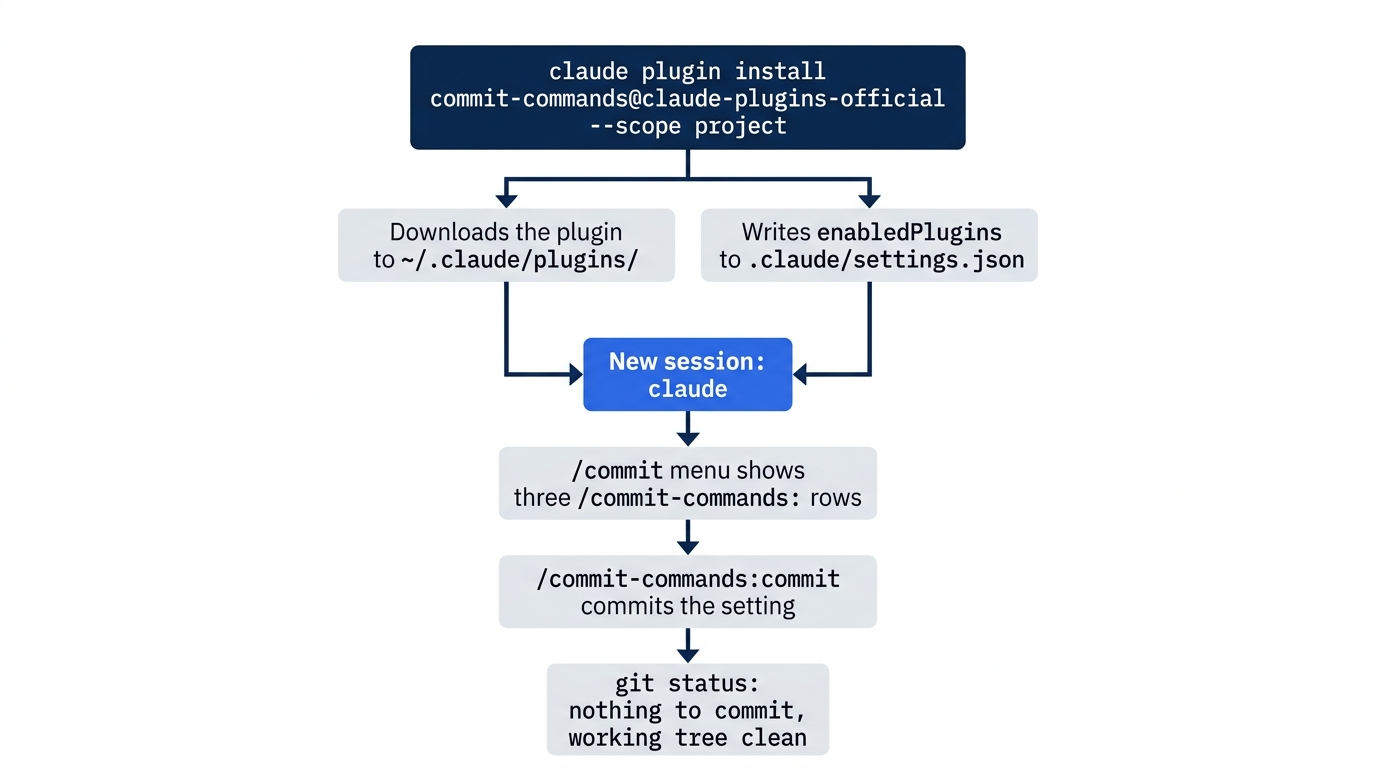
An install does two things. It downloads the plugin to your computer, and it writes one setting. Look at the setting:
git status --short
git diff .claude/settings.json
Git status shows M .claude/settings.json, the settings file that holds Day 11's hook. The diff adds three lines:
+  },
+  "enabledPlugins": {
+    "commit-commands@claude-plugins-official": true
enabledPlugins is the list of plugins that are turned on for this project. The }, line closes the hooks block from Day 11, which needs a comma now that another key follows it. Your hook did not change. The plugin's own files are not in your repository. Claude Code keeps them under ~/.claude/plugins/ in your home folder, and the setting tells it to load them in Ticket Triage.
Find the commands in the menu
Plugins load when a session starts, so start a new one:
claude
Type /commit and stop. On the tested run, the first rows of the menu were:
❯ /commit-commands:commit           (commit-commands) Create a git commit
  /commit-commands:clean_gone       (commit-commands) Cleans up all git branches marked as [gone] (branches that have been deleted on the remote but still exist
                                    locally), including removing associated worktrees.
  /commit-commands:commit-push-pr   (commit-commands) Commit, push, and open a PR
  /ship                             Check that Ticket Triage is ready to commit. Runs the tests and lists the changed files. Use before every commit. (project)
Each plugin command starts with the plugin's name and a colon, as in /commit-commands:commit. The prefix is a namespace. Two plugins can each ship a commit command, and the prefix keeps them apart. The label (commit-commands) says which plugin a command comes from. Your own /ship has no prefix, and its (project) label says that it comes from this repository. These three plugin lines prove that the plugin loaded. A fifth row, /verify, comes with Claude Code itself, so it is not from the plugin.
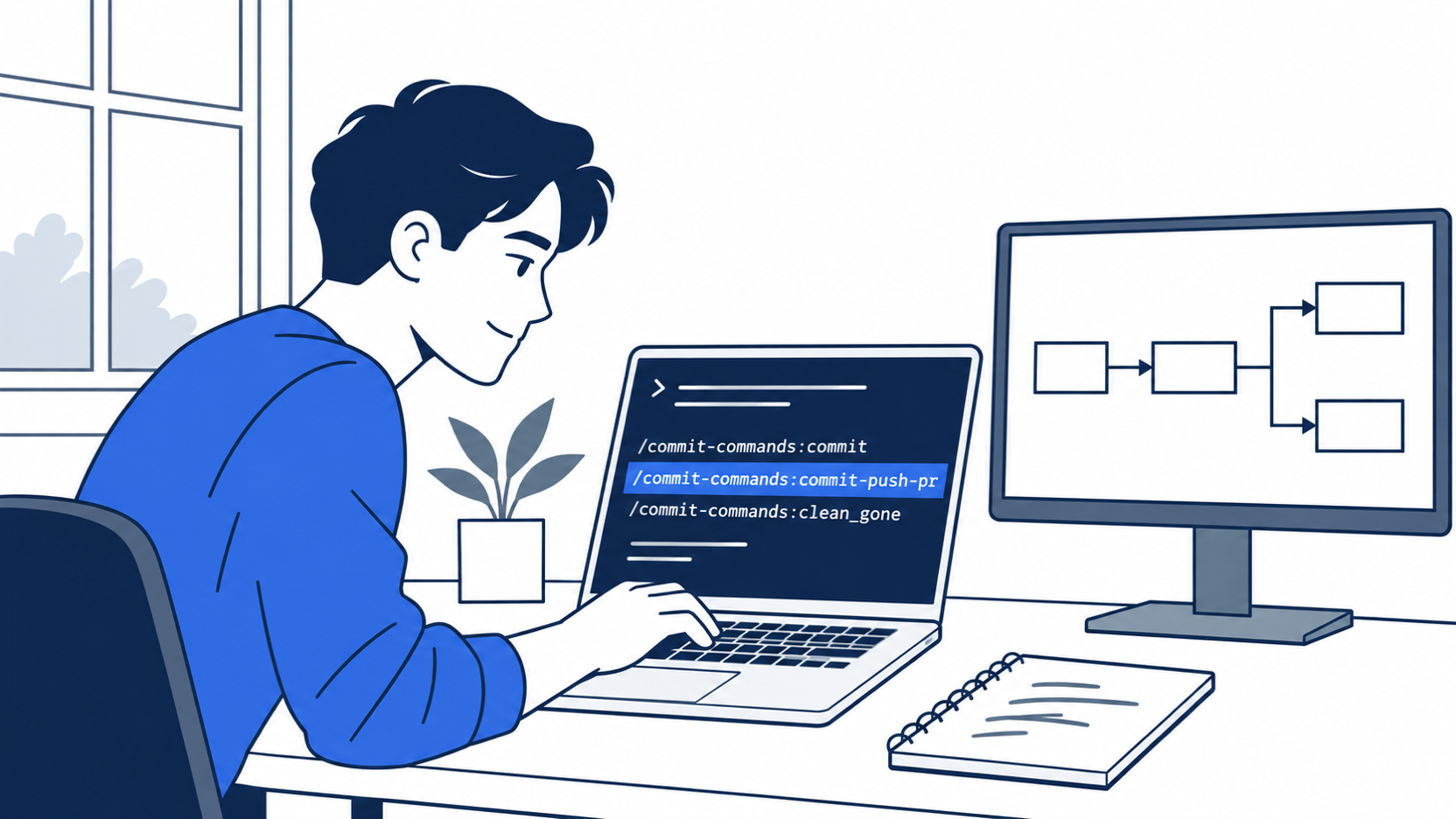
The scene shows the proof moment of the day. One install command and one new session put the plugin's three namespaced commands in the menu, next to your own /ship.
Clear what you typed with Ctrl+U, which deletes the whole input line.
Look at the plugin panel
Type /plugin and press Enter. The plugin panel opens, and its top row is:
Plugins Discover Installed Marketplaces Errors Stats
The panel opened on Discover, a searchable list of the plugins in your marketplaces. The bottom line says ←/→ to switch between tabs and Esc to close. The panel is where you browse, turn plugins on and off, and remove them later. Today, only look. Press Esc until the panel closes.
Manual mode: no prompts. The panel and the menu only read.
Commit with the plugin
The settings change is still not committed. Use the plugin to commit it:
/commit-commands:commit
Claude reads the git status and the diff, writes a commit message, stages the file, and commits. On the tested run in Manual mode, the screen showed:
⏺ Bash(git add .claude/settings.json && git commit -m "Enable commit-commands plugin…)
  ⎿  [main 663076f] Enable commit-commands plugin
      1 file changed, 3 insertions(+)
A short reply followed, which named the commit. Your hash, your branch name, and the message can differ, because Claude writes the message from your diff. The 3 insertions(+) matches the three lines that you read in the diff.
Manual mode: no prompts on the tested runs. The plugin's commit command names git add, git status, and git commit as the tools that it may use, and Claude Code allows them for that command without asking. Going deeper shows the file.
After the reply, the input box can show a suggestion in gray. Claude Code suggests a next prompt, and nothing runs until you send it. Ignore it and type /exit.
Check the win
In your terminal, run:
git status
git log --oneline -1
npm test
Git prints nothing to commit, working tree clean. The log shows the new commit. On the tested run, it was 663076f Enable commit-commands plugin. The tests show ℹ fail 0 and the same pass count as this morning.
The commit carries the plugin setting to your team. A teammate who pulls it gets the plugin turned on in Ticket Triage. Going deeper explains the one command they still run on their own computer.
You installed a plugin at project scope, found its commands in the menu, and used one of them to commit the setting that turned it on.
You can stop here. Going deeper explains why this works and where it breaks.
Going deeper
This section is for readers who want to know what an install changes, what a plugin may do without asking, how a team shares one, and how Claude Code relates to the Agent Plugins open standard. It assumes you finished Start here in Parts 1 to 14.
What the install did
The plugins overview names three layers, and a plugin must be present at all three before its commands work:
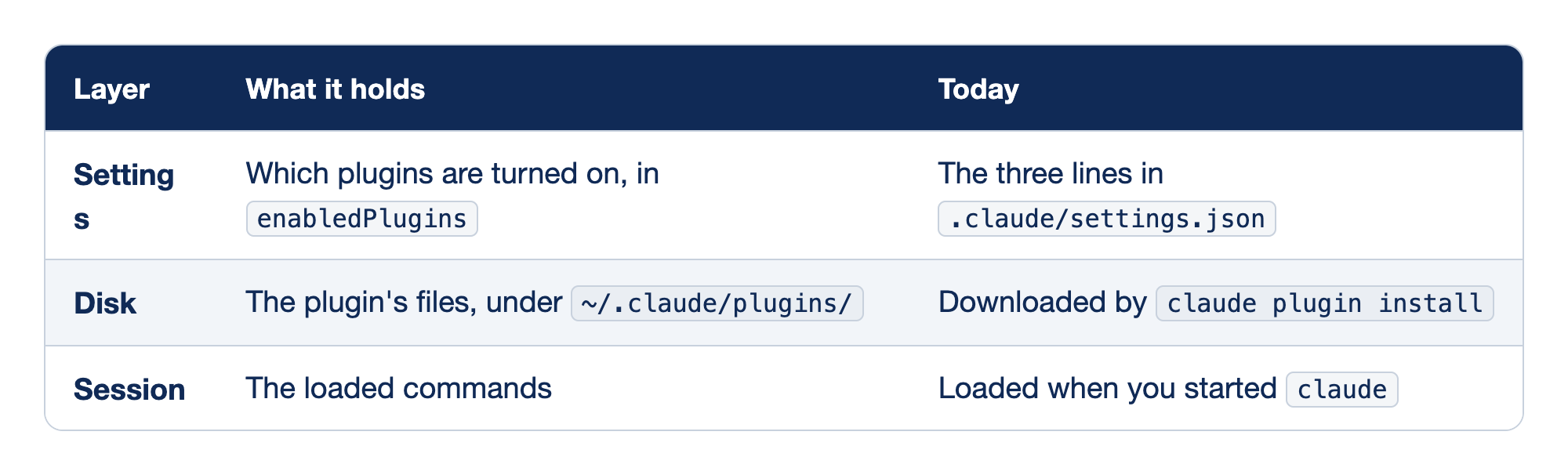
A plugin must be present at three layers before its commands work. The Layer column names the layer, the "What it holds" column says what lives at that layer, and the Today column says where you met it in Start here.
- Settings holds the list of plugins that are turned on, in
enabledPlugins, and today it is the three lines in.claude/settings.json. - Disk holds the plugin's files under
~/.claude/plugins/, andclaude plugin installdownloaded them today. - Session holds the loaded commands, and they loaded today when you started
claude.
If any one layer is missing, the commands do not work.
A plugin installed from your shell loads in the next session. In a session that is already open, /reload-plugins loads it without a restart. This guide tested the new-session path only.
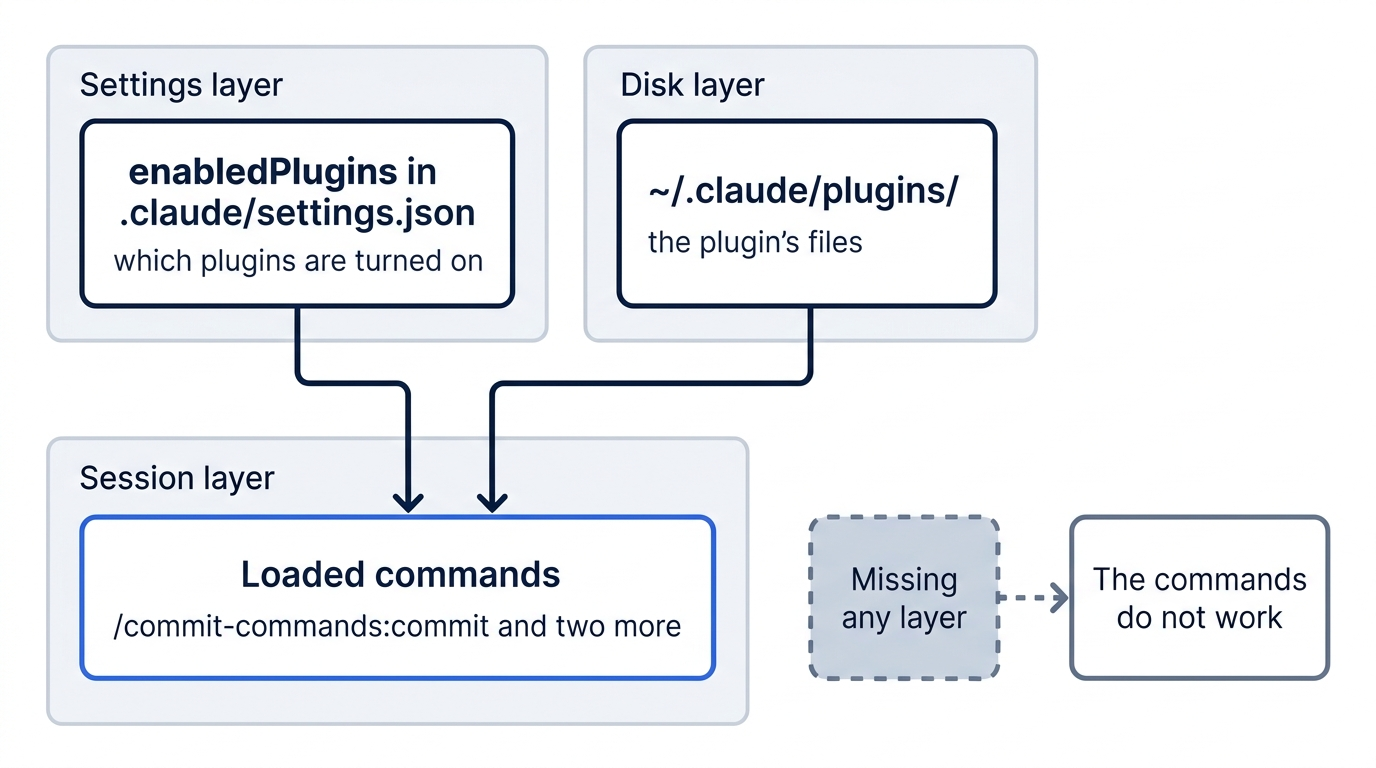
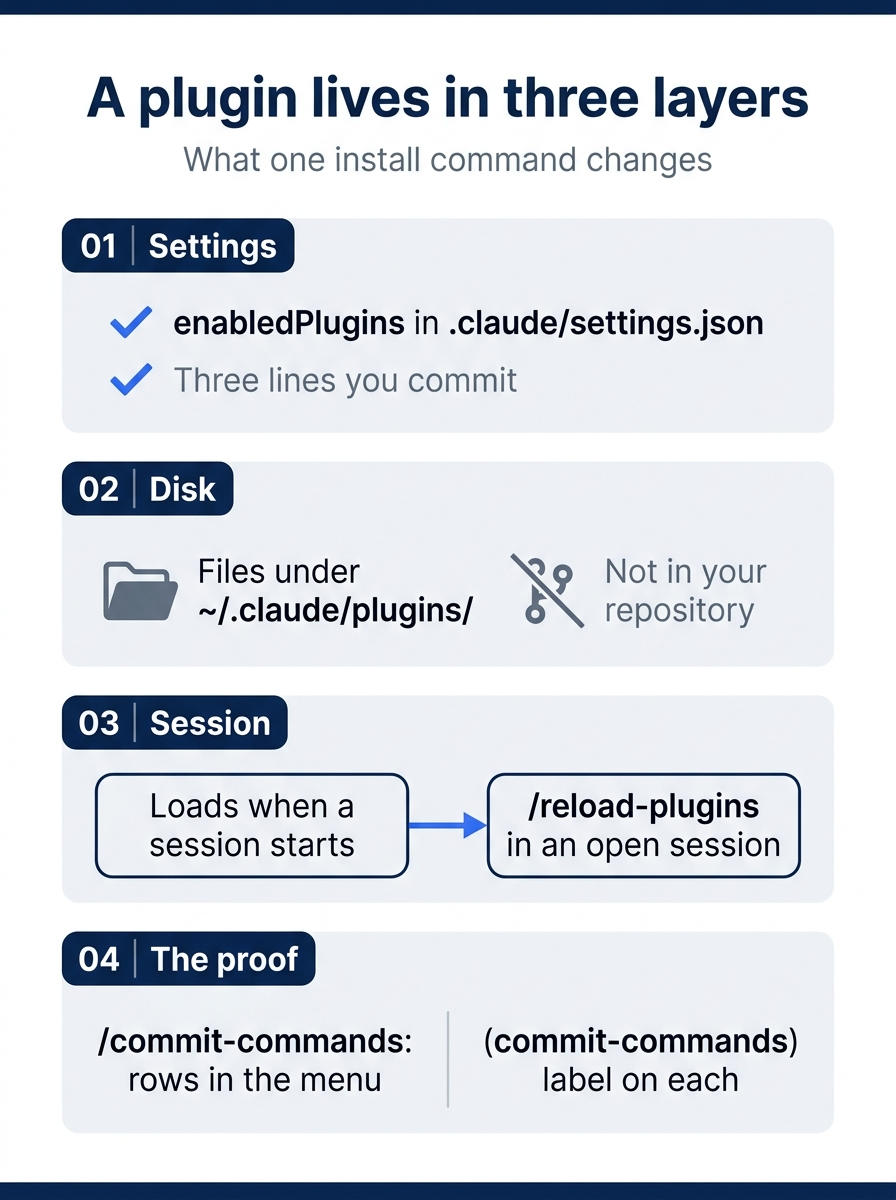
One install command touches all three layers. It writes a setting you commit, puts files on disk outside your repository, and the next session loads the commands that prove it worked.
Why Manual mode showed no prompt
A plugin command is a Markdown file with frontmatter, like the /ship skill. On the test machine, version 1.0.1 of the plugin keeps its commit command at ~/.claude/plugins/cache/claude-plugins-official/commit-commands/1.0.1/commands/commit.md. Its frontmatter, as read on November 17, 2026:
---
allowed-tools: Bash(git add:*), Bash(git status:*), Bash(git commit:*)
description: Create a git commit
---
The allowed-tools line approves those three git commands for this command while it runs. Manual mode asks before most shell commands, and this approval is why it showed no prompt. The body also runs git status, git diff HEAD, git branch --show-current, and git log --oneline -10 before Claude sees the prompt, and puts their output into it. Claude starts with the facts it needs and makes one tool call.
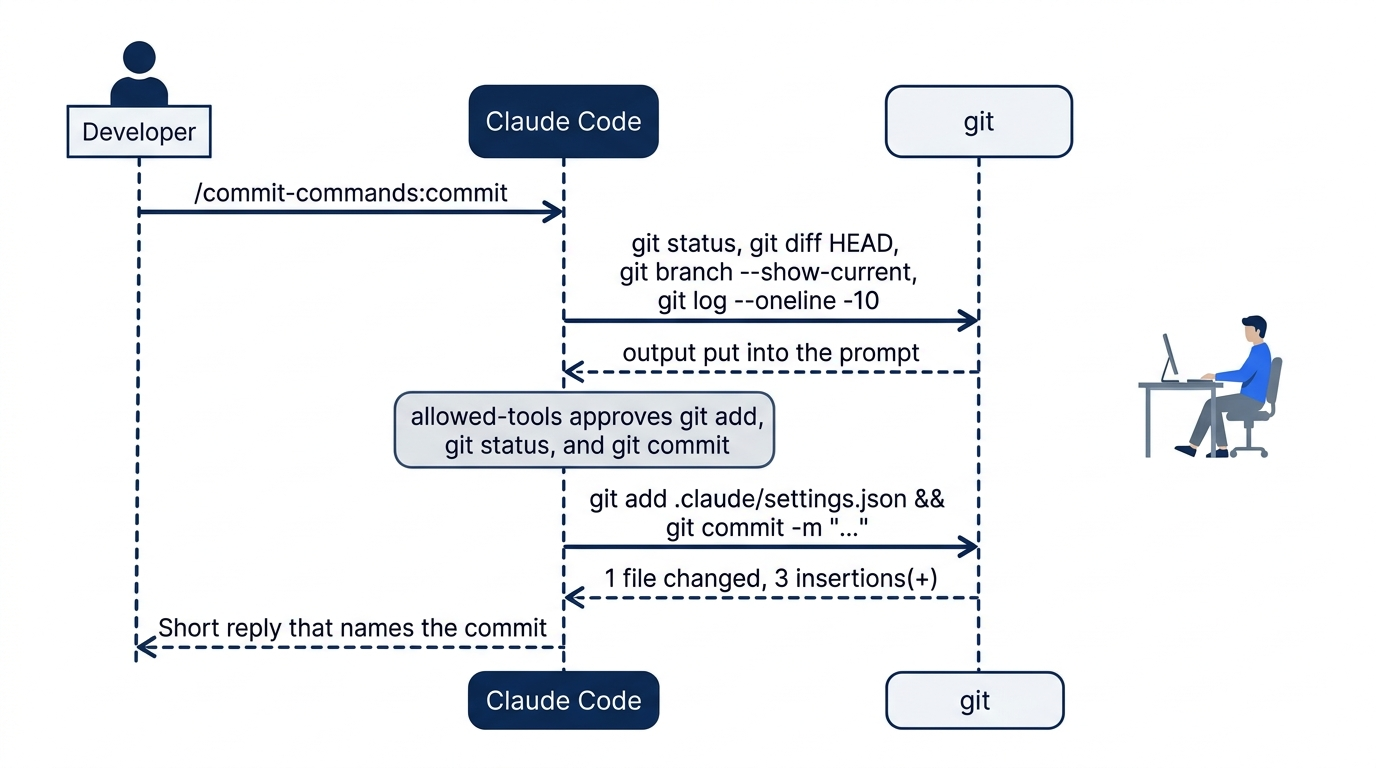
The approval cuts both ways. The docs on plugin security say that what a plugin runs, it runs as you, with your files and your shell. Before you install a plugin, read what it adds. In a session, /plugin install commit-commands@claude-plugins-official does not install right away. It opens the plugin's details, which list what it will install and, for the official marketplace, a Context cost estimate. Then it asks you to pick a scope. This guide's test used the shell command, so the details pane is from the install docs.
The docs sort marketplaces into three tiers: official (such as claude-plugins-official), community (such as claude-community, which you add yourself), and third-party, which is every other marketplace, including your own team's. The tier tells you who curates the list. It does not make a plugin safe to run without reading it.
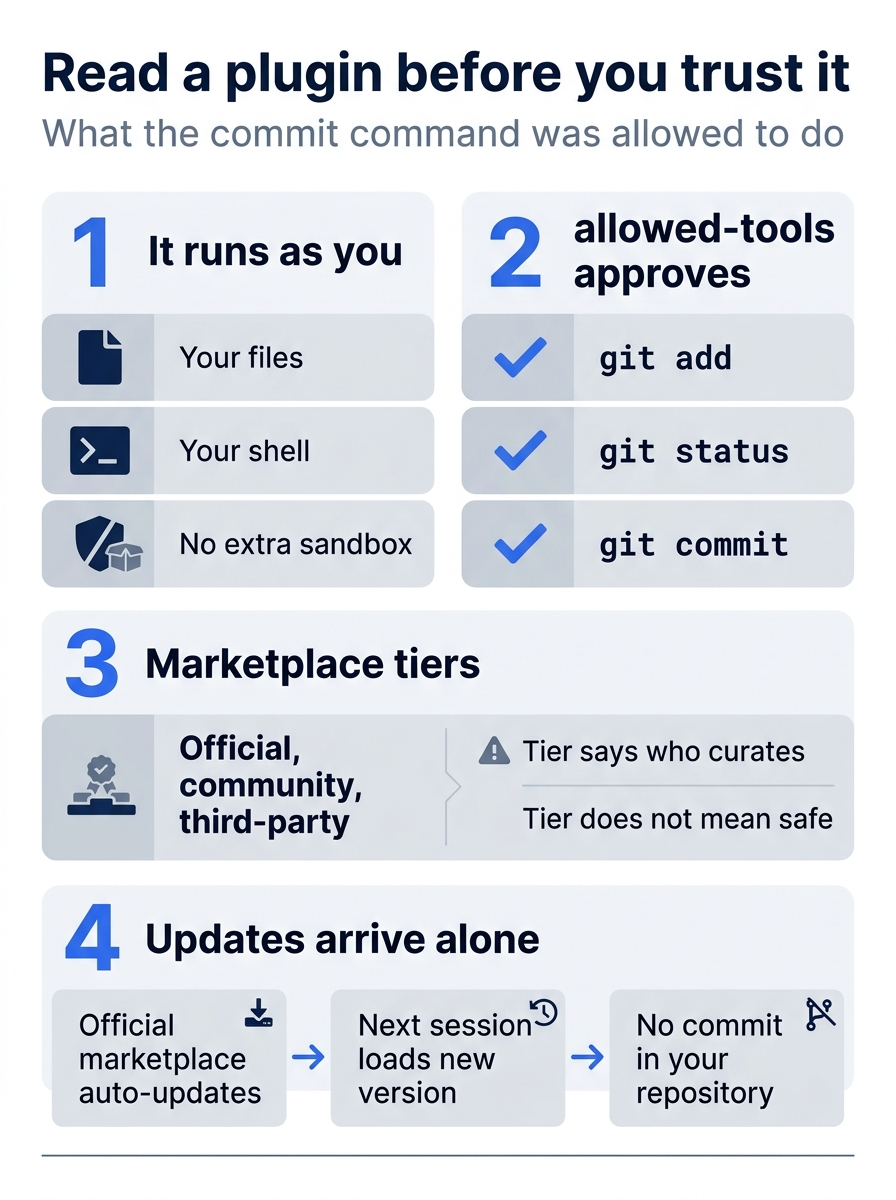
What a plugin may run, who curates its marketplace, and when it updates are all things to check before you install it.
The other two commands
Read the other two commands before you run them, because both change more than a local commit:
/commit-commands:commit-push-prcommits, pushes, and opens a pull request. Ticket Triage has no remote unless you added one./commit-commands:clean_gonedeletes local branches whose remote branch is gone, and removes their worktrees.
Neither was run in this guide's tests.
Scopes and teammates
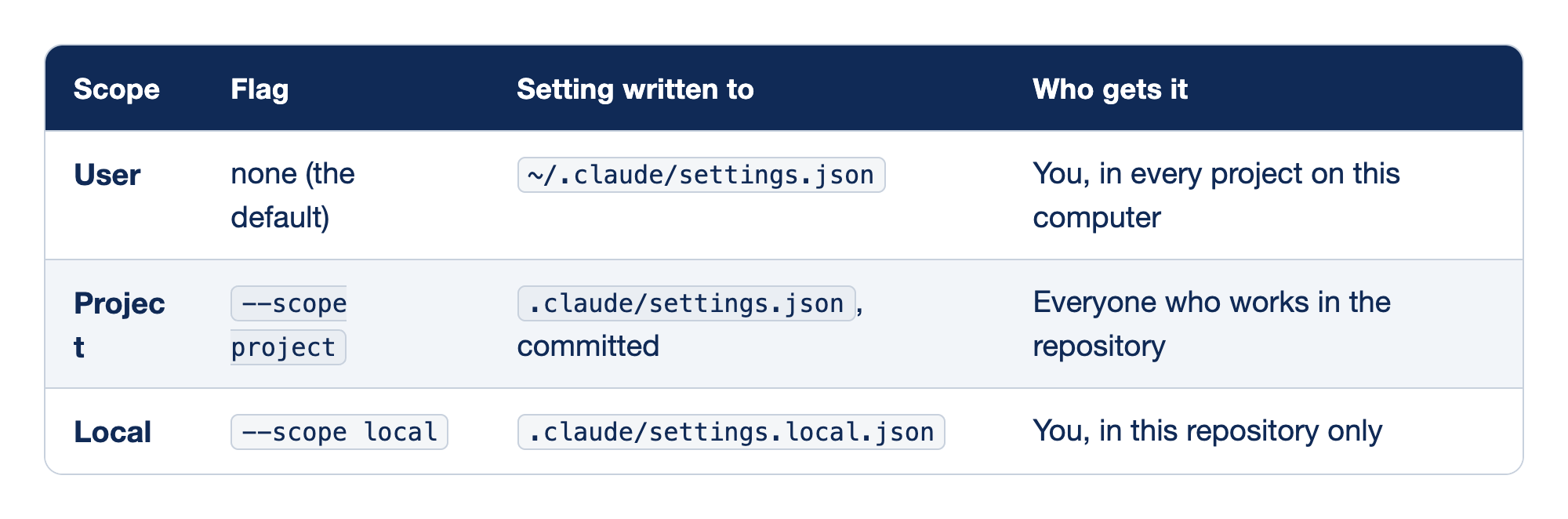
Each install scope has its own flag, writes its setting to its own file, and reaches a different set of people. The Scope column names the scope, the Flag column gives the option for claude plugin install, the "Setting written to" column names the settings file, and the "Who gets it" column says who sees the plugin.
- User needs no flag because it is the default, writes to
~/.claude/settings.json, and reaches you in every project on this computer. - Project uses
--scope project, writes to the committed.claude/settings.json, and reaches everyone who works in the repository. - Local uses
--scope local, writes to.claude/settings.local.json, and reaches only you, in this repository only.
When the same plugin is set at more than one scope, local wins over project, and project wins over user. The docs add one step for teammates: the committed setting turns the plugin on, but it does not download the plugin. Each teammate runs the same claude plugin install commit-commands@claude-plugins-official --scope project once per clone. The plugin loading reference covers what Claude Code reports when a project enables a plugin that is not installed.
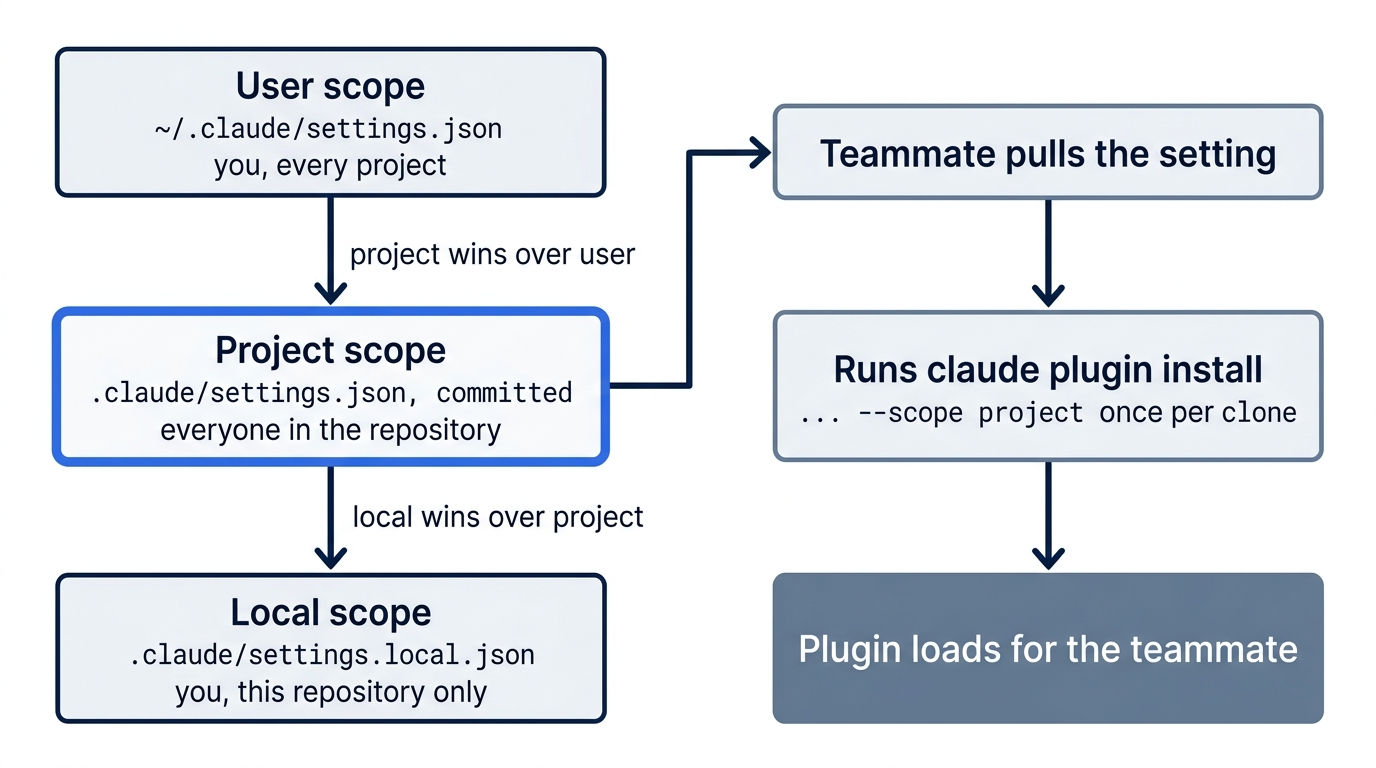
On a computer where no one has started an interactive session yet, the official marketplace is not added. A setup script for such a computer runs claude plugin marketplace add anthropics/claude-plugins-official before the install.
What an enabled plugin costs
An enabled plugin is part of every session, not only the sessions where you use it. For each skill or command that Claude can start by itself, the name and description load on every turn and take room in the context window that you read with /context on Day 6. Its MCP servers run and its hooks fire. The docs list two ways to check: claude plugin details commit-commands in your shell prints an Always-on token count, and the Installed tab of /plugin groups plugins that you have not used recently under Not used recently. Neither was tested here.
Updates you did not commit
Plugins from claude-plugins-official update by themselves, because auto-update is on by default for the official marketplace. The session that is running keeps the version it loaded and shows Plugin updated: <name> · Run /reload-plugins to apply. The next session loads the new version. A project-scope plugin can change what your team runs with no commit in your repository. If you need a fixed version, the install docs cover turning off auto-update for a marketplace on the Marketplaces tab of /plugin.
Turn a plugin off or remove it
From your shell, per the install docs:
claude plugin disable commit-commands@claude-plugins-official
claude plugin enable commit-commands@claude-plugins-official
claude plugin uninstall commit-commands@claude-plugins-official --scope project
disable keeps the plugin installed. In Ticket Triage, all three commands write to the committed .claude/settings.json, because the docs say enable and disable act on the most specific scope whose settings already list the plugin, and that is project scope here. A disable that you commit turns the plugin off for your whole team. Check what a command changed with git diff .claude/settings.json. Reset with git restore .claude/settings.json, then check that git status --short prints nothing. After an uninstall, also run the install command from Start here again. Suppose you uninstall a plugin that the project's .claude/settings.json enables, from the Installed tab or with /plugin uninstall. Claude Code then asks you to choose: press y to turn it off for you only, in .claude/settings.local.json, or u to remove it from the shared file for everyone. This guide's test did not run these commands.
Build your own
A plugin is a folder. The plugins overview shows this layout:
my-plugin/
  .claude-plugin/plugin.json   # optional manifest: name, version, description
  skills/<name>/SKILL.md       # skills, run as /my-plugin:<name>
  agents/                      # subagents
  hooks/hooks.json             # hooks
  .mcp.json                    # MCP servers
The manifest is optional. Without it, Claude Code takes the name from the marketplace entry or the folder name. To try a plugin without installing it, start Claude Code with --plugin-dir ./my-plugin, which loads it for one session. Inside the plugin, write file paths with ${CLAUDE_PLUGIN_ROOT}, because an installed plugin runs from its folder under ~/.claude/plugins/, not from yours. The create docs walk through a first plugin, and the plugins reference lists every field and folder.
The open standard: Agent Plugins 1.0
Day 10 introduced Agent Plugins 1.0, announced August 6, 2026. Its maintainers are Amazon, Cursor, Microsoft, OpenAI, and Vercel. A package has a root plugin.json, a skills/ folder, and an mcp.json, with no leading dot. In plugin.json, only $schema and name are required. Claude Code's own format uses .claude-plugin/plugin.json and .mcp.json. The four questions, answered for plugins:
- Which Agent Skills folders does Claude Code read? Only
.claude/skillsin a project, plus the personal, nested, plugin, and managed locations from Day 10. It does not read.agents/skills. Duplicate names resolve enterprise, then personal, then project. Plugin skills never collide with yours, because each one carries the plugin's prefix, as/commit-commands:commitdid today. - Does it load an Agent Plugins folder? No. Tested on 2.1.325 and again on 2.1.326 with
--plugin-dir: Claude Code loaded the package'sskills/folder only because it matches Claude Code's own layout. It ignored the rootplugin.json, so the plugin took its folder name, and it ignored the rootmcp.json. - How does it handle vendor-specific parts? With its own format, not a reverse-domain folder. The spec puts each tool's own parts in a reverse-domain folder, such as
com.github.copilot/, or under anextensionskey inplugin.json, and other tools ignore them. Claude Code defines no such folder. Its own parts live in.claude-plugin/plugin.jsonand in root folders such asagents/andhooks/. From the docs, not tested here: Claude Code expands${CLAUDE_PLUGIN_ROOT}but not the portable${PLUGIN_ROOT}(issue #93250, closed as not planned on November 16, 2026), and it ignores$schema, soclaude plugin validatedoes not check a package against the spec (issue #88906). - Portability check. A minimal Agent Plugins package,
ap-portable, with one skill and one MCP server, loaded with--plugin-diron 2.1.325 and 2.1.326. Alone, it loaded ast3-ap-only:ap-hello, named after its test folder,t3-ap-only, with no MCP server. With a second manifest,.claude-plugin/plugin.jsoncontaining{"name": "ap-portable"}, it loaded asap-portable:ap-hello. With"mcpServers": "./mcp.json"added to that manifest, Claude Code also loaded the shared server asplugin:ap-portable:ap-echo.
One package can serve both formats:
my-plugin/
  plugin.json                  # Agent Plugins 1.0: $schema, name
  mcp.json                     # Agent Plugins 1.0: $schema, mcpServers
  skills/<name>/SKILL.md       # shared skills
  .claude-plugin/plugin.json   # Claude Code: {"name": "...", "mcpServers": "./mcp.json"}
The spec requires $schema in both files, with the canonical identifiers https://agent-plugins.org/schemas/1.0.0/plugin.schema.json for plugin.json and https://agent-plugins.org/schemas/1.0.0/mcp.schema.json for mcp.json. A client that does not support the declared version must reject the plugin. The exercise in Do this today uses the canonical identifiers. On November 17, 2026, it ran as written on 2.1.326, and Claude Code loaded ap-portable and plugin:ap-portable:ap-echo, so the $schema key in mcp.json does not stop Claude Code from reading the file.
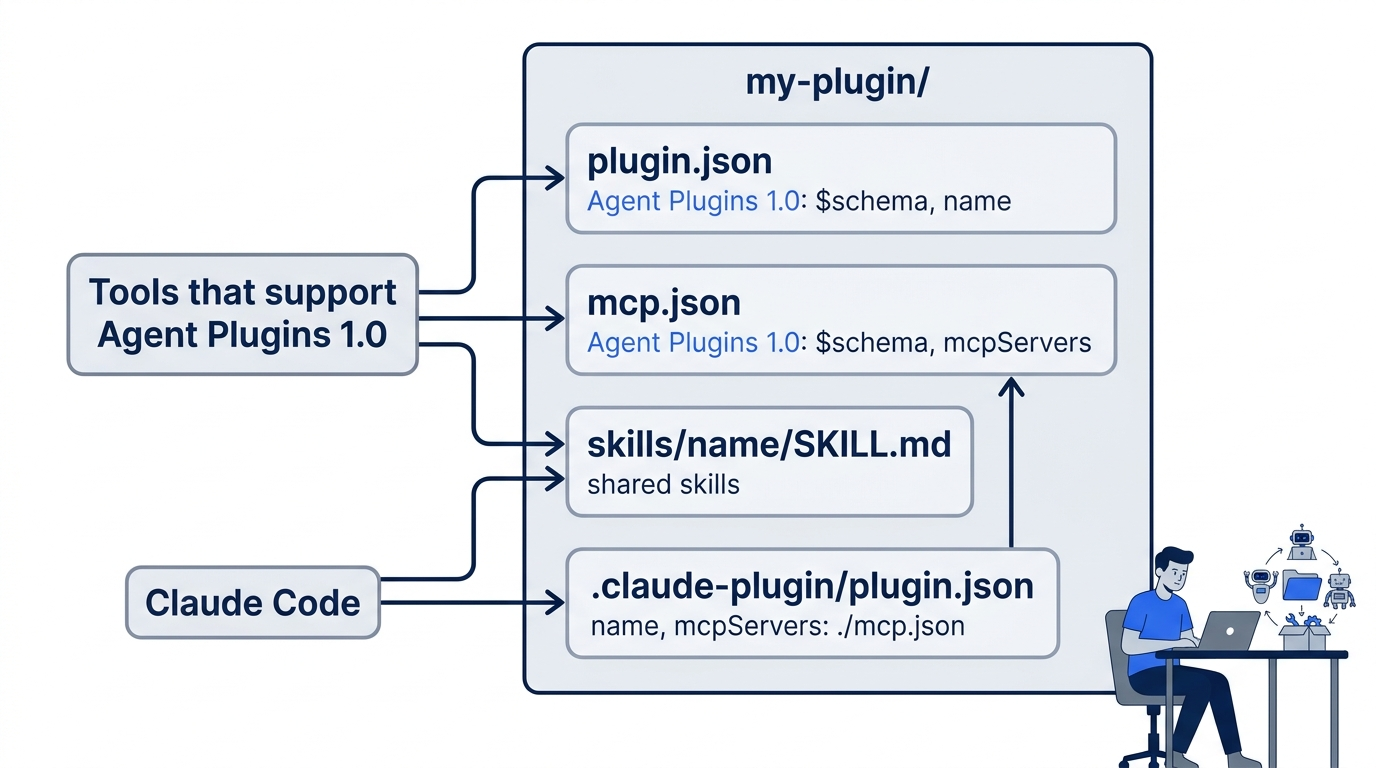
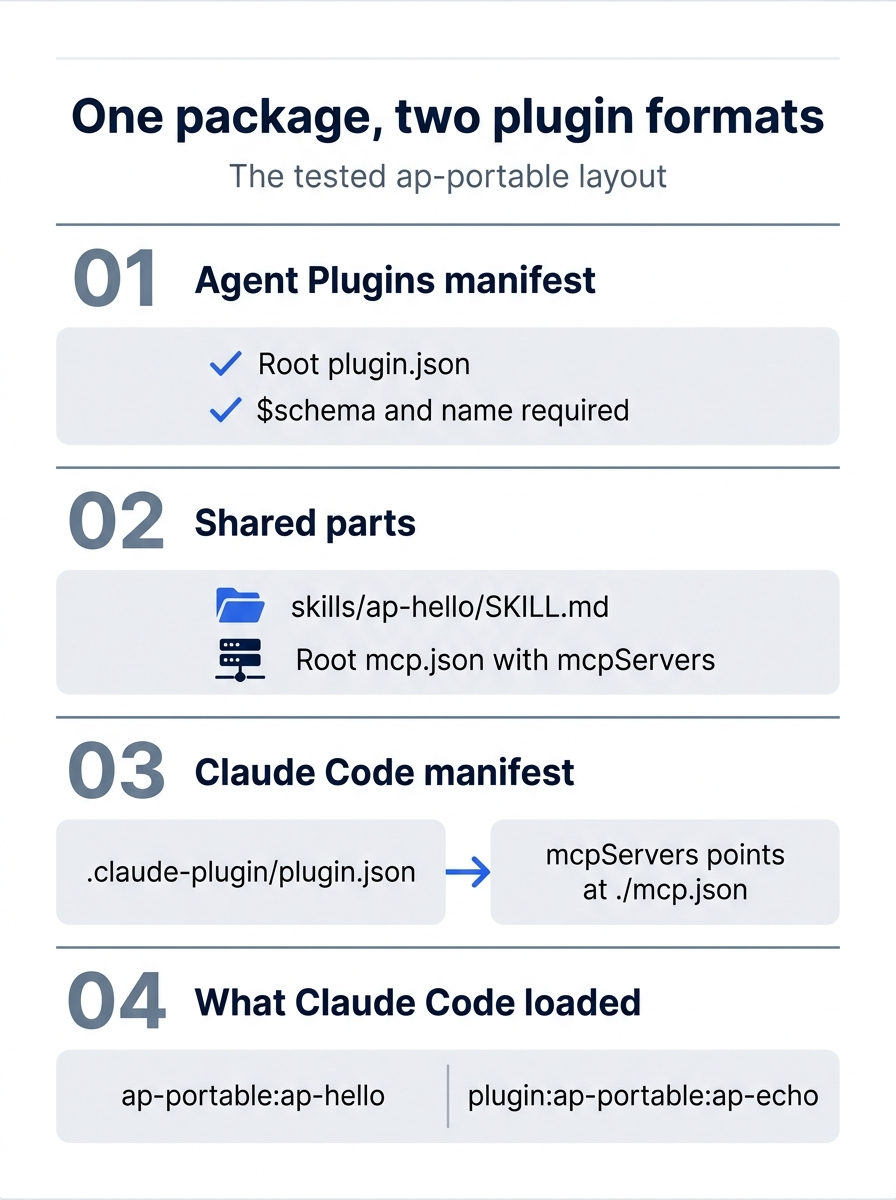
The tested ap-portable layout keeps both manifests in one folder, and the second manifest is the piece that lets Claude Code read the shared server.
Where your skills and plugins can travel, as of November 16, 2026:
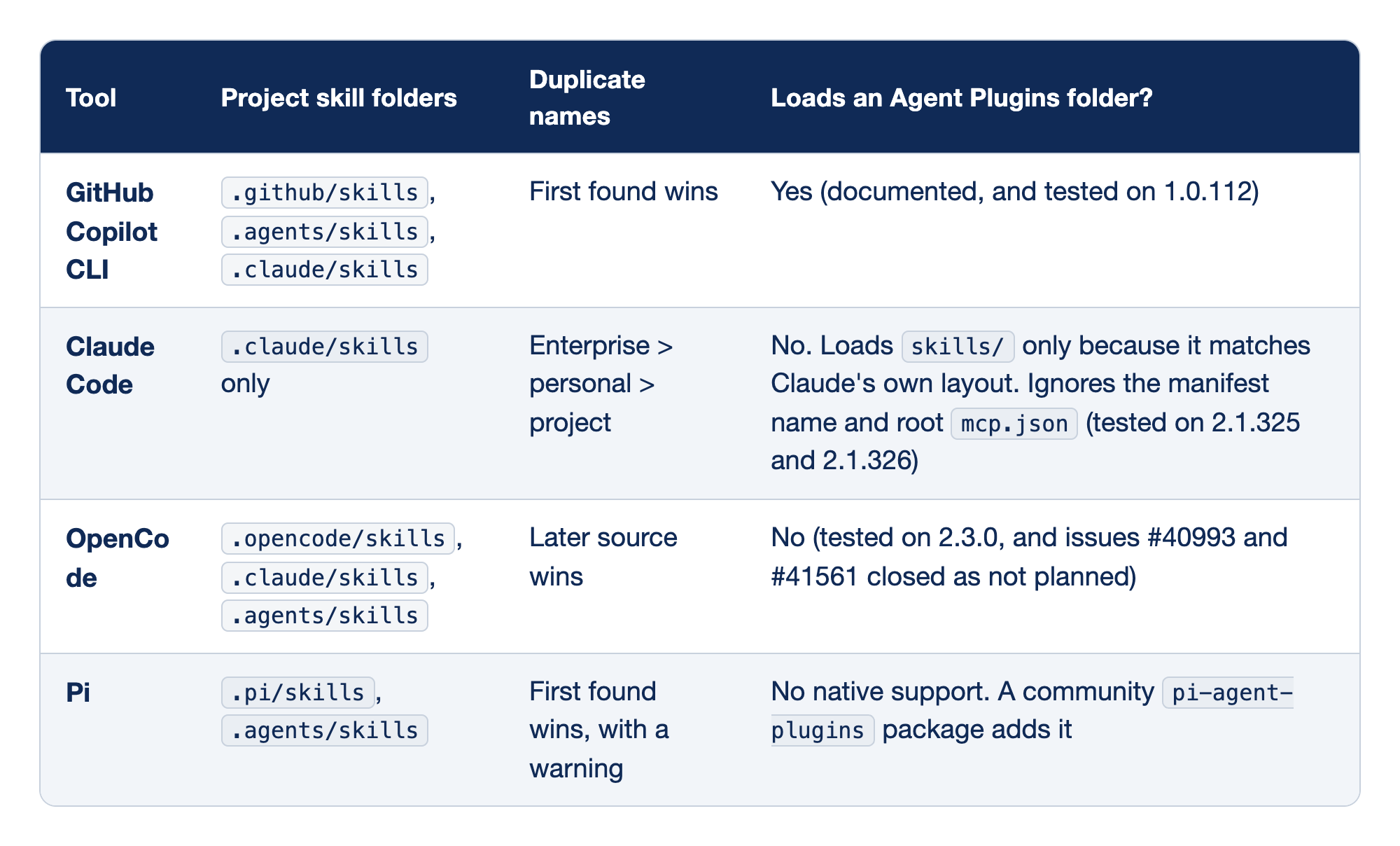
Four coding agents read skills, and they disagree on folders, on name clashes, and on plugin packages. The Tool column names the agent, the "Project skill folders" column lists the folders it reads in a project, the "Duplicate names" column says which skill wins when two share a name, and the "Loads an Agent Plugins folder?" column says whether it reads the Agent Plugins 1.0 package format, with the version tested.
- GitHub Copilot CLI reads
.github/skills,.agents/skills, and.claude/skills, lets the first skill found win a name clash, and loads an Agent Plugins folder, which is documented and was tested on 1.0.112. - Claude Code reads only
.claude/skills, resolves a clash enterprise over personal over project, and does not load an Agent Plugins folder. It loadsskills/only because that folder matches its own layout, and it ignores the manifest name and the rootmcp.json, as tested on 2.1.325 and 2.1.326. - OpenCode reads
.opencode/skills,.claude/skills, and.agents/skills, lets the later source win a clash, and does not load an Agent Plugins folder, as tested on 2.3.0, with issues #40993 and #41561 closed as not planned. - Pi reads
.pi/skillsand.agents/skills, lets the first skill found win with a warning, and has no native Agent Plugins support, although a communitypi-agent-pluginspackage adds it.
For a team that uses more than one agent: author an Agent Plugins 1.0 package for the tools that support it, and add .claude-plugin/plugin.json beside it for Claude Code. The Copilot CLI plugin reference says Copilot CLI also reads .claude-plugin/plugin.json and .claude-plugin/marketplace.json, and prefers the root Agent Plugins manifest when both exist. Copilot was not tested in this guide.
When a plugin does not work
- The commands are not in the menu. Start a new session, or run
/reload-plugins. Check thatenabledPluginslists the plugin in a settings file that this project loads. - The install says
Plugin "commit-commands" not found in marketplace "claude-plugins-official". The official marketplace is not registered on this computer. The docs say that Claude Code adds it at your first interactive session, and that a new machine where no session has run does not have it. In a test with a fresh home folder, where the first session stopped at the login screen, the only marketplace listed was a built-in one,anthropic-plugin-directory, and the install failed with this message. The message also suggestsclaude plugin marketplace update claude-plugins-official. This guide did not test the advice, and an update needs a marketplace that is already registered. Instead, runclaude plugin marketplace add anthropics/claude-plugins-official, which printed✔ Added marketplace: claude-plugins-official (declared in user settings), then run the install again. In that test, the install then worked. The add cloned the marketplace over SSH, on a computer with a GitHub SSH key. A computer without one was not tested. - A teammate pulled the setting, and nothing loads. They have not installed it. They run the same
claude plugin install ... --scope projectonce. - The install summary or the panel reports a failure. Open the Errors tab of
/pluginfor the reason. The troubleshooting page lists the messages.
Go further: Your Claude Code Setup Is Trapped in One Repo. Plugins Set It Free. is the first edition's plugins chapter. It adds a tour of the official, community, and demo marketplaces, and a full walkthrough of building, validating, and distributing your own plugin. It calls the plugin manifest required, but the current docs say it is optional.
Do this today
Everyone
- Install
commit-commandsat project scope, find its three commands after/commit, and commit the setting with/commit-commands:commit. Check the win:git log --oneline -1shows the new commit, andgit statusprintsnothing to commit, working tree clean. - Habit: when
/shipends withReady to commit, commit with/commit-commands:commit. Check:git log --oneline -1shows a message that describes your diff, andgit statusis clean.
If you read Going deeper
-
Read the commit command before you trust it again:
cat ~/.claude/plugins/cache/claude-plugins-official/commit-commands/*/commands/commit.md. Check: theallowed-toolsline names onlygit add,git status, andgit commit. The version folder can differ after an update. This step only reads, so there is nothing to reset. -
Repeat the portability test with a two-manifest package, outside Ticket Triage.
claude -pruns one prompt and exits, and--plugin-dirloads a plugin from a folder for that one run. Run:mkdir -p /tmp/ap-portable/skills/ap-hello /tmp/ap-portable/.claude-plugin /tmp/ap-project # ① cd /tmp/ap-portable echo '{ "$schema": "https://agent-plugins.org/schemas/1.0.0/plugin.schema.json", "name": "ap-portable" }' > plugin.json # ② echo '{ "$schema": "https://agent-plugins.org/schemas/1.0.0/mcp.schema.json", "mcpServers": { "ap-echo": { "command": "true" } } }' > mcp.json # ③ echo '{ "name": "ap-portable", "mcpServers": "./mcp.json" }' > .claude-plugin/plugin.json # ④ cat > skills/ap-hello/SKILL.md <<'EOF' # ⑤ --- name: ap-hello description: Say hello from the shared Agent Plugins package. --- Reply with "hello from ap-portable". EOF cd /tmp/ap-project && git init -q # ⑥ claude -p "Reply with the single word OK." --output-format stream-json --verbose \ --max-turns 1 --model haiku --plugin-dir /tmp/ap-portable \ | jq -c 'select(.type=="system" and .subtype=="init") | {plugins: [.plugins[]?.name], mcp: [.mcp_servers[]? | {name, status}]}' # ⑦① One
mkdir -pmakes the package folder, with itsskills/ap-helloand.claude-pluginfolders, and a separate empty project folder for the run.② The root
plugin.jsonis the Agent Plugins 1.0 manifest, with the required$schemaandname.③ The root
mcp.jsondeclares one shared MCP server,ap-echo, whose command istrue, so it exits at once.④ The second manifest,
.claude-plugin/plugin.json, is the one Claude Code reads: it sets the name and pointsmcpServersat the shared./mcp.json.⑤ The heredoc writes the one shared skill, a
SKILL.mdwith a name, a description, and a one-line instruction.⑥ The run starts in a fresh repository, so no Ticket Triage settings or plugins load with it.
⑦
claude -pruns one headless turn with the package loaded by--plugin-dir, and jq keeps only the init event's plugin names and MCP server statuses.Note: The full script, without markers, is extracted at code/claude_code_daily/part-14-plugins/listings/01-ap-portable-check.sh.
Check:
pluginsincludesap-portable, andmcpincludesplugin:ap-portable:ap-echowith statusfailed. The status isfailedbecause the server's command istrue, which exits at once, and the entry proves that Claude Code readmcp.json. Your own plugins and servers can appear in the lists too. Reset: runcd ~/code/ticket-triage && rm -rf /tmp/ap-portable /tmp/ap-project. Check thatls /tmp/ap-portablesaysNo such file or directoryand thatgit status --shortin Ticket Triage prints nothing.
One install, one setting, one commit
A plugin looks like a big idea, and today it came down to three lines in .claude/settings.json. The install wrote them, the menu proved the plugin loaded, and the plugin's own command committed them. Every step left something you could check.
Read a plugin before you trust it, because it runs as you. Once you trust it, commit the setting, and each teammate who runs the install once gets the same commands in Ticket Triage.
This is Part 14 of "Claude Code, Day-to-Day (second edition)," a day-by-day guide to Claude Code in which each day takes 20 to 40 minutes. Part 14 is Day 14. All 28 days are out now.