
Run Two Claude Code Sessions at Once, Then Keep Only One
Git worktrees let two Claude Code sessions edit one repository at the same time without overwriting each other: start each with --worktree, merge the keeper from the main checkout, and remove both, merging before you remove.

Start each session with --worktree so each gets its own folder and branch, merge the work you want from the main checkout, and throw the trial away without losing a commit.
You wanted two Claude sessions on the same repository at once, and you were afraid one would quietly overwrite the other's files.
In this article: Day 16 of a day-by-day guide to Claude Code. Start here: you run two sessions at the same time in two worktrees, merge one, and remove both without losing the work you kept. Going deeper: what a worktree shares with the main checkout, how Claude Code keeps a session inside its worktree, and how to keep a worktree for later.
Tested on Claude Code 2.1.326.
Yesterday you opened the same session in the Desktop app.
Start here
At the end of today, you can run two Claude Code sessions at the same time in two worktrees, merge the work of one, and throw away the work of the other.
Starting fresh or fell behind? Run git switch -C main claude-code/day-15. This replaces your main with the end of Day 15; to keep your own work, run git branch my-backup first.
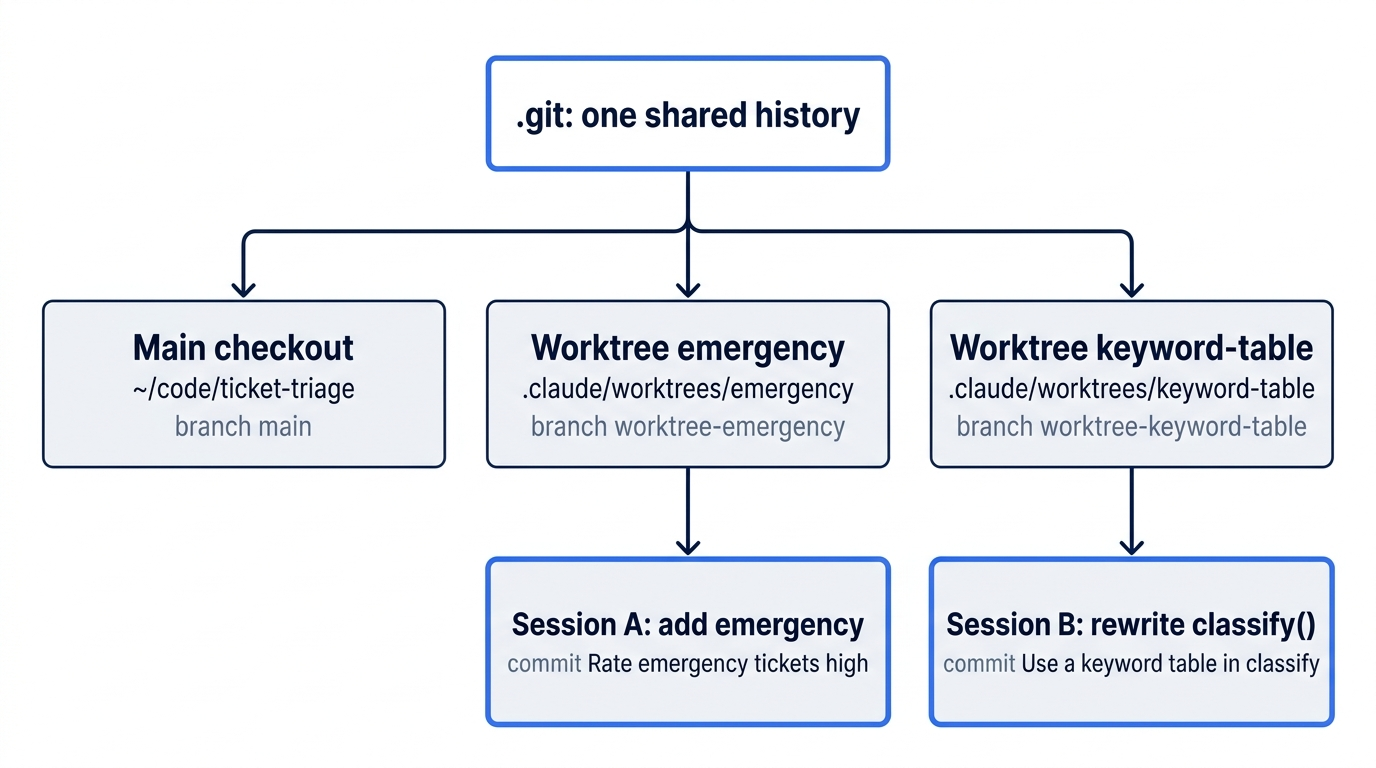
Until today, every session worked in one folder, ~/code/ticket-triage. Two sessions in that folder edit the same files, and one can overwrite the other. A git worktree fixes this. It is a second folder with its own copy of the files and its own branch, linked to the same repository. A commit in a worktree goes into the same history as your normal folder, which this guide calls the main checkout. Claude Code makes a worktree for a session when you start it with --worktree and a name.
Today you start two sessions. Session A adds "emergency" as a high-priority word, and you keep it. Session B tries a rewrite of classify() that you only want to try, and you throw it away.
Check the starting state
Open a terminal in Ticket Triage:
cd ~/code/ticket-triage
git status
npm test
Git prints nothing to commit, working tree clean. The tests show ℹ fail 0 and the pass count from Day 14, ℹ pass 19. Yesterday changed nothing in the repository.
Ignore the worktree folder
Claude Code puts each worktree in .claude/worktrees/<name>/, inside the main checkout. Without a rule in .gitignore, git status in the main checkout would list those folders as untracked files. Add the rule and commit it before you make a worktree:
echo '.claude/worktrees/' >> .gitignore
git commit -am "Ignore Claude Code worktrees"
git log --oneline -1
>> adds a line to the end of the file. The -a flag stages every tracked file that changed, and .gitignore is the only one. The log shows Ignore Claude Code worktrees. Your hash can differ from the tested runs.
Start two sessions
You need three terminal windows or tabs today. In the first one, in Ticket Triage, start session A:
claude --worktree emergency
--worktree emergency makes a worktree named emergency and starts the session in it. Open a second terminal, go to Ticket Triage, and start session B:
cd ~/code/ticket-triage
claude --worktree keyword-table
Both sessions open with an empty prompt and the status bar. The input box can show a gray suggestion, such as Try "fix typecheck errors", and the status bar can show an extra hint, such as ← 3 agents. The docs say that this count is of background sessions that wait for your input, and the tester had some. Yours can differ or not show. Ignore both for now. Open a third terminal in Ticket Triage. This one stays in the main checkout. List the worktrees:
git worktree list
On the tested auto-mode run, git printed three lines. Git prints the full path where this guide shows ~/code/ticket-triage:
~/code/ticket-triage                                  9d6815e [main]
~/code/ticket-triage/.claude/worktrees/emergency      9d6815e [worktree-emergency] locked
~/code/ticket-triage/.claude/worktrees/keyword-table  9d6815e [worktree-keyword-table] locked
Each worktree has its own branch, named worktree- and the worktree name. All three lines show the same hash, your .gitignore commit, so both sessions start from today's state. locked means that a Claude Code session is using the worktree, and git refuses to remove a locked worktree.
Give each session a task
In session A, send:
Add "emergency" as a high priority word in src/priority.js, with a test in test/priority.test.js whose ticket also matches an older rule, as CLAUDE.md requires. Run npm test, then commit with the message "Rate emergency tickets high".
Do not wait for it. Switch to session B and send:
Rewrite classify() in src/classify.js to use a table of categories and keywords instead of the chain of if statements. Keep the behavior the same. Run npm test, then commit with the message "Use a keyword table in classify".
Both sessions now work at the same time, each in its own folder.
The scene shows the point of the day. Two sessions run at the same time, each in its own folder, and a third terminal in the main checkout watches without anything colliding.
Manual mode: each session stops at its first prompt and waits until you answer it. Go back to each terminal and answer its prompts. Session A showed five prompts on the tested run: a Bash command that edits with sed, flagged Contains brace with quote character (expansion obfuscation), then Do you want to make this edit to priority.js?, Do you want to make this edit to priority.test.js?, git add (labeled Stage the changes), and git commit (labeled Commit the change). Session B showed two prompts: Do you want to overwrite classify.js?, then one Bash command labeled Commit the refactor that runs git status, git diff, git add, and git commit. Choose 1. Yes at each. Ignore the tip about auto mode. No prompt appears for npm test, because the Day 4 rule allows it. Your prompts can differ, because Claude picks its own commands.
Session A can show a red Error: line under a Bash command, which starts This session is isolated in the worktree and says this command is too complex to verify that it stays inside the worktree. Both tested runs showed it. Claude Code refused the sed command because it could not check that the command stays in the worktree. In Manual mode, you chose 1. Yes at that command's prompt, and Claude Code still refused it. Claude then made the same change with its edit tools, which brought the two edit prompts. Nothing is wrong, and you do nothing more.
On the tested auto-mode run, session A replied:
⏺ "emergency" is now a high-priority word in src/priority.js. All 20 tests pass, and the change is committed as 674a327 "Rate emergency tickets high" on
  worktree-emergency.
Its reply also said your Prettier hook reformatted src/priority.js when I saved the edit. The format-on-edit hook from Day 11 ran in the worktree, because the worktree holds a copy of the committed .claude/settings.json. Session B replied that npm test passed 19 of 19 before the commit. It added no test, because the rewrite adds no rule. On the Manual-mode run, session A added two tests, not one, and reported All 21 tests pass. Ignore the gray suggestion in each input box.
Check that the main checkout did not change
In the third terminal, run:
git log --oneline -1
git status --short
The log still shows Ignore Claude Code worktrees, and status prints nothing. Two sessions edited and committed, and your main checkout did not move. Their commits are on their own branches.
Merge session A's work
In the third terminal, merge the emergency branch into main:
git merge --ff-only worktree-emergency
A fast-forward merge moves main forward to the branch's commit. It works when main has no new commits since the branch started, which is true today. --ff-only tells git to stop with an error instead of making a merge commit. On the tested auto-mode run, git printed:
Updating 9d6815e..674a327
Fast-forward
 src/priority.js       | 9 ++++++++-
 test/priority.test.js | 4 ++++
 2 files changed, 12 insertions(+), 1 deletion(-)
The Manual-mode run showed test/priority.test.js | 5 +++++, for its two tests. Nine lines changed in src/priority.js for one new word, because Prettier split the long line.
Exit and remove both worktrees
In session A, type /exit. Claude Code asks what to do with the worktree:
Exiting worktree session
You have 1 commit on worktree-emergency. The branch will be deleted if you remove the worktree.

❯ 1. Keep worktree    Stays at ~/code/ticket-triage/.claude/worktrees/emergency
  2. Remove worktree  All changes and commits will be lost.

Enter to confirm · Esc to cancel
1. Keep worktree leaves the folder and its branch on disk, so you can come back later. 2. Remove worktree deletes the folder and the branch. Press the down arrow to select 2. Remove worktree, then press Enter. The screen shows a claude --resume line with a session ID, then:
Worktree removed. 1 commit on worktree-emergency was discarded.
The prompt says that the commit will be lost, but you lose nothing. The prompt counts commits on the branch worktree-emergency. The merge already put the same commit on main, and deleting the branch does not delete a commit that main holds. Merge first, then remove. If you remove first, the commit is gone with its branch.
In session B, type /exit. The prompt says You have 1 commit on worktree-keyword-table. Choose 2. Remove worktree again. This time the commit is really discarded, because no other branch holds it. The rewrite was a trial, and you threw it away.
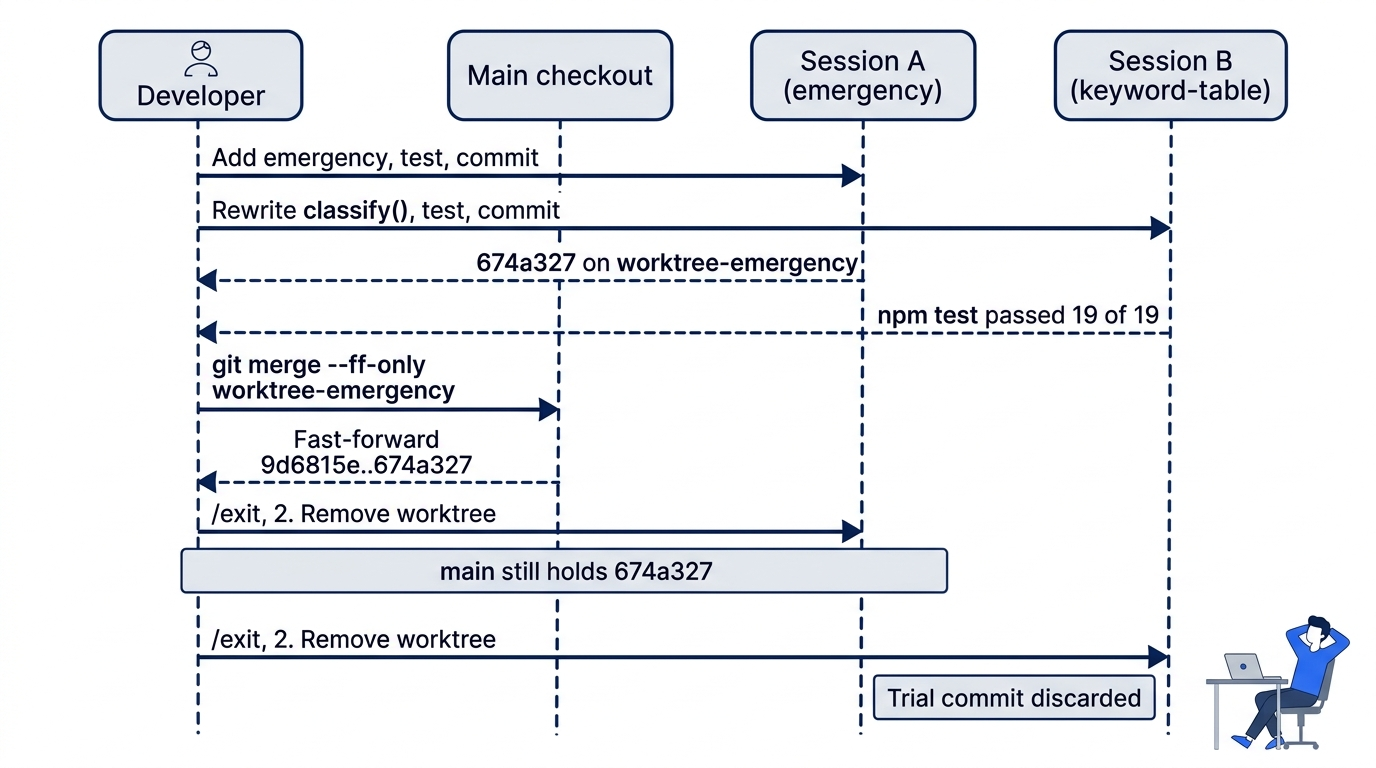
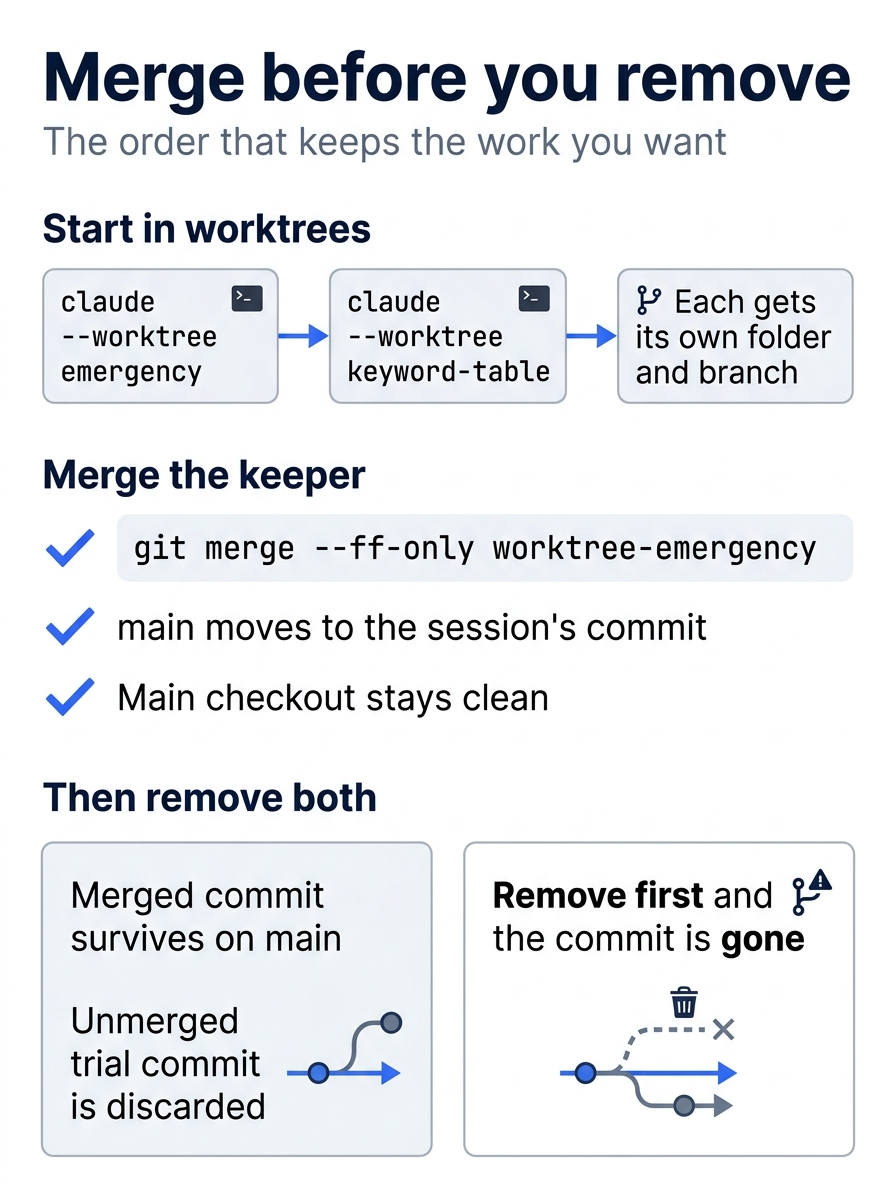
The day comes down to one rule. Start in worktrees, merge the branch you want into main, and only then remove the worktrees, because removing first deletes the commit with its branch.
Check the win
In the third terminal, run:
git worktree list
git branch
git log --oneline -3
git status
npm test
The worktree list shows one line, the main checkout. git branch shows only * main. On the tested auto-mode run, the log was:
674a327 Rate emergency tickets high
9d6815e Ignore Claude Code worktrees
6e571d5 Enable commit-commands plugin
Today added two commits: one for .gitignore and one merged commit. Your hashes differ. Git prints nothing to commit, working tree clean. The tests show ℹ fail 0 and one or two more passes than this morning: 20 on the tested auto run, 21 on the Manual run.
You ran two sessions at once in two worktrees, merged one, and removed both without losing the work that you kept.
You can stop here. Going deeper explains why this works and where it breaks.
Going deeper
This section is for readers who want to know what a worktree shares with the main checkout, what it does not carry, how Claude Code keeps a session inside its worktree, and how to keep a worktree for later. It assumes you finished Start here in Parts 1 to 16.
Where a new worktree starts
The worktrees docs say that --worktree branches from the repository's default branch on the remote, usually origin/main, so a session starts from a clean tree that matches the remote. Ticket Triage has no remote, and the docs say that without one, the worktree falls back to your current local HEAD. The tested git worktree list matched: all three lines showed the .gitignore commit. On a repository with a remote, a worktree can start without your unpushed commits. The worktree.baseRef setting changes this. Its default is "fresh", and "head" makes every new worktree branch from your local HEAD:
{
  "worktree": {
    "baseRef": "head"
  }
}
This guide did not test the setting. The docs add one more start point: claude --worktree "#1234" fetches pull request 1234 from origin and makes a worktree for it. Quote the argument, because the shell reads # as the start of a comment.
The docs say that --worktree needs workspace trust, the dialog that you accepted on Day 1. In a folder where you have never run claude, run it once there first, or --worktree exits with an error.
What a worktree shares, and what it does not
A worktree is a fresh checkout of tracked files. The docs list what it shares with the main checkout:
- The
.gitfolder. A commit in a worktree goes into the main repository's history, which is why the merge foundworktree-emergencyfrom the main checkout. - Plugins at project scope. Day 14's
commit-commandsloads in a worktree with no second install. - Permission approvals. "Yes, and don't ask again" for a Bash command in a worktree session saves the rule to the main checkout's
.claude/settings.local.json, where it applies to every worktree and survives removal. On the tested Manual-mode run, option 2 at session B's commit prompt readYes, and don't ask again for git add and git commit commands in, followed by the worktree folder. The test did not pick it, so this guide did not check where that rule landed. Start here chose1. Yesto keep Manual mode as it was. - Untracked skills, agents, and commands. If
.claude/skillsis not in the worktree's checkout, for example because it is gitignored, Claude Code loads the main checkout's skills in the worktree session.
Tracked files come from the branch, so the worktree had the committed CLAUDE.md and .claude/settings.json with the Day 11 hook. The Day 10 /ship skill is tracked too, so the docs put it in the worktree's checkout. This guide did not check it there. Gitignored files do not come along. node_modules from Day 11 is gitignored, and so is a .env file if you have one. npm test needs no packages in Ticket Triage, and the Prettier hook ran in the worktree on both tested runs. The hook calls npx, which looks for node_modules in parent folders too, and the worktree sits inside the main checkout. A follow-up test inside a worktree showed which copy ran. The worktree had no node_modules folder, and npx prettier --version printed 3.10.1 from the main checkout's node_modules/.bin/prettier. In a project that needs installed packages, the docs say to ask Claude to install them in the worktree, or to run the project's setup there yourself.
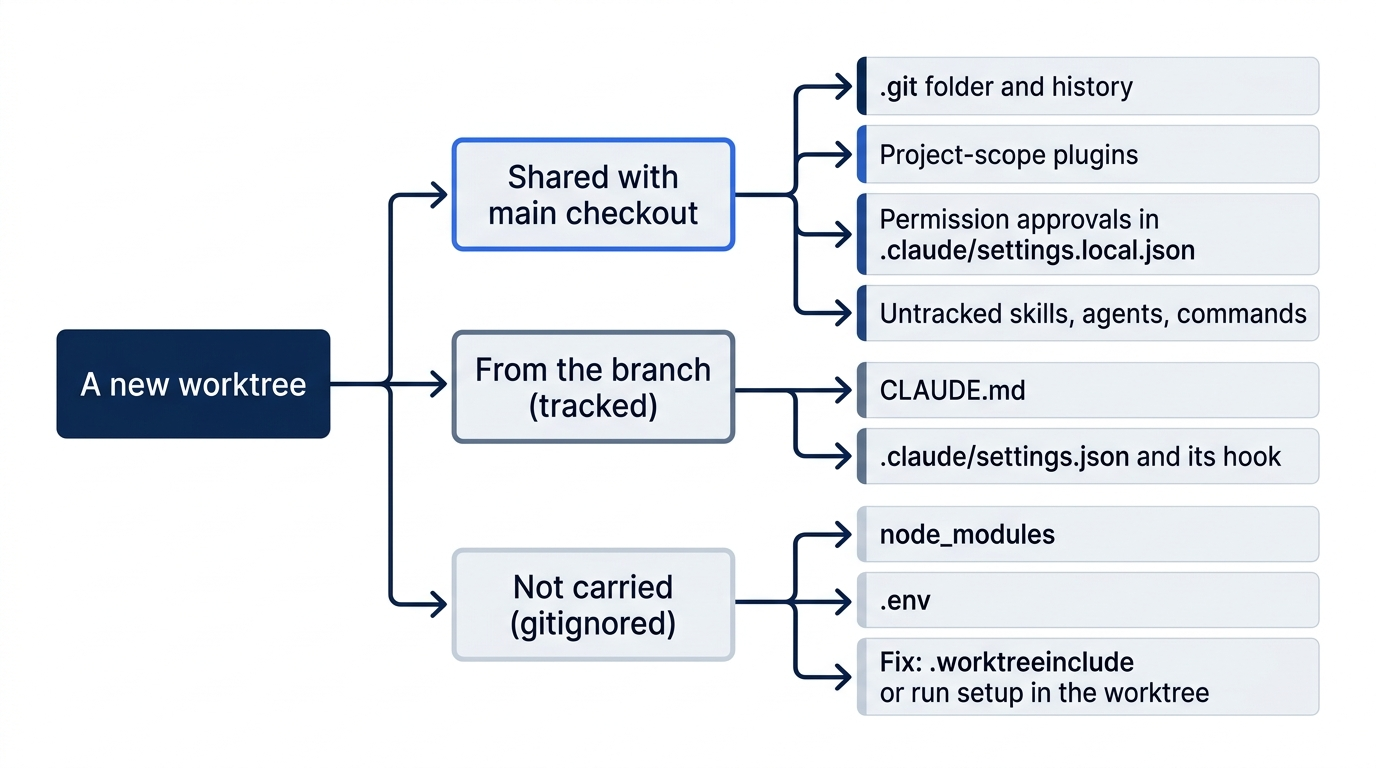
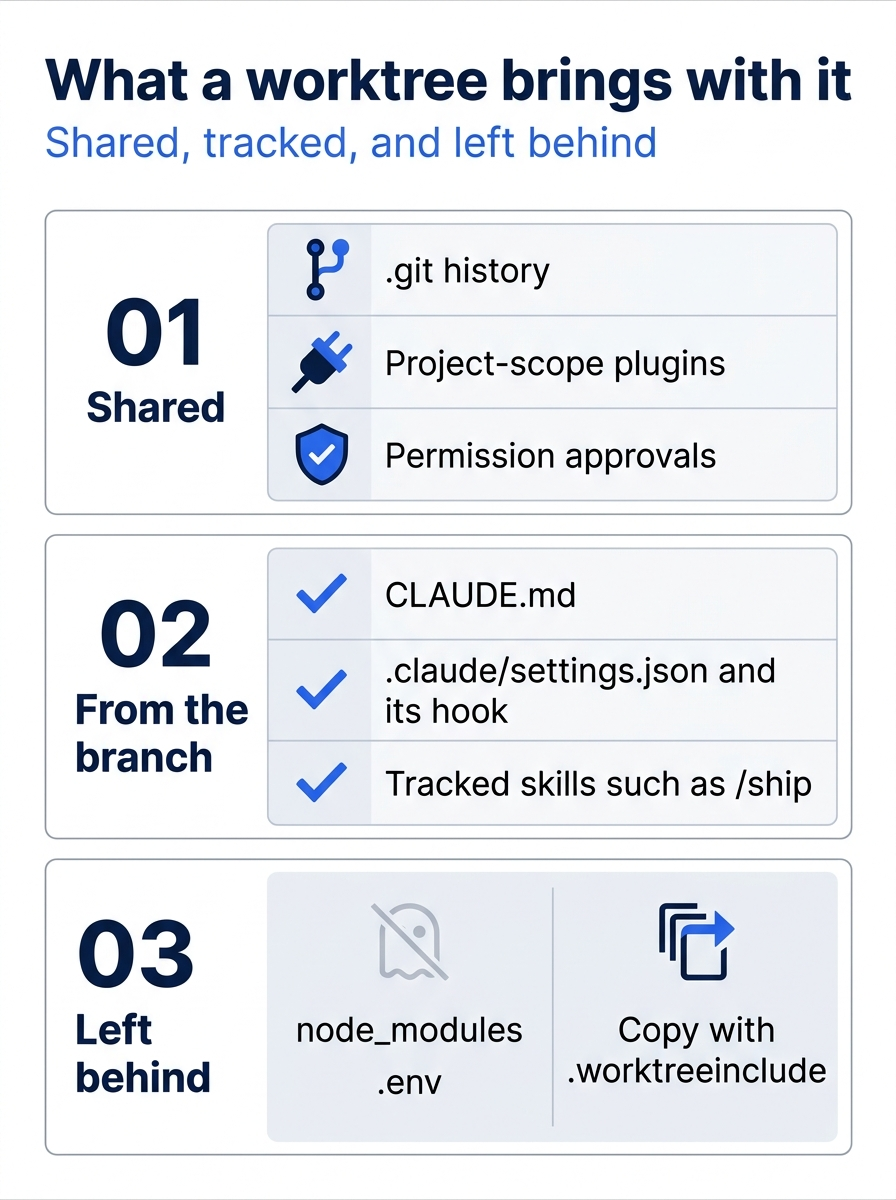
A worktree's contents fall into three groups. Shared pieces work with no setup, tracked files come from the branch, and gitignored files need a .worktreeinclude file or a setup step in the worktree.
To copy gitignored files into every new worktree, add a .worktreeinclude file at the project root. It uses .gitignore syntax, and only files that match a pattern and are gitignored are copied. The docs example:
.env
.env.local
config/secrets.json
The file applies to --worktree sessions, subagent worktrees, and parallel sessions in the Desktop app. This guide did not test it.
Hooks have one catch from the docs. When Claude enters a worktree during a session, ${CLAUDE_PROJECT_DIR} in a hook command still points at the folder where the session started. The hook's cwd input field holds the worktree path. Day 11's hook uses only the file path from its input, so it is not affected.
How Claude Code keeps a session in its worktree
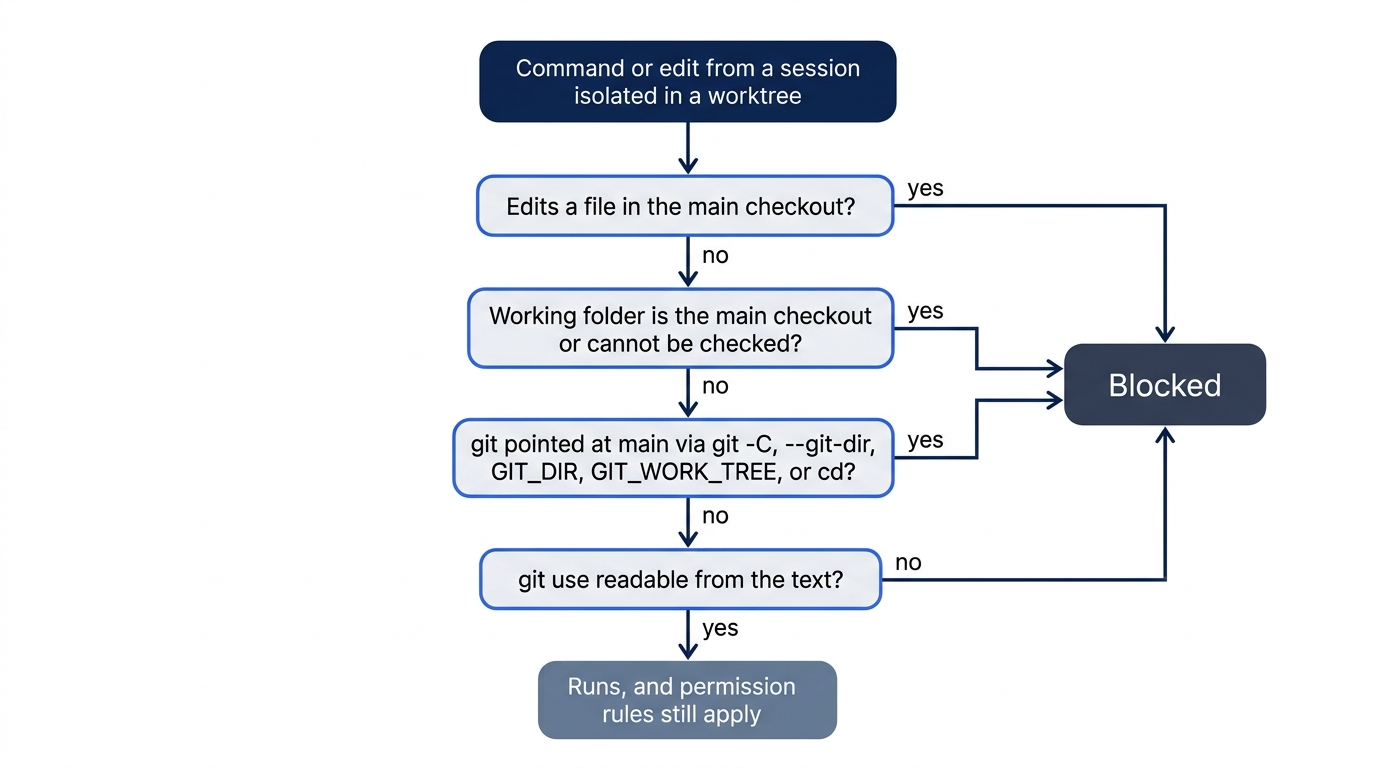
The Error: line in Start here came from an isolation check. The docs list four checks for a session that is isolated in a worktree:
- An edit to a file in the main checkout is blocked.
- A shell command whose working folder is the main checkout, or a folder that Claude Code cannot check, is blocked.
- A git command pointed at the main checkout, through
git -C,--git-dir,GIT_DIR,GIT_WORK_TREE, or acd, is blocked. - A shell command whose git use Claude Code cannot read from the text is blocked. You cannot turn this check off.
In auto mode, session A's first Bash command read the files with cat and git log, and auto mode allowed it. Its next command chained sed and a heredoc that appended tests. The Manual-mode prompt screen shows the whole command, which also ran git diff and npm test. On both tested runs, Claude Code refused that sed command with this command is too complex to verify that it stays inside the worktree and told Claude to split it into plain, separate commands. In Manual mode, the refusal came after you chose 1. Yes at its prompt, so a reader approves a command that then does not run. The checks read paths and command text. The docs say that they do not track which files a shell command writes, so they do not refuse a cp or a > redirect into the main checkout. Your permission rules still apply to it.
The exit prompt, and keeping a worktree
The docs describe what /exit does in a worktree session:
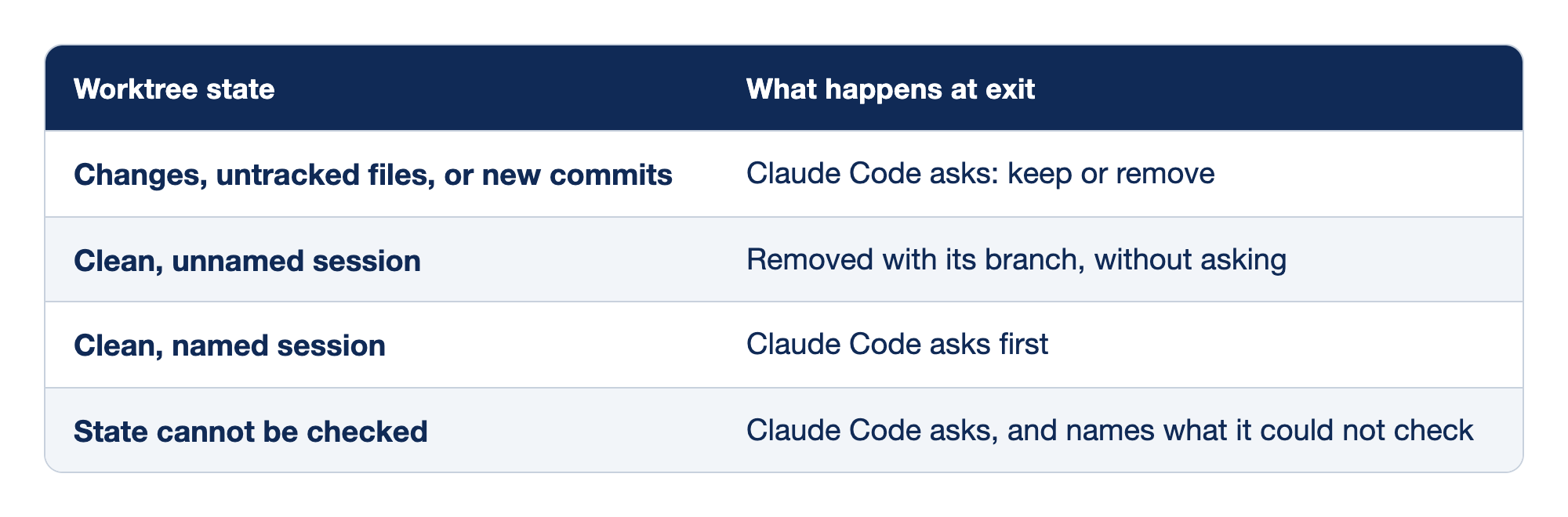
Claude Code treats a worktree differently at exit, depending on its state. The "Worktree state" column names the state, and the "What happens at exit" column says whether Claude Code asks, removes the worktree, or names what it could not check.
- Changes, untracked files, or new commits mean that Claude Code asks whether to keep or remove the worktree.
- A clean, unnamed session is removed with its branch, and Claude Code does not ask.
- A clean, named session still gets a question from Claude Code first.
- A state that cannot be checked makes Claude Code ask, and it names what it could not check.
Docs pages: named session.
Both tested sessions had one commit each, so both showed the prompt. Keep a worktree when its work is not merged and you want it later. The docs say that Claude Code prints a claude --worktree <name> --resume command at exit for a kept worktree, and that running claude --worktree again with the same name opens the existing worktree instead of making a new one. With the default "fresh" base, a reopened worktree resets to the default branch only when it has no changes and no commits of its own, or its pull request was merged and its remote branch deleted. Otherwise it reopens at its old commit. The tested runs chose Remove, so the keep path is from the docs. The exercise in Do this today walks through it.
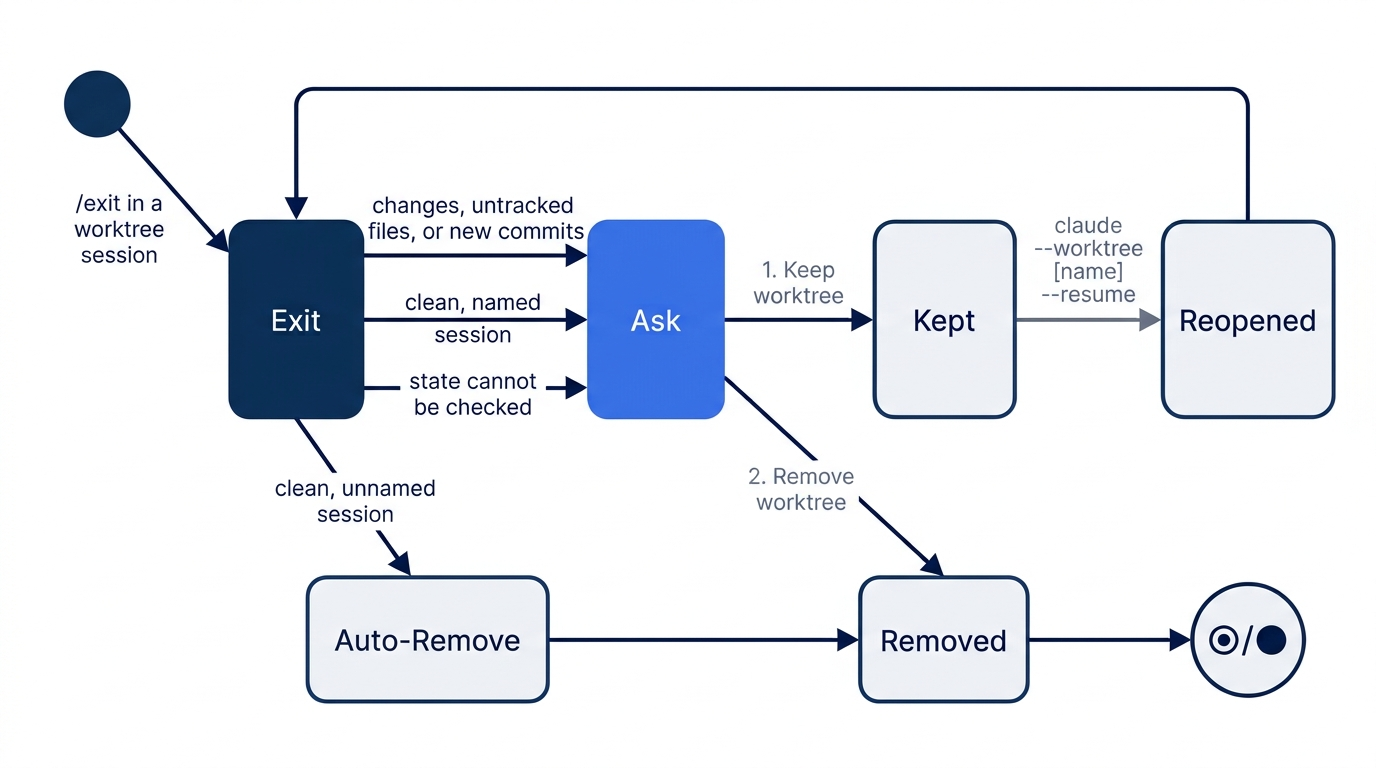
A worktree that you keep, or one left by claude -p, which the docs say has no exit prompt, stays until you remove it. From the main checkout:
git worktree remove .claude/worktrees/<name>
git branch -D worktree-<name>
If git refuses because the worktree is locked, run git worktree unlock .claude/worktrees/<name> first. If it has uncommitted changes, add --force, which deletes them.
When the merge is not a fast-forward
--ff-only worked today because main did not move while the sessions ran. If you commit to main first, or merge a second worktree branch, git merge --ff-only stops with an error and changes nothing. Then you have the usual git choices: git merge worktree-<name> makes a merge commit, or a rebase in the worktree puts its commit on top of the new main. Two sessions that edit the same lines give a merge conflict, as two people would. Worktrees keep the sessions from overwriting each other's files while they work. They do not stop the conflict at merge time. Give parallel sessions tasks in different files when you can. This guide tested only the fast-forward.
Worktrees for subagents
The subagents from Day 9 can each get their own worktree. Ask Claude to "use worktrees for your agents", or add isolation: worktree to a custom subagent's frontmatter in .claude/agents/:
---
name: refactorer
description: Applies mechanical refactors across many files
isolation: worktree
---

Apply the requested refactor across every affected file, then run the tests
and report the results.
The docs say that Claude Code removes a subagent's worktree when the subagent finishes with no changes, and that a periodic sweep removes older ones when that loses no work. The same isolation checks apply. In a normal session, you can also ask Claude to "work in a worktree", and it makes one with its EnterWorktree tool. This guide tested neither.
Go further: One Claude Is Not Enough: Running Parallel Sessions Without Collisions is the first edition's worktrees and teams chapter. It adds the Desktop app's worktree sessions, /batch, and a decision guide for worktrees, subagents, and agent teams. It says that the trust check runs even with claude -p, but the current docs say that claude -p --worktree skips the trust check.
Do this today
Everyone
- Ignore
.claude/worktrees/, run two sessions in two worktrees, mergeworktree-emergencyfrom the main checkout, and remove both worktrees. Check the win:git worktree listshows one line,git log --oneline -2showsRate emergency tickets highaboveIgnore Claude Code worktrees, andnpm testshowsℹ fail 0. - Habit: merge before you remove. At the end of a day with worktrees, run
git worktree listin the main checkout. Check: it shows only the main checkout, or a worktree that you chose to keep.
If you read Going deeper
- Keep a worktree and come back to it. This path is from the docs and was not tested. Run
claude --worktree spikeand sendAdd a comment above priority() in src/priority.js that says what it returns. Commit it with the message "Comment priority". Type/exitand choose1. Keep worktree. Check:git worktree listshows.claude/worktrees/spikeon[worktree-spike], andgit log --oneline -1in the main checkout still showsRate emergency tickets high. Run theclaude --worktree spike --resumecommand that the exit screen printed, and askWhat was the last commit on this branch?. Check: the answer namesComment priority. Reset: type/exitand choose2. Remove worktree. Check thatgit worktree listshows one line,git branchshows only* main, andgit status --shortprints nothing. - Read the isolation check at work. In a terminal in the main checkout,
~/code/ticket-triage, startclaude --worktree check, askRun git -C ~/code/ticket-triage status, and read the reply. Check: Claude Code refuses the command, because it points git at the main checkout. Manual mode: if a prompt appears for the command, choose1. Yes. The refusal comes after it. This step was not tested. Reset: type/exit. If the prompt appears, choose2. Remove worktree. Check thatgit worktree listshows one line.
Two folders, one history
A worktree looks like a big git idea, and today it came down to one flag and one rule. --worktree gave each session its own folder and branch, so neither could overwrite the other. The main checkout stayed still until you chose what to merge.
The rule is the order. Merge the work you want, then remove the worktree, and the commit lives on in main. Remove a trial without merging, and it disappears with its branch, which is exactly what you wanted.
This is Part 16 of "Claude Code, Day-to-Day (second edition)," a day-by-day guide to Claude Code in which each day takes 20 to 40 minutes. Part 16 is Day 16. All 28 days are out now.